

Setyl vs. Workwize: Expert Comparison For 2026

We review tools independently, and commissions help fund our testing. See our transparency policy, our methodology, or suggest a tool.
With hybrid work and growing tech stacks, businesses need smarter ways to manage IT assets across teams and locations. Setyl helps organizations stay on top of devices, licenses, and costs with user-friendly dashboards and reporting. Workwize focuses on creating a seamless employee experience by simplifying the full IT asset lifecycle, from procurement to offboarding. Both tools are built to cut inefficiencies, reduce expenses, and provide greater clarity over your IT environment. In this article, we’ll compare Setyl and Workwize in detail—covering features, pros and cons, pricing, and more—to help you choose the IT asset management solution that fits your needs best.
Setyl
4.9/5
- Free demo available
- From $300/month
Workwize

4.2/5
- Free demo available
- From $8/month/seat (+$540 platform fee)
Why Trust Our Software Recommendations
6,700+
Reviews
20
Industry experts
16+
Evaluation factors
14
Years
Our team has been testing and reviewing software since 2012. As tech leaders ourselves, we know how difficult—and important—it is to choose the right software.
For this guide, we evaluated tools using hands-on testing and independent research, scoring tools using our selection criteria.
Our reviews reflect our human editorial judgment, not a sales pitch.
Expert reviewers:
- Paulo Gardini MiguelTech Director
 Tim FisherVP of AI
 Gabriel RosasTech Lead & Software Architect
 Christhian GruhnTech Lead & Platform Architect

| Setyl | Workwize | |
|---|---|---|
| Free Trial | Free demo available | Free demo available |
| Pricing | From $300/month | From $8/month/seat (+$540 platform fee) |
Setyl vs. Workwize Pricing & Hidden Costs
Setyl pricing is tiered, with packages ranging from essential to advanced, and costs can rise with custom reporting, managed services, or premium integrations. Workwize pricing is also tiered, with costs increasing as you expand regions, add automation, or use enterprise-level features like SCIM and public API access.
If you’re an IT manager, you can choose the right tool by mapping each vendor’s pricing structure to your team size, geographic footprint, and integration needs—this way, you’ll avoid paying for extras you’ll never use while making sure the essentials are covered.
Setyl stands out with its robust asset and license tracking, giving teams full visibility over devices and software, plus automated workflows that cut down on manual IT tasks. It also offers IT spend management, helping you keep costs in check while spotting areas of waste. Workwize shines with automated offboarding and device deployment, making global equipment logistics smoother and less hands-on. It also provides automatic restocking and replacement services, reducing downtime and keeping employees equipped. While Setyl leans toward financial control and compliance, and Workwize emphasizes logistics and automation, both aim to simplify IT asset management in ways that reduce headaches for your team.
| Setyl | Workwize | |
|---|---|---|
| 2-Factor Authentication | Yes | Yes |
| API | Yes | Yes |
| Asset Tagging | Yes | Yes |
| Dashboard | Yes | Yes |
| Data Export | Yes | Yes |
| Data Import | Yes | Yes |
| Data Visualization | Yes | Yes |
| Database | Yes | Yes |
| Document Management | Yes | Yes |
| External Integrations | Yes | Yes |
| Hardware Integration | No | Yes |
| Hardware Modernization | No | Yes |
| Inventory Tracking | Yes | Yes |
| Multi-User | Yes | Yes |
| Network Device Performance Monitoring | No | Yes |
| Network Traffic Monitoring | No | Yes |
| Network Visualization | Yes | Yes |
| Notifications | Yes | Yes |
| Scheduling | Yes | Yes |
| Status Notifications | Yes | Yes |
| Third-Party Plugins/Add-Ons | Yes | Yes |
| Workflow Management | Yes | Yes |
| Integration | Setyl | Workwize |
| Microsoft 365 | ✅ | ❌ |
| Google Workspace | ✅ | ✅ |
| Slack | ✅ | ✅ |
| Salesforce | ❌ | ❌ |
| Jira | ✅ | ❌ |
| ServiceNow | ✅ | ❌ |
| Zendesk | ✅ | ❌ |
| QuickBooks | ❌ | ❌ |
| API | ✅ | ✅ |
| Zapier | ✅ | ❌ |
Both Setyl and Workwize offer key integrations that connect IT asset management to everyday business tools. Setyl provides a broader range, especially with service desks and workflow platforms, giving IT teams more control over operations. Workwize, on the other hand, offers fewer integrations overall, keeping things limited to the basics needed for device management.
| Factor | Setyl | Workwize |
| Certifications | ISO 27001 certified; not SOC 2 (they rely on ISO 27001 for equivalent assurance). | ISO 27001 certified; SOC 2 “in audit,” with formal certification pending. |
| GDPR & Privacy | GDPR-compliant; registered with the UK ICO (data controller/processor) and limits internal access on a legitimate-need basis. | GDPR-compliant with documented TOMs, offers a Statement of Applicability, and doesn’t share client data with third parties without consent. |
| Pen Testing | Independently penetration-tested annually, targets zero outstanding issues, and shares reports on request. | Performs regular penetration testing with continuous monitoring; pen test reports available. |
| Data Protection & Hosting | Runs on AWS in the EU (app in Ireland/Germany; S3 in Germany/UK) with scheduled backups stored in separate EU/UK locations and practiced restores. | Encrypts data at rest and in transit with strict access controls to protect sensitive information. |
Bottom line: Setyl leans harder into formal compliance depth and documented hosting posture, while Workwize emphasizes enterprise-grade security controls and transparency during its SOC 2 process. If you’re an IT manager, ask each vendor for proof (ISO certs, SoA, pen-test reports), verify data residency and backup practices, and review access controls and audit trails against your own security policies before you decide.
| Factor | Setyl | Workwize |
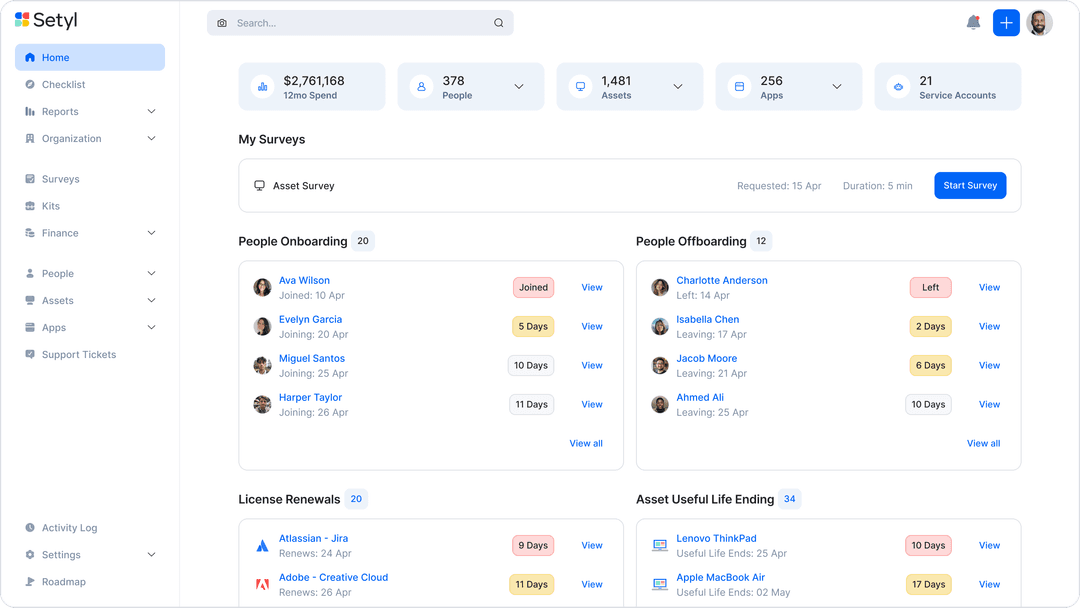
| User Interface | Clean dashboards that make it easy to view assets, licenses, and spend in one place. | Simple layouts built for quick device ordering and logistics management. |
| Onboarding | Fully guided support, with a dedicated person who helps with onboarding. | Automated device delivery and self-service portals that speed up onboarding. |
| Setup | Cloud-based setup with fast implementation and minimal technical lift. | Requires more configuration for global logistics but scales well once running. |
| Support | Dedicated success managers and responsive help center resources. | Tailored onboarding and ongoing support with a focus on logistics operations. |
Setyl feels easier when you want clear dashboards and quick visibility, but it can get heavier as you scale into advanced workflows. Workwize is smoother for equipment handling and offboarding, though it can feel less flexible if you need detailed IT controls.
Setyl
- You can easily track and manage a large number of IT assets in one place.
- You can track the full history of each asset, which makes audits easier.
- Alerts help you catch expiring warranties or licenses before they lapse.
- Reports feel limited if you need deep, custom insights.
- Visual customization is limited if you want tailored dashboards.
- Doesn’t offer the complex functionalities that may be needed for large enterprise organizations
Workwize
- Global warehouses support procurement, storage, retrieval, and disposal.
- Users praise centralized equipment records and quick setup.
- Certified wiping and automated retrieval support controlled offboarding.
- Reviewers report inaccurate portal statuses during deployments.
- Regional shipping delays complicate Middle East equipment delivery.
- Microsoft Intune device-association gaps limit some fleet workflows.
Setyl
- Tech & Professional Services FirmsIdeal for fast-scaling teams managing distributed staff, shared software, and multiple client environments.
- Finance TeamsSpend visibility, renewal tracking, and license utilization metrics help control budgets.
- Midsize OrganizationsBuilt for midsize companies that need comprehensive visibility without the overhead of legacy systems.
- Remote/Hybrid TeamsYou can track devices and licenses even when teams span different locations.
- IT & Security TeamsYou’ll have audit trails, compliance readiness, and insights into shadow IT.
- HR/Ops DepartmentsYou can tie onboarding/offboarding workflows to asset allocations, reducing gaps.
Workwize
- Distributed CompaniesWorkwize centralizes equipment records, shipping, repairs, and retrieval for companies supporting employees across multiple regions.
- 150 Plus TeamsWorkwize’s plans start at 150 users, making its seat-based pricing more suitable for midsize and larger organizations.
- IT OperationsIT teams can manage procurement, deployment, restocking, maintenance, and disposal from one asset management interface.
- People OperationsPeople teams can use automatic offboarding workflows to coordinate equipment retrieval when employees leave the organization.
- Remote WorkforcesRemote-first companies can give employees a self-service portal for hardware requests, repairs, maintenance, and support.
- Integrated EnvironmentsTeams using Slack, Kandji, Jamf, Okta, Microsoft Intune, or HR systems can connect Workwize to existing workflows.
Who Should Use Setyl, and Who Should Use Workwize?
Setyl is a good fit if your team needs stronger control over IT assets, software licenses, and spend, especially if compliance and reporting are high on your list. It’s best for organizations that want visibility and governance baked into their workflows. Workwize is better if your main challenge is managing the logistics of devices across regions, from shipping and storage to repairs and replacements. It works well for distributed teams that want automation to handle equipment without extra manual effort. In short, Setyl suits teams focused on oversight and compliance, while Workwize fits those that care most about smooth global device management.
| Setyl | Workwize | |
|---|---|---|
| Automation | Setyl Automates workflows like asset tracking, license renewals, and on/offboarding. | Workwize Automates global offboarding, device deployment, and restocking. |
| Core Focus | Setyl Strong on compliance, reporting, IT spend management, and software asset tracking, like licenses and renewals. | Workwize Strong on logistics, device delivery, and equipment handling, without dedicated software asset tracking. |
| Integrations | Setyl Broader integrations, including service desks, MDMs, and RMMs. | Workwize Leaner integrations limited to essentials for device management. |
| Pricing | Setyl Tiered plans with custom quotes and extra costs for advanced features. | Workwize Tiered plans tied to regions and automation, with higher tiers for global scale. |
| User Interface | Setyl Dashboard-driven view of assets, licenses, and spend. | Workwize Simple layouts designed for quick equipment requests and logistics. |
| Asset Management | Each platform lets you track and manage IT assets through every stage of their lifecycle. |
|---|---|
| Cloud-Based | They both operate in the cloud, enabling quick setup and remote accessibility. |
| Scalability | Both solutions can grow alongside your team and adapt to remote expansion needs. |
| Security | They both place importance on maintaining strong security standards and compliance. |
| Support | Each tool offers dependable support and onboarding help to get you running smoothly. |