

Recensione di Sendmarc: vantaggi, svantaggi, funzionalità principali e guida ai prezzi
I break down how Sendmarc stands out in the DMARC crowd, delivering straightforward compliance and visibility—even for teams who’d rather be focusing on growth than email security.

Recensiamo gli strumenti in modo indipendente e le commissioni ci aiutano a finanziare i nostri test. Consulta la nostra politica sulla trasparenza, la nostra metodologia, oppure suggerisci uno strumento.
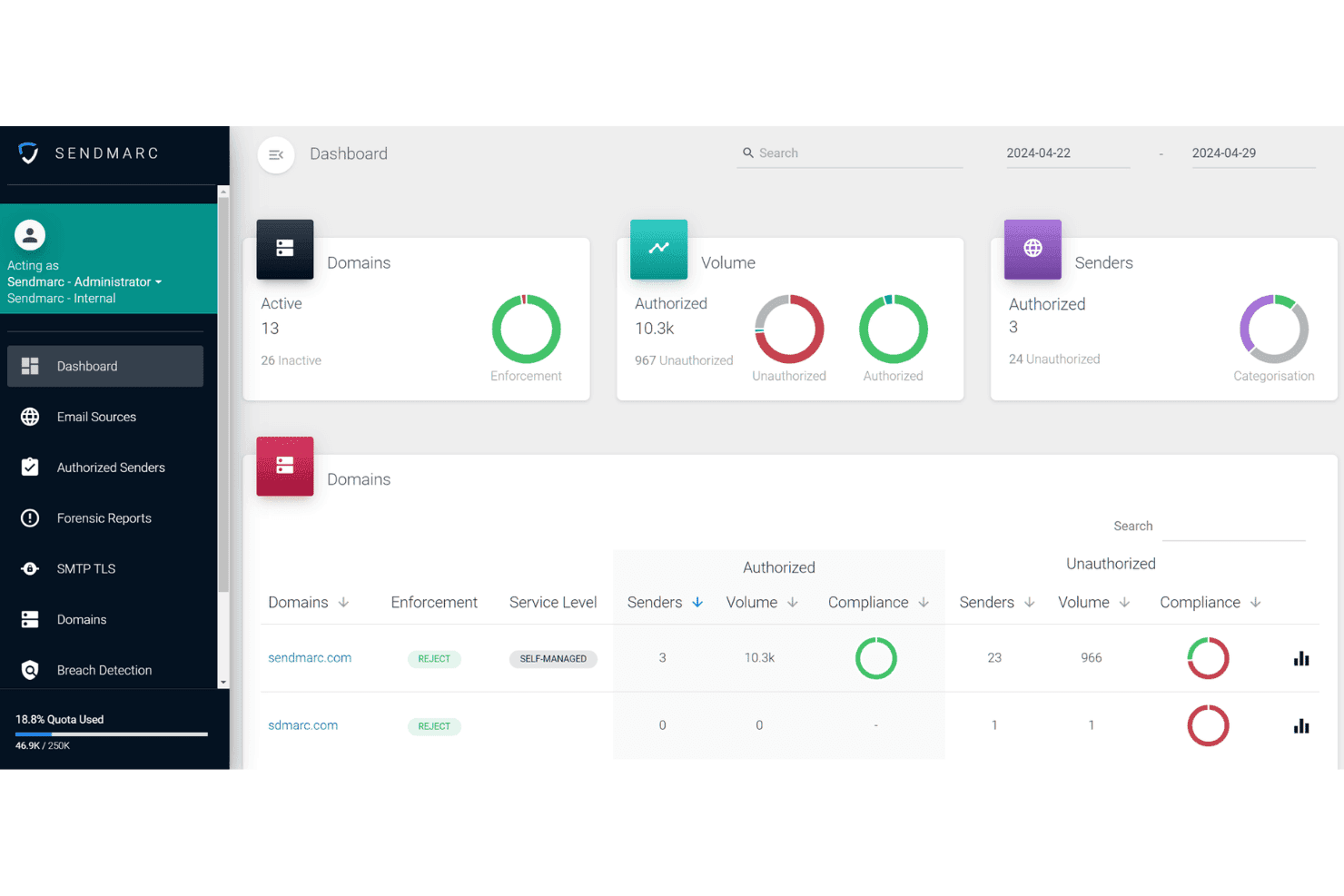
Sendmarc is a DMARC software for organizations that need to reach full DMARC enforcement, protect their domains from spoofing, and get visibility into who's sending email on their behalf. I'd point you to it if you want a more automated, partner-friendly path to enforcement than the incumbent enterprise platforms, with guided workflows that suit MSPs and internal IT teams managing multiple domains. As a DMARC solution it also covers the adjacent standards—SPF, DKIM, MTA-STS, and TLS-RPT—rather than leaving them for a second vendor.
Sendmarc Evaluation Summary
4.9/5
- Pricing upon request
- 21-day free trial
Perché fidarsi dei nostri consigli sui software
6,700+
Reviews
20
Industry experts
16+
Evaluation factors
14
Years
Il nostro team testa e recensisce software dal 2012. In quanto leader tecnologici noi stessi, sappiamo quanto sia difficile — e importante — scegliere il software giusto.
Per questa guida, abbiamo valutato gli strumenti attraverso test praticie ricerche indipendenti, assegnando un punteggio agli strumenti in base ai nostri criteri di selezione.
Le nostre recensioni riflettono il nostro giudizio editoriale umano, non un discorso di vendita.
Revisori esperti:
- Paulo Gardini MiguelDirettore tecnico
 Tim FisherVP dell'IA
 Gabriel RosasTech Lead e architetto software
 Christhian GruhnTech Lead e architetto della piattaforma

Sendmarc Overview
I think Sendmarc stands out if you're judging DMARC tools on automation, support, and MSP features. Its guided onboarding makes it easy to adopt, while automated reporting and troubleshooting help you reach enforcement faster. Expert support is the differentiator here more than raw feature count, and getting to enforcement cleanly tends to help deliverability rather than hurt it. The interface is clean and intuitive—something you can hand to a client or non-technical stakeholder without worries. You might find fewer direct integrations, but if you're choosing for a multi-client environment or want hands-on support, Sendmarc is a solid pick.
Pros
- Automated DMARC enforcement simplifies reaching full compliance.
- Guided workflows help MSPs manage many domains efficiently.
- Hands-on customer support responds quickly and speaks plainly.
Cons
- Thin PSA integration and few direct connections to SIEM or alerting platforms.
- Limited analytics drill-down compared to some competing tools.
- Smaller knowledge base than larger email security providers.
Is Sendmarc Right For Your Needs?
Who Would be a Good Fit for Sendmarc?
Sendmarc makes sense for organizations with complex email environments, public-facing brands, or compliance-driven needs. It works well for IT and security teams who want expert-backed onboarding, responsive support, and detailed reporting. I think companies handling confidential data, multi-domain management, or external partners will see the most value from Sendmarc’s strong DMARC automation, monitoring, and incident response features. If deliverability of transactional and marketing mail matters to revenue, enforcement is the floor rather than the ceiling.
- Financial ServicesSendmarc offers advanced threat protection, audit-friendly reporting, and critical support demanded by highly regulated financial institutions.
- Healthcare OrganizationsIts detailed incident notifications and compliance-driven tools help healthcare teams quickly meet strict security standards and spot email impersonation attempts.
- Mid-Size EnterprisesThe platform scales DMARC enforcement and analytics as companies grow and add domains, making it easier for IT departments to maintain oversight.
- Managed Service ProvidersSendmarc’s multi-client features, bulk management tools, and reseller options help MSPs deliver DMARC protection as a polished, value-added service.
- Retail/Ecommerce BrandsPublic-facing brands benefit from Sendmarc’s strong impersonation detection, sender monitoring, and customizable reports for managing brand reputation.
- Government AgenciesThe combination of guided onboarding, dedicated support, and security controls makes Sendmarc well-suited to agencies prioritizing phishing defense and regulatory compliance.
Who Would be a Bad Fit for Sendmarc?
Sendmarc may not be right for organizations with basic email environments, small teams without technical resources, or those who only need minimal DMARC oversight. Its richer capabilities can feel unnecessary for less complex needs and entry pricing might not appeal to low-risk email users or those focused only on SPF/DKIM setup. If email fraud isn’t a live risk for your brand, a lighter tool will do the job.
- Small StartupsLean teams with one domain and few users often don’t need Sendmarc’s advanced controls and may find its full platform more than they require.
- Nonprofits With Minimal ITResource-limited nonprofits running a single public domain could find Sendmarc’s platform excessive for their simple authentication needs.
- Freelancers/Sole ProprietorsIndividuals or single-person businesses usually require basic DMARC records, not advanced policy management, analytics, or high-touch support.
- Internal-Only IT DepartmentsTeams who restrict all email use to inside the organization may not need outside threat monitoring or DMARC enforcement at Sendmarc’s level.
- Temporary Project GroupsShort-term projects with limited external communication will see little value from ongoing monitoring and policy enforcement tools.
- Educational Clubs/AssociationsStudent groups or academic clubs often don’t need sophisticated DMARC platforms due to low stakes and minimal public-facing risk.
La Nostra Metodologia di Recensione
Come Testiamo e Valutiamo gli Strumenti
Abbiamo trascorso anni a costruire, perfezionare e migliorare il nostro sistema di testing e valutazione del software. Il nostro schema è progettato per cogliere le sfumature della selezione software e cosa rende efficace uno strumento, focalizzandosi sugli aspetti critici del processo decisionale.
Di seguito, puoi vedere esattamente come funziona il nostro testing e punteggio su sette criteri. Ci permette di offrire una valutazione imparziale del software basata su funzionalità principali, caratteristiche distintive, facilità d’uso, onboarding, assistenza clienti, integrazioni, recensioni dei clienti e rapporto qualità-prezzo.
Funzionalità Principali (25% del punteggio finale)
Il punto di partenza della nostra valutazione è sempre la funzionalità principale dello strumento. Ha le funzioni e caratteristiche base che ci si aspetta? Alcune di queste caratteristiche sono limitate ai piani tariffari superiori? Fondamentalmente, ci aspettiamo che uno strumento regga il confronto rispetto alle capacità di base dei concorrenti.
Caratteristiche Distintive (25% del punteggio finale)
Successivamente, valutiamo le caratteristiche distintive e non comuni che vanno oltre la funzionalità base tipicamente trovata negli strumenti di questa categoria. Un punteggio alto riflette funzionalità specializzate o uniche che rendono il prodotto più veloce, efficiente o offrono ulteriore valore all’utente.
Valutiamo inoltre quanto sia semplice integrare altri strumenti tipicamente utilizzati nell’infrastruttura tecnologica per espandere la funzionalità e l’utilità del software. Gli strumenti che offrono numerose integrazioni native, connessioni di terze parti e accesso API per creare integrazioni personalizzate ottengono i punteggi migliori.
Facilità d’Uso (10% del punteggio finale)
Consideriamo quanto sia rapido e semplice svolgere i compiti definiti nella funzionalità principale utilizzando lo strumento. Il software con punteggio alto è ben progettato, intuitivo da usare, offre app mobili, fornisce modelli e rende semplici attività relativamente complesse.
Onboarding (10% del punteggio finale)
Sappiamo quanto sia importante l’adozione rapida da parte del team per una nuova piattaforma, quindi valutiamo quanto sia facile imparare e utilizzare uno strumento con formazione minima. Valutiamo quanto velocemente un membro del team possa iniziare a usare lo strumento anche senza esperienza. Soluzioni con punteggio alto indicano che sono richiesti pochi o nessun supporto.
Assistenza Clienti (10% del punteggio finale)
Esaminiamo quanto sia veloce e facile ricevere assistenza e risolvere problemi tramite telefono, live chat o knowledge base. Gli strumenti e le aziende che garantiscono supporto in tempo reale ottengono il miglior punteggio, mentre i chatbot ottengono il peggiore.
Recensioni dei Clienti (10% del punteggio finale)
Oltre ai nostri test e valutazioni, prendiamo in considerazione il net promoter score dei clienti attuali e passati. Valutiamo la probabilità che, data la scelta, selezionerebbero nuovamente lo strumento per la funzionalità principale. Un software con punteggio alto riflette un alto net promoter score da parte dei clienti attuali o passati.
Rapporto Qualità-Prezzo (10% del punteggio finale)
Infine, considerando tutti gli altri criteri, analizziamo il prezzo medio dei piani base rispetto alle funzionalità principali e consideriamo il valore degli altri criteri di valutazione. Il software che offre di più a meno otterrà un punteggio più alto.
Core Features
Automated DMARC Record Setup
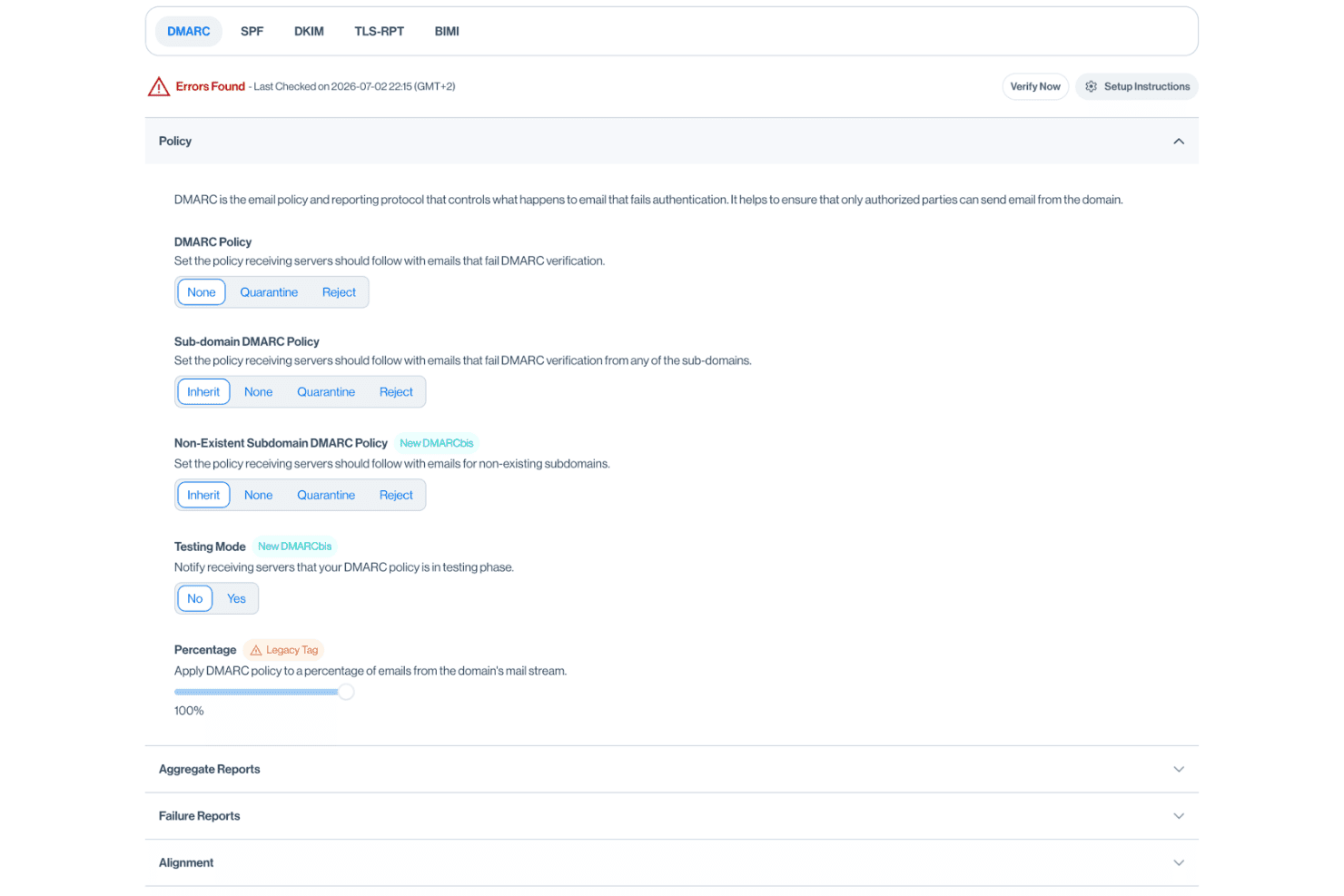
Sendmarc generates and checks DMARC records, including the rua tag that routes aggregate reports. This automation speeds compliance and cuts manual errors.
Threat and Spoofing Detection
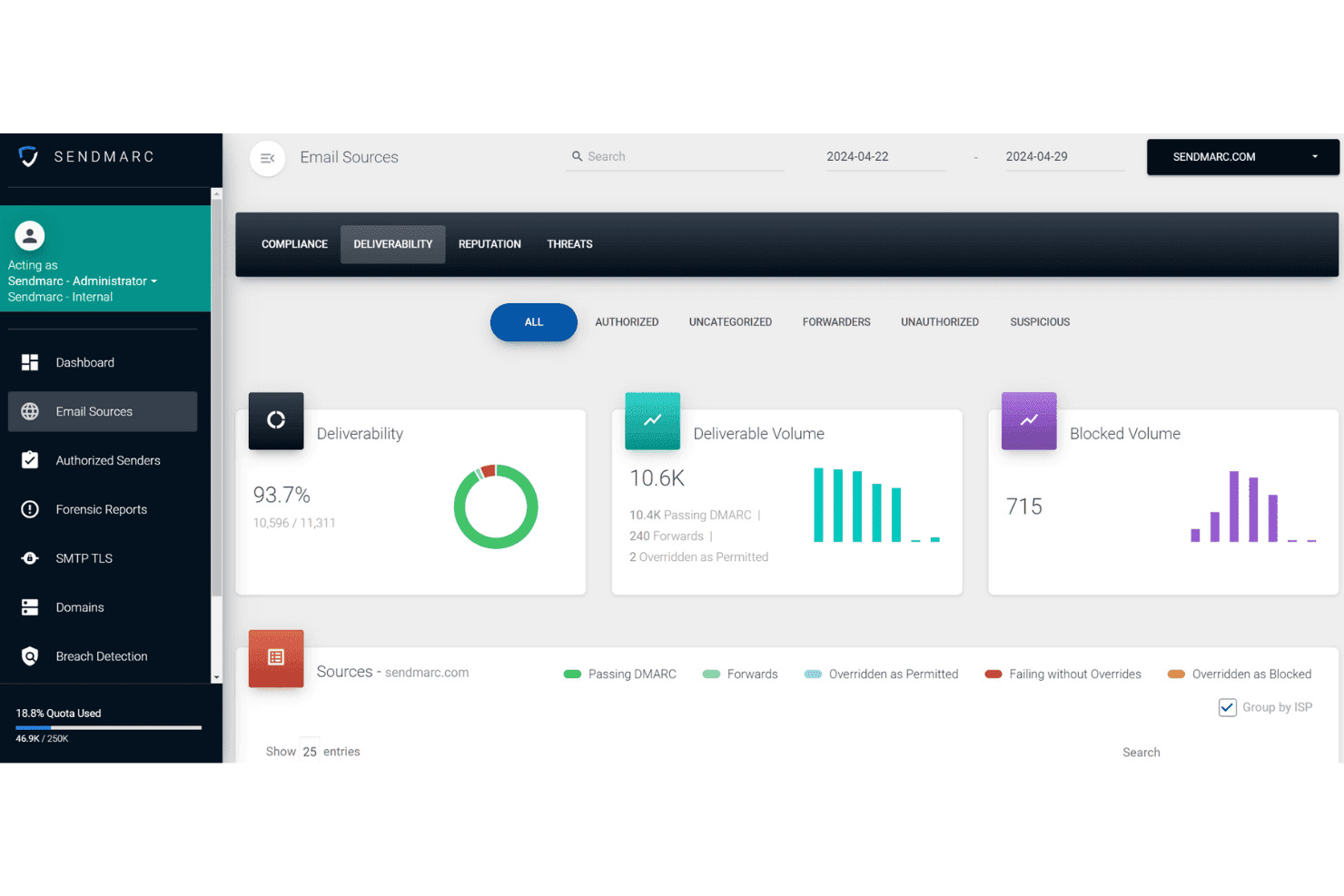
Get alerts when unauthorized sources send email using your domains. Real-time notifications help you stop phishing, spoofing, and email fraud fast.
Guided Enforcement Path
Sendmarc provides a step-by-step workflow to reach DMARC enforcement safely. Teams see exactly what actions to take next, avoiding email disruptions.
Email Source Discovery
The platform maps all legitimate email senders in your environment. SPF flattening keeps you under the ten-lookup limit as that list grows.
Personalized Report Summaries
You get regular DMARC reporting that highlights trends and issues. The summaries break data into plain language for business and IT stakeholders.
Managed Service Provider Dashboard
MSPs get a unified dashboard to monitor multiple client domains. This multi-tenant view lets you handle many customers without jumping between accounts.
Ease of Use
Sendmarc is especially user-friendly, thanks to its straightforward dashboards and clear, step-by-step enforcement workflow. I think IT admins appreciate not needing deep email expertise to set policies or interpret reports. If you're used to leaning on an AI assistant to decode raw DMARC XML, the plain-language summaries here cover much of the same ground. Based on user reviews, the guided onboarding and real-time alerts make for a less stressful DMARC rollout, and the reporting is business-friendly without jargon.
Integrations
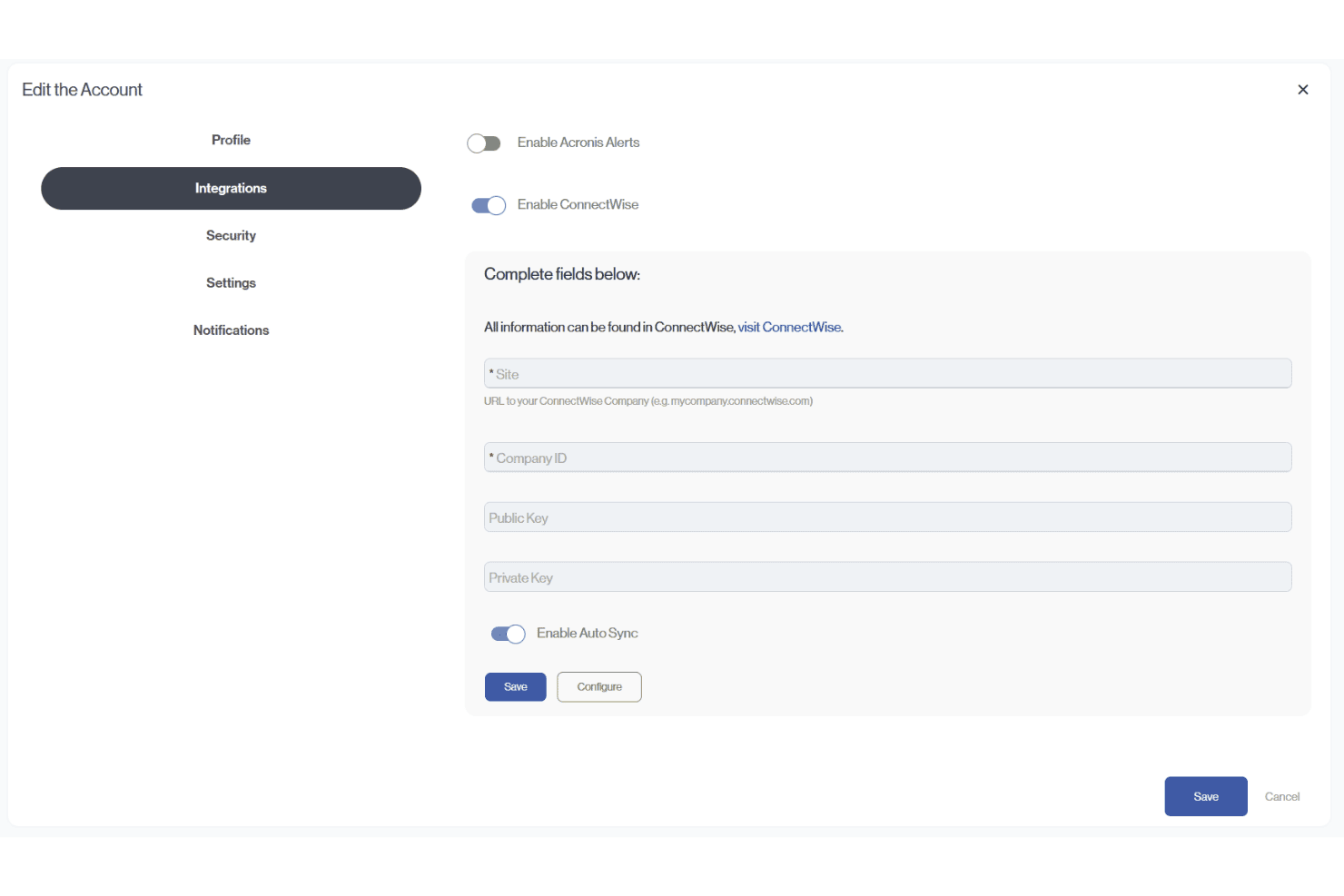
Sendmarc provides documented integrations with Abnormal Security, ConnectWise PSA, Acronis, HaloPSA, and Autotask (Datto/Kaseya). It also supports API-token creation for custom integrations, including connections with third-party platforms.
Sendmarc Specs
- 2-Factor Authentication: Yes
- Access Management: Yes
- Anti-Virus: No
- API: Yes
- Audit Trail: Yes
- Bug Tracking: Yes
- Calendar Management: Yes
- Customer Management: Yes
- Dashboard: Yes
- Data Export: Yes
- Data Import: Yes
- Data Visualization: Yes
- Email Integration: Yes
- External Integrations: Yes
- File Sharing: No
- File Transfer: No
- Firewall: No
- Google Apps Integration: Yes
- Inventory Tracking: Yes
- Malware Protection: Yes
- Multi-User: Yes
- Network Device Performance Monitoring: Yes
- Network Traffic Monitoring: Yes
- Network Visualization: Yes
- Notifications: Yes
- Project Management: Yes
- Remote Access: Yes
- Risk Assessment: Yes
- SAP Integration: Yes
- Scheduling: Yes
- Software Integration: Yes
- Third-Party Plugins/Add-Ons: Yes
- Ticket Management: Yes


