

Recensione di Momentic: Vantaggi, Svantaggi, Funzionalità e Prezzi Spiegati
Momentic è una piattaforma di test end-to-end basata sull’Intelligenza Artificiale che permette ai team di scrivere ed eseguire test in semplice inglese, utilizzando automazione basata sulle intenzioni, localizzatori auto-riparanti e agenti autonomi per ridurre la manutenzione e migliorare l’affidabilità.

Recensiamo gli strumenti in modo indipendente e le commissioni ci aiutano a finanziare i nostri test. Consulta la nostra politica sulla trasparenza, la nostra metodologia, oppure suggerisci uno strumento.
Momentic is an AI-native end-to-end testing tool for teams that need to automate web application testing without writing and maintaining large volumes of test code. I'd consider it if your team is spending too much time keeping tests from breaking after UI changes—something that's a constant drain with code-heavy tools like Cypress. Where Cypress gives you full scripting control, Momentic lets AI generate and self-heal tests, which means less manual upkeep and faster coverage for teams that don't have dedicated QA engineers writing automation full-time.
Momentic Evaluation Summary
0/5
- Pricing upon request
- Free demo available
Perché fidarsi dei nostri consigli sui software
6,700+
Reviews
20
Industry experts
16+
Evaluation factors
14
Years
Il nostro team testa e recensisce software dal 2012. In quanto leader tecnologici noi stessi, sappiamo quanto sia difficile — e importante — scegliere il software giusto.
Per questa guida, abbiamo valutato gli strumenti attraverso test praticie ricerche indipendenti, assegnando un punteggio agli strumenti in base ai nostri criteri di selezione.
Le nostre recensioni riflettono il nostro giudizio editoriale umano, non un discorso di vendita.
Revisori esperti:
- Paulo Gardini MiguelDirettore tecnico
 Tim FisherVP dell'IA
 Gabriel RosasTech Lead e architetto software
 Christhian GruhnTech Lead e architetto della piattaforma

Momentic Overview
From my perspective, what really sets Momentic apart is how deeply AI is built into the entire testing experience—not just as a feature, but as the foundation.
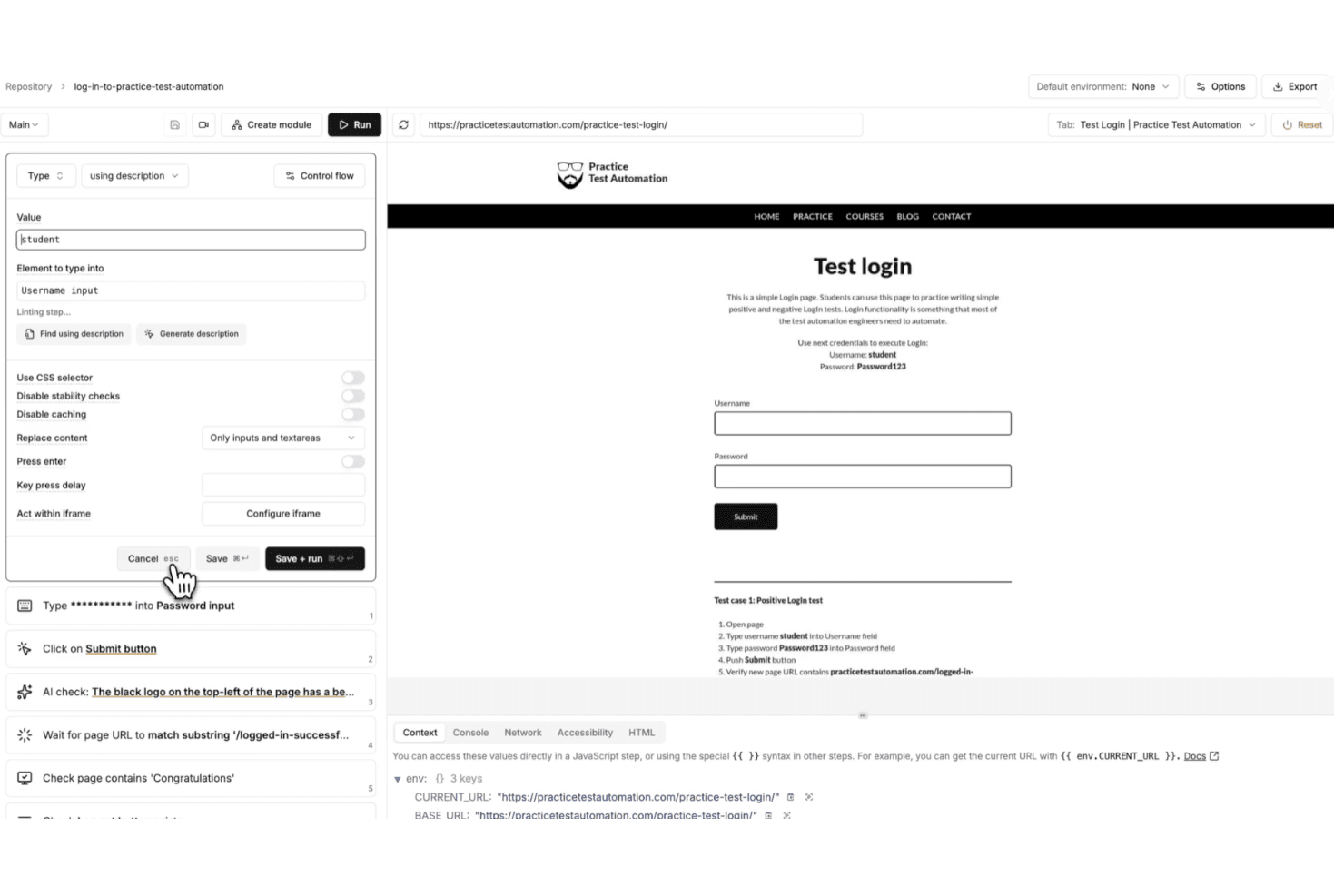
Instead of writing and maintaining brittle scripts, you define tests in plain English and let Momentic interpret your intent at runtime. I’ve found this especially valuable if you’re trying to reduce maintenance, since features like self-healing locators, smart waits, and built-in caching help your tests stay stable even as your UI changes.
You also get more than just test creation. With an autonomous agent that can generate coverage, built-in debugging tools, and flexible cloud or CI-based execution, Momentic gives you a more hands-off way to scale testing without adding complexity.
Pros
- Plain-English test creation lowers barrier for non-technical team members.
- Self-healing locators reduce maintenance when UI elements frequently change.
- Smart waiting minimizes flaky tests caused by timing and asynchronous loading issues.
Cons
- Limited browser support currently restricted to Chrome and Chromium environments.
- No code export limits flexibility for teams wanting full script ownership.
- Mobile testing setup is complex and requires significant environment configuration.
Is Momentic Right For Your Needs?
Who Would be a Good Fit for Momentic?
Momentic is a strong choice if you prioritize speed, scalability, and low test maintenance over traditional code-heavy frameworks. I find it especially effective for teams shipping frequently, since its natural-language tests, self-healing locators, and AI-driven workflows help you maintain reliable end-to-end coverage without constantly fixing brittle scripts.
- SaaS StartupsMomentic’s fast onboarding and AI-powered test creation help small teams automate workflows quickly with minimal engineering overhead and ongoing maintenance effort.
- Agile Product TeamsSelf-healing locators and intent-based assertions reduce test flakiness during rapid releases and frequent UI updates across evolving product features.
- DevOps DepartmentsCLI workflows and CI/CD integrations enable automated regression testing on every commit, helping teams catch issues earlier in development cycles.
- Teams Without Dedicated QA Automation EngineersBecause tests are written in plain English, engineering teams can own testing without needing deep expertise in frameworks like Playwright or Selenium.
- Remote Engineering TeamsBuilt-in notifications and integrations help distributed teams stay aligned on test results, failures, and deployment readiness without manual coordination.
- Modern Web Application TeamsMomentic’s focus on dynamic, JavaScript-heavy applications makes it well-suited for teams building frequently changing, component-driven user interfaces.
Who Would be a Bad Fit for Momentic?
Momentic isn’t the best choice if you need full control over your test code, broad cross-browser coverage, or strict control over where test data and artifacts are stored. It’s built for modern, fast-moving environments—not teams relying on legacy systems, complex authentication flows, or highly customized frameworks. If your workflows depend on Safari or Firefox testing, exporting code to maintain ownership, or running everything fully on-prem, you’ll likely run into limitations with Momentic’s current approach.
- Full Code Ownership NeedsMomentic does not generate or export test code, which limits flexibility for teams that require direct control, versioning, and customization of underlying test scripts.
- Cross-Browser Testing Teams (Safari/Firefox)Limited support for non-Chromium browsers makes it unsuitable for teams that must validate experiences across Safari, Firefox, or diverse user environments.
- Strict Data Residency RequirementsCloud-stored test artifacts like caches and memory traces may conflict with organizations that require fully on-premise infrastructure and complete data control policies.
- SSO-Heavy ApplicationsApplications relying heavily on third-party SSO providers (Google, GitHub, etc.) can be difficult to automate reliably due to anti-bot protections and authentication restrictions.
- Manual QA DepartmentsMomentic is built for automation, not manual or exploratory testing workflows.
- Mature, Mobile-Heavy DevelopmentWhile Momentic supports iOS and Android testing, setup can still be complex and less mature compared to dedicated mobile testing frameworks.
La Nostra Metodologia di Recensione
Come Testiamo e Valutiamo gli Strumenti
Abbiamo trascorso anni a costruire, perfezionare e migliorare il nostro sistema di testing e valutazione del software. Il nostro schema è progettato per cogliere le sfumature della selezione software e cosa rende efficace uno strumento, focalizzandosi sugli aspetti critici del processo decisionale.
Di seguito, puoi vedere esattamente come funziona il nostro testing e punteggio su sette criteri. Ci permette di offrire una valutazione imparziale del software basata su funzionalità principali, caratteristiche distintive, facilità d’uso, onboarding, assistenza clienti, integrazioni, recensioni dei clienti e rapporto qualità-prezzo.
Funzionalità Principali (25% del punteggio finale)
Il punto di partenza della nostra valutazione è sempre la funzionalità principale dello strumento. Ha le funzioni e caratteristiche base che ci si aspetta? Alcune di queste caratteristiche sono limitate ai piani tariffari superiori? Fondamentalmente, ci aspettiamo che uno strumento regga il confronto rispetto alle capacità di base dei concorrenti.
Caratteristiche Distintive (25% del punteggio finale)
Successivamente, valutiamo le caratteristiche distintive e non comuni che vanno oltre la funzionalità base tipicamente trovata negli strumenti di questa categoria. Un punteggio alto riflette funzionalità specializzate o uniche che rendono il prodotto più veloce, efficiente o offrono ulteriore valore all’utente.
Valutiamo inoltre quanto sia semplice integrare altri strumenti tipicamente utilizzati nell’infrastruttura tecnologica per espandere la funzionalità e l’utilità del software. Gli strumenti che offrono numerose integrazioni native, connessioni di terze parti e accesso API per creare integrazioni personalizzate ottengono i punteggi migliori.
Facilità d’Uso (10% del punteggio finale)
Consideriamo quanto sia rapido e semplice svolgere i compiti definiti nella funzionalità principale utilizzando lo strumento. Il software con punteggio alto è ben progettato, intuitivo da usare, offre app mobili, fornisce modelli e rende semplici attività relativamente complesse.
Onboarding (10% del punteggio finale)
Sappiamo quanto sia importante l’adozione rapida da parte del team per una nuova piattaforma, quindi valutiamo quanto sia facile imparare e utilizzare uno strumento con formazione minima. Valutiamo quanto velocemente un membro del team possa iniziare a usare lo strumento anche senza esperienza. Soluzioni con punteggio alto indicano che sono richiesti pochi o nessun supporto.
Assistenza Clienti (10% del punteggio finale)
Esaminiamo quanto sia veloce e facile ricevere assistenza e risolvere problemi tramite telefono, live chat o knowledge base. Gli strumenti e le aziende che garantiscono supporto in tempo reale ottengono il miglior punteggio, mentre i chatbot ottengono il peggiore.
Recensioni dei Clienti (10% del punteggio finale)
Oltre ai nostri test e valutazioni, prendiamo in considerazione il net promoter score dei clienti attuali e passati. Valutiamo la probabilità che, data la scelta, selezionerebbero nuovamente lo strumento per la funzionalità principale. Un software con punteggio alto riflette un alto net promoter score da parte dei clienti attuali o passati.
Rapporto Qualità-Prezzo (10% del punteggio finale)
Infine, considerando tutti gli altri criteri, analizziamo il prezzo medio dei piani base rispetto alle funzionalità principali e consideriamo il valore degli altri criteri di valutazione. Il software che offre di più a meno otterrà un punteggio più alto.
Core Features
AI-Powered Test Creation
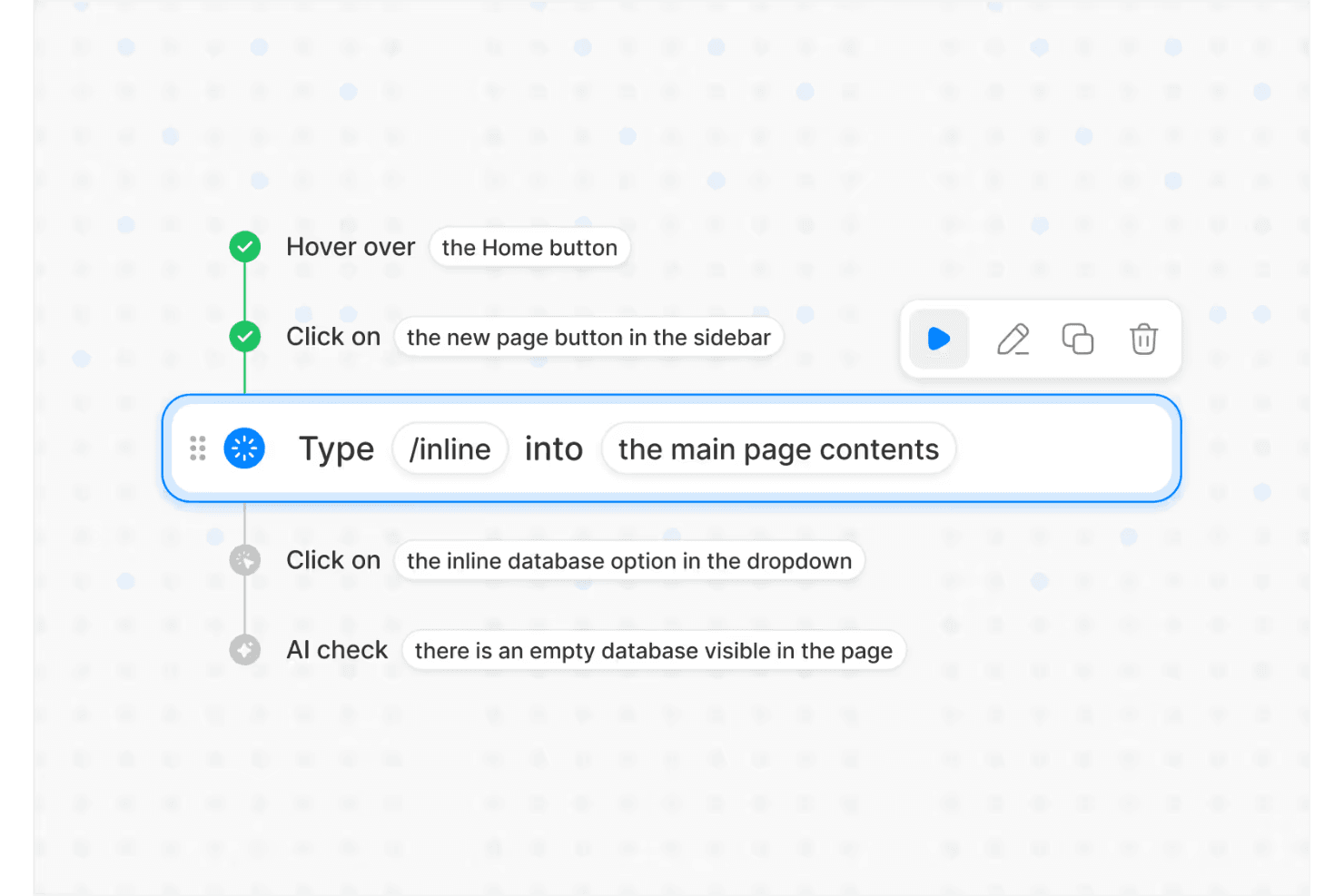
Describe test flows in plain English and Momentic’s AI builds the automation for you, making test authoring accessible to any engineer.
Self-Healing Locators
Selectors automatically adapt as your UI changes, reducing maintenance by tracking user intent instead of exact DOM structure.
Autonomous Testing Agent
Momentic’s AI explores your app, finds critical user flows, and generates or updates tests as your product evolves.
AI-Powered Assertions
Validate UI state, content, and behavior using flexible, intent-based checks that reduce false positives and handle dynamic outputs more effectively..
Regression Testing Automation
Run high-signal test suites on every commit and pull request to catch critical bugs before code merges or deploys.
Flexible Execution (Cloud + CLI)
Run tests in the cloud for quick setup or locally via CLI for CI/CD integration, version control, and developer-centric workflows.
Ease of Use
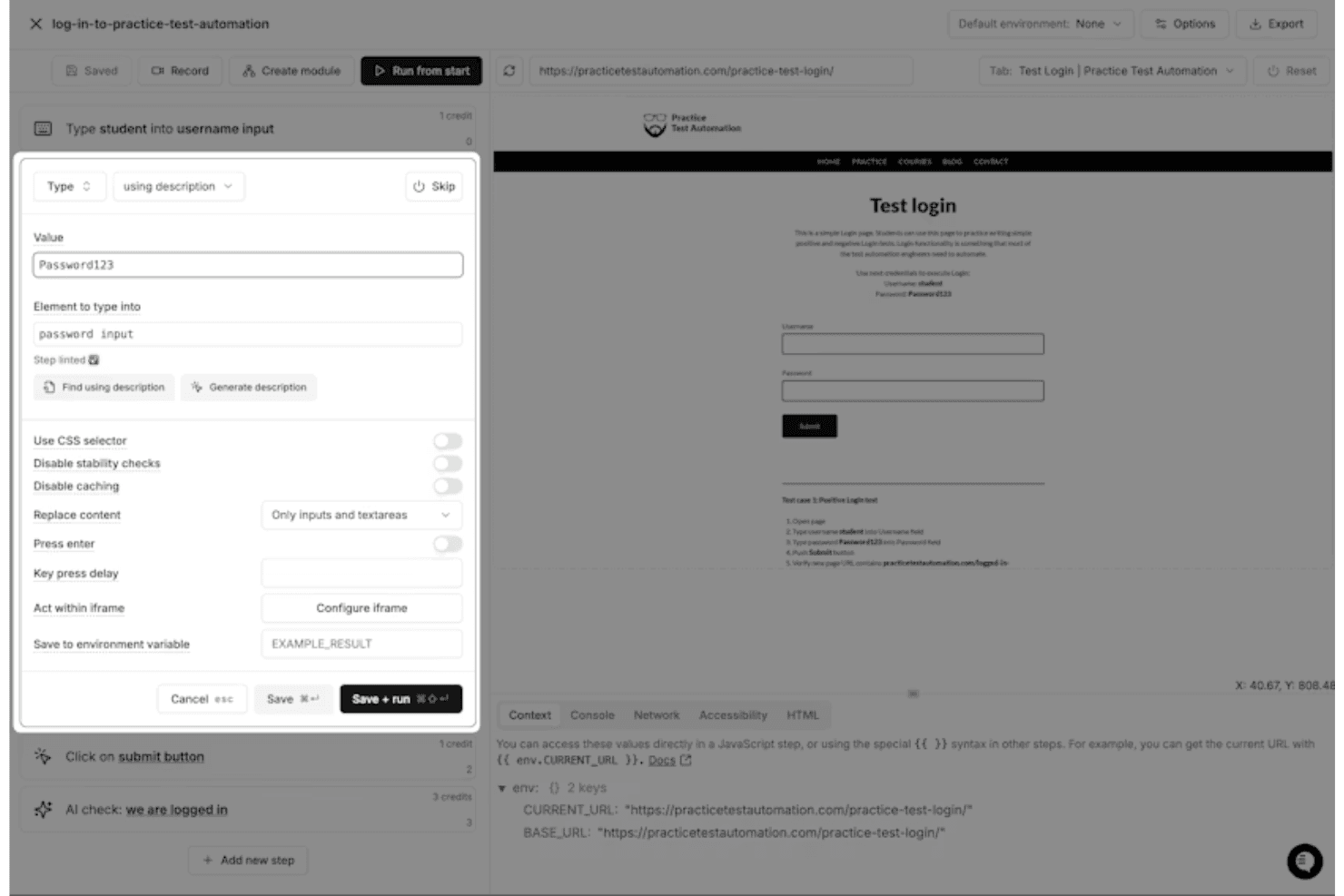
Overall, I think Momentic is one of the more approachable end-to-end testing tools available, largely because of its plain-English test creation and interactive editor. Instead of writing and maintaining code, you define test steps in natural language and get immediate feedback through a built-in browser preview and debugging tools. Features like self-healing locators and smart waiting also reduce the need for constant maintenance. That said, it’s not completely “no-skill”—you still need to learn how to write clear, unambiguous prompts and structure tests effectively to get reliable results.
Integrations
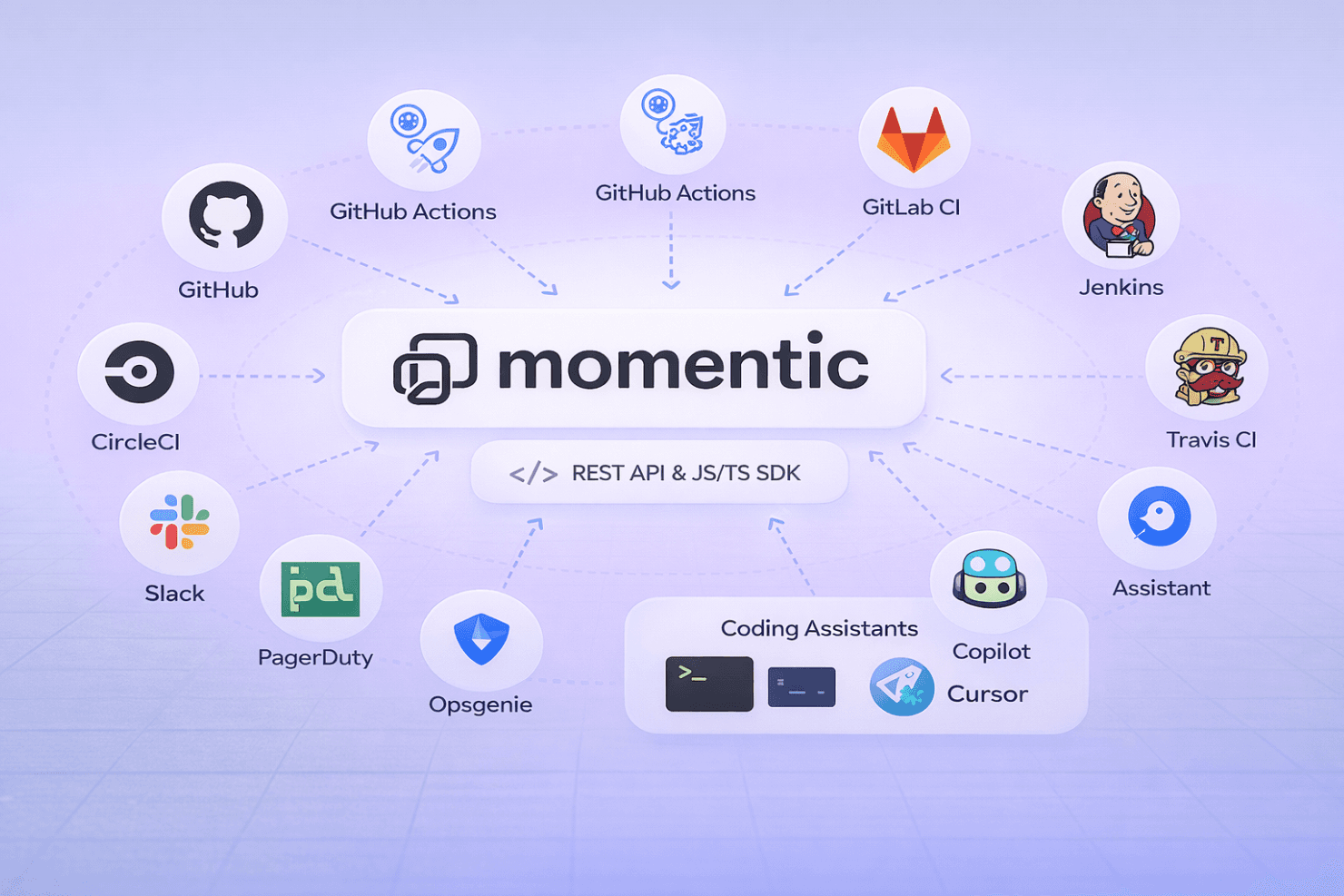
Momentic integrates with major CI/CD platforms, including GitHub Actions, CircleCI, GitLab CI, Jenkins, and Travis CI, making it easy to run automated tests as part of your development pipeline. It also supports notifications via Slack, PagerDuty, Opsgenie, and webhook-based systems for alerting and incident workflows.
Beyond that, Momentic offers a REST API and JavaScript/TypeScript SDK for building custom workflows, along with a CLI for deeper integration into local development and CI environments. It also supports integrations with coding assistants (like Copilot and Cursor) through its MCP framework, enabling AI-driven test creation and maintenance directly from developer tools.
Momentic Specs
- API: Yes
- Bug Tracking: Yes
- CI/CD Integration: Yes
- Cloud Deployment: Yes
- Code Review: Yes
- Code Transformation: No
- Collaboration Support: Yes
- Data Export: Yes
- Data Import: Yes
- Developer Tools: Yes
- External Integrations: Yes
- Git Integration: Yes
- History/Version Control: No
- IDE Plugins: Yes
- Local Deployment: No
- Multi-User: Yes
- Notifications: Yes
- Project Management: No
- Release Management: No
- Static Analysis: Yes
- Task Scheduling/Tracking: Yes
- Testing: Yes


