

I 10 migliori strumenti di test dell’accessibilità dei siti web per il 2026

Elenco ristretto dei migliori strumenti per testare l'accessibilità dei siti web


I migliori strumenti per testare l'accessibilità dei siti web aiutano i team a rilevare tempestivamente i problemi di conformità, a correggere le barriere che incidono sugli utenti con disabilità e a mantenere esperienze digitali accessibili e facili da usare. Questi strumenti forniscono informazioni chiare sugli errori, così i team di progettazione, sviluppo e QA possono risolvere i problemi prima che arrivino in produzione.
I team cercano spesso strumenti per testare l'accessibilità quando le revisioni manuali non rilevano alcuni problemi, i controlli incoerenti rallentano i rilasci o le lacune di usabilità passano inosservate. Problemi come il testo alternativo mancante, il contrasto insufficiente e la navigazione da tastiera non funzionante riducono la qualità del sito e creano lavoro aggiuntivo per tutti i team.
Con oltre 20 anni di esperienza nel settore come Chief Technology Officer, ho testato e recensito decine di strumenti per l'accessibilità dei siti web in ambienti reali, valutandone accuratezza, integrazioni e usabilità. Questa guida mette in evidenza i migliori strumenti che migliorano la conformità, favoriscono flussi di test più fluidi e aiutano i team a creare siti web più accessibili, con recensioni che analizzano funzionalità, vantaggi e svantaggi e casi d'uso più adatti.
Perché fidarsi dei nostri consigli sui software
Il nostro team testa e recensisce software dal 2012. In quanto leader tecnologici noi stessi, sappiamo quanto sia difficile — e importante — scegliere il software giusto.
Per questa guida, abbiamo valutato gli strumenti attraverso test praticie ricerche indipendenti, assegnando un punteggio agli strumenti in base ai nostri criteri di selezione.
Le nostre recensioni riflettono il nostro giudizio editoriale umano, non un discorso di vendita.
Revisori esperti:
Riepilogo dei migliori strumenti per testare l'accessibilità dei siti web
Questa tabella comparativa riassume i dettagli sui prezzi delle mie migliori selezioni di strumenti per testare l’accessibilità dei siti web, per aiutarti a trovare quello più adatto al tuo budget e alle esigenze della tua azienda.
| Tool | Best For | Trial Info | Price | ||
|---|---|---|---|---|---|
| 1 | Ideale per le politiche sui contenuti | Not available | Prezzo su richiesta | Website | |
| 2 | Ideale per la riduzione del rischio legale | Prova gratuita di 14 giorni + demo gratuita disponibile | Prezzo su richiesta | Website | |
| 3 | Ideale per la collaborazione tra team | Demo gratuita disponibile | Prezzo su richiesta | Website | |
| 4 | Ideale per la conformità governativa | Demo gratuita disponibile | Prezzo su richiesta | Website | |
| 5 | Ideale per utenti con disabilità visive | Prova gratuita disponibile | Da $225/anno | Website | |
| 6 | Ideale per simulare i lettori di schermo | Not available | Gratuito | Website | |
| 7 | Ideale per visualizzare i problemi di accessibilità | Not available | Gratuito | Website | |
| 8 | Ideale per controlli rapidi di conformità | Prova gratuita + demo disponibile | Da $490/anno | Website | |
| 9 | Ideale per soluzioni enterprise | Demo gratuita disponibile | Prezzo su richiesta | Website | |
| 10 | Ideale per il test multipagina | Prova gratuita + demo disponibili | Prezzo su richiesta | Website |
Recensioni dei migliori strumenti per testare l'accessibilità dei siti web
Di seguito trovi i miei riepiloghi dettagliati dei migliori strumenti per testare l’accessibilità dei siti web inclusi nel mio elenco ristretto. Le mie recensioni offrono un’analisi approfondita delle funzionalità principali, dei vantaggi & svantaggi, delle integrazioni e dei casi d’uso ideali di ciascuno strumento, per aiutarti a trovare quello più adatto a te.
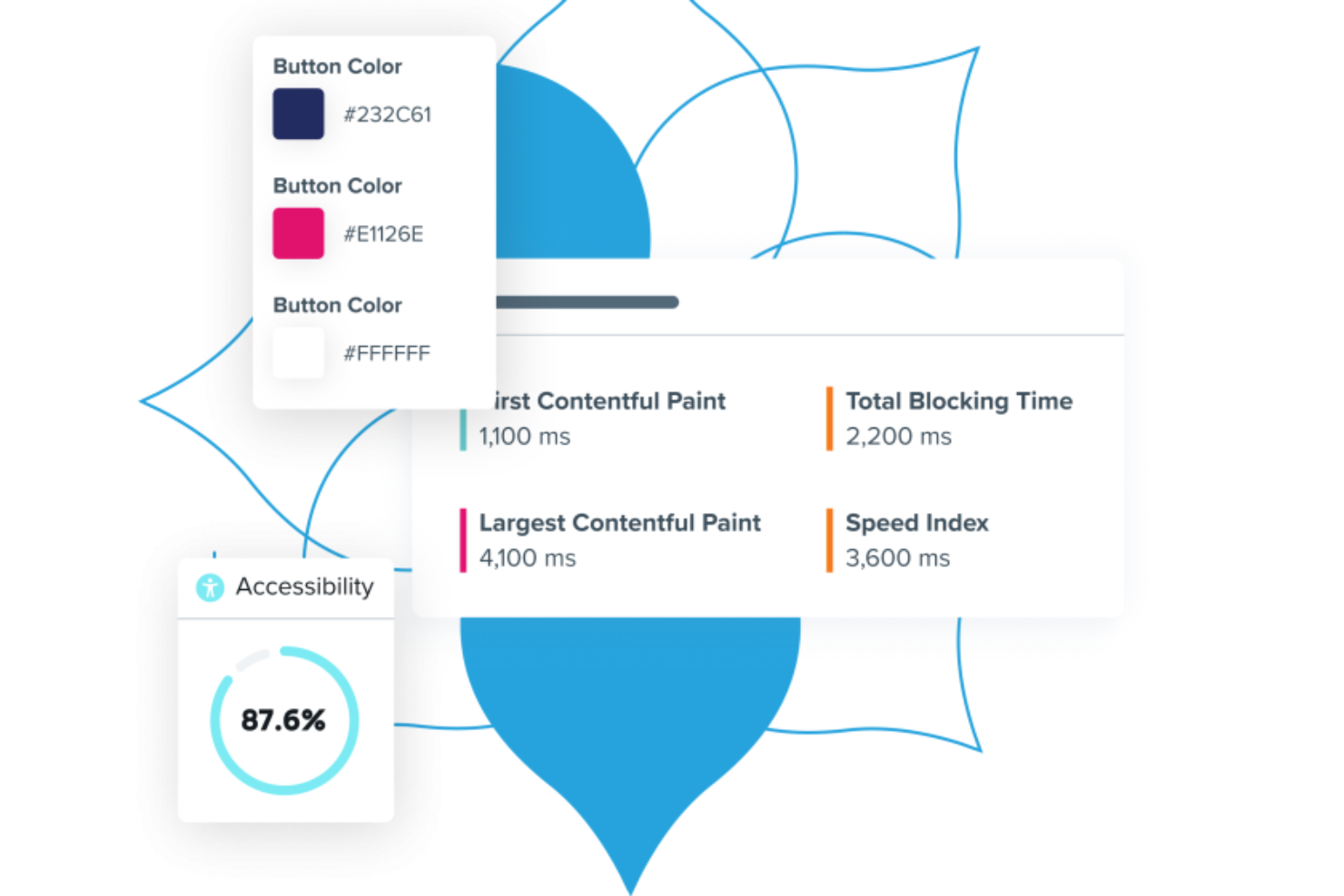
Per le organizzazioni impegnate a creare esperienze digitali inclusive, Acquia Web Governance offre una soluzione interessante. Questo strumento è progettato per migliorare l'accessibilità dei siti web e la gestione dei contenuti, garantendo la conformità a standard fondamentali come WCAG, ADA ed EAA. Che si tratti di una grande azienda o di un settore specializzato, Acquia Web Governance affronta le sfide del mantenimento di contenuti web di alta qualità e accessibili, rendendolo ideale per i team focalizzati sul miglioramento dell'esperienza utente e sulla conformità normativa.
Perché ho scelto Acquia Web Governance
Ho scelto Acquia Web Governance perché eccelle nei test di accessibilità automatizzati, una caratteristica fondamentale per qualsiasi organizzazione che dia priorità all'inclusività digitale. La capacità dello strumento di individuare e assegnare priorità ai problemi di accessibilità consente al tuo team di affrontarli rapidamente, migliorando l'esperienza utente per tutti i visitatori. Inoltre, l'integrazione con Acquia Cloud Platform e Acquia Site Factory assicura che il tuo flusso di lavoro rimanga efficiente e centralizzato, rendendolo una scelta pratica per i team che gestiscono più asset digitali.
Funzionalità principali di Acquia Web Governance
Oltre alle solide capacità di test di accessibilità, ho riscontrato anche altre funzionalità che ne aumentano l'utilità:
- Politiche sui contenuti: questa funzionalità ti aiuta a impostare e far rispettare regole per la creazione e la gestione dei contenuti al fine di garantire coerenza e conformità in tutto il sito.
- Monitoraggio delle prestazioni: offre informazioni sulle prestazioni del tuo sito web, permettendoti di prendere decisioni basate sui dati per migliorare velocità e affidabilità.
- Analisi dei visitatori: offre analisi dettagliate sulle interazioni degli utenti, aiutandoti a capire come i visitatori si relazionano con il tuo sito e dove sono necessari miglioramenti.
- Gestione della privacy dei dati: garantisce la conformità alle normative sulla protezione dei dati gestendo il consenso ai cookie e le impostazioni di privacy dei dati utente.
Integrazioni di Acquia Web Governance
Le integrazioni native includono Acquia Cloud Platform e Acquia Site Factory.
Pros and Cons
Pros:
- Audit WCAG automatizzati su più standard
- Monitoraggio e correzione avanzati dell'accessibilità dei PDF
- Dashboard chiare con cronologia della conformità
Cons:
- Integrazioni native limitate al di fuori delle piattaforme CMS
- Prezzi non trasparenti

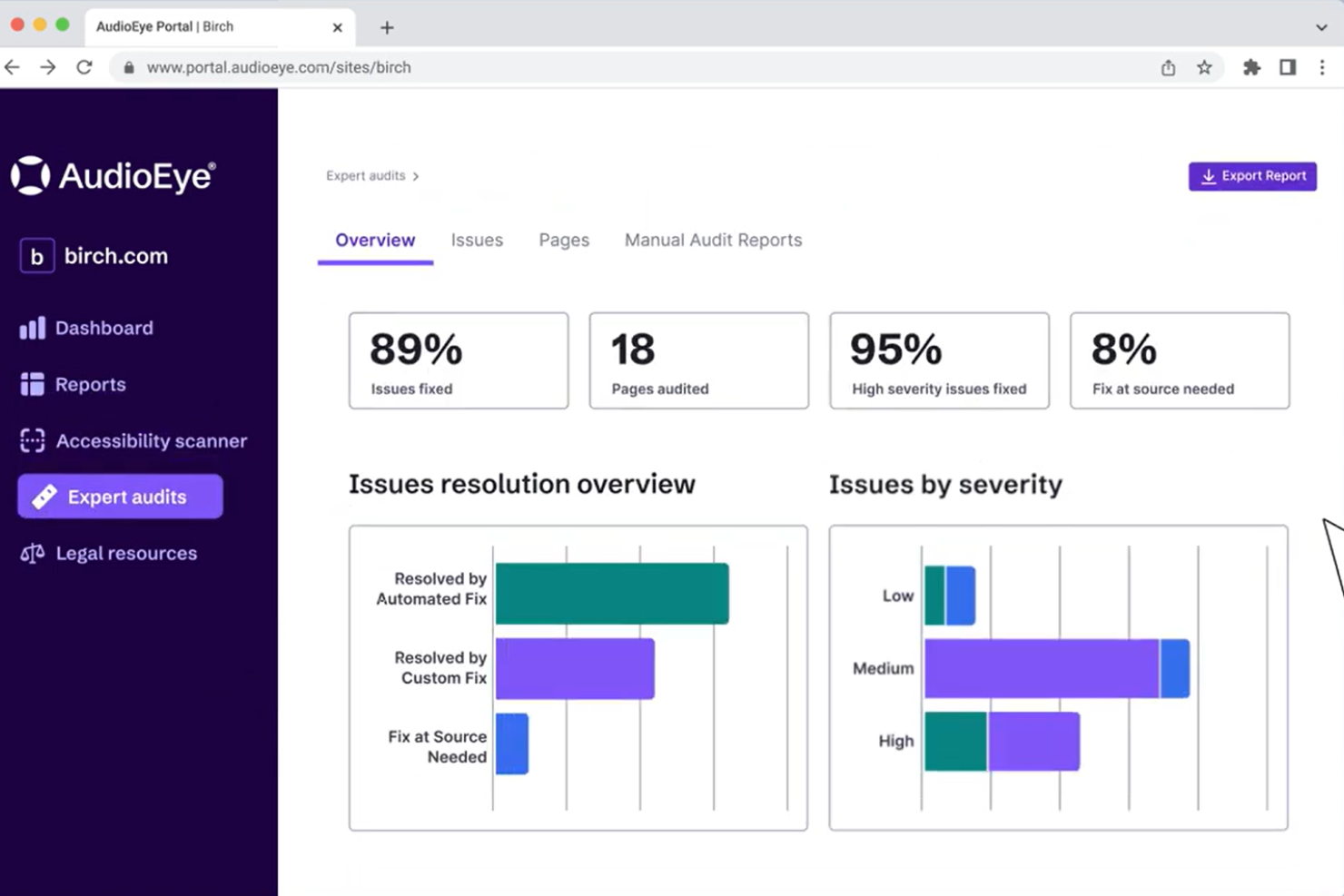
AudioEye è una piattaforma per il test e la correzione dell’accessibilità web che combina scansioni automatizzate WCAG, monitoraggio continuo, audit da parte di esperti e un SDK di test per sviluppatori, aiutando i team a identificare e risolvere i problemi di accessibilità su siti web e proprietà digitali.
Per chi è AudioEye?
AudioEye è particolarmente adatto per organizzazioni di medie e grandi dimensioni che devono conformarsi agli standard ADA, WCAG e Section 508 su ambienti web ampi o complessi.
Perché ho scelto AudioEye
Ho scelto AudioEye come uno dei migliori strumenti per la riduzione del rischio legale grazie ad AudioEye Assurance, la sua garanzia di conformità a livello di pagina. AudioEye paga infatti un importo prestabilito per ogni pagina certificata in caso di una rivendicazione legale valida. Oltre a questa garanzia, mi piace il fatto che il loro team risponda alle lettere di diffida punto per punto, revisionando e confutando le rivendicazioni dal 2022. Un livello di tracciabilità documentata raro nel settore.
Caratteristiche principali di AudioEye
- Scansione WCAG automatizzata: Esegue oltre 400 test di accessibilità rispetto ai criteri WCAG 2.2 A/AA ad ogni visita pagina per rilevare problemi in tempo reale.
- SDK per test di accessibilità: Consente agli sviluppatori di effettuare test di accessibilità a livello di componente, su singole o multiple pagine direttamente negli ambienti di pre-produzione.
- Audit umani condotti da esperti: Specialisti certificati in accessibilità analizzano manualmente le pagine ed applicano correzioni personalizzate, dove la scansione automatica non arriva.
- Integrazione nella pipeline CI/CD: Avvia automaticamente le scansioni di accessibilità con ogni distribuzione, così i problemi vengono individuati prima della pubblicazione in produzione.
Integrazioni di AudioEye
Le integrazioni includono WordPress, Shopify, Adobe Commerce, Wix, HubSpot, BigCommerce, Drupal, Squarespace, Webflow e Google Tag Manager.
Pros and Cons
Pros:
- Include il supporto in caso di contenzioso
- Corregge automaticamente gli errori nel codice sorgente
- Le scansioni vengono eseguite a ogni caricamento pagina
Cons:
- Audit mobile disponibili a pagamento
- Non corregge i problemi dei plugin di terze parti

QA Wolf
Ideale per la collaborazione tra team
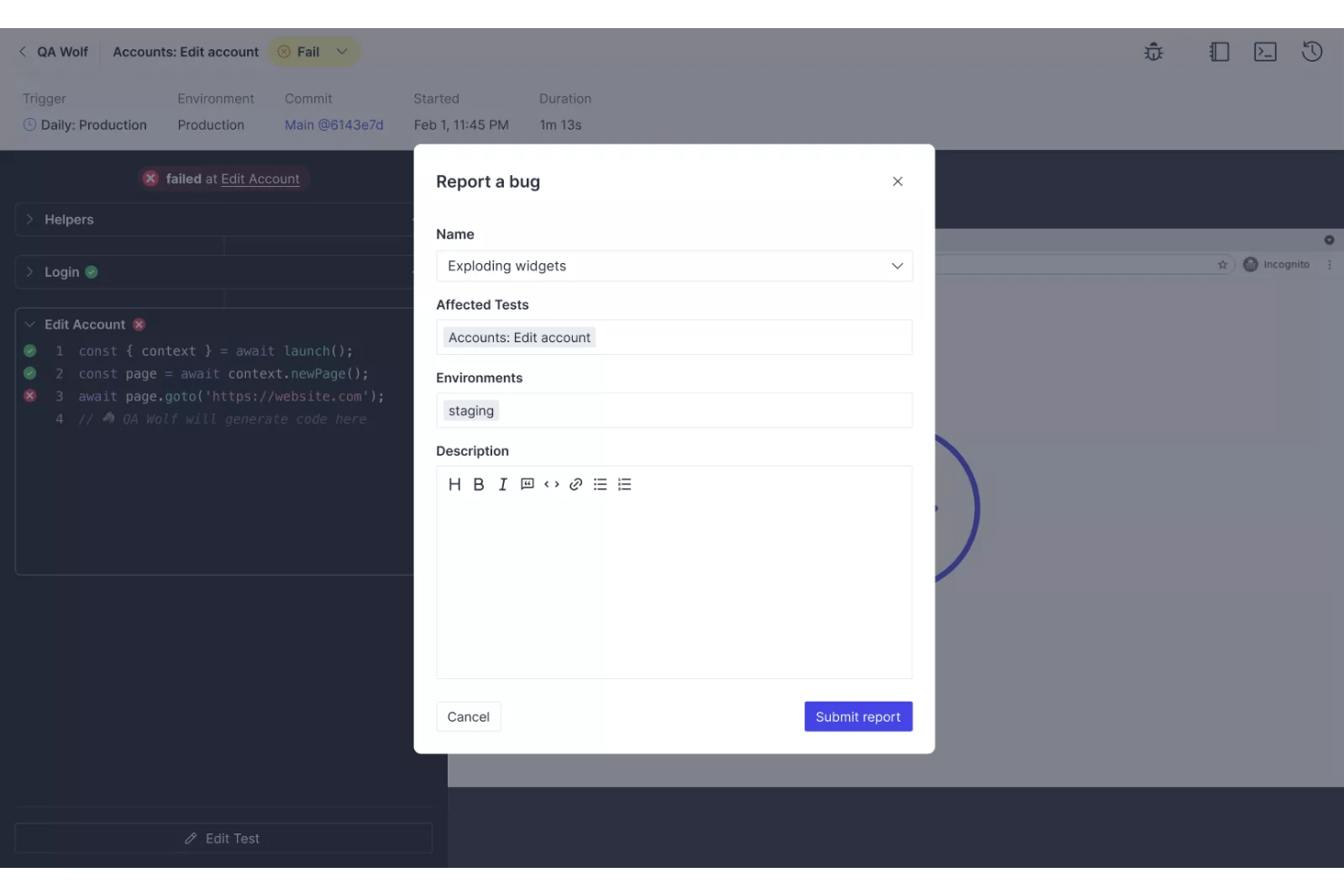
QA Wolf è una piattaforma ibrida progettata per l'assicurazione della qualità del software, rivolta principalmente ai team di sviluppo software. Automatizza i processi di test, concentrandosi su test di accessibilità e di performance, aiutando i team a garantire la consegna di software di alta qualità.
Perché ho scelto QA Wolf: Questo strumento si distingue per la sua enfasi sulla collaborazione di squadra. Consente esecuzioni illimitate di test in parallelo, offrendo risultati rapidi per mantenere il team efficiente. Funzionalità come i report degli errori verificati da persone reali e la manutenzione dei test entro 24 ore favoriscono un ambiente collaborativo. La sua infrastruttura supporta un'ampia copertura dei test, ideale per i team che desiderano migliorare i propri processi di QA senza rallentare lo sviluppo.
Caratteristiche distintive & integrazioni:
Caratteristiche includono la possibilità di automatizzare il testing end-to-end per applicazioni web, raggiungendo una copertura del test dell'80% in un breve periodo. L'infrastruttura della piattaforma supporta esecuzioni illimitate di test in parallelo, offrendo risultati rapidi di superamento/fallimento. Inoltre, QA Wolf punta a essere conveniente in termini di costi, vendendo la copertura dei test anziché le ore di lavoro.
Integrazioni includono GitHub, GitLab, Bitbucket, Slack, Jira, Linear, Azure DevOps, Trello, monday.com e Asana.
Pros and Cons
Pros:
- Raggiungimento rapido della copertura dei test
- Report sugli errori verificati da esseri umani
- Esecuzioni illimitate di test in parallelo
Cons:
- Limitato a integrazioni specifiche
- Potrebbe richiedere una configurazione tecnica
New Product Updates from QA Wolf

QA Wolf Adds Real Media Testing for iOS Apps
QA Wolf introduces real media testing for iOS apps using camera and microphone inputs. This update improves test reliability for real-world use cases. For more information, visit QA Wolf’s official site.
 .
.
Ideale per la conformità governativa
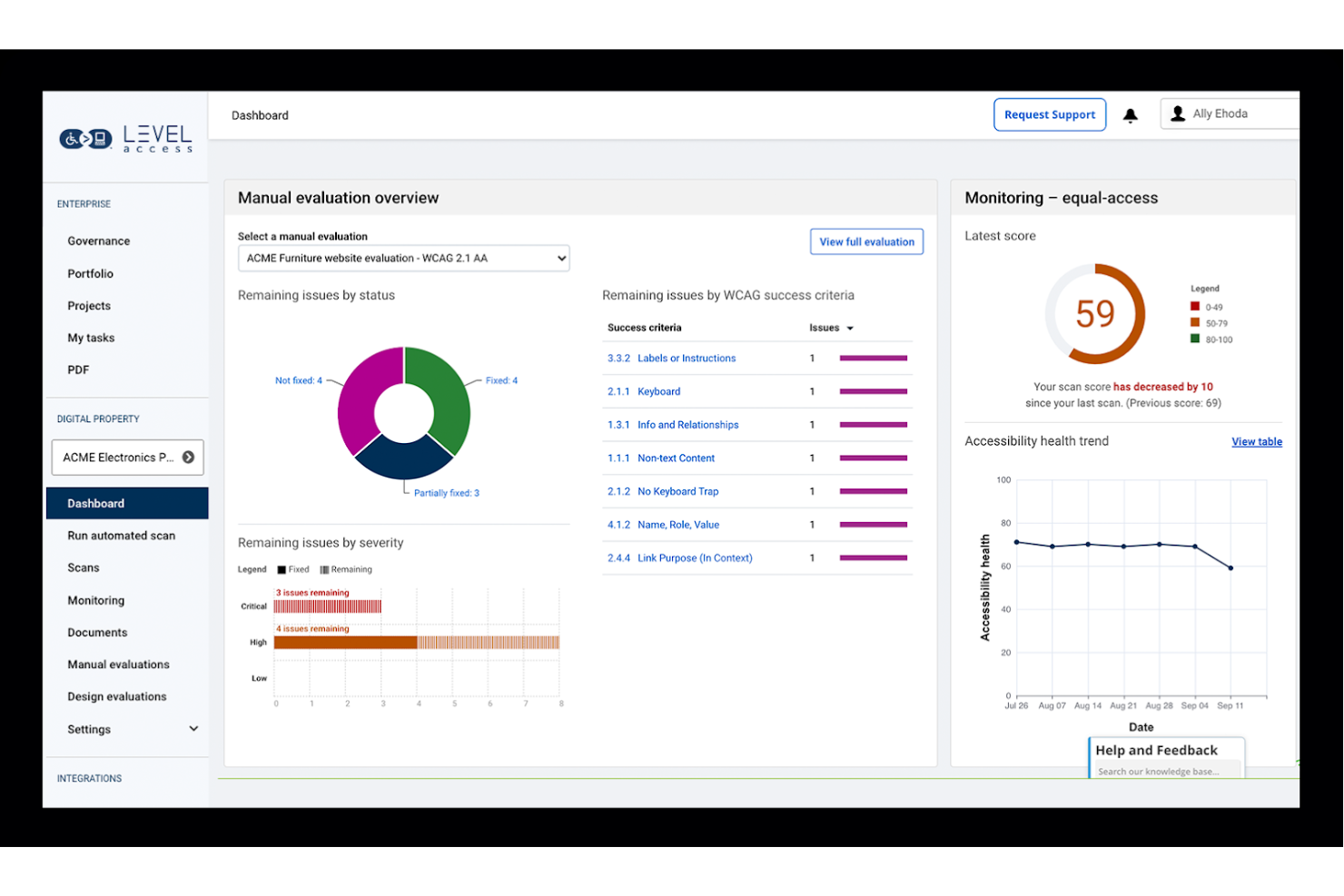
Level Access è uno strumento completo per il testing dell'accessibilità, progettato per le organizzazioni che devono garantire la conformità alle normative governative. Serve utenti aziendali e agenzie governative fornendo strumenti per gestire e migliorare l'accessibilità digitale.
Perché ho scelto Level Access: Questo strumento eccelle nell'aiutare le organizzazioni a soddisfare gli standard di conformità governativa. Offre funzionalità come il test automatizzato e report dettagliati per garantire che il tuo sito sia conforme alle normative. Lo strumento fornisce risorse di formazione per aiutare il tuo team a rimanere aggiornato sui requisiti di accessibilità. Il suo focus sulla conformità lo rende uno strumento essenziale per le organizzazioni che devono allinearsi agli standard legali.
Funzionalità e integrazioni principali:
Funzionalità includono test automatizzati che verificano il tuo sito rispetto a diversi standard di accessibilità. Lo strumento fornisce report dettagliati che evidenziano le aree di non conformità, aiutandoti a prioritizzare le correzioni. Offre anche risorse di formazione per assicurare che il tuo team comprenda le migliori pratiche sull'accessibilità.
Integrazioni includono Jira, Confluence, Slack, Microsoft Teams, GitHub, GitLab, Bitbucket, Trello, Asana e Basecamp.
Pros and Cons
Pros:
- Focus sulla conformità governativa
- Ricche risorse di formazione
- Capacità di test automatizzati
Cons:
- Richiede competenze tecniche
- La configurazione iniziale può richiedere tempo


JAWS è un software di lettore di schermo progettato per persone con disabilità visive, offrendo loro accesso ai contenuti digitali tramite output vocale. Aiuta gli utenti a navigare tra pagine web, documenti e applicazioni, migliorando la loro esperienza digitale e indipendenza.
Perché ho scelto JAWS: Conosciuto per le sue funzionalità avanzate pensate per utenti con disabilità visive, JAWS offre opzioni vocali personalizzabili, compatibilità con display Braille e scorciatoie da tastiera potenti. Queste caratteristiche facilitano una navigazione fluida per chi si affida al feedback uditivo. Lo strumento supporta una vasta gamma di applicazioni, garantendo l'accessibilità su diverse piattaforme digitali. La sua adattabilità alle esigenze individuali lo rende una scelta preferita per chi cerca un'esperienza personalizzata.
Caratteristiche principali e integrazioni:
Funzionalità che includono impostazioni vocali personalizzabili che permettono di regolare la velocità e il tipo di voce. Lo strumento supporta diversi display Braille, assicurando che il feedback tattile sia disponibile per chi ne ha bisogno. JAWS offre anche la possibilità di creare script personalizzati per migliorare l'esperienza utente su applicazioni specifiche.
Integrazioni includono Microsoft Office, Google Docs, Adobe Reader, Internet Explorer, Mozilla Firefox, Google Chrome, Microsoft Edge, Skype, Zoom e Lotus Notes.
Pros and Cons
Pros:
- Supporta più display Braille
- Ampie opzioni di scriptabilità
- Compatibilità con numerose applicazioni
Cons:
- Curva di apprendimento elevata
- Limitato a specifici sistemi operativi

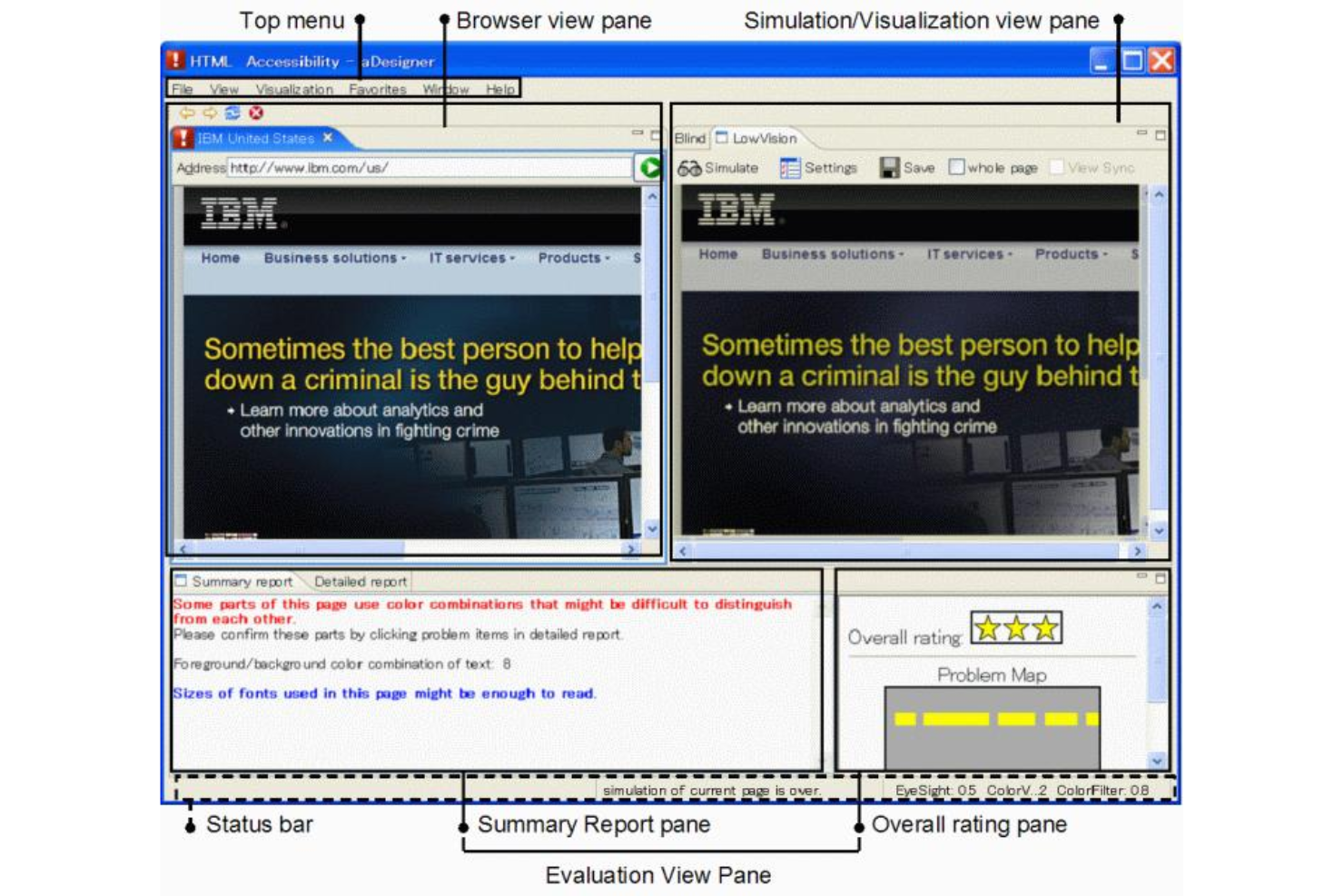
ACTF aDesigner è uno strumento rivolto a sviluppatori e tester di accessibilità, che offre capacità di simulazione per utenti di screen reader. Aiuta a valutare l’accessibilità dei contenuti web simulando come verrebbero letti dai lettori di schermo, facilitando i miglioramenti all’esperienza utente per persone ipovedenti.
Perché ho scelto ACTF aDesigner: Questo strumento è unico nella sua capacità di simulare l’output dei lettori di schermo, caratteristica fondamentale per gli sviluppatori che si concentrano sull’accessibilità. Offre funzionalità come controlli visivi e uditivi per assicurare che i contenuti siano percepibili. Le capacità di simulazione dello strumento si estendono sia ai contenuti web sia a quelli in Flash, rendendolo versatile. Il suo focus sulla simulazione di lettori di schermo aiuta i team a identificare e risolvere i problemi di accessibilità in modo più efficace.
Funzionalità distintive & integrazioni:
Funzionalità includono la visualizzazione della struttura della pagina, che aiuta a comprendere come sono organizzati i contenuti. Lo strumento fornisce controlli visivi e uditivi, garantendo che i tuoi contenuti siano accessibili ai lettori di schermo. Include anche funzionalità per emulare diversi scenari utente, offrendo una panoramica completa dei problemi di accessibilità.
Integrazioni includono Eclipse IDE, IBM Rational Functional Tester e altri strumenti dell’ecosistema Eclipse.
Pros and Cons
Pros:
- Simula l’output dei lettori di schermo
- Supporta contenuti web e Flash
- Controlli visivi e uditivi
Cons:
- Richiede competenze tecniche
- Limitato all’ecosistema Eclipse

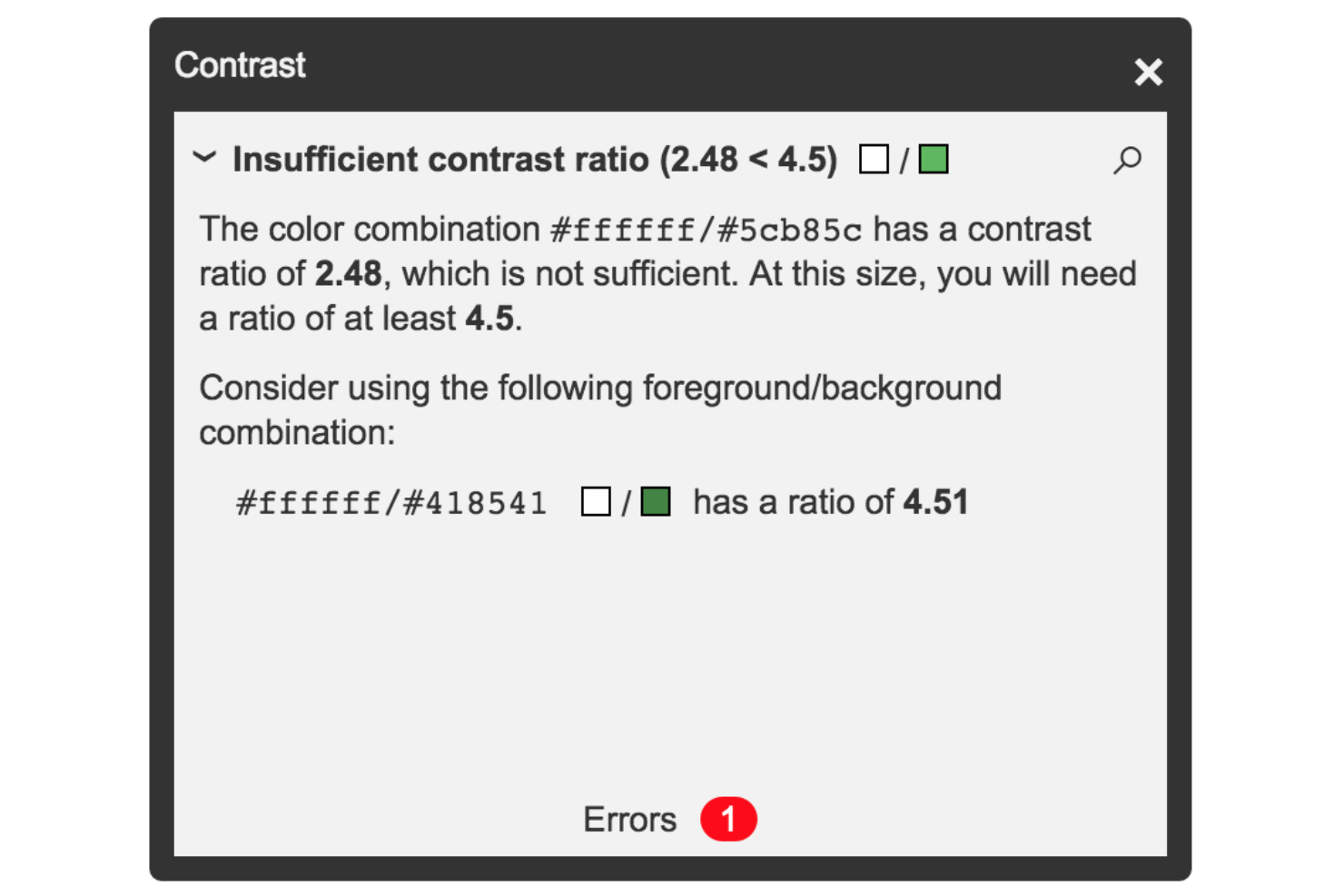
Tota11y è uno strumento di visualizzazione dell’accessibilità progettato per sviluppatori e designer web che devono individuare e affrontare problemi di accessibilità sui loro siti. Offre una rappresentazione chiara e visiva delle potenziali problematiche di accessibilità, aiutando i team a migliorare l’esperienza utente del proprio sito.
Perché ho scelto Tota11y: Questo strumento è eccellente nel visualizzare i problemi di accessibilità, rendendo più semplice per te e il tuo team individuare e risolvere i problemi. Sovrappone al tuo sito indicatori visivi che evidenziano le aree che necessitano di attenzione. Questo feedback immediato aiuta a comprendere il contesto di ogni problematica. Tota11y fornisce anche spiegazioni dettagliate e suggerimenti, assicurando che tu sappia come affrontare ogni problema con efficacia.
Caratteristiche e integrazioni principali:
Caratteristiche includono un’interfaccia interattiva che ti permette di vedere esattamente dove si verificano i problemi di accessibilità. Lo strumento fornisce spiegazioni dettagliate per ogni problematica, aiutandoti a capire perché sono importanti. Offre inoltre suggerimenti pratici per risolvere questi problemi, rendendolo uno strumento utile per gli sviluppatori che desiderano migliorare l’accessibilità del proprio sito.
Integrazioni includono GitHub, GitLab, Bitbucket, Slack, Jira, Trello, Asana, Microsoft Teams e Confluence.
Pros and Cons
Pros:
- Spiegazioni dettagliate per le problematiche
- Interfaccia interattiva
- Identificazione visiva dei problemi
Cons:
- Troppo basilare per utenti avanzati
- Richiede revisione manuale


accessScan è uno strumento di test dell'accessibilità web progettato per aziende e sviluppatori web che necessitano di valutare rapidamente la conformità dei propri siti agli standard di accessibilità. Offre scansioni rapide ed efficienti per identificare problemi di accessibilità e aiuta a garantire che i siti web rispettino i requisiti normativi.
Perché ho scelto accessScan: Questo strumento si distingue per i controlli di conformità rapidi, rendendolo ideale per i team che hanno bisogno di informazioni immediate. Fornisce rapporti dettagliati che evidenziano i problemi di accessibilità, permettendo di affrontarli tempestivamente. L'interfaccia semplice consente di eseguire scansioni senza una vasta conoscenza tecnica. Inoltre, accessScan offre suggerimenti per la correzione dei problemi, aiutandoti a migliorare l'accessibilità del sito in modo efficiente.
Caratteristiche principali e integrazioni:
Caratteristiche includono rapporti dettagliati sull'accessibilità che suddividono i problemi in azioni pratiche. Lo strumento offre un'interfaccia intuitiva che semplifica il processo di scansione, rendendolo accessibile anche agli utenti meno tecnici. accessScan offre inoltre indicazioni su come risolvere i problemi individuati, assicurando che il tuo sito rimanga conforme.
Integrazioni includono WordPress, Shopify, Wix, Squarespace, Joomla, Drupal, Magento, BigCommerce, Weebly e Webflow.
Pros and Cons
Pros:
- Interfaccia intuitiva
- Rapporti dettagliati sulle problematiche
- Controlli rapidi di conformità
Cons:
- Potrebbe non coprire tutti gli standard
- Focalizzato su controlli di base

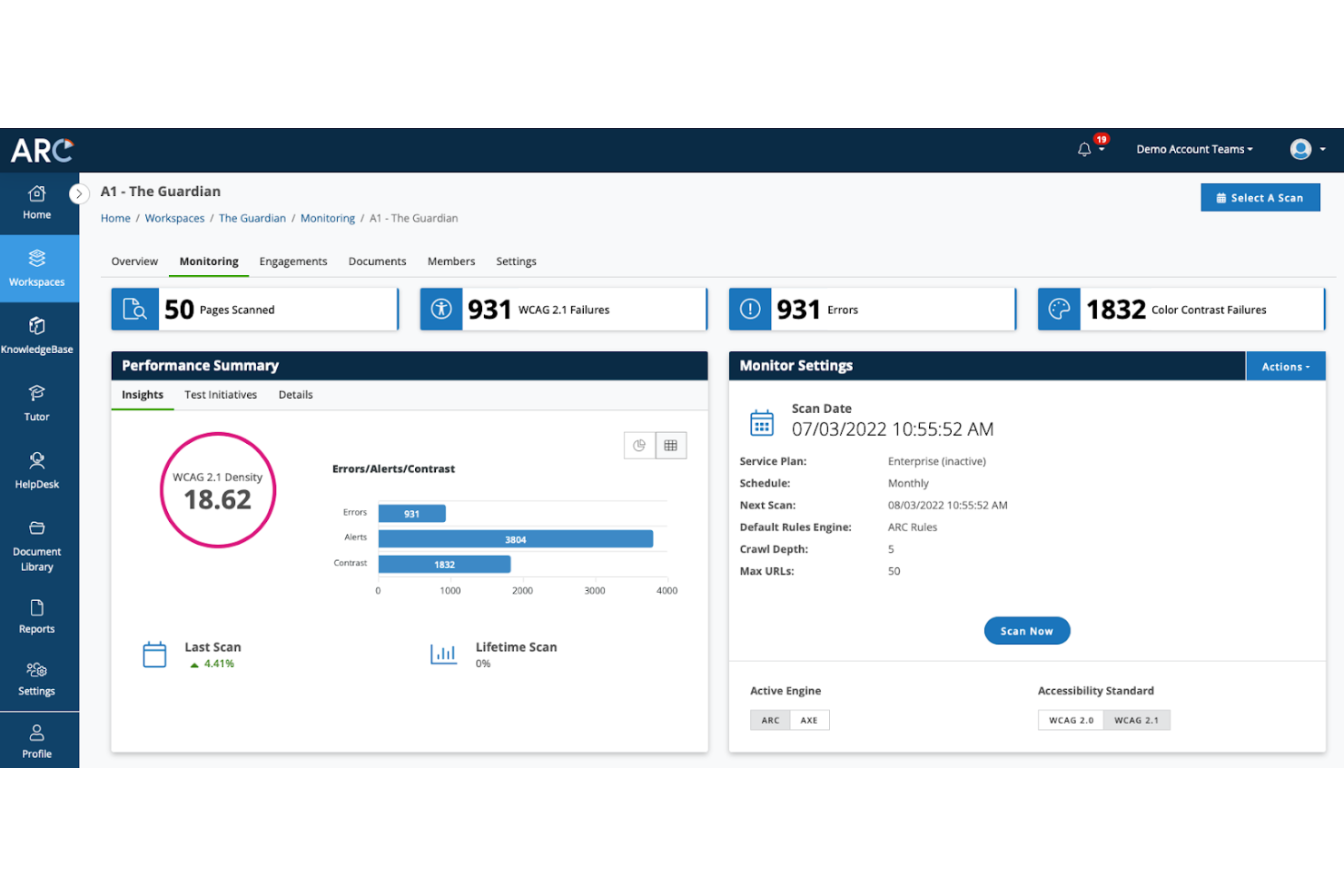
La piattaforma ARC di TPGi è uno strumento completo progettato per migliorare l'accessibilità digitale nelle organizzazioni, con un focus principale su utenti aziendali enterprise. Offre monitoraggio automatico, gestione dei programmi e un centro di conoscenza per facilitare la conformità agli standard di accessibilità.
Perché ho scelto la piattaforma ARC di TPGi: Questo strumento si distingue nell'offrire soluzioni per le aziende grazie a robuste funzionalità di gestione dei programmi. Il cruscotto centralizzato consente di monitorare in modo efficace le analisi sull'accessibilità, rendendolo adatto a grandi organizzazioni. Funzionalità come il monitoraggio automatizzato e l'accesso a un vasto archivio di risorse garantiscono una gestione approfondita dell'accessibilità. Le sue capacità di integrazione ne rafforzano ulteriormente l'utilità in ambienti enterprise.
Caratteristiche e integrazioni principali:
Caratteristiche includono monitoraggio automatico che controlla costantemente la presenza di problemi di accessibilità, assicurando che il tuo sito rimanga conforme nel tempo. Il centro di conoscenza mette a disposizione una vasta gamma di risorse, tra cui corsi di formazione e webinar, per supportare l'apprendimento del tuo team. Gli strumenti di gestione dei programmi aiutano a organizzare e semplificare le attività di accessibilità su grandi team.
Integrazioni includono ARC-WebDriver, ARC-Playwright, JAWS Inspect, Color Contrast Checker, Slack, Jira, Confluence, Trello, GitHub e Bitbucket.
Pros and Cons
Pros:
- Strumenti di monitoraggio automatico
- Forte orientamento alle aziende enterprise
- Cruscotto di analisi centralizzato
Cons:
- Pensato per grandi imprese
- Opzioni di personalizzazione limitate

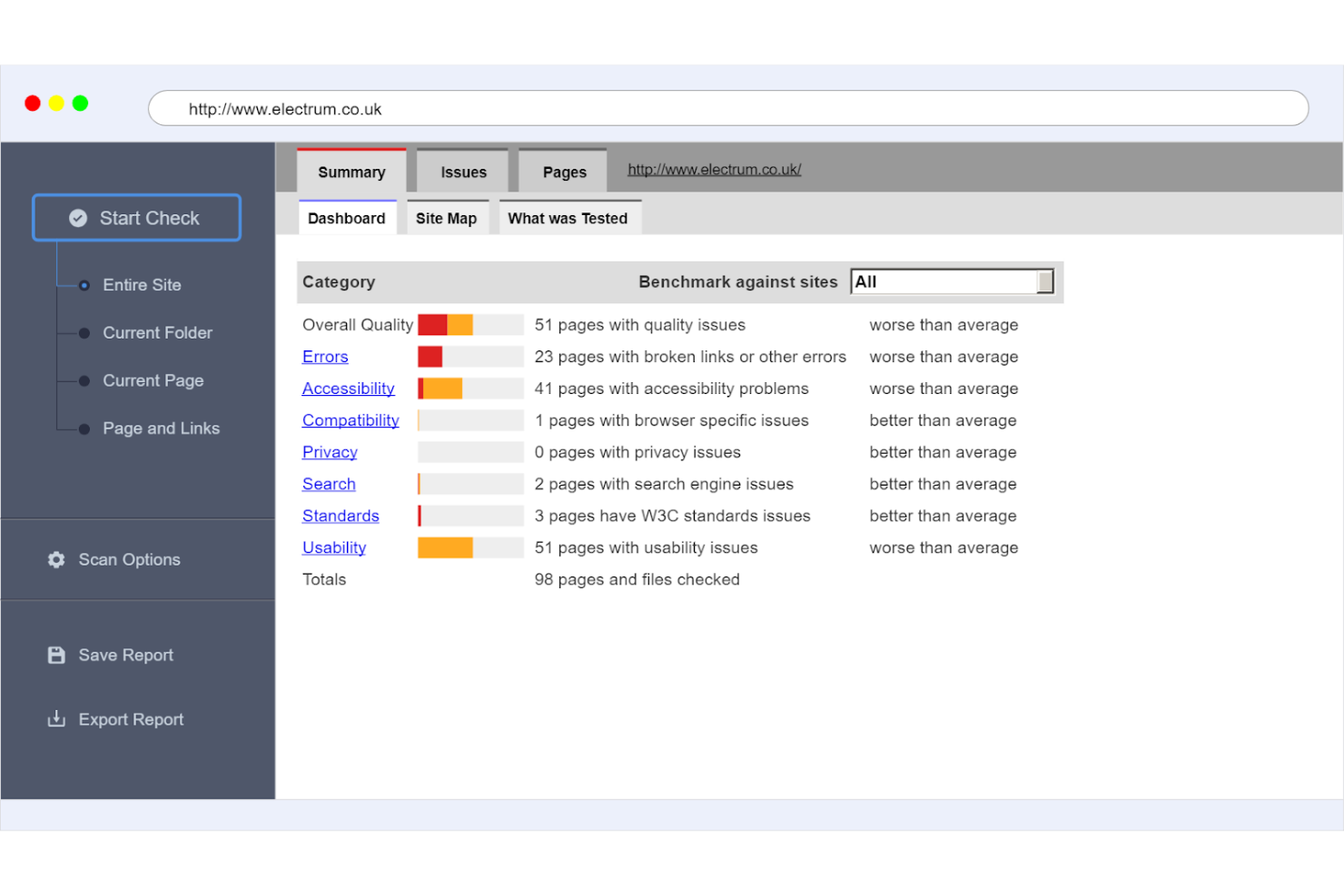
SortSite è uno strumento completo per il test dei siti web, pensato per sviluppatori web e team di assicurazione qualità. Esegue scansioni su più pagine per individuare problemi di accessibilità, usabilità e SEO, assicurando che il tuo sito rispetti gli standard di settore.
Perché ho scelto SortSite: Questo strumento è ideale per i test su più pagine, offrendo ampie capacità di scansione su siti interi. Individua una vasta gamma di problematiche, dall’accessibilità alla SEO, fornendo una visione olistica della salute del sito. I report dettagliati ti aiutano a capire e risolvere rapidamente i problemi. Il suo focus sull’analisi multipagina lo rende uno strumento prezioso per i team che gestiscono siti di grandi dimensioni.
Caratteristiche principali & integrazioni:
Caratteristiche includono la scansione automatizzata che controlla l’intero sito per la conformità agli standard di accessibilità e SEO. Lo strumento fornisce report dettagliati che suddividono i problemi in azioni risolvibili, aiutando il tuo team a dare priorità agli interventi. Offre inoltre un’interfaccia intuitiva che rende semplice la navigazione e la comprensione dei risultati.
Integrazioni includono GitHub, GitLab, Bitbucket, Jira, Confluence, Slack, Microsoft Teams, Trello, Asana e Basecamp.
Pros and Cons
Pros:
- Supporta vari standard di conformità
- Interfaccia intuitiva
- Ideale per siti web di grandi dimensioni
Cons:
- Può richiedere una configurazione tecnica
- Opzioni di personalizzazione limitate
Altri strumenti per testare l'accessibilità dei siti web
Ecco alcune altre opzioni di strumenti per testare l’accessibilità dei siti web che non sono entrate nel mio elenco ristretto, ma che vale comunque la pena prendere in considerazione:
- Pope Tech
Ideale per istituzioni educative
- A11y Color Contrast Accessibility Validator
Ideale per il test del contrasto cromatico
- Tanaguru
Ideale per progetti open-source


Come Valuto Gli Strumenti di Test di Accessibilità dei Siti Web
Valuto questi strumenti su due livelli: la scansione WCAG di base e il reporting che uno strumento deve offrire per qualificarsi, e i fattori differenzianti—come l'integrazione nelle pipeline CI/CD o la generazione di VPAT—che distinguono le migliori opzioni.
Funzionalità di Base (Requisiti Minimi per Questa Lista)
Quando seleziono gli strumenti per la mia lista, valuto ciascuno su una scala da 0 (non offre la funzionalità) a 5 (eccelle in quest'area) per ogni funzionalità di base elencata di seguito. Poi, calcolo il punteggio totale dello strumento in percentuale. Ogni strumento deve raggiungere almeno un punteggio totale minimo del 65% per essere preso in considerazione.
- Test di Conformità WCAG: Verifico quali versioni degli standard sono coperte da uno strumento—WCAG 2.1 AA è la base, ma considero anche Section 508, EN 301 549 e il supporto anticipato alla 2.2.
- Scansione Automatica del Sito: Profondità di scansione e gestione dei contenuti dinamici sono rilevanti, specialmente per SPA costruite in React o Angular che si basano sul rendering lato client.
- Reporting dei Problemi & Guida alla Correzione: Valuto se i report identificano l'esatto elemento DOM, lo collegano a un criterio di successo WCAG specifico e suggeriscono una correzione a livello di codice.
- Integrazione nel Flusso di Lavoro degli Sviluppatori: Strumenti che si integrano nelle pipeline CI/CD come GitHub Actions o Jenkins e creano ticket in Jira ottengono punteggi più alti rispetto alle opzioni solo browser.
- Supporto ai Test Manuali/Assistiti: Le scansioni automatiche rilevano circa il 30–40% dei problemi, quindi cerco check guidati per la navigazione tramite tastiera, simulatori di contrasto cromatico e anteprime per screen reader.
- Monitoraggio Continuo & Dashboard: Per i team che gestiscono decine di proprietà, valuto se lo strumento traccia le tendenze di conformità nel tempo e segnala regressioni dopo i deploy.
Una volta ottenuta una lista di strumenti che soddisfano i criteri, considero cosa distingue ciascuna piattaforma.
Fattori Differenzianti (Cosa Distingue i Fornitori)
Ecco come confronto i diversi fornitori:
Caratteristiche Distintive
I test in fase di design sono un grande elemento di differenziazione. Strumenti con plugin Figma o Sketch permettono ai team di individuare problemi di contrasto e gerarchia prima che venga scritta una sola riga di codice. Cerco anche la generazione di VPAT/ACR, che fa risparmiare ore quando i team di procurement richiedono documentazione formale di conformità. Vale la pena valutare anche la auto-remediation basata su AI, anche se verifico se le correzioni sono suggerimenti a livello di codice o overlay in fase di runtime, dato che gli approcci basati su overlay possono introdurre problemi di accessibilità propri.
Oltre le Caratteristiche
La copertura della conformità è importante dato che le normative differiscono—ADA, EN 301 549, AODA—e verifico se uno strumento aggiorna i suoi criteri man mano che gli standard evolvono. Anche i servizi di consulenza specializzata sono un fattore, poiché alcuni fornitori offrono auditor certificati e test con persone con disabilità, colmando il divario che la scansione automatica non riesce a chiudere. Anche la trasparenza dei prezzi è importante. Valuto se le licenze variano in base a pagine scansionate, utenti o domini, soprattutto per le agenzie che gestiscono più siti di clienti.
Come scegliere gli strumenti per testare l'accessibilità dei siti web
È facile perdersi in lunghi elenchi di funzionalità e strutture tariffarie complesse. Per aiutarti a rimanere concentrato mentre affronti il tuo specifico processo di selezione del software, ecco una lista di fattori da tenere a mente:
| Fattore | Cosa considerare |
| Scalabilità | Assicurati che lo strumento possa crescere insieme alle tue esigenze, gestendo siti web più grandi e un numero maggiore di utenti nel tempo. |
| Integrazioni | Verifica che lo strumento si integri con i sistemi esistenti, come CMS, CRM o strumenti di gestione dei progetti. |
| Personalizzazione | Cerca opzioni che ti consentano di adattare report e dashboard alle tue esigenze specifiche. |
| Facilità d'uso | Scegli uno strumento con un'interfaccia intuitiva che il tuo team possa imparare rapidamente senza una formazione approfondita. |
| Budget | Considera il costo totale, comprese le tariffe di configurazione e i costi ricorrenti, assicurandoti che rientri nel tuo budget. |
| Misure di sicurezza | Verifica che lo strumento disponga di misure per proteggere i tuoi dati e rispettare le normative pertinenti. |
| Standard di conformità | Assicurati che lo strumento supporti le linee guida più recenti sull'accessibilità, come le WCAG 2.1. |
| Servizi di assistenza | Cerca strumenti che offrano un solido supporto clienti, inclusa la chat dal vivo e una knowledge base completa. |
Tendenze negli strumenti di test dell'accessibilità dei siti web
Nella mia ricerca, ho raccolto innumerevoli aggiornamenti di prodotto, comunicati stampa e registri delle versioni di diversi fornitori di strumenti per il test dell'accessibilità dei siti web. Ecco alcune delle tendenze emergenti che sto monitorando:
- Analisi basata sull'IA: molti strumenti ora utilizzano l'IA per identificare i problemi di accessibilità in modo più rapido e accurato. Questa tecnologia aiuta a prevedere i potenziali problemi prima che si verifichino. Ad esempio, Evinced ha iniziato a implementare l'IA per migliorare l'accuratezza dei suoi test.
- Feedback in tempo reale: gli strumenti offrono sempre più spesso feedback in tempo reale agli sviluppatori durante la scrittura del codice. Ciò consente di apportare correzioni immediate, riducendo il tempo dedicato ai test di accessibilità in un secondo momento. Tota11y è noto per fornire un feedback visivo istantaneo.
- Attenzione all'esperienza utente: si pone sempre più l'accento sull'esperienza utente di tutti gli utenti, non solo di quelli con disabilità. Ora gli strumenti valutano l'accessibilità in termini di soddisfazione complessiva degli utenti. Questo cambiamento contribuisce a creare design web più inclusivi.
- Test multipiattaforma: i fornitori stanno ampliando le funzionalità di test per includere diversi dispositivi e browser. Ciò garantisce un'esperienza coerente nei diversi ambienti utilizzati dagli utenti. Di recente SortSite ha potenziato le sue funzionalità di test multipiattaforma.
- Controlli di conformità personalizzabili: gli strumenti offrono più opzioni per personalizzare i controlli di conformità in base alle esigenze specifiche dell'organizzazione. Questa flessibilità consente alle aziende di concentrarsi sulle normative più pertinenti per loro. AChecker offre ampie possibilità di personalizzazione nei suoi controlli di conformità.
Cosa sono gli strumenti di test dell'accessibilità dei siti web?
Gli strumenti di test dell'accessibilità dei siti web valutano e migliorano l'accessibilità dei siti per gli utenti con disabilità. Questi strumenti vengono generalmente utilizzati da sviluppatori web, designer e professionisti della garanzia della qualità per assicurare la conformità agli standard di accessibilità.
Funzionalità come l'analisi basata sull'IA, il feedback in tempo reale e i controlli di conformità personalizzabili aiutano a identificare i problemi, fornire correzioni immediate e adattare i test a esigenze specifiche. Nel complesso, questi strumenti rendono i siti web più inclusivi, migliorando l'esperienza utente per tutti.
Funzionalità degli strumenti di test dell'accessibilità dei siti web
Quando selezioni gli strumenti di test dell'accessibilità dei siti web, presta attenzione alle seguenti funzionalità chiave:
- Analisi basata sull'IA: utilizza l'intelligenza artificiale per identificare rapidamente i problemi di accessibilità, aiutandoti ad affrontare più velocemente i potenziali problemi.
- Feedback in tempo reale: fornisce correzioni immediate mentre scrivi il codice, riducendo il tempo dedicato alla risoluzione dei problemi in un secondo momento.
- Controlli di conformità personalizzabili: consente di adattare i test a specifiche esigenze normative, assicurando che il sito soddisfi gli standard più pertinenti.
- Test multipiattaforma: garantisce un'esperienza utente coerente su diversi dispositivi e browser, rendendo il sito accessibile a tutti gli utenti.
- Identificazione visiva dei problemi: offre una sovrapposizione visiva dei problemi di accessibilità, semplificando l'individuazione e la risoluzione dei problemi direttamente sul sito.
- Report dettagliati: suddivide i problemi di accessibilità in attività concrete, aiutandoti a stabilire efficacemente la priorità delle correzioni.
- Attenzione all'esperienza utente: valuta l'accessibilità in termini di soddisfazione complessiva degli utenti, promuovendo un design web più inclusivo.
- Risorse formative: fornisce guide e tutorial per aiutare il tuo team a comprendere e applicare le migliori pratiche di accessibilità.
- Integrazione con gli strumenti di sviluppo: si collega facilmente agli ambienti di sviluppo più diffusi, semplificando il processo di test all'interno del flusso di lavoro esistente.
Vantaggi degli strumenti di test dell'accessibilità dei siti web
L'implementazione di strumenti per i test di accessibilità dei siti web offre diversi vantaggi al tuo team e alla tua azienda. Eccone alcuni di cui potrai beneficiare:
- Maggiore conformità: garantisce che il tuo sito soddisfi gli standard di accessibilità, riducendo il rischio di problemi legali.
- Esperienza utente migliorata: risolvendo i problemi di accessibilità, rendi il tuo sito più intuitivo e inclusivo per tutti gli utenti.
- Risparmio di tempo: il feedback in tempo reale e l'analisi basata sull'intelligenza artificiale ti aiutano a risolvere i problemi più rapidamente, facendoti risparmiare tempo durante il processo di sviluppo.
- Maggiore portata del pubblico: rendere il tuo sito accessibile lo apre a un pubblico più ampio, inclusi gli utenti con disabilità.
- Migliore reputazione del marchio: dimostrare il proprio impegno a favore dell'accessibilità può migliorare l'immagine del marchio e la percezione pubblica.
- Manutenzione conveniente: test e aggiornamenti regolari prevengono revisioni costose individuando tempestivamente i problemi.
- Crescita delle conoscenze: l'accesso a risorse formative e tutorial aiuta il tuo team a rimanere aggiornato sulle migliori pratiche di accessibilità.
Costi e prezzi degli strumenti per i test di accessibilità dei siti web
La scelta di strumenti per i test di accessibilità dei siti web richiede la comprensione dei vari modelli di prezzo e dei piani disponibili. I costi variano in base alle funzionalità, alle dimensioni del team, ai componenti aggiuntivi e ad altri fattori. La tabella seguente riassume i piani più comuni, i relativi prezzi medi e le funzionalità tipicamente incluse nelle soluzioni di strumenti per i test di accessibilità dei siti web:
Tabella comparativa dei piani per gli strumenti di test dell'accessibilità dei siti web
| Tipo di piano | Prezzo medio | Funzionalità comuni |
| Piano gratuito | $0 | Controlli di accessibilità di base, report dei problemi limitato e assistenza della community. |
| Piano personale | $5-$25 /user /month | Scansioni più complete, report personalizzabili e assistenza via email. |
| Piano aziendale | $30-$75 /user /month | Analisi multipagina, integrazione con gli strumenti di sviluppo e assistenza prioritaria. |
| Piano Enterprise | $100-$250/user /month | Controlli completi di conformità, un responsabile dell'account dedicato e analisi avanzate. |
Domande frequenti sugli strumenti per testare l'accessibilità dei siti web
Ecco alcune risposte alle domande comuni sugli strumenti per testare l’accessibilità dei siti web:
Come si verifica l'accessibilità di un sito web?
Per verificare l’accessibilità, è consigliabile utilizzare una combinazione di strumenti per testare i siti web, inclusi strumenti automatizzati e controlli manuali. Gli strumenti automatizzati possono identificare rapidamente i problemi più comuni, mentre i test manuali garantiscono l’usabilità per gli utenti reali. Esegui i test su dispositivi e browser diversi per assicurarti che l’accessibilità sia uniforme.
È possibile automatizzare i test di accessibilità?
Sì, è possibile automatizzare i test di accessibilità per risparmiare tempo e ridurre gli errori manuali. Gli strumenti automatizzati possono analizzare il tuo sito web alla ricerca dei problemi di accessibilità più comuni e fornire dei report. Tuttavia, è importante combinare l’automazione con i test manuali per individuare i problemi che l’automazione potrebbe non rilevare.
Come si utilizza lo strumento per testare l'accessibilità del web?
Per utilizzare uno strumento per testare l’accessibilità del web, inizia inserendo l’URL del tuo sito nello strumento. Lo strumento analizzerà il sito e genererà un report che evidenzia i problemi di accessibilità. Esamina i risultati e utilizza i suggerimenti dello strumento per apportare i miglioramenti necessari al sito.
Quali sono i 4 principi dei test di accessibilità?
I quattro principi dei test di accessibilità sono Percepibile, Utilizzabile, Comprensibile e Robusto, spesso indicati con l’acronimo POUR. Questi principi guidano la creazione di contenuti accessibili a tutti gli utenti, garantendo un’esperienza web più inclusiva.
Qual è il costo degli strumenti per testare l'accessibilità?
Il costo degli strumenti per testare l’accessibilità varia notevolmente in base alle funzionalità e all’utilizzo. Alcuni strumenti offrono versioni gratuite con funzionalità limitate, mentre altri applicano un costo in base al numero di utenti o all’ampiezza delle funzionalità. È importante scegliere uno strumento adatto al proprio budget e alle proprie esigenze.
Quali sono i vantaggi dell'utilizzo degli strumenti per testare l'accessibilità?
Gli strumenti per testare l’accessibilità aiutano a garantire che il sito web sia utilizzabile da tutti, comprese le persone con disabilità. Consentono di identificare e risolvere i problemi di accessibilità, migliorare l’esperienza utente e rispettare gli standard legali. Questo non solo amplia il pubblico, ma migliora anche la reputazione del brand.
Qual è il prossimo passo?
Se stai cercando strumenti per testare l'accessibilità dei siti web, contatta gratuitamente un consulente di SoftwareSelect per ricevere consigli personalizzati.
Compili un modulo e partecipi a una breve conversazione durante la quale il consulente approfondirà le tue esigenze specifiche. In seguito riceverai una lista ristretta di software da esaminare. Ti assisterà anche durante l'intero processo di acquisto, comprese le trattative sul prezzo.