

Il software MBaaS offre un modo rapido ed efficiente per creare app, gestendo per te l'infrastruttura backend, così puoi concentrarti sulle funzionalità più importanti per i tuoi utenti. Questi strumenti si occupano di database, autenticazione e notifiche push, rendendo molto più semplice il tuo lavoro di sviluppo.
Dopo aver analizzato e testato personalmente le principali opzioni MBaaS, ti guiderò attraverso le scelte migliori per aumentare la produttività del tuo team e aiutarti a scegliere quella giusta per il tuo prossimo progetto.
Perché fidarsi dei nostri consigli sui software
6,700+
Reviews
20
Industry experts
16+
Evaluation factors
14
Years
Il nostro team testa e recensisce software dal 2012. In quanto leader tecnologici noi stessi, sappiamo quanto sia difficile — e importante — scegliere il software giusto.
Per questa guida, abbiamo valutato gli strumenti attraverso test praticie ricerche indipendenti, assegnando un punteggio agli strumenti in base ai nostri criteri di selezione.
Le nostre recensioni riflettono il nostro giudizio editoriale umano, non un discorso di vendita.
Revisori esperti:
- Paulo Gardini MiguelDirettore tecnico
 Tim FisherVP dell'IA
 Gabriel RosasTech Lead e architetto software
 Christhian GruhnTech Lead e architetto della piattaforma

Tabella comparativa dei software MBaaS
La tabella seguente confronta i dettagli sui prezzi delle mie migliori selezioni di software MBaaS.
| Tool | Best For | Trial Info | Price | ||
|---|---|---|---|---|---|
| 1 | Ideale per la facile scalabilità e autenticazione utenti | Piano gratuito disponibile | La struttura dei prezzi di Firebase parte da un piano gratuito per applicazioni di piccola scala. Il piano a pagamento, Firebase Blaze, funziona secondo un modello pay-as-you-go e i costi possono variare in base all'utilizzo. Pertanto, il prezzo per utente al mese non è fisso e può partire da pochi centesimi fino a diversi dollari, a seconda delle risorse utilizzate. | Website | |
| 2 | Ideale per servizi backend scalabili | Piano gratuito disponibile | A partire da $15/mese (con fatturazione annuale) | Website | |
| 3 | Ideale per lo sviluppo senza codice e l'hosting cloud | Piano gratuito disponibile | Backendless offre un'interfaccia di sviluppo visivo per creare la logica di backend senza scrivere codice. Fornisce anche un database intuitivo, gestione degli utenti e funzioni di cloud code. Sul piano delle integrazioni, funziona perfettamente con diversi framework frontend come Angular, React e Vue, aiutando così gli sviluppatori a ottimizzare l'intero processo di sviluppo. | Website | |
| 4 | Ideale per la prototipazione rapida con i servizi AWS | Piano gratuito disponibile | AWS Amplify utilizza un modello di prezzo pay-as-you-go. I costi dipendono dai servizi specifici utilizzati. Ad esempio, i prezzi dell'hosting partono da $0,023 per GB servito. | Website | |
| 5 | Ideale per sviluppo multipiattaforma e integrazione | Il prezzo di Azure Mobile App Service parte da $14/utente/mese per il piano Basic (fatturazione annuale). Questo prezzo non include i costi aggiuntivi per servizi extra. | Website | ||
| 6 | Ideale per lo sviluppo di app mobili aziendali e la gestione dei dati | Il prezzo di Oracle Mobile Hub parte da $101.00 al mese (fatturato annualmente). Sono inclusi 20.000 chiamate API al mese e 10GB di spazio di archiviazione. | Website | ||
| 7 | Ideale per le esigenze di sviluppo mobile open-source | Parse è una piattaforma open-source e quindi è gratuita. | Website | ||
| 8 | Ideale per la sincronizzazione dei dati in tempo reale | Download gratuito + demo gratuita disponibile | Prezzo su richiesta | Website | |
| 9 | Ideale per soluzioni complete di back-end | Piano gratuito disponibile | A partire da $5/mese | Website | |
| 10 | Ideale per modernizzare le applicazioni esistenti | Non disponibile | Prezzi su richiesta | Website |


Recensioni dei migliori software MBaaS
Ecco una panoramica dei migliori software MBaaS. Metterò in evidenza le funzionalità offerte da ciascuno strumento e i motivi per cui merita un posto in questo elenco.
 Ideale per la facile scalabilità e autenticazione utenti
- Piano gratuito disponibile
- La struttura dei prezzi di Firebase parte da un piano gratuito per applicazioni di piccola scala. Il piano a pagamento, Firebase Blaze, funziona secondo un modello pay-as-you-go e i costi possono variare in base all'utilizzo. Pertanto, il prezzo per utente al mese non è fisso e può partire da pochi centesimi fino a diversi dollari, a seconda delle risorse utilizzate.
Visit WebsiteCustomer Rating:4.5/5
Ecco la dashboard di analytics di Firebase. Firebase è una delle principali piattaforme backend-as-a-service per lo sviluppo di app serverless Android, iOS e web. I suoi punti di forza principali risiedono nella scalabilità e nell'autenticazione utenti robusta, rendendolo una scelta ideale per queste necessità specifiche.
Perché ho scelto Firebase:
Nella selezione di Firebase, sono stato colpito soprattutto dalla sua suite completa di servizi, in particolare dal database in tempo reale e dalle funzionalità di autenticazione utenti. Queste caratteristiche distinguono Firebase e le sue capacità di scalare facilmente con l'aumentare della domanda degli utenti sono senza rivali nel settore.
Di conseguenza, ritengo che Firebase sia la scelta ideale per gli sviluppatori che devono dare priorità alla scalabilità e a un'autenticazione utenti efficiente nelle loro applicazioni.
Funzionalità e integrazioni principali:
Firebase offre una varietà di funzionalità come un database in tempo reale, Firestore per strutture dati più complesse, Firebase Authentication, Cloud Messaging e Firebase Storage per l'archiviazione di contenuti generati dagli utenti.
Inoltre, Firebase fornisce integrazioni importanti con altri servizi Google come Google Analytics, Cloud Storage e AdMob, che possono migliorare ulteriormente lo sviluppo dell'app e l'esperienza utente.
Pros and Cons
Pros:
- Facile da usare con una buona documentazione
- Suite completa di servizi in un'unica piattaforma
- Capacità di database in tempo reale
Cons:
- Capacità di interrogazione limitate nel database in tempo reale
- I costi possono salire rapidamente con l'aumento dell'utilizzo nel piano pay-as-you-go
- Può essere difficile migrare a causa della natura proprietaria del servizio
 Ideale per servizi backend scalabili
- Piano gratuito disponibile
- A partire da $15/mese (con fatturazione annuale)
Visit WebsiteCustomer Rating:4.6/5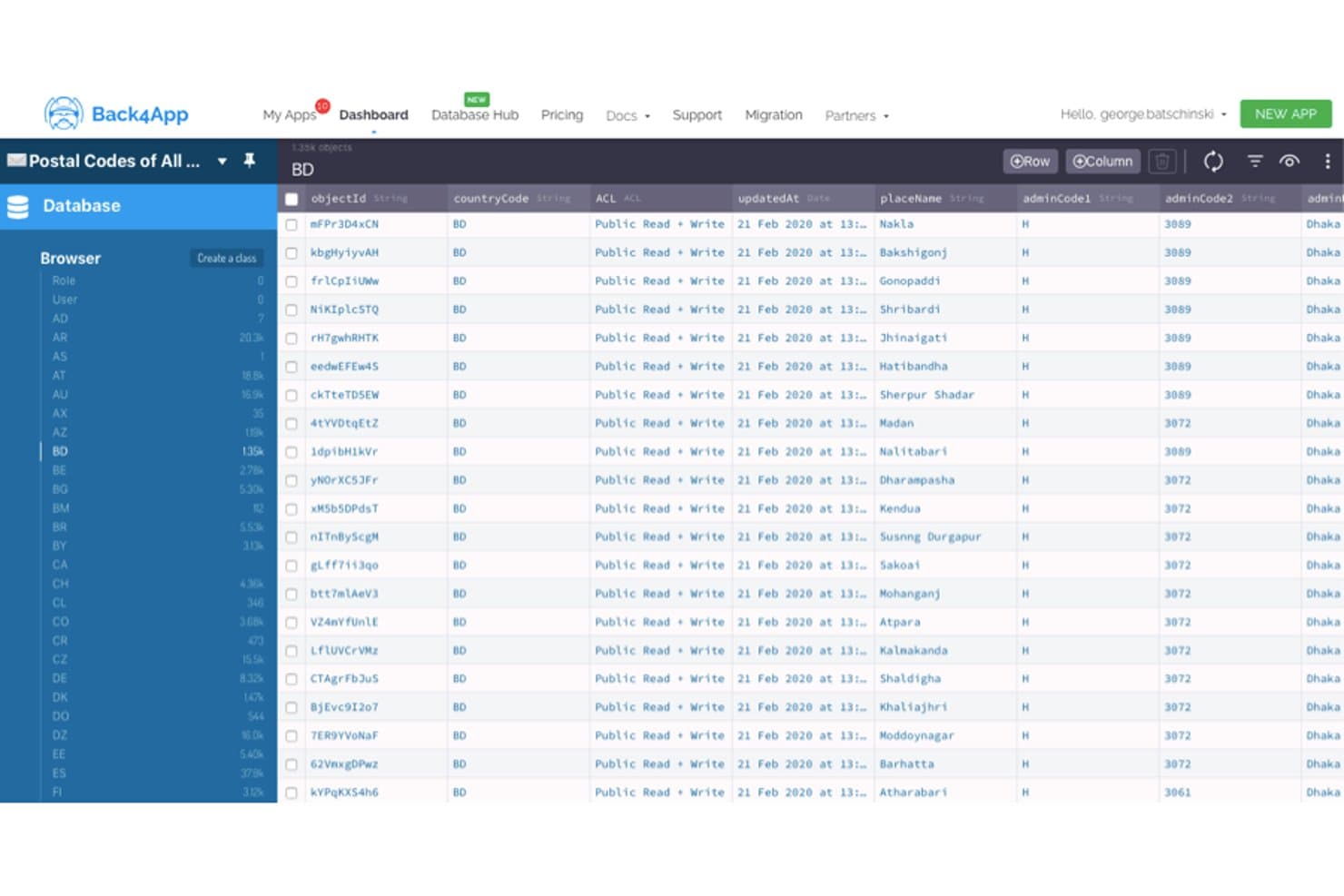
Back4App mostra i dati dei codici postali in un browser di database simile a un foglio di calcolo. Basato sul framework a codice aperto Parse Server, Back4App è una piattaforma MBaaS gestita con SDK nativi per iOS, Android, Flutter e i framework JavaScript, oltre ad autenticazione integrata, sincronizzazione dei dati in tempo reale, notifiche push e funzioni cloud serverless.
Per chi è più adatto Back4App?
Back4App è adatto alle startup orientate ai dispositivi mobili e agli sviluppatori indipendenti che hanno bisogno di un backend pronto all'uso senza dover assumere un team dedicato all'infrastruttura.
Perché ho scelto Back4App
Back4App si è guadagnato un posto nella mia lista ristretta perché la sua infrastruttura a livelli scala in modo lineare da un prototipo gratuito a un cluster dedicato con 10 CPU, senza costringere a riscrivere il backend a ogni fase. Sono particolarmente colpito dalle Live Query tramite WebSocket, che mantengono i dati dei client sincronizzati istantaneamente tra app iOS, Android e Flutter senza alcuna logica di interrogazione periodica. In combinazione con la scalabilità automatica e la distribuzione multi-regione su AWS, DigitalOcean e MongoDB Atlas, è una scelta davvero solida per i backend che devono crescere rapidamente.
Funzionalità principali di Back4App
- Autenticazione con accesso social: Supporto integrato per l'accesso con Google, GitHub, Apple e Facebook, completo di RBAC e ACL a livello di oggetto.
- Processi Cloud Code pianificati: Funzioni serverless Node.js eseguite secondo una pianificazione definita, con accesso completo ai pacchetti npm e attivatori per gli eventi del database.
- API REST e GraphQL automatiche: Ogni classe di database creata genera istantaneamente un endpoint REST e uno GraphQL completi di operazioni CRUD, filtraggio e impaginazione.
- Archiviazione dei file su CDN globale: Immagini, video e risorse di grandi dimensioni vengono distribuiti tramite una CDN integrata con ottimizzazione automatica delle immagini e caricamenti diretti tramite SDK.
Integrazioni di Back4App
Back4App dispone di integrazioni documentate con Stripe, Mailgun, Cursor, VS Code, Windsurf e Claude. Offre API REST/GraphQL e webhook per Slack, endpoint personalizzati e Zapier.
Pros and Cons
Pros:
- La base a codice aperto di Parse semplifica la migrazione
- Le Live Query supportano la sincronizzazione mobile in tempo reale
- La copertura degli SDK nativi include i principali stack mobili
Cons:
- Il piano gratuito limita i test seri del backend
- Le lacune nella documentazione complicano i flussi di lavoro CLI
Learn more about Back4App: Ideale per lo sviluppo senza codice e l'hosting cloud
- Piano gratuito disponibile
- Backendless offre un'interfaccia di sviluppo visivo per creare la logica di backend senza scrivere codice. Fornisce anche un database intuitivo, gestione degli utenti e funzioni di cloud code. Sul piano delle integrazioni, funziona perfettamente con diversi framework frontend come Angular, React e Vue, aiutando così gli sviluppatori a ottimizzare l'intero processo di sviluppo.
Visit WebsiteCustomer Rating:4.4/5
Ecco la funzione di gestione dati in Backendless. Backendless è una piattaforma backend-as-a-service (BaaS) che consente agli sviluppatori di creare applicazioni senza occuparsi della programmazione del backend. La sua natura senza codice, unita a robuste funzionalità di hosting cloud, la rende una scelta ideale per chi desidera concentrarsi maggiormente sul front end lasciando in secondo piano le preoccupazioni relative al lato server.
Perché ho scelto Backendless:
Nella scelta di uno strumento per questa lista, ho selezionato Backendless per i suoi notevoli vantaggi nello sviluppo senza codice e per l'hosting cloud. Si distingue perché permette agli sviluppatori di accelerare i propri progetti senza rimanere impigliati nelle complessità del backend.
Funzionalità principali e integrazioni:
Backendless offre un'interfaccia di sviluppo visivo per creare la logica di backend senza scrivere codice. Fornisce anche un database intuitivo, gestione degli utenti e funzioni di cloud code. Sul piano delle integrazioni, funziona perfettamente con diversi framework frontend come Angular, React e Vue, aiutando così gli sviluppatori a ottimizzare l'intero processo di sviluppo.
Pros and Cons
Pros:
- Offre sviluppo backend senza codice
- Hosting cloud affidabile e solido
- Integrazione fluida con i più diffusi framework frontend
Cons:
- L'interfaccia utente potrebbe risultare intimidatoria per i principianti
- Le limitazioni del piano gratuito possono ostacolare progetti di grandi dimensioni
- Costi aggiuntivi per l'utilizzo oltre i limiti inclusi
Learn more about Backendless: Ideale per la prototipazione rapida con i servizi AWS
- Piano gratuito disponibile
- AWS Amplify utilizza un modello di prezzo pay-as-you-go. I costi dipendono dai servizi specifici utilizzati. Ad esempio, i prezzi dell'hosting partono da $0,023 per GB servito.

Ecco la funzione di modellazione dei dati di AWS Amplify. AWS Amplify è una piattaforma di sviluppo fornita da Amazon Web Services (AWS) che consente agli sviluppatori di creare e distribuire rapidamente applicazioni mobili e web scalabili. La sua profonda integrazione con altri servizi AWS e l'attenzione alla rapida prototipazione la rendono una scelta ideale per creare prototipi in un ambiente AWS.
Perché ho scelto AWS Amplify:
Ho scelto AWS Amplify per questa lista grazie all'eccezionale supporto alla prototipazione rapida all'interno dell'ecosistema AWS. La capacità di sfruttare numerosi servizi AWS, tra cui autenticazione, API, storage e analisi, la distingue da altri strumenti. Questo rende AWS Amplify ideale per gli sviluppatori già integrati o che si stanno spostando verso l'ambiente AWS.
Funzionalità e integrazioni principali:
AWS Amplify offre un ambiente ricco di funzionalità che include Autenticazione, API GraphQL e REST, Analisi e altro ancora, tutto pensato per consentire uno sviluppo rapido di prototipi. Si integra perfettamente con una vasta gamma di altri servizi AWS, come AWS Lambda per le funzioni serverless e Amazon S3 per l'archiviazione, offrendo un'esperienza di sviluppo completa.
Pros and Cons
Pros:
- Eccellente per prototipazione rapida
- Integrazione profonda con altri servizi AWS
- Fornisce funzioni serverless
Cons:
- Il prezzo può essere complesso a causa del modello pay-as-you-go
- Curva di apprendimento più ripida per gli sviluppatori nuovi di AWS
- Può essere eccessivo per progetti di piccole dimensioni che non necessitano di servizi AWS
Learn more about AWS Amplify: Ideale per sviluppo multipiattaforma e integrazione
- Il prezzo di Azure Mobile App Service parte da $14/utente/mese per il piano Basic (fatturazione annuale). Questo prezzo non include i costi aggiuntivi per servizi extra.

Ecco la schermata del cruscotto di monitoraggio in Microsoft Azure Mobile App Service. Microsoft Azure Mobile App Service è una piattaforma cloud completa che consente agli sviluppatori di creare, testare, distribuire e gestire applicazioni per qualsiasi piattaforma, inclusi iOS, Android e Windows.
Grazie al suo solido supporto multipiattaforma e alle ampie capacità di integrazione, rappresenta una soluzione ideale per gli sviluppatori che danno priorità a questi aspetti nei loro progetti.
Perché ho scelto Microsoft Azure Mobile App Service:
Dopo aver valutato diversi strumenti, ho scelto Azure Mobile App Service per le sue funzionalità trasversali, in particolare per lo sviluppo multipiattaforma e l'integrazione dei servizi. Ciò che lo distingue è il suo forte impegno verso la compatibilità e l'integrazione con altri servizi, che lo rende una scelta eccellente per chi necessita di uno strumento eccellente in queste aree.
Funzionalità distintive e integrazioni:
Azure Mobile App Service offre funzionalità come la creazione e distribuzione su qualsiasi piattaforma utilizzando una varietà di linguaggi di sviluppo web, inclusi .NET, Node.js, Java, Python o PHP. Sono inclusi inoltre servizi pronti all'uso come notifiche push, autenticazione degli utenti, sincronizzazione offline e scalabilità automatica.
Lo strumento offre integrazioni chiave con molti altri servizi Azure, tra cui Azure DevOps per CI/CD, Azure Functions per il computing serverless e Azure Logic Apps per l'orchestrazione dei flussi di lavoro.
Pros and Cons
Pros:
- Supporto completo per diversi linguaggi di programmazione
- Robuste capacità di integrazione con altri servizi Azure
- Scalabilità e affidabilità estese
Cons:
- Può risultare complesso per i principianti a causa della vasta gamma di servizi
- I costi possono aumentare rapidamente con servizi aggiuntivi
- Richiede un periodo di apprendimento per sfruttarne appieno le capacità
Learn more about Microsoft Azure Mobile App Service: Ideale per lo sviluppo di app mobili aziendali e la gestione dei dati
- Il prezzo di Oracle Mobile Hub parte da $101.00 al mese (fatturato annualmente). Sono inclusi 20.000 chiamate API al mese e 10GB di spazio di archiviazione.

Ecco la funzione di raccolte backend mobile in Oracle Mobile App. Oracle Mobile Hub è un'offerta cloud-based di mobile-backend-as-a-service (MBaaS) di Oracle. Consente alle aziende di sviluppare, testare, connettere e gestire in modo efficace le proprie applicazioni mobili e i dati associati.
È lo strumento ideale per lo sviluppo di app mobili aziendali e per la gestione dei dati, grazie alle sue funzionalità avanzate e alla comprovata esperienza di Oracle nella gestione delle informazioni.
Perché ho scelto Oracle Mobile Hub:
Nella scelta di Oracle Mobile Hub, ciò che mi ha colpito maggiormente è stata la sua ampia suite di strumenti e funzionalità pensate per le esigenze delle aziende. Inoltre, grazie alla vasta esperienza di Oracle nella gestione dei dati, la piattaforma eccelle nella gestione di requisiti dati complessi all'interno di un ecosistema di app mobili.
Per questi motivi, ritengo che Oracle Mobile Hub sia la soluzione ideale per lo sviluppo di app mobili e la gestione dei dati a livello aziendale.
Caratteristiche distintive e integrazioni:
Oracle Mobile Hub offre strumenti robusti di sviluppo applicativo come API Catalog, che semplifica il processo di integrazione con altri sistemi. Altre funzionalità degne di nota includono Mobile Analytics, che fornisce informazioni sull'utilizzo e le performance delle app. Si integra con altri servizi Oracle come Oracle Database e Oracle Identity Management, garantendo una soluzione aziendale completa.
Pros and Cons
Pros:
- Set di strumenti completo per lo sviluppo di app mobili aziendali
- Forte integrazione con altri servizi Oracle
- Ottimo supporto per la gestione dei dati
Cons:
- Più costoso rispetto ad alcune altre piattaforme
- Può risultare complesso per applicazioni di piccola scala
- Integrazione limitata con servizi di terze parti
Learn more about Oracle Mobile Hub: Ideale per le esigenze di sviluppo mobile open-source
- Parse è una piattaforma open-source e quindi è gratuita.

Screenshot della dashboard di Parse, che offre una rapida visuale sull'archiviazione dei dati IoT. Parse è una piattaforma Backend as a Service (BaaS) open-source altamente flessibile, particolarmente adatta allo sviluppo di applicazioni mobili. Grazie alla sua ampia gamma di funzionalità, gli sviluppatori possono creare, ospitare e mantenere applicazioni in modo più efficiente, rendendolo una soluzione ideale per esigenze di sviluppo mobile open-source.
Perché ho scelto Parse:
Ho scelto Parse per la sua natura open-source di rilievo e la sua attenzione allo sviluppo mobile. Confrontando vari strumenti MBaaS, Parse si è distinto per le estese opzioni di personalizzazione e una solida community di sviluppatori. Sono proprio questa flessibilità e questo supporto a rendere Parse una delle migliori scelte per chi ha necessità di sviluppo mobile open-source.
Caratteristiche principali e integrazioni:
Le principali funzionalità di Parse includono una dashboard facile da usare, funzioni cloud code e un database in tempo reale. Queste caratteristiche facilitano lo sviluppo e la gestione efficiente delle applicazioni.
Per quanto riguarda le integrazioni, Parse offre software development kit (SDK) per molte piattaforme, incluse iOS, Android, JavaScript, Flutter e altre, agevolando così lo sviluppo di app multipiattaforma.
Pros and Cons
Pros:
- Open-source con ampie possibilità di personalizzazione
- Numerosi SDK specifici per piattaforma
- Comunità di sviluppatori solida
Cons:
- Può richiedere maggiori competenze di sviluppo rispetto alle soluzioni BaaS gestite
- Assenza di supporto clienti diretto
- Alcune funzionalità avanzate possono richiedere configurazioni complesse
Learn more about Parse: Ideale per la sincronizzazione dei dati in tempo reale
- Download gratuito + demo gratuita disponibile
- Prezzo su richiesta

Ecco la funzionalità indice IoT di Kuzzle, che contiene informazioni sul dispositivo, stato del dispositivo e raccolte di aggiornamenti. Kuzzle è una soluzione backend IoT e MBaaS scalabile e open-source, rinomata per le sue capacità in tempo reale. Fornisce agli sviluppatori un set di strumenti flessibili per gestire strutture dati complesse e garantire una sincronizzazione efficace tra diversi sistemi in tempo reale.
Perché ho scelto Kuzzle:
Ho scelto Kuzzle per la sua gestione eccezionale della sincronizzazione dei dati in tempo reale. Dalla mia comparazione approfondita, si distingue per essere open-source e per il suo focus sulla gestione dei dati in tempo reale. L'aspetto real-time è fondamentale nelle applicazioni mobili odierne, e la capacità di Kuzzle di gestirlo senza sforzo lo rende la scelta migliore per questi casi d'uso.
Funzionalità principali e integrazioni:
Kuzzle offre funzionalità come geofencing, messaggistica pub/sub e gestione del database in tempo reale. Le sue regole di validazione dei dati e il controllo degli accessi basato sui ruoli migliorano la sicurezza e la conformità. In termini di integrazioni, Kuzzle supporta connessioni a diversi database, tra cui PostgreSQL, Elasticsearch e Redis, aumentando la flessibilità nella gestione e nell'analisi dei dati.
Pros and Cons
Pros:
- Eccellente sincronizzazione dei dati in tempo reale
- La piattaforma open-source consente la personalizzazione
- Varietà di integrazioni con database supportate
Cons:
- I dettagli sui prezzi non sono trasparenti
- Potrebbe essere troppo complesso per applicazioni semplici
- Richiede competenze tecniche per l'installazione e la gestione
Learn more about Kuzzle: Ideale per soluzioni complete di back-end
- Piano gratuito disponibile
- A partire da $5/mese
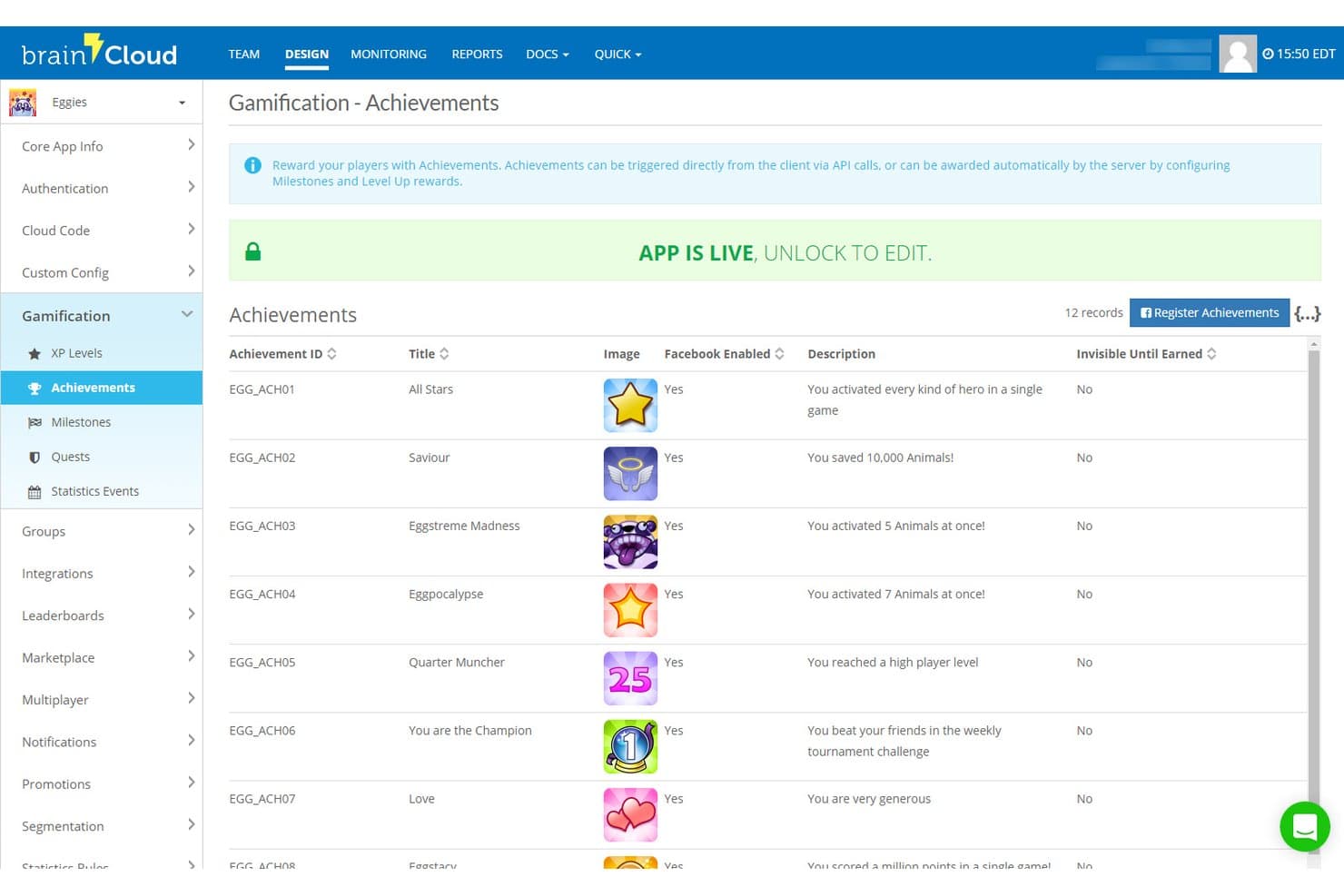
brainCloud consente agli utenti di gestire i traguardi di gioco con descrizioni e integrazione con Facebook. brainCloud è una piattaforma MBaaS progettata per giochi e app interattive, che offre autenticazione degli utenti, archiviazione dei dati nel cloud, Cloud Code senza server, infrastruttura multiplayer in tempo reale, notifiche push e strumenti LiveOps tramite un'ampia gamma di SDK per motori di gioco.
Per chi è più adatto brainCloud?
brainCloud è particolarmente adatto agli studi di sviluppo di giochi e ai team che realizzano app interattive e necessitano di funzionalità LiveOps, multiplayer e sistemi di back-end avanzati senza doverli sviluppare da zero.
Perché ho scelto brainCloud
Ho scelto brainCloud come una delle soluzioni migliori perché il suo catalogo di funzionalità di back-end è insolitamente completo per una piattaforma MBaaS gestita. Mi ha colpito in particolare il modo in cui Cloud Code gestisce routine JavaScript con controllo delle versioni e pianificabili, con hook API e accesso a servizi web esterni, evitando così di dover combinare strumenti senza server separati per eseguire la logica di gioco o le campagne LiveOps. Il livello Entità personalizzate supporta indicizzazione personalizzata, partizionamento e milioni di record, caratteristiche che, a mio avviso, lo rendono una soluzione davvero valida per i team che sviluppano app interattive ad alta intensità di dati su larga scala.
Caratteristiche principali di brainCloud
- Infrastruttura multiplayer in tempo reale: i server Room e Relay supportano fino a 40 giocatori per sessione, con scalabilità elastica e multiregione per modalità di gioco in tempo reale, a turni e asincrone.
- Strumenti per le campagne LiveOps: pianifica promozioni automatizzate, vendite segmentate e codici di riscatto che diventano attivi senza richiedere un aggiornamento dell'app.
- Motore di segmentazione degli utenti: raggruppa i giocatori in base al comportamento, all'attività o a criteri personalizzati per indirizzare notifiche push, promozioni e interrogazioni analitiche.
- Classifiche e tornei: classifiche native ordinate con supporto per tornei basati su divisioni, punteggi configurabili e gestione integrata delle rotazioni.
Integrazioni di brainCloud
brainCloud dispone di integrazioni documentate con Segment.com, Kafka, EdgeGap, Amazon GameLift, i3D Flex Metal, SendGrid e WebPurify. Fornisce inoltre API e Cloud Code per integrazioni personalizzate.
Pros and Cons
Pros:
- Ampio supporto per le identità con unione degli account
- Il Cloud Code con controllo delle versioni supporta routine pianificate
- La sincronizzazione multiplayer supporta modalità in tempo reale e asincrone
Cons:
- L'attenzione ai motori di gioco limita l'attrattiva per le app generiche
- La documentazione può ostacolare la prima implementazione
Learn more about brainCloud:
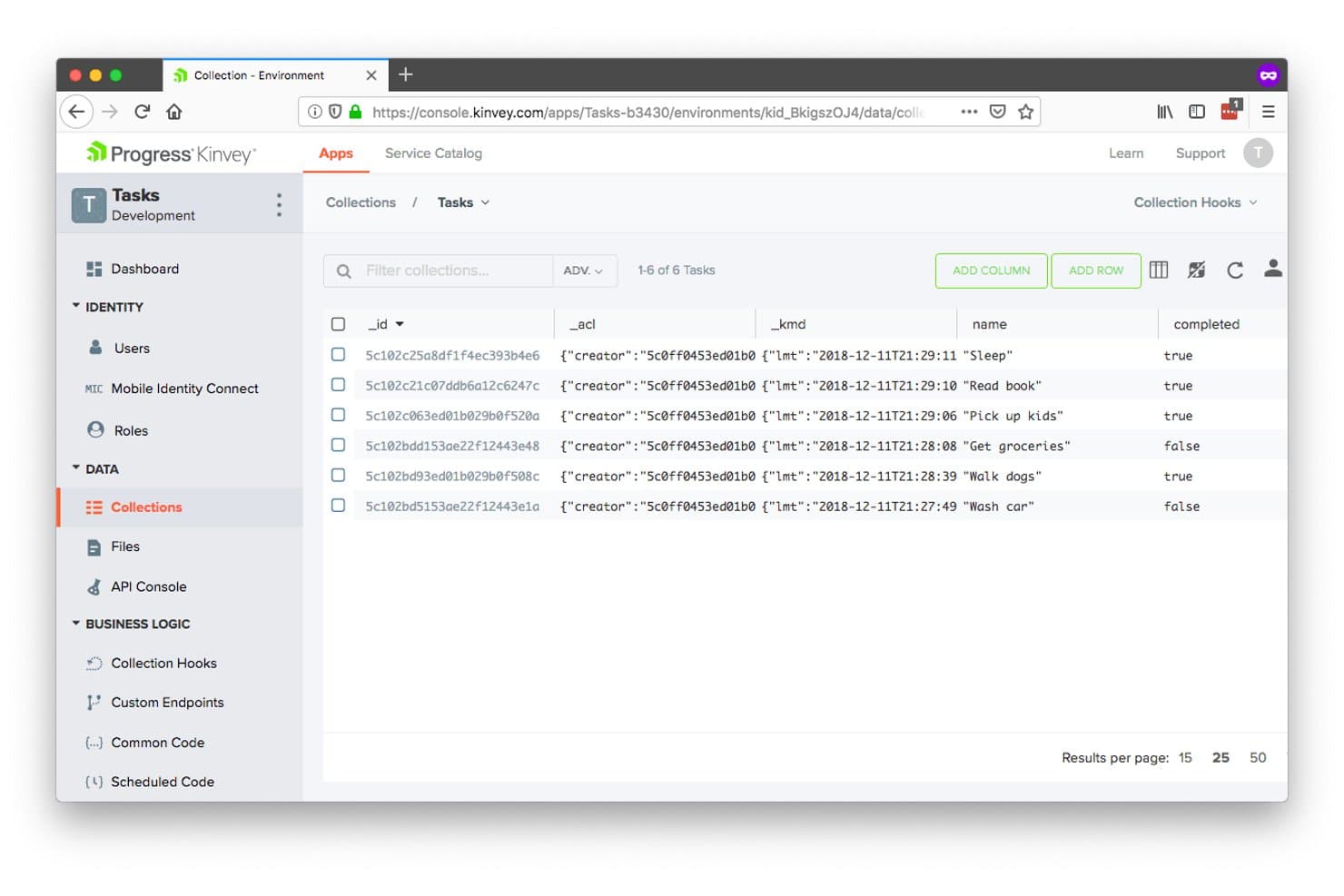
Kinvey consente agli utenti di gestire visivamente le raccolte di dati del back-end. Kinvey è una piattaforma di back-end mobile come servizio (MBaaS) di Progress che offre archiviazione gestita dei dati, autenticazione degli utenti, funzioni cloud senza server, notifiche push e sincronizzazione dei dati in tempo reale, con un livello brevettato di integrazione dei dati che espone i sistemi esistenti e locali come API moderne.
Per chi è più indicato Kinvey?
Kinvey è adatto ai team aziendali di sviluppo mobile che devono esporre i sistemi esistenti locali come API moderne senza riprogettare l'infrastruttura esistente.
Perché ho scelto Kinvey
Ho incluso Kinvey tra le mie scelte principali perché il suo livello brevettato di integrazione dei dati fa qualcosa che la maggior parte delle piattaforme MBaaS semplicemente non fa: espone i sistemi esistenti locali come API REST moderne senza riprogettare o replicare i dati. Se il tuo team gestisce un sistema ERP o EHR con cui le app mobili devono comunicare, l'approccio di Kinvey alla 'Modernizzazione immediata dei dati' collega direttamente quell'infrastruttura esistente. Apprezzo anche la funzionalità 'Connessione dell'identità mobile', che integra i fornitori di identità aziendali come Active Directory e SAML nei flussi di autenticazione mobile senza richiedere sviluppo back-end personalizzato.
Funzionalità principali di Kinvey
- Kinvey Studio: Un ambiente visivo di sviluppo a basso codice per creare app mobili, web e chatbot, con generazione bidirezionale del codice per gli sviluppatori professionisti.
- Kinvey DataStore: Un archivio di dati NoSQL gestito, con API CRUD e di query ottimizzate per dispositivi mobili per accedere ai dati strutturati su app iOS, Android e web.
- Sincronizzazione dei dati offline: La sincronizzazione incrementale a livello di SDK consente alle app mobili di sincronizzare con il cloud grandi set di dati offline, composti da centinaia di migliaia di record, senza aggiornamenti completi.
- Notifiche push: Distribuzione integrata delle notifiche push per app iOS e Android, configurabile direttamente tramite l'SDK di Kinvey senza configurazioni di terze parti.
Integrazioni di Kinvey
Kinvey si connette a Salesforce, SAP, Microsoft, Oracle e ai sistemi EHR, oltre che ai fornitori di identità Active Directory, OpenID e SAML. Le sue API REST e la connettività DataDirect supportano l'accesso personalizzato a origini dati esistenti e locali.
Pros and Cons
Pros:
- Modernizza i sistemi esistenti senza riprogettare l'infrastruttura
- Supporta grandi set di dati offline con sincronizzazione incrementale
- Offre un'ampia compatibilità con i framework mobili
Cons:
- Lo stato attuale del supporto rimane incerto
- La progettazione incentrata su REST è meno avanzata rispetto alle piattaforme GraphQL più recenti
Learn more about Kinvey:
Altri software MBaaS
Di seguito trovi un elenco di altri software MBaaS che ho selezionato, ma che non sono entrati tra i primi 12. Vale sicuramente la pena prenderli in considerazione.
- 11KumulosIdeale per un'analisi approfondita delle prestazioni delle app
- 12GameSparksIdeale per lo sviluppo di backend per videogiochi
- 13Apps PanelIdeale per integrare rapidamente funzionalità native
- 14Appgyver ComposerIdeale per lo sviluppo di app low-code
- 15AppDragIdeale per lo sviluppo visivo e l'hosting cloud
- 16BaasBoxIdeale per l'archiviazione e il recupero sicuri dei dati
Come Valuto i Software MBaaS
Valuto gli strumenti MBaaS su due livelli: le basi del backend senza cui un'app mobile non può esistere—autenticazione, SDK, sincronizzazione in tempo reale—e i fattori differenzianti che contano per il tuo specifico team e stack.
Funzionalità di Base (Criteri Minimi per Questa Lista)
Quando seleziono gli strumenti per la mia lista, valuto ciascuno su una scala da 0 (non offre la funzionalità) a 5 (eccelle in quest'area) per ogni funzionalità di base elencata di seguito. Poi calcolo il punteggio totale dello strumento in percentuale. Ogni strumento deve ottenere un punteggio totale minimo del 65% per essere preso in considerazione.
- SDK Mobile & Copertura delle Piattaforme: Verifico la presenza di SDK nativi per iOS, Android e framework multipiattaforma come Flutter o React Native, poiché la maggior parte dei team distribuisce su più piattaforme contemporaneamente.
- Servizi di Autenticazione Utente: I flussi di autenticazione integrati sono fondamentali—valuto il supporto per il login tramite social, le opzioni MFA e se la piattaforma gestisce i provider di identità, così il tuo team non dovrà implementare OAuth da zero.
- Archiviazione Dati Cloud & API: Esamino lo strato di database gestito, inclusa la disponibilità di API ottimizzate per il mobile per operazioni comuni come query, filtri e paginazione.
- Consegna di Notifiche Push: La capacità di inviare notifiche push segmentate e mirate su iOS e Android da un unico backend è un requisito che cerco in ogni MBaaS che prendo in considerazione.
- Funzioni Cloud Serverless: Controllo se la piattaforma supporta logiche personalizzate lato server attivate da scritture database, eventi di autenticazione o chiamate HTTP—come ad esempio l'invio di una email di benvenuto dopo la registrazione.
- Sincronizzazione Dati in Tempo Reale: Per app come chat, dashboard in diretta o strumenti collaborativi, valuto come la piattaforma gestisce listener in tempo reale e la persistenza dei dati offline sul dispositivo.
Una volta che ho una lista di strumenti che soddisfano questi criteri, considero ciò che distingue ogni piattaforma.
Fattori Differenzianti (Cosa Distingue i Fornitori)
Ecco come confronto i diversi fornitori:
Caratteristiche Distintive
Configurazione remota e feature flag permettono al tuo team di attivare o disattivare funzionalità e rilasciare aggiornamenti senza attendere le revisioni degli app store—un enorme vantaggio se serve disattivare velocemente una funzione buggata. Valuto inoltre se una piattaforma offre un livello API GraphQL, che concede ai client mobile maggiore controllo su forma e dimensione delle risposte dati. Per le app con utenti distribuiti a livello globale, opzioni di deployment multi-regione aiutano a ridurre la latenza e a soddisfare requisiti di residenza dei dati.
Oltre le Caratteristiche
Il rischio di lock-in del fornitore è reale nell'ambito MBaaS. Valuto se una piattaforma permette l'esportazione dati, offre opzioni self-hosted o si basa su standard aperti come REST e OAuth—perché migrare utenti autenticati e funzioni cloud a progetto avanzato è complesso. Anche la struttura dei prezzi è importante, in particolare come i costi crescono in base agli utenti attivi mensili. Un generoso piano gratuito aiuta nella prototipazione, ma verifico anche che il pricing sia prevedibile con la crescita. L'esperienza per gli sviluppatori è fondamentale: una buona documentazione SDK, strumenti CLI e emulatori locali fanno davvero la differenza nella velocità di onboarding.
Come scegliere il software MBaaS
È facile perdersi in lunghi elenchi di funzionalità e strutture tariffarie complesse. Per aiutarti a rimanere concentrato mentre affronti il tuo specifico processo di selezione del software, ecco un elenco di fattori da tenere a mente:
| Fattore | Cosa considerare |
|---|---|
| FattoreScalabilità | Cosa considerareIl software può crescere insieme alla tua azienda? Cerca soluzioni in grado di gestire quantità crescenti di dati e richieste degli utenti senza problemi di prestazioni o costi aggiuntivi. |
| FattoreIntegrazioni | Cosa considerareSi collega agli strumenti che già utilizzi? Assicurati che sia compatibile con il tuo attuale stack tecnologico per evitare interruzioni dei flussi di lavoro. |
| FattorePersonalizzazione | Cosa considerarePuoi adattarlo alle tue esigenze? Verifica se la piattaforma consente di creare funzionalità o flussi di lavoro personalizzati in linea con i processi aziendali. |
| FattoreFacilità d'uso | Cosa considerareÈ intuitivo per il tuo team? Considera la curva di apprendimento e se l'interfaccia è adatta al livello di competenza del tuo team. |
| FattoreImplementazione e avvio | Cosa considerareQuanto velocemente puoi iniziare? Valuta il processo di configurazione e la disponibilità di risorse formative per garantire una transizione senza intoppi. |
| FattoreCosto | Cosa considerareRientra nel tuo budget? Confronta i piani tariffari, comprese le commissioni nascoste, e considera i costi a lungo termine rispetto ai vantaggi. |
| FattoreMisure di sicurezza | Cosa considerareI tuoi dati e i tuoi utenti sono protetti? Cerca certificazioni di sicurezza e funzionalità come la crittografia e i controlli di accesso. |
| FattoreDisponibilità dell'assistenza | Cosa considerarePuoi ricevere aiuto quando ne hai bisogno? Verifica i canali di assistenza del fornitore, i tempi di risposta e la disponibilità per assicurarti un supporto affidabile. |
Che cos'è il software MBaaS?
Il software MBaaS è una piattaforma che gestisce l'infrastruttura backend per le app mobili e web. Gli sviluppatori e i professionisti IT utilizzano generalmente questi strumenti per accelerare lo sviluppo e ridurre il carico della gestione backend. Funzionalità come l'archiviazione dei dati, l'autenticazione degli utenti e le notifiche push aiutano a garantire scalabilità, integrazione e facilità d'uso. Nel complesso, gli strumenti MBaaS semplificano lo sviluppo delle app e migliorano la produttività.
Funzionalità
Quando selezioni un software MBaaS, presta attenzione alle seguenti funzionalità chiave:
- Archiviazione dei dati: Fornisce soluzioni di archiviazione sicure e scalabili per i dati delle app, contribuendo a gestire in modo efficiente le informazioni degli utenti.
- Autenticazione degli utenti: Offre strumenti per gestire i processi di registrazione e accesso degli utenti, garantendo un controllo sicuro degli accessi.
- Notifiche push: Consente di inviare avvisi in tempo reale agli utenti, migliorando il coinvolgimento e la comunicazione.
- Software di analisi mobile con report: Fornisce informazioni sulle prestazioni dell'app e sul comportamento degli utenti, favorendo decisioni basate sui dati.
- Funzionalità di integrazione: Permette una connessione fluida con gli strumenti e le piattaforme esistenti, garantendo la continuità dei flussi di lavoro.
- Flussi di lavoro personalizzabili: Offre la flessibilità di adattare processi e funzionalità a specifiche esigenze aziendali.
- Sincronizzazione dei dati in tempo reale: Garantisce la coerenza dei dati tra i dispositivi, offrendo un'esperienza utente uniforme.
- Funzionalità di sicurezza: Include crittografia e controlli degli accessi per proteggere i dati delle app e la privacy degli utenti.
- Scalabilità: Supporta la crescita dei dati e delle esigenze degli utenti senza influire sulle prestazioni o comportare costi aggiuntivi.
- Strumenti per sviluppatori: Fornisce API e SDK per facilitare lo sviluppo e l'integrazione, accelerando il processo di creazione delle app.
Vantaggi
L'implementazione di un software MBaaS offre diversi vantaggi al tuo team e alla tua azienda. Ecco alcuni dei vantaggi che puoi aspettarti:
- Sviluppo più rapido: Accelera la creazione delle app gestendo l'infrastruttura backend e consentendo agli sviluppatori di concentrarsi sulle funzionalità front-end.
- Riduzione dei costi: Riduce le spese per l'infrastruttura fornendo capacità di archiviazione e potenza di elaborazione scalabili secondo necessità.
- Sicurezza migliorata: Protegge i dati degli utenti con funzionalità di sicurezza integrate come la crittografia e i controlli degli accessi.
- Maggiore coinvolgimento degli utenti: Migliora la comunicazione con notifiche push e sincronizzazione dei dati in tempo reale, mantenendo gli utenti informati e connessi.
- Scalabilità: Cresce insieme alla tua azienda, gestendo l'aumento degli utenti e dei dati senza problemi di prestazioni.
- Informazioni basate sui dati: Offre strumenti di analisi per monitorare le prestazioni dell'app e il comportamento degli utenti, supportando decisioni consapevoli.
- Integrazione semplice: Si collega agli strumenti e alle piattaforme esistenti, garantendo flussi di lavoro fluidi e riducendo al minimo le interruzioni.
Costi e prezzi
La selezione di un software MBaaS richiede la comprensione dei vari modelli e piani tariffari disponibili. I costi variano in base alle funzionalità, alle dimensioni del team, agli elementi aggiuntivi e ad altri fattori. La tabella seguente riassume i piani comuni, i relativi prezzi medi e le funzionalità tipicamente incluse nelle soluzioni software MBaaS:
Tabella di confronto dei piani per il software MBaaS
| Tipo di piano | Prezzo medio | Funzionalità comuni |
|---|---|---|
| Tipo di pianoPiano gratuito | Prezzo medio$0 | Funzionalità comuniArchiviazione di base dei dati, chiamate API limitate e supporto della comunità. |
| Tipo di pianoPiano personale | Prezzo medio$10-$30/user/month | Funzionalità comuniArchiviazione avanzata dei dati, autenticazione degli utenti, notifiche push e supporto via e-mail. |
| Tipo di pianoPiano aziendale | Prezzo medio$50-$100/user/month | Funzionalità comuniAnalisi avanzate, sincronizzazione dei dati in tempo reale, integrazioni e supporto prioritario. |
| Tipo di pianoPiano Enterprise | Prezzo medio$150+/user/month | Funzionalità comuniFlussi di lavoro personalizzabili, account manager dedicato, controlli di sicurezza e garanzie SLA. |
Domande frequenti sul software MBaaS
Ecco alcune risposte alle domande più comuni sul software MBaaS:
È possibile integrare MBaaS con i sistemi esistenti?
La maggior parte delle piattaforme MBaaS offre funzionalità di integrazione tramite API, consentendo di collegarsi agli strumenti e ai servizi esistenti. Questo garantisce che i flussi di lavoro rimangano intatti e permette di sfruttare gli investimenti già effettuati. Verifica la compatibilità con il tuo attuale stack tecnologico prima di procedere.
In che modo il software MBaaS si confronta con lo sviluppo di un back-end personalizzato?
Il software MBaaS offre un’implementazione più rapida, funzionalità predefinite e costi iniziali inferiori rispetto allo sviluppo di un back-end personalizzato. I back-end personalizzati offrono un maggiore controllo per requisiti complessi, ma richiedono competenze specialistiche e manutenzione continua. Molti team scelgono il software per uno sviluppo rapido, ricorrendo allo sviluppo personalizzato per esigenze specifiche.
È possibile migrare tra diversi fornitori di software MBaaS?
La migrazione tra fornitori di software MBaaS può essere complessa, a seconda dell’integrazione con funzionalità e API specifiche del fornitore. Per facilitare eventuali migrazioni, utilizza livelli di astrazione durante l’implementazione del software. Alcune piattaforme software offrono strumenti di migrazione per agevolare il trasferimento dei dati da servizi concorrenti.
Come possono le aziende garantire la conformità dei dati quando utilizzano il software MBaaS?
Le aziende dovrebbero verificare che i fornitori di software offrano certificazioni di conformità pertinenti al proprio settore (GDPR, HIPAA, SOC2). Implementa policy di governance dei dati in linea con le funzionalità della piattaforma software MBaaS scelta. Molte soluzioni software MBaaS aziendali forniscono opzioni di residenza dei dati, controlli di crittografia e registri di audit per contribuire a mantenere i requisiti di conformità.