

Le migliori alternative ad Automox offrono una gestione degli endpoint nativa del cloud con un’automazione affidabile delle patch, un ampio supporto per i sistemi operativi e solidi controlli di sicurezza. Se stai cercando alternative ad Automox, probabilmente hai bisogno di una piattaforma in grado di gestire ambienti complessi e distribuiti senza aggiungere costi operativi o rischi.
Con l’evoluzione delle minacce e i team IT sottoposti a una forte pressione, scegliere la soluzione giusta è essenziale per mantenere la disponibilità operativa, la conformità e il controllo. Questo elenco ti aiuterà a confrontare le opzioni principali, così potrai trovare uno strumento adatto alle esigenze della tua organizzazione e in grado di proteggere i tuoi endpoint.
Che cos’è Automox?
Automox è una piattaforma di gestione degli endpoint nativa del cloud progettata per automatizzare l’applicazione delle patch, la configurazione e gli aggiornamenti di sicurezza su più sistemi operativi. I team IT utilizzano Automox per gestire e proteggere gli endpoint da un’unica dashboard, indipendentemente dalla loro posizione. La piattaforma supporta dispositivi Windows, macOS e Linux, aiutando le organizzazioni a ridurre le vulnerabilità e a mantenere la conformità. Automox è apprezzato per la sua scalabilità, l’accesso remoto sicuro e la capacità di semplificare le attività di manutenzione ordinaria degli endpoint.
Tabella di confronto: alternative ad Automox
Questa tabella di confronto riassume i dettagli sui prezzi delle mie migliori alternative ad Automox.
| Tool | Best For | Trial Info | Price | ||
|---|---|---|---|---|---|
| 1 | Ideale per l'automazione del ciclo di vita dei dispositivi basata sulle informazioni HR | Prova gratuita di 14 giorni | A partire da $8/utente/mese | Website | |
| 2 | Ideale per patching remoto su endpoint distribuiti | Disponibile piano gratuito | Prezzo su richiesta | Website | |
| 3 | Ideale per la gestione cross-platform di dispositivi e identità | Prova gratuita di 30 giorni + demo gratuita disponibile | Prezzo su richiesta | Website | |
| 4 | Ideale per l'automazione delle patch multi-OS su reti | Prova gratuita di 30 giorni | Da $245/mese (fatturato annualmente) | Website | |
| 5 | Ideale per il patching su larga scala in aziende complesse | Prova gratuita disponibile | Prezzo su richiesta | Website | |
| 6 | Ideale per l'integrazione con ambienti Microsoft 365 | Prova gratuita di 30 giorni disponibile | A partire da $4/utente/mese (fatturato annualmente) | Website | |
| 7 | Ideale per la gestione centralizzata delle patch in ambienti Windows | Prova gratuita di 30 giorni | Prezzo su richiesta | Website | |
| 8 | Ideale per flussi di lavoro di distribuzione software personalizzati | Prova gratuita di 14 giorni | Prezzo su richiesta | Website | |
| 9 | Ideale per applicazione granulare delle patch sui server Windows | Demo gratuita disponibile | Prezzo su richiesta | Website | |
| 10 | Ideale per la gestione unificata di dispositivi eterogenei | Demo gratuita disponibile | Prezzo su richiesta | Website |


Perché fidarsi dei nostri consigli sui software
6,700+
Reviews
20
Industry experts
16+
Evaluation factors
14
Years
Il nostro team testa e recensisce software dal 2012. In quanto leader tecnologici noi stessi, sappiamo quanto sia difficile — e importante — scegliere il software giusto.
Per questa guida, abbiamo valutato gli strumenti attraverso test praticie ricerche indipendenti, assegnando un punteggio agli strumenti in base ai nostri criteri di selezione.
Le nostre recensioni riflettono il nostro giudizio editoriale umano, non un discorso di vendita.
Revisori esperti:
- Paulo Gardini MiguelDirettore tecnico
 Tim FisherVP dell'IA
 Gabriel RosasTech Lead e architetto software
 Christhian GruhnTech Lead e architetto della piattaforma

Recensioni delle migliori alternative ad Automox
Di seguito trovi i miei riepiloghi dettagliati delle migliori alternative ad Automox incluse nel mio elenco. Le mie recensioni offrono un’analisi approfondita delle funzionalità, delle capacità e dei casi d’uso ideali di ogni piattaforma, per aiutarti a trovare quella più adatta a te.
 Ideale per l'automazione del ciclo di vita dei dispositivi basata sulle informazioni HR
- Prova gratuita di 14 giorni
- A partire da $8/utente/mese
Visit WebsiteCustomer Rating:4.8/5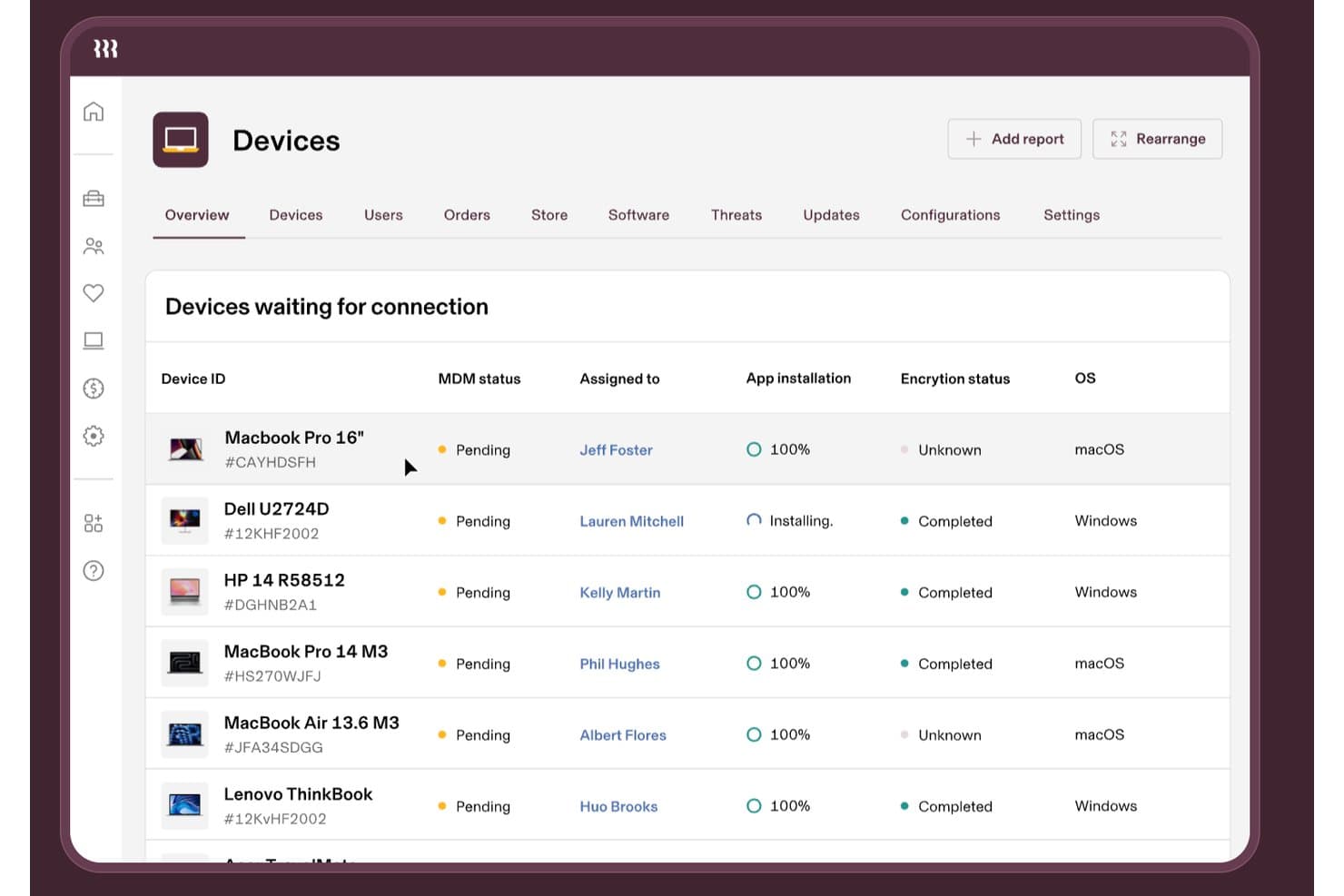
Rippling IT monitora lo stato MDM dei dispositivi, la crittografia e le installazioni delle app. Rippling IT è un software per la gestione degli endpoint destinato ai team IT e HR, che centralizza il provisioning dei dispositivi, l'accesso alle applicazioni, i controlli di sicurezza e la dismissione degli accessi per una forza lavoro distribuita.
Per chi è più indicato Rippling IT?
Team IT e HR di aziende con una forza lavoro distribuita che hanno bisogno che le modifiche relative ai dipendenti attivino il provisioning dei dispositivi, gli aggiornamenti degli accessi e le attività di dismissione.
Perché Rippling IT è una valida alternativa ad Automox
Ho scelto Rippling IT perché la sua automazione del ciclo di vita dei dispositivi, basata sulle informazioni HR, collega le modifiche relative ai dipendenti alle attività IT. Il mio team lo utilizza per attivare il provisioning dei dispositivi, gli aggiornamenti degli accessi alle applicazioni, i controlli di sicurezza e le attività di dismissione da un unico flusso di lavoro. Questo ci aiuta a gestire le modifiche agli endpoint quando i dipendenti entrano in azienda, cambiano ruolo o lasciano l'organizzazione.
Funzionalità principali di Rippling IT
- Gestione multipiattaforma: Gestisci gli endpoint macOS, Windows, iOS e iPadOS.
- Inventario dei dispositivi: Visualizza numeri di serie, versioni del sistema operativo, stato della batteria e utilizzo del disco.
- Profili di configurazione: Distribuisci le impostazioni per Wi-Fi, firewall, stampanti e accesso.
- Esecuzione di script sugli endpoint: Esegui script Bash o PowerShell pianificati sui dispositivi gestiti.
Integrazioni di Rippling IT
Rippling offre oltre 600 integrazioni pronte all'uso, tra cui Okta, Microsoft Entra ID, Slack, Zendesk e Cylance. Fornisce inoltre kit per sviluppatori e un App Shop per le integrazioni personalizzate.
Pros and Cons
Pros:
- Le modifiche relative alle risorse umane attivano i flussi di lavoro del ciclo di vita dei dispositivi
- Supporta macOS, Windows, iOS e iPadOS
- Fornisce inventario, profili ed esecuzione di script sugli endpoint
Cons:
- Meno focalizzato sull'automazione delle patch di terze parti
- Alcuni amministratori segnalano esperienze MDM difficili
Learn more about Rippling IT: Ideale per patching remoto su endpoint distribuiti
- Disponibile piano gratuito
- Prezzo su richiesta
Visit WebsiteCustomer Rating:4.9/5
Action1 offre una dashboard di gestione endpoint che mostra i dispositivi gestiti con il relativo stato. Action1 è una piattaforma SaaS per la gestione delle patch progettata per i team IT che gestiscono endpoint distribuiti o remoti. È particolarmente utile per le organizzazioni che devono mantenere sicurezza e conformità sui dispositivi al di fuori delle tradizionali reti aziendali. Se stai cercando una soluzione che semplifica la gestione remota delle patch senza necessità di infrastrutture in locale, Action1 merita considerazione.
A chi è più indicato Action1?
Action1 è perfetto per i team IT di aziende di medie dimensioni e per i Managed Service Provider (MSP) che devono gestire il patching di endpoint remoti o distribuiti in più sedi.
Perché Action1 è una valida alternativa ad Automox
Ciò che distingue Action1 come alternativa ad Automox è il suo focus sulla gestione remota delle patch per endpoint distribuiti. L’ho selezionato perché consente ai team IT di distribuire e gestire patch su dispositivi non collegati alla rete aziendale, caratteristica essenziale per supportare il lavoro da remoto e ibrido. Il design nativo per il cloud della piattaforma significa che non servono server in sede o VPN per mantenere sicuri e conformi gli endpoint. Se gestisci endpoint in più sedi o per clienti con personale remoto, le capacità di patching remoto di Action1 lo rendono una scelta eccellente.
Principali funzionalità di Action1
Altre funzionalità che risaltano per i team IT che prendono in considerazione Action1 includono:
- Policy di approvazione delle patch automatizzate: Imposta regole per approvare o rifiutare automaticamente le patch in base a gravità, fornitore o prodotto.
- Inventario degli endpoint in tempo reale: Visualizza dettagli aggiornati di hardware e software per ogni dispositivo gestito nell’ambiente.
- Controlli di accesso basati sui ruoli: Assegna permessi granulari a utenti e gruppi per gestire chi può amministrare, distribuire o visualizzare le patch.
- Log di audit dettagliati: Traccia tutte le azioni e modifiche di patching per motivi di conformità e auditing di sicurezza.
Integrazioni di Action1
Le integrazioni includono Microsoft Entra ID, Okta, Duo, Microsoft Intune e altre ancora.
Pros and Cons
Pros:
- Gratuito fino a 200 endpoint
- Reportistica in tempo reale sulla conformità delle patch
- Workflow di approvazione patch automatizzati
Cons:
- La velocità di distribuzione delle patch può talvolta essere lenta
- Le esportazioni dei report non offrono personalizzazione avanzata
Learn more about Action1: Ideale per la gestione cross-platform di dispositivi e identità
- Prova gratuita di 30 giorni + demo gratuita disponibile
- Prezzo su richiesta
Visit WebsiteCustomer Rating:4.6/5
JumpCloud offre una dashboard che mostra statistiche su utenti, dispositivi e applicazioni con notifiche operative. JumpCloud offre una piattaforma unificata per la gestione dei dispositivi e delle identità degli utenti in ambienti Windows, macOS e Linux. È una scelta efficace per i team IT che hanno bisogno di applicare politiche di sicurezza e controllare l'accesso da un'unica console basata su cloud. Se desideri semplificare la gestione degli endpoint e delle identità cross-platform, JumpCloud soddisfa entrambe le esigenze in un'unica soluzione.
Per chi è JumpCloud?
JumpCloud è ideale per i team IT delle aziende di medie dimensioni che devono gestire dispositivi e identità degli utenti su diversi sistemi operativi da un'unica piattaforma cloud.
Perché JumpCloud è una valida alternativa ad Automox
Ho scelto JumpCloud perché combina la gestione dei dispositivi e delle identità in un'unica piattaforma cloud-native, cosa che Automox non offre nativamente. Con JumpCloud, puoi gestire dispositivi Windows, macOS e Linux insieme al controllo degli accessi degli utenti da un'unica dashboard. Apprezzo anche i suoi servizi di directory, che consentono di applicare politiche di sicurezza e gestire l'autenticazione senza dover ricorrere a strumenti separati. Per i team IT che desiderano un controllo unificato sia sugli endpoint che sulle identità degli utenti, JumpCloud rappresenta un'alternativa pratica ad Automox.
Funzionalità chiave di JumpCloud
Altre funzionalità che rendono JumpCloud una scelta solida per la gestione cloud-native degli endpoint includono:
- Politiche di sicurezza Zero Trust: Applicazione di requisiti di autenticazione per dispositivi e utenti basata su valutazioni del rischio in tempo reale.
- Automazione della gestione delle patch: Pianifica e distribuisci aggiornamenti di sistemi operativi e applicazioni su tutti i dispositivi gestiti.
- Esecuzione remota dei comandi: Esegui script e comandi sugli endpoint senza la necessità di una connessione VPN.
- Reportistica e auditing: Genera log e report dettagliati sullo stato dei dispositivi, sulle attività degli utenti e sulla conformità alle politiche.
Integrazioni JumpCloud
Le integrazioni includono Google Workspace, Microsoft 365, Okta, Salesforce, Slack, Dropbox, Atlassian, Zendesk e altro ancora.
Pros and Cons
Pros:
- Gestisce dispositivi e identità in un'unica piattaforma
- Fornisce funzionalità di directory e SSO integrate
- Applica nativamente politiche di sicurezza Zero Trust
Cons:
- Meno integrazioni di terze parti
- Le funzionalità di gestione dei dispositivi mobili sono basilari
Learn more about JumpCloud: Ideale per l'automazione delle patch multi-OS su reti
- Prova gratuita di 30 giorni
- Da $245/mese (fatturato annualmente)
Visit WebsiteCustomer Rating:4.4/5
ManageEngine Patch Manager Plus mostra la dashboard Tutte le configurazioni di patch con il monitoraggio dello stato delle distribuzioni. ManageEngine Patch Manager Plus è pensato per i team che forniscono servizi IT e necessitano di una gestione centralizzata delle patch su diversi sistemi operativi. Si distingue per le organizzazioni che gestiscono endpoint sia in sede sia remoti in ambienti misti di sistemi operativi. Se cerchi un controllo granulare e automazione che vada oltre quanto offerto dalla maggior parte delle piattaforme cloud-native, questo strumento merita attenzione.
Per chi è consigliato ManageEngine Patch Manager Plus?
Gli amministratori IT di organizzazioni di medie e grandi dimensioni che gestiscono ambienti misti Windows, macOS e Linux su più sedi troveranno questa piattaforma particolarmente utile.
Perché ManageEngine Patch Manager Plus è una buona alternativa ad Automox
Per i team che necessitano di automatizzare l’applicazione delle patch su reti Windows, macOS e Linux, Patch Manager Plus offre un valido supporto multi-OS. L’ho selezionato perché consente di pianificare, testare e distribuire patch agli endpoint sia all’interno che all’esterno della rete aziendale. Il modulo di scansione automatica delle patch e i flussi di lavoro di distribuzione aiutano a ridurre lo sforzo manuale e gli aggiornamenti mancanti. La sua capacità di gestire dispositivi remoti e distribuiti lo rende una scelta pratica per organizzazioni con ambienti complessi e ibridi.
Caratteristiche principali di ManageEngine Patch Manager Plus
Altre funzionalità degne di nota per i team che valutano Patch Manager Plus includono:
- Gestione delle patch di terze parti: Applica patch a un’ampia gamma di applicazioni di terze parti insieme ai sistemi operativi dalla stessa dashboard.
- Test automatico delle patch: Testa le patch in un ambiente controllato prima della distribuzione per ridurre al minimo interruzioni e problemi di compatibilità.
- Politiche di distribuzione personalizzate: Crea e applica politiche di patch personalizzate in base a dipartimento, sede o gruppo di dispositivi.
- Report dettagliati sulla conformità: Genera report sullo stato delle patch, livelli di conformità e registri di audit per esigenze regolatorie.
Integrazioni di ManageEngine Patch Manager Plus
Le integrazioni includono Tenable Vulnerability Management, Tenable Security Center, Rapid7, CrowdStrike Falcon Spotlight e altri.
Pros and Cons
Pros:
- Supporta la correzione di Windows, macOS e Linux
- Include la gestione delle patch di applicazioni di terze parti
- Offre pianificazione e politiche di distribuzione granulari
Cons:
- Manca di dashboard in tempo reale sullo stato delle patch
- La configurazione della correzione remota può essere complessa
Learn more about ManageEngine Patch Manager Plus: Ideale per il patching su larga scala in aziende complesse
- Prova gratuita disponibile
- Prezzo su richiesta
Visit WebsiteCustomer Rating:4.4/5
HCL BigFix offre una dashboard Fixlet Explorer che mostra metriche sulle vulnerabilità. HCL BigFix è una piattaforma di gestione degli endpoint e di patching progettata per organizzazioni con ambienti IT complessi e distribuiti. È una scelta solida per le aziende che devono gestire migliaia di endpoint su più sistemi operativi e sedi. Se cerchi una soluzione che possa gestire patching e conformità su larga scala in flotte di dispositivi eterogenee, BigFix offre funzionalità che vanno oltre molti concorrenti cloud-native.
A Chi è Rivolto HCL BigFix?
HCL BigFix è adatto a grandi aziende e organizzazioni del settore pubblico che necessitano di gestire e mettere in sicurezza endpoint in ambienti complessi e multi-piattaforma.
Perché HCL BigFix è una Buona Alternativa ad Automox
Per le organizzazioni che affrontano la sfida di applicare patch a migliaia di endpoint in ambienti complessi e distribuiti, HCL BigFix si distingue. L'ho scelto perché supporta la gestione delle patch per Windows, macOS, Linux e UNIX, tutto da una singola console, cosa rara tra i competitor cloud-native. La visibilità in tempo reale e la rimedizione automatizzata di BigFix aiutano i team IT a mantenere grandi flotte di dispositivi eterogenei sicure e conformi. La sua capacità di scalare su reti globali lo rende una soluzione di gestione IT preziosa per aziende con esigenze di conformità elevate.
Funzionalità Chiave di HCL BigFix
Altre funzionalità che rendono HCL BigFix una valida opzione per la gestione degli endpoint aziendali includono:
- Applicazione Personalizzata delle Policy: Crea e applica policy di sicurezza e configurazione personalizzate su tutti gli endpoint gestiti.
- Controllo degli Accessi Basato sui Ruoli: Assegna permessi granulari a diversi ruoli IT per una delega sicura e supervisione.
- Distribuzione Automatica del Software: Distribuisci e aggiorna pacchetti software agli endpoint automaticamente sulla base di pianificazioni o trigger definiti.
- Reportistica di Conformità Integrata: Genera report di conformità dettagliati per supportare audit e requisiti normativi direttamente dalla piattaforma.
Integrazioni di HCL BigFix
Le integrazioni includono HCL AppScan, HCL iControl, HCL Connections, HCL Domino, HCL Notes, HCL SafeLinx e altro ancora.
Pros and Cons
Pros:
- Visibilità e reportistica degli endpoint in tempo reale
- Applicazione personalizzata delle policy per esigenze di conformità
- Scalabile per gestire centinaia di migliaia di endpoint
Cons:
- Configurazione complessa per deployment multi-sito
- Funzionalità cloud-native limitate
Learn more about HCL BigFix: Ideale per l'integrazione con ambienti Microsoft 365
- Prova gratuita di 30 giorni disponibile
- A partire da $4/utente/mese (fatturato annualmente)

Microsoft Intune offre funzionalità di gestione degli endpoint, tra cui iscrizione dei dispositivi, gestione delle identità e altro. Microsoft Intune è una piattaforma di gestione degli endpoint basata su cloud, pensata per le organizzazioni che fanno affidamento su Microsoft 365 e Azure. È una soluzione ideale per i team IT che necessitano di funzionalità MDM per dispositivi Windows, macOS, iOS e Android in ambienti dove l'integrazione con Microsoft è una priorità. Se hai bisogno di un approccio tutto-in-uno per l'applicazione unificata delle policy in un ecosistema incentrato su Microsoft, Intune risponde direttamente a queste esigenze.
Per chi è più adatto Microsoft Intune?
I team IT di organizzazioni di medie e grandi dimensioni che hanno standardizzato su Microsoft 365 e Azure per la produttività e la gestione della sicurezza otterranno il massimo valore da Intune.
Perché Microsoft Intune è una valida alternativa ad Automox
Ho scelto Microsoft Intune perché offre una profonda integrazione nativa con gli ambienti Microsoft 365, una priorità per molte organizzazioni già investite nell'ecosistema Microsoft. Intune consente di gestire la conformità dei dispositivi, la distribuzione delle applicazioni e le policy di sicurezza direttamente insieme alle risorse Microsoft 365 e Azure. Questa integrazione centralizza la gestione delle identità e l'accesso condizionale, facilitando l'applicazione degli standard di sicurezza su tutti gli endpoint. Per i team che desiderano una gestione unificata degli endpoint senza uscire dall'universo Microsoft, Intune è la migliore alternativa ad Automox.
Caratteristiche principali di Microsoft Intune
Altre funzionalità che spiccano per i team IT che prendono in considerazione Microsoft Intune includono:
- Cancellazione remota del dispositivo: Cancella dati da dispositivi persi o compromessi in remoto per proteggere informazioni sensibili.
- Controllo degli accessi basato sui ruoli: Assegna permessi dettagliati al personale IT in base a funzioni o responsabilità.
- Gestione delle applicazioni mobili: Gestisci e proteggi le app aziendali sia su dispositivi gestiti sia non gestiti.
- Aggiornamenti OS automatizzati: Pianifica e applica in modo forzato gli aggiornamenti dei sistemi operativi su tutti gli endpoint registrati.
Integrazioni di Microsoft Intune
Le integrazioni includono Microsoft 365, Microsoft Entra ID, OneDrive, SharePoint, Exchange e altro ancora.
Pros and Cons
Pros:
- Integrazione profonda con i servizi Microsoft 365
- Policy di accesso condizionale e conformità integrate
- Iscrizione automatica dei dispositivi per Azure AD
Cons:
- Gestione patch limitata per app di terze parti
- Le funzionalità di reportistica sono poco personalizzabili
Learn more about Microsoft Intune: Ideale per la gestione centralizzata delle patch in ambienti Windows
- Prova gratuita di 30 giorni
- Prezzo su richiesta

SolarWinds Patch Manager mostra l'inventario dei computer, lo stato delle patch e i riepiloghi degli aggiornamenti. SolarWinds Patch Manager è progettato per i professionisti IT che devono gestire la distribuzione delle patch in ampi ambienti Windows. È pensato per le organizzazioni che si affidano alle tecnologie Microsoft e desiderano un controllo granulare sulla distribuzione delle patch e sulla conformità. Se stai cercando una soluzione di gestione delle patch che si integri con Windows Server Update Services e Microsoft System Center, questo strumento risponde direttamente a queste esigenze.
Per chi è più indicato SolarWinds Patch Manager?
SolarWinds Patch Manager è una scelta valida per gli amministratori IT in organizzazioni di medie e grandi dimensioni che gestiscono principalmente infrastrutture IT basate su Windows.
Perché SolarWinds Patch Manager è una buona alternativa ad Automox
Per le organizzazioni che necessitano di una gestione centralizzata delle patch negli ambienti Windows, SolarWinds Patch Manager si distingue come una soluzione mirata. L'ho selezionato perché si integra direttamente con Windows Server Update Services e Microsoft System Center, offrendo un controllo granulare sulla distribuzione e la programmazione delle patch. Questo strumento fornisce inoltre report dettagliati sulla conformità delle patch, aiutando i team IT a soddisfare i requisiti di audit e regolamentari. Se il tuo ambiente si basa fortemente sulle tecnologie Microsoft, SolarWinds Patch Manager offre funzionalità specifiche che Automox non fornisce nativamente.
Caratteristiche principali di SolarWinds Patch Manager
Altre funzionalità che rendono SolarWinds Patch Manager utile per la gestione IT includono:
- Gestione delle patch per applicazioni di terze parti: Applica patch a un'ampia gamma di applicazioni non Microsoft insieme agli aggiornamenti Windows.
- Flussi di lavoro automatizzati per l'approvazione delle patch: Imposta regole per l'approvazione o il rifiuto automatico di specifiche patch.
- Notifiche personalizzabili: Ricevi avvisi in caso di errori nelle patch, aggiornamenti in sospeso o problemi di conformità.
- Controllo degli accessi basato sui ruoli: Assegna permessi granulari a diversi utenti o team all'interno della piattaforma.
Integrazioni di SolarWinds Patch Manager
Le integrazioni includono Microsoft WSUS, Microsoft SCCM, SolarWinds Network Performance Monitor e altro.
Pros and Cons
Pros:
- Si integra nativamente con WSUS e SCCM
- Consente l'applicazione delle patch su macchine offline e virtuali
- Fornisce flussi di lavoro automatizzati per l'approvazione delle patch
Cons:
- Supporto limitato per sistemi operativi non Windows
- Nessun agente cloud-native per gli endpoint remoti
Learn more about SolarWinds Patch Manager: Ideale per flussi di lavoro di distribuzione software personalizzati
- Prova gratuita di 14 giorni
- Prezzo su richiesta

PDQ Deploy visualizza una tabella dettagliata dell’inventario dei dispositivi. PDQ Deploy è uno strumento di automazione della distribuzione progettato per i professionisti IT che necessitano di un controllo granulare sulla distribuzione dei software. È particolarmente utile per le organizzazioni con esigenze di distribuzione complesse o personalizzate in ambienti Windows. Se cerchi una soluzione che supporti scripting avanzato e pianificazioni di distribuzione flessibili, PDQ Deploy offre funzionalità che vanno oltre molte piattaforme di gestione degli endpoint native del cloud.
A chi è maggiormente indicato PDQ Deploy?
PDQ Deploy è una soluzione efficace di patching per gli amministratori IT di organizzazioni di medie dimensioni che hanno bisogno di automatizzare e personalizzare la distribuzione del software su dispositivi Windows.
Perché PDQ Deploy è una buona alternativa ad Automox
Ciò che rende PDQ Deploy una valida alternativa ad Automox è il suo focus su flussi di lavoro di distribuzione software personalizzabili. L'ho scelto perché consente di creare pacchetti di distribuzione dettagliati utilizzando script, variabili e processi multi-step, l’ideale per organizzazioni con esigenze uniche o complesse. Puoi programmare le distribuzioni, impostare trigger e controllare i rollout degli aggiornamenti con un alto grado di precisione. Per i team IT che necessitano di più di un semplice patching di base e vogliono adattare le distribuzioni al proprio ambiente, PDQ Deploy offre una flessibilità che molte piattaforme di endpoint management cloud-native non riescono a eguagliare.
Caratteristiche principali di PDQ Deploy
Altre funzionalità che distinguono PDQ Deploy per i team IT che gestiscono endpoint:
- Console di distribuzione centralizzata: Gestisci tutte le attività di distribuzione e monitora il progresso da un’unica dashboard.
- Libreria di software preconfezionato: Accedi a un catalogo di pacchetti applicativi pronti per la distribuzione dei software più comuni.
- Tracciamento dello storico delle distribuzioni: Consulta log dettagliati delle distribuzioni passate per audit e troubleshooting.
- Controllo degli accessi basato sui ruoli: Assegna permessi a utenti o gruppi per controllare chi può creare, programmare o approvare le distribuzioni.
Integrazioni PDQ Deploy
Le integrazioni includono PDQ Inventory, PowerShell, installatori MSI, Windows Task Scheduler e altro ancora.
Pros and Cons
Pros:
- Controllo altamente granulare sui passaggi di distribuzione
- Supporto esteso agli script per attività personalizzate
- Ampia libreria di pacchetti software preconfezionati
Cons:
- Solo per Windows, nessun supporto per macOS o Linux
- Nessuna gestione delle patch integrata per gli aggiornamenti del sistema operativo
Learn more about PDQ Deploy: Ideale per applicazione granulare delle patch sui server Windows
- Demo gratuita disponibile
- Prezzo su richiesta

La dashboard Intelligence Patch di Ivanti Neurons mostra le metriche di conformità SLA e un elenco dettagliato degli aggiornamenti di sicurezza in sospeso. Ivanti Security Controls è progettato per i team IT che necessitano di un controllo avanzato sulla gestione delle patch e sulla sicurezza degli endpoint. Si rivolge alle organizzazioni con ambienti server Windows complessi e requisiti di conformità rigorosi. Se cerchi una soluzione che vada oltre la semplice applicazione delle patch e offra una visibilità dettagliata sulle vulnerabilità, Ivanti Security Controls merita sicuramente considerazione.
Per chi è più indicato Ivanti Security Controls?
Ivanti Security Controls è particolarmente adatto agli amministratori IT di medie e grandi imprese che gestiscono infrastrutture server Windows complesse.
Perché Ivanti Security Controls è una valida alternativa ad Automox
Quando hai bisogno di un controllo preciso sulla gestione delle patch per i server Windows, Ivanti Security Controls si distingue tra le alternative ad Automox. L'ho scelto perché permette di indirizzare le patch al sistema operativo, alle applicazioni di terze parti e persino alle macchine virtuali, con una pianificazione dettagliata e workflow di approvazione. La piattaforma offre inoltre scansioni sia con che senza agente per migliorare il processo di gestione delle patch senza carichi aggiuntivi. Per i team IT che richiedono un'implementazione granulare delle patch e la visibilità sullo stato delle patch in infrastrutture complesse, Ivanti Security Controls offre funzionalità che vanno oltre la semplice gestione degli endpoint.
Funzionalità principali di Ivanti Security Controls
Altre funzionalità da evidenziare per i team IT che stanno valutando Ivanti Security Controls includono:
- Archivio dei contenuti delle patch: Accedi a una libreria costantemente aggiornata di patch per applicazioni Microsoft e di terze parti.
- Controllo degli accessi basato sui ruoli: Assegna permessi granulari ai vari membri del personale IT in base alle loro responsabilità.
- Valutazione delle vulnerabilità: Scansiona gli endpoint per individuare patch mancanti e vulnerabilità di sicurezza prima della distribuzione.
- Automazione PowerShell: Usa script PowerShell integrati per automatizzare attività ripetitive di gestione delle patch e della sicurezza.
Integrazioni Ivanti Security Controls
Le integrazioni includono Microsoft SCCM, VMware, Red Hat Satellite, ServiceNow, Qualys, Tenable, Rapid7, Splunk e altre ancora.
Pros and Cons
Pros:
- Supporta flussi di lavoro di patching sia agentless che agent-based
- Offre targeting granulare delle patch per server Windows
- Include strumenti integrati per la valutazione delle vulnerabilità
Cons:
- Supporto limitato per endpoint macOS e Linux
- L'interfaccia può risultare datata e poco intuitiva
Learn more about Ivanti Security Controls: Ideale per la gestione unificata di dispositivi eterogenei
- Demo gratuita disponibile
- Prezzo su richiesta

La dashboard di Workspace ONE UEM mostra le metriche di distribuzione delle patch di Windows. Workspace ONE UEM è una piattaforma unificata di gestione degli endpoint progettata per le organizzazioni che amministrano un'ampia gamma di tipi di dispositivi e sistemi operativi. È una scelta solida per i team IT di aziende o settori regolamentati che necessitano di un controllo centralizzato su dispositivi mobili, desktop e endpoint IoT. Se cerchi una soluzione che riunisca gestione dei dispositivi, sicurezza e conformità in un unico posto, Workspace ONE UEM merita considerazione.
Per chi è ideale Workspace ONE UEM?
Workspace ONE UEM si adatta bene a grandi aziende e settori regolamentati che necessitano di una gestione centralizzata di una varietà di dispositivi su più piattaforme.
Perché Workspace ONE UEM è una valida alternativa ad Automox
Quando serve una gestione unificata su una combinazione di tipi di dispositivi, Workspace ONE UEM si distingue tra le alternative ad Automox. L'ho scelto perché supporta l'applicazione centralizzata di policy e la gestione del ciclo di vita di Windows, macOS, Linux, iOS, Android e anche dispositivi IoT da una console unica. La piattaforma offre anche controlli di conformità granulari e monitoraggio in tempo reale, elementi fondamentali per organizzazioni con ambienti endpoint complessi. Se il tuo team gestisce un parco dispositivi eterogeneo e necessita di coerenza nella sicurezza informatica e nella configurazione su tutti gli endpoint, Workspace ONE UEM risponde a questa esigenza.
Caratteristiche principali di Workspace ONE UEM
Altre caratteristiche da segnalare ai team IT che valutano Workspace ONE UEM includono:
- Cancellazione da remoto dei dispositivi: Cancella a distanza i dati da dispositivi smarriti o compromessi per proteggere le informazioni sensibili.
- Distribuzione e gestione applicazioni: Installa, aggiorna e gestisci applicazioni su tutti gli endpoint gestiti da un'unica dashboard.
- Policy di accesso condizionato: Imposta regole che controllano l'accesso di dispositivi e utenti alle risorse aziendali in base allo stato di conformità.
- Patch OS automatizzate: Pianifica ed automatizza gli aggiornamenti dei sistemi operativi per diversi tipi di dispositivi per mantenere sicurezza e conformità.
Integrazioni Workspace ONE UEM
Le integrazioni includono ServiceNow, CrowdStrike, NVIDIA, IGEL, Workspace ONE Assist e altri.
Pros and Cons
Pros:
- Offre policy di sicurezza e conformità granulari
- Fornisce funzionalità di cancellazione e blocco remoto dei dispositivi
- Si integra con le principali piattaforme di identità e sicurezza
Cons:
- L'interfaccia può risultare complessa per nuovi amministratori
- Gestione patch limitata per piattaforme diverse da Windows
Learn more about Workspace ONE UEM:
Altre alternative ad Automox
Ecco alcune alternative aggiuntive ad Automox che non sono state incluse nel mio elenco, ma che vale comunque la pena valutare:
- 11Tanium PatchIdeale per la visibilità e il controllo in tempo reale degli endpoint
- 12baramundi Patch ManagementIdeale per gestione integrata di patch e asset
- 13NinjaOneIdeale per implementazione rapida in team MSP e IT
- 14SecOps SolutionIdeale per la gestione delle patch in ambienti con requisiti di conformità
Come Valuto le Alternative ad Automox
Esamino le alternative ad Automox su due livelli: patching multipiattaforma e automazione come requisiti fondamentali, poi i fattori differenzianti come la multi-tenancy per gli MSP, i flussi di lavoro CVE e gli strumenti di compliance.
Funzionalità Principali (Requisiti di Base per Questa Lista)
Quando seleziono gli strumenti per la mia lista, valuto ognuno su una scala da 0 (funzionalità assente) a 5 (eccellente in questa area) per ogni funzionalità principale elencata di seguito. Poi, calcolo il punteggio totale dello strumento come percentuale. Ogni strumento deve raggiungere un punteggio totale minimo del 65% per essere considerato per l'inclusione.
- Gestione delle Patch Multipiattaforma: Verifico se ogni strumento esegue le patch su endpoint Windows, macOS e Linux e quanto sia esteso il suo catalogo di applicazioni di terze parti per app come Zoom, Chrome e Adobe.
- Architettura Cloud-Native: Lo strumento dovrebbe gestire gli endpoint tramite internet con un agente leggero, così i team remoti non hanno bisogno di una VPN o di un relay server on-premises per ricevere le patch.
- Automazione Basata su Policy: Valuto quanto in dettaglio si possano costruire programmi di patch, raggruppare dispositivi per criteri come sistema operativo o reparto, e attivare l'auto-remediation quando un dispositivo esce dalla compliance.
- Distribuzione del Software: Ogni piattaforma dovrebbe permettere di installare, aggiornare e rimuovere pacchetti software su tutta la flotta—sia che si tratti di distribuire una nuova versione di un browser o disinstallare in modo silenzioso app non approvate.
- Gestione della Configurazione degli Endpoint: Verifico se lo strumento supporta l'esecuzione di script personalizzati e l'applicazione delle impostazioni a livello di sistema, come disabilitare le porte USB o rafforzare le regole del firewall su larga scala.
- Reportistica e Visibilità sulla Compliance: Dashboard e report devono mostrare chiaramente lo stato delle patch, gli aggiornamenti mancanti e la postura di conformità dei dispositivi, abbastanza da poterli consegnare direttamente agli auditor o condividerli con la leadership.
Una volta creata una lista di strumenti che soddisfano questi criteri, considero cosa distingue ciascuna piattaforma.
Fattori Differenzianti (Cosa Distingue i Fornitori)
Ecco come confronto e metto a confronto i diversi fornitori:
Funzionalità Distintive
Esamino se uno strumento si connette direttamente con scanner di vulnerabilità come Tenable o Qualys, così il tuo team può passare dalla scoperta CVE alla distribuzione delle patch senza cambiare console. Anche il supporto allo scripting personalizzato è importante—librerie di script pre-costruite fanno risparmiare ore quando, ad esempio, devi ruotare le password degli amministratori locali su centinaia di endpoint durante la notte. Un portale self-service per le app è un'altra differenza da sottolineare, poiché permette agli utenti finali di installare autonomamente i software approvati riducendo i ticket IT ripetitivi.
Oltre le Funzionalità
Il supporto per MSP e ambienti multi-tenant sono valutazioni importanti. Se gestisci endpoint per più clienti, serve una visualizzazione isolata per ogni tenant, accessi basati sui ruoli, e reportistica separata per ciascun cliente da un'unica console. Anche le certificazioni di compliance contano – verifico la presenza di SOC 2 Tipo II e mapping integrato a framework come CIS o NIST, specialmente se la tua organizzazione affronta audit regolari. L'integrazione in profondità completa il quadro. Uno strumento che si collega nativamente alla tua piattaforma ITSM e al provider di identità significa meno passaggi manuali tra patching, ticketing e gestione accessi.
Perché cercare un’alternativa ad Automox?
Sebbene Automox sia una valida scelta come piattaforma di gestione degli endpoint nativa del cloud, ci sono diversi motivi per cui alcuni utenti cercano soluzioni alternative. Potresti cercare un’alternativa ad Automox perché…
- Hai bisogno del supporto per sistemi operativi obsoleti o non Windows
- Desideri opzioni più granulari per la pianificazione delle patch
- Richiedi una distribuzione in sede invece di una soluzione esclusivamente cloud
- Cerchi un’integrazione più approfondita con gli strumenti Microsoft
- Desideri report di conformità più avanzati
- Hai bisogno di una soluzione disponibile in regioni soggette a restrizioni
Se ti riconosci in una di queste situazioni, sei nel posto giusto. Il mio elenco contiene diverse opzioni di piattaforme di gestione degli endpoint native del cloud, più adatte ai team che affrontano queste difficoltà con Automox e cercano soluzioni alternative.
Funzionalità
Ecco alcune delle funzionalità principali di Automox, che ti aiuteranno a mettere a confronto ciò che offrono le soluzioni alternative:
- Gestione delle patch multipiattaforma: Automox consente di distribuire patch su dispositivi Windows, macOS e Linux da un'unica console basata sul cloud, semplificando la gestione di flotte di dispositivi eterogenee.
- Applicazione automatizzata delle policy: Configura policy personalizzate per automatizzare la distribuzione delle patch, gli aggiornamenti software e le modifiche alla configurazione su tutti gli endpoint, riducendo l'intervento manuale.
- Visibilità dei dispositivi in tempo reale: Monitora in tempo reale lo stato di ogni endpoint gestito, inclusi la conformità alle patch, la cronologia degli aggiornamenti e le metriche sull'integrità dei dispositivi.
- Gestione remota dei dispositivi: Gestisci e aggiorna gli endpoint indipendentemente dalla loro posizione, supportando le forze lavoro da remoto e ibride senza richiedere l'accesso tramite VPN.
- Applicazione di patch alle applicazioni di terze parti: Applica patch a un'ampia gamma di applicazioni non appartenenti al sistema operativo, come browser e strumenti per la produttività, per ridurre le vulnerabilità oltre a quelle dei soli sistemi operativi.
- Supporto per gli script personalizzati: Utilizza script PowerShell, Bash o Shell per automatizzare attività complesse, risolvere problemi o applicare configurazioni agli endpoint.
- Controllo degli accessi basato sui ruoli: Assegna autorizzazioni granulari a utenti e gruppi, assicurandoti che solo il personale autorizzato possa eseguire azioni sensibili o accedere a dati critici.
- Accesso tramite API: Integra Automox con altri strumenti IT e di sicurezza utilizzando la sua API RESTful, consentendo l'automazione dei flussi di lavoro e la condivisione dei dati tra le piattaforme.
- Report dettagliati sulla conformità: Genera report sullo stato delle patch, sulla conformità alle policy e sulle azioni di risoluzione per supportare gli audit e i requisiti normativi.
- Architettura nativa del cloud: Gestisci gli endpoint senza un'infrastruttura on-premise, sfruttando una piattaforma cloud scalabile e sicura per il controllo centralizzato.