

10 alternatives à DBeaver pour la gestion des bases de données en 2026

Sélection d’alternatives à DBeaver


Une bonne alternative à DBeaver offre une large compatibilité avec les bases de données, des outils de requête flexibles et une expérience utilisateur adaptée aussi bien à la gestion courante qu’au dépannage complexe. Bien que DBeaver soit un outil open source populaire de gestion des bases de données, de nombreuses équipes évaluent des outils de base de données open source et commerciaux lorsqu’elles recherchent des alternatives.
Selon votre flux de travail, vous pouvez avoir besoin d’une meilleure prise en charge de certaines plateformes de bases de données, de fonctionnalités d’édition SQL plus avancées ou d’un autre type d’interface pour gérer plusieurs bases de données. Certains développeurs préfèrent les clients SQL légers, tandis que d’autres recherchent un environnement de développement intégré complet pour les bases de données, doté de fonctionnalités avancées d’automatisation, de conception de schémas ou d’analyse des performances.
Cette liste comprend un mélange d’alternatives open source et commerciales à DBeaver. Elle vous aide à comparer différents outils de gestion des bases de données selon leur compatibilité, leur facilité d’utilisation et l’étendue de leurs fonctionnalités, afin de trouver la meilleure option pour votre flux de travail.
Qu’est-ce que DBeaver ?
DBeaver est un outil open source de gestion des bases de données qui prend en charge un large éventail de bases de données relationnelles et non relationnelles. Il fournit une interface unifiée pour se connecter à des bases de données telles que MySQL, PostgreSQL, Oracle, SQL Server et bien d’autres, ainsi que pour les interroger et les gérer.
DBeaver est apprécié des administrateurs de bases de données, des développeurs et des analystes pour sa prise en charge multiplateforme, son générateur visuel de requêtes et ses fonctionnalités qui simplifient les tâches courantes liées aux bases de données.
Tableau comparatif des alternatives à DBeaver
Ce tableau comparatif récapitule les informations tarifaires de ma sélection des meilleures alternatives à DBeaver :
| Tool | Best For | Trial Info | Price | ||
|---|---|---|---|---|---|
| 1 | Idéal pour une interface utilisateur intuitive | Essai gratuit disponible | À partir de $79/mois | Website | |
| 2 | Idéal pour la complétion intelligente du code | Essai gratuit de 30 jours + forfait gratuit + démonstration gratuite disponible | À partir de $10.90/mois (facturé annuellement) | Website | |
| 3 | Idéal avec l’intégration de Microsoft SQL Server | Formule gratuite disponible | Utilisation gratuite | Website | |
| 4 | Idéal pour la gestion légère de MySQL | Formule gratuite disponible | Utilisation gratuite | Website | |
| 5 | Idéal pour la conception visuelle de schémas | Forfait gratuit disponible | À partir de $19.6/utilisateur/mois | Website | |
| 6 | Idéal pour l’extensibilité des plug-ins | Formule gratuite disponible | Gratuit | Website | |
| 7 | Idéal pour les fonctionnalités d’automatisation des bases de données | Essai gratuit disponible | Tarification sur demande | Website | |
| 8 | Idéal pour la gestion multiplateforme des bases de données | Essai gratuit de 14 jours | À partir de $1,599/utilisateur (licence perpétuelle) | Website | |
| 9 | Idéal pour la modification collaborative du code SQL | Formule gratuite disponible et essai gratuit de 14 jours | À partir de $9/utilisateur/mois (facturé annuellement) | Website | |
| 10 | Idéal pour les connexions à plusieurs bases de données | Formule gratuite disponible et essai gratuit de 30 jours | À partir de $12/mois | Website |
Pourquoi faire confiance à nos recommandations de logiciels
Notre équipe teste et évalue des logiciels depuis 2012. En tant que leaders technologiques nous-mêmes, nous savons à quel point il est difficile — et important — de choisir le bon logiciel.
Pour ce guide, nous avons évalué les outils grâce à des tests pratiques et une recherche indépendante, en notant les outils selon nos critères de sélection.
Nos avis reflètent notre jugement éditorial humain, et non un argumentaire de vente.
Réviseurs experts:
Les meilleures alternatives à DBeaver évaluées
Vous trouverez ci-dessous mes résumés détaillés des meilleures alternatives à DBeaver qui ont intégré ma sélection. Mes évaluations présentent en détail les fonctionnalités, les capacités et les cas d’utilisation les plus adaptés de chaque outil afin de vous aider à trouver celui qui vous convient le mieux.

Idéal pour une interface utilisateur intuitive
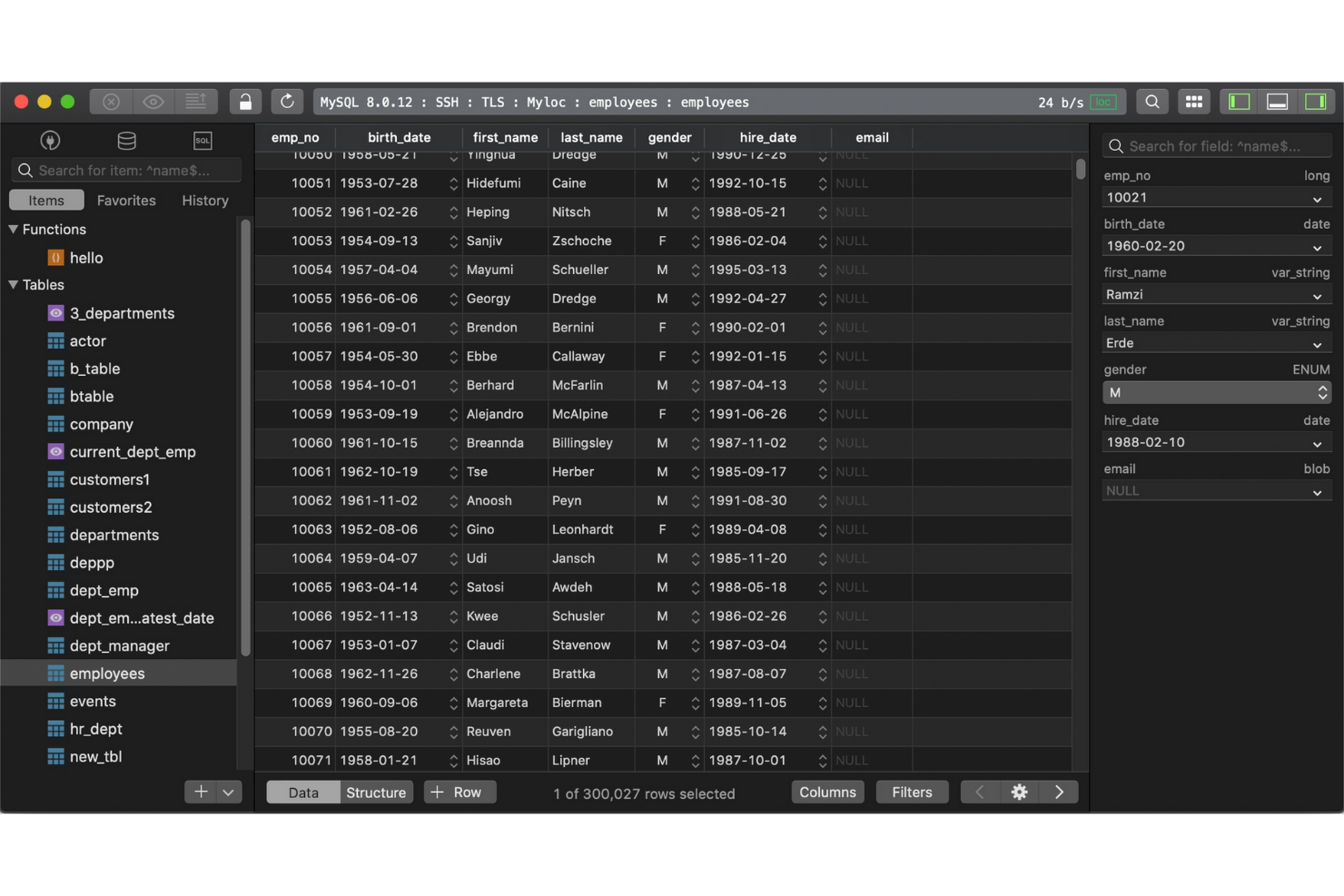
Si vous recherchez un outil de gestion de bases de données axé sur la rapidité et la simplicité, TablePlus mérite d’être envisagé. Il est conçu pour les spécialistes de l’informatique et les développeurs qui souhaitent disposer d’une interface épurée et moderne pour gérer plusieurs bases de données sans éléments superflus. TablePlus se distingue de DBeaver et de la plupart des options open source en privilégiant une navigation intuitive et un accès rapide aux fonctionnalités essentielles, ce qui facilite la gestion des tâches courantes liées aux bases de données.
Pourquoi TablePlus est une bonne alternative à DBeaver
Pour les équipes informatiques qui recherchent un outil de gestion de bases de données rapide et visuellement épuré, TablePlus constitue une option intéressante. Je l’ai retenu parce que son interface est conçue pour réduire les distractions, avec des onglets personnalisables et un mode concentration qui vous aide à vous focaliser sur la tâche en cours. TablePlus propose également la modification en ligne et l’affichage instantané des aperçus de résultats, ce qui vous permet d’effectuer des changements et d’en voir les résultats sans étapes supplémentaires. Ces fonctionnalités séduiront les utilisateurs qui privilégient un espace de travail épuré et des flux de travail efficaces aux mises en page plus complexes à plusieurs volets de DBeaver.
Principales fonctionnalités de TablePlus
Parmi les autres fonctionnalités qui rendent TablePlus intéressant, on peut citer :
- Prise en charge de plusieurs bases de données : Connectez-vous à MySQL, PostgreSQL, SQLite, SQL Server et bien d’autres, et gérez-les depuis une seule application.
- Chiffrement SSH et TLS intégré : Sécurisez vos connexions aux bases de données grâce à la prise en charge intégrée de SSH et TLS.
- Filtrage et recherche avancés : Localisez rapidement des tables, des enregistrements ou des requêtes à l’aide d’outils de recherche et de filtrage performants.
- Système de plug-ins : Étendez les fonctionnalités de TablePlus grâce à une bibliothèque croissante de plug-ins proposés par les utilisateurs.
Intégrations de TablePlus
Les intégrations comprennent MySQL, PostgreSQL, Microsoft SQL Server, SQLite, Redis, MariaDB, Amazon Redshift, MongoDB, CockroachDB et Oracle.
Pros and Cons
Pros:
- Interface conviviale conçue pour une navigation rapide dans les bases de données
- Prend en charge plusieurs bases de données relationnelles depuis un seul espace de travail
- Connexions sécurisées grâce au chiffrement SSH et TLS intégré
Cons:
- Fonctionnalités limitées de modélisation des bases de données et de diagrammes ER
- Écosystème de plug-ins plus limité que celui de nombreux outils de gestion de bases de données


Développé par JetBrains, DataGrip est un outil de gestion de bases de données conçu pour les spécialistes de l’informatique et les développeurs qui souhaitent bénéficier d’une assistance avancée au codage. Il se démarque de DBeaver et des autres solutions open source en proposant une complétion intelligente du code, des suggestions contextuelles et une analyse à la volée des requêtes SQL. DataGrip est particulièrement utile pour les équipes qui doivent écrire, refactoriser et résoudre les problèmes liés à du code de base de données complexe sur plusieurs plateformes.
Pourquoi DataGrip est une bonne alternative à DBeaver
Si vous recherchez un outil de gestion de bases de données particulièrement performant en matière de complétion de code, DataGrip mérite toute votre attention. Je l’ai choisi parce que son moteur de complétion intelligente comprend la structure et le contexte de la base de données, et propose des suggestions précises lors de la rédaction de requêtes SQL. DataGrip met également les erreurs en évidence en temps réel et fournit des corrections rapides, ce qui contribue à réduire les erreurs et à accélérer le développement des requêtes. Ces fonctionnalités en font un choix solide pour les spécialistes de l’informatique qui souhaitent écrire et maintenir du code SQL complexe avec moins d’interruptions.
Fonctionnalités clés de DataGrip
Parmi les autres fonctionnalités qui rendent DataGrip intéressant, on trouve :
- Intégration au contrôle de version : Connectez-vous directement à Git, Mercurial et à d’autres systèmes de contrôle de version depuis l’interface.
- Vues de données personnalisables : Créez et enregistrez des vues de tables personnalisées afin d’organiser et d’analyser les données plus efficacement.
- Prise en charge de plusieurs bases de données : Gérez MySQL, PostgreSQL, Oracle, SQL Server et d’autres bases de données dans un même espace de travail.
- Navigation dans les schémas : Accédez rapidement aux tables, vues et procédures à l’aide d’un panneau de navigation intuitif.
Intégrations de DataGrip
Les intégrations incluent PostgreSQL, MySQL, Oracle, Microsoft SQL Server, MongoDB, Redis, Azure SQL, Amazon Redshift, Amazon DynamoDB et SQLite.
Pros and Cons
Pros:
- Complétion intelligente du code SQL basée sur la structure de la base de données
- Détection des erreurs de requêtes en temps réel et outils de refactorisation
- Intégration native aux flux de travail de contrôle de version
Cons:
- Utilisation des ressources système supérieure à celle des clients SQL légers
- Nécessite une licence payante sans niveau gratuit

Idéal avec l’intégration de Microsoft SQL Server
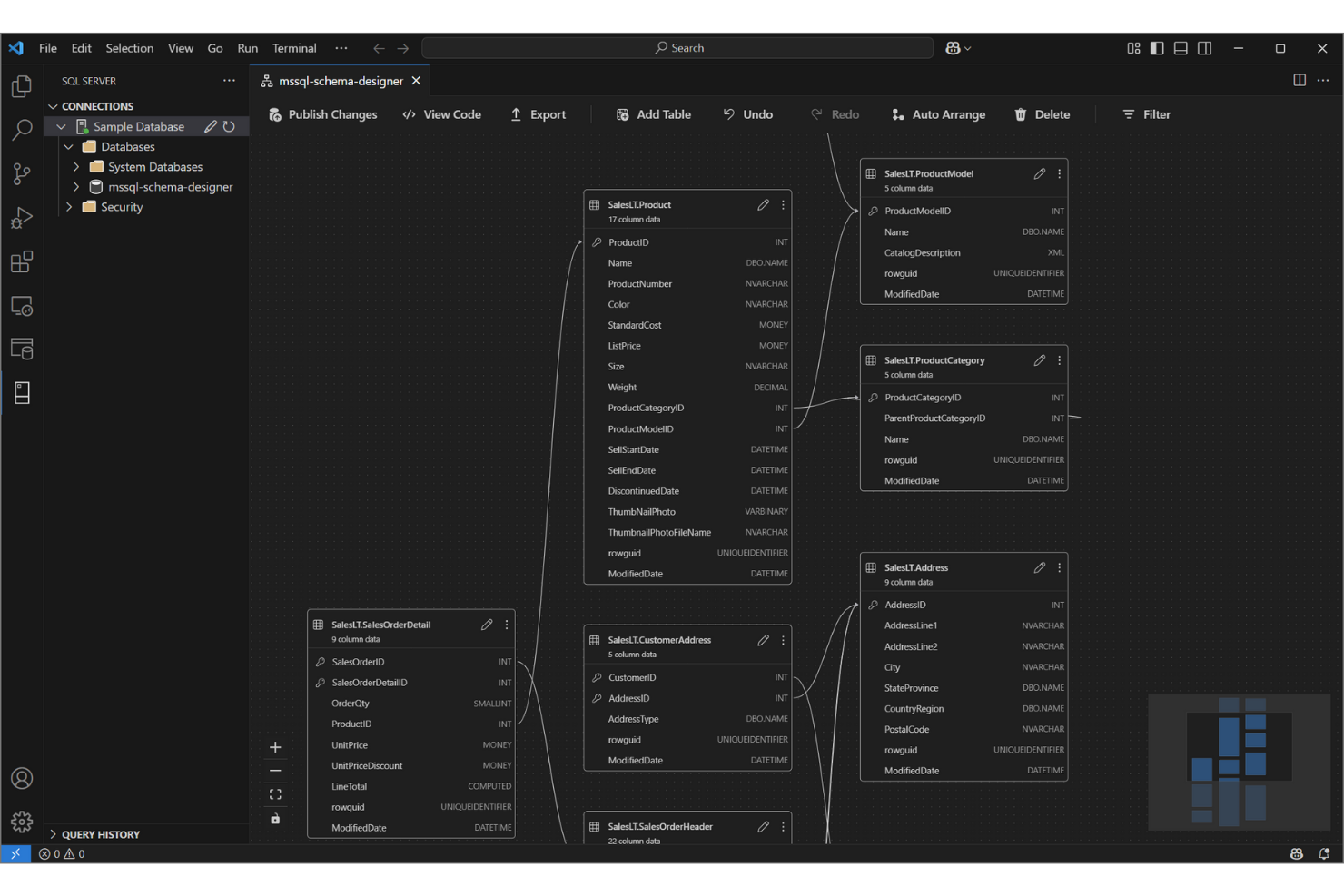
Pour les équipes informatiques qui travaillent intensivement avec Microsoft SQL Server, le Studio de gestion de Microsoft SQL Server (SSMS) offre un environnement spécialement conçu pour gérer, configurer et développer des bases de données SQL Server. Contrairement à DBeaver et à d’autres outils open source, SSMS fournit une intégration approfondie avec l’écosystème de bases de données de Microsoft, notamment des fonctionnalités avancées de sécurité, d’optimisation des performances et d’automatisation. Il est particulièrement utile pour les administrateurs de bases de données et les développeurs qui ont besoin d’un accès direct aux outils et aux flux de travail spécifiques à SQL Server.
Pourquoi le Studio de gestion de Microsoft SQL Server est une bonne alternative à DBeaver
Lorsque vous avez besoin d’un outil étroitement intégré à Microsoft SQL Server, le Studio de gestion de Microsoft SQL Server se démarque. Je l’ai choisi parce qu’il offre un accès direct à des fonctionnalités avancées de SQL Server, telles que la gestion des travaux de l’Agent, la mise en miroir des bases de données et les outils intégrés d’optimisation des performances.
SSMS prend également en charge la création de scripts et l’automatisation via SQL Server Agent et PowerShell, ce qui est précieux pour les spécialistes informatiques qui gèrent des environnements SQL Server vastes ou complexes. Ces fonctionnalités en font un choix solide pour les équipes qui souhaitent exploiter toute la puissance de la plateforme de bases de données de Microsoft.
Principales fonctionnalités du Studio de gestion de Microsoft SQL Server
Parmi les autres fonctionnalités qui rendent SSMS utile aux professionnels des bases de données figurent notamment :
- Concepteur graphique de requêtes : créez et visualisez des requêtes complexes sans écrire manuellement du code SQL.
- Création de diagrammes de bases de données : créez et modifiez des diagrammes de bases de données pour représenter les relations entre les schémas.
- Assistants d’exportation et d’importation : déplacez des données entre SQL Server et d’autres sources à l’aide d’assistants étape par étape.
- Gestion intégrée de la sécurité : configurez et gérez directement dans l’outil les rôles utilisateur, les autorisations et les stratégies de sécurité.
Intégrations du Studio de gestion de Microsoft SQL Server
Les intégrations comprennent SQL Server, Azure SQL Database, Azure SQL Managed Instance, la base de données SQL dans Microsoft Fabric, Azure Synapse Analytics, Azure Data Studio, PowerShell, Visual Studio, Active Directory et Microsoft Purview.
Pros and Cons
Pros:
- Intégration approfondie avec les fonctionnalités de gestion de Microsoft SQL Server
- Outils intégrés d’optimisation des requêtes et de surveillance des performances
- Outil gratuit de gestion de bases de données pour les environnements SQL Server
Cons:
- Prise en charge limitée des systèmes de bases de données non Microsoft
- L’interface semble dépassée par rapport aux outils de bases de données modernes

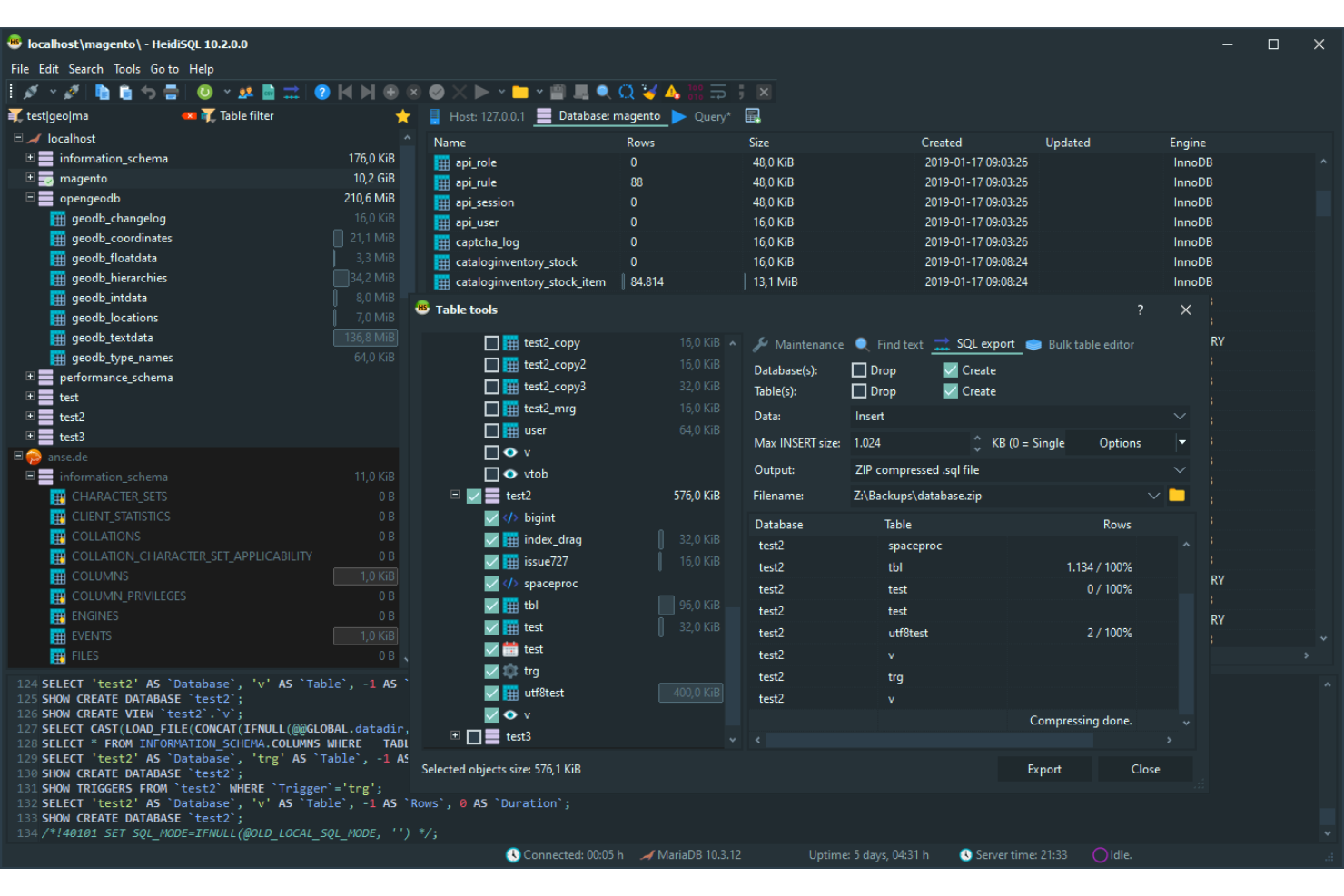
HeidiSQL se distingue auprès des spécialistes informatiques et des administrateurs de bases de données qui recherchent une solution légère et sans fonctionnalités superflues pour gérer les bases de données MySQL et MariaDB. Il est particulièrement utile pour les équipes qui ont besoin de connexions rapides, d’exportations de données simples et de l’exécution directe de requêtes, sans la surcharge d’outils plus complets comme DBeaver. L’accent mis par HeidiSQL sur la rapidité et l’utilisation minimale des ressources en fait un choix pratique pour ceux qui travaillent avec de petites bases de données ou sur des systèmes aux ressources limitées.
Pourquoi HeidiSQL est une bonne alternative à DBeaver
Si vous recherchez un outil léger et ciblé, HeidiSQL est un excellent choix pour la gestion de MySQL. Je l’ai choisi parce qu’il se lance rapidement, utilise un minimum de ressources système et fournit un accès direct aux bases de données MySQL et MariaDB, sans surcharge supplémentaire.
Des fonctionnalités telles que l’exportation de données par lots, la modification directe des tables et l’exécution rapide des requêtes en font un outil idéal pour les spécialistes informatiques qui souhaitent accéder efficacement à leurs bases de données et les quitter rapidement. Pour les équipes qui n’ont pas besoin de la prise en charge de plusieurs bases de données ni des outils avancés de visualisation de DBeaver, l’approche rationalisée de HeidiSQL constitue une solution pratique.
Principales fonctionnalités de HeidiSQL
Voici quelques autres fonctionnalités qui rendent HeidiSQL intéressant :
- Gestionnaire de sessions : Organisez et enregistrez les paramètres de connexion de plusieurs serveurs au même endroit.
- Éditeur des privilèges utilisateur : Gérez les comptes utilisateur et les autorisations des bases de données grâce à une interface graphique.
- Outils d’importation et d’exportation : Déplacez des données entre des fichiers SQL, des fichiers CSV et d’autres formats grâce à des assistants intégrés.
- Extraits de requêtes personnalisés : Enregistrez et réutilisez les extraits de code SQL fréquemment utilisés afin d’écrire vos requêtes plus rapidement.
Intégrations de HeidiSQL
Les intégrations comprennent MySQL, MariaDB, Microsoft SQL Server, PostgreSQL, SQLite, Interbase et Firebird.
Pros and Cons
Pros:
- Outil léger de gestion de bases de données nécessitant un minimum de ressources système
- Client SQL à code source ouvert pour gérer les bases de données MySQL et MariaDB
- Importation, exportation et modification rapides des données et des tables pour les bases de données relationnelles
Cons:
- Client SQL uniquement pour Windows, sans version native pour macOS ou Linux
- Prise en charge limitée des plateformes de bases de données NoSQL

DbSchema
Idéal pour la conception visuelle de schémas
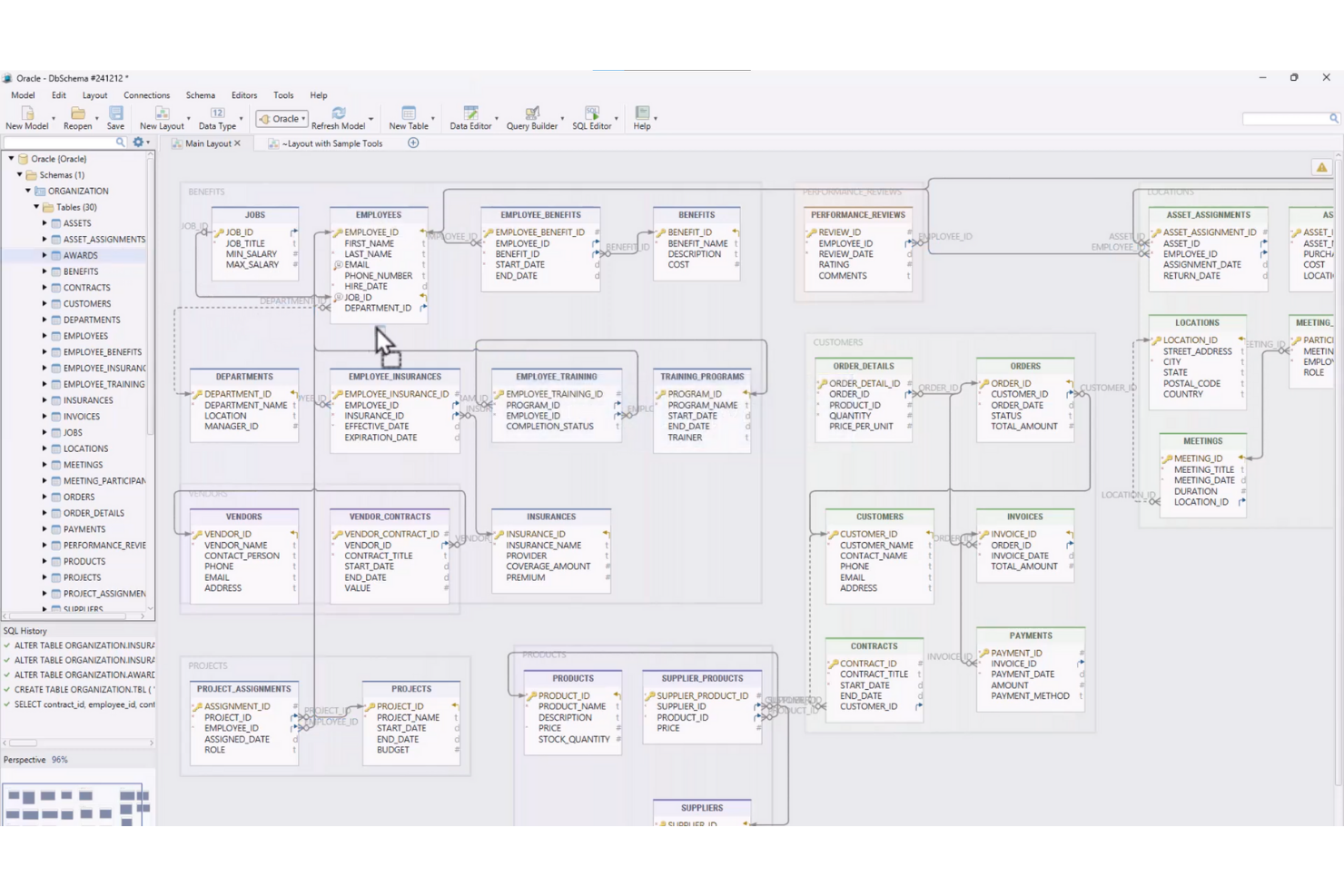
Si votre équipe a besoin de fonctionnalités avancées de conception visuelle de schémas, DbSchema propose une approche unique de la modélisation et de la gestion des bases de données. Il est particulièrement utile pour les spécialistes informatiques et les architectes de données qui souhaitent concevoir, documenter et déployer visuellement des structures de bases de données complexes sur plusieurs plateformes. Contrairement à DBeaver et aux autres outils open source, DbSchema met l’accent sur les diagrammes interactifs et la gestion collaborative des schémas, ce qui facilite la gestion des bases de données volumineuses ou distribuées.
Pourquoi DbSchema est une bonne alternative à DBeaver
Pour les équipes qui privilégient la conception visuelle des schémas, DbSchema propose un ensemble de fonctionnalités qui vont au-delà de ce qu’offre DBeaver. Je l’ai choisi parce que ses diagrammes ER interactifs permettent de concevoir, documenter et modifier visuellement les structures de bases de données, même avant la connexion à une base de données active.
DbSchema prend également en charge la synchronisation et le versionnage des schémas, ce qui aide à gérer les modifications dans les environnements distribués. Ces fonctionnalités en font un choix particulièrement adapté aux spécialistes informatiques qui doivent collaborer sur des projets de bases de données complexes et tenir à jour une documentation claire.
Principales fonctionnalités de DbSchema
En plus de ses atouts en matière de conception visuelle des schémas, j’ai également relevé les fonctionnalités suivantes :
- Explorateur de données relationnelles : Parcourez et modifiez les données de tables associées à l’aide d’une interface interactive.
- Éditeur SQL avec saisie semi-automatique : Écrivez et exécutez des requêtes SQL avec coloration syntaxique et complétion du code.
- Générateur de données : Créez des jeux de données d’exemple pour les tests et le développement directement dans l’outil.
- Conception de schémas hors ligne : Concevez et modifiez des schémas de bases de données sans avoir besoin d’une connexion à une base de données active.
Intégrations de DbSchema
Les intégrations incluent MySQL, PostgreSQL, MongoDB, SQL Server, Oracle, SQLite, Amazon Redshift, Google BigQuery, Snowflake et Cassandra.
Pros and Cons
Pros:
- Outil de conception visuelle de schémas pour modéliser et documenter les bases de données relationnelles
- Outil de gestion de bases de données prenant en charge les plateformes de bases de données relationnelles et NoSQL
- Outils de synchronisation des schémas pour gérer les modifications des bases de données dans différents environnements
Cons:
- Nécessite une licence payante pour bénéficier de toutes les fonctionnalités
- Interface moins moderne que celle de certains outils de gestion de bases de données

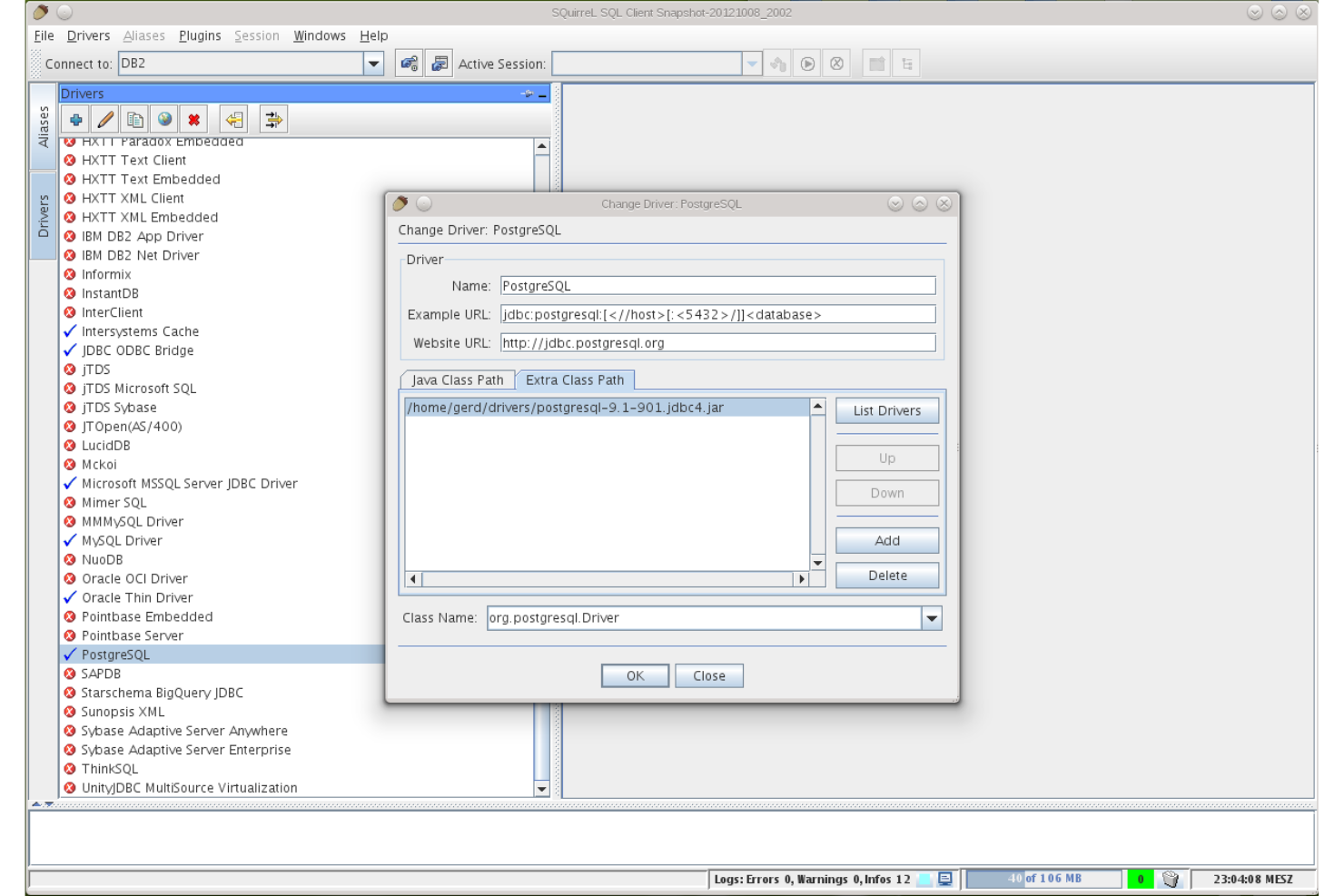
SQuirreL SQL convient parfaitement aux équipes informatiques et aux professionnels des bases de données qui recherchent un client SQL à code source ouvert hautement personnalisable. Son architecture fondée sur des plug-ins vous permet d’adapter l’outil à des flux de travail spécifiques, à différents types de bases de données ou à des fonctionnalités avancées qui ne sont pas disponibles par défaut dans DBeaver. Si vous avez besoin d’un environnement flexible qui s’adapte à des besoins uniques ou évolutifs en matière de gestion des bases de données, SQuirreL SQL offre un niveau d’extensibilité qui se démarque.
Pourquoi SQuirreL SQL est une bonne alternative à DBeaver
Pour les équipes qui souhaitent adapter leur outil de gestion des bases de données à des besoins spécifiques, l’extensibilité des plug-ins de SQuirreL SQL constitue un avantage majeur. Je l’ai choisi parce qu’il est possible d’ajouter ou de supprimer des plug-ins pour prendre en charge de nouveaux types de bases de données, des scripts avancés ou des améliorations personnalisées des flux de travail à mesure que votre environnement évolue. Le gestionnaire de plug-ins intégré facilite la découverte, l’installation et la mise à jour des extensions sans configuration manuelle. Si vous recherchez un outil qui évolue et s’adapte à votre environnement de bases de données, l’approche modulaire de SQuirreL SQL est difficile à égaler.
Principales fonctionnalités de SQuirreL SQL
En plus de son système de plug-ins extensible, j’ai également relevé les fonctionnalités suivantes :
- Éditeur SQL avec coloration syntaxique : rédigez et modifiez des requêtes SQL avec une syntaxe codée par couleur pour une meilleure lisibilité.
- Graphiques de session : visualisez les sessions de base de données et leurs relations grâce aux outils de création de graphiques intégrés.
- Gestionnaire de signets : enregistrez et organisez les instructions SQL fréquemment utilisées pour y accéder rapidement.
- Éditeur de données de table : modifiez directement le contenu des tables dans l’interface sans exécuter de requêtes manuelles.
Intégrations de SQuirreL SQL
Les intégrations comprennent MySQL, PostgreSQL, Oracle, Microsoft SQL Server, SQLite, Firebird, Sybase, DB2, HSQLDB et Apache Derby.
Pros and Cons
Pros:
- Client SQL personnalisable doté d’une architecture de plug-ins extensible
- Outil de gestion des bases de données prenant en charge plusieurs bases de données relationnelles via JDBC
- Client SQL à code source ouvert doté d’une communauté active de développeurs
Cons:
- La conception de l’interface semble dépassée par rapport aux outils modernes de gestion des bases de données
- Fonctionnalités intégrées limitées pour la conception et la visualisation des schémas

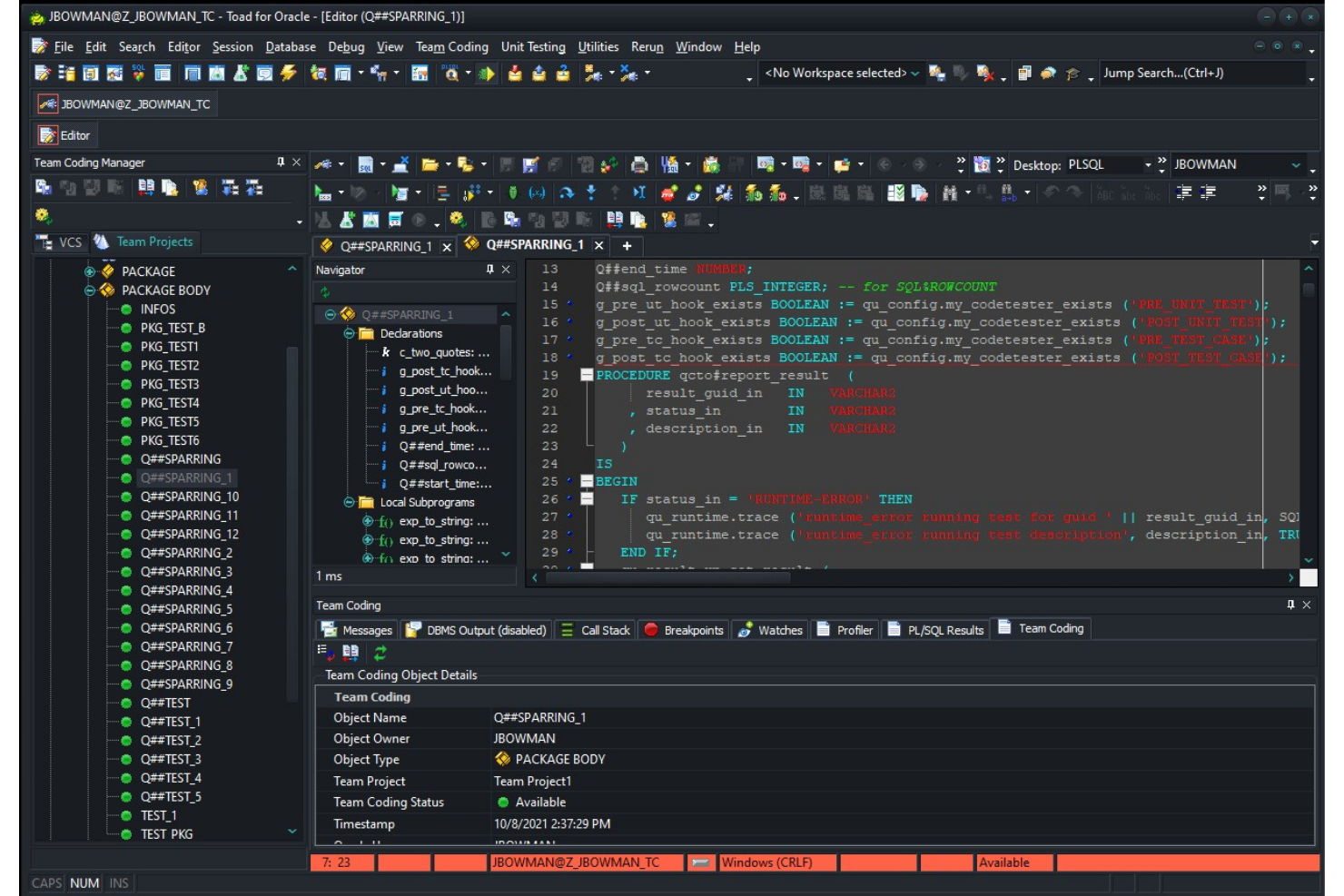
Toad se distingue auprès des spécialistes informatiques et des administrateurs de bases de données qui ont besoin d’une automatisation avancée dans leurs processus de gestion des bases de données. Contrairement à la plupart des outils open source, Toad offre une automatisation intégrée pour les tâches courantes, les révisions de code et l’optimisation des performances. Si votre équipe gère des environnements complexes ou à gros volume, les fonctionnalités d’automatisation de Toad peuvent contribuer à réduire les efforts manuels et à améliorer la cohérence.
Pourquoi Toad est une bonne alternative à DBeaver
Si vous recherchez un outil de gestion de bases de données qui privilégie l’automatisation, Toad mérite d’être pris en considération. J’ai choisi Toad parce qu’il vous permet de planifier et d’automatiser des tâches répétitives telles que les sauvegardes de bases de données, l’analyse du code et les comparaisons de données directement au sein de la plateforme.
Sa fonctionnalité de conception de l’automatisation vous permet de créer et de gérer des processus complexes sans intervention manuelle. Pour les équipes qui souhaitent réduire au minimum la maintenance manuelle des bases de données et appliquer des processus cohérents, les capacités d’automatisation de Toad le distinguent de la plupart des options open source.
Fonctionnalités clés de Toad
Parmi les autres fonctionnalités qui m’ont marqué figurent :
- Débogueur de code : parcourez les procédures stockées et les scripts étape par étape afin d’identifier et de résoudre les erreurs.
- Comparaison de schémas : comparez et synchronisez les schémas de bases de données entre différents environnements.
- Outils d’optimisation SQL : analysez et optimisez les requêtes SQL pour améliorer les performances.
- Modélisation des données : concevez et visualisez les structures de bases de données grâce aux outils de modélisation intégrés.
Intégrations de Toad
Les intégrations incluent Oracle, IBM DB2, Microsoft SQL Server, MySQL, PostgreSQL, SAP ASE, Amazon Redshift, Snowflake, MongoDB et SQLite.
Pros and Cons
Pros:
- Outil de gestion de bases de données doté de fonctions d’automatisation pour les tâches répétitives liées aux bases de données
- Outils avancés de débogage et d’optimisation des performances des requêtes SQL
- Fonctionnalités de comparaison de schémas pour gérer les modifications des bases de données
Cons:
- La tarification nécessite une demande directe auprès du fournisseur
- Utilisation plus importante des ressources système dans les environnements de bases de données volumineux


Pour les équipes informatiques qui gèrent plusieurs types de bases de données sur différentes plateformes, Navicat Premium offre un espace de travail unifié pour se connecter à diverses bases de données et les gérer. Contrairement à DBeaver et à la plupart des outils open source, il prend en charge les connexions simultanées à MySQL, PostgreSQL, Oracle, SQL Server et bien d'autres, au sein d'une seule interface. Cette solution est particulièrement utile pour les organisations qui gèrent des environnements hybrides ou multicloud et qui doivent rationaliser les opérations entre différentes bases de données.
Pourquoi Navicat Premium constitue une bonne alternative à DBeaver
Navicat Premium se distingue pour les équipes qui doivent gérer plusieurs types de bases de données depuis une seule application. Je l'ai choisi parce qu'il permet de se connecter à MySQL, PostgreSQL, Oracle, SQL Server et bien d'autres bases, et de les utiliser simultanément, le tout au sein d'une seule interface.
Sa conception multiplateforme signifie que vous pouvez l'exécuter sous Windows, macOS ou Linux sans perdre en fonctionnalités. Cela en fait un choix pertinent pour les spécialistes informatiques qui doivent coordonner les données et les flux de travail dans des environnements hybrides ou multicloud.
Principales fonctionnalités de Navicat Premium
Parmi les autres fonctionnalités qui distinguent Navicat Premium, on trouve :
- Outil de modélisation des données : Concevez et visualisez les structures de bases de données à l'aide d'un éditeur de diagrammes ER intégré.
- Sauvegarde et planification automatisées : Configurez des sauvegardes récurrentes des bases de données et automatisez les tâches de maintenance courantes.
- Synchronisation des données : Comparez et synchronisez les données entre différentes bases de données ou différents serveurs.
- Bibliothèque d'extraits de code SQL : Stockez et réutilisez les extraits de code SQL fréquemment utilisés afin de créer des requêtes plus rapidement.
Intégrations de Navicat Premium
Les intégrations incluent MySQL, PostgreSQL, SQL Server, Oracle, SQLite, MariaDB, MongoDB, Redis, Snowflake et Amazon RDS.
Pros and Cons
Pros:
- Outil multiplateforme de gestion des bases de données prenant en charge plusieurs types de bases de données
- Concepteur de diagrammes ER intégré et fonctionnalités de modélisation des données
- Outils de synchronisation des données pour gérer les environnements comportant plusieurs bases de données
Cons:
- Coût de licence élevé par rapport à de nombreuses alternatives à DBeaver
- Plateforme à code source fermé avec des possibilités de personnalisation limitées par la communauté


Beekeeper Studio est un outil à code source ouvert de gestion de bases de données conçu pour les équipes qui ont besoin de collaborer en temps réel sur des requêtes SQL. Il se distingue par ses fonctionnalités intégrées de partage des requêtes et de modification des sessions, ce qui en fait un choix pertinent pour les équipes chargées des données et les développeurs qui travaillent ensemble sur des projets de bases de données. Si vous recherchez un outil qui privilégie les flux de travail collaboratifs plutôt que la gestion individuelle des bases de données, Beekeeper Studio propose une approche unique par rapport à DBeaver.
Pourquoi Beekeeper Studio est une bonne alternative à DBeaver
Ce qui distingue Beekeeper Studio de DBeaver est l’importance accordée à la modification collaborative du code SQL. Je l’ai choisi pour les équipes qui doivent partager des requêtes et travailler ensemble en temps réel, ce que DBeaver ne prend pas en charge nativement. Des fonctionnalités comme le partage de requêtes en direct et la modification basée sur les sessions permettent à plusieurs utilisateurs de contribuer facilement au même projet de base de données. Cette approche aide les équipes à éviter les conflits de versions et permet à chacun de rester sur la même longueur d’onde pendant le développement de la base de données.
Fonctionnalités principales de Beekeeper Studio
Voici quelques autres fonctionnalités de Beekeeper Studio qui en font un choix flexible pour les professionnels des bases de données :
- Éditeur de requêtes à onglets : Travaillez sur plusieurs requêtes à la fois grâce à une interface à onglets qui maintient votre espace de travail organisé.
- Chiffrement des connexions : Sécurisez vos connexions aux bases de données grâce aux options intégrées de SSL et de tunnellisation SSH.
- Prise en charge multiplateforme : Exécutez Beekeeper Studio sous Windows, macOS et Linux sans problèmes de compatibilité.
- Modification des données des tables : Modifiez directement les données des tables dans l’interface, avec la prise en charge de la modification en ligne et des mises à jour groupées.
Intégrations de Beekeeper Studio
Les intégrations incluent MySQL, PostgreSQL, SQLite, SQL Server, MongoDB, Oracle, MariaDB, Amazon Redshift, Google BigQuery et Redis.
Pros and Cons
Pros:
- Partage des requêtes et flux de travail d’équipe simplifiés
- Outil à code source ouvert de gestion de bases de données bénéficiant d’un développement communautaire actif sur GitHub
- Interface conviviale pour gérer les requêtes et modifier les données des tables
Cons:
- Moins de fonctionnalités avancées d’administration des bases de données que certaines alternatives à DBeaver
- Fonctionnalités limitées pour les diagrammes ER et la conception visuelle des schémas
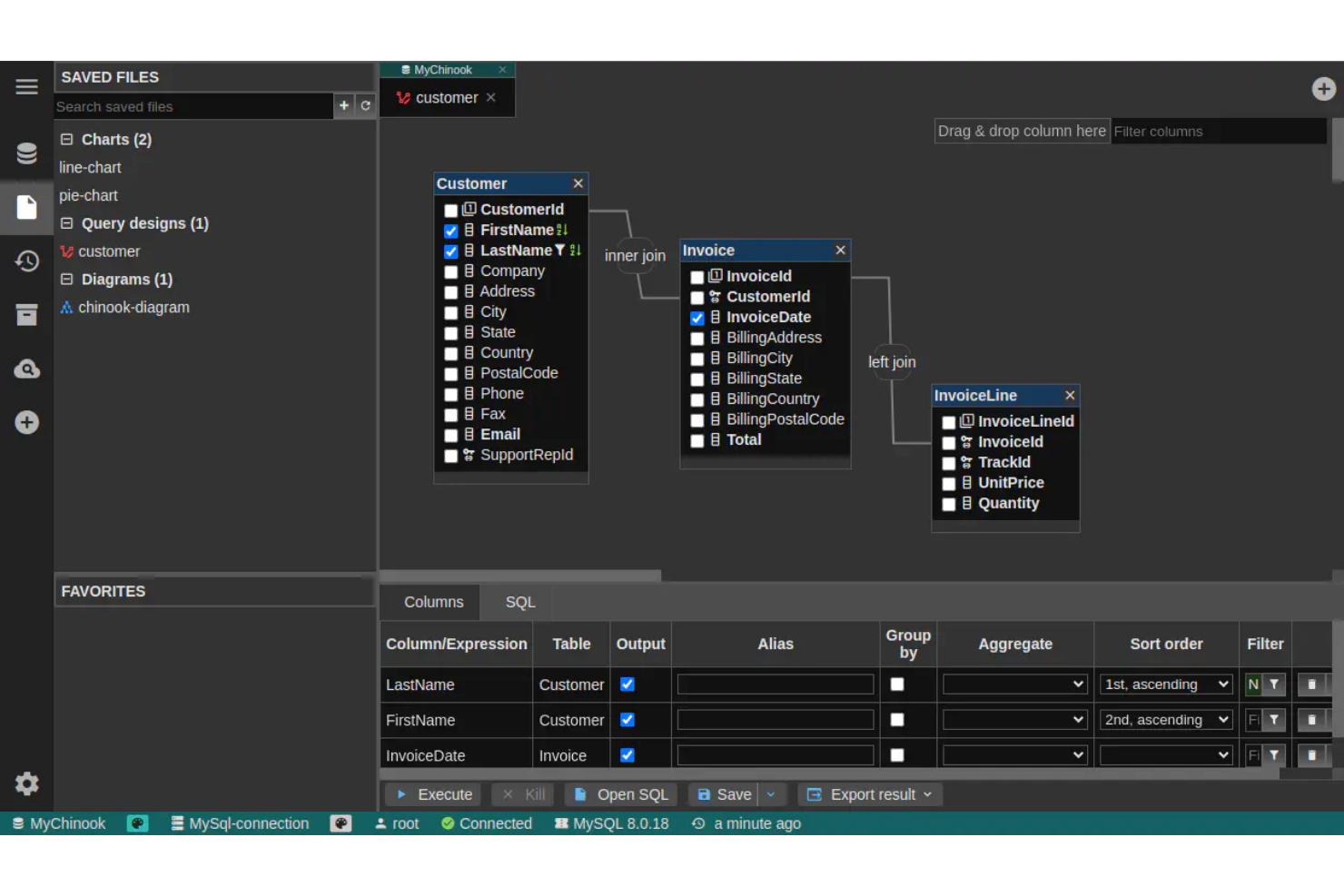
DbGate est conçu pour les professionnels des bases de données qui doivent gérer et interroger plusieurs types de bases de données depuis une seule interface. Contrairement à DBeaver, il met l’accent sur des connexions fluides entre les bases de données SQL et NoSQL, ce qui en fait un choix particulièrement adapté aux équipes qui gèrent diverses sources de données. Si votre flux de travail implique de passer d’un moteur de base de données à un autre, DbGate vous aide à centraliser et à simplifier ce processus.
Pourquoi DbGate est une bonne alternative à DBeaver
DbGate se distingue par sa capacité à se connecter à plusieurs moteurs de base de données au sein d’un même espace de travail. Je l’ai choisi pour les utilisateurs qui doivent gérer des bases de données SQL et NoSQL côte à côte, ce qui est particulièrement utile pour les équipes travaillant dans des environnements de données mixtes.
Des fonctionnalités telles que l’édition unifiée des requêtes et le transfert de données entre bases de données facilitent la gestion de flux de travail complexes impliquant plusieurs bases de données. Cette approche vous évite de devoir passer d’un outil à un autre pour chaque type de base de données.
Principales fonctionnalités de DbGate
En plus de ses capacités de connexion à plusieurs bases de données, DbGate propose plusieurs autres fonctionnalités utiles :
- Concepteur visuel de requêtes : Créez et modifiez des requêtes SQL à l’aide d’une interface glisser-déposer.
- Outils d’importation et d’exportation de données : Déplacez des données entre des bases de données ou des formats de fichiers tels que CSV et Excel.
- Système de modules d’extension : Étendez les fonctionnalités principales avec des modules d’extension pour prendre en charge des types de bases de données ou des fonctionnalités supplémentaires.
- Éditeur de données de table : Modifiez directement le contenu des tables dans l’application, avec la prise en charge des modifications en ligne.
Intégrations de DbGate
Les intégrations comprennent MySQL, PostgreSQL, Oracle, SQL Server, MongoDB, SQLite, CockroachDB, MariaDB, Redis et CosmosDB.
Pros and Cons
Pros:
- Prend en charge les connexions aux bases de données SQL et NoSQL dans un même espace de travail
- Outil libre de gestion de bases de données doté d’une architecture de modules d’extension extensible
- Le concepteur visuel de requêtes simplifie la création de requêtes SQL
Cons:
- Documentation et ressources communautaires moins matures
- Les fonctionnalités de visualisation des schémas et des diagrammes ER sont limitées
Autres alternatives à DBeaver
Voici quelques alternatives supplémentaires à DBeaver qui n’ont pas intégré ma sélection, mais qui méritent tout de même d’être examinées :
- SQL Workbench/J
Idéal pour les flux de travail SQL scriptables
- DbVisualizer
Idéal pour la création avancée de requêtes visuelles
- pgAdmin
Idéal pour une administration approfondie de PostgreSQL


Comment j'évalue les alternatives à DBeaver
J'évalue ces outils selon deux niveaux : des exigences de base que chaque option doit remplir—prise en charge de plusieurs bases de données, tunnel SSH, navigation dans le schéma—et des éléments différenciateurs qui distinguent les meilleurs.
Fonctionnalités essentielles (Critères de base pour cette liste)
Lorsque je sélectionne les outils pour ma liste, j’attribue à chacun une note de 0 (ne propose pas la fonctionnalité) à 5 (excelle dans ce domaine) pour chaque fonctionnalité essentielle mentionnée ci-dessous. Ensuite, je calcule le score total de l’outil en pourcentage. Chaque outil doit obtenir un score total minimum de 75% pour être pris en compte.
- Prise en charge de plusieurs bases de données : Je vérifie le nombre de moteurs pris en charge par l’outil—de PostgreSQL et MySQL à MongoDB, Snowflake et Redshift—pour vous permettre de travailler sur toute votre pile.
- Éditeur SQL avec IntelliSense : Un bon éditeur SQL doit proposer l’autocomplétion contextuelle, la coloration syntaxique et la mise en forme. J’examine sa gestion des requêtes complexes sur différents dialectes SQL.
- Navigation et édition des données : J’évalue la possibilité de filtrer, trier et éditer les données de table directement dans une vue en grille—pratique pour vérifier rapidement des enregistrements ou corriger une ligne erronée.
- Visualisation du schéma et des MCD : Pouvoir parcourir les arbres d’objets et générer des diagrammes ER est important lors de la découverte de bases de données inconnues ou pour auditer les relations entre tables.
- Capacités d’import/export de données : Je vérifie la prise en charge des formats courants comme CSV, JSON, SQL et XML, ainsi que le transfert interbases pour des tâches telles que la migration de données entre environnements de préproduction et de production.
- Gestion sécurisée des connexions : Les outils doivent prendre en charge le tunnel SSH, SSL/TLS et le stockage chiffré des identifiants. J’examine la gestion des connexions enregistrées sur plusieurs environnements.
Une fois ma liste d’outils conforme à ces critères, j’examine ce qui différencie chaque plateforme.
Facteurs différenciateurs (Ce qui distingue les éditeurs)
Voici comment je compare les différents fournisseurs :
Fonctionnalités phares
L’assistance à la requête via l’IA est un grand facteur de distinction—j’examine si l’outil peut générer du SQL à partir du langage naturel ou suggérer des optimisations, ce qui permet un gain de temps réel lors de la rédaction de jointures complexes sur des schémas inconnus. Les fonctions de collaboration en équipe sont également importantes, notamment les bibliothèques de requêtes partagées et le partage de connexions, car la gestion des bases de données implique souvent des échanges entre développeurs et administrateurs. Pour les équipes distribuées, j’évalue la disponibilité d’un accès cloud-natif ou via navigateur afin que les ingénieurs puissent se connecter sans installation locale.
Au-delà des fonctionnalités
Le modèle de licence a beaucoup d’importance dans ce domaine. Je vérifie si un outil propose une version gratuite ou open-source, car de nombreux administrateurs de base de données et développeurs ont besoin d’un accès immédiat sans passer par l’approvisionnement. La flexibilité de déploiement est un autre point clé—certaines équipes ont besoin d’installations sur site ou en auto-hébergement pour répondre à des politiques de sécurité internes, tandis que d’autres préfèrent le SaaS. J’examine aussi l’intégration à l’écosystème, en particulier avec Git pour la gestion versionnée des changements de schéma et l’automatisation CI/CD, car la gestion de bases de données est rarement indépendante du reste du processus DevOps.
Pourquoi chercher une alternative à DBeaver ?
Bien que DBeaver soit un outil open source performant de gestion des bases de données, il ne convient pas à tous les flux de travail. Certaines équipes préfèrent un autre client SQL ou environnement de développement intégré selon les bases de données avec lesquelles elles travaillent, leur infrastructure ou le type de tâches de gestion des bases de données qu’elles effectuent.
Vous recherchez peut-être une alternative à DBeaver parce que :
- Vous avez besoin de scripts avancés, d’automatisation ou de flux de travail SQL en ligne de commande
- Vous souhaitez un environnement de développement SQL plus léger, avec moins d’exigences système
- Vous préférez une application de bureau native pour macOS ou Linux
- Vous avez besoin d’une meilleure prise en charge de bases de données spécifiques comme MSSQL, Postgres ou Oracle
- Votre équipe s’appuie sur une interface web de gestion de bases de données pour l’accès à distance
- Vous souhaitez un client de base de données frontal spécialisé, conçu pour les développeurs
- Vous avez besoin d’outils qui s’intègrent à des flux de travail pilotés par des API ou à des environnements DBaaS
Certaines équipes préfèrent également des outils dotés d’une édition communautaire solide ou d’un écosystème open source, tandis que d’autres privilégient les environnements de développement SQL axés sur les entreprises.
Si l’un de ces scénarios vous semble familier, l’exploration des solutions alternatives peut vous aider à trouver un outil de gestion de bases de données mieux adapté à votre flux de travail, à votre infrastructure ou à votre environnement de développement préféré.
Fonctionnalités clés de DBeaver
Voici quelques-unes des principales fonctionnalités de DBeaver, pour vous aider à comparer les offres des solutions alternatives :
- Gestion des connexions à plusieurs bases de données
- Diagramme entité-association visuel et concepteur de schémas
- Éditeur SQL avec coloration syntaxique et autocomplétion
- Importation et exportation de données dans plusieurs formats
- Modification et filtrage des données des tables
- Outils intégrés d’administration de bases de données
- Prise en charge des bases de données compatibles avec JDBC
- Visualisation avancée des données et création de graphiques
- Historique d’exécution SQL et signets de requêtes
- Architecture de modules d’extension pour étendre les fonctionnalités
Et maintenant :
Si vous êtes en train d’étudier les alternatives à DBeaver, contactez gratuitement un conseiller SoftwareSelect pour obtenir des recommandations.
Vous remplissez un formulaire et échangez brièvement avec un conseiller qui examine en détail vos besoins. Vous recevez ensuite une sélection restreinte de logiciels à étudier. Les conseillers vous accompagnent même tout au long du processus d’achat, y compris lors des négociations tarifaires.