

Reseña de Workwize: ventajas, desventajas, funciones y precios
I put Workwize through its paces as an IT asset management platform, weighing its global device lifecycle tools, usability, and pricing against the trade-offs buyers should know.

Revisamos herramientas de forma independiente y las comisiones ayudan a financiar nuestras pruebas. Consulta nuestra política de transparencia, nuestra metodología o sugiere una herramienta.
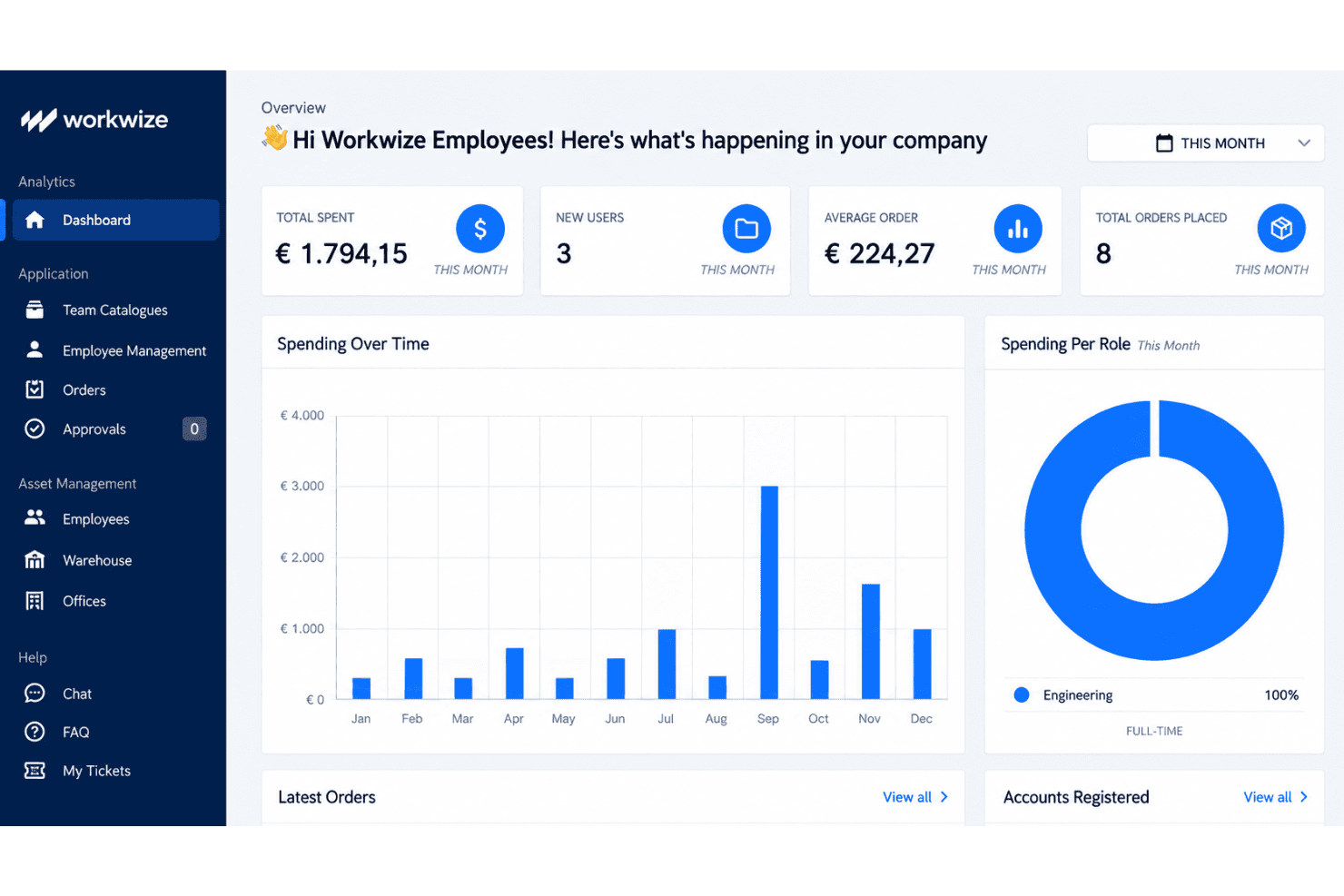
Workwize is an IT asset management software that handles the full device lifecycle for distributed teams, including procurement, deployment, retrieval, storage, and disposal across more than 100 countries. I'd consider it if you're an IT or ops leader supporting remote employees in multiple regions and you're tired of juggling local vendors, customs paperwork, and spreadsheets to track who has what hardware. Compared to a tool like Hofy, Workwize gives you more flexibility to bring your own inventory into its global warehouse network rather than locking you into buying devices through the platform, which is a better fit if you already have existing hardware you want to manage centrally.
Workwize Evaluation Summary
4.2/5
- From $8/month/seat (+$540 platform fee)
- Free demo available
Por qué confiar en nuestras recomendaciones de software
6,700+
Reviews
20
Industry experts
16+
Evaluation factors
14
Years
Nuestro equipo lleva probando y evaluando software desde 2012. Como líderes tecnológicos, sabemos lo difícil —y lo importante— que es elegir el software adecuado.
Para esta guía, evaluamos las herramientas mediante pruebas prácticas e investigación independiente, puntuando las herramientas según nuestros criterios de selección.
Nuestras reseñas reflejan nuestro criterio editorial humano, no un discurso de ventas.
Revisores expertos:
- Paulo Gardini MiguelDirector técnico
 Tim FisherVP de IA
 Gabriel RosasTech Lead y arquitecto de software
 Christhian GruhnTech Lead y arquitecto de plataforma

Workwize Overview
Workwize is a strong choice for distributed teams managing hardware across several regions. Its device lifecycle coverage includes procurement, deployment, retrieval, storage, and disposal, while its warehouse network supports existing inventory instead of requiring platform-based purchases. I’d choose it over procurement-led alternatives when flexibility matters more than a tightly bundled buying process. The user-friendly interface and onboarding appeal to IT and operations teams replacing spreadsheets, local vendors, and customs paperwork.
Pros
- Global warehouses support procurement, storage, retrieval, and disposal.
- Users praise centralized equipment records and quick setup.
- Certified wiping and automated retrieval support controlled offboarding.
Cons
- Reviewers report inaccurate portal statuses during deployments.
- Regional shipping delays complicate Middle East equipment delivery.
- Microsoft Intune device-association gaps limit some fleet workflows.
Is Workwize Right For Your Needs?
Who Would be a Good Fit for Workwize?
Workwize suits distributed organizations with at least 150 users and recurring hardware operations across regions. Its asset records, equipment portal, lifecycle workflows, integrations, and seat-based pricing support teams managing procurement, deployment, repairs, retrieval, and offboarding.
- Distributed CompaniesWorkwize centralizes equipment records, shipping, repairs, and retrieval for companies supporting employees across multiple regions.
- 150 Plus TeamsWorkwize’s plans start at 150 users, making its seat-based pricing more suitable for midsize and larger organizations.
- IT OperationsIT teams can manage procurement, deployment, restocking, maintenance, and disposal from one asset management interface.
- People OperationsPeople teams can use automatic offboarding workflows to coordinate equipment retrieval when employees leave the organization.
- Remote WorkforcesRemote-first companies can give employees a self-service portal for hardware requests, repairs, maintenance, and support.
- Integrated EnvironmentsTeams using Slack, Kandji, Jamf, Okta, Microsoft Intune, or HR systems can connect Workwize to existing workflows.
Who Would be a Bad Fit for Workwize?
Workwize is a weaker choice for small organizations, single-location teams, and businesses needing highly accurate real-time deployment data. Its 150-user minimum, quote-only pricing, reported regional shipping delays, and Microsoft Intune device-association gaps require careful evaluation.
- Small BusinessesCompanies below 150 users may not meet Workwize’s Basic plan minimum, making the platform unsuitable for smaller fleets.
- Single Office TeamsA single-office business with simple equipment handoffs may not need Workwize’s regional shipping, retrieval, and lifecycle workflows.
- Intune Dependent TeamsTeams requiring dependable Microsoft Intune device associations should test Workwize first because reviewers report gaps in this integration.
- Real Time TrackingOrganizations needing consistently accurate deployment statuses should pilot Workwize because reviewers report incorrect status information.
- Local PurchasesBusinesses buying and handing out equipment locally may gain little from Workwize’s shipping and multi-region asset operations.
- Price Sensitive BuyersTeams needing transparent comparisons may reject Workwize because pricing is quote-only and plans begin at 150 users.
Nuestra metodología de revisión
Cómo probamos y puntuamos las herramientas
Hemos invertido años construyendo, refinando y mejorando nuestro sistema de pruebas y puntuación de software. La rúbrica está diseñada para captar los matices de la selección de software y lo que hace a una herramienta efectiva, enfocándose en aspectos críticos del proceso de toma de decisiones.
A continuación, puedes ver exactamente cómo nuestro sistema de prueba y puntuación funciona a través de siete criterios. Esto nos permite ofrecer una evaluación imparcial del software basada en funcionalidad central, características destacadas, facilidad de uso, incorporación, soporte al cliente, integraciones, reseñas de clientes y relación calidad-precio.
Funcionalidad principal (25% de la puntuación final)
El punto de partida de nuestra evaluación siempre es la funcionalidad central de la herramienta. ¿Tiene las características y funciones básicas que un usuario esperaría encontrar? ¿Alguna de esas funciones principales está limitada a planes de precios superiores? Esperamos que una herramienta esté a la altura de las capacidades básicas de sus competidores.
Características destacadas (25% de la puntuación final)
Luego, evaluamos las características poco comunes y sobresalientes que van más allá de la funcionalidad principal que normalmente se encuentra en herramientas de su tipo. Una puntuación alta refleja características especializadas o únicas que hacen el producto más rápido, eficiente o que ofrecen valor adicional al usuario.
También evaluamos qué tan fácil es integrar con otras herramientas que normalmente forman parte del ecosistema tecnológico para expandir la funcionalidad y utilidad del software. Las herramientas que ofrecen abundantes integraciones nativas, conexiones de terceros y acceso API para crear integraciones personalizadas obtienen la mejor puntuación.
Facilidad de uso (10% de la puntuación final)
Consideramos cuán rápido y sencillo es ejecutar las tareas definidas por la funcionalidad principal usando la herramienta. El software con mejor puntuación está bien diseñado, es intuitivo, ofrece aplicaciones móviles, proporciona plantillas y hace que tareas relativamente complejas parezcan sencillas.
Incorporación (10% de la puntuación final)
Sabemos lo importante que es la adopción rápida por parte del equipo para una nueva plataforma, por lo que evaluamos cuán fácil es aprender y usar una herramienta con entrenamiento mínimo. Evaluamos cuán rápido un miembro del equipo puede configurarla y comenzar a utilizarla sin experiencia previa. Las soluciones con mayor puntuación requieren poco o ningún soporte.
Soporte al cliente (10% de la puntuación final)
Revisamos qué tan rápido y sencillo es resolver dudas y encontrar ayuda por teléfono, chat en vivo o base de conocimientos. Las herramientas y compañías que proporcionan soporte en tiempo real obtienen la mejor puntuación, mientras que los chatbots obtienen la peor.
Reseñas de clientes (10% de la puntuación final)
Además de nuestras pruebas y evaluaciones, consideramos la puntuación neta de promotores por parte de clientes actuales y anteriores. Revisamos la probabilidad de que elijan la herramienta de nuevo para la funcionalidad principal. Una puntuación alta refleja una alta puntuación neta de promotores actuales o pasados.
Relación calidad-precio (10% de la puntuación final)
Por último, considerando todos los demás criterios, revisamos el precio promedio de los planes de nivel básico comparado con las funciones principales y consideramos el valor de los demás criterios de evaluación. El software que ofrezca más, por menos, obtendrá una puntuación mayor.
Core Features
Centralized Asset Inventory
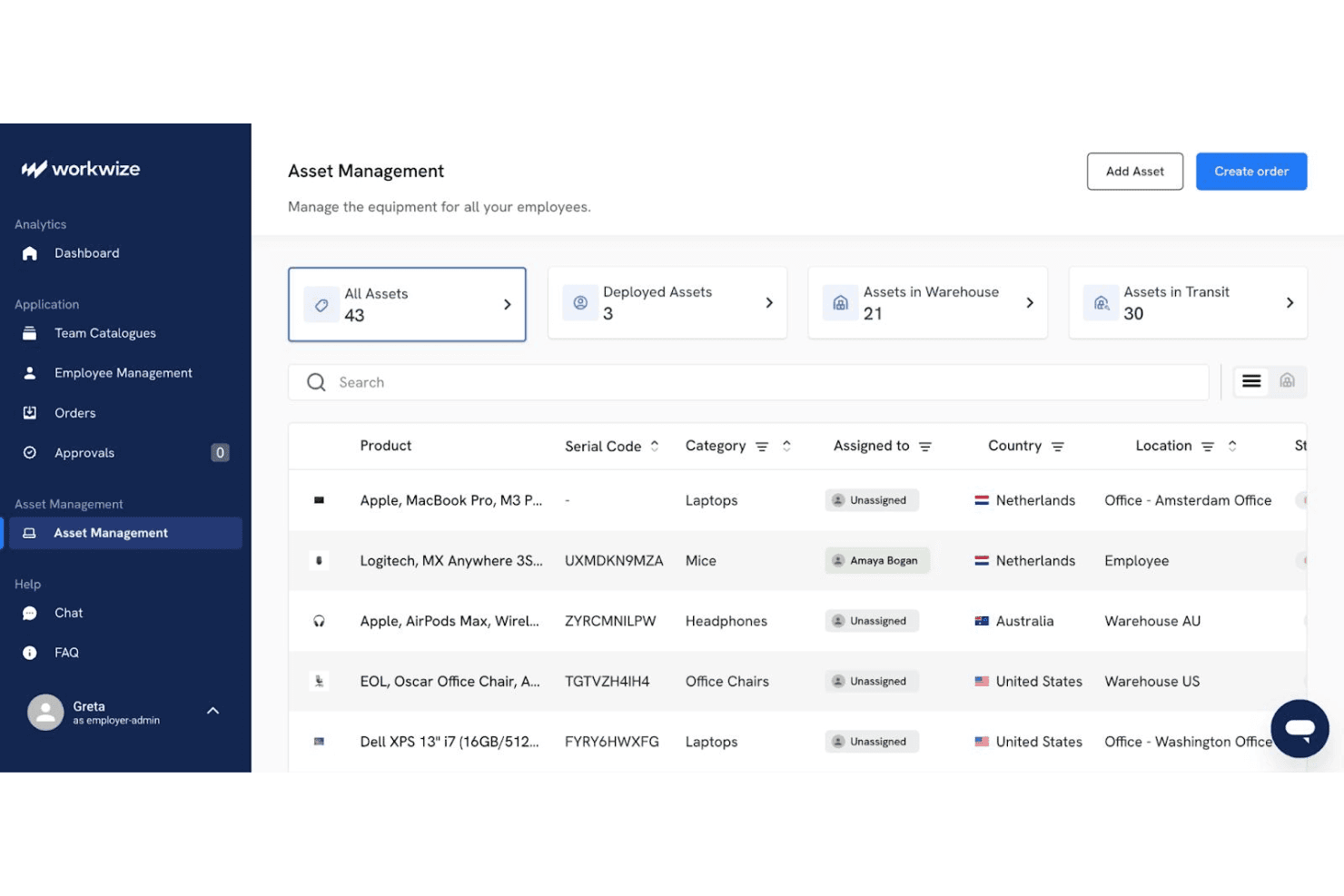
Workwize maintains a centralized record of each device, including its assignee, location, condition, and lifecycle stage. Real-time status tracking gives IT teams one place to verify ownership and identify unassigned equipment.
Global Hardware Procurement
Workwize supports international device purchasing through pre-approved catalogs, spend-based approvals, and regional warehouses. Your team can also place existing inventory into Workwize warehouses, which helps manage mixed fleets across more than 100 countries.
Zero-Touch Deployment
Workwize automates device ordering and prepares equipment with preconfigured images and enrollment workflows. Support for Apple Business Manager and Microsoft Autopilot helps employees receive configured devices without manual setup by IT.
Automated Asset Retrieval
Workwize starts retrieval workflows when employees leave or need replacement equipment. Automated shipping instructions, tracking, and warehouse returns help IT recover laptops without coordinating each handoff manually.
Repairs And Maintenance Tracking
Workwize records repairs, warranties, replacements, and maintenance events against each asset. Automated alerts help your team identify devices nearing warranty expiration or requiring service before replacement decisions become urgent.
Secure Disposal And Data Wiping
Workwize manages end-of-life workflows with certified data wiping, disposal, and recycling records. Your team receives disposal documentation while reducing the risk of retired devices retaining company data.
Ease of Use
Workwize is more approachable than many IT asset management platforms, with quick setup, centralized equipment records, and a self-service portal for hardware requests, repairs, and support. Its lifecycle workflows also keep procurement, deployment, retrieval, and disposal in one interface. However, user reviews report inaccurate deployment statuses, regional shipping delays, and Microsoft Intune device-association gaps. I’d recommend it for distributed teams prioritizing usability, but verify status accuracy during a pilot.
Integrations
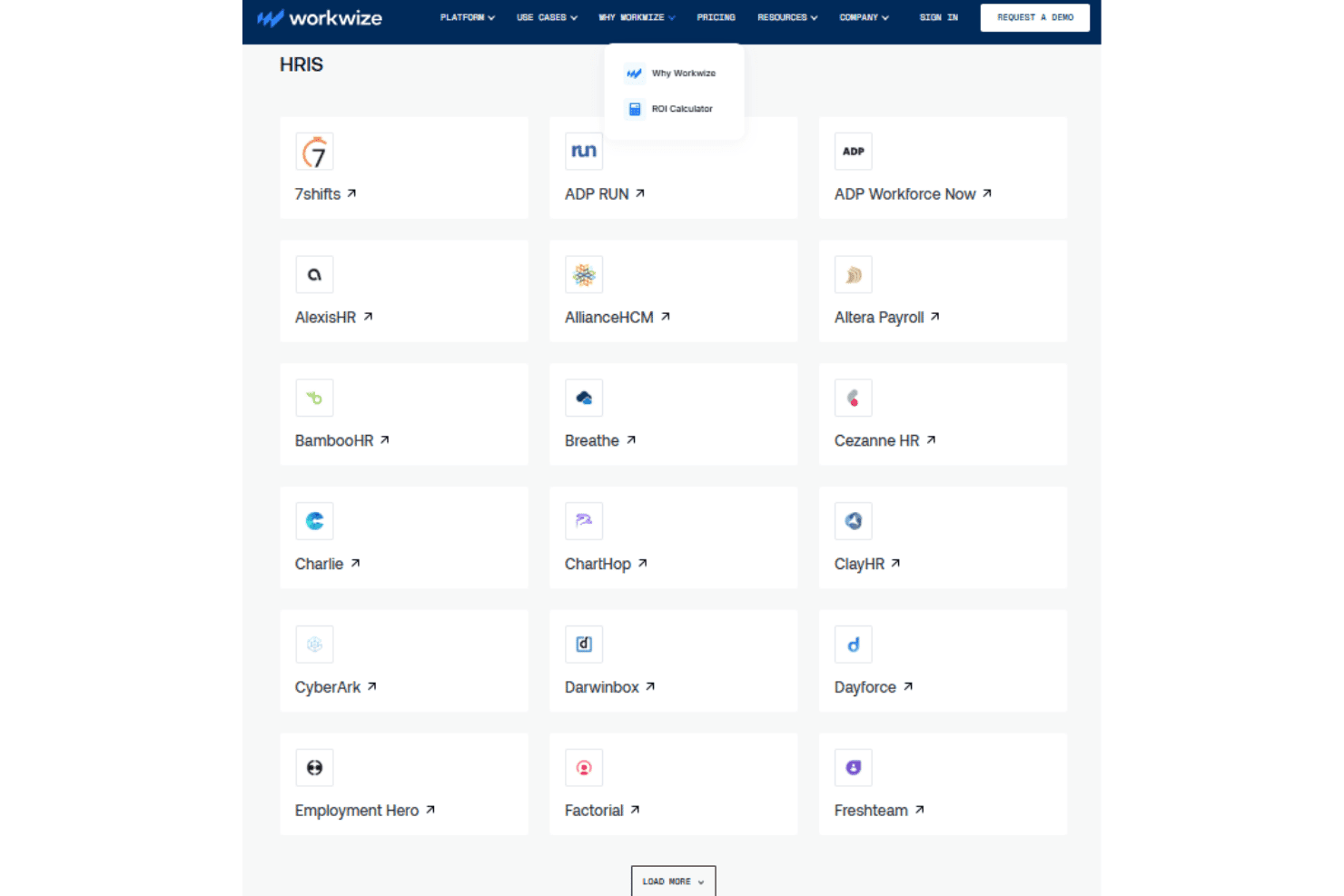
Workwize natively integrates with Slack, Kandji, Microsoft Intune, Jamf, Okta, Microsoft Entra ID, Rippling, BambooHR, Workday, and Google Workspace, among others.
Workwize also offers a public API for custom workflow connections and connects with third-party automation tools such as Zapier and Make.
Workwize Specs
- 2-Factor Authentication: Yes
- API: Yes
- Asset Tagging: Yes
- Dashboard: Yes
- Data Export: Yes
- Data Import: Yes
- Data Visualization: Yes
- Database: Yes
- Document Management: Yes
- External Integrations: Yes
- Hardware Integration: Yes
- Hardware Modernization: Yes
- Inventory Tracking: Yes
- Multi-User: Yes
- Network Device Performance Monitoring: Yes
- Network Traffic Monitoring: Yes
- Network Visualization: Yes
- Notifications: Yes
- Scheduling: Yes
- Status Notifications: Yes
- Third-Party Plugins/Add-Ons: Yes
- Workflow Management: Yes


