

Reseña de Honeycomb 2026: Ventajas, Desventajas, Características y Precios
Honeycomb destaca por su observabilidad en tiempo real y su profunda capacidad de depuración, lo que lo hace ideal para sistemas complejos, aunque puede ser excesivo para necesidades de monitoreo más simples.

Revisamos herramientas de forma independiente y las comisiones ayudan a financiar nuestras pruebas. Consulta nuestra política de transparencia, nuestra metodología o sugiere una herramienta.
Honeycomb is a cloud infrastructure monitoring tool built for engineering teams that need deep observability into distributed systems and microservices. It's a strong fit when you need to query high-cardinality event data to pinpoint production issues fast. If you're weighing it against Datadog, I'd say Honeycomb wins on query depth—you can slice event data by any combination of fields in real time, rather than relying on pre-built dashboards to surface what went wrong.
Honeycomb Evaluation Summary

4.6/5
- From $130/month
- Free plan + demo available
Por qué confiar en nuestras recomendaciones de software
6,700+
Reviews
20
Industry experts
16+
Evaluation factors
14
Years
Nuestro equipo lleva probando y evaluando software desde 2012. Como líderes tecnológicos, sabemos lo difícil —y lo importante— que es elegir el software adecuado.
Para esta guía, evaluamos las herramientas mediante pruebas prácticas e investigación independiente, puntuando las herramientas según nuestros criterios de selección.
Nuestras reseñas reflejan nuestro criterio editorial humano, no un discurso de ventas.
Revisores expertos:
- Paulo Gardini MiguelDirector técnico
 Tim FisherVP de IA
 Gabriel RosasTech Lead y arquitecto de software
 Christhian GruhnTech Lead y arquitecto de plataforma

Honeycomb Overview
When judging infrastructure monitoring tools, Honeycomb stands out for its event-based observability, intuitive query builder, and fast, interactive UI. Its pricing is transparent and scales well for teams needing granular insights. While onboarding can be complex for those new to observability, the documentation and support are strong. Integrations cover most modern stacks, but legacy environments may require extra setup.
If you’re selecting a tool for debugging distributed systems or high-cardinality data, Honeycomb often outperforms others. It’s best suited for teams prioritizing deep system visibility over basic uptime checks.
Pros
- Transparent pricing with unlimited custom metrics included
- Real-time event-based observability with fast query speeds
- Excels at high-cardinality querying for complex environments
Cons
- Onboarding is complex for teams new to observability
- Dashboards and insights can feel unintuitive to some users
- Less effective for traditional uptime monitoring use cases
Is Honeycomb Right For Your Needs?
Who Would be a Good Fit for Honeycomb?
Honeycomb is best suited for organizations with complex, distributed systems that require deep observability and rapid debugging. Teams in industries where high-cardinality data and real-time analysis are essential will find Honeycomb’s event-based approach and flexible querying especially valuable.
It’s a strong choice for modern engineering teams, especially those running microservices or cloud-native architectures, who need to quickly pinpoint issues and understand system behavior under load.
- Site Reliability EngineeringSREs benefit from Honeycomb’s ability to correlate events and metrics for proactive monitoring.
- E-commerce PlatformsDetailed tracing helps identify transaction bottlenecks and performance anomalies.
- Cloud-Native StartupsHoneycomb’s observability model fits dynamic, containerized, and serverless environments.
- DevOps TeamsFast drill-down and flexible queries enable root cause analysis during deployments.
- Fintech CompaniesReal-time event analysis supports compliance and rapid incident response in regulated environments.
- SaaS ProvidersHoneycomb’s high-cardinality querying helps SaaS teams trace user-specific issues across distributed services.
Who Would be a Bad Fit for Honeycomb?
Honeycomb is less suitable for organizations with simple infrastructure, traditional monitoring needs, or limited technical resources. Teams that primarily need basic uptime checks, legacy system support, or straightforward dashboards may find Honeycomb’s advanced features unnecessary or difficult to leverage.
Smaller businesses or non-technical departments may also struggle with the onboarding and ongoing management requirements.
- Marketing DepartmentsHoneycomb’s focus on infrastructure observability doesn’t align with marketing analytics needs.
- Manufacturing OperationsReal-time event tracing is less relevant for static, on-premise environments.
- Managed Service ProvidersTraditional uptime and SLA monitoring are not Honeycomb’s primary strengths.
- Non-Technical TeamsThe interface and query model require technical expertise to use effectively.
- Legacy IT DepartmentsLimited support for older, monolithic systems makes integration challenging.
- Small BusinessesHoneycomb’s advanced observability features are excessive for basic monitoring needs.
Nuestra metodología de revisión
Cómo probamos y puntuamos las herramientas
Hemos invertido años construyendo, refinando y mejorando nuestro sistema de pruebas y puntuación de software. La rúbrica está diseñada para captar los matices de la selección de software y lo que hace a una herramienta efectiva, enfocándose en aspectos críticos del proceso de toma de decisiones.
A continuación, puedes ver exactamente cómo nuestro sistema de prueba y puntuación funciona a través de siete criterios. Esto nos permite ofrecer una evaluación imparcial del software basada en funcionalidad central, características destacadas, facilidad de uso, incorporación, soporte al cliente, integraciones, reseñas de clientes y relación calidad-precio.
Funcionalidad principal (25% de la puntuación final)
El punto de partida de nuestra evaluación siempre es la funcionalidad central de la herramienta. ¿Tiene las características y funciones básicas que un usuario esperaría encontrar? ¿Alguna de esas funciones principales está limitada a planes de precios superiores? Esperamos que una herramienta esté a la altura de las capacidades básicas de sus competidores.
Características destacadas (25% de la puntuación final)
Luego, evaluamos las características poco comunes y sobresalientes que van más allá de la funcionalidad principal que normalmente se encuentra en herramientas de su tipo. Una puntuación alta refleja características especializadas o únicas que hacen el producto más rápido, eficiente o que ofrecen valor adicional al usuario.
También evaluamos qué tan fácil es integrar con otras herramientas que normalmente forman parte del ecosistema tecnológico para expandir la funcionalidad y utilidad del software. Las herramientas que ofrecen abundantes integraciones nativas, conexiones de terceros y acceso API para crear integraciones personalizadas obtienen la mejor puntuación.
Facilidad de uso (10% de la puntuación final)
Consideramos cuán rápido y sencillo es ejecutar las tareas definidas por la funcionalidad principal usando la herramienta. El software con mejor puntuación está bien diseñado, es intuitivo, ofrece aplicaciones móviles, proporciona plantillas y hace que tareas relativamente complejas parezcan sencillas.
Incorporación (10% de la puntuación final)
Sabemos lo importante que es la adopción rápida por parte del equipo para una nueva plataforma, por lo que evaluamos cuán fácil es aprender y usar una herramienta con entrenamiento mínimo. Evaluamos cuán rápido un miembro del equipo puede configurarla y comenzar a utilizarla sin experiencia previa. Las soluciones con mayor puntuación requieren poco o ningún soporte.
Soporte al cliente (10% de la puntuación final)
Revisamos qué tan rápido y sencillo es resolver dudas y encontrar ayuda por teléfono, chat en vivo o base de conocimientos. Las herramientas y compañías que proporcionan soporte en tiempo real obtienen la mejor puntuación, mientras que los chatbots obtienen la peor.
Reseñas de clientes (10% de la puntuación final)
Además de nuestras pruebas y evaluaciones, consideramos la puntuación neta de promotores por parte de clientes actuales y anteriores. Revisamos la probabilidad de que elijan la herramienta de nuevo para la funcionalidad principal. Una puntuación alta refleja una alta puntuación neta de promotores actuales o pasados.
Relación calidad-precio (10% de la puntuación final)
Por último, considerando todos los demás criterios, revisamos el precio promedio de los planes de nivel básico comparado con las funciones principales y consideramos el valor de los demás criterios de evaluación. El software que ofrezca más, por menos, obtendrá una puntuación mayor.
Core Features
Distributed Tracing
Track requests as they move through microservices, visualizing dependencies and latency at each step. This helps teams quickly identify bottlenecks and failure points.
High-Cardinality Querying
Run queries on millions of unique fields, such as user IDs or session tokens, without performance loss. This enables granular troubleshooting and deep system analysis.
Real-Time Event Analysis
Access and analyze telemetry data within seconds of ingestion for immediate feedback. Engineers can investigate incidents as they happen, not after the fact.
BubbleUp Root Cause Analysis
Automatically surface outliers and anomalies in your data with BubbleUp. This feature highlights what’s different about problematic events, speeding up investigations.
Service Map Visualization
See a live map of service dependencies and interactions across your infrastructure. This makes it easier to understand system architecture and pinpoint affected components.
SLO-Based Monitoring
Define and track service level objectives (SLOs) directly in Honeycomb. Teams can monitor reliability targets and get alerted when performance drifts from expectations.

Ease of Use
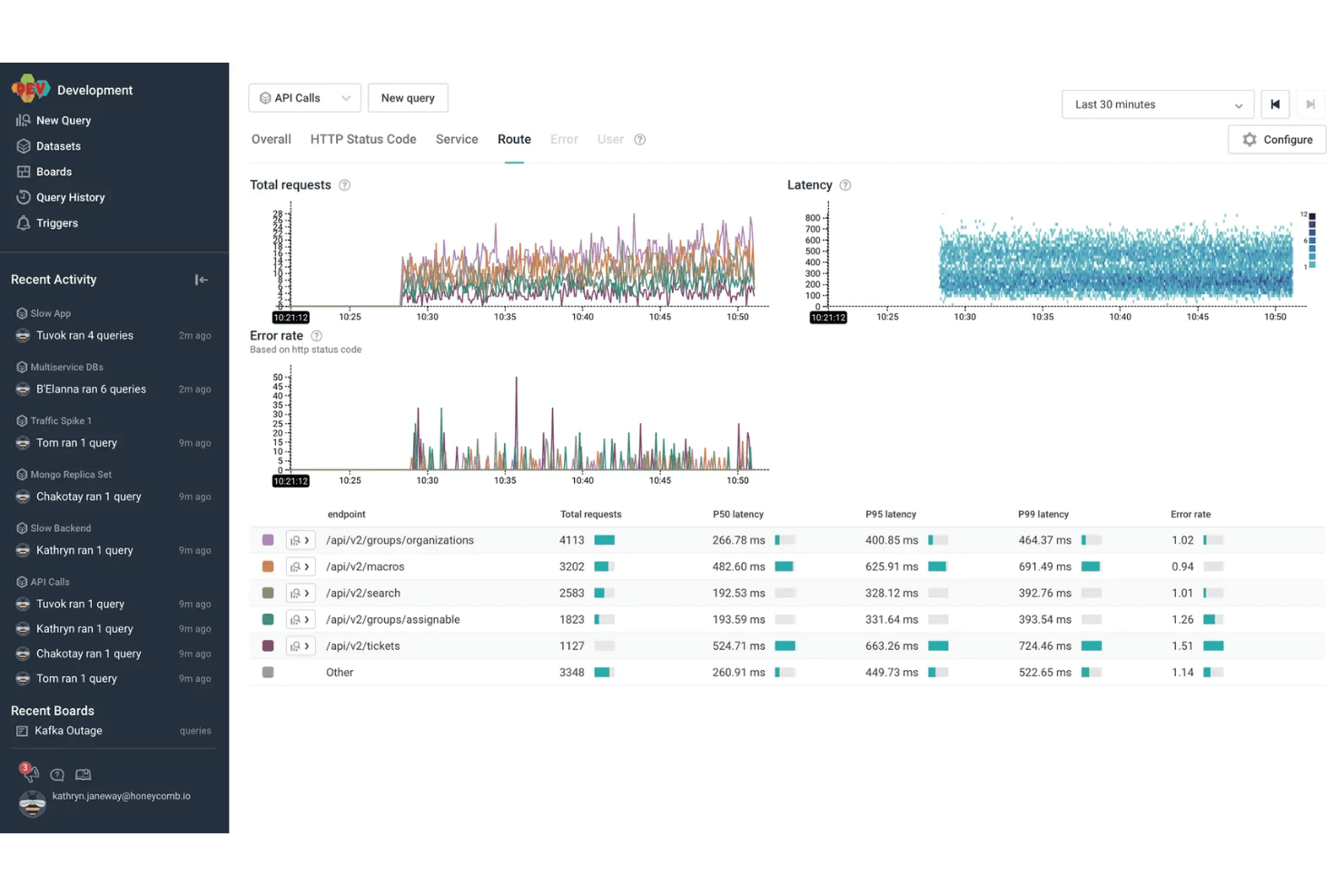
Honeycomb offers a modern, responsive interface with powerful querying and visualization tools, but its usability depends on your team’s technical expertise. Many users praise the speed and flexibility of its query builder, yet some find the learning curve steep, especially for those new to observability concepts.
The documentation and in-app guidance help, but teams without experience in distributed tracing or event-based monitoring may need extra ramp-up time to unlock Honeycomb’s full value.
Integrations
Honeycomb integrates with AWS Lambda, Slack, PagerDuty, Terraform, MySQL, Prometheus, ServiceNow, AWS CloudWatch, GitHub Actions, and Amazon Kinesis, among others.
Honeycomb also offers a robust API and supports connections with third-party integration tools for custom workflows and data ingestion.

Honeycomb Specs
- AI Integration: Yes
- API: Yes
- Automated Testing: No
- Browser Compatibility Testing: No
- Bug Tracking: Yes
- Code Review: No
- Custom Reports: Yes
- Data Export: Yes
- Data Import: Yes
- Developer Tools: Yes
- External Integrations: Yes
- Malware Protection: No
- Multi-User: Yes
- Notifications: Yes
- Performance Testing: Yes
- Process Reporting: Yes
- Static Analysis: No
- Status Notifications: Yes
- Workflow Management: No


