

Los 10 Mejores Programas de Diseño de Redes de 2026

10 Mejor software de diseño de redes - Lista corta


En el vertiginoso mundo del diseño de redes, mantenerse a la vanguardia es crucial. Enfrentas desafíos como la gestión de arquitecturas complejas y la garantía de seguridad. Ahí es donde el software de diseño de redes entra en juego para ayudarte a ti y a tu equipo a planificar redes eficientes y escalables sin complicaciones.
He dedicado tiempo a revisar y probar estas herramientas, centrándome en lo que realmente te importa: facilidad de uso, escalabilidad y relación calidad-precio. Mi objetivo es ofrecerte una visión imparcial y bien investigada sobre las mejores opciones disponibles.
En este artículo encontrarás un desglose de los mejores programas de diseño de redes, cada uno con sus propias fortalezas. Ya sea que trabajes en un equipo pequeño o en una gran empresa, aquí hay opciones para todos.
Por qué confiar en nuestras recomendaciones de software
Nuestro equipo lleva probando y evaluando software desde 2012. Como líderes tecnológicos, sabemos lo difícil —y lo importante— que es elegir el software adecuado.
Para esta guía, evaluamos las herramientas mediante pruebas prácticas e investigación independiente, puntuando las herramientas según nuestros criterios de selección.
Nuestras reseñas reflejan nuestro criterio editorial humano, no un discurso de ventas.
Revisores expertos:
Resumen del mejor software de diseño de redes
Este cuadro comparativo resume los detalles de precios de mis principales selecciones de software de diseño de redes para ayudarte a encontrar el mejor para tu presupuesto y las necesidades de tu negocio.
| Tool | Best For | Trial Info | Price | ||
|---|---|---|---|---|---|
| 1 | Ideal para el mapeo personalizado de topologías | Prueba gratuita de 30 días + demo gratuita disponible | Desde $10/mes (facturado anualmente) | Website | |
| 2 | Ideal para mapeo automático de redes | Demo gratuita disponible | Desde $245/25 dispositivos | Website | |
| 3 | El mejor para diseños visuales intuitivos | Prueba gratuita de 14 días + plan gratuito disponible | Desde $25/usuario/mes (facturado anualmente) | Website | |
| 4 | Ideal para la escalabilidad a nivel empresarial | Prueba gratuita de 30 días | Desde $5/usuario/mes (facturado anualmente) | Website | |
| 5 | Mejor para colaboración en equipo | Not available | Desde $9/usuario/mes (facturado anualmente) | Website | |
| 6 | Mejor para redes orientadas a gráficos | Not available | Precios a consultar | Website | |
| 7 | Ideal para visualizaciones detalladas | Not available | Precio bajo petición | Website | |
| 8 | Ideal para diseños de red basados en la nube | Prueba gratuita de 14 días + plan gratuito disponible | Desde $5/usuario/mes | Website | |
| 9 | Ideal para funcionalidad multiplataforma | Prueba gratuita disponible | Desde $7.95/usuario/mes (facturado anualmente) | Website | |
| 10 | Mejor para el diseño de redes inalámbricas | Not available | Precio bajo solicitud | Website |
Reseñas del mejor software de diseño de redes
A continuación, encontrarás mis resúmenes detallados del mejor software de diseño de redes que entró en mi lista corta. Mis reseñas ofrecen un análisis detallado de las características clave, pros y contras, integraciones y casos de uso ideales de cada herramienta, para ayudarte a encontrar la opción más adecuada para ti.

Site24x7
Ideal para el mapeo personalizado de topologías
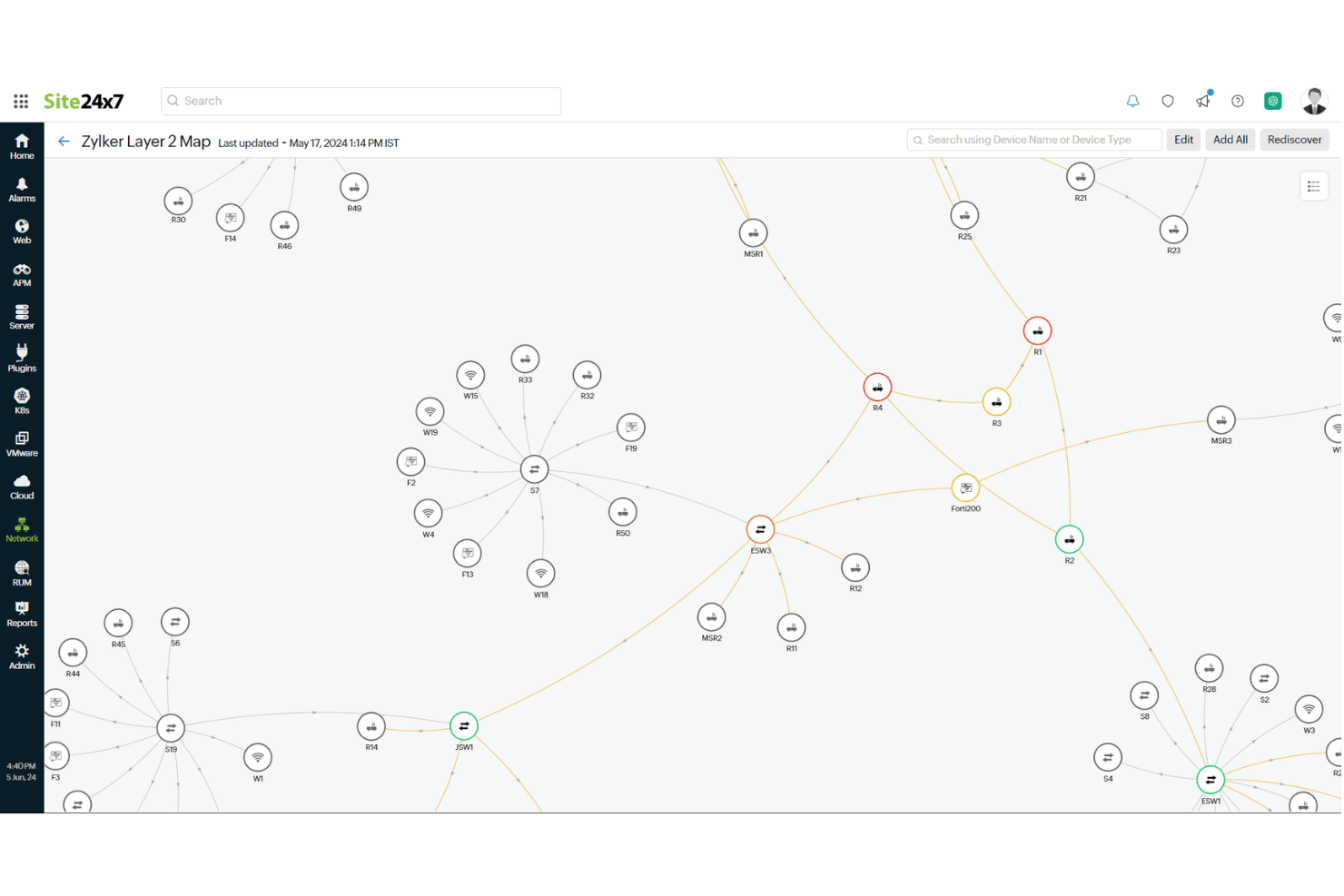
Site24x7 es una solución de monitoreo basada en la nube que te ayuda a supervisar toda tu infraestructura de TI, incluyendo redes, servidores, aplicaciones y sitios web. Su función de mapeo de red te permite visualizar el diseño de tu red, facilitando la gestión de dispositivos y conexiones.
Por qué elegí Site24x7: Me gusta porque ofrece un descubrimiento automático de la red. Al escanear tu red, identifica todos los dispositivos conectados y mapea sus interconexiones, ahorrándote el tiempo y esfuerzo del mapeo manual. Esta función garantiza que tu mapa de red se mantenga actualizado, reflejando cualquier cambio en tiempo real.
Otra característica útil es la capacidad de crear mapas de topología de red personalizados. Puedes organizar dispositivos e interfaces sobre fondos predefinidos o personalizados, proporcionando una representación visual clara de la estructura de tu red. Esta configuración te ayuda a entender cómo interactúan los dispositivos y te permite detectar posibles problemas rápidamente.
Características destacadas e integraciones:
Otras funciones incluyen soporte para los principales protocolos como ARP, CDP y LLDP, que ayudan a descubrir las interconexiones físicas de tu red. Además, Site24x7 ofrece mapas de capa 3 que brindan una visualización detallada del diseño lógico de tu red, incluyendo routers y subredes, mejorando tu comprensión de las comunicaciones entre segmentos de la red. La herramienta también te permite agregar grupos de monitores, lo que te habilita a ver el estado de un grupo de dispositivos de red de manera lógica y conveniente en el mapa.
Las integraciones incluyen ServiceNow, PagerDuty, Jira, Microsoft Teams, Slack, Nagios, AWS, Azure, Google Cloud Platform, Docker, Jenkins y Kubernetes.
Pros and Cons
Pros:
- Monitoreo integral para diversos sistemas
- Tableros e informes personalizables
- Ofrece alertas en tiempo real a través de varios canales
Cons:
- Complejidad en la configuración inicial para entornos grandes
- El exceso de alertas puede ser abrumador para los usuarios
New Product Updates from Site24x7
Site24x7 Adds Compliance Reports and Domain Squatting Detection
Site24x7’s Digital Risk Analyzer now offers domain compliance assessment and squatting detection to help you validate security posture, compare domains, and spot impersonation risks faster. For more information, visit Site24x7’s official site.
 .
.
Ideal para mapeo automático de redes
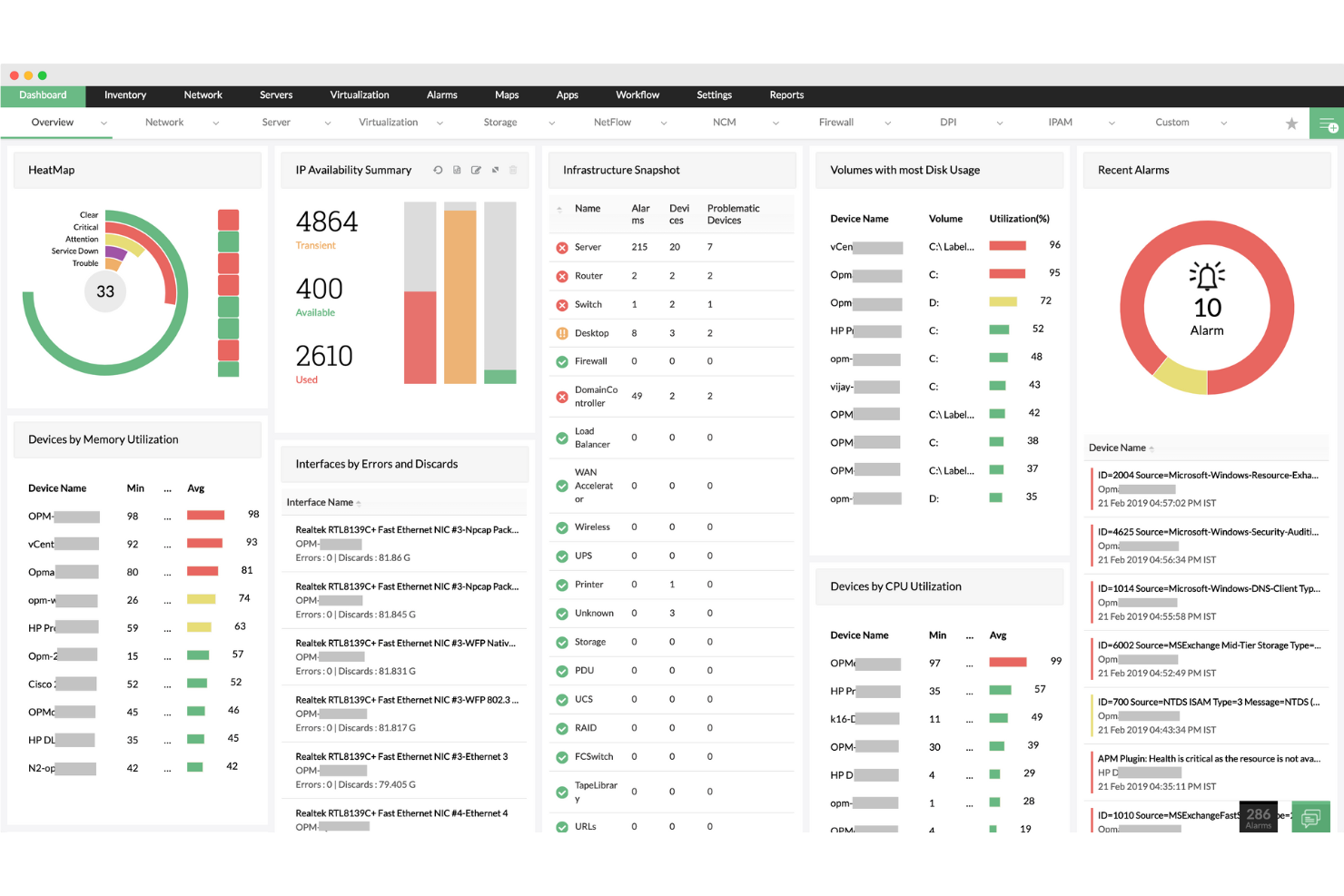
ManageEngine OpManager es una solución de monitoreo de redes que te ayuda a supervisar el rendimiento y la salud de tu red. Proporciona monitoreo en tiempo real de diversos dispositivos de red, incluidos routers, switches, servidores y máquinas virtuales.
Por qué elegí ManageEngine OpManager: OpManager destaca como un potente software de diagramación de redes gracias a sus capacidades de mapeo automático de la red. Su función de Mapas de Capa 2 crea representaciones visuales de la estructura lógica de tu red, permitiéndote ver cómo están conectados los dispositivos e identificar fallos rápidamente. Esta automatización ahorra tiempo al eliminar la necesidad de diagramar la red manualmente, lo que resulta especialmente beneficioso para redes grandes y complejas.
Además, el descubrimiento de Capa 2 garantiza que los dispositivos recién añadidos se integren automáticamente en los mapas de red existentes, manteniendo tus diagramas de red actualizados con un esfuerzo mínimo.
Características destacadas e integraciones:
Otras funciones incluyen la capacidad de crear vistas 3D de plantas, que ofrecen una visualización desde arriba de salas de servidores y centros de datos, facilitando la gestión de la infraestructura física. La vista de rack 3D ofrece una representación virtual de los racks de servidores, permitiendo a los administradores de TI organizar y monitorear dispositivos de red como si estuvieran físicamente presentes en un centro de datos.
Las integraciones incluyen ADManager Plus, Identity360, ServiceDesk Plus, Log360, Endpoint Central, OpManager, NetFlow Analyzer, CloudSpend, Analytics Plus, AWS Marketplace, Azure Marketplace y AppCreator.
Pros and Cons
Pros:
- Alertas en tiempo real
- Escalabilidad para redes en crecimiento
- Amplias capacidades de monitoreo
Cons:
- Podría ofrecer más opciones de integración
- Configuración inicial compleja
New Product Updates from ManageEngine OpManager

ManageEngine OpManager Adds NVIDIA GPU Monitoring
ManageEngine OpManager adds NVIDIA GPU monitoring for Linux servers, dedicated GPU dashboards, adaptive thresholds, and automated incident response to help teams track AI infrastructure performance, health, and resource usage. For more information, visit ManageEngine OpManager’s official site.
 .
.
Visme
El mejor para diseños visuales intuitivos

Visme es una herramienta de diseño que simplifica el proceso de creación de diagramas de red gracias a su intuitiva interfaz de arrastrar y soltar. Es una opción preferida para quienes buscan crear diseños de red que sean funcionales y visualmente atractivos.
Por qué elegí Visme: Elegí Visme por su destacada capacidad para crear diseños de red estéticamente agradables sin una curva de aprendizaje pronunciada. Su interfaz fácil de usar, junto con una amplia variedad de elementos de diseño, la coloca en una categoría propia.
En mi opinión, este software ofrece una experiencia inigualable para los usuarios que priorizan la creatividad visual en sus diagramas de red, por lo que es el mejor para diseños visuales intuitivos.
Características destacadas e integraciones:
El conjunto de funciones de Visme incluye un editor de arrastrar y soltar fácil de usar, plantillas personalizables y una amplia biblioteca de elementos de diseño. Facilita la creación de diagramas de red visualmente atractivos, brindando a los usuarios la posibilidad de importar sus propias imágenes para mayor personalización.
En cuanto a integraciones, Visme se conecta fácilmente con las principales plataformas de almacenamiento en la nube como Google Drive y Dropbox, lo que permite un fácil acceso y compartición de archivos entre equipos.
Pros and Cons
Pros:
- Editor de arrastrar y soltar fácil de usar
- Extensa biblioteca de elementos de diseño y plantillas
- Integración conveniente con plataformas de almacenamiento en la nube
Cons:
- Características avanzadas de diseño de red limitadas
- Algunos elementos de diseño disponibles solo en planes premium
- Ciclo de facturación anual para los niveles de precios más bajos

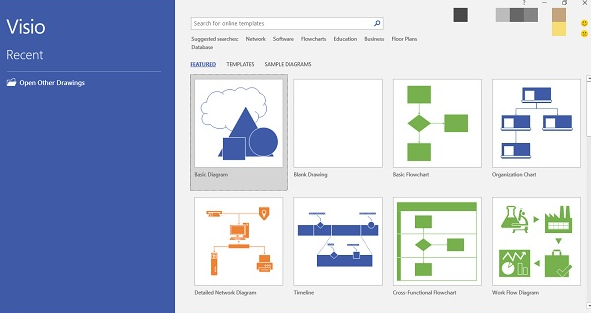
Microsoft Visio se destaca como una aplicación líder en diagramación y gráficos vectoriales diseñada para simplificar y comunicar información compleja a través de diagramas. Dados sus potentes funcionalidades y el respaldo de Microsoft, es evidente por qué Visio resulta fundamental para organizaciones que priorizan la escalabilidad a nivel empresarial.
Por qué elegí Microsoft Visio: Al seleccionar una herramienta de diagramación adecuada para mi lista, Microsoft Visio surgió como una elección obvia por su reputación y sólidas características. Mi juicio se inclinó hacia su rendimiento probado, especialmente al considerar su escalabilidad empresarial.
Creo que Visio se distingue por su capacidad para gestionar proyectos a gran escala y requisitos de diagramación complejos, convirtiéndolo en la mejor opción para empresas que buscan escalabilidad en sus esfuerzos de visualización.
Características destacadas e integraciones:
Microsoft Visio presume de funcionalidades como diagramas vinculados a datos que permiten incorporar datos en tiempo real a los visuales y la capacidad de crear desde diagramas de flujo simples hasta complejos planos de ingeniería. Está diseñado para la colaboración, permitiendo que múltiples usuarios trabajen en un solo diagrama simultáneamente.
En cuanto a integraciones, Visio se integra fácilmente con otros productos de Microsoft Office, y su compatibilidad con una amplia gama de formatos de archivo garantiza versatilidad al importar y exportar diagramas.
Pros and Cons
Pros:
- Amplia variedad de herramientas de diagramación adecuadas para diversas complejidades
- La fácil integración con la suite de Microsoft Office mejora la productividad
- Capaz de admitir múltiples usuarios trabajando en un mismo diagrama, fomentando la colaboración
Cons:
- La curva de aprendizaje puede ser pronunciada para quienes se inician en el software de diagramación
- La estructura de precios puede ser menos competitiva que alternativas nuevas y basadas en la nube
- La fuerte dependencia del ecosistema de Microsoft puede ser restrictiva para algunos usuarios

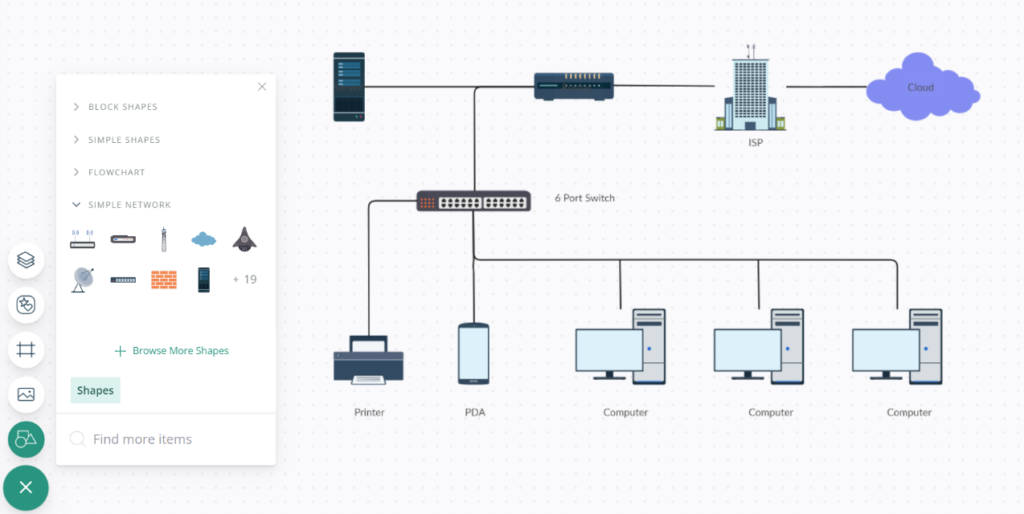
Creately es una potente herramienta de diagramación que facilita a los equipos visualizar y diseñar sus infraestructuras de red en colaboración. Sus funciones colaborativas están diseñadas para asegurar que varios usuarios puedan trabajar en un solo proyecto, optimizando los esfuerzos del equipo y convirtiéndola en la mejor opción para la colaboración grupal.
Por qué elegí el software de diagramas de red de Creately: Al determinar la herramienta adecuada para el diseño de redes, el enfoque de Creately en la colaboración en equipo fue un factor clave. Elegí Creately debido a sus incomparables funciones enfocadas en el trabajo grupal, algo que rara vez igualan otras herramientas.
En mi opinión, para un equipo que colabora frecuentemente en proyectos de redes, Creately ofrece el entorno más adecuado, consolidando su posición como la mejor opción para este caso de uso particular.
Características destacadas e integraciones:
Las funciones de Creately van más allá de la simple diagramación. Ofrece colaboración en tiempo real, permitiendo que los miembros del equipo editen y comenten simultáneamente en los diagramas, haciendo el proceso de diseño más interactivo. El software también cuenta con una amplia biblioteca de plantillas y figuras, facilitando el proceso de diseño.
En cuanto a integraciones, Creately se sincroniza con plataformas como Google Drive, Slack y Confluence, asegurando que los equipos puedan incorporar sus diagramas en su flujo de trabajo general sin inconvenientes.
Pros and Cons
Pros:
- Funciones de colaboración en tiempo real
- Amplia biblioteca de plantillas
- Integración fluida con herramientas populares de equipo como Slack
Cons:
- Precio ligeramente superior al de algunos competidores
- Requiere conexión a internet para funciones colaborativas
- Puede ser complejo para proyectos individuales y sencillos

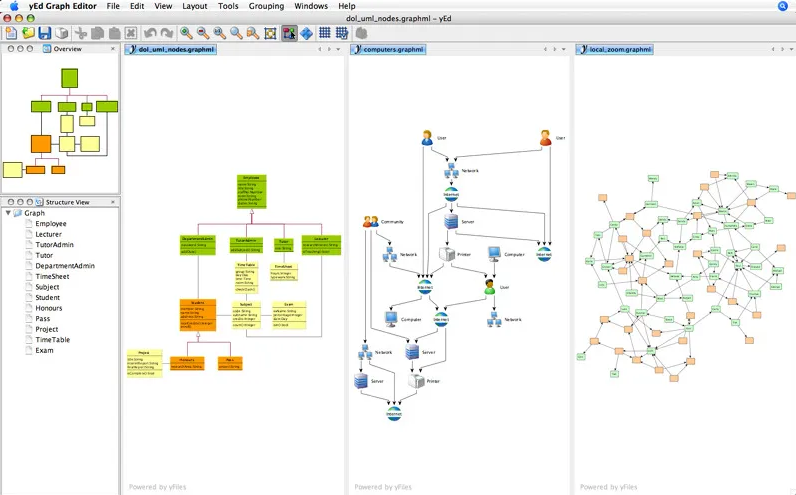
yEd Graph Editor es una aplicación de software robusta diseñada para la creación de diagramas de alta calidad. Ya sea para flujogramas intrincados o para extensos diagramas de redes, esta herramienta puede manejar proyectos de redes dirigidos por gráficos con precisión.
Por qué elegí yEd Graph Editor: En mi búsqueda de una herramienta de diagramación, yEd surgió como un fuerte contendiente, especialmente al evaluar herramientas por su capacidad en redes orientadas a gráficos. Tras comparar múltiples soluciones de software, la fortaleza específica de yEd para manejar gráficos de red complejos captó mi atención.
Basándome en mi evaluación y en opiniones recopiladas, determiné que yEd es la mejor opción para aquellos cuya principal necesidad gira en torno al diseño de redes dirigidas por gráficos.
Características y integraciones destacadas:
yEd cuenta con un algoritmo de disposición automática, que organiza intuitivamente los nodos en cualquier diagrama de red. Su paleta es rica en una variedad de elementos para representar diferentes componentes en una red. Aunque yEd destaca por sus funciones, cabe mencionar que se integra fácilmente con GraphML, un formato de archivo basado en XML para gráficos.
Pros and Cons
Pros:
- Disposición automática para diagramas completos
- Amplia paleta de elementos para diagramas
- Admite GraphML, lo que facilita la interoperabilidad
Cons:
- Puede resultar abrumador para principiantes
- Carece de algunas funciones avanzadas de colaboración presentes en otras herramientas
- La interfaz puede parecer anticuada en comparación con herramientas de diagramación más recientes

Ideal para visualizaciones detalladas
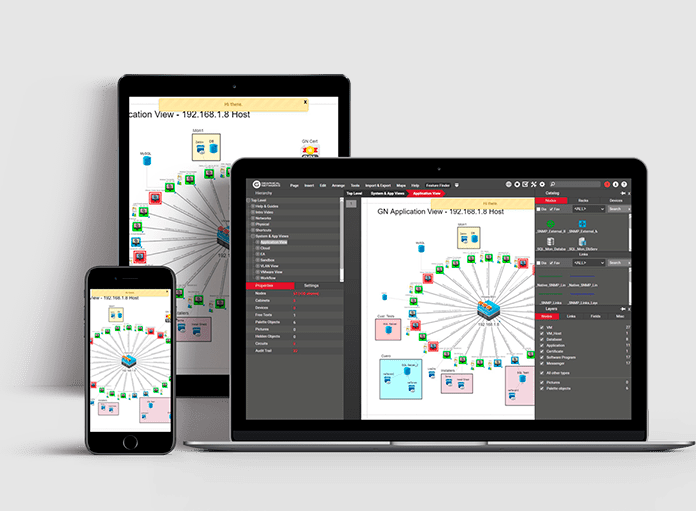
netTerrain es un software integral de documentación de redes, enfocado en ofrecer visualizaciones detalladas de infraestructuras de red complejas. Su precisión al mostrar los matices intrincados de la red garantiza que los gestores de red y los profesionales de TI puedan obtener una visión granular de sus implementaciones, alineándose con su fortaleza en la visualización detallada.
Por qué elegí netTerrain: En el proceso de selección de una herramienta de diagramación de redes, netTerrain surgió como una opción excepcional, especialmente al determinar herramientas capaces de mostrar visualizaciones detalladas. Tras compararlo con varios contendientes, me cautivó la meticulosa atención al detalle de netTerrain y su destreza para plasmar vívidamente cada componente de la red.
Es esta profundidad en la visualización lo que me llevó a considerar que netTerrain es inigualable para quienes priorizan la granularidad en sus diagramas de red.
Características destacadas e integraciones:
La función de descubrimiento automático de red de netTerrain es una verdadera ventaja, asegurando representaciones precisas y actualizadas de la red. Su enfoque jerárquico para la documentación permite a los usuarios profundizar desde una visión global de la red hasta el componente más mínimo.
En cuanto a integraciones, netTerrain está diseñado para trabajar de forma armoniosa con una infinidad de sistemas como dispositivos SNMP, VMware, Amazon Web Services (AWS) y más, haciendo que la importación de datos sea un proceso relativamente sencillo.
Pros and Cons
Pros:
- El descubrimiento automático de red garantiza la representación de datos actualizados
- El enfoque jerárquico de la documentación permite una exploración granular
- Se integra con una amplia variedad de sistemas, lo que mejora la recolección de datos
Cons:
- Puede presentar una curva de aprendizaje para quienes son nuevos en las herramientas de documentación de redes
- Aunque detallada, la interfaz puede resultar densa para algunos usuarios
- Las opciones de personalización pueden ser limitadas en comparación con algunos competidores

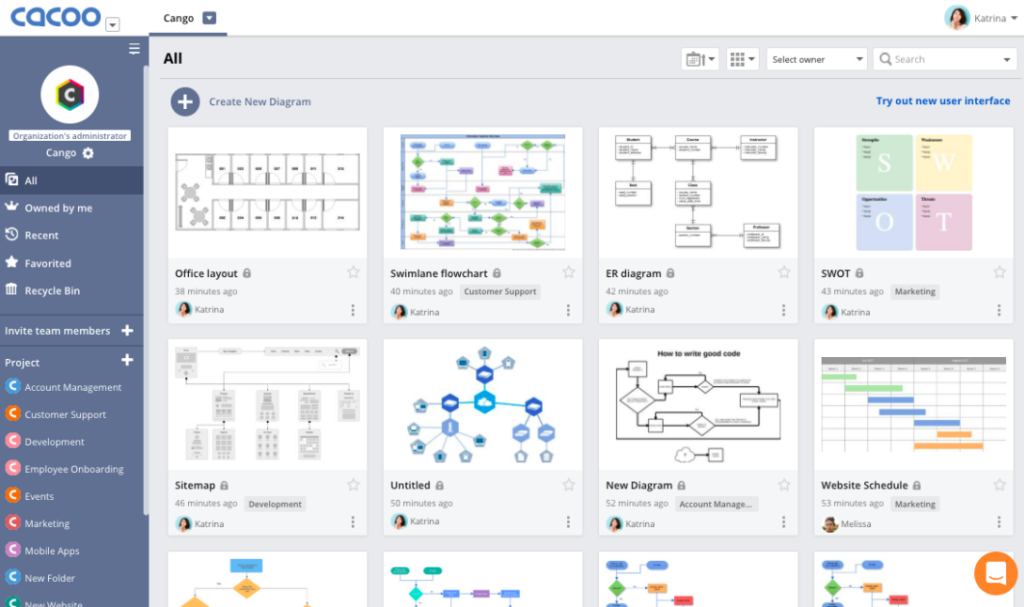
Cacoo es una herramienta de diagramación basada en la web que permite a los usuarios crear, colaborar y compartir sus diagramas en tiempo real. Gracias a su enfoque centrado en la nube, destaca por facilitar el diseño de redes sin necesidad de instalar ningún software, lo que la hace ideal para quienes prefieren flujos de trabajo en la nube.
Por qué elegí Cacoo: Entre la variedad de herramientas de diagramación que analicé, Cacoo llamó mi atención por su firme compromiso con las funcionalidades basadas en la nube. La posibilidad de diseñar, colaborar y compartir sin estar atado a un dispositivo o ubicación específica fue un distintivo clave.
Esta naturaleza nativa en la nube de Cacoo me llevó a determinar que es la opción óptima para profesionales o equipos que priorizan la accesibilidad y flexibilidad en sus procesos de diseño de redes.
Funciones destacadas e integraciones:
Cacoo cuenta con edición colaborativa en tiempo real, permitiendo a los equipos co-diseñar de manera síncrona desde diferentes ubicaciones. El software también ofrece una gran variedad de plantillas, asegurando que los usuarios puedan iniciar sus diseños sin complicaciones.
En cuanto a integraciones, Cacoo se integra fácilmente con plataformas como Google Drive, Dropbox y Confluence, garantizando que los diagramas puedan almacenarse y compartirse con herramientas conocidas.
Pros and Cons
Pros:
- La colaboración en tiempo real facilita la aportación simultánea del equipo
- La amplia biblioteca de plantillas cubre diversas necesidades de diseño
- Se integra con plataformas populares de almacenamiento y documentación
Cons:
- Carece de algunas funciones avanzadas presentes en herramientas especializadas de diseño de redes
- La interfaz puede resultar abrumadora para principiantes
- Dependencia de la conectividad a internet, dado su carácter en la nube

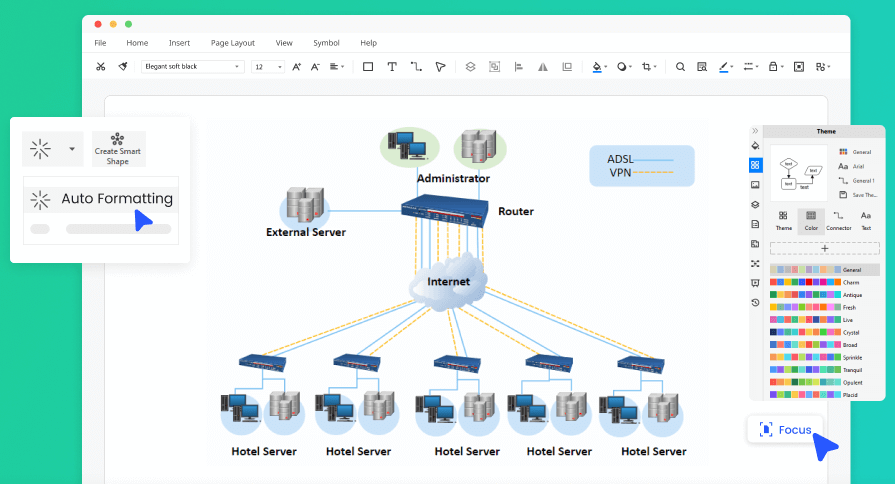
EdrawMax es una herramienta de diagramación versátil, diseñada para ser compatible con diversas plataformas operativas, desde Windows hasta macOS y Linux. Su funcionalidad multiplataforma asegura que los usuarios puedan mantener flujos de trabajo consistentes sin importar el dispositivo o sistema operativo que utilicen, lo que la convierte en una opción atractiva para equipos o individuos que usan sistemas variados.
Por qué elegí EdrawMax: En mi búsqueda del software de diagramación más adaptable, la dedicación de EdrawMax al soporte multiplataforma se hizo evidente. Consideré que se destacaba notablemente frente a muchas otras opciones por su compromiso de garantizar que los usuarios no experimenten inconvenientes al cambiar entre distintos sistemas operativos.
Este énfasis en la compatibilidad y flexibilidad es la razón por la que creo que EdrawMax es insuperable para quienes buscan funcionalidad multiplataforma en su herramienta de diagramación.
Características destacadas e integraciones:
EdrawMax ofrece una completa gama de opciones de diagramación, desde diagramas de flujo hasta diagramas de red, para satisfacer diversas necesidades. Su interfaz intuitiva garantiza una navegación sencilla y procesos de diseño rápidos. En cuanto a integraciones, EdrawMax es compatible con una variedad de formatos de archivo, permitiendo a los usuarios importar y exportar diagramas según sea necesario, en sincronía con herramientas como MS Office, PDF y más.
Pros and Cons
Pros:
- Gran variedad de tipos de diagramas para satisfacer necesidades diversas
- El soporte multiplataforma promueve la consistencia entre dispositivos
- Las integraciones de formatos de archivo facilitan importaciones y exportaciones
Cons:
- Puede tener demasiadas funciones para quienes buscan solo diagramas básicos
- Curva de aprendizaje en algunas de las funcionalidades avanzadas
- La facturación anual puede no atraer a quienes buscan planes mensuales


iBwave es una herramienta especializada diseñada para planificar y mejorar infraestructuras de redes inalámbricas. Está específicamente orientada a las particularidades y complejidades de las redes inalámbricas, lo que la convierte en una opción natural para profesionales enfocados en el ámbito inalámbrico.
Por qué elegí iBwave: Al comparar varias herramientas, el enfoque dedicado de iBwave en el diseño de redes inalámbricas fue evidente. Elegí este software porque sus funciones y capacidades abordan específicamente los desafíos y requisitos de las infraestructuras inalámbricas.
Según mi evaluación, iBwave destaca como líder en el sector de este nicho, y es claramente el mejor para quienes se dedican al diseño de redes inalámbricas.
Características destacadas e integraciones:
El conjunto de funciones de iBwave está enriquecido con herramientas como modelado 3D, funciones de diseño automatizado y algoritmos de predicción exhaustivos que proporcionan análisis precisos de cobertura inalámbrica. Además, ofrece capacidades como soporte e integración con múltiples tecnologías, asegurando que los usuarios mantengan la delantera en la industria inalámbrica, que evoluciona rápidamente.
En cuanto a integraciones, iBwave se conecta de forma fluida con herramientas de planificación RF y otras soluciones de software de terceros, garantizando una planificación y diseño inalámbricos coherentes.
Pros and Cons
Pros:
- Enfoque dedicado al diseño de redes inalámbricas
- Algoritmos de predicción exhaustivos para análisis precisos de cobertura
- Integración fluida con herramientas de planificación RF
Cons:
- Puede ser demasiado especializado para la planificación general de redes
- Curva de aprendizaje para quienes son nuevos en el diseño inalámbrico
- Falta de estructura de precios transparente
Otros programas de diseño de redes
Aquí tienes algunas opciones adicionales de software de diseño de redes que no entraron en mi lista corta pero que igualmente vale la pena considerar:
- NetBrain Network Mapping Software
Ideal para el mapeo dinámico de redes
- Lucidchart
La mejor para opciones de plantillas diversas
- Siemens Network design software
Bueno para la planificación avanzada de sistemas eléctricos


Cómo evalúo el software de diseño de redes
Divido mi evaluación en dos capas: las capacidades básicas que todo ingeniero de redes necesita—como diagramación de topologías y bibliotecas de dispositivos—y los diferenciadores que hacen destacar a las herramientas.
Funcionalidad principal (Requisitos básicos para esta lista)
Cuando selecciono herramientas para mi lista, califico cada una en una escala del 0 (no ofrece la funcionalidad) al 5 (sobresale en esta área) por cada funcionalidad principal que se detalla a continuación. Luego, calculo la puntuación total de la herramienta en porcentaje. Cada herramienta debe alcanzar un puntaje total mínimo del 65% para ser considerada para inclusión.
- Diagramación de topología de red: Evalúo la calidad del diseño de arrastrar y soltar—¿puedes mapear rápidamente un esquema de oficina con varias subredes con vistas lógicas y físicas sin pelearte con la interfaz?
- Bibliotecas de dispositivos y fabricantes: Tener iconos precisos y predefinidos para equipos de Cisco, Juniper, Fortinet y otros es importante, por lo que reviso la profundidad de la biblioteca y la frecuencia de actualización de las formas.
- Simulación y modelado de red: Busco la capacidad de ejecutar escenarios hipotéticos, como modelar un failover de un switch central o probar un nuevo plan de segmentación VLAN antes de intervenir en producción.
- Auto-descubrimiento y mapeo: Las herramientas que pueden escanear tu entorno mediante SNMP o CDP y generar automáticamente un mapa de topología en vivo ahorran horas de documentación manual.
- Documentación y exportación: Verifico si puedes exportar los diseños terminados a formatos como PDF, Visio o PNG para entregarlos a auditores, proveedores o directivos durante aprobaciones de cambios.
- Colaboración multiusuario: Los espacios de trabajo compartidos de diseño con historial de versiones y permisos basados en roles son clave, especialmente para equipos distribuidos que desarrollan conjuntamente un plan de migración de centro de datos.
Una vez que tengo una lista de herramientas que cumplen con este criterio, considero qué distingue a cada plataforma.
Factores diferenciadores (Qué diferencia a los proveedores)
Así es como comparo y contrasto los distintos proveedores:
Características que destacan
El soporte para arquitecturas en la nube es un diferenciador importante. Busco herramientas con iconos nativos de AWS, Azure y GCP y arquitecturas de referencia para que puedas diseñar entornos híbridos sin depender de formas personalizadas. La generación de configuraciones es otra característica valiosa. Una herramienta que convierte tu diagrama en configuraciones CLI o YAML listas para implementar cierra la brecha entre la planificación y la ejecución. Para proyectos de centros de datos, la diagramación de racks con mapeo de cables a nivel de puertos ayuda a planificar diseños físicos junto con los lógicos.
Más allá de las características
Las integraciones son muy importantes aquí. Verifico si una herramienta se conecta con plataformas de monitoreo como SolarWinds o Datadog y sistemas ITSM como ServiceNow, ya que incorporar datos en vivo a tus diagramas los mantiene actualizados después del despliegue. El modelo de implementación es otra consideración: algunos equipos en industrias reguladas necesitan implementaciones en sitio en lugar de SaaS. También evalúo la escalabilidad, específicamente cómo una herramienta maneja redes empresariales con miles de nodos en varios sitios sin ralentizarse durante sesiones simultáneas de edición.
Cómo elegir un software de diseño de redes
Es fácil quedar abrumado por largas listas de funciones y estructuras de precios complejas. Para ayudarte a mantener el foco durante tu proceso de selección de software, aquí tienes una lista de factores a tener en cuenta:
| Factor | Qué tener en cuenta |
| Escalabilidad | ¿Puede el software crecer con tu equipo? Busca opciones que admitan redes más grandes a medida que tus necesidades evolucionan. Considera soluciones preparadas para el futuro que no te limiten. |
| Integraciones | ¿Se conecta con tus herramientas actuales? Verifica la compatibilidad con otros programas que utilizas para evitar interrupciones en tu flujo de trabajo. |
| Personalización | ¿Puedes adaptarlo a tus procesos? Busca software que permita ajustes para cumplir con tus requerimientos específicos de proyecto. |
| Facilidad de uso | ¿La interfaz es intuitiva? Asegúrate de que tu equipo pueda adaptarse rápidamente sin largas sesiones de capacitación, ahorrando tiempo y reduciendo la frustración. |
| Implementación e incorporación | ¿Qué tan sencillo es el proceso de configuración? Evalúa el tiempo y los recursos necesarios para poner en marcha el software, y considera el soporte disponible para la incorporación. |
| Costo | ¿Se ajusta a tu presupuesto? Compara las estructuras de precios considerando tanto los costos iniciales como los recurrentes, para encontrar una solución valiosa sin excederte en el gasto. |
| Salvaguardas de seguridad | ¿Protege tus datos? Asegúrate de que el software cumpla con los estándares de seguridad para mantener segura la información de tu red ante posibles brechas. |
| Disponibilidad de soporte | ¿Obtendrás ayuda cuando la necesites? Revisa los horarios de atención, los tiempos de respuesta y los canales disponibles del proveedor para asegurarte de que puedes obtener asistencia rápidamente. |
¿Qué es el software de diseño de redes?
El software de diseño de redes es una herramienta que ayuda a diseñar y visualizar estructuras de red. Los profesionales de TI y los ingenieros de redes suelen utilizar estas herramientas para planificar y gestionar eficazmente sistemas de red. Funcionalidades como el mapeo de redes, el diseño de topologías y la simulación permiten una planificación y resolución de problemas más efectiva. Estas herramientas ofrecen un valor significativo al mejorar la eficiencia de la red y reducir los riesgos operativos.
Características
Cuando selecciones un software de diseño de redes, ten en cuenta las siguientes características clave:
- Herramientas de mapeo de redes: Visualiza los esquemas de red para ayudar a identificar conexiones y relaciones entre los dispositivos.
- Diseño de topologías: Ofrece herramientas para diseñar y modificar la topología de la red, facilitando la planificación y la gestión eficiente.
- Simulación y pruebas: Permite probar los diseños de red de forma virtual, reduciendo el riesgo de errores antes de la implementación.
- Análisis de rendimiento: Supervisa y analiza el desempeño de la red para identificar cuellos de botella y optimizar la eficiencia.
- Evaluación de seguridad: Evalúa la seguridad de la red para protegerla ante amenazas y vulnerabilidades potenciales.
- Optimización impulsada por IA: Usa inteligencia artificial para sugerir mejoras y optimizar las configuraciones de la red.
- Colaboración en tiempo real: Permite que los miembros del equipo trabajen juntos en los diseños de red simultáneamente, mejorando la productividad.
- Integración con la nube: Se conecta con servicios en la nube para ampliar las capacidades de la red y ofrecer acceso flexible.
- Plantillas personalizables: Proporciona plantillas prediseñadas que pueden adaptarse a necesidades específicas de diseño de redes.
- Documentación automatizada: Genera documentación automáticamente para mantener los registros actualizados y reducir esfuerzos manuales.
Beneficios
Implementar un software de diseño de redes aporta varios beneficios a tu equipo y tu empresa. Aquí tienes algunos de los que puedes aprovechar:
- Mayor eficiencia: La documentación automatizada y la optimización impulsada por IA ahorran tiempo y reducen el trabajo manual.
- Mejor planificación: El mapeo de redes y el diseño de topologías ofrecen visualizaciones claras para apoyar la planificación estratégica.
- Reducción de riesgos: La simulación y las pruebas te permiten detectar posibles problemas antes de la implementación, minimizando errores.
- Mejor colaboración: Las funciones de colaboración en tiempo real permiten a los equipos trabajar juntos sin interrupciones, aumentando la productividad.
- Mayor seguridad: Las herramientas de evaluación de seguridad ayudan a identificar vulnerabilidades, asegurando la protección de tu red.
- Escalabilidad: La integración con la nube garantiza que tu red pueda crecer a medida que tu empresa se expanda, sin interrupciones significativas.
- Ahorro de costos: Las herramientas de análisis de rendimiento ayudan a identificar ineficiencias, permitiendo mejoras de red más rentables.
Costos y precios
Seleccionar un software de diseño de redes requiere conocer los distintos modelos de precios y planes disponibles. Los costos varían según las características, el tamaño del equipo, los complementos y más. La siguiente tabla resume los planes comunes, sus precios medios y las características típicas incluidas en las soluciones de software de diseño de redes:
Tabla comparativa de planes para software de diseño de redes
| Tipo de plan | Precio medio | Características comunes |
|---|---|---|
| Plan gratuito | $0 | Mapeo básico de red, diseño de topologías limitado y soporte de la comunidad. |
| Plan personal | $10-$30/user/month | Mapeo de red, simulación y pruebas, y análisis básico de rendimiento. |
| Plan de negocios | $50-$100/user/month | Diseño avanzado de topologías, colaboración en tiempo real y evaluación de seguridad. |
| Plan empresarial | $150-$300/user/month | Plantillas personalizables, optimización impulsada por IA y soporte al cliente dedicado. |
Preguntas frecuentes sobre software de diseño de redes
Aquí tienes algunas respuestas a preguntas comunes sobre el software de diseño de redes:
¿Cuáles son los desafíos del diseño de redes?
El diseño de redes presenta desafíos como garantizar la seguridad, gestionar redes en expansión y configurar correctamente los dispositivos. También debes tener en cuenta las regulaciones y las limitaciones presupuestarias. Abordar estos temas requiere una planificación cuidadosa y las herramientas adecuadas para mantener tu red segura y eficiente.
¿Qué opciones de soporte existen para el software de diseño de redes?
Las opciones de soporte varían, pero suelen incluir recursos en línea, chat en vivo y soporte por correo electrónico. Algunos proveedores ofrecen gestores de cuentas dedicados o planes premium de soporte. Verifica la disponibilidad de materiales de formación, como tutoriales y seminarios web, para ayudar a tu equipo a comenzar.
¿Puede el software de diseño de redes integrarse con sistemas existentes?
Sí, muchas herramientas de diseño de redes ofrecen integraciones con sistemas y software existentes. Comprueba la compatibilidad con tus herramientas actuales para garantizar un flujo de datos sin problemas. Las integraciones pueden mejorar la funcionalidad y proporcionar una visión integral de tu red.
¿Qué sigue?
Si estás en proceso de investigar software de diseño de redes, conéctate con un asesor de SoftwareSelect para recibir recomendaciones gratuitas.
Solo tienes que completar un formulario y tener una charla breve donde analizarán tus necesidades específicas. Luego recibirás una lista corta de software para revisar. Incluso te acompañarán durante todo el proceso de compra, incluida la negociación de precios.