

Zendesk Test 2026: Vorteile, Nachteile, Funktionen & Preise
Zendesk hebt sich als erstklassige Helpdesk-Lösung für Unternehmen jeder Größe durch umfangreiche Anpassungsmöglichkeiten und KI-gestützte Funktionen hervor.

Wir bewerten Tools unabhängig; Provisionen helfen, unsere Tests zu finanzieren. Siehe unsere Transparenzrichtlinie und unsere Methodik.
Zendesk is an IT helpdesk software built for teams that need to manage internal support tickets, incident tracking, and service requests across multiple channels. I'd consider it if your support function handles a high volume of end-user requests and you want more flexible ticket routing and a cleaner agent interface than what Jira Service Management offers, particularly if your team isn't deeply embedded in software development workflows where Jira's ecosystem naturally shines.
Zendesk Evaluation Summary
4.3/5
- From $19/user/month (billed annually)
- 14-day free trial
Warum Sie unseren Software-Empfehlungen vertrauen können
6,700+
Reviews
20
Industry experts
16+
Evaluation factors
14
Years
Unser Team testet und bewertet Software seit 2012. Als Tech-Führungskräfte wissen wir selbst, wie schwierig – und wichtig – es ist, die richtige Software auszuwählen.
Für diesen Leitfaden haben wir Tools mithilfe von praktischen Tests und unabhängiger Recherche bewertet und dabei unsere Bewertungskriterien angewendet.
Unsere Bewertungen spiegeln unser menschliches redaktionelles Urteilsvermögen wider, keine Verkaufsstrategie.
Expertenprüfer:
- Paulo Gardini MiguelTech-Direktor
 Tim FisherVP für KI
 Gabriel RosasTech Lead & Software-Architekt
 Christhian GruhnTech Lead & Plattform-Architekt

Zendesk Overview
In my opinion, Zendesk stands out as a strong contender in the help desk software arena. Its user-friendly interface and robust feature set make it a great choice for customer service teams in various industries, especially those in retail and tech. While it excels in ease of use and customer support, its pricing might be a consideration for smaller businesses. Compared to competitors, Zendesk offers solid integrations and an intuitive platform, but its cost per user could be prohibitive for some. For larger enterprises seeking efficiency and reliability, Zendesk is a sound investment.
Pros
- Your team can easily manage customer interactions with its intuitive interface.
- It offers powerful reporting tools to help you track and improve performance.
- Zendesk provides excellent support, ensuring your issues are addressed promptly.
Cons
- You might find the initial setup process a bit complex.
- Customization options can feel limited for advanced users.
- Some users report occasional delays in loading times.
Is Zendesk Right For Your Needs?
Who Would be a Good Fit for Zendesk?
Zendesk is best suited for small to large businesses that need a customer service solution. It works well for companies with complex customer support needs across multiple channels. Organizations that want to unify their customer interactions, automate workflows, and gain insights from customer data will benefit from Zendesk. It's also a good choice for businesses that need scalability as they grow and require integration with other business tools.
- Large EnterprisesZendesk scales well for companies with high customer support volumes and complex workflows.
- E-commerceThe platform integrates with online stores and provides tools for managing high volumes of customer inquiries.
- SaaS CompaniesZendesk's features align well with subscription-based businesses needing to manage ongoing customer relationships.
- IT DepartmentsThe software offers IT service management capabilities suitable for handling internal tech support requests.
- Multichannel SupportZendesk excels in unifying customer interactions across various channels like email, chat, and social media.
- Global TeamsThe platform supports multiple languages and time zones, making it suitable for international customer service operations.
Who Would be a Bad Fit for Zendesk?
I don't recommend Zendesk for very small businesses or solopreneurs with simple customer service needs. The platform may be too complex and expensive for their requirements. Companies that need extensive customization might find Zendesk limiting, as it has some constraints on modifications. Businesses with strict data residency requirements should also be cautious, as Zendesk's data centers are limited to specific regions.
- Small BusinessesZendesk's pricing and feature set may be overkill for companies with limited support needs.
- Budget-ConsciousThe software can be expensive, especially when adding advanced features or scaling up users.
- Simple InquiriesFor businesses dealing primarily with basic, repetitive questions, Zendesk's advanced features may be unnecessary.
- Offline-Only SupportCompanies that don't need omnichannel or digital support options won't benefit from Zendesk's online-focused features.
- Highly SpecializedIndustries with very specific support requirements may find Zendesk's out-of-the-box solutions insufficient
- Low-Tech UsersThe platform's interface and setup can be complex for teams without technical expertise or dedicated IT support.
Unsere Bewertungsmethodik
Wie wir Werkzeuge testen & bewerten
Wir haben Jahre damit verbracht, unser System zur Softwareprüfung und -bewertung aufzubauen, zu verfeinern und zu verbessern. Das Bewertungsraster ist darauf ausgelegt, die Feinheiten der Softwareauswahl und Effektivität eines Tools einzufangen, wobei wir uns auf kritische Aspekte des Entscheidungsprozesses konzentrieren.
Nachfolgend sehen Sie genau, wie unser Test- und Bewertungssystem anhand von sieben Kriterien funktioniert. Es ermöglicht uns eine unparteiische Bewertung der Software basierend auf Grundfunktionalität, besonderen Funktionen, Benutzerfreundlichkeit, Onboarding, Kundensupport, Integrationen, Kundenbewertungen und Preis-Leistungs-Verhältnis.
Grundfunktionalität (25 % der Endbewertung)
Der Ausgangspunkt unserer Bewertung ist immer die Grundfunktionalität des Werkzeugs. Verfügt es über die grundlegenden Funktionen und Merkmale, die ein Benutzer erwarten würde? Sind grundlegende Funktionen auf höherpreisige Tarife beschränkt? Im Kern erwarten wir, dass ein Tool den Basisfähigkeiten seiner Konkurrenten standhält.
Besondere Features (25 % der Endbewertung)
Anschließend bewerten wir ungewöhnliche, herausragende Funktionen, die über die typische Grundfunktionalität von Tools dieser Art hinausgehen. Eine hohe Bewertung zeigt spezialisierte oder einzigartige Eigenschaften, die das Produkt schneller, effizienter oder für den Nutzer wertvoller machen.
Wir bewerten außerdem, wie einfach sich das Tool mit anderen üblichen Werkzeugen im Technologie-Stack integrieren lässt, um die Funktionalität und den Nutzen der Software zu erweitern. Tools mit vielen nativen Integrationen, Drittanbieter-Anbindungen und API-Zugang zur Erstellung kundenspezifischer Integrationen erhalten die besten Bewertungen.
Benutzerfreundlichkeit (10 % der Endbewertung)
Wir betrachten, wie schnell und einfach Aufgaben aus dem Bereich der Grundfunktionalität mit dem Tool erledigt werden können. Gut bewertete Software ist durchdacht gestaltet, intuitiv bedienbar, bietet mobile Apps, Vorlagen und lässt relativ komplexe Aufgaben einfach erscheinen.
Onboarding (10 % der Endbewertung)
Wir wissen, wie wichtig die schnelle Einführung eines neuen Tools für das Team ist, daher bewerten wir, wie leicht sich ein Werkzeug mit minimalem Training erlernen und nutzen lässt. Wir bewerten, wie schnell ein Teammitglied ohne Vorerfahrung anfangen kann. Hoch bewertete Lösungen benötigen wenig bis gar keine Unterstützung.
Kundensupport (10 % der Endbewertung)
Wir prüfen, wie schnell und einfach man bei Problemen Hilfe per Telefon, Live-Chat oder Wissensdatenbank erhält. Tools und Anbieter mit Echtzeit-Support werden besser bewertet, während Chatbots schlechter abschneiden.
Kundenbewertungen (10 % der Endbewertung)
Neben unserer eigenen Prüfung beziehen wir den Net Promoter Score aktueller und ehemaliger Kunden mit ein. Wir bewerten, wie wahrscheinlich es ist, dass sie sich erneut für das Werkzeug entscheiden würden. Hoch bewertete Software weist einen hohen Net Promoter Score auf.
Preis-Leistungs-Verhältnis (10 % der Endbewertung)
Abschließend vergleichen wir unter Berücksichtigung aller Kriterien den durchschnittlichen Preis der Einstiegspakete mit den Grundfunktionen und bewerten den Mehrwert aus den anderen Bewertungsbereichen. Software, die mehr fürs gleiche Geld bietet, schneidet besser ab.
New Product Updates from Zendesk
Zendesk Adds Email AI Replies and Predictive Routing
Zendesk adds configurable Knowledge and Welcome replies to email AI agents with agentic AI, plus predictive routing for email tickets in omnichannel routing. These updates help teams shape email response flows and route eligible tickets to the agent predicted to resolve them fastest. Highlights include:
- Knowledge Reply: Customize how email AI agents answer questions using connected knowledge sources.
- Welcome Reply: Add pre-conversation logic for routing, actions, integrations, or escalation before the AI agent responds.
- Predictive Email Routing: Route eligible email tickets using agent availability, workload, and performance signals.
- Expanded Email Coverage: Apply predictive routing to email, web form, side conversation, and API-created tickets.
Visit Zendesk’s official site for more details.
Zendesk Adds Email AI Replies and Predictive Routing
Zendesk adds configurable Knowledge and Welcome replies to email AI agents with agentic AI, plus predictive routing for email tickets in omnichannel routing. These updates help teams shape email response flows and route eligible tickets to the agent predicted to resolve them fastest. Highlights include:
- Knowledge Reply: Customize how email AI agents answer questions using connected knowledge sources.
- Welcome Reply: Add pre-conversation logic for routing, actions, integrations, or escalation before the AI agent responds.
- Predictive Email Routing: Route eligible email tickets using agent availability, workload, and performance signals.
- Expanded Email Coverage: Apply predictive routing to email, web form, side conversation, and API-created tickets.
Visit Zendesk’s official site for more details.
Zendesk Makes Employee Service AI Agents Generally Available
Zendesk has made employee service AI agents generally available for eligible customers, helping teams deliver faster employee support across key channels with richer knowledge coverage and automation. The update improves self-service resolution while providing clearer controls for how many issues AI can resolve each month. Highlights include:
- Multi-Channel Support: Deliver AI-powered employee help through the help center, Slack, and Microsoft Teams.
- Knowledge Connectors: Connect more than 20 sources, including Google Drive, SharePoint, Confluence, Notion, Slack, Teams, and Box.
- Permission-Aware Access: Respect resource-level permissions across connected knowledge sources.
- Advanced Action Flows: Let AI agents run multi-system workflows and resolve requests end to end.
- Human Escalation: Create tickets automatically when a request needs human support.
Visit Zendesk’s official site for more details.
Zendesk Updates AutoQA Tone Scoring
Zendesk has updated the way AutoQA calculates tone scores for QA users, making the evaluation more specific to observable, professional conduct. This helps teams rely on clearer, more consistent tone assessments without needing to change their current setup. Highlights include:
- Professional Conduct: Focuses tone scoring on observable behaviors in agent responses.
- Emotion Exclusion: Removes assessments of emotions such as frustration.
- Automatic Rollout: Applies to all Zendesk QA accounts without manual setup.
- Updated Scoring: Uses a revised calculation method that may change average tone scores.
- Compliance Focus: Aligns AutoQA tone evaluation with stricter privacy and regulatory expectations.
Visit Zendesk’s official site for more details.
Zendesk Adds Smartsheet Connector for Action Flows
Zendesk Action Flows can now connect with Smartsheet to manage sheet and row data without duplicating work across systems. Workflows can create rows, retrieve details, and update records as support tasks progress. Highlights include:
- Smartsheet Connector: Connects Zendesk Action Flows with Smartsheet.
- Add Rows: Creates new rows from support workflows.
- Read and Search: Finds and retrieves existing Smartsheet data.
- Update Rows: Updates Smartsheet records as work progresses.
- Workflow Integration: Links customer support activity with project and process tracking.
Visit Zendesk’s official site for more details.
Zendesk Contact Center Adds Outbound User Search
Zendesk Contact Center now includes outbound user search, helping agents initiate calls faster without switching tools. This streamlines outreach workflows and reduces time spent manually finding contact details. Highlights include:
- User Search: Finds Zendesk users by name or phone number.
- Saved Phone Numbers: Shows available numbers when a user has more than one.
- Direct Outbound Calling: Lets agents place calls from the dialer after selecting a user.
- Permission-Based Results: Only shows users the agent is allowed to access.
- Manual Dialing: Keeps keypad dialing available alongside user search.
Visit Zendesk’s official site for more details.
Zendesk Connects Salesforce as an External Knowledge Source
Zendesk connects Salesforce content to AI agents, Copilot, search, and generative search as an external knowledge source. This makes existing Salesforce knowledge easier to reuse across support workflows. Highlights include:
- Salesforce Knowledge Source: Lets teams connect Salesforce content directly to Zendesk.
- AI Agent Access: Makes Salesforce knowledge available to Zendesk AI agents.
- Copilot Support: Gives Copilot access to connected Salesforce content.
- Search Integration: Extends Salesforce content to standard and generative search experiences.
Visit Zendesk’s official site for more details.
Zendesk Updates Ticket Merging and Multi-Recipient Email Handling
Zendesk introduces a redesigned ticket merge sidebar and multi-recipient email tickets that create linked tickets for each support address. These updates make it easier to review merged tickets and coordinate requests across teams. Highlights include:
- Ticket Merge Sidebar: Replaces the popup modal with a sidebar that improves ticket visibility and merge context.
- Rich Text Support: Preserves HTML and formatting when tickets are merged.
- Merge Visibility: Adds status indicators, hover details, and clearer warnings during bulk merges.
- Multi-Recipient Email Tickets: Creates a separate ticket for each support address included on an inbound email.
- Linked Ticket IDs: Connects related tickets with a multi-recipient email ID for easier tracking.
Visit Zendesk’s official site for more details.
 Opens new window
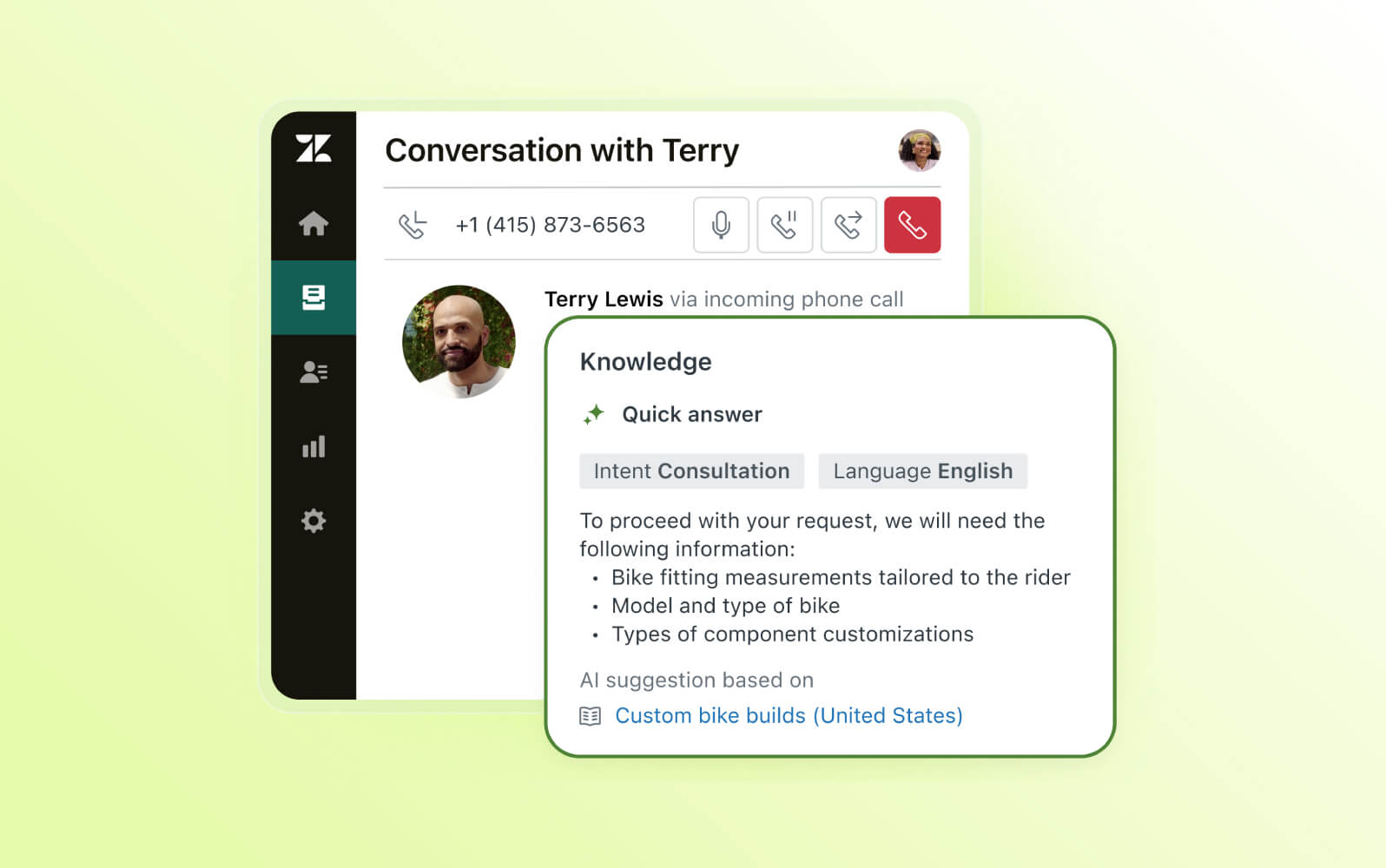
Zendesk Voice AI Agents Reach General Availability
Zendesk makes Voice AI Agents generally available with generative procedures, native voice routing, contextual handoffs, testing tools, and multilingual support. These capabilities help automate more phone conversations while giving agents the context needed to continue escalated calls. Highlights include:
- End-to-End Voice Automation: Handles calls from greeting and intent capture through resolution and wrap-up.
- Contextual Handoffs: Transfers calls with transcripts, summaries, and detected intent for human agents.
- Generative Actions: Supports API calls, database lookups, ticket updates, SMS messages, and email replies.
- Testing Widget: Lets teams test Voice AI Agents in the browser before assigning them to live phone lines.
- Multilingual Support: Supports conversations in 53 languages with language-specific voices and locales.
Visit Zendesk’s official site for more details.
 Opens new window
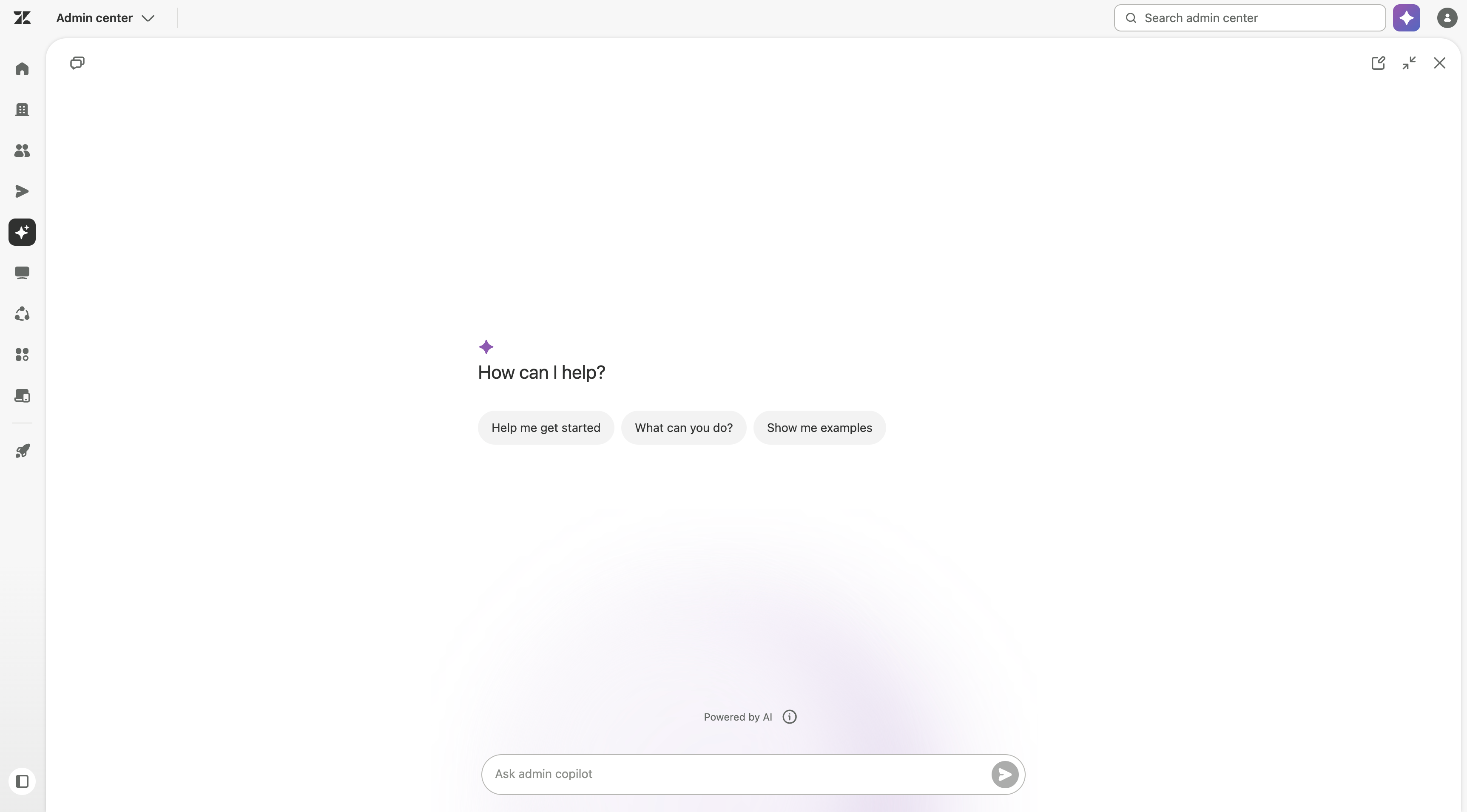
Zendesk Adds HubSpot Knowledge and Admin Copilot Controls
Zendesk adds HubSpot content across AI agents, Copilot, search, and generative search, plus role-based Admin Copilot access, expanded view, and QA recommendations. These updates improve knowledge access and admin control. Highlights include:
- HubSpot Knowledge Source: Makes HubSpot content available across AI agents, Copilot, search, and generative search.
- Role-Based Access: Lets admins control which custom roles can use Admin Copilot.
- Expanded View: Gives admins more space to review detailed Copilot responses.
- QA Recommendations: Adds Zendesk QA guidance to the recommendations feed.
Visit Zendesk’s official site for more details.
Zendesk Specs
- Analytics: Yes
- API: Yes
- Batch Permissions & Access: No
- Call Integration: Yes
- Chat: Yes
- Contact Management: Yes
- Contact Sharing: Yes
- CRM Integration: Yes
- Customer Management: Yes
- Customer Service: Yes
- Dashboard: Yes
- Data Export: Yes
- Data Import: Yes
- Data Visualization: Yes
- Email Integration: Yes
- Escalation Management: Yes
- External Integrations: Yes
- Instant Chat Integration: Yes
- Knowledge Base: Yes
- Lead Management: No
- Lead Scoring: No
- Multi-User: Yes
- Notifications: Yes
- Real-time Alerts: Yes
- Scheduling: Yes
- Self-service Portal: Yes
- Social Media Integration: Yes
- Support Forum: Yes
- Third-Party Plugins/Add-Ons: Yes
- Ticket Management: Yes
- Workflow Management: Yes
Zendesk FAQs
Zendesk Company Overview & History
Zendesk is a customer service software company that offers a cloud-based help desk platform. The company's headquarters is in San Francisco, California, and it employs over 5,000 people worldwide. Zendesk has acquired several companies to expand its product offerings, including Base CRM and Smooch.
Zendesk is known for its focus on customer experience and its commitment to corporate social responsibility. The company has a diverse customer base, including Uber, Shopify, Airbnb, and Slack. As of 2022, Zendesk's revenue was approximately $1.68 billion, with a market capitalization of around $7.1 billion
Zendesk Major Milestones
- 2007: Founded in Copenhagen, Denmark by Mikkel Svane, Morten Primdahl, and Alexander Aghassipour.
- 2009: Relocated headquarters to San Francisco, California.
- 2011: Raised $60 million in venture capital funding.
- 2014: Went public on the New York Stock Exchange (NYSE: ZEN).
- 2016: Acquired We Are Cloud SAS, maker of BIME Analytics.
- 2018: Acquired Base CRM for $143 million.
- 2019: Acquired Smooch for an undisclosed amount.
- 2021: Rejected a $17 billion acquisition offer from private equity firms.
- 2022: Acquired by private equity firms Hellman & Friedman and Permira for $10.2 billion.