

En iyi güvenlik açığı yönetimi araçları, ekiplerin güvenlik açıklarını erken tespit etmesine, güvenlik risklerini azaltmasına ve altyapıları genelinde daha güvenli ve mevzuata daha uyumlu sistemleri korumasına yardımcı olur. Zayıflıklar tespit edilmeden kaldığında, yama döngüleri manuel görevlere dayandığında veya uyarılar yararlı içgörülerden çok gürültü oluşturduğunda tehditler hızla büyüyebilir ve güvenlik operasyonlarında gereksiz boşluklar yaratabilir.
Doğru güvenlik açığı yönetimi platformu, güvenlik ve BT ekiplerine net görünürlük, otomatik tarama ve doğru önceliklendirme sağlayarak hangi sorunların hemen ele alınması gerektiğini anlamalarına ve bunlar işletmeyi etkilemeden çözmelerine yardımcı olur. Gerçek üretim ortamlarında güvenlik araçlarını test etme ve uygulama konusunda 20 yılı aşkın deneyime sahip bir Teknoloji Direktörü olarak, devam eden güvenlik çalışmaları sırasında tespit doğruluğu, otomasyon kalitesi ve kullanım kolaylığı temelinde önde gelen çözümleri değerlendirdim.
Her inceleme; ekibinizin güvenilir ve verimli risk azaltımı için en iyi güvenlik açığı yönetimi aracını seçmesine yardımcı olmak üzere özellikleri, artıları ve eksileri ve ideal kullanım alanlarını ele alır.
Why Trust Our Software Recommendations
6,700+
Reviews
20
Industry experts
16+
Evaluation factors
14
Years
Our team has been testing and reviewing software since 2012. As tech leaders ourselves, we know how difficult—and important—it is to choose the right software.
For this guide, we evaluated tools using hands-on testing and independent research, scoring tools using our selection criteria.
Our reviews reflect our human editorial judgment, not a sales pitch.
Expert reviewers:
- Paulo Gardini MiguelTech Director
 Tim FisherVP of AI
 Gabriel RosasTech Lead & Software Architect
 Christhian GruhnTech Lead & Platform Architect

Güvenlik Açığı Yönetimi Araçları Karşılaştırma Tablosu
Bu karşılaştırma tablosu, en iyi Güvenlik Açığı Yönetimi Araçları seçimlerim için fiyatlandırma ayrıntılarını özetler.
Sorted by: Default
| Tool | Starting Price | Website | |
|---|---|---|---|
Best for real-time external threat monitoring | Not rated | Pricing upon request | Website |
Best for comprehensive code-to-cloud security | 4.3 out of 5 | $300/month Free plan + free demo available | Book Demo |
Best for third-party vendor risk assessments | 4.5 out of 5 | Pricing upon request Free demo available | Website |
Best for endpoint vulnerability & patch management | 4.5 out of 5 | Pricing upon request 30-day free trial + free demo available | Website |
Best for secure code analysis | 4.4 out of 5 | Pricing upon request Free trial available | Website |
Best for proactive network security monitoring | 4.7 out of 5 | Pricing upon request 14-day free trial + demo available | Website |
Best for endpoint baselines and USB controls | 4.8 out of 5 | $2/device/month 14-day free trial + free demo available | Website |
Best for automated patch management | Not rated | Pricing upon request Free trial + free demo available | Website |
Best for continuous vulnerability monitoring | 4.8 out of 5 | $119/month Free trial available | Website |
Best for comprehensive vulnerability scanning | 4.5 out of 5 | $69/month Free demo available | Website |


En İyi Güvenlik Açığı Yönetimi Araçları İncelemeleri
Aşağıda, kısa listeme giren en iyi Güvenlik Açığı Yönetimi Araçlarının ayrıntılı özetlerini bulabilirsiniz. İncelemelerim, sizin için en iyi aracı bulmanıza yardımcı olmak amacıyla her aracın temel özelliklerine, artılarına & eksilerine, entegrasyonlarına ve ideal kullanım alanlarına ayrıntılı bir bakış sunar.


NordStellar dashboard showing real-time data breach insights, including leaked data, risk levels, and key security metrics such as breaches, infections, and stolen credentials. NordStellar is a platform designed to help you manage vulnerabilities with a focus on external threat intelligence and security. It provides tools to identify and mitigate potential security threats in real-time, ensuring your organization stays protected from cyber threats.
Why I Picked NordStellar: I chose NordStellar for its real-time alerts, advanced threat detection, and automated attack surface management that keep you ahead of cyber risks. With instant data breach and dark web monitoring, it alerts your team to compromised data or emerging threats, enabling swift action. By centralizing intelligence from over 36,000 sources and prioritizing risks, NordStellar helps both executives and security teams maintain proactive, comprehensive protection.
Standout features & integrations:
Features include brand protection, which helps in detecting and preventing unauthorized use of your brand online. The platform also offers real-time monitoring, allowing you to keep a constant watch on security threats. Lastly, its integration capabilities with SIEM and SOAR platforms mean you can easily incorporate NordStellar into your existing security infrastructure, enhancing your overall security posture.
Integrations include Splunk, SIEM platforms, SOAR platforms, Email, Slack, Webhooks, and API.
Pros and Cons
Pros:
- Integrates with SIEM and SOAR
- Automated asset discovery and mapping
- Real-time alerts for cyber threats
Cons:
- Limited mobile application support
- Pricing not publicly disclosed
Learn more about NordStellar: Best for comprehensive code-to-cloud security
- Free plan + free demo available
- From $300/month
Visit WebsiteCustomer Rating:4.3/5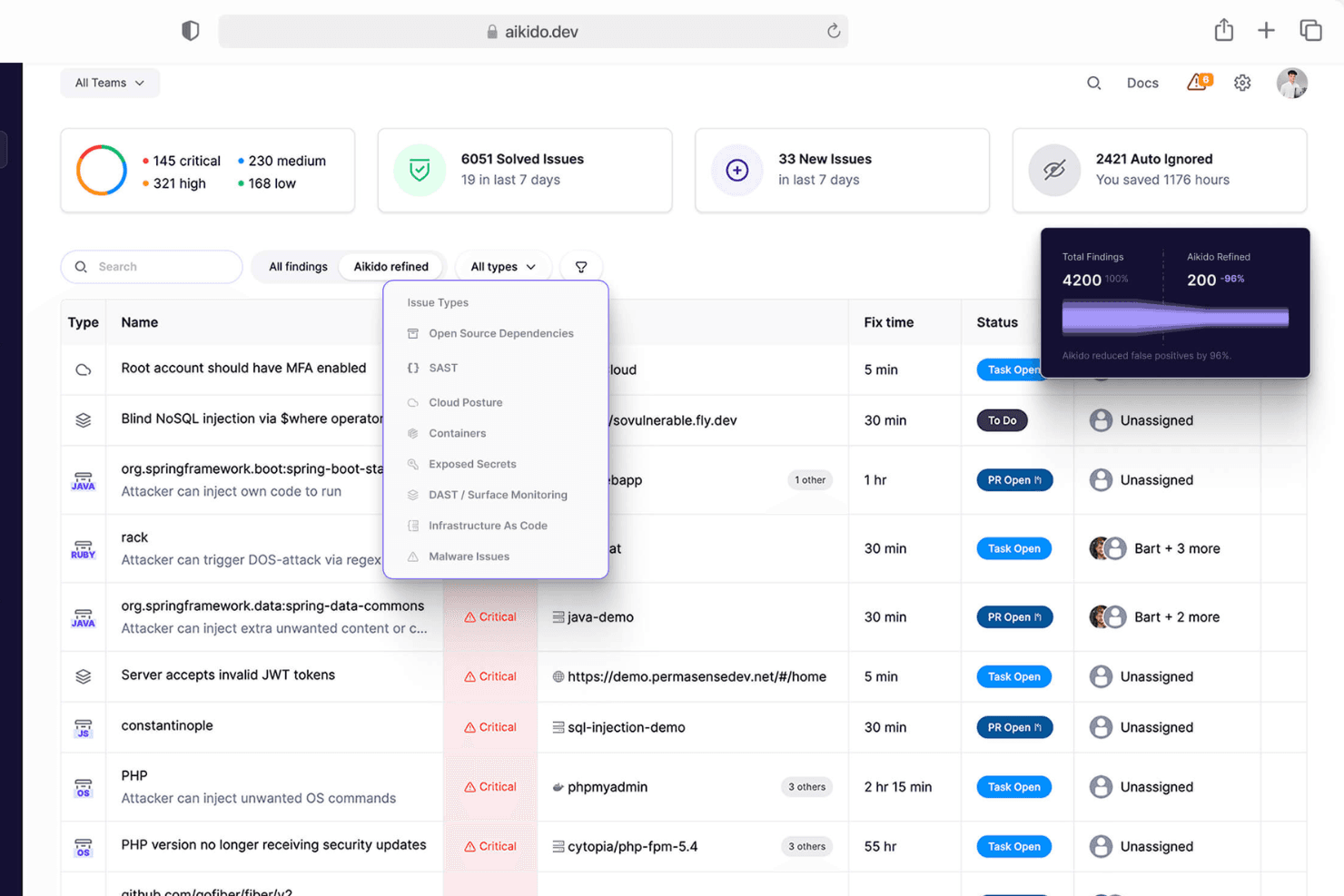
Aikido Security provides a unified dashboard to triage and filter issues by type, severity, and scan source. Aikido Security is an all-in-one platform that helps you identify and fix vulnerabilities in your code and cloud environments. It offers a range of tools to detect security risks, from static code analysis to cloud posture management.
Why I Picked Aikido Security: Aikido's static code analysis (SAST) scans your source code to spot vulnerabilities like SQL injection and cross-site scripting before they become issues. This proactive approach lets your team address potential threats early, enhancing your application's security. Additionally, Aikido's secret detection feature checks your code for exposed API keys, passwords, and other sensitive information, preventing accidental leaks that could be exploited.
Standout features & integrations:
Features include its cloud posture management (CSPM) capabilities that detect risks in your cloud infrastructure across major providers, helping you maintain a secure cloud environment. Aikido also offers infrastructure as code (IaC) scanning, open-source dependency scanning, container image scanning, surface monitoring, and malware detection in dependencies.
Integrations include Amazon Web Services (AWS), Google Cloud, Microsoft Azure Cloud, Drata, Vanta, AWS Elastic Container Registry, Docker Hub, Jira, Asana, and GitHub.
Pros and Cons
Pros:
- Scalable for growing teams
- Offers actionable insights
- Has a comprehensive dashboard and customizable reports
Cons:
- Custom SAST rules must be enabled by Aikido
- Unfixed CVEs excluded from ephemeral container scans by default
Learn more about Aikido Security: Best for third-party vendor risk assessments
- Free demo available
- Pricing upon request
Visit WebsiteCustomer Rating:4.5/5
Prevalent provides a centralized place to monitor vendor risks, including cyber vulnerabilities. Prevalent is a third-party risk management platform that helps organizations assess and monitor the risks associated with their vendors and suppliers. By automating the collection and analysis of vendor data, Prevalent enables you to focus on reducing risk and ensuring compliance throughout your vendor ecosystem.
Why I Picked Prevalent: As a vulnerability management tool, Prevalent offers cyber intelligence to help you identify and address potential security issues within your vendor network. It monitors over 550,000 companies for cyber incidents by tracking more than 1,500 criminal forums, numerous dark web pages, and various threat feeds. This extensive monitoring allows you to stay informed about vulnerabilities and take proactive measures to protect your organization.
Standout features & integrations:
Features include automated onboarding and offboarding processes, simplifying the management of vendor relationships. The platform also includes a vendor dashboard that centralizes security, performance, and compliance reporting, making it easier for your team to monitor and address risks. Furthermore, Prevalent provides built-in remediation guidance.
Integrations include Active Directory, BitSight, ServiceNow, SecZetta, and Source Defense.
Pros and Cons
Pros:
- Strong security protocols to protect data
- Users can tailor reports according to specific needs
- Extensive functionalities for managing vendor risk
Cons:
- Challenges in migrating data can complicate the initial setup
- The platform is complex and comes with a learning curve
Learn more about Prevalent: Best for endpoint vulnerability & patch management
- 30-day free trial + free demo available
- Pricing upon request
Visit WebsiteCustomer Rating:4.5/5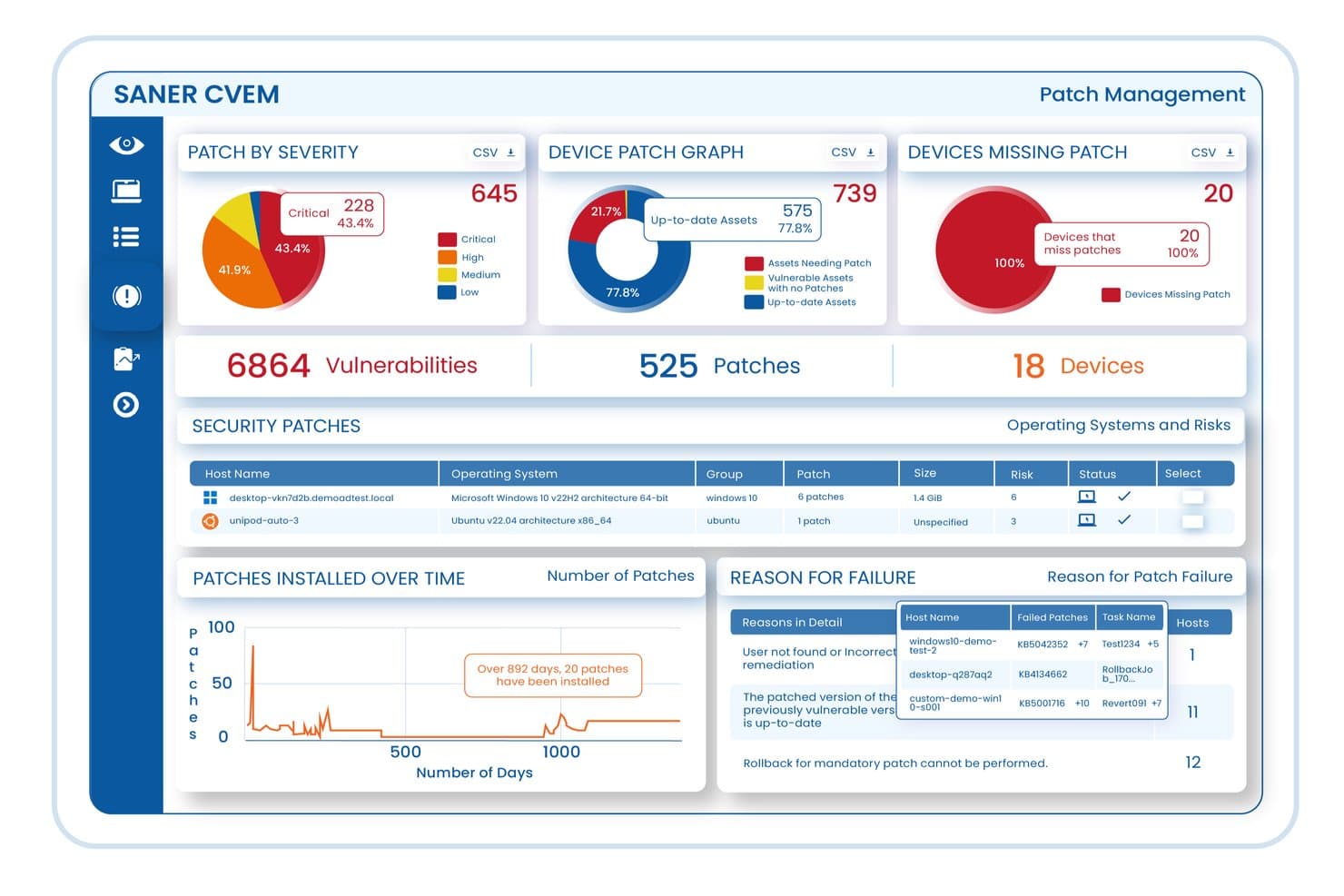
An interactive overview of the SecPod Saner Continuous Vulnerability and Exposure Management (CVEM) Platform, highlighting end-to-end vulnerability tracking, automated patch management, and risk prioritization across enterprise endpoints. SecPod (Saner Platform) is a continuous vulnerability and exposure management platform that combines endpoint scanning, risk-based prioritization, patch remediation, and compliance enforcement across enterprise IT environments in a single console.
Who Is SecPod (Saner Platform) Best For?
SecPod is a good fit for IT security teams in mid-to-large enterprises that need a single platform to manage vulnerability detection, patching, and compliance across distributed endpoint environments.
Why I Picked SecPod (Saner Platform)
I've included SecPod (Saner Platform) in my top picks because its automated endpoint detection goes well beyond basic CVE scanning. The platform runs continuous checks across Windows, macOS, Linux, and IBM AIX endpoints using a library of 160,000+ security checks, covering missing patches, misconfigurations, and exposed assets without requiring manual intervention. I also like that its AI-powered posture anomaly detection monitors 100+ device parameters using ML models, flagging behavioral deviations that signature-based scanners typically miss.
SecPod (Saner Platform) Key Features
- SSVC-based risk prioritization: Ranks vulnerabilities using EPSS exploit likelihood scores, CISA KEV status, and asset criticality to focus remediation on the highest-risk exposures first.
- Closed-loop patch remediation: Tracks vulnerabilities from initial detection through patching to verified resolution, all within the same platform.
- Compliance benchmark enforcement: Continuously audits endpoint configurations against CIS, NIST, HIPAA, PCI DSS, and STIG benchmarks.
- MITRE ATT&CK mapping: Tags vulnerability findings to MITRE ATT&CK techniques and CWE classifications for structured threat context.
SecPod (Saner Platform) Integrations
SecPod's Saner platform integrates with ServiceNow, ELK, IBM QRadar, Wazuh, and Jira, and also supports a native Freshservice integration. Its API-first architecture enables integration with SIEM, SOAR, ITSM, and DevOps pipelines, and a REST API is available for custom integrations.
Pros and Cons
Pros:
- Includes remediation, not just detection
- Lightweight agent with minimal resource consumption
- 200,000+ SCAP vulnerability checks built in
Cons:
- Initial agent setup requires significant configuration
- Reporting and dashboard customization options limited
Learn more about SecPod (Saner Platform): Best for secure code analysis
- Free trial available
- Pricing upon request
Visit WebsiteCustomer Rating:4.4/5
SonarQube shows project vulnerabilities, bugs, and quality gate status SonarQube helps development and security teams find vulnerabilities, code quality issues, secrets, and infrastructure-as-code misconfigurations before they reach production. It stands out for combining SAST, SCA, and AI code assurance across 40+ languages, making it a strong fit for teams managing application security within their DevSecOps workflows.
Who Is SonarQube Best For?
SonarQube is a strong choice for development teams and security engineers in organizations that need to manage code vulnerabilities across multiple languages and environments.
Why I Picked SonarQube
I picked SonarQube because it helps your team find and manage vulnerabilities directly in the codebase through static application security testing, secrets detection, and dependency analysis. Its secure code analysis fits well for development teams that need to catch issues during pull requests and CI/CD checks before they reach production. I also like that its quality gates can block risky code from moving forward until security and quality standards are met. For teams using AI-generated code, SonarQube can also review and suggest fixes for issues before that code is merged.
SonarQube Key Features
Some other features in SonarQube support secure development and vulnerability management workflows:
- Multi-language scanning: Scans codebases across 30+ programming languages to identify vulnerabilities, bugs, and security issues.
- Infrastructure-as-code analysis: Reviews Terraform, Kubernetes, and other IaC files for misconfigurations and security risks.
- Custom rule creation: Lets your team build and enforce security or compliance rules based on internal standards.
- Pull request decoration: Displays security findings in pull requests so teams can address issues before merging.
SonarQube Integrations
Integrations include GitHub, GitLab, Bitbucket, Azure DevOps, Atlassian Jira, and Slack.
Pros and Cons
Pros:
- Pull request feedback helps developers fix vulnerabilities earlier
- Quality gates help block risky code before production
- Scans code, secrets, dependencies, and IaC in one workflow
Cons:
- Advanced SCA capabilities require SonarQube Advanced Security add-on
- Requires self-hosting for advanced on-prem features
Learn more about SonarQube: Best for proactive network security monitoring
- 14-day free trial + demo available
- Pricing upon request
Visit WebsiteCustomer Rating:4.7/5
Auvik allows users to manage their networks with full visibility from anywhere. Auvik is a network management platform that helps you monitor, secure, and manage your network infrastructure through continuous monitoring, device tracking, and threat detection.
Why I Picked Auvik: I picked Auvik for its proactive network monitoring features that support vulnerability management through real-time visibility into device activity, potential threats, and compliance risks. Auvik’s automated network mapping and traffic analysis help identify unauthorized devices and unusual behaviors, providing the foundational insights needed to spot vulnerabilities early. The platform also includes features like configuration backups and automated alerts, enabling faster response times to potential risks. While not a full vulnerability management suite, Auvik’s security focus and integrations strengthen an organization’s overall security posture.
Standout features & integrations:
Features include real-time network monitoring, automated network mapping, traffic analysis, configuration management, compliance reporting, and alerts for potential threats. Auvik also provides encrypted communications and proactive monitoring tools that help MSPs and IT teams identify network vulnerabilities before they escalate.
Integrations include Microsoft Teams, Slack, ServiceNow, Cisco, Fortinet, Palo Alto Networks, Datto, Duo, IT Glue, Salesforce, Zendesk, and Zoom.
Pros and Cons
Pros:
- Detailed visual graphical representation of networks
- Single dashboard monitoring
- Quick and accurate alerting system
Cons:
- Customizing the platform can be time consuming
- Could use more integrations
Learn more about Auvik: Best for endpoint baselines and USB controls
- 14-day free trial + free demo available
- From $2/device/month (billed annually)
Visit WebsiteCustomer Rating:4.8/5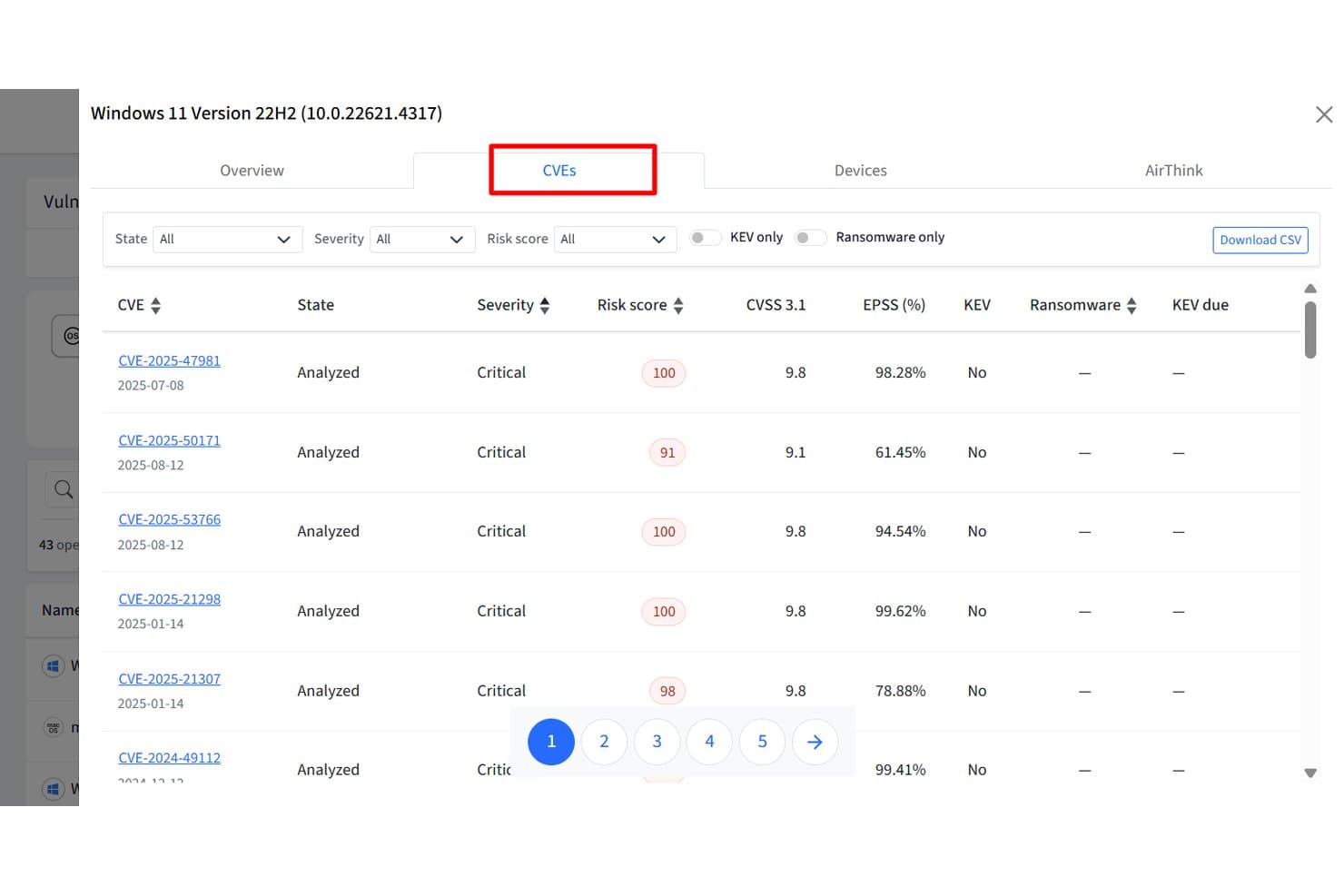
Scalefusion Veltar's CVE view lists vulnerabilities for a Windows 11 build, with risk scores, severity and exploit data. Scalefusion Veltar is an endpoint security add-on for Scalefusion UEM that covers CIS benchmark compliance, secure web filtering, USB and application control, and mobile threat defense across Windows, macOS, Android, and iOS devices.
Who Is Scalefusion Veltar Best For?
Veltar suits IT teams that need to lock down endpoint configurations, control USB and peripheral access, and enforce CIS benchmarks across a mixed Windows, macOS, and mobile device fleet.
Why I Picked Scalefusion Veltar
I've included Scalefusion Veltar in my top picks because it's one of the few tools that takes endpoint baseline enforcement seriously, enforcing CIS Level 1 and 2 benchmarks on Apple and Windows devices with continuous re-checks every 15 minutes to two hours. I also like how granular the USB controls get: you can restrict peripherals by Vendor ID, Product ID, or Serial Number, enforce encryption on connected storage, and block data transfers entirely at the I/O layer.
Scalefusion Veltar Key Features
- Secure web gateway: Blocks malicious domains, non-compliant URLs, and category-based sites directly on the device, regardless of network connection.
- WireGuard-based VPN: Deploys an on-premises VPN server with automated tunnel creation, restricting network access to enrolled, managed devices only.
- Application control with conditional access: Allows or blocks apps by Team ID, Bundle ID, certificate, or hash, with time- and IP-based access rules.
- Mobile threat defense via Check Point Harmony: Extends endpoint threat detection to mobile devices through a native integration with Check Point Harmony.
Scalefusion Veltar Integrations
Scalefusion Veltar has one documented integration: Check Point Harmony, which provides mobile threat defense.
Pros and Cons
Pros:
- Centralized device policies simplify endpoint oversight
- USB rules restrict removable-media exposure
- Endpoint compliance checks catch configuration drift
Cons:
- Coverage stops at managed endpoints, not infrastructure
- No documented CVE scanning or vulnerability prioritization
Learn more about Scalefusion Veltar: Best for automated patch management
- Free trial + free demo available
- Pricing upon request

Heimdal offers a comprehensive dashboard for IT asset management. Heimdal offers a comprehensive solution for businesses seeking efficient vulnerability management software. Its platform is particularly appealing to industries that prioritize cybersecurity, such as finance, healthcare, and government sectors. By focusing on automated patch management and asset oversight, Heimdal addresses the critical need for timely vulnerability remediation, ensuring your systems remain secure against potential threats.
Why I Picked Heimdal
I picked Heimdal for its exceptional focus on automated patch management, a feature that directly addresses the need for timely vulnerability remediation. This ensures that your systems are consistently up-to-date, reducing the risk of exploitation. Additionally, Heimdal's asset management capabilities allow you to maintain a comprehensive view of your software inventory, aiding in the identification and prioritization of vulnerabilities. Its seamless integration with third-party tools further enhances its utility in diverse IT environments.
Heimdal Key Features
In addition to its core strengths, Heimdal offers several other valuable features:
- Threat Hunting: Enables proactive identification and mitigation of potential threats within your network.
- Unified Endpoint Management: Provides centralized control over all endpoints to enhance security and compliance.
- Compliance Reporting: Generates detailed reports to ensure adherence to industry standards and regulations.
- User-Friendly Interface: Offers an intuitive dashboard for easy navigation and policy management.
Heimdal Integrations
Native integrations are not currently listed by Heimdal; however, the platform supports API-based custom integrations.
Pros and Cons
Pros:
- Detailed asset and license visibility
- Strong vulnerability and threat detection
- Automates patching across endpoints
Cons:
- Interface requires onboarding time
- No native integrations available
Learn more about Heimdal: Best for continuous vulnerability monitoring
- Free trial available
- From $119/month
Visit WebsiteCustomer Rating:4.8/5
The attack surface view in Intruder helps identify and manage potential vulnerabilities in your network. Intruder is a cloud-based vulnerability management tool that helps you identify and address security weaknesses in your digital infrastructure.
Why I Picked Intruder: Intruder's continuous vulnerability management ensures your systems are regularly scanned for new threats. This feature automatically initiates scans when changes are detected, helping you stay ahead of potential security risks. Additionally, Intruder's attack surface management discovers unknown assets like subdomains and untracked APIs, providing a comprehensive view of your organization's exposure. It also offers exposure management, which combines multiple scanning engines to identify over a thousand attack surface issues that other scanners might miss.
Standout features & integrations:
Features include prioritization that leverages the latest threat intelligence, such as CISA's Known Exploited Vulnerabilities list and machine learning-driven exploitation predictions. It also offers private bug bounty access, allowing your team to collaborate with elite hackers to uncover vulnerabilities that automated scanners might overlook.
Integrations include AWS, Azure, Google Cloud, Drata, Jira, Azure DevOps, GitHub, GitLab, ServiceNow, Cloudflare, Microsoft Sentinel, and Okta.
Pros and Cons
Pros:
- Compliance reporting capabilities
- Automated scanning and monitoring
- Comprehensive vulnerability detection
Cons:
- Attack surface feature limited to premium plan
- Occasional false positives
Learn more about Intruder: Best for comprehensive vulnerability scanning
- Free demo available
- From $69/month
Visit WebsiteCustomer Rating:4.5/5
The main dashboard of Astra Pentest provides an overview of the security status and detected vulnerabilities. Astra Pentest is a comprehensive security tool designed to perform thorough penetration testing across various platforms, including web applications, cloud environments, mobile apps, APIs, networks, and blockchain systems. It helps users identify vulnerabilities using an intelligent scanner and a user-friendly dashboard, ensuring robust web application security.
Why I Picked Astra Pentest: One of its key features is the vulnerability scanner, which performs over 8000 tests, including checks for known CVEs, OWASP Top 10, and SANS 25. This scanner is designed to cover every possible loophole, ensuring thorough security assessments. Additionally, the scanner can analyze pages behind login screens using a browser extension, which simplifies the process of securing every part of an application.
Standout features & integrations:
Some key features of Astra Pentest include pentests for web apps, cloud security, mobile apps, API, network security, and blockchain. It also offers reporting, compliance, and publically verifiable security certificates.
Integrations include GitLab, GitHub, Bitbucket, Slack, Jira, Microsoft Azure, Jenkins, CircleCI.
Pros and Cons
Pros:
- User-friendly interface
- Comprehensive security checks for compliance
- Centralized dashboard for managing vulnerabilities
Cons:
- Limited customization options
- False positives are possible with the tool
Learn more about Astra Pentest:
Diğer Güvenlik Açığı Yönetimi Araçları
Kısa listeme giremeyen ancak yine de göz atmaya değer bazı ek güvenlik açığı yönetimi aracı seçenekleri şunlardır:
- 11New RelicBest for zero-configuration security insights
- 12IBM Security QRadar EDRBest for comprehensive threat intelligence
- 13Cisco Vulnerability ManagementBest for extensive device and protocol coverage
- 14Microsoft Defender Vulnerability ManagementBest for integration with Microsoft ecosystem
- 15Tenable Vulnerability ManagementBest for active directory and infrastructure security
- 16Qualys VMDRBest for comprehensive IT asset management
- 17InsightVM (Nexpose)Best for real-time end-to-end visibility
- 18Wiz Vulnerability ManagementBest for multi-cloud environment security
- 19CyCognitoBest for attack surface management
- 20Arctic WolfBest for managed detection and response services
- 21Frontline Vulnerability ManagerBest for cloud and network security integration
- 22AdluminBest for financial sector-focused security
- 23NucleusBest for multi-framework compliance management
- 24Oligo SecurityBest for runtime open-source library protection
- 25CYRISMABest for intuitive user interface and automated patching
- 26NowSecureBest for mobile app security
- 27ResolverGood for integrating risk management across business operations
How I Evaluate Vulnerability Management Tools
I split evaluations into two layers: baseline requirements a SecOps team can't work without, and the differentiators—like exploit intelligence and attack path analysis—that set the best tools apart.
Core Functionality (Table Stakes For This List)
When I'm selecting tools for my list, I rank each one on a scale from 0 (does not offer the functionality) to 5 (excels in this area) for each core functionality listed below. Then, I calculate the tool's total score into a percentage. Each tool needs to achieve a minimum total score of 65% to be considered for inclusion.
- Asset Discovery & Inventory: I check whether the tool can automatically map endpoints, cloud workloads, containers, and network devices—especially across hybrid environments where shadow IT tends to hide.
- Vulnerability Scanning: Scan coverage matters, so I evaluate support for authenticated and unauthenticated scans across operating systems, web apps, databases, and cloud configurations.
- Risk-Based Prioritization: Rather than just listing CVSS scores, the tool should layer in exploit availability, threat intelligence, and asset criticality to surface what actually needs attention first.
- Remediation Workflow & Tracking: I look for ticket assignment, SLA tracking, and two-way sync with tools like Jira or ServiceNow so findings don't sit in a dashboard while teams lose track of owners.
- Reporting & Compliance: Audit season reveals which tools pull their weight here—I evaluate built-in templates for PCI-DSS, HIPAA, ISO 27001, and NIST, plus the ability to customize reports for different stakeholders.
- Continuous Monitoring & Integrations: A single scan is a snapshot. I look for scheduled and real-time scanning paired with native connectors for SIEMs, EDR platforms, and CI/CD pipelines.
Once I have a list of tools that meet this criteria, I consider what sets each platform apart.
Differentiating Factors (What Sets Vendors Apart)
Here's how I compare and contrast different vendors:
Standout Features
Attack path analysis is a major differentiator—I look for tools that map how chained vulnerabilities and identity gaps could give an attacker lateral movement toward crown-jewel assets. EPSS and exploit intelligence also matter because a tool that incorporates real-world weaponization data helps teams move past theoretical risk scores. For DevSecOps teams, container and IaC scanning shifts detection into the build pipeline, catching misconfigurations in Terraform or Kubernetes manifests before they reach production.
Beyond Features
Licensing models vary widely in this space—some vendors charge per IP, others per asset or per user—so I evaluate whether the pricing structure aligns with how your environment will grow. Deployment flexibility also matters, especially for teams managing air-gapped networks or strict data residency requirements where a self-hosted option is essential. I also consider ecosystem fit, checking for native connectors to your existing SIEM, SOAR, and ITSM stack so findings flow into established workflows without custom scripting.
Güvenlik Açığı Yönetimi Aracı Nasıl Seçilir?
Uzun özellik listeleri ve karmaşık fiyatlandırma yapıları içinde kaybolmak kolaydır. Kendinize özgü yazılım seçimi sürecinizde ilerlerken odaklanmanızı korumanıza yardımcı olmak için göz önünde bulundurmanız gereken faktörleri aşağıda bir kontrol listesi hâlinde bulabilirsiniz:
| Faktör | Dikkat Edilmesi Gerekenler |
| Ölçeklenebilirlik | Aracın işletmenizle birlikte büyüyebildiğinden emin olun. Performanstan ödün vermeden artan veri yüklerini ve daha fazla kullanıcıyı yönetip yönetemeyeceğini değerlendirin. |
| Entegrasyonlar | İş akışlarını kolaylaştırmak için aracın SIEM sistemleri, bilet yönetimi araçları ve bulut hizmetleri gibi mevcut yazılımlarınızla entegre olup olmadığını kontrol edin. |
| Özelleştirilebilirlik | Panoları, raporları ve uyarıları ekibinizin özel ihtiyaçlarına ve tercihlerine uyarlamanıza olanak tanıyan özelleştirme seçeneklerini arayın. |
| Kullanım Kolaylığı | Ekibiniz tarafından hızla benimsenmesini sağlamak için sezgisel bir arayüze ve kısa bir öğrenme eğrisine sahip bir araç seçin. |
| Bütçe | Maliyeti sunulan özelliklerle karşılaştırarak değerlendirin. Mali kısıtlarınıza uyan ve ödediğiniz paranın karşılığını sağlayan esnek fiyatlandırma planlarını göz önünde bulundurun. |
| Güvenlik Önlemleri | Güçlü güvenlik önlemlerinin mevcut olduğundan emin olarak aracın hassas verileri koruma ve sektörel düzenlemelere uyma becerisini değerlendirin. |
| Sağlayıcı Desteği | Sağlayıcının kullanılabilirlik, yanıt süresi ve sorun giderme için sunduğu kaynaklar dâhil olmak üzere müşteri desteği konusundaki itibarını göz önünde bulundurun. |
| Raporlama Özellikleri | Güvenlik açıkları ve uyumluluk hakkında içgörüler sağlayarak bilinçli güvenlik kararları vermenize yardımcı olan kapsamlı raporlama yeteneklerini arayın. |
Güvenlik Açığı Yönetimi Araçlarındaki Eğilimler
Araştırmam sırasında farklı Güvenlik Açığı Yönetimi Araçları sağlayıcılarının sayısız ürün güncellemesini, basın bültenini ve sürüm günlüğünü inceledim. Takip ettiğim yeni ortaya çıkan eğilimlerden bazıları şunlardır:
- Yapay zekâ destekli tehdit tespiti: Sağlayıcılar, tehdit tespit yeteneklerini geliştirmek için yapay zekâ kullanıyor. Yapay zekâ, kalıpları ve anormallikleri geleneksel yöntemlerden daha hızlı tespit ederek ekiplerin tehditlere daha hızlı yanıt vermesine yardımcı olabilir. Bazı araçlar, olası güvenlik açıklarını öngörmek için makine öğreniminden yararlanıyor.
- Bulut-yerel güvenlik: Daha fazla işletme buluta geçtikçe araçlar, daha iyi bulut-yerel güvenlik özellikleri sunacak şekilde gelişiyor. Bu eğilim, büyük ölçüde bulut altyapısına dayanan şirketler için kritik önem taşıyor ve buluta özgü güvenlik açıkları hakkında daha derin içgörüler sunuyor.
- Sıfır güven güvenlik modelleri: Daha fazla araç, her kullanıcı ve cihaz için doğrulama gerektiren sıfır güven modellerini benimsiyor. Bu yaklaşım, tehditlerin içeriden veya dışarıdan gelebileceğini varsayarak güvenliği artırıyor. Cisco gibi sağlayıcılar, sıfır güven ilkelerini platformlarına entegre ediyor.
- Gelişmiş raporlama yetenekleri: Ayrıntılı ve özelleştirilebilir raporlama giderek daha önemli hâle geliyor. Kullanıcıların güvenlik açıkları ve uyumluluk durumu hakkında içgörülere ihtiyacı var. Araçlar, bu talepleri karşılamak için daha gelişmiş raporlama özellikleri sunarak daha iyi risk yönetimine olanak tanıyor.
- Kullanıcı davranışı analitiği: Bazı sağlayıcılar, olağandışı etkinlikleri izlemek ve tespit etmek için kullanıcı davranışı analitiğini kullanıyor. Bu eğilim, içeriden gelen tehditlerin ve güvenliği ihlal edilmiş hesapların tespit edilmesine yardımcı olarak işletmelere ek bir güvenlik katmanı sağlıyor.
Güvenlik Açığı Yönetimi Araçları Nedir?
Güvenlik açığı yönetimi araçları, bir kuruluşun varlıklarındaki güvenlik zayıflıklarını bulur, izler ve gidermeye yardımcı olur. Bu araçlar; riski azaltması ve sistemleri manuel kontrollere güvenmeden güncel tutması gereken güvenlik ekipleri, BT yöneticileri ve operasyon personeli tarafından kullanılır.
Otomatik tarama, risk puanlama ve raporlama özellikleri; sorunların daha erken tespit edilmesine, önce hangi sorunların giderileceğinin belirlenmesine ve ekiplerin bilgilendirilmesine yardımcı olur. Genel olarak bu araçlar, kuruluşların daha az manuel çabayla daha güvenli ve güvenilir sistemler sürdürmesine yardımcı olur.
Güvenlik Açığı Yönetimi Araçlarının Özellikleri
Güvenlik Açığı Yönetimi Araçlarını seçerken aşağıdaki temel özelliklere dikkat edin:
- Yapay zekâ destekli tehdit tespiti: Kalıpları ve anormallikleri hızlı bir şekilde tespit etmek için yapay zekâ kullanır ve ekiplerin tehditlere daha hızlı yanıt vermesine yardımcı olur.
- Bulut-yerel güvenlik: Bulut ortamları için özel güvenlik özellikleri sunarak buluta özgü güvenlik açıkları hakkında içgörüler sağlar.
- Sıfır güven güvenlik modelleri: Her kullanıcı ve cihaz için doğrulama gerektirerek tüm erişimlerin tehdit oluşturabileceğini varsayar ve güvenliği artırır.
- Gelişmiş raporlama yetenekleri: Güvenlik açıkları ve uyumluluk durumu hakkında içgörüler sağlayan özelleştirilebilir ve ayrıntılı raporlar sunar.
- Kullanıcı davranışı analitiği: İçeriden gelen tehditleri ve güvenliği ihlal edilmiş hesapları tespit etmek için olağandışı kullanıcı etkinliklerini izler ve belirler.
- Risk önceliklendirme: Olası tehditleri değerlendirip sıralayarak ekiplerin en kritik güvenlik açıklarına odaklanmasına yardımcı olur.
- Otomatik yama yönetimi: Güvenlik yamalarının uygulanması sürecini kolaylaştırır, manuel iş yükünü azaltır ve güvenlik açıklarını en aza indirir.
- Sürekli izleme: Yeni güvenlik açıklarını ortaya çıktıklarında tespit etmek için ağın sürekli değerlendirilmesini sağlar.
- Uyumluluk raporlaması: Güvenlik önlemlerinin sektörel standartları ve düzenlemeleri karşılamasını sağlayarak uyumluluk sürecini kolaylaştırır.
- Özelleştirilebilir panolar: Kullanıcıların veri ve ölçümlere ilişkin görünümlerini belirli ihtiyaçlarına ve tercihlerine göre uyarlamasına olanak tanır.
Güvenlik Açığı Yönetimi Araçlarının Faydaları
Güvenlik Açığı Yönetimi Araçlarını uygulamak, ekibiniz ve işletmeniz için çeşitli faydalar sağlar. Yararlanabileceğiniz bazı faydalar şunlardır:
- Geliştirilmiş güvenlik duruşu: Bu araçlar, güvenlik açıklarını belirleyip yöneterek sistemlerinizi olası tehditlerden korumaya ve güvenlik risklerini azaltmaya yardımcı olur.
- Verimli risk yönetimi: Risk önceliklendirme özellikleri, ekibinizin en kritik güvenlik açıklarına odaklanmasını sağlayarak kaynakların etkili bir şekilde kullanılmasına yardımcı olur.
- Geliştirilmiş uyumluluk: Uyumluluk raporlaması, sektörel standartları ve düzenlemeleri karşılamanıza yardımcı olarak denetimleri kolaylaştırır ve uyumlulukla ilgili stresi azaltır.
- Zamandan tasarruf: Otomatik yama yönetimi ve sürekli izleme, manuel görevleri azaltarak ekibinizin diğer önemli faaliyetlere odaklanmasını sağlar.
- Bilgiye dayalı karar verme: Ayrıntılı raporlama ve analitik, daha iyi güvenlik kararlarını ve stratejilerini destekleyen içgörüler sağlar.
- Artırılmış görünürlük: Bulut-yerel güvenlik ve kullanıcı davranışı analitiği gibi özellikler, ağınızı ve olası tehditleri daha net görmenizi sağlar.
- Proaktif tehdit tespiti: Yapay zekâ destekli tehdit tespiti, güvenlik açıklarının daha hızlı belirlenmesini ve bunlara daha hızlı yanıt verilmesini sağlayarak sistemlerinizi güvende tutar.
Güvenlik Açığı Yönetimi Araçlarının Maliyetleri ve Fiyatlandırması
Güvenlik Açığı Yönetimi Araçlarını seçmek, mevcut çeşitli fiyatlandırma modellerinin ve planların anlaşılmasını gerektirir. Maliyetler özelliklere, ekip büyüklüğüne, eklentilere ve daha birçok etkene göre değişir. Aşağıdaki tabloda, Güvenlik Açığı Yönetimi Araçları çözümlerinde yaygın planlar, bunların ortalama fiyatları ve genellikle sunulan özellikler özetlenmektedir:
Güvenlik Açığı Yönetimi Araçları için Plan Karşılaştırma Tablosu
| Plan Türü | Ortalama Fiyat | Yaygın Özellikler |
| Ücretsiz Plan | $0 | Temel güvenlik açığı taraması, sınırlı raporlama ve topluluk desteği. |
| Kişisel Plan | $5-$25/user/month | Standart tarama özellikleri, risk önceliklendirme ve temel uyumluluk kontrolleri. |
| İşletme Planı | $30-$60/ user/month | Gelişmiş analizler, otomatik yama yönetimi ve özelleştirilebilir gösterge panelleri. |
| Kurumsal Plan | $70-$150/ user/month | Kapsamlı raporlama, yapay zekâ destekli tehdit algılama ve özel destek. |
Güvenlik Açığı Yönetimi Araçları (SSS)
Güvenlik Açığı Yönetimi Araçları hakkında sık sorulan bazı soruların yanıtları:
Güvenlik açığı yönetimi araçları nasıl çalışır?
Güvenlik açığı yönetimi araçları, IP tarayıcıları, ağ ve bağlantı noktası tarayıcıları ve diğer araçları kullanarak ağınızı değerlendirir. En kritik zayıflıkların önce giderilmesini sağlamak için sorunlara öncelik verir ve uygulanabilir düzeltme adımları önerir. Bu süreç, güvenlik açıklarını hızlı bir şekilde ele alarak sistemlerinizin güvenliğini sağlamaya yardımcı olur.
Çoğu güvenlik açığı değerlendirme aracının ortak özelliği nedir?
Güvenlik açığı değerlendirme araçlarının temel bir özelliği, sistemlerinizi tarayabilmeleridir. Ağınızdaki tüm cihazları, uygulamaları ve sistemleri olası güvenlik açıkları açısından analiz ederek otomatik taramalar gerçekleştirirler. Bu otomasyon, kapsamlı kapsama alanı ve verimli güvenlik açığı tespiti sağlar.
Güvenlik açığı yönetimi araçları için tipik fiyatlandırma modelleri nelerdir?
Güvenlik açığı değerlendirme araçlarının temel bir özelliği, sistemlerinizi tarayabilmeleridir. Ağınızdaki tüm cihazları, uygulamaları ve sistemleri olası güvenlik açıkları açısından analiz ederek otomatik taramalar gerçekleştirirler. Bu otomasyon, kapsamlı kapsama alanı ve verimli güvenlik açığı tespiti sağlar.
Otomatik bir güvenlik açığı aracı taramasının dezavantajı nedir?
Otomatik güvenlik açığı aracı taramalarının bazı dezavantajları vardır. Yeni keşfedilen güvenlik açıklarını veya otomatikleştirilmesi zor olan karmaşık güvenlik açıklarını tespit edemeyebilirler. Bu sınırlama, kapsamlı güvenlik kapsamı sağlamak için manuel kontroller yapmanız gerekebileceği anlamına gelir.
Güvenlik açığı taramaları ne sıklıkla gerçekleştirilmelidir?
Güvenlik açığı taramalarının sıklığı, kuruluşunuzun ihtiyaçlarına ve risk toleransına bağlıdır. Genel olarak, yeni ortaya çıkan tehditlere karşı sürekli koruma sağlamak için haftalık veya aylık gibi düzenli aralıklarla tarama gerçekleştirmek en iyisidir. Düzenli taramalar, güçlü bir güvenlik duruşunun korunmasına yardımcı olur.
Güvenlik açığı yönetimi araçları mevcut güvenlik sistemleriyle entegre edilebilir mi?
Evet, birçok güvenlik açığı yönetimi aracı mevcut güvenlik sistemleriyle entegre edilebilir. Bu entegrasyon, sorunsuz veri paylaşımına ve gelişmiş tehdit yönetimine olanak tanır. Mevcut altyapınızla birlikte çalışan bu araçlar, genel güvenlik stratejinizi güçlendirir.