

Çevik bir ortamda çalışmak, işlerin hızla ilerlemesi anlamına gelir ve gereksinimleri düzenli tutmak başlı başına tam zamanlı bir iş gibi görünebilir. Ekiplerin değişiklikleri kaydetmek, çalışmaları takip etmek ve herkesin aynı hedef doğrultusunda ilerlemesini sağlamak için doğru sisteme sahip olmadığında karmaşık projelerin ne kadar hızlı raydan çıkabildiğini gördüm.
Yazılımları inceleme deneyimime göre, doğru aracı seçmek projenizin başarısını doğrudan etkileyebilir. Bu nedenle, mevcut en iyi çevik gereksinim yönetimi araçları hakkında dengeli ve kapsamlı araştırmaya dayanan incelemeler sunmayı amaçlıyorum. Ekip iş birliğinden uyumluluk gereksinimlerine kadar çeşitli proje ihtiyaçlarına hitap eden araçları keşfedeceksiniz.
Ekibiniz için mükemmel seçeneği bulmak ve çevik projeleri yönetmenin yaygın zorluklarını azaltmak için okumaya devam edin.
Why Trust Our Software Recommendations
6,700+
Reviews
20
Industry experts
16+
Evaluation factors
14
Years
Our team has been testing and reviewing software since 2012. As tech leaders ourselves, we know how difficult—and important—it is to choose the right software.
For this guide, we evaluated tools using hands-on testing and independent research, scoring tools using our selection criteria.
Our reviews reflect our human editorial judgment, not a sales pitch.
Expert reviewers:
- Paulo Gardini MiguelTech Director
 Tim FisherVP of AI
 Gabriel RosasTech Lead & Software Architect
 Christhian GruhnTech Lead & Platform Architect

Çevik Gereksinim Yönetimi Araçları Karşılaştırma Tablosu
Bu karşılaştırma tablosu, çevik gereksinim yönetimi için en iyi seçimlerimin fiyatlandırma ayrıntılarını özetler:
Sorted by: Default
| Tool | Starting Price | Website | |
|---|---|---|---|
Best for hardware engineering requirements traceability | 4.6 out of 5 | $995/year 30-day free trial + free demo available | Website |
Best for Git-based backlog and requirements | 4.5 out of 5 | $35/month 30-day free trial and free plan available | Website |
Best for strategic backlog prioritization | 4.6 out of 5 | $7/user/month Free plan available | Website |
Best for Jira-linked requirements documentation | 4.3 out of 5 | $5.78/user/month Free plan + 7-day trial available | Website |
Best for regulated requirements reviews and audits | Not rated | Pricing upon request Free 30-day trial available + free demo available | Website |
Best for lightweight database-driven requirements | Not rated | $10/user/month Free plan + trial available | Website |
Best for linking requirements to test and defects | Not rated | $41.20/user/month Free 30-day trial available | Website |
Best for AI-assisted requirements and testing | Not rated | $5/month Free 30-day trial available | Website |
Best for model-based engineering traceability | Not rated | Pricing upon request Free demo available | Website |
Best for Azure DevOps requirements traceability | 4.5 out of 5 | Pricing upon request Free 30 days trial available | Website |


En İyi Çevik Gereksinim Yönetimi Araçları İncelemeleri
Aşağıda, kısa listeme giren en iyi çevik gereksinim yönetimi araçlarının ayrıntılı özetlerini bulabilirsiniz. İncelemelerim, size en uygun aracı bulmanıza yardımcı olmak için her aracın temel özelliklerine, artılarına ve eksilerine, entegrasyonlarına ve ideal kullanım alanlarına ayrıntılı bir bakış sunar.
 Best for hardware engineering requirements traceability
- 30-day free trial + free demo available
- From $995/year (billed annually)
Visit WebsiteCustomer Rating:4.6/5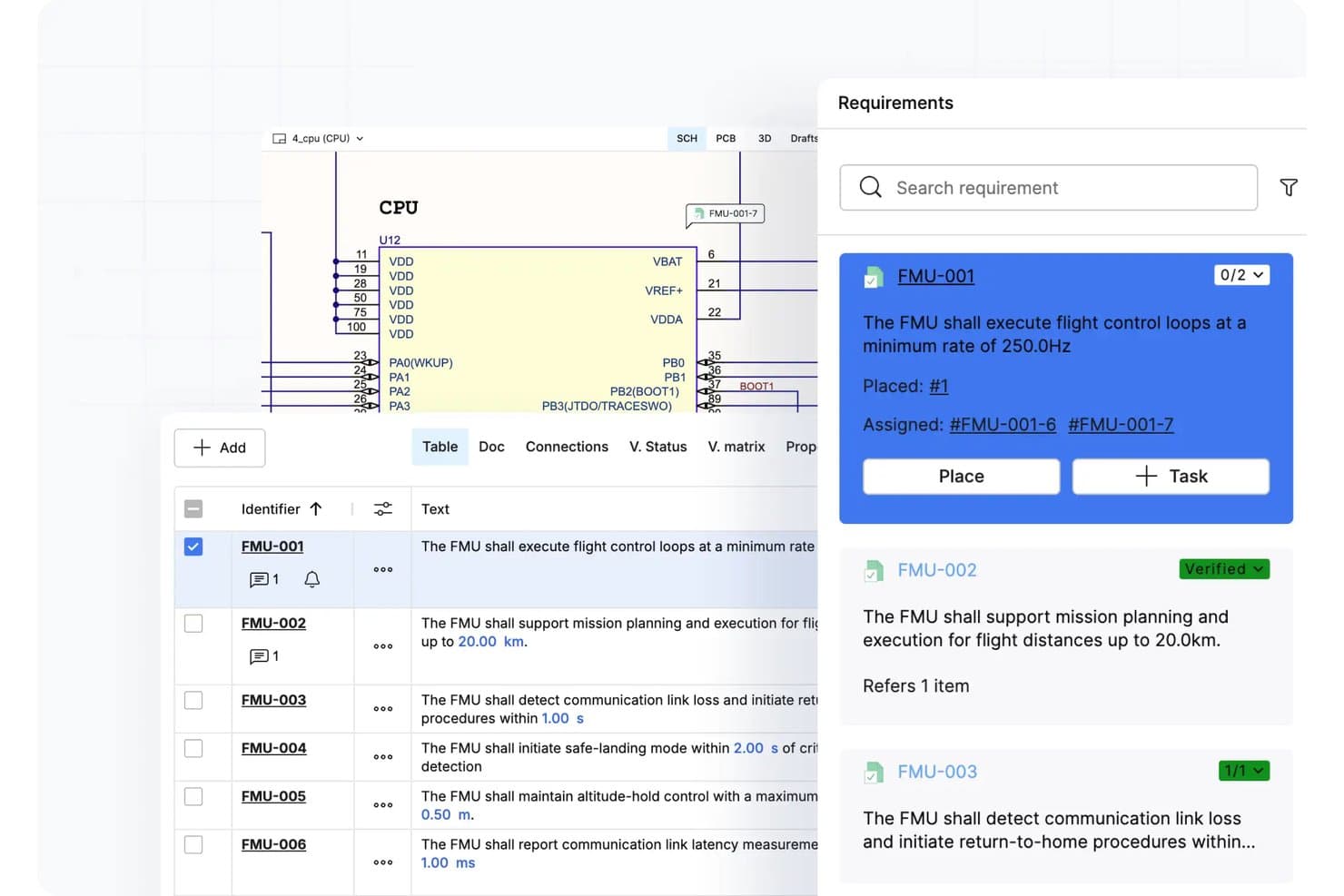
Requirements Portal links schematic components directly to tracked requirements. Requirements Portal is Altium's requirements management tool for hardware and systems engineering teams, offering structured requirements capture, design-linked traceability, verification tracking, and AI-assisted review workflows.
Who Is Requirements Portal Best For?
Requirements Portal is a strong fit for hardware and systems engineering teams that need to link requirements directly to PCB designs, schematics, and verification activities.
Why I Picked Requirements Portal
I've included Requirements Portal in my top picks because it's the strongest option I've found for hardware engineering teams that need requirements tied directly to physical design artifacts. I like how it links requirements to schematics, PCB layouts, and BOM components, so when a requirement changes, you can immediately see what's affected in the design. Its Connections Graph then maps those relationships visually, showing verification status at a glance across the full requirements set.
Requirements Portal Key Features
- AI Engineering Assistant: Uses AI to draft, improve, and flag issues in requirements, with all proposed changes held for human review before being applied.
- Formal review workflow: Assigns reviewers and approvers to requirements, collects ratings, and closes reviews with a recorded timestamp and approver identity.
- Requirement import: Pulls existing requirements from PDF, DOCX, XLSX, or CSV files and maps fields directly into structured specifications.
- Insights dashboard: Displays charts for requirement state, verification status, and AI-assisted quality assessments scoped to a specification or project.
Requirements Portal Integrations
Requirements Portal offers native integration with Altium Designer for viewing requirements alongside schematics and PCB layouts. Its REST and Python APIs support custom connections.
Pros and Cons
Pros:
- Small teams report quicker design iterations
- Formal reviews capture ratings and approvals
- Links requirements to design and verification
Cons:
- No sprint planning, capacity, or velocity tracking
- No epic, story, or sprint workflows
Learn more about Requirements Portal: Best for Git-based backlog and requirements
- 30-day free trial and free plan available
- From $35/month
Visit WebsiteCustomer Rating:4.5/5
Backlog combines tasks, issues, and features for unified team tracking. Backlog is a project management tool designed to help teams plan, track, and deliver their work by combining tasks, bugs, and features in one environment. It's used by product, development, and design teams that need to manage their backlog items, track issues, and visualize progress.
Why I picked Backlog: It provides one workspace where your team can handle tasks and requirements without bouncing between different tools. You can build backlog items, link them to issues or pull requests, and monitor progress through Gantt or Kanban views to keep work on track. It also includes custom workflows and issue types so you can shape the process around how your team operates.
Standout Features and Integrations:
Features include version control, which helps track changes and updates. The tool's task management capabilities allow your team to organize and prioritize effectively. You'll also find its collaboration tools useful for keeping everyone connected and informed.
Integrations include Jira, Redmine, Jenkins, Git, Slack, Google Drive, Dropbox, Microsoft Teams, and more.
Pros and Cons
Pros:
- All-in-one workspace
- User-friendly
- Git and backlog integration
Cons:
- Weak reporting & analytics
- Limited compliance feature
Learn more about Backlog: Best for strategic backlog prioritization
- Free plan available
- From $7/user/month
Visit WebsiteCustomer Rating:4.6/5
Hygger helps teams organize backlogs, plan work, and track delivery. Hygger is a work-management platform that helps teams collect ideas, structure their backlog, and track the development process. It's suited for product, design, and engineering groups who want a clearer view into what to build next and how to get there.
Why I picked Hygger: You'll benefit from the way your team can score backlog items based on impact and effort instead of relying on urgency alone. You can organize work on Kanban boards, use RICE or ICE to rank features, and move chosen items into development boards so nothing slips through. It gives you linked items, status tracking, and several backlog views to keep planning and delivery aligned.
Standout Features and Integrations:
Features include the value/effort prioritization matrix, so your team can rank backlog items with clarity. You'll find custom prioritization criteria where you can define your own factors and weight them to match your context. The two-dimensional Kanban board with swimlanes and labels gives you a flexible view of backlog items across stages.
Integrations include Slack, GitHub, GitLab, Google Drive, Dropbox, Jira, and more.
Pros and Cons
Pros:
- Simple visual boards
- Kanban visualization
- Backlog prioritization frameworks
Cons:
- Limited test management
- Not a formal requirements management tool
Learn more about Hygger: Best for Jira-linked requirements documentation
- Free plan + 7-day trial available
- From $5.78/user/month (billed annually)
Visit WebsiteCustomer Rating:4.3/5
Confluence helps teams create, organize, and share work across projects. Confluence is a cloud-based workspace designed to help teams create, organize, and share content across projects and knowledge areas. It's used by teams that need to capture information, work together, and keep everyone on the same page, such as product development and marketing.
Why I picked Confluence: It creates a flexible space for documenting ideas, requirements, decisions, and shared knowledge, preventing information from getting scattered. You can work together on pages, add diagrams or whiteboards, build structured databases, and link everything to your task or issue trackers. You also receive templates, permissions, and audit logs to maintain organized and accountable content.
Standout Features and Integrations:
Features include real-time collaborative editing so your team can work on documents together at the same time, automated rule runs that reduce manual document work and help you keep content fresh, structured page trees, and databases to organize and reuse information across your projects.
Integrations include Jira, Trello, Slack, Microsoft Teams, Google Drive, Bitbucket, and more.
Pros and Cons
Pros:
- Real-time editing capabilities
- Customizable templates
- Strong documentation structure
Cons:
- Limited traceability
- Risk of content sprawl
 Best for regulated requirements reviews and audits
- Free 30-day trial available + free demo available
- Pricing upon request

Jama Connect aligns requirements with test and risk workflows. Jama Connect is a development platform that helps teams author, manage, trace, and verify requirements alongside test and risk data. Its ecosystem is built for organizations working on complex systems and products, supporting workflows across engineering, testing, and compliance.
Why I picked Jama Connect: It gives your team a clean view of how requirements, tests, and risks connect across the project. You get live traceability, risk-detection dashboards, and baselining tools to track changes and impact. It also offers templates built for regulated work, which helps when you're preparing for audits. If you're handling complex systems and need strong traceability with compliance support, it's a good fit.
Standout Features and Integrations:
Features include end-to-end traceability, impact analysis, and risk management. The tool also supports real-time collaboration and review with stakeholders. You'll find its compliance support for industry standards beneficial for regulated industries.
Integrations include Jira, Microsoft Excel, MATLAB, GitHub, Microsoft Word, Confluence, and more.
Pros and Cons
Pros:
- In-depth review workflow features
- REST API enables integrations and traceability
- Strong compliance support
Cons:
- Large projects can slow reporting and performance
- Can be resource-intensive
Learn more about Jama Connect: Best for lightweight database-driven requirements
- Free plan + trial available
- From $10/user/month

Notion organizes shared documentation and adaptable project structures. Notion is a workspace tool designed for teams to create, collaborate on, and organize content such as notes, tasks, and databases. It's used by project, product, and operations teams that need a shared place for documentation and flexible structures.
Why I picked Notion: It provides one space to capture requirements, ideas, decisions, and shared knowledge without jumping between tools. You can set up pages or databases for your backlog, switch between Kanban and table views, and link tasks or designs so everything stays connected. Templates and custom properties help you shape the workspace around how your team works.
Standout Features and Integrations:
Features include a drag-and-drop editor that simplifies organizing your content. The tool's database functionality supports complex data management and tracking. You'll also appreciate the real-time collaboration feature, which makes teamwork more efficient.
Integrations include Slack, Google Drive, Asana, GitHub, Zapier, and more.
Pros and Cons
Pros:
- Flexible templates
- Combine docs and tasks
- Lightweight requirements management
Cons:
- Limited advanced project management features
- No formal traceability
Learn more about Notion: Best for linking requirements to test and defects
- Free 30-day trial available
- From $41.20/user/month (billed annually)

SpiraTeam links requirements with tests, tasks, bugs, and releases. SpiraTeam is an application lifecycle management platform that helps teams manage requirements, test cases, tasks, bugs, and releases together. It's built for software development environments where requirements and quality are highly interconnected.
Why I picked SpiraTeam: It helps your team keep requirements, tests, and defects connected so you always see how work fits together. You can write user stories, link them to test cases and issues, and track progress across everything in one place. Its dashboards and traceability views show the full path from requirement to release. If you need tighter alignment between requirements and quality in an agile, waterfall, or hybrid setup, it fits well.
Standout Features and Integrations:
Features include a requirements tracing matrix that lets you see status from requirement to test and defect, built-in task and bug tracking so your team uses fewer disconnected tools, and release management charts that help you track deliverables and risk as you move toward iteration end.
Integrations include Jira, GitHub, Azure DevOps, Jenkins, GitLab, TestRail, Microsoft Teams, and more.
Pros and Cons
Pros:
- Detailed reporting capabilities
- Strong defect tracking
- All-in-one ALM suite
Cons:
- Requires training for new users
- Initial setup complexity
Learn more about SpiraTeam: Best for AI-assisted requirements and testing
- Free 30-day trial available
- From $5/month (billed annually)

aqua turns notes and prompts into structured requirements and tests. aqua is a cloud-based platform designed to manage requirements, tests, and defects together with AI assistance. It's used by quality assurance, product, and engineering teams that need to convert input such as notes or voice prompts into structured work items, coordinate test coverage, and handle change tracking.
Why I picked aqua: It offers faster creation of requirements and test assets without the usual manual work. You can turn text, voice, or visuals into structured requirements, link them to test cases automatically, and track coverage through dashboards. Custom fields, templates, and workflow setups help you shape the tool around how your team works.
Standout Features and Integrations:
Features include detailed test case management, which provides complete coverage of your testing scenarios. The tool's defect tracking helps you identify and resolve issues efficiently. You'll also find the reporting features valuable for gaining insights into testing progress and quality metrics.
Integrations include Jenkins, Jira, Azure DevOps, Ranorex, UFT, JMeter, and more.
Pros and Cons
Pros:
- Modern interface
- Requirements-test integration
- AI-assisted test generation
Cons:
- Learning curve for AI features
- Few community resources, tutorials, and third-party support
Learn more about aqua cloud: Best for model-based engineering traceability
- Free demo available
- Pricing upon request

Polarion ALM coordinates requirements, testing, change, and release work. Polarion ALM is a browser-based platform designed to manage development from requirements through testing, change, and release. It serves engineering, quality assurance, and systems teams working in regulated or complex environments. The platform helps coordinate projects, control change, and support audit-readiness.
Why I picked Polarion ALM: Its on-premise deployment lets your team manage product requirements, tests, and releases in one place instead of switching between separate tools. You get LiveDocs for shared specifications, full traceability from requirement to code, and versioning tools that show past project states. It also supports workflows, electronic signatures, and branching when you're dealing with regulatory or audit demands. If you're handling complex work and need strong audit trails, it fits well.
Standout Features and Integrations:
Features include live collaboration via browser-based wikis and threaded discussions across roles, change and configuration management that records who changed what and when for audit readiness, and reuse and branching tools that let you share specifications across product variants while maintaining traceability.
Integrations include Azure DevOps Server, Jira, Git, Simulink, HP QC, ServiceNow, Teamcenter, Salesforce, and more.
Pros and Cons
Pros:
- Unified ALM platform
- ISO/ASPICE standard support
- End-to-end traceability
Cons:
- Limited agility for lightweight projects
- Limited LiveDocs collaboration
Learn more about Polarion ALM: Best for Azure DevOps requirements traceability
- Free 30 days trial available
- Pricing upon request
Visit WebsiteCustomer Rating:4.5/5
Modern Requirements organizes requirements across Azure DevOps workflows. Modern Requirements is a requirements management software built to work inside Azure DevOps. It's designed for teams handling complex development work, including regulated industries, helping them author, manage, trace, and report on requirements. If you're working across development, testing, and release, it brings those processes into one environment.
Why I picked Modern Requirements: It keeps your team aligned because it works directly inside Azure DevOps, so you don't have to jump between tools. You can build living documents, trace requirements through testing and release work, and use versioning and baselines to track changes over time. Its AI assistant also helps you write and refine requirements faster. If you rely on Azure DevOps and need a strong traceability matrix, it fits naturally into your workflow.
Standout Features and Integrations:
Features include authoring tools that let you create requirements, use-case diagrams, and wireframes directly in your project; trace-analysis tools that help you map requirements to tests, documents, and code; and reporting tools that pull information from your work items and output audit-ready documents.
Integrations include Azure DevOps Server, Jira, ServiceNow, GitHub, GitLab, IBM DOORS, and more.
Pros and Cons
Pros:
- Formal DevOps workflow support
- Strong traceability and versioning
- Deep Azure integration
Cons:
- Limited non-Microsoft integrations
- Dependency on Azure DevOps
Learn more about Modern Requirements:
Diğer Çevik Gereksinim Yönetimi Araçları
İşte kısa listeme girmeyen ancak yine de göz atmaya değer bazı ek çevik gereksinim yönetimi aracı seçenekleri:
How I Evaluate Agile Requirements Management Tools
I look at these tools in two layers: baseline capabilities like managing a backlog from epic to sprint, and differentiators that determine which tools actually work for your team's scale.
Core Functionality (Table Stakes For This List)
When I'm selecting tools for my list, I rank each one on a scale from 0 (does not offer the functionality) to 5 (excels in this area) for each core functionality listed below. Then, I calculate the tool's total score into a percentage. Each tool needs to achieve a minimum total score of 65% to be considered for inclusion.
- Backlog & Story Management: I evaluate how each tool handles the hierarchy from epics down to stories and acceptance criteria, including whether you can prioritize and estimate items during grooming.
- Requirements Traceability: Each tool should let me link a requirement to its downstream tasks, test cases, and defects so I can trace coverage from a feature request through release.
- Agile Workflow Support: I check for Scrum and Kanban board options, sprint planning capabilities, and agile reporting like burndown charts and velocity tracking across iterations.
- Collaboration & Commenting: Teams need to discuss requirement changes in context, so I look for threaded comments, @mentions, and review workflows that keep feedback tied to items.
- Version Control & Audit History: Regulated teams often need to baseline requirements before a release. I evaluate whether the tool tracks change history with rollback and comparison views.
- Dev Tool Integrations: A tool's value drops fast if it sits outside your pipeline, so I look for native, bi-directional sync with platforms like Jira, Azure DevOps, GitHub, or GitLab.
Once I have a list of tools that meet this criteria, I consider what sets each platform apart.
Differentiating Factors (What Sets Vendors Apart)
Here's how I compare and contrast different vendors:
Standout Features
Visual story mapping is a big differentiator. Tools that let you lay out user journeys spatially make it far easier to plan releases around real workflows instead of flat backlog lists. I also evaluate scaled agile support, especially for enterprise teams running multiple ARTs that need PI planning boards and cross-team dependency views. Stakeholder review portals matter too, since product owners often need executives or customers to approve requirements without adding licensed seats.
Beyond Features
Compliance readiness is a major consideration. Teams building medical devices or automotive software need electronic signatures, baselining, and audit-ready exports that satisfy standards like IEC 62304 or ISO 26262. I also evaluate scalability—whether the tool handles a single Scrum team's backlog as well as a 500-person program with multiple value streams. Deployment options matter here too, since some organizations require self-hosted or private cloud setups with SSO and regional data residency to meet internal security policies.
Çevik Gereksinim Yönetim Aracı Nasıl Seçilmeli
Uzun özellik listeleri ve karmaşık fiyatlandırma yapılarına kendinizi kaptırmanız kolaydır. Kendinize özgü yazılım seçimi sürecinizde ilerlerken odağınızı korumanıza yardımcı olmak için göz önünde bulundurmanız gereken faktörleri içeren bir kontrol listesi hazırladım:
| Faktör | Göz önünde bulundurulacaklar |
|---|---|
| FaktörÖlçeklenebilirlik | Göz önünde bulundurulacaklarAraç ekibinizle birlikte büyüyecek mi? Büyüdükçe daha fazla kullanıcıyı ve projeyi destekleyip destekleyemeyeceğini değerlendirin. Benzer ölçekte büyüyen mevcut müşterilere ilişkin örnekler arayın. |
| FaktörEntegrasyonlar | Göz önünde bulundurulacaklarMevcut araçlarınıza bağlanabiliyor mu? İş akışlarının kesintiye uğramaması için mevcut teknoloji yığınınızla entegrasyonları desteklediğini doğrulayın. |
| FaktörÖzelleştirilebilirlik | Göz önünde bulundurulacaklarSüreçlerinize uyacak şekilde özelleştirebilir misiniz? Aracın iş akışlarında ve panolarda ekibinizin ihtiyaçlarına uygun değişikliklere izin verip vermediğini kontrol edin. |
| FaktörKullanım Kolaylığı | Göz önünde bulundurulacaklarEkibiniz için kullanımı sezgisel mi? Öğrenme eğrisini ve eğitim gerekip gerekmediğini değerlendirin. Basit bir arayüze sahip araçların benimsenmesi genellikle daha hızlıdır. |
| FaktörUygulama ve Kullanıma Alma | Göz önünde bulundurulacaklarKurulum ne kadar sürecek? Uygulama için gereken zamanı ve kaynakları değerlendirin. Rehberli kullanıma alma süreci ve destek sunan araçları arayın. |
| FaktörMaliyet | Göz önünde bulundurulacaklarUzun vadede karşılayabilir misiniz? Fiyatlandırma planlarını karşılaştırın ve gizli ücretleri kontrol edin. Temel özelliklerden ödün vermeden aracın bütçenize uyduğunu doğrulayın. |
| FaktörGüvenlik Önlemleri | Göz önünde bulundurulacaklarVerileriniz korunuyor mu? Hassas bilgileri korumak için şifreleme ve düzenli denetimler gibi güçlü güvenlik önlemlerine sahip araçları arayın. |
| FaktörUyumluluk Gereksinimleri | Göz önünde bulundurulacaklarSektör standartlarını karşılıyor mu? Yasal sorunlardan kaçınmak için aracın GDPR veya HIPAA gibi alanınızla ilgili düzenlemelere uyduğunu doğrulayın. |
Çevik Gereksinim Yönetimi Araçları Nedir?
Çevik gereksinim yönetimi araçları, ekiplerin geliştirme yaşam döngüsü boyunca proje gereksinimlerini yönetmesine ve bunlara uyum sağlamasına yardımcı olan yazılım çözümleridir. Bu araçlar genellikle projelerin iş hedefleri ve kullanıcı ihtiyaçlarıyla uyumlu olmasını sağlamak için proje yöneticileri, geliştiriciler ve iş analistleri tarafından kullanılır.
Gerçek zamanlı iş birliği, sürüm denetimi ve iş listesi yönetimi gibi özellikler, ekiplerin düzenli kalmasına ve değişikliklere hızlı yanıt vermesine yardımcı olur. Genel olarak bu araçlar, projeleri yolunda ve kullanıcı beklentileriyle uyumlu tutmak için gereken yapıyı ve esnekliği sağlar.
Özellikler
Çevik gereksinim yönetimi araçlarını seçerken aşağıdaki temel özelliklere dikkat edin:
- Gerçek zamanlı iş birliği: Birden fazla ekip üyesinin aynı anda birlikte çalışmasını sağlayarak herkesin aynı doğrultuda ve bilgilendirilmiş olmasını sağlar.
- Sürüm denetimi: Değişiklikleri izler ve gereksinimlerin geçmişini korur; böylece gerektiğinde önceki sürümlere geri dönebilirsiniz.
- İş listesi yönetimi: Görevleri ve kullanıcı hikâyelerini önceliklendirmenize yardımcı olarak ekibin en önemli çalışmalara odaklanmasını sağlar.
- Özelleştirilebilir iş akışları: Ekiplerin süreçleri kendi özel ihtiyaçlarına göre uyarlamasını ve verimliliği en üst düzeye çıkarmasını sağlar.
- Raporlama ve analiz: Proje ilerlemesi ve performansı hakkında içgörüler sunarak ekiplerin bilinçli kararlar almasına yardımcı olur.
- Uyumluluk desteği: Aracın sektör standartlarını ve düzenlemelerini karşılamasını sağlayarak yasal sorun riskini azaltır.
- Güvenlik önlemleri: Hassas verileri şifreleme ve düzenli denetimlerle koruyarak bilgilerinizin güvende kalmasını sağlar.
- Entegrasyon özellikleri: Teknoloji yığınınızdaki mevcut araçlara bağlanarak iş akışının sürekliliğini korur.
- Etkileşimli başlangıç: Rehberli kurulum ve eğitim kaynakları sunarak ekiplerin hızlı bir şekilde başlamasını kolaylaştırır.
- Görev önceliklendirme araçları: Değeri çabaya kıyaslayarak ekiplerin etkisi yüksek görevlere odaklanmasına yardımcı olur.
Faydalar
Çevik gereksinim yönetimi araçlarını uygulamak ekibiniz ve işletmeniz için çeşitli faydalar sağlar. Yararlanabileceğiniz birkaç fayda şunlardır:
- Gelişmiş iş birliği: Gerçek zamanlı iş birliği özellikleri ekip üyelerinin aynı doğrultuda ve bilgilendirilmiş olmasını sağlayarak iletişim hatalarını azaltır.
- Daha fazla uyarlanabilirlik: Sürüm denetimi ve iş listesi yönetimi, ekiplerin değişikliklere hızlı bir şekilde yanıt vermesine ve gerektiğinde öncelikleri ayarlamasına yardımcı olur.
- Daha iyi karar alma: Raporlama ve analiz, proje ilerlemesi hakkında içgörüler sunarak ekiplerin bilinçli seçimler yapmasına yardımcı olur.
- Artırılmış güvenlik: Güvenlik önlemleri hassas verileri koruyarak bilgilerin güvenliği konusunda içinizin rahat olmasını sağlar.
- Düzenlemelere uyumluluk: Uyumluluk desteği projelerinizin sektör standartlarını karşılamasını sağlayarak yasal sorun riskini azaltır.
- Verimli başlangıç: Etkileşimli başlangıç kaynakları yeni kullanıcıların hızla bilgi edinmesini kolaylaştırarak zamandan ve emekten tasarruf sağlar.
- Optimize edilmiş görev odağı: Görev önceliklendirme araçları ekibinizin etkisi yüksek görevlere yoğunlaşmasına yardımcı olarak üretkenliği en üst düzeye çıkarır.
Maliyetler ve Fiyatlandırma
Çevik gereksinim yönetimi araçlarını seçmek, mevcut çeşitli fiyatlandırma modellerinin ve planların anlaşılmasını gerektirir. Maliyetler özelliklere, ekip büyüklüğüne, eklentilere ve diğer unsurlara göre değişir. Aşağıdaki tablo, çevik gereksinim yönetimi aracı çözümlerinde yaygın olarak sunulan planları, ortalama fiyatlarını ve tipik özelliklerini özetlemektedir:
Çevik Gereksinim Yönetimi Araçları için Plan Karşılaştırma Tablosu
| Plan Türü | Ortalama Fiyat | Yaygın Özellikler |
|---|---|---|
| Plan TürüÜcretsiz Plan | Ortalama Fiyat$0 | Yaygın ÖzelliklerTemel görev yönetimi, sınırlı entegrasyonlar ve topluluk desteği. |
| Plan TürüKişisel Plan | Ortalama Fiyat$5-$25/kullanıcı/ay | Yaygın ÖzelliklerGörev yönetimi, iş birliği araçları, temel raporlama ve sınırlı entegrasyonlar. |
| Plan Türüİşletme Planı | Ortalama Fiyat$10-$150/kullanıcı/ay | Yaygın ÖzelliklerGelişmiş raporlama, tam entegrasyon, iyileştirilmiş güvenlik özellikleri ve öncelikli müşteri desteği. |
| Plan TürüKurumsal Plan | Ortalama Fiyat$14-$500/kullanıcı/ay | Yaygın ÖzelliklerÖzelleştirilebilir iş akışları, uyumluluk desteği, özel hesap yöneticisi ve gelişmiş güvenlik seçenekleri. |
Çevik Gereksinim Yönetimi Araçları SSS
Çevik gereksinim yönetimi araçları hakkında sık sorulan soruların bazı yanıtları:
Çevik gereksinim yönetimi araçlarından en çok hangi sektörler yararlanır?
Yazılım geliştirme, otomotiv, havacılık ve sağlık hizmetleri gibi sektörler bu araçlardan büyük ölçüde yararlanır. Bu araçlar, değişen gereksinimlerin yönetilmesine yardımcı olur ve projelerin sektör standartlarını karşılamasını sağlar. Örneğin yazılım geliştirmede iş birliğini kolaylaştırır, kullanıcı hikâyelerini ve sprintleri takip eder. Düzenlemelere tabi sektörlerde ise gerekli düzenlemelere uyulması için uyumluluk desteği sunar.
Çevik gereksinim yönetimi araçları mevcut yazılımlarla entegre olabilir mi?
Evet, çoğu çevik gereksinim yönetimi aracı Jira, Slack ve GitHub gibi popüler yazılımlarla entegrasyonlar sunar. Bu entegrasyonlar iş akışının sürekliliğini korumaya ve ekip iş birliğini geliştirmeye yardımcı olur. Bir araç seçmeden önce ekibinizin hâlihazırda kullandığı yazılımları destekleyip desteklemediğini kontrol edin. Bu, mevcut teknoloji yığınınıza daha sorunsuz bir geçiş yapılmasını ve aracın etkinliğinin en üst düzeye çıkarılmasını sağlar.
Çevik gereksinim yönetimi araçları uzaktan çalışan ekipleri nasıl destekler?
Bu araçlar, gerçek zamanlı iş birliği özellikleri ve bulut tabanlı erişim sağlayarak uzaktan çalışan ekipleri destekler. Ekip üyeleri farklı konumlardan aynı anda projeler üzerinde çalışabilir ve herkesin aynı bilgileri takip etmesini sağlayabilir. Uzaktan iş birliğini geliştirmek için mobil erişim ve Zoom veya Microsoft Teams gibi iletişim platformlarıyla entegrasyon sunan araçları tercih edin.
Çevik gereksinim yönetimi araçlarının kurulumu teknik uzmanlık gerektirir mi?
Hayır, tüm araçların kurulumu için teknik uzmanlık gerekmez. Bazıları, ekiplerin hızlı bir şekilde başlamasına yardımcı olmak için sezgisel arayüzler ve yönlendirmeli başlangıç süreçleri sunar. Ancak daha karmaşık araçlar, özelleştirme veya diğer sistemlerle entegrasyon için BT desteği gerektirebilir. Gereksiz sorunlardan kaçınmak için ekibinizin teknik yetkinliklerini değerlendirmeniz ve beceri düzeylerine uygun bir araç seçmeniz önemlidir.