

Günümüzün hızlı tempolu dijital dünyasında verileri verimli bir şekilde yönetmek büyük bir zorluktur. Muhtemelen zamanınızı tüketen dağınık veriler ve manuel süreçlerle uğraşıyorsunuz. İşte veri çıkarma yazılımları burada devreye girerek bilgilerinizi kolayca toplamanıza ve düzenlemenize yardımcı olur.
Sonsuz miktardaki veriyi manuel olarak incelemenin yarattığı hayal kırıklığını anlıyorum. Çok sayıda aracı test edip incelemiş biri olarak, farklı ihtiyaçlar için neyin en iyi sonucu verdiğini biliyorum. Amacım, mevcut en iyi veri çıkarma araçlarına tarafsız bir bakış sunmak.
Her yazılımın güçlü yönlerini ve kimler için en uygun olduğunu vurgulayan, açık ve öz bir inceleme bulacaksınız. İster büyük bir kuruluşun ister küçük bir ekibin parçası olun, burada size uygun bir seçenek var.
Why Trust Our Software Recommendations
6,700+
Reviews
20
Industry experts
16+
Evaluation factors
14
Years
Our team has been testing and reviewing software since 2012. As tech leaders ourselves, we know how difficult—and important—it is to choose the right software.
For this guide, we evaluated tools using hands-on testing and independent research, scoring tools using our selection criteria.
Our reviews reflect our human editorial judgment, not a sales pitch.
Expert reviewers:
- Paulo Gardini MiguelTech Director
 Tim FisherVP of AI
 Gabriel RosasTech Lead & Software Architect
 Christhian GruhnTech Lead & Platform Architect

Veri Çıkarma Yazılımları Karşılaştırma Tablosu
Bu karşılaştırma tablosu, en iyi veri çıkarma yazılımı seçimlerim için fiyatlandırma ayrıntılarını özetlemektedir:
Sorted by: Default
| Tool | Starting Price | Website | |
|---|---|---|---|
Best for structured SaaS and database ETL pipelines | 4.9 out of 5 | $79/month Free plan + free demo available | Website |
Best for document data extraction | 4.8 out of 5 | Pricing upon request Free demo available | Website |
Best for AI-powered OCR | 4.9 out of 5 | Pricing upon request Free trial available + free demo | Website |
Best for web scraping and automation | 4.8 out of 5 | Pricing upon request | Website |
Best for handling complex data source integration | 4.8 out of 5 | $99/month 14-day free trial | Website |
Best for large scale data collection with proxy networks | 4.5 out of 5 | $0.5/1,000 records Free trial available | Website |
Best for ethical web data collection | 4.7 out of 5 | $1.5/1,000 records/month Free plan available | Website |
Best for marketing data extraction | 4.5 out of 5 | Pricing upon request Free demo available | Website |
Best for automated data integration in the cloud | Not rated | Pricing upon request 14-day free trial + free demo + free plan available | Website |
Best for automating data imports to Google Sheets | Not rated | $24/month 7-day free trial | Website |


En İyi Veri Çıkarma Yazılımları İncelemeleri
Aşağıda, kısa listeme giren en iyi veri çıkarma yazılımlarının ayrıntılı özetlerini bulabilirsiniz. İncelemelerim; her aracın temel özelliklerine, artılarına & eksilerine, entegrasyonlarına ve ideal kullanım alanlarına ayrıntılı bir bakış sunarak sizin için en uygun olanı bulmanıza yardımcı olur.
 Best for structured SaaS and database ETL pipelines
- Free plan + free demo available
- From $79/month (billed annually)
Visit WebsiteCustomer Rating:4.9/5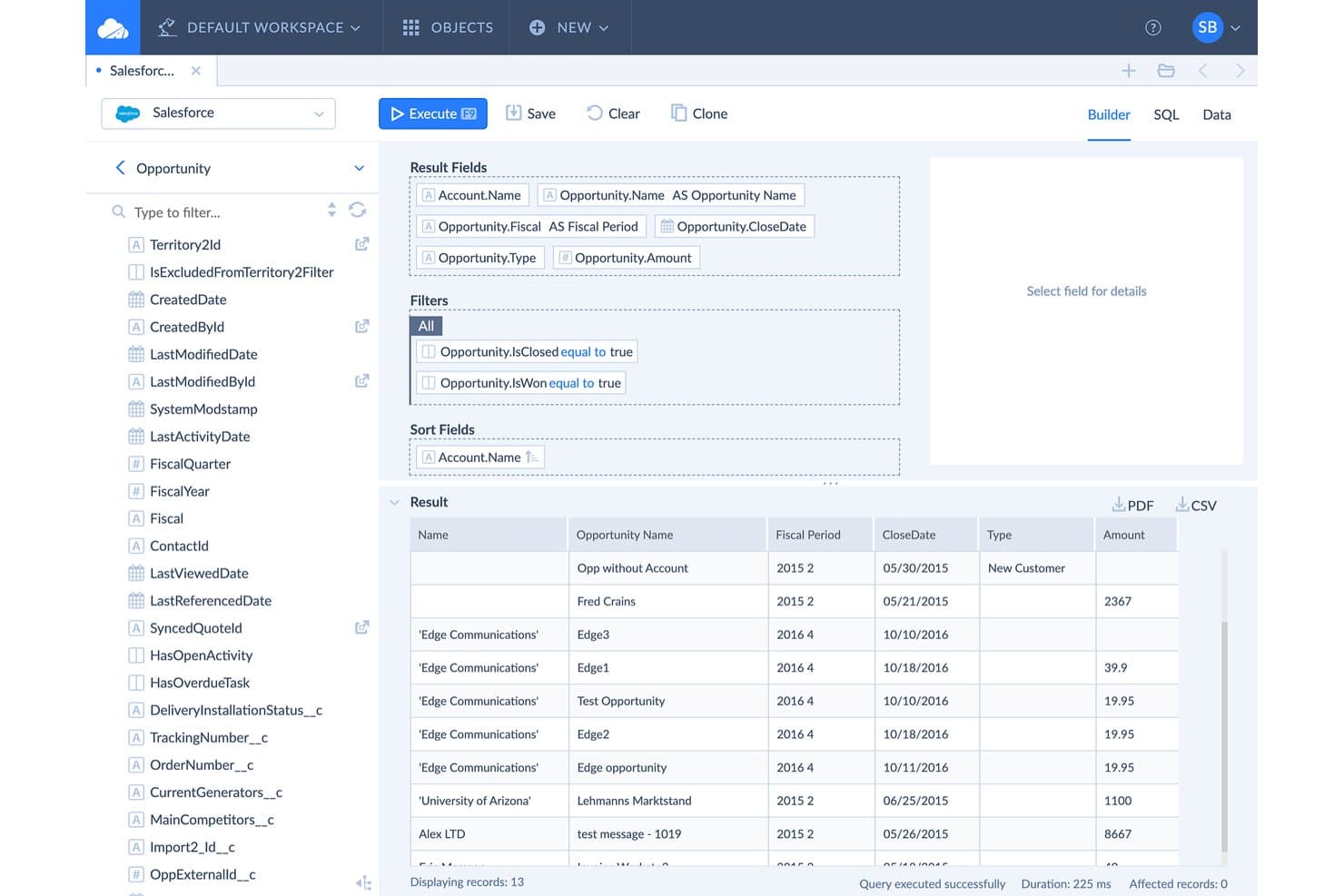
Skyvia lets users query Salesforce data visually without writing SQL. Skyvia is a no-code cloud ETL/ELT platform that extracts, transforms, and loads data between structured SaaS applications, relational databases, and data warehouses using visual pipelines, scheduled batch runs, and 200+ prebuilt connectors.
Who Is Skyvia Best For?
Skyvia suits data engineers and IT teams in small to mid-size businesses that need to automate recurring data movement between SaaS applications, relational databases, and cloud warehouses without writing code.
Why I Picked Skyvia
I've included Skyvia in my top picks because it's one of the few no-code ETL tools that handles structured SaaS-to-database pipelines without requiring a single line of code. I particularly like its visual Data Flow builder, which lets you design multi-source pipelines with conditional Control Flow logic, so a Salesforce-to-Snowflake sync with custom error-handling runs on a per-minute schedule automatically. It's purpose-built for exactly this kind of recurring, structured batch movement between cloud apps and relational databases.
Skyvia Key Features
- Scheduled batch execution: Automate recurring data transfers with configurable schedules ranging from once daily to once per minute, depending on your plan.
- 200+ prebuilt connectors: Connect to cloud applications, relational databases, data warehouses, and file storage services without building custom integrations.
- Export format options: Output extracted data in CSV, JSON, Avro, or Parquet formats and deliver files to FTP/SFTP or cloud storage destinations.
- Record-level run logging: Review per-record success and error details, including mapped field values and error descriptions, after each integration run.
Skyvia Integrations
Skyvia offers 200+ native integrations, including Salesforce, Google BigQuery, Snowflake, SQL Server, PostgreSQL, Amazon S3, Google Sheets, Shopify, and HubSpot. It also supports public API access, custom REST connectors, and webhooks for custom integrations.
Pros and Cons
Pros:
- Pipelines combine multiple structured sources
- Scheduled syncs reduce manual data transfers
- Visual mappings simplify structured data setup
Cons:
- Batch runs lack sub-second streaming speed
- No extraction from websites or documents
Learn more about Skyvia: Best for document data extraction
- Free demo available
- Pricing upon request
Visit WebsiteCustomer Rating:4.8/5
Klippa's prompt builder interface shows how users can automate and customize their data extraction workflows. Klippa DocHorizon is an AI-powered data extraction software designed to automate document processing workflows. It utilizes optical character recognition (OCR) technology to extract data from various document types, including invoices, receipts, and identity documents.
Why I Picked Klippa DocHorizon:
I chose Klippa DocHorizon for its advanced OCR capabilities that accurately capture data from diverse documents. This feature is particularly beneficial for businesses dealing with high volumes of paperwork, as it minimizes the need for manual data entry. Additionally, Klippa DocHorizon offers data anonymization, ensuring sensitive information is masked to comply with privacy regulations. This is crucial for organizations handling confidential data.
Standout features & integrations:
Other features include document classification to organize files efficiently and document verification to detect fraudulent documents. These functionalities work together to enhance your document processing workflows, ensuring accuracy, security, and compliance with industry standards. Integrations include Gmail, Google Drive, Outlook, OneDrive, Sharepoint, Oracle Netsuite, Xero, Dropbox, Quickbooks, and Zoho.
Pros and Cons
Pros:
- Fraud detection capabilities
- Automated document classification
- Supports multiple document formats for conversion
Cons:
- Limited customization options for specific workflows
- Documentation around the API could be improved
Learn more about Doxis AI.dp.: Best for AI-powered OCR
- Free trial available + free demo
- Pricing upon request
Visit WebsiteCustomer Rating:4.9/5
Nanonets allows users to export extracted data directly to Google Drive, making data handling more efficient. Nanonets is an AI-driven document processing and workflow automation platform tailored for industries including finance, healthcare, logistics, and customer support. It automates tasks such as accounts payable, document approvals, and financial reconciliation, aiming to improve operational efficiency and reduce manual efforts.
Why I Picked Nanonets:
I like that it leverages AI-powered optical character recognition (OCR) to handle unstructured and semi-structured documents. This technology is crucial for transforming physical documents into digital formats while organizing and categorizing them for efficient data extraction. You can benefit from features like intelligent document processing (IDP), which uses advanced AI technologies such as computer vision and natural language processing to identify, structure, and extract relevant information from documents like invoices, purchase orders, and ID cards.
Standout features & integrations:
The platform's no-code feature lets your team automate complex business processes without writing code, turning unstructured data into actionable insights quickly. Additionally, Nanonets ensures compliance with data security regulations such as GDPR, SOC 2, and HIPAA. Integrations include QuickBooks, Salesforce, Xero, Google Sheets, HubSpot, SAP, Slack, Microsoft Dynamics CRM, NetSuite, Gmail, Dropbox, and Zapier.
Pros and Cons
Pros:
- Customizable workflows for document processing
- Quick training capabilities for AI models
- Simple API for integration with existing systems
Cons:
- The minimal data requirements might limit the complexity of the models that can be developed
- The tool may not be suitable for large-scale applications without further customization
Learn more about TrailHQ:

Here's Apify's console overview, which is a strong platform for web scraping and automation. Apify is a cloud-based platform designed to automate web scraping tasks. It provides the tools to extract, process, and manage data from various online sources, making it ideal for web scraping and automation.
Why I Picked Apify:
I selected Apify for its extensive web scraping capabilities and well-structured interface that simplifies automation tasks. What sets it apart from other tools is its unique combination of ready-made web scrapers, known as 'actors,' and its ability to build custom solutions. Given its robust capabilities in these areas, it rightfully earns the title of being best for web scraping and automation.
Standout features & integrations:
Apify has a vast collection of pre-built actors that are useful for typical web scraping tasks. These actors can be personalized to match specific requirements without much hassle. Additionally, it provides a platform for creating customized web scraping tools. Apify is compatible with multiple platforms, such as Google Sheets, Amazon S3, Microsoft Power Automate, and Zapier. It also allows webhooks, which makes it adaptable to integrate with other services.
Pros and Cons
Pros:
- Robust integrations with common data platforms
- Flexibility to build custom scraping tools
- Extensive library of pre-built actors
Cons:
- The cost can add up for larger data operations
- Might require technical knowledge to utilize custom actors fully
- Higher pricing tier compared to some other tools
Learn more about Apify: Best for handling complex data source integration
- 14-day free trial
- From $99/month
Visit WebsiteCustomer Rating:4.8/5
Here's Dataddo's central design, which allows you to keep track of and modify your data sources. Dataddo is a potent data integration platform designed to simplify the process of extracting and connecting data from multiple sources. It shines in handling complex data source integration, making it an excellent solution for businesses grappling with diverse and complicated data sources.
Why I Picked Dataddo:
When selecting Dataddo for this list, I paid particular attention to its capability to handle complex data source integration. The platform’s ability to navigate the intricacies of data extraction from various sources makes it stand out. I determined it to be the best tool for complex data source integration due to its robustness and versatility in managing diverse data types and sources.
Standout features & integrations:
Dataddo simplifies data handling and analysis with powerful cloud-based features. It's easy to integrate with no coding required and works with platforms like Salesforce, HubSpot, and Google Analytics. Plus, it can handle multiple data sources for intricate integration.
Pros and Cons
Pros:
- Variety of data source integrations
- Cloud-based architecture for easy access
- Skilled in handling complex data source integration
Cons:
- Interface could be more intuitive
- No-code setup may limit customization options
- Higher starting price than some alternatives
Learn more about Dataddo: Best for large scale data collection with proxy networks
- Free trial available
- From $0.5/1,000 records
Visit WebsiteCustomer Rating:4.5/5
Here's the control panel in Oxylabs, which you can see proxy usage stats grouped by day, targets, or subnets and also where you can set the authorization IPs for the data center proxies. Oxylabs provides advanced data collection tools that leverage vast proxy networks. The platform excels in assisting with significant scale data scraping tasks, ensuring undetected and efficient data gathering.
Why I Picked Oxylabs:
I chose Oxylabs due to its extraordinary capability to handle large-scale data collection tasks using its extensive proxy networks. It stood out from other tools with its real-time crawler and residential proxy services, designed for tasks where vast amounts of data must be gathered promptly. Considering its advanced features and vast proxy network, it is best suited for large-scale data collection.
Standout features & integrations:
Oxylabs is a popular tool with numerous useful features. It boasts of having a vast residential and data center proxy network, along with a real-time crawler for search engines and e-commerce websites. This broad proxy network ensures anonymity and successful data scraping, even when dealing with large scales of data. Oxylabs is also compatible with many programming languages and data-scraping tools like Python, Java, Node.js, and more. This compatibility makes it easy to integrate Oxylabs into various data operations workflows.
Pros and Cons
Pros:
- Supports a wide range of integrations and programming languages
- Real-time crawler for efficient data collection
- Large and reliable proxy network
Cons:
- Complex features may require technical expertise
- Cost per GB can add up quickly for extensive tasks
- Pricing may be high for smaller scale operations
Learn more about Oxylabs: Best for ethical web data collection
- Free plan available
- From $1.5/1,000 records/month
Visit WebsiteCustomer Rating:4.7/5
Here's the data collector feature in Bright Data, which allows you to collect massive amounts of public web data without investing in software or hardware infrastructure. Bright Data is a leading web data collection platform that empowers businesses with accurate and comprehensive data insights. It prioritizes ethical data collection practices, making it a reliable choice for organizations that value responsible data handling.
Why I Picked Bright Data:
While comparing multiple data collection tools, I found Bright Data to be remarkable in its commitment to ethical data practices. It stands out for its thorough compliance with various data privacy regulations and commitment to transparency, which makes it an ideal tool for ethical web data collection.
Standout features & integrations:
Bright Data offers data collection options, like web scraping and proxy networks, with advanced features like automated extraction and geo-specific requests. Integrating with existing tech stacks is easy using common programming languages like Python, Node.js, and Java.
Pros and Cons
Pros:
- Supports a range of programming languages
- Advanced data extraction features
- Committed to ethical data practices
Cons:
- Advanced features require additional payment
- Might be complex for beginners
- Pricing is on the higher side
Learn more about Bright Data: Best for marketing data extraction
- Free demo available
- Pricing upon request
Visit WebsiteCustomer Rating:4.5/5
Adverity offers a wide range of pre-built datastream connectors to unify marketing data from multiple platforms. Adverity is a marketing data integration platform that helps you collect, transform, and manage data from various sources.
Why I Picked Adverity:
I picked Adverity because it offers features that help you manage and combine large volumes of data efficiently. Its bundle feature lets you merge multiple data extracts into a single file based on custom rules like file names or creation dates. You can also preview data extracts during ingestion, so you can catch errors or mismatches before they become a problem. This real-time visibility helps maintain accuracy across your marketing datasets.
Standout features & integrations:
Other features include the capability to map data from over 600 different sources into a standardized format, which simplifies the process of managing disparate data sets. Adverity also provides automated transformations that can be applied as soon as data is fetched, helping to match metrics and dimensions across your data based on your agreed data schema. Adverity offers a wide range of integrations, including Google, Meta, TikTok, Google BigQuery, Looker Studio, Facebook Ads, Amazon Advertising, Hubspot, Salesforce, Amazon S3, Snowflake, and Microsoft Azure.
Pros and Cons
Pros:
- Automated data quality monitoring
- Can harmonize data from various sources
- Provides the ability to create personalized dashboards
Cons:
- Certain configurations may require technical knowledge
- The initial setup can be time-consuming
Learn more about Adverity: Best for automated data integration in the cloud
- 14-day free trial + free demo + free plan available
- Pricing upon request

Here's the connector overview in Fivetran, which displays all of the user's connectors along with the time and date that each one was most last updated. Fivetran is a fully-managed cloud data integration tool that enables automatic extraction, transformation, and data loading from multiple sources to a centralized data warehouse. This tool is handy for integrating data across various cloud platforms.
Why I Picked Fivetran:
I selected Fivetran because of its impressive capabilities in automating data integration tasks in cloud environments. With its exceptional ability to handle multiple data sources and its robust automation features, Fivetran stands out from its peers, making it the tool of choice for automated data integration in the cloud.
Standout features & integrations:
Fivetran offers powerful data pipeline capabilities, data transformation tools, and reliable cloud-based data integration support. Its integrated connectors make integrating with multiple data sources easy, simplifying the integration process. Some of the data sources Fivetran integrates with include databases, event-tracking tools, and cloud services. Popular integrations include Salesforce, NetSuite, Google Analytics, and databases like MySQL, PostgreSQL, and SQL Server.
Pros and Cons
Pros:
- Strong focus on cloud data integration
- Supports a wide range of data sources
- Exceptional automation capabilities
Cons:
- Might require technical expertise for complex integrations
- Could be overkill for small-scale data integration needs
- Pricing can be complex and may increase with data volumes
Learn more about Fivetran: Best for automating data imports to Google Sheets
- 7-day free trial
- From $24/month (billed annually)

Here's the Coupler.io data export state feature, which allows you to view how your data is transferred automatically from one app to another. Coupler.io automates importing data into Google Sheets for seamless and efficient data flow.
Why I Picked Coupler.io:
In deciding on Coupler.io for this list, I considered its unique ability to sync data with Google Sheets. Many businesses already use Google Sheets in their daily operations, and Coupler.io's dedicated integration simplifies data import, making it the best for this purpose. Its automatic updates ensure data is always current, which can save considerable time and effort.
Standout features & integrations:
Coupler.io has an automatic data refresh function and supports various data sources. Its integration with Google Sheets is particularly strong, providing simplicity and powerful data import capabilities.
Pros and Cons
Pros:
- Wide range of data source compatibility
- Automatic data refresh function
- Efficient integration with Google Sheets
Cons:
- Limited functionality beyond Google Sheets integration
- Lacks advanced data transformation features
- Monthly pricing is only available with annual commitment
Learn more about Coupler.io:
Diğer Veri Çıkarma Yazılımları
Kısa listeme girmeyen ancak yine de göz atmaya değer bazı ek veri çıkarma yazılımı seçenekleri şunlardır:
- 11Altair MonarchBest for data preparation from unstructured sources
- 12Hevo DataBest for real-time data pipelines
- 13Stitch DataBest for quick setup of ETL processes
- 14CoefficientBest for bi-directional data extraction and sync
- 15KeebolaBest for flexible data operations management
- 16Astera SoftwareBest for enterprise-grade data mapping
- 17RiveryBest for comprehensive data orchestration
- 18DocuPipeBest for extracting data from handwritten documents
- 19CoresignalBest for comprehensive company data
- 20DiffbotGood for extracting web data via machine learning
- 21ParseHubGood for extracting data from dynamic and JavaScript-heavy websites
- 22nuvoGood for straightforward data extraction with artificial intelligence (AI)-powered recognition
- 23Webz.ioGood for large-scale web data extraction and crawling
- 24Browse AIGood for automating web-based tasks without coding
- 25StreamSetsGood for managing data in motion across any platform
- 26WeldGood for real-time data extraction from the web
- 27PhantombusterGood for automating repetitive online tasks with ready-to-use APIs
Diğer Veri Çıkarma Yazılımı İncelemeleri
How I Evaluate Data Extraction Software
I split my evaluation into two layers: the core extraction capabilities a tool must have to make this list, and the differentiators that matter when your pipelines feed Snowflake or BigQuery.
Core Functionality (Table Stakes For This List)
When I'm selecting tools for my list, I rank each one on a scale from 0 (does not offer the functionality) to 5 (excels in this area) for each core functionality listed below. Then, I calculate the tool's total score into a percentage. Each tool needs to achieve a minimum total score of 75% to be considered for inclusion.
- Multi-Source Connectivity: I check how many connector types a tool supports—databases, REST APIs, SaaS apps, flat files, and web sources all factor into the count.
- Structured & Unstructured Extraction: Pulling rows from PostgreSQL is table stakes; I also evaluate whether a tool can parse PDFs, HTML, emails, or image-based documents.
- Scheduling & Automation: Every tool I consider needs job scheduling, but I look at whether it supports event-based triggers, dependency chains, and retry logic for failed runs.
- Transformation & Output Mapping: I evaluate whether the tool lets you clean, map, and reshape extracted data before loading it into targets like warehouses, lakes, or staging databases.
- Scalability & Performance: High-volume workloads expose weak tooling fast, so I look at parallel processing support, incremental loads, and how well a tool handles enterprise-scale datasets.
- Developer Tooling & APIs: Tools like Airbyte and Fivetran approach this differently, but I check for usable REST APIs, CLI access, SDKs, and CI/CD-friendly configuration options.
Once I have a list of tools that meet this criteria, I consider what sets each platform apart.
Differentiating Factors (What Sets Vendors Apart)
Here's how I compare and contrast different vendors:
Standout Features
Change data capture is a big one for me—when your warehouse needs near-real-time sync from production databases, CDC eliminates full-table reloads and keeps pipelines lean. I also look at data lineage and observability features, since tracing a failed extraction back to its root cause at 2 a.m. is much easier with built-in monitoring and alerting. A no-code visual builder matters too, especially for ops teams that need to build or modify pipelines without waiting on engineering resources.
Beyond Features
The deployment model is one of the first things I evaluate. Whether a tool offers cloud-only SaaS, self-hosted, or VPC deployment shapes how well it fits your security posture—especially when pipelines touch sensitive production data. Ecosystem depth matters just as much; I check for native warehouse destinations like Snowflake and BigQuery, plus compatibility with orchestrators like Airflow or dbt. Pricing transparency is another factor I weigh, since row-based or connector-based billing can scale very differently depending on your extraction volume.
Veri Çıkarma Yazılımı Nasıl Seçilir?
Uzun özellik listeleri ve karmaşık fiyatlandırma yapıları içinde kaybolmak kolaydır. Kendinize özgü yazılım seçimi sürecinizi yürütürken odaklanmanıza yardımcı olmak için göz önünde bulundurmanız gereken faktörleri içeren bir kontrol listesi hazırladım:
| Faktör | Göz önünde bulundurulması gerekenler |
|---|---|
| FaktörÖlçeklenebilirlik | Göz önünde bulundurulması gerekenlerYazılım işletmenizle birlikte büyüyebilir mi? Performans sorunları yaşamadan artan veri hacmini ve kullanıcı sayılarını işleyip işlemediğini değerlendirin. |
| FaktörEntegrasyonlar | Göz önünde bulundurulması gerekenlerMevcut araçlarınıza bağlanabiliyor mu? Veri silolarını önlemek için CRM, ERP veya diğer sistemlerinizle uyumluluğundan emin olun. |
| FaktörÖzelleştirilebilirlik | Göz önünde bulundurulması gerekenlerYazılımı ihtiyaçlarınıza göre uyarlayabilir misiniz? İş akışlarını ve ayarları süreçlerinize uyacak şekilde düzenlemenize olanak tanıyan esnek seçenekleri arayın. |
| FaktörKullanım kolaylığı | Göz önünde bulundurulması gerekenlerYazılım ekibiniz için anlaşılır mı? Basit bir arayüz, eğitim süresini ve hataları azaltarak benimsemeyi kolaylaştırır. |
| FaktörUygulama ve işe alıştırma | Göz önünde bulundurulması gerekenlerNe kadar hızlı kullanmaya başlayabilirsiniz? Geçişi kolaylaştıran eğitimler, destek ve kurulum kılavuzları gibi kaynakları kontrol edin. |
| FaktörMaliyet | Göz önünde bulundurulması gerekenlerBütçenize uygun mu? Fiyatlandırma modellerini ve gizli ücretleri karşılaştırın. Temel özelliklerden ödün vermeden mali kapasitenize uygun seçenekleri arayın. |
| FaktörGüvenlik önlemleri | Göz önünde bulundurulması gerekenlerVerileriniz ve gizliliğiniz korunuyor mu? Sektör standartlarına uygunluğu doğrulayın; şifreleme ve kullanıcı erişim kontrollerini arayın. |
| FaktörDestek erişilebilirliği | Göz önünde bulundurulması gerekenlerİhtiyaç duyduğunuzda yardım alabiliyor musunuz? Gerektiğinde yardımın mevcut olduğundan emin olmak için sağlayıcının destek saatlerini, kanallarını ve yanıt sürelerini değerlendirin. |
Veri Çıkarma Yazılımı Nedir?
Veri çıkarma yazılımı, çeşitli kaynaklardan ve biçimlerden veri toplama sürecini otomatikleştiren bir araçtır. Veri analistleri, araştırmacılar ve BT uzmanları gibi profesyoneller, analiz ve karar alma süreçleri için verileri verimli bir şekilde toplamak ve düzenlemek amacıyla bu araçları kullanır. Otomasyon, entegrasyon özellikleri ve kullanıcı dostu arayüzler, büyük veri kümelerinin yönetilmesine ve mevcut sistemlere bağlanılmasına yardımcı olur. Genel olarak bu araçlar, veri işleme sırasında zamandan tasarruf sağlar ve hataları azaltır.
Özellikler
Veri çıkarma yazılımı seçerken aşağıdaki temel özelliklere dikkat edin:
- Otomasyon: Veri toplama ve işleme süreçlerini otomatikleştirerek manuel çabayı ve hataları azaltır.
- Entegrasyon özellikleri: Veri akışının sorunsuz olmasını sağlamak için CRM ve ERP gibi diğer sistemlere kesintisiz şekilde bağlanır.
- Kullanıcı dostu arayüz: Gezinmeyi kolaylaştıran ve eğitim süresini azaltan sezgisel bir tasarım sunar.
- Özelleştirilebilirlik: Kullanıcıların iş akışlarını ve ayarları belirli iş ihtiyaçlarını karşılayacak şekilde uyarlamasına olanak tanır.
- Gerçek zamanlı işleme: Güncel veri içgörüleri sunarak zamanında karar almayı mümkün kılar.
- Güvenlik önlemleri: Şifreleme ve erişim denetimleriyle veri koruması sağlayarak gizliliği ve uyumluluğu sürdürür.
- Ölçeklenebilirlik: Artan veri hacimlerini ve kullanıcı sayılarını destekleyerek işletmenin büyümesine uyum sağlar.
- Veri dönüştürme: Ham verileri kullanılabilir biçimlere dönüştürerek analiz ve raporlamayı kolaylaştırır. Taranmış belgeler ve görseller için yerleşik OCR araçları, daha ileri işlemler için metin çıkarabilir.
- Destek erişilebilirliği: Gerektiğinde kullanıcılara yardımcı olmak için çeşitli kanallar aracılığıyla güvenilir müşteri desteği sunar.
- Görselleştirme araçları: Verilerin grafiksel gösterimlerini sunarak içgörülerin anlaşılmasını ve paylaşılmasını geliştirir.
Faydalar
Veri çıkarma yazılımını uygulamak, ekibiniz ve işletmeniz için çeşitli faydalar sağlar. Yararlanabileceğiniz birkaç avantaj şunlardır:
- Zamandan tasarruf: Veri süreçlerini otomatikleştirmek manuel çalışmayı azaltır ve daha stratejik görevler için zaman kazandırır.
- Geliştirilmiş doğruluk: Otomatik veri toplama hataları en aza indirerek karar alma süreçleri için güvenilir veriler sağlar.
- Geliştirilmiş iş birliği: Diğer sistemlerle entegrasyon, ekipler arasında veri paylaşımını kolaylaştırarak iş birliğini geliştirir.
- Ölçeklenebilirlik: Artan veri hacimlerini ve kullanıcı taleplerini verimli bir şekilde karşılayarak işletmenin büyümesini destekler.
- Daha iyi içgörüler: Gerçek zamanlı işleme ve görselleştirme araçları, zamanında ve anlaşılır içgörüler sunarak hızlı karar almayı destekler.
- Maliyet verimliliği: Düzenli süreçler ve azalan iş gücü maliyetleri, işletmeniz için genel tasarruf sağlar.
Maliyetler ve Fiyatlandırma
Veri çıkarma yazılımını seçmek, mevcut çeşitli fiyatlandırma modellerinin ve planların anlaşılmasını gerektirir. Maliyetler özelliklere, ekip büyüklüğüne, eklentilere ve diğer unsurlara göre değişir. Aşağıdaki tabloda, veri çıkarma yazılımı çözümlerinde yaygın olarak sunulan planlar, ortalama fiyatları ve tipik özellikleri özetlenmektedir:
Veri Çıkarma Yazılımı İçin Plan Karşılaştırma Tablosu
| Plan Türü | Ortalama Fiyat | Yaygın Özellikler |
|---|---|---|
| Plan TürüÜcretsiz Plan | Ortalama Fiyat$0 | Yaygın ÖzelliklerTemel veri çıkarma, sınırlı entegrasyonlar ve topluluk desteği. |
| Plan TürüKişisel Plan | Ortalama Fiyat$10-$30/kullanıcı/ay | Yaygın ÖzelliklerGelişmiş veri çıkarma, daha fazla entegrasyon ve e-posta desteği. |
| Plan Türüİşletme Planı | Ortalama Fiyat$50-$100/kullanıcı/ay | Yaygın ÖzelliklerGelişmiş veri işleme, öncelikli destek ve özel iş akışları. |
| Plan TürüKurumsal Plan | Ortalama Fiyat$150+/kullanıcı/ay | Yaygın ÖzelliklerTam özelleştirme, özel destek ve gelişmiş güvenlik özellikleri. |
Veri Çıkarma Yazılımı Hakkında Sıkça Sorulan Sorular
Veri çıkarma yazılımı hakkında sık sorulan soruların bazı yanıtlarını burada bulabilirsiniz:
Veri çıkarmada yer alan üç temel adım nedir?
Veri çıkarma genellikle çıkarma, dönüştürme ve yükleme (ETL) adımlarını içerir. İlk olarak verileri bir veya daha fazla kaynaktan çıkarırsınız. Ardından verileri, temizleme veya birleştirme işlemlerini de içerebilecek şekilde ihtiyaçlarınıza uygun hâle getirirsiniz. Son olarak verileri depolama ve analiz için bir sisteme yüklersiniz.
Veri çıkarma yazılımının mevcut sistemlerimle entegre olmasını nasıl sağlayabilirim?
Yazılımın CRM veya ERP sistemleri gibi mevcut araçlarınızla uyumluluğunu kontrol edin. Bağlantıyı kolaylaştıran, önceden oluşturulmuş entegrasyonları veya API’leri arayın. Veri silolarını önlemek ve platformlar arasında sorunsuz veri akışı sağlamak için bu husus büyük önem taşır.
Veri çıkarma yazılımında veri güvenliği açısından nelere dikkat etmeliyim?
Yazılımın şifreleme sunduğundan ve GDPR veya HIPAA gibi veri koruma düzenlemelerine uyduğundan emin olun. Veri işleme süreçlerini izlemek için kullanıcı erişim denetimleri ve denetim günlükleri sağlayıp sağlamadığını kontrol edin. Güvenlik, hassas bilgileri korumak için hayati önem taşır.
Veri çıkarma yazılımı ne kadar ölçeklenebilir?
Ölçeklenebilirlik, yazılımın artan veri hacimlerini ve kullanıcı sayılarını işleyebilmesine bağlıdır. Büyümeye uyum sağlamak için bulut tabanlı seçenekler ve esnek fiyatlandırma sunan çözümleri tercih edin. Ölçeklenebilirlik, ihtiyaçlarınız geliştikçe aracın kullanışlılığını korumasını sağlar.
Veri çıkarma yazılımının kullanım kolaylığını nasıl değerlendirebilirim?
Arayüzünü ve gezinme özelliklerini değerlendirmek için yazılımı bir demo veya deneme sürümüyle test edin. Hem teknik hem de teknik olmayan kullanıcılar için ne kadar sezgisel olduğunu göz önünde bulundurun. Kullanımı kolay bir araç, öğrenme eğrisini azaltır ve üretkenliği artırır.
Veri çıkarma yazılımında hangi destek seçeneklerini aramalıyım?
7/24 destek sunulup sunulmadığını, yanıt sürelerini ve sohbet, e-posta veya telefon gibi iletişim kanallarını kontrol edin. Kapsamlı bir bilgi bankası ve topluluk forumları da değerli olabilir. İyi bir destek hizmeti, ihtiyaç duyduğunuzda yardım almanızı sağlar.