Zendesk vs. ServiceNow: Comparison and Expert Reviews for 2026

Explore how Zendesk and ServiceNow stack up in service management, with expert insights on features, usability, and which solution suits different business needs.

25-year IT veteran and AI exec leading enterprise AI governance at scale.

We review tools independently, and commissions help fund our testing. See our transparency policy, our methodology, or suggest a tool.

Teams today face growing pressure to deliver fast, personalized support across multiple channels while keeping costs and complexity under control. As organizations scale, many struggle with fragmented tools, rising ticket volumes, siloed data, and increasing expectations from both customers and employees. 

Choosing the right service management software can make the difference between efficient, streamlined service operations and a backlog of unresolved issues. Two of the most prominent solutions in this space. Zendesk and ServiceNow approach service management from different angles, offering distinct strengths for businesses looking to modernize their support infrastructure. This article breaks down how each platform handles core service management tasks, where they shine, and what to watch out for, so you can make a confident, informed decision.

Zendesk
Zendesk tracks chats, tags, and lead updates in one streamlined workspace.
Zendesk's AI copilot suggests real-time responses to agents during customer conversations.
Customer rating

4.3/5

Pricing
  • 14-day free trial
  • From $19/user/month (billed annually)

ServiceNow

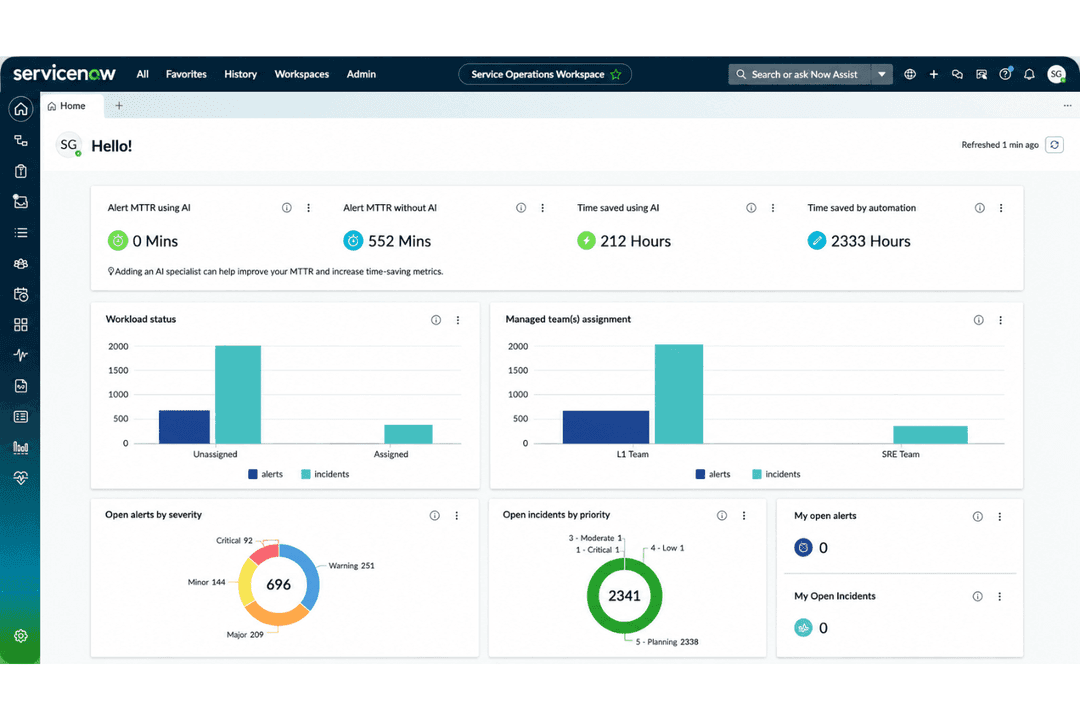
ServiceNow AI governance centralizes risk and compliance oversight.
Customer rating

4.4/5

Pricing
  • Free demo available
  • Pricing upon request

Why Trust Our Software Recommendations

6,700+

Reviews

20

Industry experts

16+

Evaluation factors

14

Years

Our team has been testing and reviewing software since 2012. As tech leaders ourselves, we know how difficult—and important—it is to choose the right software.

For this guide, we evaluated tools using hands-on testing and independent research, scoring tools using our selection criteria.

Our reviews reflect our human editorial judgment, not a sales pitch.

Expert reviewers:

ZendeskServiceNow
Free Trial14-day free trialFree demo available
PricingFrom $19/user/month (billed annually)Pricing upon request

Zendesk Vs. ServiceNow Pricing & Hidden Costs

Zendesk uses a tiered subscription model, with plans that scale based on features and user count. Add-ons for advanced analytics, AI, or integrations can increase your total cost. ServiceNow, in contrast, offers custom pricing based on modules, user roles, and deployment size, often requiring a sales conversation to get a full quote. With both platforms, costs can rise quickly if you need premium support, custom integrations, or extra automation features.

To choose the right pricing model, start by noting your current and future service management needs, think about the number of users, required integrations, and compliance requirements. Ask vendors for a detailed breakdown of all potential costs, including implementation, training, and ongoing support. Comparing the total cost of ownership over several years, not just the initial price, will help you avoid surprises and pick a solution that fits your long-term plans.

Both Zendesk and ServiceNow give you the core tools you need to manage service requests at scale. With either platform, you can capture issues as tickets or cases, route them to the right team, automate workflows, and track performance with built-in reporting and dashboards. You also get omnichannel support, so you can manage requests from email, chat, web portals, and other channels in one place.

Where they stand out is in their focus. Zendesk is built specifically for customer support, giving you an intuitive interface, fast deployment, and strong omnichannel engagement tools that help agents respond quickly and manage high ticket volumes. ServiceNow, on the other hand, excels in enterprise service management. You can automate complex workflows across IT, HR, and other departments, making it ideal if your support processes are deeply connected to internal systems and operations.

ZendeskServiceNow
AnalyticsYesYes
APIYesYes
Batch Permissions & AccessNoYes
Call IntegrationYesYes
ChatYesYes
Contact ManagementYesYes
CRM IntegrationYesYes
Customer ManagementYesYes
Data ExportYesYes
Data ImportYesYes
Email IntegrationYesYes
Escalation ManagementYesYes
External IntegrationsYesYes
Instant Chat IntegrationYesYes
Knowledge BaseYesYes
Multi-UserYesYes
NotificationsYesYes
Real-time AlertsYesYes
Self-service PortalYesYes
Social Media IntegrationYesYes
Support ForumYesYes
Ticket ManagementYesYes
Workflow ManagementYesYes

IntegrationSlackZendesk✅ServiceNow✅
IntegrationSalesforceZendesk✅ServiceNow✅
IntegrationMicrosoft TeamsZendesk✅ServiceNow✅
IntegrationJiraZendesk✅ServiceNow✅
IntegrationShopifyZendesk✅ServiceNow❌
IntegrationZoomZendesk✅ServiceNow✅
IntegrationOktaZendesk✅ServiceNow✅
IntegrationWorkdayZendesk❌ServiceNow✅
IntegrationAPIZendesk✅ServiceNow✅
IntegrationZapierZendesk✅ServiceNow✅

Zendesk and ServiceNow both integrate with many of the tools you already use, including collaboration platforms like Slack and Microsoft Teams, development tools like Jira, and CRM systems such as Salesforce. Each platform also provides robust APIs that let you build custom integrations and automate data sharing between systems. 

The main differences show up in the ecosystems they prioritize: Zendesk integrates heavily with customer support and ecommerce tools like Shopify, while ServiceNow focuses more on enterprise systems such as Workday and identity platforms used for IT and HR workflows.

FactorData EncryptionZendeskEncrypts data in transit (TLS) and at rest using industry-standard encryption and secure infrastructure.ServiceNowEncrypts data in transit and at rest, with advanced options such as customer-controlled key management.
FactorRegulatory ComplianceZendeskCertifications include SOC 2 Type II, ISO 27001, ISO 27017, ISO 27018, ISO 27701, and support for GDPR, HIPAA, and FedRAMP (low-impact).ServiceNowExtensive enterprise compliance including SOC 1/2/3, ISO 27001, HIPAA, FedRAMP (including higher authorization levels), and other industry frameworks.
FactorAccess ControlsZendeskRole-based access controls, SSO, and optional multi-factor authentication (2FA).ServiceNowGranular role-based access controls, SSO, MFA, and enterprise identity integrations.
FactorUptime GuaranteesZendeskPublicly reports service status and targets around 99.9% availability for most services.ServiceNowEnterprise SLAs commonly provide up to 99.99% availability with detailed service monitoring and dashboards.

Zendesk and ServiceNow both provide enterprise-grade security foundations, including encryption for data in transit and at rest, role-based access controls, and support for single sign-on and multi-factor authentication. Overall, ServiceNow is known for a broader set of compliance frameworks and higher-tier government certifications, making it a stronger fit for highly regulated industries.

FactorUser InterfaceZendeskClean, modern interface with intuitive navigation for new users.ServiceNowFeature-rich dashboard with a steeper learning curve for first-time users.
FactorOnboardingZendeskGuided setup and in-app tutorials help teams get started quickly.ServiceNowRequires more training and configuration, especially for custom workflows.
FactorCustomizationZendeskSimple drag-and-drop tools for basic workflow changes.ServiceNowDeep customization options for complex processes, but setup is more involved.
FactorSupport ResourcesZendeskExtensive knowledge base and responsive chat support.ServiceNowOffers detailed documentation and community forums, but support can be slower.
FactorMobile AccessZendeskMobile app is easy to use for ticket management on the go.ServiceNowMobile app supports advanced features but can feel overwhelming.

Zendesk is easier for most teams to pick up and use right away, while ServiceNow is better suited for organizations willing to invest in training for advanced capabilities. Zendesk’s straightforward interface and onboarding stand out, while ServiceNow’s flexibility comes with a learning curve that pays off for complex environments.

Zendesk

Pros
  • Your team can easily manage customer interactions with its intuitive interface.
  • It offers powerful reporting tools to help you track and improve performance.
  • Zendesk provides excellent support, ensuring your issues are addressed promptly.
Cons
  • You might find the initial setup process a bit complex.
  • Customization options can feel limited for advanced users.
  • Some users report occasional delays in loading times.

ServiceNow

Pros
  • Built-in policy management automates complex governance processes
  • Detailed audit trails support regulatory and compliance needs
  • Centralized dashboard provides clear visibility into AI workflows
Cons
  • Advanced governance features require significant setup and training
  • Pricing is not transparent for most AI-specific modules
  • Custom automation can strain IT resources during deployment

Zendesk

Zendesk tracks chats, tags, and lead updates in one streamlined workspace.
Zendesk's AI copilot suggests real-time responses to agents during customer conversations.
  1. Large EnterprisesZendesk scales well for companies with high customer support volumes and complex workflows.
  2. E-commerceThe platform integrates with online stores and provides tools for managing high volumes of customer inquiries.
  3. SaaS CompaniesZendesk's features align well with subscription-based businesses needing to manage ongoing customer relationships.
  4. IT DepartmentsThe software offers IT service management capabilities suitable for handling internal tech support requests.
  5. Multichannel SupportZendesk excels in unifying customer interactions across various channels like email, chat, and social media.
  6. Global TeamsThe platform supports multiple languages and time zones, making it suitable for international customer service operations.

ServiceNow

ServiceNow AI governance centralizes risk and compliance oversight.
  1. Financial ServicesServiceNow’s deep audit trails and policy automation help meet strict regulatory requirements for banking and insurance operations.
  2. Healthcare OrganizationsCentralized governance and compliance workflows support HIPAA needs and ensure patient data protection.
  3. Global EnterprisesServiceNow scales well for globally distributed teams needing unified oversight and secure model management.
  4. Government AgenciesBuilt-in controls and policy management align with complex government information technology standards and public sector risk controls.
  5. IT DepartmentsIntegrated governance in ITSM workflows makes ServiceNow a natural fit for teams already using incident and change management.
  6. Data Science LeadersCentralized model tracking and risk scoring make software development teams and AI leaders more efficient at cross-team collaboration and regulatory reporting.

Who Should Use Zendesk, and Who Should Use ServiceNow?

Zendesk is a great fit for customer support teams, small to midsize businesses, and organizations that want a straightforward, easy-to-adopt service management solution without heavy IT overhead. ServiceNow is best for large enterprises, IT departments, and regulated industries that need advanced workflow automation, deep customization, and strict compliance controls. If your team values quick setup and a user-friendly experience, Zendesk is the way to go. If you need to orchestrate complex processes across multiple departments or meet demanding regulatory requirements, ServiceNow is the stronger choice.

AutomationZendesk

Basic workflow automation for ticket routing and responses.

ServiceNow

Advanced automation for ITSM, HR, and custom business processes.

CustomizationZendesk

Limited to pre-built options and simple workflow changes.

ServiceNow

Highly customizable with scripting and integration capabilities.

IT Service ManagementZendesk

Basic ITSM features suitable for small teams.

ServiceNow

Enterprise ITSM capabilities with ITIL alignment.

Pricing ModelZendesk

Tiered subscription pricing per agent with predictable plans and add-ons.

ServiceNow

Custom enterprise pricing based on modules, users, and scale.

User InterfaceZendesk

Simple, modern UI designed for quick adoption.

ServiceNow

Complex dashboard with advanced options for power users.

Cloud-Based Delivery

Both are delivered as cloud-based platforms, allowing teams to access service management tools from anywhere.

Integration Options

Each solution connects with popular tools like Slack, Salesforce, and Jira, and offers API access for custom integrations.

Multichannel Support

Each platform supports email, chat, and web forms for capturing and managing service requests from multiple channels.

Reporting & Analytics

Both provide built-in dashboards and reporting tools to monitor performance, trends, and team productivity.

Ticket Management

Both offer centralized ticketing systems for tracking, assigning, and resolving requests, with customizable workflows.