


PDQ Connect Vs. NinjaOne: Comparison and Expert Reviews for 2026
See how PDQ Connect and NinjaOne stack up for real-world patch management—my comparison reveals strengths, gaps, and which solution truly fits your workflow in 2026.

We review tools independently, and commissions help fund our testing. See our transparency policy, our methodology, or suggest a tool.
Keeping systems up to date shouldn’t feel like a headache, but for many IT teams, patch management turns into a constant cycle of urgent fixes, missed updates, and mounting security concerns.
Choosing the right patch management software can make or break your routine. You’re likely wrestling with automation, security, and ease of use—which is where both PDQ Connect and NinjaOne promise answers, though each brings a different approach.
In this article, you’ll get a clear, side-by-side comparison of these two tools. I’ll walk you through pros and cons, use cases, pricing, security, and usability, so you can make the right call for your team.
PDQ Connect

4.6/5
- Free trial + demo available
- From $12/device/year
NinjaOne
4.7/5
- 14-day free trial + free demo available
- Pricing upon request
Why Trust Our Software Recommendations
6,700+
Reviews
20
Industry experts
16+
Evaluation factors
14
Years
Our team has been testing and reviewing software since 2012. As tech leaders ourselves, we know how difficult—and important—it is to choose the right software.
For this guide, we evaluated tools using hands-on testing and independent research, scoring tools using our selection criteria.
Our reviews reflect our human editorial judgment, not a sales pitch.
Expert reviewers:
- Paulo Gardini MiguelTech Director
 Tim FisherVP of AI
 Gabriel RosasTech Lead & Software Architect
 Christhian GruhnTech Lead & Platform Architect

| PDQ Connect | NinjaOne | |
|---|---|---|
| Free Trial | Free trial + demo available | 14-day free trial + free demo available |
| Pricing | From $12/device/year | Pricing upon request |
PDQ Connect Vs. NinjaOne Pricing & Hidden Costs
PDQ Connect offers tiered per-device pricing with options that scale as you add more features and endpoints. While you don’t face onboarding or setup fees, watch for costs if your team needs extra integrations or premium support. NinjaOne uses a quote-based subscription model that is typically based on the number of endpoints managed, with add-ons for advanced modules and some features locked behind higher tiers or separate licenses—custom pricing may add complexity, depending on your organization’s mix of devices and requirements.
Evaluating the right pricing fit goes beyond headline costs. I suggest mapping all your managed assets, expected usage, support needs, and potential growth into a clear list. Ask each vendor for a custom quote based on your specific system mix and required features, and factor in both direct subscription fees and indirect costs like add-ons or support. This way, you’ll sidestep hidden expenses and make sure the solution fits your technical and operational demands.
| PDQ Connect | NinjaOne | |
|---|---|---|
| 2-Factor Authentication | Yes | Yes |
| Anti-Virus | Yes | Yes |
| API | Yes | Yes |
| Bug Tracking | No | Yes |
| Customer Management | No | Yes |
| Data Export | Yes | Yes |
| Data Import | Yes | Yes |
| Email Integration | No | Yes |
| External Integrations | Yes | Yes |
| Malware Protection | Yes | Yes |
| Multi-User | Yes | Yes |
| Notifications | Yes | Yes |
| Project Management | No | Yes |
| SAP Integration | No | Yes |
| Ticket Management | Yes | Yes |
| Integration | PDQ Connect | NinjaOne |
|---|---|---|
| IntegrationActive Directory | PDQ Connect✅ | NinjaOne✅ |
| IntegrationMicrosoft Intune | PDQ Connect❌ | NinjaOne✅ |
| IntegrationServiceNow | PDQ Connect❌ | NinjaOne✅ |
| IntegrationSlack | PDQ Connect❌ | NinjaOne✅ |
| IntegrationConnectWise | PDQ Connect❌ | NinjaOne✅ |
| IntegrationAutotask | PDQ Connect❌ | NinjaOne✅ |
| IntegrationFreshdesk | PDQ Connect✅ | NinjaOne❌ |
| IntegrationJira | PDQ Connect✅ | NinjaOne❌ |
| IntegrationAPI | PDQ Connect✅ | NinjaOne✅ |
| IntegrationZapier | PDQ Connect✅ | NinjaOne❌ |
NinjaOne covers a broader range of native integrations for IT service management, communication, and virtualization, while PDQ Connect keeps things simple but offers Zapier for flexible automation. Both provide an API, so teams needing more customization or unique workflows will find these platforms adaptable for most patch management requirements.
| Factor | PDQ Connect | NinjaOne |
|---|---|---|
| FactorData Encryption | PDQ ConnectUses end-to-end encryption for data in transit and at rest. | NinjaOneApplies strong encryption for data in transit and at rest. |
| FactorAccess Controls | PDQ ConnectOffers granular user roles and permission settings. | NinjaOneProvides detailed role-based access and audit trails. |
| FactorRegulatory Compliance | PDQ ConnectSOC 2 compliant, supporting secure operations. | NinjaOneSupports SOC 2 and HIPAA compliance, with extra documentation. |
| FactorPatch Validation | PDQ ConnectVerifies patch authenticity before deployment. | NinjaOneOffers automated patch testing and rollback options. |
| FactorUptime Guarantees | PDQ ConnectDelivers high availability via cloud architecture. | NinjaOnePublishes 24/7 uptime with global infrastructure monitoring. |
NinjaOne feels more mature for organizations with advanced compliance needs, while PDQ Connect impresses with straightforward security and reliable patch delivery. In my experience, NinjaOne’s extended documentation and audit capabilities make it strong for regulated sectors, while PDQ Connect’s simplicity suits teams focused on core patching workflows.
| Factor | PDQ Connect | NinjaOne |
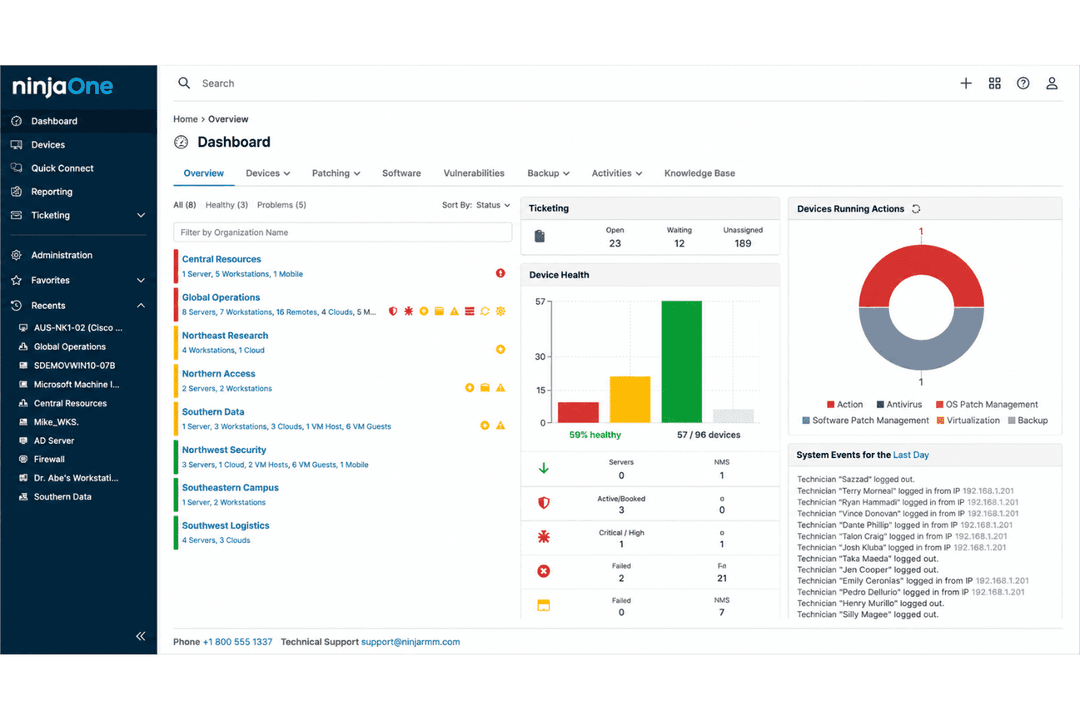
| User Interface | Clean, intuitive dashboard focused on patch tasks. | Modern, unified interface with customizable widgets. |
| Onboarding | Quick startup with simple setup and guided workflows. | Detailed onboarding with training resources and tooltips. |
| Support | Email-based support and active community forums. | 24/7 live chat, phone, and resource-rich help center. |
| Automation | Easy-to-configure scheduling, but fewer automation options. | Flexible automations for patching, alerts, and custom scripts. |
| Documentation | Focused, concise knowledge base for key operations. | In-depth documentation with step-by-step guides and videos. |
Both tools are easy to learn, but NinjaOne goes a step further with more automation options and a higher-touch support experience. I find PDQ Connect is great if you want a minimalist interface and fast onboarding, while NinjaOne fits teams who appreciate extra customization and guidance.
PDQ Connect
- Automates Windows and macOS patch deployment with granular scheduling controls.
- Inventory scanning helps pinpoint unpatched or missing software.
- No remote agent required for updates on most devices.
- Limited support for Linux and mobile environments.
- RMM options are basic compared to other all-in-one platforms.
- No dedicated onboarding support.
NinjaOne
- Deploys fast and delivers detailed endpoint visibility with no on-premise infrastructure to purchase, configure, and manage.
- Pulls patching, backup, remote access, and ticketing into one console.
- Automates patching with CVE and CVSS context, stability scoring, and dependable scripting.
- Built-in reporting is thin for client-facing work.
- Mobile device management is less robust than desktop support.
- The service desk and PSA are sized for SMB teams rather than enterprise ITSM or high-end MSP workflows.
PDQ Connect
- Financial InstitutionsFinancial institutions can use PDQ Connect to support compliance and maintain visibility across endpoints.
- K–12 EducationSchools benefit from agentless updates, prebuilt packages, and batch deployment across many Windows PCs.
- Managed Service ProvidersService providers use PDQ's scripting options and reporting for efficient multi-client patch management.
- Healthcare ClinicsAgentless patching and minimal infrastructure keep compliance easy for smaller clinics with mostly Windows devices.
- Distributed WorkforcesRemote deployment supports offsite or hybrid employees without complex VPN or agent installs.
- SMBs With WindowsSmall and midsize businesses running mostly Windows get fast setup and coverage without advanced requirements.
NinjaOne
- Managed Service ProvidersNinjaOne’s multi-tenant architecture and remote support streamline managing multiple client environments from a single dashboard.
- Small to Midsize BusinessesDevice-based pricing and easy deployment provide SMBs effective IT management without extra complexity.
- Healthcare IT DepartmentsPatch management and compliance reporting features help healthcare teams meet standards and secure sensitive data.
- Education InstitutionsRemote monitoring and access ease support for student and faculty devices across multiple sites.
- Hybrid Workforce SupportPolicy management, help desk, and remote access empower teams supporting remote and distributed users.
- Enterprise IT TeamsMulti-tenant architecture and automation scale to support large, distributed fleets and high endpoint volume.
Who Should Use PDQ Connect, And Who Should Use NinjaOne?
PDQ Connect is a fit for small & medium IT teams or budget-conscious organizations that want straightforward, no-frills patching without time spent on extra features. NinjaOne is best for MSPs, regulated industries, and larger businesses looking for end-to-end endpoint management, full audit trails, and integrated IT operations. If you value speed and simplicity, PDQ Connect delivers; if your team demands automation, integration, and advanced controls, go with NinjaOne.
| PDQ Connect | NinjaOne | |
|---|---|---|
| Automation | PDQ Connect Basic scheduling for patch jobs and scripts. | NinjaOne Advanced automation for patching, alerts, and workflows. |
| Compliance Tools | PDQ Connect SOC 2 compliant, less focus on regulated industries. | NinjaOne Advanced reporting, audit trails, and HIPAA/SOC 2 support. |
| Integrations | PDQ Connect Fewer integrations, includes Zapier for flexibility. | NinjaOne Broad integrations, especially for ITSM and RMM tools. |
| Pricing Model | PDQ Connect Simple seat-based pricing with limited add-ons. | NinjaOne Custom endpoint-based pricing with modular add-on options. |
| User Interface | PDQ Connect Clean, minimal dashboard focused on patching. | NinjaOne Highly customizable dashboard with widgets and integrations. |
| Cloud-Based Management | Both deliver a cloud-based experience, letting you manage patching and monitoring from anywhere. |
|---|---|
| Patch Automation | Both automate patch deployment to endpoints, reducing manual work and risk of missed updates. |
| Reporting | Both provide detailed reporting on patch status, failed updates, and compliance across managed devices. |
| User Access Controls | Each tool offers defined user roles and permissions for managing who can deploy or approve patches. |
| Windows Support | Each product is built for robust Windows patching, handling updates across Windows endpoints natively. |