

Mobot Review 2026 : Pros, Cons, Features, and Pricing
Mobot stands out by using real robots for mobile app testing, offering unmatched accuracy for complex scenarios, but may not suit teams needing rapid, low-cost automation.

We review tools independently, and commissions help fund our testing. See our transparency policy, our methodology, or suggest a tool.
Mobot is a mobile testing tool that uses physical robots to run automated tests on real mobile devices. If your team keeps hitting failures that only appear on real hardware, that's exactly where Mobot fits. Unlike Appium, which relies on emulators and requires significant scripting investment, Mobot handles testing on physical phones without demanding deep automation engineering resources.
Mobot Evaluation Summary
0/5
- Pricing upon request
- Free trial + free demo available
Why Trust Our Software Recommendations
6,700+
Reviews
20
Industry experts
16+
Evaluation factors
14
Years
Our team has been testing and reviewing software since 2012. As tech leaders ourselves, we know how difficult—and important—it is to choose the right software.
For this guide, we evaluated tools using hands-on testing and independent research, scoring tools using our selection criteria.
Our reviews reflect our human editorial judgment, not a sales pitch.
Expert reviewers:
- Paulo Gardini MiguelTech Director
 Tim FisherVP of AI
 Gabriel RosasTech Lead & Software Architect
 Christhian GruhnTech Lead & Platform Architect

Mobot Overview
Mobot’s use of real robots for device testing sets it apart, delivering unmatched accuracy for hardware-specific bugs and complex user flows. Its intuitive interface and responsive support make onboarding straightforward, though pricing may be higher than some alternatives. While integrations and automation depth are strong, teams needing rapid, high-volume test cycles may find it less flexible than pure software-based options.
If you’re judging tools for reliability in real-world scenarios—like biometric authentication or device rotation—Mobot is a top contender, especially for QA teams in regulated or high-stakes environments.
Pros
- Reduces manual test maintenance for QA teams.
- Automates complex user flows with physical robots.
- Detects real device issues missed by emulators.
Cons
- Limited flexibility for rapid, high-volume test cycles.
- Test execution speed is slower than virtual solutions.
- Higher pricing than most software-based tools.
Is Mobot Right For Your Needs?
Who Would be a Good Fit for Mobot?
Mobot is best suited for organizations where real device accuracy and complex user flows are essential, especially in industries with strict compliance or high user expectations. Teams that need to validate hardware integrations, biometric authentication, or device-specific behaviors will find Mobot’s physical robot approach valuable.
It’s a strong choice for regulated sectors, large QA teams, and companies where mobile app reliability directly impacts business outcomes.
- Biometric Security AppsEnsures fingerprint and facial recognition work across real devices.
- Mobile Gaming StudiosTests real-world gestures and device orientation for immersive experiences.
- Consumer ElectronicsValidates hardware integrations and device-specific features reliably.
- Enterprise QA TeamsMobot reduces manual test maintenance for large-scale, complex apps.
- Fintech StartupsPhysical robots catch device-specific bugs critical for secure mobile transactions.
- Regulated HealthcareMobot’s real device testing helps meet strict compliance and patient safety requirements.
Who Would be a Bad Fit for Mobot?
Mobot is less suitable for teams prioritizing rapid, high-volume automation or those with limited budgets. Companies that rely on frequent, iterative releases or only need basic UI validation may find Mobot’s physical approach slower and more costly than virtual solutions. It’s not ideal for small startups, web-only teams, or those with minimal device diversity.
- Minimal Device DiversityTeams with limited device requirements won’t leverage Mobot’s full value.
- Agencies With Tight DeadlinesTest execution speed may not meet rapid client turnaround times.
- Basic UI ValidationOverkill for teams only needing simple interface checks.
- High-Volume AutomationPhysical robots can’t match the speed of virtualized test farms.
- Web-Only TeamsNo support for browser or desktop app testing.
- Small StartupsMobot’s pricing and slower test cycles may exceed budget and needs.
Our Review Methodology
How We Test & Score Tools
We’ve spent years building, refining, and improving our software testing and scoring system. The rubric is designed to capture the nuances of software selection and what makes a tool effective, focusing on critical aspects of the decision-making process.
Below, you can see exactly how our testing and scoring works across seven criteria. It allows us to provide an unbiased evaluation of the software based on core functionality, standout features, ease of use, onboarding, customer support, integrations, customer reviews, and value for money.
Core Functionality (25% of final scoring)
The starting point of our evaluation is always the core functionality of the tool. Does it have the basic features and functions that a user would expect to see? Are any of those core features locked to higher-tiered pricing plans? At its core, we expect a tool to stand up against the baseline capabilities of its competitors.
Standout Features (25% of final scoring)
Next, we evaluate uncommon standout features that go above and beyond the core functionality typically found in tools of its kind. A high score reflects specialized or unique features that make the product faster, more efficient, or offer additional value to the user.
We also evaluate how easy it is to integrate with other tools typically found in the tech stack to expand the functionality and utility of the software. Tools offering plentiful native integrations, 3rd party connections, and API access to build custom integrations score best.
Ease of Use (10% of final scoring)
We consider how quick and easy it is to execute the tasks defined in the core functionality using the tool. High scoring software is well designed, intuitive to use, offers mobile apps, provides templates, and makes relatively complex tasks seem simple.
Onboarding (10% of final scoring)
We know how important rapid team adoption is for a new platform, so we evaluate how easy it is to learn and use a tool with minimal training. We evaluate how quickly a team member can get set up and start using the tool with no experience. High scoring solutions indicate little or no support is required.
Customer Support (10% of final scoring)
We review how quick and easy it is to get unstuck and find help by phone, live chat, or knowledge base. Tools and companies that provide real-time support score best, while chatbots score worst.
Customer Reviews (10% of final scoring)
Beyond our own testing and evaluation, we consider the net promoter score from current and past customers. We review their likelihood, given the option, to choose the tool again for the core functionality. A high scoring software reflects a high net promoter score from current or past customers.
Value for Money (10% of final scoring)
Lastly, in consideration of all the other criteria, we review the average price of entry level plans against the core features and consider the value of the other evaluation criteria. Software that delivers more, for less, will score higher.
Core Features
Physical Robot Testing
Mobot uses real mechanical robots to interact with actual mobile devices, capturing bugs that emulators and simulators miss.
Automated Complex User Flows
Automate multi-step scenarios like biometric authentication, device rotation, and deep linking for true end-to-end coverage.
Visual and Functional Validation
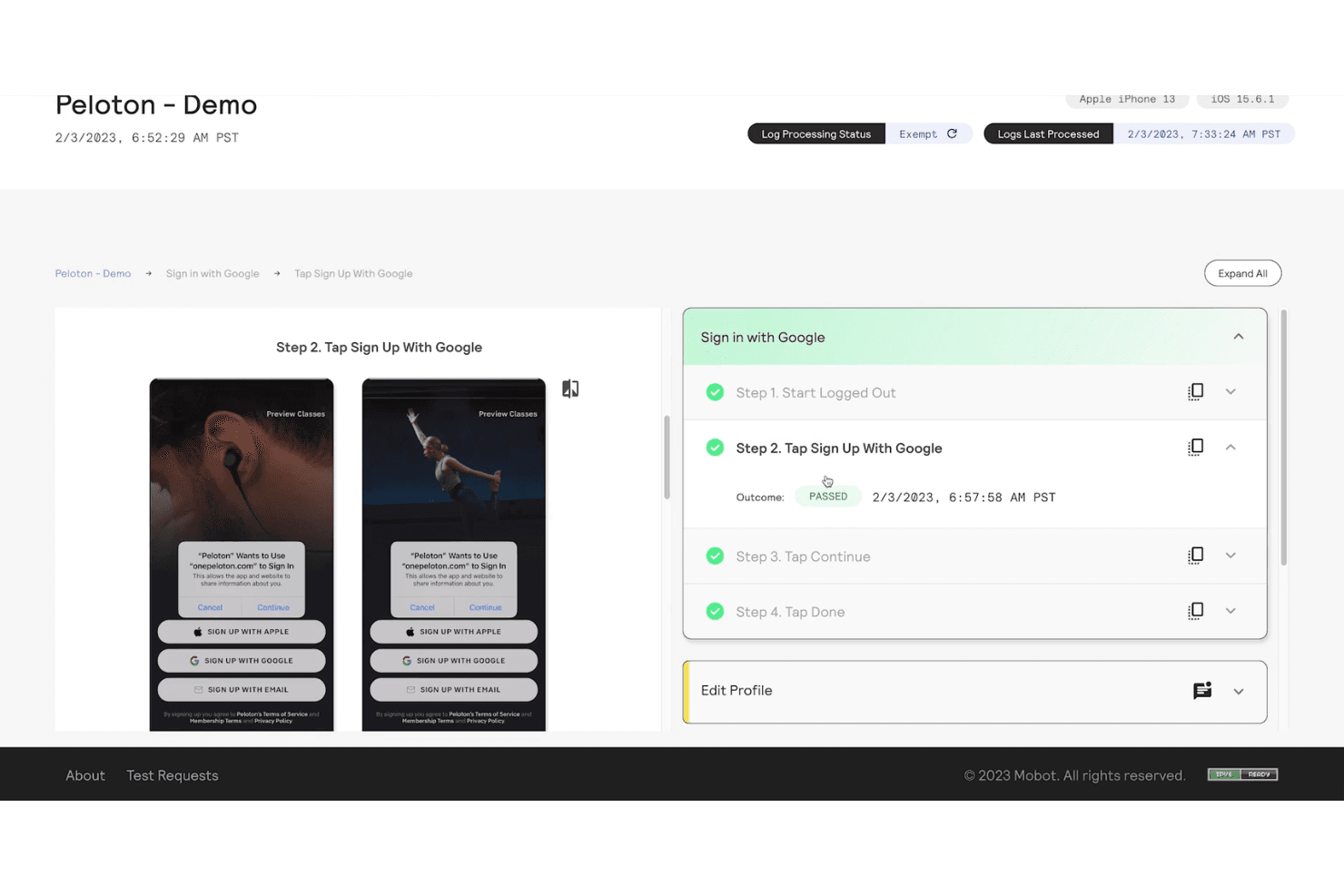
Mobot checks both UI appearance and app functionality, ensuring screens render correctly and workflows behave as expected.
Test Maintenance Reduction
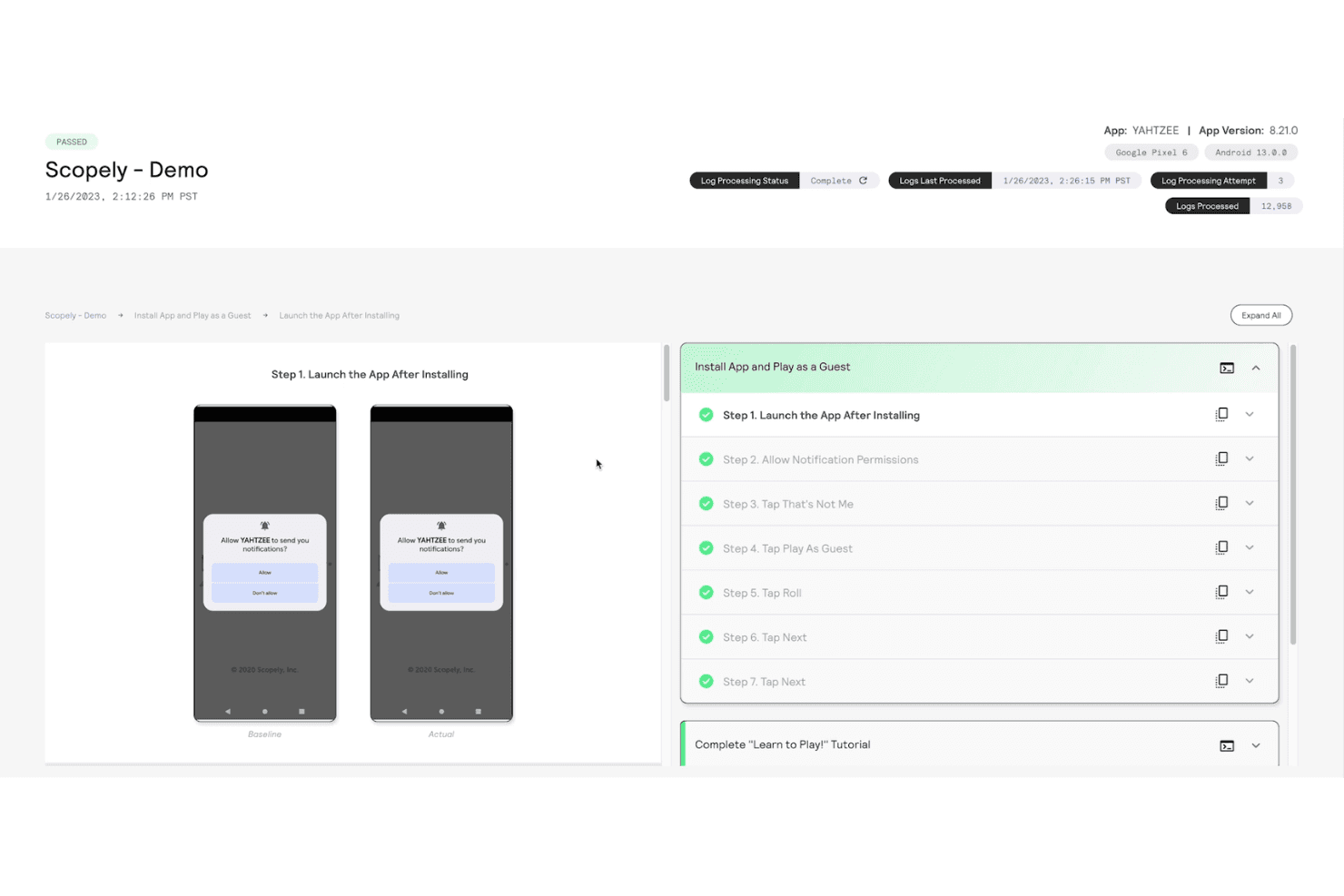
The platform minimizes flaky tests and reduces manual upkeep, freeing QA teams from constant script updates.
Full Device Coverage
Mobot supports a wide range of iOS and Android devices, helping teams test across the fragmented mobile landscape.
Detailed Reporting and Insights
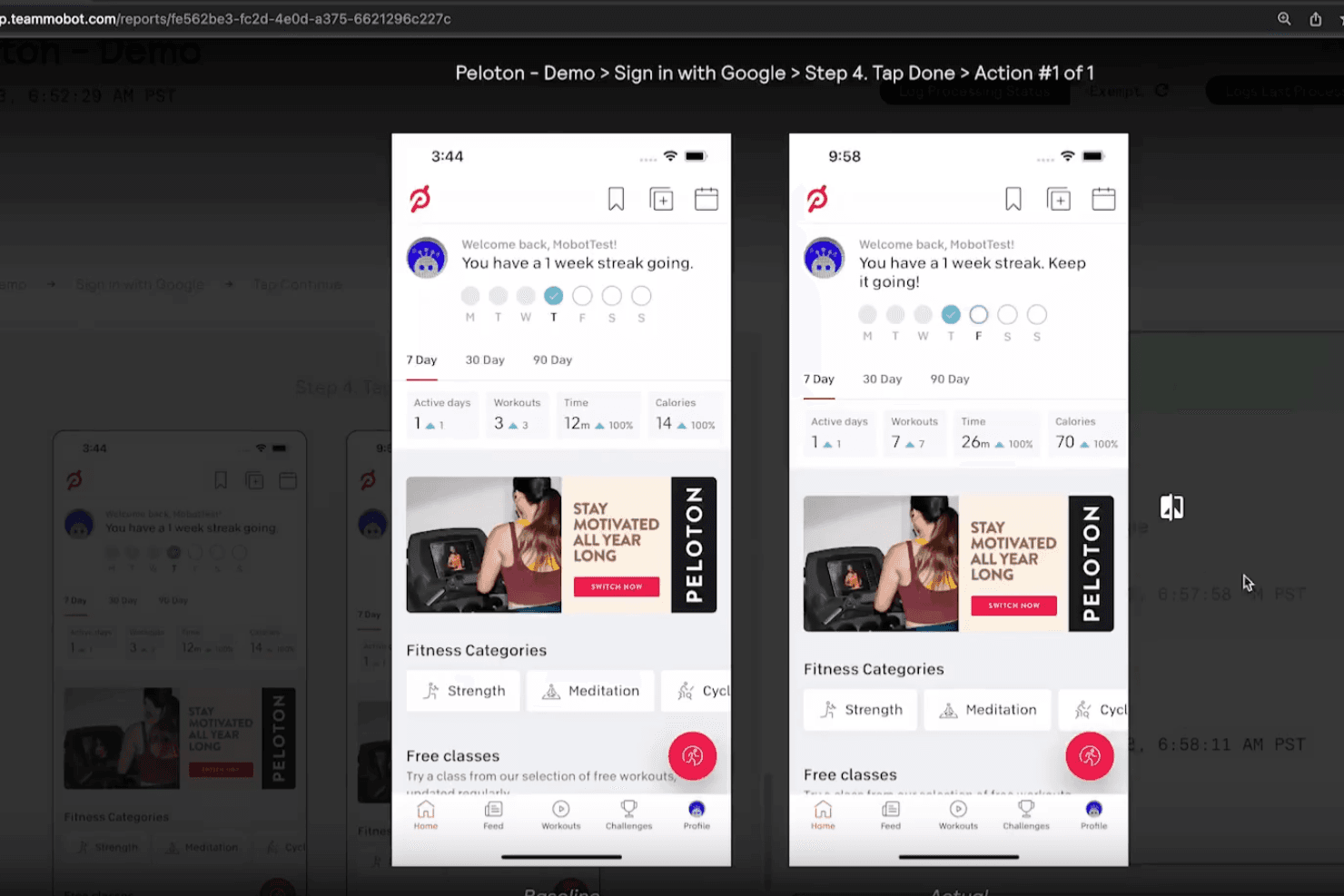
Get actionable reports with screenshots, logs, and analytics to quickly diagnose and resolve issues.
Ease of Use
Mobot is generally praised for its intuitive interface and guided onboarding, making it accessible even for teams new to automated mobile testing. Users highlight the clear test setup process and responsive support, which help reduce friction during adoption.
While managing physical devices adds some complexity, Mobot’s dashboard and workflow design keep test creation and results review straightforward. This balance of advanced capability and usability sets it apart in a space often dominated by technical barriers.
Integrations
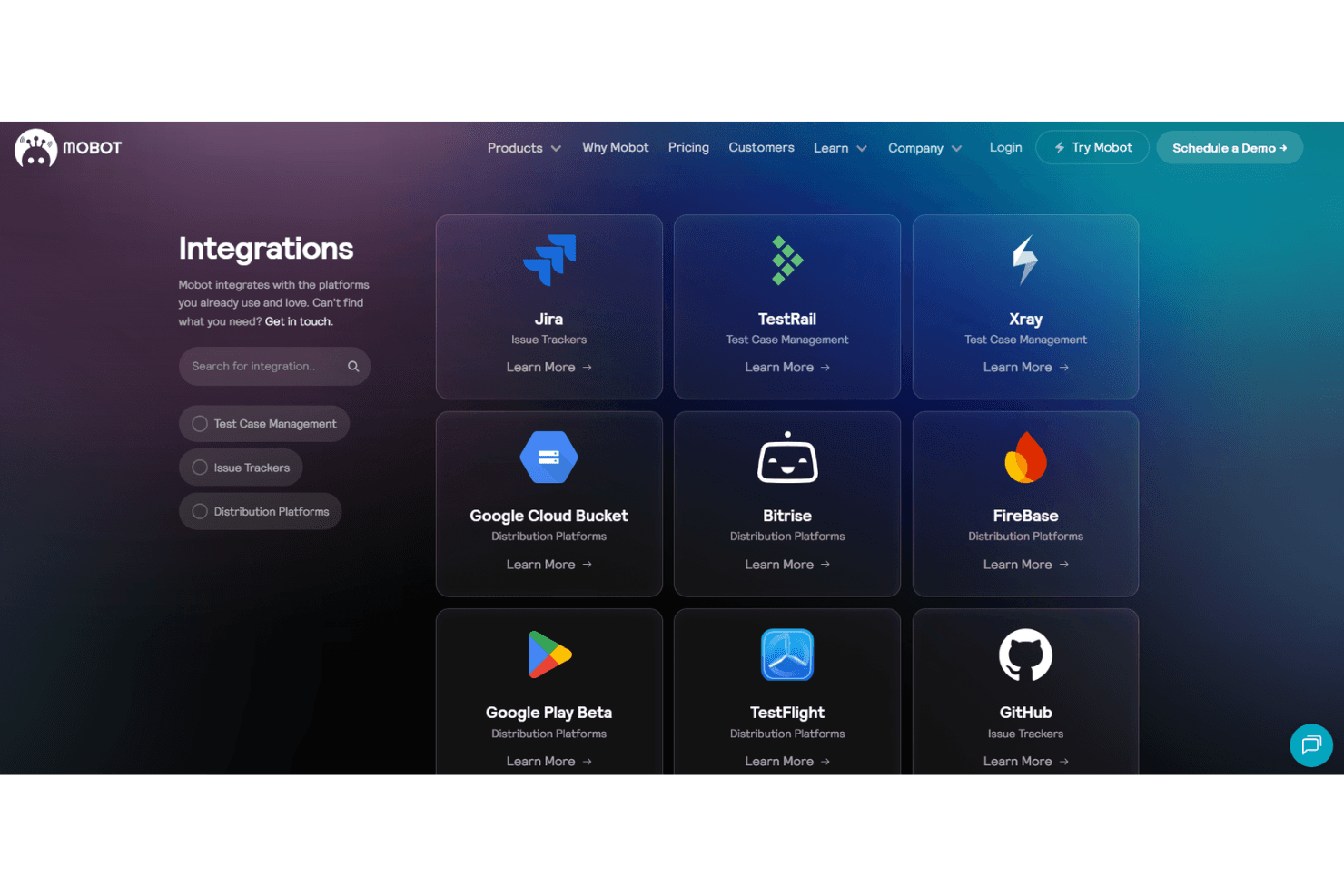
Mobot integrates with Jira, TestRail, Xray, Google Cloud Bucket, Bitrise, Firebase, Google Play Beta, TestFlight, GitHub, and Linear, among others.
Mobot also offers an API and supports connections with third-party integration tools.
Mobot Specs
- A/B Testing: No
- API: Yes
- Automated Testing: Yes
- Bug Tracking: Yes
- CI/CD Integration: Yes
- Custom Reports: Yes
- Dashboard: Yes
- Data Export: Yes
- Data Import: No
- Data Visualization: No
- Developer Tools: No
- External Integrations: Yes
- Local Deployment: No
- Manual Testing: Yes
- Multi-User: Yes
- Network Device Performance Monitoring: No
- Notifications: Yes
- Performance Testing: No
- Regression Testing: Yes
- Scheduling: Yes
- Static Analysis: No
- Test Case Library: Yes
- Test Management: Yes
- Third-Party Plugins/Add-Ons: No
- Workflow Management: Yes


