

Informatica Cloud Review: Pros, Cons, Features, and Pricing Explained

We review tools independently, and commissions help fund our testing. See our transparency policy, our methodology, or suggest a tool.
Informatica Cloud is a cloud management platform built around data integration, data quality, and master data management across hybrid and multi-cloud environments. I'd consider it for enterprise IT teams that need to connect and govern large volumes of data across dozens of sources without building custom pipelines from scratch. If you're weighing it against something like Talend, Informatica Cloud goes deeper on data governance and lineage tracking—making it the stronger choice when compliance, data trust, and end-to-end visibility matter as much as raw connectivity.
Informatica Cloud Evaluation Summary
4.3/5
- Pricing available upon request
- 30-day free limited trial
Why Trust Our Software Recommendations
6,700+
Reviews
20
Industry experts
16+
Evaluation factors
14
Years
Our team has been testing and reviewing software since 2012. As tech leaders ourselves, we know how difficult—and important—it is to choose the right software.
For this guide, we evaluated tools using hands-on testing and independent research, scoring tools using our selection criteria.
Our reviews reflect our human editorial judgment, not a sales pitch.
Expert reviewers:
- Paulo Gardini MiguelTech Director
 Tim FisherVP of AI
 Gabriel RosasTech Lead & Software Architect
 Christhian GruhnTech Lead & Platform Architect

Informatica Cloud Overview
When judging Informatica Cloud as a cloud management platform, its cloud data integration and automation functionality set it apart, especially for organizations handling large, complex data flows. The user interface can feel dense, and onboarding may require more time than some alternatives, but the platform's extensive connectivity options and strong support resources help offset this.
Pricing is on the higher end, but the advanced capabilities justify the investment for enterprises prioritizing security and scalability. Informatica Cloud is best suited for teams with mature IT processes that need granular control and compliance across hybrid or multi-cloud environments.
Pros
- Handles large-scale, complex data integration workloads.
- Offers strong data governance and compliance features.
- Provides extensive automation for data management tasks.
Cons
- Pricing is higher than many competing platforms.
- Troubleshooting technical errors can be time-consuming.
- Requires significant IT resources for setup and maintenance.
Is Informatica Cloud Right For Your Needs?
Who Would be a Good Fit for Informatica Cloud?
Informatica Cloud is best suited for organizations with complex data environments, strict compliance needs, and large-scale integration requirements. Enterprises in regulated industries, global operations, or those with dedicated IT teams will benefit from its automation, governance, and scalability.
Informatica Cloud's advanced functionality and support for hybrid and multi-cloud architectures make it a strong choice for teams that need granular control and robust data management.
- Large EnterprisesHandles high data volumes and complex integration across multiple systems.
- Financial ServicesSupports strict compliance and data governance requirements.
- Healthcare OrganizationsEnables secure, HIPAA-compliant data movement and management.
- Data Engineering TeamsAutomates ETL and data pipeline orchestration at scale.
- Global Retail ChainsManages distributed data across regions and cloud providers.
- IT Departments in Regulated IndustriesProvides audit trails and policy enforcement for sensitive data.
Who Would be a Bad Fit for Informatica Cloud?
Informatica Cloud is less suitable for smaller businesses, teams with limited IT resources, or organizations with simple data needs. Its pricing, complexity, and resource requirements may outweigh the benefits for those without large-scale integration or compliance demands. Companies seeking lightweight, low-maintenance solutions may find Informatica Cloud more than they need.
- Small StartupsSetup and costs are excessive for basic data needs.
- Non-Technical TeamsRequires IT expertise for configuration and ongoing management.
- Marketing DepartmentsLacks focus on campaign or customer data analytics.
- Local RetailersOverly complex for single-location or low-volume operations.
- FreelancersNot designed for individual or small-scale data projects.
- Nonprofit OrganizationsBudget constraints make high licensing costs impractical.
Our Review Methodology
How We Test & Score Tools
We’ve spent years building, refining, and improving our software testing and scoring system. The rubric is designed to capture the nuances of software selection and what makes a tool effective, focusing on critical aspects of the decision-making process.
Below, you can see exactly how our testing and scoring works across seven criteria. It allows us to provide an unbiased evaluation of the software based on core functionality, standout features, ease of use, onboarding, customer support, integrations, customer reviews, and value for money.
Core Functionality (25% of final scoring)
The starting point of our evaluation is always the core functionality of the tool. Does it have the basic features and functions that a user would expect to see? Are any of those core features locked to higher-tiered pricing plans? At its core, we expect a tool to stand up against the baseline capabilities of its competitors.
Standout Features (25% of final scoring)
Next, we evaluate uncommon standout features that go above and beyond the core functionality typically found in tools of its kind. A high score reflects specialized or unique features that make the product faster, more efficient, or offer additional value to the user.
We also evaluate how easy it is to integrate with other tools typically found in the tech stack to expand the functionality and utility of the software. Tools offering plentiful native integrations, 3rd party connections, and API access to build custom integrations score best.
Ease of Use (10% of final scoring)
We consider how quick and easy it is to execute the tasks defined in the core functionality using the tool. High scoring software is well designed, intuitive to use, offers mobile apps, provides templates, and makes relatively complex tasks seem simple.
Onboarding (10% of final scoring)
We know how important rapid team adoption is for a new platform, so we evaluate how easy it is to learn and use a tool with minimal training. We evaluate how quickly a team member can get set up and start using the tool with no experience. High scoring solutions indicate little or no support is required.
Customer Support (10% of final scoring)
We review how quick and easy it is to get unstuck and find help by phone, live chat, or knowledge base. Tools and companies that provide real-time support score best, while chatbots score worst.
Customer Reviews (10% of final scoring)
Beyond our own testing and evaluation, we consider the net promoter score from current and past customers. We review their likelihood, given the option, to choose the tool again for the core functionality. A high scoring software reflects a high net promoter score from current or past customers.
Value for Money (10% of final scoring)
Lastly, in consideration of all the other criteria, we review the average price of entry level plans against the core features and consider the value of the other evaluation criteria. Software that delivers more, for less, will score higher.
Core Features
Data Integration
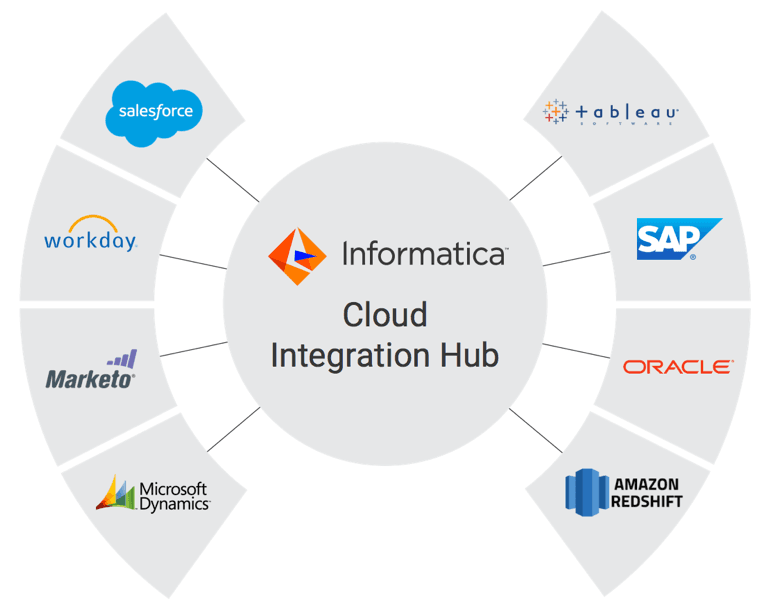
Connects, transforms, and synchronizes data across cloud and on-premises systems. Users can automate complex workflows for real-time or batch processing.
Data Quality Management
Monitors, cleanses, and standardizes data to ensure accuracy and consistency. Built-in profiling and validation tools help maintain trusted data sources.
Data Governance
Implements policies, lineage tracking, and access controls for compliance. Enables organizations to audit data usage and enforce regulatory requirements.
Cloud Data Warehousing
Supports data movement and management for cloud-based data warehouses and analytics platforms. Simplifies large-scale analytics and reporting projects.
Workflow Automation
Automates repetitive data management tasks with visual workflow design. Reduces manual intervention and speeds up deployment cycles.
API and Application Integration
Manages APIs and application connections for seamless data exchange. Centralizes control over data flows between business applications and services.
Ease of Use
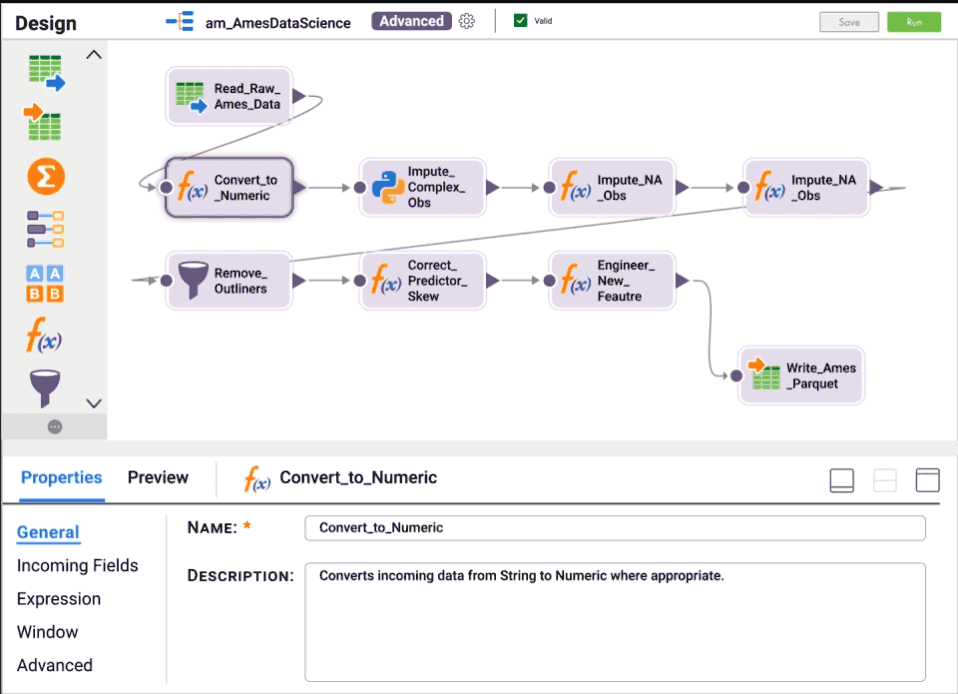
Informatica Cloud offers a feature-rich user interface that prioritizes control and flexibility, but this comes at the cost of a steeper learning curve. Many users report that initial setup and workflow design require significant IT expertise, especially for advanced automation or governance tasks. That said, the platform supports low-code mappings and visual tools that make it more accessible once your team is up to speed. It's best suited for users comfortable with technical configuration and ongoing system management.
Integrations
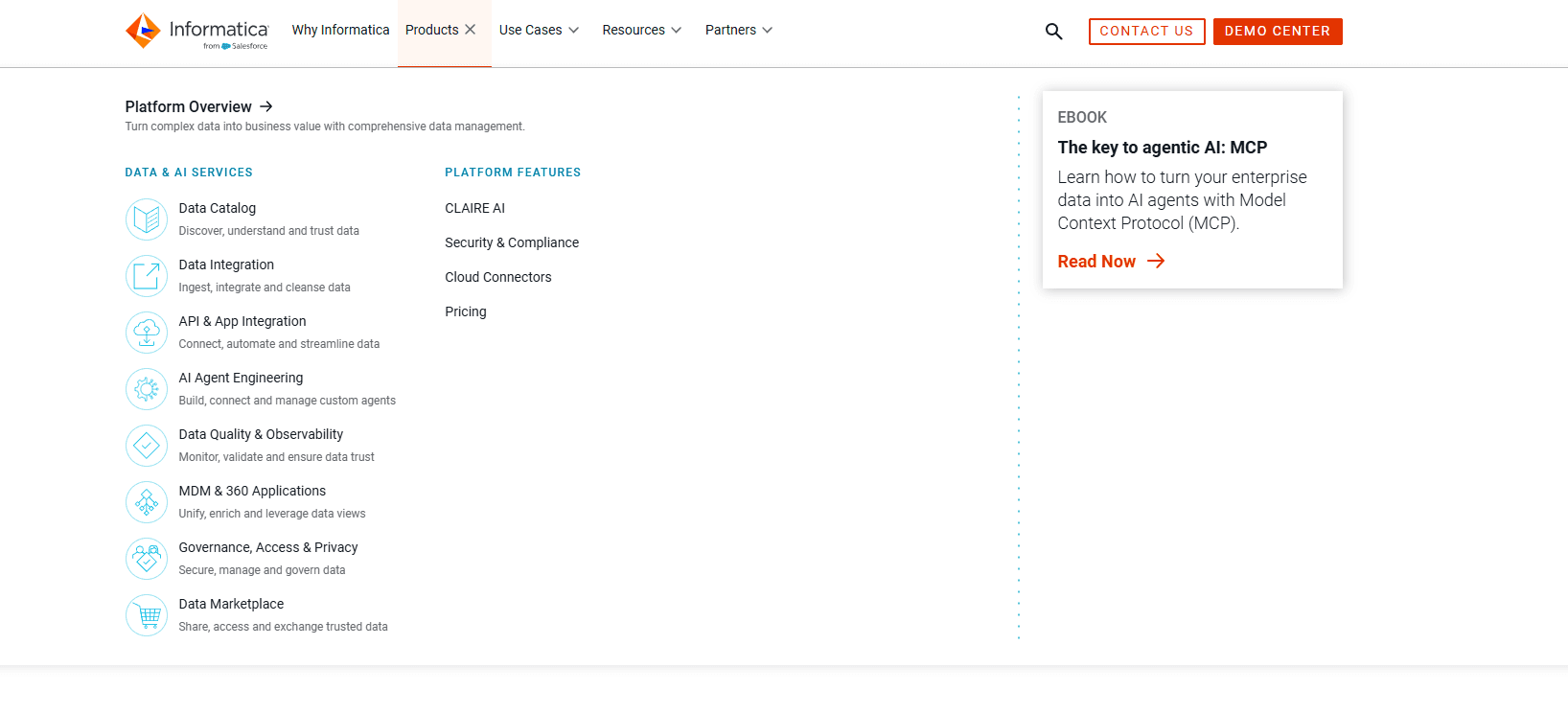
Informatica Cloud integrates with Salesforce, AWS, Microsoft Azure, Google Cloud Platform, Snowflake, and Oracle Netsuite, among others.
The platform also offers a robust API and supports connections with third-party integration tools for custom workflows.
Informatica Cloud Specs
- API: Yes
- Bug Tracking: No
- CI/CD Integration: No
- Cloud Deployment: Yes
- Code Review: No
- Code Transformation: Yes
- Collaboration Support: Yes
- Data Export: Yes
- Data Import: Yes
- Developer Tools: No
- External Integrations: Yes
- Git Integration: No
- History/Version Control: No
- IDE Plugins: No
- Local Deployment: No
- Multi-User: Yes
- Notifications: Yes
- Project Management: No
- Release Management: No
- Static Analysis: No
- Task Scheduling/Tracking: Yes
- Testing: No


