

A strong Whatfix alternative gives you various digital adoption tools, flexible onboarding design, and integrations tuned to your tech stack. If you’re searching for Whatfix alternatives, you’re likely aiming for better user training, more control over in-app guidance, or easier rollout across complex systems. You might also want a solution that’s more cost-effective, easier to set up, or offers analytics that Whatfix doesn’t. In this guide, you’ll find a shortlist of the top digital adoption platforms you should consider, with direct comparisons to help you make a confident, informed decision.
What Is Whatfix?
Whatfix is a digital adoption platform that creates in-app guidance, interactive walkthroughs, and training for software users. Teams use Whatfix to boost adoption across web apps, support onboarding, and reduce support requests. Whatfix stands out for its point-and-click content creation tools, analytics that track user progress, and integrations with popular enterprise systems. IT teams value Whatfix for reducing tech friction and helping users make the most of business-critical applications.
Whatfix Alternatives Comparison Table
This comparison table summarizes pricing details for my top Whatfix alternative selections:
| Tool | Best For | Trial Info | Price | ||
|---|---|---|---|---|---|
| 1 | Best for SaaS feature adoption targeting | 14-day free trial | From $299/month | Website | |
| 2 | Best for fast onboarding across multiple apps | 14-day free trial | From $240/month (billed annually) | Website | |
| 3 | Best for in-app learning in Salesforce ecosystems | Free demo available | Pricing upon request | Website | |
| 4 | Best for designing personalized user tours | 14-day free trial | Pricing upon request | Website | |
| 5 | Best for interactive self-serve knowledge bases | Free demo + 14-day free trial available | Pricing upon request | Website | |
| 6 | Best for change management in complex systems | Free demo available | Pricing upon request | Website | |
| 7 | Best for no-code onboarding on web apps | Free trial available | Pricing upon request | Website | |
| 8 | Best for employee onboarding automation | Free demo available | Pricing upon request | Website | |
| 9 | Best for large-scale enterprise deployments | Not available | Pricing upon request | Website | |
| 10 | Best for combined product analytics and guidance | Free plan + 30-day free trial + free demo available | Pricing upon request | Website |


Why Trust Our Software Recommendations
6,700+
Reviews
20
Industry experts
16+
Evaluation factors
14
Years
Our team has been testing and reviewing software since 2012. As tech leaders ourselves, we know how difficult—and important—it is to choose the right software.
For this guide, we evaluated tools using hands-on testing and independent research, scoring tools using our selection criteria.
Our reviews reflect our human editorial judgment, not a sales pitch.
Expert reviewers:
- Paulo Gardini MiguelTech Director
 Tim FisherVP of AI
 Gabriel RosasTech Lead & Software Architect
 Christhian GruhnTech Lead & Platform Architect

Best Whatfix Alternatives Reviews
Below are my detailed summaries of the best Whatfix alternatives that made it onto my shortlist. My reviews offer a detailed look at the features, best use cases, and integrations of each platform to help you find the best one for you.
 Best for SaaS feature adoption targeting
- 14-day free trial
- From $299/month
Visit WebsiteCustomer Rating:4.7/5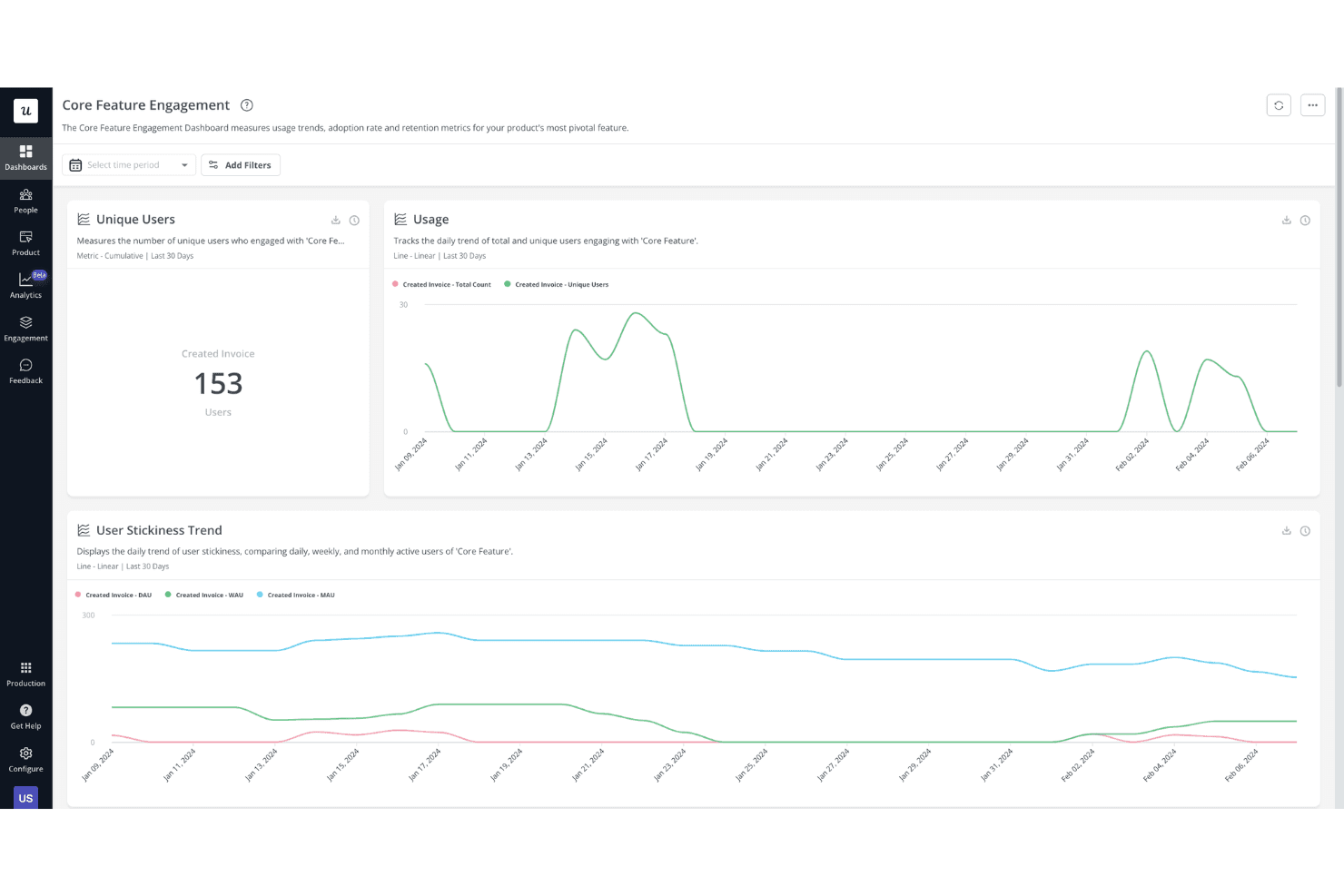
Userpilot offers a Core Feature Engagement dashboard that tracks unique users, usage trends, and user stickiness (DAU, WAU, MAU) over the last 30 days. Userpilot is a product adoption platform built for SaaS teams who need to improve feature discovery, trial activation, and customer onboarding without writing code or relying on developers.
Who Is Userpilot Best For?
Userpilot is a strong fit for product and customer success teams at B2B SaaS companies focused on improving customer onboarding and in-app engagement.
Why Userpilot Is a Good Whatfix Alternative
I picked Userpilot as one of the best because its feature adoption targeting capabilities go deeper than most DAPs I've used. Event Autocapture tracks exactly which features users interact with, and I can trigger contextual spotlights or flows to nudge users toward underused functionality. Native A/B testing then lets me validate which in-app nudge actually moves the adoption needle, rather than guessing.
Userpilot Key Features
- Resource center: Lets you create a customizable, searchable help center embedded directly in your product.
- Session replay: Records and replays user sessions to help teams analyze user journeys and friction points.
- NPS and CSAT surveys: Enables launching and analyzing in-app satisfaction surveys for continuous feedback.
- Advanced content segmentation: Targets flows, surveys, and guides to users based on attributes, behaviour, or account data.
Userpilot Integrations
Userpilot offers native integrations with Segment, HubSpot, Amplitude, Mixpanel, Intercom, Salesforce, Heap, and Google Analytics. An API is available for custom integrations.
Pros and Cons
Pros:
- Native product analytics without a separate tool
- Native event auto-capture built in
- Granular feature adoption targeting built in
Cons:
- Customer support response times can be slow
- No desktop or mobile application support
Learn more about Userpilot: Best for fast onboarding across multiple apps
- 14-day free trial
- From $240/month (billed annually)
Visit WebsiteCustomer Rating:4.8/5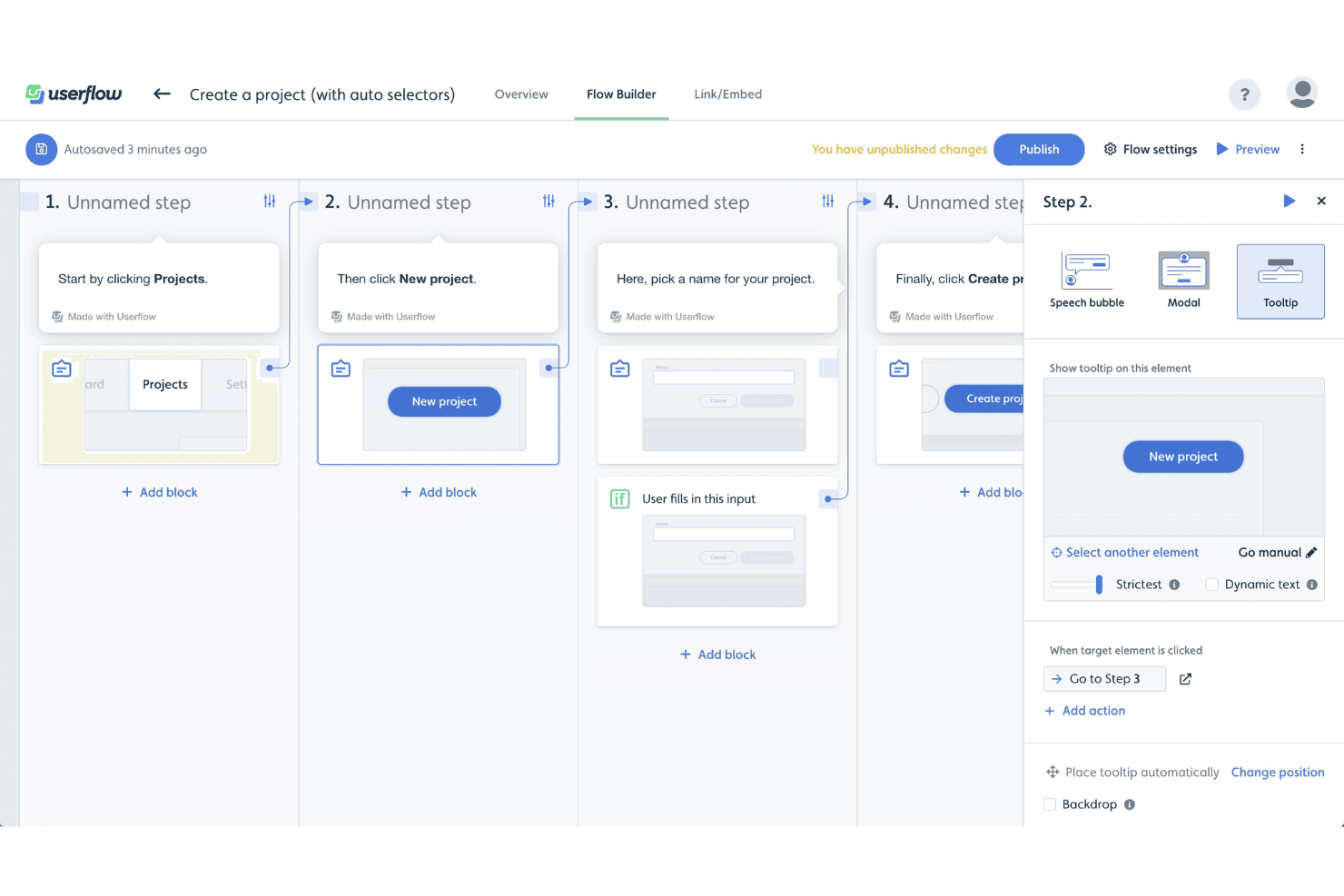
Userflow's Flow Builder lets users create step-by-step product tours using tooltips, modals, and speech bubbles with conditional logic. Userflow is a no-code product adoption platform built for SaaS product teams who need to create in-app onboarding flows, tooltips, checklists, and AI-driven self-help without pulling in developers for every change.
Who Is Userflow Best For?
Userflow is a strong fit for product and growth teams at SaaS companies who own the onboarding experience and need to iterate quickly without engineering support.
Why Userflow Is a Good Whatfix Alternative
I've included Userflow in my top picks because its FlowAI builder lets me generate complete onboarding flows from a single text prompt, which cuts build time down to minutes rather than days. What I particularly like is the shared flow library across both Adoption Studio and Adoption Agent, so a flow I build once can surface proactively in the UI or trigger through AI chat, depending on where a user needs it. Userflow's proprietary CSS selector technology also lets me target elements in complex UIs without pushing IDs into the codebase first.
Userflow Key Features
- Resource center widget: Offers an always-on help hub where users can access guides, announcements, and support content within the app.
- Advanced content segmentation: Targets flows and guidance using user attributes, roles, behaviours, or specific app locations with flexible logic settings.
- Product analytics dashboards: Provides charts, funnels, and dashboards to measure flow drop-off, overall adoption, and in-app survey results.
- A/B testing and conditional triggers: Lets you set up experiments and dynamic flow starts based on user segments, custom events, or in-app actions.
Userflow Integrations
Userflow offers native integrations with HubSpot, Salesforce, Intercom, Zendesk, and Segment. An API is available for custom integrations.
Pros and Cons
Pros:
- Shadow DOM element selection works without code
- Natively supports onboarding across multiple apps
- FlowAI generates complete flows from text
Cons:
- Limited legacy software support
- No support for desktop or mobile
Learn more about Userflow: Best for in-app learning in Salesforce ecosystems
- Free demo available
- Pricing upon request
Visit WebsiteCustomer Rating:4.7/5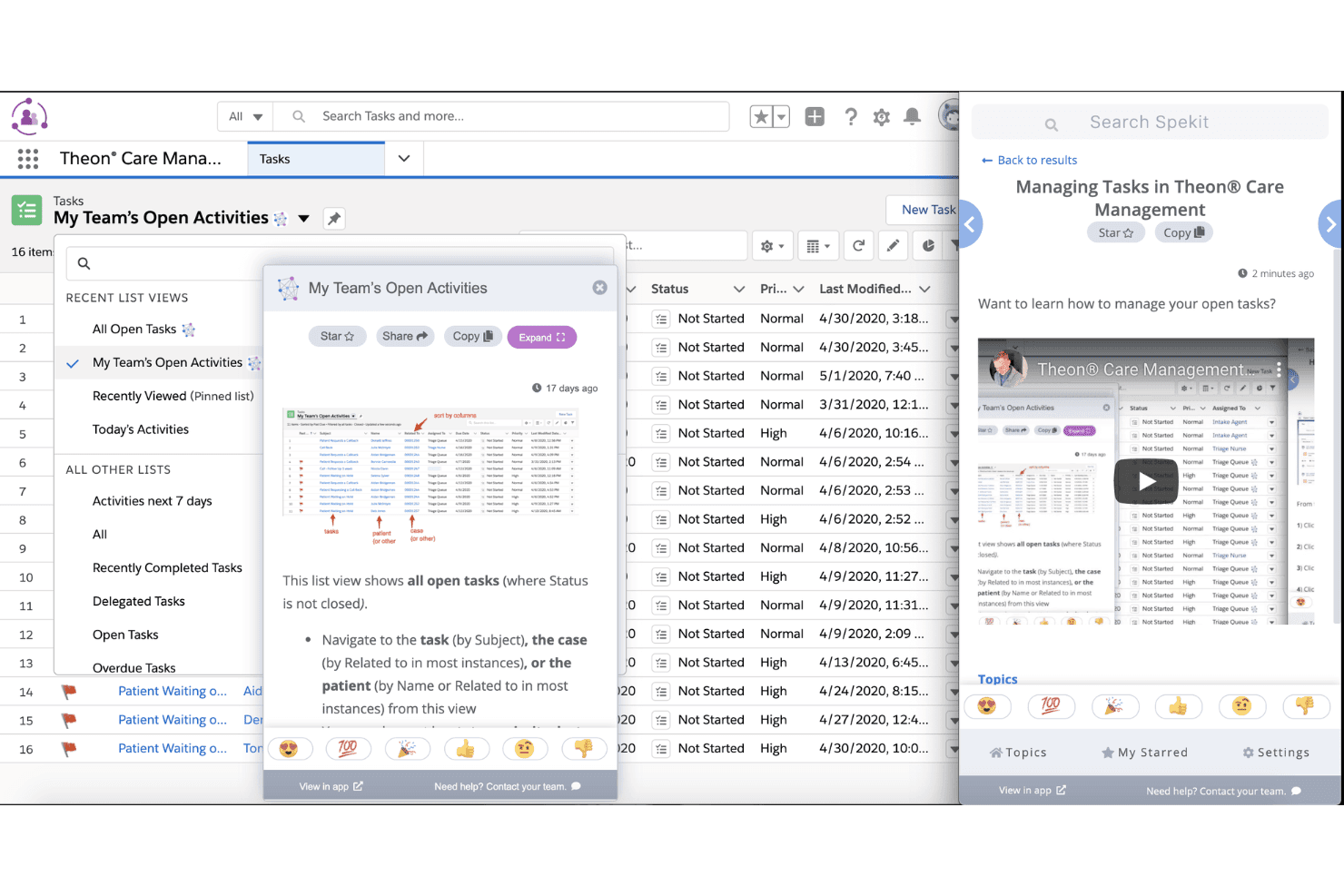
Spekit provides in-app knowledge cards and video tutorials that pop up contextually within Salesforce to guide users through task management workflows. Spekit is an AI-powered enablement platform that delivers in-app knowledge and guided learning directly inside the tools sales and GTM teams already use, reducing ramp time and keeping reps productive without switching context.
Who Is Spekit Best For?
Spekit is a strong fit for mid-market sales and revenue operations teams, particularly those running Salesforce as their primary CRM.
Why Spekit Is a Good Whatfix Alternative
I've included Spekit in my top picks because its depth inside Salesforce is genuinely hard to replicate. The AI Sidekick pulls live deal context from Salesforce opportunities, Gong calls, and emails to surface personalized coaching at exactly the right moment. Paired with Learning Paths that embed directly into the rep workflow, Spekit makes onboarding feel like guidance rather than a separate training event.
Spekit Key Features
- Chrome extension for web guidance: Delivers contextual content and walkthroughs directly across web-based apps without code changes.
- Deal Room automation: Generates deal rooms tied to opportunity data, aggregating resources and context for sales teams.
- Governed knowledge management: Centralizes enablement content with granular permissions, version control, and change tracking.
- Learning paths: Structures personalized onboarding sequences and ongoing microlearning for reps within their daily tools.
Spekit Integrations
Spekit offers native integrations with Salesforce, Slack, and Chrome, and provides an API for custom integrations.
Pros and Cons
Pros:
- Content governance with built-in change management and versioning
- Microlearning delivered without leaving the rep's workflow
- AI Sidekick surfaces coaching inside Salesforce opportunities
Cons:
- Chrome extension placement can obstruct in-app buttons and links
- No support for desktop or on-premises applications
Learn more about Spekit: Best for designing personalized user tours
- 14-day free trial
- Pricing upon request
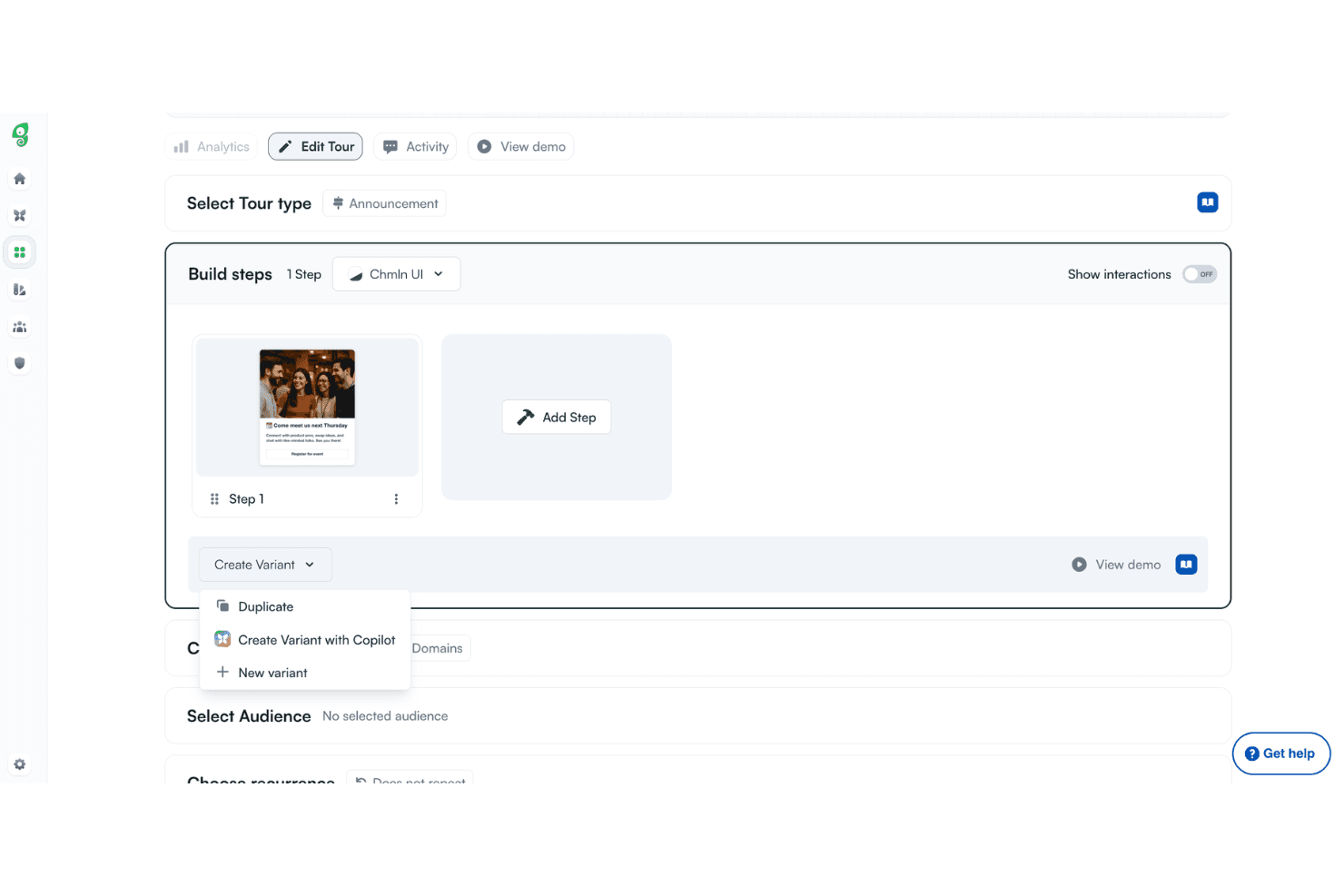
Chameleon allows users to build multi-step product tours with variant options including Duplicate, Create Variant with Copilot, and New variant. Chameleon is a product adoption platform built for SaaS product teams who need to create personalized in-app guidance, onboarding tours, and contextual self-help without relying on engineering resources.
Who Is Chameleon Best For?
Chameleon is a strong fit for mid-market SaaS companies where product and growth teams own the user onboarding and adoption experience end to end.
Why Chameleon Is a Good Whatfix Alternative
I picked Chameleon as one of the best because of how it handles tour personalization. The Prism AI agent automatically tailors each experience to individual users without manual segment-building, and the Copilot agent generates and publishes in-app guidance using your product's brand voice and context. In practice, that means my team can ship targeted, relevant tours far faster than building them from scratch.
Chameleon Key Features
- HelpBar universal search: Lets users access a searchable help center and surface resources within the app interface.
- Advanced targeting and segmentation: Allows delivery of content to users based on attributes, behaviour, or location within your product.
- A/B testing and goal tracking: Supports experimentation with different in-app experiences and tracks user actions for data-driven optimization.
- Environment management and governance: Provides staging, review workflows, and collision prevention for teams operating across multiple workspaces.
Chameleon Integrations
Chameleon offers native integrations with Mixpanel, Amplitude, Segment, Google Analytics, HubSpot, Intercom, Slack, and Salesforce. An API is available for custom integrations.
Pros and Cons
Pros:
- Built-in A/B testing for in-app experiences
- Built-in experiment tracking tools
- AI-driven tour personalization without manual segmentation
Cons:
- Analytics only track actions inside Chameleon flows
- Limited support for desktop or native apps
Learn more about Chameleon: Best for interactive self-serve knowledge bases
- Free demo + 14-day free trial available
- Pricing upon request
Visit WebsiteCustomer Rating:4.8/5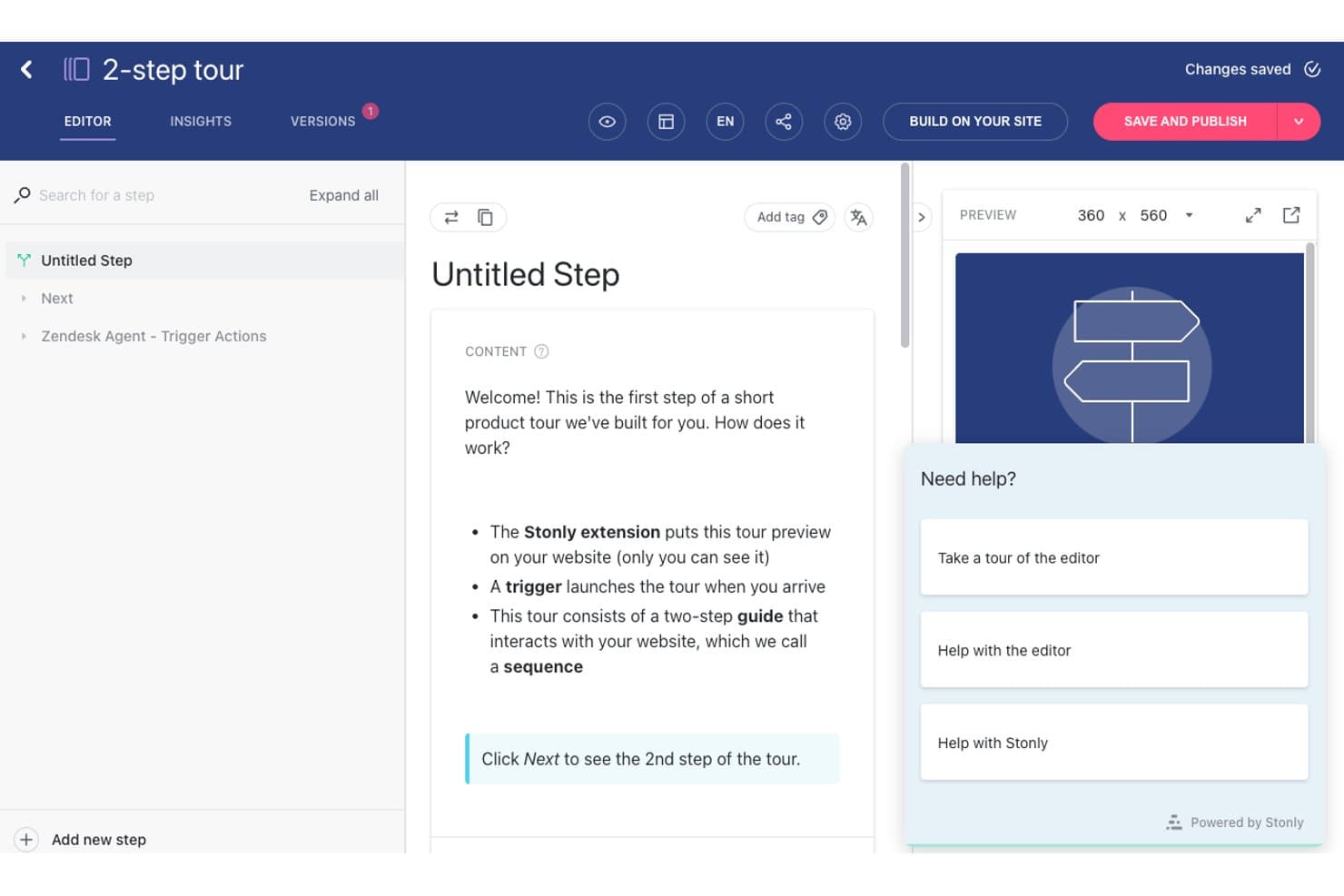
Stonly offers a step-by-step product tour editor with a live preview panel and built-in help resources for building interactive user onboarding guides. Stonly is a knowledge platform that lets support and product teams build interactive step-by-step guides, AI-powered self-help widgets, and decision trees that help users resolve issues without raising a ticket.
Who Is Stonly Best For?
Stonly is a strong fit for small to mid-market B2B SaaS teams who want support and product staff managing self-serve content without relying on developers.
Why Stonly Is a Good Whatfix Alternative
I picked Stonly as one of the best because its interactive decision trees genuinely change how users navigate help content. Instead of static docs, users follow branching, step-by-step flows that guide them to the right resolution without agent involvement. Stonly's AI Answers layer on top, pulling from your knowledge base to surface contextual responses with reported 92% accuracy, which means far fewer tickets reaching your support queue.
Stonly Key Features
- Customizable knowledge base: Build searchable, structured repositories for both internal and external teams to access critical documentation.
- No-code guide editor: Create, edit, and publish interactive content using a browser-based, drag-and-drop interface.
- Content segmentation and targeting: Show guides or knowledge resources to specific user segments based on attributes or behaviours inside your app.
- Integration with support platforms: Connect Stonly to Zendesk, Salesforce, Freshdesk, and other tools for enriched support workflows.
Stonly Integrations
Stonly offers native integrations with Zendesk, Salesforce, Freshdesk, HubSpot, Segment, Intercom, Slack, and Google Tag Manager. An API is also available for custom integrations.
Pros and Cons
Pros:
- Embedded step-by-step guides inside search bars
- AI Answers surfaces accurate self-help responses
- Interactive decision trees guide users to resolutions
Cons:
- Focused on knowledge base format
- Limited in-app walkthrough depth compared to Whatfix
Learn more about Stonly: 6Best for change management in complex systems
Apty
- Free demo available
- Pricing upon request
Visit WebsiteCustomer Rating:4.8/5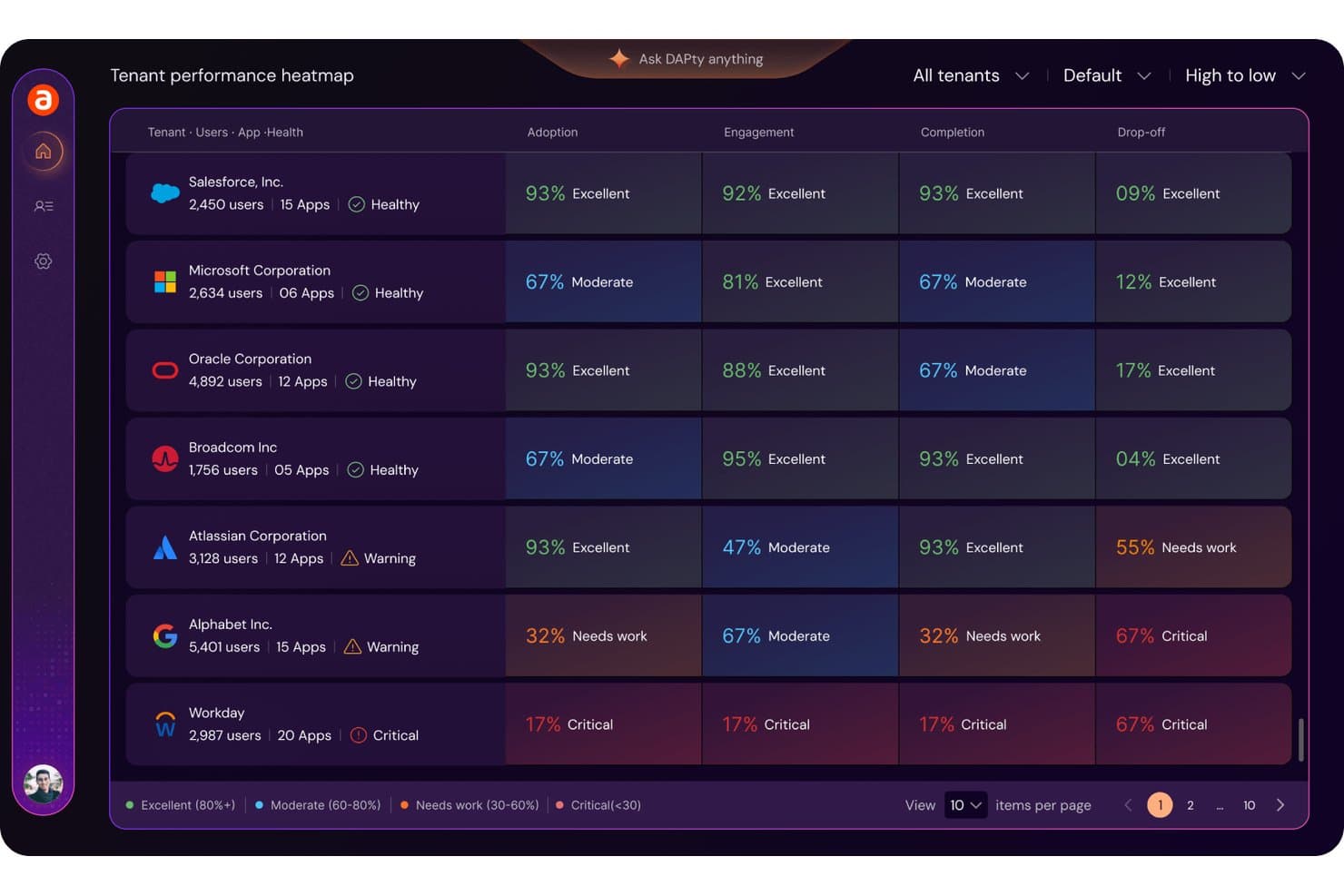
Apty features a performance heatmap dashboard for analyzing cross-organizational adoption, engagement, and completion metrics. Apty is an AI-powered digital adoption platform built for enterprises that need to enforce process compliance and reduce user errors across complex, multi-application environments like Salesforce, Workday, and SAP.
Who Is Apty Best For?
Apty fits mid-to-large enterprises with dedicated digital transformation or change management teams rolling out complex ERP and SaaS platforms across a large workforce.
Why Apty Is a Good Whatfix Alternative
I picked Apty as one of the best Whatfix alternatives because of how it handles process compliance during large-scale software rollouts. Its validations feature lets me block users from advancing in a workflow until data is entered correctly, which cuts the errors that typically spike during ERP changes. Apty PULSE then gives real-time visibility into where users stall across Workday, Salesforce, and ServiceNow simultaneously.
Apty Key Features
- No-code content creation: Build walkthroughs, tooltips, and in-app content without developer resources using a browser-based editor.
- Multi-language and segmentation: Target specific user roles or regions with localized guidance and personalized experiences.
- Exportable insights and reporting: Export adoption analytics and process data to track engagement and compliance across multiple apps.
- Role-based access and governance: Control content authoring, publishing, and approvals through detailed permissions and workflows.
Apty Integrations
Apty offers native integrations with Salesforce, Workday, ServiceNow, SAP, and Oracle. An API is available for custom integrations.
Pros and Cons
Pros:
- Supports custom enterprise apps, not just standard SaaS
- Detailed adoption analytics across multi-application environments
- Strong process compliance enforcement via in-app validation
Cons:
- No pre-built onboarding templates by role or department
- Long average software rollout duration
Learn more about Apty: Best for no-code onboarding on web apps
- Free trial available
- Pricing upon request
Visit WebsiteCustomer Rating:4.7/5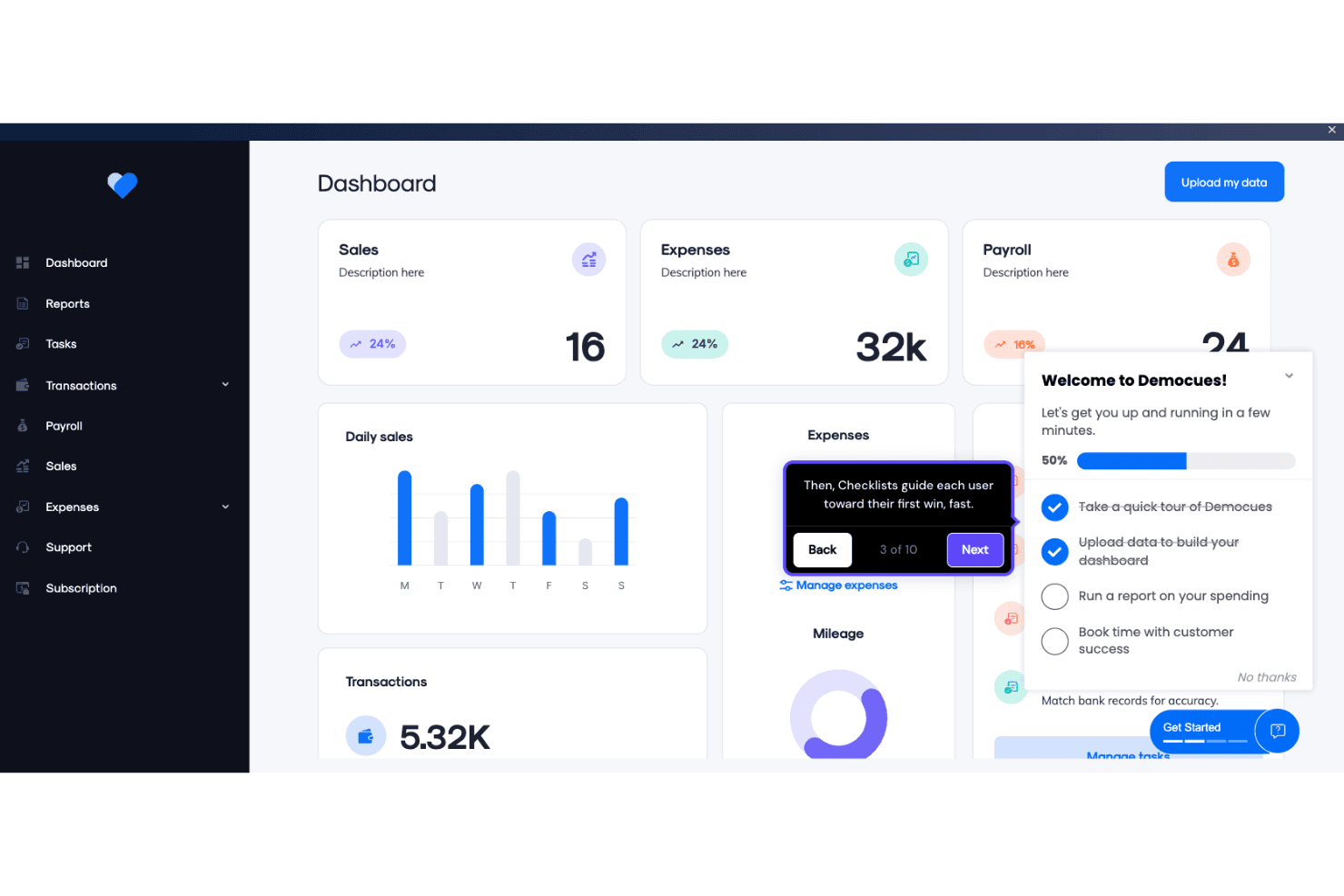
Appcues enables product teams to build in-app onboarding checklists and guided tooltips directly within a live dashboard interface. Appcues is a no-code in-app engagement platform built for SaaS product and customer success teams who need to build onboarding flows, product tours, and contextual guidance without pulling in developers.
Who Is Appcues Best For?
Appcues fits mid-market SaaS teams where product managers and customer success leads own onboarding, not IT or L&D.
Why Appcues Is a Good Whatfix Alternative
I picked Appcues as one of the best Whatfix alternatives because its Chrome extension editor lets me build onboarding flows directly inside our app, with no developer sprint required. Where Whatfix implementations average three months, I can ship a product tour, a tooltip sequence, and an onboarding checklist in a single afternoon. Appcues AI also lets me prompt-generate and publish new experiences without opening the builder at all.
Appcues Key Features
- Segmentation and targeting: Target flows and experiences to users based on roles, actions, and attributes.
- Multi-channel messaging: Combine in-app guidance with behavioural email and mobile notifications in one workflow.
- Native mobile support: Deliver onboarding and user flows in both web and native iOS/Android environments.
- Integrations library: Connect with platforms like Salesforce, HubSpot, Slack, Segment, and Mixpanel for deeper data and automation.
Appcues Integrations
Appcues offers native integrations with Salesforce, HubSpot, Segment, Mixpanel, Amplitude, Slack, Marketo, Mailchimp, Google Analytics, and Intercom. An API is also available for custom integrations.
Pros and Cons
Pros:
- Native mobile support for iOS and Android
- Ships onboarding flows faster than most competitors
- Direct visual point-and-click extension builder
Cons:
- Analytics depth falls short of enterprise needs
- Limited desktop and Citrix environment support
Learn more about Appcues: Best for employee onboarding automation
- Free demo available
- Pricing upon request
Visit WebsiteCustomer Rating:4.6/5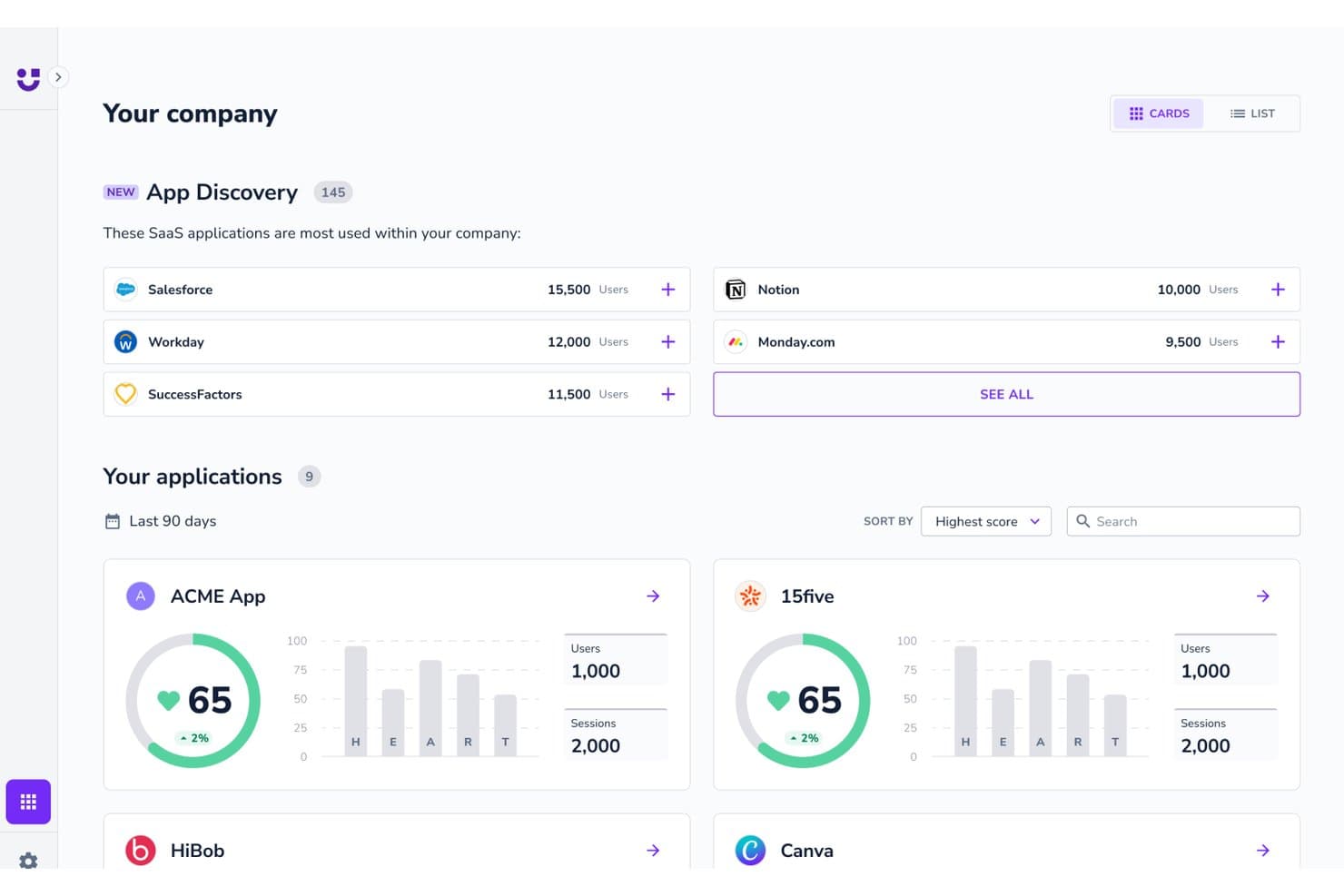
Userlane offers an App Discovery feature that surfaces the most-used SaaS applications across a company, alongside per-app engagement scores and usage metrics. Userlane is a digital adoption platform built for enterprises rolling out complex web applications like SAP, Salesforce, or Microsoft 365, combining no-code in-app guidance with application intelligence to drive software adoption across large workforces.
Who Is Userlane Best For?
Userlane is a strong fit for enterprise organizations with 500+ employees in regulated industries that need governed, scalable software rollouts across their workforce.
Why Userlane Is a Good Whatfix Alternative
I've included Userlane in my top picks because its HEART Analytics dashboard gives me real-time visibility into where employees stall during onboarding across every application in our stack. When rolling out SAP or Salesforce, I can track adoption health at the portfolio level, not just per-guide. The Userlane Assistant then surfaces contextual AI answers in the flow of work, so new hires get support without leaving the application they're learning.
Userlane Key Features
- No-code guidance editor: Build and deploy walkthroughs and tooltips with a browser-based editor that requires no developer support.
- HEART analytics dashboard: Track adoption trends, engagement, and user behaviour across all enterprise applications from a central dashboard.
- Application intelligence: Discover unused licenses and usage gaps across your software stack to optimize spending and prioritize enablement efforts.
- Role-based content targeting: Deliver specific in-app guidance and messages to employees based on department, location, or other custom user attributes.
Userlane Integrations
Userlane offers native integrations with SAP, Salesforce, Microsoft 365, Workday, Oracle HCM, and ServiceNow, and provides an API for custom integrations.
Pros and Cons
Pros:
- Application intelligence identifies underused software licenses
- No-code editor requires zero developer involvement
- HEART analytics monitors adoption across multiple applications
Cons:
- Authoring complex guided flows can be time-consuming
- Not designed for customer-facing product adoption
Learn more about Userlane: Best for large-scale enterprise deployments
- Not available
- Pricing upon request
Visit WebsiteCustomer Rating:4.5/5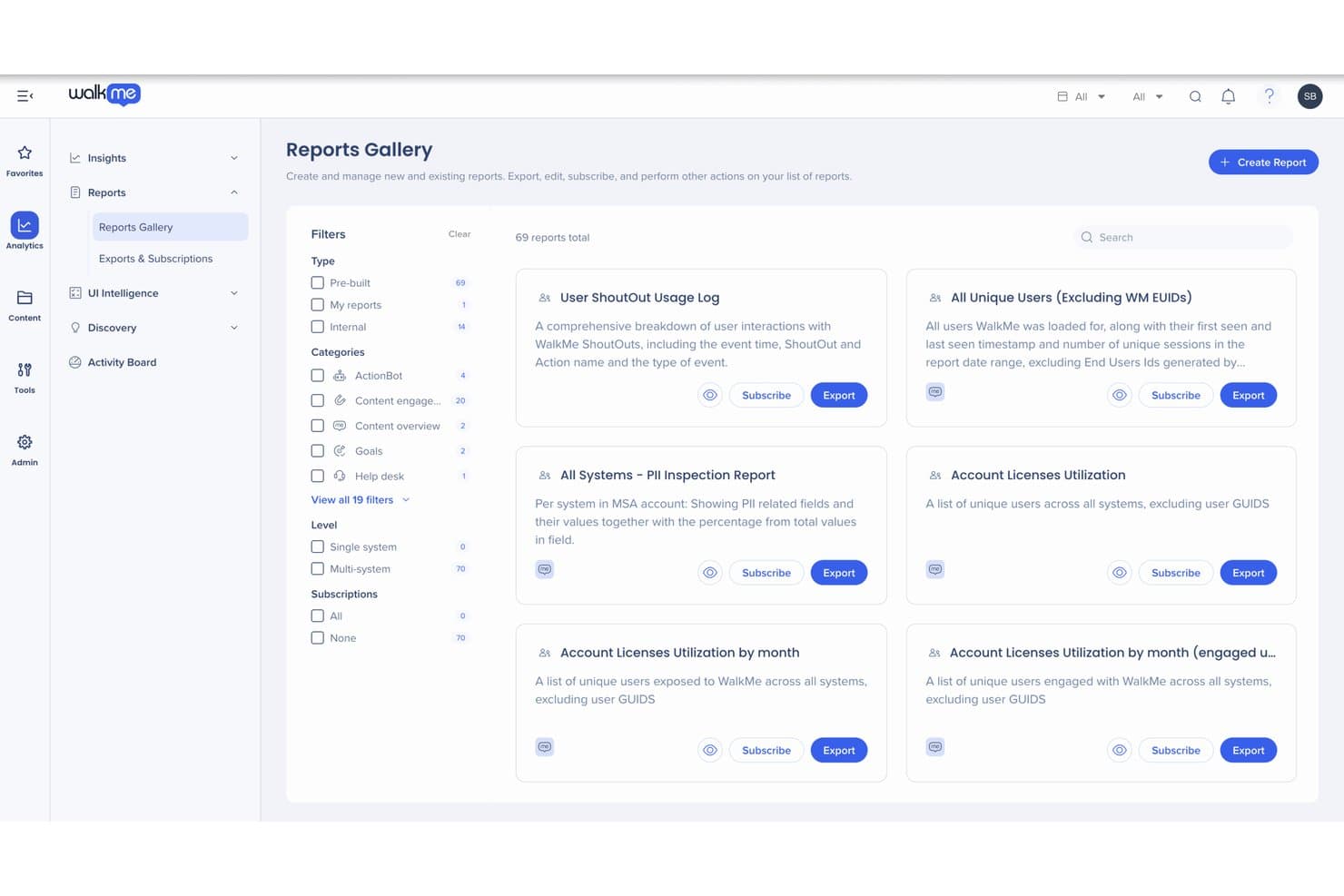
WalkMe provides a Reports Gallery with 69 pre-built analytics reports to track user engagement, license utilization, and PII inspection across systems. WalkMe is an enterprise digital adoption platform that overlays guidance, automation, and AI-assisted self-help across complex multi-application environments, making it a strong fit for large IT and enablement teams rolling out software at scale.
Who Is WalkMe Best For?
WalkMe is built for Fortune 500 and Global 2000 organizations with dedicated digital adoption teams managing large-scale, multi-application software rollouts.
Why WalkMe Is a Good Whatfix Alternative
WalkMe earns its spot on my shortlist because of how it handles cross-application guidance at scale. I particularly like the Cross-App AI layer, which follows users across Salesforce, Workday, and ServiceNow in a single session, without requiring separate deployments per app. The Discovery feature adds real depth for large enterprises: it surfaces company-wide application usage data, so adoption teams can pinpoint exactly where users drop off across the entire software stack.
WalkMe Key Features
- Smart Walk-Thrus: Guide users through complex processes with interactive, step-by-step overlay flows built entirely without code.
- ActionBot: Provide users with a conversational chatbot assistant that automates routine tasks across supported applications.
- Workstation: Surface targeted alerts, training, and workflow tools directly on users' desktops, extending support beyond their main browser.
- Behavioural segmentation: Target guidance content to users by role, behaviour, segment, or application activity for personalized experiences.
WalkMe Integrations
WalkMe offers native integrations with Salesforce, Workday, ServiceNow, SAP, Zendesk, Microsoft 365, and Okta, and provides an API for custom integrations.
Pros and Cons
Pros:
- SOC 2 and GDPR compliance built in
- Workstation pushes guidance directly to users' desktops
- AI content generation cuts walkthrough build time
Cons:
- No native mobile web browser extension support
- Setup requires custom JavaScript coding skills
Learn more about WalkMe: 10Best for combined product analytics and guidance
Pendo
- Free plan + 30-day free trial + free demo available
- Pricing upon request
Visit WebsiteCustomer Rating:4.4/5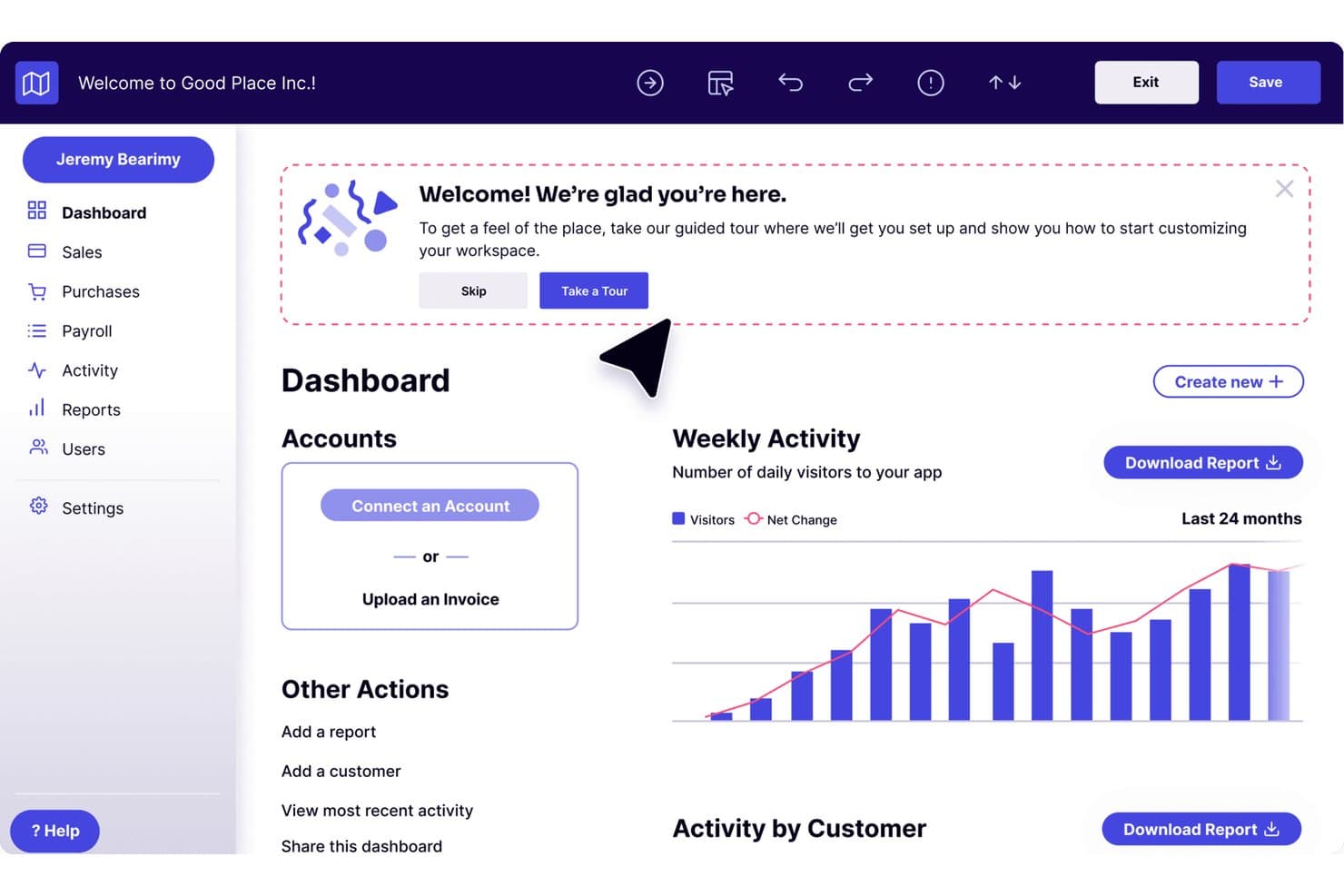
Pendo offers an onboarding guided tour prompt overlaid on a business dashboard with accounts, weekly activity charts, and navigation menu. Pendo is a digital adoption and product analytics platform that gives product managers and IT teams in-app guidance, behavioural tracking, and user feedback tools in a single system—without needing separate analytics and DAP solutions.
Who Is Pendo Best For?
Pendo is a strong fit for product-led SaaS companies whose teams need to measure user behaviour and deliver in-app guidance from one platform.
Why Pendo Is a Good Whatfix Alternative
I picked Pendo as one of the best because it's the only DAP on my shortlist where product analytics and in-app guidance share a single data layer. That means I can trigger a walkthrough based on actual user behaviour, not a manual segment I've defined upfront. Pendo's retroactive analytics retain the full behavioural history from day one of install, so I'm not limited to data collected after I set up a specific tag or event. The Agent Analytics module also tracks interactions inside AI-powered features, which no other DAP I've tested handles natively.
Pendo Key Features
- Resource Center widget: Offers users a centralized, in-app hub for help content, announcements, and support resources.
- Portfolio analytics: Aggregates product metrics across multiple apps or business units within a single dashboard.
- Custom event tracking: Lets teams define and capture specific product interaction events for granular measurement.
- Guide scheduling: Allows you to schedule in-app messages and walkthroughs for targeted rollout periods or feature launches.
Pendo Integrations
Pendo offers native integrations with Salesforce, HubSpot, Marketo, Zendesk, Segment, Google Analytics, Tableau, Jira, Slack, and Snowflake. An API is available for custom integrations.
Pros and Cons
Pros:
- AI feature tracking built into the platform
- Retroactive analytics capture data before guide setup
- Native behavioural analytics without a separate tool
Cons:
- Initial setup often requires developer assistance
- Limited external app overlay support
Learn more about Pendo:
Other Whatfix Alternatives
Here are some additional Whatfix alternatives that didn’t make it onto my shortlist, but are still worth checking out:
- 11UserGuidingBest for simple in-app walkthrough creation
- 12Product FruitsBest for multi-format onboarding content
- 13NewiredBest for real-time guidance on legacy web systems
- 14Inline ManualBest for collaborative flow authoring
- 15Lemon LearningBest for multilingual in-app content creation
- 16VisualSPBest for Microsoft 365 contextual learning
- 17tts Digital Adoption PlatformBest for regulated industry training compliance
- 18Oracle Guided LearningBest for embedded Oracle Cloud application help
Related Reviews
How I Evaluate Whatfix Alternatives
I evaluate Whatfix alternatives on two layers: core DAP capabilities mirroring Whatfix, and differentiators I look for beyond that baseline. The second layer is where I check for analytics depth, cross-app support, and compliance fit.
Core Functionality (Table Stakes For This List)
When I'm selecting tools for my list, I rank each one on a scale from 0 (does not offer the functionality) to 5 (excels in this area) for each core functionality listed below. Then, I calculate the tool's total score as a percentage. Each tool needs to achieve a minimum total score of 75% to be considered for inclusion.
- In-App Guidance: I look for multi-step walkthroughs with branching logic, like guiding a new hire through a CRM opportunity pipeline step by step.
- Contextual Self-Help: Embedded help widgets should surface relevant content based on where the user is, such as showing expense docs inside an ERP module.
- No-Code Authoring: I evaluate whether training leads can build and publish flows from a browser without filing dev tickets or writing JavaScript.
- Cross-Application Support: The platform should overlay guidance on multiple apps—Salesforce, SAP, custom portals—without separate implementations for each.
- Adoption Analytics: I check for dashboards that track flow completion rates, feature usage, and drop-off points so enablement teams can refine content.
- Content Segmentation: Role-based targeting matters. An HRIS admin rolling out a new system needs to show different flows to managers vs. individual contributors.
Once I have a list of tools that meet the criteria, I consider what sets each platform apart.
Differentiating Factors (What Sets Vendors Apart)
Here's how I compare and contrast different vendors:
Standout Features
AI-powered content generation is a big differentiator. Platforms that auto-generate walkthroughs from a single recording save enablement teams hours of manual authoring. I also check whether the self-help widget supports federated search, pulling LMS content and knowledge base articles inside the app so users resolve issues without filing a ticket. Multi-format output from the no-code editor matters too, letting teams export one flow as a video, PDF, or interactive guide for blended learning.
Beyond Features
Use case fit is the first thing I evaluate. A platform built for employee onboarding on SAP or Workday won't deliver the same value for customer-facing SaaS activation. Implementation speed also varies widely—some vendors require SDK installs and IT coordination, while others let you publish your first flow from a browser extension in hours. I also check for SOC 2 Type II and data residency options, since DAPs deployed across regulated workflows need to meet compliance requirements from day one.
Why Look For A Whatfix Alternative?
While Whatfix is a good choice of digital adoption platform, there are a number of reasons why some users seek out alternative solutions. You might be looking for a Whatfix alternative because…
- Needing published pricing model options, startup tier offers, free plans, or less opaque quotes
- Wanting faster employee onboarding implementation with fewer IT dependencies to improve ease of use
- Requiring advanced analytics tools, user feedback tracking, or data integration options
- Seeking deeper support for employee training across desktop and legacy apps to drive user adoption
- Needing more control over user privacy, retention, and data residency
- Wanting vendor specialization in product-led growth, on-demand user onboarding, and customer-facing SaaS user engagement
If any of these sound like you, you’ve come to the right place. My list contains several of the best alternatives and digital adoption platform options that are better suited for teams facing these challenges, with Whatfix to optimize the overall user experience and monitor user behaviour.
Whatfix Key Features
Here are some of the key features of Whatfix to help you contrast and compare what alternative solutions offer:
- In-app guidance: Create interactive guides, pop-ups, tooltips, and smart tips that overlay directly on software interfaces, helping users complete tasks step-by-step.
- Contextual self-help: Surface relevant resources, onboarding tool assets, FAQs, and new features documentation inside the application so users get targeted help without leaving their workflow.
- No-code content creation: Build user-friendly flows and templates from a browser extension or editor without needing developer resources.
- Content segmentation: Show contextual guidance to users based on roles, departments, or actions, driving digital transformation across your organization.
- Adoption analytics: Track monthly active users (maus), track the number of users completing tasks, monitor in-app messaging, review nps scores, and identify friction points using task lists alongside real-time dashboards and reports.
- Multi-format export: Convert walkthroughs and workflows into hands-on video simulations, PDFs, or printable SOPs to cover a range of product experience training scenarios.
- Cross-app support: Overlay guidance on multiple web, SaaS, and custom applications, supporting customer support and customer onboarding needs.
- Self-help widget with federated search: Deliver search results that pull from your customer feedback systems, knowledge base, internal wikis, or LMS, so users find answers fast within the app.
- Integration ecosystem: Connect to LMS, ticketing, and analytics platforms using native integrations, APIs, and webhooks for a more unified tech stack.
- Compliance and data security: Support requirements like SOC 2, ISO 27001, GDPR, and data residency for organizations in regulated industries.