

The best Google Analytics alternatives give you accurate website analytics, user privacy, straightforward reporting, and easy setup—without tying you to a single data vendor. If you’re searching for a Google Analytics alternative, you probably want an analytics solution that delivers clear insights without privacy headaches.
With data regulation pressures growing and site visitors expecting transparency, picking the right analytics suite affects how you handle compliance with privacy laws, optimize website performance, and keep stakeholder trust.
Below, you’ll find web analytics tools that prioritize data ownership, privacy, and flexible reporting, with features like real-time analytics, intuitive analytics dashboards, and transparent paid plans, so you can make an informed choice that works for your team’s goals.
What Is a Google Analytics Alternative?
A Google Analytics alternative is a web analytics tool that offers similar or better website tracking, reporting, and data privacy features outside of Google’s ecosystem. These tools help you monitor visitor behavior, unique visitors, bounce rate, traffic sources, and site performance using real-time data, while giving you greater control over data ownership and compliance with privacy regulations.
Many Google Analytics alternatives focus on a user-friendly experience, customizable dashboards, or deployment flexibility, making them suitable choices for organizations with specific data or reporting requirements.
Google Analytics Alternatives Comparison Table
This comparison table summarizes pricing details for my top Google Analytics alternative selections:
| Tool | Best For | Trial Info | Price | ||
|---|---|---|---|---|---|
| 1 | Best for granular funnel and cohort analysis | Free plan available | From $120/month (billed annually) | Website | |
| 2 | Best for product-led growth teams | Free plan available | Pricing upon request | Website | |
| 3 | Best for enterprise-grade privacy compliance | 30-day free trial | From €36/month | Website | |
| 4 | Best for automatic user behavior capture | Free plan available | Pricing upon request | Website | |
| 5 | Best for event-based product analytics | Free plan available | Pricing upon request | Website | |
| 6 | Best for privacy-focused website tracking | 30-day free trial | From $9/month | Website | |
| 7 | Best for on-premise analytics data ownership | 21-day free trial | From $26/month (billed annually) | Website | |
| 8 | Best for no-cookie, minimalist reporting | 14-day free trial + free plan + free demo available | From $20/month | Website | |
| 9 | Best for cookieless traffic compliance | 7-day free trial | From $15/month | Website | |
| 10 | Best for open-source, self-hosted deployment | 14-day free trial + free plan available | From $20/month | Website |


Why Trust Our Software Recommendations
6,700+
Reviews
20
Industry experts
16+
Evaluation factors
14
Years
Our team has been testing and reviewing software since 2012. As tech leaders ourselves, we know how difficult—and important—it is to choose the right software.
For this guide, we evaluated tools using hands-on testing and independent research, scoring tools using our selection criteria.
Our reviews reflect our human editorial judgment, not a sales pitch.
Expert reviewers:
- Paulo Gardini MiguelTech Director
 Tim FisherVP of AI
 Gabriel RosasTech Lead & Software Architect
 Christhian GruhnTech Lead & Platform Architect

Best Google Analytics Alternatives Reviews
Below are my detailed summaries of the best Google Analytics alternatives that made it onto my shortlist. My reviews offer a detailed look at the features, privacy capabilities, and pricing of each web analytics tool to help you find the best one for you.
 Best for granular funnel and cohort analysis
- Free plan available
- From $120/month (billed annually)
Visit WebsiteCustomer Rating:4.5/5
Mixpanel offers a Lifecycle Cohort Sample Template that visualizes retained, resurrected, new, and dormant users over a 7-day period with an interactive stacked area chart. Mixpanel is an event-based analytics platform built for product and growth teams who need to go beyond pageview counts and understand exactly how users move through their web and app experiences.
Who Is Mixpanel Best For?
Mixpanel is a strong fit for SaaS companies and digital product teams where understanding user behavior drives core business decisions.
Why Mixpanel Is a Good Google Analytics Alternative
I picked Mixpanel as one of the best because its funnel analysis goes well beyond what GA4 offers. I can define any sequence of events, like a signup flow or checkout path, and see exactly where users drop off at each step. Behavioral cohorts let me group users by what they actually did, not just who they are, and track how those groups retain or convert over time.
Mixpanel Key Features
- Session replay: Watch real user sessions alongside your analytics data to see exactly how visitors navigate key pages and drop-off points.
- Warehouse connectors: Sync product event data directly to data warehouses like BigQuery, Redshift, or Snowflake for analysis and reporting.
- Real-time alerts: Get notifications when key product metrics change or anomalies are detected, so you can react quickly to shifts in user behavior.
- Data dictionary and governance: Organize and manage event definitions, track data quality, and enforce strict access controls for compliance needs.
Mixpanel Integrations
Mixpanel offers native integrations with Segment, Fivetran, Snowflake, Amazon Redshift, Databricks, and Slack. An API is available for custom integrations.
Pros and Cons
Pros:
- Unsampled event-level data available at all times
- Cohort retention charts built on any event
- Retroactive funnel analysis without pre-configuration needed
Cons:
- Web traffic reporting less detailed than GA4
- Not designed for SEO or content analytics
Learn more about Mixpanel: Best for product-led growth teams
- Free plan available
- Pricing upon request
Visit WebsiteCustomer Rating:4.5/5
Amplitude offers a Journey Map view that visualizes the top user paths from searching items to completing purchases, with conversion percentages and average session times. Amplitude is a behavioral analytics platform built for product and growth teams who need deeper insight into how users move through their web and app experiences than GA4 typically provides.
Who Is Amplitude Best For?
Amplitude is a strong fit for mid-market and enterprise SaaS companies where product, growth, and marketing teams share ownership of the analytics stack.
Why Amplitude Is a Good Google Analytics Alternative
I picked Amplitude as one of the best because it goes where GA4 simply won't: behavioral cohort analysis built specifically for product-led growth teams. I use it to track not just where users drop off in a funnel, but which specific features drive retention across user segments. The AI Agents feature lets me pull those insights fast, without writing a single query.
Amplitude Key Features
- Session replay: Watch anonymized replays to understand individual user journeys and troubleshoot friction directly in the analytics UI.
- Heatmap visualization: See exactly where users click and scroll on any page to identify hot spots and overlooked content.
- Real-time dashboard: Monitor live visitor activity, top pages, and drop-off points with up-to-the-minute data.
- Raw data export API: Access raw, unsampled event data for custom reporting, external BI platforms, or warehouse pipelines.
Amplitude Integrations
Amplitude offers native integrations with Segment, HubSpot, Braze, Google Tag Manager, Amazon S3, and Snowflake. An API is available for custom integrations.
Pros and Cons
Pros:
- Historical data migration from Universal Analytics is supported
- Behavioral cohort segmentation across web and app data
- Retroactive funnel analysis without pre-configuring events
Cons:
- Overkill for teams that only need basic traffic reporting
- Narrower third-party integration coverage
Learn more about Amplitude: Best for enterprise-grade privacy compliance
- 30-day free trial
- From €36/month
Visit WebsiteCustomer Rating:4.7/5
Piwik PRO offers a detailed Engagement report showing new vs returning visitors, sessions, and bounce rate trends over a date range with nested dimension filtering. Piwik PRO is a privacy-first web analytics platform built for organizations in regulated industries that need full data ownership, GDPR-compliant tracking, and analytics depth without routing data through third-party servers.
Who Is Piwik PRO Best For?
It's a strong fit for IT and compliance teams at mid-to-enterprise organizations in healthcare, government, and financial services that must meet strict data residency and consent requirements.
Why Piwik PRO Is a Good Google Analytics Alternative
I've included Piwik PRO in my top picks because it's one of the few GA alternatives with a native Consent Manager that still captures anonymous behavioral data from users who decline cookies, so you're not losing insight while staying compliant. I also appreciate that you can pin data residency to specific EU servers in Germany, Netherlands, or Sweden, which matters when auditors ask exactly where personal data lives. The built-in HIPAA BAA and ISO 27001 certification cover ground that Google Analytics can't touch in regulated industries.
Piwik PRO Key Features
- Customer Data Platform integration: Link analytics data to detailed user profiles for advanced segmentation and data activation.
- Tag Manager built-in: Deploy and manage tracking tags across web properties without external tools or additional code.
- Multi-domain analytics: Track users and sessions across multiple domains and web properties within a unified dashboard.
- Raw data export and API access: Access unsampled analytics data and automate reporting with integrations to BigQuery, S3, and REST API.
Piwik PRO Integrations
Piwik PRO offers native integrations with Google Sheets, Power BI, Google Tag Manager, and supports custom integrations through a REST API, S3, SFTP, and Azure Blob Storage.
Pros and Cons
Pros:
- Built-in tag and consent management
- HIPAA and ISO 27001 certified out-of-the-box
- Full data ownership with self-hosting available
Cons:
- Fewer ecommerce tracking features than GA4
- Steeper setup for non-technical marketing teams
Learn more about Piwik PRO: Best for automatic user behavior capture
- Free plan available
- Pricing upon request
Visit WebsiteCustomer Rating:4.3/5
Heap offers a conversion funnel analysis with session replay and top events tracking to help identify where users drop off and optimize sign-up flows. Heap is a product and web analytics platform that automatically captures every user interaction without manual event tagging, making it a strong fit for product teams who need complete behavioral data without depending on developer resources.
Who Is Heap Best For?
Heap is a natural fit for product analytics managers and growth teams at B2C SaaS companies who need retroactive behavioral data without pre-planning every event.
Why Heap Is a Good Google Analytics Alternative
I picked Heap because its autocapture feature does something GA4 simply can't: it records every click, tap, page view, and form interaction from the moment you install the snippet, with no manual event tagging required. That means I can go back and analyze user behavior retroactively, even for events I never thought to track. Heap's Visual Event Labeling then lets me name and organize those captured interactions after the fact, without touching any code.
Heap Key Features
- Account-based analytics: Analyze user behavior and conversions grouped by account or organization for B2B use cases.
- Journey analysis: Visualize complete multi-step user journeys across devices and touchpoints within one interface.
- Heap Connect integration: Automatically sync raw event data to data warehouses like Snowflake and AWS without manual exports.
- Engagement matrix: Evaluate how features are adopted and identify segments of users based on their interaction levels.
Heap Integrations
Heap offers native integrations with Snowflake, Redshift, BigQuery, Salesforce, Marketo, HubSpot, Braze, and Slack. An API is available for custom integrations.
Pros and Cons
Pros:
- Build funnels retroactively on captured events
- Session replay included natively in the platform
- Autocapture eliminates missed events from deployment
Cons:
- Query performance slows at high event volumes
- Weaker SEO and campaign attribution reporting
Learn more about Heap (by Contentsquare): Best for event-based product analytics
- Free plan available
- Pricing upon request
Visit WebsiteCustomer Rating:4.5/5
PostHog offers trend charts, funnel conversion tracking, user retention tables, and active viewer metrics in one view. PostHog is an open-source analytics platform built for engineering-led teams who want to replace Google Analytics with a self-hostable, privacy-first alternative that also bundles session replay, feature flags, and A/B testing in one place.
Who Is PostHog Best For?
PostHog is a strong fit for product and engineering teams at startups and scale-ups who need deep event-level analytics without the overhead of managing multiple separate tools.
Why PostHog Is a Good Google Analytics Alternative
I've included PostHog in my top picks because its autocapture feature records every click, pageview, and form submission as a named event without writing a single tracking snippet. From there, I can build multi-step funnels, trace user paths, and run cohort retention analysis, all in the same interface where I manage feature flags and A/B tests. That event-first model means I'm never backfilling data after realizing I missed tracking a key user action.
PostHog Key Features
- Cookieless tracking: Collects web analytics without relying on cookies, helping support privacy compliance and reducing consent barriers.
- Session replay and heatmaps: Lets you watch real visitor sessions and visualize click and scroll behavior alongside analytics data.
- Self-hosting and data export: Offers a self-hosted option and allows full raw data export to external BI tools or data warehouses.
- Custom dashboards and reports: Build, save, and share interactive dashboards with flexible visualizations directly within the platform.
PostHog Integrations
PostHog offers native integrations with Segment, RudderStack, Airbyte, dbt, Zapier, Slack, GitHub, Sentry, DataDog, and Amplitude. An API is available for custom integrations.
Pros and Cons
Pros:
- Session replay included without a separate tool
- Autocapture requires no manual event tagging
- Self-hostable for complete data ownership
Cons:
- Reporting less mature than dedicated GA alternatives
- Web analytics UI can overwhelm non-technical users
Learn more about PostHog: Best for privacy-focused website tracking
- 30-day free trial
- From $9/month
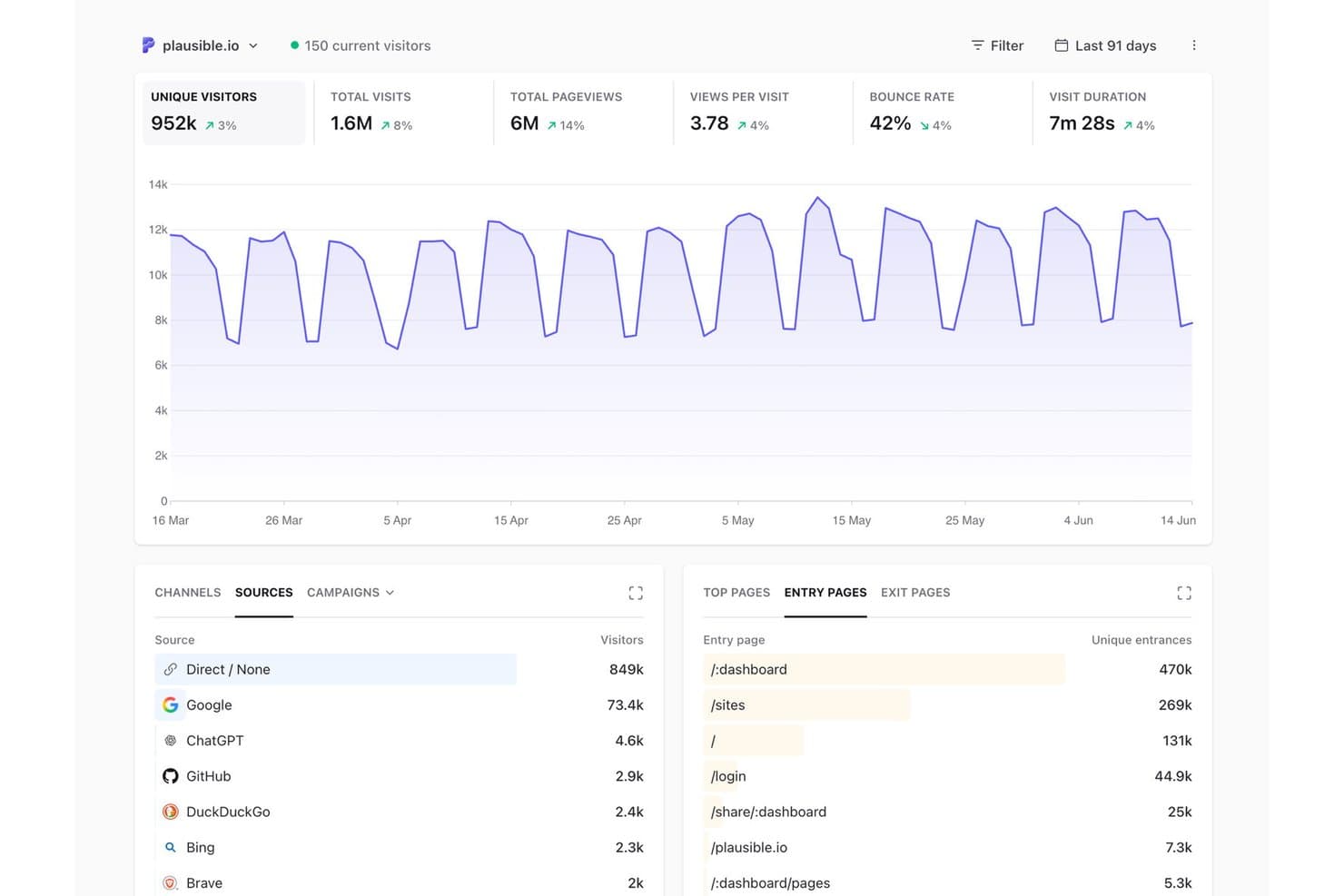
Plausible Analytics offers a clean, privacy-focused dashboard displaying unique visitors, traffic sources, and entry pages. Plausible Analytics is a cookieless web analytics platform built for teams who need clear traffic insights without the compliance overhead of traditional tools like GA4.
Who Is Plausible Analytics Best For?
It's a strong fit for web development leads and IT compliance officers at small to mid-sized companies operating under GDPR or CCPA requirements.
Why Plausible Analytics Is a Good Google Analytics Alternative
I picked Plausible Analytics because it runs entirely without cookies, which means no consent banner and no GDPR compliance gap from day one. The tracking script runs on EU-owned infrastructure, so visitor data never touches Google's servers. I also like that bot filtering is built in, stripping referral spam and data center traffic before it reaches the dashboard, keeping the numbers clean without any manual configuration.
Plausible Analytics Key Features
- UTM campaign tracking: Capture and segment traffic sources automatically by campaign, paid search, or affiliate.
- Google Search Console integration: View SEO performance data directly alongside your web analytics.
- Real-time dashboard: Monitor live visitor counts and traffic trends with updates every 30 seconds.
- Looker Studio connector: Export analytics data into BI dashboards on the Business plan and above.
Plausible Analytics Integrations
Plausible Analytics offers native integrations with Google Search Console and Data Studio. An API is available for custom integrations.
Pros and Cons
Pros:
- Lightweight script under 1KB loads fast
- EU-hosted data stays off Google's servers
- No cookie consent banner needed
Cons:
- Funnel analysis depth is limited
- No session replay or heatmap tools
Learn more about Plausible Analytics: Best for on-premise analytics data ownership
- 21-day free trial
- From $26/month (billed annually)
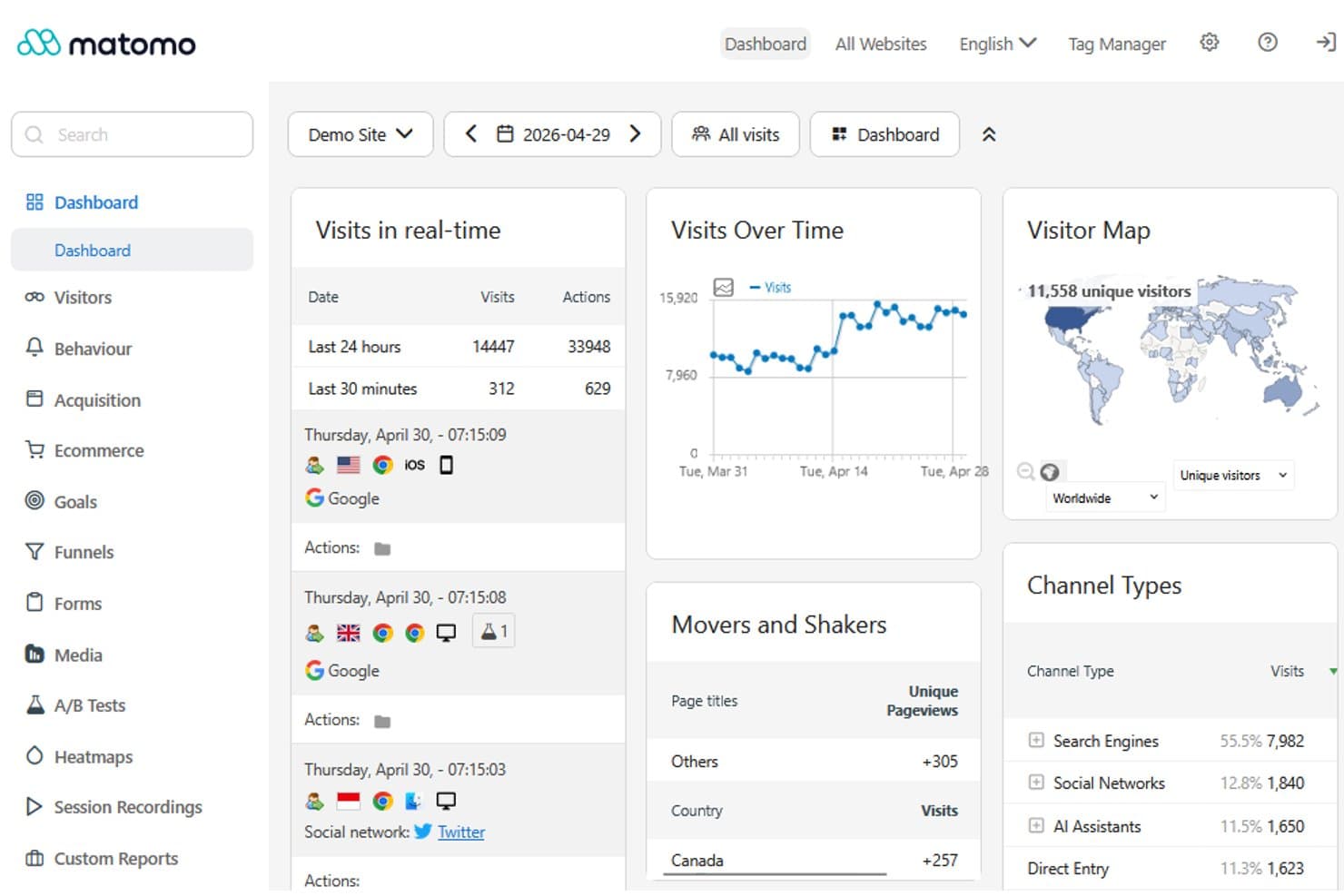
Matomo offers a real-time analytics dashboard with visit tracking, visitor maps, channel types, and movers and shakers reports as a Google Analytics alternative. Matomo is an open-source web analytics platform built for teams who need full control over their tracking data, privacy compliance, and behavioral insights without depending on Google's ecosystem.
Who Is Matomo Best For?
Matomo suits IT and compliance-focused teams in regulated industries where data sovereignty, GDPR adherence, and self-hosted infrastructure are non-negotiable.
Why Matomo Is a Good Google Analytics Alternative
I picked Matomo as one of the best because it's the only analytics platform I know of where your data never leaves your own server. With on-premise deployment, my team runs full pageview, session, and funnel tracking on our own infrastructure, with raw data accessible via the HTTP Analytics API and exportable directly to BigQuery or Snowflake. On top of that, cookieless tracking and built-in data anonymisation mean I'm collecting accurate, unsampled data without a consent banner getting in the way.
Matomo Key Features
- Custom dashboards: Build visual, shareable dashboards with flexible widgets and reporting options.
- Audience segmentation: Filter and analyze users by demographics, behaviors, traffic source, and device across custom segments.
- CMS and ecommerce plugins: Integrate directly with WordPress, WooCommerce, Drupal, Magento, and other popular platforms.
- API and data warehouse connectors: Export raw data or connect Matomo to BigQuery, Redshift, Snowflake, and BI tools for advanced analysis.
Matomo Integrations
Matomo offers native integrations with WordPress, WooCommerce, Shopify, Drupal, Joomla, and more. An API is available for custom integrations and it connects with Slack and Microsoft Teams.
Pros and Cons
Pros:
- Native heatmaps and session replay included
- Unsampled, 100% accurate visitor data
- Full data ownership with self-hosting
Cons:
- Reporting UI feels dated versus GA4
- Self-hosting demands ongoing server maintenance
Learn more about Matomo: Best for no-cookie, minimalist reporting
- 14-day free trial + free plan + free demo available
- From $20/month
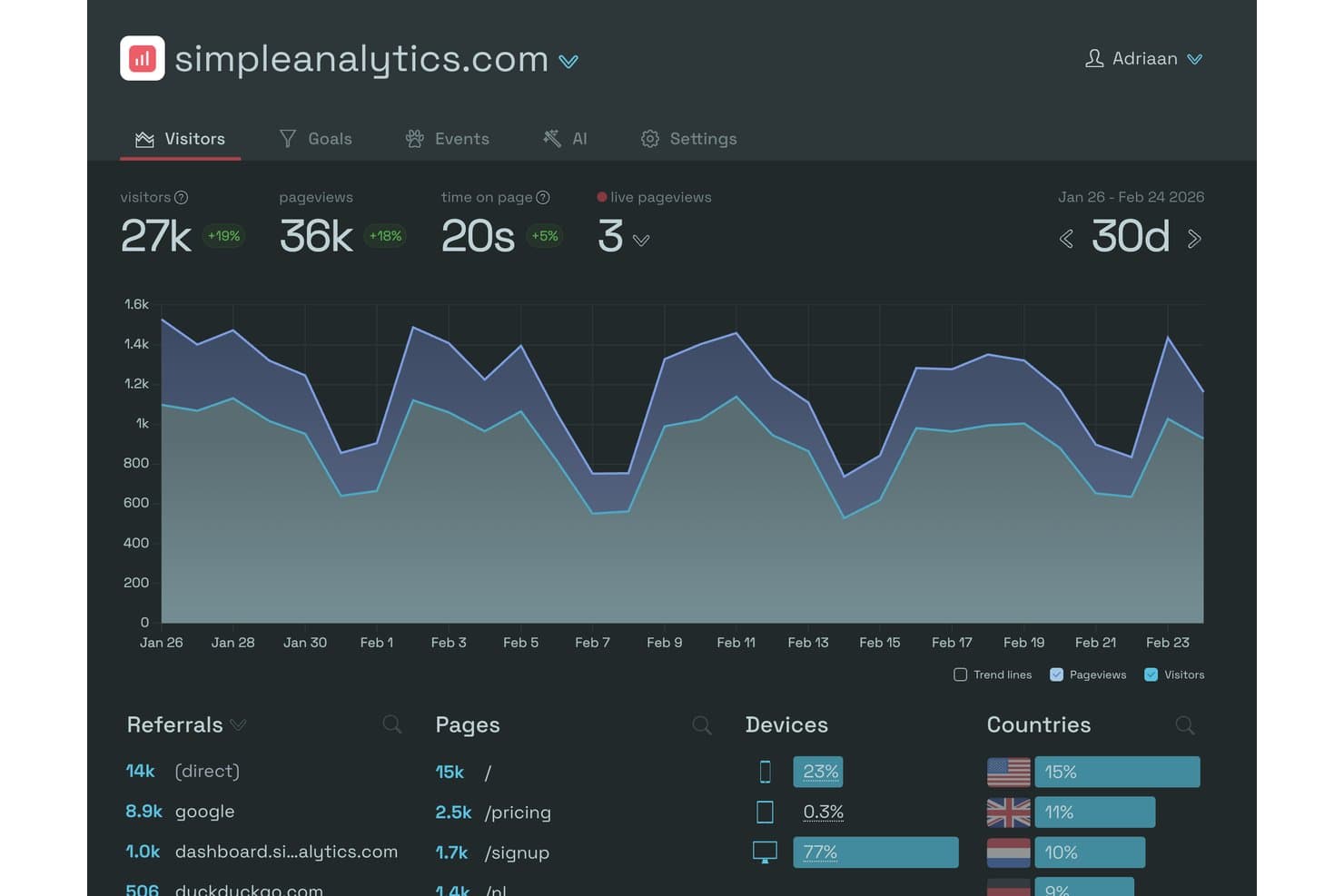
Simple Analytics offers a clean, privacy-friendly dashboard displaying visitors, pageviews, time on page, referrals, devices, and countries. Simple Analytics is a privacy-first web analytics tool built for teams that need GDPR-compliant traffic insights without cookie banners, consent popups, or the configuration complexity of GA4.
Who Is Simple Analytics Best For?
Simple Analytics is a strong fit for compliance-driven organizations and public sector teams operating under strict EU data privacy regulations.
Why Simple Analytics Is a Good Google Analytics Alternative
I've included Simple Analytics in my top picks because it tracks pageviews, referrers, and campaign parameters without placing a single cookie or storing any personal data. That means no consent banner, no cookie wall, and no GDPR configuration to maintain. I particularly like that it derives country-level geolocation without ever storing the visitor's IP address, keeping data collection genuinely clean rather than just compliant on paper.
Simple Analytics Key Features
- Historical GA import: Import your historical Google Analytics data directly into the platform for seamless migration.
- Stats and export APIs: Access aggregated or raw traffic data for integration with BI tools and internal dashboards.
- Platform integrations: Connect to WordPress, Webflow, Squarespace, Wix, and developer frameworks with ready-made plugins.
- Enterprise team reporting: Filter dashboards and analytics views by team, brand, or site for large organizations needing segmented access.
Simple Analytics Integrations
Simple Analytics offers native integrations with platforms like Webflow, WordPress, Wix, Squarespace, Ghost, Next.js, Cloudflare, and Netlify. An API is available for custom integrations and data export.
Pros and Cons
Pros:
- Visitor IP addresses are never stored
- Built-in funnels for conversion analysis
- Single-page dashboard loads instantly
Cons:
- Advanced segmentation options are limited
- No multi-step funnel or retention analysis
Learn more about Simple Analytics:
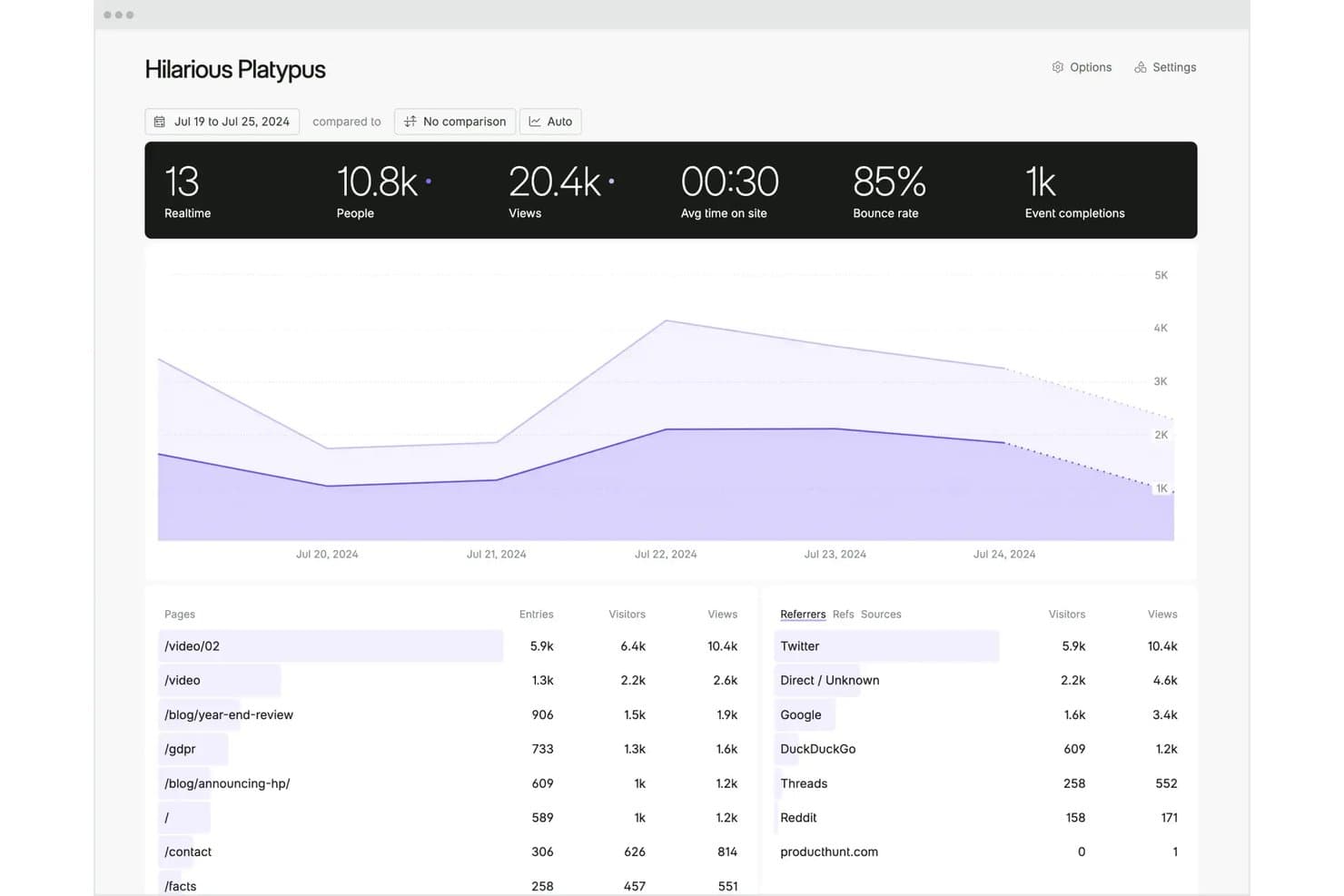
Fathom Analytics offers a clean dashboard displaying real-time visitors, pageviews, bounce rate, and top referrers including Twitter and Google. Fathom Analytics is a privacy-first web analytics tool for teams who need accurate traffic data without cookies, consent banners, or the complexity of GA4.
Who Is Fathom Analytics Best For?
IT compliance officers and web developers at companies operating under GDPR or CCPA will find Fathom a natural fit for privacy-compliant site analytics.
Why Fathom Analytics Is a Good Google Analytics Alternative
I picked Fathom Analytics for this list because it handles GDPR, CCPA, and PECR compliance by design, with no configuration required. EU visitor data is processed on EU-located infrastructure, and IP addresses are anonymized before storage, so no personal data is collected at any point. The tracking script is under 2kB and requires no cookie consent banner, which means your site stays fast and legally clean without any extra setup.
Fathom Analytics Key Features
- Live visitors view: Instantly see current site visitors and activity updated in real time.
- Dashboard sharing: Create public or password-protected dashboards to share metrics securely with stakeholders.
- Multi-site management: Track and view analytics for up to 50 websites from a single account.
- Automatic bot filtering: Exclude bots and crawlers from all traffic reports without manual adjustments.
Fathom Analytics Integrations
Fathom Analytics offers native integrations with WordPress, WooCommerce, Wix, Framer, Drupal, and more, and provides a REST API for custom integrations.
Pros and Cons
Pros:
- Single-page dashboard shows all key metrics
- Forever data retention included
- Lightweight script improves site speed
Cons:
- Limited funnel and user journey analysis
- Limited event tracking depth vs GA4
Learn more about Fathom Analytics: 10Best for open-source, self-hosted deployment
Umami
- 14-day free trial + free plan available
- From $20/month
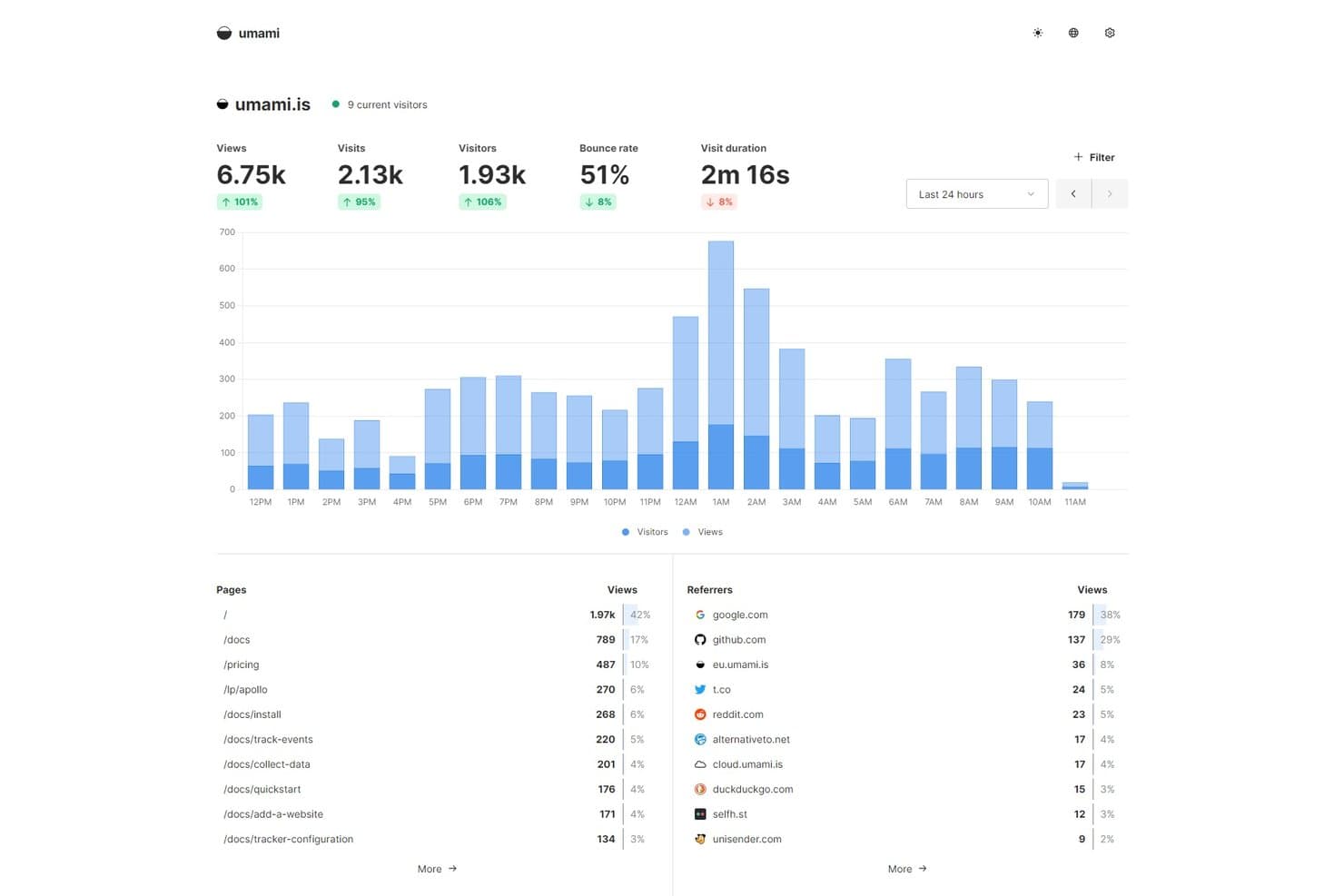
Umami offers a clean analytics dashboard displaying real-time visitors, page views, bounce rate, visit duration, top pages, and referrer sources. Umami is a privacy-first, open-source web analytics platform built for developers and technically minded teams who want full control over their data without cookies, consent banners, or the complexity of GA4.
Who Is Umami Best For?
Umami is a strong fit for developers, DevOps teams, and IT compliance officers who need self-hosted, cookieless analytics with full data ownership.
Why Umami Is a Good Google Analytics Alternative
I picked Umami as one of the best Google Analytics alternatives because the self-hosted deployment path is genuinely production-ready. Running on Docker Compose with an MIT license, you can rename the tracking script and endpoint to bypass ad blockers (something GA4 requires complex server-side tagging to achieve). I also appreciate that it captures city-level geographic data by default, with zero cookies and no consent banner required out of the box.
Umami Key Features
- Custom event tracking: Define and track user interactions like clicks, downloads, and form submissions without cookies.
- Attribution reporting: View how campaigns and traffic sources contribute to conversions using automated UTM parameter tracking.
- Multi-site analytics: Monitor traffic, events, and conversions for multiple domains and apps from a single dashboard.
- Data export API: Export all analytics data in raw format through a REST API for integration with BI tools or backups.
Umami Integrations
Umami offers native integrations with WordPress, Eleventy, Gatsby, and more, and offers an API for custom integrations.
Pros and Cons
Pros:
- Tracks multiple websites from one dashboard
- Simple setup with Docker or Node.js
- Full data ownership via self-hosted deployment
Cons:
- No funnels or cohort analysis
- Self-hosting requires server setup and maintenance
Learn more about Umami:
Other Google Analytics Alternatives
Here are some additional Google Analytics alternative options that didn’t make it onto my shortlist, but are still worth checking out:
- 11Adobe AnalyticsBest for customizable cross-channel analytics
- 12Cloudflare Web AnalyticsBest for zero-impact server-side analytics
- 13CountlyBest for unified cross-platform analytics
- 14ClickyBest for historical activity logs per visitor
- 15ContentsquareBest for large-scale experience analytics insights
- 16Microsoft ClarityBest for free session replay and heatmaps
- 17Pirsch AnalyticsBest for clean, embeddable analytics widgets
- 18GoatCounterBest for open-source, no-JS tracking support
- 19RybbitBest for developer-friendly API access
Related Reviews
How I Evaluate Google Analytics Alternatives
I think about web analytics tools in two layers: core functionality each tool must deliver—like traffic tracking and event capture—and differentiators that set vendors apart. Core functionality maps to features present in every tool I consider.
Core Functionality (Table Stakes For This List)
When I'm selecting tools for my list, I rank each one on a scale from 0 (does not offer the functionality) to 5 (excels in this area) for each core functionality listed below. Then, I calculate the tool's total score into a percentage. Each tool needs to achieve a minimum total score of 75% to be considered for inclusion.
- Website Traffic Tracking: I check whether the tool captures pageviews, sessions, users, and referral sources—including UTM parameters and multi-domain setups for teams running several properties.
- Event & Conversion Tracking: Custom event definitions and goal tracking matter here, especially the ability to build multi-step funnels that map real user journeys like signups or checkouts.
- Audience Segmentation: I look for filtering by geography, device, traffic source, and behavior so you can isolate segments like mobile visitors from organic search on a specific landing page.
- Real-Time Reporting: Live dashboards with minimal lag are what I evaluate, since teams running product launches or campaigns need sub-five-minute visibility into active visitors.
- Custom Dashboards & Reports: The ability to build, save, and share tailored views matters—tools like Matomo and Piwik PRO offer widget-based builders, while others stick to preset layouts.
- Data Export & API Access: I look for raw data export and API endpoints that feed into BI tools or data warehouses, so your analytics data isn't trapped inside a single vendor's UI.
Once I have a list of tools that meet the criteria, I consider what sets each platform apart.
Differentiating Factors (What Sets Vendors Apart)
Here's how I compare and contrast different vendors:
Standout Features
Cookieless tracking is a big differentiator. Tools that measure visitors without consent banners reduce data loss in privacy-strict regions and simplify compliance. I also evaluate data ownership—specifically whether you can export raw, unsampled event data to your own warehouse or self-hosted database. Custom funnels and retention analysis round out what I look for. The ability to retroactively build funnel reports on any event gives product teams far more flexibility than GA4's rigid exploration setup.
Beyond Features
Privacy compliance posture matters a lot here. I check whether a tool offers GDPR and CCPA compliance out of the box, including data residency options for teams bound by strict hosting rules. Pricing transparency is another factor I weigh—predictable billing tied to pageviews or events avoids the surprise overages that catch growing teams off guard. Ecosystem fit also plays a role, especially native connectors to BI tools like Looker Studio or CDPs like Segment that let you fold analytics into existing dev workflows.
Why Look For A Google Analytics Alternative?
While Google Analytics is a good choice of web analytics tools, there are a number of reasons why some users seek out alternative solutions. You might be looking for a Google Analytics alternative because…
- You want to comply with GDPR or CCPA without constant consent prompts
- Your team needs full data ownership and control over where data is stored
- You need simpler reporting without GA4's steep learning curve
- Your organization prefers open-source or self-hosted analytics
- You require advanced real-time dashboards and live visitor streams
If any of these sound like you, you’ve come to the right place. My list contains several web analytics tools options that are better suited for teams facing these challenges with Google Analytics and looking for alternative solutions.
Google Analytics Key Features
Here are some of the key features of Google Analytics, to help you contrast and compare what alternative solutions offer:
- Website traffic tracking: Captures pageviews, sessions, and users to help you understand how visitors navigate your site and which sources drive traffic.
- Event and conversion tracking: Lets you set up custom events like button clicks and goals for actions such as signups or purchases, so you can measure marketing effectiveness.
- Audience segmentation: Allows filtering and grouping of users by demographics, geographic location, device, and behavior to tailor reports to your business needs.
- Real-time reporting: Displays active visitors and live performance metrics so your team can monitor campaigns, launches, and high-traffic events as they happen.
- Custom dashboards and reports: Offers flexible report building, letting you save, share, and export tailored dashboards for different stakeholders.
- API and data export: Provides API endpoints and export options so you can pull raw data into BI tools or data warehouses for deeper analysis.
- Attribution modeling: Helps identify which sources and campaigns contribute to conversions, enabling smarter marketing spend allocation.
- Funnel analysis: Tracks user progress through multi-step conversion paths so you can spot drop-off points and optimize your website flow.
- User flow visualization: Visualizes how users move through your site and where they exit, making it easier to find bottlenecks and improve engagement.
- Integration ecosystem: Connects directly with tools like Google Ads, Search Console, and Tag Manager to centralize your data and simplify attribution.