

Având la dispoziție atât de multe instrumente diferite de testare automatizată pentru dispozitive mobile, este dificil să îți dai seama care este potrivit pentru tine. Știi că vrei să testezi eficient funcționalitatea, performanța și experiența utilizatorilor aplicațiilor tale pe diverse dispozitive mobile, dar trebuie să îți dai seama care instrument este cel mai potrivit. Te pot ajuta! În acest articol îți voi face alegerea mai ușoară, împărtășindu-ți experiența mea personală în utilizarea a zeci de instrumente diferite de testare automatizată pentru dispozitive mobile, cu diverse echipe și proiecte, precum și alegerile mele pentru cele mai bune instrumente de testare automatizată pentru dispozitive mobile.
Ce sunt instrumentele de testare automatizată pentru dispozitive mobile?
Instrumentele de testare automatizată pentru dispozitive mobile sunt programe software utilizate pentru automatizarea procesului de testare a aplicațiilor mobile. Aceste instrumente simulează interacțiunile utilizatorilor și testează funcționalitatea, performanța și interfața de utilizator a aplicațiilor mobile pe diverse dispozitive și sisteme de operare. Ele execută scripturi de testare predefinite, permițând evaluarea minuțioasă și sistematică a aplicațiilor mobile.
Printre beneficiile utilizării instrumentelor de testare automatizată pentru dispozitive mobile se numără eficiența și acuratețea sporite ale procesului de testare. Prin automatizarea sarcinilor repetitive și consumatoare de timp, acestea permit obținerea mai rapidă a feedbackului și realizarea mai rapidă a iterațiilor în ciclul de dezvoltare a aplicației. Aceste instrumente asigură o acoperire cuprinzătoare, testând aplicațiile pe mai multe dispozitive și platforme, îmbunătățind astfel calitatea aplicației și experiența utilizatorilor. În plus, ele oferă consecvență în executarea testelor și reduc probabilitatea erorilor umane, ceea ce le face esențiale pentru dezvoltarea scalabilă și de înaltă calitate a aplicațiilor mobile.
Why Trust Our Software Recommendations
6,700+
Reviews
20
Industry experts
16+
Evaluation factors
14
Years
Our team has been testing and reviewing software since 2012. As tech leaders ourselves, we know how difficult—and important—it is to choose the right software.
For this guide, we evaluated tools using hands-on testing and independent research, scoring tools using our selection criteria.
Our reviews reflect our human editorial judgment, not a sales pitch.
Expert reviewers:
- Paulo Gardini MiguelTech Director
 Tim FisherVP of AI
 Gabriel RosasTech Lead & Software Architect
 Christhian GruhnTech Lead & Platform Architect

Prezentarea celor mai bune 10 instrumente de testare automatizată pentru dispozitive mobile
În această secțiune, îți voi prezenta o scurtă descriere a fiecărei soluții de testare automatizată pentru dispozitive mobile. Continuă să citești pentru a afla pentru ce caz de utilizare este cel mai potrivit fiecare instrument, care sunt funcțiile sale remarcabile și care îi sunt avantajele și dezavantajele.
 Best for teams testing apps on smart TVs
- Free plan + free demo available
- From $17/month (billed annually)
Visit WebsiteCustomer Rating:4.9/5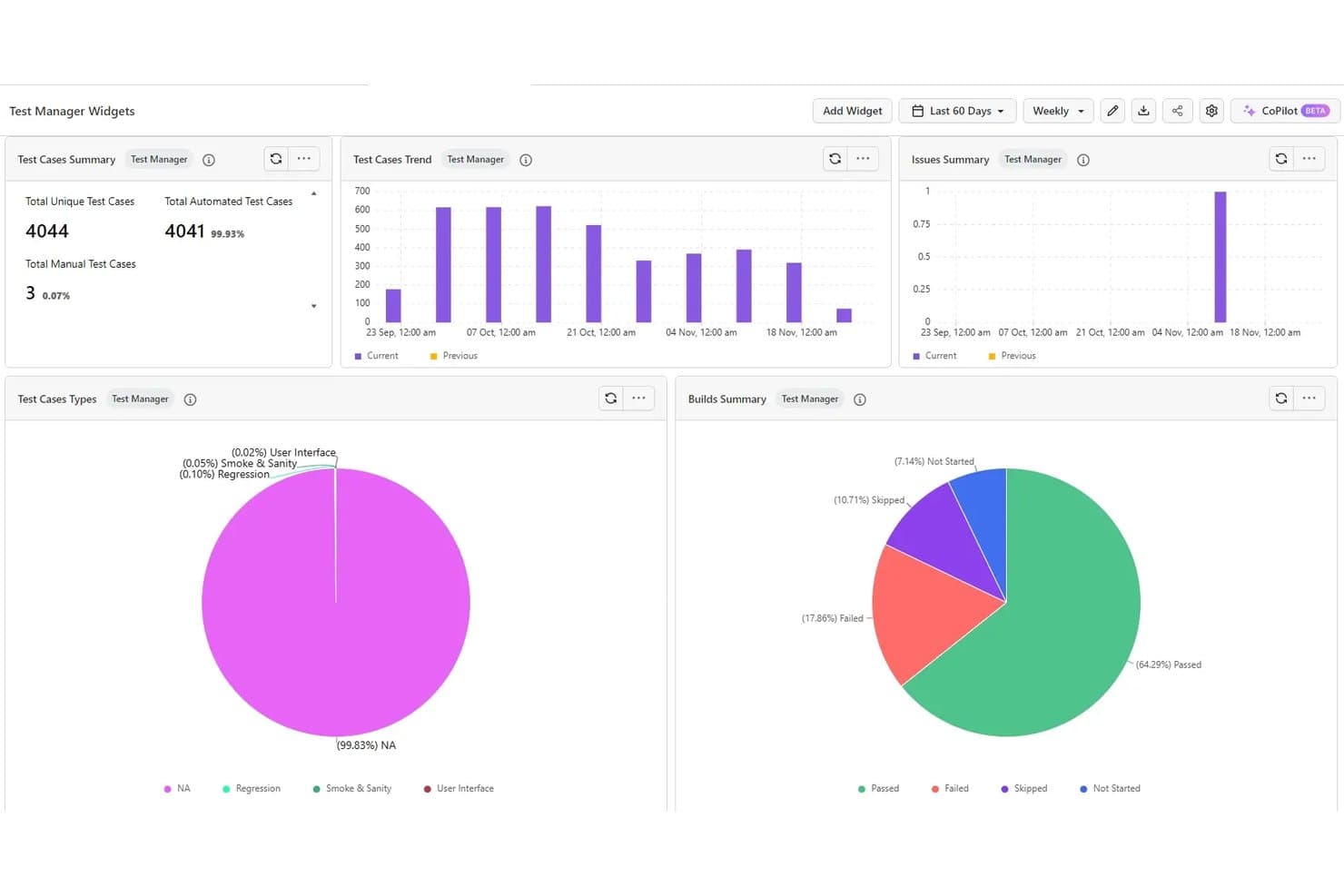
TestMu AI tracks test cases, builds, and trends via a visual dashboard. TestMu AI is a cloud-based mobile automation testing platform that runs scripted test suites for native, hybrid, and web apps on a real-device cloud of 50,000+ iOS and Android devices, with support for Appium, Espresso, XCUITest, and Maestro alongside AI-powered self-healing locators and app performance profiling.
Who Is TestMu AI Best For?
TestMu AI is a strong fit for QA and development teams that need to automate app testing across a wide range of real iOS, Android, and smart TV devices at scale.
Why I Picked TestMu AI
TestMu AI earns its spot on my shortlist because it's the only platform I've found with native support for real smart TV device testing, covering Roku, Apple TV, Android TV, and Fire TV alongside standard iOS and Android. I also rely on its App Profiling Insights dashboard, which tracks CPU, memory, FPS, battery, and crash data across Appium runs so I can catch performance regressions on TV hardware before release. Smart Heal rounds this out by automatically recovering broken locators during runs on those less predictable TV environments.
TestMu AI Key Features
- Real device cloud: Access 50,000+ real iOS and Android devices to run native, hybrid, and web app automation suites at scale.
- Multi-framework support: Run tests using Appium, Espresso, XCUITest, or Maestro across a range of languages including Java, JavaScript, Python, Ruby, PHP, and C#.
- App Profiling Insights dashboard: Track CPU, memory, FPS, battery, network, disk activity, startup time, crashes, and ANRs across Appium runs with configurable SLA thresholds.
- Parallel test execution: Distribute mobile test suites across multiple real devices and OS versions simultaneously to cut regression run time.
TestMu AI Integrations
TestMu AI lists 120+ integrations, including Appium, Espresso, XCUITest, Jenkins, CircleCI, GitLab CI, Azure Pipelines, Bitrise, and Buildkite. REST APIs and an Appium WebDriver endpoint support custom CI/CD workflows.
Pros and Cons
Pros:
- Parallel real-device runs speed regression cycles
- Profiling tracks CPU, FPS, battery, and crashes
- Smart TV automation across four platforms
Cons:
- Emulator automation remains beta and Appium-only
- Device sessions can disconnect or start slowly
Learn more about TestMu AI: Best for parallel mobile test runs
- Free plan available
- From $27/user/month (billed annually)
Visit WebsiteCustomer Rating:4.8/5
Testomat.io visualizes test results with clear pass/fail/skip metrics and drill-down execution details for each test case. Testomat.io is a web-based test management system that brings together automated and manual testing workflows in one workspace. You get real-time reporting and analytics that let your team stay on top of test outcomes without jumping between tools.
Why I picked Testomat.io: You can run mobile tests across Android, macOS, Windows, and Chrome, either locally or through your CI/CD pipeline, with unlimited access to test artifacts like screenshots and videos. Testomat.io also lets you upload automated test suites from your codebase, convert manual tests to automated ones with a click, and run them in parallel. This helps your team centralize mobile testing, accelerate execution, and easily review results as they come in.
Testomat.io Standout Features & Integrations
Standout features include built-in AI agents that can review your tests and offer suggestions to improve them, reducing repetitive work and optimizing test coverage. The platform also supports real-time analytics through visual boards and heatmaps, helping your team identify unstable mobile tests, slow performance areas, and coverage gaps instantly.
Integrations include Playwright, Cypress.io, Webdriver.io, Cucumber, Jest, Codeception, TestCafe, Protractor, CodeceptJS, Mocha, Jira, and Slack.
Pros and Cons
Pros:
- Synchronizes your manual and automation tests in one place
- Real‑time reporting with varied heatmaps and analytics
- Flexible test execution, like multi‑environment and parallel execution
Cons:
- Markdown editor doesn't always render formatting properly
- Test import from other tools lacks flexibility
Learn more about testomat.io: Best for performance testing with 24-hour expert maintenance
- Free demo available
- From 1¢/AI credit
Visit WebsiteCustomer Rating:4.9/5
QA Wolf's dashboard provides insights into ongoing testing efforts, including recent activity and identified bugs. QA Wolf is a web and mobile automation testing tool that offers solutions for accessibility, performance, and Salesforce testing for teams of any size and in any sector. It provides high levels of test coverage and maintains that coverage with 24-hour in-house maintenance and on-demand test creation.
Why I picked QA Wolf: This platform is unique in that the majority of testing efforts are outsourced to the QA Wolf team. This means that their in-house team collaborates with you to identify priorities, create automated tests, and deploy and maintain them. With unlimited, parallel test runs and full-time expert support, QA Wolf aims to make mobile automation testing easier and more efficient, so you can focus more on application development. Additionally, all bugs are human-verified and users can access detailed reports within the platform.
QA Wolf Standout Features & Integrations
Standout features include real-time bug reporting, test coverage using open-source Playwright code, a test matrix and outline for every user flow, automatic test monitoring and maintenance, unlimited parallel test runs, customizable test plans, and comprehensive test coverage reports.
Integrations include Linear, Slack, GitLab, Bitbucket, Jenkins, Microsoft Teams, GitHub, Jira, Asana, CircleCI, Travis CI, and Azure DevOps.
Pros and Cons
Pros:
- Easy, direct communication with QA Wolf team
- Tests are monitored and maintained 24/5
- All bugs are human-verified
Cons:
- Less flexibility to customize testing processes
- Reliance on external team may not be ideal for those that want more control
Learn more about QA Wolf: Best for building test automation with plain English
- Free plan + 14-day free trial + free demo available
- Pricing upon request
Visit WebsiteCustomer Rating:4.8/5
testRigor allows users to create and manage test cases in plain English for a wide range of environments, including mobile and web apps. testRigor is an AI-powered, codeless automation testing tool designed to simplify the software quality assurance process. It allows users to create automated tests using plain English instructions, eliminating the need for coding expertise.
Why I picked testRigor: Its plain English test automation is particularly beneficial for teams with limited coding expertise, enabling broader participation in the testing process. The platform supports testing on physical devices and hybrid apps, ensuring comprehensive coverage across different mobile environments. Additionally, testRigor's generative AI capabilities allow for the automatic generation of tests from documented cases, making it accessible for non-coders and speeding up the test creation process.
testRigor Standout Features & Integrations
Standout features include automated test maintenance, natural language processing, cross-browser testing, mobile testing, API testing, integration with CI/CD tools, parallel test execution, visual testing, data-driven testing, test management, test analytics, AI-driven test optimization, test scheduling, and self-healing tests.
Integrations include Jira, TestRail, Zephyr, XRay, ReportPortal, Google Cloud Build, SauceLabs, LambdaTest, BrowserStack, Gitlab, Github Actions, Jenkins, Spinnaker, AWS CodePipeline, Travis, and CircleCI.
Pros and Cons
Pros:
- Provides detailed analytics on test results
- Supports testing on a wide range of platforms
- User-friendly interface
Cons:
- Reliance on AI may lead to unexpected results
- May not suit teams requiring extensive customization capabilities
Learn more about testRigor: Best for pay-as-you-go observability
- Free plan + free demo available
- From $10/user/month
Visit WebsiteCustomer Rating:4.3/5
The software allows you to monitor and manage multiple applications and tools in one place. New Relic is an observability platform that provides application performance monitoring (APM), digital experience monitoring, infrastructure monitoring, and business observability. Its pay-as-you-go pricing model and extensive capabilities make it a suitable choice for businesses seeking flexible and scalable observability solutions.
Why I picked New Relic: I chose New Relic for mobile automation testing because it provides a comprehensive observability platform that scales with the needs of the project. Its ability to deliver data-driven insights and integrate with a variety of other tools makes it a distinct choice in the market. I believe New Relic stands out as the best tool for pay-as-you-go observability due to its transparent pricing model that allows companies to pay only for what they use, ensuring cost-effectiveness while offering a complete view of their digital systems.
New Relic Standout Features & Integrations
Standout features include the software's newly implemented interactive application security testing (IAST) capabilities. The tool helps you spot and fix high-risk errors and vulnerabilities during the development process. By using the tool, you can troubleshoot issues in your code more quickly and ship more secure, well-tested products.
Integrations include over 700 apps, including AWS, Google Cloud, Microsoft Azure, Jenkins, CircleCI, Travis CI, and Slack. It also has an API you can use to build custom integrations.
Pros and Cons
Pros:
- AI-powered anomaly detection and intelligent alerting
- Integrates seamlessly with popular dev tools
- Wide range of monitoring capabilities
Cons:
- Added complexity from reliance on agents installed on application servers
- Has a bit of a learning curve
Learn more about New Relic: Best for comprehensive mobile testing with low-code authoring
- Free trial + free demo available
- Pricing upon request
Visit WebsiteCustomer Rating:4.3/5
Key features of Tricentis Testim Mobile include code flexibility, test stability, real usage condition testing, virtual device testing, troubleshooting dashboards, and efficient device management. Tricentis Testim Mobile is a comprehensive tool designed to facilitate mobile testing and accelerate app delivery. It offers end-to-end testing capabilities, addressing common challenges in mobile app testing such as device variability, coding skills requirement, scripted test instability, and device management complexity. This tool stands out for its low-code test authoring, allowing for fast and codeless creation of stable tests on both real and virtual devices.
Why I Picked Tricentis Testim Mobile: Tricentis Testim Mobile is a tool that combines low-code test authoring, mobile test automation, and test execution on virtual and physical devices. It addresses challenges such as variability in mobile devices, coding skills, test stability, usage conditions, device management, and solution integration. The tool is designed to accelerate app delivery through mobile testing and improve app performance. It offers customization options using code, powerful locators for test stability, Tricentis Device Cloud for real device testing, and the Virtual Mobile Grid for virtual device testing. Testim Mobile integrates these features into a single solution, providing troubleshooting tools, visualization dashboards, and TestOps features for organizing tests and integrating with CI/CD pipelines.
Tricentis Testim Mobile Standout Features and Integrations
Standout features: A codeless automation approach, meaning users can create automated tests without writing any code. This feature is particularly useful for testers or professionals who do not have a programming background. The tool often uses a visual approach, allowing users to create test cases by interacting with the application's user interface directly. Plus, Tricentis Testim allows testing across various web browsers and platforms. This is crucial for ensuring that web applications work seamlessly on different browsers (such as Chrome, Firefox, Safari, etc.) and operating systems (Windows, macOS, Linux, etc.).
Integrations: Bamboo, Azure DevOps, Circle CI, Jenkins, GitHub, Saucelabs, LambdaTest, and Bitbucket. If you cannot find the app you are looking for, you can also use its REST API to build custom integrations with your tech stack.
Pros and Cons
Pros:
- Paid plan pricing may be high for some organizations
- Helpful support team
- Increased test complexity limits no-code options
Cons:
- Offers plenty of integrations
- Free plan available
Learn more about Tricentis Testim Mobile:

Android UI Automator with Kotlin. UI Automator enables Android developers to write automated tests for mobile applications. This UI test automation framework is best for implementing cross-app functional UI testing across systems and installed applications.
Why I picked UI Automator: The tool lets you run cross-app UI testing across systems and installed apps. This capability helps you rely on one tool for testing both systems and installed applications. It streamlines the testing process and enables you to minimize the complexity of managing multiple mobile automation testing tools.
It’s a UI testing framework, which comes with APIs that allow you to interact with visible elements on a device, regardless of which activity is in focus. UI Automator lets you execute operations like opening the Settings menu or the app launcher in a test device. It’s suitable for writing opaque box-style automated tests — an approach in which the test code doesn’t rely on internal implementation details of the target app.
UI Automator Standout Features and Integrations
Standout features include an API for accessing device state and APIs that support cross-app UI testing (UI Automator APIs). The software provides an API that lets you retrieve state information and implement operations on the device on which the target app is running.
UI Automator APIs allow you to create tests without the need to know about the implementation details of the target app. These APIs can help you to capture and manipulate user interface elements across multiple applications.
Integrations: UI Automator lets you integrate with Android development tools.
Pros and Cons
Pros:
- Available for free
- Comprehensive guides
- Support for cross-app UI testing
Cons:
- Long user support response time
- Steep learning curve
Learn more about UI Automator:

An example of iOS app testing in Frank with the help of the app inspector (Symbiote). Frank, also known as Testing With Frank, allows you to run reliable iOS and Mac tests with Cucumber. With Frank, you can author tests using Cucumber and run them against your iOS application.
Why I picked Frank: I added Frank to my list because it provides an easy way to visualize the app you’re testing. It has a powerful app inspector (Symbiote) that helps you get comprehensive information on your running app.
Another thing I like about this tool is that it’s easy to set up. You can set your iOS app up for Frank tests in less than 10 minutes.
Additionally, there is an active community of helpful people so you can easily get help or have your questions answered by more experienced users.
Frank Standout Features and Integrations
Standout features: Frank lets you take a video record of your test runs, enabling you to visualize your app in action. The tool gives you the flexibility to execute tests anywhere, both on the simulator and iOS devices. It streamlines the testing process by letting you integrate with CI so you can run tests across various phases of development.
Integrations: Frank integrates with CI solutions. It also integrates with Cucumber and other iOS app development tools.
Pros and Cons
Pros:
- Easy to use
- Test on both emulators and physical devices
- Great user community
Cons:
- More support options would be welcome
- Limited customization
Learn more about Frank:

An example of EarlGrey testing on an iOS app. EarlGrey is an iOS UI automation test framework. It is a free and open-source tool that was developed at Google. It's designed to help you write and perform UI tests for native iOS applications.
Why I picked EarlGrey: It’s a testing framework that simplifies native iOS UI test automation. EarlGrey allows you to write tests that are clear and concise. It comes with improved synchronization capabilities, which synchronize with the UI, network requests, and various queues. The synchronization features increase test stability and make tests very repeatable by letting you ensure that the user interface is in a steady state before actions are executed.
EarlGrey Standout Features and Integrations
Standout features include visibility checks and user-like interaction. The tool uses screenshot differential comparison to determine the visibility of user interface components before interacting with them. EarlGrey tries to mimic (UI interactions simulation) how real users would interact with your product’s user interface. This makes it possible to find and fix defects that real users would come across in your app.
Integrations: EarlGrey allows you to integrate with some third-party tools, including XCTest, Xcode, GitHub, and Slack.
Pros and Cons
Pros:
- User interaction simulation
- Streamlines native iOS automation testing
- It’s available for free
Cons:
- Difficult configurations
- Few software integrations
Learn more about EarlGrey:

Creating automated screenshots using XCUITest. XCUITest, launched by Apple, is a UI testing framework that enables developers to test the user interface of native iOS apps using Swift or Objective-C coding language.
Why I picked XCUITest: It makes UI testing of native iOS apps very easy and straightforward for iOS developers. XCUITest helps you validate your product to ensure the user interface behaves correctly when expected actions are performed.
In my opinion, this is one of the best mobile automation testing tools for iOS developers. This is because it runs inside the XCode IDE and users can author test scripts in either Objective-C or Swift, making it suitable for any iOS developer.
XCUITest Standout Features and Integrations
Standout features: It lets you test your app with gestures, such as tapping, swiping, pinching, and rotating. It provides the capabilities you need to test your app as if a person were interacting with the interface. This helps you understand how your product would behave when a real user performs some expected actions.
Additionally, XCUITest’s architecture was designed to enable the fast execution of iOS tests. It’s also straightforward to set up and maintain.
Integrations: XCUITest integrates with XCode and CI environments.
Pros and Cons
Pros:
- Simple test creation process
- Easy to set up
- Fast execution of iOS tests
Cons:
- It’s language-specific
- You can’t test another mobile OS
Learn more about XCUITest:
Rezumatul celor mai bune 10 instrumente de testare automatizată pentru dispozitive mobile
Sorted by: Default
| Tool | Starting Price | Website | |
|---|---|---|---|
Best for teams testing apps on smart TVs | 4.9 out of 5 | $17/month Free plan + free demo available | Book Demo |
Best for parallel mobile test runs | 4.8 out of 5 | $27/user/month Free plan available | Website |
Best for performance testing with 24-hour expert maintenance | 4.9 out of 5 | From 1¢/AI credit Free demo available | Website |
Best for building test automation with plain English | 4.8 out of 5 | Pricing upon request Free plan + 14-day free trial + free demo available | Website |
Best for pay-as-you-go observability | 4.3 out of 5 | $10/user/month Free plan + free demo available | Website |
Best for comprehensive mobile testing with low-code authoring | 4.3 out of 5 | Pricing upon request Free trial + free demo available | Website |
Best for cross-app functional UI testing | Not rated | Free to use | Website |
Best for testing iOS apps using Cucumber | Not rated | Free to use | Website |
Best for native iOS UI automation testing | Not rated | Free to use | Website |
Best for iOS developers | Not rated | Free to use | Website |


Alte opțiuni
Iată câteva opțiuni bune care nu au ajuns pe lista celor mai bune instrumente de testare automatizată pentru dispozitive mobile:
- 11MonkeyRunnerBest for running unit test suites
- 12CalabashBest for automated functional testing for Android using Cucumber
- 13EspressoBest tool for running Android UI tests
- 14TestComplete MobileBest for automating your mobile GUI tests on real devices
- 15UFT MobileBest for providing a centralized lab of real mobile devices and emulators
- 16MonkeyTalkBest for testing native and hybrid iOS and Android applications
- 17SeeTestBest for iOS and Android mobile web testing
- 18SelendroidBest mobile automation testing tool for native and hybrid Android apps
- 19MobotBest for using real robots to test on physical devices
- 20TestsigmaBest for building end-to-end tests for mobile apps with English scripts
Criterii de selecție pentru instrumentele de testare automatizată pentru dispozitive mobile
Iată un rezumat al principalelor criterii de selecție și evaluare pe care le-am folosit pentru a alcătui lista celor mai bune instrumente de testare automatizată pentru dispozitive mobile pentru acest articol:
Funcționalități de bază
Printre funcționalitățile de bază pe care le-am luat în considerare se numără:
- Automatizare inteligentă
- Crearea și executarea simplificate a testelor
- Capacități pentru mai multe platforme
- Compatibilitate cu mai multe tipuri de testare
- Capacități de gestionare și monitorizare a testelor
Funcții esențiale
Am acordat prioritate instrumentelor care includ funcții esențiale pentru instrumentele de testare automatizată a aplicațiilor mobile. Printre funcțiile principale pe care le-am luat în considerare se numără:
- Testarea performanței: O funcție care îți permite să testezi calitatea sau capacitatea software-ului. Te ajută să determini modul în care produsul tău va răspunde sau se va comporta într-o anumită condiție de încărcare.
- Testarea în paralel: Această capacitate îți permite să automatizezi simultan aceleași teste în mai multe medii — combinații de dispozitive reale și configurații de browsere.
- Testarea funcțională: O funcție care te ajută să validezi funcționalitățile de bază ale software-ului în raport cu un set de standarde prestabilite.
- Testarea interfeței de utilizator: Cunoscută și sub denumirea de testare a interfeței grafice cu utilizatorul, testarea interfeței de utilizator îți permite să validezi interfața grafică a produsului pentru a te asigura că îndeplinește cerințele sau specificațiile acestuia.
- Testarea securității: Aceasta se concentrează pe evaluarea securității aplicației tale. Scopul acestei funcții este de a descoperi vulnerabilitățile sau breșele din software înainte ca intrușii să le exploateze.
- Testarea continuă: Această funcție este inclusă în soluțiile de testare automatizată pentru dispozitive mobile pentru a permite testarea continuă pe parcursul întregului ciclu de viață al dezvoltării software (SDLC).
Ușurință în utilizare
Am evaluat multe instrumente și am ales produse de testare automatizată pentru dispozitive mobile care oferă o experiență excelentă utilizatorilor. Fiecare instrument pe care l-am recomandat are o interfață intuitivă, funcții personalizabile, documentație cuprinzătoare, tutoriale online și asistență pentru utilizatori.
Integrări software
Am selectat instrumente care se integrează cu alte soluții de dezvoltare software și de asigurare a calității. Prin integrare, vă puteți conecta instrumentele preferate la sistemul de automatizare mobilă. Acest lucru vă ajută să vă eficientizați fluxurile de lucru, să partajați resurse fără probleme și să finalizați sarcinile mai rapid, fără complexitatea trecerii de la un software la altul.
Prețuri
Am luat în considerare raportul calitate-preț. În timp ce unele instrumente sunt gratuite, altele oferă pachete premium. Acestea au însă modele flexibile de tarifare. Există mai multe opțiuni de preț, astfel încât să puteți alege instrumentul și pachetul potrivite pentru nevoile dumneavoastră.
Întrebări frecvente
Iată câteva întrebări populare pe care le pun oamenii despre instrumentele de testare prin automatizare mobilă:
Care sunt beneficiile instrumentelor de testare prin automatizare mobilă?
Printre beneficiile software-ului de automatizare a testării mobile se numără implementarea mai rapidă a aplicațiilor, eficiența îmbunătățită, testele simplificate, feedbackul în timp real și reducerea costurilor pentru asigurarea calității.
Cine utilizează instrumentele de testare prin automatizare mobilă?
Dezvoltatorii și profesioniștii din domeniul asigurării calității se bazează pe sistemele de automatizare a testării mobile pentru a valida funcțiile aplicațiilor și a se asigura că produsele lor funcționează conform așteptărilor.
Cum automatizați testarea mobilă?
Pașii exacți implicați în implementarea testării prin automatizare mobilă depind de instrumentul de automatizare pe care îl utilizați. Acestea fiind spuse, pașii generali pentru testarea prin automatizare mobilă includ definirea obiectivelor testării, alegerea instrumentului potrivit de testare prin automatizare, rularea testelor pe dispozitive virtuale și reale și analiza rezultatelor testelor.
Alte programe de testare
Dacă doriți să aflați mai multe despre testarea software, consultați următoarele recenzii.
- Cele mai bune instrumente de testare a aplicațiilor mobile
- Cele mai bune instrumente de testare continuă
- Cele mai bune instrumente de testare prin automatizare
- Cele mai bune instrumente de gestionare a testelor
Concluzii
Indiferent de nevoile dumneavoastră în materie de testare mobilă, există o soluție de testare prin automatizare mobilă potrivită pentru cazul dumneavoastră de utilizare. Cu ajutorul listei de mai sus, puteți găsi cel mai bun software de automatizare a testării mobile pentru proiectul dumneavoastră și puteți crea o experiență de testare mai eficientă.
Pentru a afla mai multe despre instrumentele de testare software și pentru a obține mai multe informații de la profesioniști de top din domeniu, abonați-vă la newsletterul nostru pentru a primi cele mai recente articole și podcasturi.