

În lumea digitală de astăzi, care se mișcă într-un ritm alert, gestionarea eficientă a datelor reprezintă o provocare majoră. Probabil că te confrunți cu date dispersate și procese manuale care îți consumă timpul. Aici intervine software-ul de extragere a datelor, ajutându-te să colectezi și să organizezi informațiile cu ușurință.
Înțeleg frustrarea de a parcurge manual cantități nesfârșite de date. După ce am testat și analizat numeroase instrumente, știu ce funcționează cel mai bine pentru diferite nevoi. Scopul meu este să îți ofer o perspectivă imparțială asupra celor mai bune instrumente de extragere a datelor disponibile.
Vei găsi o analiză clară și concisă a fiecărui program, cu evidențierea punctelor forte și a utilizatorilor cărora li se potrivește cel mai bine. Fie că faci parte dintr-o întreprindere mare sau dintr-o echipă mică, aici există ceva pentru tine.
Why Trust Our Software Recommendations
6,700+
Reviews
20
Industry experts
16+
Evaluation factors
14
Years
Our team has been testing and reviewing software since 2012. As tech leaders ourselves, we know how difficult—and important—it is to choose the right software.
For this guide, we evaluated tools using hands-on testing and independent research, scoring tools using our selection criteria.
Our reviews reflect our human editorial judgment, not a sales pitch.
Expert reviewers:
- Paulo Gardini MiguelTech Director
 Tim FisherVP of AI
 Gabriel RosasTech Lead & Software Architect
 Christhian GruhnTech Lead & Platform Architect

Tabel comparativ al programelor de extragere a datelor
Acest tabel comparativ rezumă detaliile de preț pentru selecțiile mele de top de programe de extragere a datelor:
Sorted by: Default
| Tool | Starting Price | Website | |
|---|---|---|---|
Best for structured SaaS and database ETL pipelines | 4.9 out of 5 | $79/month Free plan + free demo available | Website |
Best for document data extraction | 4.8 out of 5 | Pricing upon request Free demo available | Website |
Best for AI-powered OCR | 4.9 out of 5 | Pricing upon request Free trial available + free demo | Website |
Best for web scraping and automation | 4.8 out of 5 | Pricing upon request | Website |
Best for handling complex data source integration | 4.8 out of 5 | $99/month 14-day free trial | Website |
Best for large scale data collection with proxy networks | 4.5 out of 5 | $0.5/1,000 records Free trial available | Website |
Best for ethical web data collection | 4.7 out of 5 | $1.5/1,000 records/month Free plan available | Website |
Best for marketing data extraction | 4.5 out of 5 | Pricing upon request Free demo available | Website |
Best for automated data integration in the cloud | Not rated | Pricing upon request 14-day free trial + free demo + free plan available | Website |
Best for automating data imports to Google Sheets | Not rated | $24/month 7-day free trial | Website |


Recenzii ale celor mai bune programe de extragere a datelor
Mai jos sunt rezumatele mele detaliate ale celor mai bune programe de extragere a datelor care au ajuns pe lista mea scurtă. Recenziile mele oferă o privire detaliată asupra funcțiilor principale, avantajelor și dezavantajelor, integrărilor și cazurilor de utilizare ideale pentru fiecare instrument, pentru a te ajuta să îl găsești pe cel mai potrivit pentru tine.
 Best for structured SaaS and database ETL pipelines
- Free plan + free demo available
- From $79/month (billed annually)
Visit WebsiteCustomer Rating:4.9/5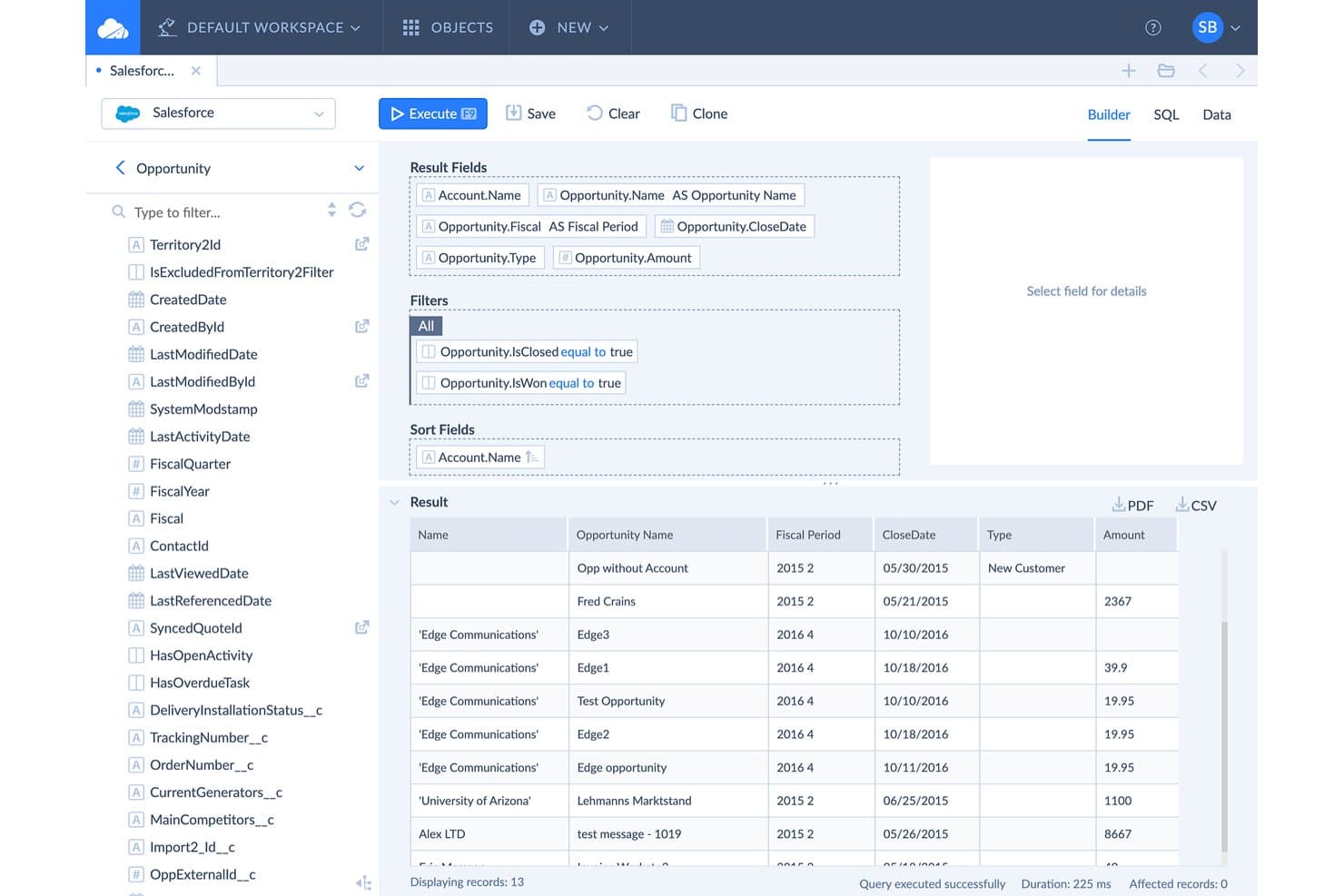
Skyvia lets users query Salesforce data visually without writing SQL. Skyvia is a no-code cloud ETL/ELT platform that extracts, transforms, and loads data between structured SaaS applications, relational databases, and data warehouses using visual pipelines, scheduled batch runs, and 200+ prebuilt connectors.
Who Is Skyvia Best For?
Skyvia suits data engineers and IT teams in small to mid-size businesses that need to automate recurring data movement between SaaS applications, relational databases, and cloud warehouses without writing code.
Why I Picked Skyvia
I've included Skyvia in my top picks because it's one of the few no-code ETL tools that handles structured SaaS-to-database pipelines without requiring a single line of code. I particularly like its visual Data Flow builder, which lets you design multi-source pipelines with conditional Control Flow logic, so a Salesforce-to-Snowflake sync with custom error-handling runs on a per-minute schedule automatically. It's purpose-built for exactly this kind of recurring, structured batch movement between cloud apps and relational databases.
Skyvia Key Features
- Scheduled batch execution: Automate recurring data transfers with configurable schedules ranging from once daily to once per minute, depending on your plan.
- 200+ prebuilt connectors: Connect to cloud applications, relational databases, data warehouses, and file storage services without building custom integrations.
- Export format options: Output extracted data in CSV, JSON, Avro, or Parquet formats and deliver files to FTP/SFTP or cloud storage destinations.
- Record-level run logging: Review per-record success and error details, including mapped field values and error descriptions, after each integration run.
Skyvia Integrations
Skyvia offers 200+ native integrations, including Salesforce, Google BigQuery, Snowflake, SQL Server, PostgreSQL, Amazon S3, Google Sheets, Shopify, and HubSpot. It also supports public API access, custom REST connectors, and webhooks for custom integrations.
Pros and Cons
Pros:
- Pipelines combine multiple structured sources
- Scheduled syncs reduce manual data transfers
- Visual mappings simplify structured data setup
Cons:
- Batch runs lack sub-second streaming speed
- No extraction from websites or documents
Learn more about Skyvia: Best for document data extraction
- Free demo available
- Pricing upon request
Visit WebsiteCustomer Rating:4.8/5
Klippa's prompt builder interface shows how users can automate and customize their data extraction workflows. Klippa DocHorizon is an AI-powered data extraction software designed to automate document processing workflows. It utilizes optical character recognition (OCR) technology to extract data from various document types, including invoices, receipts, and identity documents.
Why I Picked Klippa DocHorizon:
I chose Klippa DocHorizon for its advanced OCR capabilities that accurately capture data from diverse documents. This feature is particularly beneficial for businesses dealing with high volumes of paperwork, as it minimizes the need for manual data entry. Additionally, Klippa DocHorizon offers data anonymization, ensuring sensitive information is masked to comply with privacy regulations. This is crucial for organizations handling confidential data.
Standout features & integrations:
Other features include document classification to organize files efficiently and document verification to detect fraudulent documents. These functionalities work together to enhance your document processing workflows, ensuring accuracy, security, and compliance with industry standards. Integrations include Gmail, Google Drive, Outlook, OneDrive, Sharepoint, Oracle Netsuite, Xero, Dropbox, Quickbooks, and Zoho.
Pros and Cons
Pros:
- Fraud detection capabilities
- Automated document classification
- Supports multiple document formats for conversion
Cons:
- Limited customization options for specific workflows
- Documentation around the API could be improved
Learn more about Doxis AI.dp.: Best for AI-powered OCR
- Free trial available + free demo
- Pricing upon request
Visit WebsiteCustomer Rating:4.9/5
Nanonets allows users to export extracted data directly to Google Drive, making data handling more efficient. Nanonets is an AI-driven document processing and workflow automation platform tailored for industries including finance, healthcare, logistics, and customer support. It automates tasks such as accounts payable, document approvals, and financial reconciliation, aiming to improve operational efficiency and reduce manual efforts.
Why I Picked Nanonets:
I like that it leverages AI-powered optical character recognition (OCR) to handle unstructured and semi-structured documents. This technology is crucial for transforming physical documents into digital formats while organizing and categorizing them for efficient data extraction. You can benefit from features like intelligent document processing (IDP), which uses advanced AI technologies such as computer vision and natural language processing to identify, structure, and extract relevant information from documents like invoices, purchase orders, and ID cards.
Standout features & integrations:
The platform's no-code feature lets your team automate complex business processes without writing code, turning unstructured data into actionable insights quickly. Additionally, Nanonets ensures compliance with data security regulations such as GDPR, SOC 2, and HIPAA. Integrations include QuickBooks, Salesforce, Xero, Google Sheets, HubSpot, SAP, Slack, Microsoft Dynamics CRM, NetSuite, Gmail, Dropbox, and Zapier.
Pros and Cons
Pros:
- Customizable workflows for document processing
- Quick training capabilities for AI models
- Simple API for integration with existing systems
Cons:
- The minimal data requirements might limit the complexity of the models that can be developed
- The tool may not be suitable for large-scale applications without further customization
Learn more about TrailHQ:

Here's Apify's console overview, which is a strong platform for web scraping and automation. Apify is a cloud-based platform designed to automate web scraping tasks. It provides the tools to extract, process, and manage data from various online sources, making it ideal for web scraping and automation.
Why I Picked Apify:
I selected Apify for its extensive web scraping capabilities and well-structured interface that simplifies automation tasks. What sets it apart from other tools is its unique combination of ready-made web scrapers, known as 'actors,' and its ability to build custom solutions. Given its robust capabilities in these areas, it rightfully earns the title of being best for web scraping and automation.
Standout features & integrations:
Apify has a vast collection of pre-built actors that are useful for typical web scraping tasks. These actors can be personalized to match specific requirements without much hassle. Additionally, it provides a platform for creating customized web scraping tools. Apify is compatible with multiple platforms, such as Google Sheets, Amazon S3, Microsoft Power Automate, and Zapier. It also allows webhooks, which makes it adaptable to integrate with other services.
Pros and Cons
Pros:
- Robust integrations with common data platforms
- Flexibility to build custom scraping tools
- Extensive library of pre-built actors
Cons:
- The cost can add up for larger data operations
- Might require technical knowledge to utilize custom actors fully
- Higher pricing tier compared to some other tools
Learn more about Apify: Best for handling complex data source integration
- 14-day free trial
- From $99/month
Visit WebsiteCustomer Rating:4.8/5
Here's Dataddo's central design, which allows you to keep track of and modify your data sources. Dataddo is a potent data integration platform designed to simplify the process of extracting and connecting data from multiple sources. It shines in handling complex data source integration, making it an excellent solution for businesses grappling with diverse and complicated data sources.
Why I Picked Dataddo:
When selecting Dataddo for this list, I paid particular attention to its capability to handle complex data source integration. The platform’s ability to navigate the intricacies of data extraction from various sources makes it stand out. I determined it to be the best tool for complex data source integration due to its robustness and versatility in managing diverse data types and sources.
Standout features & integrations:
Dataddo simplifies data handling and analysis with powerful cloud-based features. It's easy to integrate with no coding required and works with platforms like Salesforce, HubSpot, and Google Analytics. Plus, it can handle multiple data sources for intricate integration.
Pros and Cons
Pros:
- Variety of data source integrations
- Cloud-based architecture for easy access
- Skilled in handling complex data source integration
Cons:
- Interface could be more intuitive
- No-code setup may limit customization options
- Higher starting price than some alternatives
Learn more about Dataddo: Best for large scale data collection with proxy networks
- Free trial available
- From $0.5/1,000 records
Visit WebsiteCustomer Rating:4.5/5
Here's the control panel in Oxylabs, which you can see proxy usage stats grouped by day, targets, or subnets and also where you can set the authorization IPs for the data center proxies. Oxylabs provides advanced data collection tools that leverage vast proxy networks. The platform excels in assisting with significant scale data scraping tasks, ensuring undetected and efficient data gathering.
Why I Picked Oxylabs:
I chose Oxylabs due to its extraordinary capability to handle large-scale data collection tasks using its extensive proxy networks. It stood out from other tools with its real-time crawler and residential proxy services, designed for tasks where vast amounts of data must be gathered promptly. Considering its advanced features and vast proxy network, it is best suited for large-scale data collection.
Standout features & integrations:
Oxylabs is a popular tool with numerous useful features. It boasts of having a vast residential and data center proxy network, along with a real-time crawler for search engines and e-commerce websites. This broad proxy network ensures anonymity and successful data scraping, even when dealing with large scales of data. Oxylabs is also compatible with many programming languages and data-scraping tools like Python, Java, Node.js, and more. This compatibility makes it easy to integrate Oxylabs into various data operations workflows.
Pros and Cons
Pros:
- Supports a wide range of integrations and programming languages
- Real-time crawler for efficient data collection
- Large and reliable proxy network
Cons:
- Complex features may require technical expertise
- Cost per GB can add up quickly for extensive tasks
- Pricing may be high for smaller scale operations
Learn more about Oxylabs: Best for ethical web data collection
- Free plan available
- From $1.5/1,000 records/month
Visit WebsiteCustomer Rating:4.7/5
Here's the data collector feature in Bright Data, which allows you to collect massive amounts of public web data without investing in software or hardware infrastructure. Bright Data is a leading web data collection platform that empowers businesses with accurate and comprehensive data insights. It prioritizes ethical data collection practices, making it a reliable choice for organizations that value responsible data handling.
Why I Picked Bright Data:
While comparing multiple data collection tools, I found Bright Data to be remarkable in its commitment to ethical data practices. It stands out for its thorough compliance with various data privacy regulations and commitment to transparency, which makes it an ideal tool for ethical web data collection.
Standout features & integrations:
Bright Data offers data collection options, like web scraping and proxy networks, with advanced features like automated extraction and geo-specific requests. Integrating with existing tech stacks is easy using common programming languages like Python, Node.js, and Java.
Pros and Cons
Pros:
- Supports a range of programming languages
- Advanced data extraction features
- Committed to ethical data practices
Cons:
- Advanced features require additional payment
- Might be complex for beginners
- Pricing is on the higher side
Learn more about Bright Data: Best for marketing data extraction
- Free demo available
- Pricing upon request
Visit WebsiteCustomer Rating:4.5/5
Adverity offers a wide range of pre-built datastream connectors to unify marketing data from multiple platforms. Adverity is a marketing data integration platform that helps you collect, transform, and manage data from various sources.
Why I Picked Adverity:
I picked Adverity because it offers features that help you manage and combine large volumes of data efficiently. Its bundle feature lets you merge multiple data extracts into a single file based on custom rules like file names or creation dates. You can also preview data extracts during ingestion, so you can catch errors or mismatches before they become a problem. This real-time visibility helps maintain accuracy across your marketing datasets.
Standout features & integrations:
Other features include the capability to map data from over 600 different sources into a standardized format, which simplifies the process of managing disparate data sets. Adverity also provides automated transformations that can be applied as soon as data is fetched, helping to match metrics and dimensions across your data based on your agreed data schema. Adverity offers a wide range of integrations, including Google, Meta, TikTok, Google BigQuery, Looker Studio, Facebook Ads, Amazon Advertising, Hubspot, Salesforce, Amazon S3, Snowflake, and Microsoft Azure.
Pros and Cons
Pros:
- Automated data quality monitoring
- Can harmonize data from various sources
- Provides the ability to create personalized dashboards
Cons:
- Certain configurations may require technical knowledge
- The initial setup can be time-consuming
Learn more about Adverity: Best for automated data integration in the cloud
- 14-day free trial + free demo + free plan available
- Pricing upon request

Here's the connector overview in Fivetran, which displays all of the user's connectors along with the time and date that each one was most last updated. Fivetran is a fully-managed cloud data integration tool that enables automatic extraction, transformation, and data loading from multiple sources to a centralized data warehouse. This tool is handy for integrating data across various cloud platforms.
Why I Picked Fivetran:
I selected Fivetran because of its impressive capabilities in automating data integration tasks in cloud environments. With its exceptional ability to handle multiple data sources and its robust automation features, Fivetran stands out from its peers, making it the tool of choice for automated data integration in the cloud.
Standout features & integrations:
Fivetran offers powerful data pipeline capabilities, data transformation tools, and reliable cloud-based data integration support. Its integrated connectors make integrating with multiple data sources easy, simplifying the integration process. Some of the data sources Fivetran integrates with include databases, event-tracking tools, and cloud services. Popular integrations include Salesforce, NetSuite, Google Analytics, and databases like MySQL, PostgreSQL, and SQL Server.
Pros and Cons
Pros:
- Strong focus on cloud data integration
- Supports a wide range of data sources
- Exceptional automation capabilities
Cons:
- Might require technical expertise for complex integrations
- Could be overkill for small-scale data integration needs
- Pricing can be complex and may increase with data volumes
Learn more about Fivetran: Best for automating data imports to Google Sheets
- 7-day free trial
- From $24/month (billed annually)

Here's the Coupler.io data export state feature, which allows you to view how your data is transferred automatically from one app to another. Coupler.io automates importing data into Google Sheets for seamless and efficient data flow.
Why I Picked Coupler.io:
In deciding on Coupler.io for this list, I considered its unique ability to sync data with Google Sheets. Many businesses already use Google Sheets in their daily operations, and Coupler.io's dedicated integration simplifies data import, making it the best for this purpose. Its automatic updates ensure data is always current, which can save considerable time and effort.
Standout features & integrations:
Coupler.io has an automatic data refresh function and supports various data sources. Its integration with Google Sheets is particularly strong, providing simplicity and powerful data import capabilities.
Pros and Cons
Pros:
- Wide range of data source compatibility
- Automatic data refresh function
- Efficient integration with Google Sheets
Cons:
- Limited functionality beyond Google Sheets integration
- Lacks advanced data transformation features
- Monthly pricing is only available with annual commitment
Learn more about Coupler.io:
Alte programe de extragere a datelor
Iată câteva opțiuni suplimentare de programe de extragere a datelor care nu au ajuns pe lista mea scurtă, dar care merită totuși analizate:
- 11Altair MonarchBest for data preparation from unstructured sources
- 12Hevo DataBest for real-time data pipelines
- 13Stitch DataBest for quick setup of ETL processes
- 14CoefficientBest for bi-directional data extraction and sync
- 15KeebolaBest for flexible data operations management
- 16Astera SoftwareBest for enterprise-grade data mapping
- 17RiveryBest for comprehensive data orchestration
- 18DocuPipeBest for extracting data from handwritten documents
- 19CoresignalBest for comprehensive company data
- 20DiffbotGood for extracting web data via machine learning
- 21ParseHubGood for extracting data from dynamic and JavaScript-heavy websites
- 22nuvoGood for straightforward data extraction with artificial intelligence (AI)-powered recognition
- 23Webz.ioGood for large-scale web data extraction and crawling
- 24Browse AIGood for automating web-based tasks without coding
- 25StreamSetsGood for managing data in motion across any platform
- 26WeldGood for real-time data extraction from the web
- 27PhantombusterGood for automating repetitive online tasks with ready-to-use APIs
Alte recenzii ale programelor de extragere a datelor
How I Evaluate Data Extraction Software
I split my evaluation into two layers: the core extraction capabilities a tool must have to make this list, and the differentiators that matter when your pipelines feed Snowflake or BigQuery.
Core Functionality (Table Stakes For This List)
When I'm selecting tools for my list, I rank each one on a scale from 0 (does not offer the functionality) to 5 (excels in this area) for each core functionality listed below. Then, I calculate the tool's total score into a percentage. Each tool needs to achieve a minimum total score of 75% to be considered for inclusion.
- Multi-Source Connectivity: I check how many connector types a tool supports—databases, REST APIs, SaaS apps, flat files, and web sources all factor into the count.
- Structured & Unstructured Extraction: Pulling rows from PostgreSQL is table stakes; I also evaluate whether a tool can parse PDFs, HTML, emails, or image-based documents.
- Scheduling & Automation: Every tool I consider needs job scheduling, but I look at whether it supports event-based triggers, dependency chains, and retry logic for failed runs.
- Transformation & Output Mapping: I evaluate whether the tool lets you clean, map, and reshape extracted data before loading it into targets like warehouses, lakes, or staging databases.
- Scalability & Performance: High-volume workloads expose weak tooling fast, so I look at parallel processing support, incremental loads, and how well a tool handles enterprise-scale datasets.
- Developer Tooling & APIs: Tools like Airbyte and Fivetran approach this differently, but I check for usable REST APIs, CLI access, SDKs, and CI/CD-friendly configuration options.
Once I have a list of tools that meet this criteria, I consider what sets each platform apart.
Differentiating Factors (What Sets Vendors Apart)
Here's how I compare and contrast different vendors:
Standout Features
Change data capture is a big one for me—when your warehouse needs near-real-time sync from production databases, CDC eliminates full-table reloads and keeps pipelines lean. I also look at data lineage and observability features, since tracing a failed extraction back to its root cause at 2 a.m. is much easier with built-in monitoring and alerting. A no-code visual builder matters too, especially for ops teams that need to build or modify pipelines without waiting on engineering resources.
Beyond Features
The deployment model is one of the first things I evaluate. Whether a tool offers cloud-only SaaS, self-hosted, or VPC deployment shapes how well it fits your security posture—especially when pipelines touch sensitive production data. Ecosystem depth matters just as much; I check for native warehouse destinations like Snowflake and BigQuery, plus compatibility with orchestrators like Airflow or dbt. Pricing transparency is another factor I weigh, since row-based or connector-based billing can scale very differently depending on your extraction volume.
Cum alegi un program de extragere a datelor
Este ușor să te pierzi în liste lungi de funcții și structuri complexe de prețuri. Pentru a te ajuta să rămâi concentrat în timp ce parcurgi procesul unic de selectare a programului, iată o listă de factori pe care trebuie să îi ai în vedere:
| Factor | Ce trebuie luat în considerare |
|---|---|
| FactorScalabilitate | Ce trebuie luat în considerarePoate programul să se dezvolte odată cu afacerea ta? Verifică dacă poate gestiona un volum mai mare de date și mai mulți utilizatori fără probleme de performanță. |
| FactorIntegrări | Ce trebuie luat în considerareSe conectează la instrumentele existente? Asigură-te că este compatibil cu CRM-ul, ERP-ul sau alte sisteme pentru a evita silozurile de date. |
| FactorPosibilități de personalizare | Ce trebuie luat în considerarePoți adapta programul la nevoile tale? Caută opțiuni flexibile care îți permit să ajustezi fluxurile de lucru și setările pentru a se potrivi proceselor tale. |
| FactorUșurința utilizării | Ce trebuie luat în considerareEste programul intuitiv pentru echipa ta? O interfață simplă reduce timpul de instruire și numărul de erori, facilitând adoptarea. |
| FactorImplementare și integrare inițială | Ce trebuie luat în considerareCât de repede poți începe? Verifică existența unor resurse precum tutoriale, asistență și ghiduri de configurare care facilitează tranziția. |
| FactorCost | Ce trebuie luat în considerareSe încadrează în bugetul tău? Compară modelele de preț și taxele ascunse. Caută opțiuni care corespund capacității tale financiare fără să sacrifici funcțiile esențiale. |
| FactorMăsuri de securitate | Ce trebuie luat în considerareSunt protejate datele și confidențialitatea ta? Verifică respectarea standardelor din industrie și caută criptare și controale pentru accesul utilizatorilor. |
| FactorDisponibilitatea asistenței | Ce trebuie luat în considerarePoți primi ajutor atunci când ai nevoie? Evaluează programul de asistență al furnizorului, canalele disponibile și timpii de răspuns pentru a te asigura că primești ajutor atunci când ai nevoie. |
Ce este un program de extragere a datelor?
Software-ul de extragere a datelor este un instrument care automatizează procesul de colectare a datelor din diverse surse și formate. Profesioniști precum analiștii de date, cercetătorii și specialiștii IT folosesc aceste instrumente pentru a colecta și organiza eficient datele în scopul analizei și luării deciziilor. Automatizarea, capacitățile de integrare și interfețele ușor de utilizat facilitează gestionarea seturilor mari de date și conectarea la sistemele existente. În general, aceste instrumente economisesc timp și reduc erorile în gestionarea datelor.
Funcții
Atunci când alegi un program de extragere a datelor, urmărește următoarele funcții esențiale:
- Automatizare: Automatizează colectarea și procesarea datelor, reducând efortul manual și erorile.
- Capacități de integrare: Se conectează perfect cu alte sisteme, precum CRM și ERP, pentru a asigura un flux fluid al datelor.
- Interfață ușor de utilizat: Oferă un design intuitiv care simplifică navigarea și reduce timpul de instruire.
- Posibilitate de personalizare: Permite utilizatorilor să adapteze fluxurile de lucru și setările pentru a răspunde nevoilor specifice ale companiei.
- Procesare în timp real: Oferă informații actualizate despre date, permițând luarea deciziilor la timp.
- Măsuri de securitate: Asigură protecția datelor prin criptare și controale de acces, menținând confidențialitatea și conformitatea.
- Scalabilitate: Acceptă volume tot mai mari de date și un număr în creștere de utilizatori, adaptându-se la extinderea companiei.
- Transformarea datelor: Convertește datele brute în formate utilizabile, facilitând analiza și raportarea. Pentru documentele și imaginile scanate, instrumentele OCR încorporate pot extrage textul pentru procesare ulterioară.
- Disponibilitatea asistenței: Oferă asistență pentru clienți fiabilă prin diverse canale, pentru a ajuta utilizatorii atunci când este necesar.
- Instrumente de vizualizare: Oferă reprezentări grafice ale datelor, îmbunătățind înțelegerea și comunicarea informațiilor obținute.
Beneficii
Implementarea unui software pentru extragerea datelor oferă mai multe beneficii pentru echipa și compania dumneavoastră. Iată câteva de care vă puteți bucura:
- Economisirea timpului: Automatizarea proceselor de date reduce munca manuală, eliberând timp pentru sarcini mai strategice.
- Precizie îmbunătățită: Colectarea automată a datelor minimizează erorile, asigurând date fiabile pentru luarea deciziilor.
- Colaborare îmbunătățită: Integrarea cu alte sisteme facilitează partajarea datelor între echipe, îmbunătățind colaborarea.
- Scalabilitate: Sprijină dezvoltarea companiei prin gestionarea eficientă a volumelor mai mari de date și a cerințelor crescute ale utilizatorilor.
- Informații mai bune: Procesarea în timp real și instrumentele de vizualizare oferă informații clare și disponibile la timp, contribuind la luarea rapidă a deciziilor.
- Eficiență a costurilor: Procesele simplificate și reducerea costurilor cu forța de muncă duc la economii generale pentru compania dumneavoastră.
Costuri și prețuri
Selectarea unui software pentru extragerea datelor necesită înțelegerea diferitelor modele de preț și planuri disponibile. Costurile variază în funcție de caracteristici, dimensiunea echipei, extensii și alți factori. Tabelul de mai jos rezumă planurile uzuale, prețurile medii ale acestora și caracteristicile incluse de obicei în soluțiile software pentru extragerea datelor:
Tabel comparativ al planurilor pentru software-ul de extragere a datelor
| Tipul planului | Preț mediu | Caracteristici uzuale |
|---|---|---|
| Tipul planuluiPlan gratuit | Preț mediu$0 | Caracteristici uzualeExtragere de bază a datelor, integrări limitate și asistență din partea comunității. |
| Tipul planuluiPlan personal | Preț mediu$10-$30/utilizator/lună | Caracteristici uzualeExtragere îmbunătățită a datelor, mai multe integrări și asistență prin e-mail. |
| Tipul planuluiPlan pentru companii | Preț mediu$50-$100/utilizator/lună | Caracteristici uzualeProcesare avansată a datelor, asistență prioritară și fluxuri de lucru personalizate. |
| Tipul planuluiPlan pentru întreprinderi | Preț mediu$150+/utilizator/lună | Caracteristici uzualePersonalizare completă, asistență dedicată și funcții avansate de securitate. |
Întrebări frecvente despre software-ul de extragere a datelor
Iată câteva răspunsuri la întrebările frecvente despre software-ul de extragere a datelor:
Care sunt cele trei etape principale implicate în extragerea datelor?
Extragerea datelor implică de obicei extragerea, transformarea și încărcarea (ETL). Începeți prin extragerea datelor din una sau mai multe surse. Apoi, transformați-le pentru a corespunde nevoilor dvs., ceea ce poate include curățarea sau combinarea datelor. În cele din urmă, încărcați-le într-un sistem pentru stocare și analiză.
Cum mă asigur că software-ul de extragere a datelor se integrează cu sistemele mele existente?
Verificați compatibilitatea software-ului cu instrumentele dvs. actuale, cum ar fi sistemele CRM sau ERP. Căutați integrări predefinite sau API-uri care facilitează conectarea. Acest lucru este esențial pentru a evita izolarea datelor și pentru a asigura un flux de date fără probleme între platforme.
Ce ar trebui să iau în considerare în ceea ce privește securitatea datelor în software-ul de extragere a datelor?
Asigurați-vă că software-ul oferă criptare și respectă reglementările privind protecția datelor, precum GDPR sau HIPAA. Verificați dacă oferă controale pentru accesul utilizatorilor și jurnale de audit pentru monitorizarea gestionării datelor. Securitatea este esențială pentru protejarea informațiilor sensibile.
Cât de scalabil este software-ul de extragere a datelor?
Scalabilitatea depinde de capacitatea software-ului de a gestiona volume și numere de utilizatori în creștere. Căutați soluții care oferă opțiuni bazate pe cloud și prețuri flexibile pentru a susține dezvoltarea. Scalabilitatea asigură faptul că instrumentul rămâne util pe măsură ce nevoile dvs. evoluează.
Cum pot evalua ușurința de utilizare a software-ului de extragere a datelor?
Testați software-ul cu o demonstrație sau o versiune de încercare pentru a-i evalua interfața și navigarea. Luați în considerare cât de intuitiv este pentru utilizatorii tehnici și non-tehnici. Un instrument ușor de utilizat reduce curba de învățare și crește productivitatea.
Ce opțiuni de asistență ar trebui să caut la software-ul de extragere a datelor?
Verificați disponibilitatea asistenței 24/7, timpii de răspuns și canale precum chat, e-mail sau telefon. O bază de cunoștințe solidă și forumurile comunității pot fi, de asemenea, valoroase. O asistență bună vă asigură că primiți ajutor atunci când aveți nevoie.