

Testarea regresiei poate fi o adevărată bătaie de cap pentru echipa dvs., mai ales când gestionați mai multe proiecte și termene limită strânse. Este ușor să omiteți erorile care reapar în cod. Aici intervin instrumentele de testare a regresiei, ajutându-vă să identificați problemele înainte ca acestea să devină grave.
Din experiența mea, găsirea instrumentului potrivit poate face o diferență majoră. Am testat și analizat independent cele mai bune opțiuni de pe piață, concentrându-mă pe ceea ce contează cu adevărat pentru fluxul de lucru și obiectivele dvs.
În acest articol, vă voi prezenta alegerile mele imparțiale pentru cele mai bune instrumente de testare a regresiei. Veți afla informații despre funcții, ușurința de utilizare și elementele care diferențiază fiecare instrument. Să începem și să găsim opțiunea potrivită pentru echipa dvs.
Why Trust Our Software Recommendations
6,700+
Reviews
20
Industry experts
16+
Evaluation factors
14
Years
Our team has been testing and reviewing software since 2012. As tech leaders ourselves, we know how difficult—and important—it is to choose the right software.
For this guide, we evaluated tools using hands-on testing and independent research, scoring tools using our selection criteria.
Our reviews reflect our human editorial judgment, not a sales pitch.
Expert reviewers:
- Paulo Gardini MiguelTech Director
 Tim FisherVP of AI
 Gabriel RosasTech Lead & Software Architect
 Christhian GruhnTech Lead & Platform Architect

Tabel comparativ al instrumentelor de testare a regresiei
Tabelul de mai jos compară detaliile privind prețurile pentru cele mai bune instrumente de testare a regresiei alese de mine.
Sorted by: Default
| Tool | Starting Price | Website | |
|---|---|---|---|
Best for integration with custom enterprise systems | Not rated | Pricing upon request Not available | Website |
Best for checking UI against Figma and PDFs | 4.9 out of 5 | $17/month Free plan + free demo available | Book Demo |
Best with design-first modular test creation | 4.8 out of 5 | Pricing upon request 14-day free trial | Website |
Best for low-code test automation | 4.8 out of 5 | $99/month 14-day free trial + free plan available | Website |
Best for checklist-based manual test management | 4.1 out of 5 | $49/month Free trial available | Website |
Best for expert-led regression testing | 4.9 out of 5 | From 1¢/AI credit Free demo available | Website |
Best suite of flexible and on-demand testing solutions | 4.6 out of 5 | Pricing upon request | Website |
Best for organizing your test cases in one visual editor | 4.5 out of 5 | Pricing upon request Free trial available + free demo | Website |
Best for CI/CD tool integration | 4.8 out of 5 | Pricing upon request 14-day free trial + free demo available | Website |
Best to convert manual tests into automated tests | 4.8 out of 5 | Pricing upon request Free plan + 14-day free trial + free demo available | Website |


Recenzii ale celor mai bune instrumente de testare a regresiei
Mai jos se află rezumatele mele detaliate ale celor mai bune instrumente de testare a regresiei care au ajuns pe lista mea scurtă. Recenziile mele oferă o analiză detaliată a funcțiilor esențiale, avantajelor și dezavantajelor, integrărilor și cazurilor de utilizare ideale ale fiecărui instrument, pentru a vă ajuta să îl găsiți pe cel mai potrivit pentru dvs.
 Best for integration with custom enterprise systems
- Not available
- Pricing upon request

TestDevLab supports QA automation and software testing with mobile interface validation, usability testing, and cross-device quality checks for interactive applications. TestDevLab is a managed QA and software testing company whose ISTQB-certified engineers deliver regression, functional, security, and performance testing across web, mobile, and API environments.
Who Is Software Testing Best For?
TestDevLab is a good fit for mid-size to enterprise engineering teams that need dedicated QA expertise without building an in-house testing department.
Why I Picked Software Testing
I've included TestDevLab in my top picks because their enterprise regression testing approach goes well beyond generic test execution. For teams running complex, custom-built systems, I particularly like their change impact analysis step, which maps code changes to specific integration points, including REST, GraphQL, and SOAP APIs, before a single test runs. Their backend regression validation also covers third-party service integrations and authentication flows, which is exactly where custom enterprise environments tend to break silently between releases.
Software Testing Key Features
- Cross-platform regression testing: TestDevLab runs regression suites across web, mobile, and desktop environments using real devices and browsers, not just simulators.
- CI/CD pipeline test execution: TestDevLab integrates regression test runs directly into pipelines like Jenkins, GitLab CI, and GitHub Actions.
- Exploratory regression sessions: Certified testers conduct structured exploratory testing to catch regressions that scripted test cases miss.
- Defect reporting and triage: Each regression cycle produces detailed bug reports with reproduction steps, severity ratings, and environment-specific context.
Software Testing Integrations
TestDevLab is primarily a managed QA services company rather than a SaaS integration platform. Instead of offering many plug-and-play native integrations, its engineers work directly within clients’ existing CI/CD pipelines, cloud infrastructure, and testing frameworks.
Pros and Cons
Pros:
- Handles regression and accessibility testing together
- Deep expertise in multimedia and security testing
- Tailored test solutions for specific requirements
Cons:
- Minimum project size requires significant budget commitment
- No self-service platform for running tests
Learn more about TestDevLab: Best for checking UI against Figma and PDFs
- Free plan + free demo available
- From $17/month (billed annually)
Visit WebsiteCustomer Rating:4.9/5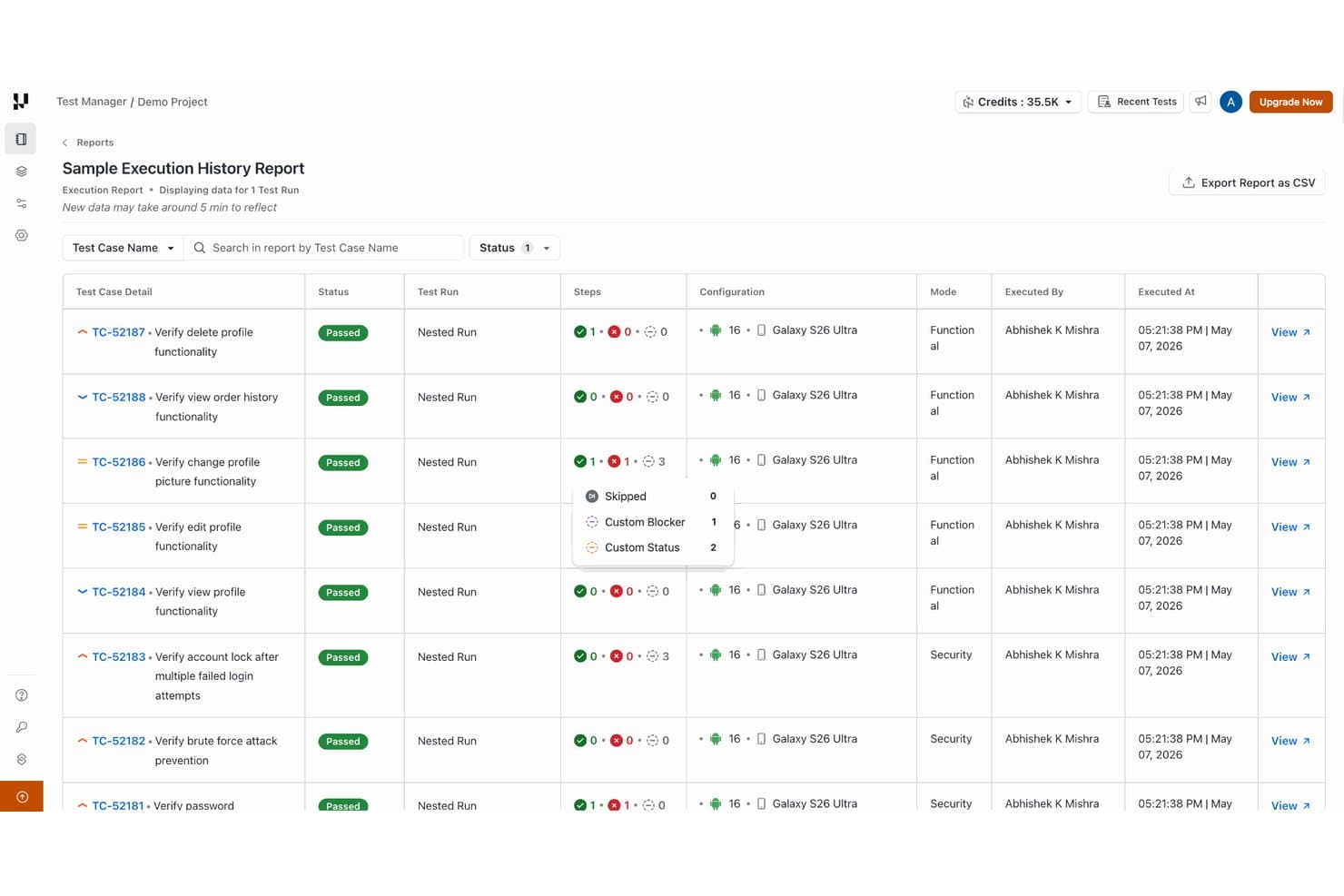
TestMu AI tracks test case execution history with pass/fail step details. TestMu AI is a visual regression testing tool that captures UI screenshots and compares them against approved baselines across web pages, mobile apps, Figma designs, and PDFs, with CI/CD pipeline integration and AI-driven diff analysis.
Who Is TestMu AI Best For?
TestMu AI's SmartUI is a good fit for QA engineers who need to catch visual regressions by comparing live UI against Figma designs or PDFs before shipping.
Why I Picked TestMu AI
I picked TestMu AI as one of the best because its SmartUI does something I haven't seen handled this cleanly elsewhere: it lets you upload a Figma frame or PDF and compare it directly against a live web page or mobile screen to catch design drift before a release ships. Visual AI then classifies the differences by type, layout shifts, color changes, missing elements, and ranks them by severity so you're not wading through noise to find what actually broke.
TestMu AI Key Features
- Mismatch threshold configuration: Set approval and rejection thresholds at the project, build, or screenshot level to auto-approve, auto-reject, or flag visual differences for manual review.
- Branch-aware baselines: Maintain separate baselines per Git branch and configure a baseline branch in Project Settings so non-baseline branches are always compared against it.
- Smart Ignore: Automatically separate moved content from genuine changes and skip dynamic regions like ads, timestamps, or user-specific content during visual comparisons.
- CI/CD pull-request checks: Report visual test results as pass/fail status checks directly on GitHub and GitLab pull requests, blocking deploys when regressions are detected.
TestMu AI Integrations
TestMu AI connects with GitHub Actions, GitLab CI, Jenkins, Azure DevOps, CircleCI, Bitbucket, Figma, Storybook, Jira, and Slack. It also provides APIs for PDF and mobile screenshot uploads, plus webhooks for commit- or build-triggered visual tests.
Pros and Cons
Pros:
- Reviewers value regression checks before releases
- Thresholds route visual diffs for review
- Compares live UI against Figma and PDFs
Cons:
- No documented functional test-case management
- Visual checks don't validate application behavior
Learn more about TestMu AI: Best with design-first modular test creation
- 14-day free trial
- Pricing upon request
Visit WebsiteCustomer Rating:4.8/5
ACCELQ offers API test automation with a natural language step editor, test suite dashboard, execution history, defect tracking, and requirement coverage metrics for regression testing. ACCELQ is an AI-powered codeless test automation platform that supports regression testing across web, mobile, API, desktop, and mainframe applications using natural language-based test design, autonomous element identification, and self-healing execution.
Who Is ACCELQ Best For?
ACCELQ is a strong fit for enterprise QA teams working across complex, integration-heavy systems where both technical testers and non-technical stakeholders need to contribute to test coverage.
Why I Picked ACCELQ
ACCELQ earns its spot on my shortlist because its Behavior Driven Scenario Designer lets me build test scenarios at the business-process level before any automation logic is written. That design-first approach means regression suites are built from reusable Actions and Scenarios, so when the UI changes, I update one module rather than dozens of scripts. The Change Management with Reconciliation feature then flags exactly which tests are affected by application changes, so nothing slips through undetected.
ACCELQ Key Features
- Codeless API automation: Automates REST, SOAP, and GraphQL APIs without code.
- Unified platform for web, mobile, and mainframe: Runs regression tests across multiple application types in a single workflow.
- Real device cloud integration: Connects to BrowserStack and Sauce Labs for cross-device and cross-browser test execution.
- Bidirectional Jira and Azure DevOps integration: Syncs test results, defects, and traceability directly with major ALM and project management tools.
ACCELQ Integrations
ACCELQ offers native integrations with Jenkins, Jira, ClickUp, Bamboo, TeamCity, Slack, and Microsoft Teams, and provides an API for custom integrations.
Pros and Cons
Pros:
- Unified automation for web, mobile, and API
- Self-healing for fast-changing application interfaces
- Behavior-driven scenario designer supports reusable tests
Cons:
- Learning curve for team adoption
- Advanced reporting lacks flaky test detection
Learn more about ACCELQ: Best for low-code test automation
- 14-day free trial + free plan available
- From $99/month (billed annually)
Visit WebsiteCustomer Rating:4.8/5
BugBug offers a low-code test automation tool, allowing users to create tests without the need for extensive coding knowledge. BugBug is a user-friendly and reliable test automation tool that offers a low-code solution for QA, developers, and product managers to ensure the quality of web apps and websites without repetitive manual testing. It allows users to create end-to-end tests in minutes.
BugBug's ability to generate stable selectors based on a project's configuration ensures that automated tests are less likely to break with UI changes. BugBug's capability to record complex interactions, including those across different tabs or iframes, is crucial for comprehensive regression testing of intricate web applications. Additionally, it allows for flexible test editing and the addition of assertions, facilitating the adaptation of tests as applications evolve. Its screenshot and screen-capturing features further aid in identifying UI changes and errors introduced by recent code modifications.
Integrations include GitHub, GitLab, Jira, Slack, Trello, Bitbucket, and Zapier. Pricing begins from $99/month with a free trial and free plan available.
Learn more about BugBug: Best for checklist-based manual test management
- Free trial available
- From $49/month (billed annually)
Visit WebsiteCustomer Rating:4.1/5
Testpad helps QA teams manage regression testing through reusable test scripts, clear pass/fail tracking, and instant visibility into test coverage across releases. Testpad is a manual test management tool designed for QA teams and software testers who want a flexible, checklist-driven approach to organizing and running regression tests without the complexity of traditional test case management systems.
Who Is Testpad Best For?
QA leads and software teams at startups or SMBs who want a straightforward way to manage and execute manual regression tests.
Why I Picked Testpad
I picked Testpad as one of the best because its checklist-based approach makes it easy for my team to organize and execute manual regression tests. I like that we can quickly create, update, and reuse test checklists for each release cycle. The ability to structure tests as simple, readable lists helps us catch regressions without getting bogged down in complex test case management.
Testpad Key Features
- Guest tester access: Invite external testers to participate without requiring them to create accounts.
- Real-time progress tracking: Monitor test execution status and results as they happen.
- Bulk test editing: Update multiple test items at once to save time during test maintenance.
- CSV import/export: Move test data in and out of Testpad for easier integration with other tools.
Testpad Integrations
Integrations include GitHub, NVIDIA, Bell, Digital Genius, Ideas2Executables, Legrand, Foxhole QA, TestLauncher, OpenROV, and Numed Healthcare. An API is also available for custom integrations.
Pros and Cons
Pros:
- Provides real-time progress tracking for test runs
- Offers CSV import and export for test data
- Enables live editing of tests during execution
Cons:
- Does not support test parameterization
- Limited reporting and analytics features
Learn more about Testpad: Best for expert-led regression testing
- Free demo available
- From 1¢/AI credit
Visit WebsiteCustomer Rating:4.9/5
QA Wolf's platform provides a dashboard where users can view bug reports, tests, and run history. QA Wolf is an automated testing platform designed for developers and QA teams. Unlike traditional tools, QA Wolf is a platform-enabled service that leverages a team of expert QA engineers to handle the creation, execution, and management of all your automated tests. This approach simplifies the testing process and consistently keeps your critical tests maintained and up-to-date, allowing your team to focus on building and improving applications while ensuring new updates in code do not produce any issues.
One of the unique features of QA Wolf that makes it ideal for regression testing is its provision of human-verified bug reports. This ensures that any identified issues are thoroughly vetted by QA experts, minimizing false positives and providing clear, actionable feedback. QA Wolf also offers unlimited test runs, allowing teams to run regression tests as often as needed without worrying about additional costs.
QA Wolf integrates with GitHub, CircleCI, GitLab, Travis CI, Vercel, and Slack. Pricing is available upon request with a free demo available.
Learn more about QA Wolf: Best suite of flexible and on-demand testing solutions
- Pricing upon request
Visit WebsiteCustomer Rating:4.6/5
Connect directly to your integrated platforms through the settings section of the tool Testlio is an automated regression testing tool that primarily provides managed application testing. The tool provides a robust suite of flexible and on-demand testing solutions such as end-to-end testing, functional testing and localization testing. Testlio also offers a support team and expert QA resources, allowing easy implementation within your team.
Testlio offers an abundance of features, including detail oriented test plans, which allow you to review the device information, tester information and test criteria. The tool also provides exploratory testing and livestream testing, allowing you and your team to test your applications in real-time, as well as review the bugs identified on the tool’s dashboard. Finally, Testlio allows you access to all devices within your system without the need to build labs.
Testlio provides integrations with project management tools such as Aana and Jira, as well as IDE’s such as Visual studio.
Testlio offers flexible customized pricing upon request.
Learn more about Testlio: Best for organizing your test cases in one visual editor
- Free trial available + free demo
- Pricing upon request
Visit WebsiteCustomer Rating:4.5/5
Use the test recorder to capture your manual tests executed within your application Testim Automate is an automated testing platform for fast authoring of AI-powered stable tests and tools to help you scale quality. The tool uses AI to identify and lock-in visual elements, allowing you to increase test stability of UI functional tests. Your tests can be extended with custom JavaScript that can run in or out of the browser.
Testim tests are recorded and then edited in its visual editor, allowing you to better organize your test cases. The tool offers AI-based locators that automatically lock-in elements, and test steps are discrete objects that can be configured, shared, grouped and parameterized, providing you and your team with the means to streamline your processes within your application lifecycle. Testim also helps keep tests clean by identifying duplicate test steps to be replaced by shared objects.
The cost of Testim begins at $1000 per month. The tool also offers a free version with up to 1000 test runs per month.
Learn more about Tricentis Testim: Best for CI/CD tool integration
- 14-day free trial + free demo available
- Pricing upon request
Visit WebsiteCustomer Rating:4.8/5
Reflect offers a no-code test automation interface for creating tests. Reflect is a regression testing platform that helps you automate end-to-end tests without writing any code. It’s built around AI prompts, so you can describe a test in plain English and have Reflect turn it into executable steps. I liked how quickly you can build and run regression suites without touching selectors or scripting frameworks.
I picked Reflect because it removes the complexity from regression testing. Instead of writing and maintaining brittle code, it generates tests by simply typing what you want to happen. Reflect also automatically handles UI changes—tests adapt when the app evolves, which means fewer false positives and less upkeep. I also appreciate the visual diffs and video recordings of test runs, which made debugging faster and clearer.
Reflect supports visual checks, cross-browser runs, parallel execution, and API+UI testing in the same flow. It integrates with CI/CD tools like GitHub, Jenkins, and Jira, lets you schedule tests, and notifies you of failures instantly. You can also use parameterized inputs and isolate test data to cover different scenarios.
Learn more about Reflect: Best to convert manual tests into automated tests
- Free plan + 14-day free trial + free demo available
- Pricing upon request
Visit WebsiteCustomer Rating:4.8/5
Manage your test cases from a high level dashboard within testRigor’s application testRigor is a regression testing tool that stands out when it comes to the new era of AI-based automation tools. The tool allows you to create tests in plain English, with elements being referenced from a human perspective. testRigor analyzes all possible parameters behind the scenes to use the most useful ones, which results in ultra-reliable tests.
testRigor allows you to dramatically decrease your test maintenance, by allowing you and your team to spend 95% less time on it on average. Instead, the tool allows you to seamlessly build new tests and increase test coverage. testRigor makes the process of converting existing manual test cases into automated tests very straightforward, and users can also define and customize their own wording if they desire.
The cost of testRigor starts at $300 per month and can be tailored to your specific needs. There is a free 14-day trial with no credit card information required upfront.
Learn more about testRigor:
Alte instrumente de testare a regresiei
Iată câteva opțiuni suplimentare de instrumente de testare a regresiei care nu au ajuns pe lista mea scurtă, dar merită totuși analizate:
- 11Katalon StudioBest full toolkit for complete test coverage
- 12New RelicBest for synthetic testing
- 13AutifyBest for AI-driven test maintenance
- 14IBM Rational Functional Tester (RFT)Best to simplify test virtualization & editing using screenshots
- 15SeleniumBest for developers testing UI performance and functionality
- 16Rainforest QABest UI-driven testing solution for regression & functional tests
- 17LeapworkBest to build processes visually for non-technical team members
- 18ArgosBest for testing visual elements
- 19WatirBest for executing tests on browsers
- 20Autify AximoBest for AI-driven automation
How I Evaluate Regression Testing Tools
I evaluate these tools in two layers: the baseline a tool must clear—automated execution, CI/CD triggers, suite management—and the differentiators that matter when you're scaling across environments.
Core Functionality (Table Stakes For This List)
When I'm selecting tools for my list, I rank each one on a scale from 0 (does not offer the functionality) to 5 (excels in this area) for each core functionality listed below. Then, I calculate the tool's total score into a percentage. Each tool needs to achieve a minimum total score of 65% to be considered for inclusion.
- Test Automation Execution: I look for scripted, codeless, or hybrid automation that lets teams run hundreds of regression tests on every build without manual intervention.
- Test Suite Organization & Reuse: A tool should let you group, tag, and version test suites so you can maintain separate regression sets for, say, checkout flows vs. API endpoints.
- CI/CD Pipeline Integration: I check whether the tool plugs into platforms like Jenkins, GitHub Actions, or GitLab CI with native triggers that kick off regression runs on each commit or merge.
- Cross-Environment Coverage: The tool needs to execute tests across browsers, operating systems, and devices—desktop Chrome and mobile Safari shouldn't require separate frameworks.
- Reporting & Failure Analysis: I evaluate how clearly the tool surfaces failures, including logs, screenshots, and historical trends that help you pinpoint whether a regression is new or flaky.
- Test Maintenance Features: Reusable components, shared object repositories, or self-healing locators matter here—especially when frequent UI changes would otherwise break half your suite.
Once I have a list of tools that meet this criteria, I consider what sets each platform apart.
Differentiating Factors (What Sets Vendors Apart)
Here's how I compare and contrast different vendors:
Standout Features
Risk-based test selection is a major differentiator. Tools that analyze code diffs to prioritize which tests to run can shrink a four-hour regression suite to just the cases that matter for a given commit. Visual regression testing is another feature I evaluate closely—it catches layout shifts and styling breaks that functional assertions miss entirely. AI-powered test generation is also worth considering, especially for teams scaling coverage quickly without the bandwidth to hand-author every new case.
Beyond Features
Scalability matters—I look at whether a tool can handle thousands of parallel test runs during peak release windows without queuing delays. Integration depth with your existing stack is just as important; a tool that connects to Jira, Git, and your test management platform saves hours of manual status syncing. I also evaluate licensing models closely, since pricing based on parallel executions vs. named users can dramatically shift total cost depending on your team's release cadence and size.
Cum să alegeți instrumentele de testare a regresiei
Este ușor să vă pierdeți în liste lungi de funcții și structuri complexe de prețuri. Pentru a vă ajuta să rămâneți concentrat în timp ce parcurgeți procesul unic de selectare a software-ului, iată o listă de verificare a factorilor de care trebuie să țineți cont:
| Factor | Aspecte de luat în considerare |
|---|---|
| FactorScalabilitate | Aspecte de luat în considerareInstrumentul se va dezvolta odată cu nevoile echipei dvs.? Luați în considerare dimensiunile viitoare ale proiectelor și numărul de utilizatori. Căutați instrumente care gestionează fără probleme încărcări mai mari. |
| FactorIntegrări | Aspecte de luat în considerareFuncționează cu instrumentele dvs. actuale? Verificați compatibilitatea cu fluxurile CI/CD și cu alte programe pe care le utilizați deja, pentru a evita întreruperile fluxului de lucru. |
| FactorPosibilități de personalizare | Aspecte de luat în considerarePuteți adapta instrumentul la procesele dvs.? Asigurați-vă că puteți modifica fluxurile de lucru și rapoartele pentru a corespunde cerințelor și preferințelor unice ale echipei dvs. |
| FactorUșurință în utilizare | Aspecte de luat în considerareEste ușor de utilizat pentru toți membrii echipei? Căutați interfețe intuitive și cerințe minime de instruire, astfel încât toată lumea să poată începe rapid să lucreze. |
| FactorImplementare și integrare inițială | Aspecte de luat în considerareCât de simplu este procesul de configurare? Evaluați timpul și resursele necesare pentru implementare și instruire. Căutați instrumente cu ghiduri clare și asistență. |
| FactorCost | Aspecte de luat în considerarePrețul se încadrează în bugetul dvs.? Comparați modelele de abonament și fiți atenți la taxele ascunse. Asigurați-vă că prețul corespunde valorii și funcțiilor oferite. |
| FactorMăsuri de securitate | Aspecte de luat în considerareCum vă protejează instrumentul datele? Verificați existența criptării, a controalelor de acces și a conformității cu standardele relevante pentru protejarea informațiilor sensibile. |
| FactorDisponibilitatea asistenței | Aspecte de luat în considerareEste disponibil ajutorul atunci când aveți nevoie? Luați în considerare programul de asistență al furnizorului, timpii de răspuns și resursele disponibile, precum asistența prin chat sau telefon. |
Ce sunt instrumentele de testare a regresiei?
Instrumentele de testare a regresiei sunt programe utilizate pentru automatizarea testării, cu scopul de a confirma că modificările recente ale codului nu au afectat negativ funcționalitățile existente. Aceste instrumente execută o serie de teste asupra unui program care funcționa anterior, după modificări precum actualizări sau remedieri de erori, pentru a se asigura că noile schimbări nu introduc erori noi sau regresii în sistemul existent.
Acestea asigură o acoperire completă a testelor, reducând riscul ca erorile să ajungă în versiunile lansate. Instrumentele de testare vizuală a regresiei sunt deosebit de eficiente în detectarea modificărilor interfeței și a problemelor de aspect.
Funcții
Atunci când selectați instrumente de testare a regresiei, urmăriți următoarele funcții esențiale:
- Automatizare: Automatizează cazurile de testare repetitive, economisind timp și reducând erorile manuale.
- Capacități de integrare: Se conectează la conductele CI/CD existente pentru a se integra perfect în fluxul de lucru al dezvoltării.
- Rapoarte personalizabile: Oferă informații detaliate despre rezultatele testelor, ajutând echipele să ia decizii informate.
- Testare pe mai multe browsere: Asigură funcționarea consecventă a software-ului în diferite browsere web și pe diferite dispozitive.
- Crearea testelor bazată pe inteligență artificială: Utilizează învățarea automată pentru a genera și optimiza eficient cazurile de testare.
- Colaborare în timp real: Permite membrilor echipei să lucreze împreună și să ofere feedback în timpul procesului de testare.
- Scalabilitate: Se adaptează la dimensiunea în creștere a proiectelor și la extinderea echipei fără a compromite performanța.
- Măsuri de securitate: Protejează datele sensibile prin criptare și controale de acces pentru a asigura conformitatea.
- Interfață ușor de utilizat: Oferă un design intuitiv care reduce la minimum perioada de învățare pentru utilizatorii noi.
- Resurse de instruire și asistență: Oferă acces la tutoriale, webinare și asistență pentru clienți, pentru a sprijini familiarizarea inițială și depanarea.
Beneficii
Implementarea instrumentelor de testare de regresie oferă mai multe beneficii pentru echipa și afacerea dumneavoastră. Iată câteva dintre avantajele de care vă puteți bucura:
- Economie de timp: Automatizarea accelerează procesul de testare, permițând echipei să se concentreze pe sarcini mai strategice.
- Calitate îmbunătățită a software-ului: Testarea regulată detectează erorile din timp, asigurând stabilitatea și fiabilitatea software-ului.
- Eficiență din punct de vedere al costurilor: Detectarea timpurie a problemelor reduce costul remedierilor ulterioare în ciclul de dezvoltare.
- Colaborare îmbunătățită: Funcțiile de colaborare în timp real permit membrilor echipei să partajeze rapid informații și feedback.
- Scalabilitate: Capacitatea de a gestiona proiecte mai mari și echipe în creștere fără efort suplimentar susține dezvoltarea afacerii.
- Precizie mai mare: Testele automatizate elimină erorile umane, oferind rezultate mai consecvente și mai fiabile.
- Securitatea datelor: Măsurile de securitate integrate protejează informațiile sensibile în timpul procesului de testare.
Costuri și prețuri
Selectarea instrumentelor de testare de regresie necesită înțelegerea diferitelor modele de preț și planuri disponibile. Costurile variază în funcție de funcții, dimensiunea echipei, suplimente și alți factori. Tabelul de mai jos sintetizează planurile comune, prețurile medii ale acestora și funcțiile tipice incluse în soluțiile de instrumente de testare de regresie:
Tabel comparativ al planurilor pentru instrumentele de testare de regresie
| Tipul planului | Preț mediu | Funcții comune |
|---|---|---|
| Tipul planuluiPlan gratuit | Preț mediu$0 | Funcții comuneAutomatizarea de bază a testelor, integrări limitate și asistență din partea comunității. |
| Tipul planuluiPlan personal | Preț mediu$5-$25/utilizator/lună | Funcții comuneAutomatizarea testelor, raportare de bază, integrări cu instrumente populare și asistență prin e-mail. |
| Tipul planuluiPlan pentru companii | Preț mediu$30-$75/utilizator/lună | Funcții comuneRaportare avansată, testare pe mai multe browsere, asistență prioritară și instrumente de colaborare. |
| Tipul planuluiPlan pentru întreprinderi | Preț mediu$100-$250/utilizator/lună | Funcții comuneFluxuri de lucru personalizabile, manager de cont dedicat, funcții de securitate îmbunătățite și capacități complete de integrare. |
Întrebări frecvente despre instrumentele de testare a regresiei
M-am gândit la câteva întrebări și răspunsuri de bază în timp ce scriam acest material, care i-ar putea ajuta pe cei aflați la început să se familiarizeze cu subiectul.
Instrumentele de testare a regresiei pot simula diferite medii de utilizare?
Da, instrumentele de testare a regresiei pot simula diverse medii de utilizare pentru a asigura funcționarea consecventă a aplicațiilor pe diferite platforme, browsere și dispozitive. Aceste instrumente pot imita diferite sisteme de operare, versiuni de browser, viteze ale rețelei și multe altele, pentru a valida comportamentul aplicației în condiții diverse.
Cum asigură instrumentele de testare a regresiei completitudinea acoperirii testelor?
Instrumentele de testare a regresiei asigură completitudinea acoperirii testelor oferind funcționalități care asociază testele cu cerințele, detectează părțile netestate ale aplicației și sugerează cazuri de testare suplimentare. Acestea includ adesea funcții de analiză și raportare care ajută la identificarea lacunelor de acoperire și la prioritizarea cazurilor de testare pe baza riscului și a impactului.
Cum gestionează instrumentele de testare a regresiei seturile mari de date de testare?
Instrumentele de testare a regresiei gestionează seturile mari de date de testare oferind funcții precum virtualizarea datelor, gestionarea datelor de testare și testarea bazată pe date. Acestea le permit testerilor să creeze, să importe și să gestioneze eficient datele de testare, asigurând faptul că testele sunt atât complete, cât și relevante pentru scenariile aplicației testate.
Care sunt tipurile de software pentru testarea regresiei?
Software-ul pentru testarea regresiei este esențial pentru a asigura faptul că modificările aduse codului nou nu afectează negativ funcționalitatea existentă a aplicațiilor software. Aceste instrumente există sub diverse forme, fiecare fiind concepută pentru a răspunde unor nevoi, medii și metodologii de testare diferite. Înțelegerea tipurilor de software pentru testarea regresiei poate ajuta echipele și organizațiile să selecteze cele mai potrivite instrumente pentru cerințele lor specifice.
Iată principalele tipuri de software pentru testarea regresiei:
Instrumente automatizate de testare a regresiei: Aceste instrumente automatizează executarea testelor de regresie, reducând semnificativ timpul și efortul necesare pentru testare. Instrumentele automatizate sunt ideale pentru proiectele cu baze de cod extinse sau care suferă modificări frecvente, asigurând o acoperire cuprinzătoare a testelor fără intervenție manuală.
Instrumente de gestionare a testelor: Deși nu sunt destinate exclusiv testării regresiei, instrumentele de gestionare a testelor ajută la organizarea și gestionarea cazurilor de testare, inclusiv a testelor de regresie. Acestea includ adesea funcții pentru planificarea, executarea și urmărirea progresului testelor, fiind valoroase pentru coordonarea eforturilor de testare a regresiei în cadrul unor procese mai ample de asigurare a calității.
Instrumente de integrare continuă (CI): Instrumentele CI se integrează cu software-ul pentru testarea regresiei pentru a rula automat testele ca parte a ciclului de viață al dezvoltării software. Această integrare este esențială pentru practicile Agile și DevOps, permițând echipelor să identifice și să remedieze rapid regresiile pe măsură ce codul nou este integrat.
Instrumente fără cod pentru testarea regresiei: Destinate echipelor cu experiență limitată în programare, instrumentele fără cod oferă o interfață ușor de utilizat pentru crearea și executarea testelor fără scrierea de cod. Aceste instrumente folosesc interacțiuni bazate pe interfața grafică cu utilizatorul, făcând testarea regresiei mai accesibilă membrilor netehnici ai echipei.
Instrumente pentru testarea regresiei performanței: Aceste instrumente se concentrează pe detectarea regresiilor care afectează performanța aplicației, precum timpii de încărcare și capacitatea de răspuns. Testarea regresiei performanței este esențială pentru aplicațiile în care experiența utilizatorului este afectată direct de viteză și eficiență.
Platforme de testare a regresiei bazate pe cloud: Platformele bazate pe cloud oferă flexibilitatea de a rula teste de regresie în diverse medii și pe numeroase dispozitive, fără a fi necesară o infrastructură fizică. Acest tip este deosebit de util pentru testarea aplicațiilor pe diferite sisteme de operare, browsere și dispozitive mobile.
Instrumente open source pentru testarea regresiei: Instrumentele open source oferă flexibilitatea personalizării și sunt adesea disponibile fără costuri. Deși pot necesita mai multă configurare și întreținere decât instrumentele comerciale, soluțiile open source sunt potrivite pentru echipele care dețin competențele tehnice necesare pentru a adapta instrumentele la nevoile lor specifice.
Instrumente pentru testarea pe mai multe browsere și platforme: Aceste instrumente asigură funcționarea conform așteptărilor a aplicațiilor pe mai multe browsere și platforme, ceea ce este esențial pentru aplicațiile web și mobile. Ele permit echipelor să automatizeze testele pe diverse combinații de browsere și sisteme de operare, asigurând compatibilitatea și o experiență de utilizare consecventă.
Fiecare tip de software pentru testarea regresiei are propriul set de funcții, avantaje și limitări. Alegerea instrumentului potrivit depinde de mai mulți factori, inclusiv dimensiunea și complexitatea proiectului, competențele tehnice ale echipei de asigurare a calității și obiectivele specifice ale procesului de testare a regresiei.
Evaluând cu atenție aceste aspecte, echipele pot alege cel mai potrivit software pentru testarea regresiei, pentru a menține versiuni software de înaltă calitate.
Cum se integrează instrumentele de testare a regresiei cu fluxurile de lucru CI/CD?
Aceste instrumente automatizează procesul de testare și se integrează perfect cu fluxurile de lucru CI/CD, declanșând automat testele la fiecare trimitere de cod. Astfel se asigură obținerea rapidă a feedbackului și se contribuie la menținerea calității continue a software-ului.