

Cele mai bune instrumente de testare BDD ajută echipele să reducă diferența dintre dezvoltarea tehnică și obiectivele de afaceri, transformând cerințele utilizatorilor în scenarii clare și testabile. Acestea se asigură că toată lumea, de la dezvoltatori la părțile interesate fără cunoștințe tehnice, înțelege ce se construiește și de ce, reducând refacerea și confuzia în timpul dezvoltării.
Multe echipe caută aceste instrumente după ce s-au confruntat cu criterii de acceptare neclare, discuții repetate în timpul evaluărilor sprinturilor sau teste care nu reflectă nevoile reale ale utilizatorilor. Fără un cadru comun pentru colaborare, este ușor ca proiectele să se abată de la obiective și să livreze rezultate care nu corespund așteptărilor.
Am lucrat cu echipe de inginerie și de produs care au implementat cadre BDD în medii agile, testând modul în care diferite instrumente gestionează automatizarea, integrarea și raportarea în condiții reale de proiect. Această experiență a arătat care platforme fac testarea bazată pe comportament practică și eficientă, nu doar teoretică.
În acest ghid, vei vedea care instrumente de testare BDD facilitează definirea unor scenarii fiabile, îmbunătățesc comunicarea între echipe și mențin un proces de testare consecvent, de la dezvoltare până la livrare.
Why Trust Our Software Recommendations
6,700+
Reviews
20
Industry experts
16+
Evaluation factors
14
Years
Our team has been testing and reviewing software since 2012. As tech leaders ourselves, we know how difficult—and important—it is to choose the right software.
For this guide, we evaluated tools using hands-on testing and independent research, scoring tools using our selection criteria.
Our reviews reflect our human editorial judgment, not a sales pitch.
Expert reviewers:
- Paulo Gardini MiguelTech Director
 Tim FisherVP of AI
 Gabriel RosasTech Lead & Software Architect
 Christhian GruhnTech Lead & Platform Architect

Tabel comparativ al instrumentelor de testare BDD
Acest tabel comparativ rezumă detaliile privind prețurile pentru selecția mea de top de instrumente de testare BDD.
Sorted by: Default
| Tool | Starting Price | Website | |
|---|---|---|---|
Best for advanced modular codeless automation | 4.8 out of 5 | Pricing upon request 14-day free trial | Website |
Best for Gherkin step automation | 4.3 out of 5 | Pricing upon request Free trial available | Website |
Best for enterprise test management | 4.3 out of 5 | Pricing upon request 14-day free trial + Free demo | Website |
Best for Jira integration | 4.2 out of 5 | Pricing upon request 30-day free trial | Website |
Best for cross-language support | 4.2 out of 5 | Pricing upon request Free demo available | Website |
Best for behavior-driven development | Not rated | $4/user/month Free plan available | Website |
Best for early test automation | Not rated | Pricing upon request Free demo available | Website |
Best for dependency injection | Not rated | Free To Use | Website |
Best for .NET environments | Not rated | Free To Use | Website |
Best for wiki-style testing | Not rated | Free To Use | Website |


Recenzii ale celor mai bune instrumente de testare BDD
Mai jos sunt rezumatele mele detaliate ale celor mai bune instrumente de testare BDD care au ajuns pe lista mea scurtă. Recenziile mele oferă o privire detaliată asupra caracteristicilor principale, avantajelor și dezavantajelor, integrărilor și cazurilor de utilizare ideale ale fiecărui instrument, pentru a te ajuta să îl găsești pe cel mai potrivit pentru tine.
 Best for advanced modular codeless automation
- 14-day free trial
- Pricing upon request
Visit WebsiteCustomer Rating:4.8/5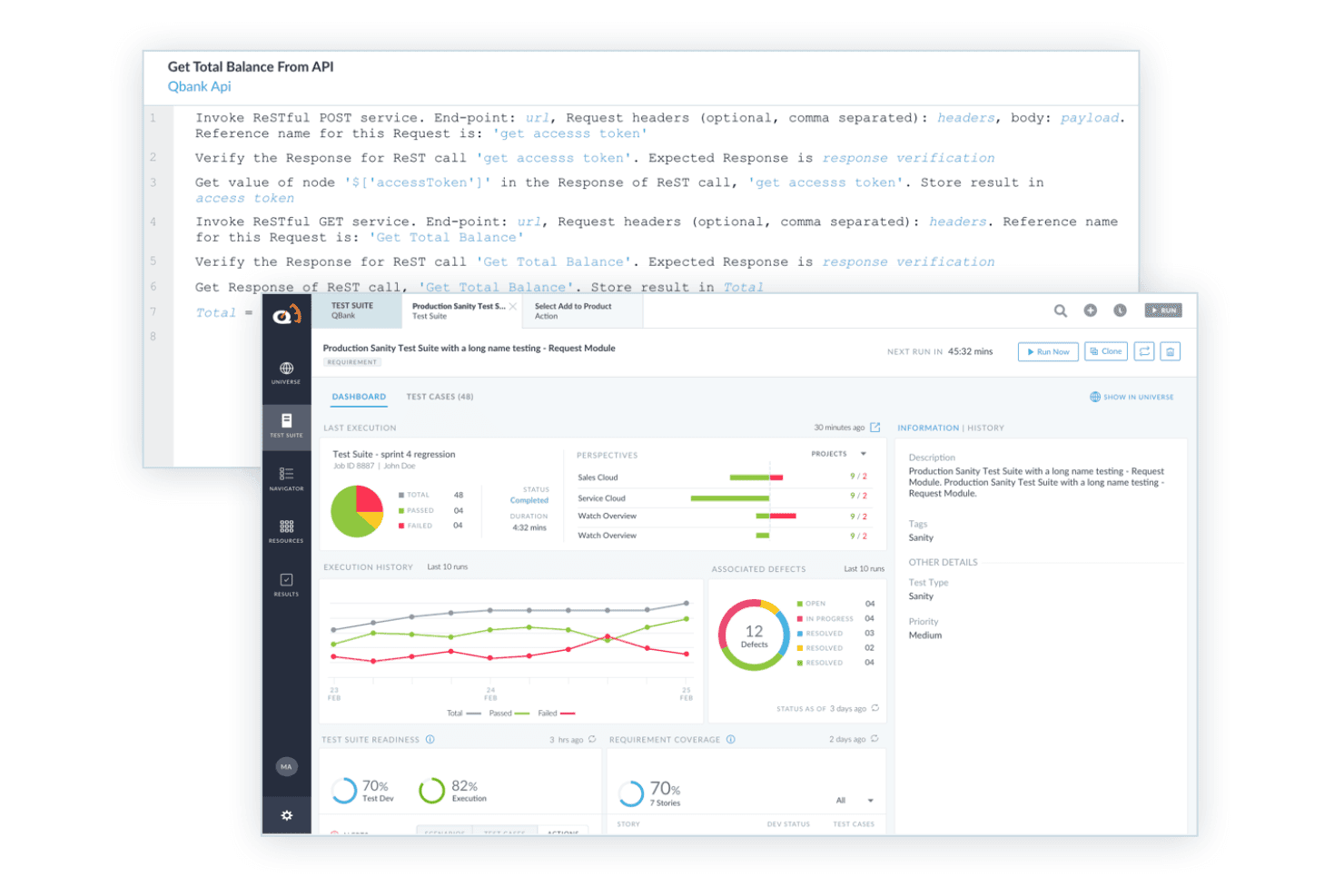
ACCELQ supports BDD testing with readable API test steps, automated execution, and test suite reporting. ACCELQ is a codeless test automation platform that supports behavior-driven scenario design across web, API, mobile, desktop, and packaged applications without requiring scripting at any layer.
Who Is ACCELQ Best For?
ACCELQ suits enterprise QA teams that need to scale test automation across multiple application types without depending on developers to write and maintain test scripts.
Why I Picked ACCELQ
ACCELQ earns its spot on my shortlist because its Behavior Driven Scenario Designer lets QA teams author Given-When-Then scenarios in plain English without touching a line of code. What I particularly like is the modularity: reusable action libraries mean that when your application changes, you update one component and the fix propagates across every test that references it. I've seen this approach cut test maintenance time significantly on large regression suites spanning web, API, and mobile within a single execution environment.
ACCELQ Key Features
- Cross-platform automation: Automates tests across web, API, mobile, desktop, and packaged applications from a single platform.
- API and backend testing: Supports testing for REST, SOAP, GraphQL, database, middleware, and ETL integrations.
- Jira and CI/CD integrations: Connects with Jira, Jenkins, Azure DevOps, and other common CI tools for end-to-end workflow alignment.
- Role-based collaboration: Allows business users, testers, and developers to contribute to scenario creation and review with role-specific permissions.
ACCELQ Integrations
ACCELQ offers native integrations with Jenkins, Jira, ClickUp, Bamboo, TeamCity, Slack, and Microsoft Teams, and provides an API for custom integrations.
Pros and Cons
Pros:
- Self-healing test elements reduce maintenance effort
- Reusable action libraries support modular test design
- Allows codeless BDD automation for complex apps
Cons:
- Scenario dashboards can become cluttered at scale
- Lacks native Gherkin feature file authoring
Learn more about ACCELQ: Best for Gherkin step automation
- Free trial available
- Pricing upon request
Visit WebsiteCustomer Rating:4.3/5
Squish supports Behavior Driven Development (BDD), allowing tests to be written in human-readable language. Squish is on my list for how directly it supports step-level BDD automation with Gherkin, which most test automation tools still don’t get right. When teams need to bridge readable, business-driven scenarios with actual UI automation—especially for cross-platform desktop, mobile, or embedded systems—I've found Squish is a good solution.
What I like is how you match natural-language Gherkin steps with GUI interactions, making test case reuse and versioning much less painful as UI evolves.
Squish’s Best For
- Teams who need automated Gherkin-based UI and functional testing
- Projects covering desktop, mobile, and embedded application interfaces
Squish’s Not Great For
- Users who want web-first or API-only BDD automation
- Teams without time for test maintenance or initial setup
What sets Squish apart
Squish takes a direct approach for teams that want to automate BDD tests in Gherkin without bolting it onto another tool. Unlike classic scripting tools or web-first frameworks like Cypress, you map natural-language steps directly onto interactive, full-stack UI tests across desktop, mobile, and embedded devices. This works great when you need business-readable test cases that actually run against real applications.
Tradeoffs with Squish
Squish optimizes for UI and step-level automation, so you lose the speed and simplicity of tools designed just for headless web or API testing. That added capability means extra setup and maintenance, especially when apps or UIs change frequently.
Pros and Cons
Pros:
- Works across a wide range of platforms
- Effective BDD integration with automatic step mapping
- Supports many scripting languages like Python and JavaScript
Cons:
- May take time to learn Squish's advanced features
- Automated tests are not always easy to create
Learn more about Squish: Best for enterprise test management
- 14-day free trial + Free demo
- Pricing upon request
Visit WebsiteCustomer Rating:4.3/5
Tricentis qTest provides more than 60 out-of-the-box metrics ready to be utilized, along with drag-and-drop capabilities for creating custom dashboards. Tricentis qTest makes the cut for enterprise teams that need BDD support integrated right into their test management process. I rely on it when teams have to coordinate test case design, execution, and traceability at scale, especially with complex scenarios mapped in Gherkin. What I appreciate most is how well qTest centralizes requirements, BDD scenarios, and automation across large QA organizations—giving everyone a single source of truth.
Tricentis qTest’s Best For
- Large QA teams managing enterprise BDD and test traceability
- Organizations needing centralized test management and automation at scale
Tricentis qTest’s Not Great For
- Small teams wanting simple or lightweight BDD tools
- Groups without the need for advanced enterprise features
What sets Tricentis qTest apart
Tricentis qTest is built for organizations where test management, BDD, and automation need to live in one centralized space. Unlike Jira, which adds testing through plugins, qTest expects full-scale QA teams to manage requirements, BDD scenarios, and test execution together. I see it working best when you need traceability between requirements, tests, and results, especially in regulated or high-complexity environments.
Tradeoffs with Tricentis qTest
qTest optimizes for scale and centralized governance, so you end up trading off speed and simplicity. Smaller teams without heavy compliance needs usually find the overhead unnecessary.
Pros and Cons
Pros:
- Enhances collaboration among teams
- Strong analytics features
- Supports various methodologies
Cons:
- Some integrations need manual setup
- Requires training for optimal use
Learn more about Tricentis qTest:

AssertThat offers a comprehensive view of your automation BDD test scenarios so you can easily monitor performance metrics at a glance. AssertThat earns a spot on my list for how directly it brings BDD testing into Jira environments. If you're working closely with stakeholders who live in Jira, AssertThat is the first tool I suggest for syncing Gherkin scripts and results right into Epics and Stories.
What sets it apart for me is the way you can manage cucumber tests, map scenarios, and track outcomes without leaving your core Jira workflow. This makes it much easier for teams to keep test management aligned with delivery work.
AssertThat's Best For
- Jira-based teams managing BDD with Gherkin and cucumber
- Organizations keeping test management and project tracking together
AssertThat's Not Great For
- Teams not using Jira as their primary platform
- Projects needing advanced visual test reporting or analytics
What sets AssertThat apart
AssertThat treats BDD test management as a native part of Jira, not an add-on. You write and manage Gherkin feature files alongside your Jira issues so testers, developers, and non-technical stakeholders work side by side, using the platform they already rely on. Unlike standalone tools like SpecFlow, AssertThat makes test documentation and traceability part of your Jira workflow. This works well if you need your BDD assets tied right into your sprint and issue tracking.
Tradeoffs with AssertThat
AssertThat optimizes for Jira-first teams, but you lose out on richer test analytics or flexible reporting that dedicated BDD platforms can offer. If you want deep data or cross-project test visibility, you’ll probably feel boxed in.
Pros and Cons
Pros:
- Real-time reporting features
- Supports BDD syntax
- Integrates well with Jira
Cons:
- Limited support outside Jira
- Limited standalone features
Learn more about AssertThat: Best for cross-language support
- Free demo available
- Pricing upon request
Visit WebsiteCustomer Rating:4.2/5
Cucumber plugin for Java IDE Cucumber is on my shortlist because it supports teams writing BDD scenarios in over 30 programming languages, making it a solid pick for projects that aren't locked to a single stack. When you need consistent BDD practices across language boundaries or mixed environments, this tool adapts easily. I appreciate the open, readable Gherkin syntax and how it keeps both technical and non-technical folks aligned.
Cucumber’s Best For
- Teams using multiple programming languages in BDD workflows
- Cross-functional groups needing plain-language scenario definitions
Cucumber’s Not Great For
- Projects limited to one tightly integrated language stack
- Teams that dislike maintaining text-based feature files
What sets Cucumber apart
Cucumber expects you to drive development through conversations and shared understanding, not just written specs. I see it lean hardest into collaboration between technical and non-technical folks, much more than classic tools like Jira or even SpecFlow. Instead of embedding requirements into ticket fields or code comments, you write executable scenarios in Gherkin that live with your codebase. This works best when you want understanding and tests to stay aligned as your product evolves.
Tradeoffs with Cucumber
Cucumber optimizes for shared, readable scenarios, but you give up some speed and simplicity compared to tools that just generate tests from code. In practice, you spend more time writing and maintaining plain-language documentation.
Pros and Cons
Pros:
- Adapts to various environments
- Bridges technical and non-technical teams
- Supports multiple programming languages
Cons:
- Limited advanced features
- May require additional configuration
Learn more about Cucumber:

JDave has earned its place in my BDD testing shortlist because it applies a specification-by-example approach in Java that stays readable even for non-developers. I find its context-based structuring lets teams express behavior, outcomes, and specifications in plain language, which smooths collaboration with stakeholders.
What I appreciate most is how clear the separation is between context, event, and outcome when writing specs in JDave. This works especially well on teams aiming for consensus on requirements before any code gets shipped.
JDave’s Best For
- Java teams practicing behavior-driven development and specification by example
- Developers collaborating closely with domain experts and non-developers
JDave’s Not Great For
- Teams that want modern UI or rich web interfaces
- Organizations using non-Java (Python, .NET, JS) tech stacks
What sets JDave apart
JDave stands out by steering you toward describing software behavior in plain language with a structure that maps directly to real-world examples. Compared to tools like Cucumber or SpecFlow, JDave embeds behavior-driven principles directly into the Java language instead of relying on Gherkin syntax or external configuration. You tend to work closely with domain experts and keep technical detail out of the conversation until it’s time to implement.
Tradeoffs with JDave
JDave optimizes for Java-centric, behavior-focused specs, but you give up vendor support, modern UI, and polish. In practice, teams that want graphical tools or support for non-Java stacks won’t find what they need here.
Pros and Cons
Pros:
- Supports narrative-style tests
- Enhances collaboration with stakeholders
- Focuses on behavior-driven specifications
Cons:
- Requires understanding of BDD principles
- Limited to Java environments
Learn more about JDave:

TestLeft UI highlighting object in object tree panel TestLeft lands on my shortlist because it integrates BDD into developer workflows right from the start, so you can automate tests as code is written. I recommend it when you want tests to be scriptable inside Visual Studio or JetBrains IDEs, letting teams use C# or Java for both steps and automation.
What stands out to me is how TestLeft lets you trigger and manage BDD scenarios directly in your CI pipeline. I like that you can keep automation efforts in sync with rapid iteration, which makes it especially useful for adoption early in the development cycle.
TestLeft’s Best For
- Developers who want code-first BDD test automation
- Teams integrating automated BDD into their CI pipelines
TestLeft’s Not Great For
- Non-developers who need no-code BDD tools
- Organizations seeking mature, out-of-the-box test reporting
What sets TestLeft apart
TestLeft expects developers to keep automated BDD tests close to the codebase, integrating right into IDEs like Visual Studio and JetBrains. This design keeps the automation process aligned with everyday development work. Instead of managing BDD in separate tools like Cucumber or SpecFlow, I notice TestLeft is best when you want to run and maintain your tests directly where you write code.
Tradeoffs with TestLeft
TestLeft optimizes for code-driven automation, but that means testers who prefer visual tools or need extensive built-in reporting often feel limited.
Pros and Cons
Pros:
- Early automation integration
- Generates scripts in various languages
- Supports parallel test execution
Cons:
- Limited support for non-IDE environments
- Requires knowledge of IDEs
Learn more about TestLeft:

BeanSpec is a java based testing solution that is used for specifiying, checking and summarizing the behaviour of a component in a declarative, narrative style. BeanSpec is on my list for its approach to dependency injection and how it aids in constructing reliable test scenarios for BDD. Instead of hardcoding dependencies, you can inject mocks and stubs easily at runtime, which I’ve found especially useful for isolating test cases. When testing it, I appreciated the type-safe parameter resolution and how much it speeds up setup for complex object graphs in automated behavior-driven tests.
BeanSpec’s Best For
- Developers automating dependency injection in BDD test suites
- Teams that need fine-grained control over test object setup
BeanSpec’s Not Great For
- Users needing end-to-end BDD frameworks out of the box
- QA teams that avoid custom dependency injection or JVM-based tools
What sets BeanSpec apart
BeanSpec is designed for developers who want direct control over how dependencies are injected during testing. It skips the bigger frameworks you see with tools like Spring or Guice and instead gives you granular visibility into argument resolution and object wiring. In practice, I find it works best when you want to set up tight test cases for BDD and need to swap real implementations for mocks on the fly. Unlike heavyweight dependency injection tools, BeanSpec expects you to stay close to the code and adjust your dependencies per scenario without much extra setup.
Tradeoffs with BeanSpec
BeanSpec optimizes for manual, flexible injection, but you give up integrated step definitions and test management. You’ll need to bring another BDD runner and coordinate tooling yourself.
Pros and Cons
Pros:
- Supports custom bean scopes
- Reduces boilerplate code
- Straightforward dependency injection
Cons:
- Lacks extensive documentation
- Limited to Java environments
Learn more about BeanSpec:

SpecFlow test result with breakdown of individual scenario execution SpecFlow is on this list because it's built for teams working in .NET environments who want solid BDD support right in their workflow. I rely on it when I need to automate acceptance tests using Gherkin with native C# integrations—setup feels natural if you're already in the Microsoft stack.
What stands out for me is the feature-rich Visual Studio integration and living documentation support that helps teams keep scenarios understandable and synchronized with code.
SpecFlow’s Best For
- .NET development teams wanting BDD with Gherkin syntax
- Organizations using Visual Studio for test automation
SpecFlow’s Not Great For
- JavaScript or Python-based automation projects
- Teams needing built-in cross-platform or browser support
What sets SpecFlow apart
SpecFlow stands out because it’s designed for .NET teams who want to make BDD scenarios a seamless part of their workflow. Unlike Cucumber, which tends to feel more natural in Ruby or JavaScript stacks, SpecFlow expects you to work inside Visual Studio and take advantage of familiar C# tooling. In practice, this works best when you want your BDD process to fit inside established .NET development habits without extra translation between frameworks or languages.
Tradeoffs with SpecFlow
SpecFlow optimizes for deep .NET and Visual Studio integration, but you lose flexibility on language choice and broader cross-platform browser automation. If you move away from C# or work across stacks, you’ll run into friction.
Pros and Cons
Pros:
- Seamless Visual Studio experience
- Aligns technical and non-technical teams
- Ideal for .NET environments
Cons:
- Not suitable for non-.NET projects
- Limited to .NET framework
Learn more about SpecFLow:

FitNesse plugin working with IntelliJ FitNesse makes my list because it’s rare to see a tool that merges documentation and test case development so naturally. It's great for writing acceptance criteria in wikis and turning those into runnable tests without leaving that workflow.
I appreciate how you can collaborate on test specs right in the browser, and then execute those wiki pages as living BDD tests. For cross-functional teams that want to keep business-readable specs and automated tests together, this is a strong option.
FitNesse’s Best For
- Teams writing executable specs alongside documentation in wikis
- QA and business analysts who want readable, shared BDD tests
FitNesse’s Not Great For
- Users needing modern IDE integrations or fast UI feedback
- Teams that want highly visual workflow or test management
What sets FitNesse apart
FitNesse approaches BDD by making documentation and test specs live together in a browser-based wiki, rather than keeping requirements in tickets like Jira or user stories outside your test suite. This works well for teams who already use wikis to write specs and want to connect those directly to automated, runnable tests for greater alignment.
You interact through a shared wiki instead of an IDE, which supports more collaboration between testers and business users.
Tradeoffs with FitNesse
FitNesse optimizes for collaboration and transparency, but you lose out on modern workflow features and faster feedback that you’d expect from test tools built into current IDEs. This can slow some teams down when tests or codebases get large.
Pros and Cons
Pros:
- Directly reflects business requirements
- Supports acceptance testing
- Integrates documentation with tests
Cons:
- Lacks advanced testing features
- Not ideal for complex projects
Learn more about FitNesse:
Alte instrumente de testare BDD
Iată câteva opțiuni suplimentare de instrumente de testare BDD care nu au ajuns pe lista mea scurtă, dar care merită totuși verificate:
- 11JBehaveBest for Java developers
- 12ConcordionBest for specification by example
- 13testRigorBest for no-code test automation
- 14Zephyr ScaleBest for test management in Jira
Related Reviews
How I Evaluate BDD Testing Tools
I evaluate every tool across two layers: the baseline BDD capabilities (Gherkin support, step binding, CI integration) a team needs to ship, and the differentiators that determine fit.
Core Functionality (Table Stakes For This List)
When I'm selecting tools for my list, I rank each one on a scale from 0 (does not offer the functionality) to 5 (excels in this area) for each core functionality listed below. Then, I calculate the tool's total score into a percentage. Each tool needs to achieve a minimum total score of 65% to be considered for inclusion.
- Gherkin/Natural Language Syntax: I check whether the tool supports full Gherkin constructs like Scenario Outlines, data tables, and tags—not just basic Given-When-Then scaffolding.
- Step Definition Binding: Each tool's approach to mapping plain-language steps to executable code matters, so I evaluate parameterization, regex support, and reuse across feature files.
- Test Automation Execution: I look for reliable execution across application types—web, API, and mobile—and whether the tool supports parallel runs to keep large BDD suites practical.
- CI/CD Pipeline Integration: The tool should plug into pipelines like Jenkins, GitHub Actions, or GitLab CI through native plugins or well-documented CLI commands.
- Living Documentation & Reporting: Good BDD tools turn test results into stakeholder-ready documentation, so I evaluate report quality, feature traceability, and historical trend visibility.
- Feature File Collaboration: I look at how the tool supports shared authoring—whether through a web editor for product owners or Git-synced workflows for developer-QA handoffs.
Once I have a list of tools that meet this criteria, I consider what sets each platform apart.
Differentiating Factors (What Sets Vendors Apart)
Here's how I compare and contrast different vendors:
Standout Features
Requirements traceability is a big one—I look for tools that link Gherkin scenarios directly to Jira or Azure DevOps stories so test outcomes map back to acceptance criteria. Self-healing locators also save teams real time; when a front-end element changes, the tool adapts instead of failing the whole suite. I also evaluate AI-assisted scenario authoring, where a tool suggests or generates Gherkin steps from user stories, which speeds up feature file creation for large backlogs.
Beyond Features
Language and framework fit is the first thing I check—a tool built around Java and Cucumber JVM won't suit a team writing TypeScript with Playwright. Pricing model matters too, especially the difference between open-source frameworks and commercial platforms that charge per user or per parallel execution. I also evaluate how well each tool connects to the broader DevOps stack, from Jira and TestRail for test management to Slack and ReportPortal for visibility into results across the team.
Cum să alegi instrumentele de testare BDD
Este ușor să te pierzi în liste lungi de caracteristici și structuri complexe de prețuri. Pentru a te ajuta să rămâi concentrat în timp ce parcurgi procesul tău unic de selecție a software-ului, iată o listă de verificare a factorilor de care trebuie să ții cont:
| Factor | Ce trebuie avut în vedere |
| Scalabilitate | Asigură-te că instrumentul poate crește odată cu echipa ta și poate gestiona eficient volume tot mai mari de teste. |
| Integrări | Verifică dacă se integrează fără probleme cu instrumentele existente, cum ar fi fluxurile CI/CD și sistemele de control al versiunilor. |
| Posibilități de personalizare | Caută funcții care îți permit să adaptezi instrumentul la fluxurile tale de lucru și la nevoile specifice de testare. |
| Ușurință în utilizare | Alege un instrument cu o interfață intuitivă, care minimizează timpul de învățare pentru echipa ta. |
| Buget | Evaluează costul total de deținere, inclusiv eventualele taxe ascunse, pentru a te asigura că se încadrează în bugetul tău. |
| Măsuri de securitate | Asigură-te că instrumentul respectă standardele din domeniul tău și îți protejează datele. |
| Asistență | Ține cont de disponibilitatea și calitatea serviciului de asistență pentru clienți și a resurselor comunității. |
| Documentație | Caută o documentație completă și clară, care să te ajute la configurare și depanare. |
Tendințe în instrumentele de testare BDD
În cercetarea mea, am consultat nenumărate actualizări de produse, comunicate de presă și jurnale de lansare de la diferiți furnizori de instrumente de testare BDD. Iată câteva dintre tendințele emergente pe care le urmăresc:
- Crearea testelor cu ajutorul inteligenței artificiale: Tot mai multe instrumente folosesc inteligența artificială pentru a genera automat cazuri de testare pe baza poveștilor utilizatorilor. Acest lucru economisește timp pentru dezvoltatori și asigură o acoperire cuprinzătoare a testelor. Furnizori precum testRigor conduc această tendință prin integrarea creării testelor bazate pe inteligență artificială în platformele lor.
- Colaborare în timp real: Instrumentele își îmbunătățesc funcțiile care permit echipelor să colaboreze în timp real, asigurând alinierea tuturor părților interesate. Acest lucru este deosebit de util pentru echipele distribuite care lucrează la proiecte complexe.
- Capacități îmbunătățite de raportare: Există o cerere tot mai mare pentru funcții detaliate de analiză și raportare, care să ofere informații despre rezultatele testelor și starea proiectului. Furnizorii adaugă tablouri de bord personalizabile pentru a ajuta echipele să vizualizeze eficient datele.
- Dezvoltare bazată pe comportament pentru persoane care nu sunt dezvoltatori: Tot mai multe instrumente se concentrează pe facilitarea accesului persoanelor care nu sunt dezvoltatori la BDD, prin simplificarea sintaxei și oferirea unor interfețe intuitive. Această tendință contribuie la reducerea diferențelor dintre membrii tehnici și non-tehnici ai echipei.
- Accent pe testarea securității: Pe măsură ce securitatea devine o prioritate majoră, instrumentele BDD încep să includă funcții de testare a securității pentru a identifica vulnerabilitățile din timp în ciclul de viață al dezvoltării software. Această tendință câștigă teren, în special în industriile cu cerințe stricte de conformitate.
Ce sunt instrumentele de testare BDD?
Instrumentele de testare BDD sunt aplicații care ajută echipele să scrie și să automatizeze teste folosind descrieri în limbaj obișnuit despre modul în care ar trebui să se comporte software-ul. Dezvoltatorii, testerii și analiștii de afaceri folosesc aceste instrumente pentru a crea o înțelegere comună a cerințelor și pentru a confirma că funcțiile se comportă conform așteptărilor.
Scrierea scenariilor, integrarea automatizării și funcțiile de raportare contribuie la colaborare, acuratețe și obținerea mai rapidă a feedbackului în timpul dezvoltării. În general, instrumentele de testare BDD facilitează conectarea obiectivelor de afaceri cu implementarea tehnică și menținerea unei calități constante a software-ului.
Funcțiile instrumentelor de testare BDD
Atunci când selectați instrumente de testare BDD, urmăriți următoarele funcții esențiale:
- Compatibilitate cu sintaxa Gherkin: Permite echipelor să scrie teste în limbaj obișnuit, astfel încât acestea să fie ușor de înțeles de toate părțile interesate.
- Crearea testelor cu ajutorul inteligenței artificiale: Generează automat cazuri de testare pe baza poveștilor utilizatorilor, economisind timp și asigurând o acoperire cuprinzătoare.
- Colaborare în timp real: Permite echipelor să lucreze simultan, asigurând alinierea și comunicarea eficientă.
- Capacități îmbunătățite de raportare: Oferă analize detaliate și tablouri de bord pentru vizualizarea rezultatelor testelor și a stării proiectului.
- Compatibilitate cu mai multe limbaje: Oferă flexibilitate prin acceptarea mai multor limbaje de programare, adaptându-se echipelor de dezvoltare diverse.
- Documentație actualizată continuu: Menține documentația la zi cu cele mai recente teste, asigurând accesul tuturor membrilor echipei la informații actuale.
- Funcții de testare a securității: Identifică vulnerabilitățile din timp în procesul de dezvoltare, aspect important pentru industriile cu cerințe de conformitate.
- Tablouri de bord personalizabile: Permite echipelor să adapteze rapoartele și analizele la nevoile specifice, contribuind la luarea unor decizii mai bune.
- Integrare cu instrumentele CI/CD: Asigură rularea automată a testelor în fluxul de dezvoltare, sporind eficiența.
- Specificații bazate pe comportament: Ajută la alinierea dezvoltării cu nevoile utilizatorilor, concentrându-se pe principiile dezvoltării bazate pe comportament.
Beneficiile instrumentelor de testare BDD
Implementarea instrumentelor de testare BDD oferă mai multe beneficii pentru echipa și afacerea dumneavoastră. Iată câteva dintre acestea:
- Colaborare îmbunătățită: Prin utilizarea sintaxei Gherkin, aceste instrumente facilitează înțelegerea și contribuția la teste atât pentru membrii tehnici, cât și pentru cei non-tehnici ai echipei.
- Crearea mai rapidă a testelor: Funcțiile de creare a testelor cu ajutorul inteligenței artificiale economisesc timp prin generarea automată a cazurilor de testare, permițând echipei să se concentreze asupra dezvoltării.
- Aliniere mai bună: Funcțiile de colaborare în timp real asigură că toate părțile interesate sunt pe aceeași lungime de undă, reducând neînțelegerile și erorile.
- O perspectivă mai amplă: Capacitățile îmbunătățite de raportare oferă analize și tablouri de bord valoroase, ajutând echipa să ia decizii informate.
- Securitate îmbunătățită: Funcțiile de testare a securității identifică din timp vulnerabilitățile, ceea ce este esențial pentru menținerea conformității și protejarea afacerii.
- Documentație actualizată: Documentația actualizată continuu informează toți membrii echipei cu privire la cele mai recente actualizări ale testelor, asigurând accesul tuturor la informații actuale.
- Dezvoltare flexibilă: Compatibilitatea cu mai multe limbaje permite echipei să lucreze în limbajele de programare preferate, adaptându-se unor seturi diverse de competențe.
Costurile și prețurile instrumentelor de testare BDD
Selectarea instrumentelor de testare BDD necesită înțelegerea diferitelor modele și planuri de tarifare disponibile. Costurile variază în funcție de funcții, dimensiunea echipei, suplimente și alți factori. Tabelul de mai jos rezumă planurile comune, prețurile medii ale acestora și funcțiile incluse de obicei în soluțiile cu instrumente de testare BDD:
Tabel comparativ al planurilor pentru instrumentele de testare BDD
| Tipul planului | Preț mediu | Funcții comune |
| Plan gratuit | $0 | Crearea de bază a testelor, integrări limitate și asistență din partea comunității. |
| Plan personal | $10-$30/utilizator/lună | Crearea avansată a testelor, integrări esențiale și asistență prin e-mail. |
| Plan de afaceri | $30-$60/utilizator/lună | Suita completă de teste, raportare îmbunătățită, instrumente de colaborare și asistență standard. |
| Plan pentru întreprinderi | $60-$120/utilizator/lună | Funcții personalizabile, asistență prioritară, securitate avansată și gestionarea dedicată a contului. |
Instrumente de testare BDD (întrebări frecvente)
Iată câteva răspunsuri la întrebările frecvente despre instrumentele de testare BDD:
Care dintre instrumente pot fi utilizate în BDD?
Instrumentele BDD includ opțiuni populare precum Cucumber, JBehave și pytest-bdd. Aceste instrumente vă ajută să scrieți teste într-un limbaj pe care îl poate înțelege toată echipa, asigurând claritate și colaborare. Acestea acceptă diverse limbaje de programare, astfel încât să îl puteți alege pe cel care corespunde nevoilor proiectului dumneavoastră.
Care sunt cele trei practici ale BDD?
Cele trei practici de bază ale BDD sunt scenariile colaborative, criteriile de acceptare automatizate și documentația vie. Aceste practici asigură comunicarea eficientă în cadrul echipei și alinierea testelor la obiectivele de afaceri. Prin utilizarea unui limbaj comun, BDD favorizează o înțelegere mai bună între dezvoltatori, testeri și părțile interesate din zona de afaceri.
Ce tip de testare este asociat în mod obișnuit cu BDD?
Testarea de acceptare este asociată în mod obișnuit cu BDD. Aceasta asigură faptul că software-ul îndeplinește cerințele de afaceri și nevoile utilizatorilor. Instrumentele BDD precum Cucumber ajută la automatizarea acestor teste, facilitând verificarea faptului că aplicația se comportă conform așteptărilor.
Cum se implementează un cadru BDD?
Pentru a implementa un cadru BDD, începeți prin planificarea testelor și scrierea acestora în Gherkin. Definiți funcționalități cu scenarii clare care descriu comportamentul așteptat. Automatizați aceste scenarii folosind un instrument BDD precum Cucumber, pentru a vă asigura că sunt executate în mod consecvent ca parte a procesului de dezvoltare.
Cum îmbunătățește BDD colaborarea?
BDD îmbunătățește colaborarea prin utilizarea unui limbaj comun, pe care îl pot înțelege atât membrii tehnici, cât și cei non-tehnici ai echipei. Această abordare ajută la reducerea diferențelor dintre dezvoltatori și părțile interesate din zona de afaceri, asigurând alinierea tuturor la obiectivele și cerințele proiectului.
Poate fi utilizat BDD pentru proiecte non-Agile?
Da, BDD poate fi utilizat pentru proiecte non-Agile. Deși completează metodologiile Agile, concentrarea sa asupra comunicării și clarității îl face valoros în orice proces de dezvoltare. BDD asigură înțelegerea cerințelor de către echipă, indiferent de metodologia urmată.