

Cele mai bune alternative la Git ajută echipele de dezvoltare să gestioneze controlul versiunilor fără să se confrunte cu curbe de învățare abrupte, structuri de comenzi derutante sau strategii complicate de ramificare. Aceste instrumente facilitează colaborarea la cod, menținerea unor istorice clare ale proiectelor și alinierea practicilor de control al versiunilor la ritmul livrării moderne de software.
Multe echipe caută alternative la Git după ce întâmpină probleme precum depanarea conflictelor care rezultă din istorice de commituri neclare, gestionarea mai multor depozite care nu se integrează fără probleme sau pierderea de ore pentru a-i învăța pe noii angajați comenzi Git avansate doar pentru a pune în funcțiune fluxurile de lucru de bază. Aceste provocări încetinesc adesea lansările și distrag atenția dezvoltatorilor de la crearea funcționalităților importante.
Am lucrat cu echipe de inginerie care au migrat de la sisteme tradiționale, am testat platforme distribuite de control al versiunilor în medii de producție reale și am evaluat modul în care aceste instrumente se extind atât în cadrul startupurilor SaaS, cât și al infrastructurilor de mari întreprinderi. Această experiență practică arată clar care platforme reduc fricțiunile și care doar înlocuiesc un set de probleme cu altul.
În acest ghid vei vedea care alternative la Git îmbunătățesc cu adevărat colaborarea, simplifică fluxurile de lucru și oferă flexibilitatea de care echipa ta are nevoie pentru a menține livrarea de software de înaltă calitate, fără complexitate inutilă.
Ce este Git?
Git este un sistem distribuit de control al versiunilor (DVCS) care urmărește modificările codului sursă în timpul dezvoltării software. Este utilizat pe scară largă de dezvoltatori, ingineri software și profesioniști IT care trebuie să gestioneze și să colaboreze eficient la cod.
Funcțiile de ramificare, îmbinare și urmărire a versiunilor ajută la colaborare, gestionarea modificărilor și menținerea integrității codului. Git oferă o modalitate fiabilă de a păstra proiectele echipei organizate și actualizate.
De ce să cauți o alternativă la Git?
Git poate fi dificil de învățat dincolo de noțiunile de bază, iar unii utilizatori îl consideră lent atunci când lucrează cu fișiere binare mari, ceea ce contează atunci când se alătură membri noi sau când proiectele includ elemente grafice ori resurse pentru jocuri. Iată când s-ar putea potrivi mai bine un alt instrument:
- Echipa ta include persoane care nu au mai folosit controlul versiunilor. Unii utilizatori consideră dificil să învețe comenzile și termenii Git dincolo de operațiunile simple de trimitere și preluare, astfel încât integrarea durează mai mult. Instrumente precum Mercurial folosesc un set consecvent de comenzi pe care începătorii îl învață rapid.
- Proiectele tale includ fișiere binare mari. Unii utilizatori consideră Git lent în cazul fișierelor mari și spun că nu este conceput pentru stocarea imaginilor și videoclipurilor. Platforme precum Perforce P4 sunt concepute pentru fișiere mari și dezvoltare paralelă.
- Rezolvi frecvent conflicte de îmbinare. Unii utilizatori consideră dificilă rezolvarea conflictelor din linia de comandă, mai ales atunci când colegii modifică aceleași rânduri. Îmbinarea poate fi dificilă și în cazul altor instrumente de control al versiunilor, așa că efectuează o îmbinare reală a unei ramuri împreună cu echipa în perioada de testare, înainte de a face schimbarea.
Git rămâne alegerea potrivită dacă îți dorești un control al versiunilor rapid și complet distribuit, în care ramificarea este simplă, iar fiecare dezvoltator deține istoricul complet al proiectului. Pentru echipele software care creează frecvent ramuri și lucrează din locații diferite, acest avantaj poate compensa curba de învățare abruptă, gestionarea lentă a fișierelor mari și rezolvarea manuală a conflictelor.
Why Trust Our Software Recommendations
6,700+
Reviews
20
Industry experts
16+
Evaluation factors
14
Years
Our team has been testing and reviewing software since 2012. As tech leaders ourselves, we know how difficult—and important—it is to choose the right software.
For this guide, we evaluated tools using hands-on testing and independent research, scoring tools using our selection criteria.
Our reviews reflect our human editorial judgment, not a sales pitch.
Expert reviewers:
- Paulo Gardini MiguelTech Director
 Tim FisherVP of AI
 Gabriel RosasTech Lead & Software Architect
 Christhian GruhnTech Lead & Platform Architect

Tabel comparativ al alternativelor la Git
Acest tabel comparativ rezumă detaliile de preț pentru principalele mele alternative la Git selectate:
Score legend (out of 5)
- Excellent4.5–5
- Good4–4.4
- Average3–3.9
- Below average2–2.9
- Poor1–1.9
Sorted by: Default
| Tool | Starting Price | Website | |||||||
|---|---|---|---|---|---|---|---|---|---|
Best for integrated DevSecOps | 4.2 out of 5 | 4 | 5 | 5 | 3 | 4 | 4 | $29/user/month Free plan + free trial available | Website |
Best for centralized control | 3.0 out of 5 | 3 | 4 | 3 | 3 | 3 | 2 | Pricing upon request Free plan available | Website |
Best for legacy system compatibility | 2.3 out of 5 | 2 | 3 | 3 | 2 | 2 | 2 | Pricing upon request Not available | Website |
Best for complex workflows | 3.3 out of 5 | 4 | 3 | 3 | 3 | 4 | 3 | Pricing upon request Not available | Website |
Best for easy learning curve | 2.8 out of 5 | 2 | 4 | 2 | 3 | 4 | 2 | Pricing upon request Free plan available | Website |
Best for large file handling | 4.0 out of 5 | 4 | 4 | 4 | 4 | 4 | 4 | Pricing upon request Free plan available | Website |
Best for governance and compliance | 3.3 out of 5 | 4 | 4 | 3 | 2 | 3 | 4 | Pricing upon request Free demo available | Website |
Best for integrated project management | 3.0 out of 5 | 3 | 4 | 3 | 2 | 4 | 2 | Pricing upon request Free plan available | Website |
Best for Visual SourceSafe users | 3.0 out of 5 | 3 | 4 | 3 | 3 | 3 | 2 | $349/user Free plan + free trial + free demo available | Website |
Best for decentralized collaboration | 2.8 out of 5 | 2 | 4 | 3 | 2 | 3 | 3 | Pricing upon request Free plan available | Website |


Recenzii ale celor mai bune alternative la Git
Mai jos sunt rezumatele mele detaliate ale celor mai bune alternative la Git care au ajuns pe lista scurtă. Recenziile mele oferă o analiză detaliată a funcțiilor principale, avantajelor & dezavantajelor, integrărilor și cazurilor de utilizare ideale pentru fiecare instrument, pentru a te ajuta să îl găsești pe cel mai potrivit pentru tine.
 Best for integrated DevSecOps
- Free plan + free trial available
- From $29/user/month (billed annually)
Visit WebsiteCustomer Rating:4.5/5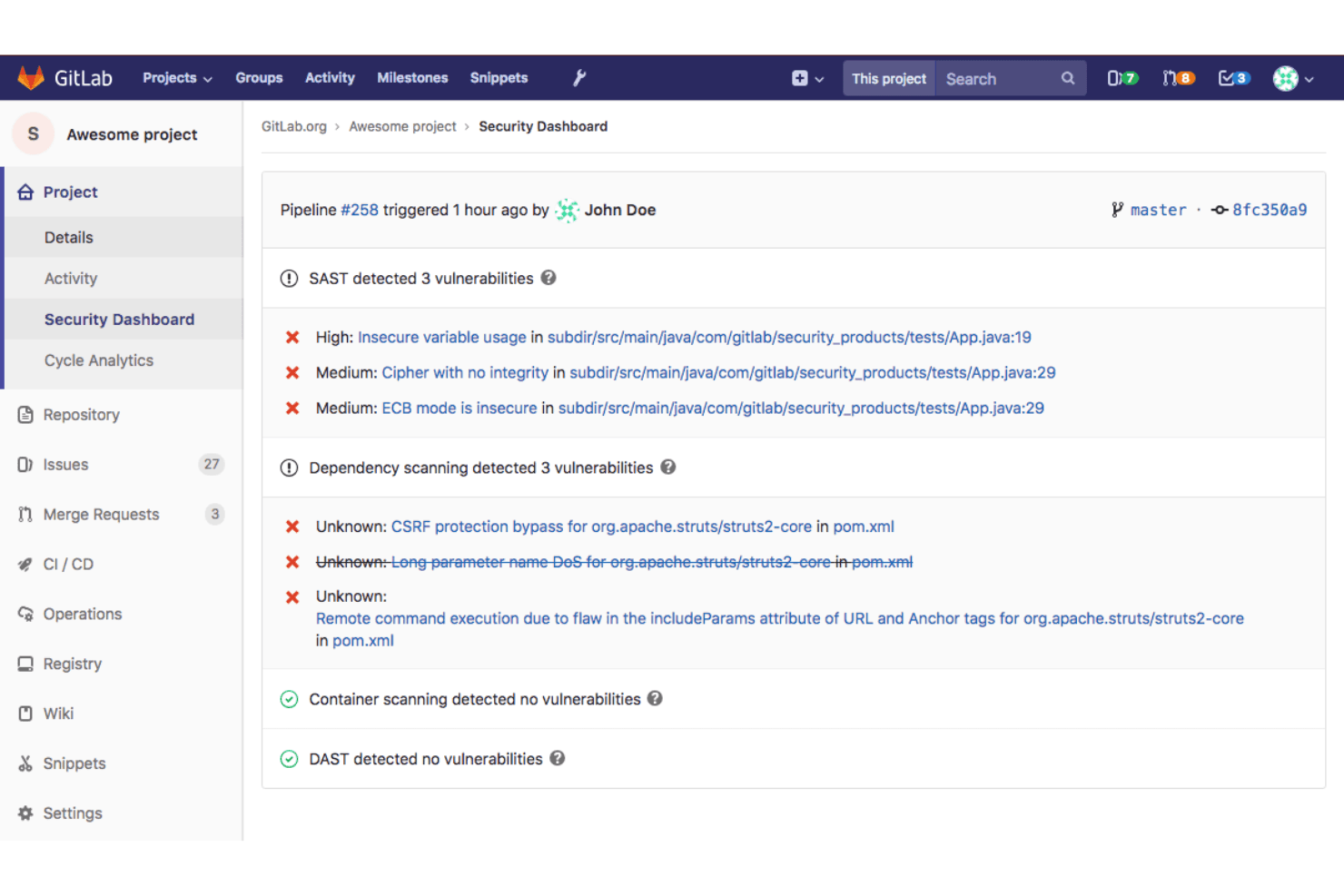
GitLab's Security Dashboard surfaces SAST and dependency vulnerabilities per pipeline. GitLab is a DevSecOps platform that brings source code management, CI/CD, security scanning, and project planning into a single environment—making it a strong fit for engineering teams that want to manage the full software delivery lifecycle without stitching together separate tools.
Who Is GitLab Best For?
GitLab is a strong fit for engineering teams that want CI/CD, security scanning, and source code management in one place rather than across separate tools.
Why I Picked GitLab
GitLab earns its spot as one of the best on my shortlist because it's the only Git alternative that truly collapses the entire DevSecOps pipeline into a single environment. I appreciate that security scanning isn't bolted on as an afterthought: SAST, secret detection, and container scanning run directly inside merge request pipelines, so my team catches vulnerabilities before code ever merges. Built-in CI/CD with parent-child and multi-project pipeline support means we're managing complex delivery workflows without leaving the same platform where we write and review code.
GitLab Key Features
- Merge request approval rules: Define required approval counts and eligible approvers, including role-based rules for protected branches.
- Role-based access control: Assign granular permissions at the group and project level, with users able to hold different roles across different projects.
- GitHub importer: Migrate repositories, branches, Git LFS objects, issues, pull requests, comments, and wiki pages directly from GitHub into GitLab.
- Audit events: Track group, project, instance, and sign-in activity with indefinitely retained audit logs accessible via UI and API.
GitLab Integrations
GitLab integrates with Jenkins, JetBrains IDEs, Slack, AWS, Google Cloud, Oracle Cloud, and GitHub mirroring. It also supports REST, GraphQL, webhooks, and MCP integrations for custom workflows.
Pros and Cons
Pros:
- Self-hosted deployment keeps code on your infrastructure
- Security scans surface inside merge requests
- Commit history includes searchable diffs and verification
Cons:
- Pipeline YAML and runner issues complicate debugging
- Nested settings can overwhelm new contributors

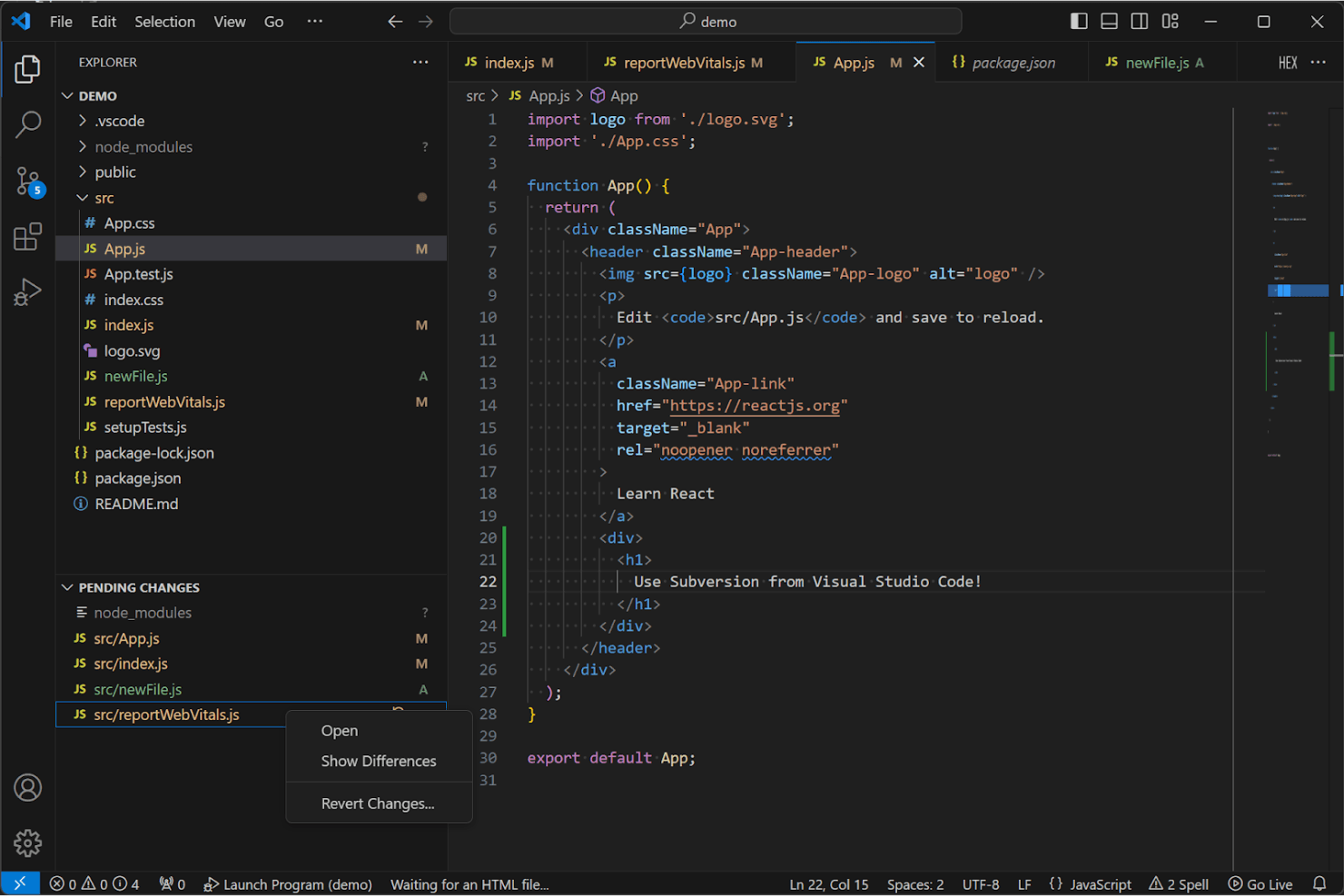
Apache Subversion integrates with VS Code for version control and pending changes tracking. Apache Subversion is a free, open-source centralized version control system that suits software developers and IT administrators who need strict access control, reliable revision history, and a straightforward commit-based workflow without the complexity of a distributed VCS.
Who Is Apache Subversion Best For?
Apache Subversion is a strong fit for software developers and IT administrators who need strict, path-based access control and a reliable centralized revision history without managing a distributed setup.
Why I Picked Apache Subversion
I've included Apache Subversion in my top picks because it gives you genuine centralized control that Git simply doesn't prioritize. Path-based authorization lets you define exactly who can read or write to specific repository paths, which matters when you're managing sensitive codebases or mixed-access projects. I also appreciate atomic commits: every change either lands completely or not at all, with a single revision number covering the entire repository tree, so your history stays clean and auditable.
Apache Subversion Key Features
- Atomic commits: Every change either succeeds completely or not at all, so your repository history never lands in a broken intermediate state.
- Path-based authorization: Assign no access, read access, or read-write access at the directory or file level, giving you fine-grained control over who sees what.
- File locking: Lock individual files to signal that an edit is in progress, preventing conflicting changes on binary files or other non-mergeable assets.
- Language API bindings: Access Subversion functionality directly from Python, Perl, Java, or Ruby through published API bindings.
Apache Subversion Integrations
Apache Subversion lists integrations with Eclipse and NetBeans, though their functions aren’t specified. It also provides C APIs and bindings for Python, Perl, Java, and Ruby for custom integrations.
Pros and Cons
Pros:
- File locks coordinate edits to binary assets
- Path-level permissions restrict sensitive code access
- Atomic repository-wide commits keep history auditable
Cons:
- Branch merges grow difficult in advanced workflows
- Central-server dependence limits offline work
Learn more about Apache Subversion:
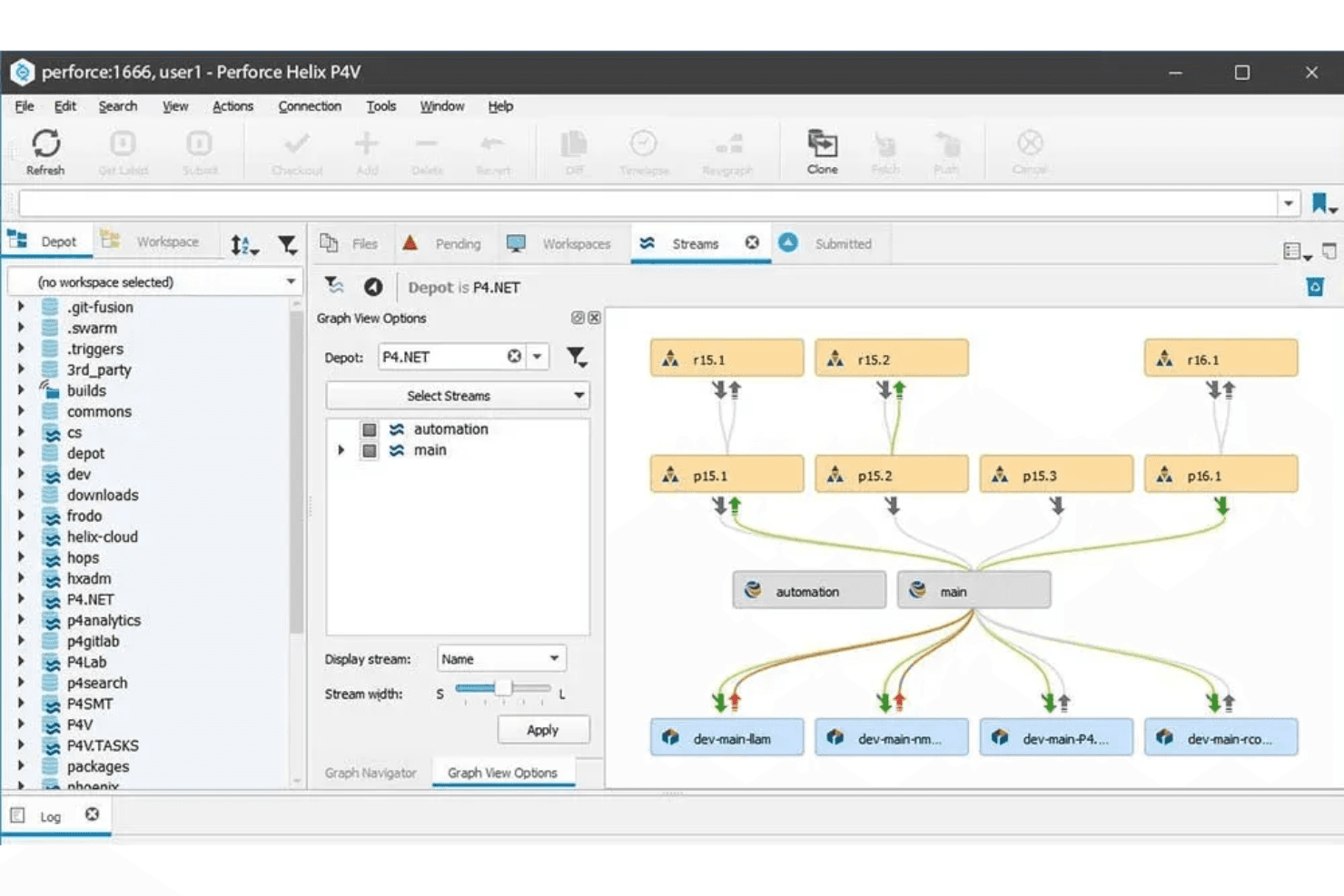
Perforce Helix P4V visualizes stream branching hierarchies for version control. CVS is a centralized version control system that appeals to organizations maintaining long-running legacy codebases, letting multiple developers work on shared files concurrently without exclusive locking.
Who Is CVS Best For?
CVS is a strong fit for IT administrators and engineering teams maintaining legacy codebases on long-running on-premise infrastructure who can't justify a migration to a modern VCS.
Why I Picked CVS
I've included CVS in my top picks because it's the most reliable option I know of for teams that need to keep legacy codebases running without the disruption of a full migration. Its centralized client/server model lets multiple developers check out and edit the same files concurrently, with version history stored safely on a central server. I also appreciate its vendor branch support, which lets you import and merge file versions from outside teams, even ones not using CVS themselves.
CVS Key Features
- Operation scripts: CVS lets you supply custom scripts to log repository activity or enforce team-specific policies on commits and other operations.
- Modules database: Map names to collections of directories and files so you can check out or update an entire project component with a single command.
- On-premise deployment: CVS runs on most Unix variants, with client support for Windows NT/95, OS/2, and VMS, giving your team full control over where repositories live.
- Mailing list support: Free community support is available through CVS mailing lists for help requests and bug reports, with additional commercial support options listed separately.
CVS Integrations
CVS doesn't have any native integrations. It supports user-supplied scripts and administrative files for site policies and external bug-tracking systems.
Pros and Cons
Pros:
- On-premise deployment suits legacy environments
- Vendor branches support third-party code imports
- Concurrent checkouts avoid exclusive file locks
Cons:
- Check-ins require access to the central server
- Manual merge tracking complicates branch work
Learn more about CVS:
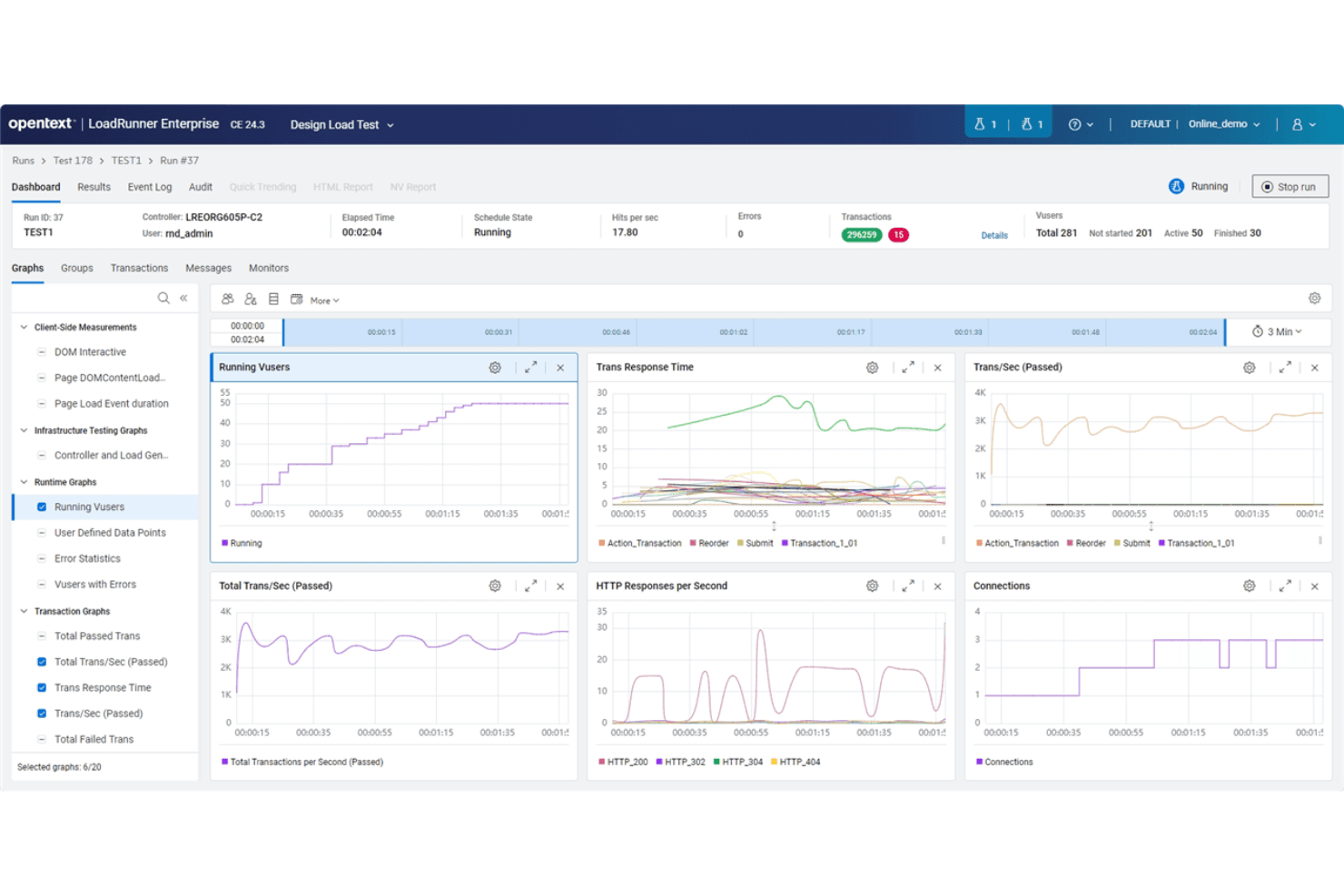
OpenText LoadRunner Enterprise monitors live load test performance metrics. OpenText AccuRev is an enterprise source code management tool built around stream-based architecture, designed for large teams running complex parallel development workflows across distributed environments.
Who Is OpenText AccuRev Best For?
OpenText AccuRev is a strong fit for large enterprise engineering teams running parallel development across distributed environments who need strict access control and stream-based workflows.
Why I Picked OpenText AccuRev
I picked AccuRev because it handles complex parallel development workflows in a way most Git-based tools simply aren't designed for. Its stream-based architecture lets teams run multiple release tracks simultaneously, with Change Packages tying every promoted change to a specific issue. Stream ACLs and stream locks give administrators granular control over who can promote to or from any stream, which matters when you're coordinating dozens of developers across distributed environments.
OpenText AccuRev Key Features
- Git Server integration: Developers can clone, push, and pull code using standard Git tools while AccuRev enforces its stream-based policies and access controls in the background.
- Element-level ACLs: Administrators can set allow or deny permissions on individual file elements for specific users or groups, with a full audit history of every access change.
- History Browser: Displays all transactions associated with an element, stream, or depot, with options to view, diff, promote, or revert directly from the history view.
- Pulse code review integration: Teams can create and update code reviews tied to AccuWork issues through the Pulse web interface, the AccuWork GUI, or the Git Server web interface.
OpenText AccuRev Integrations
OpenText AccuRev offers native integrations with Git, Micro Focus Pulse, Jira through AccuSync, Eclipse, Visual Studio, and SonarQube. Its AccuRev Common API and CLI support custom integrations, though the Common API doesn’t include technical support.
Pros and Cons
Pros:
- Fine-grained ACLs govern stream access
- Change Packages tie promotions to issues
- Stream hierarchy supports parallel release tracks
Cons:
- Reviewers describe AccuRev’s command line as complex
- Reviewers report slowdowns with large repositories
Learn more about OpenText AccuRev:
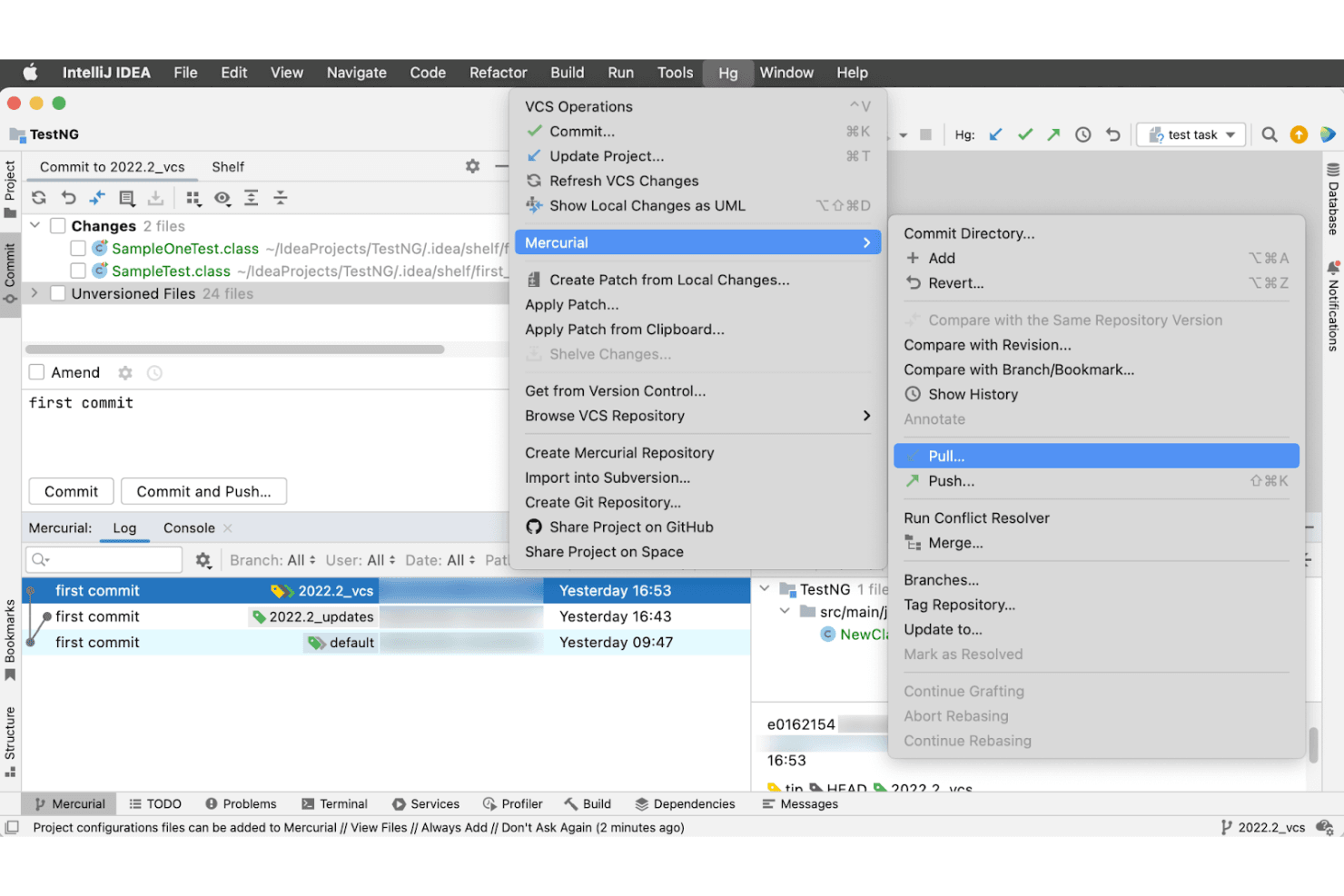
Mercurial lets users pull, push, and manage branches via IntelliJ IDEA. Mercurial is a free, distributed version control system that appeals to developers who want a simpler alternative to Git, offering intuitive commands, local branching and merging, and a built-in conversion tool for migrating existing Git repositories.
Who Is Mercurial Best For?
Mercurial is a great fit for individual developers or small teams who want a straightforward, easy-to-learn distributed version control system without Git's complexity.
Why I Picked Mercurial
I picked Mercurial as one of the best because its command set genuinely lives up to the easy learning curve claim, keeping dangerous operations like history rewriting behind opt-in extensions rather than available by default. I appreciate that branching is lightweight, with named branches, bookmarks, and repository clones all supported without the staging-area complexity Git introduces. Its built-in
convertextension also makes migrating from Git straightforward, preserving branches and remotes as bookmarks without requiring third-party tooling.Mercurial Key Features
- Distributed repository cloning: Every clone contains the full project history, letting you commit, branch, and merge without a network connection.
- Python extension API: You can modify existing commands, add new ones, or tap into core functionality using official, community, or custom Python extensions.
largefilesextension: Stores large binary file revisions in a central network store while keeping lightweight stand-ins in your repository, fetching only the revisions you need.- TortoiseHg GUI integration: Provides a Windows File Explorer interface with branch-history visualization for developers who prefer working outside the command line.
Mercurial Integrations
Mercurial doesn't have any native integrations. Its Python extension API supports custom commands, but no named CI/CD, IDE, or issue-tracker integrations are documented.
Pros and Cons
Pros:
- Lightweight bookmarks avoid staging-area overhead
- Full-history clones support offline commits
- Intuitive commands ease the switch from Git
Cons:
- Smaller community means fewer tools and resources
- No built-in code review or pull requests
Learn more about Mercurial: Best for large file handling
- Free plan available
- Pricing upon request
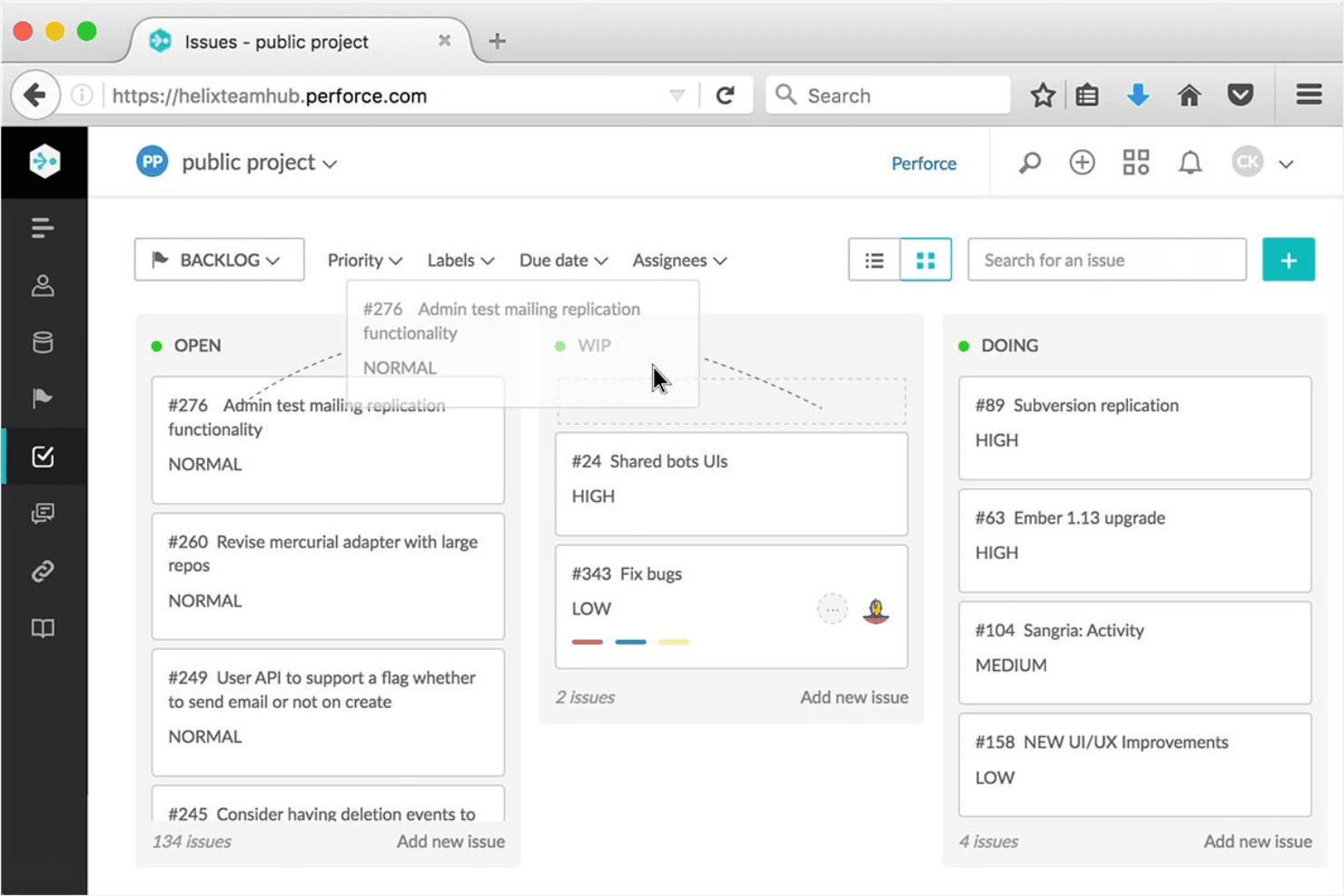
Perforce Helix Core organizes project issues by status across a Kanban board. Perforce Helix Core is a centralized version control system built for teams managing large-scale codebases, binary files, and digital assets—making it a natural fit for game studios, engineering teams, and organizations where Git's limitations with large files create real bottlenecks.
Who Is Perforce Helix Core Best For?
P4 is a strong fit for game studios and engineering teams that regularly work with large binary files, 3D assets, or massive codebases where Git starts to buckle under the weight.
Why I Picked Perforce Helix Core
I picked Perforce Helix Core as one of the best because it handles large binary files and digital assets in ways Git simply can't match at scale. Where Git struggles with multi-gigabyte files, P4's centralized repository treats binaries and source code equally, and its Virtual File Service pulls down only file metadata on initial sync, fetching actual content on demand. I also rely on its exclusive file locking to prevent overwritten work when multiple contributors touch the same non-mergeable asset.
Perforce Helix Core Key Features
- Atomic changelist submission: Every file in a changelist is saved to the depot together or not at all, keeping your repository in a consistent state.
- Granular path-based access control: Permissions can be set at the file level by user, group, depot path, or client IP address, with exclusionary rules for fine-grained restrictions.
- P4 Code Review: A web-based review tool for structured team collaboration on submitted changelists, included at no cost on the Free plan.
- P4 Git Connector: Mirrors, caches, or replicates Git repositories into P4 graph depots, letting teams run Git workflows alongside a central P4 server.
Perforce Helix Core Integrations
Perforce Helix Core has native integrations with Jenkins, TeamCity, Jira, Unreal Engine, Unity, and Microsoft Visual Studio. P4 Git Connector connects GitHub, GitLab, and Bitbucket repositories, while APIs for eight programming languages support custom integrations.
Pros and Cons
Pros:
- Atomic changelists keep multi-file submits consistent
- Exclusive locks prevent asset overwrites
- Handles large binaries alongside source code
Cons:
- On-premises setup demands administrative expertise
- Branching and merges require careful handling
Learn more about Perforce Helix Core:
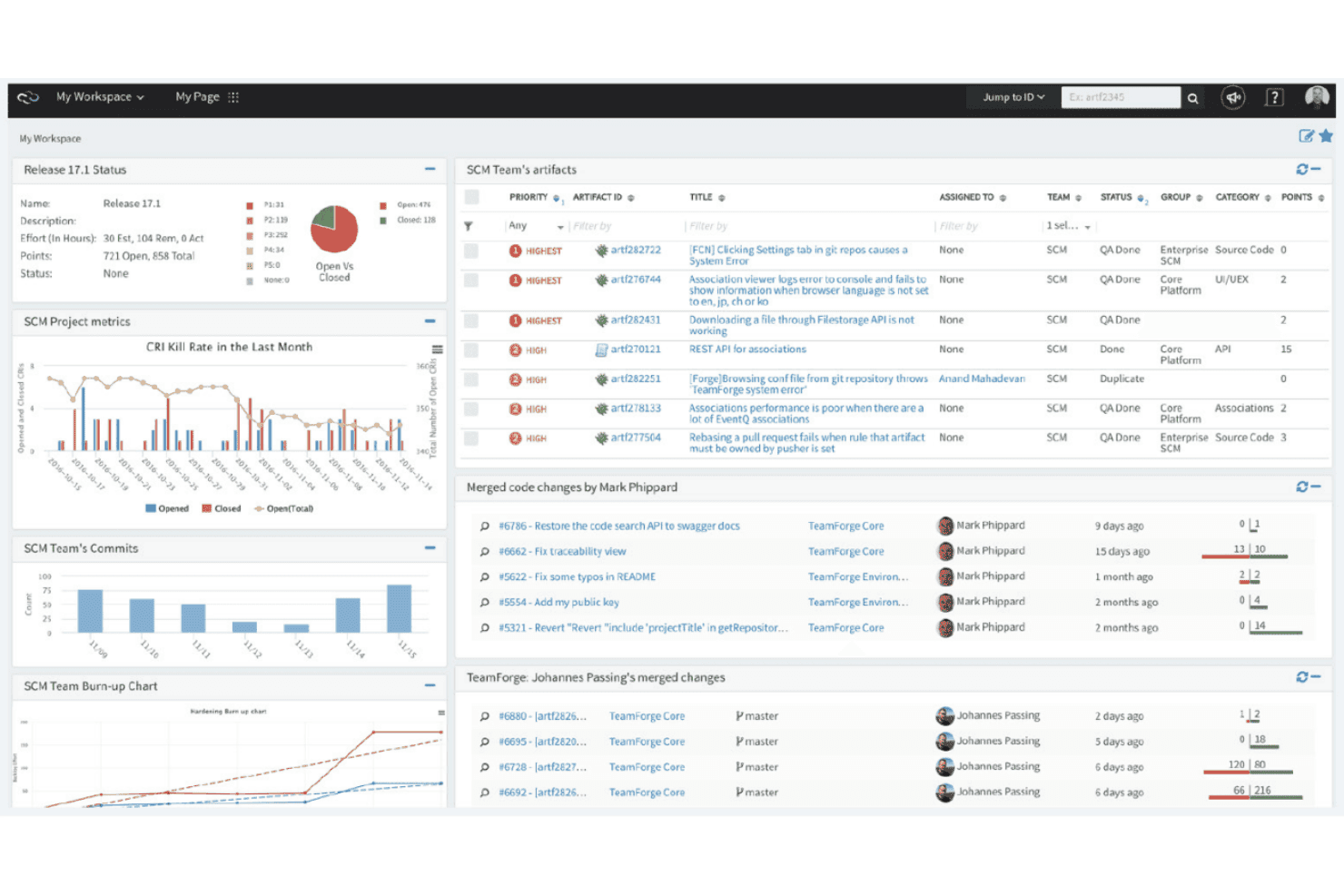
TeamForge unifies project metrics, commits, and artifact tracking in one dashboard. Digital.ai TeamForge is an enterprise source control and application lifecycle management platform that ties Git and Subversion hosting, code review, and work tracking together under a single governance framework—making it a strong fit for regulated industries and compliance-driven engineering teams.
Who Is TeamForge Best For?
TeamForge is a strong fit for enterprise engineering teams in regulated industries that need strict governance, audit trails, and lifecycle traceability across source control and project tracking.
Why I Picked TeamForge
I picked TeamForge because it's built from the ground up for engineering teams where compliance isn't optional. I particularly like its History Protection feature, which logs every branch deletion and non-fast-forward rewrite in an audit trail, so nothing disappears without a record. Pair that with granular role-based permissions that revoke source code access the moment a role or membership changes, and you have version control that holds up under regulatory scrutiny.
TeamForge Key Features
- Commit-to-work-item association: Links individual commits to tracker items like requirements, bugs, and tasks so you can see exactly what code change addressed which work item.
- Pull request merge policies: Lets repository owners configure merge eligibility rules, including required code review, CI validation, or both, before a branch can be merged.
- Repository replication: Replicates Git and Subversion repositories across multiple servers to support distributed teams and improve access reliability.
- Jenkins integration via webhooks: Sends build data to TeamForge and triggers Jenkins builds from Gerrit events through the Webhooks-based Event Broker.
TeamForge Integrations
TeamForge documents integrations with Jenkins, Jira, Nexus, Micro Focus ALM / Quality Center, TestLink, and Review Board. It also provides REST, SOAP, and Webconnect APIs for custom integrations, with Jenkins support for build data and Gerrit-triggered builds.
Pros and Cons
Pros:
- Role-based permissions revoke repository access promptly
- Auditable recovery preserves rewritten branch history
- Strong commit-to-work-item traceability
Cons:
- Pull request updates reset reviewer votes
- Manual Git conflict resolution lacks visual tooling
Learn more about TeamForge: Best for integrated project management
- Free plan available
- Pricing upon request
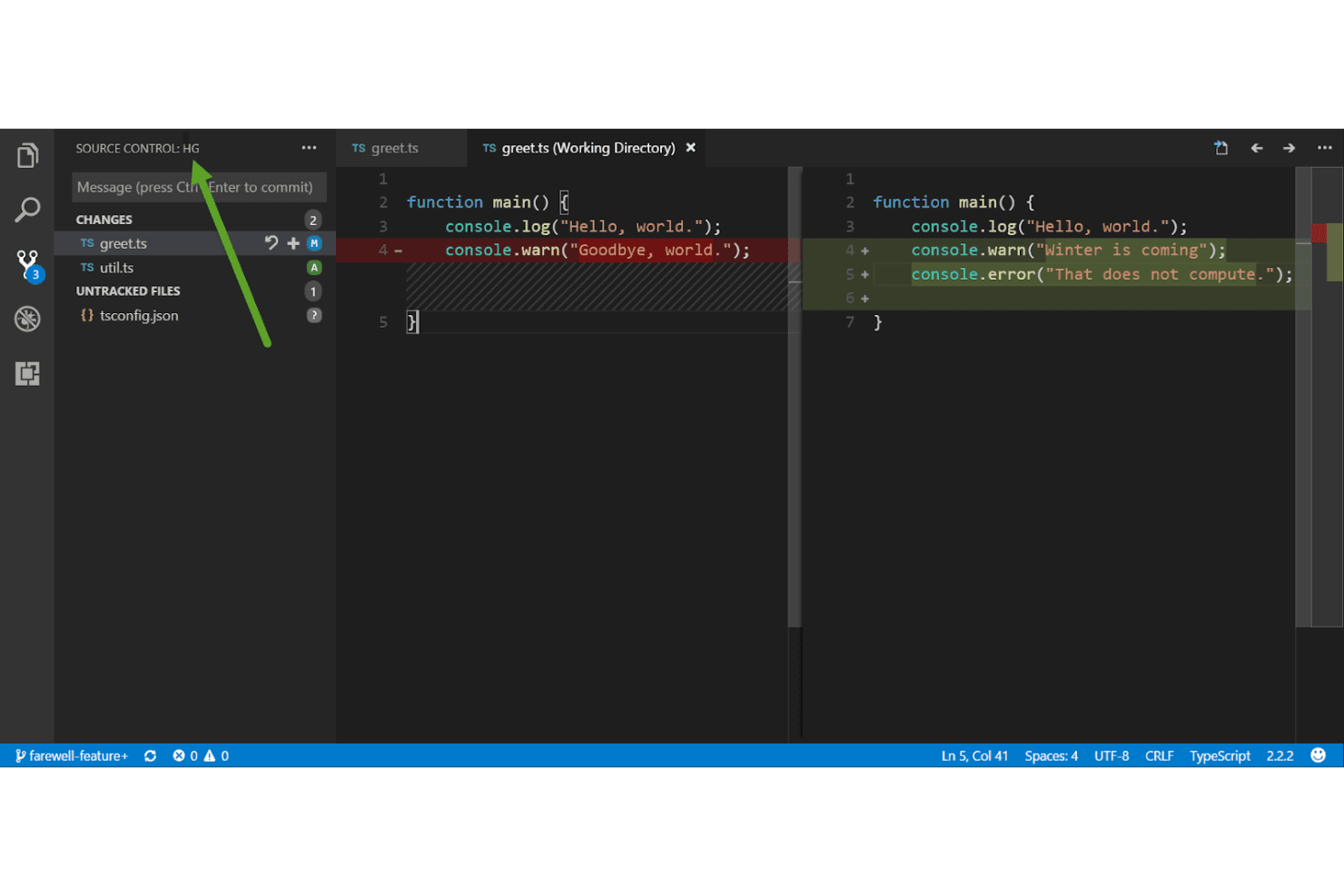
Fossil SCM displays file diffs side-by-side within VS Code's source control panel. Fossil SCM is a self-contained, self-hosted version control system that bundles bug tracking, wiki, forum, and chat into a single executable—making it a strong fit for development teams who want a complete project environment without stitching together separate tools.
Who Is Fossil SCM Best For?
Fossil SCM is a strong fit for small development teams that want version control, bug tracking, wiki, and project discussion in a single self-hosted executable.
Why I Picked Fossil SCM
I've included Fossil SCM in my top picks because it's one of the few version control systems that bundles bug tracking, wiki, forum, and chat into a single executable alongside version control. For teams that want project management without stitching together separate tools, that's a real advantage: tickets live in the same repository as your code, and project discussions happen in the built-in forum with the same logins and permissions.
Fossil SCM Key Features
- Autosync mode: Automatically pushes your committed changes to the parent repository so distributed team members stay current without manual syncing.
- Git import and export: Moves version-controlled file history between Fossil and Git using the Git fast-export and fast-import interchange format.
- Role-based user capabilities: Assigns access permissions across fixed categories—
nobody,anonymous,reader, anddeveloper—managed through the built-in admin web interface. - Automatic GitHub mirroring: Keeps a GitHub mirror of your Fossil repository in sync automatically, so you can maintain an external presence without manual exports.
Fossil SCM Integrations
Fossil offers one documented native integration with GitHub through automatic repository mirroring. It also provides a JSON-over-HTTP API for custom integrations, but no other integrations are clearly documented.
Pros and Cons
Pros:
- Small executable supports straightforward self-hosting
- Local clones keep project notes available offline
- Tickets and code share one repository
Cons:
- No documented build or test integration
- No pull-request approval workflow
Learn more about Fossil SCM: Best for Visual SourceSafe users
- Free plan + free trial + free demo available
- From $349/user
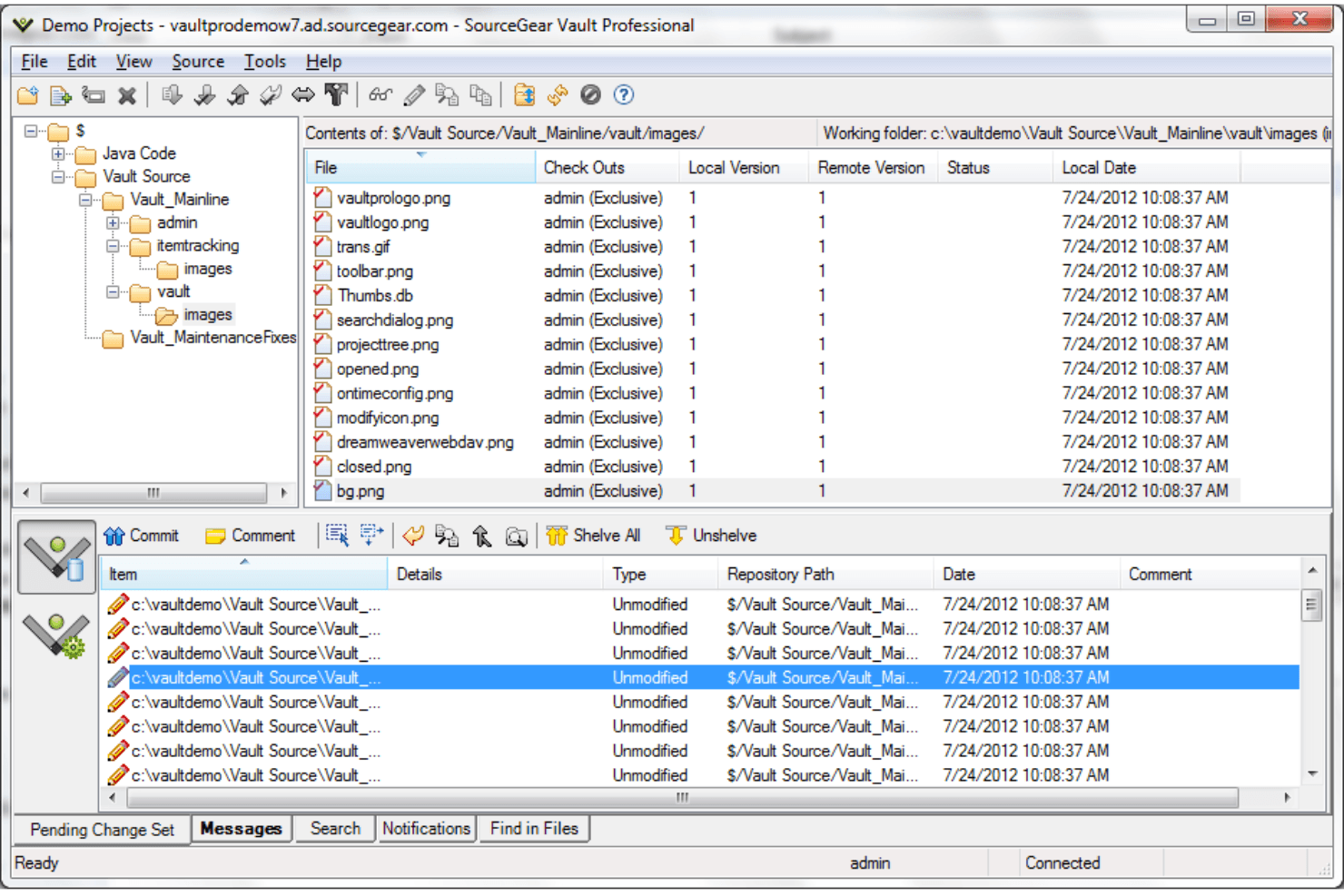
SourceGear Vault manages file check-outs and version tracking in one view. SourceGear Vault is a self-hosted version control system built for Windows development environments, offering centralized repository management, Visual Studio and Eclipse integration, and a familiar workflow for teams moving away from legacy source control tools.
Who Is SourceGear Vault Best For?
Vault is a strong fit for Windows-based development teams that still run Visual SourceSafe and need a structured, low-disruption path to a modern version control system.
Why I Picked SourceGear Vault
I've included SourceGear Vault in my top picks because it's the most direct migration path I've seen for teams still running Visual SourceSafe. The VSS Handoff feature brings your latest file versions into Vault immediately while keeping a live hook into SourceSafe for older history, so your team isn't cut off from past records during the transition. Vault's interface and terminology mirror SourceSafe Explorer closely enough that developers can check in and check out code on day one without relearning a workflow.
SourceGear Vault Key Features
- Line History: View exactly which check-ins affected any selected lines in a file, with check-in comments and diffs available directly from the history window.
- Atomic transactions: Every repository change is committed as an all-or-nothing operation to SQL Server, so partial or corrupted check-ins can't occur.
- Folder-level security: Assign access permissions by user or group at the folder level, with optional Windows domain account integration for login and security enforcement.
- Work item tracking: Vault Professional includes built-in, customizable work item and bug tracking with time recording fields, project-specific access controls, and direct linking between check-ins and work items.
SourceGear Vault Integrations
SourceGear Vault has documented integrations with Visual Studio, Eclipse, Microsoft MSSCCI-compatible IDEs, TeamCity, BuildMaster, Visual Build Pro, Ant, and NAnt. It also offers .NET and Java-callable APIs plus command-line clients for custom automation.
Pros and Cons
Pros:
- Atomic check-ins protect repository consistency
- Line history traces changes to specific lines
- Familiar workflows ease SourceSafe transitions
Cons:
- No pull-request review or approval gates
- No native Git-history migration path
Learn more about SourceGear Vault:
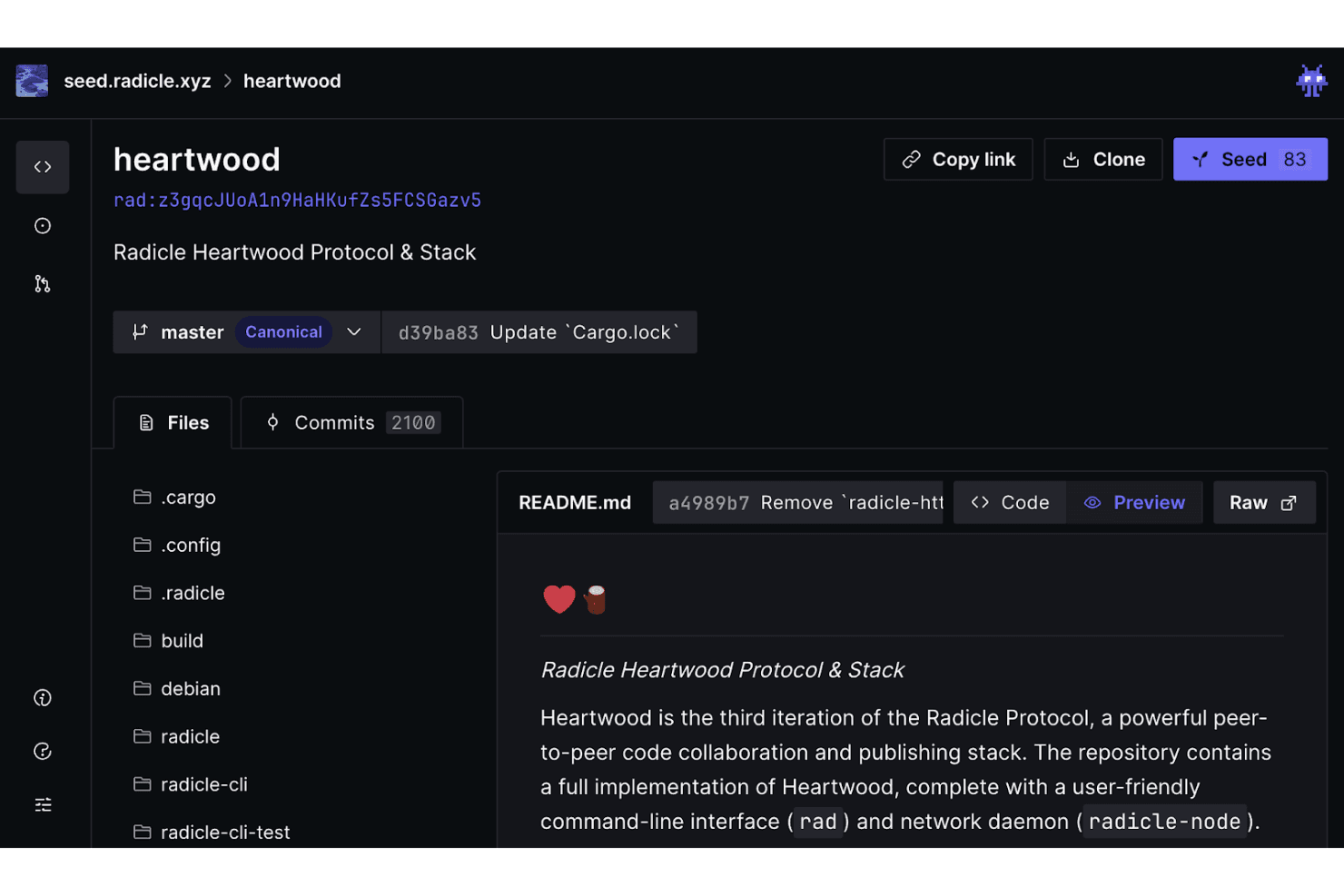
Radicle lets users browse repositories, files, and commits peer-to-peer. Radicle is an open-source, peer-to-peer code collaboration platform built on Git that lets developers host and review code without relying on a centralized provider.
Who Is Radicle Best For?
Radicle is a strong fit for developers and DevOps engineers who want to collaborate on code without depending on a centralized hosting provider.
Why I Picked Radicle
I picked Radicle as one of the best because it's the only tool on this list where your repositories live across a network of peers rather than on a single company's servers. Every contributor runs a node, and collaborative objects like patches and issues are stored in Git and can be created offline, then synchronized when you reconnect. I particularly like how delegate-signature thresholds let your team govern default-branch changes cryptographically, without handing control to any central authority.
Radicle Key Features
- Offline-first issues and patches: You can create issues and patches without an internet connection, and they sync automatically when your node reconnects.
- Radicle Desktop: A graphical interface that supports line-by-line diff comments, an inbox for patches and reviews, and rich-text issue editing with Markdown, screenshots, and videos.
- CI integrations: Radicle supports GitHub Actions, Concourse, Kraken, and generic outgoing webhooks so you can connect existing CI pipelines to your Radicle repositories.
- HTTP JSON API: The Radicle HTTP Daemon exposes a read-only HTTP JSON API, giving you web-based access to node data without needing a direct peer connection.
Radicle Integrations
Radicle offers documented integrations with GitHub Actions, Concourse, Kraken, and generic outgoing webhooks. It also supports Git natively and provides a read-only HTTP JSON API for custom integrations.
Pros and Cons
Pros:
- Signed delegates govern default-branch changes
- Peer replication avoids single-host dependence
- Offline patches and issues sync later
Cons:
- Private repositories remain unsafe to use
- Repository access depends on active seeders
Learn more about Radicle:
Alte alternative la Git
Iată câteva alternative suplimentare la Git care nu au ajuns pe lista mea scurtă, dar merită totuși verificate.
- 11Plastic SCMBest for game development
- 12
- 13
- 14
- 15
- 16
- 17
How I Evaluate Git Alternatives
I split my evaluation into two layers: the baseline a tool must hit—branching, commit history, CI/CD integration—and the differentiators, like monorepo performance, self-hosting options, and migration tooling.
Core Functionality (Table Stakes For This List)
When I'm selecting tools for my list, I rank each one on a scale from 0 (does not offer the functionality) to 5 (excels in this area) for each core functionality listed below. Then, I calculate the tool's total score into a percentage. Each tool needs to achieve a minimum total score of 65% to be considered for inclusion.
- Version Control Engine: I look for a mature revision engine with full commit history, atomic commits, rollback, and tagging—the foundation for tracking every change across a codebase.
- Branching & Merging: Whether it's feature branches, release branches, or hotfix workflows, I evaluate how each tool handles branch creation, three-way merges, and conflict resolution.
- Repository Hosting Model: I check whether the tool supports centralized, distributed, or hybrid models along with access controls like RBAC, SSO, and self-hosted deployment options.
- Large File & Monorepo Handling: Teams working with game assets, media files, or monorepos need a tool that won't choke—I evaluate performance with large binaries and sparse checkout support.
- Collaboration & Code Review: Pull requests, inline diffs, threaded comments, and approval gates are what I look for to confirm the tool supports real team-based development workflows.
- Integration & Tooling Ecosystem: A version control tool has to plug into your existing stack. I evaluate CLI, API, webhook support, and integrations with CI/CD pipelines and popular IDEs.
Once I have a list of tools that meet this criteria, I consider what sets each platform apart.
Differentiating Factors (What Sets Vendors Apart)
Here's how I compare and contrast different vendors:
Standout Features
Built-in issue tracking is a major differentiator. Tools like Gitea and GitLab bundle project boards and wikis alongside repos, which means fewer context switches for your team. I also evaluate whether a tool offers a native GUI client, since not every developer wants to live in the terminal. Patch-based or changeset-based versioning models, like those in Pijul and Darcs, take a fundamentally different approach to history that can simplify cherry-picks and reordering compared to Git's snapshot model.
Beyond Features
Migration and interoperability matter a lot when you're evaluating Git alternatives. I check whether a tool can import existing Git or SVN repos with full history intact, since a messy migration can stall adoption for weeks. Community and ecosystem maturity is another factor I weigh—active forums, solid documentation, and a visible roadmap signal long-term viability. I also look at pricing and licensing models, especially whether there's a free tier or open-source option that lets smaller teams get started before committing to an enterprise plan.
Funcțiile principale ale Git
Iată câteva dintre funcțiile principale ale Git, pentru a te ajuta să compari și să evaluezi ce oferă soluțiile alternative.
- Controlul versiunilor: Git ajută echipa să urmărească modificările din cod, permițând revenirea la versiunile anterioare atunci când este necesar.
- Ramificare și îmbinare: Puteți crea ramuri pentru a lucra independent la funcționalități și le puteți îmbina fără probleme atunci când sunt gata.
- Sistem distribuit: Git permite fiecărui dezvoltator să aibă o copie locală a întregului proiect, astfel încât echipa să poată lucra offline și să sincronizeze ulterior modificările.
- Istoricul commiturilor: Git păstrează un istoric al commiturilor, ajutându-vă pe dumneavoastră și pe echipa dumneavoastră să înțelegeți ce modificări au fost făcute și de ce.
- Colaborare: Cu Git, echipa poate colabora eficient la proiecte prin partajarea modificărilor prin intermediul unui depozit central.
- Zona de pregătire: Zona de pregătire a Git vă permite să pregătiți un set de modificări înainte de a le înregistra, oferindu-vă un control mai bun asupra istoricului commiturilor.
- Sursă deschisă: Git este o aplicație cu sursă deschisă, ceea ce înseamnă că poate fi utilizat gratuit și personalizat pentru a răspunde nevoilor echipei dumneavoastră.
- Securitate: Git utilizează metode criptografice pentru a vă proteja datele, asigurând urmărirea precisă a modificărilor.
- Performanță: Git gestionează eficient proiectele și bazele de cod de mari dimensiuni, astfel încât echipa dumneavoastră nu va întâmpina încetiniri.
- Compatibilitate: Git funcționează cu diverse instrumente și platforme, facilitând integrarea în fluxul de lucru existent.
- Compatibilitate cu Linux: Git este acceptat nativ pe Linux, ceea ce îl face alegerea preferată pentru mulți dezvoltatori care lucrează în medii cu sursă deschisă.
- Gestionarea depozitelor Git: Git vă permite să gestionați depozitele cu controale granulare ale accesului, interfețe bazate pe web și opțiuni găzduite autonom.
- Opțiuni găzduite autonom: Git poate fi găzduit autonom cu instrumente precum Gitea, GitLab și Atlassian Bitbucket, oferind control complet asupra depozitelor.
- Flexibilitatea controlului sursei: Git acceptă diverse fluxuri de lucru, inclusiv controlul centralizat și descentralizat al versiunilor.
- Compatibilitate cu SVN: Git include instrumente care facilitează migrarea de la Subversion (SVN), ușurând tranziția echipelor.
- Integrări API: Git oferă suport pentru API-uri în vederea automatizării, integrărilor și dezvoltării personalizate.
- Suport AWS: Depozitele Git pot fi găzduite pe AWS CodeCommit, oferind un control al sursei scalabil și gestionat în cloud.
- Eficiență în linia de comandă: Interfața Git le permite utilizatorilor avansați să execute eficient sarcini complexe.
- Integrare cu dezvoltarea front-end: Git se integrează în fluxurile de lucru pentru dezvoltarea front-end, permițând controlul versiunilor pentru interfețele utilizator și elementele de design.
- Proiecte cu sursă deschisă: Git stă la baza multor proiecte cu sursă deschisă, inclusiv a celor găzduite pe GitHub, GitLab și SourceForge.
- Solicitări de extragere: Git acceptă solicitări de extragere și fluxuri de lucru pentru revizuirea codului, făcând colaborarea și controlul calității mai ușor de gestionat.
- Utilizarea Git pentru proiecte diverse: Git este utilizat de programatori, echipe DevOps și colaboratori ai proiectelor cu sursă deschisă din diverse industrii.
- Autentificare și controlul accesului: Git acceptă autentificarea SSH, HTTPS și OAuth pentru acces securizat la depozite.
- Alternative la GitHub: GitLab, Gitea și Bitbucket oferă soluții bazate pe Git pentru echipele care caută alternative la GitHub.
- Compatibilitate cu Python și Rust: Git este utilizat pe scară largă în fluxurile de lucru pentru dezvoltarea în Python și Rust, pentru gestionarea bazelor de cod.
- Funcționalitatea de rebazare: Git acceptă rebazarea, permițând obținerea unor istorice de commituri mai clare prin rearanjarea modificărilor înainte de îmbinare.
- Gestionarea depozitelor de mari dimensiuni: Git poate gestiona eficient depozitele de mari dimensiuni prin optimizări precum Git LFS (stocarea fișierelor mari).