

Un instrument de verificare a accesibilității PDF scanează documentele pentru a identifica barierele din calea accesibilității digitale. De asemenea, poate ajuta la identificarea soluțiilor care fac conținutul accesibil unui număr mai mare de persoane. Dacă sunteți în căutarea acestor soluții, trebuie să mențineți riscurile de neconformitate la un nivel scăzut, să sprijiniți toți utilizatorii și să simplificați supravegherea pe măsură ce utilizarea fișierelor PDF crește.
Acest ghid prezintă instrumente pentru echipele IT și de dezvoltare care trebuie să integreze accesibilitatea în gestionarea documentelor. Include opțiuni pentru automatizarea verificărilor și susținerea fluxurilor de lucru pregătite pentru audit. Veți găsi opțiuni pentru evaluări manuale, automatizare și chiar conținut specializat — toate bazate pe caracteristici și standarde importante pentru echipa dumneavoastră.
Why Trust Our Software Recommendations
6,700+
Reviews
20
Industry experts
16+
Evaluation factors
14
Years
Our team has been testing and reviewing software since 2012. As tech leaders ourselves, we know how difficult—and important—it is to choose the right software.
For this guide, we evaluated tools using hands-on testing and independent research, scoring tools using our selection criteria.
Our reviews reflect our human editorial judgment, not a sales pitch.
Expert reviewers:
- Paulo Gardini MiguelTech Director
 Tim FisherVP of AI
 Gabriel RosasTech Lead & Software Architect
 Christhian GruhnTech Lead & Platform Architect

Tabel comparativ al instrumentelor de verificare a accesibilității PDF
Sorted by: Default
| Tool | Starting Price | Website | |
|---|---|---|---|
Best for batch validation and issue fixes | 5.0 out of 5 | $599/user/year Free plan available | Website |
Best for visual PDF/UA and WCAG reviews | Not rated | Pricing upon request Free plan available | Website |
Best for guided manual compliance testing | Not rated | Pricing upon request Not available | Website |
Best for automated PDF/UA verification | Not rated | Pricing upon request 14-day free trial | Website |
Best for regulated PDF quality checks | Not rated | Pricing upon request Free demo available | Website |
Best for editing PDFs with accessibility tools | 4.6 out of 5 | $10.99/user/month 14-day free trial | Website |
Best for checking and fixing PDFs | 4.5 out of 5 | $19.99/user/month 7-day free trial | Website |
Best for website-wide PDF monitoring | 4.5 out of 5 | Pricing upon request Free demo available | Website |
Best for AI-assisted table remediation | Not rated | Pricing upon request Free demo available | Website |
Best for bulk PDF accessibility validation | Not rated | Pricing upon request Free demo available | Website |


Recenzii ale instrumentelor de verificare a accesibilității PDF
Mai jos sunt rezumatele mele detaliate ale celor mai bune instrumente de verificare a accesibilității PDF care au ajuns pe lista mea scurtă. Recenziile mele oferă o privire detaliată asupra caracteristicilor, celor mai potrivite cazuri de utilizare și capacităților fiecărui instrument, pentru a vă ajuta să îl găsiți pe cel mai potrivit pentru dumneavoastră.
 Best for batch validation and issue fixes
- Free plan available
- From $599/user/year
Visit WebsiteCustomer Rating:5/5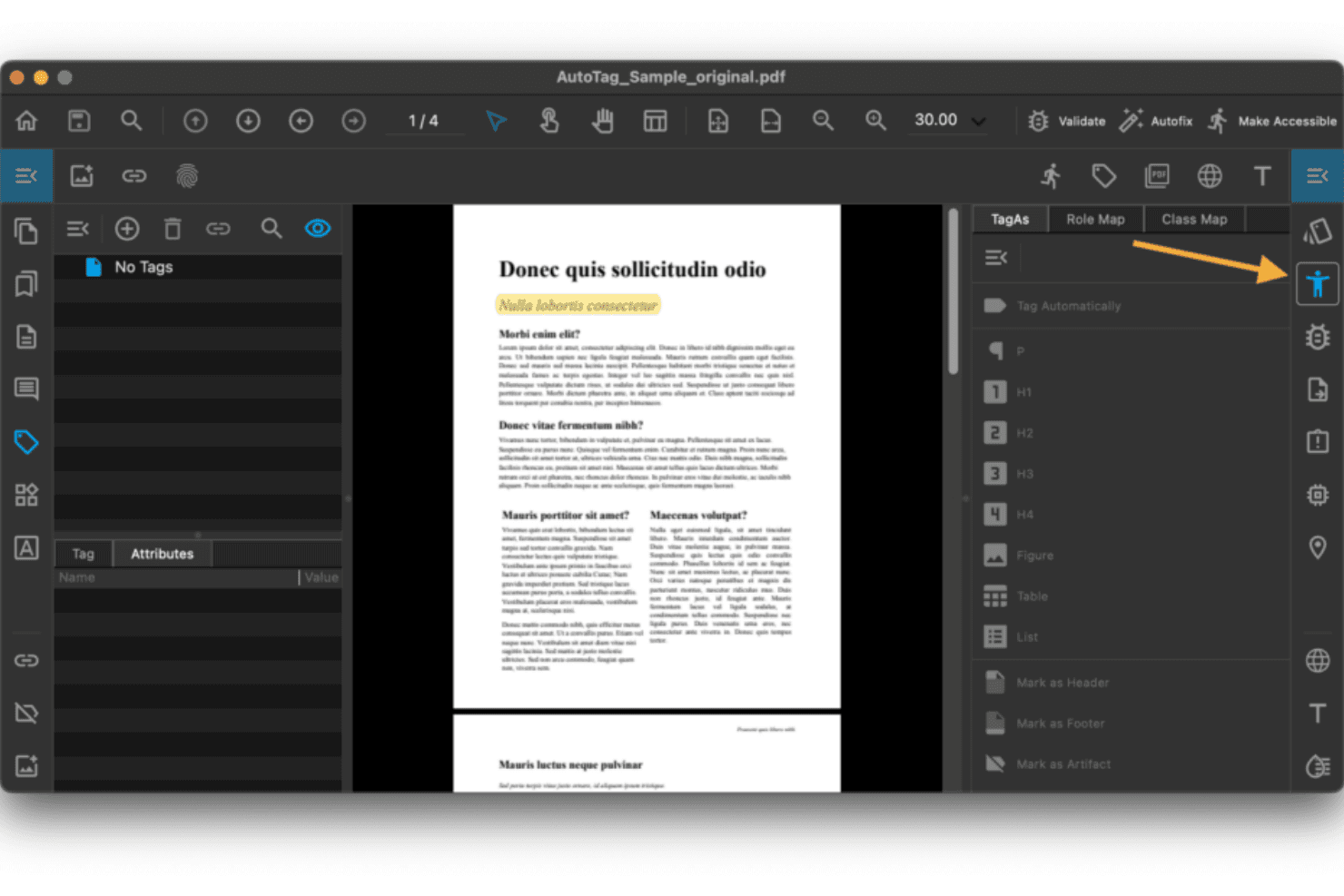
PDFix lets users tag PDF elements for accessibility compliance. PDFix is an AI-powered PDF accessibility platform for WCAG 2.1/2.2, PDF/UA, and Section 508 validation. It also supports automated batch remediation and is available as a desktop application, SDK, and REST API.
Who Is PDFix Best For?
PDFix suits developers and compliance teams in regulated industries such as government, finance, and healthcare. It's particularly useful for teams that need to validate and remediate large PDF volumes programmatically.
Why I Picked PDFix
PDFix earns its spot as one of the best on my shortlist because of how it handles batch validation and automated fixes in one workflow. I've run it across entire document folders and it flags every violation with Matterhorn Protocol references, pinpointing the exact location in the tag tree. What I really like is the AI-powered auto-tagging, which rebuilds reading order and heading hierarchy across hundreds of PDFs without touching each file manually.
PDFix Key Features
- veraPDF-powered standards validation: Uses the industry-standard veraPDF engine to audit compliance with PDF/UA, WCAG, and Section 508.
- Multi-format report export: Generates accessibility reports in JSON, XML, HTML, and plain text for easy sharing and integration.
- Cross-platform desktop app: Runs on Windows, macOS, and Linux so you can check accessibility on any major operating system.
- Developer SDK with API: Provides Python, C#, Java, Node.js, and C++ bindings for integrating accessibility checks into automated workflows.
PDFix Integrations
PDFix offers native integrations with Enfocus Switch and GitHub Actions Marketplace, and provides a REST API and SDK for custom integrations across Python, C#, Java, Node.js, and C++.
Pros and Cons
Pros:
- Matterhorn Protocol references identify exact tag failures
- AI auto-tagging reconstructs reading order automatically
- Batch remediates hundreds of PDFs simultaneously
Cons:
- No cloud-based document processing option
- Requires developer expertise for pipeline integration
Learn more about PDFix: Best for visual PDF/UA and WCAG reviews
- Free plan available
- Pricing upon request

PAC checks PDF accessibility compliance across PDF/UA, WCAG, and quality criteria. PAC is a free Windows desktop tool that checks PDFs against PDF/UA (ISO 14289-1) and WCAG 2.1 standards using the Matterhorn Protocol. It also includes a visual tag tree inspector and screen reader structure preview.
Who Is PAC (PDF Accessibility Checker) Best For?
PAC is a strong fit for accessibility compliance officers and technical documentation leads who need to manually audit PDFs against PDF/UA and WCAG standards.
Why I Picked PAC (PDF Accessibility Checker)
PAC earns its spot as one of the best on my shortlist because of how it handles visual PDF/UA review. The screen reader preview lets me see exactly what JAWS or NVDA will read, and the full tag tree shows every property and attribute in the document structure. I also like its coverage of machine-testable Matterhorn Protocol checkpoints. As a result, I can review validation results against established PDF/UA criteria.
PAC (PDF Accessibility Checker) Key Features
- AI-assisted semantic analysis: Uses AI to reduce manual effort in checking the quality of PDF structure and tags.
- Screen reader simulation view: Visually displays how popular screen readers will interpret the PDF’s content and order.
- Document structure statistics: Presents structural statistics and summaries for each PDF, including tag distribution and logical structure details.
- Local, offline operation: Runs entirely on Windows desktops without uploading files to the internet or external servers.
PAC (PDF Accessibility Checker) Integrations
PAC (PDF Accessibility Checker) doesn't have any native integrations.
Pros and Cons
Pros:
- Visual screen reader preview built in
- Full Matterhorn Protocol checkpoint coverage included
- Free to download and use permanently
Cons:
- No batch processing for multiple PDFs
- Windows-only, excluding Mac and Linux users
Learn more about PAC (PDF Accessibility Checker):

Allyant guides users through PDF remediation with step-by-step workflows. Allyant's CommonLook PDF Validator is a free Adobe Acrobat plugin that checks PDFs against WCAG, PDF/UA, and Section 508 standards. It also guides users through automated and manual accessibility tests and provides per-document certification reports.
Who Is Allyant Best For?
Allyant's CommonLook PDF Validator is a strong fit for compliance officers and documentation teams in government agencies or regulated industries where Section 508 conformance is a hard requirement.
Why I Picked Allyant
I picked Allyant's CommonLook PDF Validator as one of the best for guided manual compliance testing. Unlike tools that stop at automated flagging, it guides you through checks no scanner can reliably complete. That includes verifying alt text accuracy (not just presence), confirming table summaries are meaningful, and validating heading tag hierarchy. The per-document certification report delivers a concrete conformance record against Section 508, WCAG, and PDF/UA.
Allyant Key Features
- Adobe Acrobat integration: Runs as a plugin inside Adobe Acrobat Pro on Windows for native PDF analysis.
- Section 508 and HHS checks: Includes tests specific to US government and healthcare accessibility regulations.
- Tag-based content highlighting: Lets you review tags’ application visually within the PDF for deeper inspection.
- Per-document certification reports: Generates a downloadable compliance certificate after every check for record-keeping.
Allyant Integrations
Allyant's CommonLook PDF Validator runs as a plugin for Adobe Acrobat Pro on Windows. Native integrations beyond Adobe Acrobat Pro are not clearly documented.
Pros and Cons
Pros:
- Generates per-document certification reports
- Validates against Section 508, WCAG, and PDF/UA
- Guides users through manual compliance checks
Cons:
- No batch scanning across multiple PDFs
- Only runs on Windows via Adobe Acrobat
Learn more about Allyant:

pdfaPilot 5 introduces ePub 3.0 support and email-to-PDF/A conversion. pdfaPilot is an enterprise PDF/UA and PDF/A compliance tool from callas software. It's available as a desktop app, server, CLI, and SDK for automated accessibility verification across document workflows.
Who Is pdfaPilot Best For?
IT operations and compliance teams in government, legal, or enterprise environments that need to process large PDF archives for PDF/UA conformance.
Why I Picked pdfaPilot
pdfaPilot earns its spot as one of the best on my shortlist because no other tool I've tested matches it for high-volume automated PDF/UA verification. For example, the Server variant's hotfolder processing runs up to 8 parallel jobs. The Dispatcher license can scale processing across multiple machines for large archives. I also like pdfGoHTML, which converts tagged PDFs to color-coded HTML so I can visually verify document structure, heading hierarchy, and alt text quality.
pdfaPilot Key Features
- Full standards compliance support: Supports PDF/A-1, PDF/A-2, PDF/A-3, and machine-verifiable PDF/UA-1 accessibility checks.
- Quality control profile editor: Lets you create, edit, and apply custom PDF accessibility and compliance rule sets.
- PDF-to-HTML structure preview: Converts tagged PDFs to visual HTML for fast inspection of accessibility structures.
- Flexible API and integration options: Offers REST API, CLI, and SDK for integration with workflow automation and document pipelines.
pdfaPilot Integrations
pdfaPilot offers native integration with Enfocus Switch for workflow automation and provides a REST API, CLI, and SDK for custom integrations with document management systems and CI/CD pipelines.
Pros and Cons
Pros:
- Visual HTML output confirms tag structure accuracy
- Parallel server jobs accelerate large-archive auditing
- Deep PDF/UA-1 and Matterhorn Protocol coverage
Cons:
- Steep setup for non-technical compliance teams
- No built-in manual tag remediation editor
Learn more about pdfaPilot: Best for regulated PDF quality checks
- Free demo available
- Pricing upon request

DocShifter lets users build document workflows with chained transformation modules. DocShifter PDFValidator is an automated PDF validation tool for regulatory and technical compliance standards, including PDF/UA-1. For example, it can inspect bookmarks, hyperlinks, font embedding, page properties, and annotations.
Who Is DocShifter PDFValidator Best For?
It's a strong fit for enterprise teams in life sciences, banking, and insurance that need automated, high-volume PDF validation against regulatory submission standards.
Why I Picked DocShifter PDFValidator
I picked DocShifter PDFValidator because of how precisely it targets regulated document workflows. It validates against health authority submission standards, checking bookmarks, hyperlinks, font embedding, and page conformance in a single automated pass. I particularly like that it supports PDF/UA-1 as a validated output format, which matters when document quality is directly tied to regulatory acceptance criteria.
DocShifter PDFValidator Key Features
- Hyperlink validation: Automatically checks for broken, external, or incorrectly formatted hyperlinks in PDF files.
- Bookmark structure analysis: Verifies bookmark organization, nesting, and alignment with document structure.
- Page property enforcement: Ensures page size, orientation, and numbering comply with regulatory and technical requirements.
- Annotation and comment detection: Flags presence of annotations, comments, or tracked changes that should be removed before archiving.
DocShifter PDFValidator Integrations
DocShifter PDFValidator offers native integrations with Veeva Vault, OpenText Documentum, Lorenz docuBridge, and Microsoft SharePoint. An API is available for custom integrations and workflow automation.
Pros and Cons
Pros:
- Detects font embedding, annotation, and bookmark issues
- Supports high-volume automated batch PDF checking
- Validates PDFs against health authority submission standards
Cons:
- Limited to validation, not broader accessibility auditing
- No built-in remediation for accessibility failures
Learn more about DocShifter PDFValidator: Best for editing PDFs with accessibility tools
- 14-day free trial
- From $10.99/user/month
Visit WebsiteCustomer Rating:4.6/5
Foxit PDF Editor's home screen offers quick access to PDF tools. Foxit PDF Editor is a PDF editing platform with built-in accessibility tools. These include WCAG and Section 508 checking, autotagging, reading order editing, alt-text management, and guided remediation workflows.
Who Is Foxit PDF Editor Best For?
Foxit PDF Editor suits technical documentation teams and compliance officers at mid-to-large organizations that need to author, edit, and remediate PDFs for Section 508 or ADA requirements.
Why I Picked Foxit PDF Editor
I've included Foxit PDF Editor in my top picks because it combines accessibility checking and in-place remediation in one editing environment. I particularly like the Full Check tool, which generates a clickable report where each flagged issue links directly to its location in the document. The Reading Order panel and Autotag feature let me fix structural tagging problems without switching between applications.
Foxit PDF Editor Key Features
- Accessibility full check report: Scans PDFs for WCAG and Section 508 issues and provides a clickable report with detailed findings.
- Tag editor panel: Lets you edit tags, add or adjust headings, and mark artifacts directly in the document structure.
- Alternate text management: Supports adding and validating alternate text for images and marking decorative elements as artifacts.
- Action Wizard automation: Automates multi-step accessibility checks and fixes across multiple documents to reduce repetitive manual work.
Foxit PDF Editor Integrations
Foxit PDF Editor offers native integrations with Microsoft OneDrive, Google Drive, Dropbox, Box, and SharePoint. An API is available for custom integrations.
Pros and Cons
Pros:
- Autotag generates structure from untagged PDFs
- Supports PDF/UA and WCAG validation checks
- Combines editing and accessibility checking natively
Cons:
- Flags fewer issues than dedicated checkers
- Batch remediation lacks scheduling or automation
Learn more about Foxit PDF Editor: Best for checking and fixing PDFs
- 7-day free trial
- From $19.99/user/month (billed annually)
Visit WebsiteCustomer Rating:4.5/5
Adobe Acrobat offers tools like Edit, Sign, Export, and Stamp. Adobe Acrobat Pro is a PDF editing and accessibility platform with a built-in accessibility checker. It also provides a tag tree editor, reading order tools, and AI-assisted alt text generation for PDF remediation.
Who Is Adobe Acrobat Best For?
Adobe Acrobat Pro is a strong fit for accessibility compliance officers and technical documentation leads in enterprise and public sector organizations.
Why I Picked Adobe Acrobat
Adobe Acrobat earns its spot on my shortlist because no other tool combines accessibility checking and in-tool remediation as tightly. I particularly like the tag tree editor and Reading Order tool, which let me inspect and fix structural issues directly within the same interface. The 2025 addition of AI-generated alt text means I can address one of the most common accessibility failures without switching tools.
Adobe Acrobat Key Features
- Accessibility Checker action: Scans PDFs for issues related to standards compliance and generates a detailed accessibility report.
- Exportable audit reports: Produces compliance documentation that you can share or archive for internal and external audits.
- Integration with Microsoft Office: Lets you create accessible PDFs directly from Word, Excel, and PowerPoint files.
- Support for assistive technologies: Ensures compatibility with popular screen readers and other assistive devices for accessible document navigation.
Adobe Acrobat Integrations
Adobe Acrobat offers native integrations across the Microsoft ecosystem, including Microsoft 365 and SharePoint, and supports PDF workflows from within Microsoft Office applications. No API-based accessibility pipeline integration.
Pros and Cons
Pros:
- Tag tree editor for direct structural fixes
- AI-generated alt text speeds up remediation
- In-tool remediation alongside accessibility checking
Cons:
- No API-based accessibility pipeline integration
- Batch processing limited without enterprise licensing
Learn more about Adobe Acrobat: Best for website-wide PDF monitoring
- Free demo available
- Pricing upon request
Visit WebsiteCustomer Rating:4.5/5
Recite Me helps travel sites support passengers with disabilities online. Recite Me is a PDF accessibility checker that crawls your website to discover, scan, and automatically remediate PDF documents against WCAG 2.2 Level AA standards.
Who Is Recite Me Best For?
Recite Me is a strong fit for organizations managing large volumes of web-published PDFs who need continuous compliance monitoring rather than one-time audits.
Why I Picked Recite Me
Recite Me earns its spot on my shortlist because it approaches PDF accessibility at the site level rather than the file level. It crawls your website to automatically discover linked PDFs, reducing the need to identify documents manually. From there, continuous re-scanning flags new or changed documents as they appear. In addition, two-way CMS sync can replace remediated files without manual republishing.
Recite Me Key Features
- Compliance dashboard: Centralized dashboard visualizes the accessibility status of all scanned PDFs in real time.
- Automated remediation tools: AI-driven modules apply structural tags, fix reading order, and improve metadata automatically.
- Ongoing PDF monitoring: Scheduled scans and alerts detect and flag new or updated PDFs on your website.
- CMS integration: Two-way sync ensures any PDF uploaded to your CMS is automatically checked and, if needed, remediated.
Recite Me Integrations
Native integrations are not clearly documented. An API is available for custom integrations.
Pros and Cons
Pros:
- Continuous monitoring flags new uploads without manual checks
- Automated OCR converts image-embedded text automatically
- Scans your entire site for every linked PDF
Cons:
- Manual remediation still needed for complex tag structures
- No standalone desktop or offline scanning option
Learn more about Recite Me:

Equidox suggests tag zones automatically using ML Page Match. Equidox is a cloud-based PDF remediation platform that uses AI-powered detection to identify and tag document structure. This includes tables, headings, lists, and images. It can also export accessible PDFs, HTML, and EPUB files.
Who Is Equidox Best For?
Equidox is a strong fit for compliance officers and document teams in government, higher education, and healthcare that manage large libraries of PDFs requiring structured remediation.
Why I Picked Equidox
I picked Equidox as one of the best because its Smart Table Detector sets it apart for anyone remediating complex PDFs. It automatically identifies rows, columns, merged cells, and spanning cell structures, and auto-populates the table summary with heading and cell count data. The HTML preview can also help verify how a screen reader will interpret the table structure before the final accessible PDF is exported.
Equidox Key Features
- Smart zone detector: Uses AI to identify headings, lists, links, and images in untagged PDFs for accurate tagging.
- HTML preview: Offers a real-time view of how screen readers will interpret document structure and content.
- Built-in OCR: Converts scanned documents to digital text with automatic tagging for accessibility.
- Group and role management: Provides permissions, configurable access domains, and collaboration controls for larger teams.
Equidox Integrations
Equidox offers SSO integrations with Microsoft and Google and provides an API for custom integrations and batch processing. Native integrations beyond these are not clearly documented.
Pros and Cons
Pros:
- HTML preview confirms screen reader output
- Built-in OCR for scanned PDF remediation
- AI-powered table detection handles complex structures
Cons:
- No standalone compliance reporting dashboard available
- Limited batch processing compared to enterprise tools
Learn more about Equidox: Best for bulk PDF accessibility validation
- Free demo available
- Pricing upon request

PREP guides users through fixing heading structures in PDF documents. PREP by Continual Engine is a cloud-based PDF accessibility remediation platform with AI-powered auto-tagging and built-in WCAG 2.2/PDF/UA compliance checking. It also provides reading order editing and bulk validation APIs.
Who Is PREP by Continual Engine Best For?
PREP is a strong fit for accessibility teams at universities, government agencies, and large organizations managing high volumes of legacy PDF documents.
Why I Picked PREP by Continual Engine
I picked PREP as one of the best because its Accessibility Checker API and ContinuA11Y Audit tool handle bulk validation at a scale most checkers can't match. I can point ContinuA11Y at an entire site, have it detect inaccessible PDFs automatically, and route them directly into PREP for remediation in a single workflow. The API validates against WCAG 2.2, PDF/UA-1, and Section 508 using the Matterhorn Protocol, so every flagged issue maps to a specific compliance checkpoint.
PREP by Continual Engine Key Features
- AI-based auto-tagging: Uses machine learning to automatically detect and tag document elements like lists, tables, and headings.
- Built-in OCR mode: Processes scanned or image-based PDFs to add selectable, accessible text content.
- Screen reader preview: Simulates how remediated PDFs will be interpreted by assistive technologies.
- Templatized document tagging: Lets you create and reuse tagging templates for consistent remediation across similar document types.
PREP by Continual Engine Integrations
PREP offers native integrations with Canvas, D2L Brightspace, CivicPlus, and Wagtail, and provides a REST API for custom integrations.
Pros and Cons
Pros:
- Covers WCAG 2.2, PDF/UA, and Section 508
- AI auto-tagging speeds up remediation significantly
- Handles bulk PDF validation at enterprise scale
Cons:
- Limited standalone desktop remediation option
- Requires technical setup for API-based workflows
Learn more about PREP by Continual Engine:
Alte instrumente de verificare a accesibilității PDF
Iată câteva opțiuni suplimentare de instrumente pentru verificarea accesibilității PDF care nu au ajuns pe lista mea scurtă, dar care merită totuși verificate:
- 11TheLaTeXLab PDF Accessibility CheckerBest for LaTeX and math accessibility checks
- 12PdftoolsBest for API-based accessibility validation
Related Reviews
How I Evaluate PDF Accessibility Checkers
I split my evaluation into baseline checks like PDF/UA validation and batch processing. I then consider differentiators like remediation depth, API access, and compliance coverage.
Core Functionality (Table Stakes For This List)
When I'm selecting tools for my list, I rank each one on a scale from 0 (does not offer the functionality) to 5 (excels in this area) for each core functionality listed below. I then calculate the tool's total score into a percentage, using 65% as a benchmark to help assess its overall fit for the list.
- WCAG/PDF-UA Validation: I check whether a tool covers WCAG 2.1/2.2 AA, PDF/UA-1, and Section 508 rules—not just a partial subset of basic checks.
- Tag Structure Analysis: A good checker lets you inspect the full tag tree, logical reading order, and heading hierarchy so screen readers interpret content correctly.
- Accessibility Issue Detection: I assess whether the tool can identify accessibility issues across document structure, tags, reading order, and other machine-testable requirements.
- Detailed Issue Reporting: Reports should pinpoint each failure by location and severity, with export options like JSON or XML for feeding into tracking systems.
- Remediation Guidance: Beyond flagging errors, I evaluate whether the tool offers specific fix instructions or in-tool corrections for issues like missing alt text.
- Standards Coverage: I assess which accessibility standards and requirements each checker supports, such as PDF/UA, WCAG, and Section 508.
Once I have a list of tools that meet the criteria, I consider what sets each platform apart.
Differentiating Factors (What Sets Vendors Apart)
Here's how I compare and contrast different vendors:
Standout Features
Automated remediation is a major differentiator. For example, AI-assisted or one-click fixes for missing tags, alt text, and table headers can reduce manual PDF editing. I also look for a visual reading order and tag tree editor, since adjusting logical structure by hand is often the only way to get complex layouts right for screen readers. Detailed audit reports matter too, especially when your team needs exportable compliance documentation for legal reviews or regulatory audits.
Beyond Features
Security and data handling matter, especially for teams processing legal or healthcare PDFs. I check whether vendors offer on-premise options or hold certifications like SOC 2 and ISO 27001. Compliance standards coverage is another factor I evaluate closely. Accessibility regulations vary by region and sector, so tools that track updates to WCAG, PDF/UA, and EN 301 549 help you stay current. Finally, I consider deployment flexibility. I look at whether a tool fits your stack as a SaaS app, desktop plugin, or CMS integration.
Cum să alegeți un instrument de verificare a accesibilității PDF
Atunci când evaluați instrumentele de verificare a accesibilității PDF, concentrați-vă mai întâi asupra nevoilor fluxului de lucru al documentelor și a responsabilităților privind conformitatea:
| Dacă prioritatea dumneavoastră este... | Căutați... |
| Rapoarte de reglementare pregătite pentru audit | Documentație detaliată și exportabilă privind conformitatea |
| Procesarea unui volum mare de documente | Verificare automată pe loturi pentru depozite mari |
| Integrarea în fluxul de lucru | Opțiuni API/CLI pentru fluxuri CI/CD sau CMS |
| Remediere rapidă | Sugestii de remediere în instrument sau asistate de inteligență artificială |
| Editarea unor machete complexe de documente | Arbore vizual de etichete și editor pentru ordinea de citire |
Cum să vă evaluați lista scurtă
- Solicitați un raport de audit de probă: Cereți un raport care poate fi citit automat și de oameni pentru un fișier PDF intern pe care îl dețineți.
- Rulați un test pe un lot de 10 fișiere: Încărcați un set de documente obișnuit pentru a vedea cum gestionează instrumentul validarea și raportarea pe loturi la scară largă.
- Verificați documentația API: Consultați documentația furnizorului pentru REST API, CLI sau SDK, pentru exemple de integrare și compatibilitatea cu fluxurile de lucru CI/CD.
- Solicitați în scris o clauză privind conformitatea: Cereți o declarație care să garanteze acoperirea standardelor WCAG 2.2 și PDF/UA-1 în termenii contractuali sau în SLA.
- Compromis — automatizare versus control manual: Decideți dacă doriți remedieri rapide și automatizate la scară largă sau dacă aveți nevoie de editare precisă, manuală, pentru documente complexe.
Ce sunt instrumentele de verificare a accesibilității PDF?
Instrumentele de verificare a accesibilității PDF scanează fișierele PDF pentru a identifica probleme care pot crea bariere pentru persoanele cu dizabilități. Apoi raportează aceste probleme pentru evaluare sau remediere. Aceste instrumente validează documentele în raport cu standarde precum WCAG și PDF/UA, inspectează structurile de etichete și oferă îndrumări concrete pentru remediere. Echipele le folosesc pentru a se asigura că documentele pot fi utilizate de toată lumea, respectă cerințele legale și pot fi auditate cu ușurință în ceea ce privește gradul de pregătire pentru accesibilitate.
Caracteristicile instrumentelor de verificare a accesibilității PDF
Atunci când selectați instrumente de verificare a accesibilității PDF, urmăriți următoarele caracteristici esențiale:
- Validarea WCAG/PDF-UA: Verifică fiecare PDF în raport cu standarde de accesibilitate precum WCAG, PDF/UA și Secțiunea 508 pentru a identifica lacunele de conformitate și a contribui la gestionarea riscurilor juridice.
- Analiza structurii etichetelor: Examinează arborele de etichete al documentului, ordinea de citire și ierarhia titlurilor pentru a determina dacă tehnologiile asistive vor interpreta corect conținutul.
- Verificare automată în loturi: Procesează mai multe PDF-uri simultan, permițând auditarea și monitorizarea eficientă a unor depozite mari de documente sau a fluxurilor de lucru ale echipelor.
- Raportare detaliată a problemelor: Generează rapoarte care pot fi citite de mașini și de oameni, indicând exact unde apar deficiențele de accesibilitate, precum și gravitatea și acțiunile recomandate.
- Îndrumări pentru remediere: Oferă instrucțiuni specifice și aplicabile sau instrumente de tip asistent încorporate pentru remedierea erorilor precum lipsa textului alternativ, elementele fără etichete și ordinea incorectă de citire.
- Integrare API/CLI: Oferă API REST și instrumente de linie de comandă, astfel încât echipele să poată automatiza verificările de accesibilitate în cadrul fluxurilor CI/CD sau al proceselor de publicare.
- Rapoarte de conformitate exportabile: Produce rapoarte în formate precum PDF, HTML sau XML, care pot fi partajate cu auditorii sau păstrate ca documentație privind accesibilitatea.
- Editor vizual al arborelui de etichete: Permite utilizatorilor să previzualizeze și să ajusteze vizual structura unui PDF, contribuind la remedierea machetelor complexe fără a necesita cunoștințe tehnice aprofundate.
- Configurarea regulilor personalizate: Oferă administratorilor posibilitatea de a impune reguli de accesibilitate specifice organizației sau de a semnala situații unice de conformitate.
- Controale de acces bazate pe roluri: Permite diferiților membri ai echipei să verifice, să aprobe sau să remedieze problemele pe baza permisiunilor atribuite, sprijinind auditarea și conformitatea colaborativă.
Funcții AI comune ale instrumentelor de verificare a accesibilității PDF-urilor
Pe lângă funcțiile standard ale instrumentelor de verificare a accesibilității PDF-urilor prezentate mai sus, multe dintre aceste soluții integrează AI prin funcții precum:
- Generarea textului alternativ cu ajutorul AI: Creează automat texte alternative descriptive pentru imagini și elemente grafice, reducând efortul manual și îmbunătățind accesibilitatea pentru utilizatorii cititoarelor de ecran.
- Sugerarea automată a etichetelor: Utilizează AI pentru a analiza structura documentului și a recomanda sau aplica etichete adecvate, reducând munca manuală implicată în etichetarea PDF-urilor complexe.
- Predicția ordinii de citire: Utilizează învățarea automată pentru a deduce secvența logică de citire a conținutului, contribuind la prezentarea informațiilor de către cititoarele de ecran în ordinea dorită.
- Prioritizarea contextuală a problemelor: Folosește AI pentru a evalua gravitatea și impactul problemelor de accesibilitate detectate, îndrumând utilizatorii să abordeze mai întâi cele mai critice probleme.
- Îndrumări pentru remediere în limbaj natural: Oferă instrucțiuni generate de AI, adaptate contextului, pentru remedierea erorilor specifice de accesibilitate, făcând remedierea mai intuitivă pentru utilizatorii cu niveluri diferite de experiență.
Avantajele instrumentelor de verificare a accesibilității PDF-urilor
Implementarea instrumentelor de verificare a accesibilității PDF-urilor oferă mai multe avantaje pentru echipa și compania dumneavoastră. Iată câteva dintre beneficiile la care vă puteți aștepta:
- Conformitate cu reglementările: Sprijină respectarea unor standarde precum WCAG, PDF/UA și Secțiunea 508, reducând riscurile juridice pentru organizația dumneavoastră.
- Utilizare mai facilă a documentelor: Se asigură că PDF-urile sunt accesibile persoanelor care utilizează tehnologii asistive, detectând și remediind problemele privind ordinea de citire și etichetarea.
- Pregătire pentru audit: Produce rapoarte detaliate și exportabile care documentează îmbunătățirile de accesibilitate, facilitând pregătirea pentru audituri sau evaluări.
- Economisirea timpului: Automatizează verificările în loturi și sugerează remedieri în cadrul instrumentului, permițând echipelor să proceseze și să remedieze mai eficient seturi mari de documente.
- Colaborare între echipe: Accesul bazat pe roluri și funcțiile fluxurilor de lucru ajută departamentele IT, de conformitate și responsabilii de conținut să gestioneze împreună accesibilitatea.
- Integrarea în procese: Opțiunile API și CLI permit verificări automate pe parcursul ciclului de viață al documentelor, menținând conformitatea pe măsură ce fișierele trec prin etapele de publicare și evaluare.
- Reducerea erorilor manuale: Funcțiile automatizate și bazate pe AI identifică probleme pe care verificările manuale le-ar putea omite, îmbunătățind calitatea și consecvența generală a accesibilității PDF-urilor.
Costuri și prețuri
Prețurile instrumentelor de verificare a accesibilității PDF-urilor variază în funcție de funcții, dimensiunea echipei, implementare și suplimente. Pentru comparație, tabelul de mai jos prezintă tipurile obișnuite de planuri, prețurile tipice și funcțiile incluse:
Tabel comparativ al planurilor pentru instrumentele de verificare a accesibilității PDF-urilor
| Tip de abonament | Preț mediu | Caracteristici comune |
|---|---|---|
| Tip de abonamentAbonament gratuit | Preț mediu$0 | Caracteristici comuneValidare de bază pentru un număr limitat de fișiere PDF, rapoarte manuale și acces la recomandări esențiale pentru remediere. |
| Tip de abonamentAbonament personal | Preț mediu$10–$30/utilizator/lună | Caracteristici comuneVerificări nelimitate pentru un singur utilizator, procesare în lot, raportare îmbunătățită și asistență prin e-mail. |
| Tip de abonamentAbonament pentru companii | Preț mediu$40–$80/utilizator/lună | Caracteristici comuneAcces pentru mai mulți utilizatori, integrări API și cu fluxuri de lucru, remediere automatizată, rapoarte exportabile pregătite pentru audit și controale de acces bazate pe roluri. |
| Tip de abonamentAbonament pentru întreprinderi | Preț mediu$100–$250/utilizator/lună | Caracteristici comuneOpțiuni de implementare personalizate, funcții avansate de securitate, asistență prioritară, analize ale conformității la nivelul întregii organizații și integrare inițială dedicată. |
Întrebări frecvente despre verificatoarele de accesibilitate PDF
Iată câteva răspunsuri la întrebările frecvente despre verificatoarele de accesibilitate PDF:
În raport cu ce standarde validează verificatoarele de accesibilitate PDF?
Majoritatea verificatoarelor de accesibilitate PDF validează documentele în raport cu WCAG 2.1/2.2, PDF/UA, Secțiunea 508 și, uneori, standardul european EN 301 549, asigurând o acoperire extinsă a conformității la nivel global.
Pot folosi verificatoarele de accesibilitate PDF pentru loturi mari de documente?
Unele verificatoare de accesibilitate PDF oferă procesare în lot pentru scanarea mai multor documente simultan, în timp ce altele sunt concepute în principal pentru validarea individuală a fișierelor.
Cât de precise sunt verificatoarele automate de accesibilitate?
Instrumentele automate sunt foarte eficiente pentru semnalarea problemelor structurale și a etichetelor lipsă, însă documentele complexe sau aspectele unice beneficiază în continuare de verificare și remediere manuală.
Se integrează aceste instrumente cu sistemele de gestionare a conținutului sau cu sistemele de fluxuri de lucru?
Da, mai mulți furnizori oferă API-uri, module sau integrări încorporate cu platforme CMS, sisteme DAM și fluxuri de publicare pentru verificări automate ale conformității.
Ce se întâmplă dacă este găsită o problemă — o remediază verificatoarele în locul meu?
Unele verificatoare oferă sugestii ghidate sau bazate pe inteligență artificială pentru remediere și pot automatiza corectarea problemelor comune, precum textul alternativ lipsă sau ordinea incorectă de citire, însă uneori sunt necesare în continuare ajustări manuale.