

Nu este nevoie să vă reamintesc că sistemele se blochează atunci când nu pot face față presiunii — probabil ați văzut deja acest lucru. Poate că echipa dvs. folosește instrumente învechite, care nu reflectă comportamentul real al utilizatorilor. Poate că ultimul test de încărcare v-a oferit rezultate, dar nu și claritate. Sau poate că lansați o aplicație nouă și vreți să evitați surprizele de ultim moment în mediul de producție.
Am lucrat cu echipe de dezvoltare și de asigurare a calității pentru o gamă variată de proiecte — aplicații web cu trafic ridicat, platforme care folosesc intens API-uri și sisteme backend supuse unor solicitări considerabile. De-a lungul timpului, am testat zeci de instrumente pentru testarea la stres, pentru a vedea care dintre ele vă ajută cu adevărat să identificați blocajele înaintea utilizatorilor.
În acest ghid, voi analiza cele mai bune software-uri pentru testarea la stres pe baza utilizării reale, nu doar a listelor de funcții — astfel încât să puteți găsi instrumentul care se potrivește cu adevărat fluxului de lucru și stivei tehnologice a echipei dvs.
Why Trust Our Software Recommendations
6,700+
Reviews
20
Industry experts
16+
Evaluation factors
14
Years
Our team has been testing and reviewing software since 2012. As tech leaders ourselves, we know how difficult—and important—it is to choose the right software.
For this guide, we evaluated tools using hands-on testing and independent research, scoring tools using our selection criteria.
Our reviews reflect our human editorial judgment, not a sales pitch.
Expert reviewers:
- Paulo Gardini MiguelTech Director
 Tim FisherVP of AI
 Gabriel RosasTech Lead & Software Architect
 Christhian GruhnTech Lead & Platform Architect

Tabel comparativ al software-urilor pentru testarea la stres
Acest tabel comparativ rezumă detaliile de preț pentru selecțiile mele de top de software-uri pentru testarea la stres:
Sorted by: Default
| Tool | Starting Price | Website | |
|---|---|---|---|
Best for spotting app or generator limits | 4.9 out of 5 | $17/month Free plan + free demo available | Book Demo |
Best for teams needing quick setup | 4.9 out of 5 | From 1¢/AI credit Free demo available | Website |
Best for rapid performance testing with CI/CD integration | 4.3 out of 5 | Pricing upon request Free trial available + free demo | Website |
Best for testing complex web apps | 4.4 out of 5 | $499/month 15-day free available + free demo | Website |
Best overclocking utility with in-game GPU monitoring | Not rated | Pricing upon request 30-day free trial | Website |
Best for overall PC performance testing | Not rated | $1,695/year | Website |
Best for continuous testing integration | Not rated | $99/month Free trial available | Website |
Best for Python-based load testing | Not rated | Free to use | Website |
Best for open-source flexibility | Not rated | Free to use | Website |
Best for detailed hardware monitoring | Not rated | $29/year Free trial available | Website |


Recenzii ale celor mai bune software-uri pentru testarea la stres
Mai jos sunt prezentate rezumatele mele detaliate ale celor mai bune software-uri pentru testarea la stres care au ajuns pe lista mea scurtă. Recenziile mele oferă o perspectivă detaliată asupra funcțiilor principale, avantajelor și dezavantajelor, integrărilor și cazurilor ideale de utilizare ale fiecărui instrument, pentru a vă ajuta să îl găsiți pe cel mai potrivit pentru dvs.
 Best for spotting app or generator limits
- Free plan + free demo available
- From $17/month (billed annually)
Visit WebsiteCustomer Rating:4.9/5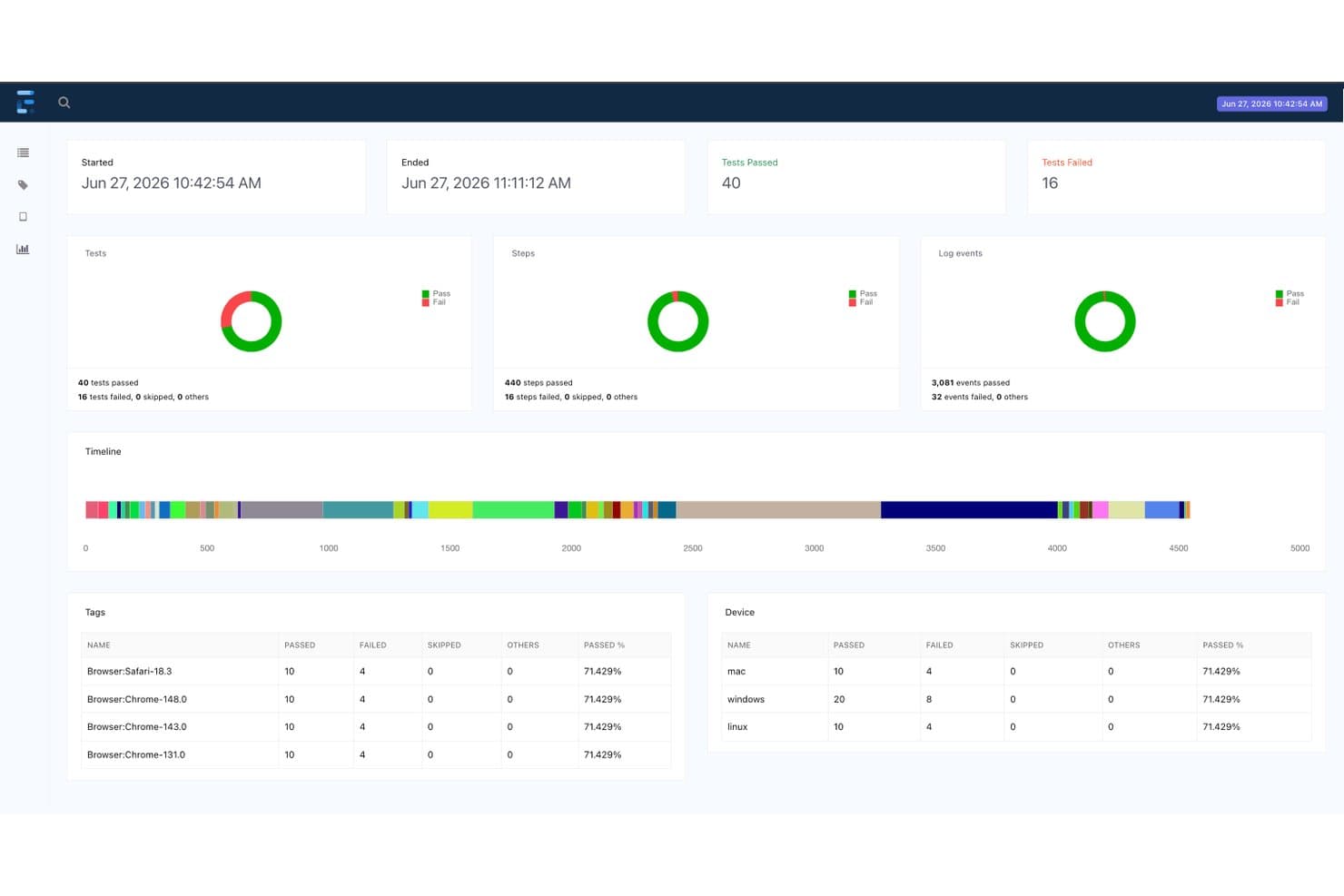
Here's where you can review test run results with pass and fail counts and a timeline in TestMu AI. TestMu AI is a cloud-based stress testing platform that runs existing JMeter, Gatling, and k6 scripts on managed load generators to simulate load, stress, spike, and soak test scenarios against HTTP, REST, SOAP, GraphQL, and database endpoints.
Who Is TestMu AI Best For?
TestMu AI is a good fit for performance engineers who already work with JMeter, Gatling, or k6 and want to run those existing scripts at scale without managing their own load generator infrastructure.
Why I Picked TestMu AI
I picked TestMu AI as one of the best because it's specifically built to show you where your app or your load generators hit their ceiling first. The Task Metrics view surfaces CPU and memory consumption per stage, so when a stress run starts throwing errors, you can tell whether the application buckled or whether the generators ran out of resources before the app was actually pushed to its limit. I also like that the stress test type ramps virtual users beyond expected peak and pairs timeline plots with per-endpoint response-time percentiles, letting you pinpoint exactly where latency climbs and errors begin.
TestMu AI Key Features
- Multi-framework script support: Upload and run existing JMeter
.jmxplans, Gatling Java DSL simulations, or k6.js/.tsscripts without rewriting them for the platform. - Distributed CSV data splitting: Automatically divide CSV test data across load generators so each machine processes unique rows instead of replaying the same dataset.
- Static outbound IP access: Obtain fixed outbound IPs from TestMu AI to allowlist in your firewall, enabling load tests to reach private or staging endpoints.
- Scheduled stress test runs: Use Workflows to schedule JMeter stress tests on a recurring basis, such as nightly runs, without manual intervention.
TestMu AI Integrations
TestMu AI supports JMeter, Gatling, and k6 for performance testing, with Gatling CI through
hyperexecute.yamland scheduled JMeter runs through Workflows. The broader platform lists 120+ integrations, but named CI/CD integrations and a performance-testing API aren’t documented.Pros and Cons
Pros:
- Reviewers praise straightforward platform setup
- Existing JMeter, Gatling, and k6 scripts run
- Task metrics distinguish generator from app failures
Cons:
- Concurrency and run duration remain plan-limited
- Reviewers report delays during large batches
Learn more about TestMu AI: Best for teams needing quick setup
- Free demo available
- From 1¢/AI credit
Visit WebsiteCustomer Rating:4.9/5
QA Wolf offers fully managed end-to-end test coverage. QA Wolf is a hybrid platform and service that automates end-to-end testing for web and mobile applications. It targets software teams, especially in fintech, healthcare, and eCommerce, looking to enhance their QA processes efficiently.
Why I picked QA Wolf: It’s geared towards teams needing quick setup with features like AI-driven test automation and human-verified bug reports. The platform allows you to run tests in parallel, reducing the time needed for thorough testing. QA Wolf's integration with CI/CD pipelines ensures smoother development workflows. The focus on minimizing vendor lock-in makes it adaptable for various development environments.
Standout features & integrations:
Features include AI-driven test automation that simplifies your testing processes. Human-verified bug reports provide precise insights into issues, helping your team address them quickly. The ability to run tests in parallel saves time and resources.
Integrations include GitHub, GitLab, Bitbucket, CircleCI, Jenkins, Travis CI, Slack, Jira, Trello, and Asana.
Pros and Cons
Pros:
- Human-verified bug reports
- AI-driven automation
- Quick setup process
Cons:
- Dependence on CI/CD integration
- May not suit all industries
Learn more about QA Wolf: Best for rapid performance testing with CI/CD integration
- Free trial available + free demo
- Pricing upon request
Visit WebsiteCustomer Rating:4.3/5
Tricentis NeoLoad offers codeless test design, automatic test updates, dynamic infrastructure capabilities, and support for repurposing functional test scripts. Tricentis NeoLoad is a performance testing tool designed for large-scale enterprises. It's particularly useful for development and QA teams that need efficient testing processes across APIs, microservices, and legacy systems.
Why I picked Tricentis NeoLoad: It focuses on large-scale enterprise testing with features like codeless test design and automatic test updates. NeoLoad's dynamic infrastructure management lets your team create and manage tests without needing extensive coding knowledge, aligning with its USP for large-scale testing. It integrates well with existing DevOps toolchains, supporting a wide range of protocols. This adaptability makes it suitable for modern, cloud-based environments.
Standout features & integrations:
Features include codeless test design, which allows you to create tests without coding. Automatic test updates ensure your tests stay current as your applications evolve. Dynamic infrastructure management helps your team efficiently manage testing resources.
Integrations include Jenkins, Jira, GitHub, Azure DevOps, Bamboo, Dynatrace, Splunk, AppDynamics, New Relic, and Grafana.
Pros and Cons
Pros:
- Dynamic infrastructure management
- Codeless test creation
- Supports legacy applications
Cons:
- May need additional plugins
- Limited customization for some features
Learn more about Tricentis NeoLoad: Best for testing complex web apps
- 15-day free available + free demo
- From $499/month
Visit WebsiteCustomer Rating:4.4/5
WebLOAD's stress testing feature includes automated test optimization capabilities that use data to automatically optimize test parameters. WebLOAD is a load testing tool designed for testing complex web applications, making it ideal for large enterprises and tech teams. It helps assess performance, scalability, and reliability under various load conditions.
Why I picked WebLOAD: It's tailored for testing complex web apps with advanced scripting capabilities and real-time analytics. The tool allows you to simulate large user loads, providing insights into potential bottlenecks. Its flexibility in scripting lets your team create customized test scenarios. WebLOAD's comprehensive analytics give you detailed reports, helping you make informed decisions about application performance.
Standout features & integrations:
Features include advanced scripting capabilities that let you create detailed test scenarios. Real-time analytics provide immediate insights into performance issues. The tool also offers customizable dashboards to monitor key metrics during tests.
Integrations include Jenkins, Selenium, JIRA, GitHub, Azure DevOps, Dynatrace, New Relic, AppDynamics, Splunk, and Grafana.
Pros and Cons
Pros:
- Supports large user loads
- Real-time performance analytics
- Advanced scripting options
Cons:
- High resource consumption
- Limited customer support
Learn more about WebLOAD: Best overclocking utility with in-game GPU monitoring
- 30-day free trial
- Pricing upon request

MSI Afterburner lets gamers screen record and monitor their GPU during game play. MSI Afterburner is a free software application that gives users control over their graphics cards, allowing for performance enhancements and hardware monitoring. It's designed for gamers and PC enthusiasts who want to optimize their systems. The software supports graphics cards from all brands, not just MSI.
Why I picked MSI Afterburner: This tool offers an OC Scanner feature that automatically finds the highest stable overclock settings for your GPU, making it easier to boost performance without manual tweaking. It also provides real-time hardware monitoring, displaying critical information like temperature and usage directly on your screen during gameplay. Additionally, you can create custom fan profiles to manage cooling and noise levels effectively.
Standout features & integrations:
Features include real-time hardware monitoring, which lets you keep track of your system's performance metrics. The software also allows for video capture, enabling you to record your gameplay sessions. Another feature is the ability to customize fan profiles, giving you control over cooling performance.
Integrations include compatibility with various graphics cards, allowing you to use the software regardless of your GPU brand.
Pros and Cons
Pros:
- Includes video capture functionality
- Offers real-time performance monitoring
- Supports GPUs from all brands
Cons:
- Overclocking can void GPU warranties
- May require technical knowledge to use effectively
Learn more about MSI Afterburner:

PCMark 10’s Battery Life Profiles assess battery performance across five real-world scenarios. PCMark 10 is a benchmarking tool that assesses the performance of Windows PCs. It caters to organizations and individuals looking to evaluate system capabilities across various tasks and applications.
Why I picked PCMark 10: PCMark 10 offers a comprehensive set of tests that cover a wide range of activities, from everyday productivity tasks to digital content creation. It includes specialized benchmarks for battery life and storage performance, allowing you to assess different aspects of your system's capabilities. The tool provides multi-level reporting, delivering high-level scores as well as detailed insights into specific test groups and workloads. Additionally, PCMark 10 is easy to install and run, requiring no complicated configuration.
Standout features & integrations:
Features include a Battery Life Profile that tests and compares laptop battery life across common scenarios, and dedicated storage benchmarks that use real-world traces from popular applications to assess the performance of modern drives.
Integrations include compatibility with Microsoft Office applications such as Word, Excel, PowerPoint, and Edge, and support for automation tools like Testdriver.
Pros and Cons
Pros:
- Supports automation through command-line scripting
- Provides detailed storage performance benchmarks
- Measures battery life with real-world scenarios
Cons:
- Requires separate licenses for commercial use
- Limited to Windows operating systems
Learn more about PCMark 10:

Run your test cases in BlazeMeter and generate the results through graphs BlazeMeter is a cloud-based performance testing platform designed for DevOps and Agile teams. It helps you simulate real-world user traffic to test the scalability and reliability of web and mobile applications.
Why I picked BlazeMeter: It excels in continuous testing integration, making it a great fit for Agile workflows. BlazeMeter supports multiple testing frameworks, which allows your team to run tests in parallel with development. The platform's real-time reporting helps you quickly identify performance bottlenecks. Its ability to simulate thousands of users ensures your applications can handle peak loads efficiently.
Standout features & integrations:
Features include the ability to create and run tests from multiple testing frameworks, which adds flexibility to your testing processes. Real-time reporting gives you instant insights into performance issues. The platform also offers the capability to simulate thousands of users, ensuring your applications are ready for high traffic.
Integrations include Jenkins, JMeter, Selenium, GitHub, GitLab, New Relic, Splunk, Dynatrace, AppDynamics, and PagerDuty.
Pros and Cons
Pros:
- Simulates thousands of users
- Real-time performance reporting
- Supports multiple testing frameworks
Cons:
- Requires technical expertise
- Can be resource-intensive
Learn more about BlazeMeter:

Manage tests on your endpoints, and view the statics of your test cases Locust is an open-source load testing tool that enables developers and testers to assess the performance of their systems. By allowing user behavior to be defined in Python code, it facilitates the simulation of millions of simultaneous users to evaluate system capacity and identify potential bottlenecks.
Why I picked Locust: Locust allows you to define user behavior using Python, making it accessible if your team is familiar with the language. Its event-based architecture supports running load tests distributed over multiple machines, enabling the simulation of millions of simultaneous users. The tool provides a web-based user interface that displays real-time test progress and allows you to adjust the load during a test. Additionally, Locust's flexibility lets you test various systems and protocols by writing custom clients.
Standout features & integrations:
Features include a user-friendly web interface that displays real-time test progress and allows you to adjust the load during a test. Locust's event-based architecture supports running load tests distributed over multiple machines, enabling the simulation of millions of simultaneous users. Additionally, it allows you to test various systems and protocols by writing custom clients.
Integrations include third-party extensions such as locust-plugins for additional protocols and reporting, opentelemetry-demo for OTEL traces, locust-swarm for automating distributed runs over SSH, har2locust for translating browser recordings to locustfiles, and support for workers written in other languages like Go and Java.
Pros and Cons
Pros:
- Allows testing of various systems and protocols
- Provides a web-based UI for real-time monitoring
- Supports distributed testing across multiple machines
Cons:
- Limited built-in support for non-HTTP protocols
- Requires Python programming knowledge
Learn more about Locust:

Apache JMeter offers remote testing for machines that face network limitations. Apache JMeter is an open-source application designed for load testing and analyzing the performance of web applications. It caters to developers and testers who need an adaptable tool to simulate various load conditions and measure performance metrics.
Why I picked Apache JMeter: It offers open-source flexibility, allowing your team to customize and extend its capabilities. With support for multiple protocols, you can test a wide range of applications. Its user-friendly GUI simplifies the creation of test plans, making it accessible even if you're new to performance testing. Apache JMeter's extensive documentation and community support further enhance its adaptability for diverse testing needs.
Standout features & integrations:
Features include support for multiple protocols, allowing you to test different types of applications. The user-friendly GUI helps you easily create and manage test plans. Extensive documentation provides guidance and support for various testing scenarios.
Integrations include Jenkins, Maven, Gradle, Git, Ant, JIRA, Selenium, Grafana, InfluxDB, and AWS.
Pros and Cons
Pros:
- Strong community support
- Supports multiple protocols
- Highly customizable
Cons:
- Limited real-time analytics
- Basic UI design
Learn more about Apache JMeter:

HWiNFO64 provides detailed information about your PC’s hardware. HWiNFO64 is a hardware information and diagnostic tool designed for IT professionals and enthusiasts. It provides in-depth system monitoring and reporting to help you analyze hardware performance and health.
Why I picked HWiNFO64: It’s ideal for detailed hardware monitoring with features like real-time system monitoring and customizable reports. The tool gives you comprehensive data on every component, from CPU to GPU metrics. Its clear interface helps you quickly identify performance issues. HWiNFO64's extensive reporting capabilities ensure you have all the data you need to make informed decisions about your hardware.
Standout features & integrations:
Features include real-time system monitoring that keeps you updated on hardware performance. Customizable reports let you focus on the metrics that matter most to your team. The tool’s detailed sensor information provides insights into temperature, voltage, and fan speeds.
Integrations include Rainmeter, RivaTuner, MSI Afterburner, AIDA64, SpeedFan, Open Hardware Monitor, LogFusion, and LCDHost.
Pros and Cons
Pros:
- Customizable reporting
- Real-time monitoring
- Detailed hardware insights
Cons:
- Basic UI design
- Limited support resources
Learn more about HWiNFO64:
Alte software-uri pentru testarea la stres
Iată câteva opțiuni suplimentare de software pentru testarea la stres care nu au ajuns pe lista mea scurtă, dar merită totuși analizate:
- 11Stress-ngBest for Linux systems stress tests
- 12Core TempBest for CPU temperature monitoring
- 13GPU-ZBest for GPU load testing
- 14HeavyLoadBest for simulating high system load
- 15MemTest86Best for memory diagnostics
- 16LoadTracerBest for Windows-based applications
- 17Dotcom MonitorBest for real-browser stress testing
How I Evaluate Stress Testing Software
I split my evaluation into two layers: the baseline every tool must meet—like distributed load generation and real-time metrics—and differentiators that set the best options apart.
Core Functionality (Table Stakes For This List)
When I'm selecting tools for my list, I rank each one on a scale from 0 (does not offer the functionality) to 5 (excels in this area) for each core functionality listed below. Then, I calculate the tool's total score into a percentage. Each tool needs to achieve a minimum total score of 65% to be considered for inclusion.
- Load Generation at Scale: I evaluate how many concurrent virtual users a tool can sustain, especially for scenarios like flash sale simulations or product launch spikes.
- Protocol & Application Support: Each tool should cover the protocols your stack relies on, whether that's REST APIs, gRPC microservices, WebSocket connections, or database queries.
- Test Scripting & Scenario Design: I look for flexible options to build realistic user journeys, from coded scripts with parameterized data to visual recorders for teams with less coding experience.
- Real-Time Performance Metrics: Dashboards should surface latency percentiles, throughput, and error rates as tests run so you can spot degradation the moment it starts, not after the test ends.
- Distributed/Cloud Load Testing: I check whether a tool can distribute load across multiple regions and nodes to replicate global traffic patterns instead of hammering from a single origin.
- CI/CD & Reporting Integration: Tools should plug into pipelines like Jenkins or GitHub Actions with pass/fail thresholds, plus generate reports your team can share with stakeholders.
Once I have a list of tools that meet this criteria, I consider what sets each platform apart.
Differentiating Factors (What Sets Vendors Apart)
Here's how I compare and contrast different vendors:
Standout Features
APM and observability integrations matter a lot here. When a tool connects to platforms like Datadog or Grafana, you can correlate load test spikes with backend traces instead of toggling between dashboards. I also look for chaos engineering features. Tools that combine stress tests with fault injection let you validate failover behavior under load, not just raw throughput. For larger teams, collaborative test management with shared workspaces and version-controlled scripts keeps performance testing from becoming one person's silo.
Beyond Features
Deployment flexibility is a big differentiator. Teams testing internal apps behind a firewall need on-premise or private VPC options, while others want fully managed cloud infrastructure. Pricing models also vary widely. Some vendors charge per virtual user hour, others per test run, so I evaluate which model aligns with your testing cadence. For regulated industries like healthcare or finance, I check for SOC 2 and ISO 27001 certifications alongside data residency options to make sure test environments meet compliance requirements.
Cum să alegeți software-ul pentru testarea la stres
Este ușor să vă pierdeți în liste lungi de funcții și structuri complexe de prețuri. Pentru a vă ajuta să rămâneți concentrați pe parcursul procesului unic de selectare a software-ului, iată o listă de verificare a factorilor de care trebuie să țineți cont:
| Factor | Aspecte de luat în considerare |
| Scalabilitate | Asigurați-vă că instrumentul poate evolua odată cu nevoile echipei dvs. Căutați soluții care pot gestiona un număr tot mai mare de utilizatori fără a compromite performanța. |
| Integrări | Verificați dacă software-ul se integrează cu instrumentele existente, precum fluxurile CI/CD, sistemele de monitorizare și platformele de raportare, pentru fluxuri de lucru fără întreruperi. |
| Posibilități de personalizare | Luați în considerare în ce măsură puteți adapta instrumentul la scenarii sau fluxuri de lucru specifice de testare, cum ar fi scripturile sau tablourile de bord personalizate. |
| Ușurința în utilizare | Evaluați interfața și experiența utilizatorului. Are un design intuitiv, care reduce la minimum curba de învățare pentru echipa dvs.? |
| Buget | Comparați planurile de prețuri cu limitele bugetului dvs. Căutați prețuri transparente și luați în considerare orice costuri suplimentare, precum taxele pentru instruire sau asistență. |
| Măsuri de securitate | Verificați dacă instrumentul dispune de măsuri pentru protejarea datelor dvs., precum criptarea, controalele accesului utilizatorilor și conformitatea cu standardele din industrie. |
| Servicii de asistență | Luați în considerare nivelul de asistență oferit, inclusiv disponibilitatea chatului live, a forumurilor pentru utilizatori și a managerilor de cont dedicați, care să vă ajute echipa. |
| Indicatori de performanță | Căutați instrumente care oferă indicatori și analize cuprinzătoare, pentru a vă ajuta să înțelegeți performanța sistemului și să luați decizii bazate pe date. |
Tendințe în software-ul pentru testarea la stres
În cadrul cercetării mele, am consultat nenumărate actualizări de produse, comunicate de presă și jurnale de lansări de la diferiți furnizori de software pentru testarea la stres. Iată câteva dintre tendințele emergente pe care le urmăresc:
- Testare bazată pe IA: Algoritmii de IA sunt utilizați pentru a prezice blocajele și a automatiza scenariile de testare. Acest lucru facilitează identificarea problemelor de către echipe înainte ca acestea să afecteze utilizatorii. Unii furnizori integrează IA pentru a îmbunătăți analiza predictivă și acoperirea testelor.
- Testarea încărcării bazată pe cloud: Tot mai multe instrumente utilizează infrastructura cloud pentru a simula încărcări din diferite locații geografice. Acest lucru ajută companiile să înțeleagă modul în care funcționează aplicațiile lor la nivel global. Furnizorii oferă soluții scalabile care se pot adapta instantaneu la cerințele variabile de testare.
- Accent pe experiența utilizatorului: Se pune tot mai mult accent pe testarea experienței utilizatorului în condiții de încărcare. Instrumentele măsoară acum timpii de răspuns și indicatorii de satisfacție a utilizatorilor, oferind informații dincolo de simpla performanță a sistemului.
- Colaborare în timp real: Funcțiile care permit echipelor să lucreze împreună în timp real în timpul testării câștigă tot mai mult teren. Această tendință sprijină echipele distribuite și îmbunătățește comunicarea, unele instrumente oferind tablouri de bord partajate și monitorizarea testelor în timp real.
- Integrarea testării continue: Testarea de stres devine parte a conductei de integrare continuă/livrare continuă (CI/CD). Acest lucru asigură testarea performanței pe tot parcursul ciclului de dezvoltare, permițând iterații mai rapide și o calitate mai bună a produsului.
Ce este software-ul de testare de stres?
Software-ul de testare de stres este utilizat pentru a evalua modul în care funcționează sistemele în condiții de încărcare extremă. Aceste instrumente sunt utilizate de obicei de profesioniști IT, dezvoltatori și administratori de sisteme pentru a se asigura că aplicațiile pot face față traficului de vârf și pentru a identifica potențialele blocaje. Monitorizarea în timp real, simularea încărcării bazată pe cloud și indicatorii experienței utilizatorului ajută echipele să anticipeze problemele și să optimizeze performanța. În general, aceste instrumente asigură fiabilitatea și stabilitatea, aspecte esențiale pentru menținerea satisfacției utilizatorilor și a continuității activității.
Caracteristicile software-ului de testare de stres
Atunci când alegeți un software de testare de stres, acordați atenție următoarelor caracteristici esențiale:
- Simularea încărcării: Simulează un trafic ridicat de utilizatori pentru a testa modul în care funcționează sistemele sub presiune.
- Monitorizare în timp real: Oferă informații imediate despre performanța sistemului și potențialele probleme din timpul testelor.
- Tablouri de bord personalizabile: Vă permite să adaptați interfața pentru a vă concentra asupra indicatorilor care contează cel mai mult pentru echipa dvs.
- Analiză bazată pe IA: Utilizează IA pentru a prezice blocajele și a automatiza scenariile de testare, pentru o acoperire mai bună.
- Capabilități bazate pe cloud: Oferă posibilitatea de a simula încărcări din diferite locații geografice folosind infrastructura cloud.
- Indicatori ai experienței utilizatorului: Măsoară timpii de răspuns și satisfacția utilizatorilor pentru a oferi informații dincolo de performanța tehnică.
- Raportare detaliată: Generează rapoarte cuprinzătoare pentru a ajuta la analiza rezultatelor testelor și la luarea deciziilor bazate pe date.
- Integrare cu conductele CI/CD: Asigură testarea continuă a performanței pe tot parcursul ciclului de dezvoltare.
- Crearea avansată de scripturi: Permite crearea unor scenarii de testare complexe pentru a imita mai bine utilizarea din lumea reală.
- Instrumente de colaborare: Sprijină lucrul în echipă în timp real prin tablouri de bord partajate și monitorizarea testelor în timp real.
Beneficiile software-ului de testare de stres
Implementarea unui software de testare de stres oferă mai multe beneficii pentru echipa și compania dvs. Iată câteva dintre avantajele de care vă puteți bucura:
- Fiabilitate îmbunătățită: Identifică potențialele blocaje ale sistemului înainte ca acestea să afecteze performanța, asigurând stabilitatea aplicațiilor dvs.
- Satisfacție sporită a utilizatorilor: Măsoară indicatori ai experienței utilizatorului, precum timpii de răspuns, pentru a contribui la îmbunătățirea satisfacției generale.
- Luarea deciziilor în cunoștință de cauză: Oferă rapoarte detaliate și analize în timp real pentru a orienta deciziile bazate pe date.
- Economii de costuri: Detectează problemele din timp, reducând riscul perioadelor de nefuncționare și al lucrărilor de mentenanță costisitoare.
- Evaluarea scalabilității: Testează cât de bine poate sistemul dvs. să facă față încărcărilor crescute, ajutându-vă să planificați dezvoltarea viitoare.
- Îmbunătățire continuă: Se integrează cu conductele CI/CD pentru a asigura testarea și optimizarea constantă a performanței pe tot parcursul dezvoltării.
- Colaborarea în echipă: Oferă instrumente pentru lucrul în echipă în timp real, facilitând abordarea colaborativă a problemelor de performanță.
Costurile și prețurile software-ului de testare de stres
Alegerea unui software de testare de stres necesită înțelegerea diferitelor modele și planuri de preț disponibile. Costurile variază în funcție de caracteristici, dimensiunea echipei, suplimente și alți factori. Tabelul de mai jos rezumă planurile obișnuite, prețurile medii ale acestora și caracteristicile incluse de obicei în soluțiile software de testare de stres:
Tabel comparativ al planurilor pentru software-ul de testare de stres
| Tipul planului | Preț mediu | Caracteristici obișnuite |
| Plan gratuit | $0/utilizator/lună | Testare de bază a încărcării, analiză limitată și asistență din partea comunității. |
| Plan personal | $10-$30/utilizator/lună | Instrumente avansate de testare a încărcării, monitorizare în timp real și raportare de bază. |
| Plan pentru companii | $50-$100/utilizator/lună | Analiză cuprinzătoare, integrare cu CI/CD și tablouri de bord personalizabile. |
| Plan pentru întreprinderi | $150-$300/utilizator/lună | Testare nelimitată, asistență dedicată, crearea avansată de scripturi și securitate pentru întreprinderi. |
Software pentru testarea la stres (Întrebări frecvente)
Iată câteva răspunsuri la întrebările frecvente despre software-ul pentru testarea la stres:
Care sunt limitările testării la stres?
Testarea la stres depinde de scenarii și se bazează pe raționamentul și experiența persoanelor care o efectuează. Acest lucru poate face ca rezultatele să fie subiective și să varieze în funcție de scenariile alese. Este posibil să nu acopere toate problemele potențiale, de aceea este esențial să fie utilizată împreună cu alte metode de testare.
Poate fi automatizată testarea la stres?
Da, testarea la stres poate fi automatizată pentru a identifica rapid posibilele puncte de defecțiune. Automatizarea le permite inginerilor să localizeze problemele care ar putea provoca defecțiuni în condiții extreme. Astfel, modificările pot fi implementate mai ușor înainte de lansarea unui produs pe piață, economisind timp și resurse.
Îmi pot folosi computerul în timpul testării la stres?
Este recomandat să evitați utilizarea computerului pentru alte activități în timpul unui test de stres. Acest lucru poate compromite acuratețea testului și poate duce la instabilitatea sistemului sau la blocări. Testele de stres solicită procesorul la capacitatea maximă, prin urmare menținerea sistemului dedicat testului asigură rezultate mai fiabile.
Cum se efectuează testarea la stres în software?
Pentru a efectua testarea la stres, începeți prin planificarea testului și definirea scenariilor pe care doriți să le evaluați. Creați scripturi de automatizare pentru aceste scenarii, apoi executați-le pentru a simula încărcarea dorită. Analizați rezultatele pentru a identifica blocajele și zonele care pot fi îmbunătățite în sistemul dumneavoastră.
Ce ar trebui să iau în considerare atunci când aleg software-ul pentru testarea la stres?
Atunci când alegeți software pentru testarea la stres, luați în considerare factori precum scalabilitatea, integrările, ușurința în utilizare și bugetul. Căutați instrumente care corespund nevoilor echipei dumneavoastră, oferă funcțiile necesare și se încadrează în limitele financiare disponibile. Astfel, vă asigurați că obțineți cea mai bună soluție pentru cerințele dumneavoastră.
Prin ce diferă testarea la stres de testarea încărcării?
Testarea la stres împinge sistemele dincolo de capacitatea operațională normală pentru a vedea cum se comportă în condiții extreme, în timp ce testarea încărcării evaluează performanța la nivelurile de utilizare preconizate. Testarea la stres se concentrează pe stabilitatea sistemului atunci când este supus presiunii, în timp ce testarea încărcării se asigură că sistemul poate face față încărcărilor obișnuite generate de utilizatori.