

Software-ul pentru rezervarea birourilor flexibile cu AI utilizează inteligența artificială pentru a automatiza și optimiza modul în care echipa dumneavoastră rezervă birouri în spații de lucru comune. Dacă sunteți în căutarea celei mai bune modalități de a gestiona programele hibride, de a reduce conflictele de rezervare și de a utiliza mai eficient biroul, ați ajuns în locul potrivit. În acest ghid veți găsi cele mai bune platforme pentru rezervarea birourilor bazate pe AI, elementele care le diferențiază și modul în care vă pot ajuta să vă mențineți locul de muncă flexibil și eficient în 2026.
Why Trust Our Software Recommendations
6,700+
Reviews
20
Industry experts
16+
Evaluation factors
14
Years
Our team has been testing and reviewing software since 2012. As tech leaders ourselves, we know how difficult—and important—it is to choose the right software.
For this guide, we evaluated tools using hands-on testing and independent research, scoring tools using our selection criteria.
Our reviews reflect our human editorial judgment, not a sales pitch.
Expert reviewers:
- Paulo Gardini MiguelTech Director
 Tim FisherVP of AI
 Gabriel RosasTech Lead & Software Architect
 Christhian GruhnTech Lead & Platform Architect

Tabel comparativ pentru software-ul de rezervare a birourilor flexibile cu AI
Acest tabel comparativ rezumă detaliile privind prețurile pentru selecția mea de software pentru rezervarea birourilor flexibile cu AI:
Sorted by: Default
| Tool | Starting Price | Website | |
|---|---|---|---|
Best for unified map-based resource booking | 4.7 out of 5 | €1.7/user/month Free plan available; 14-day free trial; free demo available | Website |
Best for desk booking and office operations | 4.7 out of 5 | $500/month Free demo available | Book Demo |
Best for AI-assisted workplace coordination | 4.3 out of 5 | Pricing upon request Free demo available | Website |
Best for real-time desk availability mapping | 4.8 out of 5 | $1.79/user/month 7-day free trial + free demo available | Website |
Best with advanced analytics for occupancy | 4.5 out of 5 | Pricing upon request Free demo available | Website |
Best for integrated carbon tracking | 4.5 out of 5 | $99/month Free demo available | Website |
Best for Microsoft 365 calendar integration | 4.7 out of 5 | $13.50/month 30-day free trial + free demo available | Website |
Best for privacy-focused desk reservations | 4.5 out of 5 | $51/month 30-day free trial available | Website |
Best for Slack-based desk booking | 5.0 out of 5 | $2.50/user/month Free trial + free demo available | Website |
Best for multi-location desk coordination | 5.0 out of 5 | €1.59/resource/month 30-day free trial available | Website |


Recenzii pentru software-ul de rezervare a birourilor flexibile cu AI
Mai jos sunt rezumatele mele detaliate ale celor mai bune soluții software pentru rezervarea birourilor flexibile cu AI care au intrat în selecția mea. Recenziile mele oferă o perspectivă detaliată asupra funcțiilor, celor mai potrivite cazuri de utilizare și integrărilor fiecărei platforme, pentru a vă ajuta să o găsiți pe cea mai potrivită pentru dumneavoastră.
 Best for unified map-based resource booking
- Free plan available; 14-day free trial; free demo available
- From €1.7/user/month (billed annually)
Visit WebsiteCustomer Rating:4.7/5
Dibsido manages desk booking with maps and automated space optimization. Dibsido is a workplace management platform designed for CTOs seeking AI-enabled hot desk booking software that unifies desk, meeting room, and parking reservations in one app.
Who Is Dibsido Best For?
Facilities teams and office managers at small to midsize organizations that need simple, unified booking for desks, rooms, and parking.
Why I Picked Dibsido
I picked Dibsido as one of the best because it lets my team manage desks, meeting rooms, and parking from a unified map-based interface. I like using a single tool to organize every shared workspace resource right inside the same app.
Dibsido Key Features
- AI floorplan enhancer: Automatically upgrades floor plans for easier space management and booking visualization.
- Advanced booking permissions: Set different access rights for user groups and manage resource control.
- Automated notifications: Sends booking reminders and updates through email or app push notifications.
- Analytics dashboard: Provides insights into office, desk, room, and parking space utilization.
Dibsido Integrations
Integrations include Slack, Microsoft 365, Google Workspace, two-way Google and Outlook Calendar sync, and SSO through Microsoft Entra ID, Google Workspace, and SAML.
Pros and Cons
Pros:
- Includes iOS and Android mobile apps on every plan
- Interactive floor plan maps streamline reservations
- Parking waitlist automatically assigns a spot when one frees up
Cons:
- Lacks advanced automation for large enterprises
- Analytics dashboard offers limited customization
Learn more about Dibsido: 2Best for desk booking and office operations
elia
- Free demo available
- From $500/month
Visit WebsiteCustomer Rating:4.7/5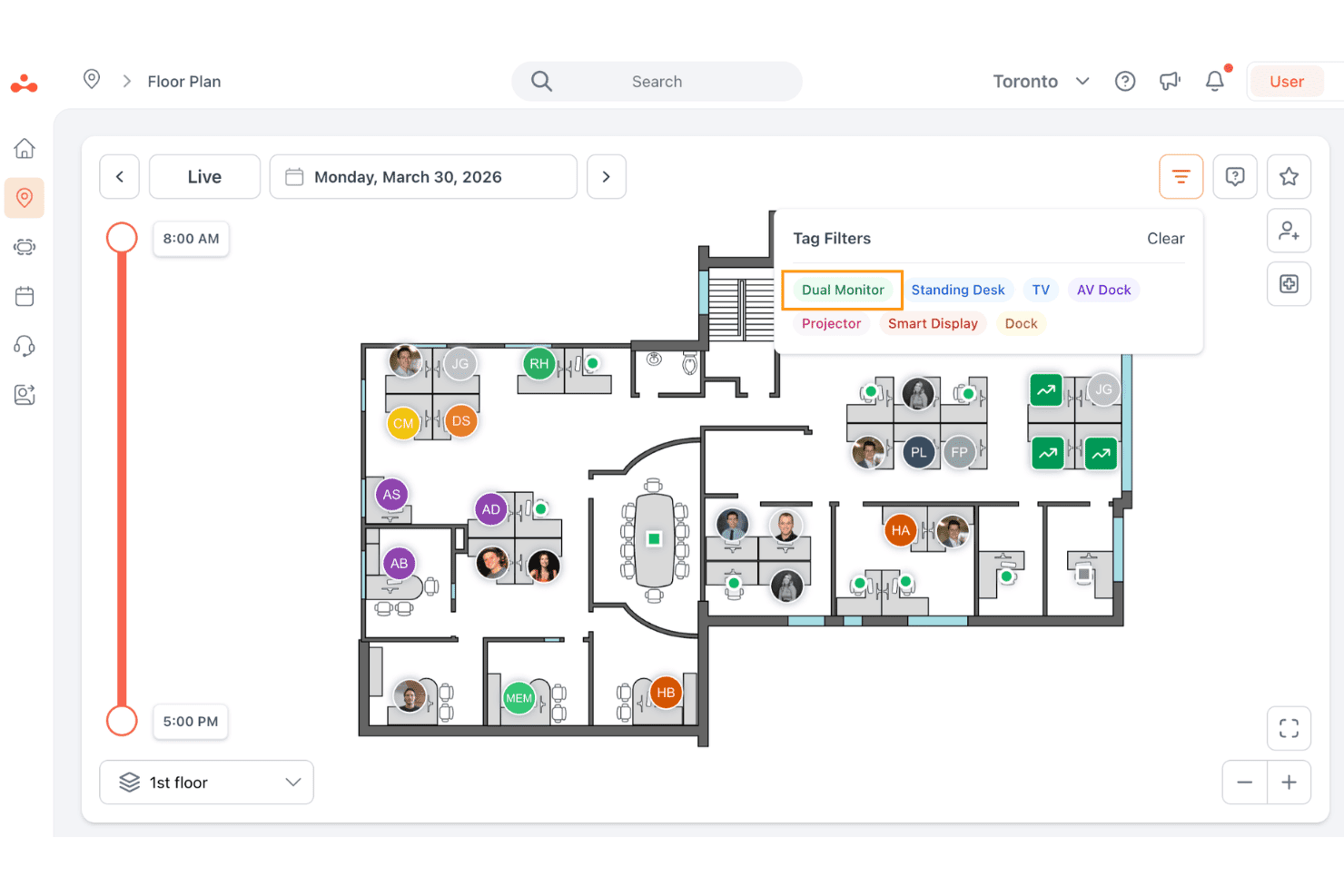
elia lets users filter available hot desks by amenity tags on a live floor plan. elia is a workplace operations platform that covers desk and room booking, visitor management, occupancy analytics, and service request tracking across a single interface.
Who Is elia Best For?
elia suits office operations and facilities teams that want desk booking, room reservations, visitor management, and occupancy analytics in one platform.
Why I Picked elia
I picked elia as one of the best because it goes beyond desk booking to cover the full scope of office operations in a single platform. I particularly like how the interactive floor plan lets employees browse real-time desk availability, filter by preference, and reserve a workspace before they arrive, without any guesswork. The occupancy analytics and heatmaps give operations teams concrete usage data to back space-planning decisions, like consolidating underused floors or reallocating neighbourhoods to growing teams.
elia Key Features
- Colleague visibility: Employees can see who's planning to come in and where they're sitting, so coordinating in-person collaboration takes less back-and-forth.
- Visitor management: Visitors check in at a self-service kiosk, and hosts get arrival notifications through email, Slack, or Microsoft Teams.
- Service request tracking: Employees submit and track IT, catering, or maintenance requests directly from the platform, with automated assignment and status updates.
- Workplace automation builder: Administrators configure custom triggers, conditions, and actions to automate recurring workflows like room cancellations, reminders, and task assignments.
elia Integrations
elia offers integrations with Microsoft 365, Google Workspace, Google Calendar, Microsoft Teams, Microsoft Outlook, and Slack. Enterprise includes API access for custom integrations, but the available API capabilities aren't specified.
Pros and Cons
Pros:
- Occupancy heatmaps inform space planning
- Colleague visibility helps coordinate office days
- Floor-plan desk selection clarifies availability
Cons:
- Sensor-based check-in; no-show release rules unclear
- AI recommendations are Enterprise-only and undefined
Learn more about elia: Best for AI-assisted workplace coordination
- Free demo available
- Pricing upon request
Visit WebsiteCustomer Rating:4.3/5
AI platform for booking desks, rooms, parking, and office resources. HybridHero is an AI-powered workplace management platform that helps hybrid teams book desks, meeting rooms, parking spaces, and other workplace resources through interactive floor plans, real-time availability, and intelligent booking assistance.
Who Is HybridHero Best For?
HybridHero is a strong fit for mid-sized organizations managing hybrid work schedules that want a smarter way to coordinate desk bookings, workplace attendance, and office utilization.
Why I Picked HybridHero
I picked HybridHero because it makes coordinating office attendance much easier for hybrid teams. Employees can use the AI assistant to book desks, find teammates, and reserve workspaces based on real-time availability, while managers gain visibility into office utilization through live analytics and occupancy data. I also like that QR check-ins and automatic desk releases help reduce unused reservations, making shared workspaces more efficient.
HybridHero Key Features
- HybridHero AI assistant: Book desks using natural language while checking live availability.
- Colleague finder: Locate teammates on interactive floor plans and reserve nearby desks.
- Utilization heat maps: Analyze occupancy trends to improve workplace planning.
- Calendar sync: Connect desk bookings with Microsoft Outlook, Microsoft Teams, and Google Workspace calendars.
HybridHero Integrations
HybridHero integrates with Microsoft Outlook, Microsoft Teams, Google Workspace, Active Directory, Okta, OpenID Connect, ADFS, and Slack. It also provides a REST API and webhooks for custom integrations with HR, access control, and workplace systems.
Pros and Cons
Pros:
- QR check-in with auto-release
- AI-powered desk booking
- Strong workplace analytics
Cons:
- Page loads can be slow
- Occasional mobile app bugs
Learn more about Hybrid Hero: Best for real-time desk availability mapping
- 7-day free trial + free demo available
- From $1.79/user/month (billed annually)
Visit WebsiteCustomer Rating:4.8/5
WornInSync offers desk booking, team calendars, and workplace scheduling. WorkInSync is an AI-powered desk booking software that provides real-time desk availability mapping, workspace scheduling, and centralized management for hybrid offices.
Who Is WorkInSync Best For?
WorkInSync is a good fit for facilities managers and IT teams in mid-size to large hybrid workplaces needing real-time desk mapping.
Why I Picked WorkInSync
I picked WorkInSync as one of the best because I can see real-time desk availability on an interactive floor map, which helps my team quickly find and book open workspaces. I like that I can set up neighborhood zones and manage bookings for different office locations from a single dashboard. My team also uses the mobile app to reserve desks and check in on the go.
WorkInSync Key Features
- AI-powered booking suggestions: Recommends desks based on user preferences and booking patterns.
- Contactless check-in: Lets users check in using QR codes or NFC.
- Automated sanitization workflows: Triggers cleaning requests after each desk booking.
- Integration with access control systems: Syncs desk bookings with physical entry permissions.
WorkInSync Integrations
Native integrations include Google Calendar, Microsoft Teams, Workday, SAP, and Oracle PeopleSoft. An API may be available for custom integrations.
Pros and Cons
Pros:
- Centralized management for multiple office locations
- Contactless check-in with QR code support
- Automated cleaning and sanitization workflows
Cons:
- Reporting features lack advanced customization
- Occasional sync issues with calendar systems
Learn more about WorkInSync: Best with advanced analytics for occupancy
- Free demo available
- Pricing upon request
Visit WebsiteCustomer Rating:4.5/5
Robin offers floor plans with desk booking, room labels, and live availability. Robin is a desk booking and workplace management platform that lets you manage desk reservations, interactive floor plans, occupancy analytics, and space usage policies for hybrid offices.
Who Is Robin Best For?
Workplace experience teams and facilities managers in mid-sized and large hybrid organizations who need detailed occupancy analytics.
Why I Picked Robin
I picked Robin as one of the best because I rely on its advanced analytics to track occupancy trends and desk usage patterns across multiple office locations. My team uses its real-time dashboards and custom reporting to make data-driven decisions about space allocation. I also like that Robin lets us visualize floor plans and monitor booking activity at a granular level.
Robin Key Features
- Interactive desk booking map: Users can reserve desks directly from a visual floor plan.
- Mobile app access: Book desks, check availability, and manage reservations from iOS and Android devices.
- Neighborhoods management: Group desks into zones for team-based booking and collaboration.
- Visitor management: Register guests and track visitor flow within the office.
Robin Integrations
Robin offers native integrations with Microsoft Outlook, Microsoft Teams, Google Workspace, Okta, and Slack, and provides an API for custom integrations.
Pros and Cons
Pros:
- Real-time updates reduce double-booking risk
- Automated desk assignments based on usage patterns
- Highlights occupancy and trends
Cons:
- Offline access is limited for mobile users
- Admin dashboard can feel cluttered initially
Learn more about Robin: Best for integrated carbon tracking
- Free demo available
- From $99/month
Visit WebsiteCustomer Rating:4.5/5
YAROOMS offers booking analytics, desk usage rates, and floor heatmaps. YAROOMS is a workplace management platform for AI-powered hot desk booking that includes desk reservations, space scheduling, occupancy analytics, and resource management features.
Who Is YAROOMS Best For?
Facilities and sustainability managers at mid-sized and large organizations who need integrated desk booking and carbon tracking.
Why I Picked YAROOMS
I picked YAROOMS as one of the best because I can track carbon emissions directly from workspace bookings, which is rare in this category. My team uses its built-in sustainability dashboard to monitor and report on our office’s environmental impact. I also like that I can set carbon reduction targets and see how our desk usage aligns with those goals.
YAROOMS Key Features
- Interactive floor plan booking: Users can select and reserve desks directly from a visual office map.
- Recurring desk reservations: Schedule repeating bookings for desks on a daily, weekly, or custom basis.
- Mobile app access: Book desks, view availability, and manage reservations from iOS and Android devices.
- Role-based access controls: Set permissions for booking, managing, or viewing desks based on user roles.
YAROOMS Integrations
YAROOMS offers native integrations with Microsoft 365, Google Workspace, Okta, and Azure Active Directory, and provides an API for custom integrations.
Pros and Cons
Pros:
- Supports recurring and team-based desk bookings
- Native Microsoft 365 integration
- Built-in carbon tracking for workspace usage
Cons:
- No AI-driven booking recommendations
- Limited visitor management capabilities
Learn more about YAROOMS: Best for Microsoft 365 calendar integration
- 30-day free trial + free demo available
- From $13.50/month (billed annually)
Visit WebsiteCustomer Rating:4.7/5
Clearooms offers floor plan hot desk booking with live desk availability. Clearooms is a desk and meeting room booking platform designed for businesses that want to manage workspace reservations, interactive floor plans, and resource scheduling in one system.
Who Is Clearooms Best For?
Clearooms is a strong fit for office administrators and IT teams in organizations that rely on Microsoft 365 for daily operations.
Why I Picked Clearooms
I picked Clearooms as one of the best because I can sync desk and meeting room bookings directly with Microsoft 365 calendars, so reservations show up instantly for everyone. My team uses the interactive floor plan to find and book available desks in real time. I also like that I can set up booking rules and manage resources from a single dashboard without switching between tools.
Clearooms Key Features
- Contactless check-in: Users can check in to desks using QR codes.
- Visitor management: Manage guest access and track visitor activity.
- Customizable booking permissions: Set who can book which desks or rooms.
- Desk utilization reporting: View analytics on workspace occupancy and booking trends.
Clearooms Integrations
Clearooms offers native integrations with Google Workspace, Jumpcloud, Microsoft 365, Microsoft Teams, and Azure Active Directory. An API is available for custom integrations.
Pros and Cons
Pros:
- Displays real-time desk availability
- Desk booking limits can be set by admin
- QR code check-in supports contactless workflows
Cons:
- Mobile app notifications can be inconsistent
- Limited analytics compared to other platforms
Learn more about Clearooms: 8Best for privacy-focused desk reservations
Joan
- 30-day free trial available
- From $51/month
Visit WebsiteCustomer Rating:4.5/5
Joan offers interactive floor plans, desk booking, and workspace management. Joan is an AI-powered hot desk booking system that lets you manage desk reservations, set workspace policies, and automate scheduling for flexible office environments.
Who Is Joan Best For?
Privacy-conscious organizations and IT teams that need secure, controlled desk booking in shared office spaces.
Why I Picked Joan
I picked Joan as one of the best because its privacy controls let my team restrict who can see and book desks, which is rare in this space. I like that I can set granular permissions for different departments and anonymize booking data to protect sensitive information. The platform also supports badge-based authentication, so only authorized users can access specific workstations.
Joan Key Features
- Interactive floor plan: Users can select and book desks directly from a visual office map.
- Mobile app booking: Reserve desks and manage bookings from iOS and Android devices.
- Calendar integration: Sync desk reservations with Google Calendar and Microsoft Outlook.
- Real-time availability: Instantly view which desks are open or occupied throughout the day.
Joan Integrations
Joan offers native integrations with Microsoft Active Directory, Google Calendar, Microsoft Teams, and Slack. An API is available for custom integrations.
Pros and Cons
Pros:
- Visual floor plan for intuitive desk selection
- Badge-based authentication for secure access
- Privacy controls for confidential desk bookings
Cons:
- Few native integrations beyond calendars
- Limited analytics for workspace utilization
Learn more about Joan: Best for Slack-based desk booking
- Free trial + free demo available
- From $2.50/user/month (billed annually)
Visit WebsiteCustomer Rating:5/5
Officely offers hot desk booking with floor plans and space reservations. Officely is a desk booking software solution that lets teams manage workspace reservations, office schedules, and desk assignments directly within Slack.
Who Is Officely Best For?
Officely is a great fit for hybrid teams and office managers who already use Slack as their main communication platform.
Why I Picked Officely
I picked Officely as one of the best because I can manage desk bookings, office attendance, and team schedules directly inside Slack without switching apps. My team uses the Slack bot to see who’s coming in, reserve desks, and coordinate in real time. I also like that Officely lets me set up office neighborhoods and manage recurring bookings, all from within our existing Slack workspace.
Officely Key Features
- Health surveys: Collect daily health status from employees before they book a desk.
- Capacity management: Set and enforce office capacity limits for each day.
- Desk check-in reminders: Send automated reminders to confirm desk bookings.
- Visitor management: Track and manage external guests entering the office.
Officely Integrations
Officely offers native integrations with Google Calendar, Microsoft Outlook, and Slack, and provides an API for custom integrations.
Pros and Cons
Pros:
- Supports recurring and group bookings
- Offers daily health check surveys
- Lets you manage office capacity limits
Cons:
- Basic visitor management features
- No mobile app for on-the-go booking
Learn more about Officely: 10Best for multi-location desk coordination
Flexopus
- 30-day free trial available
- From €1.59/resource/month (billed annually)
Visit WebsiteCustomer Rating:5/5
Flexopus offers floor plan desk booking with live availability and seat maps. Flexopus is a desk-sharing and AI-powered hot desk booking platform that lets you manage workspace reservations, interactive floor plans, and multi-location coordination from a single dashboard.
Who Is Flexopus Best For?
Flexopus is a good fit for facilities managers and IT teams coordinating desk bookings across multiple office locations.
Why I Picked Flexopus
I picked Flexopus as one of the best because I can coordinate desk bookings across several office locations from a single dashboard. I like that I can set up location-specific rules and permissions for each site. My team uses the interactive floor plans to visualize and manage workspace availability in real time.
Flexopus Key Features
- AI-powered desk assignment: Uses algorithms to suggest optimal desk placements for users.
- QR code desk check-in: Lets users check in to desks by scanning QR codes on-site.
- Calendar integration: Syncs desk bookings with Outlook and Google Calendar.
- Analytics dashboard: Provides workspace utilization and occupancy reports.
Flexopus Integrations
Flexopus offers native integrations with Microsoft 365, Outlook, Google Workspace, and Slack, and provides an API for custom integrations.
Pros and Cons
Pros:
- Provides parking space booking alongside desks
- Offers multilingual user interface
- Supports multiple locations
Cons:
- Lacks built-in facility move management
- No native passive sensor integrations
Learn more about Flexopus:
Alte soluții software pentru rezervarea birourilor flexibile cu AI
Iată câteva opțiuni suplimentare de software pentru rezervarea birourilor flexibile cu AI care nu au intrat în selecția mea, dar care merită totuși analizate:
- 11annyBest for flexible booking permissions
- 12Eptura EngageBest for mobile-first workplace engagement
- 13desk.lyBest for customizable workspace rules
- 14EdenBest for automated check-in and check-out
- 15OfficeSpaceBest for interactive floor plan management
- 16SkeddaBest for granular access control settings
- 17deskbirdBest for employee self-service booking
- 18KadenceBest for automated neighborhood desk assignments
- 19TacticBest for interactive booking via floor plans
- 20ArchieBest for hybrid work scheduling tools
- 21EnvoyBest for visitor management integration
- 22DeskFlexBest for hardware device compatibility
- 23HybridHeroBest for occupancy threshold alerts
How I Evaluate AI Hot Desk Booking Software
Every tool here has to prove its AI does something real—like learning booking patterns to seat squads together or predicting no-shows to free up space. I break my evaluation into core functionality a platform must have to qualify and differentiating factors that set one vendor apart from the next.
Core Functionality (Table Stakes For This List)
When I'm selecting tools for my list, I rank each one on a scale from 0 (does not offer the functionality) to 5 (excels in this area) for each core functionality listed below. Then, I calculate the tool's total score into a percentage. Each tool needs to achieve a minimum total score of 65% to be considered for inclusion.
- AI-Driven Desk Recommendations: I look for platforms where the AI actually learns from booking history and team patterns—suggesting desks near collaborators rather than just listing open seats.
- Hot Desk Reservation Engine: Real-time booking across multiple offices matters here, including support for recurring reservations, auto-release on no-shows, and check-in workflows.
- Interactive Floor Plan Views: I evaluate whether maps are dynamic and filterable—showing amenities, neighborhoods, and live availability rather than a static image with pins.
- Predictive Occupancy Analytics: The platform should forecast demand and flag underused zones, giving workspace admins data to act on rather than just historical usage charts.
- Enterprise Tool Integrations: I check for native connections to calendar systems, Slack or Teams, and SSO providers like Okta or Azure AD—the tools IT teams already manage daily.
- Multi-Channel Booking Access: Users should be able to reserve a desk from a mobile app, web portal, calendar invite, or chat interface without losing functionality between channels.
Once I have a list of tools that meet the criteria, I consider what sets each platform apart.
Differentiating Factors (What Sets Vendors Apart)
Here's how I compare and contrast different vendors:
Standout Features
Smart team clustering is a big differentiator—I look for AI that seats sprint teams or project squads near each other based on shared calendars and collaboration signals, not just random open desks. IoT sensor integration adds another layer, letting platforms detect actual occupancy and auto-release desks when someone doesn't show up. I also evaluate automated policy enforcement, where the AI applies hybrid work rules and capacity limits without an admin manually configuring exceptions every week.
Beyond Features
Security and compliance matter a lot here because these platforms handle employee location data daily. I check for SOC 2 Type II certification, GDPR readiness, and data residency controls—especially for multi-region deployments. Deployment architecture is equally important; I evaluate whether a vendor offers open APIs and webhooks so IT teams can connect the platform to internal systems like ServiceNow or custom dashboards. I also consider implementation speed, including how quickly floor maps can be digitized and users provisioned in bulk.
Cum să alegeți software-ul pentru rezervarea birourilor flexibile cu AI
Este ușor să vă pierdeți în liste lungi de funcții și structuri complexe de prețuri. Pentru a vă ajuta să rămâneți concentrat în timp ce parcurgeți procesul unic de selecție a software-ului, iată o listă de verificare a factorilor de care trebuie să țineți cont:
| Factor | Aspecte de luat în considerare |
|---|---|
| FactorScalabilitate | Aspecte de luat în considerareVa putea software-ul să gestioneze numărul actual și viitor de angajați, locațiile și modificările spațiului de lucru fără actualizări majore? |
| FactorIntegrări | Aspecte de luat în considerareSe conectează nativ la sistemul dumneavoastră de informații pentru resurse umane, calendar, SSO și sistemele de acces în clădire sau veți avea nevoie de dezvoltare personalizată? |
| FactorPosibilitate de personalizare | Aspecte de luat în considerarePuteți adapta regulile de rezervare, permisiunile și fluxurile de lucru pentru a corespunde politicilor organizației și structurilor echipelor dumneavoastră? |
| FactorUșurință în utilizare | Aspecte de luat în considerareVor adopta angajații și administratorii rapid instrumentul sau va trebui să investiți în instruire și asistență suplimentare pentru a încuraja adoptarea? |
| FactorImplementare și integrare inițială | Aspecte de luat în considerareCât timp va dura lansarea, migrarea datelor și pregătirea utilizatorilor pentru utilizare? Sunt disponibile resurse sau servicii care să ajute la configurare? |
| FactorCost | Aspecte de luat în considerareSunt nivelurile de preț clare și previzibile pe măsură ce vă extindeți? Fiți atenți la taxele ascunse, tarifele per utilizator sau suplimentele necesare care cresc costurile. |
| FactorMăsuri de securitate | Aspecte de luat în considerareOferă platforma SSO, criptarea datelor și controale de acces care respectă standardele de securitate și cerințele de conformitate ale organizației dumneavoastră? |
| FactorDisponibilitatea asistenței | Aspecte de luat în considerareVeți avea acces la asistență promptă în timpul programului de lucru și sunt definite clar SLA-urile sau căile de escaladare? |
Ce este software-ul pentru rezervarea birourilor flexibile cu AI?
Software-ul pentru rezervarea birourilor flexibile cu AI este o platformă digitală care utilizează inteligența artificială pentru a automatiza și optimiza rezervarea spațiilor de lucru în mediile de birou flexibile. Acesta ajută organizațiile să gestioneze repartizarea birourilor, să monitorizeze gradul de ocupare și să aplice politicile de rezervare. Aceste instrumente includ adesea funcții precum disponibilitatea în timp real, sugestii automate de birouri și integrarea cu calendarele sau sistemele clădirii, pentru a sprijini modelele de lucru hibride și bazate pe activități.
Funcțiile software-ului pentru rezervarea birourilor flexibile cu AI
Când alegeți software pentru rezervarea birourilor flexibile cu AI, urmăriți următoarele funcții esențiale:
- Alocarea birourilor bazată pe AI: Utilizează algoritmi pentru a sugera birourile optime pe baza preferințelor utilizatorilor, a proximității față de echipă sau a tiparelor de rezervare.
- Planuri interactive ale etajului: Le permite utilizatorilor să vizualizeze și să selecteze birourile disponibile pe o hartă digitală a spațiului de lucru.
- Monitorizarea disponibilității în timp real: Actualizează instantaneu starea birourilor pe măsură ce rezervările sunt efectuate, anulate sau confirmate prin înregistrarea sosirii.
- Integrarea cu calendarul: Sincronizează rezervările birourilor cu instrumente precum Outlook sau Google Calendar pentru programare.
- Fluxuri de aprobare a rezervărilor: Le permite managerilor să verifice și să aprobe rezervările birourilor pentru anumite echipe sau zone cu cerere ridicată.
- Confirmarea sosirii și plecării prin cod QR: Permite confirmarea fără contact a utilizării biroului prin scanarea unui cod în spațiul de lucru.
- Analiză și raportare a utilizării: Oferă informații despre tendințele de ocupare, utilizarea birourilor și tiparele de rezervare pentru luarea deciziilor pe baza datelor.
- Reguli de rezervare personalizabile: Le permite administratorilor să stabilească restricții în funcție de grupul de utilizatori, departament sau intervalul orar, pentru aplicarea politicilor privind spațiul de lucru.
- Integrarea cu sistemele clădirii: Se conectează la sisteme de control al accesului, încuietori inteligente sau sisteme de control al mediului pentru o experiență de birou unificată.
- Acces prin aplicația mobilă: Oferă funcții de rezervare, notificare și confirmare a sosirii din mers prin intermediul unei aplicații mobile dedicate.
Beneficiile software-ului AI pentru rezervarea birourilor flexibile
Implementarea unui software AI pentru rezervarea birourilor flexibile oferă mai multe beneficii pentru echipa și compania dumneavoastră. Iată câteva dintre avantajele de care vă puteți bucura:
- Utilizarea optimizată a spațiului de lucru: Alocarea birourilor bazată pe AI și monitorizarea în timp real vă ajută să utilizați la maximum spațiul disponibil din birou.
- Experiență îmbunătățită pentru angajați: Planurile interactive ale etajului și rezervarea mobilă le permit angajaților să găsească și să rezerve cu ușurință spațiul de lucru potrivit.
- Aplicarea îmbunătățită a politicilor: Regulile de rezervare personalizabile și fluxurile de aprobare asigură respectarea politicilor organizației dumneavoastră privind spațiul de lucru.
- Reducerea volumului de muncă administrativă: Programarea automatizată, integrarea cu calendarul și instrumentele de autoservire reduc la minimum coordonarea manuală pentru echipele responsabile de facilități.
- Luarea deciziilor pe baza datelor: Analiza și raportarea utilizării oferă informații utile pentru planificarea configurației biroului și a necesarului viitor de spațiu.
- Flexibilitate sporită la locul de muncă: Rezervarea la cerere și accesul mobil sprijină munca hibridă și programul variabil al echipelor.
- Securitate și conformitate consolidate: Integrarea cu sistemele de control al accesului și SSO contribuie la protejarea datelor sensibile și la gestionarea accesului la spațiul de lucru.
Costurile și prețurile software-ului AI pentru rezervarea birourilor flexibile
Selectarea unui software AI pentru rezervarea birourilor flexibile necesită înțelegerea diferitelor modele de preț și a planurilor disponibile. Costurile variază în funcție de funcții, dimensiunea echipei, suplimente și alți factori. Tabelul de mai jos prezintă pe scurt planurile uzuale, prețurile medii ale acestora și funcțiile incluse în mod obișnuit în soluțiile software AI pentru rezervarea birourilor flexibile:
Tabel comparativ al planurilor pentru software-ul AI de rezervare a birourilor flexibile
| Tipul planului | Preț mediu | Funcții comune |
|---|---|---|
| Tipul planuluiPlan gratuit | Preț mediu$0 | Funcții comuneRezervare de bază a birourilor, număr limitat de utilizatori, vizualizare simplă a planului etajului și asistență prin e-mail. |
| Tipul planuluiPlan personal | Preț mediu$5-$10/utilizator/lună | Funcții comuneRezervare individuală, integrare cu calendarul, acces prin aplicația mobilă și analize de bază. |
| Tipul planuluiPlan pentru companii | Preț mediu$10-$25/utilizator/lună | Funcții comuneRezervare pentru echipe, planuri interactive ale etajului, fluxuri de aprobare, integrări cu HRIS și rapoarte de utilizare. |
| Tipul planuluiPlan pentru întreprinderi | Preț mediu$25-$50/utilizator/lună | Funcții comuneSecuritate avansată, SSO, fluxuri de lucru personalizate, acces API, asistență prioritară și integrări personalizate. |
Întrebări frecvente despre software-ul AI de rezervare a birourilor flexibile
Iată câteva răspunsuri la întrebările frecvente despre software-ul AI de rezervare a birourilor flexibile:
Cum îmbunătățește AI rezervarea birourilor flexibile în comparație cu sistemele manuale?
AI îmbunătățește rezervarea birourilor flexibile sugerând automat birourile optime pe baza preferințelor utilizatorului, a proximității față de echipă și a tiparelor de utilizare. Acest lucru îmbunătățește experiența utilizatorului, eliminând incertitudinea privind găsirea unui loc flexibil. Prin utilizarea unui asistent AI, sistemul reduce conflictele, economisește timp și ajută organizațiile să își gestioneze mai eficient spațiile imobiliare și nevoile de la locul de muncă decât în cazul unui model bazat pe birouri permanente.
Se poate integra software-ul AI de rezervare a birourilor flexibile cu sistemele IT existente?
Da, majoritatea soluțiilor software AI de rezervare a birourilor flexibile se pot integra cu instrumente precum HRIS, platforme de calendar, SSO și sisteme de acces în clădire. Aceste integrări susțin o strategie de lucru flexibilă și se pot conecta chiar și cu software-ul de programare a sălilor sau cu sistemele de semnalizare digitală pentru a oferi actualizări în timp real în întregul mediu de lucru. Verificați întotdeauna opțiunile de integrare pentru a vă asigura că sunt compatibile cu stiva tehnologică actuală.
La ce măsuri de securitate ar trebui să mă aștept din partea acestor platforme?
Ar trebui să vă așteptați la funcții precum SSO, criptarea datelor, controale de acces bazate pe roluri și jurnale de audit. Aceste măsuri de protecție contribuie la securizarea datelor sensibile despre angajați și gradul de ocupare, asigurând conformitatea cu GDPR și cu alte standarde interne sau externe. Menținerea unui mediu sigur și ușor de utilizat este esențială atunci când sunt gestionate date referitoare la prezența la birou.
Este posibilă personalizarea regulilor de rezervare pentru echipe sau locații diferite?
Da, majoritatea platformelor vă permit să definiți reguli de rezervare personalizate în funcție de grupul de utilizatori, departament sau locație. Această flexibilitate vă permite să gestionați politicile de utilizare partajată a birourilor, să aplicați reguli specifice pentru spațiile de lucru și să vă adaptați la cerințele diferitelor echipe. De asemenea, puteți automatiza setările pentru a gestiona situațiile în care un utilizator nu se prezintă, eliberând biroul pentru a putea fi folosit de alte persoane.
Cum sprijină aplicațiile mobile rezervarea birourilor flexibile?
Aplicațiile mobile le permit utilizatorilor să rezerve birouri, să verifice disponibilitatea și să se înregistreze sau să încheie sesiunea de oriunde. Aceste aplicații includ adesea funcții de orientare pentru a-i ajuta pe angajați să se deplaseze prin birou și să își găsească locul flexibil alocat. Acest lucru sprijină munca hibridă și le permite angajaților să își gestioneze mai ușor nevoile legate de locul de muncă, chiar și atunci când sunt în deplasare.
Ce tip de analize pot obține din software-ul AI de rezervare a birourilor flexibile?
Vă puteți aștepta la analize privind utilizarea birourilor, tendințele de ocupare, frecvența rezervărilor și comportamentul utilizatorilor. Aceste informații oferă o imagine clară asupra modului în care sunt utilizate spațiile imobiliare, ajutându-vă să luați decizii informate cu privire la configurarea biroului și la planificarea viitoare a spațiului, pentru a sprijini mai bine colaborarea la birou.