

Software-ul pentru gestionarea parolelor vă menține conturile în siguranță stocând, generând și organizând toate parolele într-un singur loc, astfel încât să nu trebuiască să rețineți zeci de date de conectare unice sau să vă faceți griji cu privire la erorile de securitate. Instrumentul potrivit simplifică autentificarea și vă protejează de parole slabe, reutilizate sau uitate.
Am ajutat persoane și echipe să găsească soluții de gestionare a parolelor care combină configurarea simplă cu securitatea solidă. În acest ghid, vă voi arăta exact cum să alegeți cel mai bun software pentru gestionarea parolelor în funcție de nevoile dumneavoastră.
Why Trust Our Software Recommendations
6,700+
Reviews
20
Industry experts
16+
Evaluation factors
14
Years
Our team has been testing and reviewing software since 2012. As tech leaders ourselves, we know how difficult—and important—it is to choose the right software.
For this guide, we evaluated tools using hands-on testing and independent research, scoring tools using our selection criteria.
Our reviews reflect our human editorial judgment, not a sales pitch.
Expert reviewers:
- Paulo Gardini MiguelTech Director
 Tim FisherVP of AI
 Gabriel RosasTech Lead & Software Architect
 Christhian GruhnTech Lead & Platform Architect

Tabel comparativ: software pentru gestionarea parolelor
Acest tabel comparativ rezumă detaliile privind prețurile pentru principalele mele selecții de software pentru gestionarea parolelor.
Sorted by: Default
| Tool | Starting Price | Website | |
|---|---|---|---|
Best with just-in-time privileged access controls | 4.8 out of 5 | Pricing upon request 14-day free trial | Website |
Best for individual users and small businesses | 4.6 out of 5 | $3/user/month 30-day free trial + free plan available | Website |
Best for multi-platform password synchronization | 4.7 out of 5 | $2.99/month 14-day free trial | Website |
Best for a built-in VPN feature | 4.5 out of 5 | $4.99/user/month | Website |
Best for large organizations with complex needs | 3.8 out of 5 | $2.96/user/month | Website |
Best for a straightforward user interface | Not rated | $2.49/user/month | Website |
Best for organizations valuing open-source software | Not rated | $3/user/month 7-day free trial + free plan + free demo available | Website |
Best for providing advanced two-factor authentication | Not rated | $8/client/month Free demo available | Website |
Best for IT service providers | Not rated | Pricing upon request | Website |
Best for integrating with Active Directory | Not rated | $5/user/month | Website |


Recenzii despre cel mai bun software pentru gestionarea parolelor
Mai jos sunt rezumatele mele detaliate ale celui mai bun software pentru gestionarea parolelor inclus în selecția mea. Recenziile mele oferă o privire detaliată asupra funcțiilor principale, avantajelor & dezavantajelor, integrărilor și cazurilor ideale de utilizare pentru fiecare instrument, pentru a vă ajuta să îl găsiți pe cel mai potrivit pentru dumneavoastră.
 Best with just-in-time privileged access controls
- 14-day free trial
- Pricing upon request
Visit WebsiteCustomer Rating:4.8/5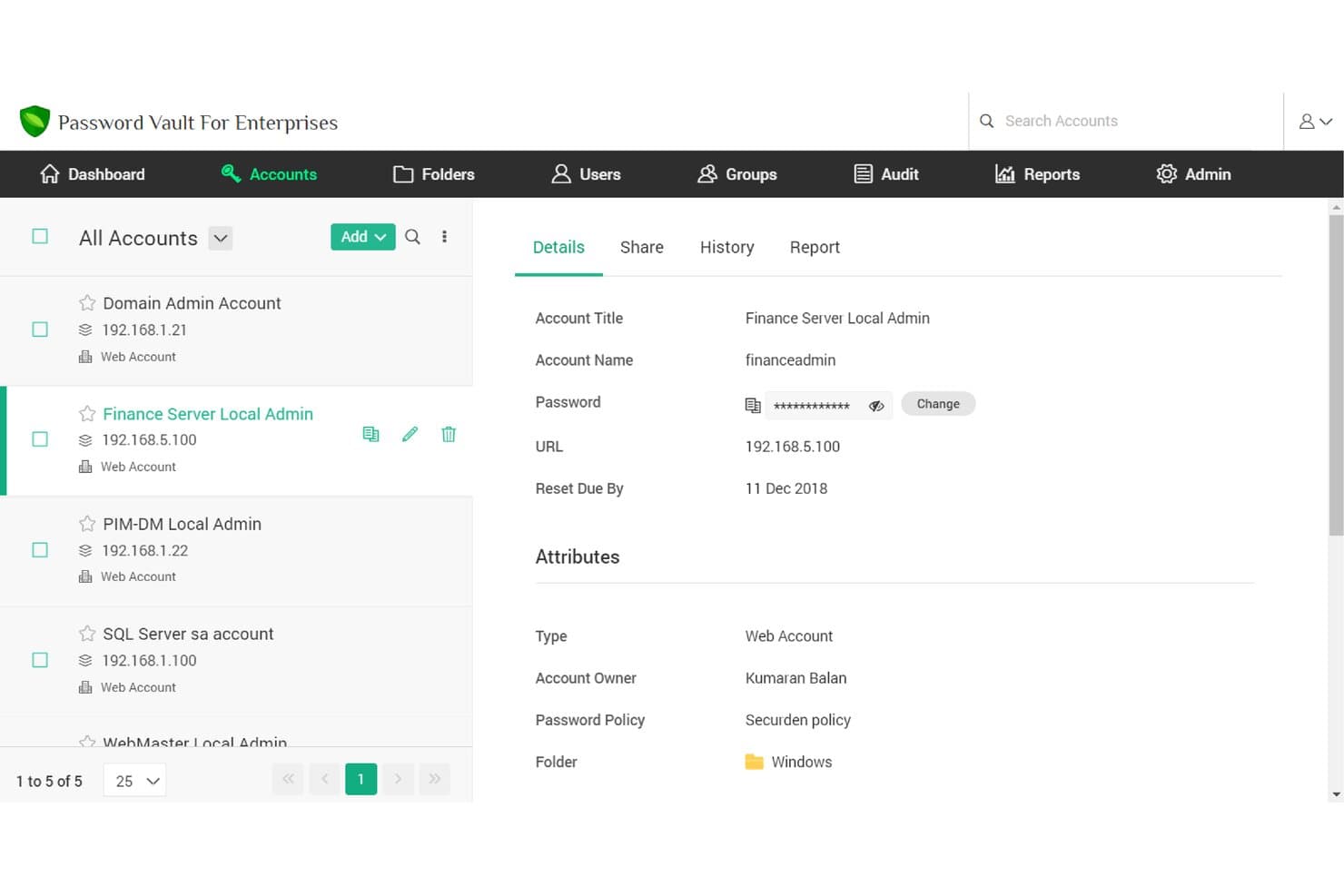
Securden Unified PAM offers a centralized account vault where users can view and manage stored credentials, passwords, and account details with role-based controls. Securden Unified PAM is an enterprise privileged access management platform that combines credential vaulting, session monitoring, secrets management, and endpoint privilege controls in one solution.
Who Is Securden Unified PAM Best For?
It's a strong fit for security-focused IT teams in mid-to-enterprise organizations that need to govern privileged access across complex, multi-system environments.
Why I Picked Securden Unified PAM
I picked Securden Unified PAM because its just-in-time access controls go further than most password managers. Approval-gated sessions automatically revoke access and randomize the underlying credential the moment the time window expires, so users never retain usable passwords after a session ends. I also like that third-party vendor access can be scoped to a specific time window, with full session recording running throughout, which makes post-incident reviews straightforward.
Securden Unified PAM Key Features
- Granular role-based credential sharing: Share sensitive credentials and secrets with specific teams, users, or third parties with full permission controls.
- Comprehensive audit trails and session recording: Capture detailed logs of all privileged activity, including keystrokes and session video playback.
- Directory sync and SSO integration: Connect with Active Directory, LDAP, and SAML identity providers for automated provisioning and authentication.
- Automated credential rotation policies: Enforce password complexity and rotation schedules for privileged accounts, keys, and application secrets.
Securden Unified PAM Integrations
Securden Unified PAM offers native integrations with Okta, OneLogin, Microsoft Entra ID (Azure AD), Google Workspace, Ping Identity, Active Directory, LDAP, ServiceNow, and IBM QRadar. An API is available for custom integrations.
Pros and Cons
Pros:
- Granular vendor access scoping with time limits
- Session recording aids post-incident forensic reviews
- Just-in-time access minimizes standing privilege exposure
Cons:
- No consumer-facing browser autofill experience
- Initial deployment complexity for smaller IT teams
Learn more about Securden Unified PAM: Best for individual users and small businesses
- 30-day free trial + free plan available
- From $3/user/month (billed annually)
Visit WebsiteCustomer Rating:4.6/5
LastPass monitors your accounts and sends an alert if your information is compromised. LastPass is a robust password manager that helps individuals and small businesses manage their online credentials securely. It simplifies password management by creating, storing, and filling in login credentials across multiple sites.
Given its ease of use and cost-effectiveness, it is an excellent choice for individual users and small businesses that need a straightforward solution for password management.
Why I Picked LastPass: In assessing password management solutions, I was drawn to LastPass for its simple yet effective approach to password management. What makes LastPass stand out from the crowd is its user-friendly interface and intuitive features, making it accessible to individual users and small businesses.
I believe LastPass is ideal for this user segment due to its combination of affordability, ease of use, and comprehensive feature set that does not compromise on security.
Standout Features & Integrations:
Key features of LastPass include auto-fill and auto-login, secure password sharing, and multi-factor authentication. These features make it easier for users to navigate the web securely without the burden of remembering numerous passwords. LastPass integrates easily with various browsers and operating systems, offering a smooth user experience across devices.
Pros and Cons
Pros:
- Compatible with various platforms and browsers for easy use
- Offers secure password sharing, which is handy for team collaboration
- User-friendly interface, suitable for individuals and small businesses
Cons:
- Some users might find the setup process a bit complex initially
- Customer support could be more responsive
- The mobile app requires a subscription, which may not be ideal for users looking for a free solution
Learn more about LastPass: Best for multi-platform password synchronization
- 14-day free trial
- From $2.99/month (billed annually)
Visit WebsiteCustomer Rating:4.7/5
1Password vaults organize, share, and control team information access. 1Password offers a secure and user-friendly solution to manage all your passwords across various platforms. It shines in synchronizing your sensitive information across all devices and operating systems, securing your digital life no matter where you are.
Why I Picked 1Password: The multi-platform support and easy synchronization made 1Password stand out in my evaluation. As more people work from different devices and locations, it’s crucial to have a password manager that harmonizes your data across all platforms.
For this reason, 1Password took the crown for being the best for multi-platform password synchronization.
Standout Features & Integrations:
1Password offers end-to-end encryption, auto-fill functionality, and Travel Mode, which allows you to remove sensitive data from your devices when you travel. It integrates with popular browsers for effortless login and form filling, and it's compatible with major operating systems including Windows, macOS, iOS, and Android.
Pros and Cons
Pros:
- Easy synchronization across all platforms
- Travel Mode for data safety during travel
- End-to-end encryption for maximum security
Cons:
- May require initial learning to utilize all features
- No free version available
- Pricing is based on annual billing
Learn more about 1Password: Best for a built-in VPN feature
- From $4.99/user/month (billed annually)
Visit WebsiteCustomer Rating:4.5/5
Here's what reporting dashboard in Dashlane looks like. Dashlane is a robust password manager with an array of additional features, including a built-in VPN for added online security. The tool aids in generating, storing, and auto-filling complex passwords across all your devices, keeping your digital identity secure.
Its built-in VPN sets it apart, adding an extra layer of security, particularly when accessing the internet from public or unsecured networks.
Why I Picked Dashlane: I picked Dashlane for its unique built-in VPN feature. While all password managers secure your login credentials, Dashlane goes a step further to safeguard your overall online activities, making it the best option for users who need a VPN along with password management.
This distinct aspect creates a full-package security tool, differentiating Dashlane from many other password managers.
Standout Features & Integrations:
Beyond password management, Dashlane includes a digital wallet for secure online payments and offers dark web monitoring to alert users if their information appears in compromised databases. The tool's VPN functionality provides an encrypted internet connection, a feature not common in many password managers.
Dashlane integrates well with numerous web browsers like Chrome, Firefox, and Safari, and offers apps for both iOS and Android platforms like Microsoft.
Pros and Cons
Pros:
- Offers a digital wallet for secure online payments
- Provides dark web monitoring
- Includes a built-in VPN for added online security
Cons:
- Free version significantly limits the number of passwords and devices
- The built-in VPN is not as fully-featured as standalone VPN services
- More expensive compared to some other password managers
Learn more about Dashlane: Best for large organizations with complex needs
- From $2.96/user/month (min 5 seats, billed annually)
Visit WebsiteCustomer Rating:3.8/5
This image is a screenshot of the ManageEngine Password Manager Pro website. ManageEngine Password Manager Pro is an enterprise-grade password management solution that enables secure file storage, management, and sharing of passwords and digital identities. It is designed for larger organizations with intricate requirements, allowing for intricate access controls, thorough audit trails, and robust add-ons.
It fits large organizations well because of its scalability and the ability to handle complex hierarchical structures.
Why I Picked ManageEngine Password Manager Pro: I selected ManageEngine Password Manager Pro because of its scalability and extensive feature set catering to complex organizational structures. This tool stood out to me because it's not just a password manager, but a comprehensive privileged access management solution.
It's particularly suitable for large organizations with complex needs due to its extensive customization options, role-based access controls, and robust auditing capabilities.
Standout Features & Integrations:
ManageEngine Password Manager Pro offers a wide array of features such as automated password resets, secure remote access, privileged session management, and detailed audit trails. Its high-level security measures, including two-factor authentication, ensure secure access to sensitive data.
The tool integrates with a range of other platforms, such as Active Directory, LDAP, and a variety of SIEM tools to provide comprehensive security management.
Pros and Cons
Pros:
- Includes detailed audit trails for transparency and accountability
- Provides robust integrations for comprehensive security management
- Offers extensive features suitable for large organizations
Cons:
- The user interface could be more intuitive and user-friendly
- Pricing could be high for organizations with a large number of users
- Can be overwhelming for small businesses or individuals due to its complexity
Learn more about ManageEngine Password Manager Pro: Best for a straightforward user interface
- From $2.49/user/month (billed annually)

Implement company-wide security measures, including password guidelines and multi-factor authentication with NordPass. NordPass is a secure password management tool that operates with a focus on user-friendly design and simplicity. It's developed by the creators of NordVPN, and this attention to straightforward design makes it an excellent choice for those looking for an easy-to-use interface.
Why I Picked NordPass: I chose NordPass for this list because of its clean, intuitive user interface. Compared to some other passkey management tools, NordPass excels in providing a user-friendly experience without sacrificing security.
Given its easy-to-navigate design, I found NordPass to be the best tool for those seeking a straightforward user interface.
Standout Features & Integrations:
NordPass features include password generation, secure passkey sharing, and a built-in OCR scanner to capture information quickly. It's encrypted with the latest security measures (XChaCha20) to keep user information safe.
NordPass also integrates smoothly with various browsers such as Chrome, Firefox, Opera, and Edge, and platforms like iOS and Android, facilitating easy and secure access across devices.
Pros and Cons
Pros:
- Advanced security encryption (XChaCha20)
- Secure password sharing feature
- Clean and straightforward user interface
Cons:
- Annual commitment may not be ideal for all users
- The best features are only available in the paid plan
- Limited advanced features compared to some competitors
Learn more about NordPass: Best for organizations valuing open-source software
- 7-day free trial + free plan + free demo available
- From $3/user/month (billed annually)

Improve user onboarding and account provision/de-provision using Bitwarden Directory Connector or SCIM integration. Bitwarden is an open-source password manager that is designed for both individuals and businesses. It offers secure password storage and sharing, making it ideal for organizations that place a premium on the flexibility and transparency of open-source software.
Why I Picked Bitwarden: I selected Bitwarden for inclusion on this list due to its open-source nature. This characteristic sets it apart from many other password management tools. The transparency provided by open-source software can enhance trust and allow for customizable security solutions, making Bitwarden the best choice for organizations valuing open-source software.
Standout Features & Integrations:
Bitwarden provides end-to-end encryption for secure password management and sharing, as well as features such as a password generator and secure note storage. It offers easy integrations with multiple browsers, including Chrome, Firefox, Safari, and Edge, and mobile platforms like iOS and Android, allowing for secure access across various devices.
Pros and Cons
Pros:
- Wide range of browser and platform integrations
- Offers end-to-end encryption
- Open-source nature provides transparency and flexibility
Cons:
- Lacks some advanced features offered by proprietary password managers
- Requires some technical expertise to fully utilize open-source benefits
- User interface may not be as intuitive as some competitors
Learn more about Bitwarden: Best for providing advanced two-factor authentication
- Free demo available
- From $8/client/month

Here's the secure file and password sharing in Keeper. Keeper is a comprehensive password management solution that takes user security to a higher level. Its commitment to bolstering account security through advanced two-factor authentication makes it ideal for users who prioritize improved security protocols.
Why I Picked Keeper: The decision to include Keeper on this list was largely influenced by its focus on advanced security features. It differentiates itself with robust two-factor authentication, adding an extra layer of security to user accounts.
I am of the opinion that Keeper is the best tool for advanced two-factor authentication due to its uncompromising approach to securing user information.
Standout Features & Integrations:
Keeper offers features like secure record sharing, emergency access, and a strong focus on two-factor authentication, including biometric login. It also provides a secure digital vault for storing sensitive documents. Integration-wise, Keeper works easily with popular platforms like Slack, and it supports SAML 2.0 for secure authentication.
Pros and Cons
Pros:
- Integration with platforms like Slack
- Secure digital vault for storing sensitive documents
- Focuses on advanced two-factor authentication
Cons:
- Its emphasis on security might be overwhelming for users seeking a more straightforward password management tool
- Annual billing may not be suitable for all users
- Lower tiers lack some advanced features
Learn more about Keeper:

With Passportal's comprehensive, exportable reports, nothing will escape your notice. Passportal provides a specialized solution for IT service providers, offering an intuitive password and IT documentation management system. This tool simplifies the task of handling multiple clients' credentials and IT information, making it ideal for IT service providers.
Why I Picked Passportal: Passportal caught my attention due to its specificity in catering to the needs of IT service providers. Its centralized credential management and robust IT documentation features set it apart from other password managers.
I believe Passportal is best for IT service providers because it is designed to manage multiple clients' credentials and IT information efficiently.
Standout Features & Integrations:
Passportal includes features such as automated password resets, secure password sharing, and comprehensive IT documentation. It also provides audit logs to monitor any changes made. Integration-wise, Passportal works well with popular professional service automation (PSA) tools like Autotask and ConnectWise.
Pros and Cons
Pros:
- Integration with popular PSA tools
- Robust IT documentation capabilities
- Centralized management of multiple clients' credentials
Cons:
- Limited usability outside of IT service providers
- May be overwhelming for individual users or small businesses
- Pricing information is not directly available
Learn more about Passportal: Best for integrating with Active Directory
- From $5/user/month (min 50 seats)

Specops Password Security Software safeguards business data by preventing weak passwords. Specops is a comprehensive password security software that excels in Active Directory (AD) integration. This solution streamlines password policies, breach prevention, and secure password resets while synchronizing easily with your AD environment.
Why I Picked Specops Password Security Software: In assessing a plethora of password managers, Specops emerged as unique due to its deep Active Directory integration. This makes it perfect for organizations heavily reliant on AD for their identity and access management.
Consequently, Specops becomes the top pick for those seeking a solution best for integrating with Active Directory.
Standout Features & Integrations:
Specops stands out with features like customizable password policies, password expiration notifications, and secure self-service password reset functionality. Its ability to integrate easily with Active Directory ensures that password policies and changes reflect instantly across the AD environment, making user management more streamlined.
Pros and Cons
Pros:
- Secure self-service password reset
- Customizable password policies
- Deep Active Directory integration
Cons:
- Some features may have a learning curve
- May not be necessary for organizations not to use Active Directory
- Minimum of 50 seats might be high for smaller teams
Learn more about Specops Password Security Software:
Alte soluții software pentru gestionarea parolelor
Iată câteva opțiuni suplimentare de software pentru gestionarea parolelor care nu au fost incluse în selecția mea, dar care merită totuși analizate:
- 11SecurdenBest for centralized control over shared credentials
- 12PassworkBest for teams seeking robust collaboration
- 13Bravura PassBest for extensive customization options
- 14Zoho VaultGood for businesses already using the Zoho suite
- 15OneLoginGood for enterprise-level identity management
- 16Sticky PasswordGood for biometric verification options
- 17EssentialPIMGood for integration with personal information management
- 18ManageEngine ADSelfService PlusGood for Active Directory environments
- 19LogMeOnceGood for users seeking a photo login feature
- 20KeePassGood for users who prefer open-source solutions
- 21EnpassGood for offline password management
- 22True KeyGood for integration with Intel software
- 23RemembearGood for a simple and intuitive user interface
- 24Password BossGood for sharing passwords securely with teams
- 25BIO-key PortalGuard IDaaSGood for identity-as-a-service functionality
How I Evaluate Password Manager Software
I split evaluation into two layers: a baseline every tool must clear—zero-knowledge vaults, admin policy controls, SCIM provisioning—and differentiators that separate the best fits from the rest.
Core Functionality (Table Stakes For This List)
When I'm selecting tools for my list, I rank each one on a scale from 0 (does not offer the functionality) to 5 (excels in this area) for each core functionality listed below. Then, I calculate the tool's total score into a percentage. Each tool needs to achieve a minimum total score of 65% to be considered for inclusion.
- Encrypted Credential Vault: I evaluate the encryption model and whether the vendor maintains a zero-knowledge architecture, meaning even the provider can't access stored passwords, notes, or files.
- Secure Credential Sharing: Teams constantly pass around database credentials and staging environment logins, so I look for role-based sharing with revocation and expiration controls.
- Autofill & Browser Integration: Reliable autofill across major browsers and platforms matters. I check for desktop, mobile, and CLI coverage since IT and dev teams work across varied environments.
- Admin Policy Controls: I look at the admin console for enforceable password strength rules, MFA requirements, and access restrictions like IP allowlisting or device trust policies.
- SSO & Directory Integration: Provisioning users manually at scale is painful. I evaluate SAML SSO support and SCIM directory sync with providers like Okta, Azure AD, and Google Workspace.
- Audit Logs & Reporting: Compliance audits require proof of who accessed what and when. I check for detailed, exportable activity logs and password health dashboards at a minimum.
Once I have a list of tools that meet this criteria, I consider what sets each platform apart.
Differentiating Factors (What Sets Vendors Apart)
Here's how I compare and contrast different vendors:
Standout Features
Secrets management is a major differentiator. Dev and DevOps teams need a vault that handles API keys, SSH keys, and environment variables with CLI or SDK access—not just browser-based passwords. I also evaluate privileged access management features like credential rotation and just-in-time access for admin accounts. For organizations with strict data residency requirements, a self-hosting option can be a deciding factor, letting you deploy the vault on your own infrastructure.
Beyond Features
Security certifications matter here. I check whether a vendor holds SOC 2 Type II or ISO 27001 and whether they publish third-party penetration test results. Developer and DevOps integration is another big factor—tools that offer Terraform providers, CI/CD pipeline support, and REST APIs fit into existing workflows far better than those limited to browser extensions alone. I also evaluate incident response posture, including how account recovery works without breaking zero-knowledge encryption and how transparent the vendor has been about past security events.
Cum să alegeți software-ul pentru gestionarea parolelor
Este ușor să vă pierdeți în liste lungi de funcții și structuri complexe de prețuri. Pentru a vă ajuta să rămâneți concentrat pe parcursul procesului unic de selecție a software-ului, iată o listă de verificare a factorilor de care trebuie să țineți cont:
| Factor | Ce trebuie avut în vedere |
|---|---|
| FactorScalabilitate | Ce trebuie avut în vederePoate instrumentul să se dezvolte odată cu echipa dumneavoastră? Verificați dacă acceptă adăugarea mai multor utilizatori sau gestionarea unui volum crescut de date fără probleme de performanță. Căutați planuri flexibile pentru utilizatori, care să permită dezvoltarea. |
| FactorIntegrări | Ce trebuie avut în vedereFuncționează cu celelalte instrumente pe care le utilizați? Verificați compatibilitatea cu platformele existente, precum Google Workspace sau Microsoft 365, pentru a eficientiza fluxurile de lucru și a evita introducerea manuală a datelor. |
| FactorPosibilități de personalizare | Ce trebuie avut în vederePuteți adapta instrumentul la nevoile dumneavoastră? Căutați opțiuni pentru ajustarea setărilor, permisiunilor și rolurilor utilizatorilor, astfel încât să corespundă structurii echipei și politicilor de securitate. |
| FactorUșurință în utilizare | Ce trebuie avut în vedereEste ușor de utilizat pentru toată lumea? Evaluați interfața și designul. Asigurați-vă că sunt intuitive pentru echipa dumneavoastră, reducând la minimum perioada de învățare și necesitatea unei instruiri extinse. |
| FactorImplementare și integrare inițială | Ce trebuie avut în vedereCât de repede puteți începe? Evaluați procesul de configurare și integrare inițială. Căutați resurse precum tutoriale, șabloane și asistență dedicată pentru a facilita tranziția și a asigura o implementare fără probleme. |
| FactorCost | Ce trebuie avut în vedereSe încadrează în bugetul dumneavoastră? Analizați structura prețurilor, inclusiv eventualele taxe ascunse. Comparați costul cu funcțiile oferite și căutați reduceri pentru facturarea anuală sau planurile pentru un număr mare de utilizatori. |
| FactorMăsuri de protecție a securității | Ce trebuie avut în vedereSunt parolele dumneavoastră în siguranță? Asigurați-vă că instrumentul utilizează standarde solide de criptare, oferă autentificare multifactorială și furnizează jurnale de audit pentru monitorizarea accesului și detectarea activităților neautorizate. |
| FactorCerințe de conformitate | Ce trebuie avut în vedereRespectă reglementările din domeniu? Verificați dacă instrumentul respectă standardele legale relevante, precum GDPR sau HIPAA, mai ales dacă echipa dumneavoastră gestionează date sensibile. Căutați certificări sau documentație care să confirme conformitatea. |
Ce este software-ul pentru gestionarea parolelor?
Software-ul pentru gestionarea parolelor este un instrument care stochează, generează și organizează toate parolele într-un singur loc sigur. Persoane precum administratorii IT, specialiștii în securitate și oricine s-a săturat să uite datele de conectare îl folosesc pentru a-și menține conturile în siguranță fără stresul cauzat de parole nesfârșite. Vă ajută să creați parole puternice, le completează automat și vă protejează informațiile, astfel încât să nu trebuiască să vă faceți griji cu privire la date de conectare slabe sau reutilizate.
Funcții
Când selectați un software pentru gestionarea parolelor, urmăriți următoarele funcții esențiale:
- Seif de parole: Stochează în siguranță toate parolele într-un singur loc, facilitând gestionarea și accesarea acestora atunci când este necesar.
- Completare automată: Completează automat datele de autentificare pe site-uri, economisind timp și reducând riscul erorilor de introducere.
- Generator de parole: Creează parole puternice și unice pentru fiecare cont, sporind securitatea prin prevenirea utilizării parolelor ușor de ghicit.
- Autentificare multifactor: Adaugă un nivel suplimentar de securitate, solicitând pași de verificare adiționali, pe lângă parolă.
- Monitorizarea rețelei dark web: Te avertizează dacă datele tale de autentificare apar în breșe de date, permițându-ți să acționezi rapid pentru a-ți proteja conturile.
- Controale de acces personalizabile: Îți permite să definești cine poate accesa anumite parole, asigurându-te că informațiile sensibile sunt disponibile doar utilizatorilor autorizați.
- Înregistrarea sesiunilor: Monitorizează și înregistrează activitățile utilizatorilor, oferind o pistă de audit în scopuri de securitate și conformitate.
- Autentificare biometrică: Folosește amprenta sau recunoașterea facială pentru acces sigur și convenabil la conturile tale.
- Rapoarte de securitate: Oferă informații despre starea și securitatea parolelor, ajutându-te să identifici punctele slabe și să îți îmbunătățești nivelul general de securitate.
- Posibilități de integrare: Se conectează cu alte instrumente și platforme pe care le utilizezi, sporind eficiența fluxului de lucru și reducând introducerea manuală a datelor.
Beneficii
Implementarea unui software de gestionare a parolelor oferă mai multe beneficii pentru echipa și compania ta. Iată câteva dintre avantajele de care te poți bucura:
- Securitate îmbunătățită: Îți protejează conturile cu parole puternice și unice și autentificare multifactor, reducând riscul breșelor de securitate.
- Economisirea timpului: Completează automat datele de autentificare pentru acces rapid, eliminând necesitatea de a memora sau introduce manual parolele.
- Gestionare simplificată: Centralizează stocarea parolelor într-un seif securizat, facilitând organizarea și recuperarea datelor de autentificare.
- Conformitate îmbunătățită: Oferă piste de audit și jurnale de activitate pentru a ajuta la respectarea reglementărilor și standardelor de securitate.
- Productivitate crescută: Se integrează cu instrumentele existente pentru a eficientiza fluxurile de lucru și a reduce introducerea manuală a datelor.
- Alerte proactive privind amenințările: Monitorizează rețeaua dark web pentru a detecta breșe, permițându-ți să reacționezi rapid la potențialele amenințări.
- Acces personalizabil: Oferă control asupra persoanelor care pot vizualiza sau modifica parolele, asigurându-se că datele sensibile sunt accesibile doar utilizatorilor autorizați.
Costuri și prețuri
Selectarea unui software de gestionare a parolelor necesită înțelegerea diferitelor modele de tarifare și planuri disponibile. Costurile variază în funcție de caracteristici, dimensiunea echipei, suplimente și alți factori. Tabelul de mai jos sintetizează planurile comune, prețurile medii ale acestora și caracteristicile incluse de obicei în soluțiile software de gestionare a parolelor:
Tabel comparativ al planurilor pentru software-ul de gestionare a parolelor
| Tipul planului | Preț mediu | Caracteristici comune |
|---|---|---|
| Tipul planuluiPlan gratuit | Preț mediu$0 | Caracteristici comuneStocare de bază a parolelor, completare automată și generare de parole. |
| Tipul planuluiPlan personal | Preț mediu$3-$10/user/month | Caracteristici comuneSeif securizat de parole, sincronizare pe mai multe dispozitive și asistență de bază. |
| Tipul planuluiPlan pentru companii | Preț mediu$5-$25/user/month | Caracteristici comunePartajarea parolelor în echipă, controale administrative și asistență prioritară. |
| Tipul planuluiPlan pentru întreprinderi | Preț mediu$15-$50/user/month | Caracteristici comuneFuncții avansate de securitate, instrumente de conformitate, manager de cont dedicat și integrări personalizate. |
Întrebări frecvente despre software-ul de gestionare a parolelor
Iată câteva răspunsuri la întrebările frecvente despre software-ul de gestionare a parolelor:
Pot folosi software-ul de gestionare a parolelor fără conexiune la internet?
Da, multe aplicații de gestionare a parolelor oferă acces fără conexiune la internet. Puteți vizualiza parolele stocate chiar și fără o conexiune la internet. Totuși, unele funcții, precum sincronizarea între dispozitive, pot necesita acces la internet. Verificați dacă instrumentul pe care îl luați în considerare acceptă funcționalitatea offline, dacă aceasta este importantă pentru modul dumneavoastră de lucru.
Este dificil să trec la un nou manager de parole?
Nu, majoritatea managerelor de parole oferă instrumente de import. Acestea vă permit să transferați cu ușurință parolele din vechiul manager. Căutați opțiuni care acceptă importul din instrumente populare precum LastPass sau Dashlane. Astfel, puteți economisi timp și efort în timpul tranziției și vă puteți menține securitatea.
Cum gestionează managerii de parole breșele de securitate a datelor?
Managerii de parole vă avertizează dacă datele dumneavoastră sunt compromise. Aceștia monitorizează breșele și vă notifică dacă sunt afectate datele de autentificare stocate. Puteți schimba apoi rapid parolele pentru a vă proteja conturile. Unele instrumente oferă chiar monitorizarea rețelei clandestine pentru informații suplimentare despre securitate.
Funcționează managerii de parole pe mai multe dispozitive?
Da, de obicei se sincronizează între dispozitive. Aceasta înseamnă că vă puteți accesa parolele de pe telefon, tabletă și computer. Verificați dacă instrumentul acceptă sistemele de operare pe care le utilizați, precum Windows, macOS, iOS și Android. Astfel, beneficiați de o experiență perfectă pe toate dispozitivele dumneavoastră.