

Instrumentele de testare a cutiei negre vă permit să testați software-ul ca un utilizator real — identificând erori, validând funcționalități și asigurându-vă că totul funcționează fără probleme, fără să atingeți codul sursă. Acestea sunt concepute pentru a vă ajuta să simulați scenarii reale, să descoperiți probleme critice și să îndepliniți cu încredere așteptările utilizatorilor.
Am lucrat ani de zile cu aceste instrumente, așa că știu ce funcționează (și ce nu). În acest articol, vă voi ajuta să identificați cele mai bune instrumente de testare a cutiei negre pentru a vă simplifica fluxul de lucru și a vă îmbunătăți rezultatele.
Why Trust Our Software Recommendations
6,700+
Reviews
20
Industry experts
16+
Evaluation factors
14
Years
Our team has been testing and reviewing software since 2012. As tech leaders ourselves, we know how difficult—and important—it is to choose the right software.
For this guide, we evaluated tools using hands-on testing and independent research, scoring tools using our selection criteria.
Our reviews reflect our human editorial judgment, not a sales pitch.
Expert reviewers:
- Paulo Gardini MiguelTech Director
 Tim FisherVP of AI
 Gabriel RosasTech Lead & Software Architect
 Christhian GruhnTech Lead & Platform Architect

Tabel comparativ al instrumentelor de testare a cutiei negre
Acest tabel comparativ rezumă detaliile privind prețurile pentru selecția mea de top de instrumente de testare a cutiei negre:
Sorted by: Default
| Tool | Starting Price | Website | |
|---|---|---|---|
Best for testing private apps behind firewalls | 4.9 out of 5 | $17/month Free plan + free demo available | Book Demo |
Best for human-led black box testing | 4.9 out of 5 | From 1¢/AI credit Free demo available | Website |
Best for AI-driven test maintenance | 4.8 out of 5 | Pricing upon request 14-day free trial + free demo available | Website |
Best for graphical user interface (GUI) black box testing | 4.3 out of 5 | Pricing upon request Free trial available | Website |
Best for black box testing microservices and container-based applications | 4.5 out of 5 | Pricing upon request 14-day free trial + free demo available | Website |
Best for creating black box test scripts with a test recorder | Not rated | Pricing upon request Free demo available | Website |
Best record and playback automated IDE | Not rated | Open source and free Free | Website |
Best black box automation tool for regression and functionality testing | Not rated | Pricing upon request Free demo | Website |
Best automated testing tool with minimal system monitoring | Not rated | Pricing upon request | Website |
Best Windows macro-creation automation tool for keyboard and mouse functions | Not rated | Open-source and free Free plan available | Website |


Recenzii ale celor mai bune instrumente de testare a cutiei negre
Mai jos sunt rezumatele mele detaliate ale celor mai bune instrumente de testare a cutiei negre care au ajuns pe lista mea scurtă. Recenziile mele oferă o privire detaliată asupra funcțiilor principale, avantajelor și dezavantajelor, integrărilor și cazurilor ideale de utilizare ale fiecărui instrument, pentru a vă ajuta să îl găsiți pe cel mai potrivit pentru dumneavoastră.
 Best for testing private apps behind firewalls
- Free plan + free demo available
- From $17/month (billed annually)
Visit WebsiteCustomer Rating:4.9/5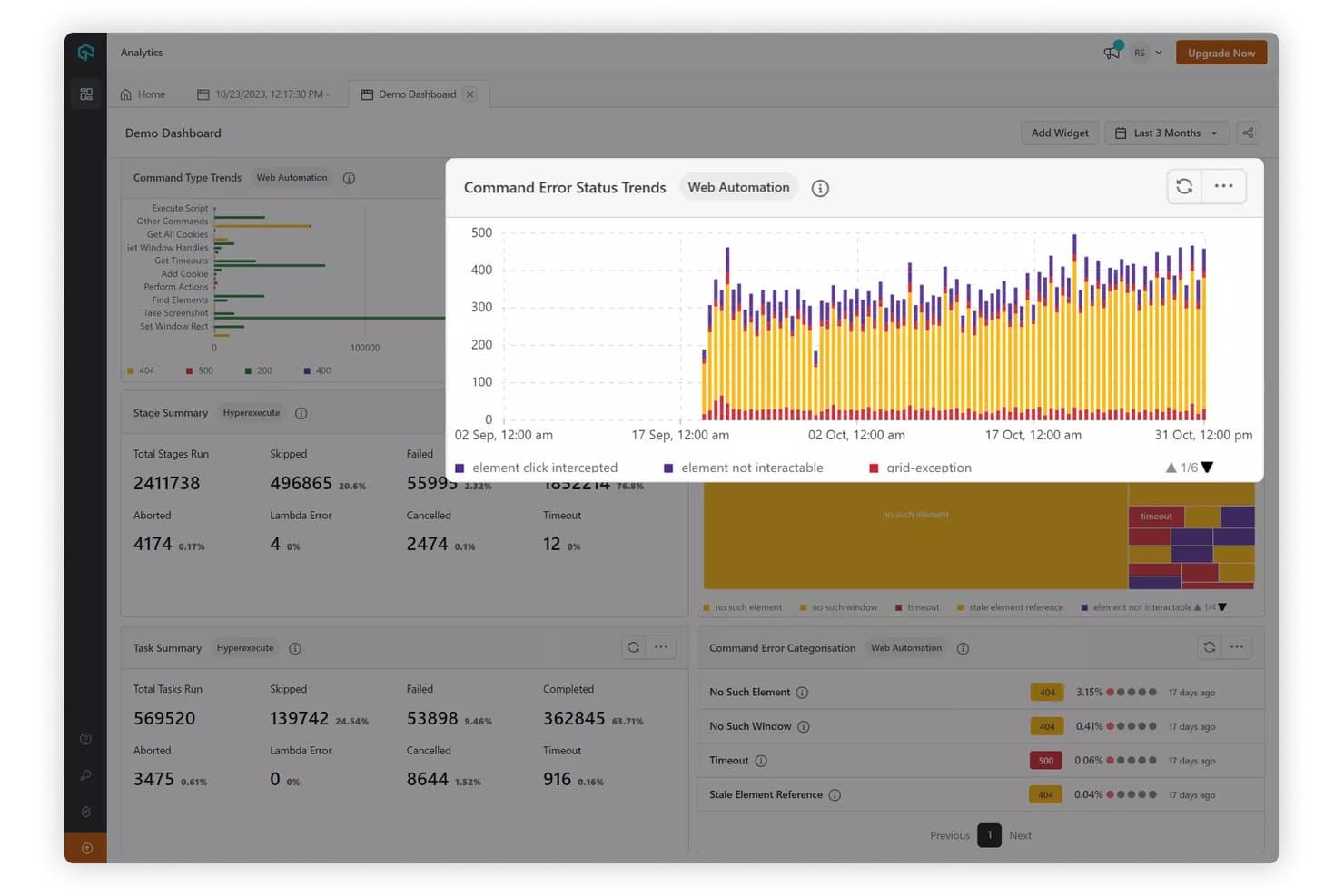
TestMu AI tracks command error trends via an analytics dashboard. TestMu AI is an AI-native cloud testing platform that runs automated black box tests across web and mobile applications, supporting frameworks like Selenium, Playwright, Cypress, and Appium on a parallel execution grid spanning 3,000+ browser and device environments.
Who Is TestMu AI Best For?
TestMu AI is a strong fit for DevOps and QA teams that need to test web and mobile apps running behind firewalls or on private networks.
Why I Picked TestMu AI
I picked TestMu AI as one of the best because its Secure Tunnel encrypts traffic from the cloud grid back to apps running on private networks or behind firewalls, so your test suite can hit an internal staging environment without exposing it publicly. On top of that, HyperExecute distributes those same private-network test runs in parallel, and Self-Healing Locators re-resolve broken element paths at runtime, keeping pipelines running even as the app UI changes.
TestMu AI Key Features
- Cross-browser execution grid: Run automated tests across 3,000+ browser and OS combinations, including Chrome, Firefox, and Edge on Windows, macOS, and Linux.
- Real device cloud: Execute web and native app tests on physical Android and iOS devices, with access to GPS mocking, camera injection, biometrics, and offline mode.
- Test analytics dashboard: View test status, flaky-test trends, error distributions, and concurrency data across your suite runs from a single dashboard.
- 120+ integrations: Connect directly to CI/CD tools like Jenkins, GitLab CI, and Azure Pipelines, as well as bug trackers like Jira, GitHub, and Azure DevOps.
TestMu AI Integrations
TestMu AI lists 120+ integrations, including Jenkins, GitLab CI, Azure Pipelines, Jira, GitHub, Azure DevOps, Slack, and CircleCI. REST APIs support custom pipeline and testing integrations.
Pros and Cons
Pros:
- Videos and HAR logs aid diagnosis
- Broad browser and real-device coverage
- Secure tunnel tests apps behind firewalls
Cons:
- Real-device sessions can fail or disconnect
- Structured case management requires separate product
Learn more about TestMu AI: Best for human-led black box testing
- Free demo available
- From 1¢/AI credit
Visit WebsiteCustomer Rating:4.9/5
QA Wolf offers a platform that allows users to access test run history, bug reports, and more. QA Wolf is an automated hybrid testing platform and service designed to simplify and enhance the quality assurance process for web applications. It offers black box testing and automates end-to-end tests, ensuring that applications function correctly from the user's perspective.
Why I picked QA Wolf: QA Wolf offers a unique combination of automation and human oversight. The platform allows for automated end-to-end tests, which mimic real user interactions with the application. This approach ensures that all critical user flows are thoroughly tested without requiring insight into the underlying code. Furthermore, QA Wolf’s human QA engineers provide ongoing support, triage, and maintenance of tests, ensuring reliability and reducing the burden on development teams.
QA Wolf Standout Features:
- The platform runs tests in parallel, reducing testing time and accelerating feedback loops.
- Provides detailed bug reports with video walk-throughs and trace logs, making it easy for developers to diagnose and fix issues.
- Supports a wide range of test scenarios, including UI interactions, API testing, and third-party integrations
- Round-the-clock QA engineers provide continuous support, reviewing test failures and maintaining test suites, ensuring consistent quality.
QA Wolf Integrations: Jenkins, CircleCI, GitHub, Jira, Asana, Linear, and more.
Pros and Cons
Pros:
- Easy to communicate and collaborate with the QA Wolf team
- All bugs are human-verified
- Automated end-to-end tests
Cons:
- Limited flexibility with test customizations
- Not ideal for teams wanting full control over the testing process
Learn more about QA Wolf: Best for AI-driven test maintenance
- 14-day free trial + free demo available
- Pricing upon request
Visit WebsiteCustomer Rating:4.8/5
Reflect offers a no-code test automation interface for creating tests. Reflect is a black box testing platform that helps you automate functional tests without needing to access or understand the internal code. Its use of Generative AI lets you create tests by simply describing user interactions in natural language. The platform interprets these inputs and generates tests that focus solely on behavior and outcomes, aligning with black box testing principles.
Why I picked Reflect: I picked Reflect because it takes all the guesswork and technical overhead out of test creation. Instead of dealing with flaky selectors or scripting frameworks, you can type what you want to test and let the tool handle the rest. It’s especially useful when your goal is to validate how your app behaves from the outside—what users actually see and do. Reflect also offers AI-driven maintenance, adapting tests automatically when the UI changes, so you don’t have to do the manual work.
Reflect Standout Features:
- Turn plain-English prompts into test steps—no need for XPath or selectors
- Combine visual checks and API validation in a single test
- Automatically updates tests as the app UI evolves
- Schedule tests and receive real-time failure alerts via Slack or email
- Use parameterized inputs to cover more scenarios without duplicating work
Reflect Integrations: GitHub, Slack, Jira, Jenkins, CircleCI, Azure DevOps, Linear, Bitbucket, Codefresh.
Pros and Cons
Pros:
- No-code test creation
- AI-powered test maintenance
- Comprehensive CI/CD integration
Cons:
- Limitations to mobile app testing
- Could offer more customization options for test configurations
Learn more about Reflect: Best for graphical user interface (GUI) black box testing
- Free trial available
- Pricing upon request
Visit WebsiteCustomer Rating:4.3/5
Screenshots of Squish verification points Squish by Froglogic is an automated testing framework tool that targets graphical user interfaces (GUIs) and human-machine interfaces (HMIs). Therefore, it is ideal for those who want to test an application’s visual features and elements.
Why I picked Froglogic Squish: the tool provides testers and DevOps with behavioral-driven development (BDD) and testing. It also supports agile methodology testing, which helps bridge collaboration among technical and business stakeholders. In addition to its IDE, it has robust cross-platform, cross-device compatibility with desktop, mobile, embedded, and web GUI tests.
Probably due to its prohibitive price tag, the tool is popular among enterprise users. It tests various platforms and operating systems, including programming languages like Python, JavaScript, Perl, Ruby, and Tcl.
Froglogic Squish Standout Features
- Capabilities include refactoring scripts to suit use cases with Squish Verification Points and the ability to perform image comparisons to validate table values.
- You can create, debug, and edit tests in the Squish IDE. It also includes powerful features such as recording and playback capabilities, along with image-based and object-based recognition capabilities.
- With its comprehensive documentation and customizable qualification tool to ensure test processes meet safety standards, Froglogic Squish allows you to execute test suites reliably.
- Froglogic Squish seamlessly integrates and facilitates multi-technology applications from more than one toolkit. These are as varied as iOS, Android, Embedded (Qt, Windows, Java), Java, AWT, Swing, SWT, RCP, JavaFx, Windows, and Mac.
Froglogic Squish Integrations: Squish by Froglogic supports frameworks and platforms such as Windows, Android, iOS, Qt, Web, HTML5, Flex & JavaApplets, Java, and more.
Price: Squish Tester floating license is priced at $589/month, paid annually. A 10-day free trial is available with no CC required.
Pros and Cons
Pros:
- In addition to working with more obscure QT applications, it can cross-cut from Windows to Mac
- Equipped with a centralized dashboard and monitoring system
- Supports audio recording of test scripts
Cons:
- A lot of time consumption due to the manual testing involved
Learn more about Squish: Best for black box testing microservices and container-based applications
- 14-day free trial + free demo available
- Pricing upon request
Visit WebsiteCustomer Rating:4.5/5
Chaos engineering as a service with Gremlin on Kubernetes node Gremlin is an automation framework for systematic and resilience testing based on chaos testing, a subset of chaos engineering. It is geared toward the modern era of computing, as it is helpful for testing cloud apps, microservices, and container-based applications.
Why I picked Gremlin: the tool deliberately breaks things in the tested app and then learns how to make it resilient. It does this by executing tests that allow testers to manipulate inter-service messages at the network level.
The tool’s zero-regression approach helps to minimize service disruptions and code rollbacks that typically attend poorly resilient software products.
Gremlin Standout Features
- Testing failure handling capabilities in cloud infrastructure and applications such as containers and microservices.
- Gremlin’s test automation allows you to test each application layer of infrastructure rigorously, including safely halting and automatically rolling back.
- It comes with a well-documented API and CI/CD to prepare ship quality code fast by running tests that magnify system reliability.
- With Gremlin, you can use a set of 12 Chaos engineering experiments to test for weaknesses in an underlying system.
Gremlin Integrations: Gremlin integrates with LoadRunner Professional 2022.
Price: Gremlin’s pricing starts at $300 per month per service. A 30-day free trial is available.
Pros and Cons
Pros:
- Easy to learn and use
- Provides engineering teams with reliable, high-velocity testing
- Its testing helps improve outcomes across your technology stack
Cons:
- Gremlin only provides limited support for on-premise chaos injection
Learn more about Gremlin: Best for creating black box test scripts with a test recorder
- Free demo available
- Pricing upon request

RFT with the result of test details The IBM Rational Functional Tester is an automated testing framework from IBM for regression, functional, and GUI testing. It can be used for different programming languages and environments, such as Java, AJAX, Power Builder, SAP, .Net, Dojo Toolkit, and Siebel, while encompassing both web-based and terminal emulator-based applications.
Why I picked IBM RFT: the tool gives test engineers the ability to record, playback, and export test scripts with Robotic Response Time agents. In addition, it provides intelligent script maintenance capabilities and various customization options.
When manual testing is impossible to scale effectively, RFT is ideal for a broad range of scenarios. It benefits businesses and organizations of various types, from freelancers, and SMBs, to enterprises. The tool has reporting capabilities that support communication and collaboration in hybrid environments.
RFT Standout Features
- IBM Rational Functional Tester provides capabilities for the end-to-end testing of seemingly diverse systems, which yields a broad range of coverage for QA teams. It allows the flexibility to test legacy and modern applications in different business scenarios.
- RFT facilitates the acceleration of shorter test cycles because it enables test engineers to reuse the same tests with different data sets.
- RFT’s advanced test scripting features, like its Rational Performance Tester. It lets you view and analyze the response time, events, and other metrics during playback. With its ScriptAssure technology, you can handle frequent user interface changes remarkably without incurring much maintenance overhead.
RFT Standout Integrations: RFT provides integrations with other IBM products, such as IBM Jazz® integration, which supports collaborative application lifecycle management. It also integrates with non-native enterprise messaging solutions like JMS and TIBCO EMS.
Price: Pricing is only available upon request. RFT’s Starter Edition is free.
Pros and Cons
Pros:
- Provides reliable testing at scale
- The ability to easily switch between languages and platforms
- Works well with mainframes
Cons:
- It is difficult to get optimal results with complex Java apps.
Learn more about IBM Rational Functional Tester (RFT):

Selenium project showing a recorded test run Selenium IDE is an open-source integrated development environment with automated testing capabilities. It is a turn-key, web-ready tool that provides easy debugging with its record and playback features.
Why I picked Selenium IDE: By recording your interaction with websites, the tool allows you to generate site automation tests seamlessly. The tool’s capabilities eliminate the need for developers to repeat these manual steps in the programming environment. In addition, it allows DevOps and testers to manage these actions by recording, editing, and debugging tests.
As an accessory to your test environment, the tool is lightweight, providing web browser extensions with minimal overhead and digital footprint.
Selenium IDE Standout Features
- Create, manage and organize test cases and test suites for easy deployment by test teams.
- Ability to execute cross-browser tests with the aid of Selenium WebDriver
- Execute resilient tests that can record and be run from multiple locators for each element
- Seamless recording and playback on popular browsers like Chrome and Firefox
- Saving scripts and loading them up for execution on demand
- Allows you to reuse one test case inside another and Speed control
Selenium IDE Integrations: Apart from its browser plugins, Selenium IDE integrates with Jenkins, Azure DevOps, and IntelliJ.
Pricing: Selenium IDE is open-source and free.
Pros and Cons
Pros:
- Easy to use
- It doesn’t require any programming language to use it
- Provides the flexibility to write advanced tests
Cons:
- It doesn’t support data-driven testing.
Learn more about Selenium IDE: Best black box automation tool for regression and functionality testing
- Free demo
- Pricing upon request

Silk Test interface with test steps Silk Test is an automation testing tool from Micro Focus International. It is designed to perform regression and functionality testing effectively. Through its cross-platform and cross-browser testing, it aims to provide collaborative test design to promote a full range of test coverages.
Why I picked Silk Test: Along with its portability, the tool maintains rigorous quality standards with lower complexity. The tool’s collaborative testing also allows business and technical groups in an organization to work together more effectively.
User can leverage both manual and automated testing capabilities for web, mobile, and enterprise applications. The tool also permits testing desktop and mobile browsers using Selenium scripts to record steps.
Silk Test Standout Features
- Silk Test provides the ability to support your continuous integration (CI) and continuous-deployment (CD) pipelines. Containers can be scrutinized with parallel and dockerized testing.
- Using Skill Test’s Record Testcase command, testers can record actions and verification steps as they navigate the application being tested. Skill Test provides enhanced module reuse capabilities to facilitate manual testing with script files that can contain one or more related test cases.
- Instead of creating multiple test suites for different environments, Skill Test allows you to use a single test script to conduct both web, desktop, and browser tests.
- With Silk Test back-end visualization, testers can save time while producing realistic simulations of service behavior.
Silk Test Integrations: Test teams use Silk Test for mobile and desktop platforms such as Java, DOM, iOS, Android, and Firefox.
Price: Pricing is customized and available upon request. A free demo is available.
Pros and Cons
Pros:
- Speed and quality with continuous testing
- Easy and intuitive to use
- Supports cross-platform and browser testing
Cons:
- A complex setup that might confuse non-tech-savvy users
Learn more about SilkTest:

QTP test result summaries QTP/UFT is designed to operate without the need for monitoring systems to intervene. It is designed by Micro Focus and focuses on functional, regression, and service testing.
QTP/UFT (Unified Functional Testing) serves both technical and non-technical users. This unified testing paradigm tests both the front-end and back-end components of a system, supporting both GUI and API testing using virtualized facilities.
QTP/UFT Standout Features
- QTP/UFT allows users to automate actions, then identify and test bugs in real time.
- Testing activities without monitoring the system in intervals while also applying uniformity of actions on different users, data sets, and various browsers on Windows operating systems.
- QTP/UFT provides all services under a common IDE, including GUI testing and non-GUI using API Service Test.
- QTP/UFT uses VB Script as a scripting language.
QTP/UFT Integrations: QTP/UFT uses ALM to integrate with other HP products. It also integrates with SAP and Oracle.
Price: QTP/UFT is provided upon request.
Pros and Cons
Pros:
- Requires no to minimal monitoring to function effectively
- Enables both API and GUI testing elements
Cons:
- Its execution time is relatively high compared to other testing tools
- Limited to desktop applications and Windows OS
Learn more about QTP/UFT: Best Windows macro-creation automation tool for keyboard and mouse functions
- Free plan available
- Open-source and free

AutoHotkey interface with selected SysListview item AutoHotkey is a free and open-source scripting utility that allows you to automate repeated tasks. The tool is designed for Microsoft Visual Studio Community 2022 and is lightweight, fast, and stable.
Why I picked AutoHotkey: As a macro-creation software, the tool allows you to send user-generated mouse clicks and keystrokes to an application easily. Besides reducing data-entry tasks, the tool enables developers to perform sophisticated tasks such as creating form fillers. Moreover, AutoHotkey is fully programmable, supporting various concepts like arrays, matrices, and component object models (COM).
AutoHotkey Standout Features
- With its scripts and macros, AutoHotkey allows users to customize shortcuts and remap keys with lightweight automation.
- You can create small and complex scripts to accomplish various productivity tasks like user-entry forms.
- The internal language command allows you to parse script files with programming paradigms like object orientation, procedural programming, and command-based programming.
- AutoHotkey allows you to structure its scripts as independent modules, especially with subroutines such as functions, Hotstrings, and Hotkeys with portable auto-execute sections.
AutoHotkey Integrations: AutoHotkey can integrate with platforms like Git, VSCode, and PowerShell.
Price: AutoHotkey is open-source and free.
Pros and Cons
Pros:
- Powerful, yet easy to learn
- Good documentation
- Fully programmable
Cons:
- It doesn’t offer embedded compiler options like similar macro software
Learn more about AutoHotkey:
Alte instrumente de testare a cutiei negre
Iată câteva opțiuni suplimentare de instrumente de testare a cutiei negre care nu au ajuns pe lista mea scurtă, dar merită totuși verificate:
- 11KatalonBest end-to-end test management platform
- 12RanorexBest all-in-one test automation framework for black box testing
- 13WatirBest web application black box testing tool In Ruby
- 14MbUnitBest C# Automated Unit Testing Framework
- 15SelendroidBest automated black box testing framework for native, web, and hybrid Android apps
- 16MobotBest for outsourcing tough black box tests
How I Evaluate Black Box Testing Tools
I split my evaluation into baseline requirements—like input/output testing and CI/CD integration—and differentiators that separate enterprise-grade tools from those built for smaller QA teams.
Core Functionality (Table Stakes For This List)
When I'm selecting tools for my list, I rank each one on a scale from 0 (does not offer the functionality) to 5 (excels in this area) for each core functionality listed below. Then, I calculate the tool's total score into a percentage. Each tool needs to achieve a minimum total score of 65% to be considered for inclusion.
- Input-Output Testing: I check whether a tool can execute tests purely through external inputs and expected outputs—like submitting form data or API requests—without needing source code access.
- Functional Test Automation: The ability to automate regression and acceptance tests matters here, whether through scripted, codeless, or hybrid approaches like those in Selenium or Katalon.
- Test Case Management: I evaluate how each tool handles organizing, tagging, and versioning test suites so QA teams can maintain and reuse cases across multiple release cycles.
- Cross-Environment Support: Tools that cover browser, OS, and device combinations earn higher marks, especially for teams running the same test suite against both web and mobile apps.
- Defect Reporting & Logs: I look for detailed failure output—screenshots, execution logs, and trace data—that gives testers enough context to reproduce a bug without rerunning the entire suite.
- CI/CD Integration: Whether it's Jenkins, GitLab CI, or GitHub Actions, I evaluate how each tool plugs into existing pipelines to trigger test runs automatically on every build or merge.
Once I have a list of tools that meet the criteria, I consider what sets each platform apart.
Differentiating Factors (What Sets Vendors Apart)
Here's how I compare and contrast different vendors:
Standout Features
AI-powered test generation stands out because it cuts maintenance overhead. When a button's locator changes after a UI redesign, self-healing tests adapt without manual updates. Codeless test authoring matters too, especially for teams where manual QA testers need to build automated suites through record-and-playback or visual builders without writing scripts. I also evaluate visual regression testing, which flags pixel-level UI shifts between builds that functional assertions alone would miss entirely.
Beyond Features
Integration ecosystem depth is one of the first things I evaluate. A tool that connects natively to Jira, TestRail, and your CI/CD pipeline saves hours of custom configuration. I also consider how well a platform supports mixed-skill teams—some tools offer strong documentation and community resources that help manual testers ramp up on automation without formal training. Licensing flexibility matters as well, since a per-user model can become expensive fast as your QA team scales across projects.
Cum să alegeți un instrument de testare a cutiei negre
Este ușor să vă pierdeți în liste lungi de funcții și structuri complexe de prețuri. Pentru a vă ajuta să rămâneți concentrat în timp ce parcurgeți procesul unic de selectare a software-ului, iată o listă de verificare a factorilor de care trebuie să țineți cont:
| Factor | Ce trebuie luat în considerare |
|---|---|
| FactorScalabilitate | Ce trebuie luat în considerareVa crește instrumentul odată cu echipa dumneavoastră? Verificați dacă poate face față unei creșteri a numărului de proiecte sau utilizatori fără o scădere a performanței. |
| FactorIntegrări | Ce trebuie luat în considerareFuncționează cu instrumentele pe care le utilizați deja? Verificați compatibilitatea cu software-ul de dezvoltare și de gestionare a proiectelor. |
| FactorPosibilitate de personalizare | Ce trebuie luat în considerareÎl puteți adapta pentru a se potrivi fluxului dumneavoastră de lucru? Căutați opțiuni pentru ajustarea funcțiilor în funcție de nevoile specifice, fără a complica inutil procesul. |
| FactorUșurință în utilizare | Ce trebuie luat în considerareEste ușor de utilizat pentru echipa dumneavoastră? Asigurați-vă că interfața este intuitivă și necesită o instruire minimă pentru a începe. |
| FactorImplementare și integrare inițială | Ce trebuie luat în considerareCât timp va dura configurarea? Luați în considerare timpul și resursele necesare pentru a începe utilizarea, inclusiv materialele de instruire furnizate de furnizor. |
| FactorCost | Ce trebuie luat în considerareSe încadrează în bugetul dumneavoastră? Comparați structura de prețuri cu limitele financiare și verificați existența taxelor ascunse sau a costurilor suplimentare pentru funcții extra. |
| FactorMăsuri de securitate | Ce trebuie luat în considerareSunt datele dumneavoastră protejate? Evaluați măsurile de securitate existente, precum criptarea și conformitatea cu reglementările privind protecția datelor. |
| FactorDisponibilitatea asistenței | Ce trebuie luat în considerareVeți primi ajutor atunci când aveți nevoie? Evaluați nivelul de asistență oferit, inclusiv timpii de răspuns și canalele disponibile, precum chatul, e-mailul sau telefonul. |
Ce sunt instrumentele de testare a cutiei negre?
Instrumentele de testare a cutiei negre sunt software-uri utilizate pentru a testa funcționalitatea altor software-uri fără a avea cunoștințe despre modul lor intern de funcționare sau despre structura codului. Aceste instrumente se concentrează pe examinarea datelor de intrare și de ieșire ale software-ului testat, evaluându-i comportamentul și funcționalitatea așa cum sunt percepute de utilizatorul final.
Acestea sunt utilizate pentru diverse tipuri de teste, inclusiv teste funcționale, de sistem și de acceptanță, fără a necesita acces la codul sursă.
Funcții
Atunci când selectați instrumente de testare a cutiei negre, urmăriți următoarele funcții esențiale:
- Generarea automată a cazurilor de testare: Creează automat cazuri de testare pe baza cerințelor utilizatorului, economisind timp și reducând efortul manual.
- Testarea compatibilității: Asigură funcționarea software-ului pe diferite dispozitive și sisteme de operare, îmbunătățind accesibilitatea pentru utilizatori.
- Validarea interfeței cu utilizatorul: Verifică gradul de utilizare al interfeței aplicației, asigurând o experiență pozitivă pentru utilizator.
- Integrarea cu fluxurile CI/CD: Permite integrarea fără probleme în fluxurile de integrare și livrare continuă, sporind eficiența.
- Tablouri de bord personalizabile: Oferă vizualizări adaptate ale rezultatelor și indicatorilor testării, ajutând la luarea rapidă a deciziilor.
- Analiza testelor bazată pe inteligență artificială: Utilizează inteligența artificială pentru a analiza rezultatele testelor, identificând tipare și posibile probleme.
- Raportare în timp real: Oferă feedback imediat cu privire la rezultatele testelor, permițând rezolvarea mai rapidă a problemelor.
- Măsuri de protecție a securității: Protejează datele sensibile în timpul testării, asigurând respectarea standardelor de protecție a datelor.
- Resurse de instruire: Include videoclipuri și tururi interactive pentru a-i ajuta pe utilizatori să înceapă rapid și eficient.
- Asistență disponibilă 24/7: Oferă asistență non-stop pentru rezolvarea problemelor și menținerea productivității.
Beneficii
Implementarea instrumentelor de testare de tip cutie neagră oferă mai multe beneficii echipei și companiei dumneavoastră. Iată câteva dintre acestea:
- Calitate îmbunătățită a software-ului: Prin detectarea timpurie a erorilor și problemelor, aceste instrumente contribuie la asigurarea faptului că software-ul corespunde așteptărilor utilizatorilor.
- Economie de timp: Generarea automată a cazurilor de testare reduce efortul depus pentru testarea manuală, permițând echipei să se concentreze pe alte sarcini.
- Experiență îmbunătățită a utilizatorului: Validarea interfeței cu utilizatorul asigură faptul că aplicația este intuitivă și ușor de utilizat.
- Flexibilitate mai mare: Testarea compatibilității pe diferite dispozitive și platforme sporește accesibilitatea software-ului.
- Fluxuri de lucru eficiente: Integrarea cu fluxurile CI/CD permite procese mai fluide de dezvoltare și implementare.
- Protecția datelor: Măsurile de protecție a securității asigură protejarea informațiilor sensibile în timpul testării.
- Luarea unor decizii informate: Raportarea în timp real și tablourile de bord personalizabile oferă informații valoroase pentru rezolvarea rapidă a problemelor.
Costuri și prețuri
Selectarea instrumentelor de testare de tip cutie neagră necesită înțelegerea diferitelor modele și planuri de tarifare disponibile. Costurile variază în funcție de caracteristici, dimensiunea echipei, extensii și alți factori. Tabelul de mai jos rezumă planurile uzuale, prețurile medii ale acestora și caracteristicile incluse în mod obișnuit în soluțiile de testare de tip cutie neagră:
Tabel comparativ al planurilor pentru instrumentele de testare de tip cutie neagră
| Tipul planului | Preț mediu | Caracteristici uzuale |
|---|---|---|
| Tipul planuluiPlan gratuit | Preț mediu$0 | Caracteristici uzualeFuncții de bază pentru testare, cazuri de testare limitate și asistență din partea comunității. |
| Tipul planuluiPlan personal | Preț mediu$10-$30/utilizator/lună | Caracteristici uzualeGenerarea automată a testelor, raportare de bază și asistență prin e-mail. |
| Tipul planuluiPlan pentru companii | Preț mediu$40-$70/utilizator/lună | Caracteristici uzualeAnalize avansate, opțiuni de integrare și asistență prioritară prin e-mail. |
| Tipul planuluiPlan pentru întreprinderi | Preț mediu$100-$200/utilizator/lună | Caracteristici uzualeTablouri de bord personalizabile, manager de cont dedicat și asistență 24/7. |
Întrebări frecvente despre instrumentele de testare de tip cutie neagră
Iată câteva răspunsuri la întrebările frecvente despre instrumentele de testare de tip cutie neagră:
Care este diferența dintre testarea de tip cutie neagră și testarea de tip cutie albă?
Testarea de tip cutie neagră se concentrează pe testarea funcționalității software-ului fără a cunoaște structura internă a codului, în timp ce testarea de tip cutie albă implică testarea logicii interne și a structurii codului. În testarea de tip cutie neagră, simulați interacțiunile utilizatorilor pentru a identifica erorile, în timp ce testarea de tip cutie albă necesită cunoașterea codului pentru testarea unor trasee și condiții specifice. Testarea de tip cutie neagră este realizată de obicei de testeri, în timp ce dezvoltatorii efectuează adesea testarea de tip cutie albă pentru a asigura calitatea codului.
Se pot integra instrumentele de testare de tip cutie neagră cu software-ul meu existent?
Da, multe instrumente de testare de tip cutie neagră oferă opțiuni de integrare cu instrumente populare de dezvoltare software și gestionare a proiectelor. Căutați instrumente care oferă API-uri sau conectori integrați pentru o integrare fără probleme cu platforme precum Jira, GitHub sau Jenkins. Integrarea contribuie la eficientizarea fluxului de lucru, permițându-vă să gestionați testele și erorile în sistemele existente, economisind timp și reducând erorile.
Cum poate echipa mea să testeze dacă un instrument de testare de tip cutie neagră funcționează atât pentru aplicații web, cât și pentru aplicații mobile?
Verificați dacă acceptă browsere, dispozitive mobile și aplicații hibride într-o singură suită de testare. Astfel economisiți timp prin gestionarea unui număr mai mic de instrumente. Asigurați-vă că funcționează cu emulatoare, servicii cloud pentru dispozitive sau scripturi pentru mai multe platforme.