

Asistenții de programare cu IA sunt instrumente de învățare automată care vă ajută să scrieți, să analizați și să depanați codul mai rapid. Dacă sunteți în căutarea celor mai buni asistenți de programare cu IA, probabil doriți să accelerați programarea, să remediați greșelile și să țineți pasul cu proiectele complexe. Din experiența mea, faptul că știți ce opțiuni există vă poate îmbunătăți sau vă poate afecta semnificativ fluxul de lucru — alegeți asistentul potrivit și veți petrece mai puțin timp blocat și mai mult timp livrând cod de calitate. În acest ghid, vă voi arăta exact ce asistenți merită luați în considerare în 2026 și ce diferențiază fiecare instrument, pentru a-l găsi pe cel care se potrivește stilului și stivei dvs. tehnologice.
Why Trust Our Software Recommendations
6,700+
Reviews
20
Industry experts
16+
Evaluation factors
14
Years
Our team has been testing and reviewing software since 2012. As tech leaders ourselves, we know how difficult—and important—it is to choose the right software.
For this guide, we evaluated tools using hands-on testing and independent research, scoring tools using our selection criteria.
Our reviews reflect our human editorial judgment, not a sales pitch.
Expert reviewers:
- Paulo Gardini MiguelTech Director
 Tim FisherVP of AI
 Gabriel RosasTech Lead & Software Architect
 Christhian GruhnTech Lead & Platform Architect

Tabel comparativ pentru asistenții de programare cu IA
Acest tabel comparativ rezumă detaliile de preț pentru selecțiile mele de top de asistenți de programare cu IA:
Sorted by: Default
| Tool | Starting Price | Website | |
|---|---|---|---|
Best for private AI model deployment options | 4.6 out of 5 | $39/user/month Free demo available | Website |
Best for large-scale codebase navigation | Not rated | $16,000 Free demo + free trial | Website |
Best for multi-language code understanding | Not rated | $20/user/month Free plan available | Website |
Best for collaborative team coding workflows | Not rated | $30/user/month Free plan + free demo available | Website |
Best for integration with AWS development tools | Not rated | $19/month per user Free tier | Website |
Best for real-time code suggestions in editors | 4.8 out of 5 | $10/user/month Free plan available | Website |
Best for natural language code generation | 4.3 out of 5 | $17/month billed annually, Claude Code included in Pro Free plan available, but Claude Code requires a paid plan | Website |
Best for autocomplete and in-depth code chat | 5.0 out of 5 | $8/month Free plan available | Website |
Best for autonomous software development tasks | Not rated | $20/month Free plan available | Website |
Best for Google ecosystem code support | Not rated | $19/user/month 30-day free trial | Website |


Recenzii ale celor mai buni asistenți de programare cu IA
Mai jos sunt rezumatele mele detaliate ale celor mai buni asistenți de programare cu IA care au ajuns pe lista mea scurtă. Recenziile mele oferă o analiză detaliată a funcțiilor, capabilităților și integrărilor fiecărui instrument, pentru a vă ajuta să-l găsiți pe cel mai potrivit pentru dvs.
 Best for private AI model deployment options
- Free demo available
- From $39/user/month (billed annually)
Visit WebsiteCustomer Rating:4.6/5
Tabnine offers an AI chat assistant within VS Code that refactors code and suggests type-safe reusable functions in real time. Tabnine is an enterprise-focused AI code assistant that delivers context-aware code completions, AI chat, and agentic workflows directly inside your IDE, with flexible deployment options including on-premises and air-gapped environments.
Who Is Tabnine Best For?
Tabnine is a strong fit for engineering teams in regulated or security-conscious industries where code privacy, compliance, and control over AI model deployment are non-negotiable.
Why I Picked Tabnine
I picked Tabnine as one of the best because no other AI code assistant gives you this level of control over where your code goes. You can deploy on-premises or in an air-gapped environment, and bring your own LLM instead of relying on Tabnine's hosted models. The Enterprise Context Engine indexes your full codebase locally, so every suggestion reflects your actual architecture without routing proprietary code to third-party servers.
Tabnine Key Features
- AI-powered chat: Interact with a context-aware AI assistant directly inside your IDE for support across the software development lifecycle.
- Multi-language support: Tabnine works with over 20 programming languages and frameworks including Python, JavaScript, Java, and Go.
- Agentic development workflows: Automate code changes, refactoring, and pull requests using autonomous agents within your own environment.
- Code quality awareness agent: Train a review agent on your organization’s code and pull requests to align AI suggestions with internal standards.
Tabnine Integrations
Tabnine offers native integrations with VS Code, JetBrains IDEs, GitHub, GitLab, Bitbucket, Jira, Confluence, and Perforce Helix Core, and provides an API for custom integrations.
Pros and Cons
Pros:
- Broad IDE and language coverage
- Agentic workflows automate code refactoring
- Private deployment in air-gapped environments
Cons:
- Requires higher local machine hardware
- Free tier limited to small pilots
Learn more about Tabnine:

Sourcegraph's Cody AI assistant generates test code in a split-editor view, showing both the source file and auto-generated unit tests side by side. Sourcegraph is a code intelligence platform with an AI coding assistant (Cody) that uses org-wide semantic code search to power context-aware completions, code generation, and chat across entire multi-repository codebases.
Who Is Sourcegraph Best For?
Sourcegraph is a strong fit for enterprise engineering teams managing large, distributed codebases across many repositories who need AI assistance that scales with that complexity.
Why I Picked Sourcegraph
I picked Sourcegraph as one of the best because Cody's context engine goes further than what most AI assistants can see. Where tools like Copilot work from open files, Cody uses Sourcegraph's org-wide code graph to pull relevant functions, types, and patterns from across hundreds of repositories. I've found this especially valuable on large distributed systems, where a suggestion that ignores how an API is used elsewhere can introduce breaking changes.
Sourcegraph Key Features
- Deep Search: Lets you use AI-powered natural language or regex queries to find code patterns across your organization.
- Batch Changes: Enables automated, multi-repo code modifications and migration management in a single workflow.
- Code Insights: Visualizes trends and tracks code health, migrations, and technical debt over time.
- IDE plugin support: Integrates directly with VS Code, JetBrains IDEs, and Neovim for in-editor AI assistance.
Sourcegraph Integrations
Sourcegraph offers native integrations with GitHub, GitLab, and Bitbucket, and provides a GraphQL API, REST API, and CLI for custom integrations.
Pros and Cons
Pros:
- Supports AI-assisted =test generation
- Shares context between separate projects
- Indexes and searches massive codebases quickly
Cons:
- Slower autocomplete latency
- No support for Visual Studio IDE
Learn more about Sourcegraph: Best for multi-language code understanding
- Free plan available
- From $20/user/month (billed annually)
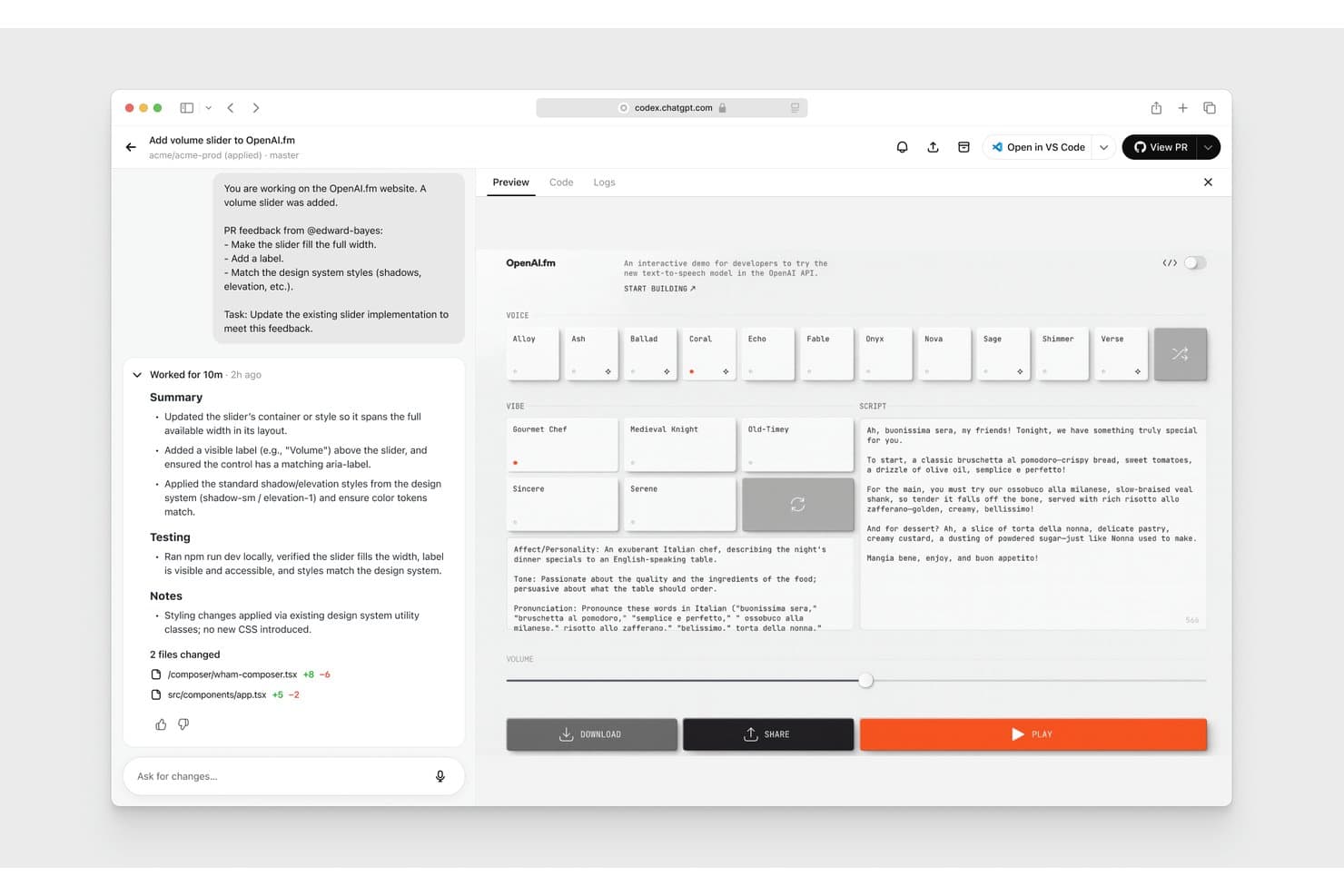
OpenAI Codex offers an AI-powered coding assistant that applies PR feedback, updates UI components, and previews live changes directly in the browser. OpenAI Codex is an agentic AI coding assistant that handles code generation, refactoring, code review, and test writing across 30+ programming languages directly within your IDE, CLI, or a dedicated cloud environment.
Who Is OpenAI Codex Best For?
It's a strong fit for engineering teams at growth-stage and enterprise companies managing large, multi-language codebases where consistent code standards and parallel development matter.
Why I Picked OpenAI Codex
OpenAI Codex earns its spot on my shortlist because of how well it understands code across 30+ languages at the full repository level, not just the open file. I use the Skills feature to encode my team's conventions, so Codex applies them consistently whether it's writing Python backend logic or TypeScript frontend components. In practice, that means it extends our Next.js patterns, respects our Tailwind classes, and maintains export conventions without needing to be reminded each session.
OpenAI Codex Key Features
- Multi-agent workflows: Run multiple agents in parallel across different projects or worktrees.
- Automated code review: Codex reviews pull requests, detects bugs, and highlights backward compatibility issues.
- CLI and IDE extension: Use Codex directly from your terminal or integrate with common developer environments.
- Automations for recurring tasks: Schedule routine work like issue triage, alert monitoring, or CI/CD triggers.
OpenAI Codex Integrations
OpenAI Codex offers native integrations with GitHub, Slack, Vercel, Netlify, Cloudflare, Figma, and Linear, and provides an API and SDK for custom integrations.
Pros and Cons
Pros:
- Automates code review with suggestions
- Supports over 30 languages and frameworks
- Handles large repositories with multi-file context
Cons:
- Can hit usage limits on lower tiers
- No dedicated desktop application
Learn more about OpenAI Codex: 4Best for collaborative team coding workflows
Qodo
- Free plan + free demo available
- From $30/user/month (billed annually)

Qodo provides automated code reviews that surface bugs, rule violations, and requirement gaps with categorized severity levels. Qodo is an AI code quality platform that combines automated PR review, unit test generation, and IDE-based code assistance with full-repository and cross-repo context awareness across the software development lifecycle.
Who Is Qodo Best For?
Qodo is a strong fit for engineering teams at mid-size to enterprise companies where code review quality, test coverage, and cross-team standards are active priorities.
Why I Picked Qodo
Qodo earns its spot as one of the best on my shortlist because its Living Rules system turns a team's own PR history into enforceable coding standards automatically. When my team opens a pull request, specialized agents simultaneously evaluate bugs, security vulnerabilities, quality, and test coverage gaps, posting line-level comments rather than low-signal noise. I also like the cross-repo context engine, which catches breaking changes across multiple repositories before they hit production.
Qodo Key Features
- Agentic PR code review: Provides line-level AI code review with context across files and repositories.
- IDE plugin support: Integrates natively with VS Code, JetBrains, and Visual Studio for code generation and review.
- Zero data retention mode: Analyzes code without retaining data, supporting SOC 2 Type II compliance.
- On-premises and BYOK deployment: Lets teams deploy on-prem or use their own large language model providers for strict control.
Qodo Integrations
Qodo offers native integrations with GitHub, GitLab, Bitbucket, Azure DevOps, Gerrit, VS Code, JetBrains IDEs, and Visual Studio. An API is available for custom integrations and CI/CD workflows.
Pros and Cons
Pros:
- Cross-repo change detection in reviews
- Team-defined coding standard enforcement
- Multi-agent PR analysis for bugs and quality
Cons:
- Lacks instant typing predictions
- Occasional false positives in code review
Learn more about Qodo: Best for integration with AWS development tools
- Free tier (50 agentic requests/month)
- Pro tier $19/month per user

Amazon Q Developer offers an automated code review feature that detects critical security vulnerabilities like unsanitized input execution (CWE-94) and suggests fixes directly in the IDE. Amazon Q Developer is an AI code assistant from AWS that combines inline code completions, agentic code generation, security scanning, and cloud-native development support across IDEs, CLI, and the AWS Management Console.
Who Is Amazon Q Developer Best For?
It's a natural fit for engineering teams that build, deploy, and operate on AWS and want an AI coding assistant that understands their cloud infrastructure.
Why I Picked Amazon Q Developer
Amazon Q Developer earns its spot on my shortlist because of how deeply it understands AWS services at the code level. When I'm writing a Lambda function or authoring a CloudFormation template, it generates contextually accurate suggestions that reflect real AWS service behavior, not just generic syntax. I also rely on its CLI support, which lets me ask natural language questions and get bash commands directly in the terminal without switching context.
Amazon Q Developer Key Features
- Agentic coding commands: Use slash commands in your IDE to trigger documentation, code reviews, and unit test generation directly from the editor.
- Project-wide security scanning: Analyze your codebase for vulnerabilities, secrets, and infrastructure-as-code issues using integrated SAST and rule-based checks.
- Codebase-aware suggestions: Get code completions and explanations that factor in the broader project context, not just the current file.
- Java and .NET transformations: Automate language upgrades like Java 8 to 17 or porting .NET applications from Windows to Linux.
Amazon Q Developer Integrations
Amazon Q Developer offers native integrations with Visual Studio Code, JetBrains IDEs, Visual Studio, Eclipse, GitHub, GitLab, Slack, Microsoft Teams, AWS Management Console, and JupyterLab. An API is available for custom integrations.
Pros and Cons
Pros:
- Strong security scanning and code review tools
- Project-wide agent tasks via slash commands
- Deep context with AWS infrastructure and APIs
Cons:
- Limited language support compared to some peers
- Occasional latency in code completions
Learn more about Amazon Q Developer: Best for real-time code suggestions in editors
- Free plan available
- From $10/user/month
Visit WebsiteCustomer Rating:4.8/5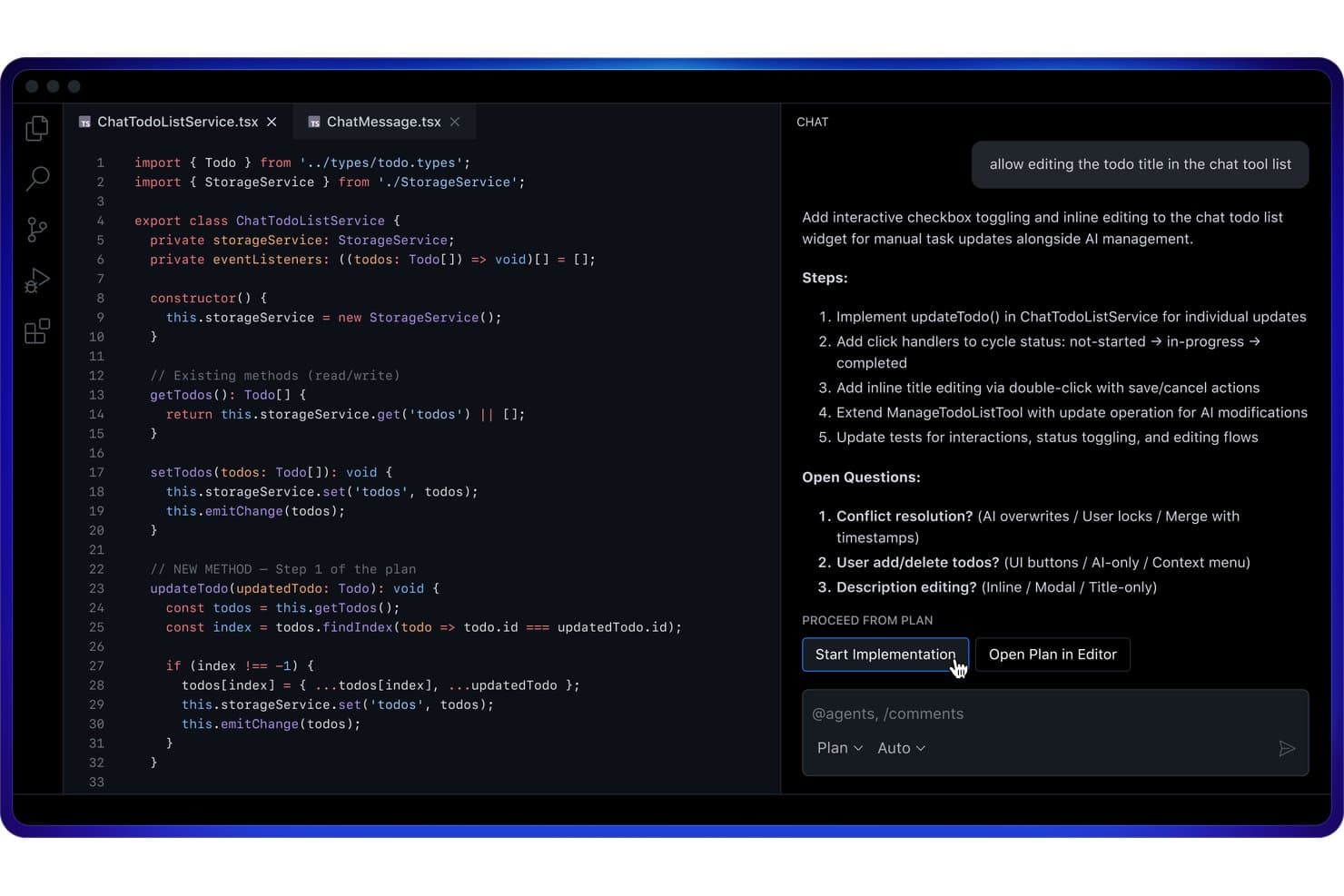
GitHub Copilot offers a Plan Mode in VS Code that outlines implementation steps and open questions before writing code. GitHub Copilot is an AI code assistant built by GitHub that delivers inline code completions, multi-model conversational chat, agentic coding workflows, and automated code review across major IDEs, the CLI, and GitHub.com.
Who Is GitHub Copilot Best For?
GitHub Copilot is a strong fit for individual developers and engineering teams already working within the GitHub ecosystem who want AI assistance embedded directly in their editor.
Why I Picked GitHub Copilot
GitHub Copilot earns its spot as one of the best on my shortlist because its inline completion engine is genuinely in a class of its own. I'm talking whole-function suggestions that appear as I type, with near-zero latency, directly inside VS Code or JetBrains. What really impresses me is the Next Edit Suggestions feature, which anticipates where I'm headed next in the file and surfaces completions proactively, not just at my cursor position.
GitHub Copilot Key Features
- Copilot Chat: Chat directly with the AI in your IDE or on GitHub.com for code explanation and modification.
- Code review agent: Automate pull request reviews and get inline suggestions for improvements across files.
- Multi-model selection: Choose from several AI models, including options from OpenAI, Anthropic, and Google.
- Copilot CLI: Use Copilot features from the command line for agent tasks and code generation beyond the editor.
GitHub Copilot Integrations
GitHub Copilot offers native integrations with Visual Studio Code, Visual Studio, JetBrains IDEs (like IntelliJ and PyCharm), Xcode, Neovim, Eclipse, Raycast, SQL Server Management Studio, Zed, and GitHub.com. An API is available for custom integrations.
Pros and Cons
Pros:
- Broad multi-language and IDE support
- Strong context awareness in large codebases
- Real-time suggestions as you type in editor
Cons:
- No native multi-file refactoring agents
- Lacks local network storage options
Learn more about GitHub Copilot: Best for natural language code generation
- Free plan available, but Claude Code requires a paid plan
- From $17/month billed annually ($20 monthly), Claude Code included in Pro
Visit WebsiteCustomer Rating:4.3/5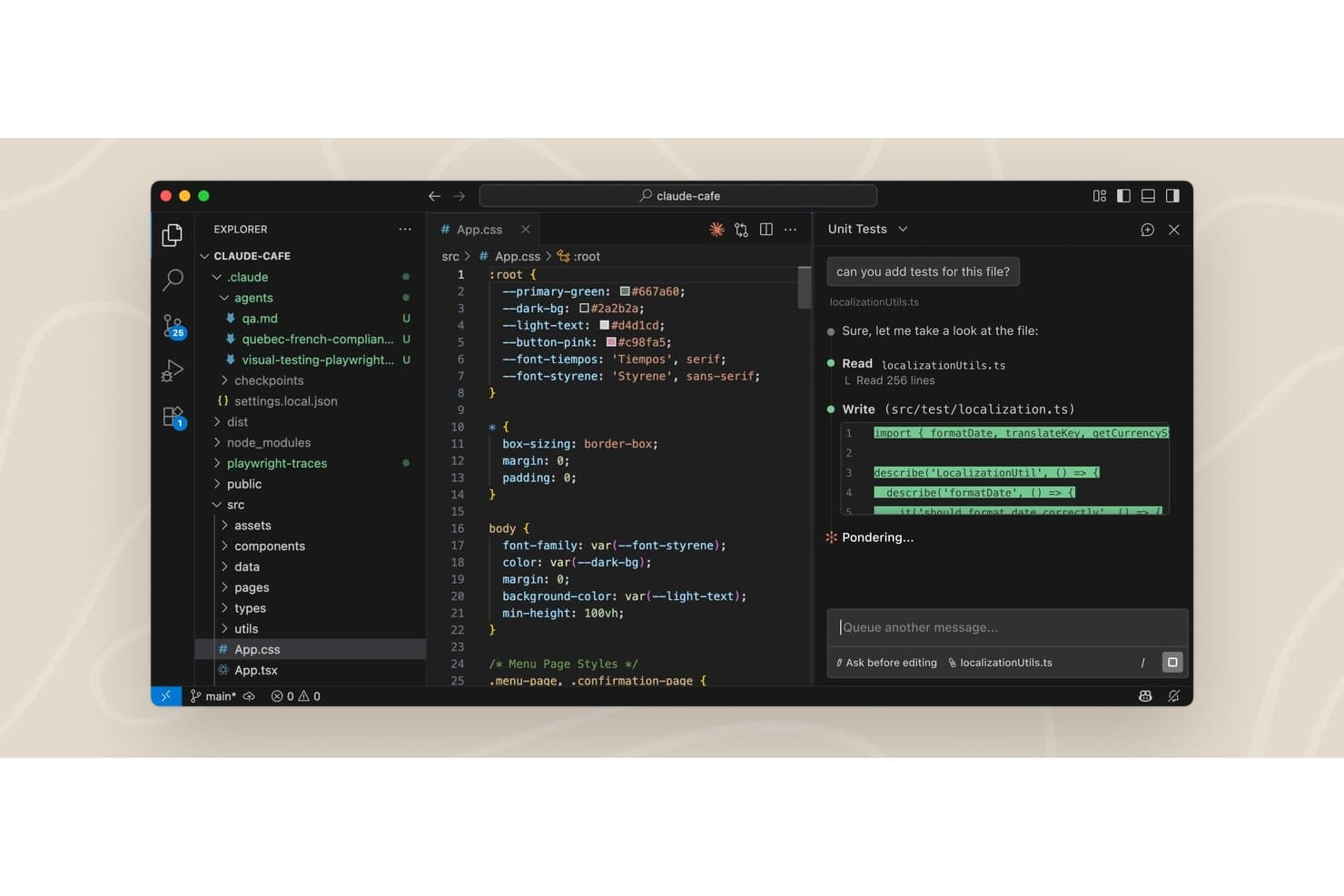
Claude Code offers a VS Code extension with an AI chat panel that reads files and writes unit tests directly in the editor. Claude Code is an agentic AI coding assistant that runs directly in your terminal and IDE, reading your full codebase, editing files across multiple locations, running commands, and submitting pull requests without manual context selection.
Who Is Claude Code Best For?
Claude Code is a strong fit for software engineers and engineering teams working on large, complex codebases where understanding project-wide context is as important as writing new code.
Why I Picked Claude Code
I picked Claude Code as one of the best because of how far its natural language generation actually goes. Describing a feature in plain English doesn't just produce a function: it maps dependencies, edits across multiple files, runs tests, and submits a PR. The codebase onboarding feature is something I use on unfamiliar repos to build a working mental model in seconds, not hours.
Claude Code Key Features
- Agent view: Manage all coding sessions in one interface for organized parallel work.
- Routines: Configure tasks to run on a schedule, via API call, or when events occur.
- Git worktree isolation: Provide isolated repo copies to each session and sub-agent to prevent conflicts.
- MCP connector support: Integrate with deployment, database, monitoring, and custom CLI tools through Model Context Protocol.
Claude Code Integrations
Claude Code offers native integrations with GitHub, Slack, and Chrome, while supporting extended tool connections and IDEs via the Model Context Protocol (MCP) and dedicated CLI platforms. An API is available for custom integrations.
Pros and Cons
Pros:
- Produces detailed code review comments
- Automatically compacts your conversation history
- Handles multi-file and cross-repo edits
Cons:
- Cannot adjust reasoning model thinking levels
- No standalone configuration interface
Learn more about Claude Code: Best for autocomplete and in-depth code chat
- Free plan available
- From $8/month
Visit WebsiteCustomer Rating:5/5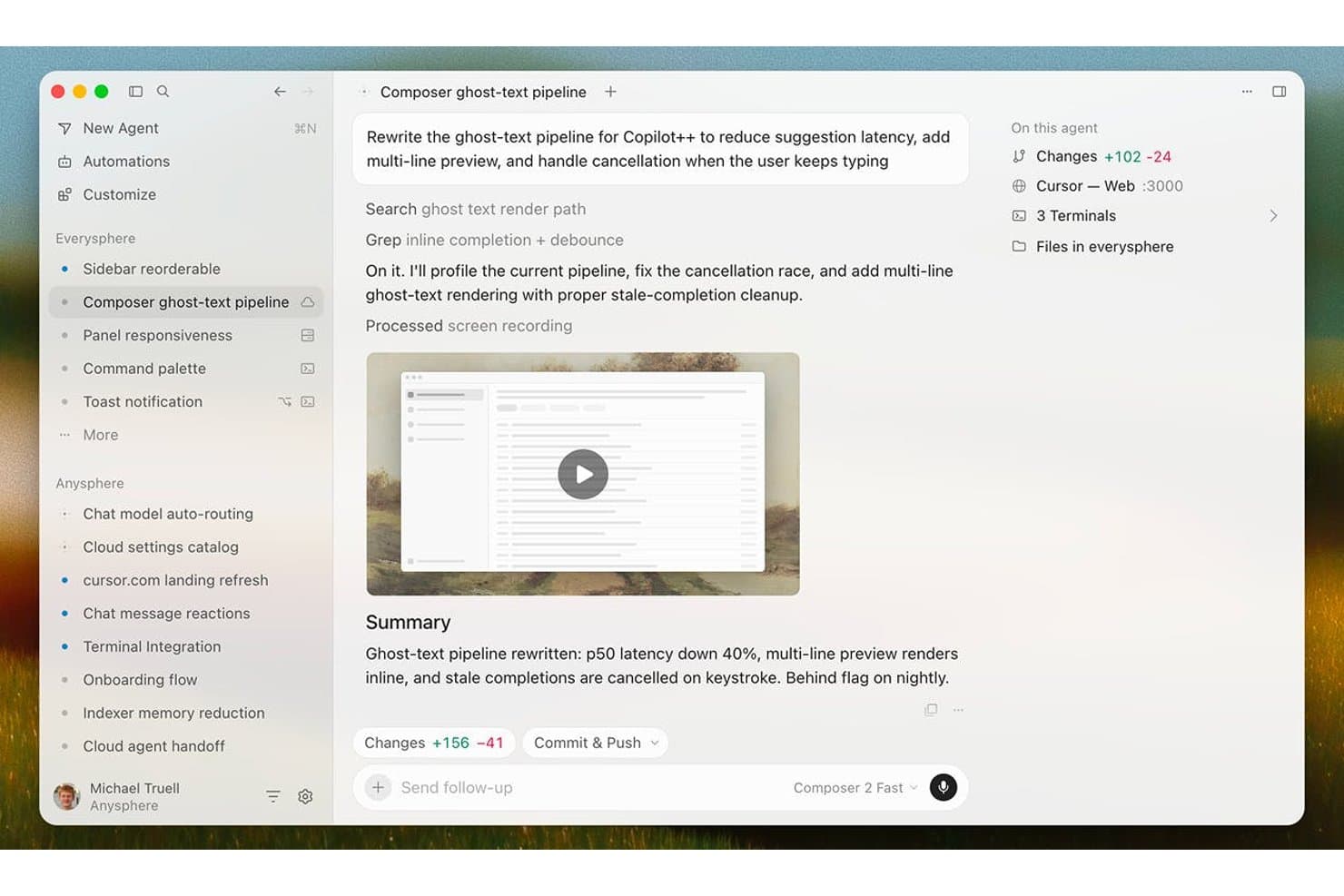
Cursor offers an AI agent interface that rewrites code pipelines, tracks file changes, and summarizes results with latency improvements. Cursor is an AI-native code editor built on VS Code that combines Tab autocomplete, multi-file code generation via Composer, codebase-aware chat, and autonomous coding agents into a single development environment.
Who Is Cursor Best For?
Cursor is a strong fit for software developers and engineering teams who want AI deeply integrated into their daily coding workflow rather than layered on as a separate tool.
Why I Picked Cursor
Cursor earns its spot on my shortlist because its Tab autocomplete is genuinely in a class of its own. Powered by the Supermaven engine, it predicts entire functions and cross-file import paths as you type, not just the next token. What I like even more is the codebase chat: you can ask Cursor why a particular service is structured the way it is, and it pulls context from across your entire indexed repo to give you a real answer.
Cursor Key Features
- Composer multi-file generation: Build out full frameworks and multiple files from natural language prompts inside the editor.
- Agentic code review with Bugbot: Automate pull request review and surface suggested improvements using integrated AI agents.
- MCP (Model Context Protocol) support: Connect to multiple AI models from top providers for flexible code generation and analysis.
- Cloud agents and automations: Deploy always-on agents to handle scheduled or triggered coding tasks directly in your workflow.
Cursor Integrations
Cursor offers native integrations with GitHub, Slack, Okta, Azure Active Directory, Google Workspace, and supports VS Code extensions. An API is available for custom integrations.
Pros and Cons
Pros:
- Deep project context understanding in chat
- Agentic pull request review and bug detection
- Cross-file code generation with Composer
Cons:
- Indexing speeds lower on large repositories
- Requires continuous internet access
Learn more about Cursor: Best for autonomous software development tasks
- Free plan available
- From $20/month (Pro)
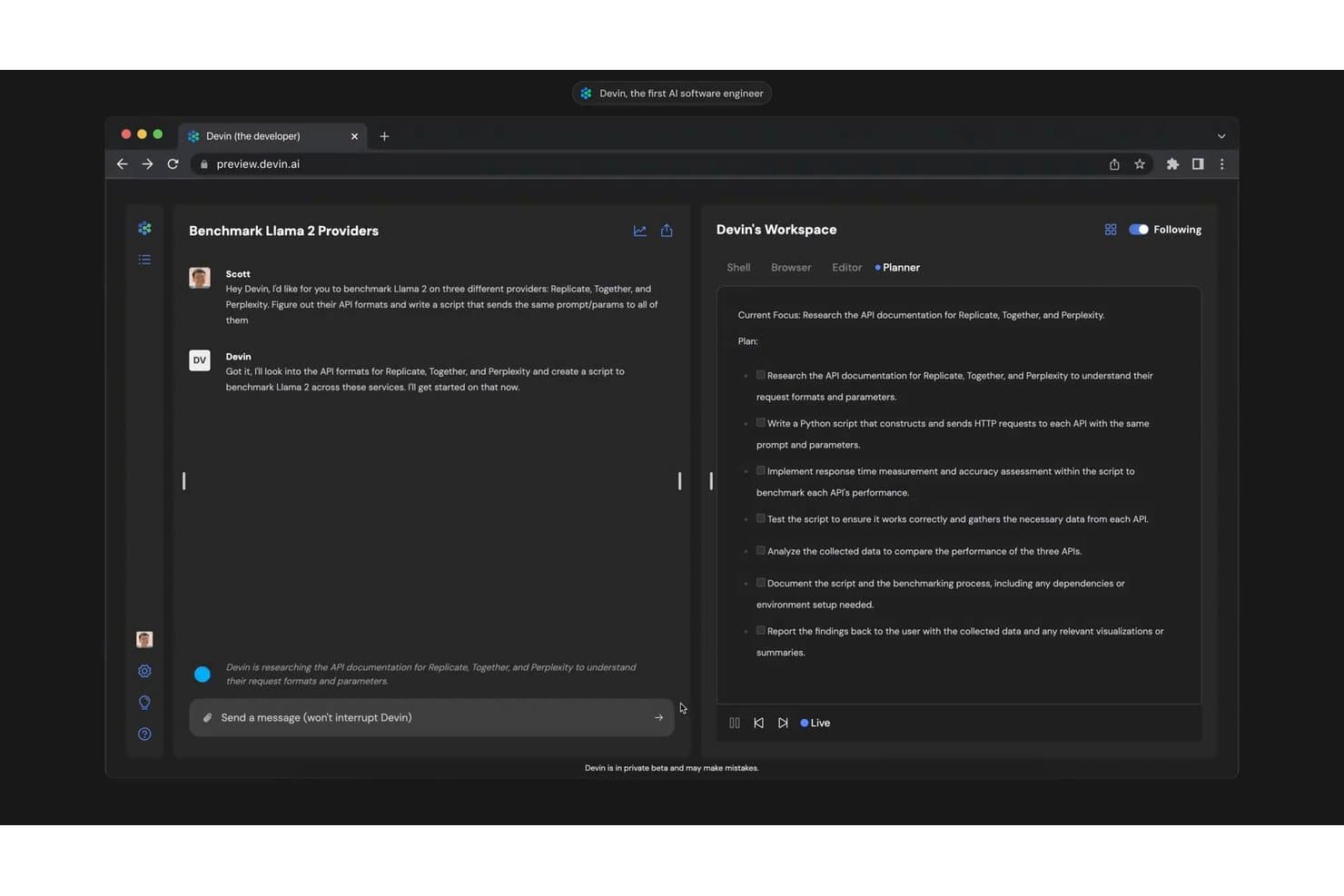
Devin autonomously plans and executes multi-step coding tasks, such as benchmarking Llama 2 across multiple AI providers. Devin is an autonomous AI coding agent that plans, writes, tests, and debugs code end-to-end in a sandboxed cloud environment, submitting pull requests without requiring developer supervision.
Who Is Devin Best For?
Devin is a strong fit for engineering teams at growth-stage and enterprise companies that need to offload repetitive, well-defined development tasks at scale.
Why I Picked Devin
Devin earns its spot as one of the best on my shortlist because it operates at a fundamentally different level than typical AI code assistants. Where most tools suggest the next line, I use Devin to assign an entire GitHub issue and get back a reviewed pull request. Its knowledge base learns my codebase's conventions over time, so output quality improves with repeated use. DeepWiki auto-indexes repositories and generates system diagrams, which I've found invaluable on legacy migration projects.
Devin Key Features
- Devin Cloud: Run autonomous coding agents in a persistent, sandboxed cloud environment.
- Devin Desktop: Use a dedicated desktop app for interacting with Devin’s features and code suggestions.
- Devin Review: Automate pull request reviews to surface code issues and visual QA results.
- Third-party integrations: Connect with tools like Slack, GitHub, Jira, and Linear for workflow automation.
Devin Integrations
Devin offers native integrations with GitHub, GitLab, Bitbucket, Linear, Jira, Notion, Slack, Microsoft Teams, Datadog, and AWS. An API is available for custom integrations.
Pros and Cons
Pros:
- Generates system diagrams and documentation
- Auto-reviews pull requests with AI QA
- Assigns and completes entire tickets autonomously
Cons:
- No offline execution mode
- Limited IDE plugin support compared to rivals
Learn more about Devin: Best for Google ecosystem code support
- 30-day free trial
- From $19/user/month (billed annually)

Gemini Code Assist offers an agent mode with an inline diff view in VS Code, allowing users to review, accept, or decline AI-suggested file changes directly in the editor. Gemini Code Assist is Google's AI code assistant built on the Gemini model family, offering inline code completion, natural language code generation, codebase-aware chat, and automated PR review across major IDEs and the Google Cloud ecosystem.
Who Is Gemini Code Assist Best For?
It's a natural fit for engineering teams already working within the Google Cloud ecosystem, including those building on Firebase, BigQuery, or GCP-hosted infrastructure.
Why I Picked Gemini Code Assist
I picked Gemini Code Assist as one of the best because of how deeply it's embedded in the Google developer surface. When I'm in Firebase, it handles code generation and Crashlytics-driven debugging right inside the console. On BigQuery projects, it generates queries from table metadata, cutting out manual schema lookups. It also connects into Apigee for API spec generation and mock proxy setup.
Gemini Code Assist Key Features
- Whole-function code completion: Delivers multi-line and block-level completions directly in major IDEs.
- IDE chat assistant: Offers natural language chat for code explanations, usage help, and troubleshooting in context.
- Automated pull request reviews: Uses AI agents to summarize and review GitHub pull requests with code suggestions.
- Gemini CLI agent: Provides AI-driven code understanding and task automation right from the command line.
Gemini Code Assist Integrations
Gemini Code Assist offers native integrations with Visual Studio Code, JetBrains IDEs, Android Studio, Cloud Workstations, Cloud Shell, GitHub, Firebase, BigQuery, Apigee, and Application Integration. An API is available for custom integrations.
Pros and Cons
Pros:
- GitHub PR review automations save manual effort
- Suggests code across multiple languages
- Deep understanding of Google Cloud projects
Cons:
- Some advanced features require Enterprise plan
- Code completions sometimes lag during peak hours
Learn more about Gemini Code Assist:
Alți asistenți de programare cu IA
Iată câteva opțiuni suplimentare de asistenți de programare cu IA care nu au ajuns pe lista mea scurtă, dar merită totuși analizate:
- 11ClineBest for natural language debugging support
- 12JetBrains AI in IDEsBest for IDE integration across JetBrains suite
- 13ReplitBest for instant cloud-based code execution
- 14ZedBest for multiplayer real-time code editing
- 15AiderBest for in-terminal conversational coding
- 16Augment CodeBest for AI-powered code test generation
- 17GitLab DuoBest for end-to-end DevOps workflow integration
- 18JetBrains JunieBest for AI-guided refactoring insights
How I Evaluate AI Code Assistants
Every tool on this list has to do more than autocomplete—it needs to help you ship better code, catch bugs, and navigate unfamiliar repos faster. I split my evaluation into core functionality every assistant must nail and differentiating factors that separate one tool from another.
Core Functionality (Table Stakes for This List)
When I'm selecting tools for my list, I rank each one on a scale from 0 (does not offer the functionality) to 5 (excels in this area) for each core functionality listed below. Then, I calculate the tool's total score as a percentage. Each tool needs to achieve a minimum total score of 75% to be considered for inclusion.
- Code Completion: I look for accurate, multi-line suggestions that appear in real time as you type—not just single-token predictions that barely save keystrokes.
- Natural Language Generation: Good tools let you describe a function in plain English and get usable code back, not just a rough skeleton you have to rewrite.
- IDE Integration: I check whether the assistant plugs into the IDEs your team actually uses, like VS Code, JetBrains, or Neovim, without a clunky setup.
- Multi-Language Support: I evaluate how well each tool handles the languages and frameworks in your stack, from Python and TypeScript to Go or Rust.
- Codebase Context Awareness: The best assistants index your full repo, so suggestions reflect your project's patterns, not just the file you have open.
- Code Explanation & Refactoring: I look for tools that can walk you through unfamiliar legacy code and suggest concrete refactors or flag potential bugs inline.
Once I have a list of tools that meet the criteria, I consider what sets each platform apart.
Differentiating Factors (What Sets Vendors Apart)
Here's how I compare and contrast different vendors:
Standout Features
Agentic task execution matters here—some assistants can plan and carry out multi-step refactors or bug fixes with minimal input from you, which saves serious time on large codebases. I also look at whether a tool lets you swap between underlying models based on your team's privacy, cost, or performance needs. Inline code review and test generation round things out, especially for teams that want automated PR feedback and vulnerability checks woven into their Git workflow.
Beyond Features
Data privacy is a big deal—I check whether your code is used for model training and if zero-retention or self-hosted deployment options exist for regulated environments. Admin controls and governance matter just as much, especially SSO, audit logs, and the ability to block suggestions that match public code to reduce IP risk. Pricing structure also shapes my evaluation, since per-seat costs can balloon fast on a growing team compared to usage-based models with free tiers for individual developers.
Cum să alegeți asistenții de programare cu IA
Este ușor să vă pierdeți în liste lungi de funcții și structuri complexe de prețuri. Pentru a vă ajuta să rămâneți concentrat în timp ce parcurgeți procesul dvs. unic de selecție a software-ului, iată o listă de verificare a factorilor de care trebuie să țineți cont:
| Factor | Aspecte de luat în considerare |
|---|---|
| FactorScalabilitate | Aspecte de luat în considerareVa susține instrumentul echipa dvs. pe măsură ce creșteți? Luați în considerare modelele de licențiere și dacă prețul rămâne rezonabil pe măsură ce crește numărul de angajați. |
| FactorIntegrări | Aspecte de luat în considerareSe conectează la IDE-urile principale, furnizorii Git, CI/CD și alte instrumente? Lipsurile de aici pot crea muncă duplicată și pot limita adoptarea. |
| FactorPosibilități de personalizare | Aspecte de luat în considerarePuteți adapta comportamentul, controalele sau selectarea modelului asistentului la tiparele de programare ale echipei și la nevoile de confidențialitate a datelor? |
| FactorUșurință în utilizare | Aspecte de luat în considerareCât de repede pot inginerii să obțină beneficii de pe urma instrumentului? Configurările complicate sau interfața de utilizare neintuitivă încetinesc integrarea și reduc susținerea din partea echipei. |
| FactorImplementare și integrare | Aspecte de luat în considerareCe este necesar pentru implementare — de la permisiuni de acces la scripturi de configurare? Căutați documentație clară și un timp minim alocat de ingineri pentru implementare. |
| FactorCost | Aspecte de luat în considerareComparați planurile per utilizator cu cele bazate pe utilizare sau destinate companiilor? Costurile neașteptate pot apărea pe măsură ce utilizarea crește, așa că clarificați din timp costul total. |
| FactorMăsuri de securitate | Aspecte de luat în considerarePlatforma oferă controale pentru păstrarea codului, permisiuni bazate pe roluri și suport pentru medii găzduite autonom sau complet izolate? |
| FactorDisponibilitatea asistenței | Aspecte de luat în considerareCât de promptă este asistența dacă echipa dvs. întâmpină erori sau are întrebări? Verificați existența unor SLA-uri clare și a acoperirii regionale sau pe fusuri orare, dacă este necesar. |
Ce sunt asistenții de programare cu IA?
Asistenții de programare cu IA sunt instrumente software care utilizează învățarea automată pentru a-i ajuta pe dezvoltatori să scrie, să înțeleagă și să îmbunătățească mai rapid codul. Aceștia oferă funcții precum completarea inteligentă a codului, generarea de cod pe baza indicațiilor în limbaj natural, explicații automate și sugestii pentru refactorizare sau remedierea erorilor. Acești asistenți se integrează în IDE-uri și fluxurile de dezvoltare pentru a accelera sarcinile zilnice de programare și pentru a sprijini o calitate mai bună a codului în cadrul echipelor.
Funcțiile asistenților de programare cu IA
Când selectați asistenți de programare cu IA, urmăriți următoarele funcții esențiale:
- Completarea codului: Oferă sugestii în funcție de context pe măsură ce scrieți, ajutându-vă să finalizați rapid linii sau blocuri de cod fără să vă pierdeți concentrarea sau contextul.
- Indicații în limbaj natural: Vă permit să descrieți în limbaj simplu codul dorit și să generați cod sau funcții funcționale pe baza instrucțiunilor dumneavoastră.
- Integrarea în mediile de dezvoltare: Se integrează direct în mediile de dezvoltare populare, astfel încât să puteți folosi funcțiile AI fără să părăsiți fluxul de lucru pentru programare.
- Suport pentru mai multe limbaje: Acoperă o gamă largă de limbaje de programare și cadre de dezvoltare, fiind util pentru proiecte și stive tehnologice diferite.
- Înțelegerea contextului bazei de cod: Înțelege structura și istoricul proiectului, ceea ce îi permite să genereze cod sau sugestii potrivite pentru depozitul dumneavoastră specific.
- Refactorizare automată: Identifică oportunități de restructurare sau îmbunătățire a codului existent pentru lizibilitate, eficiență sau ușurința întreținerii.
- Detectarea erorilor: Semnalează problemele sau erorile comune din cod în timp ce lucrați și oferă recomandări pentru remedierea lor înainte să devină probleme mai mari.
- Explicarea codului: Descompune codul necunoscut sau complex, explicând logica și structura, astfel încât membrii echipei să se familiarizeze și să contribuie mai ușor.
- Generarea testelor unitare: Scrie automat teste pentru a verifica dacă funcțiile funcționează conform intenției, accelerând acoperirea prin teste și oferindu-vă încredere în baza de cod.
- Revizuirea cererilor de integrare: Ajută la revizuirea modificărilor din cererile de integrare, identifică probleme potențiale și oferă feedback direct în fluxul de lucru pentru revizuirea codului.
Beneficiile asistenților AI pentru cod
Implementarea asistenților AI pentru cod oferă mai multe beneficii echipei și companiei dumneavoastră. Iată câteva dintre acestea:
- Dezvoltare accelerată: Funcțiile de completare și generare a codului vă ajută echipa să lanseze mai rapid funcționalități noi și să remedieze problemele.
- Calitate mai ridicată a codului: Instrumentele automate de detectare a erorilor, refactorizare și revizuire a codului contribuie la un cod mai consecvent și mai ușor de întreținut în toate proiectele dumneavoastră.
- Familiarizare mai rapidă: Explicarea codului și sugestiile bazate pe context permit noilor dezvoltatori să se adapteze și să contribuie cu mai puține dificultăți.
- Reducerea muncii manuale: Funcții precum generarea testelor unitare și documentația automată elimină sarcinile repetitive din activitatea echipei dumneavoastră.
- Colaborare îmbunătățită: Revizuirea cererilor de integrare și funcțiile de feedback în linie îmbunătățesc ciclurile de revizuire și aliniază standardele echipei.
- Flexibilitate mai mare în privința limbajelor: Suportul pentru mai multe limbaje facilitează gestionarea proiectelor care se întind pe mai multe stive tehnologice sau tranziția între tehnologii.
- Securitate și conformitate îmbunătățite: Măsurile de protecție a securității și controalele privind confidențialitatea codului vă ajută să mențineți conformitatea și să protejați datele sensibile în medii reglementate.
Costurile și prețurile asistenților AI pentru cod
Selectarea asistenților AI pentru cod necesită înțelegerea diferitelor modele de preț și planuri disponibile. Costurile variază în funcție de funcții, dimensiunea echipei, suplimente și multe altele. Tabelul de mai jos sintetizează planurile comune, prețurile lor medii și funcțiile incluse de obicei în soluțiile de asistență AI pentru cod:
Tabel comparativ al planurilor pentru asistenții AI pentru cod
| Tipul planului | Preț mediu | Funcții comune |
|---|---|---|
| Tipul planuluiPlan gratuit | Preț mediu$0 | Funcții comuneCompletarea de bază a codului, suport limitat pentru limbaje, integrare de bază în mediile de dezvoltare și explicații de bază ale codului. |
| Tipul planuluiPlan personal | Preț mediu$5-$25/utilizator/lună | Funcții comuneAcoperire completă a limbajelor, completări îmbunătățite, generare personală de teste și detectarea individuală a erorilor. |
| Tipul planuluiPlan pentru companii | Preț mediu$30-$60/utilizator/lună | Funcții comuneInstrumente de colaborare pentru echipe, automatizarea revizuirii codului, controale administrative și opțiuni avansate de securitate. |
| Tipul planuluiPlan pentru întreprinderi | Preț mediu$70-$150/utilizator/lună | Funcții comuneIntegrări personalizate, SSO/SAML, implementare locală, analize privind utilizarea și asistență dedicată. |
Întrebări frecvente despre asistenții de programare bazați pe inteligență artificială
Iată câteva răspunsuri la întrebările frecvente despre asistenții de programare bazați pe inteligență artificială:
Pot asistenții de programare bazați pe inteligență artificială să gestioneze baze de cod private sau proprietare?
Da, mulți asistenți de programare bazați pe inteligență artificială pot lucra cu baze de cod private sau proprietare. Căutați soluții care oferă politici clare privind confidențialitatea datelor, controale pentru păstrarea codului sau implementare găzduită local, astfel încât codul existent să nu părăsească niciodată mediul dumneavoastră. Acesta este un caz de utilizare frecvent pentru echipele care lucrează în condițiile unor cerințe stricte de conformitate.
Înlocuiesc asistenții de programare bazați pe inteligență artificială necesitatea revizuirii codului?
Nu, asistenții de programare bazați pe inteligență artificială nu înlocuiesc revizuirile umane ale codului, dar le pot completa. Aceștia automatizează verificările de rutină și evidențiază problemele potențiale, permițând echipei să se concentreze pe arhitectură și pe feedbackul esențial pentru activitate. Utilizarea acestor instrumente de programare bazate pe inteligență artificială contribuie la menținerea unui stil de programare consecvent în întreaga echipă, sporind în același timp productivitatea generală a dezvoltatorilor.
Cum influențează asistenții de programare bazați pe inteligență artificială integrarea dezvoltatorilor noi?
Asistenții de programare bazați pe inteligență artificială pot accelera integrarea, deoarece oferă explicații despre cod și sugestii bazate pe context. Un programator nou poate primi ajutor în timp real pentru rezolvarea problemelor sau poate consulta fragmente de cod pentru a învăța tipare standard, reducând nevoia de sprijin constant din partea unui mentor și permițând iterații mai rapide în timpul sarcinilor sau al construirii prototipurilor inițiale.
Ce limbaje de programare acceptă asistenții de programare bazați pe inteligență artificială?
Majoritatea asistenților de programare bazați pe inteligență artificială acceptă limbaje de programare importante precum Python, JavaScript, Java și TypeScript. Unele soluții își extind suportul pentru limbaje sau cadre de lucru de nișă, așa că verificați dacă stiva dumneavoastră este acoperită integral înainte de a alege un editor de cod pentru a scrie cod și a optimiza performanța.
Există riscuri de expunere a datelor sensibile sau reglementate?
Da, există riscuri dacă asistentul de programare transmite codul sursă către exterior. Verificați întotdeauna termenii de confidențialitate ai furnizorului și căutați opțiuni precum lipsa păstrării datelor, procesarea în regiune sau implementarea locală pentru o siguranță suplimentară. Multe configurații moderne utilizează local un LLM cu sursă deschisă pentru a asigura securitatea completă a datelor, generând în același timp rezultate de înaltă calitate pentru depanare.