

Gerir o acesso dos utilizadores pode ser uma dor de cabeça para qualquer equipa tecnológica. É necessário garantir que todos têm as permissões adequadas sem comprometer a segurança. É aqui que entra o software de aprovisionamento de utilizadores. Este ajuda a automatizar e simplificar a gestão de utilizadores, poupando tempo à sua equipa e reduzindo os erros.
Com base na minha experiência a testar e analisar estas ferramentas, encontrei algumas opções de destaque que podem facilitar o seu trabalho. Fiz a pesquisa por si, para que não tenha de a fazer. Este artigo em formato de lista irá guiá-lo pelo melhor software de aprovisionamento de utilizadores disponível, destacando funcionalidades, vantagens e desvantagens.
Terá uma análise imparcial de cada ferramenta, ajudando-o a escolher a melhor opção para as necessidades da sua equipa. Vamos explorar o mundo do software de aprovisionamento de utilizadores e encontrar a solução certa para si.
Why Trust Our Software Recommendations
6,700+
Reviews
20
Industry experts
16+
Evaluation factors
14
Years
Our team has been testing and reviewing software since 2012. As tech leaders ourselves, we know how difficult—and important—it is to choose the right software.
For this guide, we evaluated tools using hands-on testing and independent research, scoring tools using our selection criteria.
Our reviews reflect our human editorial judgment, not a sales pitch.
Expert reviewers:
- Paulo Gardini MiguelTech Director
 Tim FisherVP of AI
 Gabriel RosasTech Lead & Software Architect
 Christhian GruhnTech Lead & Platform Architect

Tabela comparativa: software de aprovisionamento de utilizadores
Esta tabela comparativa resume os detalhes de preços das minhas principais seleções de software de aprovisionamento de utilizadores.
| Tool | Best For | Trial Info | Price | ||
|---|---|---|---|---|---|
| 1 | Best for automated user provisioning | 14-day free trial | From $8/user/month (billed annually) | Website | |
| 2 | Best for global user provisioning for physical assets | Free demo available | From $49/user/month | Website | |
| 3 | Best for streamlined Active Directory management | 30-day free trial | From $7/user/month (min 5 seats) | Website | |
| 4 | Best for pre-built app and system connectors | 30-day free trial available | Pricing upon request | Website | |
| 5 | Best for directory-as-a-service capabilities | 30-day free trial | From $9/user/month (billed annually) | Website | |
| 6 | Best for risk-based authentication | Pricing upon request | Website | ||
| 7 | Best for secure enterprise identity verification | 30-day free trial | From $7.00/user/month | Website | |
| 8 | Best for adaptive workforce authentication | 30-day free trial + free demo available | From $6/user/month (billed annually) | Website | |
| 9 | Best for open-source identity and access management | From $20/user/month (billed annually) | Website | ||
| 10 | Best for SaaS operations management | Free demo available | Pricing upon request | Website |


Análise do melhor software de aprovisionamento de utilizadores
Abaixo encontram-se os meus resumos detalhados do melhor software de aprovisionamento de utilizadores que entrou na minha lista restrita. As minhas análises oferecem uma visão detalhada das principais funcionalidades, vantagens e desvantagens, integrações e casos de utilização ideais de cada ferramenta, para o ajudar a encontrar a melhor opção para si.
 Best for automated user provisioning
- 14-day free trial
- From $8/user/month (billed annually)
Visit WebsiteCustomer Rating:4.7/5
Rippling IT lets you send user provisioning requests for new employees, including for access to various apps. Rippling IT is a comprehensive platform designed to help businesses manage their IT infrastructure efficiently, with tools for device management, identity and access management, and inventory management. Amy Mortlock, VP of Marketing at ShadowDragon, shared: “The automated device management is impressive. When someone joins, leaves, or changes jobs, Rippling handles device setup, software installation, and security settings automatically—no manual IT work required.”
Why I Picked Rippling IT: It offers automated user provisioning. When you hire a new employee, the system automatically sets up their user accounts across all necessary applications based on predefined roles and departments. For instance, if you onboard a new sales representative, Rippling will create their accounts and grant them access to all sales-designated apps without manual intervention.
Standout features & integrations:
Other features include app-specific configuration, which allows you to set provisioning rules tailored to each application. This means that different roles within your company can have customized access to the tools they need. The platform also offers detailed audit trails and reporting, providing visibility into user activities and aiding in compliance efforts. Some integrations include Slack, Microsoft Teams, Zoom, Asana, Jira, Salesforce, Hubspot, Google Workspace, Microsoft 365, GitHub, Datadog, and Checkr.
Pros and Cons
Pros:
- Remote device lock and wipe capabilities
- Support for onboarding and offboarding employees and their devices
- Customizable workflow automation
Cons:
- Can be complex to set up initially
- Not all features may be necessary for smaller operations
Learn more about Rippling IT: Best for global user provisioning for physical assets
- Free demo available
- From $49/user/month
Visit WebsiteCustomer Rating:4.7/5
Deel offers provisioning of physical assets in over 130 countries, ideal for global workforces. Deel is a global leader in payroll, HR, and IT management, offering a wide range of solutions that empower businesses to manage distributed teams in over 130 countries. With a strong focus on supporting global operations, Deel provides tools for handling everything from equipment delivery to workforce management, ensuring compliance.
Why I Picked Deel: Deel IT automates key workflows, such as onboarding and offboarding, enabling businesses to set up new hires with pre-configured devices, complete with all necessary apps and security settings. The platform’s global reach ensures that the provisioning of physical assets is not limited by geographic barriers—equipment and user accounts can be activated quickly, no matter where your employee is located.
Standout features & integrations:
Other standout features include its 24/7 global support and real-time visibility into all IT assets, enabling businesses to track, update, and manage devices across different regions efficiently. The platform also supports device recovery and reuse, ensuring optimal use of physical resources. Deel integrates with systems like Apple Business Manager, Windows Autopilot, Okta, BambooHR, Rippling, and Workday.
Pros and Cons
Pros:
- Can combine HR and IT asset management in one
- Helps automate asset workflows
- Supports equipment deployment in over 130 countries
Cons:
- Doesn't offer features beyond device management, like network and server management
- May not be ideal for teams with very complex IT asset needs
Learn more about Deel IT: Best for streamlined Active Directory management
- 30-day free trial
- From $7/user/month (min 5 seats)
Visit WebsiteCustomer Rating:4.2/5
A photo focused on the reports tab of the user provisioning software tool ManageEngine ADManager Plus. ManageEngine ADManager Plus provides an extensive platform designed to manage and maintain Active Directory domains efficiently. Focusing on making Active Directory operations more intuitive, it ties directly into our rationale for being the best tool for streamlined Active Directory management.
Why I Picked ManageEngine ADManager Plus: I chose ManageEngine ADManager Plus after comparing various tools for Active Directory management. Its focus on providing a streamlined user experience and rich features made it stand out. When judging its ability to simplify complex AD tasks, it became evident that it truly was the best for those looking for a tool that offers a straightforward approach to Active Directory management.
Standout features & integrations:
ManageEngine ADManager Plus boasts an array of features catering to novice and expert administrators. Its bulk user management capabilities, combined with the detailed reports, make day-to-day operations efficient. Furthermore, it has vital integrations with various apps and on-premises systems, allowing for a more unified IT management experience.
Pros and Cons
Pros:
- Provides a self-service portal for end-users
- Integrated reporting system
- Comprehensive Active Directory management capabilities
Cons:
- Lacks some advanced automation features
- User interface could be more modern
- Steeper learning curve for beginners
Learn more about ManageEngine ADManager Plus: Best for pre-built app and system connectors
- 30-day free trial available
- Pricing upon request
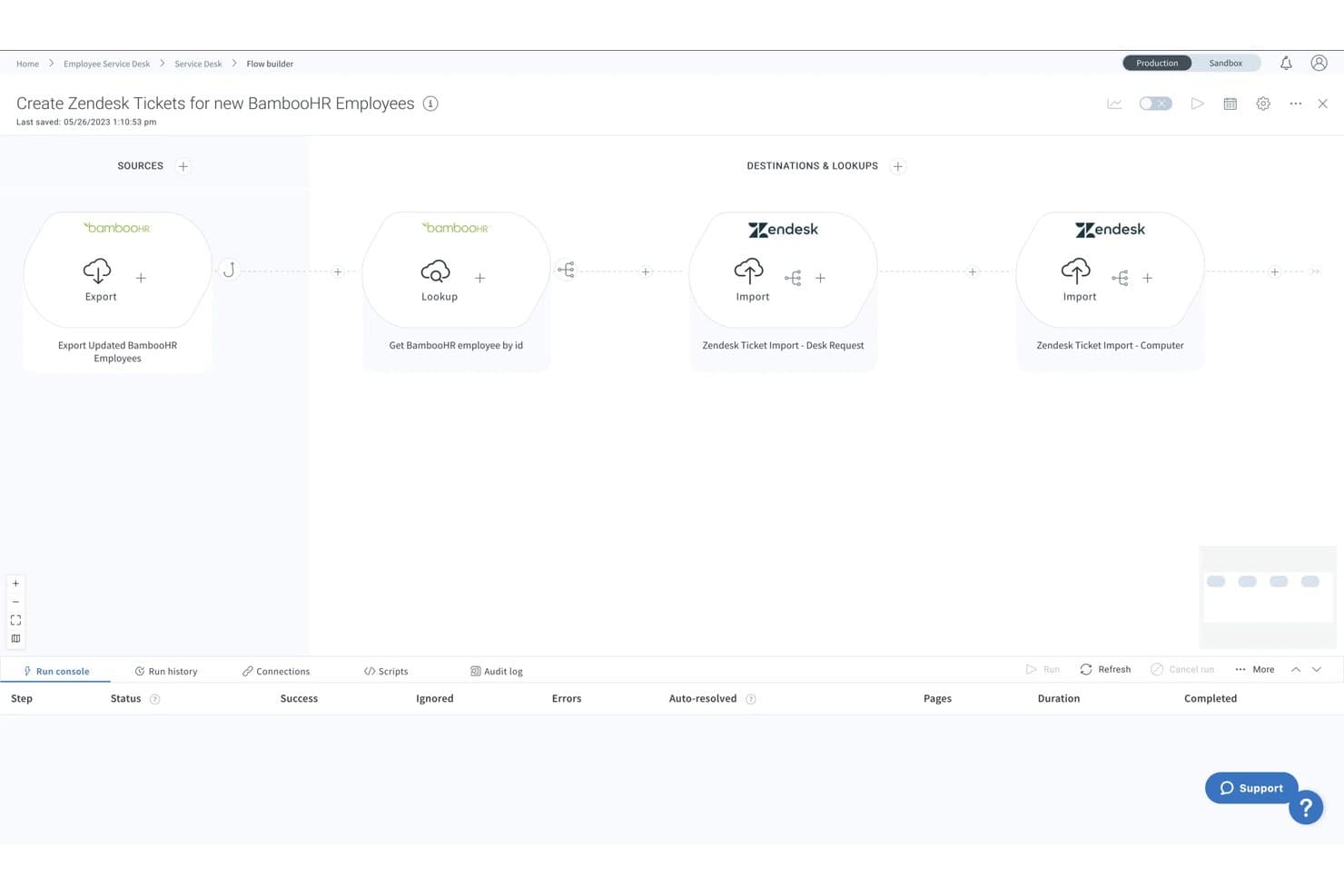
Celigo offers a visual flow builder that automates user provisioning workflows. Celigo is an iPaaS that automates user provisioning and deprovisioning by connecting HRIS platforms, directories, and SaaS applications through pre-built connectors and configurable workflow automation.
Who Is Celigo Best For?
IT teams at mid-market and enterprise organizations managing provisioning across a broad, mixed stack of SaaS, ERP, and HRIS platforms.
Why I Picked Celigo
Celigo earns its spot on my shortlist because of how it handles provisioning to long-tail apps that don't support SCIM. With 1,000+ pre-built connectors, I can extend provisioning to NetSuite, custom ERPs, or niche SaaS apps that a dedicated IAM tool simply can't reach. I also rely on its prebuilt SuccessFactors onboarding/offboarding flows, which automatically deprovision users across all connected apps when someone is marked inactive in HR.
Celigo Key Features
- Audit log and error management dashboard: Tracks all provisioning activity and highlights sync failures with detailed troubleshooting data.
- Role-based user access controls: Assigns granular permissions to Celigo users managing flows and integrations.
- Native SAML and SSO integrations: Supports secure authentication with SAML, Okta, and other identity providers for platform users.
- Custom flow builder with JavaScript editor: Lets IT teams create conditional provisioning workflows and data mappings without leaving the UI.
Celigo Integrations
Celigo offers 1,000+ native integrations, including NetSuite, SAP SuccessFactors, Workday, BambooHR, Okta, ServiceNow, Jira, Zendesk, Salesforce, and Microsoft 365. An API is available for custom integrations.
Pros and Cons
Pros:
- Conditional workflow logic handles complex provisioning
- Prebuilt HR onboarding flows reduce setup time
- Covers provisioning gaps for non-SCIM applications
Cons:
- Error debugging requires technical expertise
- Not purpose-built for identity governance
Learn more about Celigo: Best for directory-as-a-service capabilities
- 30-day free trial
- From $9/user/month (billed annually)
Visit WebsiteCustomer Rating:4.6/5
A screenshot focused on the users tab of the user provisioning software tool JumpCloud. JumpCloud provides a centralized platform to manage user identities across various IT resources. Businesses can achieve unified identity management through their directory-as-a-service capabilities, thus fulfilling complex access requests in today's heterogeneous IT environments.
Why I Picked JumpCloud: In the vast landscape of IT tools, selecting the right one often boils down to specific needs and standout features. When determining the best fit for directory services, JumpCloud immediately surfaced as a top contender due to its robust capabilities in handling user identities. I chose this tool because it effectively blends automated user processes with intricate directory functionalities, marking it as the best for directory-as-a-service capabilities.
Standout features & integrations:
JumpCloud excels in managing and automating user identities, ensuring that access requests are processed efficiently. The platform's comprehensive API further augments its directory functionalities, facilitating intricate integrations and custom workflows. As for integrations, JumpCloud has built partnerships with various IT platforms, allowing businesses to maintain cohesion in identity management across diverse ecosystems.
Pros and Cons
Pros:
- Efficient handling of access requests
- Advanced API for custom integrations and workflows
- Comprehensive management of user identities
Cons:
- Integrations, while vast, may not cover niche industry tools
- Some advanced features could require technical expertise
- Might be overwhelming for smaller organizations
Learn more about JumpCloud:

A screenshot displaying the applications tab of IBM security Verify. IBM Security Verify is a comprehensive access management solution emphasizing risk-based authentication, ensuring users are granted access based on contextual risks. This approach balances security and user convenience, aligning perfectly with the rising demands of modern digital businesses.
Why I Picked IBM Security Verify: In choosing and comparing various tools, IBM Security Verify particularly caught my attention due to its unique approach to authentication. The tool's emphasis on a risk-based method, which is different from traditional authentication strategies, piqued my interest. Hence, I am of the opinion that for organizations looking to pivot towards a more contextual and dynamic authentication system, IBM Security Verify is best for risk-based authentication.
Standout features & integrations:
IBM Security Verify is an account provisioning tool and a complete identity solution. Its risk-based authentication mechanism evaluates numerous parameters before granting access, adding an extra layer of security. Integration-wise, IBM Security Verify is compatible with various enterprise applications and systems, ensuring consistent identity practices regardless of the underlying platform.
Pros and Cons
Pros:
- Wide compatibility with numerous enterprise applications and systems.
- Comprehensive user provisioning tool ensuring efficient account management.
- Advanced risk-based authentication for improved security.
Cons:
- As with many IBM solutions, it may come with a steeper learning curve for some users
- Integration with certain legacy systems might require additional effort
- Might be perceived as complex for smaller organizations
Learn more about IBM Security Verify: Best for secure enterprise identity verification
- 30-day free trial
- From $7.00/user/month

A photo displaying the admin center built for the tool Microsoft Entra ID. Microsoft Entra ID is a tool designed to provide businesses with a robust mechanism for identity verification. As enterprises grow and navigate through complex hybrid environments, a secure and reliable identity verification becomes indispensable. Microsoft Entra ID squarely focuses on this, ensuring that enterprise identities are verified with utmost security.
Why I Picked Microsoft Entra ID: I picked Microsoft Entra ID as my top choice for identity verification tools. It's great for the enterprise sector, especially those in hybrid environments. After comparing it to other options, I found that it excels at providing secure identity verification. This makes it easy for the IT department to handle and authenticate users with confidence.
Standout features & integrations:
Microsoft Entra ID boasts of features that are tailored for today's complex business infrastructures. It's highly adaptive to hybrid environments, ensuring absolute identity verifications across both on-premise and cloud platforms. Furthermore, its deep integration with Microsoft 365 means that businesses can maintain a consistent identity verification method across the suite of Microsoft applications.
Pros and Cons
Pros:
- Deep integration with Microsoft 365 ensures a streamlined experience for the IT department.
- Extensive function in hybrid environments, balancing both on-premise and cloud.
- Tailored for enterprises, addressing specific challenges they face in identity verification.
Cons:
- The complexity may require dedicated IT personnel for setup and maintenance
- Businesses not invested in the Microsoft ecosystem might find some features redundant
- May be perceived as intricate for small businesses without hybrid infrastructures
Learn more about Microsoft Entra ID: Best for adaptive workforce authentication
- 30-day free trial + free demo available
- From $6/user/month (billed annually)

A sample of the mobile and desktop view of the interface for Okta Workforce Identity. Okta Workforce Identity is a renowned tool in the cybersecurity realm that focuses on providing robust identity solutions for the modern workforce. Its main thrust is adaptive authentication, tailoring access requirements based on varying user contexts and scenarios, which is essential for today's diverse and dynamic work environment.
Why I Picked Okta Workforce Identity: I have found that Okta Workforce Identity is a top choice for adaptive authentication. This tool stands out due to its ability to adjust access protocols based on user behavior and context. After comparing various options, I am confident that Okta Workforce Identity is the ideal solution for adaptive workforce authentication. It is particularly useful for businesses with constantly changing dynamics and security requirements.
Standout features & integrations:
Okta Workforce Identity is more than just an authentication tool. It offers advanced compliance reporting features, helping businesses meet their compliance requirements without hassles. Furthermore, Okta integrates with a multitude of enterprise applications, enhancing its adaptability and ensuring consistent identity practices across various platforms.
Pros and Cons
Pros:
- Extensive integrations with a myriad of enterprise tools, making it versatile in diverse IT environments.
- In-depth compliance reporting assists businesses in meeting stringent compliance requirements.
- Comprehensive adaptive authentication caters to varying workforce needs.
Cons:
- As a comprehensive tool, setup and initial configuration might be extensive
- Certain advanced features might require a steeper learning curve
- Might be perceived as overkill for very small businesses
Learn more about Okta Workforce Identity: Best for open-source identity and access management
- From $20/user/month (billed annually)

A photo focused on the different dashboards of the tool WSO2 Identity Server. WSO2 Identity Server offers a comprehensive solution for identity management, ensuring real-time and secure access to applications and services. As an open-source platform, it caters to organizations prioritizing flexibility, customization, and transparency in their identity and access management strategies.
Why I Picked WSO2 Identity Server: After evaluating various tools, I found that the open-source WSO2 Identity Server was the best option for identity and access management. Its transparency and flexibility make it the top choice.
Standout features & integrations:
WSO2 Identity Server prides itself on an efficient provisioning process, ensuring timely and accurate user data management. The platform supports Single Sign-On (SSO) and Multi-Factor Authentication (MFA) mechanisms, reinforcing its commitment to secure access. In integrations, WSO2 connects with a range of enterprise tools, ensuring consistent identity management across diverse business systems.
Pros and Cons
Pros:
- Wide-ranging integrations support uniform identity practices across tools.
- Efficient provisioning process enhances the user data management experience.
- Open-source nature ensures transparency and customization options.
Cons:
- Potential for complexities when integrating with proprietary systems
- Requires dedicated resources for optimal customization and deployment
- Might pose a steeper learning curve for those unfamiliar with open-source platforms
Learn more about WSO2 Identity Server: Best for SaaS operations management
- Free demo available
- Pricing upon request

A screenshot focused on the dashboard of BetterCloud. BetterCloud is a cloud-based platform tailor-made for IT professionals, offering extensive SaaS management tools to ensure efficient and secure operations. Its excellence in overseeing multiple SaaS environments ties in directly with our earlier declaration of its prowess in SaaS operations management.
Why I Picked BetterCloud: When selecting tools for the list, BetterCloud caught my attention because of its unique approach to managing diverse SaaS ecosystems. In comparing various platforms, it became evident that BetterCloud had a distinct edge, especially in centralizing the management of SaaS applications. Given its adeptness in offering granular controls over various SaaS apps, it is best for those keen on robust SaaS operations management.
Standout features & integrations:
BetterCloud flourishes with features such as advanced audit trails, multi-factor authentication, and automated deprovisioning to secure and optimize SaaS applications. Furthermore, it provides crucial integrations with prominent SaaS applications like Slack, Google Workspace, and Dropbox, making the management process coherent and integrated.
Pros and Cons
Pros:
- Efficient deprovisioning of user accounts
- Incorporates multi-factor authentication for added security
- Comprehensive cloud-based SaaS management tools
Cons:
- Pricing structure could be more transparent
- Might be overkill for small businesses
- Can be complex for beginners
Learn more about BetterCloud:
Outro software de aprovisionamento de utilizadores
Eis algumas opções adicionais de software de aprovisionamento de utilizadores que não entraram na minha lista restrita, mas que vale a pena conhecer:
- 11LumosBest for energy-efficient IT solutions
- 12ConductorOneBest for access rights orchestration
- 13GroupID By ImanamiBest for group lifecycle and automation
- 14RipplingBest for integrated HR and IT automation
- 15OneLoginGood for unified access management across devices
- 16HelloIDGood for streamlined identity management
- 17ZluriGood for SaaS application management
- 18UniqkeyGood for advanced password protection in EU
- 19Jamf connectBest for Apple device identity management
- 20SailPointGood for comprehensive identity governance
- 21Auth0Good for customizable identity authentication
- 22CyberArk IdentityGood for secure remote workforce connectivity
- 23CoreviewGood for Microsoft 365 management and insights
- 24FastpathGood for compliance and audit readiness
- 25Opal SecurityGood for API security and policy enforcement
- 26TeleportGood for secure infrastructure access
- 27PingFederateGood for scalable enterprise federation and single sign-on
How I Evaluate User Provisioning Software
I split my evaluation into baseline criteria—like automated lifecycle triggers and SCIM support—and differentiators that set tools apart for complex, multi-app environments.
Core Functionality (Table Stakes For This List)
When I'm selecting tools for my list, I rank each one on a scale from 0 (does not offer the functionality) to 5 (excels in this area) for each core functionality listed below. Then, I calculate the tool's total score into a percentage. Each tool needs to achieve a minimum total score of 65% to be considered for inclusion.
- Automated Account Lifecycle Management: I check whether the tool can trigger create, update, and deprovisioning actions automatically when someone joins, moves teams, or exits the org.
- App & Directory Integrations: The connector catalog matters. I evaluate how many SaaS apps and directories like Active Directory or Google Workspace sync natively out of the box.
- Role-Based Access Control: I look at how roles map to app entitlements, like whether a new sales hire automatically gets CRM and dialer access based on their group assignment.
- HRIS-Driven Provisioning: A solid tool should pull from your HRIS as the source of truth, so a status change in Workday or BambooHR kicks off provisioning workflows.
- SCIM & Standards Support: I evaluate whether each platform supports SCIM 2.0, SAML, and OIDC for interoperable provisioning across standards-compliant applications.
- Audit Logs & Reporting: Every provisioning event should be searchable and exportable. I look for tools that log who got access, when, and who approved it.
Once I have a list of tools that meet the criteria, I consider what sets each platform apart.
Differentiating Factors (What Sets Vendors Apart)
Here's how I compare and contrast different vendors:
Standout Features
Self-service access request portals save IT teams from fielding repetitive tickets every time someone needs a new app. I also look for access certification campaigns, where managers periodically confirm or revoke entitlements to keep your access posture clean between audits. A no-code workflow builder is another differentiator I value, especially for teams that need to design multi-step approval chains or conditional provisioning logic without writing scripts.
Beyond Features
Compliance certifications matter here. I check whether a vendor holds SOC 2 Type II and ISO 27001 at minimum, since provisioning tools handle sensitive identity data across your entire stack. Ecosystem depth is another factor I weigh—tools that plug into your existing SSO, MFA, and SIEM platforms reduce architectural gaps. I also evaluate time to value, especially how quickly you can complete your initial directory sync, map attributes, and go live with your first provisioning workflows.
Como escolher software de aprovisionamento de utilizadores
É fácil ficar preso a longas listas de funcionalidades e estruturas de preços complexas. Para o ajudar a manter o foco enquanto percorre o seu processo específico de seleção de software, eis uma lista de verificação dos fatores a ter em conta:
| Fator | O que deve considerar |
|---|---|
| FatorEscalabilidade | O que deve considerarO software pode crescer com a sua organização? Considere as necessidades futuras e se a ferramenta consegue lidar com um aumento do número de utilizadores sem custos adicionais ou problemas de desempenho. |
| FatorIntegrações | O que deve considerarConsegue ligar-se aos seus sistemas existentes? Verifique a compatibilidade com a sua atual pilha tecnológica para evitar soluções alternativas dispendiosas ou limitações. |
| FatorPersonalização | O que deve considerarPode adaptar a ferramenta aos seus fluxos de trabalho? Avalie a facilidade de modificar definições e permissões para corresponder aos seus processos. |
| FatorFacilidade de utilização | O que deve considerarA interface é intuitiva para a sua equipa? Certifique-se de que não exige formação extensiva nem abranda as operações diárias. |
| FatorImplementação e integração inicial | O que deve considerarCom que rapidez pode começar? Analise o processo de configuração, os recursos necessários e o suporte durante a integração inicial para evitar atrasos. |
| FatorCusto | O que deve considerarDe que forma os preços se alinham com o seu orçamento? Compare os custos com as funcionalidades e a escalabilidade. Esteja atento a taxas ocultas ou modelos de preços inflexíveis. |
| FatorMedidas de segurança | O que deve considerarEstão implementadas medidas de proteção de dados? Avalie a encriptação, os controlos de acesso e a conformidade com as normas do setor para proteger informações sensíveis. |
| FatorDisponibilidade do suporte | O que deve considerarQue suporte oferece o fornecedor? Verifique a disponibilidade 24 horas por dia, 7 dias por semana, os tempos de resposta e a qualidade dos recursos, como guias ou fóruns da comunidade, para obter ajuda quando surgirem problemas. |
O que é o software de aprovisionamento de utilizadores?
O software de aprovisionamento de utilizadores é uma ferramenta que ajuda as empresas a controlar quem pode aceder aos seus sistemas, aplicações e dados. Mantém tudo organizado, garantindo que cada pessoa tem o acesso adequado à sua função.
Em vez de adicionar ou remover utilizadores manualmente, o software trata desse processo automaticamente quando alguém entra na empresa, muda de função ou sai da empresa. Isto mantém os acessos atualizados e ajuda a evitar erros.
Funcionalidades
Ao selecionar um software de aprovisionamento de utilizadores, tenha em atenção as seguintes funcionalidades principais:
- Criação automatizada de utilizadores: Configura automaticamente novas contas de utilizador, poupando tempo e reduzindo erros no processo de integração.
- Gestão de acessos: Controla as permissões e os níveis de acesso dos utilizadores para garantir a segurança e a conformidade.
- Relatórios de conformidade: Gera relatórios para ajudar as organizações a cumprir os requisitos regulamentares e as necessidades de auditoria.
- Federação de identidades: Liga vários sistemas de identidade, permitindo um acesso contínuo em diferentes plataformas.
- Início de sessão único (SSO): Permite aos utilizadores aceder a várias aplicações com um único conjunto de credenciais, simplificando os processos de início de sessão.
- Autenticação multifator: Adiciona uma camada extra de segurança ao exigir uma verificação adicional para além das palavras-passe.
- Gestão baseada em políticas: Impõe regras para as contas de utilizador e as associações a grupos, mantendo a higiene do diretório.
- Registos de auditoria: Regista as atividades e alterações dos utilizadores para proporcionar transparência e ajudar na resolução de problemas.
- Fluxos de trabalho personalizáveis: Permite às organizações adaptar o software aos seus processos e necessidades específicos.
- Capacidades de integração: Liga-se aos sistemas e aplicações existentes para melhorar a funcionalidade e a eficiência.
Vantagens
A implementação de um software de aprovisionamento de utilizadores proporciona várias vantagens à sua equipa e à sua empresa. Eis algumas das vantagens que pode esperar:
- Poupança de tempo: Automatiza a configuração de utilizadores e a gestão de acessos, reduzindo o trabalho manual e acelerando o processo de integração.
- Segurança reforçada: Funcionalidades como a autenticação multifator e os controlos de acesso ajudam a proteger dados sensíveis contra acessos não autorizados.
- Garantia de conformidade: Gera relatórios de conformidade e registos de auditoria, facilitando o cumprimento dos requisitos regulamentares.
- Maior precisão: A automatização reduz os erros no aprovisionamento de utilizadores, garantindo níveis de acesso e permissões corretos.
- Eficiência operacional: As capacidades de integração permitem que o software funcione em conjunto com os sistemas existentes, melhorando o fluxo de trabalho geral.
- Escalabilidade: Suporta organizações em crescimento ao gerir um número maior de utilizadores sem aumentar a carga administrativa.
- Gestão simplificada: Centraliza a gestão de utilizadores, facilitando a supervisão e o ajuste das funções e permissões dos utilizadores.
Custos e preços
A seleção de um software de aprovisionamento de utilizadores exige uma compreensão dos vários modelos de preços e planos disponíveis. Os custos variam consoante as funcionalidades, a dimensão da equipa, os complementos, entre outros fatores. A tabela abaixo resume os planos comuns, os respetivos preços médios e as funcionalidades normalmente incluídas nas soluções de software de aprovisionamento de utilizadores:
Tabela de comparação de planos de software de aprovisionamento de utilizadores
| Tipo de plano | Preço médio | Funcionalidades comuns |
|---|---|---|
| Tipo de planoPlano gratuito | Preço médio$0 | Funcionalidades comunsGestão básica de utilizadores, integrações limitadas e apoio da comunidade. |
| Tipo de planoPlano pessoal | Preço médio$5-$25/utilizador/mês | Funcionalidades comunsAprovisionamento de utilizadores, relatórios básicos e apoio por e-mail. |
| Tipo de planoPlano empresarial | Preço médio$25-$50/utilizador/mês | Funcionalidades comunsIntegrações avançadas, relatórios de conformidade e apoio telefónico. |
| Tipo de planoPlano empresarial de grande escala | Preço médio$50-$100/utilizador/mês | Funcionalidades comunsFluxos de trabalho personalizados, gestor de conta dedicado e serviços de apoio premium. |
Perguntas frequentes sobre software de aprovisionamento de utilizadores
Aqui ficam algumas respostas a perguntas comuns sobre software de aprovisionamento de utilizadores:
Qual é a diferença entre aprovisionamento e desaprovisionamento de utilizadores?
O aprovisionamento de utilizadores envolve a configuração de contas de utilizador e permissões quando alguém entra na sua organização. O desaprovisionamento é o processo de remover o acesso quando essa pessoa sai. Ambos são essenciais para manter a segurança. A automatização destas tarefas poupa tempo e reduz os erros, garantindo que os utilizadores têm o acesso adequado quando necessário e nenhum acesso quando já não precisam dele.
O software de aprovisionamento de utilizadores pode ser integrado nos sistemas de TI existentes?
Sim, a maioria dos softwares de aprovisionamento de utilizadores pode ser integrada nos sistemas de TI existentes. Isto inclui diretórios como o Active Directory e serviços na nuvem como o Google Workspace. A integração ajuda a manter a consistência entre plataformas, reduzindo a necessidade de atualizações manuais. Verifique a compatibilidade com os seus sistemas atuais antes de efetuar a compra para evitar problemas.
De que forma o software de aprovisionamento de utilizadores melhora a segurança?
O software de aprovisionamento de utilizadores melhora a segurança ao automatizar os controlos de acesso e garantir a conformidade. Ajuda a aplicar políticas de segurança, como atualizações de palavras-passe e autenticação multifator. Ao manter dados e permissões de utilizadores exatos, minimiza o risco de acesso não autorizado. As auditorias e os relatórios regulares apoiam ainda mais os esforços de segurança.
É necessário receber formação para utilizar software de aprovisionamento de utilizadores?
Sim, normalmente é necessária alguma formação para utilizar eficazmente software de aprovisionamento de utilizadores. O nível de formação depende da complexidade da ferramenta. Muitos fornecedores disponibilizam recursos de formação, como vídeos, seminários online e documentação. Investir tempo na formação ajuda-o a si e à sua equipa a tirar o máximo partido das capacidades do software, garantindo uma implementação mais simples.