

O software de PKI gerido ajuda a emitir, acompanhar e renovar certificados digitais, permitindo à sua equipa proteger sistemas sem ter de lidar constantemente com datas de expiração, falhas de conformidade ou gestão manual de chaves.
Muitas equipas recorrem a estas ferramentas depois de passarem demasiado tempo a procurar certificados prestes a expirar, a gerir processos internos ou a recear que algo passe despercebido durante as auditorias. Não é que a infraestrutura de chave pública seja nova; o problema é que geri-la em grande escala sem ferramentas dedicadas pode rapidamente tornar-se incomportável.
Tenho trabalhado com organizações na seleção e implementação de ferramentas de PKI que reduzem o risco, cumprem os requisitos das políticas e tornam a gestão de certificados menos onerosa para equipas que já estão sobrecarregadas. Este guia baseia-se nessa experiência, para o ajudar a escolher uma solução adequada ao seu ambiente e a recuperar tempo para se concentrar noutras prioridades.
Why Trust Our Software Recommendations
6,700+
Reviews
20
Industry experts
16+
Evaluation factors
14
Years
Our team has been testing and reviewing software since 2012. As tech leaders ourselves, we know how difficult—and important—it is to choose the right software.
For this guide, we evaluated tools using hands-on testing and independent research, scoring tools using our selection criteria.
Our reviews reflect our human editorial judgment, not a sales pitch.
Expert reviewers:
- Paulo Gardini MiguelTech Director
 Tim FisherVP of AI
 Gabriel RosasTech Lead & Software Architect
 Christhian GruhnTech Lead & Platform Architect

Tabela de comparação de software de PKI
Esta tabela de comparação resume os detalhes de preços das minhas principais escolhas de software de PKI:
| Tool | Best For | Trial Info | Price | ||
|---|---|---|---|---|---|
| 1 | Best for automated security management | Pricing upon request | Website | ||
| 2 | Best for certificate lifecycle tasks | Pricing upon request | Website | ||
| 3 | Best for Windows-based PKI setups | From $972/user (billed annually) | Website | ||
| 4 | Best for enterprise certificate issuance | Pricing upon request | Website | ||
| 5 | Best for zero-touch certificate renewal | Pricing upon request | Website | ||
| 6 | Best for protocol and hardware support | Pricing upon request | Website | ||
| 7 | Best for flexible PKI deployment | Pricing upon request | Website | ||
| 8 | Best open-source PKI solution | Open source project and Available for free | Website | ||
| 9 | Best for large-scale encryption coverage | From $12/user/month (billed annually) | Website | ||
| 10 | Best for complex certificate management | Free demo available | Pricing upon request | Website |


Análises do melhor software de PKI
Apresentam-se abaixo os meus resumos detalhados do melhor software de PKI que entrou na minha lista restrita. As minhas análises oferecem uma visão detalhada das principais funcionalidades, vantagens & desvantagens, integrações e casos de utilização ideais de cada ferramenta, para o ajudar a encontrar a mais adequada para si.


Here is an example of writing a secret to HashiCorp Vault. Secrets are always encrypted and written to the backend storage. HashiCorp Vault takes charge of your digital security, providing a comprehensive suite for identity-based access and safeguarding sensitive data across various systems. The tool impressively automates the management of secrets, encryption keys, and certificates.
Why I Picked HashiCorp Vault:
I chose HashiCorp Vault due to its commitment to security automation. In the dynamic landscape of digital security, Vault excels at streamlining the process and reducing manual oversight. The tool's remarkable focus on automation provides a formidable shield for sensitive data.
Hence, I believe HashiCorp Vault truly stands out as the best choice for businesses needing to handle automated security management.
Standout Features and Integrations:
Vault’s dynamic secrets feature reduces the risk of unwanted data exposure by creating secrets on demand that get revoked after use. Its encryption as a service module allows users to encrypt data without dealing with the complexities of key management.
As for integrations, Vault plugs into your existing infrastructure seamlessly. It works well with popular platforms like AWS, Google Cloud, and Azure, providing extensive coverage.
Pros and Cons
Pros:
- Dynamic secrets ensure maximum data safety
- Wide array of integrations for versatile deployment
- Robust and flexible key and secrets management
Cons:
- Pricing structure is not transparently listed
- Detailed documentation may be overwhelming
- Steep learning curve for new users
Learn more about HashiCorp Vault:

Here is a screenshot of Digicert's dashboard for certificate inspectors. DigiCert PKI Platform provides scalable and reliable high-assurance certificate solutions. It shines in lifecycle management by simplifying and automating the processes of issuing, renewing, and managing digital certificates, making it the best choice for these tasks.
Why I Picked DigiCert PKI Platform:
I chose the DigiCert PKI Platform due to its comprehensive approach to certificate lifecycle management, which makes it stand out among other tools. Its automation of intricate certificate-related processes supports why it's the best for lifecycle management, ensuring certificate operations remain efficient and streamlined.
Standout Features and Integrations:
The platform's notable features include automated certificate issuance and renewal, intuitive UI for easy management, and robust APIs for integration. DigiCert PKI Platform also offers key integrations with widely used systems like Microsoft Active Directory, Microsoft Autoenrollment, and other IT infrastructure components, extending its certificate lifecycle management capabilities into these environments.
Pros and Cons
Pros:
- Offers a user-friendly management interface
- Robust APIs enable integration with various systems
- Streamlines certificate issuance and renewal processes
Cons:
- Setup and configuration can be time-consuming
- Some users may find the platform’s extensive features overwhelming
- Pricing structure can be complex and is not directly available
Learn more about DigiCert PKI Platform: Best for Windows-based PKI setups
- From $972/user (billed annually)

Take a look at Microsoft Active Directory Certificate Services with its certificate templates console. The screenshot shows the duplicate template feature. Microsoft Active Directory Certificate Services (AD CS) is a role in Windows Server that allows the creation of a fully functional public key infrastructure (PKI). Being tightly integrated with the Microsoft ecosystem, it becomes the go-to PKI solution for Windows-centric environments.
Why I Picked Microsoft Active Directory Certificate Services (AD CS):
In the process of selecting PKI tools, AD CS caught my attention due to its seamless integration within the Microsoft ecosystem. This integration, I believe, positions it as the best choice for Windows-centric environments, where it can provide a streamlined and native PKI solution.
Standout Features and Integrations:
AD CS features include the ability to customize certificate contents and extensions, and it supports automated certificate issuance through templates. Its biggest strength is its integration with Microsoft Active Directory, allowing for simple deployment and management of certificates within a Windows environment.
Pros and Cons
Pros:
- Automated certificate issuance through templates
- Customizable certificate contents and extensions
- Seamless integration within the Microsoft ecosystem
Cons:
- Requires a Windows Server license, which can be pricey for smaller organizations
- Can be complex to set up without a good understanding of PKI principles
- Limited to Windows environments
Learn more about Microsoft Active Directory Certificate Services (AD CS):

Here is an example image for managed SSL home screen in GlobalSign’s certificate management platform. GlobalSign PKI is a platform designed to secure organizations' digital identities at scale. It excels in issuing large volumes of certificates and automated enrollment, making it a top choice for businesses seeking robust, enterprise-level protection.
Why I Picked GlobalSign PKI:
When selecting tools for this list, I evaluated each based on their distinctive qualities. GlobalSign PKI emerged due to its capacity to handle high-volume issuance and automated enrollment, which are critical in enterprise-level protection. This robust capability justifies why I believe it is the best for businesses that require extensive protection.
Standout Features and Integrations:
GlobalSign PKI has a robust set of features, including certificate lifecycle management, automated enrollment, and support for multiple certificate types. It offers integrations with Microsoft Active Directory and other IT infrastructure systems, ensuring wide coverage of protection across different organizational applications.
Pros and Cons
Pros:
- Offers automated enrollment for ease of use
- Handles high-volume certificate issuance efficiently
- Provides extensive enterprise-level protection
Cons:
- The platform may have a steep learning curve for those new to PKI solutions
- Some customers have reported slow customer service response times
- Lack of transparent pricing can be challenging for potential users
Learn more about GlobalSign PKI:

Here is a screenshot of Venafi's dashboard. Venafi is a distinguished PKI platform that centralizes and automates the lifecycle of digital certificates. Because of its automation features, particularly zero-touch issuance, and renewal of certificates, Venafi is best suited for those who seek streamlined certificate management.
Why I Picked Venafi:
When I was determining which PKI platform to include on this list, Venafi stood out due to its advanced automation capabilities. Its feature of zero-touch issuance and renewal of certificates distinguishes it from the crowd, leading to my decision that it is best for automation.
Standout Features and Integrations:
Venafi stands out with its advanced automation for the lifecycle of certificates, including issuance, renewal, and revocation. In addition to this, it integrates with leading IT systems like cloud providers, DevOps tools, and more, making it a highly adaptable platform.
Pros and Cons
Pros:
- Provides visibility into all machine identities and their associated risks
- Integrates with leading IT systems
- Advanced automation of certificate lifecycle
Cons:
- Customer support may be slow during off-peak hours
- Can be complex to set up and manage without adequate training
- Pricing is not transparent and requires a custom quote
Learn more about Venafi: Best for protocol and hardware support
- Pricing upon request

Here is a screenshot of the EJBCA web dashboard. EJBCA is a robust, platform-agnostic PKI solution, designed to enable seamless issuance and management of digital certificates. Given its ability to support all major protocols and hardware, EJBCA is best for interoperability in diverse IT environments.
Why I Picked EJBCA:
I selected EJBCA for this list because it stands apart with its broad interoperability. Its compatibility with major protocols and hardware sets it apart and makes it an ideal choice for diverse IT ecosystems. Therefore, I judged it to be the best for interoperability.
Standout Features and Integrations:
EJBCA boasts a rich feature set, including extensive certificate life cycle management, flexible integrations, and support for hardware security modules. It integrates with a variety of platforms and devices, reinforcing its standing as a versatile, interoperable PKI solution.
Pros and Cons
Pros:
- Extensive platform and device integrations
- Robust certificate life cycle management
- High interoperability with major protocols and hardware
Cons:
- Community support may not be as responsive or comprehensive as Enterprise support
- May be complex to set up for those unfamiliar with Java-based applications
- Enterprise version pricing is not publicly available
Learn more about EJBCA (Enterprise JavaBeans Certificate Authority):

Here is a sample image of the PrimeKey EJBCA dashboard on Graylog. PrimeKey EJBCA® Enterprise serves as a robust Certificate Authority, ensuring secure and flexible management of digital identities. The software is tailored to meet the needs of organizations of all scales, providing a range of customizable options to match the complexity of varying IT environments.
Why I Picked PrimeKey EJBCA® Enterprise:
I selected PrimeKey EJBCA® Enterprise for its adaptability. In a tech landscape teeming with varying needs and use cases, this PKI solution's customizable nature offers a clear advantage. Its ability to mold itself to the unique requirements of an organization makes it the best for those seeking a flexible deployment option.
Standout Features and Integrations:
PrimeKey EJBCA® Enterprise shines with its powerful certificate management system and adaptable workflows. It supports multiple Certificate Authority (CA) hierarchies and a wide array of certificate profiles. On the integration front, it syncs well with HSMs from vendors like Thales and Utimaco, and it offers a REST API for seamless integration with existing IT infrastructure.
Pros and Cons
Pros:
- Robust integration options, including REST API
- Comprehensive certificate and workflow management
- Versatile and customizable to suit unique requirements
Cons:
- Transparent pricing information is not available
- Support might be required for initial setup
- Can be complex for novice users
Learn more about PrimeKey EJBCA® Enterprise:

OpenXPKI's web frontend allows access to the workflow catalog, allowing users to instantiate new workflows and work on existing workflow instances. OpenXPKI is a powerful open-source PKI solution designed for flexibility and security. The tool brings to the table a scalable and enterprise-ready architecture that allows you to mold a security solution that aligns with your unique needs.
Why I Picked OpenXPKI:
OpenXPKI caught my attention for its open-source nature. This factor not only makes it a cost-effective option but also enables extensive customization and scalability. It's the diversity in design and adaptability that sets OpenXPKI apart, earning it the title of the best open-source solution for tailoring security architecture.
Standout Features and Integrations:
OpenXPKI offers a feature-rich environment with customizable workflows, support for multiple CA hierarchies, and sophisticated token handling. The tool also provides an extensive API for integration and automation, and it plays well with a range of databases including MySQL, Oracle, and PostgreSQL.
Pros and Cons
Pros:
- Solid API for integrations and automation
- Extensive customization and scalability options
- Open-source and free to use
Cons:
- Absence of dedicated customer support
- Requires more setup compared to commercial PKI solutions
- The learning curve may be steep for beginners
Learn more about OpenXPKI:

The KeyTalk client app enables native secure email encryption, as well as access to Cloud, Hybrid, and Local network environments, which have been protected using enforced client certificate authentication. KeyTalk serves as an effective PKI solution designed to secure and automate the management of your digital certificates across multiple devices. KeyTalk's strength lies in its scalability, making it ideal for organizations dealing with a large number of devices, hence being the best for scalable security.
Why I Picked KeyTalk:
I chose KeyTalk because of its impressive ability to scale and manage certificate lifecycles across countless devices, setting it apart from other PKI solutions on the list. In terms of securing numerous devices, I believe KeyTalk comes out on top, hence I deem it the best for scalable security.
Standout Features and Integrations:
KeyTalk's foremost features include automatic certificate renewal, revocation, and installation across various devices. It also excels in supporting different certificate types like SSL/TLS, code signing, and user certificates. Notably, KeyTalk integrates with a broad range of server systems, software applications, and network components, amplifying its usability across diverse IT infrastructures.
Pros and Cons
Pros:
- Extensive system and application integrations
- Broad range of certificate support
- Exceptional scalability for device management
Cons:
- Premium price point may not fit all budgets
- Interface might be challenging for novice users
- Could be overkill for smaller businesses
Learn more about KeyTalk: Best for complex certificate management
- Free demo available
- Pricing upon request
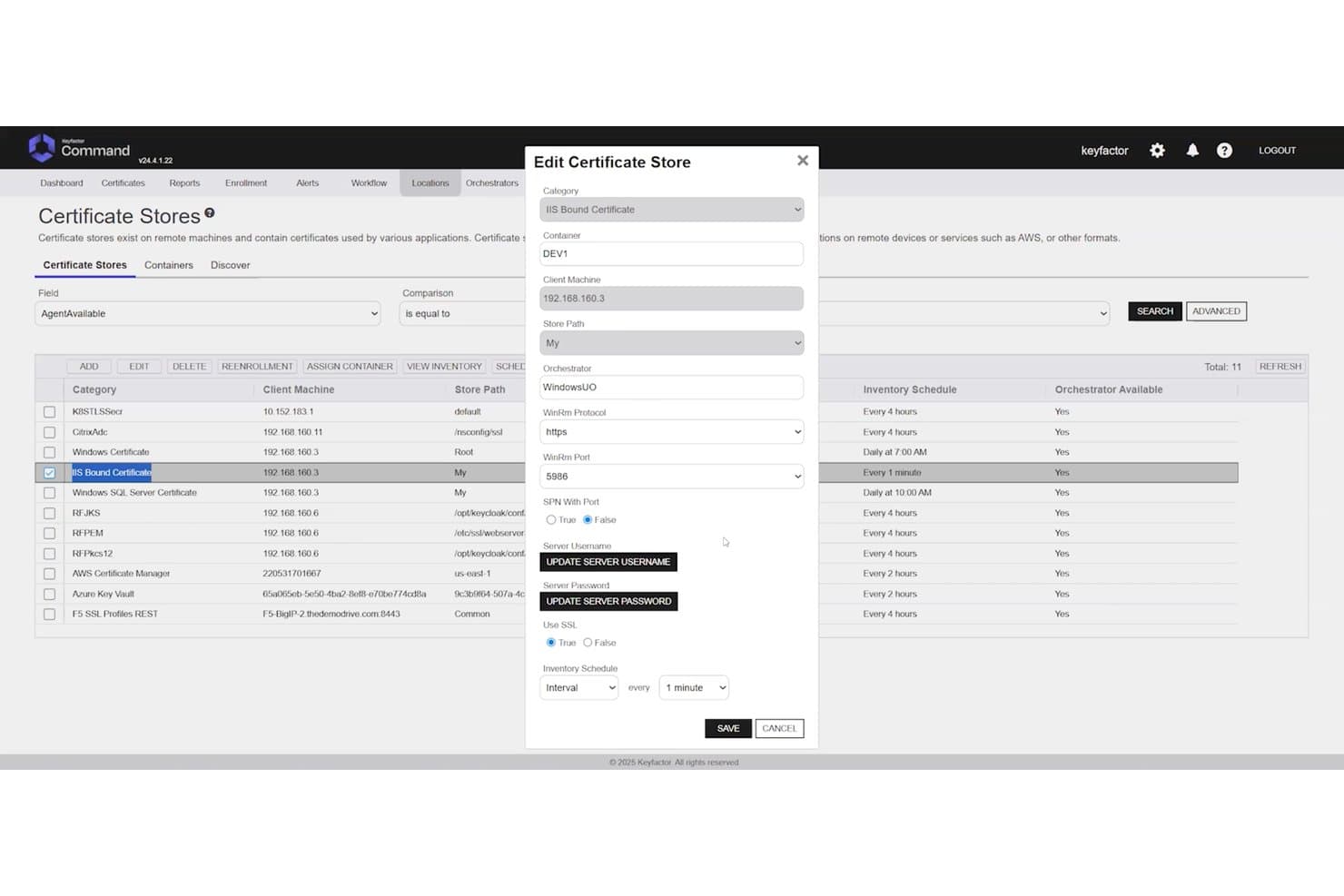
Keyfactor Command lets users configure IIS certificate stores with detailed settings. Keyfactor Command is a CA-agnostic PKI platform that centralizes certificate lifecycle management, cryptographic key management, and automated discovery across multi-cloud, on-premises, and hybrid environments.
Who Is Keyfactor Command Best For?
Keyfactor Command is a strong fit for enterprise PKI and security teams managing large, multi-CA environments with complex compliance and automation requirements.
Why I Picked Keyfactor Command
Keyfactor Command earns its spot on my shortlist because no other platform handles multi-CA complexity at this scale. I'm particularly impressed by its CA-agnostic architecture, which lets you manage certificates across any combination of public and private CAs without locking into a single issuer. When a CA compromise hits, bulk re-issuance across your entire inventory is a genuinely fast response, not a days-long scramble. Its post-quantum readiness, including PQC certificate inventory and custom OID support, makes it the right long-term bet for enterprises managing hundreds of millions of certificates.
Keyfactor Command Key Features
- Network-wide certificate discovery: Agentless scanning across IP ranges, subnets, key stores, cloud environments, and code repositories to surface unmanaged and rogue certificates.
- RBAC with identity provider integration: Role-based access controls tie directly to Active Directory and external identity providers, with workflow-driven enrollment and approval gates.
- HSM integration: Native support for Thales Luna, AWS CloudHSM, and Azure Key Vault, with FIPS 140-2 validated module support for secure key storage.
- Self-service DevOps automation UI: A dedicated interface lets DevOps teams request and manage certificates independently, with native cert-manager and CI/CD pipeline support.
Keyfactor Command Integrations
Keyfactor Command offers 100+ pre-built integrations, including Thales Luna HSM, AWS CloudHSM, Azure Key Vault, Active Directory, and cert-manager. It also provides REST APIs and SDKs for custom integrations and supports CI/CD workflows.
Pros and Cons
Pros:
- Supports granular policy and audit controls
- Automates bulk renewal and reissuance
- Handles multi-CA certificate estates
Cons:
- Interface feels dated to some reviewers
- Setup can confuse new administrators
Learn more about Keyfactor Command:
Outro software de PKI
Eis algumas opções adicionais de software de PKI que não entraram na minha lista restrita, mas que ainda vale a pena conhecer: não consegui encontrar informações específicas sobre fornecedores de software de PKI.
- 11GoDaddy PKI PlatformBest for brand-backed reliability
- 12KeycloakBest for multi-protocol integration
- 13Ubisecure Certificate AuthorityBest for digital identity control
- 14Dogtag Certificate SystemBest for open-source enterprise PKI
- 15FreeIPABest for Linux-based identity services
- 16GlobalSign IoT Identity PlatformBest for identity at IoT scale
- 17GnuPGBest for free OpenPGP-compliant encryption
- 18OpenCA PKIBest for flexible academic PKI setups
- 19OpenSSLBest for open-source cryptography tools
- 20RSA Certificate ManagerBest for large certificate operations
- 21SectonaBest for controlling privileged account access
- 22SecureW2Best for secure Wi-Fi onboarding
- 23SafeNet Trusted AccessBest for smart access and authentication
How I Evaluate PKI Software
I split my evaluation into two layers: baseline requirements like CA hierarchy support and CLM automation, then differentiators that determine the best fit for your specific environment.
Core Functionality (Table Stakes For This List)
When I'm selecting tools for my list, I rank each one on a scale from 0 (does not offer the functionality) to 5 (excels in this area) for each core functionality listed below. Then, I calculate the tool's total score into a percentage. Each tool needs to achieve a minimum total score of 65% to be considered for inclusion.
- Certificate Lifecycle Management: I evaluate how each platform handles issuance, renewal, discovery, and revocation—especially automated renewal workflows that prevent the kind of outages caused by expired certificates.
- Certificate Authority Management: I look for the ability to stand up private CA hierarchies and integrate with public CAs, since most enterprise environments need both internal and publicly trusted certificates.
- Cryptographic Key Management: Secure key generation, storage, and HSM integration matter here. I check whether the platform supports dedicated HSM appliances or cloud-based HSM services for key protection.
- Standards & Protocol Support: Each tool should support core PKI standards like x.509, SCEP, ACME, and OCSP/CRL. Broader protocol coverage means fewer workarounds when enrolling diverse endpoint types.
- Automation & API Access: REST APIs and pre-built integrations with DevOps tooling like Kubernetes and Terraform are what I look for, since manual provisioning doesn't scale in CI/CD-driven environments.
- Policy Enforcement & Compliance: I evaluate RBAC granularity, audit logging depth, and built-in policy templates that help teams enforce key length minimums, algorithm restrictions, and validity periods.
Once I have a list of tools that meet this criteria, I consider what sets each platform apart.
Differentiating Factors (What Sets Vendors Apart)
Here's how I compare and contrast different vendors:
Standout Features
Post-quantum readiness is top of mind for me. Platforms that already support crypto-agile algorithms give your team a head start before migration deadlines hit. I also evaluate multi-cloud CA orchestration—teams running workloads across AWS, Azure, and on-prem shouldn't need separate consoles for each CA. DevOps-native workflows round out the picture. Native cert-manager and Terraform integrations let engineers request certificates inside their existing pipelines instead of filing tickets.
Beyond Features
Deployment flexibility matters a lot here. Some teams need SaaS for speed, while others require air-gapped or on-prem installations to meet data sovereignty rules. I also look closely at vendor-held compliance certifications like WebTrust, Common Criteria, and SOC 2 Type II—these save your team months of audit prep. Ecosystem fit is another key factor. Connectors to identity providers like Entra ID, HSM vendors like Thales, and SIEM platforms determine how cleanly PKI plugs into your existing stack.
Como escolher software de PKI
É fácil ficar preso a listas extensas de funcionalidades e estruturas de preços complexas. Para o ajudar a manter-se concentrado enquanto percorre o seu processo específico de seleção de software, eis uma lista de verificação dos fatores a ter em conta:
| Fator | O que considerar |
|---|---|
| FatorEscalabilidade | O que considerarO software pode crescer com a sua organização? Considere as necessidades futuras e se a ferramenta consegue lidar com um aumento do volume de certificados sem problemas de desempenho. |
| FatorIntegrações | O que considerarFunciona com os seus sistemas existentes? Verifique a compatibilidade com a sua infraestrutura de TI atual e quaisquer aplicações de terceiros de que dependa. |
| FatorPersonalização | O que considerarPode adaptar o software aos seus processos? Procure opções para personalizar fluxos de trabalho, políticas e permissões de utilizador de acordo com as necessidades da sua equipa. |
| FatorFacilidade de utilização | O que considerarA interface é fácil de utilizar? Uma ferramenta difícil de utilizar pode prejudicar a produtividade. Procure uma navegação intuitiva e instruções claras. |
| FatorImplementação e integração inicial | O que considerarQuanto tempo será necessário para começar a utilizar o software? Considere o tempo e os recursos necessários para a configuração, bem como se o fornecedor disponibiliza apoio adequado durante a integração inicial. |
| FatorCusto | O que considerarO preço está dentro do seu orçamento? Avalie não só os custos iniciais, mas também quaisquer taxas ocultas ou despesas a longo prazo que possam surgir. |
| FatorMedidas de segurança | O que considerarExistem medidas de segurança sólidas? Certifique-se de que o software cumpre as normas do setor e disponibiliza funcionalidades como encriptação e controlos de acesso. |
| FatorRequisitos de conformidade | O que considerarCumpre os requisitos regulamentares? Verifique se o software permite cumprir os regulamentos de proteção de dados relevantes para o seu setor. |
O que é o software PKI?
O software PKI é uma ferramenta que ajuda a gerir certificados digitais e chaves de encriptação para manter os dados e os sistemas seguros. É utilizado sobretudo por equipas de TI, profissionais de segurança e administradores de sistemas que precisam de proteger sistemas internos, identidades de utilizadores e comunicações online.
Funcionalidades como a emissão de certificados, o acompanhamento das renovações e o armazenamento de chaves ajudam a manter a organização, a reduzir o trabalho manual e a evitar certificados expirados ou mal geridos. Estas ferramentas facilitam a gestão da encriptação sem acrescentar complexidade ao seu fluxo de trabalho.
Funcionalidades
Ao selecionar software PKI, procure as seguintes funcionalidades essenciais:
- Gestão de certificados: Automatiza a emissão, renovação e revogação de certificados digitais, poupando tempo e reduzindo erros.
- Encriptação: Protege dados sensíveis, convertendo-os num formato seguro ao qual apenas os utilizadores autorizados podem aceder.
- Autenticação de utilizadores: Garante que apenas as pessoas autorizadas podem aceder aos sistemas e dados, verificando as identidades dos utilizadores.
- Suporte à conformidade: Ajuda as organizações a cumprir os regulamentos e as normas do setor, reduzindo o risco de sanções por incumprimento.
- Capacidades de integração: Funciona de forma integrada com a infraestrutura de TI existente e com aplicações de terceiros, assegurando a continuidade dos fluxos de trabalho.
- Políticas personalizáveis: Permitem criar políticas de segurança adaptadas às necessidades e aos requisitos específicos da organização.
- Escalabilidade: Suporta volumes crescentes de certificados e alterações organizacionais sem comprometer o desempenho.
- Controlos de acesso: Permitem controlar de forma detalhada quem pode aceder a determinados dados ou sistemas, reforçando a segurança geral.
- Registo de auditoria: Regista as atividades do sistema para monitorizar e analisar incidentes de segurança, apoiando investigações forenses.
- Interface fácil de utilizar: Disponibiliza uma navegação intuitiva e instruções claras, facilitando a gestão e a utilização do software.
Benefícios
A implementação de software PKI proporciona vários benefícios à sua equipa e à sua empresa. Eis alguns dos que pode esperar:
- Segurança reforçada: Encripta os dados e garante que apenas os utilizadores autorizados têm acesso, protegendo as suas informações sensíveis.
- Conformidade regulamentar: Apoia o cumprimento das normas e dos regulamentos do setor, reduzindo o risco de multas por incumprimento.
- Eficiência operacional: Automatiza as tarefas de gestão de certificados, poupando tempo e minimizando o risco de erros manuais.
- Escalabilidade: Cresce com a sua organização, suportando mais utilizadores e certificados sem exigir alterações significativas.
- Maior confiança: Verifica as identidades dos utilizadores e encripta as comunicações, criando confiança junto de clientes e parceiros.
- Poupança de custos: Reduz a necessidade de processos manuais e o risco de potenciais falhas de segurança, permitindo poupar dinheiro a longo prazo.
- Preparação para auditorias: Disponibiliza registos e relatórios detalhados para auditorias de segurança, facilitando a identificação e correção de vulnerabilidades.
Custos e preços
A seleção de software PKI requer uma compreensão dos vários modelos de preços e planos disponíveis. Os custos variam consoante as funcionalidades, o tamanho da equipa, os complementos e outros fatores. A tabela abaixo resume os planos comuns, os seus preços médios e as funcionalidades normalmente incluídas nas soluções de software PKI:
Tabela de comparação de planos de software PKI
| Tipo de plano | Preço médio | Funcionalidades comuns |
|---|---|---|
| Tipo de planoPlano gratuito | Preço médio$0 | Funcionalidades comunsGestão básica de certificados, suporte limitado e opções de encriptação mínimas. |
| Tipo de planoPlano pessoal | Preço médio$10-$30/utilizador/mês | Funcionalidades comunsEncriptação melhorada, autenticação de utilizadores e suporte à conformidade. |
| Tipo de planoPlano empresarial | Preço médio$40-$80/utilizador/mês | Funcionalidades comunsGestão avançada do ciclo de vida dos certificados, capacidades de integração e escalabilidade. |
| Tipo de planoPlano empresarial de grande dimensão | Preço médio$100-$200/utilizador/mês | Funcionalidades comunsPolíticas personalizáveis, suporte abrangente e registos de auditoria extensivos. |
Perguntas frequentes sobre software PKI
Eis algumas respostas a perguntas comuns sobre software PKI:
Como gere os certificados digitais?
A gestão de certificados digitais envolve emitir, renovar e revogar certificados conforme necessário. Precisará de um sistema que automatize estas tarefas para reduzir os erros e poupar tempo. O software PKI inclui frequentemente ferramentas para acompanhar o estado dos certificados e alertá-lo para as próximas datas de expiração.
Qual é o papel de uma autoridade de certificação?
Uma autoridade de certificação (CA) é uma entidade de confiança que emite certificados digitais. Estes certificados verificam a identidade do titular do certificado. Ao escolher software PKI, certifique-se de que este suporta a integração com autoridades de certificação estabelecidas ou permite configurar a sua própria autoridade.
Como melhora o software PKI a segurança?
O software PKI melhora a segurança através da encriptação de dados e da verificação de identidades. Utiliza chaves públicas e privadas para proteger as comunicações. Ao avaliar as opções, considere a eficácia com que o software gere as chaves e se suporta a autenticação multifator.
As ferramentas de software PKI são difíceis de utilizar?
O nível de dificuldade pode variar consoante a ferramenta. Alguns softwares PKI têm uma curva de aprendizagem acentuada devido às suas numerosas funcionalidades e capacidades. No entanto, a maioria das ferramentas PKI modernas dá prioridade à experiência do utilizador, disponibilizando interfaces intuitivas e suporte abrangente para ajudar na integração dos utilizadores e na utilização contínua.
O software PKI pode integrar-se com sistemas existentes?
A integração é essencial para um fluxo de trabalho eficiente. A maioria dos softwares PKI consegue ligar-se à infraestrutura informática e a aplicações de terceiros. Verifique a compatibilidade com os seus sistemas atuais para evitar interrupções e garantir operações contínuas.
Como lida o software PKI com a escalabilidade?
A escalabilidade garante que o software cresce de acordo com as suas necessidades. Quer esteja a expandir a equipa ou a aumentar a utilização de certificados, o software deverá conseguir lidar com mais utilizadores e dados sem problemas de desempenho. Considere os seus planos futuros ao avaliar as opções de escalabilidade.