

Os testes de regressão podem ser uma dor de cabeça para a sua equipa, especialmente quando está a gerir vários projetos e prazos apertados. É fácil não detetar erros que voltam a surgir no seu código. É aí que entram as ferramentas de testes de regressão, ajudando a identificar problemas antes de estes se tornarem graves.
Com base na minha experiência, encontrar a ferramenta certa pode fazer toda a diferença. Testei e analisei de forma independente as principais opções disponíveis no mercado, concentrando-me no que é realmente importante para o seu fluxo de trabalho e os seus objetivos.
Neste artigo, partilho as minhas escolhas imparciais das melhores ferramentas de testes de regressão. Ficará a conhecer as funcionalidades, a facilidade de utilização e aquilo que distingue cada ferramenta. Vamos descobrir qual é a mais adequada para a sua equipa.
Why Trust Our Software Recommendations
6,700+
Reviews
20
Industry experts
16+
Evaluation factors
14
Years
Our team has been testing and reviewing software since 2012. As tech leaders ourselves, we know how difficult—and important—it is to choose the right software.
For this guide, we evaluated tools using hands-on testing and independent research, scoring tools using our selection criteria.
Our reviews reflect our human editorial judgment, not a sales pitch.
Expert reviewers:
- Paulo Gardini MiguelTech Director
 Tim FisherVP of AI
 Gabriel RosasTech Lead & Software Architect
 Christhian GruhnTech Lead & Platform Architect

Tabela comparativa de ferramentas de testes de regressão
A tabela abaixo compara os detalhes de preços das minhas principais ferramentas de testes de regressão.
| Tool | Best For | Trial Info | Price | ||
|---|---|---|---|---|---|
| 1 | Best for integration with custom enterprise systems | Not available | Pricing upon request | Website | |
| 2 | Best for checking UI against Figma and PDFs | Free plan + free demo available | From $17/month (billed annually) | Website | |
| 3 | Best with design-first modular test creation | 14-day free trial | Pricing upon request | Website | |
| 4 | Best for checklist-based manual test management | Free trial available | From $49/month (billed annually) | Website | |
| 5 | Best for expert-led regression testing | Free demo available | From 1¢/AI credit | Website | |
| 6 | Best suite of flexible and on-demand testing solutions | Pricing upon request | Website | ||
| 7 | Best for organizing your test cases in one visual editor | Free trial available + free demo | Pricing upon request | Website | |
| 8 | Best for CI/CD tool integration | 14-day free trial + free demo available | Pricing upon request | Website | |
| 9 | Best to convert manual tests into automated tests | Free plan + 14-day free trial + free demo available | Pricing upon request | Website | |
| 10 | Best full toolkit for complete test coverage | Free plan + 30-day free trial + free demo available | From $180/seat/month | Website |


Análises das melhores ferramentas de testes de regressão
Abaixo encontram-se os meus resumos detalhados das melhores ferramentas de testes de regressão que entraram na minha lista restrita. As minhas análises apresentam uma visão detalhada das principais funcionalidades, vantagens & desvantagens, integrações e casos de utilização ideais de cada ferramenta, para o ajudar a encontrar a melhor opção para si.
 Best for integration with custom enterprise systems
- Not available
- Pricing upon request

TestDevLab supports QA automation and software testing with mobile interface validation, usability testing, and cross-device quality checks for interactive applications. TestDevLab is a managed QA and software testing company whose ISTQB-certified engineers deliver regression, functional, security, and performance testing across web, mobile, and API environments.
Who Is Software Testing Best For?
TestDevLab is a good fit for mid-size to enterprise engineering teams that need dedicated QA expertise without building an in-house testing department.
Why I Picked Software Testing
I've included TestDevLab in my top picks because their enterprise regression testing approach goes well beyond generic test execution. For teams running complex, custom-built systems, I particularly like their change impact analysis step, which maps code changes to specific integration points, including REST, GraphQL, and SOAP APIs, before a single test runs. Their backend regression validation also covers third-party service integrations and authentication flows, which is exactly where custom enterprise environments tend to break silently between releases.
Software Testing Key Features
- Cross-platform regression testing: TestDevLab runs regression suites across web, mobile, and desktop environments using real devices and browsers, not just simulators.
- CI/CD pipeline test execution: TestDevLab integrates regression test runs directly into pipelines like Jenkins, GitLab CI, and GitHub Actions.
- Exploratory regression sessions: Certified testers conduct structured exploratory testing to catch regressions that scripted test cases miss.
- Defect reporting and triage: Each regression cycle produces detailed bug reports with reproduction steps, severity ratings, and environment-specific context.
Software Testing Integrations
TestDevLab is primarily a managed QA services company rather than a SaaS integration platform. Instead of offering many plug-and-play native integrations, its engineers work directly within clients’ existing CI/CD pipelines, cloud infrastructure, and testing frameworks.
Pros and Cons
Pros:
- Handles regression and accessibility testing together
- Deep expertise in multimedia and security testing
- Tailored test solutions for specific requirements
Cons:
- Minimum project size requires significant budget commitment
- No self-service platform for running tests
Learn more about TestDevLab: Best for checking UI against Figma and PDFs
- Free plan + free demo available
- From $17/month (billed annually)
Visit WebsiteCustomer Rating:4.9/5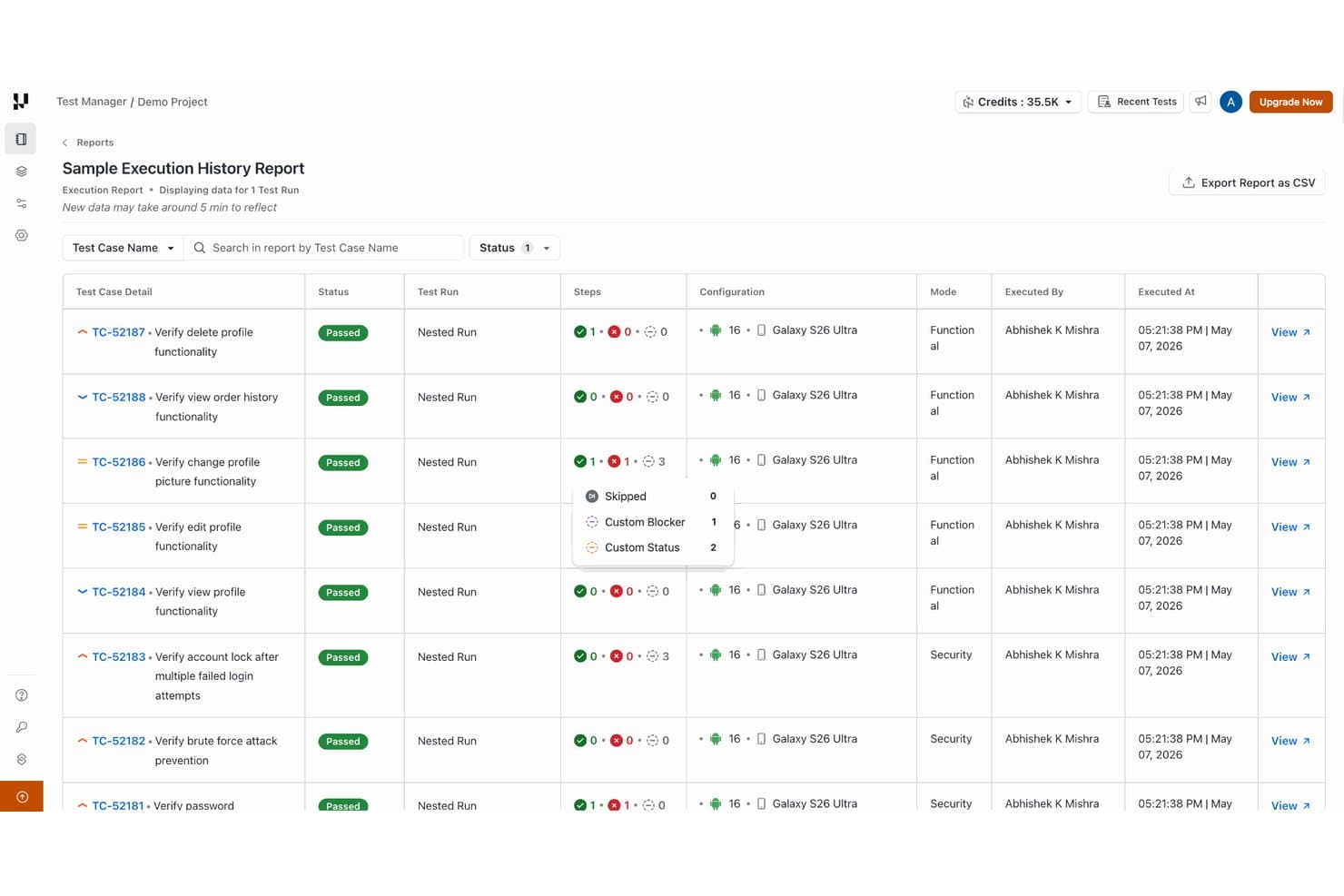
TestMu AI tracks test case execution history with pass/fail step details. TestMu AI is a visual regression testing tool that captures UI screenshots and compares them against approved baselines across web pages, mobile apps, Figma designs, and PDFs, with CI/CD pipeline integration and AI-driven diff analysis.
Who Is TestMu AI Best For?
TestMu AI's SmartUI is a good fit for QA engineers who need to catch visual regressions by comparing live UI against Figma designs or PDFs before shipping.
Why I Picked TestMu AI
I picked TestMu AI as one of the best because its SmartUI does something I haven't seen handled this cleanly elsewhere: it lets you upload a Figma frame or PDF and compare it directly against a live web page or mobile screen to catch design drift before a release ships. Visual AI then classifies the differences by type, layout shifts, color changes, missing elements, and ranks them by severity so you're not wading through noise to find what actually broke.
TestMu AI Key Features
- Mismatch threshold configuration: Set approval and rejection thresholds at the project, build, or screenshot level to auto-approve, auto-reject, or flag visual differences for manual review.
- Branch-aware baselines: Maintain separate baselines per Git branch and configure a baseline branch in Project Settings so non-baseline branches are always compared against it.
- Smart Ignore: Automatically separate moved content from genuine changes and skip dynamic regions like ads, timestamps, or user-specific content during visual comparisons.
- CI/CD pull-request checks: Report visual test results as pass/fail status checks directly on GitHub and GitLab pull requests, blocking deploys when regressions are detected.
TestMu AI Integrations
TestMu AI connects with GitHub Actions, GitLab CI, Jenkins, Azure DevOps, CircleCI, Bitbucket, Figma, Storybook, Jira, and Slack. It also provides APIs for PDF and mobile screenshot uploads, plus webhooks for commit- or build-triggered visual tests.
Pros and Cons
Pros:
- Reviewers value regression checks before releases
- Thresholds route visual diffs for review
- Compares live UI against Figma and PDFs
Cons:
- No documented functional test-case management
- Visual checks don't validate application behavior
Learn more about TestMu AI: Best with design-first modular test creation
- 14-day free trial
- Pricing upon request
Visit WebsiteCustomer Rating:4.8/5
ACCELQ offers API test automation with a natural language step editor, test suite dashboard, execution history, defect tracking, and requirement coverage metrics for regression testing. ACCELQ is an AI-powered codeless test automation platform that supports regression testing across web, mobile, API, desktop, and mainframe applications using natural language-based test design, autonomous element identification, and self-healing execution.
Who Is ACCELQ Best For?
ACCELQ is a strong fit for enterprise QA teams working across complex, integration-heavy systems where both technical testers and non-technical stakeholders need to contribute to test coverage.
Why I Picked ACCELQ
ACCELQ earns its spot on my shortlist because its Behavior Driven Scenario Designer lets me build test scenarios at the business-process level before any automation logic is written. That design-first approach means regression suites are built from reusable Actions and Scenarios, so when the UI changes, I update one module rather than dozens of scripts. The Change Management with Reconciliation feature then flags exactly which tests are affected by application changes, so nothing slips through undetected.
ACCELQ Key Features
- Codeless API automation: Automates REST, SOAP, and GraphQL APIs without code.
- Unified platform for web, mobile, and mainframe: Runs regression tests across multiple application types in a single workflow.
- Real device cloud integration: Connects to BrowserStack and Sauce Labs for cross-device and cross-browser test execution.
- Bidirectional Jira and Azure DevOps integration: Syncs test results, defects, and traceability directly with major ALM and project management tools.
ACCELQ Integrations
ACCELQ offers native integrations with Jenkins, Jira, ClickUp, Bamboo, TeamCity, Slack, and Microsoft Teams, and provides an API for custom integrations.
Pros and Cons
Pros:
- Unified automation for web, mobile, and API
- Self-healing for fast-changing application interfaces
- Behavior-driven scenario designer supports reusable tests
Cons:
- Learning curve for team adoption
- Advanced reporting lacks flaky test detection
Learn more about ACCELQ: Best for checklist-based manual test management
- Free trial available
- From $49/month (billed annually)
Visit WebsiteCustomer Rating:4.1/5
Testpad helps QA teams manage regression testing through reusable test scripts, clear pass/fail tracking, and instant visibility into test coverage across releases. Testpad is a manual test management tool designed for QA teams and software testers who want a flexible, checklist-driven approach to organizing and running regression tests without the complexity of traditional test case management systems.
Who Is Testpad Best For?
QA leads and software teams at startups or SMBs who want a straightforward way to manage and execute manual regression tests.
Why I Picked Testpad
I picked Testpad as one of the best because its checklist-based approach makes it easy for my team to organize and execute manual regression tests. I like that we can quickly create, update, and reuse test checklists for each release cycle. The ability to structure tests as simple, readable lists helps us catch regressions without getting bogged down in complex test case management.
Testpad Key Features
- Guest tester access: Invite external testers to participate without requiring them to create accounts.
- Real-time progress tracking: Monitor test execution status and results as they happen.
- Bulk test editing: Update multiple test items at once to save time during test maintenance.
- CSV import/export: Move test data in and out of Testpad for easier integration with other tools.
Testpad Integrations
Integrations include GitHub, NVIDIA, Bell, Digital Genius, Ideas2Executables, Legrand, Foxhole QA, TestLauncher, OpenROV, and Numed Healthcare. An API is also available for custom integrations.
Pros and Cons
Pros:
- Provides real-time progress tracking for test runs
- Offers CSV import and export for test data
- Enables live editing of tests during execution
Cons:
- Does not support test parameterization
- Limited reporting and analytics features
Learn more about Testpad: Best for expert-led regression testing
- Free demo available
- From 1¢/AI credit
Visit WebsiteCustomer Rating:4.9/5
QA Wolf's platform provides a dashboard where users can view bug reports, tests, and run history. QA Wolf is an automated testing platform designed for developers and QA teams. Unlike traditional tools, QA Wolf is a platform-enabled service that leverages a team of expert QA engineers to handle the creation, execution, and management of all your automated tests. This approach simplifies the testing process and consistently keeps your critical tests maintained and up-to-date, allowing your team to focus on building and improving applications while ensuring new updates in code do not produce any issues.
One of the unique features of QA Wolf that makes it ideal for regression testing is its provision of human-verified bug reports. This ensures that any identified issues are thoroughly vetted by QA experts, minimizing false positives and providing clear, actionable feedback. QA Wolf also offers unlimited test runs, allowing teams to run regression tests as often as needed without worrying about additional costs.
QA Wolf integrates with GitHub, CircleCI, GitLab, Travis CI, Vercel, and Slack. Pricing is available upon request with a free demo available.
Learn more about QA Wolf: Best suite of flexible and on-demand testing solutions
- Pricing upon request
Visit WebsiteCustomer Rating:4.6/5
Connect directly to your integrated platforms through the settings section of the tool Testlio is an automated regression testing tool that primarily provides managed application testing. The tool provides a robust suite of flexible and on-demand testing solutions such as end-to-end testing, functional testing and localization testing. Testlio also offers a support team and expert QA resources, allowing easy implementation within your team.
Testlio offers an abundance of features, including detail oriented test plans, which allow you to review the device information, tester information and test criteria. The tool also provides exploratory testing and livestream testing, allowing you and your team to test your applications in real-time, as well as review the bugs identified on the tool’s dashboard. Finally, Testlio allows you access to all devices within your system without the need to build labs.
Testlio provides integrations with project management tools such as Aana and Jira, as well as IDE’s such as Visual studio.
Testlio offers flexible customized pricing upon request.
Learn more about Testlio: Best for organizing your test cases in one visual editor
- Free trial available + free demo
- Pricing upon request
Visit WebsiteCustomer Rating:4.5/5
Use the test recorder to capture your manual tests executed within your application Testim Automate is an automated testing platform for fast authoring of AI-powered stable tests and tools to help you scale quality. The tool uses AI to identify and lock-in visual elements, allowing you to increase test stability of UI functional tests. Your tests can be extended with custom JavaScript that can run in or out of the browser.
Testim tests are recorded and then edited in its visual editor, allowing you to better organize your test cases. The tool offers AI-based locators that automatically lock-in elements, and test steps are discrete objects that can be configured, shared, grouped and parameterized, providing you and your team with the means to streamline your processes within your application lifecycle. Testim also helps keep tests clean by identifying duplicate test steps to be replaced by shared objects.
The cost of Testim begins at $1000 per month. The tool also offers a free version with up to 1000 test runs per month.
Learn more about Tricentis Testim: Best for CI/CD tool integration
- 14-day free trial + free demo available
- Pricing upon request
Visit WebsiteCustomer Rating:4.8/5
Reflect offers a no-code test automation interface for creating tests. Reflect is a regression testing platform that helps you automate end-to-end tests without writing any code. It’s built around AI prompts, so you can describe a test in plain English and have Reflect turn it into executable steps. I liked how quickly you can build and run regression suites without touching selectors or scripting frameworks.
I picked Reflect because it removes the complexity from regression testing. Instead of writing and maintaining brittle code, it generates tests by simply typing what you want to happen. Reflect also automatically handles UI changes—tests adapt when the app evolves, which means fewer false positives and less upkeep. I also appreciate the visual diffs and video recordings of test runs, which made debugging faster and clearer.
Reflect supports visual checks, cross-browser runs, parallel execution, and API+UI testing in the same flow. It integrates with CI/CD tools like GitHub, Jenkins, and Jira, lets you schedule tests, and notifies you of failures instantly. You can also use parameterized inputs and isolate test data to cover different scenarios.
Learn more about Reflect: Best to convert manual tests into automated tests
- Free plan + 14-day free trial + free demo available
- Pricing upon request
Visit WebsiteCustomer Rating:4.8/5
Manage your test cases from a high level dashboard within testRigor’s application testRigor is a regression testing tool that stands out when it comes to the new era of AI-based automation tools. The tool allows you to create tests in plain English, with elements being referenced from a human perspective. testRigor analyzes all possible parameters behind the scenes to use the most useful ones, which results in ultra-reliable tests.
testRigor allows you to dramatically decrease your test maintenance, by allowing you and your team to spend 95% less time on it on average. Instead, the tool allows you to seamlessly build new tests and increase test coverage. testRigor makes the process of converting existing manual test cases into automated tests very straightforward, and users can also define and customize their own wording if they desire.
The cost of testRigor starts at $300 per month and can be tailored to your specific needs. There is a free 14-day trial with no credit card information required upfront.
Learn more about testRigor: Best full toolkit for complete test coverage
- Free plan + 30-day free trial + free demo available
- From $180/seat/month
Visit WebsiteCustomer Rating:4.4/5
Combine all your jobs for both UI and API testing into a single project using Katalon Studio Katalon Studio is an all-in-one regression testing platform for simplified web, mobile, API and desktop (Windows, Linux and Mac OS) test automation, and is the alternative to building traditional frameworks with open-source libraries. Katalon Studio offers built-in features such as Object Spy, Debugging UI, Test Artifact Sharing, Retry Failed Tests, Smart Wait, Self-Healing and analytics for test reporting, which provides you complete test coverage from within the toolkit alone.
Katalon Studio provides you with all critical capabilities and stability for functional and end-to-end automated testing, providing your team with a robust testing grid for your application lifecycle. The tool allows you to cycle through every step in weeks instead of months by applying low-code methods for test creation, execution, maintenance, and reporting.
Katalon offers integration with CI/CD tools such as Jenkins, BitBucket, Azure DevOps, VCS platforms such as Git, Github, Azure DevOps Repos, and DevOps tools such as Docker.
The cost of Katalon Studio starts from $69 per user per month. The tool also offers a free version, as well as a 30-day trial to test out all premium features for first-time users.
Learn more about Katalon Studio:
Outras ferramentas de testes de regressão
Eis algumas opções adicionais de ferramentas de testes de regressão que não entraram na minha lista restrita, mas que ainda vale a pena conhecer:
- 11New RelicBest for synthetic testing
- 12AutifyBest for AI-driven test maintenance
- 13IBM Rational Functional Tester (RFT)Best to simplify test virtualization & editing using screenshots
- 14SeleniumBest for developers testing UI performance and functionality
- 15Rainforest QABest UI-driven testing solution for regression & functional tests
- 16LeapworkBest to build processes visually for non-technical team members
- 17ArgosBest for testing visual elements
- 18WatirBest for executing tests on browsers
- 19Autify AximoBest for AI-driven automation
- 20Micro Focus Unified Functional Testing (UFT)Best for automating Windows applications
How I Evaluate Regression Testing Tools
I evaluate these tools in two layers: the baseline a tool must clear—automated execution, CI/CD triggers, suite management—and the differentiators that matter when you're scaling across environments.
Core Functionality (Table Stakes For This List)
When I'm selecting tools for my list, I rank each one on a scale from 0 (does not offer the functionality) to 5 (excels in this area) for each core functionality listed below. Then, I calculate the tool's total score into a percentage. Each tool needs to achieve a minimum total score of 65% to be considered for inclusion.
- Test Automation Execution: I look for scripted, codeless, or hybrid automation that lets teams run hundreds of regression tests on every build without manual intervention.
- Test Suite Organization & Reuse: A tool should let you group, tag, and version test suites so you can maintain separate regression sets for, say, checkout flows vs. API endpoints.
- CI/CD Pipeline Integration: I check whether the tool plugs into platforms like Jenkins, GitHub Actions, or GitLab CI with native triggers that kick off regression runs on each commit or merge.
- Cross-Environment Coverage: The tool needs to execute tests across browsers, operating systems, and devices—desktop Chrome and mobile Safari shouldn't require separate frameworks.
- Reporting & Failure Analysis: I evaluate how clearly the tool surfaces failures, including logs, screenshots, and historical trends that help you pinpoint whether a regression is new or flaky.
- Test Maintenance Features: Reusable components, shared object repositories, or self-healing locators matter here—especially when frequent UI changes would otherwise break half your suite.
Once I have a list of tools that meet this criteria, I consider what sets each platform apart.
Differentiating Factors (What Sets Vendors Apart)
Here's how I compare and contrast different vendors:
Standout Features
Risk-based test selection is a major differentiator. Tools that analyze code diffs to prioritize which tests to run can shrink a four-hour regression suite to just the cases that matter for a given commit. Visual regression testing is another feature I evaluate closely—it catches layout shifts and styling breaks that functional assertions miss entirely. AI-powered test generation is also worth considering, especially for teams scaling coverage quickly without the bandwidth to hand-author every new case.
Beyond Features
Scalability matters—I look at whether a tool can handle thousands of parallel test runs during peak release windows without queuing delays. Integration depth with your existing stack is just as important; a tool that connects to Jira, Git, and your test management platform saves hours of manual status syncing. I also evaluate licensing models closely, since pricing based on parallel executions vs. named users can dramatically shift total cost depending on your team's release cadence and size.
Como escolher ferramentas de testes de regressão
É fácil ficar perdido entre listas extensas de funcionalidades e estruturas de preços complexas. Para o ajudar a manter o foco enquanto trabalha no seu processo específico de seleção de software, eis uma lista de fatores a ter em conta:
| Fator | O que deve considerar |
|---|---|
| FatorEscalabilidade | O que deve considerarA ferramenta acompanhará as necessidades da sua equipa? Considere as dimensões dos projetos e o número de utilizadores no futuro. Procure ferramentas que suportem cargas maiores sem problemas. |
| FatorIntegrações | O que deve considerarFunciona com as suas ferramentas atuais? Verifique a compatibilidade com pipelines de CI/CD e com outro software que já utilize, para evitar interrupções no fluxo de trabalho. |
| FatorPossibilidade de personalização | O que deve considerarPode adaptar a ferramenta aos seus processos? Certifique-se de que pode modificar os fluxos de trabalho e os relatórios para se adequarem às necessidades e preferências específicas da sua equipa. |
| FatorFacilidade de utilização | O que deve considerarÉ fácil de utilizar por todos os membros da equipa? Procure interfaces intuitivas e requisitos mínimos de formação, para que todos possam começar a trabalhar rapidamente. |
| FatorImplementação e integração inicial | O que deve considerarO processo de configuração é simples? Avalie o tempo e os recursos necessários para a implementação e a formação. Procure ferramentas com guias claros e assistência. |
| FatorCusto | O que deve considerarOs preços estão dentro do seu orçamento? Compare os modelos de subscrição e esteja atento a taxas ocultas. Certifique-se de que o custo corresponde ao valor e às funcionalidades oferecidas. |
| FatorMedidas de segurança | O que deve considerarComo é que a ferramenta protege os seus dados? Verifique a existência de encriptação, controlos de acesso e conformidade com as normas relevantes, para proteger informações sensíveis. |
| FatorDisponibilidade da assistência | O que deve considerarÉ possível obter ajuda quando necessário? Considere o horário de assistência do fornecedor, os tempos de resposta e os recursos disponíveis, como assistência por chat ou telefone. |
O que são ferramentas de testes de regressão?
As ferramentas de testes de regressão são programas utilizados para automatizar testes, confirmando que as alterações recentes ao código não afetaram negativamente a funcionalidade existente. Estas ferramentas executam uma série de testes em programas que funcionavam anteriormente, após modificações como atualizações ou correções de erros, para garantir que as novas alterações não introduzem novos erros ou regressões no sistema existente.
Garantem uma cobertura abrangente dos testes, reduzindo o risco de os erros chegarem às versões lançadas. As ferramentas de testes de regressão visual são particularmente eficazes na deteção de alterações na interface do utilizador e de problemas de disposição.
Funcionalidades
Ao selecionar ferramentas de testes de regressão, esteja atento às seguintes funcionalidades essenciais:
- Automatização: Automatiza casos de teste repetitivos, poupando tempo e reduzindo erros manuais.
- Capacidades de integração: Liga-se a cadeias de CI/CD existentes para se adaptar perfeitamente ao seu fluxo de desenvolvimento.
- Relatórios personalizáveis: Fornece informações detalhadas sobre os resultados dos testes, ajudando as equipas a tomar decisões informadas.
- Testes entre navegadores: Garante que o software funciona de forma consistente em diferentes navegadores Web e dispositivos.
- Criação de testes orientada por IA: Utiliza aprendizagem automática para gerar e otimizar casos de teste de forma eficiente.
- Colaboração em tempo real: Permite que os membros da equipa trabalhem em conjunto e partilhem comentários durante o processo de testes.
- Escalabilidade: Adapta-se ao aumento da dimensão dos projetos e ao crescimento da equipa sem comprometer o desempenho.
- Medidas de segurança: Protege dados sensíveis através de encriptação e controlos de acesso, garantindo a conformidade.
- Interface intuitiva: Oferece um design intuitivo que minimiza a curva de aprendizagem para novos utilizadores.
- Recursos de formação e suporte: Disponibiliza acesso a tutoriais, seminários em linha e suporte ao cliente para ajudar na integração e na resolução de problemas.
Vantagens
A implementação de ferramentas de testes de regressão proporciona várias vantagens à sua equipa e à sua empresa. Eis algumas das que pode esperar:
- Poupança de tempo: A automatização acelera o processo de testes, permitindo que a sua equipa se concentre em tarefas mais estratégicas.
- Melhoria da qualidade do software: Os testes regulares detetam erros numa fase inicial, garantindo que o seu software permanece estável e fiável.
- Eficiência de custos: A deteção precoce de problemas reduz o custo das correções mais tarde no ciclo de desenvolvimento.
- Colaboração melhorada: As funcionalidades de colaboração em tempo real permitem que os membros da equipa partilhem rapidamente informações e comentários.
- Escalabilidade: A capacidade de lidar com projetos maiores e equipas em crescimento sem esforço adicional apoia o crescimento da empresa.
- Maior precisão: Os testes automatizados eliminam o erro humano, proporcionando resultados mais consistentes e fiáveis.
- Segurança dos dados: As medidas de segurança integradas protegem as suas informações sensíveis durante o processo de testes.
Custos e preços
A seleção de ferramentas de testes de regressão exige uma compreensão dos vários modelos de preços e planos disponíveis. Os custos variam consoante as funcionalidades, a dimensão da equipa, os complementos e outros fatores. A tabela abaixo resume os planos comuns, os respetivos preços médios e as funcionalidades normalmente incluídas nas soluções de ferramentas de testes de regressão:
Tabela de comparação de planos para ferramentas de testes de regressão
| Tipo de plano | Preço médio | Funcionalidades comuns |
|---|---|---|
| Tipo de planoPlano gratuito | Preço médio$0 | Funcionalidades comunsAutomatização básica de testes, integrações limitadas e suporte da comunidade. |
| Tipo de planoPlano pessoal | Preço médio$5-$25/utilizador/mês | Funcionalidades comunsAutomatização de testes, relatórios básicos, integrações com ferramentas populares e suporte por e-mail. |
| Tipo de planoPlano empresarial | Preço médio$30-$75/utilizador/mês | Funcionalidades comunsRelatórios avançados, testes entre navegadores, suporte prioritário e ferramentas de colaboração. |
| Tipo de planoPlano empresarial avançado | Preço médio$100-$250/utilizador/mês | Funcionalidades comunsFluxos de trabalho personalizáveis, gestor de conta dedicado, funcionalidades de segurança melhoradas e capacidades de integração completas. |
Perguntas frequentes sobre ferramentas de testes de regressão
Pensei em algumas perguntas e respostas básicas enquanto escrevia isto, que poderão ajudar quem chegou agora a orientar-se.
As ferramentas de testes de regressão podem simular diferentes ambientes de utilizador?
Sim, as ferramentas de testes de regressão podem simular vários ambientes de utilizador para garantir que as aplicações funcionam de forma consistente em diferentes plataformas, navegadores e dispositivos. Estas ferramentas podem imitar diferentes sistemas operativos, versões de navegadores, velocidades de rede e muito mais, de modo a validar o comportamento da aplicação em condições diversas.
Como garantem as ferramentas de testes de regressão a abrangência completa dos testes?
As ferramentas de testes de regressão garantem a abrangência completa dos testes ao disponibilizarem funcionalidades que associam os testes aos requisitos, detetam partes da aplicação que não foram testadas e sugerem casos de teste adicionais. Incluem frequentemente funcionalidades de análise e elaboração de relatórios que ajudam a identificar lacunas de cobertura e a dar prioridade aos casos de teste com base no risco e no impacto.
Como gerem as ferramentas de testes de regressão grandes conjuntos de dados de teste?
As ferramentas de testes de regressão gerem grandes conjuntos de dados de teste através de funcionalidades como virtualização de dados, gestão de dados de teste e testes orientados por dados. Permitem aos testadores criar, importar e gerir dados de teste de forma eficiente, garantindo que os testes são abrangentes e relevantes para os cenários da aplicação que estão a ser testados.
Quais são os tipos de software de testes de regressão?
O software de testes de regressão é essencial para garantir que as novas alterações ao código não afetam negativamente a funcionalidade existente das aplicações de software. Estas ferramentas existem em várias formas, cada uma concebida para responder a diferentes necessidades, ambientes e metodologias de teste. Compreender os tipos de software de testes de regressão pode ajudar as equipas e organizações a selecionar as ferramentas mais adequadas aos seus requisitos específicos.
Eis os principais tipos de software de testes de regressão:
Ferramentas de testes de regressão automatizados: Estas ferramentas automatizam a execução de testes de regressão, reduzindo significativamente o tempo e o esforço necessários para os testes. As ferramentas automatizadas são ideais para projetos com grandes bases de código ou que sofrem alterações frequentes, garantindo uma cobertura abrangente dos testes sem intervenção manual.
Ferramentas de gestão de testes: Embora não sejam exclusivamente destinadas aos testes de regressão, as ferramentas de gestão de testes ajudam a organizar e gerir casos de teste, incluindo testes de regressão. Incluem frequentemente funcionalidades para planear, executar e acompanhar o progresso dos testes, sendo valiosas para coordenar os esforços de testes de regressão no âmbito de processos de garantia de qualidade mais amplos.
Ferramentas de integração contínua (CI): As ferramentas de CI integram-se com software de testes de regressão para executar automaticamente os testes como parte do ciclo de vida do desenvolvimento de software. Esta integração é essencial para as práticas Agile e DevOps, permitindo às equipas identificar e corrigir rapidamente as regressões à medida que o novo código é integrado.
Ferramentas de testes de regressão sem código: Destinadas a equipas com conhecimentos limitados de programação, as ferramentas sem código disponibilizam uma interface fácil de utilizar para criar e executar testes sem escrever código. Estas ferramentas utilizam interações baseadas em interfaces gráficas, tornando os testes de regressão mais acessíveis aos membros não técnicos da equipa.
Ferramentas de testes de regressão de desempenho: Estas ferramentas concentram-se na deteção de regressões que afetam o desempenho da aplicação, como os tempos de carregamento e a capacidade de resposta. Os testes de regressão de desempenho são essenciais para aplicações em que a experiência do utilizador é diretamente afetada pela velocidade e eficiência.
Plataformas de testes de regressão baseadas na nuvem: As plataformas baseadas na nuvem oferecem a flexibilidade de executar testes de regressão numa vasta gama de ambientes e dispositivos, sem necessidade de infraestrutura física. Este tipo de plataforma é particularmente útil para testar aplicações em diferentes sistemas operativos, navegadores e dispositivos móveis.
Ferramentas de testes de regressão de código aberto: As ferramentas de código aberto oferecem flexibilidade de personalização e estão frequentemente disponíveis sem custos. Embora possam exigir mais configuração e manutenção do que as ferramentas comerciais, as soluções de código aberto são adequadas para equipas com as competências técnicas necessárias para adaptar as ferramentas às suas necessidades específicas.
Ferramentas de testes entre navegadores e plataformas: Estas ferramentas garantem que as aplicações funcionam conforme esperado em vários navegadores e plataformas, o que é essencial para aplicações Web e móveis. Permitem às equipas automatizar testes em várias combinações de navegadores e sistemas operativos, garantindo a compatibilidade e uma experiência de utilizador consistente.
Cada tipo de software de testes de regressão tem o seu próprio conjunto de funcionalidades, vantagens e limitações. A seleção da ferramenta adequada depende de vários fatores, incluindo a dimensão e a complexidade do projeto, as competências técnicas da equipa de garantia de qualidade e os objetivos específicos do processo de testes de regressão.
Ao avaliarem cuidadosamente estes aspetos, as equipas podem escolher o software de testes de regressão mais adequado para manter lançamentos de software de elevada qualidade.
Como se integram as ferramentas de testes de regressão com os pipelines de CI/CD?
Estas ferramentas automatizam o processo de testes e integram-se de forma harmoniosa com os pipelines de CI/CD, acionando automaticamente os testes a cada submissão de código. Isto garante um feedback rápido e ajuda a manter a qualidade contínua do software.