

As melhores ferramentas de teste BDD ajudam as equipas a colmatar a lacuna entre o desenvolvimento técnico e os objetivos empresariais, transformando os requisitos dos utilizadores em cenários claros e testáveis. Garantem que todos, desde os programadores até às partes interessadas não técnicas, compreendem o que está a ser desenvolvido e porquê, reduzindo o retrabalho e a confusão durante o desenvolvimento.
Muitas equipas procuram estas ferramentas depois de lidarem com critérios de aceitação pouco claros, constantes trocas de informação durante as revisões de sprint ou testes que não refletem as necessidades reais dos utilizadores. Sem uma estrutura partilhada para a colaboração, é fácil os projetos perderem o rumo e apresentarem resultados que não correspondem às expectativas.
Trabalhei com equipas de engenharia e de produto na implementação de estruturas BDD em ambientes ágeis, testando a forma como diferentes ferramentas lidam com a automatização, a integração e os relatórios em condições reais de projeto. Essa experiência mostrou-me quais as plataformas que tornam os testes orientados pelo comportamento práticos e eficazes, e não apenas teóricos.
Neste guia, verá quais as ferramentas de teste BDD que facilitam a definição de cenários fiáveis, melhoram a comunicação entre equipas e mantêm um processo de teste consistente, desde o desenvolvimento até à entrega.
Why Trust Our Software Recommendations
6,700+
Reviews
20
Industry experts
16+
Evaluation factors
14
Years
Our team has been testing and reviewing software since 2012. As tech leaders ourselves, we know how difficult—and important—it is to choose the right software.
For this guide, we evaluated tools using hands-on testing and independent research, scoring tools using our selection criteria.
Our reviews reflect our human editorial judgment, not a sales pitch.
Expert reviewers:
- Paulo Gardini MiguelTech Director
 Tim FisherVP of AI
 Gabriel RosasTech Lead & Software Architect
 Christhian GruhnTech Lead & Platform Architect

Tabela comparativa de ferramentas de teste BDD
Esta tabela comparativa resume os detalhes de preços das minhas principais escolhas de ferramentas de teste BDD.
| Tool | Best For | Trial Info | Price | ||
|---|---|---|---|---|---|
| 1 | Best for advanced modular codeless automation | 14-day free trial | Pricing upon request | Website | |
| 2 | Best for Gherkin step automation | Free trial available | Pricing upon request | Website | |
| 3 | Best for enterprise test management | 14-day free trial + Free demo | Pricing upon request | Website | |
| 4 | Best for Jira integration | 30-day free trial | Pricing upon request | Website | |
| 5 | Best for cross-language support | Free demo available | Pricing upon request | Website | |
| 6 | Best for behavior-driven development | Free plan available | From $4/user/month | Website | |
| 7 | Best for early test automation | Free demo available | Pricing upon request | Website | |
| 8 | Best for dependency injection | Free To Use | Website | ||
| 9 | Best for .NET environments | Free To Use | Website | ||
| 10 | Best for wiki-style testing | Free To Use | Website |


Análises das melhores ferramentas de teste BDD
Abaixo encontram-se os meus resumos detalhados das melhores ferramentas de teste BDD que entraram na minha lista restrita. As minhas análises apresentam uma visão detalhada das principais funcionalidades, vantagens & desvantagens, integrações e casos de utilização ideais de cada ferramenta, para o ajudar a encontrar a melhor opção para si.
 Best for advanced modular codeless automation
- 14-day free trial
- Pricing upon request
Visit WebsiteCustomer Rating:4.8/5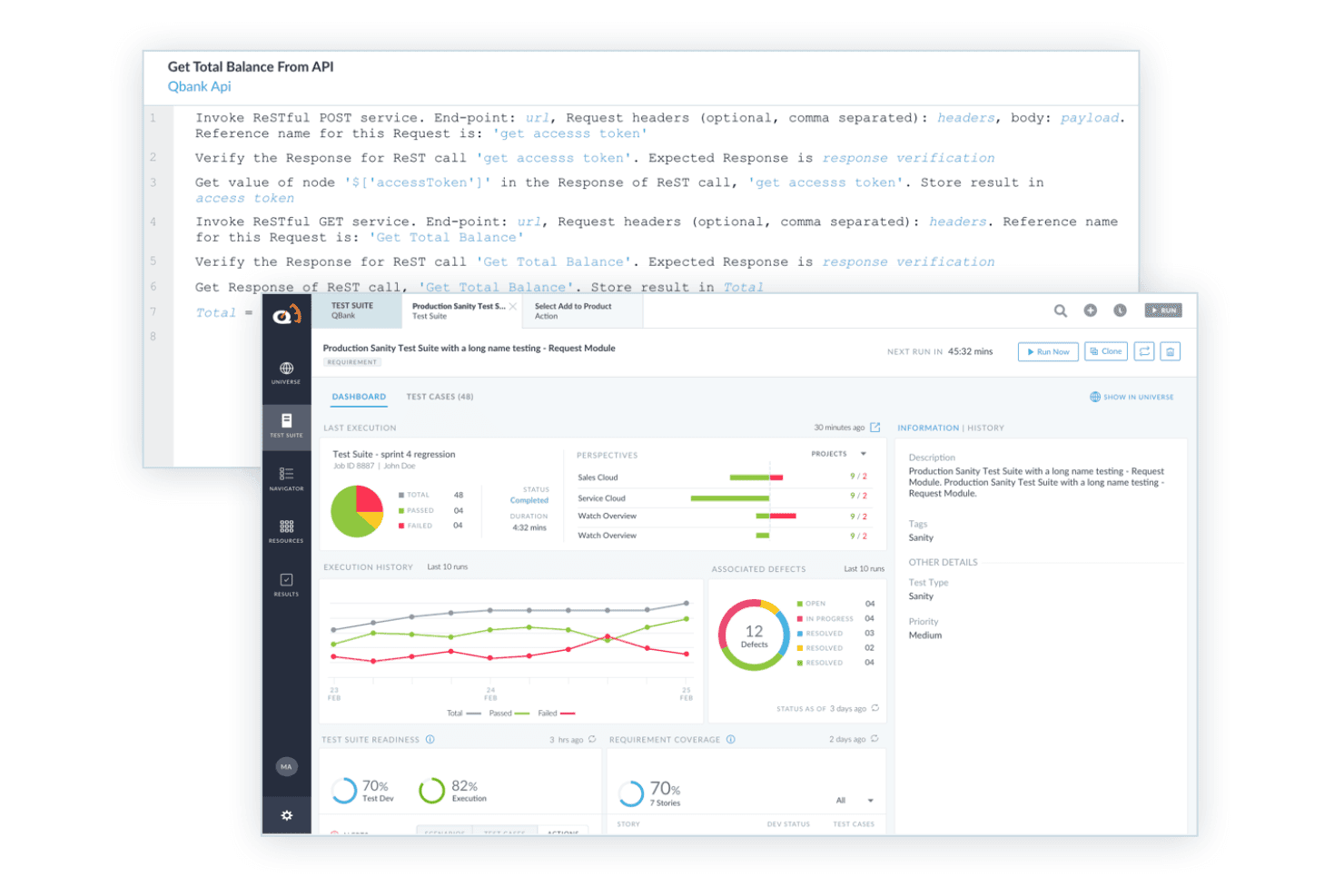
ACCELQ supports BDD testing with readable API test steps, automated execution, and test suite reporting. ACCELQ is a codeless test automation platform that supports behavior-driven scenario design across web, API, mobile, desktop, and packaged applications without requiring scripting at any layer.
Who Is ACCELQ Best For?
ACCELQ suits enterprise QA teams that need to scale test automation across multiple application types without depending on developers to write and maintain test scripts.
Why I Picked ACCELQ
ACCELQ earns its spot on my shortlist because its Behavior Driven Scenario Designer lets QA teams author Given-When-Then scenarios in plain English without touching a line of code. What I particularly like is the modularity: reusable action libraries mean that when your application changes, you update one component and the fix propagates across every test that references it. I've seen this approach cut test maintenance time significantly on large regression suites spanning web, API, and mobile within a single execution environment.
ACCELQ Key Features
- Cross-platform automation: Automates tests across web, API, mobile, desktop, and packaged applications from a single platform.
- API and backend testing: Supports testing for REST, SOAP, GraphQL, database, middleware, and ETL integrations.
- Jira and CI/CD integrations: Connects with Jira, Jenkins, Azure DevOps, and other common CI tools for end-to-end workflow alignment.
- Role-based collaboration: Allows business users, testers, and developers to contribute to scenario creation and review with role-specific permissions.
ACCELQ Integrations
ACCELQ offers native integrations with Jenkins, Jira, ClickUp, Bamboo, TeamCity, Slack, and Microsoft Teams, and provides an API for custom integrations.
Pros and Cons
Pros:
- Self-healing test elements reduce maintenance effort
- Reusable action libraries support modular test design
- Allows codeless BDD automation for complex apps
Cons:
- Scenario dashboards can become cluttered at scale
- Lacks native Gherkin feature file authoring
Learn more about ACCELQ: Best for Gherkin step automation
- Free trial available
- Pricing upon request
Visit WebsiteCustomer Rating:4.3/5
Squish supports Behavior Driven Development (BDD), allowing tests to be written in human-readable language. Squish is on my list for how directly it supports step-level BDD automation with Gherkin, which most test automation tools still don’t get right. When teams need to bridge readable, business-driven scenarios with actual UI automation—especially for cross-platform desktop, mobile, or embedded systems—I've found Squish is a good solution.
What I like is how you match natural-language Gherkin steps with GUI interactions, making test case reuse and versioning much less painful as UI evolves.
Squish’s Best For
- Teams who need automated Gherkin-based UI and functional testing
- Projects covering desktop, mobile, and embedded application interfaces
Squish’s Not Great For
- Users who want web-first or API-only BDD automation
- Teams without time for test maintenance or initial setup
What sets Squish apart
Squish takes a direct approach for teams that want to automate BDD tests in Gherkin without bolting it onto another tool. Unlike classic scripting tools or web-first frameworks like Cypress, you map natural-language steps directly onto interactive, full-stack UI tests across desktop, mobile, and embedded devices. This works great when you need business-readable test cases that actually run against real applications.
Tradeoffs with Squish
Squish optimizes for UI and step-level automation, so you lose the speed and simplicity of tools designed just for headless web or API testing. That added capability means extra setup and maintenance, especially when apps or UIs change frequently.
Pros and Cons
Pros:
- Works across a wide range of platforms
- Effective BDD integration with automatic step mapping
- Supports many scripting languages like Python and JavaScript
Cons:
- May take time to learn Squish's advanced features
- Automated tests are not always easy to create
Learn more about Squish: Best for enterprise test management
- 14-day free trial + Free demo
- Pricing upon request
Visit WebsiteCustomer Rating:4.3/5
Tricentis qTest provides more than 60 out-of-the-box metrics ready to be utilized, along with drag-and-drop capabilities for creating custom dashboards. Tricentis qTest makes the cut for enterprise teams that need BDD support integrated right into their test management process. I rely on it when teams have to coordinate test case design, execution, and traceability at scale, especially with complex scenarios mapped in Gherkin. What I appreciate most is how well qTest centralizes requirements, BDD scenarios, and automation across large QA organizations—giving everyone a single source of truth.
Tricentis qTest’s Best For
- Large QA teams managing enterprise BDD and test traceability
- Organizations needing centralized test management and automation at scale
Tricentis qTest’s Not Great For
- Small teams wanting simple or lightweight BDD tools
- Groups without the need for advanced enterprise features
What sets Tricentis qTest apart
Tricentis qTest is built for organizations where test management, BDD, and automation need to live in one centralized space. Unlike Jira, which adds testing through plugins, qTest expects full-scale QA teams to manage requirements, BDD scenarios, and test execution together. I see it working best when you need traceability between requirements, tests, and results, especially in regulated or high-complexity environments.
Tradeoffs with Tricentis qTest
qTest optimizes for scale and centralized governance, so you end up trading off speed and simplicity. Smaller teams without heavy compliance needs usually find the overhead unnecessary.
Pros and Cons
Pros:
- Enhances collaboration among teams
- Strong analytics features
- Supports various methodologies
Cons:
- Some integrations need manual setup
- Requires training for optimal use
Learn more about Tricentis qTest:

AssertThat offers a comprehensive view of your automation BDD test scenarios so you can easily monitor performance metrics at a glance. AssertThat earns a spot on my list for how directly it brings BDD testing into Jira environments. If you're working closely with stakeholders who live in Jira, AssertThat is the first tool I suggest for syncing Gherkin scripts and results right into Epics and Stories.
What sets it apart for me is the way you can manage cucumber tests, map scenarios, and track outcomes without leaving your core Jira workflow. This makes it much easier for teams to keep test management aligned with delivery work.
AssertThat's Best For
- Jira-based teams managing BDD with Gherkin and cucumber
- Organizations keeping test management and project tracking together
AssertThat's Not Great For
- Teams not using Jira as their primary platform
- Projects needing advanced visual test reporting or analytics
What sets AssertThat apart
AssertThat treats BDD test management as a native part of Jira, not an add-on. You write and manage Gherkin feature files alongside your Jira issues so testers, developers, and non-technical stakeholders work side by side, using the platform they already rely on. Unlike standalone tools like SpecFlow, AssertThat makes test documentation and traceability part of your Jira workflow. This works well if you need your BDD assets tied right into your sprint and issue tracking.
Tradeoffs with AssertThat
AssertThat optimizes for Jira-first teams, but you lose out on richer test analytics or flexible reporting that dedicated BDD platforms can offer. If you want deep data or cross-project test visibility, you’ll probably feel boxed in.
Pros and Cons
Pros:
- Real-time reporting features
- Supports BDD syntax
- Integrates well with Jira
Cons:
- Limited support outside Jira
- Limited standalone features
Learn more about AssertThat: Best for cross-language support
- Free demo available
- Pricing upon request
Visit WebsiteCustomer Rating:4.2/5
Cucumber plugin for Java IDE Cucumber is on my shortlist because it supports teams writing BDD scenarios in over 30 programming languages, making it a solid pick for projects that aren't locked to a single stack. When you need consistent BDD practices across language boundaries or mixed environments, this tool adapts easily. I appreciate the open, readable Gherkin syntax and how it keeps both technical and non-technical folks aligned.
Cucumber’s Best For
- Teams using multiple programming languages in BDD workflows
- Cross-functional groups needing plain-language scenario definitions
Cucumber’s Not Great For
- Projects limited to one tightly integrated language stack
- Teams that dislike maintaining text-based feature files
What sets Cucumber apart
Cucumber expects you to drive development through conversations and shared understanding, not just written specs. I see it lean hardest into collaboration between technical and non-technical folks, much more than classic tools like Jira or even SpecFlow. Instead of embedding requirements into ticket fields or code comments, you write executable scenarios in Gherkin that live with your codebase. This works best when you want understanding and tests to stay aligned as your product evolves.
Tradeoffs with Cucumber
Cucumber optimizes for shared, readable scenarios, but you give up some speed and simplicity compared to tools that just generate tests from code. In practice, you spend more time writing and maintaining plain-language documentation.
Pros and Cons
Pros:
- Adapts to various environments
- Bridges technical and non-technical teams
- Supports multiple programming languages
Cons:
- Limited advanced features
- May require additional configuration
Learn more about Cucumber:

JDave has earned its place in my BDD testing shortlist because it applies a specification-by-example approach in Java that stays readable even for non-developers. I find its context-based structuring lets teams express behavior, outcomes, and specifications in plain language, which smooths collaboration with stakeholders.
What I appreciate most is how clear the separation is between context, event, and outcome when writing specs in JDave. This works especially well on teams aiming for consensus on requirements before any code gets shipped.
JDave’s Best For
- Java teams practicing behavior-driven development and specification by example
- Developers collaborating closely with domain experts and non-developers
JDave’s Not Great For
- Teams that want modern UI or rich web interfaces
- Organizations using non-Java (Python, .NET, JS) tech stacks
What sets JDave apart
JDave stands out by steering you toward describing software behavior in plain language with a structure that maps directly to real-world examples. Compared to tools like Cucumber or SpecFlow, JDave embeds behavior-driven principles directly into the Java language instead of relying on Gherkin syntax or external configuration. You tend to work closely with domain experts and keep technical detail out of the conversation until it’s time to implement.
Tradeoffs with JDave
JDave optimizes for Java-centric, behavior-focused specs, but you give up vendor support, modern UI, and polish. In practice, teams that want graphical tools or support for non-Java stacks won’t find what they need here.
Pros and Cons
Pros:
- Supports narrative-style tests
- Enhances collaboration with stakeholders
- Focuses on behavior-driven specifications
Cons:
- Requires understanding of BDD principles
- Limited to Java environments
Learn more about JDave:

TestLeft UI highlighting object in object tree panel TestLeft lands on my shortlist because it integrates BDD into developer workflows right from the start, so you can automate tests as code is written. I recommend it when you want tests to be scriptable inside Visual Studio or JetBrains IDEs, letting teams use C# or Java for both steps and automation.
What stands out to me is how TestLeft lets you trigger and manage BDD scenarios directly in your CI pipeline. I like that you can keep automation efforts in sync with rapid iteration, which makes it especially useful for adoption early in the development cycle.
TestLeft’s Best For
- Developers who want code-first BDD test automation
- Teams integrating automated BDD into their CI pipelines
TestLeft’s Not Great For
- Non-developers who need no-code BDD tools
- Organizations seeking mature, out-of-the-box test reporting
What sets TestLeft apart
TestLeft expects developers to keep automated BDD tests close to the codebase, integrating right into IDEs like Visual Studio and JetBrains. This design keeps the automation process aligned with everyday development work. Instead of managing BDD in separate tools like Cucumber or SpecFlow, I notice TestLeft is best when you want to run and maintain your tests directly where you write code.
Tradeoffs with TestLeft
TestLeft optimizes for code-driven automation, but that means testers who prefer visual tools or need extensive built-in reporting often feel limited.
Pros and Cons
Pros:
- Early automation integration
- Generates scripts in various languages
- Supports parallel test execution
Cons:
- Limited support for non-IDE environments
- Requires knowledge of IDEs
Learn more about TestLeft:

BeanSpec is a java based testing solution that is used for specifiying, checking and summarizing the behaviour of a component in a declarative, narrative style. BeanSpec is on my list for its approach to dependency injection and how it aids in constructing reliable test scenarios for BDD. Instead of hardcoding dependencies, you can inject mocks and stubs easily at runtime, which I’ve found especially useful for isolating test cases. When testing it, I appreciated the type-safe parameter resolution and how much it speeds up setup for complex object graphs in automated behavior-driven tests.
BeanSpec’s Best For
- Developers automating dependency injection in BDD test suites
- Teams that need fine-grained control over test object setup
BeanSpec’s Not Great For
- Users needing end-to-end BDD frameworks out of the box
- QA teams that avoid custom dependency injection or JVM-based tools
What sets BeanSpec apart
BeanSpec is designed for developers who want direct control over how dependencies are injected during testing. It skips the bigger frameworks you see with tools like Spring or Guice and instead gives you granular visibility into argument resolution and object wiring. In practice, I find it works best when you want to set up tight test cases for BDD and need to swap real implementations for mocks on the fly. Unlike heavyweight dependency injection tools, BeanSpec expects you to stay close to the code and adjust your dependencies per scenario without much extra setup.
Tradeoffs with BeanSpec
BeanSpec optimizes for manual, flexible injection, but you give up integrated step definitions and test management. You’ll need to bring another BDD runner and coordinate tooling yourself.
Pros and Cons
Pros:
- Supports custom bean scopes
- Reduces boilerplate code
- Straightforward dependency injection
Cons:
- Lacks extensive documentation
- Limited to Java environments
Learn more about BeanSpec:

SpecFlow test result with breakdown of individual scenario execution SpecFlow is on this list because it's built for teams working in .NET environments who want solid BDD support right in their workflow. I rely on it when I need to automate acceptance tests using Gherkin with native C# integrations—setup feels natural if you're already in the Microsoft stack.
What stands out for me is the feature-rich Visual Studio integration and living documentation support that helps teams keep scenarios understandable and synchronized with code.
SpecFlow’s Best For
- .NET development teams wanting BDD with Gherkin syntax
- Organizations using Visual Studio for test automation
SpecFlow’s Not Great For
- JavaScript or Python-based automation projects
- Teams needing built-in cross-platform or browser support
What sets SpecFlow apart
SpecFlow stands out because it’s designed for .NET teams who want to make BDD scenarios a seamless part of their workflow. Unlike Cucumber, which tends to feel more natural in Ruby or JavaScript stacks, SpecFlow expects you to work inside Visual Studio and take advantage of familiar C# tooling. In practice, this works best when you want your BDD process to fit inside established .NET development habits without extra translation between frameworks or languages.
Tradeoffs with SpecFlow
SpecFlow optimizes for deep .NET and Visual Studio integration, but you lose flexibility on language choice and broader cross-platform browser automation. If you move away from C# or work across stacks, you’ll run into friction.
Pros and Cons
Pros:
- Seamless Visual Studio experience
- Aligns technical and non-technical teams
- Ideal for .NET environments
Cons:
- Not suitable for non-.NET projects
- Limited to .NET framework
Learn more about SpecFLow:

FitNesse plugin working with IntelliJ FitNesse makes my list because it’s rare to see a tool that merges documentation and test case development so naturally. It's great for writing acceptance criteria in wikis and turning those into runnable tests without leaving that workflow.
I appreciate how you can collaborate on test specs right in the browser, and then execute those wiki pages as living BDD tests. For cross-functional teams that want to keep business-readable specs and automated tests together, this is a strong option.
FitNesse’s Best For
- Teams writing executable specs alongside documentation in wikis
- QA and business analysts who want readable, shared BDD tests
FitNesse’s Not Great For
- Users needing modern IDE integrations or fast UI feedback
- Teams that want highly visual workflow or test management
What sets FitNesse apart
FitNesse approaches BDD by making documentation and test specs live together in a browser-based wiki, rather than keeping requirements in tickets like Jira or user stories outside your test suite. This works well for teams who already use wikis to write specs and want to connect those directly to automated, runnable tests for greater alignment.
You interact through a shared wiki instead of an IDE, which supports more collaboration between testers and business users.
Tradeoffs with FitNesse
FitNesse optimizes for collaboration and transparency, but you lose out on modern workflow features and faster feedback that you’d expect from test tools built into current IDEs. This can slow some teams down when tests or codebases get large.
Pros and Cons
Pros:
- Directly reflects business requirements
- Supports acceptance testing
- Integrates documentation with tests
Cons:
- Lacks advanced testing features
- Not ideal for complex projects
Learn more about FitNesse:
Outras ferramentas de teste BDD
Eis algumas opções adicionais de ferramentas de teste BDD que não entraram na minha lista restrita, mas que vale a pena conhecer:
- 11JBehaveBest for Java developers
- 12ConcordionBest for specification by example
- 13testRigorBest for no-code test automation
- 14Zephyr ScaleBest for test management in Jira
Related Reviews
How I Evaluate BDD Testing Tools
I evaluate every tool across two layers: the baseline BDD capabilities (Gherkin support, step binding, CI integration) a team needs to ship, and the differentiators that determine fit.
Core Functionality (Table Stakes For This List)
When I'm selecting tools for my list, I rank each one on a scale from 0 (does not offer the functionality) to 5 (excels in this area) for each core functionality listed below. Then, I calculate the tool's total score into a percentage. Each tool needs to achieve a minimum total score of 65% to be considered for inclusion.
- Gherkin/Natural Language Syntax: I check whether the tool supports full Gherkin constructs like Scenario Outlines, data tables, and tags—not just basic Given-When-Then scaffolding.
- Step Definition Binding: Each tool's approach to mapping plain-language steps to executable code matters, so I evaluate parameterization, regex support, and reuse across feature files.
- Test Automation Execution: I look for reliable execution across application types—web, API, and mobile—and whether the tool supports parallel runs to keep large BDD suites practical.
- CI/CD Pipeline Integration: The tool should plug into pipelines like Jenkins, GitHub Actions, or GitLab CI through native plugins or well-documented CLI commands.
- Living Documentation & Reporting: Good BDD tools turn test results into stakeholder-ready documentation, so I evaluate report quality, feature traceability, and historical trend visibility.
- Feature File Collaboration: I look at how the tool supports shared authoring—whether through a web editor for product owners or Git-synced workflows for developer-QA handoffs.
Once I have a list of tools that meet this criteria, I consider what sets each platform apart.
Differentiating Factors (What Sets Vendors Apart)
Here's how I compare and contrast different vendors:
Standout Features
Requirements traceability is a big one—I look for tools that link Gherkin scenarios directly to Jira or Azure DevOps stories so test outcomes map back to acceptance criteria. Self-healing locators also save teams real time; when a front-end element changes, the tool adapts instead of failing the whole suite. I also evaluate AI-assisted scenario authoring, where a tool suggests or generates Gherkin steps from user stories, which speeds up feature file creation for large backlogs.
Beyond Features
Language and framework fit is the first thing I check—a tool built around Java and Cucumber JVM won't suit a team writing TypeScript with Playwright. Pricing model matters too, especially the difference between open-source frameworks and commercial platforms that charge per user or per parallel execution. I also evaluate how well each tool connects to the broader DevOps stack, from Jira and TestRail for test management to Slack and ReportPortal for visibility into results across the team.
Como escolher ferramentas de teste BDD
É fácil ficar preso a listas extensas de funcionalidades e estruturas de preços complexas. Para o ajudar a manter o foco enquanto percorre o seu processo específico de seleção de software, eis uma lista de verificação dos fatores a ter em conta:
| Fator | O que considerar |
| Escalabilidade | Certifique-se de que a ferramenta pode crescer com a sua equipa e lidar eficazmente com volumes de testes crescentes. |
| Integrações | Verifique se se integra facilmente com as ferramentas que já utiliza, como pipelines de CI/CD e sistemas de controlo de versões. |
| Personalização | Procure funcionalidades que lhe permitam adaptar a ferramenta aos seus fluxos de trabalho e necessidades de teste específicos. |
| Facilidade de utilização | Escolha uma ferramenta com uma interface intuitiva que minimize a curva de aprendizagem da sua equipa. |
| Orçamento | Avalie o custo total de propriedade, incluindo quaisquer custos ocultos, para garantir que se enquadra no seu orçamento. |
| Medidas de segurança | Certifique-se de que a ferramenta cumpre as normas do seu setor e protege os seus dados. |
| Suporte | Considere a disponibilidade e a qualidade do suporte ao cliente e dos recursos da comunidade. |
| Documentação | Procure documentação abrangente e clara para o auxiliar na configuração e na resolução de problemas. |
Tendências nas ferramentas de teste BDD
Na minha investigação, recolhi inúmeras atualizações de produtos, comunicados de imprensa e registos de lançamentos de diferentes fornecedores de ferramentas de teste BDD. Eis algumas das tendências emergentes que estou a acompanhar:
- Criação de testes com recurso a IA: Um número crescente de ferramentas utiliza IA para gerar automaticamente casos de teste com base nas histórias de utilizador. Isto poupa tempo aos programadores e garante uma cobertura abrangente dos testes. Fornecedores como a testRigor estão na vanguarda desta tendência, integrando a criação de testes orientada por IA nas suas plataformas.
- Colaboração em tempo real: As ferramentas estão a melhorar as funcionalidades que permitem às equipas colaborar em tempo real, garantindo que todas as partes interessadas estão alinhadas. Isto é particularmente útil para equipas distribuídas que trabalham em projetos complexos.
- Capacidades de elaboração de relatórios melhoradas: Existe uma procura crescente por funcionalidades detalhadas de análise e elaboração de relatórios que forneçam informações sobre os resultados dos testes e o estado dos projetos. Os fornecedores estão a adicionar painéis personalizáveis para ajudar as equipas a visualizar os dados de forma eficaz.
- Desenvolvimento orientado por comportamento para não programadores: Um número crescente de ferramentas está a concentrar-se em tornar o BDD acessível a não programadores, simplificando a sintaxe e disponibilizando interfaces intuitivas. Esta tendência está a ajudar a reduzir a distância entre os membros técnicos e não técnicos das equipas.
- Foco nos testes de segurança: À medida que a segurança se torna uma prioridade máxima, as ferramentas BDD começam a incorporar funcionalidades de testes de segurança para identificar vulnerabilidades numa fase inicial do ciclo de vida do desenvolvimento de software. Esta tendência está a ganhar força, especialmente em setores com requisitos rigorosos de conformidade.
O que são ferramentas de teste BDD?
As ferramentas de teste BDD são aplicações que ajudam as equipas a escrever e automatizar testes utilizando descrições em linguagem corrente sobre o comportamento esperado do software. Os programadores, os profissionais de testes e os analistas de negócio utilizam estas ferramentas para criar uma compreensão partilhada dos requisitos e confirmar que as funcionalidades funcionam conforme esperado.
A escrita de cenários, a integração da automatização e as funcionalidades de elaboração de relatórios ajudam na colaboração, na precisão e na obtenção de feedback mais rápido durante o desenvolvimento. De um modo geral, as ferramentas de teste BDD facilitam a ligação entre os objetivos de negócio e a implementação técnica, bem como a manutenção de uma qualidade de software consistente.
Funcionalidades das ferramentas de teste BDD
Ao selecionar ferramentas de teste BDD, esteja atento às seguintes funcionalidades principais:
- Suporte para a sintaxe Gherkin: Permite às equipas escrever testes em linguagem corrente, tornando-os compreensíveis para todas as partes interessadas.
- Criação de testes com recurso a IA: Gera automaticamente casos de teste com base nas histórias de utilizador, poupando tempo e garantindo uma cobertura abrangente.
- Colaboração em tempo real: Permite que as equipas trabalhem em conjunto simultaneamente, garantindo o alinhamento e uma comunicação eficiente.
- Capacidades de elaboração de relatórios melhoradas: Disponibiliza análises detalhadas e painéis para visualizar os resultados dos testes e o estado dos projetos.
- Suporte para várias linguagens: Oferece flexibilidade através do suporte para várias linguagens de programação, acomodando equipas de desenvolvimento diversificadas.
- Documentação viva: Mantém a documentação atualizada com os testes mais recentes, garantindo que todos os membros da equipa têm acesso a informações atuais.
- Funcionalidades de testes de segurança: Identifica vulnerabilidades numa fase inicial do processo de desenvolvimento, algo importante para setores com requisitos de conformidade.
- Painéis personalizáveis: Permite às equipas adaptar os relatórios e as análises às suas necessidades específicas, contribuindo para uma melhor tomada de decisões.
- Integração com ferramentas de CI/CD: Garante que os testes são executados automaticamente no fluxo de desenvolvimento, aumentando a eficiência.
- Especificações orientadas por comportamento: Ajuda a alinhar o desenvolvimento com as necessidades dos utilizadores, ao centrar-se nos princípios do desenvolvimento orientado por comportamento.
Benefícios das ferramentas de teste BDD
A implementação de ferramentas de teste BDD proporciona vários benefícios para a sua equipa e para a sua empresa. Eis alguns dos benefícios que pode esperar:
- Melhor colaboração: Ao utilizar a sintaxe Gherkin, estas ferramentas facilitam a compreensão e a contribuição para os testes por parte dos membros técnicos e não técnicos da equipa.
- Criação mais rápida de testes: As funcionalidades de criação de testes baseadas em IA poupam tempo ao gerar automaticamente casos de teste, permitindo que a sua equipa se concentre no desenvolvimento.
- Melhor alinhamento: As funcionalidades de colaboração em tempo real garantem que todas as partes interessadas estão em sintonia, reduzindo mal-entendidos e erros.
- Maior visibilidade: As capacidades de criação de relatórios melhoradas fornecem análises e painéis valiosos, ajudando a sua equipa a tomar decisões informadas.
- Segurança reforçada: As funcionalidades de testes de segurança identificam vulnerabilidades numa fase inicial, o que é fundamental para manter a conformidade e proteger a sua empresa.
- Documentação atualizada: A documentação viva mantém todos os membros da equipa informados sobre as atualizações mais recentes dos testes, garantindo que todos têm acesso a informações atuais.
- Desenvolvimento flexível: O suporte para várias linguagens permite que a sua equipa trabalhe nas linguagens de programação da sua preferência, acomodando diferentes conjuntos de competências.
Custos e preços das ferramentas de testes BDD
A seleção de ferramentas de testes BDD requer uma compreensão dos vários modelos de preços e planos disponíveis. Os custos variam consoante as funcionalidades, o tamanho da equipa, os complementos, entre outros fatores. A tabela abaixo resume os planos comuns, os respetivos preços médios e as funcionalidades normalmente incluídas nas soluções de ferramentas de testes BDD:
Tabela de comparação de planos para ferramentas de testes BDD
| Tipo de plano | Preço médio | Funcionalidades comuns |
| Plano gratuito | $0 | Criação básica de testes, integrações limitadas e apoio da comunidade. |
| Plano pessoal | $10-$30/utilizador/mês | Criação avançada de testes, integrações essenciais e apoio por e-mail. |
| Plano empresarial | $30-$60/utilizador/mês | Conjunto completo de testes, relatórios melhorados, ferramentas de colaboração e apoio padrão. |
| Plano empresarial avançado | $60-$120/utilizador/mês | Funcionalidades personalizáveis, apoio prioritário, segurança avançada e gestão dedicada da conta. |
Ferramentas de testes BDD (Perguntas frequentes)
Eis algumas respostas a perguntas comuns sobre ferramentas de testes BDD:
Quais destas ferramentas podem ser utilizadas em BDD?
As ferramentas BDD incluem opções populares como Cucumber, JBehave e pytest-bdd. Estas ferramentas ajudam a escrever testes numa linguagem que todos os membros da sua equipa conseguem compreender, garantindo clareza e colaboração. Suportam várias linguagens de programação, pelo que pode escolher uma que se adeque às necessidades do seu projeto.
Quais são as três práticas do BDD?
As três práticas fundamentais do BDD são cenários colaborativos, critérios de aceitação automatizados e documentação viva. Estas práticas garantem que a sua equipa comunica eficazmente e que os testes estão alinhados com os objetivos empresariais. Ao utilizar uma linguagem comum, o BDD promove uma melhor compreensão entre programadores, testadores e partes interessadas do negócio.
Que tipo de testes está normalmente associado ao BDD?
Os testes de aceitação estão normalmente associados ao BDD. Garantem que o software cumpre os requisitos empresariais e as necessidades dos utilizadores. As ferramentas BDD, como o Cucumber, ajudam a automatizar estes testes, facilitando a verificação de que a aplicação funciona conforme esperado.
Como implementar uma estrutura BDD?
Para implementar uma estrutura BDD, comece por planear os testes e escrevê-los em Gherkin. Defina funcionalidades com cenários claros que descrevam o comportamento esperado. Automatize estes cenários utilizando uma ferramenta BDD, como o Cucumber, para garantir que são executados de forma consistente como parte do processo de desenvolvimento.
Como é que o BDD melhora a colaboração?
O BDD melhora a colaboração através da utilização de uma linguagem partilhada que os membros técnicos e não técnicos da equipa conseguem compreender. Esta abordagem ajuda a colmatar a distância entre programadores e partes interessadas do negócio, garantindo que todos estão alinhados quanto aos objetivos e requisitos do projeto.
O BDD pode ser utilizado em projetos não Ágeis?
Sim, o BDD pode ser utilizado em projetos não Ágeis. Embora complemente as metodologias Ágeis, o seu foco na comunicação e na clareza torna-o valioso em qualquer processo de desenvolvimento. O BDD garante que a sua equipa compreende os requisitos, independentemente da metodologia seguida.