

As ferramentas de Integração Contínua e Entrega Contínua (CI/CD) são essenciais nos processos atuais de desenvolvimento de software. Enquanto especialista em tecnologia, conhece os desafios de manter a eficiência e a fiabilidade no seu fluxo de trabalho. Poderá estar à procura de uma alternativa ao Jenkins devido à sua complexidade ou à falta de funcionalidades específicas que respondam às necessidades da sua equipa.
Com base na minha experiência, encontrar a ferramenta certa pode fazer uma diferença significativa no seu fluxo de trabalho. Vou partilhar as minhas análises imparciais das melhores alternativas ao Jenkins, com foco nas suas funcionalidades únicas e na forma como podem responder aos seus desafios específicos.
Ficará com uma visão clara das opções disponíveis, o que o ajudará a tomar uma decisão informada para a sua equipa.
O que é o Jenkins?
O Jenkins é uma ferramenta de CI/CD que automatiza partes do desenvolvimento de software. É normalmente utilizada por programadores, engenheiros de DevOps e equipas de TI para melhorar a eficiência dos fluxos de trabalho. O Jenkins ajuda os utilizadores ao disponibilizar automatização, extensibilidade e integração com várias ferramentas.
Suporta a necessidade de fiabilidade e flexibilidade da sua equipa, e o valor geral do Jenkins reside na simplificação dos processos de compilação, teste e implementação para aumentar a produtividade.
Por que motivo procurar uma alternativa ao Jenkins?
Embora o Jenkins seja uma boa escolha de ferramenta de CI/CD, existem muitos motivos pelos quais alguns utilizadores procuram soluções alternativas. Poderá estar à procura de uma alternativa ao Jenkins porque:
- O Jenkins pode ser demasiado complexo para equipas pequenas
- O suporte para ambientes nativos da nuvem é limitado
- A configuração pode consumir muito tempo
- A interface do utilizador parece desatualizada
- Os plug-ins podem causar problemas de manutenção
Se alguma destas situações lhe parece familiar, veio ao sítio certo. A minha lista inclui várias opções de ferramentas de CI/CD mais adequadas para equipas que enfrentam estes desafios com o Jenkins e procuram soluções alternativas.
Why Trust Our Software Recommendations
6,700+
Reviews
20
Industry experts
16+
Evaluation factors
14
Years
Our team has been testing and reviewing software since 2012. As tech leaders ourselves, we know how difficult—and important—it is to choose the right software.
For this guide, we evaluated tools using hands-on testing and independent research, scoring tools using our selection criteria.
Our reviews reflect our human editorial judgment, not a sales pitch.
Expert reviewers:
- Paulo Gardini MiguelTech Director
 Tim FisherVP of AI
 Gabriel RosasTech Lead & Software Architect
 Christhian GruhnTech Lead & Platform Architect

Tabela comparativa de alternativas ao Jenkins
Esta tabela comparativa resume os detalhes de preços das minhas principais seleções de alternativas ao Jenkins:
| Tool | Best For | Trial Info | Price | ||
|---|---|---|---|---|---|
| 1 | Best for GitHub integration | Free plan + 30-day free trial + free demo available | From $4/user/month | Website | |
| 2 | Best for speed and reliability | Free plan available | From $0.003/minute | Website | |
| 3 | Best for complex workflows | Free plan + 14-day trial + demo available | From $540/year (billed annually) | Website | |
| 4 | Best for Atlassian integration | Free plan + 14-day Standard and 30-day Premium free trials available | From $3.65/user/month | Website | |
| 5 | Best for Kubernetes workflows | Not available | Pricing upon request | Website | |
| 6 | Best for automated testing | Free plan + free demo available | From $15/month | Website | |
| 7 | Best for developer control | Free plan + free demo available | Pricing upon request | Website | |
| 8 | Best for containerized builds | Free plan + free trial of up to 5,000 builds available | From $300/month (billed annually) | Website | |
| 9 | Best for ease of use | Free demo available | From $15/user/month | Website | |
| 10 | Best for infrastructure governance | Free plan + 14-day trial + demo available | From $399/month (billed annually) | Website |


Análises das melhores alternativas ao Jenkins
Seguem-se os meus resumos detalhados das melhores alternativas ao Jenkins que entraram na minha lista resumida. As minhas análises apresentam uma visão detalhada das principais funcionalidades, vantagens e desvantagens, integrações e casos de utilização ideais de cada ferramenta, para o ajudar a encontrar a melhor opção para si.
 Best for GitHub integration
- Free plan + 30-day free trial + free demo available
- From $4/user/month
Visit WebsiteCustomer Rating:4.8/5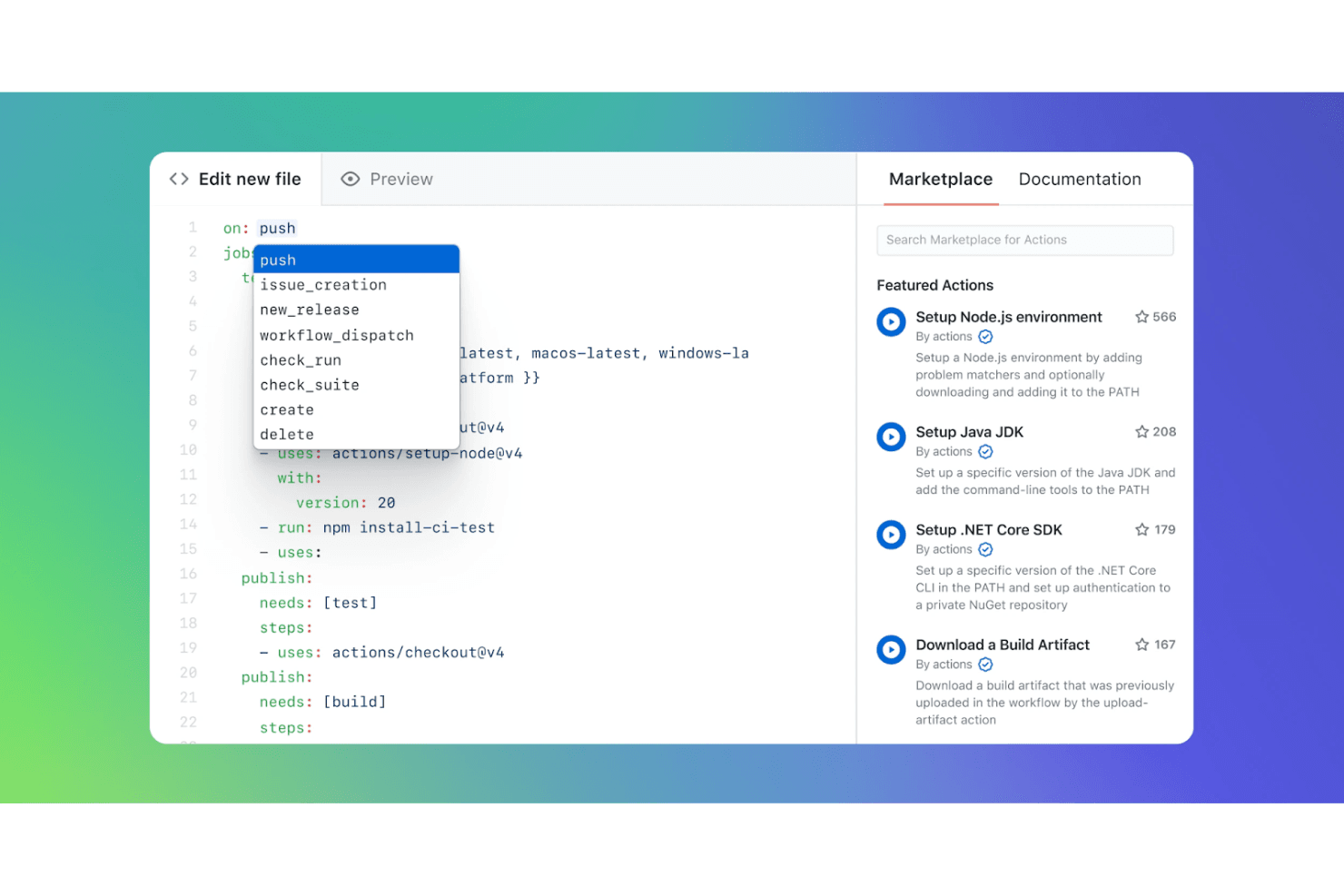
GitHub Actions lets users pick workflow triggers via autocomplete editor. GitHub Actions is a CI/CD and workflow automation service built into GitHub that lets teams build, test, and deploy code without maintaining a separate automation server—making it a natural fit for teams already working in GitHub who want to cut Jenkins overhead.
Who Is GitHub Actions Best For?
GitHub Actions is the natural choice for teams whose code already lives in GitHub and want CI/CD that runs where their pull requests do.
Why I Picked GitHub Actions
GitHub Actions earns its spot on my shortlist because your CI/CD workflows live right where your code and pull requests do. I particularly like the GitHub Actions Importer, which audits your existing Jenkins pipelines, generates a migration forecast from historical run data, and converts pipelines to YAML workflows automatically. Add autoscaling GitHub-hosted runners across Linux, macOS, and Windows, and you can drop the Jenkins server entirely without rebuilding your pipeline logic from scratch.
GitHub Actions Key Features
- Matrix builds: Run jobs simultaneously across multiple operating systems and runtime versions in a single workflow run.
- Environment protection rules: Gate deployments with required reviewer approvals, wait timers, and branch restrictions before a job proceeds.
- Reusable workflows: Define parameterized workflows once and call them across multiple repositories using a repository reference.
- Encrypted secrets store: Store and manage encrypted secrets at the repository, environment, or organization level for use in workflows.
GitHub Actions Integrations
GitHub Actions integrates natively with GitHub repositories and GitHub Packages, and supports cloud-provider OIDC trust. Marketplace integrations include Docker Buildx, TruffleHog OSS, Prowler Security Scan, Super-Linter, and SSH Remote Commands, plus a REST API for custom integrations.
Pros and Cons
Pros:
- Approval gates help control releases
- Hosted runners remove server upkeep
- Jenkins importer accelerates pipeline conversion
Cons:
- Self-hosted runners still require maintenance
- Complex YAML workflows can be hard to debug
Learn more about GitHub Actions: Best for speed and reliability
- Free plan available
- From $0.003/minute
Visit WebsiteCustomer Rating:4.7/5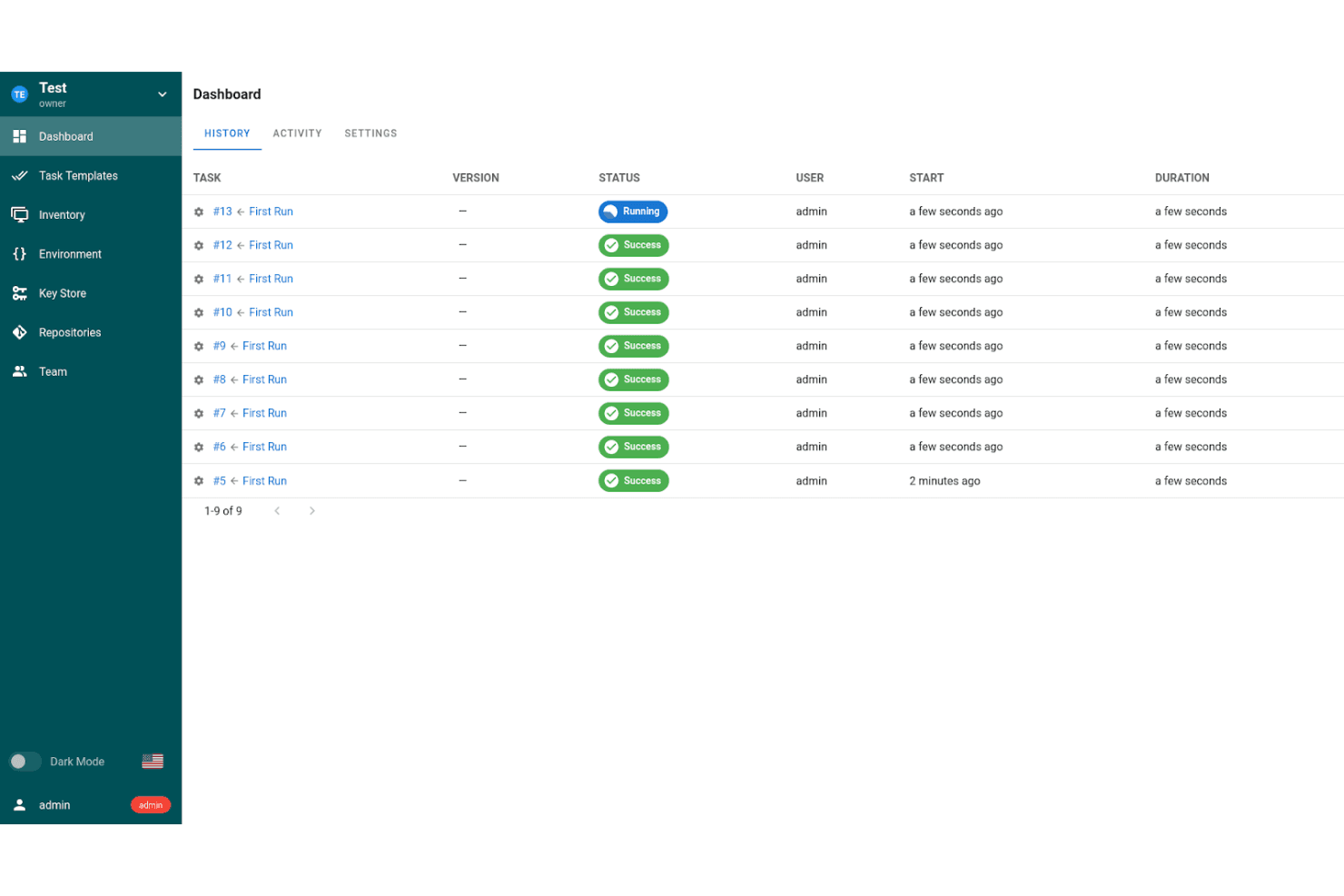
Semaphore tracks task run history with real-time status updates. Semaphore is a managed CI/CD platform that appeals to DevOps and platform engineering teams looking to replace Jenkins with a faster, infrastructure-light alternative that handles parallel builds, chained deployment pipelines, and flexible cloud or self-hosted execution.
Who Is Semaphore Best For?
Semaphore is a strong fit for DevOps and platform engineering teams that want managed, fast CI/CD without the burden of maintaining build infrastructure.
Why I Picked Semaphore
I picked Semaphore as one of the best because speed and reliability aren't just marketing claims here—reviewers report builds finishing 2–3 times faster than Jenkins, and that tracks with how parallel execution works: jobs in the same pipeline block run concurrently by default, no configuration needed. I also appreciate the managed cloud runtime, which handles infrastructure scaling and software updates so my team isn't babysitting build agents. The SSH debugging feature is a practical standout too, letting me attach directly to a running job to inspect logs and environment variables in real time.
Semaphore Key Features
- Deployment targets: Define environment-specific credentials, branch and tag conditions, and promotion permissions for each deployment environment.
- Monorepo support: Use the
change_infunction to trigger builds only for services affected by specific file or folder changes. - Pipeline configuration as code: Write and version declarative YAML pipeline definitions stored directly in your connected Git repository.
- Test and flaky-test dashboards: View test results across builds and identify inconsistent tests that affect pipeline reliability.
Semaphore Integrations
Semaphore offers native integrations with GitHub, Bitbucket, GitLab, and Slack, plus Argo CD webhook connectivity. Its OAS 3.0 API supports custom integrations and workflow automation.
Pros and Cons
Pros:
- SSH debugging exposes live job failures
- Managed agents reduce Jenkins upkeep
- Parallel builds can finish markedly faster
Cons:
- Fixed job and block caps constrain workflows
- Advanced pipelines can need extra troubleshooting
Learn more about Semaphore: Best for complex workflows
- Free plan + 14-day trial + demo available
- From $540/year (billed annually)
Visit WebsiteCustomer Rating:4.3/5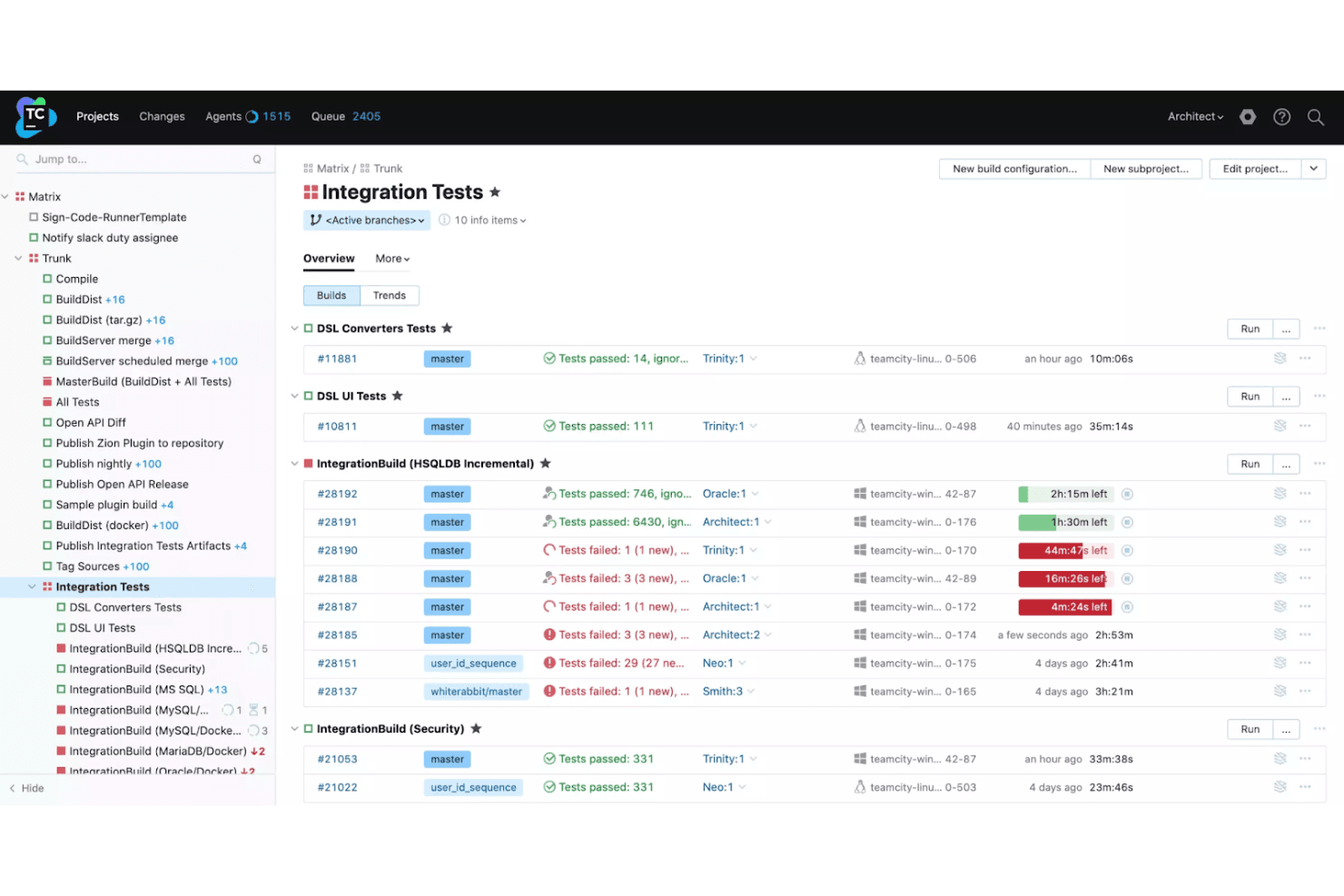
TeamCity displays build statuses and test results across multiple configurations. TeamCity is a CI/CD platform from JetBrains that handles build, test, and deployment automation for DevOps teams and release engineers who need reliable pipeline management across multiple projects without the maintenance burden of self-hosted infrastructure.
Who Is TeamCity Best For?
TeamCity is a strong fit for DevOps engineers and release managers who run multi-stage pipelines across several projects and need reliable build-chain management without piecing together plugins to cover the basics.
Why I Picked TeamCity
I've included TeamCity in my top picks because it handles complex, multi-stage pipeline dependencies better than most CI/CD tools I've worked with. Build chains let you wire snapshot and artifact dependencies across projects, so a downstream deployment only runs when every upstream build passes. I also rely on the Kotlin DSL to version-control the entire pipeline configuration, with IDE support for autocomplete and refactoring that makes managing large-scale setups far less error-prone.
TeamCity Key Features
- Build chain visualization: Displays pipeline-stage dependencies graphically so you can see how snapshot and artifact dependencies connect upstream and downstream jobs.
- Pre-tested commit validation: Runs a personal build against your changes before they're committed to the shared repository, catching failures before they hit the main branch.
- Agent-terminal debugging: Opens a live terminal session directly on the build agent so you can inspect the execution environment while a build is running.
- AI-assisted failure analysis: Analyzes build logs automatically and suggests causes and next steps when a build fails.
TeamCity Integrations
TeamCity offers native integrations with GitHub, GitLab, Bitbucket, Azure DevOps, AWS, Google Cloud Platform, Azure, Kubernetes, and Docker. It also provides a REST API for custom integrations.
Pros and Cons
Pros:
- Detailed build history aids failure investigation
- Built-in capabilities reduce Jenkins plugin assembly
- Visual build chains clarify cross-project dependencies
Cons:
- Smaller plugin ecosystem than Jenkins
- Complex pipeline-as-code can duplicate configurations
Learn more about TeamCity: Best for Atlassian integration
- Free plan + 14-day Standard and 30-day Premium free trials available
- From $3.65/user/month
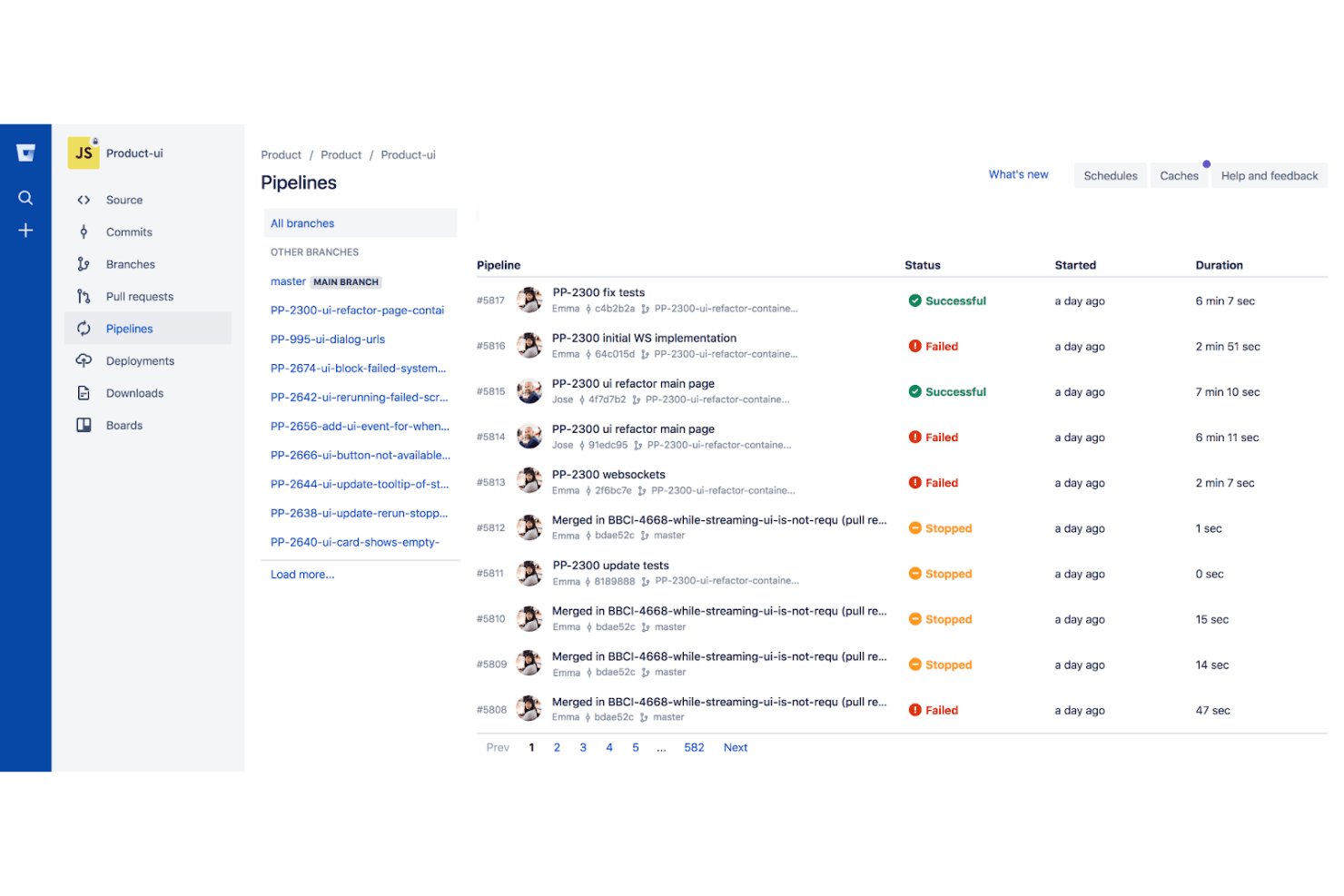
Bitbucket Pipelines lets users monitor CI/CD pipeline runs and statuses. Bitbucket Pipelines is a CI/CD service built directly into Bitbucket Cloud that lets teams automate builds, tests, and deployments without managing any pipeline infrastructure.
Who Is Bitbucket Pipelines Best For?
Bitbucket Pipelines is a natural fit for teams already running on the Atlassian stack—especially those using Jira and Bitbucket—who want CI/CD without spinning up separate infrastructure.
Why I Picked Bitbucket Pipelines
I picked Bitbucket Pipelines because it's the obvious choice if your team is already deep in the Atlassian ecosystem. With Pipelines built directly into Bitbucket Cloud, your CI/CD config lives in
bitbucket-pipelines.ymlright alongside your code, and Jira issues link automatically to commits and pipeline runs without any setup. I also appreciate the dedicated Jenkinsfile converter tool, which handles declarative pipeline migration and lets you move repositories incrementally while Jenkins stays running.Bitbucket Pipelines Key Features
- Dynamic Pipelines: Inject or generate standardized pipeline workflows at runtime across your entire workspace using centrally defined policies as code.
- OIDC resource server integration: Connect pipeline steps to AWS, GCP, or Vault without storing credentials in Bitbucket by using built-in OIDC support.
- Hybrid runner support: Run pipeline steps on Atlassian-hosted runners, your own self-hosted runners, or both within the same workflow.
- Pipeline artifacts: Share build outputs between sequential steps or retain them after execution, with support for passing files across stages in a single pipeline run.
Bitbucket Pipelines Integrations
Bitbucket documents over 100 out-of-the-box integrations, including native Jira connectivity and marketplace integrations for CircleCI, Snyk, SonarQube Cloud, Slack, and Azure. A REST API supports custom integrations.
Pros and Cons
Pros:
- YAML keeps build configuration version controlled
- Jenkinsfile converter supports gradual migration
- Hosted runners remove Jenkins server upkeep
Cons:
- Troubleshooting failures can require another run
- Build-minute and concurrency limits constrain workloads
Learn more about Bitbucket Pipelines:
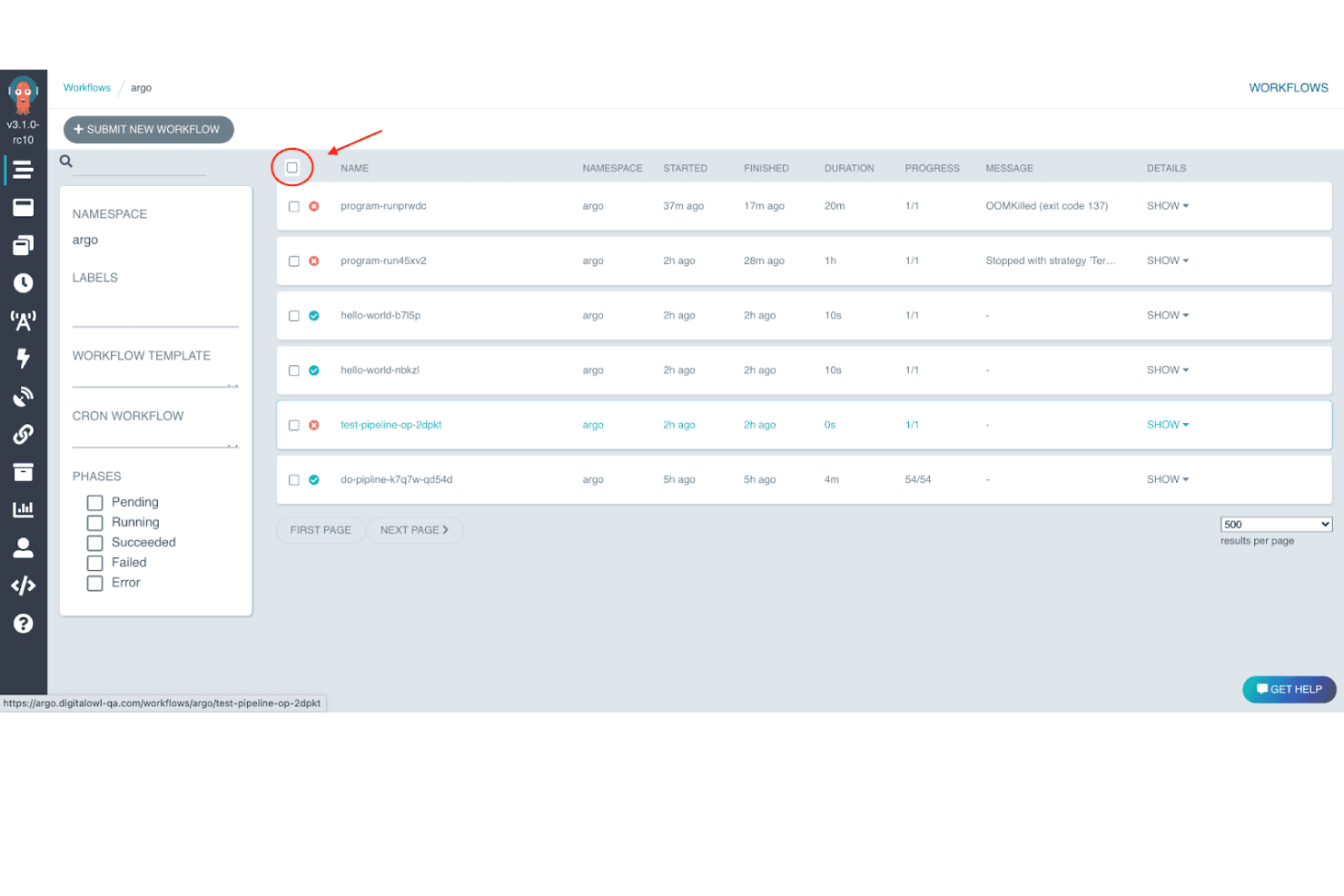
Argo Workflows lets users monitor and manage workflow runs in one view. Argo Workflows is an open-source, container-native workflow engine that appeals to teams already running on Kubernetes who want to orchestrate CI/CD pipelines and parallel jobs without leaving their existing infrastructure.
Who Is Argo Workflows Best For?
Argo Workflows is a strong fit for platform and DevOps engineers whose infrastructure already runs entirely on Kubernetes and who need to orchestrate containerized CI/CD or machine-learning pipelines without introducing a separate execution environment.
Why I Picked Argo Workflows
Argo Workflows earns its spot on my shortlist because it's built entirely around Kubernetes, treating every workflow step as a container rather than bolting on Kubernetes support as an afterthought. I particularly like how it lets you model pipelines as DAGs, so when I'm orchestrating parallel ML or CI jobs, dependencies are explicit and steps run concurrently without manual coordination. WorkflowTemplates are also reusable across the cluster, which means my team can version and reference shared pipeline components the same way we manage any other Kubernetes resource.
Argo Workflows Key Features
- Kubernetes CRD-based workflow definitions: Workflows are defined as native Kubernetes custom resources, so you can version, apply, and manage them alongside the rest of your cluster configuration.
- Event-driven pipeline triggering: Argo Server's event endpoint accepts JSON payloads, letting you submit workflow templates in response to external signals via webhooks.
- Artifact repository integration: Workflows can pass outputs between steps using configured artifact repositories, with support for S3-compatible storage, GCS, and Azure Blob Storage.
- REST API access: A REST API lets you programmatically submit, monitor, and manage workflows from external tools or CI/CD scripts.
Argo Workflows Integrations
Native integrations are not clearly documented. Argo Workflows supports custom connectivity through its REST API and event endpoints, plus artifact repositories including Amazon S3, Google Cloud Storage, MinIO, and Azure Blob Storage.
Pros and Cons
Pros:
- Supports highly parallel machine-learning pipelines
- Reuses workflow components through Kubernetes templates
- Runs parallel containerized CI/CD workloads on Kubernetes
Cons:
- No documented native branch or pull-request triggers
- Requires teams to operate Kubernetes themselves
Learn more about Argo Workflows:
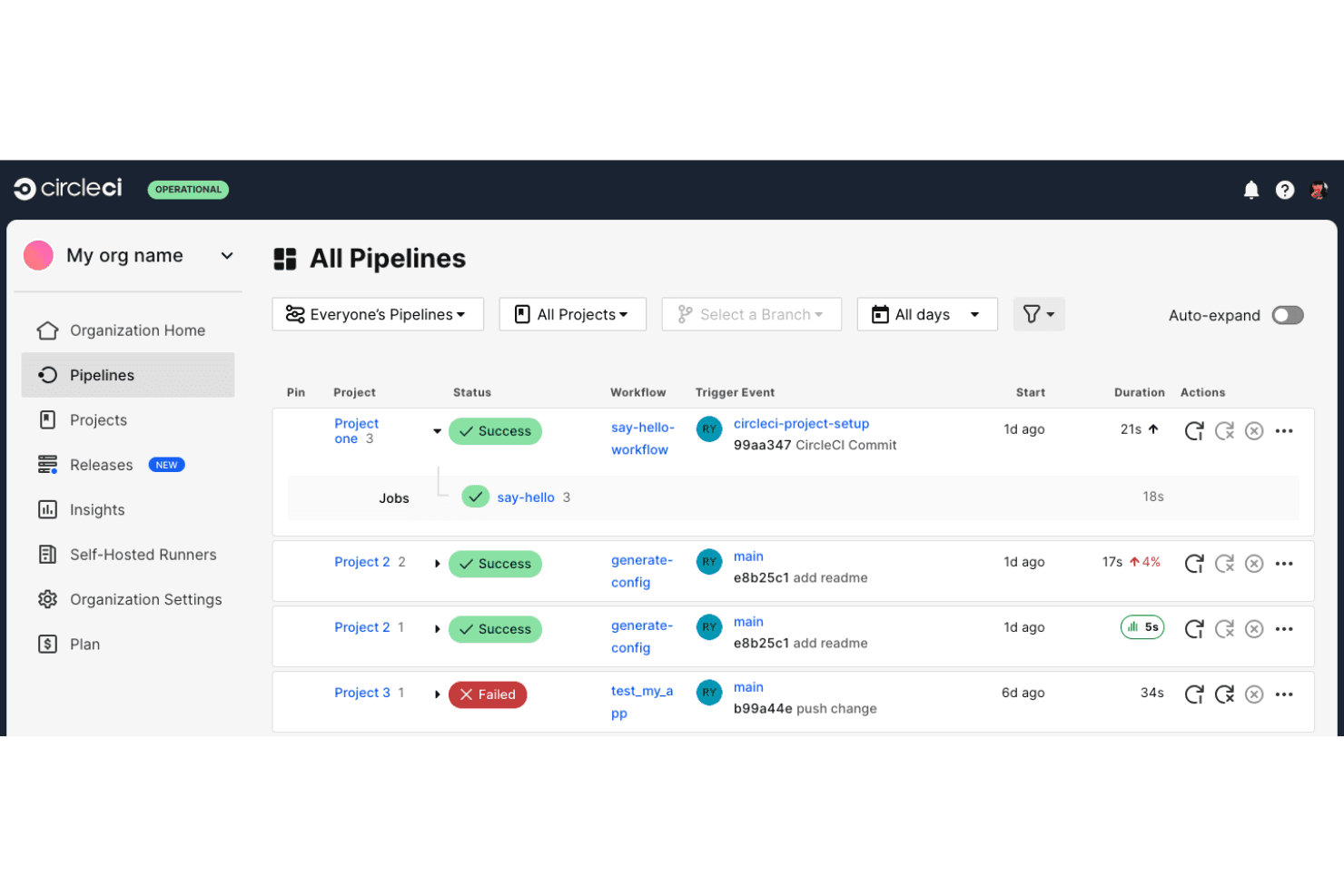
CircleCI lets users monitor all pipeline statuses across projects in one view. CircleCI is a managed CI/CD platform that removes the infrastructure burden of self-hosted automation, giving DevOps and platform engineering teams a fully cloud-hosted environment for running build, test, and deployment pipelines at scale.
Who Is CircleCI Best For?
CircleCI is a strong fit for DevOps and platform engineering teams that want to run automated testing at scale without managing CI server infrastructure.
Why I Picked CircleCI
CircleCI earns its spot on my shortlist because of how seriously it takes automated testing at scale. I particularly like Smarter Testing, which uses intelligent test selection to run only the tests affected by a given change, and dynamic test splitting to distribute that work across parallel containers. When I'm dealing with a large test suite that would otherwise block a release, flaky-test detection through Insights is what saves me from chasing down false failures across hundreds of pipeline runs.
CircleCI Key Features
- Orbs registry: Reusable configuration packages that let you pull pre-built, shareable pipeline components from a public marketplace or create private orbs for your organization.
- Jenkins Converter: A built-in migration tool that converts Jenkins operations and an expanding range of Jenkins plugins and syntax directly into CircleCI configuration.
- Config policies: Organization-wide policy enforcement that standardizes pipeline configuration across all projects from a single control point.
- OIDC authentication: Native OpenID Connect support that lets jobs authenticate to external services like AWS, GCP, and Vault without distributing long-lived secrets.
CircleCI Integrations
CircleCI offers native integrations with GitHub, GitLab, and Bitbucket, plus marketplace orbs for AWS, Azure, and Google Cloud services. Its REST API v2 and webhooks support custom integrations.
Pros and Cons
Pros:
- Gradual migration lets Jenkins pipelines keep running
- Flaky-test insights help isolate false failures
- Parallel test splitting shortens feedback cycles
Cons:
- Some users report slow startup and inconsistent concurrency
- Complex YAML workflows can become unwieldy
Learn more about CircleCI:
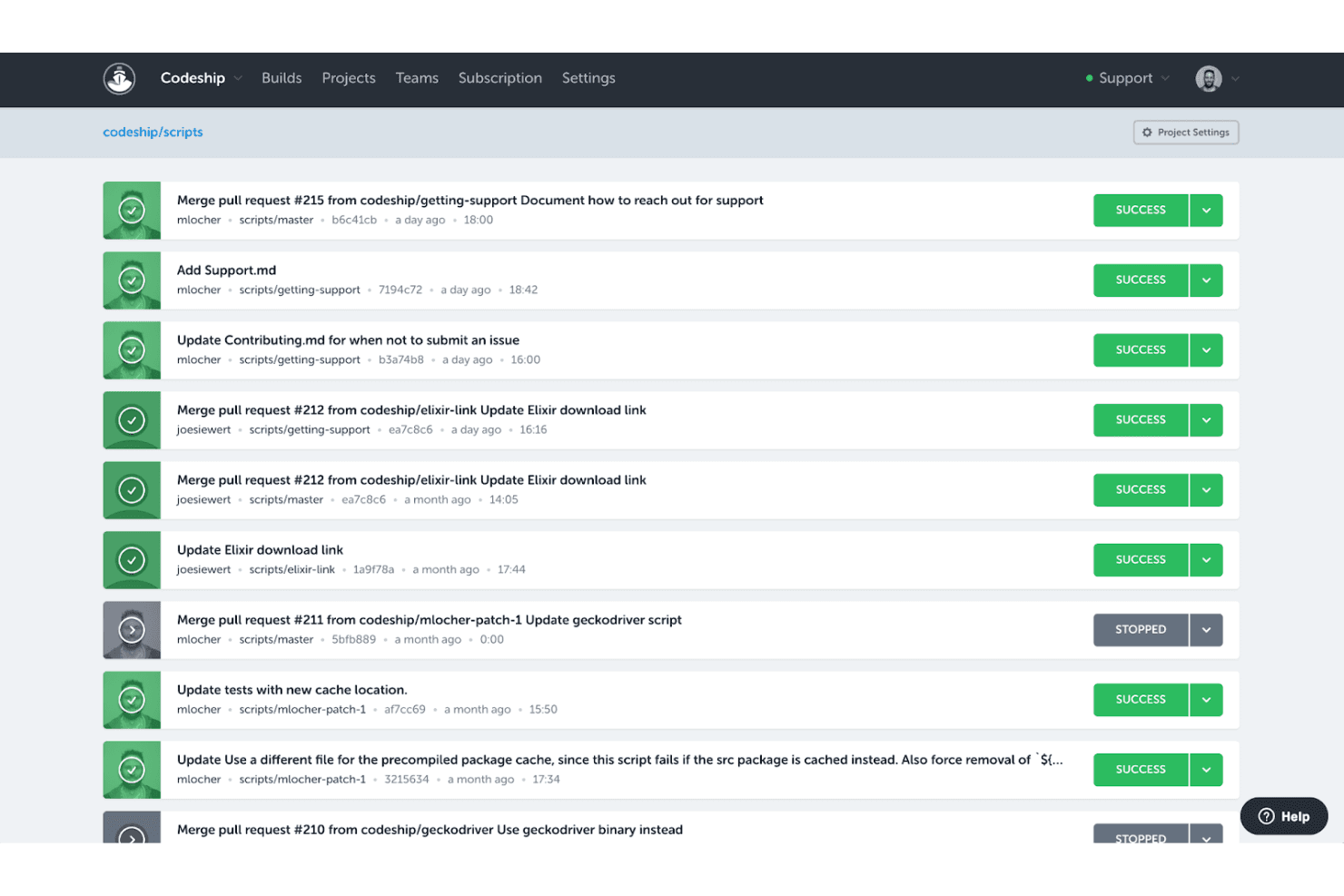
Codeship displays a build history list with pass/fail statuses. CloudBees CodeShip is a hosted CI/CD service that lets developer teams automate build, test, and deploy pipelines without managing server infrastructure, using Docker-based environments and repository-driven configuration.
Who Is CodeShip Best For?
CodeShip suits small developer teams that want a hosted CI/CD service they can configure directly from their repository, without maintaining build infrastructure.
Why I Picked CodeShip
I picked CodeShip because it hands pipeline control directly to developers, with build and deployment steps defined in
codeship-steps.ymlandcodeship-services.ymlfiles that live right in the application repository. That means your pipeline changes version-control alongside your code, and you can test those changes locally using the Jet CLI before pushing. I also like that CodeShip Pro runs every step in its own Docker container, so the environment you debug locally is nearly identical to what runs in the cloud.CodeShip Key Features
- Commit-triggered builds: CodeShip automatically starts a build when code is pushed to a connected GitHub or Bitbucket repository.
- Encrypted environment files: CodeShip Pro lets you store sensitive credentials in AES-encrypted environment files that are decrypted at build time.
- Marketplace availability: You can sign up for and connect CodeShip through the GitHub, Atlassian, AWS, and Heroku marketplaces.
- Staging-to-production promotion: CodeShip supports a workflow that deploys to staging automatically, then promotes the same build artifact to production using a marker branch.
CodeShip Integrations
CodeShip has documented marketplace integrations with GitHub, Atlassian, AWS, and Heroku, plus integrations with Bitbucket and Cloudflare Workers. Its workflows also connect with Amazon S3 through the AWS CLI and Cloudflare’s REST API.
Pros and Cons
Pros:
- Local Jet runs help reproduce build failures
- Repository-based YAML keeps pipelines versioned
- Hosted CI avoids Jenkins server upkeep
Cons:
- End-of-life reports create migration risk
- Smaller extension ecosystem than Jenkins
Learn more about CodeShip: Best for containerized builds
- Free plan + free trial of up to 5,000 builds available
- From $300/month (billed annually)
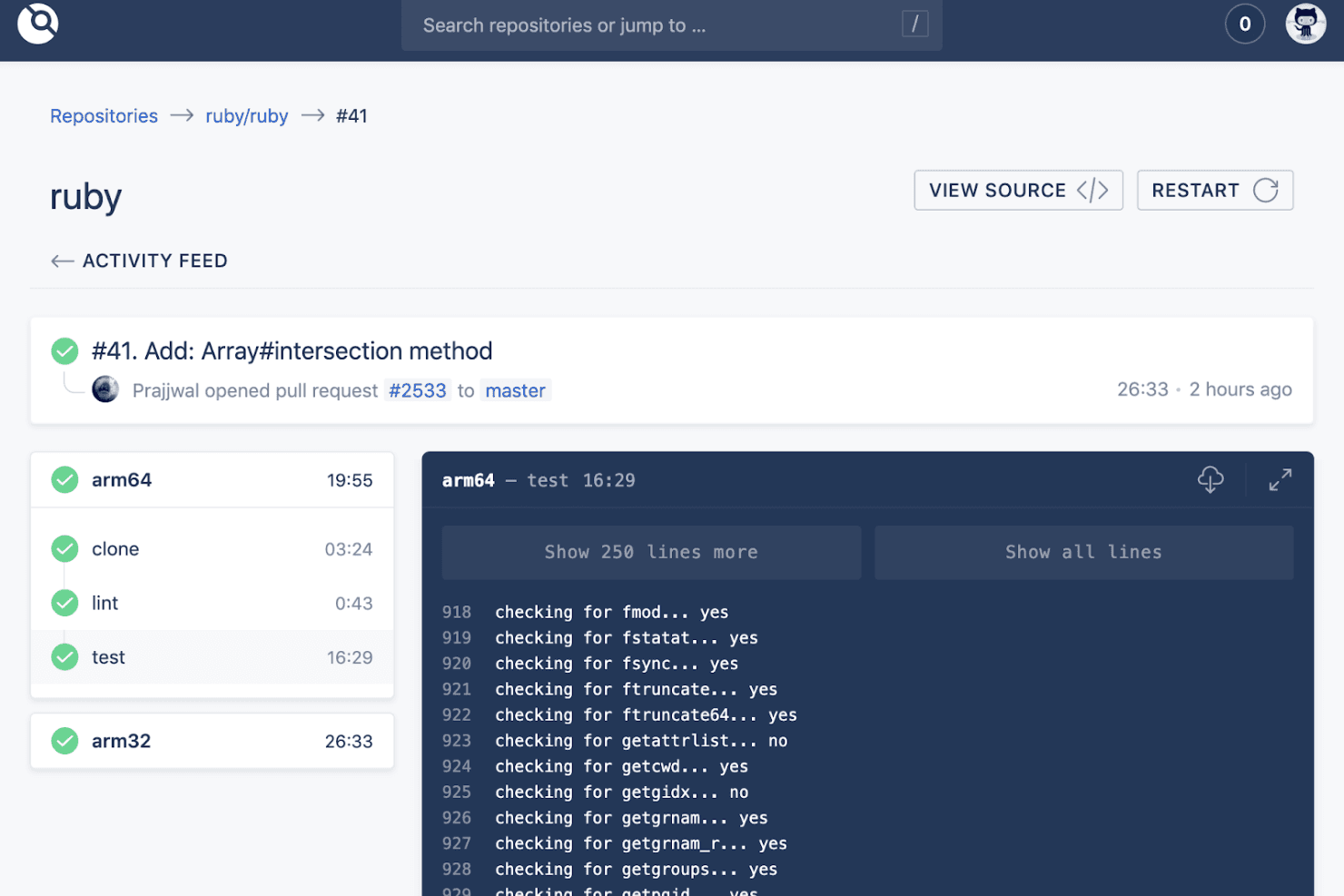
Drone CI displays real-time build logs and step-by-step pipeline results. Drone CI is a container-native CI/CD platform that automates builds, tests, and deployments through isolated Docker containers, making it a natural fit for DevOps teams looking to modernize away from plugin-heavy Jenkins setups.
Who Is Drone CI Best For?
Drone CI is a strong fit for DevOps teams that already work heavily with Docker and want pipeline configuration that lives in the same repo as their code.
Why I Picked Drone CI
I picked Drone CI because it's purpose-built for container-native pipelines, which makes it a natural step up from Jenkins if your team is already running Docker. Every pipeline step executes inside its own isolated container pulled at runtime, so there's no dependency bleed between builds. I also like that your entire pipeline lives in a
.drone.ymlfile committed directly to your repo, keeping build config versioned alongside your code rather than buried in a GUI.Drone CI Key Features
- Multi-SCM webhook triggers: Drone connects natively to GitHub, GitLab, Bitbucket, Gitea, and Gogs, automatically triggering pipelines via webhooks on pushes, pull requests, and tags.
- DAG pipeline execution: Directed-acyclic-graph scheduling lets you define fan-out to parallel pipelines and fan-in to a downstream pipeline within a single
.drone.ymlfile. - Community plugin marketplace: Hundreds of container-based plugins cover deployment targets, cloud registries, notifications, and security scanning, and you can build your own if needed.
- Encrypted secret management: Drone supports per-repository and per-organization secrets, with integrations for AWS Secret Manager, Kubernetes Secrets, and HashiCorp Vault.
Drone CI Integrations
Drone CI offers native integrations with GitHub, GitHub Enterprise, GitLab, Bitbucket, Gitea, and Gogs. Its marketplace lists hundreds of container-based integrations, including Jenkins, Kubernetes, AWS ECR, Google Cloud Run, Slack, and Terraform, and it provides an API for custom integrations.
Pros and Cons
Pros:
- Reviewers praise lightweight setup and automation
- Repository-based YAML keeps pipelines versioned
- Container-isolated steps reduce dependency conflicts
Cons:
- Updates can break and need manual troubleshooting
- Limited multi-user permissions complicate administration
Learn more about Drone CI:
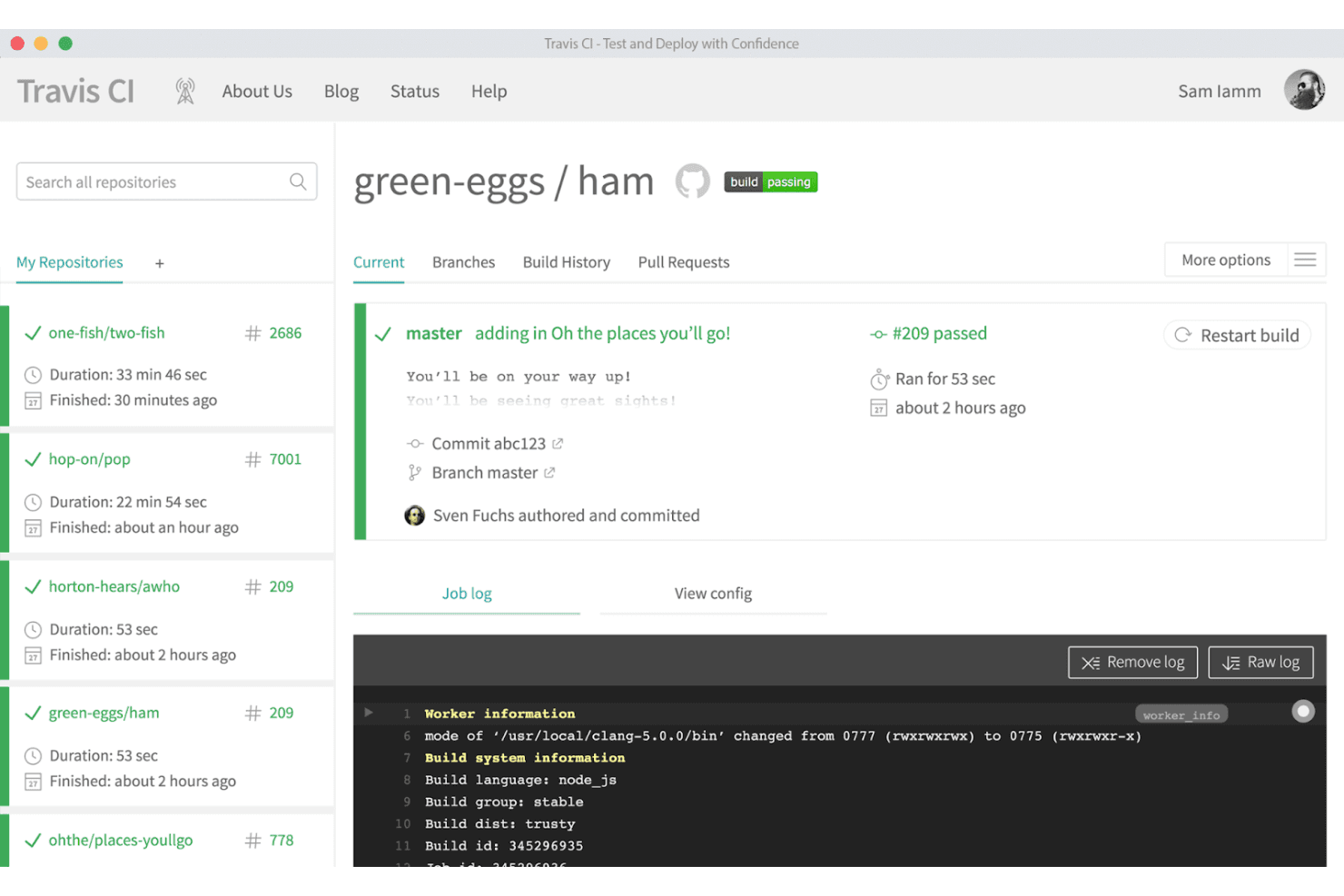
Travis CI lets users monitor build statuses and view job logs in real time. Travis CI is a hosted CI/CD platform that lets teams automate build, test, and deployment pipelines without managing their own server infrastructure, making it a practical option for developers who want straightforward pipeline automation with native GitHub, GitLab, and Bitbucket integration.
Who Is Travis CI Best For?
Travis CI is a strong fit for small to mid-sized development teams that want hosted CI/CD up and running quickly, without the overhead of managing build server infrastructure.
Why I Picked Travis CI
I picked Travis CI as one of the best because getting a pipeline running takes almost no time: you drop a
.travis.ymlfile into your repo root and Travis CI picks it up automatically. I especially like how the build matrix works in practice, letting me test across dozens of language versions and OS combinations in a single config block without touching a server. For teams moving away from Jenkins, that's a meaningful shift since there's no infrastructure to provision or maintain.Travis CI Key Features
- Multi-OS and architecture support: Run builds across Linux, macOS, and Windows, including architectures like arm64, ppc64le, and s390x, within a single pipeline configuration.
- Deployment provider integrations: Configure deployments to 40+ providers—including AWS, Azure, Google Cloud, Heroku, and npm—directly in your
.travis.ymlfile. - HashiCorp Vault secrets integration: Pull credentials stored in a Vault instance into your build environment without hardcoding sensitive values in your config.
- API-based build management: Use the Travis CI API v3 to trigger builds, cancel jobs, edit environment variables, and validate pipeline configs programmatically.
Travis CI Integrations
Travis CI offers 40+ native deployment-provider integrations and 20+ quality and testing integrations, including GitHub, GitLab, Bitbucket, AWS, Azure, Google Cloud, Heroku, npm, and HashiCorp Vault. Its API v3 supports custom build management and automation.
Pros and Cons
Pros:
- Hosted workers remove server upkeep
- Build matrices cover many test environments
- Simple YAML setup gets builds running quickly
Cons:
- Fewer extension options than Jenkins
- Shared runners can stall or start slowly
Learn more about Travis CI: Best for infrastructure governance
- Free plan + 14-day trial + demo available
- From $399/month (billed annually)
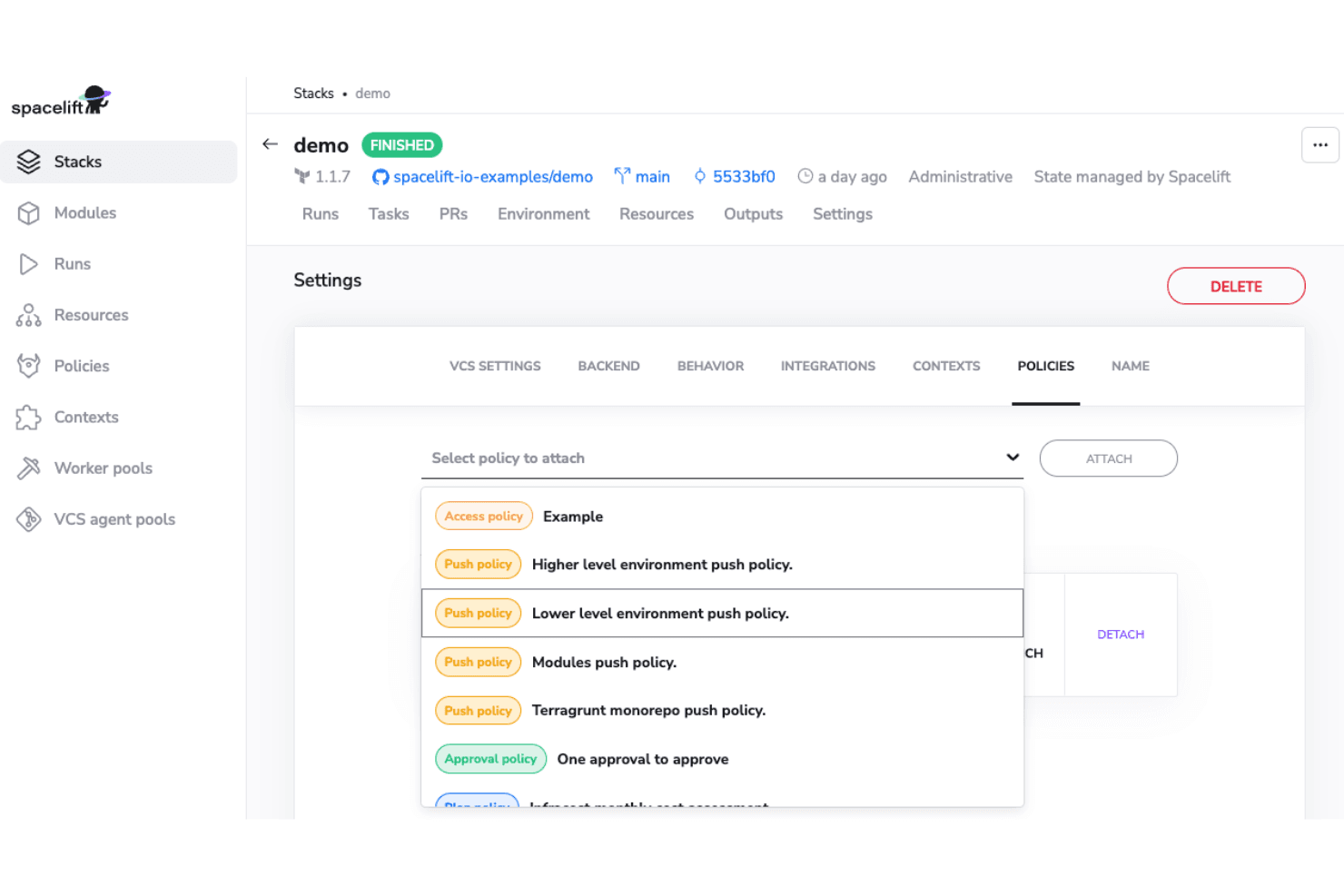
Spacelift lets users attach policies directly to stacks via Settings. Spacelift is an infrastructure orchestration platform built for DevOps and platform engineers who need governed, policy-driven IaC workflows across Terraform, OpenTofu, Pulumi, Kubernetes, and more—without the maintenance burden of scripting infrastructure changes in Jenkins.
Who Is Spacelift Best For?
Spacelift is a strong fit for DevOps and platform engineers at mid-to-large organizations who need policy-driven guardrails and governance across multi-team IaC workflows.
Why I Picked Spacelift
Spacelift earns its spot on my shortlist because of how seriously it takes infrastructure governance. I love that you can write policy as code using OPA/Rego to enforce real guardrails, like restricting which Azure VM sizes Dev versus Prod teams can deploy, with approval gates built directly into the pipeline. Drift detection across hundreds of servers is another feature I find genuinely hard to replicate elsewhere, catching configuration gaps before they become incidents.
Spacelift Key Features
- Multi-IaC stack orchestration: Spacelift manages infrastructure workflows across Terraform, OpenTofu, Pulumi, Kubernetes, Ansible, Terragrunt, and CloudFormation from a single platform.
- Worker pool flexibility: You can run jobs on Spacelift's hosted public workers or deploy private worker pools in your own infrastructure on AWS, Azure, GCP, or Kubernetes.
- VCS-triggered pull request plans: Spacelift automatically posts infrastructure plans to pull requests and publishes commit checks and deployment statuses back to your source control provider.
- Self-service blueprints and templates: Teams can define reusable YAML templates with multi-stack configurations, dependencies, and versioned inputs to let developers provision infrastructure without raising tickets.
Spacelift Integrations
Spacelift offers native integrations with GitHub, GitLab, Bitbucket, Azure DevOps, AWS, Azure, and Google Cloud. Its GraphQL API and webhooks support custom integrations and CI/CD workflows.
Pros and Cons
Pros:
- Pull-request plans support safer infrastructure reviews
- Drift detection catches configuration gaps
- Policy gates govern infrastructure deployments
Cons:
- Private workers require customer-managed upkeep
- Not designed for application build pipelines
Learn more about Spacelift:
Outras alternativas ao Jenkins
Eis algumas alternativas adicionais ao Jenkins que não entraram na minha lista resumida, mas que ainda vale a pena conhecer:
- 11TektonBest for cloud-native CI/CD
- 12Concourse CIBest for community collaboration
- 13CloudBeesBest for enterprise scalability
- 14GitLab CIBest for integrated DevOps lifecycle
- 15BuildkiteBest for hybrid cloud builds
- 16Azure PipelinesBest for Windows and Linux builds
- 17SpinnakerBest for multi-cloud deployments
- 18Atlassian BambooBest for seamless integration with Jira
- 19AWS CodePipelineBest for AWS ecosystem integration
- 20Jenkins XBest for Kubernetes-native CI/CD
How I Evaluate Jenkins Alternatives
I split evaluation into two layers: baseline requirements every CI tool must meet—pipeline-as-code, SCM triggers, secrets handling—and differentiators like runner flexibility and migration tooling.
Core Functionality (Table Stakes For This List)
When I'm selecting tools for my list, I rank each one on a scale from 0 (does not offer the functionality) to 5 (excels in this area) for each core functionality listed below. Then, I calculate the tool's total score into a percentage. Each tool needs to achieve a minimum total score of 75% to be considered for inclusion.
- CI/CD Pipeline Automation: I evaluate whether a tool can orchestrate full build-test-deploy workflows with conditional logic, approval gates, and multi-stage pipelines.
- Pipeline-as-Code Configuration: Each tool should let teams define pipelines in version-controlled YAML or DSL files, ideally with reusable templates and shared libraries.
- SCM & Git Integration: I check for native connections to GitHub, GitLab, Bitbucket, and Azure Repos, including PR status checks and webhook-based triggers on commits or tags.
- Plugin & Integration Ecosystem: The breadth of available integrations matters—tools like CircleCI use orbs while GitHub Actions uses a marketplace, but both should cover common DevOps needs.
- Distributed & Container Builds: I look at how each tool scales workloads, whether through Kubernetes runners, ephemeral containers, or autoscaling cloud-hosted agents.
- Secrets & Credentials Management: Secure handling of API keys and tokens is essential, so I evaluate encrypted storage, scoped access controls, and vault integration support.
Once I have a list of tools that meet this criteria, I consider what sets each platform apart.
Differentiating Factors (What Sets Vendors Apart)
Here's how I compare and contrast different vendors:
Standout Features
Policy and compliance guardrails set tools apart. Platforms that bake SBOM generation and SLSA attestation into pipeline runs save teams from bolting on separate supply chain security tooling. I also evaluate built-in observability, like DORA metrics dashboards and flaky test detection. These features help platform teams pinpoint slow stages without exporting data to external systems. Self-hosted runner flexibility matters for teams in regulated environments who need air-gapped or hybrid execution alongside cloud-managed runners.
Beyond Features
Migration path from Jenkins is a major factor I evaluate. Tools that offer Jenkinsfile converters or guided migration wizards cut weeks off the transition compared to rewriting every pipeline from scratch. Pricing predictability also matters—I look at whether costs scale by build minutes, concurrency, or seats, and whether free tiers exist for smaller teams or open-source projects. Security and compliance certifications like SOC 2 and ISO 27001 round out my evaluation, especially for teams that need SSO/SAML and audit logging to satisfy enterprise governance requirements.
Principais funcionalidades do Jenkins
Eis algumas das principais funcionalidades do Jenkins para o ajudar a comparar soluções alternativas:
- Integração e entrega contínuas: Tal como outro software de automatização de compilações, o Jenkins automatiza o processo de integração de alterações de código e de entrega de aplicações, ajudando a sua equipa a implementar atualizações de forma eficiente. Integra-se perfeitamente com os fluxos de trabalho do Azure DevOps e do GitOps.
- Instalação fácil: O Jenkins é um programa autónomo baseado em Java que pode ser instalado em qualquer sistema operativo, incluindo ambientes macOS e locais, simplificando o processo de configuração para a sua equipa.
- Configuração intuitiva: A interface Web facilita a configuração do Jenkins, com verificações de erros integradas e ajuda para orientar a configuração. O suporte de CLI permite criar scripts e automatizar processos de forma eficiente.
- Amplo suporte de plug-ins: Aceda a centenas de plug-ins para integrar o Jenkins com várias ferramentas da sua cadeia de ferramentas de CI/CD, incluindo o Git, a JetBrains e sistemas de controlo de versões.
- Extensibilidade: Personalize o Jenkins através da sua arquitetura de plug-ins para adicionar novas funcionalidades e adaptá-lo às suas necessidades específicas. Amplie a funcionalidade com APIs e ferramentas de gestão de dependências.
- Carga de trabalho distribuída: Distribua tarefas por várias máquinas para acelerar compilações, testes e implementações, aumentando a eficiência e reduzindo os tempos de compilação.
- Pipeline como código: Utilize os Pipelines do Jenkins para definir em código os seus pipelines de compilação, teste e implementação, permitindo o controlo de versões, a automatização e a colaboração.
- Suporte da comunidade: Beneficie de uma comunidade grande e ativa que apoia e melhora continuamente o Jenkins, garantindo-lhe acesso às atualizações mais recentes.
- Funcionalidades de segurança: Com integrações de gestão de repositórios e autenticação, implemente definições de segurança e controlos de acesso para proteger os seus processos e dados de CI/CD.
- Escalabilidade: Dimensione o Jenkins para responder às exigências dos seus projetos em crescimento, garantindo que consegue processar cargas de trabalho maiores em fornecedores de serviços cloud como a Amazon AWS e o Azure DevOps.
- Integração com o Git: Ligue facilmente o Jenkins aos repositórios Git, permitindo fluxos de trabalho GitOps e implementações automatizadas.
- Suporte para Python: Utilize o Jenkins para automatizar compilações e testes de aplicações Python, integrando-o com ambientes virtuais e ferramentas de gestão de dependências.
- Flexibilidade na cloud e local: Implemente o Jenkins numa infraestrutura local ou tire partido de plataformas cloud para obter pipelines de CI/CD escaláveis e flexíveis.
- Suporte ao desenvolvimento de aplicações: Automatize os fluxos de trabalho de compilação, teste e implementação de aplicações para garantir uma entrega de software eficiente e fiável.
- Notificações automatizadas: Mantenha a sua equipa informada através de notificações por e-mail, Slack ou outras ferramentas de comunicação integradas no Jenkins.