

As ferramentas de descoberta de ativos informáticos identificam e catalogam automaticamente todos os dispositivos, sistemas e ativos de software no ambiente informático da sua organização. Se está a avaliar estas ferramentas, sabe como a visibilidade em tempo real é essencial para a conformidade, a segurança e a prevenção da proliferação de ativos — sobretudo à medida que os ambientes híbridos e a adoção de SaaS aumentam.
Neste guia, obterá uma visão clara das opções para mapear ativos, integrar a descoberta com os seus sistemas atuais e gerir tudo, desde servidores locais a dispositivos IoT e serviços na nuvem.
Why Trust Our Software Recommendations
6,700+
Reviews
20
Industry experts
16+
Evaluation factors
14
Years
Our team has been testing and reviewing software since 2012. As tech leaders ourselves, we know how difficult—and important—it is to choose the right software.
For this guide, we evaluated tools using hands-on testing and independent research, scoring tools using our selection criteria.
Our reviews reflect our human editorial judgment, not a sales pitch.
Expert reviewers:
- Paulo Gardini MiguelTech Director
 Tim FisherVP of AI
 Gabriel RosasTech Lead & Software Architect
 Christhian GruhnTech Lead & Platform Architect

Tabela de comparação: ferramentas de descoberta de ativos informáticos
Compare preços e especificações lado a lado das ferramentas de descoberta de ativos informáticos que incluí na minha lista restrita.
| Tool | Best For | Trial Info | Price | ||
|---|---|---|---|---|---|
| 1 | Best for quick ITSM workflow integration | Free trial + free demo available | From $19/agent/month (billed annually) | Website | |
| 2 | Best for SaaS platform asset inventory | Free demo available | From $39/user/month (billed annually) | Website | |
| 3 | Best for vulnerability exposure mapping | Free trial available | Pricing upon request | Website | |
| 4 | Best for browser-based inventory management | Free trial + free demo available | Pricing upon request | Website | |
| 5 | Best for integrations across IT and security tools | Free demo available | Pricing upon request | Website | |
| 6 | Best for automated infrastructure mapping | Free trial + free demo available | Pricing upon request | Website | |
| 7 | Best for agentless network-wide device scanning | Free demo + 14-day free trial available | From $239/month (billed annually) | Website | |
| 8 | Best for integrated software license tracking | Free demo available | Pricing upon request | Website | |
| 9 | Best for CMDB native discovery and reconciliation | Free demo available | Pricing upon request | Website | |
| 10 | Best for cloud workload identification | Free demo available | Pricing upon request | Website |


Avaliações das ferramentas de descoberta de ativos informáticos
Abaixo encontram-se os meus resumos detalhados das melhores ferramentas de descoberta de ativos informáticos que incluí na minha lista restrita. As minhas avaliações analisam detalhadamente as capacidades, integrações e melhores casos de utilização de cada ferramenta, para o ajudar a encontrar a mais adequada para si.
 Best for quick ITSM workflow integration
- Free trial + free demo available
- From $19/agent/month (billed annually)
Visit WebsiteCustomer Rating:4.6/5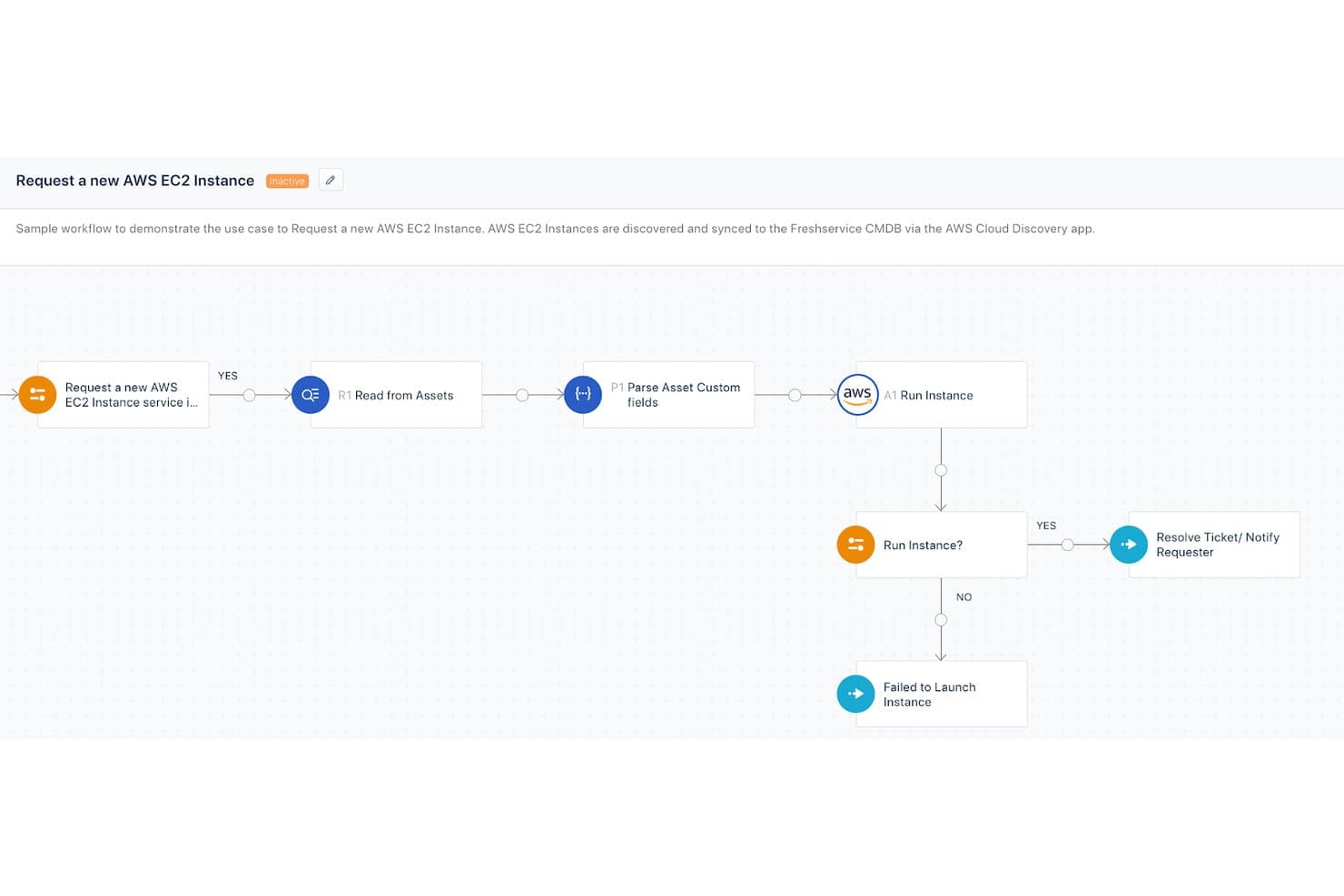
Freshservice by Freshworks automates AWS EC2 instance provisioning workflows. Freshservice is a cloud-based ITSM and IT asset management platform that combines automated asset discovery, agent and agentless scanning, a self-updating CMDB, and software license tracking across on-prem, cloud, and hybrid environments.
Who Is Freshservice by Freshworks Best For?
Freshservice is a strong fit for mid-market to enterprise IT operations teams that manage complex, multi-environment infrastructure and need asset discovery tightly connected to incident, change, and service management workflows.
Why I Picked Freshservice by Freshworks
I've included Freshservice in my top picks because its asset discovery feeds directly into the same platform where my team manages incidents, changes, and service requests. When a probe scans a new device and updates the CMDB, that asset record is immediately linkable to open tickets and change workflows, with no manual data transfer. I also like the dependency mapping feature, which shows how discovered assets connect to services, so my team can assess impact before making changes.
Freshservice by Freshworks Key Features
- Agentless network discovery: Scan networks for connected devices and endpoints using SNMP, WMI, and SSH without installing agents.
- Cloud infrastructure integrations: Connect directly with AWS, Azure, VMware, and GCP for cloud asset and virtual machine discovery.
- Software license management: Track installed software and manage entitlement and compliance data in one place.
- Real-time asset change tracking: Continuously updates asset records and logs any configuration or relationship changes as they happen.
Freshservice by Freshworks Integrations
Freshservice offers native integrations with ServiceNow, Jira, Azure Active Directory, AWS, Microsoft 365, Google Workspace, Jamf, Intune, and Slack. An API is available for custom integrations.
Pros and Cons
Pros:
- Asset records link directly to service tickets
- Agent and agentless discovery supported natively
- CMDB updates automatically after each discovery scan
Cons:
- Advanced reporting requires higher-tier plan upgrades
- Cloud-native SaaS discovery depth is limited
Learn more about Freshservice by Freshworks: Best for SaaS platform asset inventory
- Free demo available
- From $39/user/month (billed annually)
Visit WebsiteCustomer Rating:4.4/5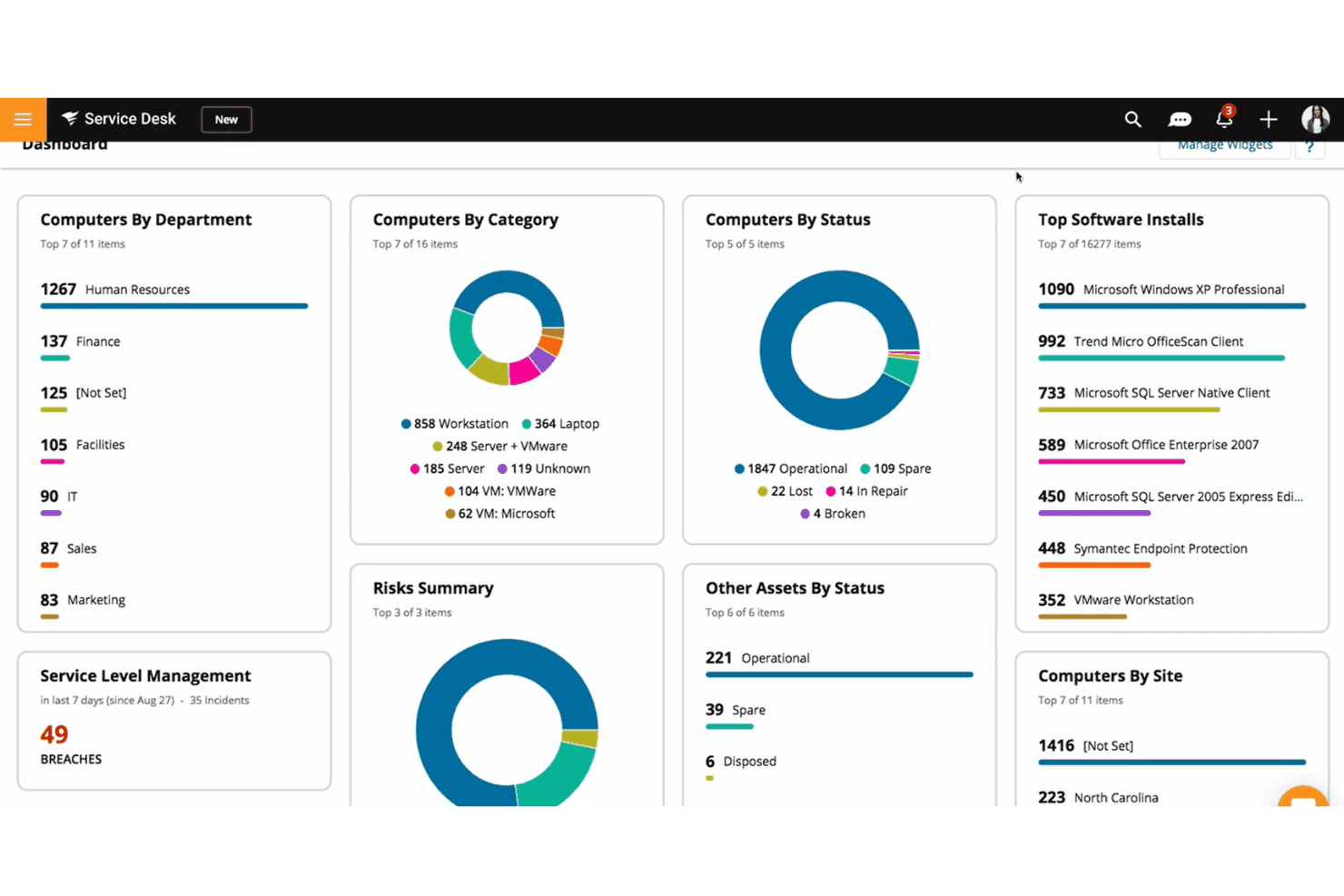
SolarWinds Service Desk provides a visual asset and IT management dashboard. SolarWinds Service Desk is a cloud-based ITSM platform with built-in IT asset discovery that combines agent-based and agentless network scanning, hardware and software inventory, CMDB population, and license compliance tracking.
Who Is SolarWinds Service Desk Best For?
It's a strong fit for mid-market and enterprise IT teams that want asset discovery, CMDB, and ITSM managed in a single SaaS platform.
Why I Picked SolarWinds Service Desk
I picked SolarWinds Service Desk because its SolarWinds Discovery feature handles both agent-based and agentless scanning natively inside a SaaS-delivered ITSM platform. I particularly like the Asset Map tool, which pinpoints device location, owner, IP address, and status across cloud environments like Azure, AWS, and Jamf. What sets it apart is that discovered asset data flows directly into the built-in CMDB, so my team isn't maintaining a separate inventory database alongside the service desk.
SolarWinds Service Desk Key Features
- Discovery scanner: Continuously scans your network for IP-connected devices using agentless technology.
- Visual CMDB and dependency mapping: Provides graphical views of asset dependencies and relationships.
- License compliance tracking: Monitors installed software and tracks usage to support audits and compliance.
- Audit history and data masking: Maintains detailed logs of asset changes and protects sensitive information in reports.
SolarWinds Service Desk Integrations
SolarWinds Service Desk has native integrations with Jira, Slack, Salesforce, Jamf, Intune, Microsoft Azure, and AWS. An API is available for custom integrations.
Pros and Cons
Pros:
- License compliance tracking built into the platform
- Discovers assets across AWS, Azure, and Jamf
- No on-prem infrastructure required for deployment
Cons:
- Discovery depth less than dedicated standalone tools
- Reporting customization is relatively limited
Learn more about SolarWinds Service Desk: Best for vulnerability exposure mapping
- Free trial available
- Pricing upon request
Visit WebsiteCustomer Rating:4.3/5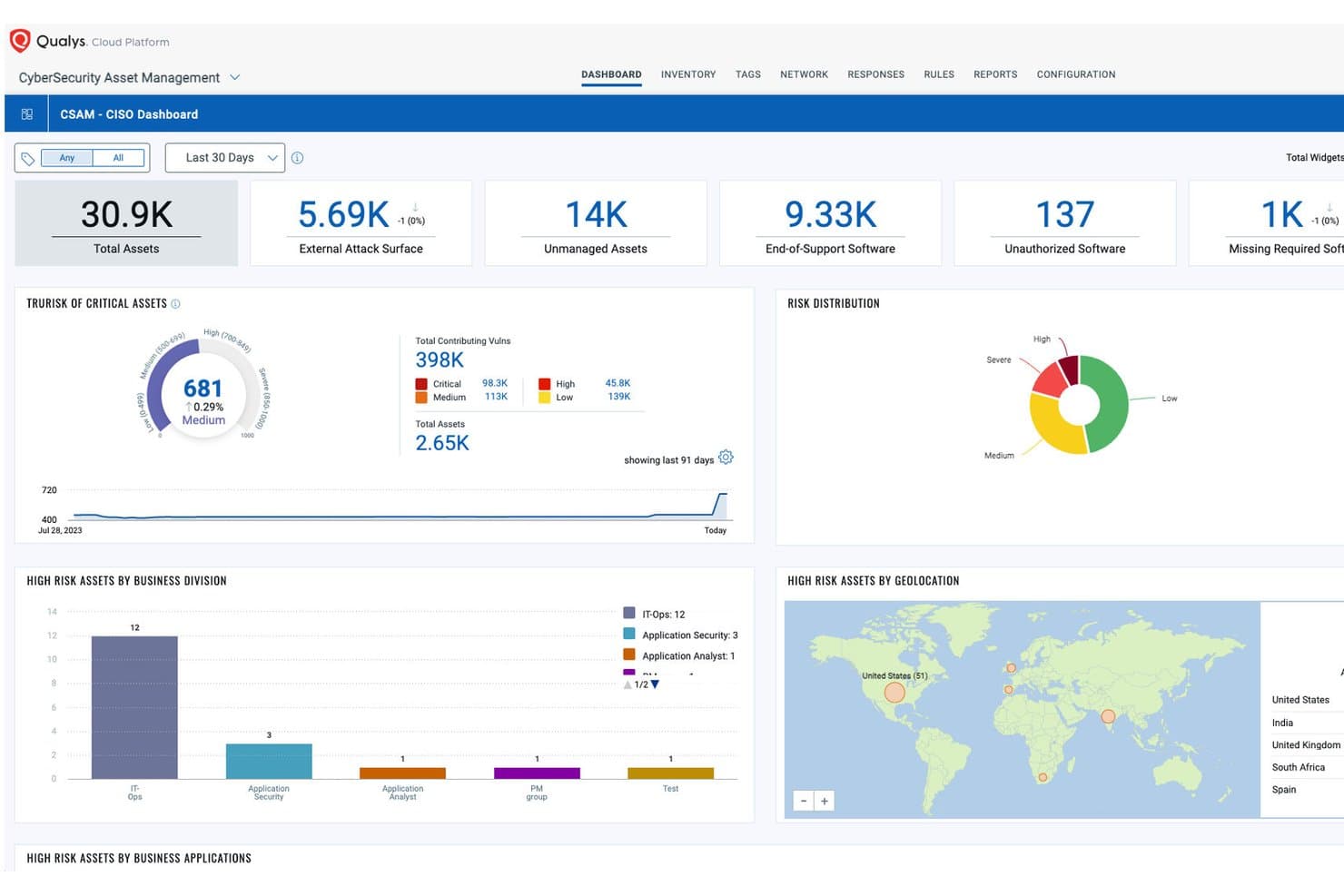
Qualys centralizes asset risk visibility across divisions and geolocations. Qualys Global AssetView is a cloud-native IT asset discovery and inventory platform that combines multi-sensor discovery (agents, scanners, passive sensors, and cloud connectors) with vulnerability context across on-prem, cloud, container, and OT/IoT environments.
Who Is Qualys Best For?
IT security and operations teams in mid-to-large enterprises that need asset inventory tightly coupled with vulnerability management workflows.
Why I Picked Qualys
Qualys earns its spot as one of the best on my shortlist because of how tightly asset discovery connects to vulnerability context. What I like most is the direct pipeline from Global AssetView into VMDR, where every discovered asset immediately becomes part of the vulnerability assessment scope. I also like the TruRisk scoring, which ranks assets by business impact so my team can prioritize remediation rather than chasing every CVE across a flat, unweighted list.
Qualys Key Features
- Multi-sensor asset discovery: Combine agent, agentless, API, and passive network sensors to capture assets across hybrid environments.
- Hardware and software normalization: Automatically standardize asset names, manufacturers, and software across the inventory for easier search and reporting.
- Product catalog enrichment: Enrich discovered assets with lifecycle data like warranty, end-of-life, and license category details.
- Custom tagging and hierarchical organization: Tag assets manually or dynamically and group them with flexible tag hierarchies to support reporting and access controls.
Qualys Integrations
Qualys offers native integrations with ServiceNow, Splunk, AWS, Azure, and Google Cloud Platform, and provides REST APIs for custom integrations.
Pros and Cons
Pros:
- TruRisk scoring prioritizes assets by business impact
- Multi-sensor coverage across hybrid environments
- Discovery feeds directly into vulnerability management
Cons:
- UI navigation across modules can feel fragmented
- Agent deployment adds setup complexity at scale
Learn more about Qualys: Best for browser-based inventory management
- Free trial + free demo available
- Pricing upon request
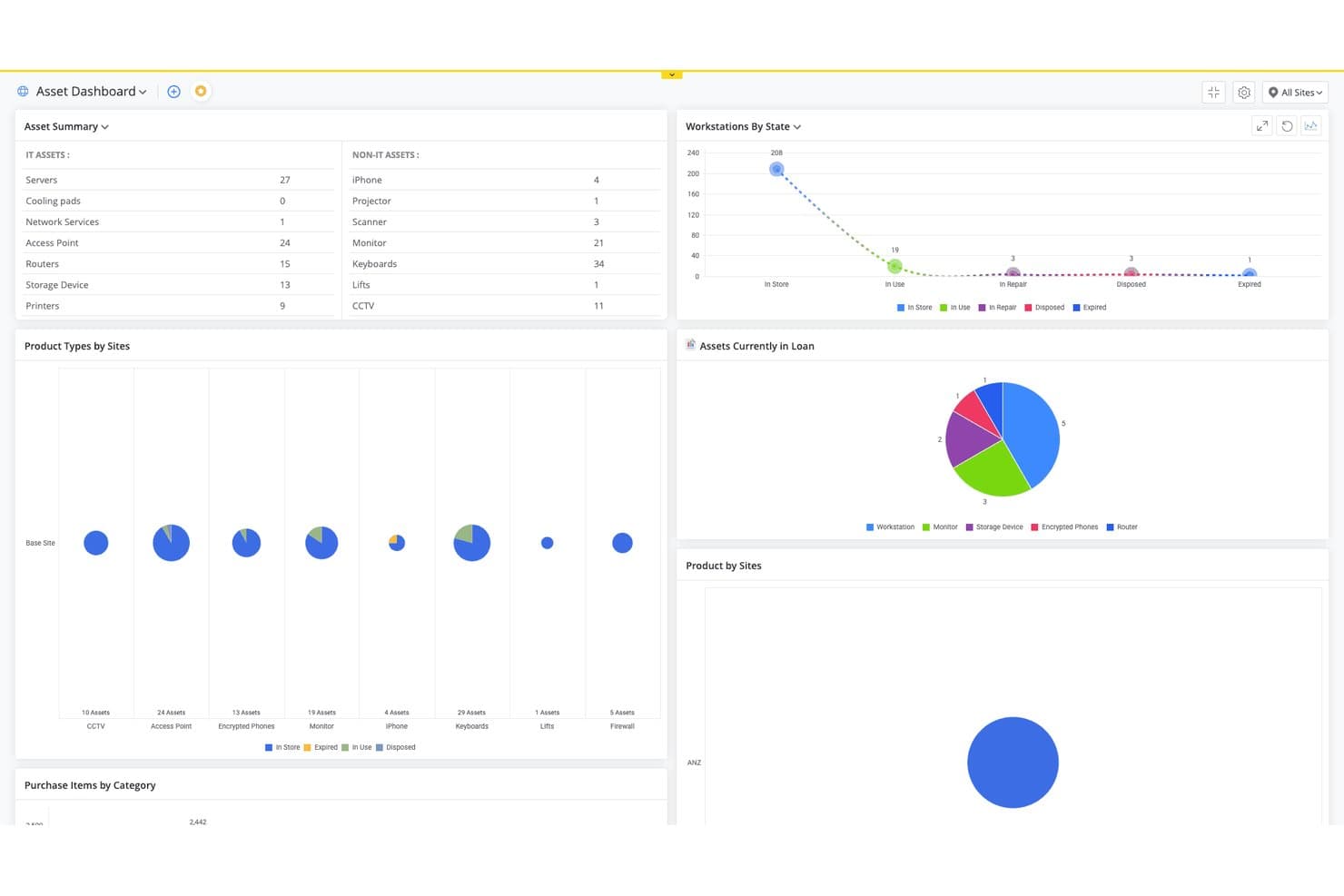
ManageEngine AssetExplorer tracks IT and non-IT assets across sites in one dashboard. ManageEngine AssetExplorer is a browser-based IT asset management platform that combines agent-based and agentless network discovery, hardware and software inventory, CMDB, and license compliance tracking across on-premises and cloud environments.
Who Is ManageEngine AssetExplorer Best For?
It's a strong fit for IT asset managers in mid-sized organizations who need structured lifecycle tracking across both hardware and software without enterprise-level complexity.
Why I Picked ManageEngine AssetExplorer
I picked ManageEngine AssetExplorer because the entire inventory workflow runs in a browser, with no thick client to install or maintain. What I particularly like is the drag-and-drop asset lifecycle canvas, which lets me visually map out procurement-to-disposal workflows per asset type. The agentless scanning also means I can pull full hardware and software inventory from desktops, servers, and switches without deploying agents across the estate.
ManageEngine AssetExplorer Key Features
- CMDB visualization: View relationships and dependencies among assets within a graphical CMDB interface.
- Software license compliance: Track entitlements, assignments, and usage across all managed assets in real time.
- Automated purchase order management: Generate, process, and track IT asset purchase orders directly in the platform.
- Role-based access controls: Assign granular permissions to users based on their responsibilities and organizational roles.
ManageEngine AssetExplorer Integrations
ManageEngine AssetExplorer offers native integrations with ManageEngine ServiceDesk Plus, Endpoint Central, Zoho Analytics, Microsoft 365, SolarWinds, and Lansweeper, and provides an API for custom integrations.
Pros and Cons
Pros:
- Asset lifecycle management from procurement to disposal
- Built-in software license compliance tracking
- Agentless scanning covers unmanaged network devices
Cons:
- Cloud asset discovery lacks depth vs. competitors
- Reporting interface feels dated and inflexible
Learn more about ManageEngine AssetExplorer: Best for integrations across IT and security tools
- Free demo available
- Pricing upon request
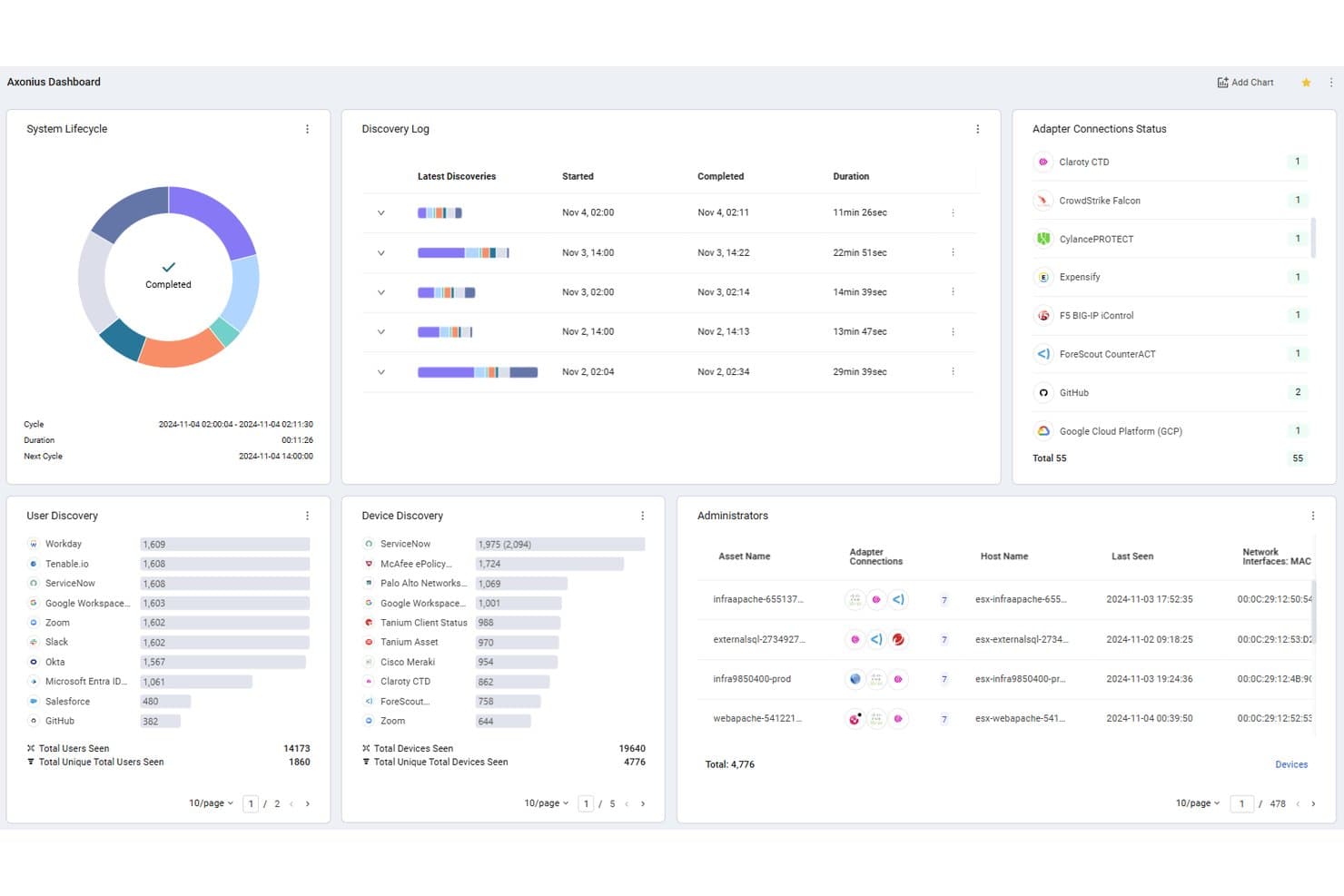
Axonius centralizes asset discovery across users, devices, and adapters. Axonius is a cybersecurity asset intelligence platform that aggregates and correlates asset data from 1,400+ adapters across endpoint agents, cloud providers, SaaS apps, and IAM solutions into a continuously reconciled inventory.
Who Is Axonius Best For?
Axonius is a strong fit for security and IT operations teams at mid-to-large enterprises that already run multiple endpoint, cloud, and identity tools across their environment.
Why I Picked Axonius
Axonius earns its spot as one of the best on my shortlist because of how it handles asset data spread across CrowdStrike, Tanium, Active Directory, and AWS, all giving a different answer. It pulls from all of those via API-based adapters, no scanners or agents required, and reconciles them into a single correlated asset record. What I like most is the Action Center: 600+ actions across those same adapters let me open a ServiceNow ticket or isolate a device without leaving the platform.
Axonius Key Features
- Continuous asset reconciliation: The inventory updates in near real time by pulling fresh data from connected adapters.
- Cloud and SaaS discovery: Native connectors map assets across AWS, Azure, Google Cloud, and major SaaS platforms.
- Policy enforcement center: Create and automate trigger-based actions for compliance and asset hygiene.
- Custom query builder: Powerful search filters let you identify asset conditions and export tailored asset lists.
Axonius Integrations
Axonius offers over 1,400 native integrations, including ServiceNow, CrowdStrike, Tanium, Microsoft 365, Okta, AWS, Google Cloud Platform, Azure, Palo Alto Networks, and Cisco. An API is available for custom integrations.
Pros and Cons
Pros:
- Identifies unmanaged and shadow IT devices automatically
- No agents needed for most asset discovery
- Discovers assets across cloud, SaaS, and on-prem simultaneously
Cons:
- Query language takes time to learn thoroughly
- Initial adapter configuration is time-consuming at scale
Learn more about Axonius: Best for automated infrastructure mapping
- Free trial + free demo available
- Pricing upon request
Visit WebsiteCustomer Rating:4.8/5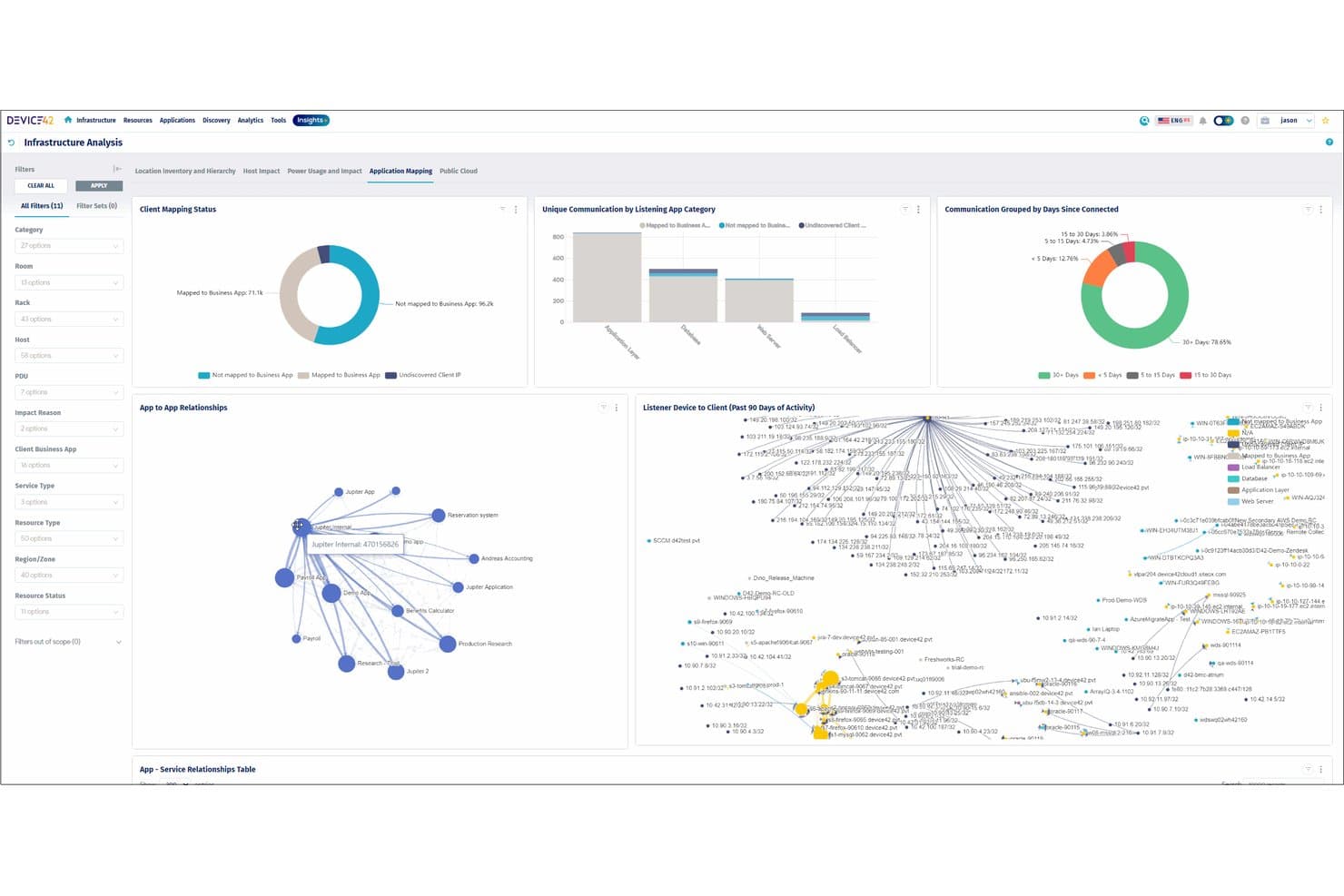
Device42 maps app-to-app relationships and client communication visually. Device42 is an agentless IT asset discovery and CMDB platform that scans physical, virtual, cloud, and hybrid environments using multi-protocol discovery to build a continuously updated inventory of hardware, software, and infrastructure dependencies.
Who Is Device42 Best For?
Device42 is a strong fit for IT operations and infrastructure teams at mid-to-large enterprises managing complex, multi-site environments across on-premises, cloud, and virtual systems.
Why I Picked Device42
Device42 earns its spot as one of the best on my shortlist because of how it handles infrastructure mapping at scale. I love that it uses multi-protocol agentless scanning (SNMP, WMI, SSH, IPMI) to automatically build dependency maps across physical servers, VMs, and cloud instances without manual configuration. Its Impact Charts trace relationships from blade chassis down to individual VMs and service connections, which I rely on when diagnosing cascading failures across a hybrid environment.
Device42 Key Features
- Software license metering: Tracks usage, entitlements, and compliance for user, device, and CPU licensing models.
- Automatic warranty lookups: Pulls warranty status directly from Dell, IBM, and Lenovo using vendor APIs.
- Prebuilt ITSM integrations: Connects natively with ServiceNow, Jira, Freshservice, Zendesk, and other platforms.
- Report scheduling and export: Allows on-demand or scheduled exports of asset health, inventory, and change history in .csv format.
Device42 Integrations
Device42 offers native integrations with ServiceNow, Jira, Freshservice, Zendesk, and PagerDuty, and provides an API for custom integrations.
Pros and Cons
Pros:
- Built-in CMDB with continuous auto-update
- Dependency maps trace relationships across infrastructure layers
- Agentless multi-protocol scanning across hybrid environments
Cons:
- UI feels dated compared to newer competitors
- Initial configuration requires significant network expertise
Learn more about Device42: Best for agentless network-wide device scanning
- Free demo + 14-day free trial available
- From $239/month (billed annually)
Visit WebsiteCustomer Rating:4.3/5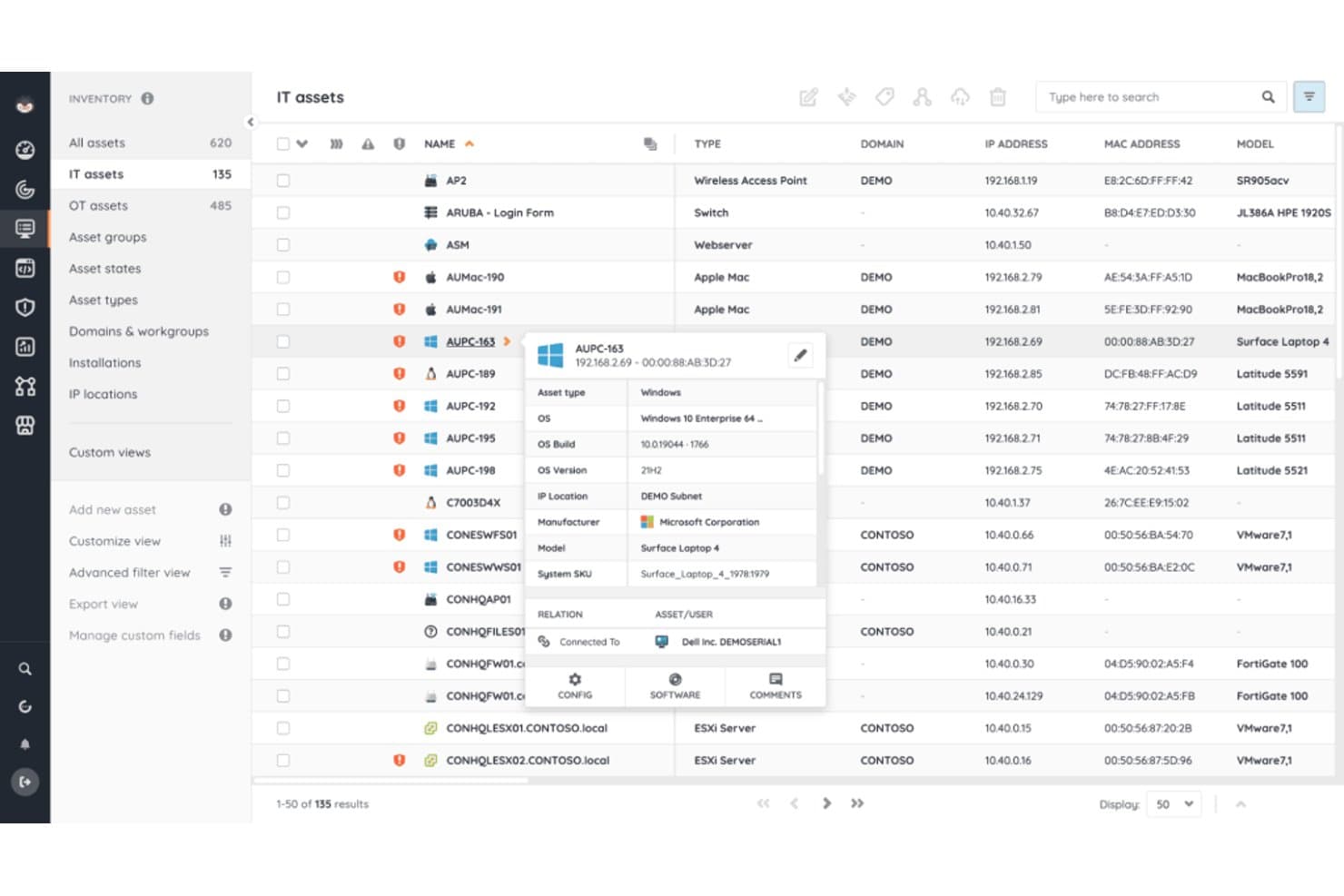
Lansweeper surfaces detailed asset profiles, OS, and hardware info. Lansweeper is an IT asset discovery and inventory platform that scans networks across IT, OT, IoT, and cloud environments using agentless, agent-based, and passive discovery methods to build a unified asset record.
Who Is Lansweeper Best For?
Lansweeper suits network and systems administrators in mid-size to large organizations managing complex, mixed-device environments that span physical, virtual, and cloud infrastructure.
Why I Picked Lansweeper
Lansweeper earns its spot on my shortlist because of how it handles agentless scanning at scale. Its Credential-Free Device Recognition (CDR) fingerprints devices without needing login credentials, so I'm not blocked by unmanaged or locked-down endpoints. The passive Traffic Sensor also catches devices that active scans miss by analyzing live network traffic, which is where a lot of shadow IT actually hides.
Lansweeper Key Features
- Cloud API integrations: Connects directly with AWS, Azure, and Google Cloud for asset discovery without local sensors.
- Vulnerability and lifecycle insights: Surfaces hardware and software vulnerabilities, plus end-of-life and end-of-support risks.
- Native ITSM integrations: Offers direct connectors for ServiceNow, Jira Service Management, and ConnectWise for asset data sharing.
- Custom report builder: Lets users create, schedule, and export detailed asset and inventory reports to support compliance and audits.
Lansweeper Integrations
Lansweeper offers native integrations with ServiceNow, Jira Service Management, Jira Assets, ConnectWise, HaloITSM, and HappyFox. An API is available for custom integrations.
Pros and Cons
Pros:
- Covers IT, OT, and IoT environments natively
- Passive sensor surfaces hidden shadow IT devices
- Agentless CDR scans without needing device credentials
Cons:
- Mobile device discovery coverage is relatively limited
- Initial scan configuration requires significant manual setup
Learn more about Lansweeper: Best for integrated software license tracking
- Free demo available
- Pricing upon request
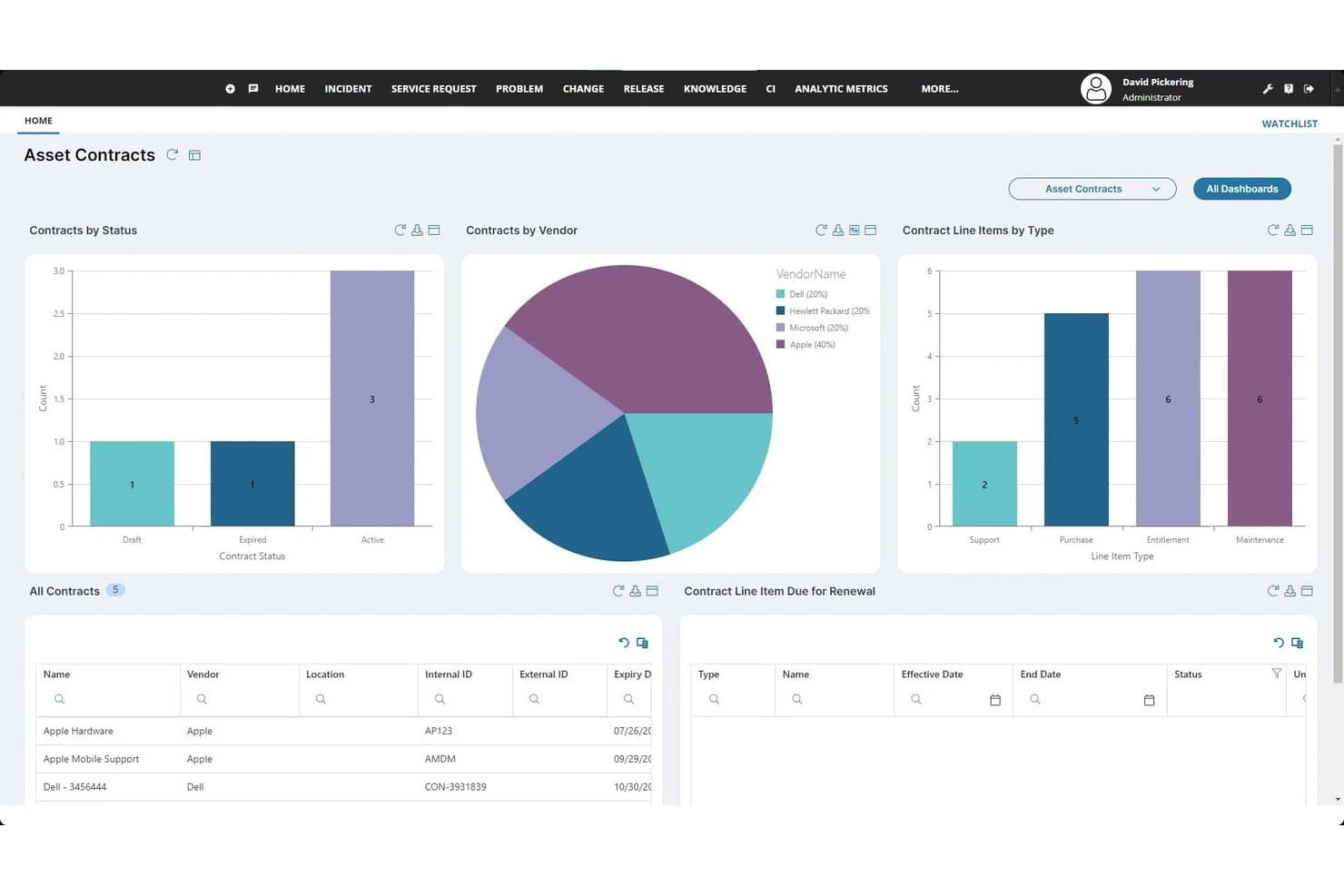
Ivanti ITSM tracks asset contracts by vendor, status, and renewal dates. Ivanti Neurons for Discovery is an enterprise IT asset discovery platform that continuously scans networks using active and passive techniques to inventory hardware, software, cloud, OT/IoT, and SaaS assets across multi-environment infrastructures.
Who Is Ivanti ITSM Best For?
It's a strong fit for mid-market and enterprise IT operations and asset management teams running complex, multi-environment infrastructures.
Why I Picked Ivanti ITSM
Ivanti Neurons for Discovery earns its spot on my shortlist because software license tracking is built directly into the discovery workflow, not added as a separate module. I like that my team can see which licenses are active, which contracts are approaching renewal, and where license spend is being wasted, without switching tools. The passive scanning also catches unmanaged devices, so I'm not working from an incomplete picture when it's time to run a software audit.
Ivanti ITSM Key Features
- Continuous passive and active discovery: Combine passive network listening with active scanning to find all connected devices as they join the network.
- Multi-environment asset coverage: Discover and inventory devices across on-premises, cloud, virtual, SaaS, and OT/IoT environments.
- CMDB and ITSM integration: Sync discovered asset data directly with Ivanti and third-party CMDB or ITSM platforms for workflow automation.
- Vulnerability data aggregation: Ingest and centralize findings from Tenable, Qualys, and Rapid7 into a unified exposure analysis dashboard.
Ivanti ITSM Integrations
Ivanti Neurons for Discovery offers native integrations with ServiceNow, Microsoft 365, Azure, Tenable, Rapid7, Qualys, Cisco, BMC, Okta, Zscaler, and CrowdStrike. An API is available for custom integrations.
Pros and Cons
Pros:
- Discovers assets across cloud, SaaS, and on-prem
- Built-in software license metering and reclaim
- Safely fingerprints OT and IoT devices passively
Cons:
- Reporting dashboards lack deep customization options
- Initial setup and tuning requires significant time
Learn more about Ivanti ITSM: Best for CMDB native discovery and reconciliation
- Free demo available
- Pricing upon request
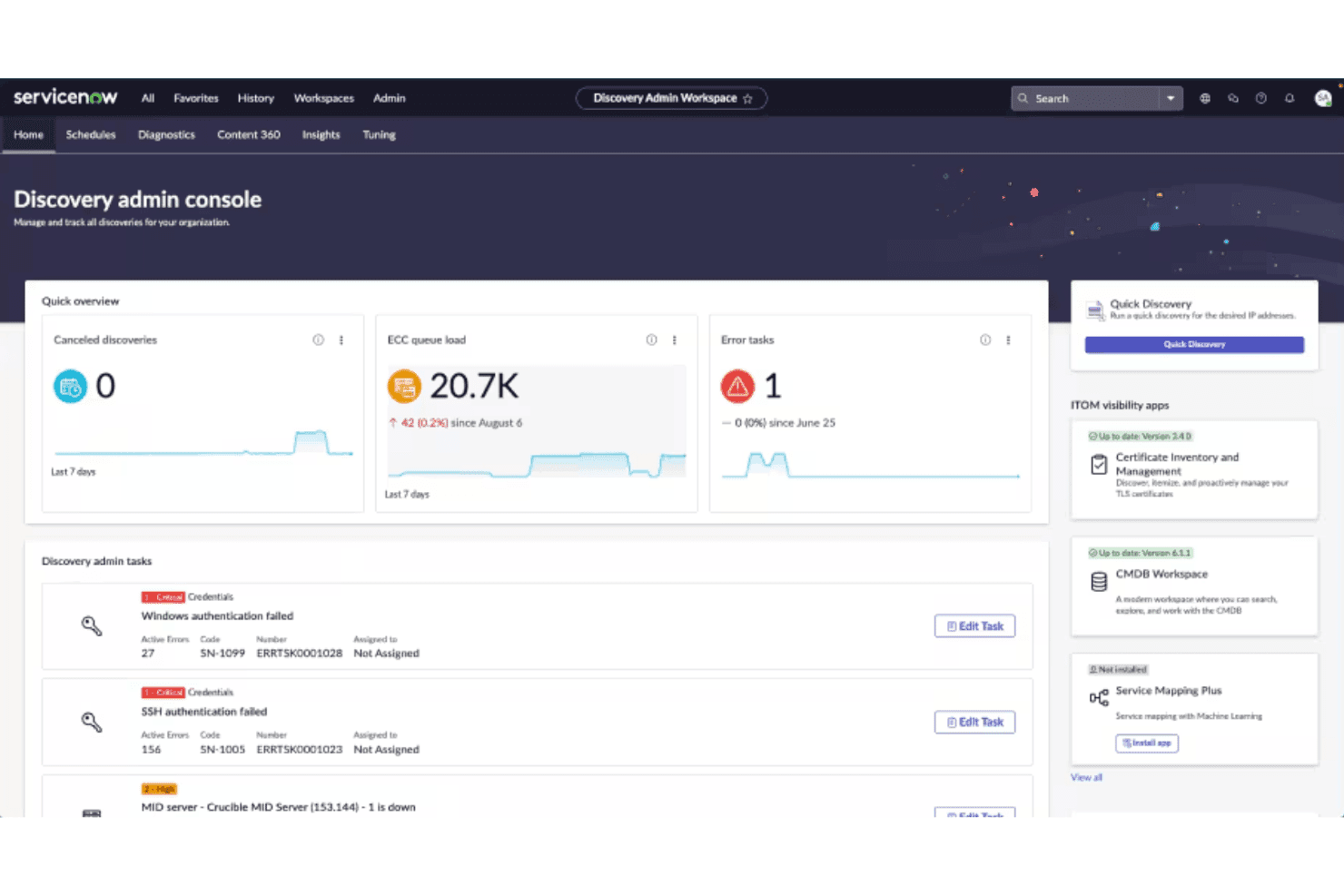
ServiceNow Discovery centralizes admin tasks, errors, and queue monitoring. ServiceNow Discovery is an IT asset discovery module within the ServiceNow ITOM suite that scans on-premises, cloud, containerized, and hybrid environments using agentless and agent-based methods to populate and reconcile a native CMDB.
Who Is ServiceNow Discovery Best For?
It's a strong fit for large enterprises with complex, hybrid infrastructure that need discovery tightly coupled to an existing ServiceNow ITSM or ITOM environment.
Why I Picked ServiceNow Discovery
ServiceNow Discovery earns its spot as one of the best on my shortlist because the Identification and Reconciliation Engine (IRE) is genuinely in a class of its own. When my team runs a discovery scan, the IRE automatically deduplicates and reconciles incoming CI data against existing CMDB records, eliminating ghost entries and conflicting asset records. I also like the event-driven discovery model, which captures configuration changes across cloud environments as they happen rather than waiting for the next scheduled scan.
ServiceNow Discovery Key Features
- Agent Client Collector: Collects asset data from endpoints and domain controllers, closing traditional agentless scanning gaps.
- Event-driven discovery: Receives real-time configuration events from cloud sources to maintain current asset data.
- Service Graph Connectors: Ingests and normalizes data from third-party cloud and infrastructure sources.
- Content Library: Uses AI-powered application fingerprints to identify and classify discovered software across environments.
ServiceNow Discovery Integrations
ServiceNow Discovery offers native integrations across the ServiceNow ecosystem and allows integration with third-party cloud platforms like AWS, Azure, Google Cloud Platform, Cisco ACI, and VMware vSphere. An API is available for custom integrations.
Pros and Cons
Pros:
- IRE deduplicates CI records automatically
- Covers cloud, on-prem, and containers natively
- Native CMDB reconciliation with zero manual cleanup
Cons:
- Requires full ServiceNow platform licensing
- Discovery tuning requires significant configuration effort
Learn more about ServiceNow Discovery: Best for cloud workload identification
- Free demo available
- Pricing upon request
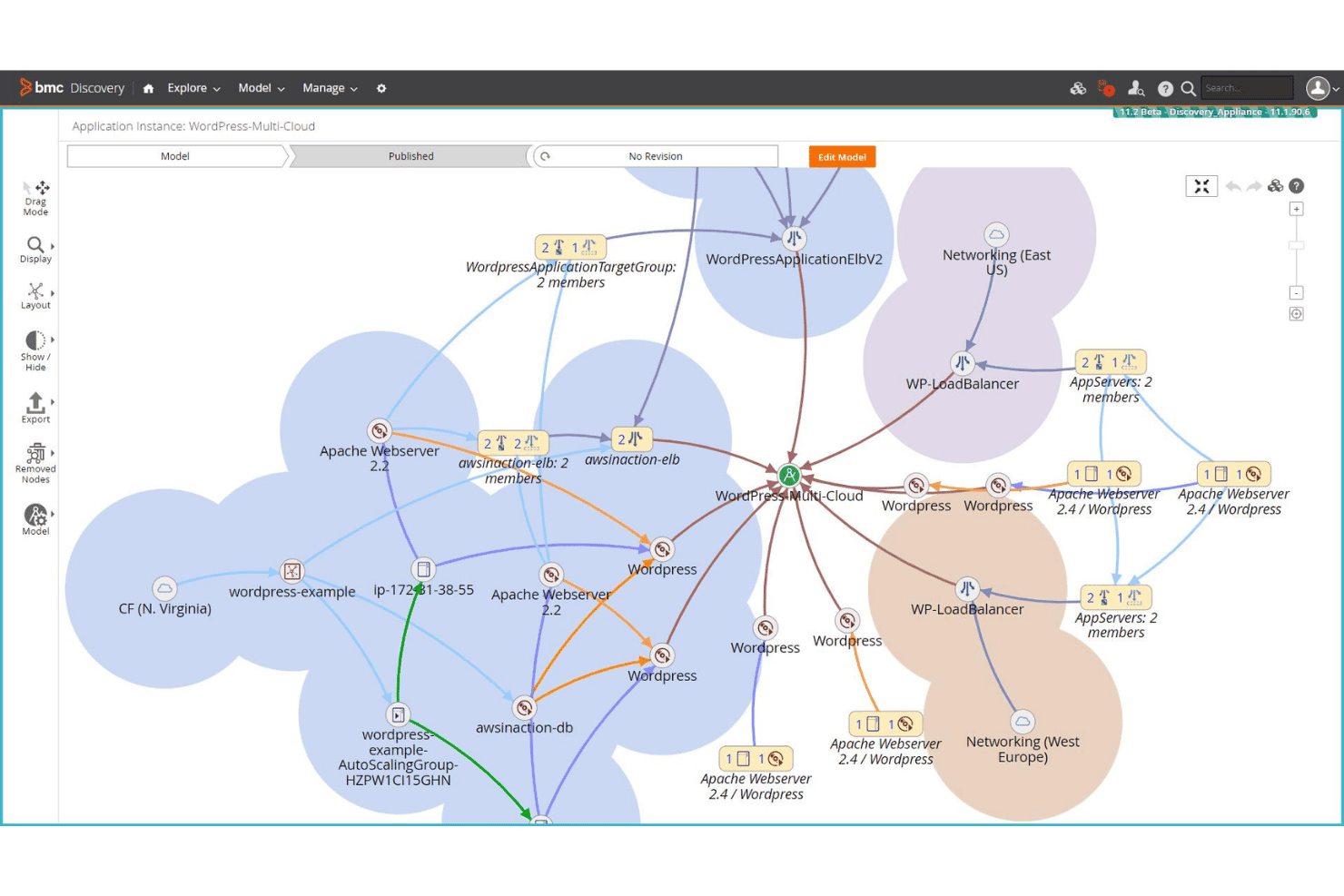
BMC Helix Discovery maps multi-cloud WordPress app dependencies visually. BMC Helix Discovery is an agentless IT asset discovery platform that automatically scans and maps hardware, software, and service dependencies across on-premises, multi-cloud, and containerized environments.
Who Is BMC Helix Discovery Best For?
It's a strong fit for enterprise IT operations and security teams managing large-scale hybrid or multi-cloud infrastructure.
Why I Picked BMC Helix Discovery
BMC Helix Discovery earns its spot on my shortlist because of how well it handles cloud workload identification at scale. Most discovery tools struggle to keep pace with dynamic cloud environments, but BMC Helix continuously scans AWS, Azure, and GCP workloads and maps their dependencies in real time. I particularly like Blueprint-Automated Service Modeling, which builds visual service maps showing exactly which cloud resources underpin a given business application.
BMC Helix Discovery Key Features
- Agentless scanning: Discovers IT assets across the network without requiring software installation on endpoints.
- Service-aware dependency mapping: Automatically visualizes relationships between discovered assets and mapped business services.
- CMDB integration: Synchronizes discovered asset and relationship data with ServiceNow, BMC Helix, or Remedy CMDB platforms.
- SSL/TLS certificate discovery: Identifies and inventories security certificates deployed across your IT infrastructure.
BMC Helix Discovery Integrations
BMC Helix Discovery offers native integrations with ServiceNow, BMC Helix ITSM, and Remedy CMDB platforms. An API is available for custom integrations.
Pros and Cons
Pros:
- Real-time change detection across hybrid environments
- Agentless scanning covers unmanaged network devices
- Deep multi-cloud workload dependency mapping
Cons:
- Reporting customization is relatively limited
- Complex initial setup for large deployments
Learn more about BMC Helix Discovery:
Outras ferramentas de descoberta de ativos informáticos
Eis algumas ferramentas adicionais de descoberta de ativos informáticos que não foram incluídas na minha lista restrita, mas que continuam a merecer atenção:
- 11Tanium AssetBest for real-time asset visibility at scale
- 12ArmisBest for passive discovery of IoT and OT devices
- 13SecPod (Saner Platform)Best for security posture analytics
- 14InvGate AssetsBest for intuitive asset lifecycle reporting
- 15NinjaOneBest for fast remote asset auditing
- 16Flexera OneBest for hybrid cloud asset governance
- 17Open-AudITBest for open-source network discovery
- 18AssetSonarBest for SaaS subscription tracking
How I Evaluate IT Asset Discovery Tools
I evaluate these tools in two layers: baseline requirements like multi-environment scanning and CMDB integration, then differentiators like OT/IoT fingerprinting and license metering.
Core Functionality (Table Stakes For This List)
When I'm selecting tools for my list, I rank each one on a scale from 0 (does not offer the functionality) to 5 (excels in this area) for each core functionality listed below. I then calculate the tool's total score into a percentage, using 65% as a benchmark to help assess its overall fit for the list.
- Automated Network Discovery: I check whether the tool scans subnets using protocols like SNMP, WMI, and SSH rather than relying on manual asset entry.
- Hardware & Software Inventory: Each tool should capture detailed specs, installed software versions, and patch levels—not just device names or IP addresses.
- Agent & Agentless Scanning: I look for support of both methods so you can reach managed endpoints and unmanaged devices like contractor laptops or lab equipment.
- Multi-Environment Coverage: Discovery should span on-prem, cloud, virtual, and remote environments so nothing falls through the gaps during an audit.
- CMDB/ITSM Integration: I evaluate whether the tool feeds asset data into platforms like ServiceNow or Jira through native connectors or open APIs.
- Continuous Monitoring: I look for near real-time change detection that flags new devices, removals, or configuration drift without waiting for a scheduled scan.
Once I have a list of tools that meet the criteria, I consider what sets each platform apart.
Differentiating Factors (What Sets Vendors Apart)
Here's how I compare and contrast different vendors:
Standout Features
Cloud and SaaS discovery matters because environments change fast. Ephemeral instances spin up in AWS or Azure, and employees adopt unsanctioned apps that create shadow IT. I look for native connectors that surface those assets automatically. Software license metering is another differentiator, since it helps you spot unused installations and reclaim licenses before an audit catches over-deployment. For teams managing manufacturing floors or hospital networks, OT/IoT device fingerprinting using passive traffic analysis identifies connected devices without disrupting sensitive equipment.
Beyond Features
Deployment architecture is a big factor I evaluate. Multi-site teams need distributed collectors that can scan air-gapped or segmented networks, and SaaS vs. on-prem options affect data residency compliance. The integration ecosystem also matters—I check whether a tool can feed asset data into SIEM or SOAR platforms alongside ITSM connectors, since discovery data loses value if it stays siloed. Pricing model is worth close attention too, especially per-asset pricing that can spike when cloud workloads scale up seasonally.
Como escolher ferramentas de descoberta de ativos informáticos
Ao decidir quais são as ferramentas de descoberta de ativos informáticos mais adequadas para a sua equipa, comece por associar as suas principais prioridades a funcionalidades específicas e fatores de implementação que afetam diretamente a preparação para auditorias, a segurança e as transferências operacionais:
| Se a sua prioridade for | Procure |
|---|---|
| Se a sua prioridade forMapear ativos na nuvem e SaaS | ProcureConectores nativos para AWS, Azure e SaaS |
| Se a sua prioridade forIntegração rápida em várias localizações | ProcureRecoletores distribuídos ou leves |
| Se a sua prioridade forAlertas em tempo real sobre TI sombra | ProcureMonitorização contínua e passiva da rede |
| Se a sua prioridade forReduzir importações CMDB falhadas | ProcureIntegrações CMDB bidirecionais e normalizadas |
| Se a sua prioridade forConformidade de licenças e preparação para auditorias | ProcureMedição de licenças e relatórios de utilização incorporados |
Como avaliar a sua lista restrita
- Execute uma análise de descoberta numa sub-rede de teste: Durante a primeira semana, teste a análise sem agente da ferramenta para todos os ativos físicos e virtuais.
- Exporte e envie os dados para a sua CMDB: Peça uma demonstração nativa do ServiceNow ou BMC e verifique se os atributos dos ativos são mapeados sem perda de dados.
- Audite a medição de licenças e a precisão dos relatórios: Peça uma auditoria ou exportação de licenças que abranja pelo menos três dos principais títulos de software que utiliza.
- Solicite a documentação de segurança do fornecedor: Peça informações sobre os métodos de encriptação atuais e as certificações de conformidade (SOC 2, ISO 27001).
- Decida: rapidez de SaaS pronta a utilizar ou cobertura mais abrangente de ambientes locais e IoT — dê prioridade com base no seu ambiente mais complexo.
O que são ferramentas de descoberta de ativos informáticos?
As ferramentas de descoberta de ativos de TI são soluções de software especializadas que analisam e identificam automaticamente todo o hardware, software e dispositivos em rede nos ambientes de uma organização. Permitem às equipas de TI manter um inventário em tempo real, apoiar auditorias de segurança, identificar ativos não geridos ou não autorizados e alimentar fluxos de trabalho como a gestão de licenças ou as avaliações de vulnerabilidades. Estas ferramentas desempenham um papel crucial na manutenção de uma infraestrutura de TI atualizada, em conformidade e protegida contra riscos ocultos.
Funcionalidades
Ao selecionar ferramentas de descoberta de ativos de TI, procure as seguintes funcionalidades essenciais:
- Análise automatizada da rede: Deteta todos os dispositivos e pontos finais ligados à sua rede sem introdução manual, garantindo que nada é esquecido durante o inventário.
- Inventário de hardware: Recolhe informações detalhadas sobre as especificações dos dispositivos, números de série e registos de propriedade em toda a sua infraestrutura.
- Inventário de software: Acompanha todo o software instalado, os números de versão, o estado das correções e a utilização, ajudando a identificar vulnerabilidades ou lacunas de licenciamento.
- Descoberta com e sem agente: Oferece análise baseada em agentes e sem agentes para abranger dispositivos geridos e pontos finais temporários ou não geridos.
- Suporte para vários ambientes: Descobre ativos em ambientes locais, virtuais, na nuvem e remotos, proporcionando um registo de ativos unificado e atualizado.
- Deteção de alterações em tempo real: Atualiza instantaneamente os registos de ativos quando os dispositivos são adicionados, alterados ou removidos, ajudando a reagir rapidamente a atividades não autorizadas.
- Integração com CMDB e ITSM: Envia ou sincroniza diretamente os dados dos ativos com bases de dados de gestão da configuração ou plataformas de gestão de serviços, apoiando operações de TI mais abrangentes.
- Controlos de acesso baseados em funções: Permite definir funções e permissões de utilizadores para manter a segurança dos dados, especialmente para fins de auditoria ou conformidade.
- Relatórios personalizáveis: Gera relatórios agendados ou a pedido que destacam alterações no inventário, utilização de software e ativos em situação de não conformidade.
- Gestão da conformidade de licenças: Monitoriza os direitos de utilização do software em comparação com as instalações, apoiando auditorias e reduzindo gastos excessivos com licenças.
As soluções de ferramentas de descoberta de ativos de TI normalmente não incluem inteligência artificial como parte das suas funcionalidades.
Benefícios
A implementação de ferramentas de descoberta de ativos de TI proporciona vários benefícios à sua equipa e à sua empresa. Eis alguns dos benefícios que pode esperar:
- Visibilidade total dos ativos: Obtenha um inventário preciso e em tempo real de todos os ativos de hardware e software em todos os ambientes, através de funcionalidades de análise automatizada.
- Deteção de TI sombra: Identifique rapidamente dispositivos não autorizados e contas não aprovadas na nuvem ou em SaaS, utilizando a descoberta sem agentes e a descoberta nativa na nuvem.
- Preparação para auditorias e conformidade: Mantenha registos atualizados através de monitorização contínua e integração com plataformas CMDB ou ITSM, facilitando as auditorias.
- Otimização de licenças: Acompanhe a utilização do software e os direitos de utilização, ajudando a sua equipa a evitar implementações excessivas e a reduzir os custos de licenciamento.
- Resposta mais rápida a incidentes: Permita que as equipas de segurança e de TI localizem rapidamente os dispositivos e corrijam as vulnerabilidades antes que as ameaças se agravem.
- Redução da carga de trabalho manual: Elimine atividades repetitivas de recolha de dados através de fluxos de trabalho automatizados de inventário, elaboração de relatórios e integração.
- Melhoria da gestão de alterações: Detete em tempo real adições, remoções ou desvios de configuração, para que as alterações operacionais não passem despercebidas.
Custos e preços
A seleção de ferramentas de descoberta de ativos de TI exige uma compreensão dos vários modelos de preços e planos disponíveis. Os custos variam consoante as funcionalidades, a dimensão da equipa, os complementos e outros fatores. A tabela abaixo resume os planos comuns, os respetivos preços médios e as funcionalidades normalmente incluídas nas soluções de descoberta de ativos de TI:
Tabela de comparação de planos para ferramentas de descoberta de ativos de TI
| Tipo de plano | Preço médio | Funcionalidades comuns |
|---|---|---|
| Tipo de planoPlano gratuito | Preço médio$0 | Funcionalidades comunsAnálise básica da rede, inventário limitado, relatórios restritos e apoio da comunidade. |
| Tipo de planoPlano pessoal | Preço médio$10–$30/mês | Funcionalidades comunsAcesso para um único utilizador, relatórios avançados, inventário de software e notificações por e-mail. |
| Tipo de planoPlano empresarial | Preço médio$50–$150/mês | Funcionalidades comunsSuporte para vários utilizadores, descoberta automatizada, integração com sistemas CMDB/ITSM e análises agendadas. |
| Tipo de planoPlano empresarial avançado | Preço médio$200–$500+/mês | Funcionalidades comunsOpções de implementação personalizadas, acesso à API, ativos ilimitados, suporte premium e relatórios de conformidade. |
Perguntas frequentes sobre ferramentas de descoberta de ativos de TI
Eis algumas respostas a perguntas comuns sobre ferramentas de descoberta de ativos de TI:
Com que frequência deve executar análises de descoberta de ativos?
Deve executar análises de descoberta regularmente — muitas equipas agendam-nas diariamente ou semanalmente — para manter os dados do inventário atualizados e detetar rapidamente dispositivos novos ou não autorizados.
As ferramentas de descoberta de ativos de TI conseguem encontrar dispositivos não geridos ou desconhecidos?
Sim, a maioria das ferramentas consegue detetar dispositivos não geridos ou desconhecidos através da análise de rede e da monitorização passiva, ajudando-o a resolver problemas de TI sombra e riscos ocultos.
Estas ferramentas são compatíveis com ambientes na nuvem e remotos?
Sim, muitas ferramentas de descoberta de ativos de TI disponibilizam conectores para AWS, Azure e aplicações SaaS, bem como permitem a análise remota, proporcionando visibilidade em todos os ambientes.
Que medidas de segurança deve esperar das ferramentas de descoberta de ativos?
Procure controlos de acesso baseados em funções, armazenamento e transmissão de dados encriptados e registos de auditoria para apoiar a conformidade e proteger dados de inventário sensíveis.
Como é que as ferramentas de descoberta de ativos de TI se integram nos sistemas ITSM ou CMDB existentes?
A maioria das soluções disponibiliza conectores pré-configurados ou APIs para sincronizar diretamente os ativos descobertos com plataformas ITSM e bases de dados de gestão da configuração, simplificando os fluxos de trabalho.