

As melhores alternativas ao Terraform ajudam as equipas a definir, aprovisionar e gerir infraestruturas com menos estrangulamentos nos fluxos de trabalho, uma aplicação mais robusta de políticas e integrações alinhadas com as atuais pilhas tecnológicas. Estas ferramentas permitem aos engenheiros automatizar implementações, aplicar regras de governação e manter ambientes reproduzíveis sem depender exclusivamente do ecossistema da HashiCorp.
As equipas começam frequentemente a procurar alternativas ao Terraform depois de se depararem com desafios como a depuração de erros HCL pouco transparentes, a manutenção de ficheiros de estado em equipas distribuídas ou a tentativa de expandir o Terraform com integrações que este não suporta nativamente. Outras enfrentam limitações ao aplicar políticas de segurança avançadas ou precisam de um alinhamento mais estreito com as linguagens que os seus programadores já utilizam.
Trabalhei com grupos de engenharia que migraram do Terraform para outras estruturas de IaC, avaliei estas plataformas em implementações de produção reais e testei o seu desempenho em condições do mundo real, como implementações em várias clouds e ambientes orientados para a conformidade. Esta experiência ajudou-me a formar uma perspetiva prática sobre os pontos fortes de cada ferramenta e as áreas onde criam dificuldades.
Neste guia, verá quais as alternativas ao Terraform que oferecem uma sintaxe mais clara, uma governação mais robusta e uma integração mais simples nos fluxos de trabalho DevOps modernos, para que possa selecionar a plataforma que melhor se adapta à sua estratégia de infraestrutura.
O que é o Terraform?
O Terraform é uma ferramenta de Infraestrutura como Código (IaC) que permite definir e gerir infraestruturas através de código. É normalmente utilizado por programadores, engenheiros de DevOps e profissionais de TI que precisam de automatizar e dimensionar infraestruturas de forma eficiente.
Funcionalidades como o aprovisionamento de recursos, o suporte para várias clouds e a gestão do estado ajudam a automatizar tarefas de infraestrutura, reduzir erros manuais e garantir a consistência. O valor geral do Terraform reside na sua capacidade de simplificar a gestão de infraestruturas e melhorar a eficiência.
Why Trust Our Software Recommendations
6,700+
Reviews
20
Industry experts
16+
Evaluation factors
14
Years
Our team has been testing and reviewing software since 2012. As tech leaders ourselves, we know how difficult—and important—it is to choose the right software.
For this guide, we evaluated tools using hands-on testing and independent research, scoring tools using our selection criteria.
Our reviews reflect our human editorial judgment, not a sales pitch.
Expert reviewers:
- Paulo Gardini MiguelTech Director
 Tim FisherVP of AI
 Gabriel RosasTech Lead & Software Architect
 Christhian GruhnTech Lead & Platform Architect

Tabela de comparação das alternativas ao Terraform
Esta tabela de comparação resume os detalhes de preços das minhas principais alternativas selecionadas ao Terraform:
Score legend (out of 5)
- Excellent4.5–5
- Good4–4.4
- Average3–3.9
- Below average2–2.9
- Poor1–1.9
Sorted by: Default
| Tool | Starting Price | Website | |||||||
|---|---|---|---|---|---|---|---|---|---|
Best for multi-language IaC | 4.0 out of 5 | 4 | 5 | 3 | 4 | 4 | 4 | $40/month Free plan available | Website |
Best for DevSecOps integration | 2.7 out of 5 | 3 | 2 | 3 | 2 | 2 | 4 | $29/user/month Free plan + free trial available | Website |
Best for VM development environments | Not rated | Not rated | 2 | Not rated | 1 | 3 | 2 | Pricing upon request Free plan available | Website |
Best for continuous integration | 1.5 out of 5 | 1 | 1 | 1 | 1 | 3 | 2 | Pricing upon request Not available | Website |
Best for AWS resource management | Not rated | 4 | 4 | 3 | Not rated | 3 | 3 | $0.0009 per handler operation Free plan available | Website |
Best for IT automation | 2.7 out of 5 | 2 | 3 | 2 | 2 | 3 | 4 | Pricing upon request Free plan + free demo available | Website |
Best for multi-cloud orchestration | 3.2 out of 5 | 3 | 3 | 3 | 4 | 3 | 3 | Pricing upon request Free plan + 60-day free trial available | Website |
Best for Google Cloud resources | Not rated | 2 | 3 | 3 | Not rated | 2 | 3 | Pricing upon request Free plan + free trial available | Website |
Best for open-source IaC | 3.3 out of 5 | 3 | 4 | 3 | 4 | 4 | 2 | Pricing upon request Not available | Website |
Best for Kubernetes integration | 3.2 out of 5 | 3 | 4 | 1 | 4 | 4 | 3 | $1,000/month Free demo available | Website |


Análises das melhores alternativas ao Terraform
Apresentamos abaixo os meus resumos detalhados das melhores alternativas ao Terraform que entraram na minha lista restrita. As minhas análises apresentam uma visão detalhada das principais funcionalidades, vantagens e desvantagens, integrações e casos de utilização ideais de cada ferramenta, para ajudar a encontrar a melhor opção para si.

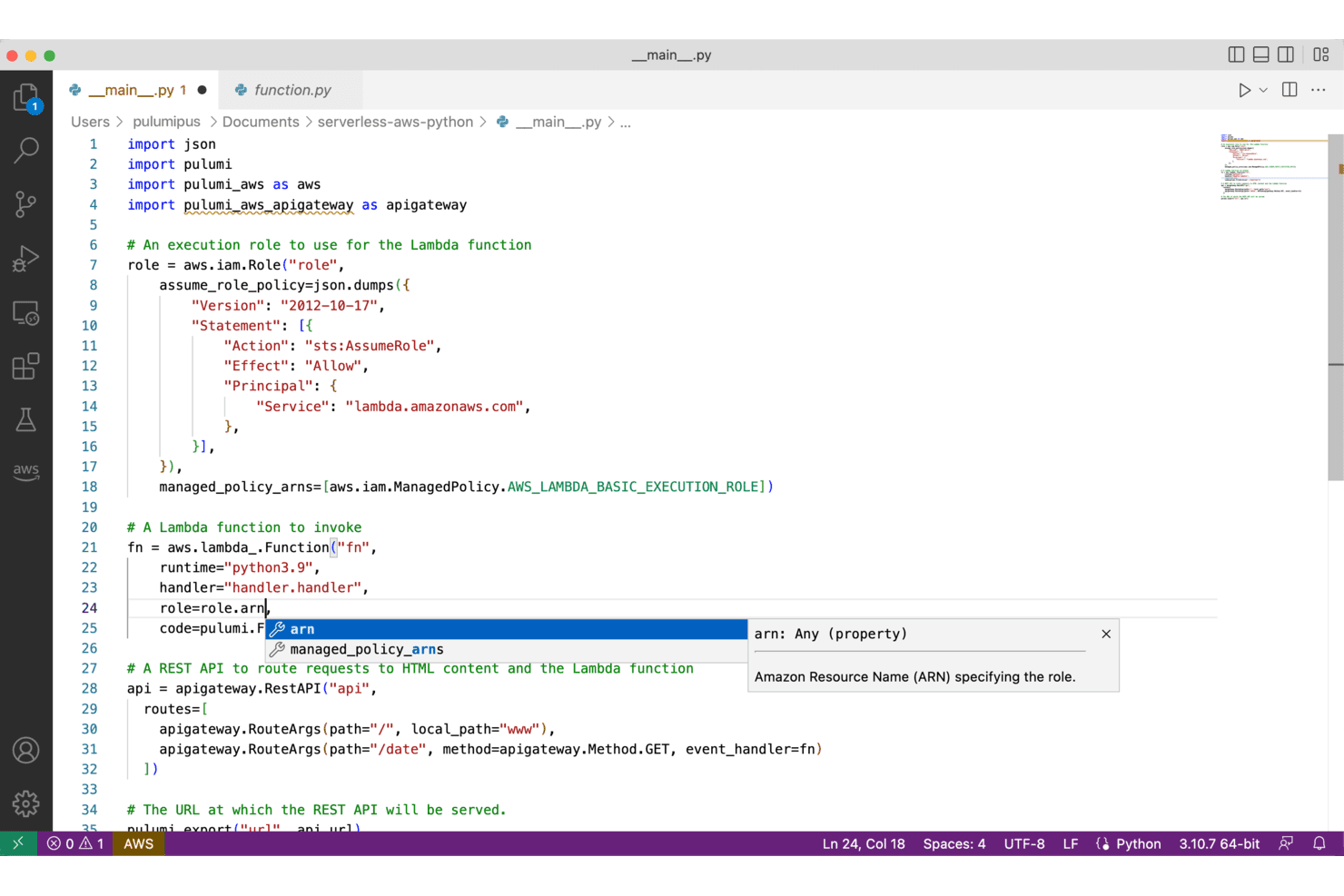
Pulumi enables infrastructure-as-code using Python with AWS resources. Pulumi is an infrastructure-as-code platform that lets DevOps and platform engineering teams define, deploy, and manage cloud infrastructure using general-purpose programming languages like Python, TypeScript, and Go—instead of a domain-specific language.
Who Is Pulumi Best For?
Pulumi is a strong fit for DevOps and platform engineering teams that want to write infrastructure code in the same languages they already use for application development.
Why I Picked Pulumi
I picked Pulumi as one of the best because it's the only Terraform alternative that lets my team write infrastructure code in TypeScript, Python, Go, or .NET alongside actual application code, using real loops, functions, and classes instead of a domain-specific language. I can run
pulumi convertto migrate existing HCL into a typed Python or TypeScript program, and reference Terraform state outputs side by side while cutting over incrementally. Policy as code supports TypeScript, Python, and OPA/Rego, so the same enforcement guardrails my team already writes can govern infrastructure deployments too.Pulumi Key Features
- Multi-cloud native providers: Pulumi includes purpose-built native providers for AWS, Azure, Google Cloud, and Kubernetes, generated directly from upstream API schemas for up-to-date resource coverage.
- Pulumi Automation API: Lets you embed infrastructure operations inside application code, enabling custom developer portals, CLI tools, and CI/CD workflows built around infrastructure.
- Drift detection and remediation: Pulumi Cloud's commercial plans add scheduled drift detection that compares recorded state against live cloud resources and can auto-remediate on a configurable cadence.
- Pulumi ESC (Environments, Secrets, and Config): Centralizes secrets and configuration from AWS Secrets Manager, HashiCorp Vault, Azure Key Vault, and other providers into a composable, versioned control plane.
Pulumi Integrations
Pulumi offers 200+ native integrations with cloud and service providers, including AWS, Azure, Google Cloud, Kubernetes, Terraform, OpenTofu, GitHub, GitLab, and Azure DevOps. It also provides REST APIs, SDKs, webhooks, and an Automation API for custom infrastructure workflows.
Pros and Cons
Pros:
- Enforce guardrails with code-based policies
- Convert HCL and migrate incrementally
- Write infrastructure in familiar programming languages
Cons:
- Provider ecosystem trails Terraform’s maturity
- Large codebases can become harder to navigate
Learn more about Pulumi: Best for DevSecOps integration
- Free plan + free trial available
- From $29/user/month (billed annually)
Visit WebsiteCustomer Rating:4.5/5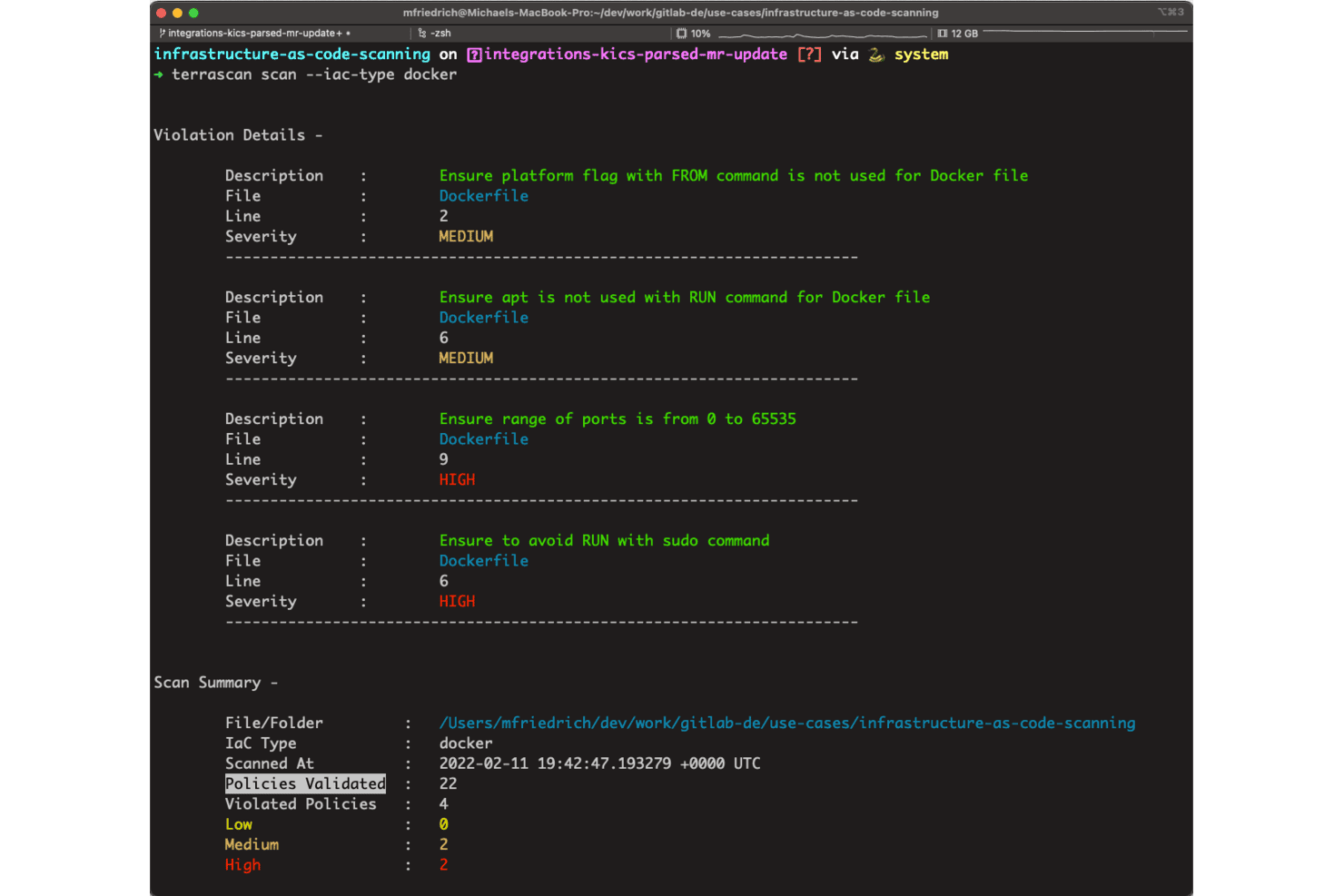
GitLab surfaces Dockerfile security violations with severity levels via Terrascan. GitLab is a DevSecOps platform that wraps Terraform and OpenTofu workflows inside a unified environment for source control, CI/CD pipelines, state management, and security scanning—making it a strong fit for DevOps teams that want to run infrastructure as code without stitching together separate tools.
Who Is GitLab Best For?
GitLab is a strong fit for DevOps teams that already use GitLab for source control and CI/CD and want to manage Terraform or OpenTofu workflows without adding a separate tool.
Why I Picked GitLab
I've included GitLab in my top picks because it's the only platform on this list that wraps Terraform and OpenTofu workflows inside a full DevSecOps environment, covering source control, CI/CD pipelines, state management, and security scanning without requiring separate tools. I particularly like how merge requests surface Terraform plan output directly, so my team can review resource changes and get approvals before anything applies. GitLab also manages state natively, with versioning, locking, and project-level permissions built in.
GitLab Key Features
- GitLab-managed state backend: Stores Terraform and OpenTofu state files with built-in versioning, locking, and project-level permissions across GitLab.com, Self-Managed, and Dedicated deployments.
- Private Terraform Module Registry: Lets teams publish and consume private Terraform modules across projects using CI/CD, with role-based access controls for publishing and deletion.
- OIDC-based cloud authentication: Authenticates CI jobs to cloud providers like GCP using Workload Identity Federation, eliminating the need to store long-lived credentials as pipeline secrets.
- Pipeline execution policies: Enforces organization-wide CI/CD job requirements across projects, allowing security and compliance teams to inject or replace pipeline configurations at scale.
GitLab Integrations
GitLab integrates with Terraform and OpenTofu and connects with Terraform Cloud, Terraform Enterprise, HashiCorp Vault, Flux, AWS, Microsoft Azure, and Google Cloud. It also offers REST, GraphQL, webhooks, OAuth 2.0, and MCP APIs for custom integrations.
Pros and Cons
Pros:
- Code review and deployment share one workflow
- Shared state includes versioning and locking
- Merge-request plans expose resource changes for review
Cons:
- Deprecated templates leave teams maintaining pipeline images
- Terraform and OpenTofu still provision infrastructure
 Best for VM development environments
- Free plan available
- Pricing upon request
Visit WebsiteCustomer Rating:4.6/5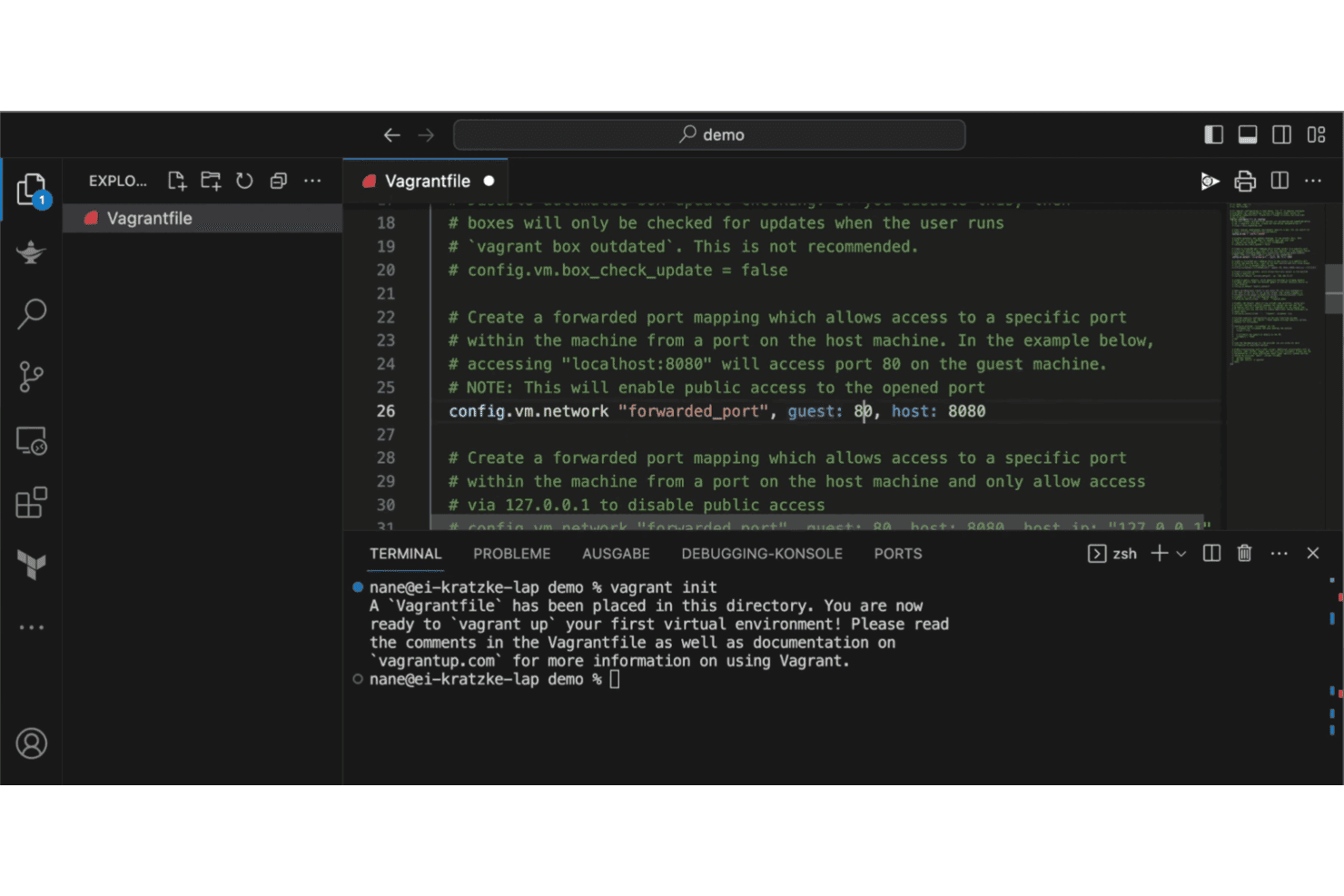
Vagrant lets users configure port forwarding in the Vagrantfile via VS Code. Vagrant is a HashiCorp command-line tool that lets development teams build and share reproducible VM environments from a single Vagrantfile, making it a lightweight option for teams who need consistent local dev setups without manual configuration.
Who Is Vagrant Best For?
Vagrant suits developers and small dev teams who need consistent, reproducible local VM environments without manually configuring each machine from scratch.
Why I Picked Vagrant
I've included Vagrant in my top picks because it's the go-to tool for teams who need consistent, reproducible VM development environments without manually configuring each machine. A single Vagrantfile defines the entire environment and can be committed to version control, so every developer runs
vagrant upand gets the exact same setup across Linux, macOS, and Windows. I particularly like how it supports provisioners like shell scripts, Chef, and Puppet natively, making repeatable local environments straightforward to manage.Vagrant Key Features
- Vagrantfile version control: Define your entire VM environment in a single Vagrantfile that you can commit to version control and share across your team.
- Multi-provisioner support: Run shell scripts, Chef, or Puppet automatically during
vagrant upto install and configure software on the guest machine. - Provider flexibility: Manage VMs across VirtualBox, Docker, and VMware through Vagrant's plugin-based provider system.
- Vagrant Share: Share a running Vagrant environment with others using a single command for quick collaboration or remote access.
Vagrant Integrations
Vagrant has native integrations with VirtualBox and Docker, plus provider support for VMware, AWS, and Rackspace. Its Vagrant Cloud API supports custom integrations through REST-style HTTP requests and JSON responses.
Pros and Cons
Pros:
- Straightforward setup gets teams running quickly
- Versioned Vagrantfiles standardize developer setups
- Repeatable local VM environments for testing
Cons:
- Ruby-based configs create a second IaC model
- No state tracking or plan/apply workflow
Learn more about Vagrant:
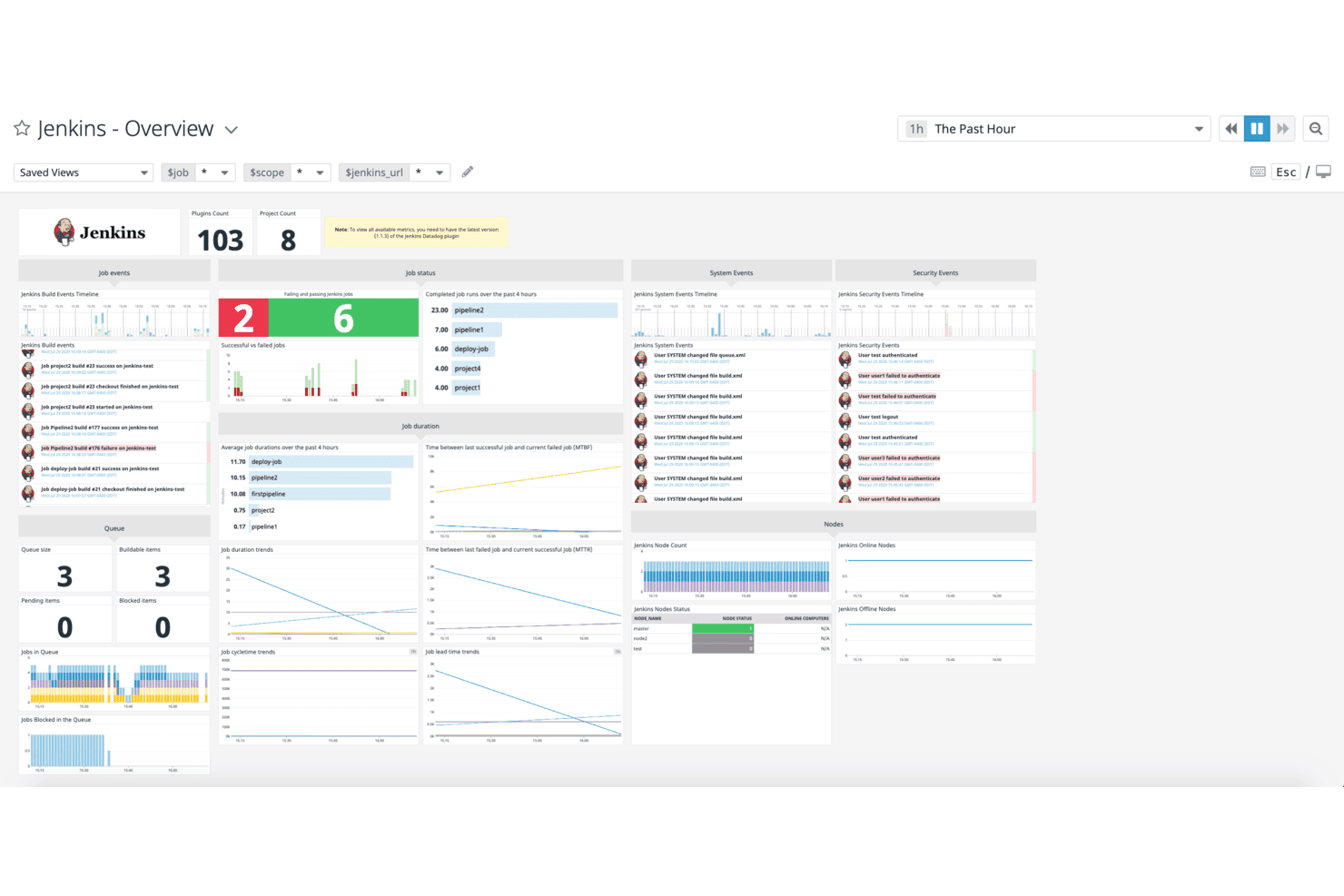
Jenkins centralizes build, queue, and security event monitoring in one dashboard. Jenkins is an open-source automation server that DevOps and platform engineering teams use to orchestrate CI/CD pipelines, trigger infrastructure workflows, and integrate with tools like Terraform, Kubernetes, and major cloud providers.
Who Is Jenkins Best For?
Jenkins is a strong fit for DevOps teams that already run CI/CD pipelines and want to orchestrate Terraform executions within their existing automation workflows.
Why I Picked Jenkins
I picked Jenkins as one of the best because it's the CI/CD backbone many DevOps teams already trust, and it handles continuous integration with a depth that's hard to replicate. I use Jenkinsfile-defined pipelines stored directly in source control to trigger
terraform planandterraform applysteps as part of a broader build-and-deploy workflow. Pipeline approval gates let me lock down who can confirm an apply, so infrastructure changes go through the same review process as application code.Jenkins Key Features
- Terraform build wrapper: The Jenkins Terraform plugin runs
terraform planandterraform applyas pipeline steps directly from a Jenkinsfile. - Pipeline-as-code: Define your full CI/CD workflow in a
Jenkinsfilestored in source control alongside your application and infrastructure code. - Granular permission controls: Assign job-level and credentials-level permissions to control which users can build, configure, or access sensitive pipeline resources.
- 2,300+ plugin ecosystem: Connect Jenkins to Git, GitHub, Kubernetes, and cloud provider services through community-maintained plugins.
Jenkins Integrations
Jenkins supports 2,300+ community-contributed plugins, including Git, GitHub, Kubernetes, and Terraform, plus cloud steps for AWS, Azure, and Google Cloud. Its REST-like API supports custom CI/CD integrations.
Pros and Cons
Pros:
- Version-controlled Jenkinsfiles keep workflows reviewable
- Pipeline approvals can gate infrastructure applies
- Automates Terraform runs alongside build pipelines
Cons:
- No native state locking or drift detection
- Doesn’t provision infrastructure without Terraform
- Terraform build wrapper: The Jenkins Terraform plugin runs
 Best for AWS resource management
- Free plan available
- From $0.0009 per handler operation
Visit WebsiteCustomer Rating:4.4/5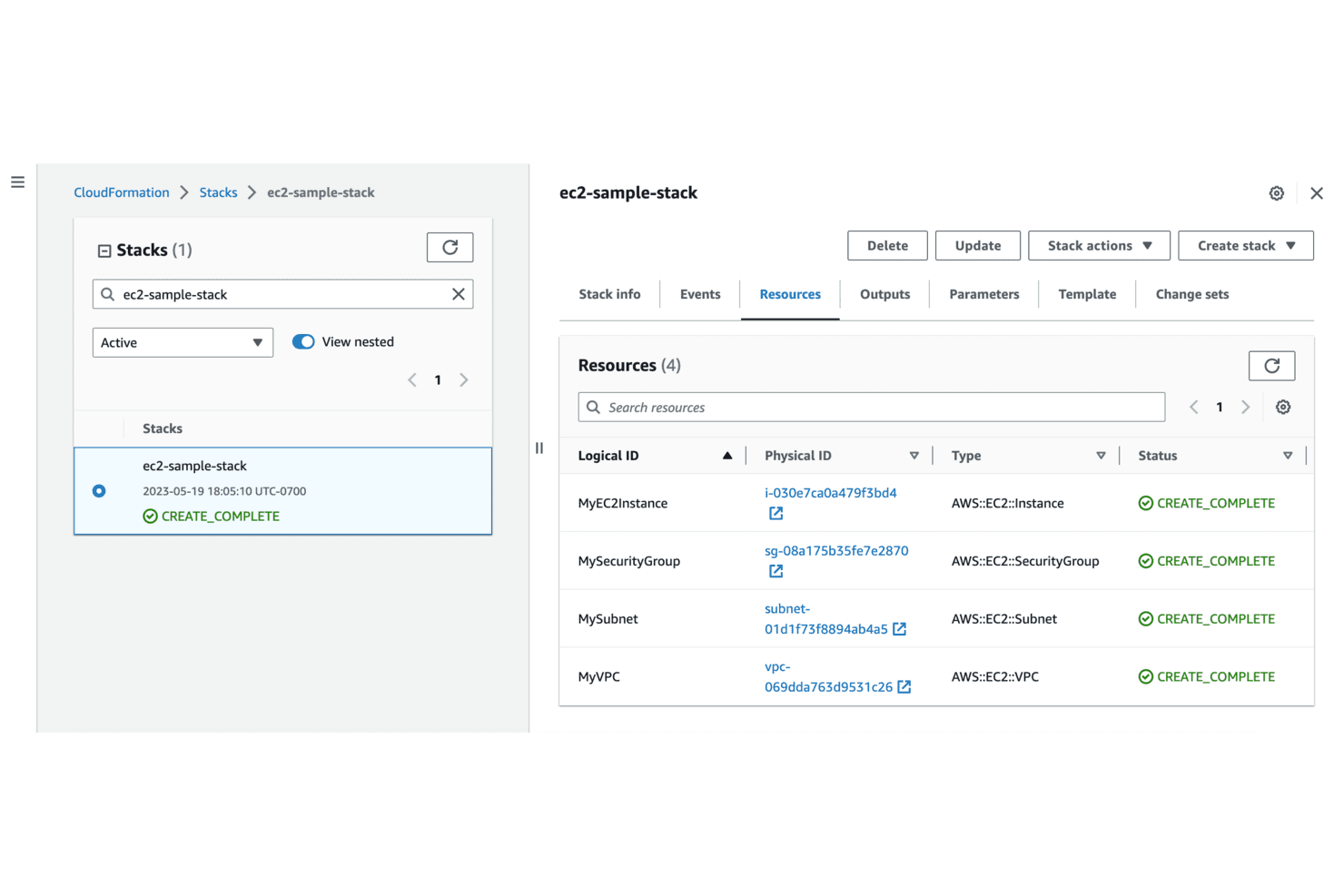
AWS CloudFormation tracks provisioned resources and their statuses in one view. AWS CloudFormation is Amazon's native infrastructure as code service, built for teams running entirely within AWS who want to provision, manage, and version cloud resources through declarative templates without maintaining their own state backend.
Who Is AWS CloudFormation Best For?
AWS CloudFormation is a natural fit for teams already running entirely within AWS who want native infrastructure as code without managing a separate state backend.
Why I Picked AWS CloudFormation
I picked AWS CloudFormation as one of the best because it's the native IaC solution for teams already deep in the AWS ecosystem. I love how Change Sets let you preview exactly which resources will be replaced or deleted before you commit, and drift detection flags any manual changes made outside the stack so your templates stay the source of truth. If your infrastructure is AWS-only, you won't find a tighter fit between your IaC tooling and your cloud provider.
AWS CloudFormation Key Features
- AWS CDK support: Author infrastructure using TypeScript, Python, Java, or .NET through the AWS Cloud Development Kit, which CloudFormation then provisions.
- StackSets: Deploy, update, or delete a common set of AWS resources across multiple accounts and Regions from a single template.
- Rollback triggers: Monitor CloudWatch alarms during stack creation and updates, automatically reverting operations if a specified alarm fires.
- IaC generator: Scan existing AWS resources and auto-generate JSON or YAML CloudFormation templates for importing or migrating them into managed stacks.
AWS CloudFormation Integrations
AWS CloudFormation offers marketplace integrations with MongoDB Atlas, Datadog, Atlassian Opsgenie, JFrog, Trend Micro, Splunk, Aqua Security, FireEye, Sysdig, and Snyk. Its AWS CloudFormation service API, AWS SDKs, and AWS CLI support custom integrations.
Pros and Cons
Pros:
- Managed stack state supports automatic rollback
- Change Sets preview replacements and deletions
- Repeatable AWS provisioning through versioned templates
Cons:
- Large templates can become difficult to maintain
- AWS-only provisioning excludes multi-cloud Terraform use cases
Learn more about AWS CloudFormation: Best for IT automation
- Free plan + free demo available
- Pricing upon request
Visit WebsiteCustomer Rating:4.2/5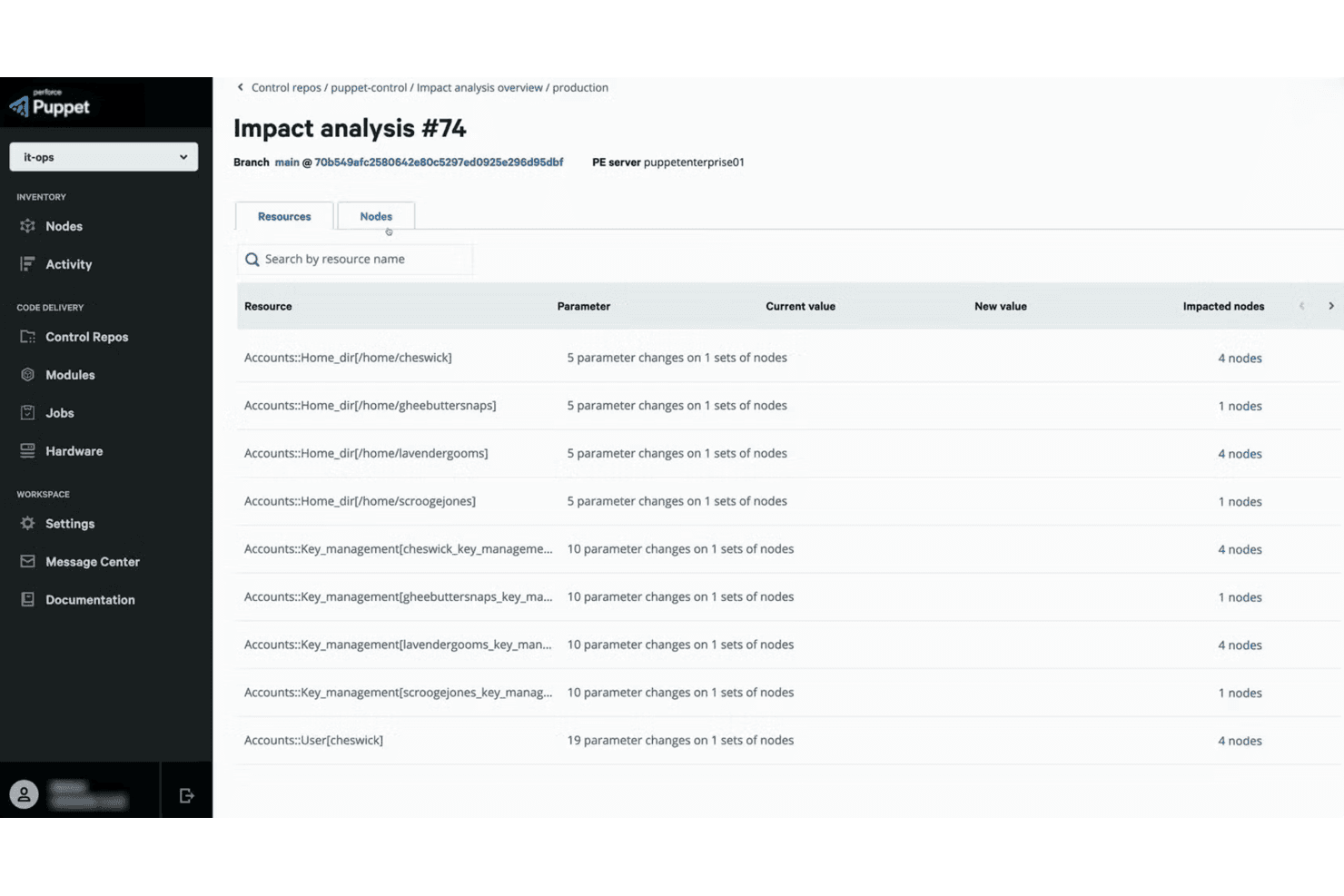
Puppet surfaces resource-level impact analysis before code deployments. Puppet Enterprise is a configuration management platform that appeals to IT and infrastructure teams managing large server fleets across hybrid and multi-cloud environments, helping them enforce consistent system states, detect drift, and automate compliance.
Who Is Puppet Best For?
Puppet Enterprise suits IT and infrastructure teams managing large server fleets who need consistent configuration enforcement across hybrid and multi-cloud environments.
Why I Picked Puppet
I picked Puppet as one of the best for IT automation because it enforces desired configuration state continuously across server fleets, automatically detecting and correcting drift before it becomes a problem. Where Terraform provisions your infrastructure, Puppet takes over from there, managing OS-level and application configuration across on-premises, cloud, and hybrid environments through a Git-based control repository. I also appreciate that over 7,000 Puppet Forge modules mean you're rarely writing automation from scratch.
Puppet Key Features
- Role-based access control: Assigns default and custom roles—Administrators, Operators, Viewers, Code Deployers—with granular permissions controlling what each user can view or modify across managed environments.
- Impact Analysis: Generates pre-merge reports showing the scope and risk of Puppet code changes, with CI/CD integration to flag issues before deployment.
- Observability Data Connector: Exports Puppet infrastructure, change, compliance, and patching data to tools like Splunk, Datadog, Grafana, and Prometheus.
- ServiceNow integration: Lets authorized users trigger Puppet tasks and plans directly from ServiceNow and syncs Puppet node facts into ServiceNow CMDB records.
Puppet Integrations
Puppet Enterprise has native integrations with ServiceNow and Splunk, plus documented integrations with Terraform, Datadog, New Relic, Prometheus, and Grafana. HTTP(S) APIs support custom integrations.
Pros and Cons
Pros:
- Forge modules reduce custom configuration work
- Detects and corrects configuration drift automatically
- Enforces configuration consistency across server fleets
Cons:
- Some cloud modules lack required service coverage
- Doesn't provision cloud infrastructure like Terraform
Learn more about Puppet: Best for multi-cloud orchestration
- Free plan + 60-day free trial available
- Pricing upon request
Visit WebsiteCustomer Rating:4.1/5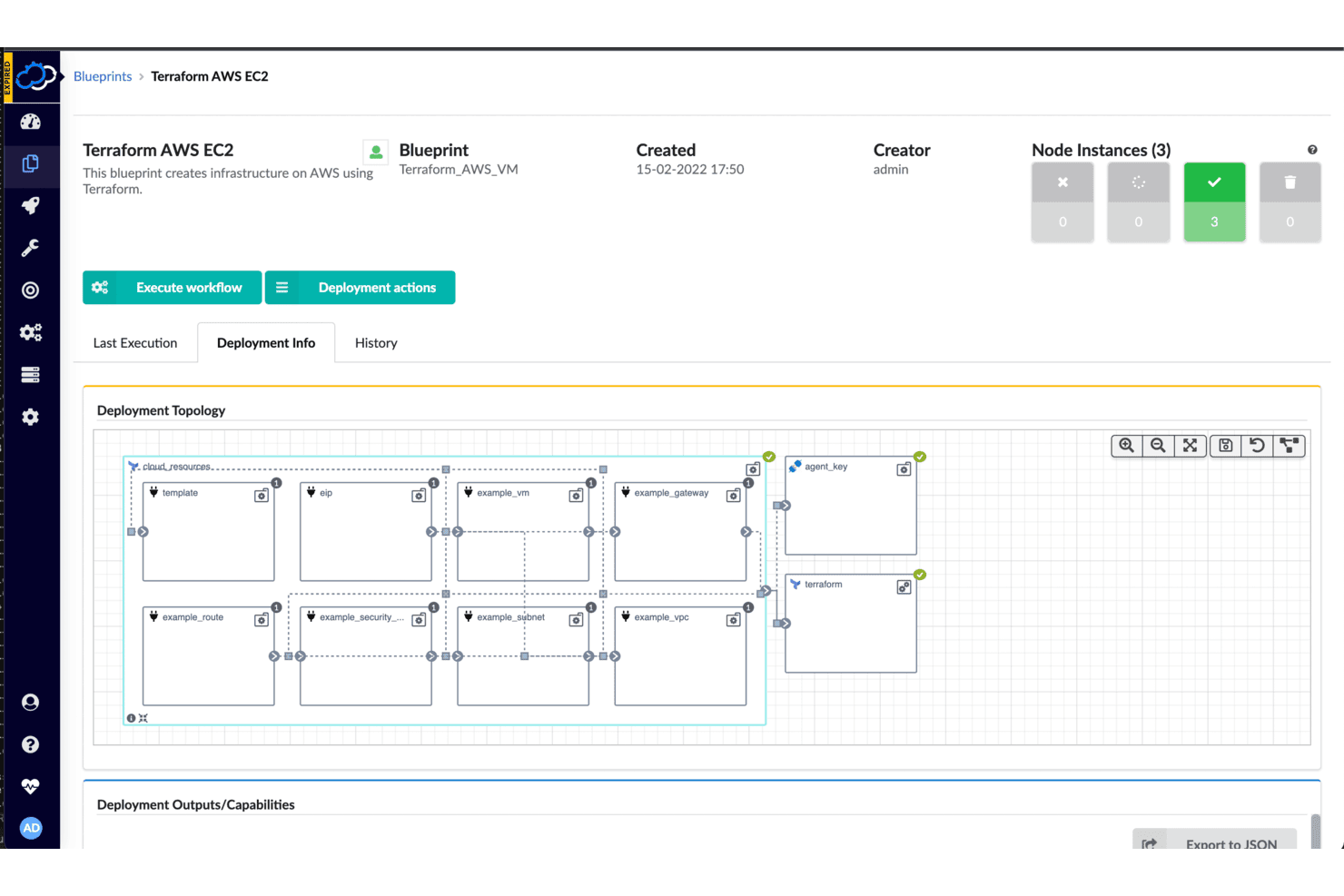
Cloudify visualizes infrastructure deployment topology for AWS EC2. Cloudify is an open-source orchestration platform that lets DevOps and platform engineering teams manage infrastructure across multiple clouds, Kubernetes clusters, and on-premises environments through a single, unified workflow engine.
Who Is Cloudify Best For?
Cloudify suits infrastructure architects and platform engineers at large organizations managing diverse toolchains across multiple clouds, Kubernetes clusters, and on-premises environments.
Why I Picked Cloudify
I picked Cloudify because it's the strongest option on my list for teams running infrastructure across multiple clouds simultaneously. Its Terraform plugin lets you manage AWS and Azure modules side by side within a single blueprint, while Cloudify's DSL models the relationships between those environments, their shared resources, and their distributed lifecycles. On top of that, Cloudify Spire's manager-of-managers architecture means you can centrally orchestrate and heal deployments across multi-site and edge environments from one place.
Cloudify Key Features
- Terraform plugin lifecycle management: The Terraform plugin runs init, plan, apply, refresh, import, and destroy operations directly from Cloudify blueprints.
- Built-in heal and scale workflows: Cloudify auto-generates heal and scale workflows from its desired-state model for day-two operations.
- CI/CD pipeline integration: Native integrations with Jenkins, GitHub Actions, GitLab CI/CD, and CircleCI let you trigger Cloudify environment operations from your existing pipelines.
- Secret store with encrypted storage: Secrets are encrypted in the database using Fernet symmetric encryption and are accessible across deployments.
Cloudify Integrations
Cloudify offers documented native integrations with AWS, Microsoft Azure, Terraform, Ansible, Docker, OpenStack, VMware vSphere, and ServiceNow. It also supports Jenkins, GitHub Actions, GitLab CI/CD, and CircleCI workflows, plus REST and Python APIs for custom integrations.
Pros and Cons
Pros:
- Built-in healing and scaling workflows
- Runs Terraform modules within composite blueprints
- Orchestrates multi-cloud infrastructure beyond provisioning
Cons:
- YAML DSL and manager add operational overhead
- Wraps Terraform rather than replacing it
Learn more about Cloudify: Best for Google Cloud resources
- Free plan + free trial available
- Pricing upon request
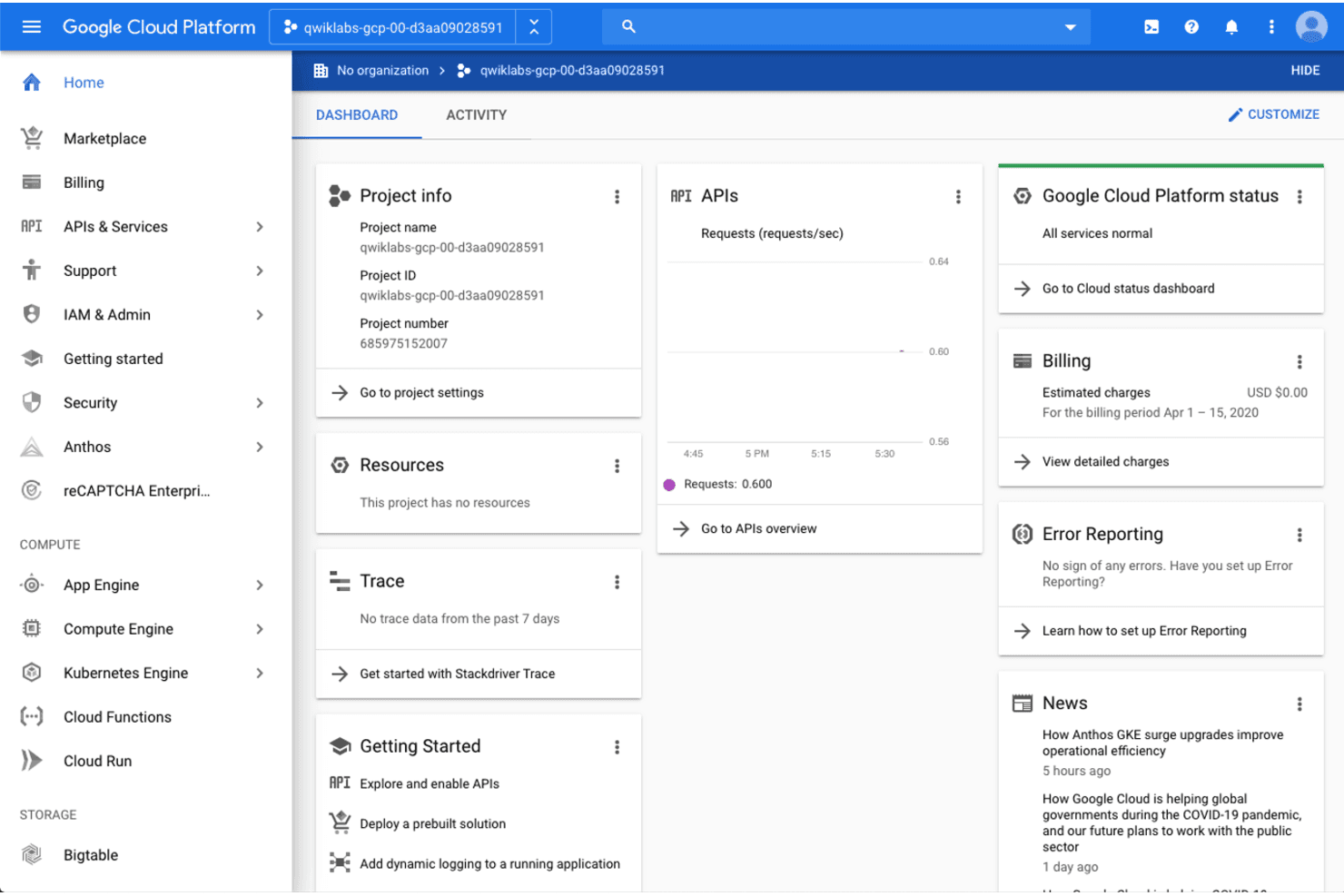
Google Cloud Platform provides a central dashboard for managing project resources and APIs. Google Cloud Deployment Manager is Google's native infrastructure-as-code service that lets you define, deploy, and manage Google Cloud resources declaratively using YAML configurations and Jinja or Python templates.
Who Is Google Cloud Deployment Manager Best For?
Teams already committed to Google Cloud who need a no-cost way to declaratively manage GCP resources and are actively planning a migration path to Infrastructure Manager or Terraform.
Why I Picked Google Cloud Deployment Manager
I've included Google Cloud Deployment Manager on this list specifically for GCP-committed teams who need a no-cost, native way to declaratively provision resources like Compute Engine, BigQuery, and Cloud SQL using YAML and Jinja or Python templates. I appreciate that it supports deployment previews, in-place or rolling updates, and rollback to previous deployments, all within Google's IAM framework. That said, support ended April 2026, so I'd treat it primarily as a bridge tool while planning a migration to Infrastructure Manager or Terraform via the built-in DM Convert utility.
Google Cloud Deployment Manager Key Features
- YAML-based declarative configuration: Define your Google Cloud infrastructure in YAML files, with Jinja or Python templates for reusable, parameterized resource definitions.
- IAM-based access control: Assign predefined roles—Admin, Editor, Viewer, Type Editor, and Type Viewer—to control who can create, manage, or view deployments at the project level.
- Cloud Audit Logs integration: Log administrative and data-access operations automatically, including deployment create, update, patch, delete, and preview-cancel events.
- DM Convert migration tool: Convert existing Deployment Manager YAML configurations and templates to Terraform or Kubernetes Resource Model files, with generated import commands for Terraform state.
Google Cloud Deployment Manager Integrations
Google Cloud Deployment Manager offers documented native integrations with Cloud Storage, Compute Engine, and Cloud SQL. It also provides a REST API and supports custom API type providers for connecting additional APIs.
Pros and Cons
Pros:
- DM Convert generates Terraform import commands
- Managed state avoids separate state-file operations
- Quick deployment setup praised by reviewers
Cons:
- Support ended; service sunset follows in 2027
- Google Cloud-only configurations deepen vendor lock-in
Learn more about Google Cloud Deployment Manager (GCP):
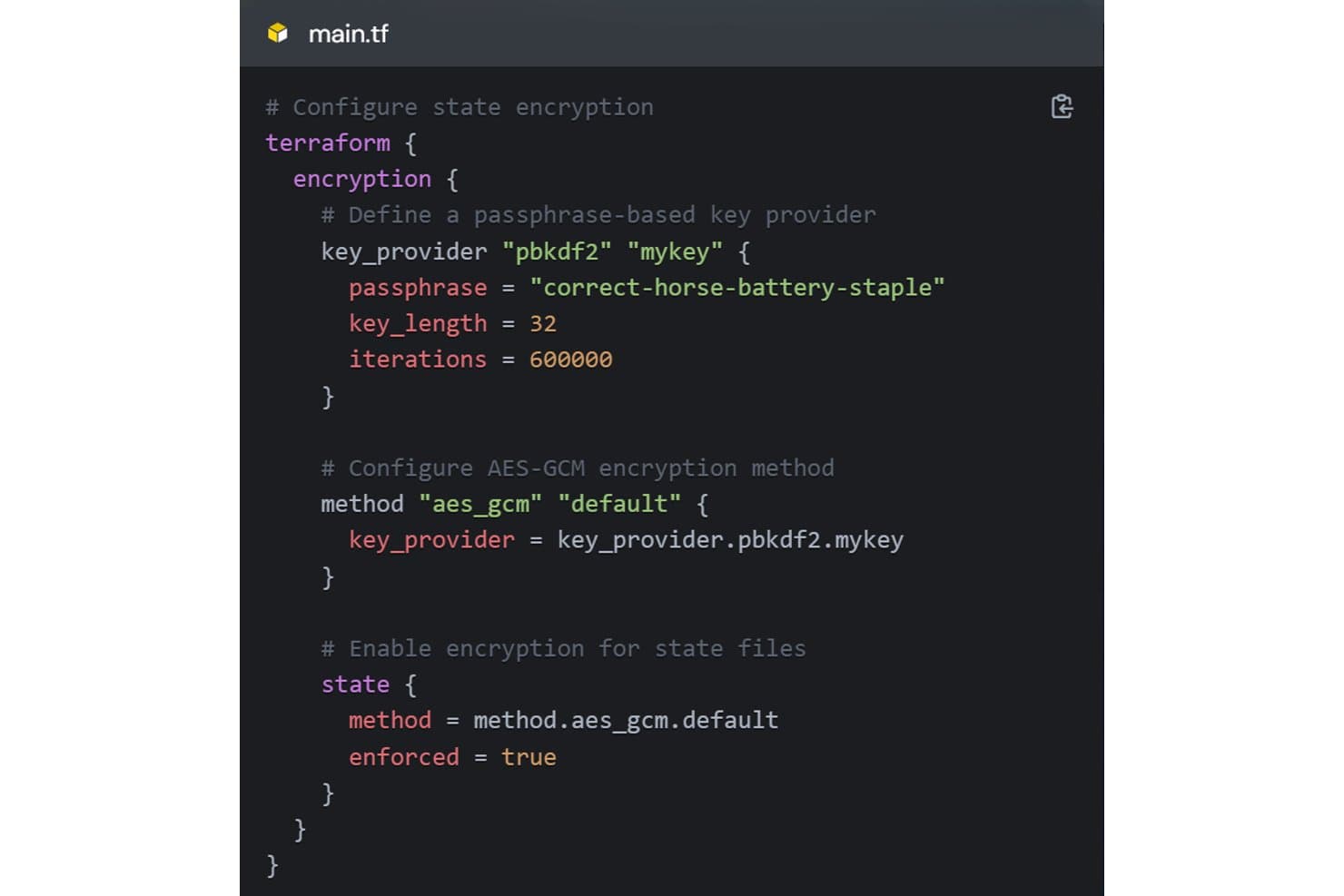
OpenTofu encrypts state files using AES-GCM and a passphrase-based key provider. OpenTofu is a Linux Foundation-governed, open-source IaC tool that lets infrastructure teams define, provision, and manage cloud and on-premises resources through a familiar declarative workflow—making it a natural fit for teams looking to move away from Terraform without rewriting their existing configurations.
Who Is OpenTofu Best For?
OpenTofu is a strong fit for infrastructure teams that are moving away from Terraform due to licensing concerns and want a drop-in replacement with minimal migration friction.
Why I Picked OpenTofu
I picked OpenTofu because it's the most credible open-source answer to Terraform's licensing shift, governed by the Linux Foundation rather than a single commercial entity. What I appreciate most is how low-friction the migration is: most existing Terraform configurations work without modification, and switching is largely a matter of running
tofuinstead ofterraform. On top of that, state encryption at rest and provider iteration withfor_eachgive teams genuinely useful capabilities that go beyond a simple binary swap.OpenTofu Key Features
- Write, Plan, Apply workflow: A three-stage declarative workflow that lets you author configuration, preview proposed changes without executing them, and then apply only after review.
- Reusable modules: Shareable, configurable packages of infrastructure code that teams can pull from the OpenTofu Registry or maintain privately to standardize deployments.
- Remote state backends: Stores infrastructure state in remote backends—including S3, Azure Blob, and GCS—with support for state locking to prevent conflicting concurrent operations.
tofu importcommand: Brings existing infrastructure resources under OpenTofu management by importing them into state at a specified resource address.
OpenTofu Integrations
OpenTofu offers 4,000+ marketplace provider integrations through its Registry, including AWS, Azure, Google Cloud, Kubernetes, Docker, GitHub, and GitLab. The OpenTofu Registry also provides an API for custom integrations.
Pros and Cons
Pros:
- State encryption adds at-rest protection
- Linux Foundation governance reduces single-vendor dependence
- Most Terraform configurations migrate with minimal edits
Cons:
- Hardcoded scripts and HCP workflows complicate migration
- Approvals rely on external CI or TACOS
Learn more about OpenTofu:
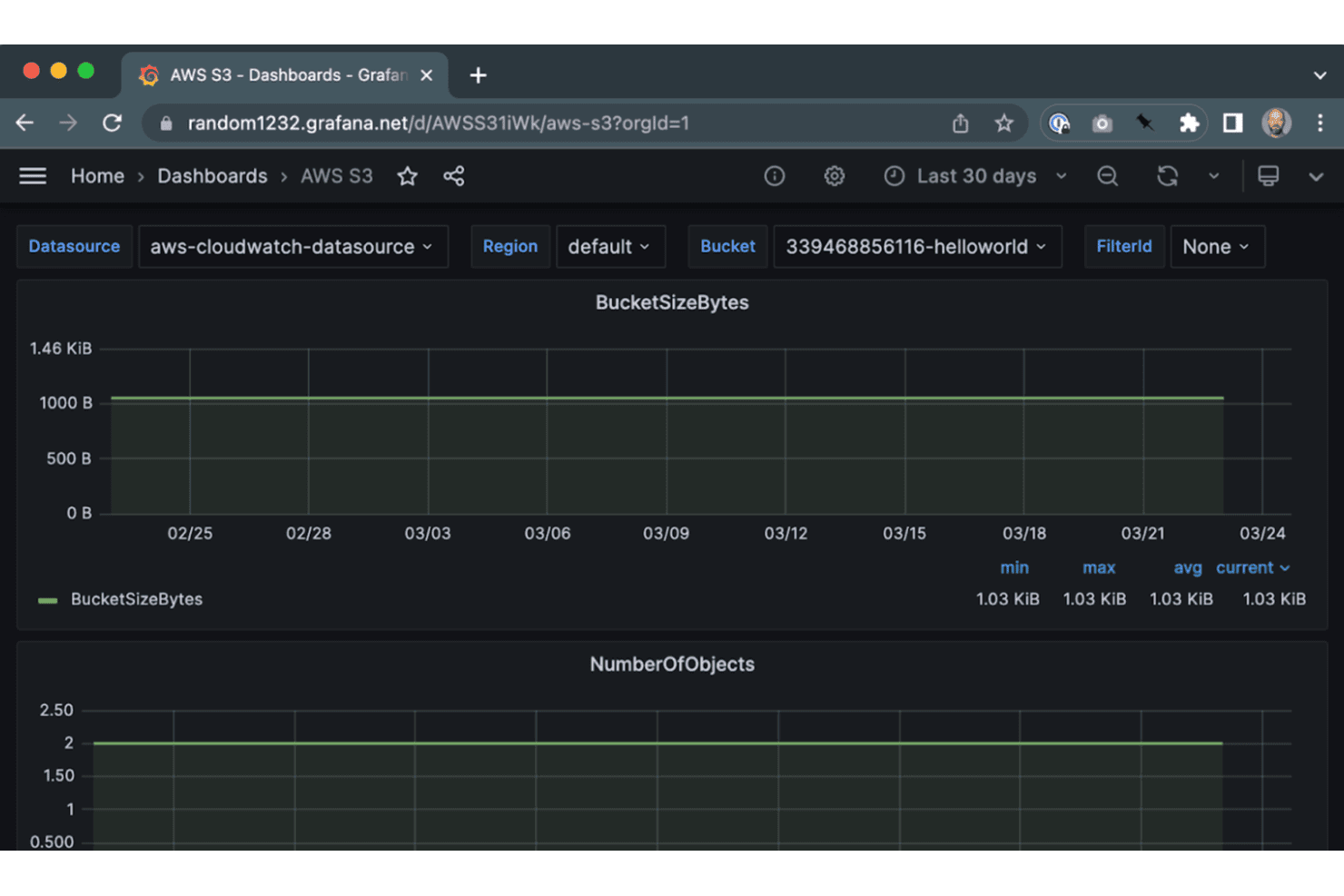
Crossplane monitors AWS S3 bucket size and object count via Grafana. Crossplane is an open-source, Kubernetes-native control plane framework built for platform and DevOps engineers who want to manage cloud infrastructure using the same declarative APIs and tooling they already use for applications.
Who Is Crossplane Best For?
Crossplane is a strong fit for platform engineering teams that are already running Kubernetes and want to manage cloud infrastructure through the same APIs and workflows they use for applications.
Why I Picked Crossplane
I've included Crossplane in my top picks because it's the only tool here that treats infrastructure as a native Kubernetes resource, letting you manage cloud services with the same
kubectlcommands and RBAC policies you already use for your workloads. I particularly like how composite resources let platform teams expose curated, self-service APIs to developers without handing over raw cloud access. Crossplane's always-on reconciliation loops also continuously correct drift, so if someone modifies a GCP bucket directly, Crossplane quietly restores the declared state without any manual intervention.Crossplane Key Features
- Multi-language composition functions: Write composition functions in YAML, KCL, Python, or Go to define how Crossplane builds and configures infrastructure resources.
- Upbound Marketplace: Browse, install, and publish providers, configurations, functions, and add-ons to extend your control plane across AWS, Azure, GCP, and OCI.
- Observe-mode import: Bring existing cloud resources under Crossplane management using an
Observepolicy and external-name annotation, without disrupting the running resource. - Package revision control: Configure automatic or manual activation of provider package revisions and set how many inactive revisions are retained across your control plane fleet.
Crossplane Integrations
Crossplane offers marketplace integrations with AWS, Microsoft Azure, Google Cloud Platform, Oracle Cloud Infrastructure, Terraform, Argo CD, and Kyverno. It also provides REST and Kubernetes APIs for custom integrations.
Pros and Cons
Pros:
- Reconciliation restores out-of-band changes
- Self-service abstractions preserve team guardrails
- Kubernetes-native infrastructure alongside workloads
Cons:
- No Terraform state or HCL compatibility
- No general Terraform-style plan preview
Learn more about Crossplane:
Outras alternativas ao Terraform
Eis algumas alternativas adicionais ao Terraform que não entraram na minha lista restrita, mas que vale a pena conhecer:
- 11MorpheusBest for hybrid cloud management
- 12env0Best for cloud governance
- 13DockerBest for containerization
- 14ChefBest for configuration management
- 15KubernetesBest for container orchestration
- 16Aikido SecurityBest for security auditing
How I Evaluate Terraform Alternatives
I split my evaluation into baseline requirements—multi-cloud provisioning, state management, and plan previews—and differentiators like licensing model, HCL migration paths, and GitOps integration.
Core Functionality (Table Stakes For This List)
When I'm selecting tools for my list, I rank each one on a scale from 0 (does not offer the functionality) to 5 (excels in this area) for each core functionality listed below. Then, I calculate the tool's total score into a percentage. Each tool needs to achieve a minimum total score of 65% to be considered for inclusion.
- Infrastructure as Code: I check whether the tool supports declarative resource definitions in a structured language, like HCL in Terraform or TypeScript in Pulumi, with version-controllable config files.
- Multi-Cloud Provider Support: A tool earns higher marks when it covers AWS, Azure, and GCP at minimum—plus SaaS and on-prem providers for teams managing hybrid environments.
- State Management: I evaluate how each tool tracks deployed resources, looking at remote state backends, locking mechanisms, and drift detection against live infrastructure.
- Execution Plan & Preview: Before any apply, I look for a clear plan output that shows exactly which resources will be created, modified, or destroyed—similar to
terraform planorpulumi preview. - Modular & Reusable Configurations: Teams provisioning similar stacks across staging and production need modules or components they can version, share, and compose without duplicating code.
- CI/CD & Automation Integration: I evaluate how well each tool plugs into pipeline workflows, whether through native VCS integrations, CLI compatibility with GitHub Actions or GitLab CI, or webhook-driven runs.
Once I have a list of tools that meet this criteria, I consider what sets each platform apart.
Differentiating Factors (What Sets Vendors Apart)
Here's how I compare and contrast different vendors:
Standout Features
Policy-as-code support matters when teams need guardrails that block non-compliant deploys automatically—like enforcing tagging standards or preventing public S3 buckets before they go live. I also evaluate whether a tool lets you write infrastructure in general-purpose languages like Python or TypeScript, which can be a big advantage for teams without HCL experience. Drift detection is another differentiator; tools that continuously scan live resources and alert on unauthorized changes save hours of manual auditing.
Beyond Features
Licensing is a major reason teams explore Terraform alternatives in the first place, so I check whether each tool uses a truly open-source license like Apache 2.0 or MPL versus a source-available model with commercial restrictions. Migration path from Terraform is equally important—I look for compatibility with existing HCL files, state imports, and provider registries so teams aren't rewriting hundreds of modules from scratch. I also consider how well each tool fits into GitOps workflows with tools like ArgoCD or Atlantis for PR-driven infrastructure changes.
Por que procurar uma alternativa ao Terraform?
Embora o Terraform seja uma boa escolha entre as ferramentas de Infraestrutura como Código (IaC), existem várias razões pelas quais alguns utilizadores procuram soluções alternativas. Pode estar à procura de uma alternativa ao Terraform porque…
- Precisa de suporte multilingue para a sua equipa
- Está a deparar-se com dificuldades na curva de aprendizagem do Terraform
- Requer uma melhor integração com os sistemas existentes
- Precisa de funcionalidades mais avançadas de gestão de políticas
- A sua equipa procura ferramentas de colaboração em tempo real
- Está limitado pela disponibilidade geográfica do Terraform
Se alguma destas situações lhe é familiar, veio ao sítio certo. A minha lista contém várias opções de ferramentas de Infraestrutura como Código (IaC) mais adequadas para equipas que enfrentam estes desafios com o Terraform e procuram soluções alternativas.
Principais funcionalidades do Terraform
Eis algumas das principais funcionalidades do Terraform para o ajudar a contrastar e comparar o que as soluções alternativas oferecem:
- Fluxo de trabalho em três etapas: O Terraform utiliza um fluxo de trabalho de escrita, planeamento e aplicação que ajuda a sua equipa a definir, pré-visualizar e implementar alterações à infraestrutura de forma eficiente.
- Suporte para vários fornecedores: Funciona com uma vasta gama de fornecedores, permitindo-lhe gerir vários serviços na nuvem e no local.
- Infraestrutura imutável: O Terraform promove uma abordagem de infraestrutura imutável, simplificando as atualizações e garantindo a consistência.
- Gestão do estado: Regista as alterações à infraestrutura através de um ficheiro de estado, ajudando-o a gerir e compreender o estado atual da sua infraestrutura.
- Módulos de configuração reutilizáveis: Pode criar módulos reutilizáveis para uniformizar os componentes da infraestrutura em diferentes ambientes.
- Integração com sistemas de controlo de versões: O Terraform integra-se com sistemas de controlo de versões, facilitando a colaboração e o acompanhamento das alterações na sua equipa.
- Aprovisionamento automatizado de recursos: Automatiza o aprovisionamento de recursos, reduzindo o esforço manual e os erros na gestão da infraestrutura.
- Envolvimento da comunidade: O Terraform incentiva as contribuições e os debates da comunidade, promovendo uma comunidade de utilizadores ativa que ajuda a melhorar a ferramenta.