

SureMDM-beoordeling 2026: voordelen, nadelen, functies en prijzen
I judge SureMDM by how well it can bring order to a mixed-device fleet—not just by its feature list. This review weighs its strengths, trade-offs, and pricing to help you decide if it fits.

We review tools independently, and commissions help fund our testing. See our transparency policy, our methodology, or suggest a tool.
SureMDM is MDM software from 42Gears for managing and securing devices across platforms. I’d consider it when your team needs one console for a mixed fleet, including mobile devices, computers, kiosks, wearables, or IoT endpoints. SureMDM is a stronger fit than Microsoft Intune when your fleet also includes ChromeOS, Wear OS, VR, or IoT devices, which SureMDM lists among its supported platforms.
SureMDM Evaluation Summary
4.8/5
- From $3.99/device/month (billed annually)
- 30-day free trial
Waarom u onze softwareaanbevelingen kunt vertrouwen
6,700+
Reviews
20
Industry experts
16+
Evaluation factors
14
Years
Ons team test en beoordeelt software sinds 2012. Als technologieleiders weten we zelf hoe moeilijk — en belangrijk — het is om de juiste software te kiezen.
Voor deze gids hebben we tools geëvalueerd met behulp van praktijktests en onafhankelijk onderzoek, waarbij we tools beoordeeden aan de hand van onze selectiecriteria.
Onze reviews weerspiegelen ons menselijke redactionele oordeel, geen verkooppraatje.
Deskundige beoordelaars:
- Paulo Gardini MiguelTechnisch directeur
 Tim FisherVP AI
 Gabriel RosasTech Lead & software-architect
 Christhian GruhnTech Lead & platformarchitect

SureMDM Overview
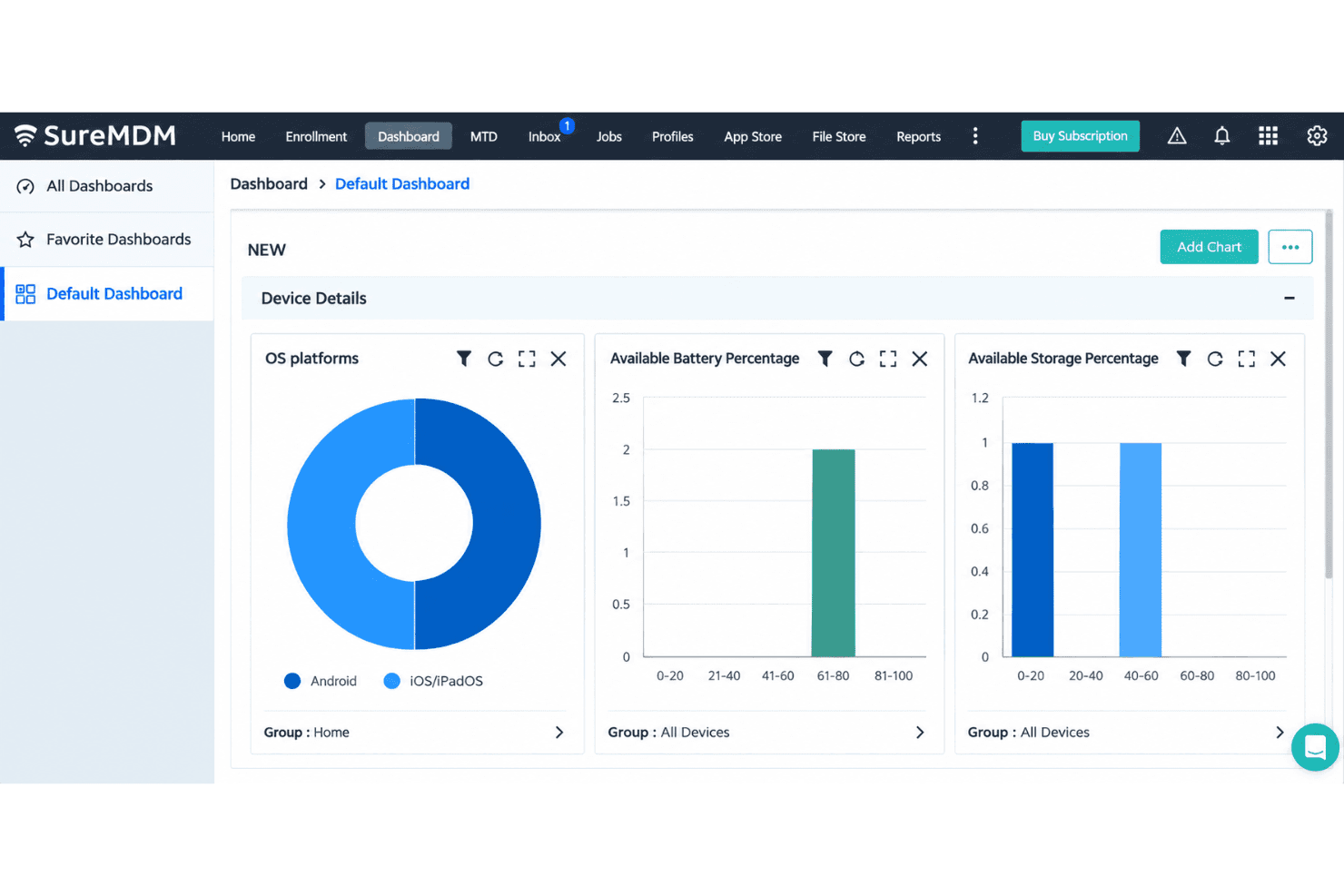
I’d choose SureMDM for a mixed fleet spanning phones, computers, kiosks, wearables, VR, and IoT devices. Zero-touch, Apple Business Manager, and QR enrollment support staged rollouts, while remote control, kiosk policies, app deployment, and remote wipe cover daily administration. Advanced reporting, identity management, certificate management, and SIEM integrations are available in higher tiers. The central console brings inventory and device controls together, though its broad feature set requires planning. 42Gears also offers 24/7 support. I’d select it for managing varied endpoints, with the right plan depending on the features and integrations required.
Pros
- Wide support spans mobile, desktop, ChromeOS, wearables, VR, and IoT.
- Users praise remote control, app deployment, and kiosk mode.
- Reviewers frequently commend responsive technical support.
Cons
- Reporting offers limited customization for operational views.
- Profile and policy changes become difficult to manage at scale.
- One administrator reported an outage leaving iOS devices unmanaged.
Is SureMDM Right For Your Needs?
Who Would be a Good Fit for SureMDM?
SureMDM suits teams managing varied devices or distributed endpoints that need enrollment, app deployment, and remote actions from one console. Its enrollment options, integrations, and REST API also fit IT teams connecting device management with existing systems.
- Mixed FleetsOrganizations managing varied device types can use SureMDM’s broad platform coverage and centralized enrollment, app deployment, lock, and wipe features.
- Zebra OperationsTeams managing Zebra devices can pair SureMDM with its Zebra LifeGuard integration for device-related workflows.
- Distributed TeamsIT departments supporting remote or dispersed workers can manage devices remotely and handle routine tasks from one console.
- New Device RolloutsDeployment teams can use zero-touch, QR-code, and Apple Business Manager enrollment to prepare devices for users.
- IT Support TeamsSupport staff can remotely lock or wipe devices and deploy apps without handling each endpoint in person.
- Connected IT OperationsIT teams using Microsoft 365, ServiceNow, Active Directory, or other listed integrations can connect SureMDM with existing systems, and use its REST API for external workflows.
Who Would be a Bad Fit for SureMDM?
SureMDM may be less suitable when device management needs are narrow or your team can’t spend time on configuration. Its advanced settings have a learning curve, and profile or policy changes can become harder to manage as deployments grow. Check connector availability before choosing it for a workflow that depends on a specific external application.
- Small Single-Platform FleetsTeams managing a small, uniform fleet may not need SureMDM’s broad platform coverage, which can add complexity beyond their routine requirements.
- No Admin CapacityOrganizations without an owner for setup and ongoing configuration may struggle with SureMDM’s learning curve around advanced settings.
- Frequent Policy ChangesTeams that regularly revise profiles and policies may find those changes harder to manage as their deployment grows.
- Complex RolloutsOrganizations planning large, mixed-fleet deployments should expect more configuration work than a small rollout, given SureMDM’s broad coverage and advanced settings.
- Unlisted IntegrationsTeams requiring a turnkey connector to an unlisted system should verify its availability first, since connecting external applications through the REST API may require additional work.
- Basic Device NeedsBusinesses that only need a narrow set of device-management tasks may find SureMDM’s broad platform coverage and configuration options more than they need.
Our Review Methodology
How We Test & Score Tools
We’ve spent years building, refining, and improving our software testing and scoring system. The rubric is designed to capture the nuances of software selection and what makes a tool effective, focusing on critical aspects of the decision-making process.
Below, you can see exactly how our testing and scoring works across seven criteria. It allows us to provide an unbiased evaluation of the software based on core functionality, standout features, ease of use, onboarding, customer support, integrations, customer reviews, and value for money.
Core Functionality (25% of final scoring)
The starting point of our evaluation is always the core functionality of the tool. Does it have the basic features and functions that a user would expect to see? Are any of those core features locked to higher-tiered pricing plans? At its core, we expect a tool to stand up against the baseline capabilities of its competitors.
Standout Features (25% of final scoring)
Next, we evaluate uncommon standout features that go above and beyond the core functionality typically found in tools of its kind. A high score reflects specialized or unique features that make the product faster, more efficient, or offer additional value to the user.
We also evaluate how easy it is to integrate with other tools typically found in the tech stack to expand the functionality and utility of the software. Tools offering plentiful native integrations, 3rd party connections, and API access to build custom integrations score best.
Ease of Use (10% of final scoring)
We consider how quick and easy it is to execute the tasks defined in the core functionality using the tool. High scoring software is well designed, intuitive to use, offers mobile apps, provides templates, and makes relatively complex tasks seem simple.
Onboarding (10% of final scoring)
We know how important rapid team adoption is for a new platform, so we evaluate how easy it is to learn and use a tool with minimal training. We evaluate how quickly a team member can get set up and start using the tool with no experience. High scoring solutions indicate little or no support is required.
Customer Support (10% of final scoring)
We review how quick and easy it is to get unstuck and find help by phone, live chat, or knowledge base. Tools and companies that provide real-time support score best, while chatbots score worst.
Customer Reviews (10% of final scoring)
Beyond our own testing and evaluation, we consider the net promoter score from current and past customers. We review their likelihood, given the option, to choose the tool again for the core functionality. A high scoring software reflects a high net promoter score from current or past customers.
Value for Money (10% of final scoring)
Lastly, in consideration of all the other criteria, we review the average price of entry level plans against the core features and consider the value of the other evaluation criteria. Software that delivers more, for less, will score higher.
Core Features
Device Enrollment
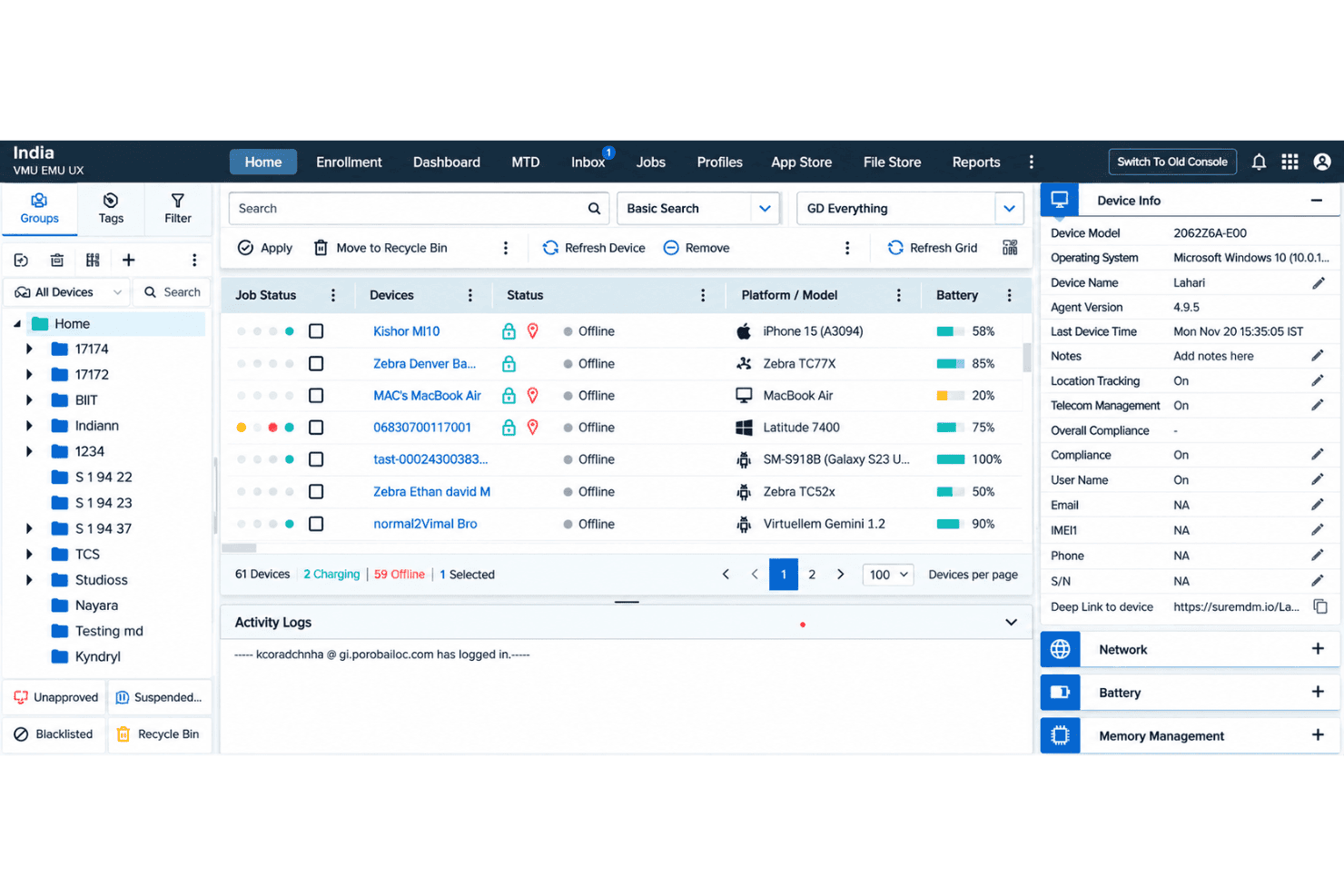
SureMDM enrolls devices through zero-touch, QR-code, Apple Business Manager, and manual methods. These options let your team prepare a batch of devices before rollout or enroll a BYOD device with Apple User Enrollment.
Configuration And Security Policies
Admins apply settings and security rules from the SureMDM console, including password requirements, network settings, and restrictions. Remote lock and wipe let your team respond to a lost device without retrieving it first.
App And Content Deployment
SureMDM pushes apps from sources such as Managed Google Play or an enterprise app store, and can install Android apps silently. Your team can also distribute files remotely, such as PDFs for field staff.
Kiosk Lockdown
Kiosk mode restricts a device to approved apps or websites, with options to block system settings and other apps. A retail tablet, for example, can stay locked to a checkout app; SureLock is included with all plans.
Remote Support
Admins can view and control supported device screens, transfer files, and troubleshoot from the console. That lets your support team diagnose a field device remotely instead of first arranging an on-site visit.
Device Inventory And Tracking
SureMDM records device and app inventory, and offers location tracking on supported devices, including real-time and historical GPS views for Android. Your team can check device status or locate a misplaced device before deciding whether to lock or wipe it.
Ease of Use
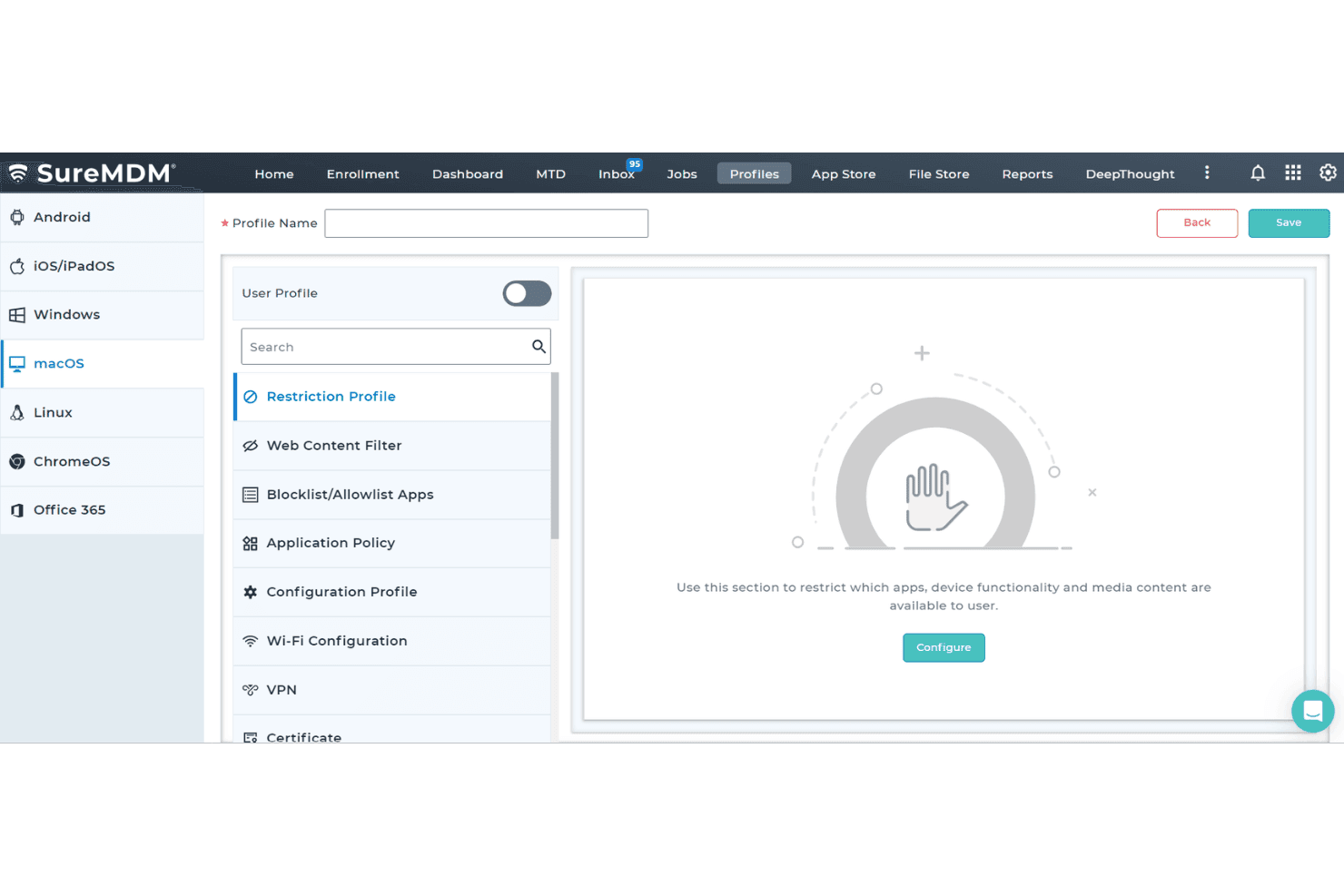
SureMDM is fairly easy to use for routine device work, but its broad platform coverage adds complexity as deployments grow. Reviewers praise the organized dashboard, straightforward setup, and remote management; enrollment options, app deployment, and remote lock or wipe keep common tasks in one console. The trade-off is a learning curve around advanced settings, and profile or policy changes can become harder to manage at scale. I’d favor it over narrower mobile-first tools for mixed fleets, provided you can invest time in configuration.
Integrations
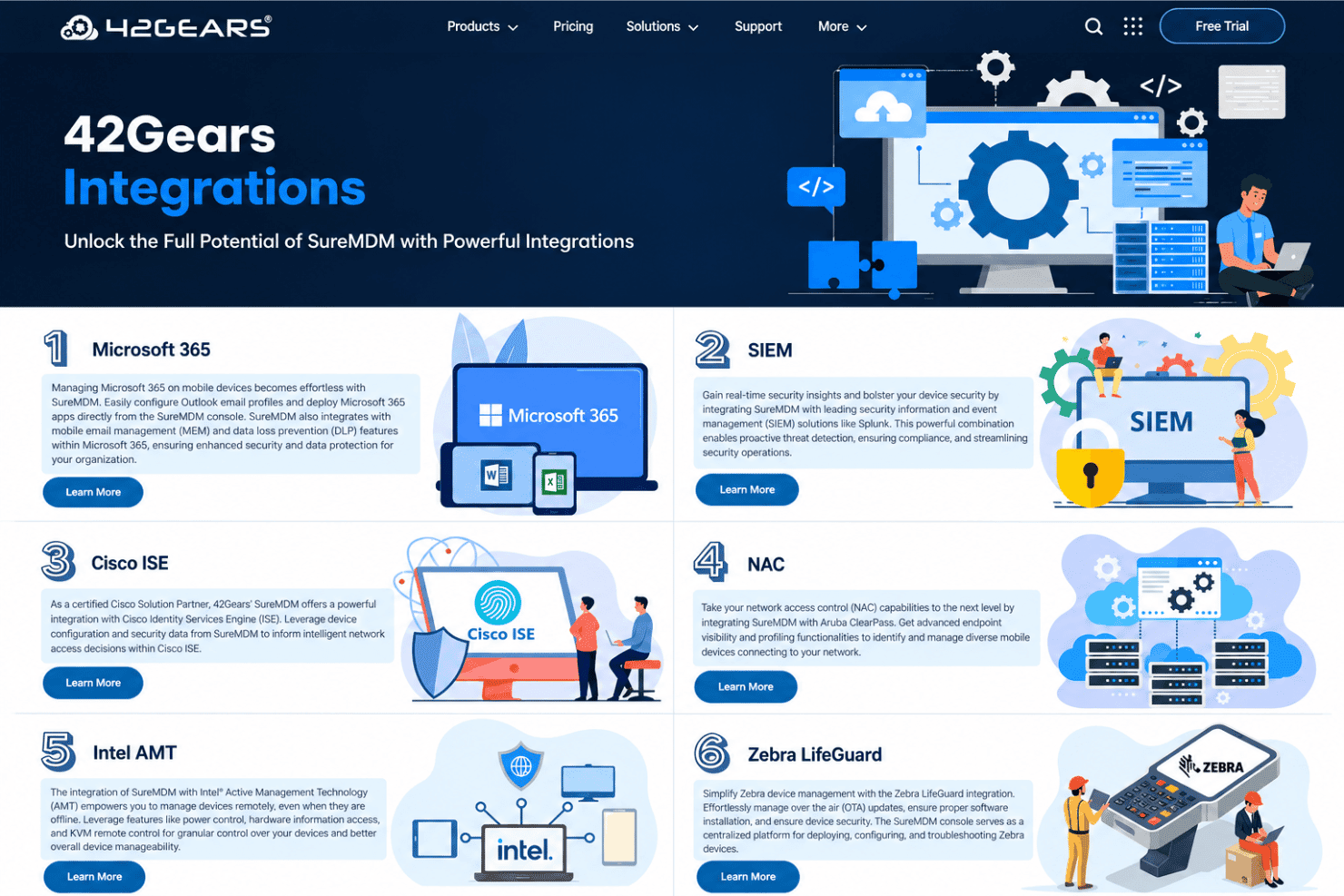
SureMDM integrates with Microsoft 365, Splunk, Cisco ISE, Aruba ClearPass, Intel AMT, Zebra LifeGuard, ServiceNow, Active Directory, and Google Workspace.
SureMDM also offers a REST API for custom integrations with external applications, dashboards, and workflows.
SureMDM Specs
- 2-Factor Authentication: Yes
- Cloud Deployment: Yes
- Dashboard: Yes
- Data Export: Yes
- Data Import: Yes
- External Integrations: Yes
- Inventory Tracking: Yes
- Multi-User: Yes
- Network Device Performance Monitoring: No
- Notifications: Yes
- Password & Access Management: Yes
- Remote Access: Yes


