


PDQ Connect versus NinjaOne: Vergelijking en deskundige beoordelingen voor 2026
Bekijk hoe PDQ Connect en NinjaOne zich in de praktijk tot elkaar verhouden op het gebied van patchbeheer—mijn vergelijking laat sterke punten, tekortkomingen en zien welke oplossing echt bij jouw workflow past in 2026.

We review tools independently, and commissions help fund our testing. See our transparency policy, our methodology, or suggest a tool.
Keeping systems up to date shouldn’t feel like a headache, but for many IT teams, patch management turns into a constant cycle of urgent fixes, missed updates, and mounting security concerns.
Choosing the right patch management software can make or break your routine. You’re likely wrestling with automation, security, and ease of use—which is where both PDQ Connect and NinjaOne promise answers, though each brings a different approach.
In this article, you’ll get a clear, side-by-side comparison of these two tools. I’ll walk you through pros and cons, use cases, pricing, security, and usability, so you can make the right call for your team.
PDQ Connect

4.6/5
- Free trial + demo available
- From $12/device/year
NinjaOne
4.7/5
- 14-day free trial + free demo available
- Pricing upon request
Waarom u onze softwareaanbevelingen kunt vertrouwen
6,700+
Reviews
20
Industry experts
16+
Evaluation factors
14
Years
Ons team test en beoordeelt software sinds 2012. Als technologieleiders weten we zelf hoe moeilijk — en belangrijk — het is om de juiste software te kiezen.
Voor deze gids hebben we tools geëvalueerd met behulp van praktijktests en onafhankelijk onderzoek, waarbij we tools beoordeeden aan de hand van onze selectiecriteria.
Onze reviews weerspiegelen ons menselijke redactionele oordeel, geen verkooppraatje.
Deskundige beoordelaars:
- Paulo Gardini MiguelTechnisch directeur
 Tim FisherVP AI
 Gabriel RosasTech Lead & software-architect
 Christhian GruhnTech Lead & platformarchitect

| PDQ Connect | NinjaOne | |
|---|---|---|
| Free Trial | Free trial + demo available | 14-day free trial + free demo available |
| Pricing | From $12/device/year | Pricing upon request |
PDQ Connect versus NinjaOne: prijzen en verborgen kosten
PDQ Connect biedt gedifferentieerde prijzen per apparaat, met opties die meegroeien naarmate je meer functies en eindpunten toevoegt. Hoewel je niet te maken krijgt met introductie- of installatiekosten, moet je letten op kosten als je team extra integraties of uitgebreide ondersteuning nodig heeft. NinjaOne gebruikt een abonnementsmodel op basis van een offerte, dat doorgaans is gebaseerd op het aantal beheerde eindpunten, met uitbreidingen voor geavanceerde modules en bepaalde functies die alleen beschikbaar zijn in hogere abonnementsniveaus of via afzonderlijke licenties. Aangepaste prijzen kunnen de complexiteit vergroten, afhankelijk van de combinatie van apparaten en vereisten binnen je organisatie.
Bij het beoordelen van de juiste prijsoplossing kijk je verder dan de kosten op de voorgrond. Ik raad aan om al je beheerde middelen, het verwachte gebruik, ondersteuningsbehoeften en mogelijke groei in een duidelijke lijst vast te leggen. Vraag elke leverancier om een aangepaste offerte op basis van jouw specifieke systeemcombinatie en vereiste functies, en houd rekening met zowel directe abonnementskosten als indirecte kosten, zoals uitbreidingen of ondersteuning. Zo voorkom je verborgen uitgaven en zorg je ervoor dat de oplossing aansluit bij je technische en operationele behoeften.
| PDQ Connect | NinjaOne | |
|---|---|---|
| 2-Factor Authentication | Yes | Yes |
| Anti-Virus | Yes | Yes |
| API | Yes | Yes |
| Bug Tracking | No | Yes |
| Customer Management | No | Yes |
| Data Export | Yes | Yes |
| Data Import | Yes | Yes |
| Email Integration | No | Yes |
| External Integrations | Yes | Yes |
| Malware Protection | Yes | Yes |
| Multi-User | Yes | Yes |
| Notifications | Yes | Yes |
| Project Management | No | Yes |
| SAP Integration | No | Yes |
| Ticket Management | Yes | Yes |
| Integratie | PDQ Connect | NinjaOne |
|---|---|---|
| IntegratieActive Directory | PDQ Connect✅ | NinjaOne✅ |
| IntegratieMicrosoft Intune | PDQ Connect❌ | NinjaOne✅ |
| IntegratieServiceNow | PDQ Connect❌ | NinjaOne✅ |
| IntegratieSlack | PDQ Connect❌ | NinjaOne✅ |
| IntegratieConnectWise | PDQ Connect❌ | NinjaOne✅ |
| IntegratieAutotask | PDQ Connect❌ | NinjaOne✅ |
| IntegratieFreshdesk | PDQ Connect✅ | NinjaOne❌ |
| IntegratieJira | PDQ Connect✅ | NinjaOne❌ |
| IntegratieAPI | PDQ Connect✅ | NinjaOne✅ |
| IntegratieZapier | PDQ Connect✅ | NinjaOne❌ |
NinjaOne biedt een breder aanbod aan oorspronkelijke integraties voor IT-servicebeheer, communicatie en virtualisatie, terwijl PDQ Connect het eenvoudig houdt maar Zapier biedt voor flexibele automatisering. Beide bieden een API, waardoor teams die meer aanpassing of unieke werkstromen nodig hebben, deze platforms geschikt zullen vinden voor de meeste vereisten op het gebied van patchbeheer.
| Factor | PDQ Connect | NinjaOne |
|---|---|---|
| FactorGegevensversleuteling | PDQ ConnectGebruikt end-to-endversleuteling voor gegevens tijdens overdracht en in rust. | NinjaOnePast sterke versleuteling toe voor gegevens tijdens overdracht en in rust. |
| FactorToegangsbeheer | PDQ ConnectBiedt gedetailleerde gebruikersrollen en machtigingsinstellingen. | NinjaOneBiedt gedetailleerd op rollen gebaseerd toegangsbeheer en audittrail. |
| FactorNaleving van regelgeving | PDQ ConnectVoldoet aan SOC 2 en ondersteunt veilige activiteiten. | NinjaOneOndersteunt naleving van SOC 2 en HIPAA, met aanvullende documentatie. |
| FactorPatchvalidatie | PDQ ConnectControleert de authenticiteit van patches vóór implementatie. | NinjaOneBiedt geautomatiseerd patchtesten en opties voor terugdraaien. |
| FactorUptimegaranties | PDQ ConnectLevert hoge beschikbaarheid via een cloudarchitectuur. | NinjaOnePubliceert 24/7-beschikbaarheid met wereldwijde infrastructuurbewaking. |
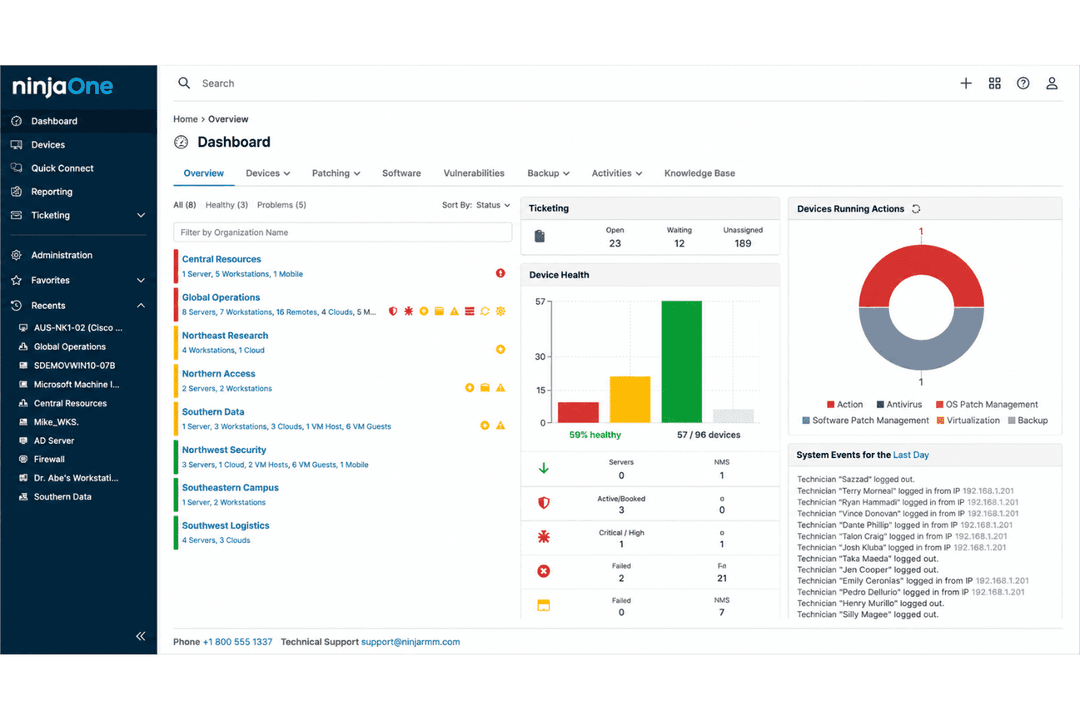
NinjaOne voelt volwassener aan voor organisaties met geavanceerde nalevingsbehoeften, terwijl PDQ Connect indruk maakt met eenvoudige beveiliging en betrouwbare patchimplementatie. In mijn ervaring maken de uitgebreide documentatie- en auditmogelijkheden van NinjaOne het sterk voor gereguleerde sectoren, terwijl de eenvoud van PDQ Connect geschikt is voor teams die zich richten op essentiële patchwerkstromen.
| Onderdeel | PDQ Connect | NinjaOne |
| Gebruikersinterface | Overzichtelijk, intuïtief dashboard gericht op patchtaken. | Moderne, uniforme interface met aanpasbare widgets. |
| Ingebruikname | Snelle start met eenvoudige configuratie en begeleide werkstromen. | Uitgebreide ingebruikname met trainingsmateriaal en tooltips. |
| Ondersteuning | Ondersteuning per e-mail en actieve communityfora. | 24/7 livechat, telefonische ondersteuning en een informatiecentrum met veel bronnen. |
| Automatisering | Eenvoudig te configureren planning, maar minder automatiseringsopties. | Flexibele automatisering voor patchbeheer, waarschuwingen en aangepaste scripts. |
| Documentatie | Gerichte, beknopte kennisbank voor belangrijke bewerkingen. | Uitgebreide documentatie met stapsgewijze handleidingen en video's. |
Beide tools zijn eenvoudig te leren, maar NinjaOne gaat een stap verder met meer automatiseringsopties en een intensievere ondersteuningservaring. Ik vind dat PDQ Connect uitstekend geschikt is als je een minimalistische interface en een snelle ingebruikname wilt, terwijl NinjaOne past bij teams die extra aanpassingsmogelijkheden en begeleiding waarderen.
PDQ Connect
- Automates Windows and macOS patch deployment with granular scheduling controls.
- Inventory scanning helps pinpoint unpatched or missing software.
- No remote agent required for updates on most devices.
- Limited support for Linux and mobile environments.
- RMM options are basic compared to other all-in-one platforms.
- No dedicated onboarding support.
NinjaOne
- Deploys fast and delivers detailed endpoint visibility with no on-premise infrastructure to purchase, configure, and manage.
- Pulls patching, backup, remote access, and ticketing into one console.
- Automates patching with CVE and CVSS context, stability scoring, and dependable scripting.
- Built-in reporting is thin for client-facing work.
- Mobile device management is less robust than desktop support.
- The service desk and PSA are sized for SMB teams rather than enterprise ITSM or high-end MSP workflows.
PDQ Connect
- Financial InstitutionsFinancial institutions can use PDQ Connect to support compliance and maintain visibility across endpoints.
- K–12 EducationSchools benefit from agentless updates, prebuilt packages, and batch deployment across many Windows PCs.
- Managed Service ProvidersService providers use PDQ's scripting options and reporting for efficient multi-client patch management.
- Healthcare ClinicsAgentless patching and minimal infrastructure keep compliance easy for smaller clinics with mostly Windows devices.
- Distributed WorkforcesRemote deployment supports offsite or hybrid employees without complex VPN or agent installs.
- SMBs With WindowsSmall and midsize businesses running mostly Windows get fast setup and coverage without advanced requirements.
NinjaOne
- Managed Service ProvidersNinjaOne’s multi-tenant architecture and remote support streamline managing multiple client environments from a single dashboard.
- Small to Midsize BusinessesDevice-based pricing and easy deployment provide SMBs effective IT management without extra complexity.
- Healthcare IT DepartmentsPatch management and compliance reporting features help healthcare teams meet standards and secure sensitive data.
- Education InstitutionsRemote monitoring and access ease support for student and faculty devices across multiple sites.
- Hybrid Workforce SupportPolicy management, help desk, and remote access empower teams supporting remote and distributed users.
- Enterprise IT TeamsMulti-tenant architecture and automation scale to support large, distributed fleets and high endpoint volume.
Wie zou PDQ Connect moeten gebruiken en wie NinjaOne?
PDQ Connect is geschikt voor kleine en middelgrote IT-teams of kostenbewuste organisaties die eenvoudig patchbeheer zonder poespas willen, zonder tijd te besteden aan extra functies. NinjaOne is het meest geschikt voor MSP's, gereguleerde sectoren en grotere bedrijven die op zoek zijn naar eindpuntbeheer van begin tot eind, volledige audittrajecten en geïntegreerde IT-operaties. Als je snelheid en eenvoud belangrijk vindt, levert PDQ Connect die; als je team automatisering, integratie en geavanceerde beheerfuncties nodig heeft, kies dan voor NinjaOne.
| PDQ Connect | NinjaOne | |
|---|---|---|
| Automation | PDQ Connect Basic scheduling for patch jobs and scripts. | NinjaOne Advanced automation for patching, alerts, and workflows. |
| Compliance Tools | PDQ Connect SOC 2 compliant, less focus on regulated industries. | NinjaOne Advanced reporting, audit trails, and HIPAA/SOC 2 support. |
| Integrations | PDQ Connect Fewer integrations, includes Zapier for flexibility. | NinjaOne Broad integrations, especially for ITSM and RMM tools. |
| Pricing Model | PDQ Connect Simple seat-based pricing with limited add-ons. | NinjaOne Custom endpoint-based pricing with modular add-on options. |
| User Interface | PDQ Connect Clean, minimal dashboard focused on patching. | NinjaOne Highly customizable dashboard with widgets and integrations. |
| Cloud-Based Management | Both deliver a cloud-based experience, letting you manage patching and monitoring from anywhere. |
|---|---|
| Patch Automation | Both automate patch deployment to endpoints, reducing manual work and risk of missed updates. |
| Reporting | Both provide detailed reporting on patch status, failed updates, and compliance across managed devices. |
| User Access Controls | Each tool offers defined user roles and permissions for managing who can deploy or approve patches. |
| Windows Support | Each product is built for robust Windows patching, handling updates across Windows endpoints natively. |