

Harness-beoordeling: voordelen, nadelen, functies en prijzen
Harness vereenvoudigt CI/CD-processen met zijn efficiënte automatiseringsmogelijkheden en is daarmee een opvallende keuze voor teams die op zoek zijn naar een gebruiksvriendelijke oplossing voor moderne softwareontwikkeling en -levering.

We review tools independently, and commissions help fund our testing. See our transparency policy, our methodology, or suggest a tool.
Harness is a CI/CD tool built for engineering teams that need automated, policy-driven software delivery across cloud-native environments. It's worth a close look if your team is ready to move on from Jenkins—Harness eliminates the plugin management and brittle pipeline scripting that Jenkins requires, and adds ML-based deployment verification that catches issues automatically without manual rollback decisions.
Harness Evaluation Summary

4.6/5
- Pricing upon request
- Free plan available
Waarom u onze softwareaanbevelingen kunt vertrouwen
6,700+
Reviews
20
Industry experts
16+
Evaluation factors
14
Years
Ons team test en beoordeelt software sinds 2012. Als technologieleiders weten we zelf hoe moeilijk — en belangrijk — het is om de juiste software te kiezen.
Voor deze gids hebben we tools geëvalueerd met behulp van praktijktests en onafhankelijk onderzoek, waarbij we tools beoordeeden aan de hand van onze selectiecriteria.
Onze reviews weerspiegelen ons menselijke redactionele oordeel, geen verkooppraatje.
Deskundige beoordelaars:
- Paulo Gardini MiguelTechnisch directeur
 Tim FisherVP AI
 Gabriel RosasTech Lead & software-architect
 Christhian GruhnTech Lead & platformarchitect

Harness Overview
In my opinion, Harness is a solid choice for teams looking for a reliable CI/CD tool with strong orchestration capabilities. It excels with its standout features and ease of use, making it ideal for enterprises that need effective deployment processes supported by clear metrics, a centralized dashboard, and traceable workflows. While the onboarding process is straightforward, Harness might not be the cheapest option, which can be a consideration for budget-conscious teams. Despite this, its functionality and customer support make it a worthwhile investment, especially for tech-heavy industries such as finance and e-commerce. Harness is a strong contender for environments needing robust automation and integration capabilities.
Pros
- Harness automates deployment processes, saving your team time and effort across every pipeline.
- Its user-friendly interface makes it easy for your team to navigate and use.
- The platform provides intelligent automation, reducing manual errors in your work.
Cons
- You might find its initial configuration a bit complex for your team.
- Some users report occasional delays in customer support responses.
- Harness may have a steeper learning curve for new users compared to other tools, particularly when working with YAML or scripting.
Is Harness Right For Your Needs?
Who Would be a Good Fit for Harness?
Harness is ideal for tech-savvy teams in industries such as finance or e-commerce that require efficient deployment processes. If your team values automation, GitOps, and reducing manual errors, Harness's intelligent automation features make it a great fit. Its accessible interface helps teams manage complex deployments with ease, including advanced strategies such as canary releases. For large enterprises looking to streamline their CI/CD processes, Harness offers the scalability and support necessary to meet your demands.
- Large EnterprisesHarness is perfect for large enterprises seeking scalable and effective deployment solutions.
- Finance SectorHarness suits finance teams that require secure and automated deployment processes to meet regulatory standards.
- E-CommerceHarness helps e-commerce businesses by automating deployments, reducing downtime, and improving customer experience.
- DevOps TeamsDevOps teams benefit from Harness's automation features that simplify CI/CD workflows and reduce manual errors in source code deployments.
- Tech StartupsTech startups can use Harness to quickly deploy applications, reuse deployment templates, and iterate on their products effectively.
- Healthcare ITHarness assists healthcare IT teams by ensuring secure, compliant, and error-free deployments for sensitive data applications.
Who Would be a Bad Fit for Harness?
Harness might not be ideal for small businesses or startups with limited budgets due to its cost structure. If your team lacks technical expertise, the initial configuration and learning curve could be challenging. For industries that don't require frequent deployments or complex automation, Harness's robust features may be unnecessary. Teams that need quick support might find the occasional delays in customer service frustrating, which could impact your productivity.
- Small StartupsSmall startups with tight budgets may find Harness's cost prohibitive for their limited needs.
- Non-Tech IndustriesNon-tech industries with simple processes might not need Harness's advanced features for basic deployments.
- Budget-Conscious TeamsTeams focused on cost-saving may struggle with Harness's pricing, especially if their deployment needs are minimal.
- Low-Tech DepartmentsDepartments with low technical skills may find Harness's setup and learning curve too complex to manage.
- Occasional DeployersBusinesses that deploy infrequently won't fully utilize Harness's automation capabilities, making it an unnecessary expense.
- Quick Support NeedsTeams needing immediate support may be frustrated by potential delays in Harness's customer service responses.
Our Review Methodology
How We Test & Score Tools
We’ve spent years building, refining, and improving our software testing and scoring system. The rubric is designed to capture the nuances of software selection and what makes a tool effective, focusing on critical aspects of the decision-making process.
Below, you can see exactly how our testing and scoring works across seven criteria. It allows us to provide an unbiased evaluation of the software based on core functionality, standout features, ease of use, onboarding, customer support, integrations, customer reviews, and value for money.
Core Functionality (25% of final scoring)
The starting point of our evaluation is always the core functionality of the tool. Does it have the basic features and functions that a user would expect to see? Are any of those core features locked to higher-tiered pricing plans? At its core, we expect a tool to stand up against the baseline capabilities of its competitors.
Standout Features (25% of final scoring)
Next, we evaluate uncommon standout features that go above and beyond the core functionality typically found in tools of its kind. A high score reflects specialized or unique features that make the product faster, more efficient, or offer additional value to the user.
We also evaluate how easy it is to integrate with other tools typically found in the tech stack to expand the functionality and utility of the software. Tools offering plentiful native integrations, 3rd party connections, and API access to build custom integrations score best.
Ease of Use (10% of final scoring)
We consider how quick and easy it is to execute the tasks defined in the core functionality using the tool. High scoring software is well designed, intuitive to use, offers mobile apps, provides templates, and makes relatively complex tasks seem simple.
Onboarding (10% of final scoring)
We know how important rapid team adoption is for a new platform, so we evaluate how easy it is to learn and use a tool with minimal training. We evaluate how quickly a team member can get set up and start using the tool with no experience. High scoring solutions indicate little or no support is required.
Customer Support (10% of final scoring)
We review how quick and easy it is to get unstuck and find help by phone, live chat, or knowledge base. Tools and companies that provide real-time support score best, while chatbots score worst.
Customer Reviews (10% of final scoring)
Beyond our own testing and evaluation, we consider the net promoter score from current and past customers. We review their likelihood, given the option, to choose the tool again for the core functionality. A high scoring software reflects a high net promoter score from current or past customers.
Value for Money (10% of final scoring)
Lastly, in consideration of all the other criteria, we review the average price of entry level plans against the core features and consider the value of the other evaluation criteria. Software that delivers more, for less, will score higher.
Core Features
Automated Deployments: Harness automates your deployment processes, reducing manual work and the risk of errors. It lets your team focus on other critical tasks.
Continuous Integration: This feature allows your team to integrate code changes frequently from a shared repo, improving collaboration and speeding up your development cycle.
Version Control: Harness supports version control, ensuring your team can track changes and roll back if needed, adding an extra layer of security to your work.
Monitoring and Feedback: With real-time monitoring, Harness gives your team immediate feedback on deployments, helping you catch issues early.
Security Management: Its built-in security features, including role-based permissions, protect your deployment processes, giving your team peace of mind.
Scalability: Harness scales with your business needs, handling increased workloads without compromising performance.
Ease of Use
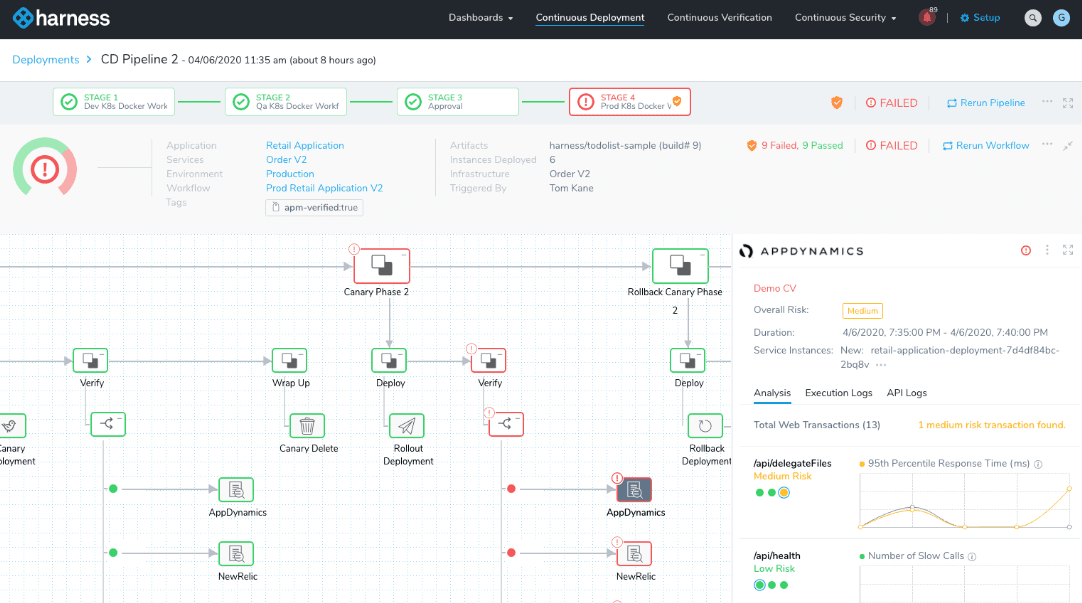
Harness's user-friendly interface simplifies your team's deployment processes. Although the initial setup might feel a bit complex, once configured, your team will find the navigation intuitive and straightforward. The platform's real-time monitoring and feedback features enhance usability by providing immediate insights. Compared to other options, Harness's automation capabilities reduce manual errors, making it a preferred choice for teams seeking efficiency without compromising on ease of use.

Integrations
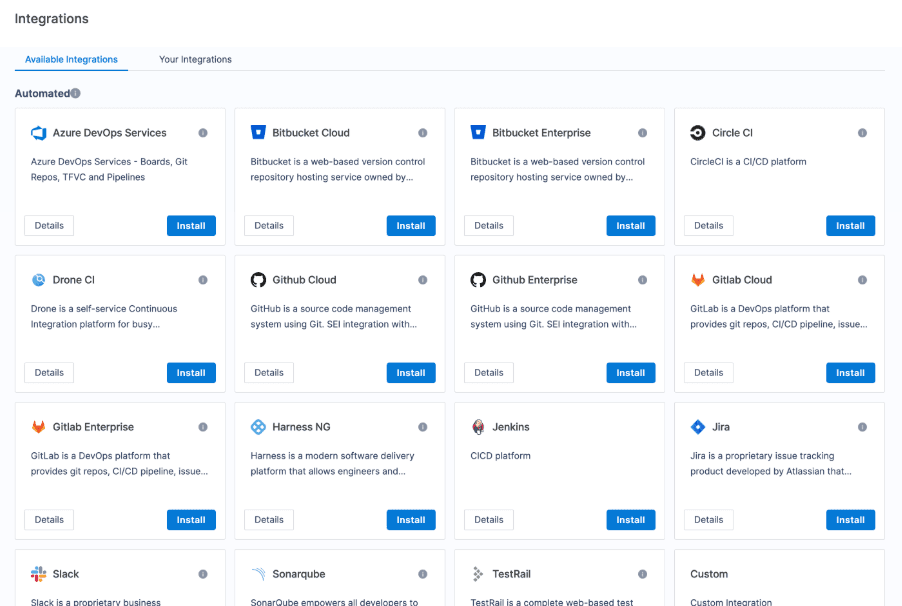
Harness integrates with GitHub, Bitbucket, GitLab, Jenkins, Jira, Slack, Docker, Kubernetes, AWS, Google Cloud, and Microsoft Azure. Harness also provides an API and connects with third-party integration tools to extend its capabilities.
Harness Specs
- API: Yes
- Billing/Invoicing: No
- Budgeting: No
- CRM Integration: No
- Dashboards: Yes
- Data Export: Yes
- Data Import: Yes
- Document Management: No
- Expense Tracking: No
- External Integrations: Yes
- Financial Analysis: No
- Forecasting: No
- Gantt Charts: No
- Inventory Tracking: No
- Multi-Currency: No
- Multi-User: Yes
- Notifications: Yes
- Project Management: Yes
- Resource Management: No
- Scheduling: Yes
- Status Notifications: Yes
- Task Scheduling/Tracking: No
- Time Management: No
- Workflow Management: Yes


