

De beste SaaS-integrasjonsplattformene hjelper team med å koble sammen applikasjoner, automatisere dataflyter, redusere manuelt arbeid og holde informasjon konsistent på tvers av systemer. Disse verktøyene gjør det mulig for organisasjoner å flytte data på en pålitelig måte mellom SaaS-produkter, slik at team kan arbeide med oppdatert informasjon uten å måtte administrere komplekse skript.
Team ser ofte etter SaaS-integrasjonsplattformer når manuelle dataoverføringer fører til feil, frakoblede systemer bremser driften eller feilkonfigurasjoner skaper mangler mellom verktøy. Disse problemene fører til inkonsekvent rapportering, dobbeltarbeid og utfordringer for IT- og driftsteam som prøver å opprettholde samsvar på tvers av avdelinger.
Med over 20 år i bransjen som teknologidirektør har jeg testet og vurdert dusinvis av SaaS-integrasjonsplattformer i virkelige miljøer for å evaluere ytelse, integrasjonsomfang og brukervennlighet. Denne veiledningen fremhever de beste SaaS-integrasjonsplattformene som hjelper team med å opprettholde pålitelig dataflyt. Hver vurdering dekker funksjoner, fordeler og ulemper samt de mest egnede bruksområdene, slik at du kan velge riktig verktøy.
Why Trust Our Software Recommendations
6,700+
Reviews
20
Industry experts
16+
Evaluation factors
14
Years
Our team has been testing and reviewing software since 2012. As tech leaders ourselves, we know how difficult—and important—it is to choose the right software.
For this guide, we evaluated tools using hands-on testing and independent research, scoring tools using our selection criteria.
Our reviews reflect our human editorial judgment, not a sales pitch.
Expert reviewers:
- Paulo Gardini MiguelTech Director
 Tim FisherVP of AI
 Gabriel RosasTech Lead & Software Architect
 Christhian GruhnTech Lead & Platform Architect

Sammenligningstabell for SaaS-integrasjonsplattformer
Denne sammenligningstabellen oppsummerer prisopplysningene for mine utvalgte SaaS-integrasjonsplattformer:
| Tool | Best For | Trial Info | Price | ||
|---|---|---|---|---|---|
| 1 | Best with universal protocol connectors | 30-day free trial | Pricing upon request | Website | |
| 2 | Best for managed ITSM integration ops | Not available | Pricing upon request | Website | |
| 3 | Best for cloud data synchronization | Free plan available | From $79/month (billed annually) | Website | |
| 4 | Best for small business automation | 14-day free trial and free plan available | From $19.99/month (billed annually) | Website | |
| 5 | Best for no-code integration builders | Free demo available | From $1,495/month | Website | |
| 6 | Best for marketing data integration | Free demo available | Pricing upon request | Website | |
| 7 | Best for scalability in large teams | 30-day free trial | From $99/month | Website | |
| 8 | Best for compliance with regulations | Free demo available | Pricing upon request | Website | |
| 9 | Best for enterprise-level solutions | Free trial + free demo available | Pricing upon request | Website | |
| 10 | Best for API integration agility | Free demo available | Pricing upon request | Website |


De beste SaaS-integrasjonsplattformene – vurdert
Nedenfor finner du mine detaljerte sammendrag av de beste SaaS-integrasjonsplattformene som kom med på kortlisten. Vurderingene mine gir en detaljert gjennomgang av de viktigste funksjonene, fordelene og ulempene, integrasjonene og de ideelle bruksområdene for hvert verktøy, slik at du kan finne det beste alternativet for deg.


Seamlessly connect and automate your SaaS ecosystem with Celigo’s robust integration platform. ƒprCeligo is a cloud-based integration platform designed for IT teams and business operations leaders who need to connect SaaS applications, automate workflows, and manage data flows across complex business systems.
Who Is Celigo Best For?
IT teams and operations leaders at mid-sized to large businesses who need to connect and automate multiple SaaS applications across departments.
Why I Picked Celigo
I picked Celigo as one of the best because I can connect SaaS apps using universal protocol connectors like REST, SOAP, FTP, and EDI without custom coding. My team uses Celigo to integrate legacy systems with modern cloud apps, and we rely on its protocol flexibility to handle complex B2B data exchanges.
Celigo Key Features
- Visual integration designer: Build and manage integrations with a drag-and-drop interface.
- Prebuilt application connectors: Access a library of connectors for popular SaaS apps like Salesforce, NetSuite, and Shopify.
- Error management dashboard: Monitor, troubleshoot, and resolve integration errors from a centralized dashboard.
- Integration lifecycle management: Version, test, and deploy integrations with built-in change management tools.
Celigo Integrations
Integrations include Salesforce, Microsoft Dynamics 365 Business Central, Oracle NetSuite, Walmart, SAP, Snowflake, Acumatica, ADP, Adobe, and 3M.
Pros and Cons
Pros:
- Supports universal protocols like REST, SOAP, and FTP
- Real-time monitoring and alerting for workflows
- Visual flow builder for custom integrations
Cons:
- Limited on-premises system integration options
- Advanced features require higher-tier pricing
Learn more about Celigo:
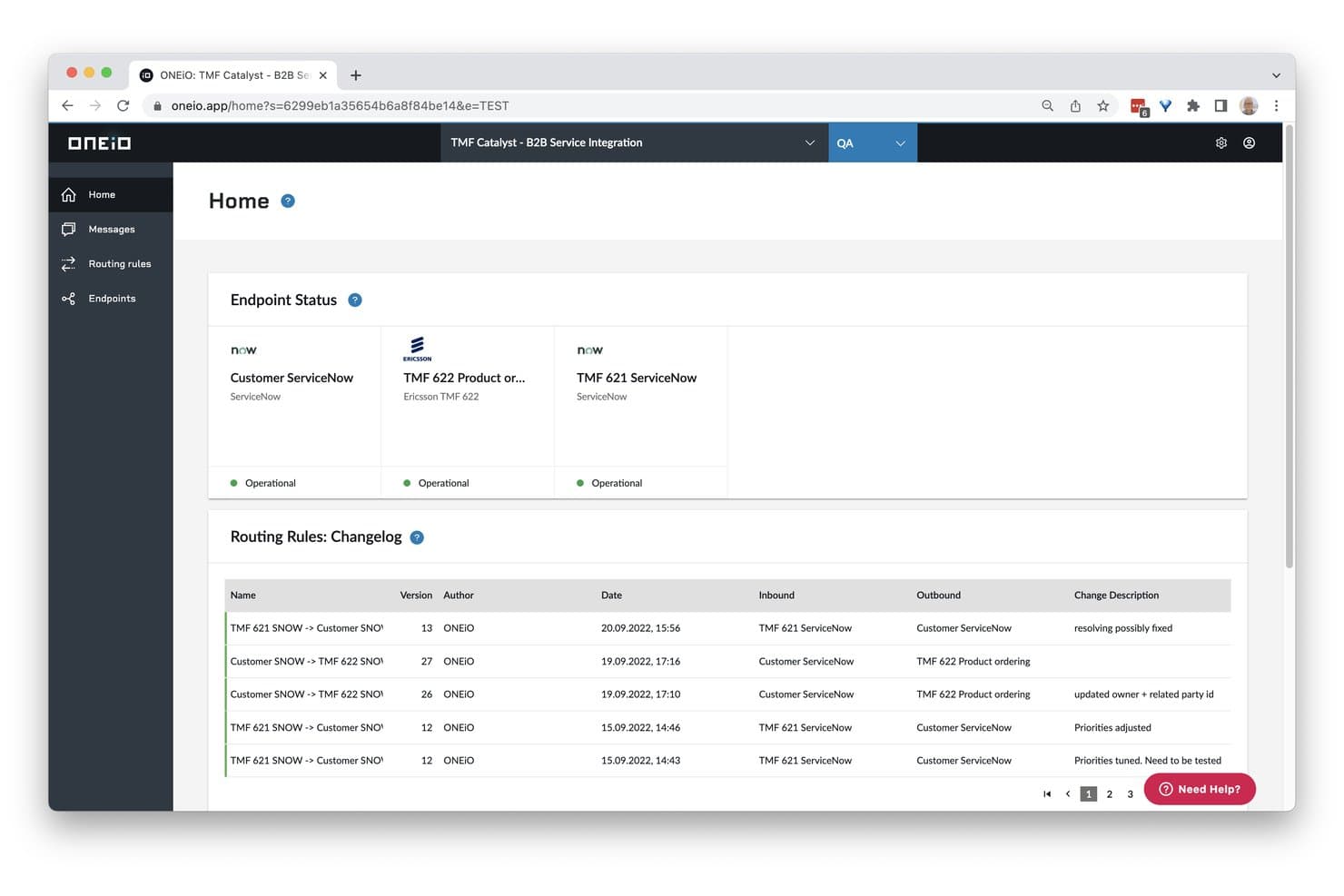
ONEiO gives users real-time endpoint status and routing rule history. ONEiO is a managed iPaaS built around ITSM and enterprise IT ecosystems, offering multi-endpoint integration, AI-driven monitoring, no-code workflow configuration, and cross-protocol data transformation.
Who Is ONEiO Best For?
ONEiO is a strong fit for enterprise IT teams and managed service providers that need to connect ITSM platforms across complex, multi-vendor service delivery chains.
Why I Picked ONEiO
ONEiO earns its spot on my shortlist because it's the only platform here that treats integration as a managed operation, not just a toolset. I picked it specifically for ITSM-heavy environments where uptime accountability matters: the ONEAi® engine monitors integrations around the clock and self-heals before incidents surface, which I find genuinely rare. Its persistent message queuing means no tickets are lost if a connected system like ServiceNow or Freshservice goes down mid-sync.
ONEiO Key Features
- Multi-endpoint hub architecture: Connects multiple systems through a single shared integration layer, eliminating point-to-point sprawl as your tool stack grows.
- Rule Robot: Automatically generates routing rules once an integration is configured, reducing manual setup for standard connection patterns.
- Persistent message queuing: Holds and retries messages across asynchronous inbound, processing, and outbound queues so no data is lost during system outages.
- ISO/IEC 27001:2022 certification with data residency options: Provides EU, UK, and US cluster options alongside certified information security controls to meet regional compliance requirements.
ONEiO Integrations
ONEiO offers 50+ documented integrations, including ServiceNow, Jira, BMC Remedy, Freshservice, Zendesk, Salesforce, Microsoft Dynamics 365, HubSpot, Slack, and Azure DevOps. It also connects to custom systems through REST, SOAP, FTP, email, and other standard APIs.
Pros and Cons
Pros:
- Persistent message queuing prevents data loss
- ONEAi engine provides proactive self-healing
- Managed integration operations with SLA-backed uptime
Cons:
- Limited analytics and reporting capabilities
- No self-service for citizen integrators
Learn more about ONEiO: Best for cloud data synchronization
- Free plan available
- From $79/month (billed annually)
Visit WebsiteCustomer Rating:4.9/5
Skyvia enables seamless cloud data integration, backup, and management. Skyvia is a cloud-based data integration platform aimed at businesses needing efficient data synchronization across various cloud services. Its primary functions include data integration, backup, and management, making it a versatile tool for businesses with diverse data requirements.
Why I picked Skyvia: Skyvia offers a no-coding approach to data integration, which is ideal for teams without developer resources. The software’s data import and export features enable you to move data between cloud apps and databases effortlessly. Plus, its scheduling capabilities let you automate data synchronization tasks, reducing manual data entry. Additionally, Skyvia’s backup feature ensures your data is securely stored and easily restorable.
Standout features & integrations:
Features include data migration, backup, and synchronization across multiple cloud and on-premise sources. It also provides a no-code interface, making it user-friendly for non-developers, and supports ETL operations for seamless data processing and integration between different platforms.
Integrations include Salesforce, Dynamics CRM, QuickBooks Online, MySQL, PostgreSQL, SQL Server, Google BigQuery, HubSpot, Zoho CRM, and Mailchimp.
Pros and Cons
Pros:
- Automated task scheduling
- Efficient data synchronization
- No-coding integration process
Cons:
- Basic reporting tools
- Limited customization options
Learn more about Skyvia: Best for small business automation
- 14-day free trial and free plan available
- From $19.99/month (billed annually)
Visit WebsiteCustomer Rating:4.7/5
Zapier automates workflows by connecting apps, streamlining tasks for businesses. Zapier is an automation tool designed for small businesses, enabling users to connect different apps and automate workflows. It helps streamline processes by allowing users to automate repetitive tasks without coding knowledge.
Why I picked Zapier: Zapier offers a user-friendly interface that lets you set up automated workflows (called Zaps) quickly. With a vast library of pre-built templates, Zapier simplifies the automation process for those who may not have technical expertise. Its ability to connect multiple apps and trigger actions based on specific events makes it ideal for small businesses looking to save time. Plus, the platform's focus on ease of use and accessibility sets it apart from more complex solutions.
Standout features & integrations:
Features include task automation between apps, a user-friendly interface to set up triggers and actions, and support for thousands of apps, enabling seamless integrations across various platforms.
Integrations include Google Sheets, Slack, Gmail, Trello, HubSpot, Mailchimp, Asana, Shopify, QuickBooks, and Salesforce.
Pros and Cons
Pros:
- Wide range of templates
- No coding needed
- Easy workflow automation
Cons:
- Not ideal for large enterprises
- Limited advanced functionality
Learn more about Zapier: Best for no-code integration builders
- Free demo available
- From $1,495/month
Visit WebsiteCustomer Rating:4.8/5
Cyclr enables no-code integrations for app developers, streamlining workflows. Cyclr is a no-code integration platform designed for SaaS and app developers, enabling them to create and manage integrations effortlessly. It supports essential business functions such as workflow automation and data connectivity, catering to teams that want to deploy integrations without heavy coding.
Why I picked Cyclr: Cyclr’s drag-and-drop interface allows you to build integrations without needing technical skills. It offers pre-built connectors, simplifying the process of linking various applications, while its visual tools make it easy to map data flows, reducing development time. Additionally, the platform's reporting features provide insights into integration performance, which is important for ongoing optimization.
Standout features & integrations:
Features include an extensive library of pre-built connectors, a drag-and-drop workflow builder, and real-time monitoring tools.
Integrations include Salesforce, HubSpot, Shopify, Slack, QuickBooks, Google Sheets, Mailchimp, Zendesk, Xero, and Microsoft Dynamics 365.
Pros and Cons
Pros:
- Quick deployment for developers
- Extensive connector library
- Easy drag-and-drop interface
Cons:
- Limited advanced customization
- High initial cost
Learn more about Cyclr: Best for marketing data integration
- Free demo available
- Pricing upon request
Visit WebsiteCustomer Rating:4.5/5
Adverity offers a wide range of pre-built datastream connectors to unify marketing data from multiple SaaS platforms. Adverity is a marketing data platform that helps teams connect, manage, and share their data. It offers tools to collect data from various sources, transform it, and send it to destinations like dashboards or storage systems.
Why I picked Adverity: I picked Adverity because it offers no-code data transformation and smart automation. You can pull in marketing data from multiple tools, standardize it with built-in functions like column splitting and data mapping, and push it to your preferred analytics or storage platform. It also includes AI-powered data quality monitoring, which is key when you're integrating large amounts of data from various SaaS tools, automatically flagging issues like duplicates or anomalies before they impact your reporting.
Standout features & integrations:
Features include smart naming conventions that use machine learning to prevent errors and improve data governance. Adverity also offers AI integration to help your teams become more data-driven.
Integrations include Google, Meta, TikTok, Google BigQuery, Looker Studio, Facebook Ads, Amazon Advertising, Hubspot, Salesforce, Amazon S3, Snowflake, and Microsoft Azure.
Pros and Cons
Pros:
- Provides the ability to create personalized dashboards
- Can harmonize data from various sources
- Automated data quality monitoring
Cons:
- The initial setup can be time-consuming
- Certain configurations may require technical knowledge
Learn more about Adverity: Best for scalability in large teams
- 30-day free trial
- From $99/month
Visit WebsiteCustomer Rating:4.4/5
Boomi connects enterprise apps, data, and automates workflows seamlessly. Boomi is a cloud-based integration platform that serves large enterprises, providing tools for data integration, API management, and workflow automation. It’s well-suited for businesses looking to connect applications and data across their organizations seamlessly.
Why I picked Boomi: Boomi’s scalable architecture supports extensive data integration needs, making it a strong choice for large teams. Its drag-and-drop interface facilitates easy workflow creation without deep technical skills, while its ability to manage APIs helps your team to connect applications efficiently. Additionally, the platform's real-time data processing enhances decision-making by providing up-to-date information quickly.
Standout features & integrations:
Features include a drag-and-drop interface for building workflows, API management, and real-time data integration. Boomi also offers extensive connectivity with pre-built connectors and supports automation for improved business processes.
Integrations include Salesforce, NetSuite, SAP, Oracle, Workday, Microsoft Dynamics 365, ServiceNow, Dropbox, Google Cloud Platform, and AWS.
Pros and Cons
Pros:
- Efficient API management
- Real-time data processing
- Scalable for large enterprises
Cons:
- High learning curve
- Complex setup process


IBM provides secure, compliant data integration and automation for enterprises. IBM offers an integration platform as a service (iPaaS) that is designed for enterprises needing secure and compliant data management. It serves businesses across industries that require adherence to strict data regulations while performing data integration and automation tasks.
Why I picked IBM: IBM provides a secure environment where your team can integrate applications while meeting regulatory standards. The platform supports complex workflows, offering flexibility for various business needs. Plus, its advanced data governance tools help ensure compliance, which is important for regulated industries. Additionally, its analytics capabilities provide insights into data silos, usage, and performance, allowing for informed decision-making.
Standout features & integrations:
Features include IBM Cloud, which provides scalable infrastructure and platform services, IBM Watson for AI and machine learning applications, and IBM’s blockchain technology for secure, decentralized transactions. IBM also excels in hybrid cloud environments and data management solutions for businesses across industries.
Integrations include Salesforce, SAP, Oracle, Microsoft Dynamics 365, AWS, Google Cloud, ServiceNow, Workday, Slack, and Twilio.
Pros and Cons
Pros:
- Extensive data governance
- Supports complex workflows
- Strong compliance features
Cons:
- Limited offline capabilities
- High resource demands
Learn more about IBM: Best for enterprise-level solutions
- Free trial + free demo available
- Pricing upon request

MuleSoft integrates apps and data for enterprise connectivity and efficiency. MuleSoft is an integration platform that caters primarily to large enterprises, providing API management and connectivity solutions. It excels in integrating applications and data across various environments, enhancing operational efficiency.
Why I picked MuleSoft: MuleSoft offers an advanced API management suite that allows you to design, build, and manage APIs efficiently. With its Anypoint Platform, you can connect apps, data, and devices with ease. Additionally, the software’s data integration capabilities make it suitable for complex enterprise ecosystems, which is vital for large-scale operations and troubleshooting processes.
Standout features & integrations:
Features include Anypoint Platform, which allows users to design, build, and manage APIs and integrations, and robust data transformation capabilities for seamless communication across different systems. MuleSoft also provides pre-built connectors, API management, and real-time analytics for monitoring integrations.
Integrations include Salesforce, SAP, ServiceNow, Workday, Microsoft Dynamics 365, Oracle, AWS, Google Cloud, Slack, and Twilio.
Pros and Cons
Pros:
- High-volume data processing
- Suitable for large enterprises
- Extensive API management capabilities
Cons:
- Limited for smaller teams
- Steep learning curve
Learn more about MuleSoft:

Tray enables flexible API integrations and automates complex workflows. Tray is an integration platform that caters to businesses needing flexible API integrations and workflow automation. It’s designed for teams looking to connect a wide range of applications and automate complex business processes efficiently.
Why I picked Tray: Tray offers a flexible platform for creating API integrations that fit your specific business needs. The software’s visual workflow builder allows you to design complex processes without extensive coding. With this focus on API integrations, Tray helps your team connect diverse applications seamlessly. Additionally, its scalability supports growing businesses, aiding in the management of increasing data flows.
Standout features & integrations:
Features include powerful connectors for different apps, a visual workflow builder, and enterprise-grade security and scalability, enabling teams to automate complex processes across systems with ease.
Integrations include Salesforce, Slack, Google Sheets, HubSpot, Zendesk, Shopify, Marketo, Microsoft Dynamics 365, Trello, and NetSuite.
Pros and Cons
Pros:
- Visual workflow builder
- Scalable for growing businesses
- Flexible API integrations
Cons:
- Limited offline functionality
- High setup complexity
Learn more about Tray:
Andre SaaS-integrasjonsplattformer
Her er noen flere alternativer for SaaS-integrasjonsplattformer som ikke kom med på kortlisten min, men som likevel er verdt å se nærmere på:
- 11ParagonBest for rapid integration deployment
- 12CoefficientBest for two-way spreadsheet sync
- 13WhalesyncBest for syncing Notion and Airtable
- 14HexaSyncBest for ecommerce platforms
- 15DigibeeBest for hybrid cloud environments
- 16WorkatoBest for business process automation
- 17SnapLogicBest for big data integration
- 18JitterbitBest for rapid API creation
- 19PrismaticBest for embedded integrations
How I Evaluate SaaS Integration Platforms
I look at every platform in two layers: the baseline capabilities a tool must have to make the list, and the differentiators—like CI/CD support or regional data residency—that reveal real fit.
Core Functionality (Table Stakes For This List)
When I'm selecting tools for my list, I rank each one on a scale from 0 (does not offer the functionality) to 5 (excels in this area) for each core functionality listed below. Then, I calculate the tool's total score into a percentage. Each tool needs to achieve a minimum total score of 75% to be considered for inclusion.
- Pre-Built Connectors Library: I evaluate the breadth and depth of native connectors, paying attention to coverage across categories like CRM, HRIS, ERP, and service desks.
- Workflow Automation Builder: The visual builder matters—I look for branching logic, conditional paths, and loops that handle real scenarios like multi-step employee onboarding flows.
- Data Transformation & Mapping: Field mapping alone isn't enough. I check for formula support, data type conversions, and the ability to reshape nested JSON or XML payloads between systems.
- API & Webhook Support: Custom connector creation is a key differentiator here. I evaluate REST, SOAP, and GraphQL support alongside webhook triggers for real-time event handling.
- Monitoring & Error Handling: Production integrations break. I look at execution logs, alerting options, automated retry policies, and how easy it is to diagnose a failed sync at 2 a.m.
- Security & Governance Controls: I check for OAuth and SSO support, role-based access, encryption standards, and relevant compliance certifications like SOC 2 and ISO 27001.
Once I have a list of tools that meet this criteria, I consider what sets each platform apart.
Differentiating Factors (What Sets Vendors Apart)
Here's how I compare and contrast different vendors:
Standout Features
AI-powered automation is a big differentiator. I look for platforms that suggest field mappings or generate workflows from natural language prompts, which cuts setup time on complex multi-system integrations. Event-driven architecture also matters when teams need real-time data movement via Kafka or pub/sub messaging instead of scheduled batch syncs. For SaaS vendors building integrations into their own products, embedded iPaaS capabilities let them offer native connectivity to customers without maintaining separate infrastructure.
Beyond Features
Developer experience is a major consideration. I check whether platforms offer CLI tools, Git-based version control, and CI/CD pipeline support so DevOps teams can treat integrations as code. Deployment flexibility also weighs heavily—some organizations need private agents running behind firewalls or data residency in specific regions. Pricing transparency rounds out my evaluation. I look at whether billing is based on tasks, connectors, or data volume, and how predictably costs scale as integration usage grows across teams.
Slik velger du en SaaS-integrasjonsplattform
Det er lett å gå seg vill i lange funksjonslister og komplekse prismodeller. For å hjelpe deg med å holde fokus når du går gjennom din unike prosess for valg av SaaS-produkt, får du her en sjekkliste over faktorer du bør ha i tankene:
| Faktor | Hva du bør vurdere |
| Skalerbarhet | Kan plattformen vokse sammen med teamet ditt? |
| Integrasjoner | Kan den integreres med de eksisterende verktøyene dine? |
| Tilpasningsmuligheter | Kan du tilpasse den til dine spesifikke behov? |
| Brukervennlighet | Er plattformen brukervennlig for teamet ditt? |
| Budsjett | Passer den innenfor den økonomiske planen din? |
| Sikkerhetstiltak | Finnes det tiltak for å beskytte dataene dine? |
| Støtte | Er det tilgjengelig pålitelig kundestøtte? |
| Samsvar | Følger den nødvendige forskrifter? |
Trender innen SaaS-integrasjonsplattformer
I researchen min hentet jeg inn utallige produktoppdateringer, pressemeldinger og utgivelseslogger fra ulike leverandører av SaaS-integrasjonsplattformer. Her er noen av de fremvoksende trendene jeg følger med på:
- AI-drevne innsikter: Plattformene bruker i økende grad AI til å gi datadrevet innsikt. Denne innsikten hjelper virksomheter med å optimalisere driften ved å forutsi trender og identifisere ineffektivitet.
- Utvikling med lite kode: Flere plattformer tar i bruk tilnærminger med lite kode, slik at brukere kan bygge integrasjoner med minimalt behov for programmering. Denne trenden gjør det enklere for personer uten utviklerbakgrunn å opprette komplekse arbeidsflyter.
- Forbedret datasikkerhet: Med økende bekymring for personvern styrker plattformene sikkerhetsfunksjonene sine. Forbedret kryptering og verktøy for regelverksetterlevelse blir standard for å beskytte sensitiv informasjon.
- Skalerbar arkitektur: Etter hvert som virksomheter vokser, trenger de plattformer som kan skalere i takt med dem. Leverandører utvikler nå løsninger som kan håndtere økende datamengder uten at det går ut over ytelsen, i kombinasjon med integrasjoner med kundeorientert innebygd iPaaS.
- Samarbeid i sanntid: Integrasjonsplattformer legger til funksjoner som fremmer samarbeid i sanntid mellom teammedlemmer. Denne trenden støtter distribuerte team som arbeider fra ulike steder, og sørger for at alle er samkjørte.
Hva er en SaaS-integrasjonsplattform?
SaaS-integrasjonsplattformer kobler sammen ulike programvareapplikasjoner og tjenester for å automatisere arbeidsflyter og synkronisere data. Disse verktøyene brukes vanligvis av IT-fagfolk, utviklere og forretningsanalytikere som trenger å integrere ulike systemer for å forbedre effektiviteten og datanøyaktigheten.
Funksjoner som verktøy for API-integrasjon, databehandling i sanntid og utvikling med lite kode bidrar til å opprette effektive arbeidsflyter og sikre datakonsistens. Samlet sett gir disse plattformene betydelig verdi ved å redusere manuelt arbeid og forbedre driftseffektiviteten.
Funksjoner i SaaS-integrasjonsplattformer
Når du velger en SaaS-integrasjonsplattform, bør du se etter følgende viktige funksjoner:
- API-integrasjon: Kobler sammen ulike applikasjoner og muliggjør automatisert datautveksling og kommunikasjon mellom systemer.
- Databehandling i sanntid: Sørger for at data oppdateres umiddelbart på tvers av systemer, slik at informasjonen er aktuell og nøyaktig.
- Utvikling med lite kode: Gjør det mulig for brukere å opprette arbeidsflyter uten omfattende programmering, noe som gjør løsningen tilgjengelig for brukere uten teknisk bakgrunn.
- Datasynkronisering: Holder data konsistente på tvers av alle tilkoblede plattformer, reduserer avvik og sikrer nøyaktighet.
- Skalerbar arkitektur: Støtter virksomheter i vekst ved å håndtere økende datamengder uten at det påvirker ytelsen.
- Automatisering av arbeidsflyter: Automatiserer repetitive oppgaver, sparer tid og reduserer risikoen for menneskelige feil.
- Sikkerhetsfunksjoner: Beskytter sensitive data med kryptering og verktøy for regelverksetterlevelse, og sikrer personvern og overholdelse av regelverk.
- Visuell arbeidsflytbygger: Gir et brukervennlig grensesnitt for utforming av komplekse arbeidsflyter, noe som forbedrer brukervennligheten og effektiviteten.
- AI-drevne innsikter: Tilbyr datadrevne anbefalinger og prognoser som hjelper brukere med å optimalisere driften og ta informerte beslutninger.
Fordeler med SaaS-integrasjonsplattformer
Implementering av en SaaS-integrasjonsplattform gir flere fordeler for teamet og virksomheten din. Her er noen av fordelene du kan se frem til:
- Forbedret effektivitet: Automatisering av arbeidsflyter reduserer manuelle oppgaver og sparer tid, slik at teamet kan konsentrere seg om viktigere aktiviteter.
- Forbedret datanøyaktighet: Databehandling og synkronisering i sanntid sørger for at alle systemer har konsistent og oppdatert informasjon.
- Større fleksibilitet: Utvikling med lite kode gjør det mulig for brukere uten teknisk bakgrunn å opprette og endre arbeidsflyter enkelt, slik at de kan tilpasses endrede forretningsbehov.
- Skalerbarhet: Skalerbar arkitektur støtter virksomhetens vekst ved å håndtere større datamengder uten at det går ut over ytelsen.
- Bedre beslutningstaking: AI-drevne innsikter gir datadrevne anbefalinger som hjelper teamet med å ta informerte og strategiske beslutninger.
- Økt sikkerhet: Avanserte sikkerhetsfunksjoner beskytter sensitive data og sikrer overholdelse av regelverk, noe som reduserer risikoen.
- Effektivisert samarbeid: Integrasjonsmuligheter legger til rette for datadeling på tvers av plattformer og forbedrer lagarbeid og samarbeid.
Kostnader og priser for SaaS-integrasjonsplattformer
Når du velger en SaaS-administrasjonsplattform, må du forstå de ulike prismodellene og abonnementene som er tilgjengelige. Kostnadene varierer basert på funksjoner, teamstørrelse, tillegg og mer. Tabellen nedenfor oppsummerer vanlige abonnementer, gjennomsnittsprisene deres og typiske funksjoner som er inkludert i løsninger for SaaS-integrasjonsplattformer:
Sammenligningstabell for SaaS-integrasjonsplattformer
| Abonnementstype | Gjennomsnittspris | Vanlige funksjoner |
| Gratisabonnement | $0 | Grunnleggende integrasjoner, begrenset datasynkronisering og brukerstøtte fra fellesskapet. |
| Personlig abonnement | $10-$30/bruker/måned | Avanserte integrasjoner, mer datasynkronisering og brukerstøtte på e-post. |
| Forretningsabonnement | $50-$100/bruker/måned | Tilpassede arbeidsflyter, databehandling i sanntid og prioritert brukerstøtte. |
| Virksomhetsabonnement | $150-$300/bruker/måned | Ubegrensede integrasjoner, avanserte sikkerhetsfunksjoner og en dedikert kundeansvarlig. |
Vanlige spørsmål om SaaS-integrasjonsplattformer
Her er noen svar på vanlige spørsmål om SaaS-integrasjonsplattformer:
Hvilken av følgende er en viktig utfordring som håndteres av SaaS-integrasjonstjenester?
SaaS-integrasjonstjenester håndterer flere utfordringer, blant annet skalerbarhet, sikkerhet og datasynkronisering. Disse tjenestene forenkler komplekse konfigurasjoner og sørger for at systemene dine kan vokse i takt med virksomhetens behov. Ved å håndtere disse utfordringene kan du opprettholde effektiv og sikker drift.
Hvordan forbedrer SaaS-integrasjonsplattformer datasikkerheten?
SaaS- og iPaaS-programvare-integrasjoner forbedrer datasikkerheten ved å bruke kryptering og tiltak for å overholde regelverk, slik at sensitiv informasjon beskyttes. Disse plattformene sørger for at data overføres sikkert mellom applikasjoner, slik at informasjonen din forblir trygg. Ved å følge bransjereguleringer hjelper de virksomheten din med å opprettholde tillit og etterlevelse.
Hvorfor er databehandling i sanntid viktig i SaaS-integrasjon?
Databehandling i sanntid sørger for at alle tilkoblede systemer har oppdatert informasjon, noe som er avgjørende for nøyaktige beslutninger. Denne funksjonen gjør det mulig for teamet ditt å reagere raskt på endringer og opprettholde effektiv drift. Når data synkroniseres i sanntid gjennom plattformen din for skyintegrasjon, kan du sørge for at forretningsprosessene dine alltid er i tråd med oppdatert informasjon.
Hvordan er utvikling med lite kode til nytte for brukere av SaaS-integrasjoner?
Utvikling med lite kode forenkler prosessen med å opprette integrasjoner, slik at brukere kan bygge arbeidsflyter uten omfattende kunnskap om programmering. Denne funksjonen gjør det mulig for ikke-tekniske teammedlemmer å utvikle og endre integrasjoner. Ved å redusere behovet for teknisk ekspertise kan teamet ditt raskt tilpasse seg nye forretningskrav.