

Programvare for administrasjon av iOS-enheter lar deg kontrollere, overvåke og sikre iPhone-enheter, iPad-er, Mac-er og annen iOS-maskinvare i hele organisasjonen fra et sentralt kontrollpanel. Hvis du har ansvar for å administrere voksende samlinger av iOS-enheter, holde systemene sikre og sørge for samsvar, er det viktig å finne riktig programvare. Her får du min vurdering av de beste plattformene for administrasjon av iOS-enheter, med oppdaterte anbefalinger som hjelper deg med å sammenligne funksjoner, se hva som oppfyller virksomhetsstandarder og prioritere verktøy som gjør jobben enklere.
Hvorfor du kan stole på våre programvareanbefalinger
6,700+
Reviews
20
Industry experts
16+
Evaluation factors
14
Years
Teamet vårt har testet og anmeldt programvare siden 2012. Vi er selv teknologiledere, så vi vet hvor vanskelig og hvor viktig det er å velge riktig programvare.
I denne guiden har vi vurdert verktøyene gjennom praktisk testing og uavhengig research og gitt dem poeng ut fra våre utvelgelseskriterier.
Anmeldelsene våre bygger på vår egen redaksjonelle vurdering. De er ikke et salgsargument.
Ekspertanmeldere:
- Paulo Gardini MiguelTech Director
 Tim FisherVP of AI
 Gabriel RosasTech Lead & Software Architect
 Christhian GruhnTech Lead & Platform Architect

Sammenligningstabell for programvare for administrasjon av iOS-enheter
Denne sammenligningstabellen oppsummerer prisopplysningene for mine beste utvalgte programvarer for administrasjon av iOS-enheter.
| Tool | Best For | Trial Info | Price | ||
|---|---|---|---|---|---|
| 1 | Best for kiosk and single app mode on Apple | 14-day free trial + free demo available | From $2/device/month (billed annually) | Website | |
| 2 | Best for cross-platform endpoint control | 90-day free trial | From $60/user/month (billed annually) | Website | |
| 3 | Best for Munki integration | 30-day free trial + free demo available | From $2.50/device/month (billed annually) | Website | |
| 4 | Best for SMB multi-OS management | 14-day free trial + free plan available | From $2.75/device/month (billed annually) | Website | |
| 5 | Best for real-time device monitoring | 14-day free trial + free demo available | From $8.25/Mac/month | Website | |
| 6 | Best built-in AI security analytics | 30-day free trial | From $$2.97/client device/month | Website | |
| 7 | Best for multi-OS profile provisioning | 30-day free trial + free demo available | From $1.28/device/month (billed annually) | Website | |
| 8 | Best integrated Apple security features | Free plan + 30-day free trial available | From $0.46/device/month | Website | |
| 9 | Best for automated issue fixing | Free demo available | From $3/device/month | Website | |
| 10 | Best for automated device enrollment | Free demo available | Pricing upon request | Website |


Anmeldelser av den beste programvaren for administrasjon av iOS-enheter
Nedenfor finner du mine detaljerte sammendrag av den beste programvaren for administrasjon av iOS-enheter som kom med på kortlisten. Anmeldelsene mine gir en detaljert gjennomgang av funksjonene, integrasjonene og de beste bruksområdene for hver plattform, slik at du kan finne den som passer best for deg.
 Best for kiosk and single app mode on Apple
- 14-day free trial + free demo available
- From $2/device/month (billed annually)
Visit WebsiteCustomer Rating:4.7/5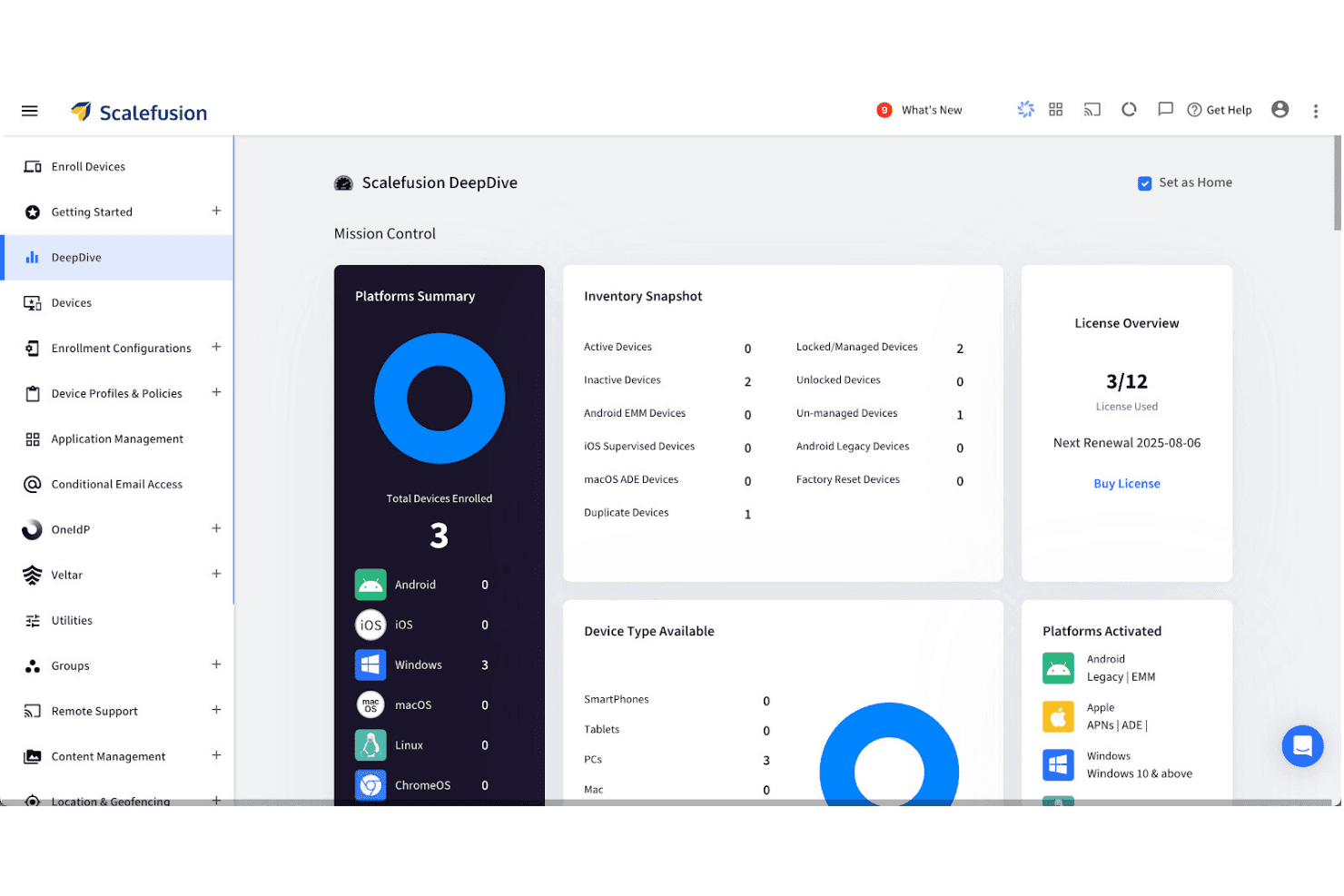
Scalefusion's DeepDive dashboard gives a full device inventory overview. Scalefusion is a unified endpoint management platform that covers iOS, iPadOS, macOS, and tvOS devices alongside Android, Windows, Linux, and ChromeOS—all managed from a single dashboard with kiosk controls, app deployment, zero-touch enrollment, and identity integration.
Who Is Scalefusion Best For?
Scalefusion is a strong fit for IT teams managing mixed-OS fleets who need tight kiosk and single app mode controls alongside standard Apple MDM capabilities.
Why I Picked Scalefusion
Scalefusion earns its spot on my shortlist because of how far its kiosk and Single App Mode controls go beyond what most Apple MDMs offer. I've set up Single App Kiosk Mode on iOS deployments where devices need to run one app permanently, and Scalefusion handles that without workarounds. It also supports Apple TV management, including Single App Mode for tvOS, which lets you lock down lobby displays or digital signage from the same console as your iPhones and Macs.
Scalefusion Key Features
- macOS App Catalog: A library of 400+ third-party macOS apps powered by Installomator that supports silent installation, automated background updates, and pre/post-install scripting.
- AirThink AI script generation: An AI-powered tool that generates ready-to-deploy Shell, Bash, Python, and PowerShell scripts for macOS and other platforms without manual coding.
- Apple TV (tvOS) management: Remote app deployment, home screen layout control, and AirPlay settings management for Apple TV devices from the same dashboard as iOS and macOS.
- FileVault encryption management: Enforces full-disk encryption on managed Macs with support for key escrow and key rotation directly from the Scalefusion dashboard.
Scalefusion Integrations
Scalefusion offers native integrations with Apple Business Manager, Apple School Manager, Okta, Microsoft Entra ID, Google Workspace, Samsung Knox, Zebra, Lenovo, Bluebird, and Kyocera, plus Platform SSO for macOS. An open API and webhooks are available for custom integrations and automation workflows.
Pros and Cons
Pros:
- Built-in AI-powered scripting for automation
- macOS App Catalog with silent deployments
- Single App Kiosk Mode on iOS and tvOS
Cons:
- Lacks on-premise or FedRAMP compliance options
- No native Mac endpoint detection or EDR
Learn more about Scalefusion: Best for cross-platform endpoint control
- 90-day free trial
- From $60/user/month (billed annually)
Visit WebsiteCustomer Rating:4.7/5
Microsoft Intune dashboard with device compliance and enrollment status. Microsoft Intune is a unified endpoint management platform from Microsoft designed for IT teams to manage Apple, Windows, and Android devices, with tools for device configuration, security policy enforcement, and application deployment.
Who Is Microsoft Intune Best For?
Microsoft Intune is a strong choice for IT administrators at midsize and large organizations with diverse fleets of Apple and other devices.
Why I Picked Microsoft Intune
I picked Microsoft Intune as one of the best because I can create and enforce cross-platform security policies for Apple endpoints alongside Windows and Android devices. My team uses it to automate device enrollment, push custom compliance configurations, and manage app deployments from a unified dashboard.
Microsoft Intune Key Features
- Device lifecycle management: Manage provisioning, updates, and retirement for Apple hardware.
- Remote device actions: Remotely lock, wipe, or reset Apple devices from the console.
- Apple Business Manager integration: Sync and manage devices purchased through Apple Business Manager.
- Bulk application deployment: Install, update, or remove apps across large sets of managed devices.
Microsoft Intune Integrations
Integrations include Configuration Manager, Windows Autopilot, Endpoint analytics, Microsoft 365, Microsoft Defender for Endpoint, Windows Autopatch, Managed Google Play, Apple tokens and certificates, and TeamViewer.
Pros and Cons
Pros:
- Manage enterprise deployment at scale
- Automated Apple device compliance enforcement
- Centralized device management for Mac and iOS
Cons:
- Advanced macOS settings require manual configuration
- Apple OS version controls can be restrictive
Learn more about Microsoft Intune: Best for Munki integration
- 30-day free trial + free demo available
- From $2.50/device/month (billed annually)
Visit WebsiteCustomer Rating:4.8/5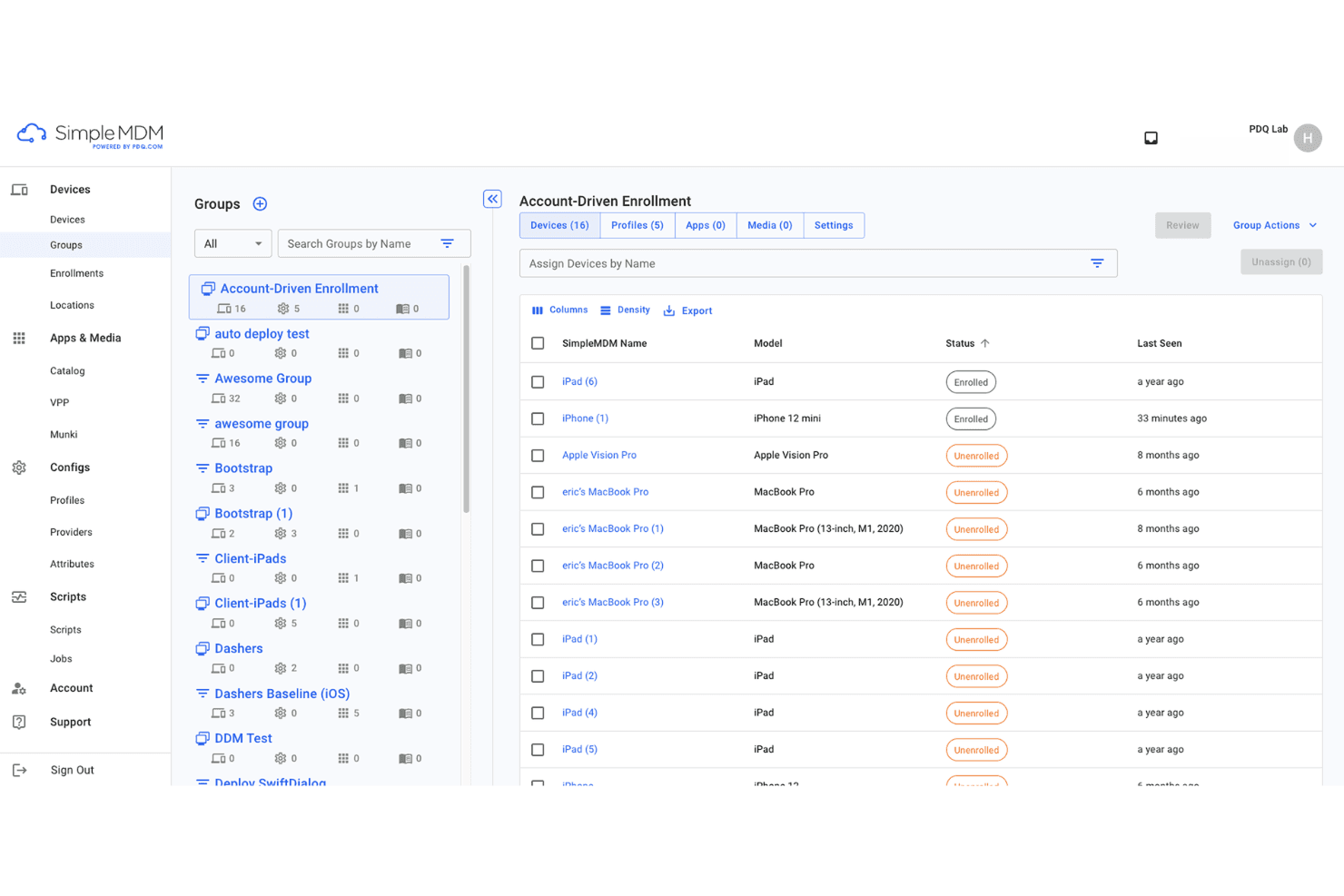
SimpleMDM organizes iOS devices into groups for streamlined enrollment management. SimpleMDM is a macOS and iOS device management platform for automating configuration, app management, device inventory, and policy enforcement, offering features tailored for administrators managing Apple device environments.
Who Is SimpleMDM Best For?
SimpleMDM is a strong fit for IT teams at midsize businesses and educational institutions managing large Apple device inventories.
Why I Picked SimpleMDM
I picked SimpleMDM as one of the best because I get a purpose-built Munki integration that simplifies creating custom app catalogues and managing heavy software deployments. I also like that I can automate patching and app distribution workflows easily.
SimpleMDM Key Features
- Zero-touch device enrollment: Set up and provision Apple devices remotely from first boot.
- Granular configuration profiles: Apply detailed device restrictions and preferences across fleets.
- Remote lock and wipe: Secure lost or stolen devices with centralized lock and data removal.
- Certificate and Wi-Fi management: Push network credentials and certificates directly to managed devices.
SimpleMDM Integrations
Integrations include Apple Business Manager, Apple School Manager, Microsoft Azure, OneLogin, Okta, ADFS, and JumpCloud.
Pros and Cons
Pros:
- Simple app catalogue creation Fast platform setup
- Automated Munki-based software deployment workflows
- Automated Munki-based software deployment workflows
Cons:
- No local agent for offline device control
- Limited Windows or cross-platform management
Learn more about SimpleMDM: Best for SMB multi-OS management
- 14-day free trial + free plan available
- From $2.75/device/month (billed annually)
Visit WebsiteCustomer Rating:4.5/5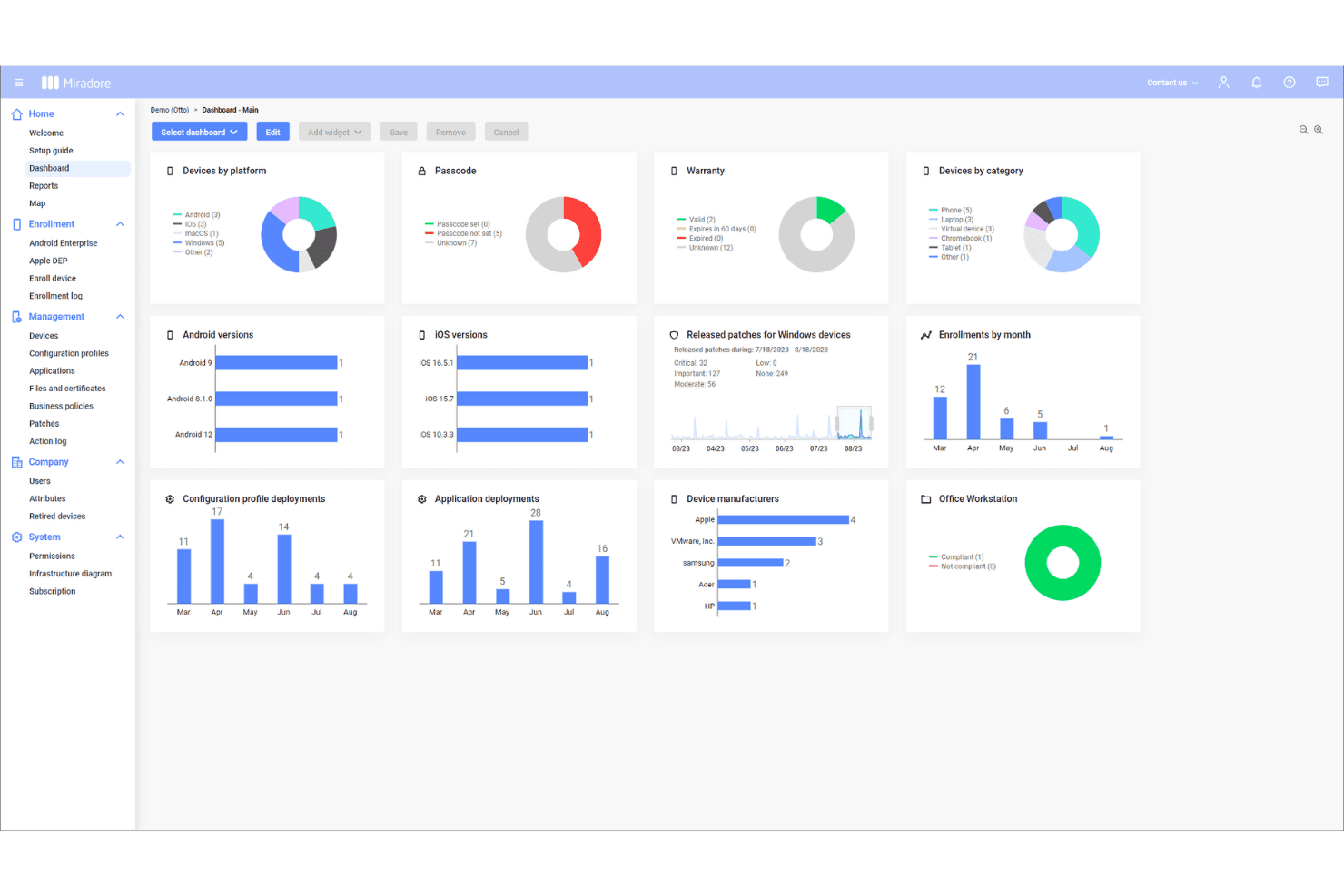
Miradore's dashboard gives a full overview of enrolled devices. Miradore is a cloud-based mobile device management solution for SMBs that lets you enroll, monitor, secure, and control Apple, Android, and Windows devices from a single web console.
Who Is Miradore Best For?
SMB IT administrators who need an easy way to manage Apple and other device platforms across multiple locations will find Miradore a strong fit.
Why I Picked Miradore
I picked Miradore because I can manage iOS, Android, and Windows devices from one dashboard—ideal for SMBs with diverse device fleets. My team uses its over-the-air configuration and remote lock/wipe features to keep Apple devices secure.
Miradore Key Features
- Device inventory management: Track detailed hardware and software information for all managed Apple devices.
- Application whitelisting and blacklisting: Specify which apps can or cannot be installed or run on devices.
- Automated OS update management: Schedule and enforce operating system updates across enrolled Apple devices.
- Compliance monitoring: Monitor device status and security posture through real-time compliance dashboards.
Miradore Integrations
Integrations include TeamViewer, API, Microsoft Active Directory, Microsoft Entra ID, and Google Workspace.
Pros and Cons
Pros:
- Supports bulk device provisioning workflows
- Easy policy deployment to Apple devices
- Centralized web console for device oversight
Cons:
- Some restrictions on remote device actions
- Limited security compliance reporting tools
Learn more about Miradore: Best for real-time device monitoring
- 14-day free trial + free demo available
- From $8.25/Mac/month
Visit WebsiteCustomer Rating:4.5/5
Addigy dashboard shows live device monitoring and security status insights. Addigy is an Apple device management platform that gives IT teams tools for centralized configuration, inventory management, remote monitoring, software deployment, and security policy enforcement across Macs, iPhones, and iPads.
Who Is Addigy Best For?
IT teams in midsize to large organizations that need to monitor, manage, and secure Apple devices across multiple locations.
Why I Picked Addigy
I picked Addigy as one of the best because I rely on its real-time device monitoring to quickly flag compliance issues and system failures. Its live dashboard and automated remediation let me react to critical changes as they happen, not hours later.
Addigy Key Features
- Automated onboarding workflows: Provision new Apple devices with custom scripts, configurations, and apps as soon as they join your network.
- Patch management: Schedule and deploy OS updates and application patches across your entire Apple device fleet.
- Self-service portal: Provide users with access to a catalogue of approved apps and resources for easy, secure installation.
- Policy management: Centrally enforce and adjust compliance, security, and usage policies for macOS, iOS, and iPadOS devices.
Addigy Integrations
Integrations include Apple Business Manager, Okta, Google, ThreatDown, Autotask, Backblaze, BrightGauge, CloudRadial, Hudu, and Zapier.
Pros and Cons
Pros:
- Supports zero-touch provisioning
- Policy enforcement across device types
- Real-time monitoring for instant status updates
Cons:
- Fewer reporting templates
- Limited visibility into web content
Learn more about Addigy: Best built-in AI security analytics
- 30-day free trial
- From $$2.97/client device/month
Visit WebsiteCustomer Rating:3.1/5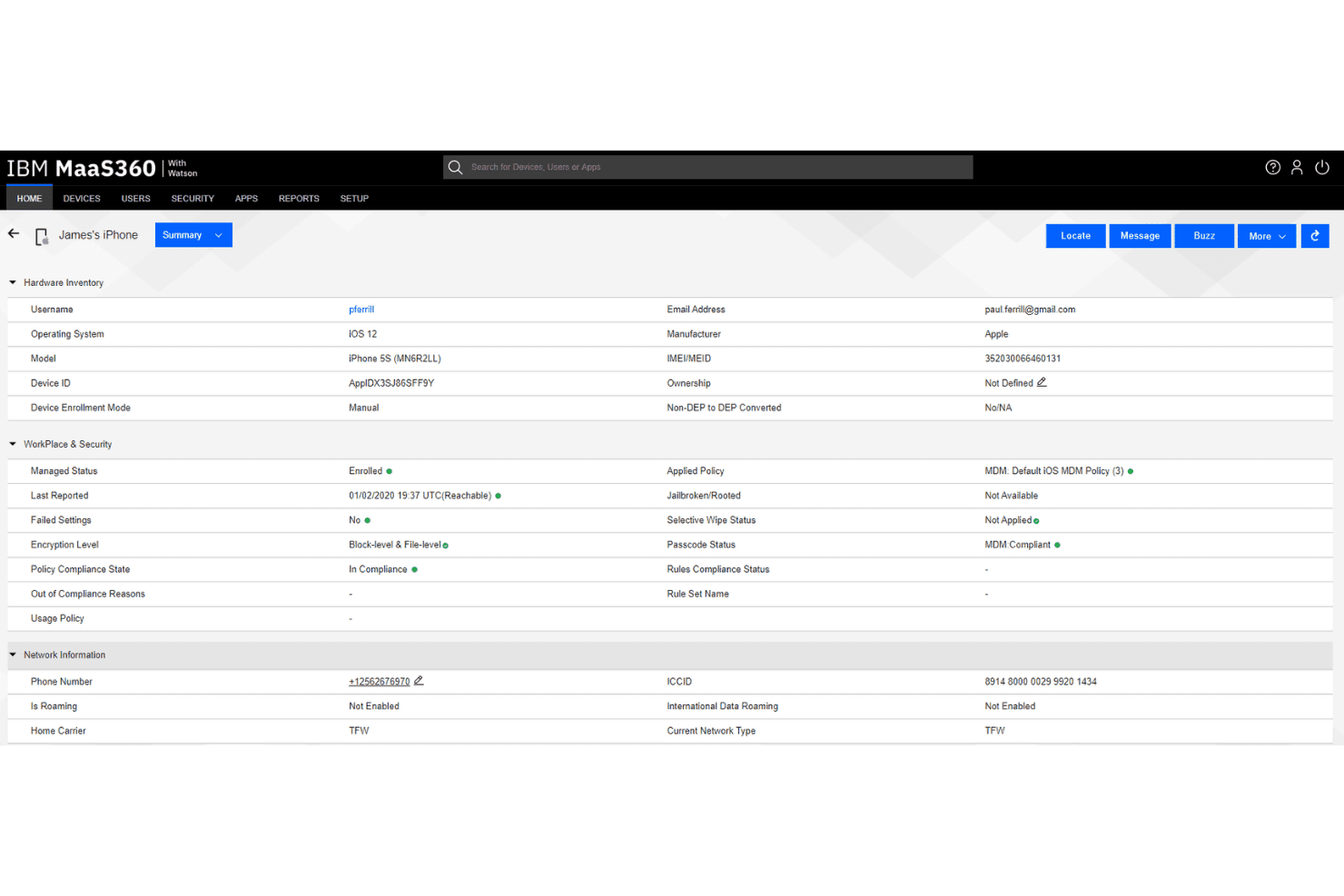
IBM MaaS360 gives admins full device visibility and compliance status. IBM MaaS360 is a unified endpoint management platform designed for Apple device management, offering cloud-based control, real-time monitoring, remote configuration, and policy automation across iOS, macOS, and other devices.
Who Is IBM MaaS360 Best For?
IT security and compliance teams in regulated industries who need real-time monitoring and control over Apple devices at scale.
Why I Picked IBM MaaS360
I picked IBM MaaS360 because I rely on its built-in AI security analytics for advanced threat detection on Apple devices. I use its Watson AI-powered dashboards to quickly surface suspicious behaviours and automate compliance alerts across enterprise endpoints.
IBM MaaS360 Key Features
- Remote device wipe: Remotely erase data on lost or stolen Apple devices.
- Automated device enrollment: Configure and enroll new Apple devices at scale.
- Application catalogue: Deploy, update, and manage apps across managed Apple devices.
- Geofencing policies: Apply security and access rules based on device location.
IBM MaaS360 Integrations
Integrations include Zimperium Mobile Threat Defense (MTD), IBM Verify, IBM Cloud Pak for Security, TeamViewer, Zscaler, Microsoft Azure, and Microsoft 365.
Pros and Cons
Pros:
- Built-in mobile expense monitoring tracks data usage
- Supports granular device and app policy controls
- Proactively flags device security issues
Cons:
- Manual renewal needed for Entra ID synchronization
- Remote control requires separate TeamViewer license
Learn more about IBM MaaS360: Best for multi-OS profile provisioning
- 30-day free trial + free demo available
- From $1.28/device/month (billed annually)
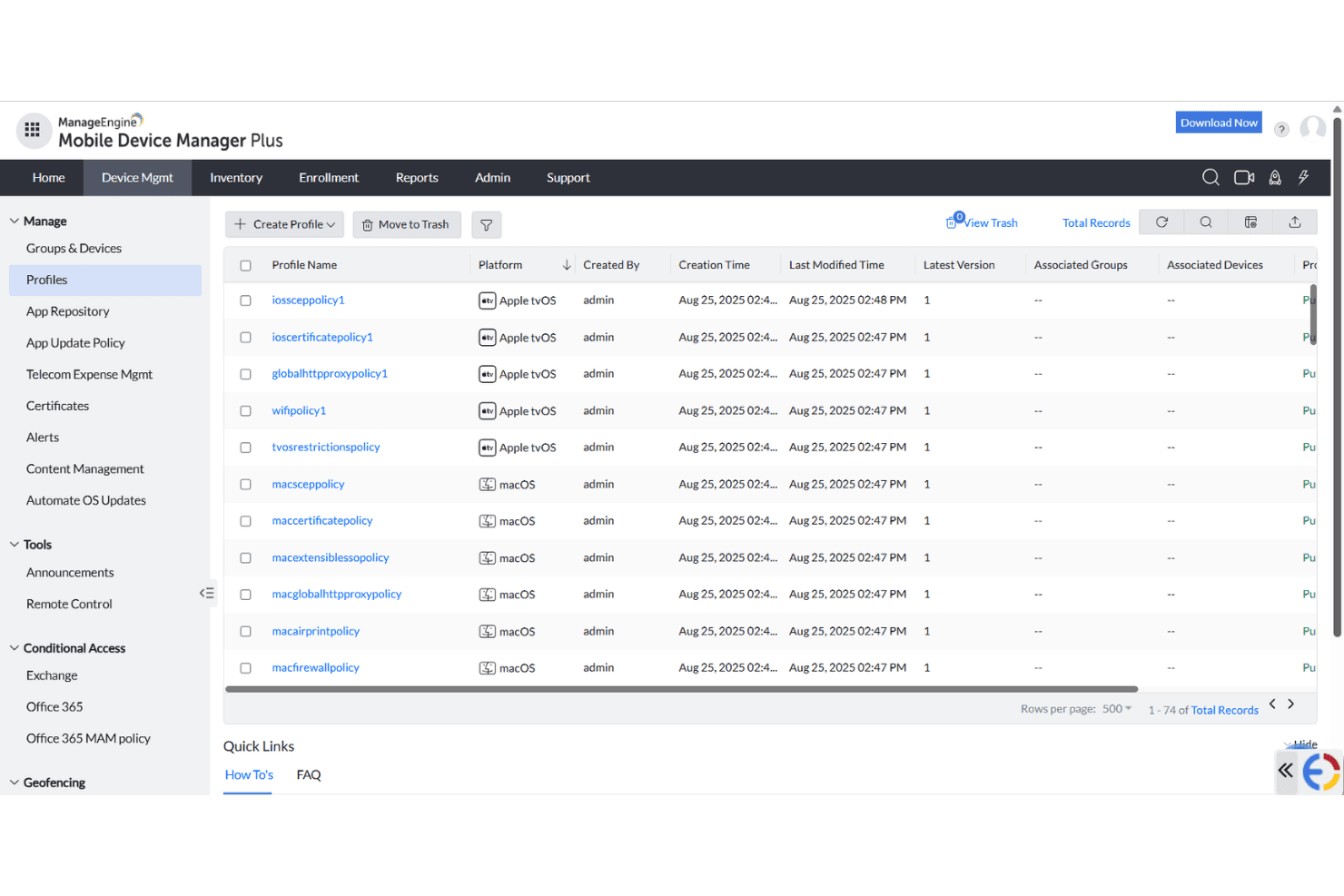
ManageEngine MDM Plus centralizes device profile management across platforms. ManageEngine Mobile Device Manager Plus is an endpoint management solution for IT teams who need centralized control over Apple, Android, Windows, Chrome OS, and Linux devices, with features for device enrollment, configuration, and security policy enforcement.
Who Is ManageEngine Mobile Device Manager Plus Best For?
IT teams at educational institutions and mid-sized enterprises managing large multi-OS device fleets will find ManageEngine Mobile Device Manager Plus especially useful.
Why I Picked ManageEngine Mobile Device Manager Plus
I picked ManageEngine Mobile Device Manager Plus because I can provision and assign custom profiles across iOS, macOS, Android, and Windows from a single console. My team uses it to automate user- and device-based policy deployment, so we don’t have to manage multiple platforms separately.
ManageEngine Mobile Device Manager Plus Key Features
- Remote device troubleshooting: Remotely view and control Apple devices for support and diagnostics.
- App distribution management: Push, update, or remove apps on iOS and macOS devices over the air.
- Compliance reporting: Generate reports on device compliance status and security posture.
- Content management: Distribute, update, and secure documents on managed Apple devices.
ManageEngine Mobile Device Manager Plus Integrations
Integrations include ServiceDesk Plus, ServiceNow, Zendesk, Analytics Plus, AssetExplorer, Zoho Creator, and Zoho CRM.
Pros and Cons
Pros:
- Remote troubleshooting for iOS and macOS devices
- Automated policy deployment for multiple operating systems
Cons:
- Limited customization for configuration templates
- Granular access controls are complex
- Allows remote device viewing
Learn more about ManageEngine Mobile Device Manager Plus: Best integrated Apple security features
- Free plan + 30-day free trial available
- From $0.46/device/month

Mosyle device security panel with remote controls and protection tools. Mosyle is an Apple device management software platform that offers configuration, deployment, compliance controls, and security management for macOS, iOS, iPadOS, and tvOS devices in business and education environments.
Who Is Mosyle Best For?
IT teams in education and business settings who need specialized security and management for mixed fleets of Apple devices.
Why I Picked Mosyle
I picked Mosyle as one of the best because I get tight integration of Apple-specific security features like device encryption, endpoint protection, and automated compliance checks directly in the management platform. This lets me address both security and configuration from one place.
Mosyle Key Features
- Remote device deployment: Provision and configure Apple devices without on-site setup.
- Application management: Install, update, and remove apps across managed endpoints.
- Profile-based configurations: Apply tailored settings based on user groups or device types.
- Live device monitoring: Track hardware status and compliance in real time.
Mosyle Integrations
Integrations include Google Workspace, Microsoft 365 for Business, Okta, Ping Identity, AD Federation Services (AD FS), and LDAP Active Directory.
Pros and Cons
Pros:
- Includes encryption management
- Detailed Apple-centric compliance tools
- Native security for Apple devices
Cons:
- Lacks advanced scripting features
- Limited customization for compliance reporting
Learn more about Mosyle: Best for automated issue fixing
- Free demo available
- From $3/device/month
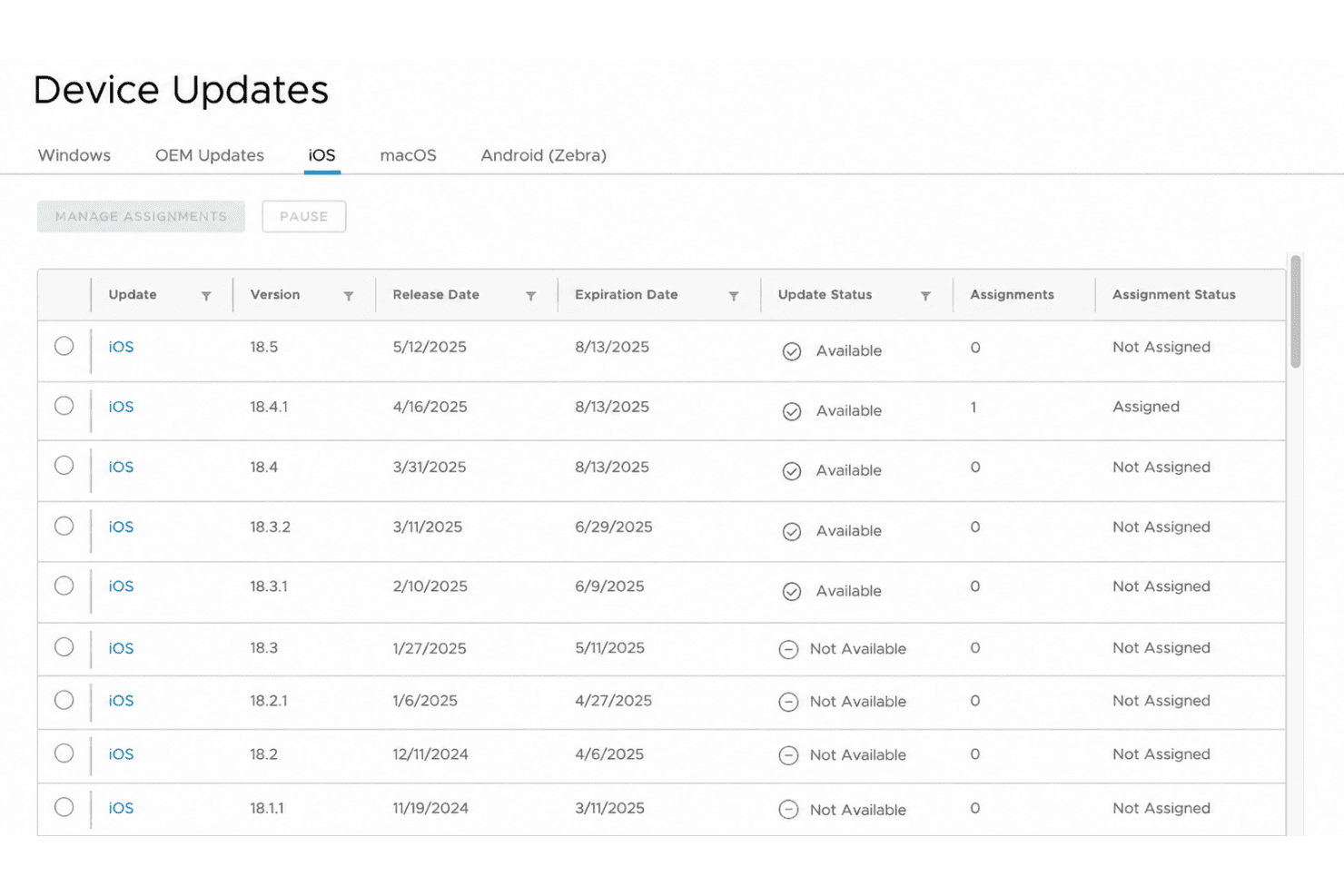
Omnissa Workspace ONE manages iOS device update assignments by version. Omnissa Workspace ONE is a unified endpoint management platform for Apple devices that offers app management, device compliance, zero-touch enrollment, and real-time monitoring in a cloud-based environment.
Who Is Omnissa Workspace ONE Best For?
IT teams in large enterprises need to automate Apple device management, monitoring, and issue remediation across complex device environments.
Why I Picked Omnissa Workspace ONE
I picked Omnissa Workspace ONE because I’ve used its automation engine to fix routine Apple device issues before they hit end users. My team relies on intelligent remediation workflows and granular policy enforcement that go beyond what typical MDM platforms offer.
Omnissa Workspace ONE Key Features
- Zero-touch provisioning: Set up and enroll Apple devices remotely without manual configuration.
- App catalogue management: Distribute and manage approved applications across your fleet of Apple devices.
- Device encryption controls: Enforce encryption policies to secure sensitive data on all managed Apple devices.
- Remote lock and wipe: Remotely lock or wipe devices if they are lost or compromised.
Omnissa Workspace ONE Integrations
Integrations include Omnissa Access, Okta, Microsoft Entra ID, ServiceNow, Horizon 8, Horizon Cloud, and Omnissa Intelligence.
Pros and Cons
Pros:
- Detailed role-based access for IT teams
- Experience score tracking improves support
- Automated remediation for common
Cons:
- High server memory load during certificate shifts
- Extra license required for custom reports
Learn more about Omnissa Workspace ONE: Best for automated device enrollment
- Free demo available
- Pricing upon request

Ivanti Neurons for MDM offers dashboard charts for tracking devices and user status. Ivanti Neurons for MDM is a cloud-based Apple device management platform that offers over-the-air provisioning, security policy enforcement, remote device management, and app distribution for enterprise IT environments.
Who Is Ivanti Neurons for MDM Best For?
IT administrators in mid-sized to large organizations who need to automate Apple device setup and management across geographically distributed teams.
Why I Picked Ivanti Neurons for MDM
I picked Ivanti Neurons for MDM as one of the best because I’ve configured automated device enrollment using Apple Business Manager, saving hours on bulk provisioning. I also like how my team can enforce setup workflows and quickly push managed configurations right out of the box.
Ivanti Neurons for MDM Key Features
- Remote device wipe: Remotely erase data on lost or stolen Apple devices.
- Application distribution: Distribute, update, and manage apps on enrolled Apple devices.
- Policy compliance monitoring: Continuously monitor devices for security and compliance policy adherence.
- Conditional access controls: Set device access rules based on security posture or compliance status.
Ivanti Neurons for MDM Integrations
Integrations include Google Admin Console, Microsoft Entra ID, LDAP, Splunk Enterprise, and ServiceNow.
Pros and Cons
Pros:
- Detailed device health and security dashboards
- Cloud-based MDM simplifies scaling
- Applies conditional access rules
Cons:
- Requires manual setup for VPP apps
- Initial configuration process can be complex
Learn more about Ivanti Neurons for MDM:
Annen programvare for administrasjon av iOS-enheter
Her er noen flere alternativer for programvare for administrasjon av iOS-enheter som ikke kom med på kortlisten, men som likevel er verdt å undersøke:
- 11FleetBest open source management tools
- 12Rippling ITBest for HR-triggered device lifecycle management
- 13JumpCloudBest for automated user-to-device setup
- 14NinjaOneBest remote troubleshooting for Macs
- 15HexnodeBest role-based access control
- 16JamfBest for education environments
- 17Deel ITBest compliance for international teams
- 18IruBest API extensibility for automation
- 19RipplingBest unified HR and IT device management
- 20Cisco Meraki Systems ManagerBest network-driven device controls
- 21iMazingBest local device backup management
How I Evaluate iOS Device Management Software
I evaluate these tools in two layers: the baseline requirements like native ABM support and ADE enrollment, and the differentiators that separate tools worth recommending from those that don't.
Core Functionality (Table Stakes For This List)
When I'm selecting tools for my list, I rank each one on a scale from 0 (does not offer the functionality) to 5 (excels in this area) for each core functionality listed below. Then, I calculate the tool's total score as a percentage. Each tool needs to achieve a minimum total score of 65% to be considered for inclusion.
- iOS MDM Protocol Support: I check for native integration with Apple's MDM framework and Apple Business Manager, since tools without proper ABM connectivity create enrollment headaches at scale.
- Zero-Touch Deployment: Every tool should support Automated Device Enrollment so new hires can unbox a Mac, connect to Wi-Fi, and land on a fully configured desktop with no IT hands-on the device.
- Configuration Profile Management: I evaluate how each tool handles building and scoping profiles for things like Wi-Fi, VPN, and restriction payloads across macOS and iOS devices.
- App & Patch Management: Deploying VPP-purchased apps is table stakes, but I also look at how each tool handles third-party patching for apps like Chrome, Zoom, and Slack on macOS.
- Security & Compliance Enforcement: The tool should handle FileVault key escrow, passcode policies, Gatekeeper settings, and remote lock/wipe to keep iOS endpoints aligned with security baselines.
- Inventory & Reporting: Real-time visibility into device hardware, installed software, and OS versions matters. I look for reporting that helps you spot non-compliant or outdated devices quickly.
Once I have a list of tools that meet the criteria, I consider what sets each platform apart.
Differentiating Factors (What Sets Vendors Apart)
Here's how I compare and contrast different vendors:
Standout Features
Identity provider integration with Okta, Entra ID, or Google Workspace is a big differentiator—it ties device trust directly to user authentication through Platform SSO. I also look at whether a tool supports custom scripting for tasks like enforcing naming conventions or remediating configuration drift with shell scripts. A self-service portal where employees install approved apps without filing a ticket cuts down support volume. Built-in endpoint detection matters too, since Mac-specific threats are better caught by tools tuned to macOS behaviours.
Beyond Features
Compliance certifications matter a lot here. I check whether a vendor holds SOC 2 Type II or ISO 27001 and offers prebuilt templates for frameworks like CIS Benchmarks or NIST 800-53. Pricing structure is another factor I weigh—per-device vs. per-user licensing changes total cost significantly when employees carry both a Mac and an iPhone. I also evaluate ecosystem integrations, especially connectors to SIEM platforms and ITSM tools like ServiceNow, since iOS MDMs rarely operate in isolation from a broader security and operations stack.
Slik velger du programvare for administrasjon av iOS-enheter
Det er lett å gå seg vill i lange funksjonslister og kompliserte prismodeller. For å hjelpe deg med å holde fokus mens du går gjennom den unike prosessen med å velge programvare, får du her en sjekkliste over faktorer du bør ha i mente:
| Faktor | Hva du bør vurdere |
|---|---|
| FaktorSkalerbarhet | Hva du bør vurdereKan løsningen håndtere det nåværende og forventede antallet iOS-enheter? Vær oppmerksom på priser per enhet og begrensninger på organisatoriske enheter. |
| FaktorIntegrasjoner | Hva du bør vurdereHar den innebygd tilkobling til identitetsleverandøren, enhetsbeholdningen, supportsystemet eller verktøyene for nettverkssikkerhet? Undersøk om iOS Business Manager støttes. |
| FaktorTilpasningsmuligheter | Hva du bør vurdereKan du opprette detaljerte policyer, automatisere arbeidsflyter eller tilpasse kontrollpanelet til arbeidsflytene dine? Test administratorkontrollene i en prøveperiode hvis det er mulig. |
| FaktorBrukervennlighet | Hva du bør vurdereEr administratorkontrollpanelet intuitivt? Kan de ansatte raskt registrere og administrere enheter uten omfattende opplæring eller manuelle prosesser? |
| FaktorImplementering og innføring | Hva du bør vurdereHvor lang tid vil utrullingen av enheter og konfigurasjonen av policyer ta? Spør om leverandørstøtte, importverktøy og hjelp med migrering for store enhetsparker. |
| FaktorKostnad | Hva du bør vurdereEr lisens-, support- og oppgraderingskostnadene forutsigbare? Beregn forventede månedlige og årlige utgifter, ikke bare den oppførte prisen. |
| FaktorSikkerhetstiltak | Hva du bør vurdereSamsvarer plattformen med kravene til samsvar og interne standarder for personvern, kryptering og tilgangskontroller? |
| FaktorTilgjengelig support | Hva du bør vurdereKan du få rask support i regionen og tidssonen din? Finn ut mer om direktechat, åpningstidene for telefonsupport og prosessene for eskalering. |
Hva er programvare for administrasjon av iOS-enheter?
Programvare for administrasjon av iOS-enheter er en plattform for sentral registrering, konfigurering, sikring og overvåking av samlinger av iOS-, iPadOS- og macOS-enheter. IT-team bruker den til å automatisere klargjøring av enheter, distribuere policyer, håndheve samsvar og gi brukere fjernsupport. Disse verktøyene bidrar til å administrere oppdateringer, begrense funksjoner og beskytte sensitive data på alle administrerte iOS-enheter i en organisasjon.
Funksjoner
Når du velger programvare for administrasjon av iOS-enheter, bør du se etter følgende nøkkelfunksjoner:
- Automatisert enhetsregistrering: Registrer nye iPhone-, iPad- eller Mac-enheter i større mengder via ABM eller Apple School Manager, slik at de er klare til bruk rett ut av esken. Dette reduserer tiden IT-teamene bruker på manuelt oppsett.
- Distribusjon og oppdatering av apper: Send ut, oppdater eller fjern applikasjoner på administrerte enheter eksternt for å sikre at brukerne har de riktige verktøyene og alltid kjører programvare fra appbutikken som støttes.
- Ekstern låsing og sletting: Lås eller slett tapte, stjålne eller utrangerte enheter eksternt for å beskytte sensitive data og redusere risikoen for uautorisert tilgang.
- Administrasjon av retningslinjer og konfigurasjon: Definer og håndhev sikkerhetsinnstillinger, Wi-Fi-detaljer, VPN-innstillinger, innholdsfiltrering og krav til passord på tvers av enheter for å opprettholde samsvar og enhetlighet.
- Instrumentbord for samsvar og rapportering: Overvåk statusen for enheters og brukeres samsvar, generer rapporter om sikkerhetsnivået og identifiser raskt enheter som ikke lenger følger retningslinjene.
- Sporing av enhetsbeholdning: Oppretthold en sanntidsoversikt over alle administrerte iOS-enheter, inkludert maskinvaredetaljer, aktive nyttelaster og programvareversjoner, for å støtte administrasjon og planlegging av eiendeler.
- Posisjonssporing og geogjerder: Spor enhetenes posisjoner og håndhev posisjonsbaserte begrensninger, for eksempel ved å deaktivere funksjoner eller blokkere tilgang utenfor godkjente grenser.
- Integrasjon av identitet og tilgang: Koble til identitetsleverandører for å håndheve brukerbaserte retningslinjer, administrere enkeltpålogging (SSO) og autentisering, og kreve sikre pålogginger eller flerfaktorautentisering på alle enheter.
- Selvbetjeningsportaler: La brukerne installere apper, tilbakestille passord eller håndtere enhetsregistrering uten hjelp fra IT, enten det gjelder en delt iPad, en bedriftsdistribusjon eller BYOD-modeller via brukerregistrering.
- Rollebaserte administratorkontroller: Tildel ulike tillatelsesnivåer til administratorer, for eksempel eksterne MSP-er eller interne team, slik at du kan delegere enhetsadministrasjon uten å svekke sikkerhet eller samsvar.
Fordeler
Implementering av programvare for administrasjon av iOS-enheter gir flere fordeler for teamet og virksomheten din. Her er noen av fordelene du kan se frem til:
- Sentralisert oversikt over enheter: Overvåk og administrer alle iOS-enheter i virksomheten via ett enkelt instrumentbord for bedre oversikt og kontroll på tvers av iOS, macOS, iPadOS, tvOS og til og med VisionOS.
- Automatisert håndheving av sikkerhet: Angi og håndhev sikkerhetsretningslinjer på tvers av enheter automatisk, slik at manuelle feil minimeres og sensitive data beskyttes.
- Raskere klargjøring av enheter: Få nye medarbeidere raskt i gang med automatisert enhetsregistrering og forhåndskonfigurerte konfigurasjonsprofiler.
- Støtte for overholdelse av regelverk: Spor status for samsvar og generer detaljerte rapporter som hjelper deg med å oppfylle bransje- eller virksomhetens sikkerhetsstandarder på alle endepunkter.
- Redusert arbeidsmengde for brukerstøtte: Gi brukerne selvbetjeningsverktøy, feilsøk eksternt og automatiser vanlige IT-oppgaver for å redusere den daglige belastningen på brukerstøtten.
- Enhetlig brukeropplevelse: Lever standardiserte apper, tilganger og innstillinger slik at alle brukere får det samme sikre og produktive arbeidsmiljøet.
- Mulighet for ekstern respons: Lås, slett eller send oppgraderinger til enheter eksternt for å håndtere hendelser eller endringer i virksomhetens behov uten fysisk tilgang.
Kostnader og priser
Valg av programvare for administrasjon av iOS-enheter krever en forståelse av de ulike prismodellene og tilgjengelige abonnementene. Kostnadene varierer basert på funksjoner, teamstørrelse, tillegg og mer. Tabellen nedenfor oppsummerer vanlige abonnementer, gjennomsnittsprisene deres og typiske funksjoner som er inkludert i programvareløsninger for administrasjon av iOS-enheter:
Sammenligningstabell for abonnementer
| Abonnementstype | Gjennomsnittspris | Vanlige funksjoner |
|---|---|---|
| AbonnementstypeGratisabonnement | Gjennomsnittspris$0 | Vanlige funksjonerStøtter et begrenset antall enheter og inkluderer grunnleggende registrering, grunnleggende appadministrasjon og begrenset brukerstøtte. |
| AbonnementstypePersonlig abonnement | Gjennomsnittspris$5-$10/user/month | Vanlige funksjonerLegger til avansert appdistribusjon, ekstern låsing og sletting, sporing av enhetsbeholdning og brukerstøtte via e-post. |
| AbonnementstypeBedriftsabonnement | Gjennomsnittspris$10-$25/user/month | Vanlige funksjonerInkluderer håndheving av retningslinjer, instrumentbord for samsvar, integrasjon med identitetsleverandører, rapporter og administratorkontroller. |
| AbonnementstypeVirksomhetsabonnement | Gjennomsnittspris$25-$50/user/month | Vanlige funksjonerTilbyr avansert sikkerhetsanalyse, automatisert samsvar, geogjerder, tilpasset klargjøring, prioritert brukerstøtte og SLA-er. |
Vanlige spørsmål om programvare for iOS-enhetsadministrasjon
Her er noen svar på vanlige spørsmål om programvare for iOS-enhetsadministrasjon:
Kan jeg administrere både Mac-maskiner og iPhone-enheter med det samme verktøyet?
Ja, med de fleste programvarer for Apple-enhetsadministrasjon kan du administrere Mac-maskiner, iPhone-modeller, iPad-modeller og noen ganger til og med Apple TV-enheter fra én enkelt administrasjonskonsoll. Denne enhetlige tilnærmingen på tvers av Apple-økosystemet forenkler håndheving av retningslinjer og inventarsporing for all maskinvaren din.
Trenger jeg Apple Business Manager for å bruke programvare for enhetsadministrasjon?
Nei, men integrasjon med Apple Business Manager gir tilgang til automatisert enhetsregistrering uten berøring og bedre kontroll. Uten dette kan det hende du må registrere enheter manuelt ved hjelp av verktøy som Apple Configurator, noe som kan ta lengre tid og begrense automatiseringen for større enhetsparker.
Hva skjer hvis en ansatt mister den administrerte enheten sin?
Du kan låse, lokalisere eller slette data på tapte eller stjålne Apple-enheter eksternt via administrasjonsplattformen din for å sikre enhetene umiddelbart. Dette beskytter bedriftsdata og bidrar til å forhindre uautorisert tilgang selv om enheten befinner seg utenfor kontoret.
Hvordan administreres oppdateringer og nye iOS-/macOS-versjoner?
De fleste plattformer støtter utsending av oppdateringer og styring av når et nytt operativsystem rulles ut til administrerte enheter. Dette gjør det mulig for IT-team å teste kompatibilitet før operativsystemoppdateringer installeres, og bidrar til å unngå driftsforstyrrelser.
Kan IT kontrollere personlige kontoer på bedriftseid eller ansatteid maskinvare?
Nei. Selv om MDM-programvare lar organisasjoner administrere bedriftskonfigurasjoner, applikasjoner og sikkerhetsparametere, kan den ikke få tilgang til eller administrere personopplysninger, private iCloud-kontoer eller personlige bilder.
Hvor lang tid tar det vanligvis å klargjøre en ny enhet?
Med automatisert enhetsregistrering kan en ny enhet settes opp for brukere på få minutter. Manuell klargjøring tar lengre tid, men de fleste verktøy tilbyr trinnvise veiledninger og maler som bidrar til å fremskynde prosessen.