

Programvare for nettverksinventar sporer, organiserer og hjelper deg med å administrere alle aktiva som er koblet til nettverket ditt. Når du håndterer IT-, OT- eller IoT-miljøer, gir disse verktøyene sanntidsinnsikt, slik at du kan minimere risiko og holde tritt med endrede krav.
Hvis du trenger å revidere, kontrollere eller automatisere aktivaadministrasjonen, har du kommet til rett sted. Nedenfor finner du den beste programvaren for nettverksinventar for 2026, med alternativer fra oppdagelse i hybrid sky til samsvarsdrevet dokumentasjon.
Hvorfor du kan stole på våre programvareanbefalinger
6,700+
Reviews
20
Industry experts
16+
Evaluation factors
14
Years
Teamet vårt har testet og anmeldt programvare siden 2012. Vi er selv teknologiledere, så vi vet hvor vanskelig og hvor viktig det er å velge riktig programvare.
I denne guiden har vi vurdert verktøyene gjennom praktisk testing og uavhengig research og gitt dem poeng ut fra våre utvelgelseskriterier.
Anmeldelsene våre bygger på vår egen redaksjonelle vurdering. De er ikke et salgsargument.
Ekspertanmeldere:
- Paulo Gardini MiguelTech Director
 Tim FisherVP of AI
 Gabriel RosasTech Lead & Software Architect
 Christhian GruhnTech Lead & Platform Architect

Sammenligningstabell for programvare for nettverksinventar
Denne sammenligningstabellen oppsummerer prisdetaljer for mine beste utvalg av programvare for nettverksinventar:
| Tool | Best For | Trial Info | Price | ||
|---|---|---|---|---|---|
| 1 | Best for AI-driven inventory and compliance audits | Free demo + 30-day free trial available | From $1,499/year | Website | |
| 2 | Best for hybrid network visibility | Free demo + 14-day free trial available | Not available | Website | |
| 3 | Best for automation-driven asset inventory | Free demo + 30-day free trial available | Pricing upon request | Website | |
| 4 | Best for agentless asset discovery | Free plan + 21-day free trial available | From $5,000/year | Website | |
| 5 | Best for auto-updating IT docs and compliance audits | 30-day free trial | From €465.00/year | Website | |
| 6 | Best for hybrid IT environments | Free trial + free demo available | Pricing upon request | Website | |
| 7 | Best for IT, OT, and IoT asset discovery in one view | Free demo + 14-day free trial available | From $239/month (billed annually) | Website | |
| 8 | Best for DC asset lifecycle and CMDB sync | Free demo available | Pricing upon request | Website | |
| 9 | Best for CMDB-connected asset discovery at scale | Free demo available | Pricing upon request | Website | |
| 10 | Best for enterprise-wide asset discovery sync | Free demo available | Pricing upon request | Website |


Anmeldelser av programvare for nettverksinventar
Her er mine beste programvareutvalg. Jeg har oppsummert de viktigste funksjonene, de viktigste bruksområdene og integrasjonene for hvert alternativ, slik at du kan finne det som passer best.
 Best for AI-driven inventory and compliance audits
- Free demo + 30-day free trial available
- From $1,499/year
Visit WebsiteCustomer Rating:4.6/5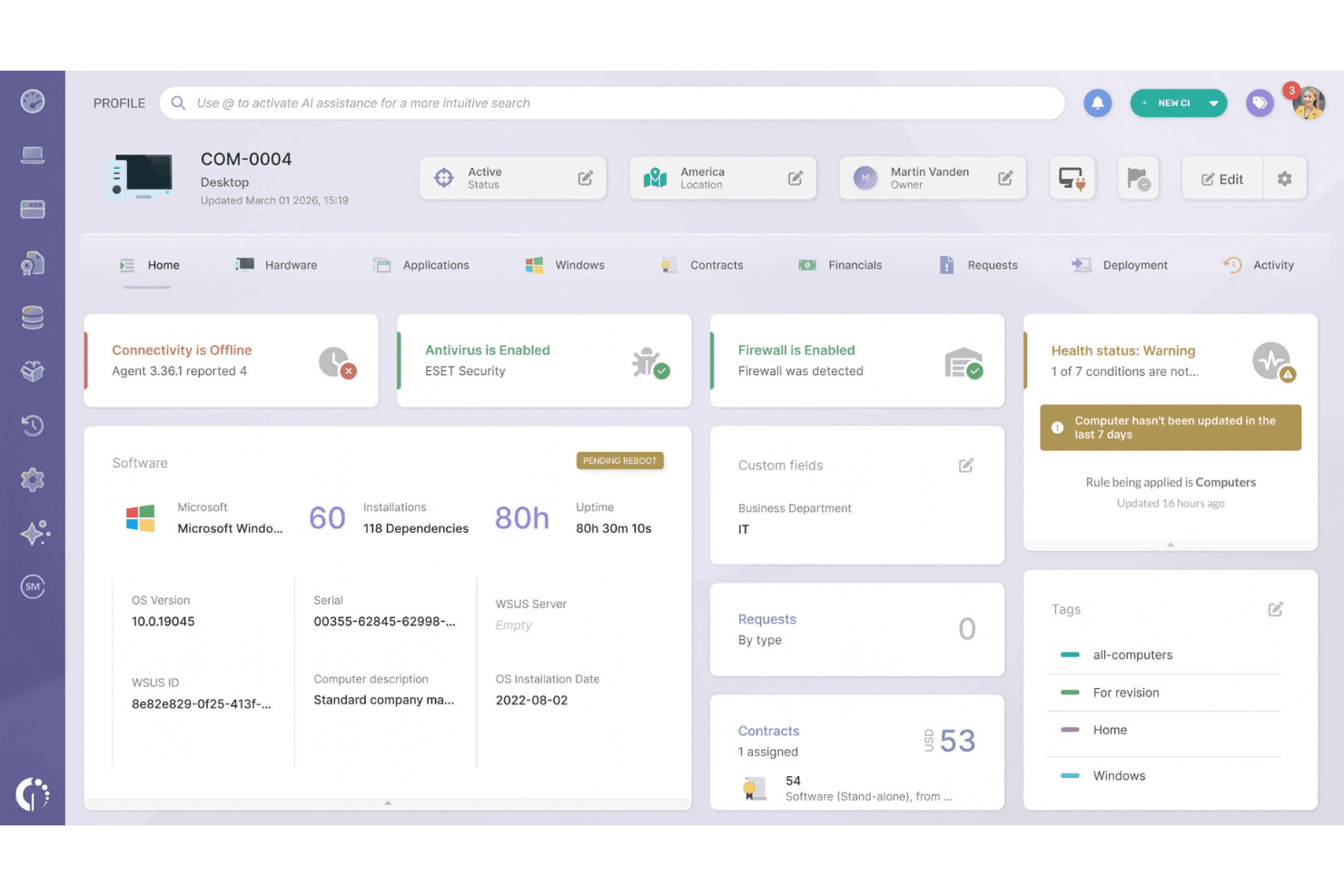
InvGate Asset Management displays full device health, software, and contract details. InvGate Asset Management is an IT asset management platform that combines agent-based and agentless network discovery, centralized hardware and software inventory, CMDB mapping, and compliance reporting across cloud, virtual, and on-premises environments.
Who Is InvGate Asset Management Best For?
InvGate Asset Management is a strong fit for IT teams in mid-to-large enterprises that need audit-ready inventory with built-in compliance reporting across GDPR, HIPAA, and PCI-DSS frameworks.
Why I Picked InvGate Asset Management
I picked InvGate Asset Management because its AI Hub genuinely changes how compliance audits work in practice. Instead of manually hunting for outdated or non-compliant assets, Smart Recommendations surfaces them automatically, with specific guidance on whether to update, replace, or reassign. The Atlas database layers in real end-of-life and end-of-support dates for hardware and software, so pre-built GDPR, HIPAA, and PCI-DSS compliance reports are grounded in accurate, current data.
InvGate Asset Management Key Features
- Agent-based endpoint inventory: A lightweight agent for Windows, macOS, Linux, and Android collects detailed hardware specs, installed software, and usage data daily, even when devices are off-network.
- Proxy-based agentless network scanning: Lightweight Discovery Proxies scan user-defined IP ranges using SNMP, WMI, and SSH to fingerprint servers, printers, routers, and switches without deploying agents.
- Automated CMDB with dependency mapping: The built-in CMDB maps relationships between assets, applications, users, and locations, with AI-assisted suggestions to keep dependency data current as your environment changes.
- Automated warranty tracking: Native API integrations with Dell and Lenovo auto-populate warranty expiration dates at the asset level, with Smart Tag automation and email alerts for upcoming expirations.
InvGate Asset Management Integrations
InvGate Asset Management offers native integrations across the Microsoft ecosystem, AWS, Google Cloud Platform, Jamf, VMware vCenter, Jira, and Zendesk. Its REST API supports custom integrations.
Pros and Cons
Pros:
- Built-in compliance dashboards and audit tools
- AI-powered recommendations for risky assets
- Dual agent-based and agentless device discovery
Cons:
- Automatic warranty sync limited to Dell and Lenovo
- No real-time network topology mapping
Learn more about InvGate Asset Management: Best for hybrid network visibility
- Free demo + 14-day free trial available
- Not available
Visit WebsiteCustomer Rating:4.5/5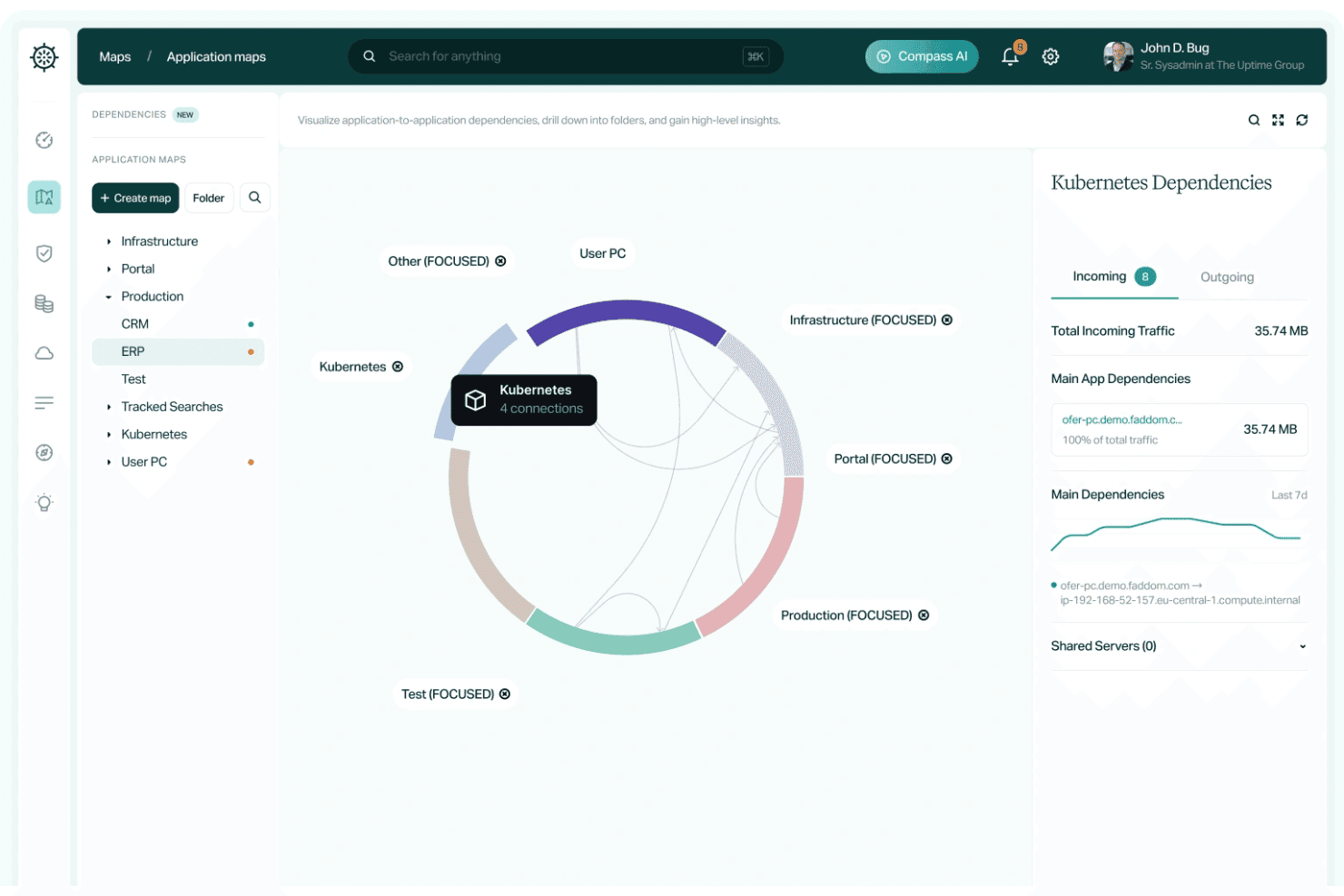
Faddom maps application dependencies with traffic insights. Faddom is an agentless network inventory and topology mapping tool that discovers servers, VMs, cloud instances, and application dependencies across on-premises and cloud environments using passive traffic analysis and protocols like NetFlow, SNMP, and sFlow.
Who Is Faddom Best For?
Faddom is a strong fit for enterprise IT and infrastructure teams managing hybrid environments who need real-time topology visibility without the overhead of agent deployment.
Why I Picked Faddom
I picked Faddom as one of the best because it gives you a complete, real-time topology map of your hybrid environment in under 60 minutes, with no agents and no credentials required by default. What I find impressive is how it handles both on-premises infrastructure and multi-cloud environments (AWS, Azure, GCP) within a single unified map, using passive traffic analysis via NetFlow, sFlow, and SNMP. Its Lighthouse AI continuously flags behavioral anomalies like rogue logins and DNS spikes, so your inventory isn't just a snapshot—it's a live, security-aware view of your network.
Faddom Key Features
- CVE vulnerability enrichment: Links discovered software and version data to known CVEs, giving you a real-time view of vulnerable assets across your environment.
- Cloud rightsizing and migration planning: Built-in recommendations surface idle or oversized cloud instances with cost data across AWS, Azure, and GCP to support migration wave planning.
- Compass AI natural language querying: Ask plain-language questions about your infrastructure topology and get direct answers without manually digging through maps or reports.
- SSL certificate tracking: Monitors SSL certificates across discovered services, flagging expiring or misconfigured certificates before they become an incident.
Faddom Integrations
Faddom offers integrations with ServiceNow, Jira, Zabbix, Nagios, Microsoft AD, and AWS.
Pros and Cons
Pros:
- Flags shadow IT and CVE vulnerabilities automatically
- No endpoint agents or server credentials required
- Generates real-time topology maps in under an hour
Cons:
- Does not support SaaS application discovery
- No native CMDB or bidirectional data sync
Learn more about Faddom: Best for automation-driven asset inventory
- Free demo + 30-day free trial available
- Pricing upon request
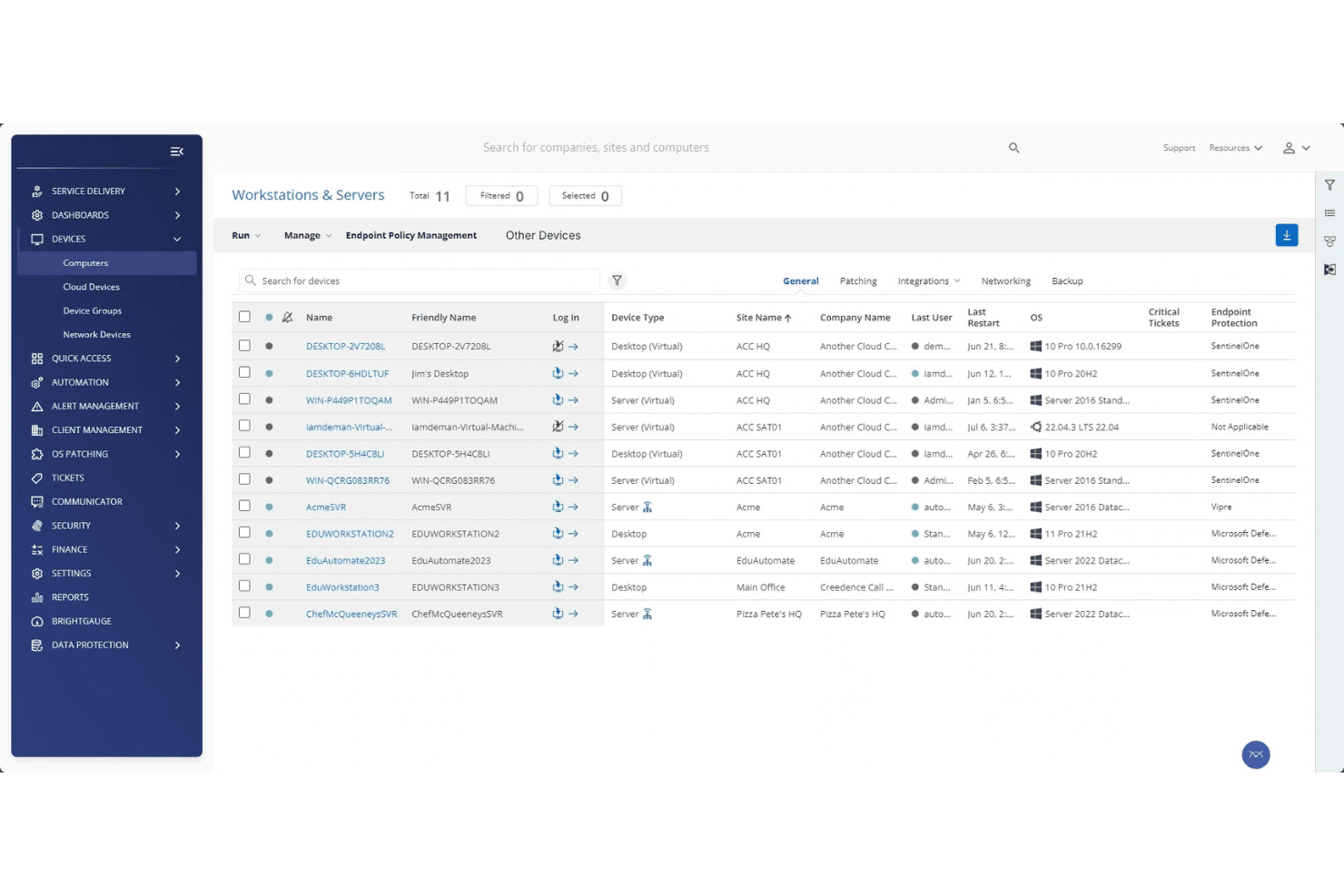
ConnectWise RMM centralizes device management across all client workstations and servers. ConnectWise RMM is an agent-based and agentless remote monitoring and management platform that combines automated network discovery, multi-protocol device scanning, asset cataloging, change tracking, and scripted automation across multi-site IT environments.
Who Is ConnectWise RMM Best For?
ConnectWise RMM is purpose-built for MSP technicians managing multiple client networks from a single console.
Why I Picked ConnectWise RMM
ConnectWise RMM earns its spot on my shortlist because its Network Probe technology turns any Windows agent into a discovery engine, automatically scanning IP ranges, creating device records, and querying devices via Detection Templates across multi-site environments. I particularly like how the platform pairs agent-based cataloging (hardware specs, installed software, patch status) with agentless SNMP, WMI, and LLDP scanning, so even unmanaged switches and printers get captured. The ~400 prebuilt automation scripts then let you act on that inventory data without writing everything from scratch.
ConnectWise RMM Key Features
- Asset change tracking: Logs hardware, software, and ownership changes over time to support audits and lifecycle management.
- Dataviews reporting: Provides 100+ interactive query views for searching, filtering, and exporting asset data.
- Multi-tenant console: Manages multiple client networks from one interface with per-client site structures and segmented reporting.
- Deployment flexibility: Supports on-premises and cloud (SaaS) hosting based on your data residency or network segmentation needs.
ConnectWise RMM Integrations
ConnectWise RMM connects with ConnectWise PSA, Autotask, Auvik, ServiceNow, and Aportio. It also integrates with Zapier and provides a REST API for custom connections.
Pros and Cons
Pros:
- Multi-tenant console for MSP client management
- Deep change tracking for asset lifecycles
- Hybrid agent and agentless device discovery
Cons:
- Monitoring for non-Windows devices is limited
- Advanced topology mapping requires Auvik add-on
Learn more about ConnectWise RMM: Best for agentless asset discovery
- Free plan + 21-day free trial available
- From $5,000/year
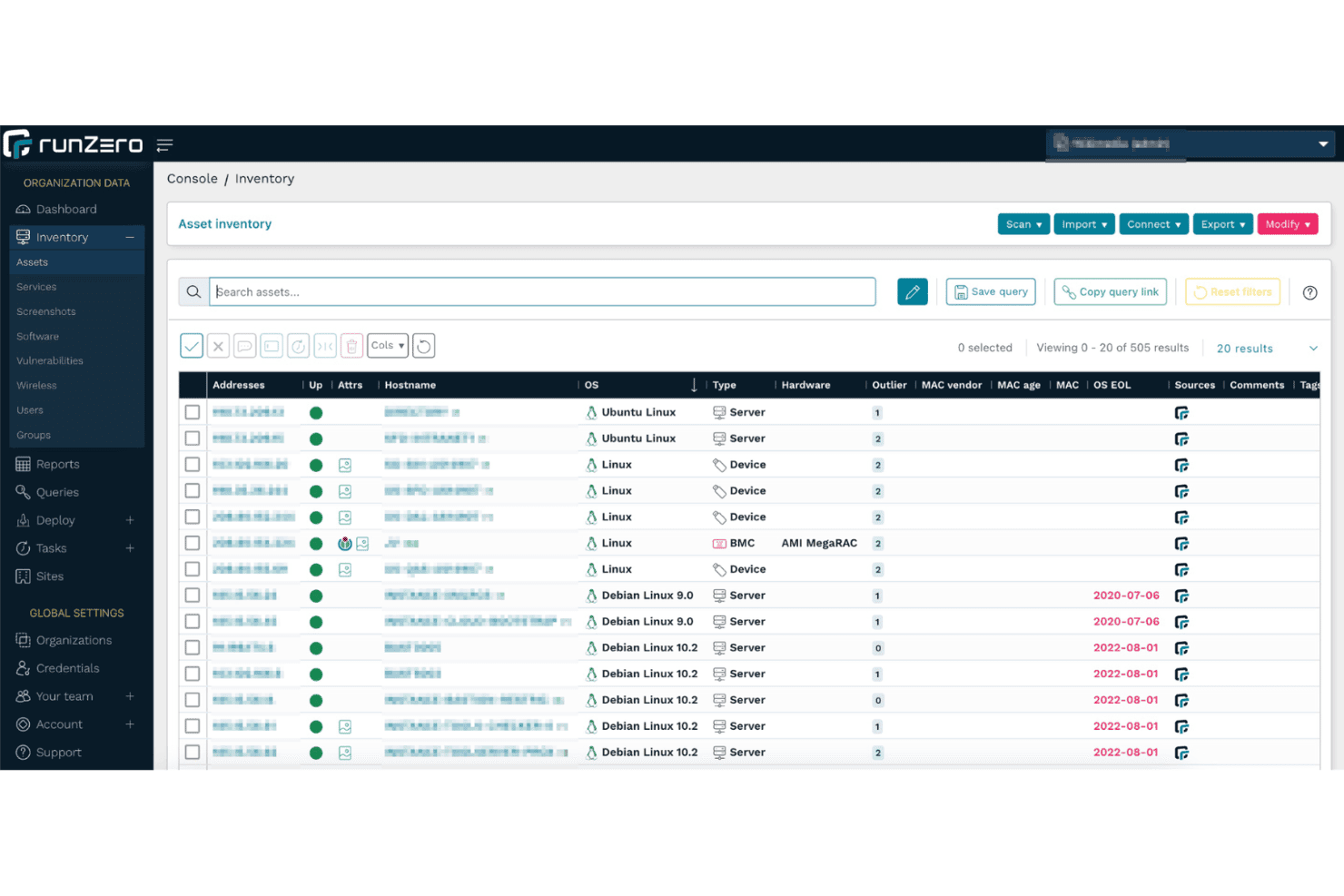
runZero displays a full asset inventory across 505 discovered network devices. runZero is a network inventory and cyber asset attack surface management (CAASM) platform that discovers and catalogs IT, OT, IoT, and cloud assets using a combination of active scanning, passive traffic sampling, and API-based integrations.
Who Is runZero Best For?
runZero is a strong fit for security and network teams managing mixed IT, OT, and IoT environments where deploying agents or gathering credentials isn't practical.
Why I Picked runZero
I picked runZero as one of the best because its agentless discovery model sets it apart. It fingerprints IoT, OT, and shadow IT devices without credentials, agents, or appliances. I've run it against environments where deploying agents wasn't an option, and it still surfaces open ports, running services, SSL certificates, and even screenshots of web interfaces. The passive OT traffic sampling is particularly valuable for fragile ICS environments where active scanning carries real operational risk.
runZero Key Features
- Compliance dashboards: Pre-built dashboards mapped to frameworks including NIST CSF, PCI DSS, DORA, NIS2, and NYDFS for audit-ready reporting.
- Multi-tenant MSSP console: Supports per-customer accounts or a global account with per-organization RBAC, scoped credentials, and parent-child org relationships.
- SSL/TLS certificate tracking: Discovers and catalogs all certificates across the network, including expired and expiring-soon certs with full issuer and chain metadata.
- Attack path mapping: Visualizes lateral movement paths from internet-facing entry points through the network, identifying segmentation gaps and choke points.
runZero Integrations
runZero offers 30+ documented integrations, including Jira Service Management, NetBox, AWS, Microsoft Intune, Google Cloud Platform, CrowdStrike, Splunk, and Qualys. It also provides an API for custom integrations.
Pros and Cons
Pros:
- Screenshots web services for faster device validation
- Visualizes network topology with 2D and 3D maps
- Agentless discovery finds unmanaged and shadow IT
Cons:
- Native change tracking requires external SIEM export
- Hardware detail is limited without credentials
Learn more about runZero: Best for auto-updating IT docs and compliance audits
- 30-day free trial
- From €465.00/year
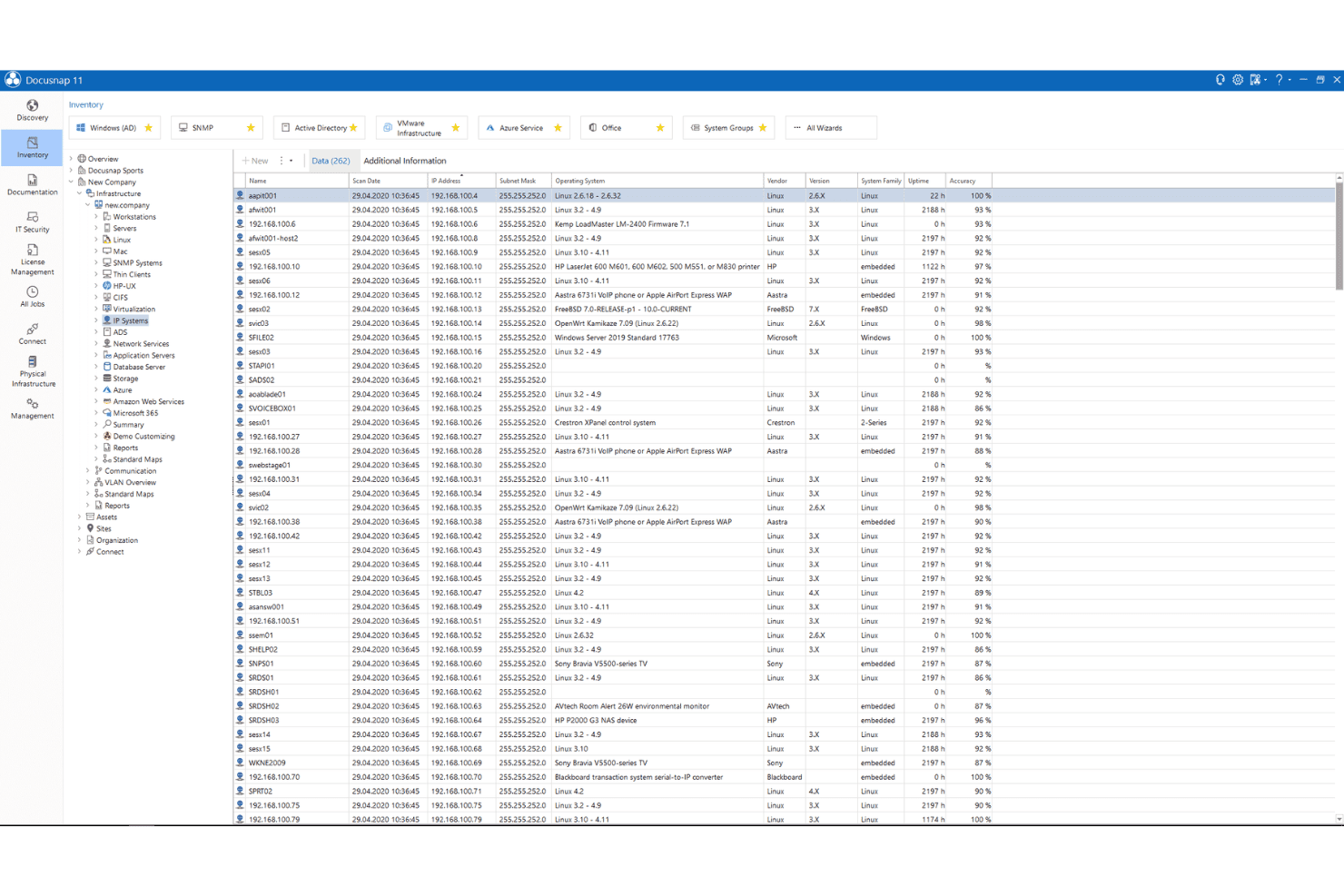
Docusnap displays a full SNMP device inventory with OS and network details. Docusnap is an agentless network inventory and IT documentation tool that combines automated device discovery, an ITIL-compliant CMDB, license management, network topology mapping, and compliance-ready reporting across on-premises and cloud environments.
Who Is Docusnap Best For?
Docusnap is a strong fit for IT teams in regulated industries that need audit-ready documentation and license compliance tracking across hybrid on-premises and cloud environments.
Why I Picked Docusnap
Docusnap earns its spot on my shortlist because of how it handles documentation that actually stays current. Every scheduled inventory cycle automatically refreshes network maps, IT concept documents, and compliance reports without anyone touching them manually. I particularly like its 200+ pre-built audit reports mapped to frameworks like ISO 27001, NIS-2, GDPR, and DORA, which means your documentation is audit-ready by default, not scrambled together before an inspection. The agentless discovery across Windows, Linux, macOS, and cloud platforms like Azure and AWS keeps the CMDB accurate across hybrid environments without deployment overhead.
Docusnap Key Features
- Multi-protocol agentless scanning: Scans devices using WMI, SSH, SNMP, and REST APIs without installing agents on any endpoint.
- ITIL-compliant CMDB: Stores all inventoried assets in a structured, dependency-aware configuration database.
- Multi-tenancy for MSPs: Built-in client separation with per-tenant scanning credentials, role-based access control, and custom branding for each managed organization.
- Permission analysis: Audits access rights across Windows file systems, Active Directory, SharePoint, Exchange, and CIFS/SMB-compatible storage.
Docusnap Integrations
Docusnap offers native integrations with Microsoft 365, Azure Services, Amazon Web Services, and Cisco Meraki. It also provides a REST API and Zapier for custom connections.
Pros and Cons
Pros:
- Multi-tenancy with per-client data segregation
- ITIL-compliant CMDB with dependency mapping
- Auto-updating IT documentation after each scan
Cons:
- Limited report customization options
- No real-time rogue device alerting
Learn more about Docusnap: Best for hybrid IT environments
- Free trial + free demo available
- Pricing upon request
Visit WebsiteCustomer Rating:4.8/5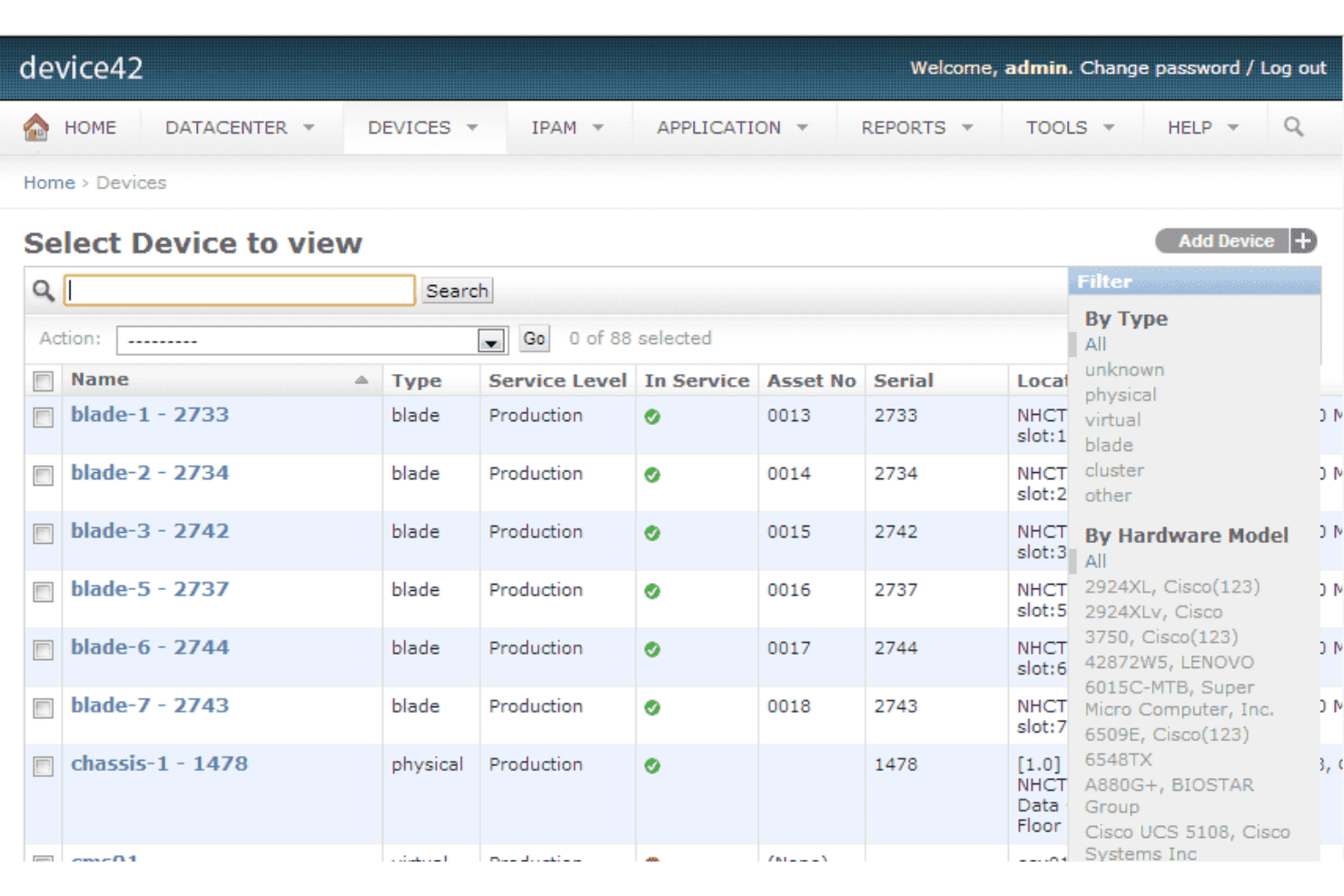
Device42 lets users filter and manage all devices by type and hardware model. Device42 is a network inventory management platform that combines agentless auto-discovery, a unified CMDB, IPAM, DCIM, and application dependency mapping across physical, virtual, cloud, and containerized environments.
Who Is Device42 Best For?
Device42 is a strong fit for mid-to-large IT teams managing mixed environments that span on-premises hardware, virtual infrastructure, and cloud resources under one inventory system.
Why I Picked Device42
I've included Device42 in my top picks because it's one of the few network inventory management tools that genuinely handles physical, virtual, cloud, and containerized assets under a single CMDB without requiring agents on most devices. I particularly like how Remote Collectors extend agentless discovery into segmented subnets and remote offices, covering protocols like SNMP, WMI, SSH, and even Modbus for OT/IoT devices. Its Application Dependency Mapping automatically visualizes service-to-server relationships, which is invaluable when you need to assess the impact of a planned change across a hybrid environment.
Device42 Key Features
- Software license tracking: Monitor purchased, installed, and actively used software licenses in a single view, with flags for prohibited software and upcoming expirations.
- EnrichAI data normalization: Automatically deduplicates and enriches discovered asset records with manufacturer warranty, EOL, and EOS data on every discovery cycle.
- SSL certificate management: Auto-discovers certificates across your environment, tracks expiration dates, and surfaces cipher suite details for audit and compliance review.
- IPAM with DNS and NAT tracking: Manages IPv6/IPv4 subnets, VLANs, and IP assignments alongside DNS record types and NAT rules through firewalls and load balancers.
Device42 Integrations
Device42 offers native integrations with ServiceNow, Freshservice, Jira Service Management, Splunk, Power BI, and CyberArk. An API is also available for custom connections.
Pros and Cons
Pros:
- Warranty and EOL data auto-enriched every cycle
- Topology and impact charts auto-generate from scans
- Agentless discovery spans cloud, on-prem, and IoT
Cons:
- Advanced reporting requires DOQL query language
- Hardware subcomponent change tracking is limited
Learn more about Device42: Best for IT, OT, and IoT asset discovery in one view
- Free demo + 14-day free trial available
- From $239/month (billed annually)
Visit WebsiteCustomer Rating:4.3/5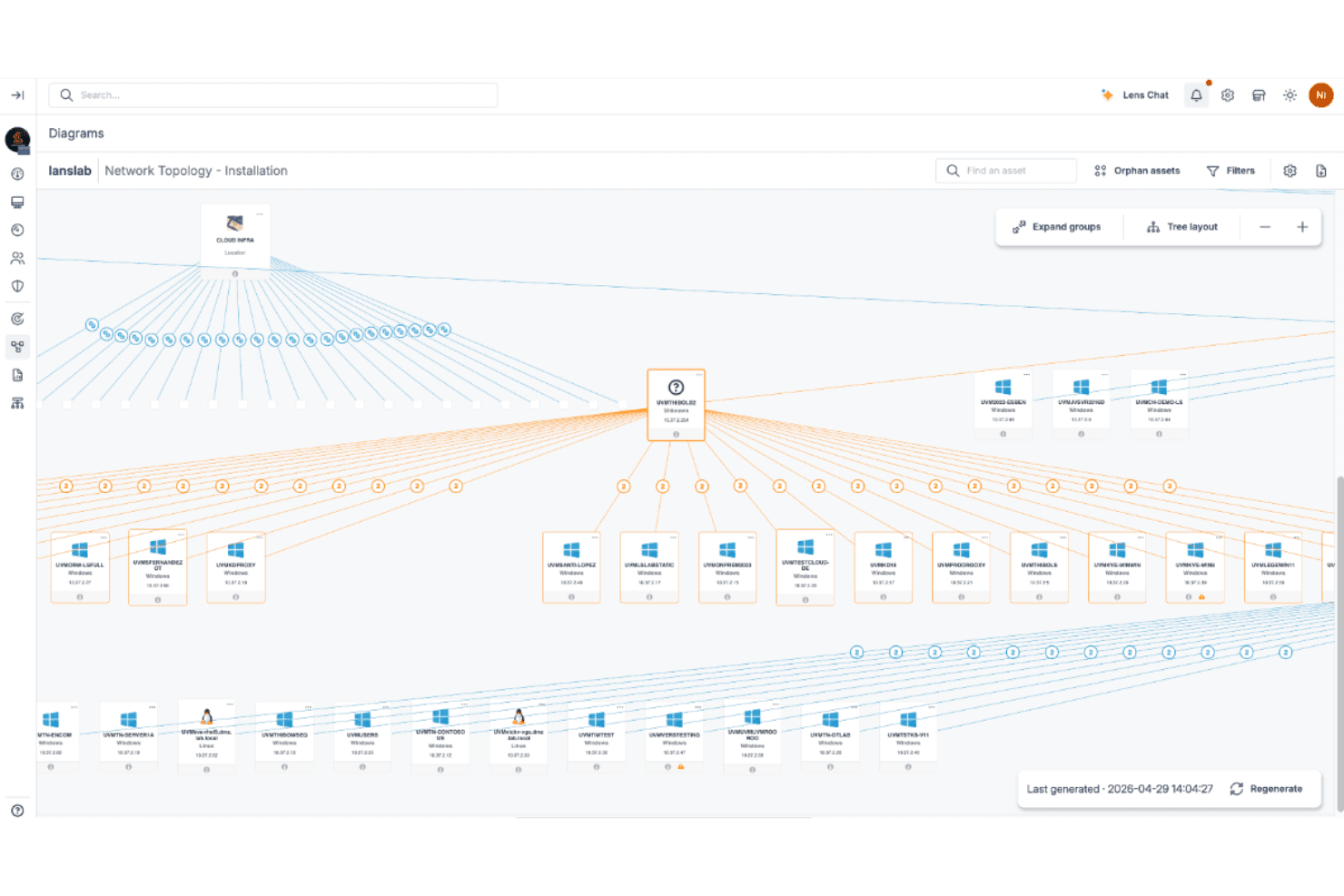
Lansweeper maps your full network topology across all assets. Lansweeper is a network inventory management system that combines agentless active scanning, passive device sensing, agent-based tracking, and cloud connectors to discover and catalog IT, OT, and IoT assets across hybrid environments.
Who Is Lansweeper Best For?
Lansweeper is a strong fit for IT teams managing mixed environments where IT, OT, and IoT devices coexist and need to be tracked in a single, unified inventory.
Why I Picked Lansweeper
I picked Lansweeper as one of the best because no other tool I've used collapses IT, OT, and IoT discovery into a single, normalized inventory as naturally as this one does. Its Asset Radar layer passively fingerprints devices using credential-free packet sensing, surfacing unmanaged IoT hardware and rogue endpoints that credentialed scans routinely miss. I also rely on its built-in vulnerability cross-referencing, which maps discovered assets directly to CVE feeds so I can see which specific devices are exposed without switching tools.
Lansweeper Key Features
- Warranty tracking: Automatically pulls warranty status from Dell, HP, Lenovo, and other major vendors, with configurable expiration alerts at 30, 60, and 90 days.
- Multi-tenant MSP portal: A dedicated management console lets MSPs view, report on, and manage asset inventories across all client sites from a single interface.
- Compliance reporting templates: Pre-built report templates mapped to frameworks including NIST, HIPAA, PCI-DSS, ISO 27001, and CIS Controls support audit preparation directly from inventory data.
- GraphQL API and webhooks: Available on Pro and Enterprise tiers, these let your team push asset data into external tools or trigger automated workflows based on inventory changes.
Lansweeper Integrations
Lansweeper integrates with Datadog, Jira Service Management, Brinqa, Halo, Happyfox, Microsoft Sentinel, Splunk, and Armis. GraphQL and REST APIs, webhooks, and an MCP Server support custom connectivity.
Pros and Cons
Pros:
- Maps vulnerabilities directly to discovered assets
- Agentless scanning uncovers hard-to-reach assets
- Finds unmanaged and rogue IoT/OT devices
Cons:
- SNMPv3 context field not supported
- No built-in patch deployment feature
Learn more about Lansweeper: Best for DC asset lifecycle and CMDB sync
- Free demo available
- Pricing upon request
Visit WebsiteCustomer Rating:4.4/5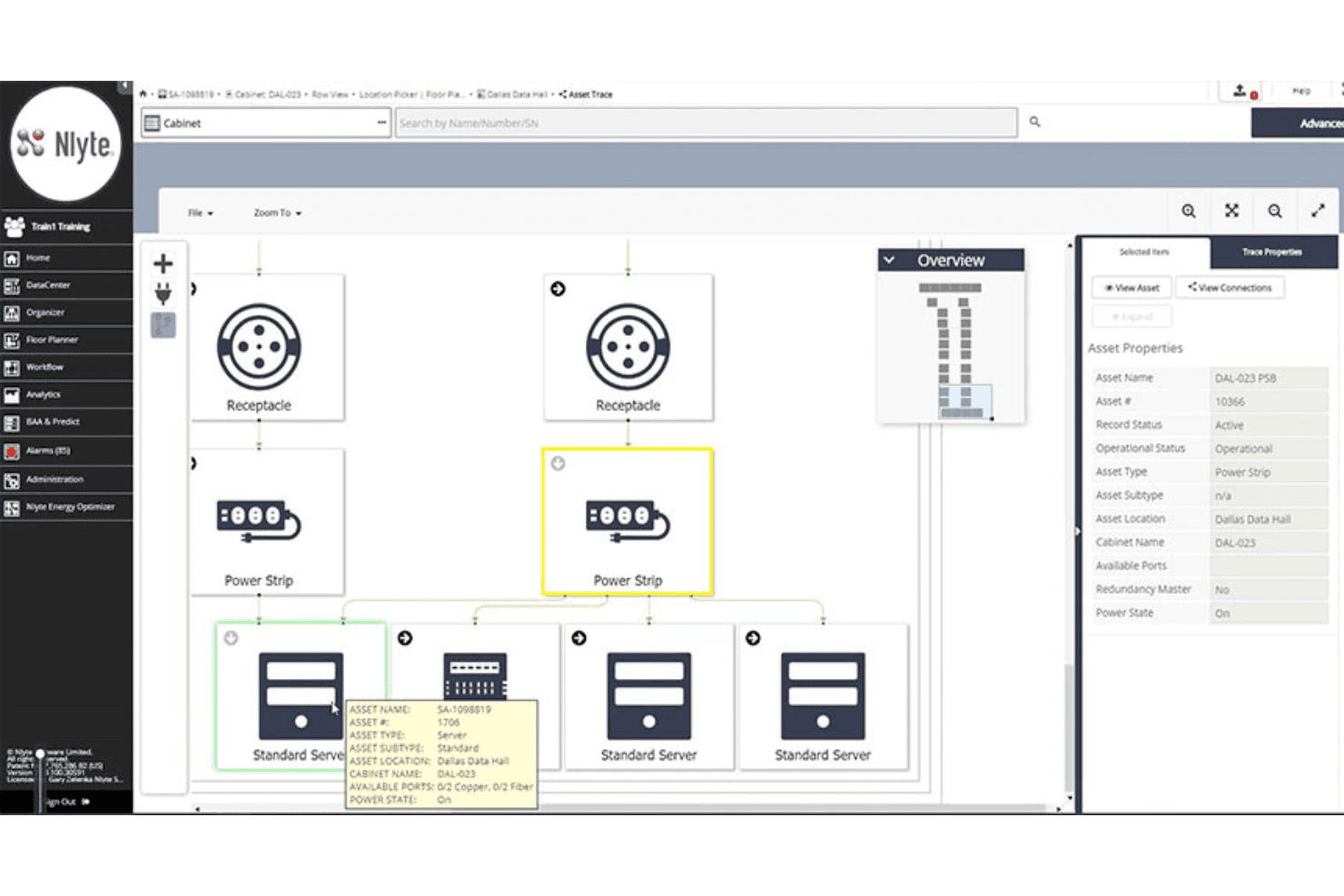
Nlyte DCIM visualizes power chain connections across cabinet assets. Nlyte DCIM is a data center infrastructure management platform that combines automated asset discovery, full lifecycle asset cataloging, change tracking, multi-protocol scanning, and CMDB integration across physical DC environments.
Who Is Nlyte DCIM Best For?
Nlyte DCIM is a strong fit for enterprise IT teams managing large physical data center footprints who need end-to-end asset lifecycle tracking and tight CMDB integration.
Why I Picked Nlyte DCIM
Nlyte DCIM earns its spot on my shortlist because of how it handles the full asset lifecycle alongside live CMDB synchronization, which is genuinely rare at this depth. The Asset Optimizer tracks every device from procurement to decommissioning, capturing serial numbers, RFID tags, rack position, and custom fields like PO numbers. Its bi-directional ServiceNow sync means a physical rack change in Nlyte automatically updates the logical CMDB record, keeping both systems accurate without manual reconciliation.
Nlyte DCIM Key Features
- Nlyte Discovery module: Automatically scans networks across all major protocols and operating systems to detect connected devices, capture firmware data, and flag unknown or zombie assets.
- Asset Integrity Monitoring: Baselines all assets, power systems, and processes with chain-of-custody tracking to surface unauthorized changes and support Zero Trust security postures.
- Operational AI suite: Includes conversational natural language querying of asset and infrastructure data, AI-driven workload placement, and anomaly detection with root cause analysis.
- Multi-tenant cabinet views: Provides secure, isolated per-tenant visibility into cabinet data, supporting colocation providers managing infrastructure across multiple customers.
Nlyte DCIM Integrations
Nlyte DCIM integrates with leading ITSM, CMDBs, and BMSs. A REST API is also available for custom connections.
Pros and Cons
Pros:
- Supports broad protocols including BACnet and MODBUS
- Bi-directional sync with ServiceNow CMDB
- Excels at tracking the full asset lifecycle
Cons:
- Interface design frequently called outdated
- Oriented around physical data center assets
Learn more about Nlyte DCIM: Best for CMDB-connected asset discovery at scale
- Free demo available
- Pricing upon request
Visit WebsiteCustomer Rating:4/5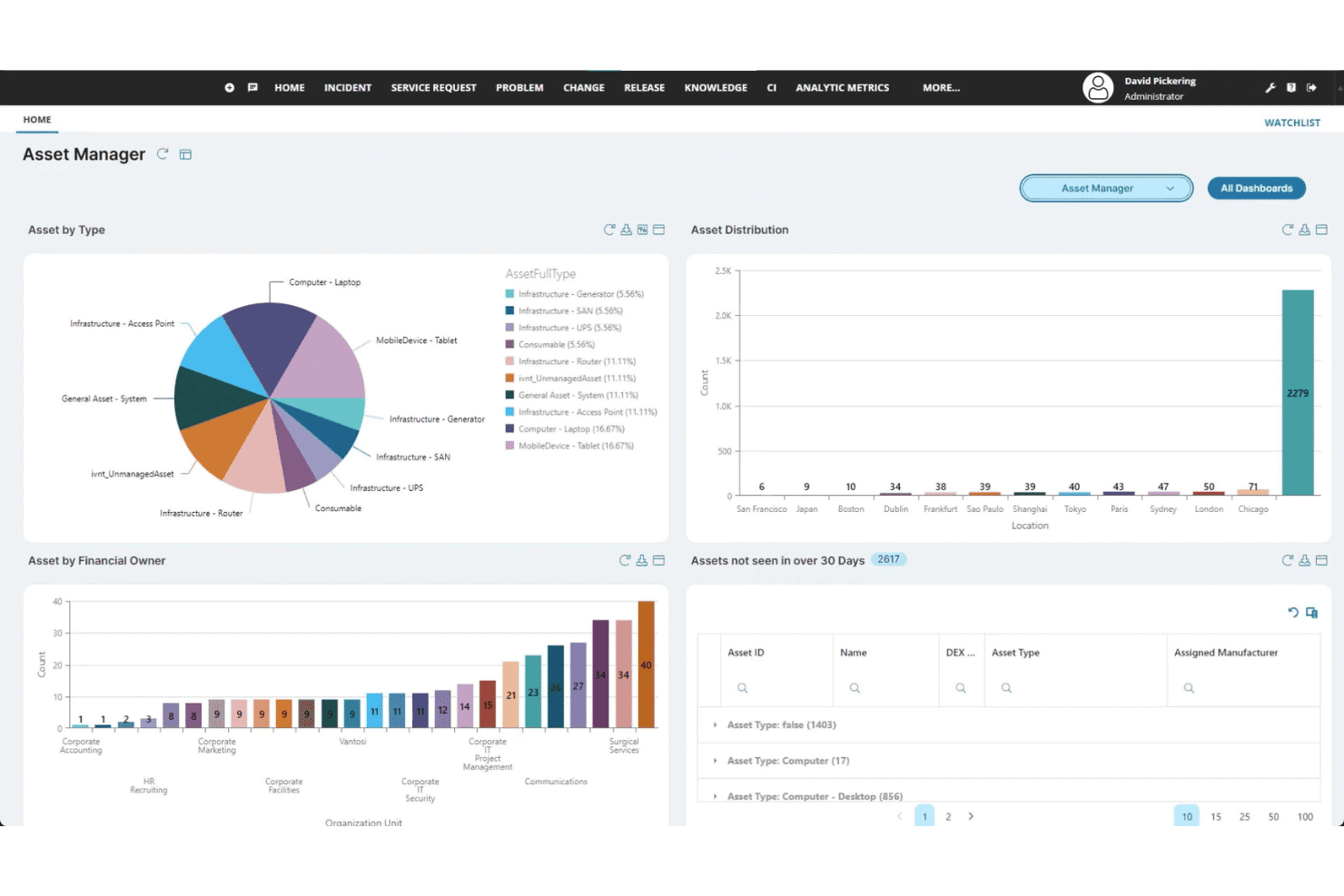
Ivanti Neurons centralizes asset tracking across type, location, and owner. Ivanti Neurons is a network inventory platform that combines active scanning, passive discovery, and agent-based telemetry to build a unified, deduplicated asset catalog across managed, unmanaged, IoT, OT, and cloud environments.
Who Is Ivanti Neurons Best For?
Ivanti Neurons is a strong fit for enterprise IT teams that need a single, authoritative asset record feeding directly into an existing CMDB or ITSM platform.
Why I Picked Ivanti Neurons
I picked Ivanti Neurons because its CMDB sync is genuinely one of the best I've seen in this category. Discovery data flows directly into ServiceNow, Freshservice, Jira, and others, keeping configuration items current without manual intervention. What makes it stand out at scale is the combination of always-on passive discovery and a self-organizing scanner election, so even intermittent or transient devices don't slip through.
Ivanti Neurons Key Features
- Rogue device detection: Continuously scans every subnet to flag unauthorized devices and rogue wireless access points against your known asset baseline.
- Multi-source data normalization: Ingests discovery data from active scans, passive listening, agent telemetry, and third-party connectors, then deduplicates it into a single asset record.
- Warranty and lifecycle enrichment: Automatically augments asset records with warranty status, contract data, and end-of-life dates pulled from vendor data connectors.
- AI-driven automation via Neurons Bots: Uses embedded AI to power automation workflows that act on discovery data, including vulnerability prioritization and self-healing endpoint tasks.
Ivanti Neurons Integrations
Ivanti Neurons integrates with ServiceNow CMDB, Ivanti Neurons for ITSM, Jira, Halo, Microsoft Azure DevOps, and AWS Amazon Inspector. Open REST APIs support custom integrations.
Pros and Cons
Pros:
- Direct CMDB sync maintains real-time asset accuracy
- Agentless scanning covers IoT and OT devices
- Continuous always-on asset and change discovery
Cons:
- Initial setup needs advanced technical expertise
- Full topology maps require separate purchase
Learn more about Ivanti Neurons: Best for enterprise-wide asset discovery sync
- Free demo available
- Pricing upon request
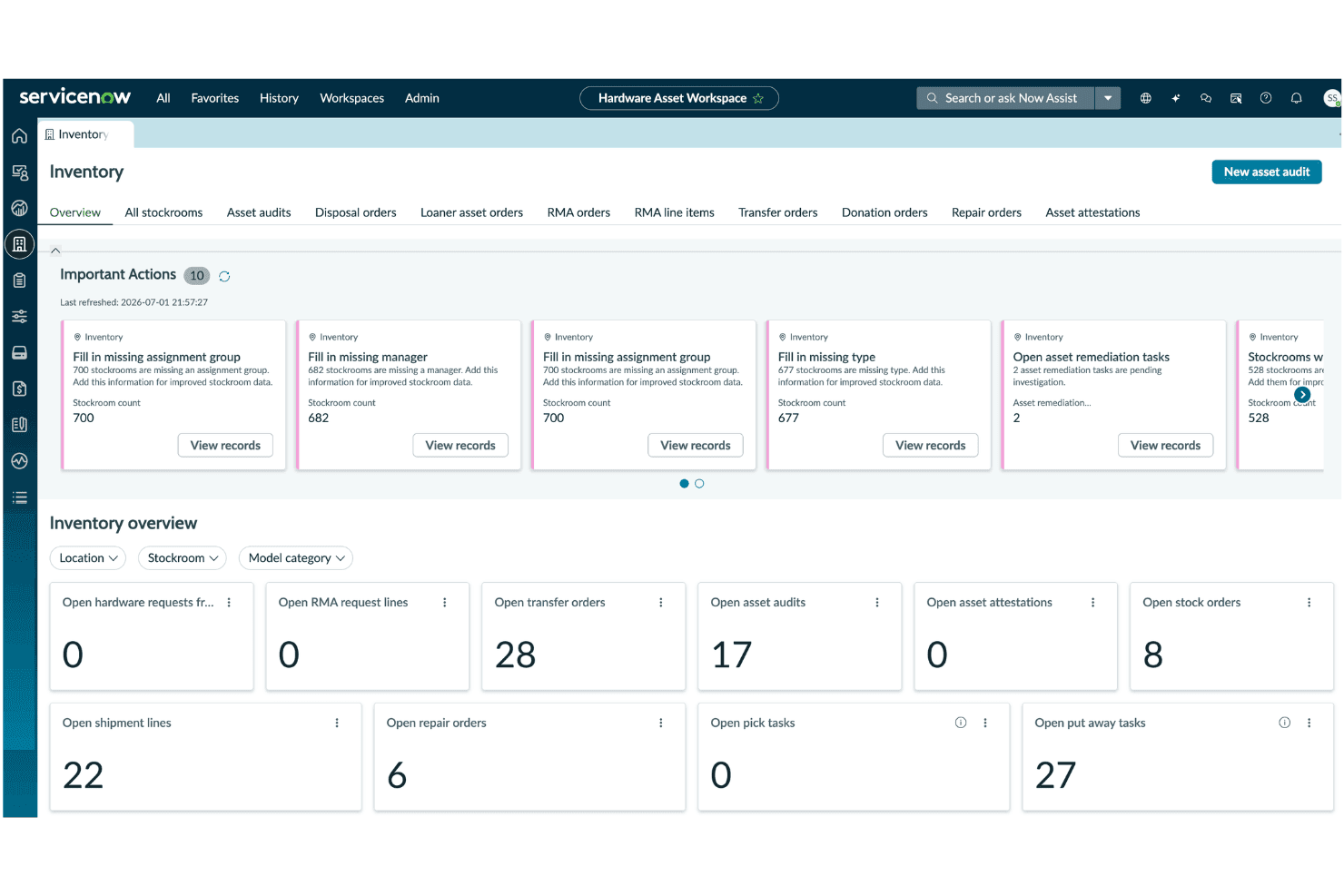
ServiceNow ITAM centralizes inventory oversight with real-time asset action alerts. ServiceNow ITAM is an enterprise IT asset management platform that combines automated network discovery, CMDB-backed device and software cataloging, multi-protocol scanning, and license compliance tracking across on-premises, cloud, and hybrid environments.
Who Is ServiceNow ITAM Best For?
ServiceNow ITAM is a strong fit for large enterprises that already run ServiceNow for ITSM and want asset discovery, CMDB records, and license compliance managed on the same platform.
Why I Picked ServiceNow ITAM
ServiceNow ITAM earns its spot on my shortlist because the CMDB is the actual system of record, not a secondary sync target. I love how Discovery auto-populates CI records across WMI, SSH, and SNMP in a single scheduled scan, then keeps those records current as configurations shift. What makes this genuinely useful for large shops is that the same asset data feeds directly into incident, change, and vulnerability workflows without any custom plumbing.
ServiceNow ITAM Key Features
- Software asset management (SAM): Tracks software license entitlements, monitors usage, detects compliance violations, and flags corrective actions automatically.
- Application dependency mapping: Visualizes relationships between applications and underlying network infrastructure CIs to support impact analysis during incidents or changes.
- Cloud resource discovery: Automatically discovers and catalogs assets across AWS, Azure, and GCP environments, including serverless functions like AWS Lambda and Azure Functions.
- GRC integration: Feeds asset and compliance data directly into ServiceNow's Governance, Risk, and Compliance module for audit management and policy enforcement.
ServiceNow ITAM Integrations
ServiceNow ITAM has native integrations across ServiceNow ITSM, ITOM, SecOps, IntegronQ, Splunk, QRadar, and Microsoft Entra ID. REST API is also available for custom connections
Pros and Cons
Pros:
- Cloud and serverless discovery feature included
- Multi-protocol scanning supports enterprise-scale networks
- Directly updates CMDB as system of record
Cons:
- Setup requires significant platform expertise
- Discovery misses devices on unknown subnets
Learn more about ServiceNow ITAM:
Annen programvare for nettverksinventar
Her er noen ekstra alternativer som ikke kom med på hovedlisten min, men som kan være relevante for dine behov.
- 11N-able N-centralBest for MSP-scale network topology mapping
- 12AuvikBest for multi-tenant network discovery
- 13FreshserviceBest for ITSM-linked network asset discovery
- 14DomotzBest for rogue device detection
- 15PRTG Network MonitorBest for sensor-based network mapping
- 16ManageEngine AssetExplorerBest for end-to-end ITAM with license compliance
- 17AxoniusBest for cyber-physical asset visibility
- 18WhatsUp Gold 360Best for distributed multi-site network inventory
- 19JDisc DiscoveryBest for one-time network assessment projects
- 20AlloyScanBest for cloud-native agent and agentless inventory
How I Evaluate Network Inventory Software
I split my evaluation into baseline requirements every tool must meet—like agentless discovery and multi-protocol scanning—and the differentiators that separate a solid tool from the right one for your environment.
Core Functionality (Table Stakes For This List)
When I'm selecting tools for my list, I rank each one on a scale from 0 (does not offer the functionality) to 5 (excels in this area) for each core functionality listed below. I then calculate the tool's total score into a percentage, and use that to help me assess its overall fit for the list.
- Automated network discovery: I evaluate whether the tool can scan distributed or hybrid environments on a recurring schedule without manual input for each subnet.
- Device and asset cataloging: A solid catalog goes beyond IP and hostname lists. I look for rich asset records that include OS, manufacturer, installed software, and location data.
- Multi-protocol scanning: I check for support across SNMP, WMI, SSH, and ICMP at minimum, plus agent and agentless options that cover a range of device types including IoT.
- Change and configuration tracking: Tools that log config changes with timestamps, and comparison views help teams catch drift before it causes outages or compliance gaps.
- Reporting and export: I look for customizable reports, scheduled delivery, and export formats that feed into ITSM or CMDB workflows rather than just static CSV dumps.
- Network mapping and topology: Interactive topology maps with drill-down capability matter more than static diagrams, especially when you're troubleshooting across multiple sites.
Once I have a list of tools that meet the criteria, I consider what sets each platform apart.
Differentiating Factors (What Sets Vendors Apart)
Here's how I compare and contrast different vendors:
Standout Features
Agentless deep discovery matters most when your environment includes unmanaged IoT, OT, or BYOD devices you can't install agents on. I check whether a tool can fingerprint those endpoints using both credentialed and credential-less scans. Rogue device detection builds on that by alerting you when unknown MAC addresses appear against an approved baseline—critical for catching shadow IT before it becomes a security gap. I also evaluate CMDB and ITSM sync depth, looking for bidirectional connectors with platforms like ServiceNow or Jira that keep asset data authoritative across your operations stack without manual re-entry.
Beyond Features
Pricing model matters a lot here. Per-device licensing can spiral fast when you're scanning dynamic environments where device counts fluctuate weekly, so I check whether a vendor offers per-subnet or flat-tier options that keep costs predictable. I also evaluate the integration ecosystem beyond ITSM—tools like Auvik and ConnectWise RMM offer prebuilt connectors into RMM, SIEM, and patch management platforms, while others rely on REST APIs you'll need to build around. Security posture is another factor: I look for SOC 2 or ISO 27001 certifications and confirm that scan credentials stored for WMI or SSH are encrypted at rest, not just in transit.
Slik velger du programvare for nettverksinventar
For å finne riktig programvare kan du bruke denne tabellen til å knytte prioriteringene dine til viktige utvalgskriterier:
| Hvis prioriteten din er … | Se etter … |
|---|---|
| Hvis prioriteten din er …Å redusere manuell sporing av aktiva | Se etter …Automatisert, agentløs nettverksoppdagelse |
| Hvis prioriteten din er …Å administrere ulike miljøer | Se etter …Støtte for flere protokoller og hybridmiljøer (IT/OT/IoT) |
| Hvis prioriteten din er …Å integrere med ITSM eller CMDB | Se etter …Ferdigbygde koblinger og toveis synkronisering |
| Hvis prioriteten din er …Å revidere for samsvar | Se etter …Automatisk oppdatert dokumentasjon og konfigurasjonslogger |
| Hvis prioriteten din er …Å oppdage uautoriserte eller skjulte enheter | Se etter …Sanntidsvarsler om ukjente enheter og verktøy for grunnlinjer |
Slik vurderer du kortlisten din
- Test dekningen for aktivaoppdagelse: Kjør en demonstrasjon eller prøveversjon, og skann to forskjellige nettverkssegmenter (kablet og trådløst) for å bekrefte bredden i enhetsdeteksjonen.
- Kontroller integrasjonsdybden: Be om en demonstrasjon eller dokumentasjonsgjennomgang som viser hvordan aktivadata synkroniseres toveis med den valgte CMDB- eller ITSM-løsningen.
- Gjennomgå arbeidsflyter for rapportering og eksport: Be leverandøren generere en planlagt eksport av rapporter over endringer i aktiva og oppgi eksempler på utdataformater.
- Bekreft sikkerhetsnivået: Be om dokumentasjon på kryptering av påloggingsopplysninger (både i hvile og under overføring), for eksempel i form av et sikkerhetsdokument eller et revisjonssammendrag.
- Avgjør mellom sanntidsfleksibilitet og grundig dokumentasjon: Velg mellom verktøy som er optimalisert for sanntidsskanning uten agenter, og verktøy som fokuserer på robuste, revisjonsvennlige rapporter – velg én tilnærming basert på kravene i miljøet ditt.
Hva er programvare for nettverksinventar?
Programvare for nettverksinventar er et verktøy som automatisk oppdager, katalogiserer og sporer alle enheter som er koblet til nettverket ditt. Disse plattformene gir deg detaljert innsikt i maskinvare, programvare og enhetskonfigurasjoner. Du kan bruke programvare for nettverksinventar til å overvåke endringer, revidere eiendeler, generere rapporter og støtte samsvar. De hjelper infrastruktur- og sikkerhetsteam med å holde orden, redusere manuell sporing av eiendeler og reagere raskt på nettverksmiljøer som er i endring.
Funksjoner i programvare for nettverksinventar
Når du vurderer plattformer for nettverksinventar, bør du se etter disse nøkkelfunksjonene:
- Automatisk nettverksoppdagelse: Oppdager og katalogiserer alle enheter på tvers av kablede, trådløse, skybaserte og virtuelle miljøer for å opprettholde en sanntidsliste over eiendeler og eliminere synlighetsmangler.
- Katalogisering av enheter og eiendeler: Samler inn detaljerte opplysninger – inkludert maskinvarespesifikasjoner, operativsystem, IP-adresser, installert programvare og plassering – for å gjøre feilsøking og livssyklushåndtering raskere.
- Skanning med flere protokoller: Utnytter SNMP, WMI, SSH og ICMP til å hente ut data fra forskjellig maskinvare, slik at kompatibilitet sikres på tvers av blandede miljøer.
- Sporing av konfigurasjoner og endringer: Logger enhetsinnstillinger, fastvareoppdateringer og policyendringer for å forenkle revisjoner, muliggjøre raske tilbakeføringer og oppdage feilkonfigurasjoner tidlig.
- Interaktiv nettverkskartlegging: Genererer sanntidskart over topologien for å visualisere enhetstilkoblinger, lokalisere feil og identifisere flaskehalser med et øyekast.
- Tilpassbar rapportering: Leverer planlagte rapporter eller rapporter ved behov i flere eksportformater for å oppfylle samsvarsbehov og støtte datadeling på tvers av IT-verktøy.
- Integrasjon med IT-administrasjonsverktøy: Synkroniserer data om eiendeler direkte med ITSM-, CMDB- og supportsystemplattformer, eliminerer manuell registrering og støtter effektiv hendelseshåndtering.
- Rollebasert tilgangskontroll: Begrens tilgang til data, redigeringer og eksporter basert på brukertillatelser for å beskytte sensitiv informasjon om eiendeler.
- Varsling og notifikasjoner: Utløser umiddelbare varsler når uautoriserte enheter kobler seg til nettverket eller uautoriserte konfigurasjonsendringer finner sted, slik at trusler kan håndteres raskere.
- Støtte for samsvar og revisjon: Beholder historiske oppføringer over eiendeler, status og endringer for å sikre at du er klar for regulatoriske revisjoner og interne revisjoner av retningslinjer.
AI-funksjoner i programvare for nettverksinventar
I tillegg til standardfunksjonene som er oppført ovenfor, tar mange av disse løsningene i bruk AI med funksjoner som:
- AI-drevet avviksdeteksjon: Bruker maskinlæring til å identifisere uvanlige mønstre i nettverkstrafikk eller enhetsatferd, og varsler deg om potensielle trusler eller feilkonfigurasjoner før de eskalerer.
- Prediktiv analyse av enhetsfeil: Analyserer historiske data om enhetens ytelse og miljøet for å forutsi hvilke maskinvarekomponenter som sannsynligvis vil svikte, slik at du kan planlegge proaktivt vedlikehold og redusere nedetid.
- Automatisert årsaksanalyse: Bruker AI-algoritmer til å korrelere varsler, logger og konfigurasjonsendringer, slik at den underliggende årsaken til nettverkshendelser kan identifiseres raskere enn ved manuell undersøkelse.
- Intelligent klassifisering av eiendeler: Utnytter AI til å kategorisere nye eller ukjente enheter basert på trafikkmønstre, kommunikasjonsprotokoller og atferdssignaturer, noe som reduserer behovet for manuell merking og forbedrer nøyaktigheten i inventaret.
- Smarte anbefalinger for utbedring: Gir AI-genererte forslag til hvordan oppdagede problemer kan løses, for eksempel gjennom konfigurasjonsendringer eller fastvareoppdateringer, basert på anbefalte fremgangsmåter og resultater fra tidligere hendelser.
Fordeler med programvare for nettverksinventar
Implementering av verktøy for nettverksinventar gir flere fordeler for teamet og virksomheten din. Her er noen av fordelene du kan se frem til:
- Automatisk oppdagelse av enheter: Skanner nettverket ditt for automatisk å bygge en komplett, oppdatert enhetsliste, slik at blinde soner fjernes.
- Nøyaktig sporing av eiendeler: Lagrer viktige opplysninger om hver enhet – som maskinvare, programvare og plassering – for å gjøre administrasjonen enklere.
- Kompatibilitet med flere protokoller: Bruker standarder som SNMP, WMI, SSH og ICMP for å finne og overvåke alle typer utstyr.
- Logging av endringer og konfigurasjon: Registrerer endringer i innstillingene over tid, slik at du tidlig kan oppdage feil eller utilsiktede oppdateringer.
- Interaktiv nettverkskartlegging: Tegner oppdaterte kart over nettverksoppsettet ditt, slik at du raskt kan oppdage og løse problemer.
- Integrasjon med IT-administrasjonssystemer: Deler data direkte med verktøyene dine for saksbehandling og sporing, slik at alle systemer holdes oppdatert.
- Varsling i sanntid og støtte for samsvar: Varsler deg om ukjente enheter eller usikre endringer, samtidig som historikk holdes klar for revisjoner.
Kostnader og priser for programvare for nettverksinventar
For å velge riktig verktøy må du forstå de ulike prismodellene og abonnementene som er tilgjengelige. Kostnadene varierer basert på funksjoner, teamstørrelse, tillegg og mer. Tabellen nedenfor oppsummerer vanlige abonnementer, gjennomsnittsprisene deres og typiske funksjoner som inngår i programvare for nettverksinventar:
Sammenligningstabell for abonnementer for programvare for nettverksinventar
| Abonnementstype | Gjennomsnittspris | Vanlige funksjoner |
|---|---|---|
| AbonnementstypeGratis abonnement | Gjennomsnittspris$0-$0 | Vanlige funksjonerGrunnleggende nettverksoppdagelse, begrenset enhetsinventar, manuelle skanninger og støtte fra fellesskapet. |
| AbonnementstypePersonlig abonnement | Gjennomsnittspris$15-$40 per bruker/måned | Vanlige funksjonerStøtte for én bruker, planlagt skanning av enheter, standardrapportering og grunnleggende integrasjon med IT-verktøy. |
| AbonnementstypeForretningsabonnement | Gjennomsnittspris$40-$100 per bruker/måned | Vanlige funksjonerTilgang for flere brukere, automatisk nettverksoppdagelse, avansert rapportering, ITSM-integrasjoner og rollebasert tilgangskontroll. |
| AbonnementstypeVirksomhetsabonnement | Gjennomsnittspris$100-$250 per bruker/måned | Vanlige funksjonerUbegrenset antall brukere, støtte for hybrid sky og lokal drift, tilpassede integrasjoner, revisjonslogger og API-tilgang. |
Vanlige spørsmål om programvare for nettverksinventar
\u003cspan data-slate-fragment=\u0022JTVCJTdCJTIyY2hpbGRyZW4lMjIlM0ElNUIlN0IlMjJ0ZXh0JTIyJTNBJTIySGVyZSUyMGFyZSUyMHNvbWUlMjBhbnN3ZXJzJTIwdG8lMjBjb21tb24lMjBxdWVzdGlvbnMlMjBhYm91dCUyMG5ldHdvcmslMjBpbnZlbnRvcnklMjBzb2Z0d2FyZSUzQSUyMiU3RCU1RCUyQyUyMnR5cGUlMjIlM0ElMjJwJTIyJTJDJTIyaWQlMjIlM0ElMjJfOEJmOXVYaVRUJTIyJTdEJTVE\u0022\u003eHer finner du svar på noen vanlige spørsmål du kan støte på når du skal velge riktig verktøy for nettverksinventar:\u003c/span\u003e
Hvordan vet jeg om programvare for nettverksinventar støtter hybride miljøer eller skymiljøer?
\u003cspan data-slate-fragment=\u0022JTVCJTdCJTIyY2hpbGRyZW4lMjIlM0ElNUIlN0IlMjJ0ZXh0JTIyJTNBJTIyWW91JTIwc2hvdWxkJTIwY2hlY2slMjBmb3IlMjBtdWx0aS1wcm90b2NvbCUyMHNjYW5uaW5nJTIwYW5kJTIwY2xvdWQlMjBkaXNjb3ZlcnklMjBmZWF0dXJlcy4lMjBMb29rJTIwZm9yJTIwc3VwcG9ydCUyMGZvciUyMFNOTVAlMkMlMjBXTUklMkMlMjBTU0glMkMlMjBhbmQlMjBBUElzJTIwZm9yJTIwcGxhdGZvcm1zJTIwbGlrZSUyMEFXUyUyQyUyMEF6dXJlJTJDJTIwYW5kJTIwR29vZ2xlJTIwQ2xvdWQuJTIwTWFueSUyMGxlYWRpbmclMjB0b29scyUyMGNhbGwlMjBvdXQlMjBoeWJyaWQlMjBlbnZpcm9ubWVudCUyMGNvbXBhdGliaWxpdHklMjBvbiUyMHRoZWlyJTIwZmVhdHVyZSUyMHBhZ2VzJTIwb3IlMjBkb2N1bWVudGF0aW9uLiUyMiU3RCU1RCUyQyUyMnR5cGUlMjIlM0ElMjJwJTIyJTJDJTIyaWQlMjIlM0ElMjJUZ0dubTlQZEx4JTIyJTdEJTVE\u0022\u003eDu bør se etter skanning med flere protokoller og funksjoner for oppdagelse i skyen. Se etter støtte for SNMP, WMI, SSH og API-er for plattformer som AWS, Azure og Google Cloud. Mange ledende verktøy fremhever kompatibilitet med hybride miljøer på funksjonssidene eller i dokumentasjonen.\u003c/span\u003e
Kan programvare for nettverksinventar oppdage og klassifisere IoT- og uadministrerte enheter?
\u003cspan data-slate-fragment=\u0022JTVCJTdCJTIyY2hpbGRyZW4lMjIlM0ElNUIlN0IlMjJ0ZXh0JTIyJTNBJTIyWWVzJTJDJTIwbW9zdCUyMG1vZGVybiUyMG5ldHdvcmslMjBpbnZlbnRvcnklMjBzb2Z0d2FyZSUyMGNhbiUyMGlkZW50aWZ5JTIwSW9UJTIwYW5kJTIwQllPRCUyMGRldmljZXMlRTIlODAlOTRlc3BlY2lhbGx5JTIwdGhvc2UlMjBvZmZlcmluZyUyMGFnZW50bGVzcyUyMGRlZXAlMjBkaXNjb3ZlcnkuJTIwVGhleSVFMiU4MCU5OWxsJTIwdXNlJTIwY3JlZGVudGlhbGVkJTIwYW5kJTIwY3JlZGVudGlhbC1sZXNzJTIwc2NhbnMlMjB0byUyMGZpbmdlcnByaW50JTIwZGV2aWNlJTIwdHlwZXMlMkMlMjBldmVuJTIwaWYlMjB5b3UlMjBjYW5lJTIwdCUyMGFuc3RhbGwlMjBhZ2VudHMuJTIwRGV2aWNlJTIwY2xhc3NpZmljYXRpb24lMjBhY2N1cmFjeSUyMHZhcmllcyUyQyUyMHNvJTIwYWx3YXlzJTIwdmFsaWRhdGUlMjB3aXRoJTIwYSUyMH BpbG90JTIwc2Nhbi4lMjIlN0QlNUQlMkMlMjJ0eXBlJTIyJTNBJTIycCUyMiUyQyUyMmlkJTIyJTNBJTIycXVaajFSVUZraCUyMiU3RCU1RA==\u0022\u003eJa, de fleste moderne plattformer for nettverksinventar kan identifisere IoT- og BYOD-enheter, særlig de som tilbyr agentløs dybdeoppdagelse. De bruker skanninger med og uten legitimasjon for å identifisere enhetstyper, selv når du ikke kan installere agenter. Nøyaktigheten ved enhetsklassifisering varierer, så valider alltid resultatene med en pilotskanning.\u003c/span\u003e
Hvilke integrasjoner bør jeg prioritere for ITSM- og CMDB-arbeidsflyter?
\u003cspan data-slate-fragment=\u0022JTVCJTdCJTIyY2hpbGRyZW4lMjIlM0ElNUIlN0IlMjJ0ZXh0JTIyJTNBJTIyRm9jdXMlMjBvbiUyMHBsYXRmb3JtcyUyMHdpdGglMjBwcmVidWlsdCUyQyUyMGJpZGlyZWN0aW9uYWwlMjBjb25uZWN0b3JzJTIwZm9yJTIwdGhlJTIwSVRTTSUyMGFuZCUyMENNREIlMjB0b29scyUyMHlvdXIlMjB0ZWFtJTIwYWxyZWFkeSUyMHVzZXMuJTIwU2VydmljZU5vdyUyQyUyMEppcmElMjBTZXJ2aWNjZSUyME1hbmFnZW1lbnQlMkMlMjBhbmQlMjBCTUMlMjBSZW1lZHklMjBhcmUlMjBjb21tb24lMjBpbnRlZ3JhdGlvbiUyMHRhcmdldHMuJTIwTmF0aXZlJTIwY29ubmVjdG9ycyUyMHNhdmUlMjB0aW1lJTIwYW5kJTIwcmVkdWNlJTIwaXNzdWVzJTIwd2l0aCUyMHN5bmNpbmclMjBhc3NldCUyMHJlY29yZHMlMjBiZXR3ZWVuJTIwc3lzdGVtcy4lMjIlN0QlNUQlMkMlMjJ0eXBlJTIyJTNBJTIycCUyMiUyQyUyMmlkJTIyJTNBJTIybEN1VVlBWFhhJTIyJTdEJTVE\u0022\u003eFokuser på programvare med ferdigbygde, toveis koblinger til ITSM- og CMDB-verktøyene teamet allerede bruker. ServiceNow, Jira Service Management og BMC Remedy er vanlige integrasjonsmål. Innebygde koblinger sparer tid og reduserer problemer med synkronisering av ressursposter mellom systemer.\u003c/span\u003e
Er det mulig å overvåke nettverksendringer i sanntid med disse verktøyene?
\u003cspan data-slate-fragment=\u0022JTVCJTdCJTIyY2hpbGRyZW4lMjIlM0ElNUIlN0IlMjJ0ZXh0JTIyJTNBJTIyWWVzJTJDJTIwc29tZSUyMG5ldHdvcmslMjBpbnZlbnRvcnklMjB0b29scyUyMG9mZmVyJTIwcmVhbC10aW1lJTIwb3IlMjBuZWFyLXJlYWwtdGltZSUyMGNoYW5nZSUyMGRldGVjdGlvbi4lMjBUaGV5JTIwdHJhY2slMjBjb25maWd1cmF0aW9uJTIwY2hhbmdlcyUyMGFjcm9zcyUyMGRldmljZXMlMkMlMjBhbGVydCUyMHlvdSUyMHRvJTIwbmV3JTIwb3IlMjByb2d1ZSUyMGVuZHBvaW50cyUyQyUyMGFuZCUyMG9mdGVuJTIwcHJvdmlkZSUyMGF1ZGl0JTIwbG9ncyUyMHdpdGglMjB0aW1lc3RhbXBzJTIwYW5kJTIwcm9sbGJhY2slMjBvcHRpb25zLiUyMEp1c3QlMjBub3RlJTIwdGhhdCUyMHVwZGF0ZSUyMGZyZXF1ZW5jeSUyMGFuZCUyMG5vdGlmaWNhdGlvbiUyMGRlbGF5cyUyMHZhcnklMjBiZXR3ZWVuJTIwdmVuZG9ycy4lMjIlN0QlNUQlMkMlMjJ0eXBlJTIyJTNBJTIycCUyMiUyQyUyMmlkJTIyJTNBJTIycGFORkUtak5WNSUyMiU3RCU1RA==\u0022\u003eJa, enkelte verktøy for nettverksinventar tilbyr deteksjon av endringer i sanntid eller tilnærmet sanntid. De sporer konfigurasjonsendringer på tvers av enheter, varsler deg om nye eller uautoriserte endepunkter og tilbyr ofte revisjonslogger med tidsstempler og alternativer for tilbakerulling. Vær oppmerksom på at oppdateringsfrekvens og varslingsforsinkelser varierer mellom leverandører.\u003c/span\u003e
Hvordan kan jeg validere en leverandørs sikkerhetsnivå, særlig når det gjelder lagring av legitimasjon?
\u003cspan data-slate-fragment=\u0022JTVCJTdCJTIyY2hpbGRyZW4lMjIlM0ElNUIlN0IlMjJ0ZXh0JTIyJTNBJTIyQXNrJTIwdmVuZG9ycyUyMGZvciUyMHByb29mJTIwb2YlMjBkYXRhJTIwZW5jcnlwdGlvbiUyMGJvdGglMjBhdCUyMHJlc3QlMjBhbmQlMjBpbiUyMHRyYW5zaXQlMkMlMjBhbmQlMjBjaGVjayUyMGZvciUyMGNvbXBsaWFuY2UlMjB3aXRoJTIwZnJhbWV3b3JrcyUyMGxpa2UlMjBTT0MlMjAyJTIwb3IlMjBJU08lMjAyNzAwMS4lMjBSZXF1ZXN0JTIwYSUyMHJlY2VudCUyMHNlY3VyaXR5JTIwYXVkaXQlMjBzdW1tYXJ5JTJDJTIwYW5kJTIwcmV2aWV3JTIwaG93JTIwdGhlaXIlMjBwbGF0Zm9ybSUyMHN0b3JlcyUyMGFuZCUyMGhhbmRsZXMlMjBzZW5zaXRpdmUlMjBzY2FuJTIwY3JlZGVudGlhbHMlRTIlODAlOTRlc3BlY2lhbGx5JTIwZm9yJTIwU05NUCUyQyUyMFdNSSUyQyUyMG9yJTIwU1NILiUyMiU3RCU1RCUyQyUyMnR5cGUlMjIlM0ElMjJwJTIyJTJDJTIyaWQlMjIlM0ElMjJKQTRiR0pIczhWJTIyJTdEJTVE\u0022\u003eBe leverandørene om dokumentasjon på datakryptering både i hvile og under overføring, og kontroller at de følger rammeverk som SOC 2 eller ISO 27001. Be om et nylig sammendrag av en sikkerhetsrevisjon, og se på hvordan plattformen lagrer og håndterer sensitive skanningslegitimasjoner, særlig for SNMP, WMI eller SSH.\u003c/span\u003e
Krever de fleste løsninger agenter, eller kan alt gjøres agentløst?
\u003cspan data-slate-fragment=\u0022JTVCJTdCJTIyY2hpbGRyZW4lMjIlM0ElNUIlN0IlMjJ0ZXh0JTIyJTNBJTIyTW9zdCUyMG5ldHdvcmslMjBpbnZlbnRvcnklMjBzb2Z0d2FyZSUyMG9mZmVycyUyMGFnZW50bGVzcyUyMGRpc2NvdmVyeSUyMGFzJTIwdGhlJTIwZGVmYXVsdCUyQyUyMGJ1dCUyMHNvbWUlMjBwcm92aWRlJTIwb3B0aW9uYWwlMjBhZ2VudHMlMjBmb3IlMjBkZWVwZXIlMjBkYXRhJTIwY29sbGVjdGlvbiUyMG9yJTIwcmVtb3RlJTIwc2l0ZXMuJTIwRm9yJTIwZW52aXJvbm1lbnRzJTIwd2hlcmUlMjB5b3UlMjBjYW5lJTIwdCUyMGluc3RhbGwlMjBhZ2VudHMlMjAobGlrZSUyMElvVCUyMG9yJTIwZ3Vlc3QlMjBuZXR3b3JrcyklMkMlMjBhZ2VudGxlc3MlMjB0b29scyUyMHVzaW5nJTIwU05NUCUyQyUyMG5ldHdvcmslMjBzY2FucyUyQyUyMGFuZCUyMEFSUCUyMGFyZSUyMHRoZSUyMGJlc3QlMjBmaXQuJTIyJTdEJTVEJTJDJTIydHlwZSUyMiUzQSUyMnAlMjIlMkMlMjJpZCUyMiUzQSUyMkN2ODNhX3U0dUQlMjIlN0QlNUQ=\u0022\u003eDe fleste verktøy for nettverksinventar tilbyr agentløs oppdagelse som standard, men enkelte har valgfrie agenter for mer omfattende datainnsamling eller eksterne lokasjoner. I miljøer der du ikke kan installere agenter, for eksempel IoT- eller gjestenettverk, passer agentløse verktøy som bruker SNMP, nettverksskanninger og ARP best.\u003c/span\u003e
Hva er den beste måten å prøve eller teste programvare for nettverksinventar før kjøp?
\u003cspan data-slate-fragment=\u0022JTVCJTdCJTIyY2hpbGRyZW4lMjIlM0ElNUIlN0IlMjJ0ZXh0JTIyJTNBJTIyU3RhcnQlMjB3aXRoJTIwYSUyMGRlbW8lMjBvciUyMGZyZWUlMjB0cmlhbCUyMGFuZCUyMHNjYW4lMjB0d28lMjBkaWZmZXJlbnQlMjBzZWdtZW50cyVFMiU4MCU5NHdpcmVkJTIwYW5kJTIwd2lyZWxlc3MlMkMlMjBvciUyMGNsb3VkJTIwYW5kJTIwb24tcHJlbWlzZXMuJTIwUmV2aWV3JTIwd2hhdCUyMGRldmljZXMlMjBhcmUlMjBkaXNjb3ZlcmVkJTJDJTIwaG93JTIwZGV0YWlsZWQlMjB0aGUlMjBhc3NldCUyMHJlY29yZHMlMjBhcmUlMkMlMjBhbmQlMjB0ZXN0JTIwZXhwb3J0JTIwYW5kJTIwaW50ZWdyYXRpb24lMjB3b3JrZmxvd3MuJTIwVXNlJTIwdGhpcyUyMGhhbmRzLW9uJTIwdGltZSUyMHRvJTIwY2hlY2slMjBjb3ZlcmFnZSUyMGFuZCUyMGVhc2UlMjBvZiUyMHVzZS4lMjIlN0QlNUQlMkMlMjJ0eXBlJTIyJTNBJTIycCUyMiUyQyUyMmlkJTIyJTNBJTIycEEyT2pOMm51NiUyMiU3RCU1RA==\u0022\u003eStart med en demonstrasjon eller gratis prøveperiode, og skann to ulike segmenter – kablet og trådløst, eller sky og lokalt. Gå gjennom hvilke enheter som oppdages, hvor detaljerte ressursoppføringene er, og test arbeidsflyter for eksport og integrasjon. Bruk denne praktiske tiden til å kontrollere dekning og brukervennlighet.\u003c/span\u003e