

Som en person som er godt kjent med teknologiverdenen, forstår jeg utfordringene du møter når du prøver å finne den perfekte programvaren for praksisadministrasjon. Enten du er en oppstartsbedrift på jakt etter en robust SaaS-løsning eller en medborgerutvikler som ønsker å bygge apper uten inngående programmeringskunnskaper, har jeg det du trenger. Du ser sannsynligvis etter en appbygger som enkelt kan opprette nett- og Android-apper, har en åpen kildekode-orientering for maksimal tilpasning og integreres sømløst med teknologigiganter som Microsoft.
Basert på mine egne erfaringer bør det riktige verktøyet for å administrere teknologipraksisen din finne en balanse mellom avanserte funksjoner i frontend og et brukervennlig grensesnitt. Det må levere pålitelige varsler, fungere for både lokale og eksterne team og hevde seg mot populære alternativer som Quickbase. Og jeg lover at fordelene ved å velge riktig programvare er betydelige.
Det effektiviserer ikke bare arbeidsflyten din, men letter også byrden med unødvendige administrative oppgaver. Denne digitale veiledningen er utformet for å avhjelpe disse utfordringene og gi deg noen utmerkede alternativer å vurdere. La oss utforske den beste programvaren for teknologipraksisadministrasjon, som kan bli en avgjørende faktor for virksomheten din.
Hva er Bubble?
Bubble er en nettappbygger uten kode som lar deg utforme og lansere apper uten å skrive kode. Den brukes hovedsakelig av sologründere, oppstartsteam og frilansere som ønsker å bygge tilpassede nettapper raskt. Visuell utvikling, API-integrasjoner og databasekontroll gjør det enklere å bygge, lansere og skalere apper fra ett sted. Alt i alt lar Bubble deg bygge komplette nettapper uten behov for tekniske utviklingsressurser.
Hvorfor du kan stole på våre programvareanbefalinger
6,700+
Reviews
20
Industry experts
16+
Evaluation factors
14
Years
Teamet vårt har testet og anmeldt programvare siden 2012. Vi er selv teknologiledere, så vi vet hvor vanskelig og hvor viktig det er å velge riktig programvare.
I denne guiden har vi vurdert verktøyene gjennom praktisk testing og uavhengig research og gitt dem poeng ut fra våre utvelgelseskriterier.
Anmeldelsene våre bygger på vår egen redaksjonelle vurdering. De er ikke et salgsargument.
Ekspertanmeldere:
- Paulo Gardini MiguelTech Director
 Tim FisherVP of AI
 Gabriel RosasTech Lead & Software Architect
 Christhian GruhnTech Lead & Platform Architect

Sammenligningstabell for Bubble-alternativer
Denne sammenligningstabellen oppsummerer prisdetaljene for mine beste utvalgte Bubble-alternativer:
| Tool | Best For | Trial Info | Price | ||
|---|---|---|---|---|---|
| 1 | Best for automating workflows across 9,000+ apps | Free plan available; 14-day free trial | From $19.99/month (billed annually) | Website | |
| 2 | Best for white-label AI web app delivery | 14-day free trial | From $25/month | Website | |
| 3 | Best for one-page sites on a shoestring budget | Free plan available; 7-day free trial | From $0.75/month (billed annually) | Website | |
| 4 | Best for aesthetically pleasing e-commerce sites | 14-day free trial | From $19/month (billed annually) | Website | |
| 5 | Best for AI-generated single-page websites | Free plan available | From $20.75/month (billed annually) | Website | |
| 6 | Best for BPM-backed low-code app development | Free plan available | Pricing upon request | Website | |
| 7 | Best for collaborative low-code app delivery at scale | Free plan available | From $1,090/month | Website | |
| 8 | Best for launching websites with AI-generated design | Free plan available | From $17.77/month (billed annually) | Website | |
| 9 | Best for AI-generated web, iOS and Android apps | 14-day free trial | From $65/month | Website | |
| 10 | Best for web design flexibility with visual CSS grid | Free plan available | From $15/month (billed annually) | Website |


Anmeldelser av de beste Bubble-alternativene
Nedenfor finner du mine detaljerte sammendrag av de beste Bubble-alternativene som kom med på kortlisten. Anmeldelsene mine gir et detaljert innblikk i de viktigste funksjonene, fordelene & ulempene, integrasjonene og ideelle bruksområdene for hvert verktøy, slik at du kan finne det beste alternativet for deg.
 Best for automating workflows across 9,000+ apps
- Free plan available; 14-day free trial
- From $19.99/month (billed annually)
Visit WebsiteCustomer Rating:4.7/5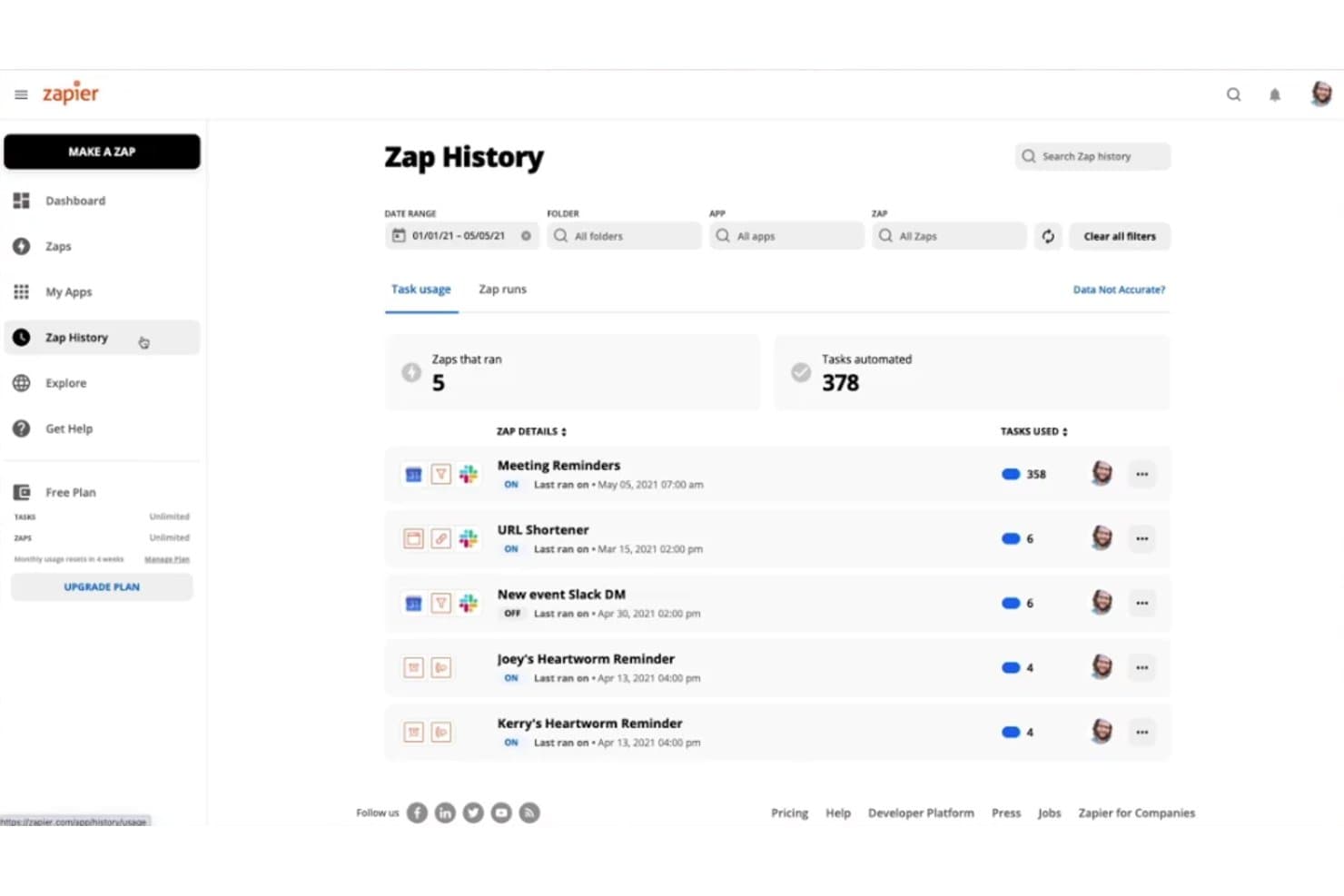
Zapier tracks automated task usage and zap run history over time. Zapier gives IT and operations teams a no-code way to connect business apps and automate routine handoffs, helping them build lightweight workflows without custom integration work.
Who Is Zapier Best For?
Zapier suits lean IT and operations teams that need to coordinate work across SaaS tools without dedicating developers to each integration.
Why I Picked Zapier
I picked Zapier as a Bubble alternative when the need is coordinating app workflows rather than building a custom interface. Its multi-step Zaps connect a trigger to several actions, while Paths route records based on conditions, such as sending support requests to different queues. That fits its USP: Best for automating workflows across multiple applications.
Zapier Key Features
- Zapier Tables: Store, edit, and organize records in a built-in database.
- Zapier Interfaces: Build no-code forms, pages, and portals connected to your data.
- Formatter: Change text, dates, numbers, and other data fields.
- Webhooks: Send or receive HTTP requests to connect with services outside Zapier’s app directory.
Zapier Integrations
Zapier offers integrations with 9,000+ apps, including Google Sheets, Slack, Salesforce, Microsoft Teams, and HubSpot. Its developer platform lets you build custom integrations.
Pros and Cons
Pros:
- Built-in tables and portals extend automation
- Routes records through conditional multi-step workflows
- Connects app workflows without custom backend code
Cons:
- Complex branching can complicate troubleshooting
- Doesn’t replace a full custom app builder
Learn more about Zapier: 2Best for white-label AI web app delivery
Duda
- 14-day free trial
- From $25/month
Visit WebsiteCustomer Rating:4.6/5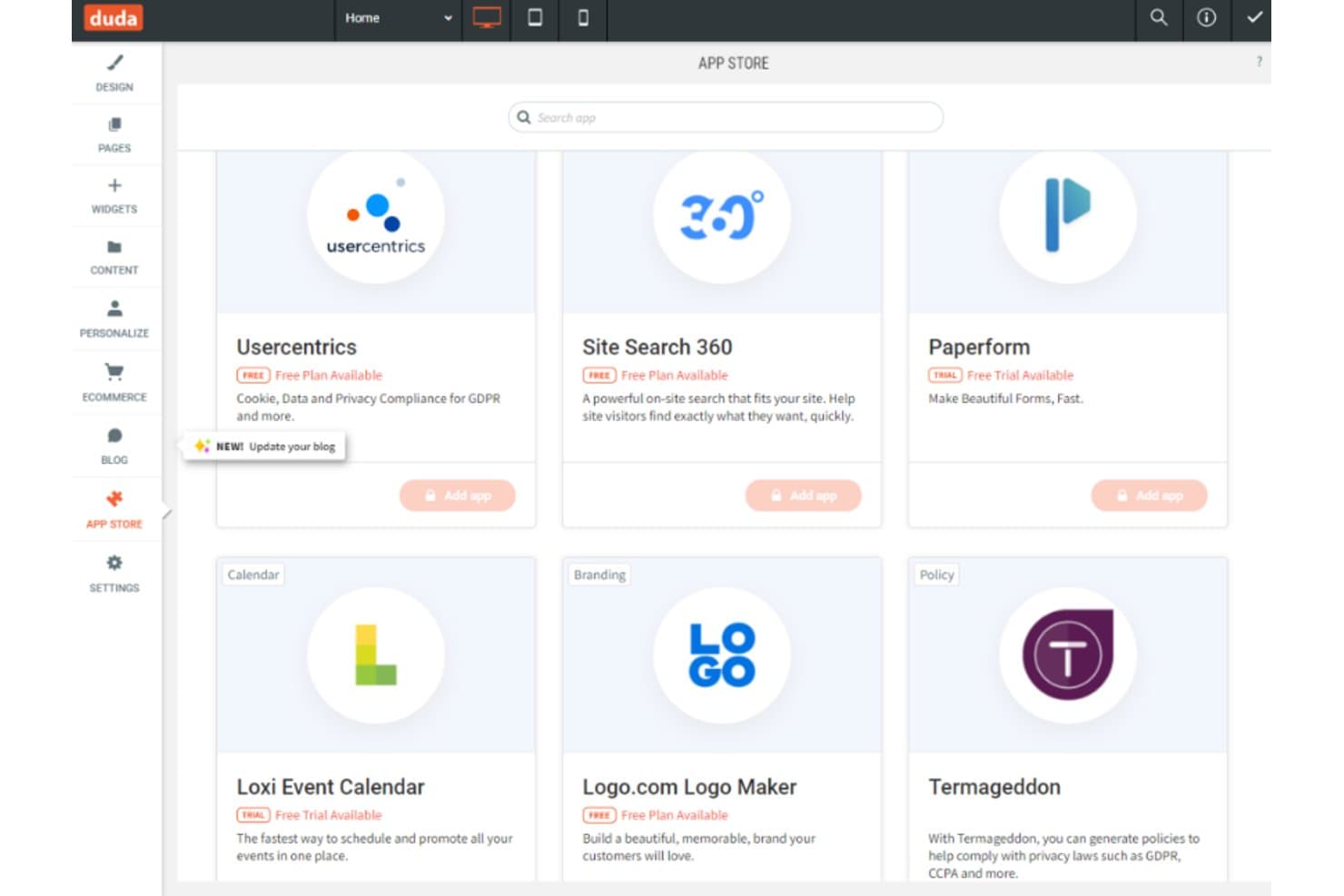
Duda's App Store lets users add tools like calendars and forms. For agencies and small businesses that need to build websites without custom code, Duda provides tools to create responsive sites and update content without relying on developers.
Who Is Duda Best For?
Duda suits web design agencies and freelancers who manage multiple client websites and want to deliver them under their own brand.
Why I Picked Duda
I picked Duda as a Bubble alternative for agencies because it fits this use case: Best for white-label website building with client management tools. I like that you can build responsive client sites under your own brand and let clients update content without developer help.
Duda Key Features
- Drag-and-drop editor: Arrange site elements visually without writing code.
- SEO tools: Edit metadata and add local business schema to pages.
- Dynamic pages: Generate pages from structured collection content.
- Native ecommerce: Add an online store to a Duda website.
Duda Integrations
Duda lists integrations with Google Analytics, Google Sheets, Airtable, PayPal, Google Calendar, and Mapbox, and connects with Zapier. It also provides a REST API for custom integrations and supports Albato connectors.
Pros and Cons
Pros:
- Dynamic pages handle structured client content
- Reusable templates speed responsive site production
- White-label client dashboards and permissions
Cons:
- Complex app workflows need external tools
- Advanced design flexibility remains limited
Learn more about Duda: Best for one-page sites on a shoestring budget
- Free plan available; 7-day free trial
- From $0.75/month (billed annually)
Visit WebsiteCustomer Rating:4.5/5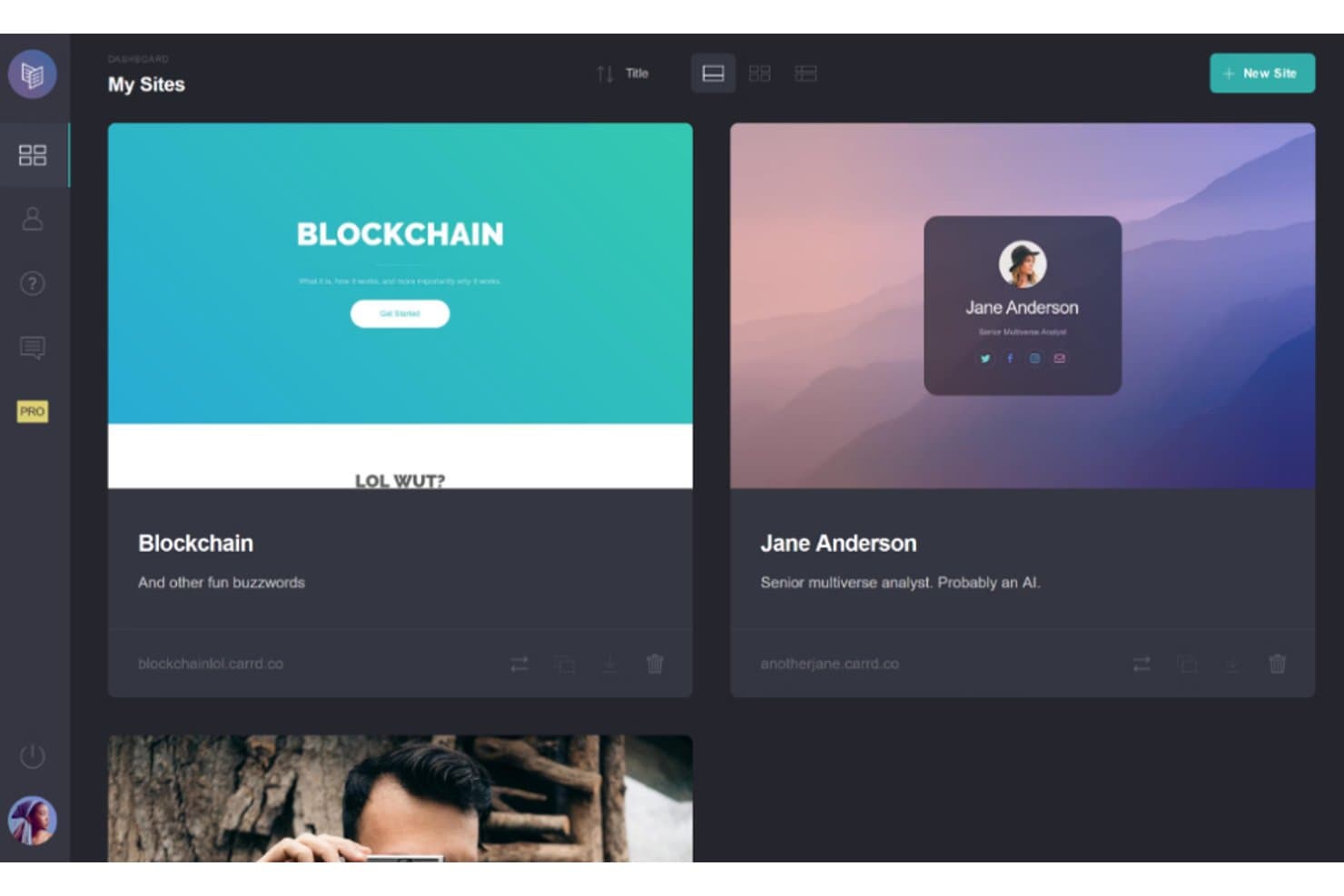
Carrd lets users manage multiple websites from one dashboard. Carrd is a no-code website builder for creators, small businesses, and IT teams that need to publish a product, service, or project presence without building and maintaining a full web app.
Who Is Carrd Best For?
Freelancers and solo operators who need a portfolio or campaign page without the overhead of a multipage site.
Why I Picked Carrd
I picked Carrd as a Bubble alternative when a project needs simple, responsive one-page sites with a lean setup. Its single-page layouts suit product launches and service pages, while built-in forms let you collect inquiries without building a full web app.
Carrd Key Features
- Templates: Start with a pre-designed template and customize its content and styling.
- Custom domains: Publish a site to a domain you own with a Pro plan.
- Embed elements: Add third-party widgets or custom code with a Pro plan.
- Google Analytics: Add a tracking ID to monitor site visits with a Pro plan.
Carrd Integrations
Carrd supports signup forms for services including Mailchimp, HubSpot, Kit, ActiveCampaign, and EmailOctopus. Pro Plus custom forms can send data to Airtable, Make, n8n, or a URL, and connect with Zapier; Carrd also supports widgets and embeds for Stripe, PayPal, Gumroad, and Typeform.
Pros and Cons
Pros:
- Custom styling supports polished single-page portfolios
- Responsive templates suit phones and desktops
- Fast publishing for focused landing pages
Cons:
- Precise column spacing can feel fiddly
- Single-page structure limits content and SEO
Learn more about Carrd: Best for aesthetically pleasing e-commerce sites
- 14-day free trial
- From $19/month (billed annually)
Visit WebsiteCustomer Rating:4.6/5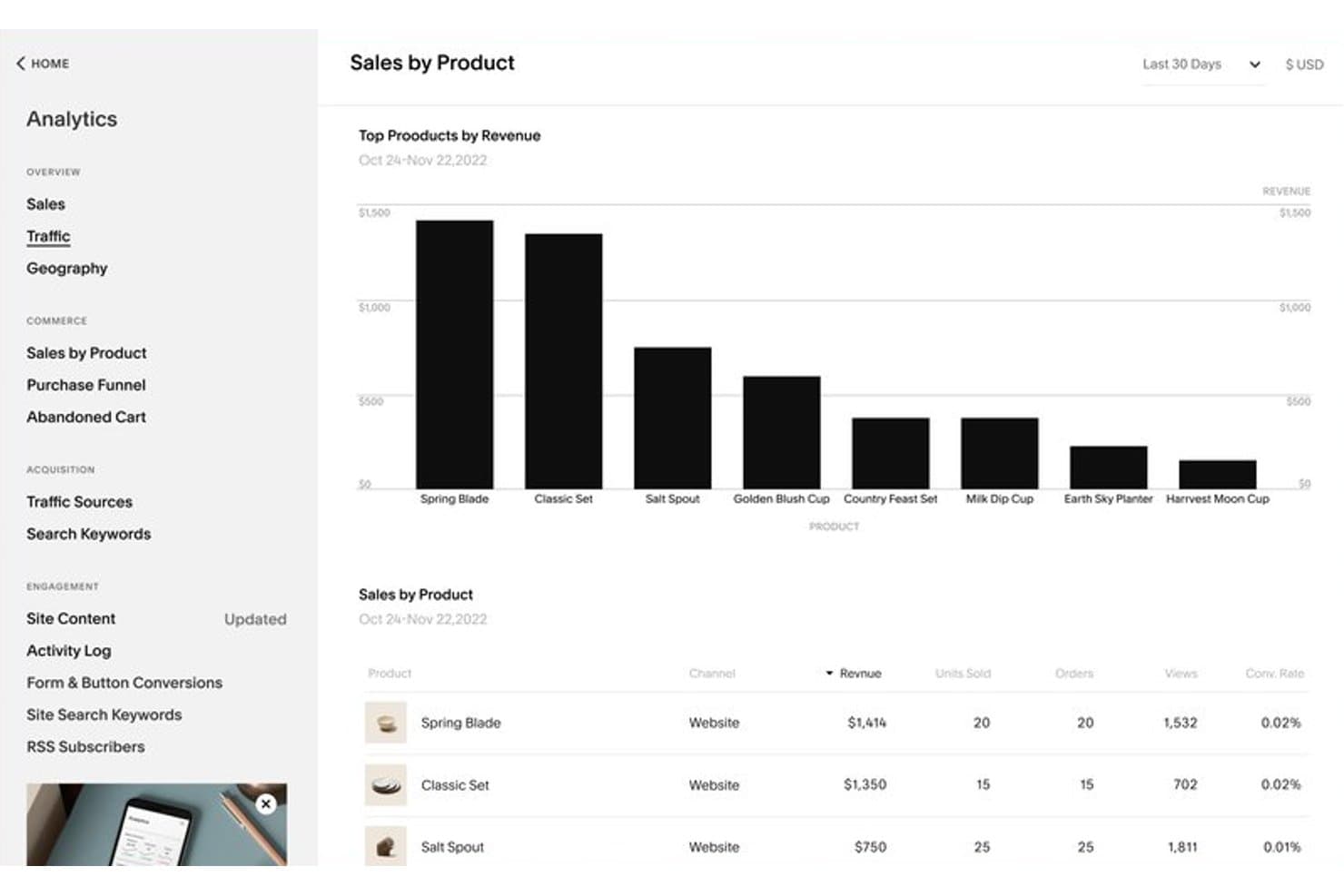
Squarespace tracks revenue and units sold per product over time. Squarespace gives small businesses, creators, and service teams a no-code way to build a branded website and sell online without coordinating separate site-building and commerce tools.
Who Is Squarespace Best For?
Squarespace suits independent designers and boutique retailers who want a polished website with built-in ecommerce.
Why I Picked Squarespace
I picked Squarespace for aesthetically pleasing website design with e-commerce capabilities, especially when a Bubble project is really a branded storefront. Its designed templates and built-in product pages, inventory tools, and checkout support a polished shop without building commerce flows from scratch.
Squarespace Key Features
- Fluid Engine editor: Arrange page content with a drag-and-drop grid editor.
- SEO tools: Edit page titles, descriptions, and URL slugs.
- Website analytics: View traffic sources, page views, and visitor activity.
- Blog management: Create posts, organize them with categories, and schedule publication.
Squarespace Integrations
Squarespace supports official integrations with Stripe, PayPal, Square, Google Analytics, Mailchimp, Google Search Console, and Google Workspace. It connects form blocks to Zapier and offers APIs for custom form and commerce integrations; its extensions marketplace includes QuickBooks Online and ShipStation.
Pros and Cons
Pros:
- Drag-and-drop editing needs no code
- Built-in product pages and inventory management
- Polished templates launch branded storefronts
Cons:
- Checkout and template controls constrain tailored experiences
- Limited extensions restrict custom workflows
Learn more about Squarespace: Best for AI-generated single-page websites
- Free plan available
- From $20.75/month (billed annually)
Visit WebsiteCustomer Rating:4.6/5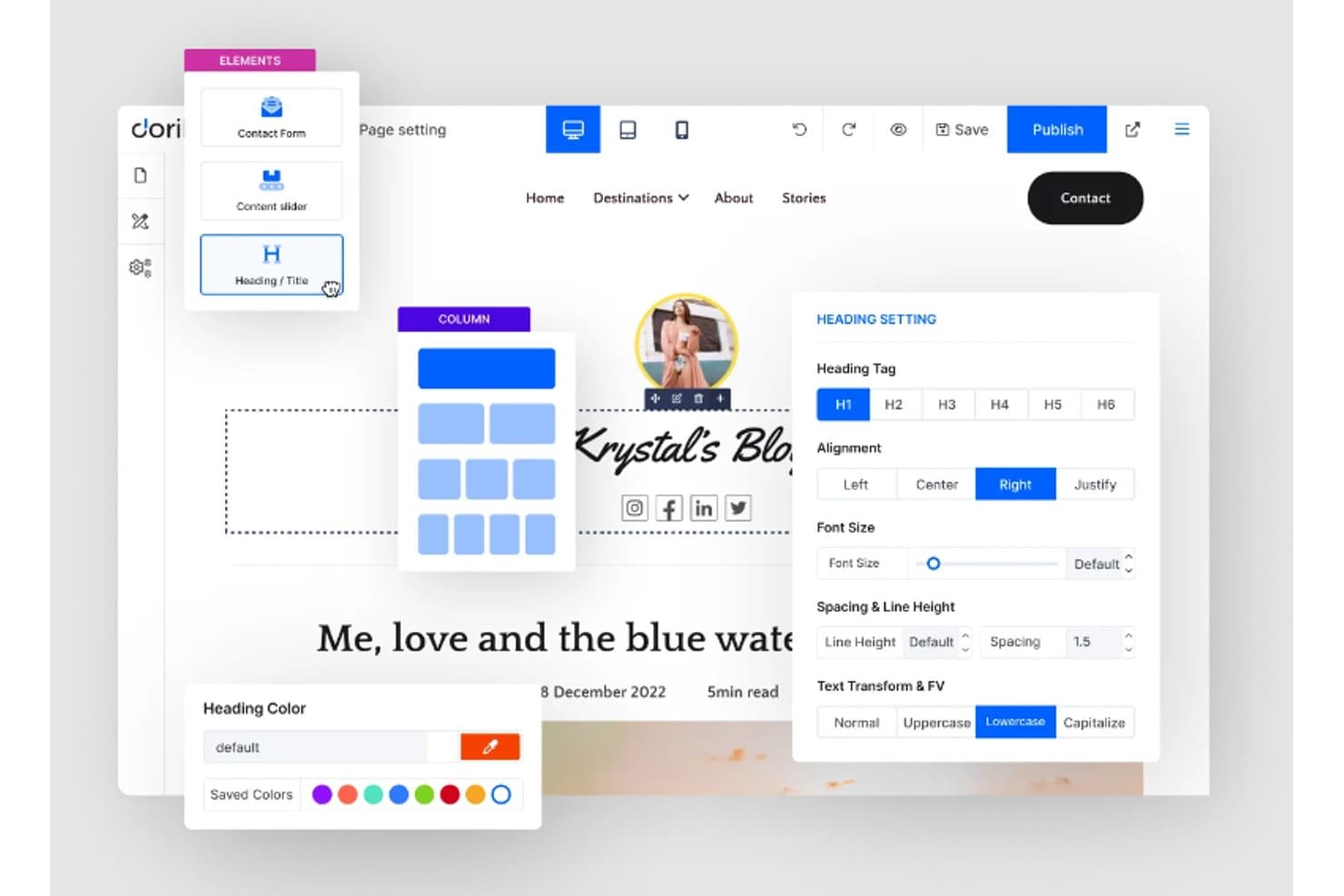
Dorik lets users customize headings with styling and layout controls. Dorik is a no-code website builder for small businesses and teams that want to create and manage websites without coding or relying on a custom development project.
Who Is Dorik Best For?
Dorik suits freelancers and small service providers who need a clean landing page to present an offer or collect inquiries.
Why I Picked Dorik
I like Dorik as a Bubble alternative for single-page websites with a minimalist design ethos. Its responsive templates and prebuilt UI blocks help me put together a focused landing page, such as a service launch page or event signup, by arranging just the sections it needs. That suits a clear web presence without building a full web app.
Dorik Key Features
- CMS collections: Create dynamic content collections with custom fields and page templates.
- SEO controls: Set page titles, descriptions, and keywords, and manage redirects and sitemaps.
- Form integrations: Add contact or subscription forms and connect email platforms such as Mailchimp.
- Hosting and SSL: Publish with Dorik hosting, SSL, and a connected custom domain.
Dorik Integrations
Dorik lists 40+ integrations, including Mailchimp, ConvertKit, Stripe, PayPal, Shopify, Google Analytics, Airtable, Calendly, Make, and Zapier. Its public API supports custom integrations and is available on Business and Agency plans.
Pros and Cons
Pros:
- CMS collections handle blogs and repeatable content
- Responsive layouts support focused single-page sites
- Fast landing-page assembly with reusable blocks
Cons:
- Limited tools for complex ecommerce workflows
- Not built for Bubble-style app logic
Learn more about Dorik: Best for BPM-backed low-code app development
- Free plan available
- Pricing upon request
Visit WebsiteCustomer Rating:4.4/5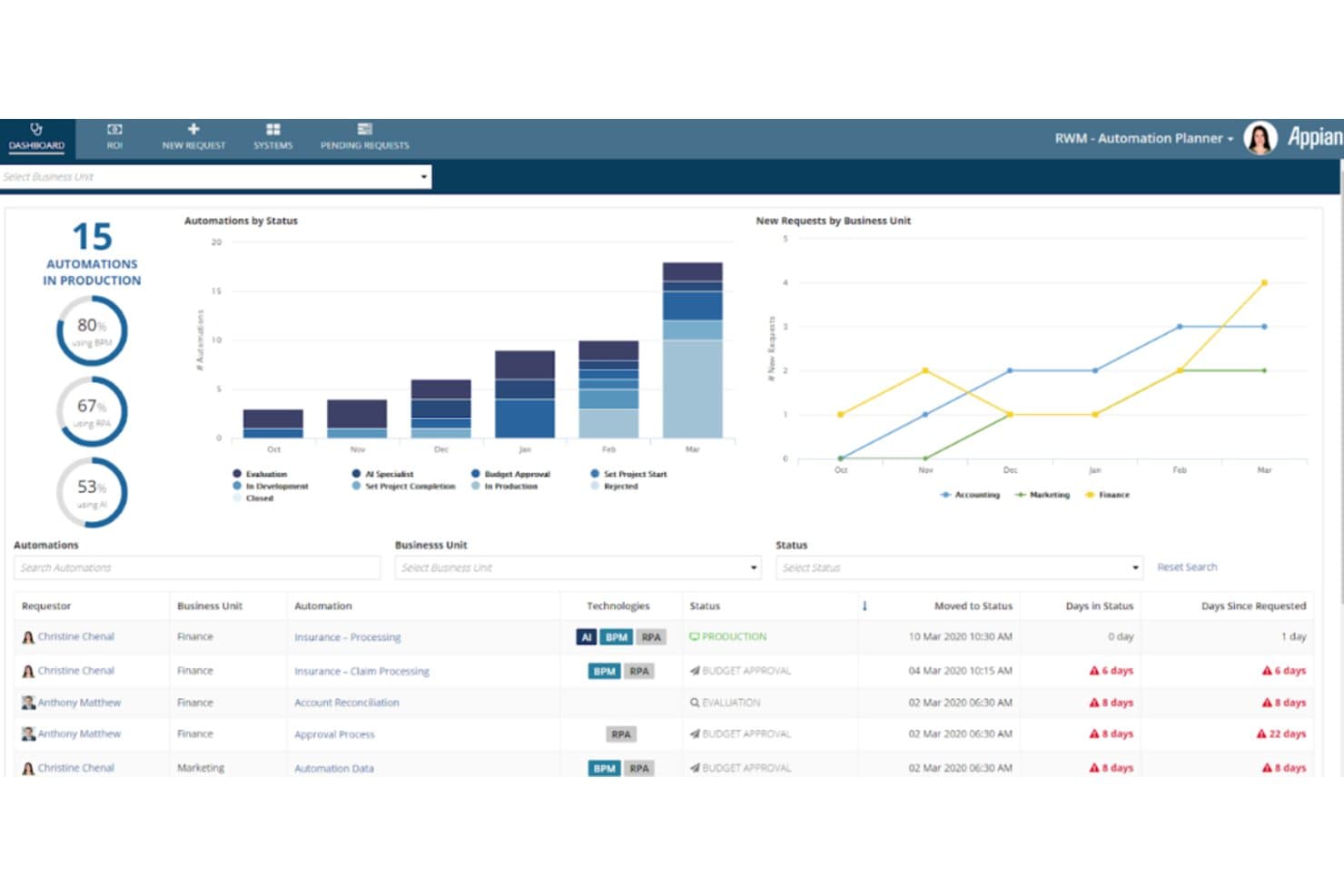
Appian tracks automation pipelines across business units in real time. Appian is a low-code platform for enterprises building custom applications to digitize operational work and connect systems, with a focus described as “Best for integrating business process management with low-code development.”
Who Is Appian Best For?
Appian suits enterprise IT teams and process owners who need to build low-code applications for complex, cross-department workflows.
Why I Picked Appian
I picked Appian because it’s “Best for integrating business process management with low-code development.” Its process models map approvals and exception paths, while case management tracks work across departments. I’d consider it over Bubble for an enterprise app routing service requests through IT, security, and finance.
Appian Key Features
- Visual low-code design: Build applications with visual, drag-and-drop tools.
- Web and mobile deployment: Build once and deploy apps to browsers and native mobile devices.
- Native CI/CD: Use built-in continuous integration and delivery tools to manage application releases.
- Data Fabric: Connect to and unify enterprise data without requiring migration.
Appian Integrations
Appian offers hundreds of prebuilt connectors, including Salesforce, SAP, AWS, Microsoft SharePoint, DocuSign, Microsoft Dynamics, NetSuite, and Workday. It also supports REST and SOAP integrations, JDBC connections, Kafka, and an Integration SDK for custom integrations.
Pros and Cons
Pros:
- Data fabric queries systems without migration
- Rapid low-code delivery for operational applications
- Process models handle branching enterprise workflows
Cons:
- Licensing costs can climb as teams expand
- Custom interfaces offer limited visual flexibility
Learn more about Appian: Best for collaborative low-code app delivery at scale
- Free plan available
- From $1,090/month
Visit WebsiteCustomer Rating:4.4/5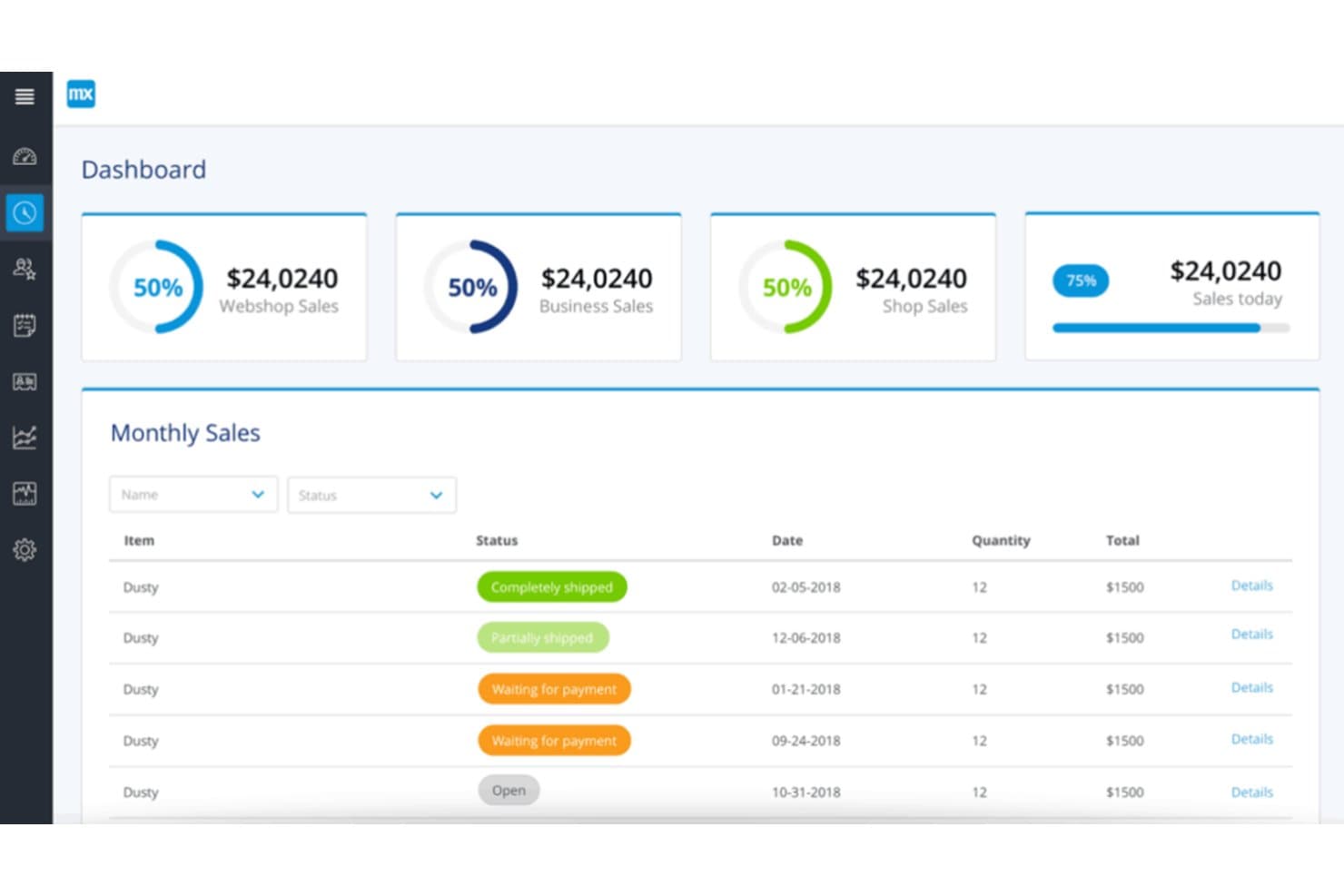
Mendix provides a real-time sales dashboard with monthly order tracking. Mendix is a low-code development platform for IT and business teams building custom web and mobile apps to replace manual processes and address application backlogs.
Who Is Mendix Best For?
Mendix suits IT teams building custom web and mobile apps to replace manual processes and address application backlogs.
Why I Picked Mendix
I picked Mendix as a Bubble alternative for its “Best for collaborative development with its user-friendly visual modeling.” Mendix Studio lets business contributors model pages and workflows, while developers can continue in Studio Pro. Team Server tracks shared changes as an internal app evolves.
Mendix Key Features
- Managed cloud hosting: Mendix Cloud provides app deployment, backups, logs, and SSL/TLS certificates.
- API management: APIs support deployment, configuration, logs, backups, and other management actions.
- Application monitoring: Track CPU, memory, disk, and model-execution metrics, with logs and alerts.
- Environment permissions: Assign per-environment permissions for deployment, backups, monitoring, and API access.
Mendix Integrations
Mendix supports integrations through REST, SOAP, JDBC, and OData, with Marketplace connectors for Salesforce, Slack, Kafka, Redis, and MQTT. It also provides APIs and a Connector Kit for custom integrations.
Pros and Cons
Pros:
- Reusable components speed cross-platform prototyping
- Business contributors can shape process flows
- Visual domain models clarify data relationships
Cons:
- Bespoke screens often need CSS workarounds
- Large projects make version-control merges confusing
Learn more about Mendix: 8Best for launching websites with AI-generated design
Wix
- Free plan available
- From $17.77/month (billed annually)
Visit WebsiteCustomer Rating:4.2/5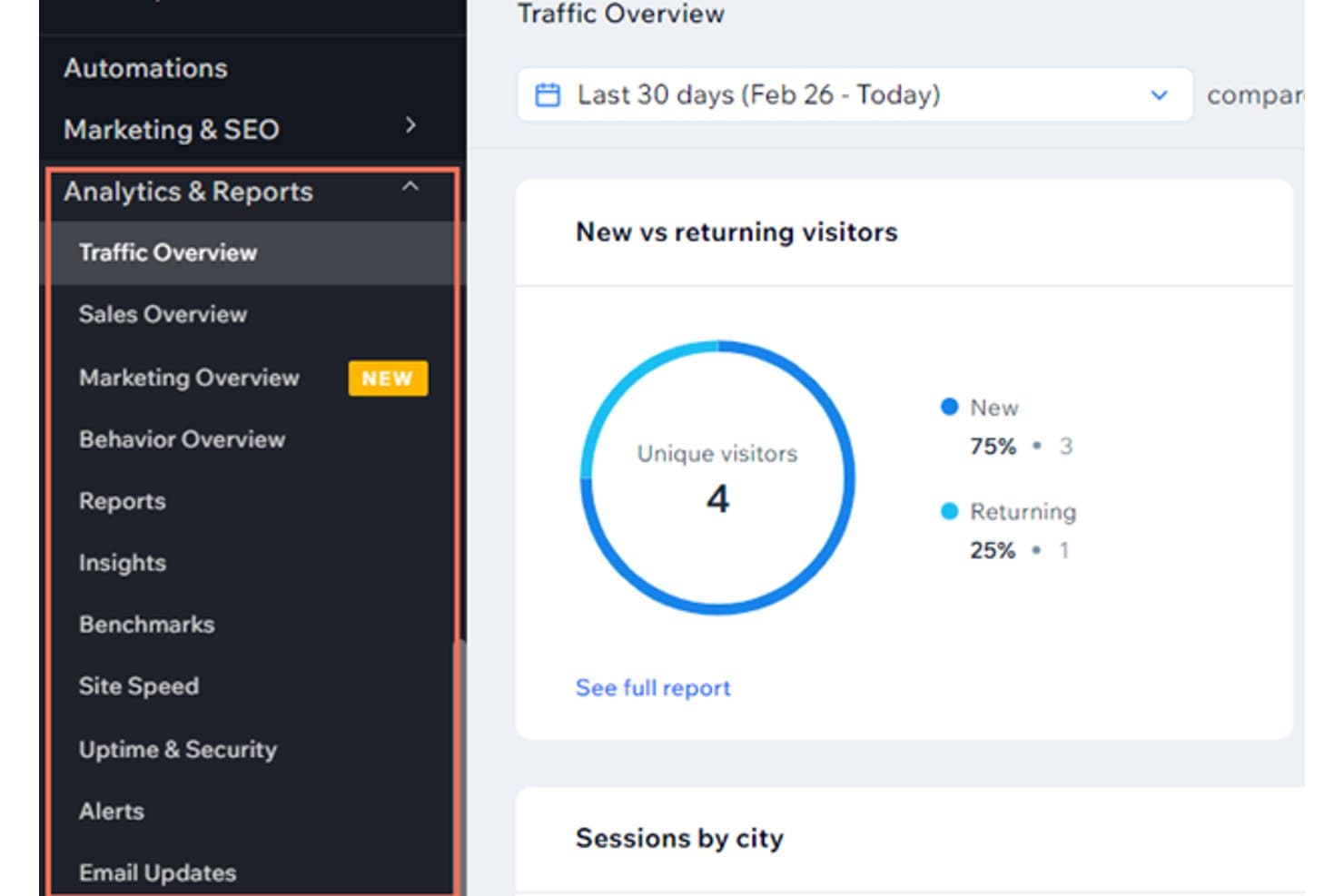
Wix tracks new vs. returning visitors in its Analytics dashboard. For small businesses and independent teams that need a web presence without custom coding, Wix is a no-code website builder for creating and managing business sites.
Who Is Wix Best For?
Wix suits freelancers and local service businesses that want a polished website built from ready-made design templates.
Why I Picked Wix
I include Wix among Bubble alternatives for its “Best for beginner-friendly website building with extensive design templates” focus. Its industry-specific templates provide a starting point for business sites, portfolios, and service pages, and the visual editor lets me customize layouts. I’d choose it for a polished website rather than a database-driven web app.
Wix Key Features
- Wix Bookings: Add appointment scheduling, service listings, and booking forms to your site.
- Wix Stores: Create product pages, manage inventory, and accept online orders.
- Wix CMS: Store structured content and display it across dynamic pages.
- SEO setup checklist: Configure page titles, meta descriptions, and indexing settings.
Wix Integrations
Wix offers native marketing integrations with Google Analytics, TikTok Pixel, Meta Pixel & CAPI, Google Tag Manager, Google Ads, Amazon, Instagram, Bing, and Google Business Profile, plus Zapier. Its App Market offers 500+ marketplace apps, and Wix APIs support custom integrations.
Pros and Cons
Pros:
- Built-in bookings and stores cover common workflows
- CMS collections power dynamic content pages
- Industry templates speed up polished business-site launches
Cons:
- Wix-hosted sites are difficult to migrate elsewhere
- Complex app logic requires more workarounds
Learn more about Wix: Best for AI-generated web, iOS and Android apps
- 14-day free trial
- From $65/month
Visit WebsiteCustomer Rating:3.5/5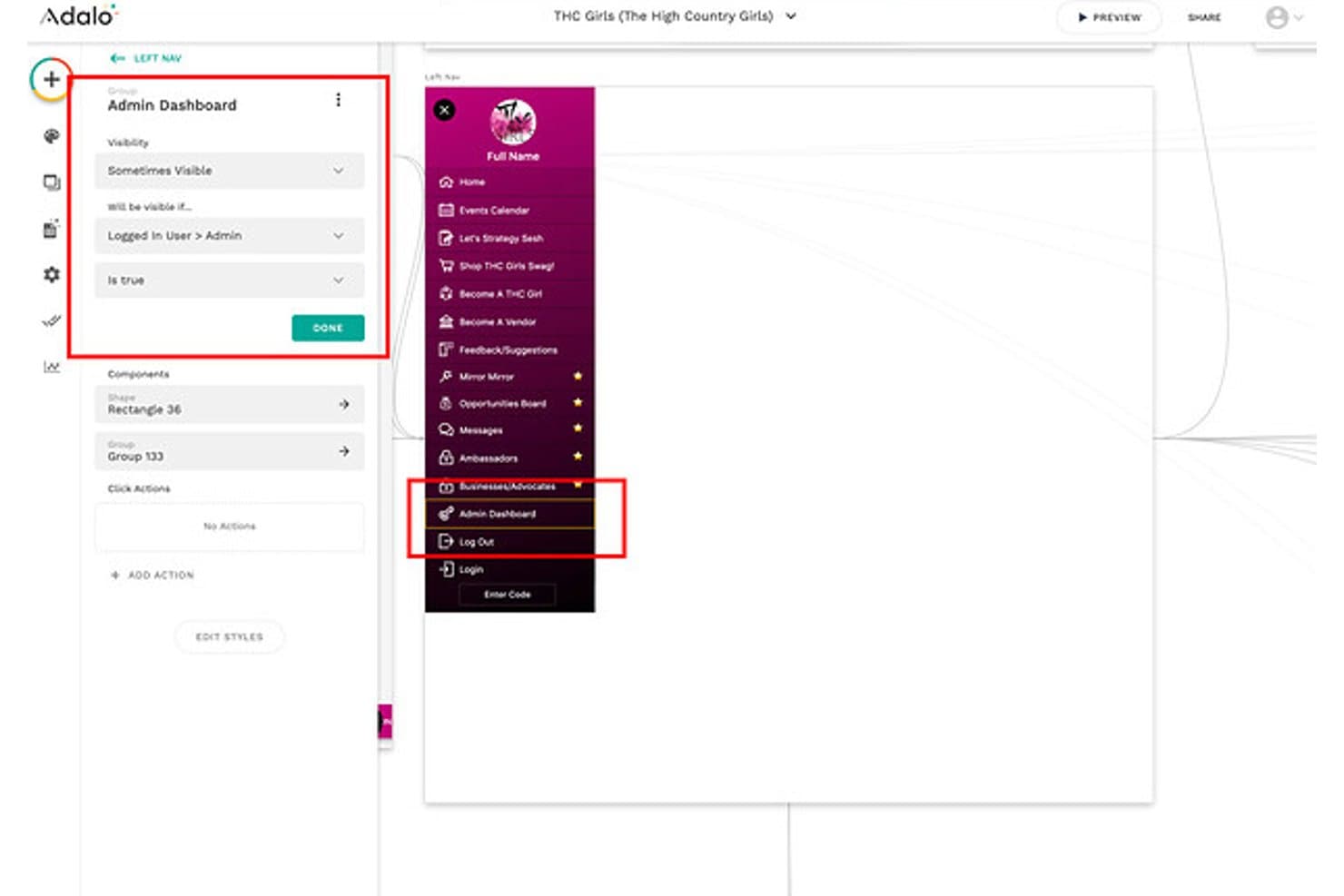
Adalo lets users set visibility rules for admin nav items. Adalo is a no-code app development platform for teams that want to build mobile or web apps for business workflows without maintaining a custom-code stack.
Who Is Adalo Best For?
Adalo suits small businesses and operations teams that need custom mobile apps without a dedicated development team.
Why I Picked Adalo
“Best for intuitive app creation with a drag-and-drop interface” describes why I picked Adalo: I can arrange screens with components, connect buttons to actions, and use collections to store app data. For a Bubble alternative, I’d use that setup to build a field-service app with job lists and status updates.
Adalo Key Features
- Native app publishing: Publish iOS and Android apps to their app stores.
- Web app publishing: Publish a web app from the same project.
- Push notifications: Send notifications to users of iOS and Android apps.
- AI app generation: Describe your app idea and let Ada create an initial app.
Adalo Integrations
Adalo connects with Zapier, which supports connections to services such as Slack, Google Sheets, SendGrid, Twilio, Airtable, and HubSpot. Adalo also supports custom API connections through its API, External Collections, and Custom Actions.
Pros and Cons
Pros:
- Built-in collections help model app workflows
- One project publishes native apps and web
- Drag-and-drop connects screens, actions, and data
Cons:
- Android performance may suffer with larger collections
- Complex workflows can expose bugs and limitations
Learn more about Adalo: 10Best for web design flexibility with visual CSS grid
Webflow
- Free plan available
- From $15/month (billed annually)
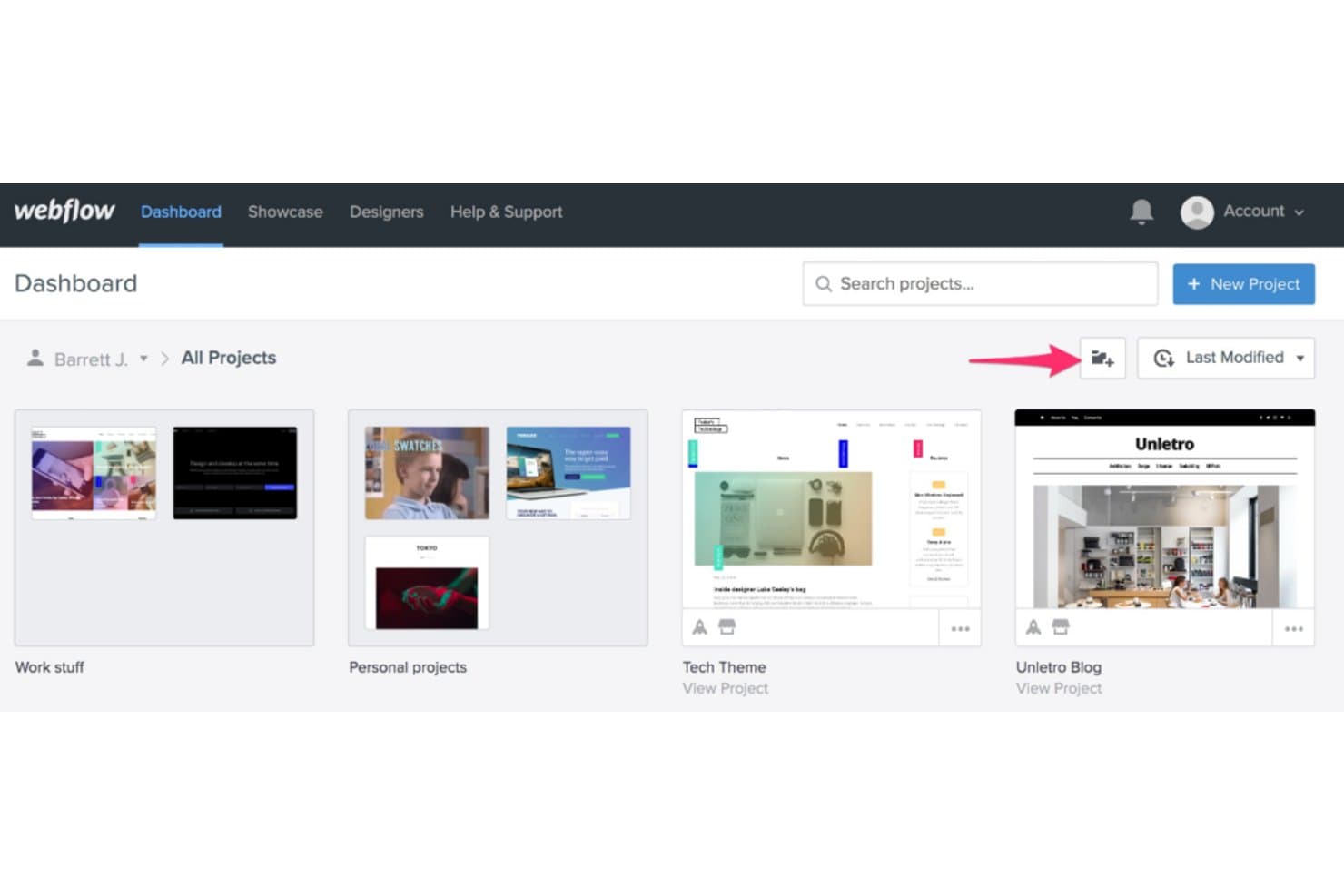
Webflow organizes projects into folders on a visual dashboard. Webflow is a no-code website development platform for businesses and design teams that want to build custom, responsive websites and manage content without relying on developers for every update.
Who Is Webflow Best For?
Webflow suits web designers and front-end teams that need visual control over responsive layouts, including CSS grid.
Why I Picked Webflow
I picked Webflow because it’s Best for web design flexibility with visual CSS grid. I use its visual grid controls to shape responsive page layouts, then adjust those layouts for different screen sizes. That makes it a strong Bubble alternative for building a custom marketing site or product landing page.
Webflow Key Features
- CMS collections: Create structured content types and manage items such as blog posts in the Webflow Editor.
- Interactions: Build animations and trigger-based effects with visual controls.
- SEO settings: Edit page titles, meta descriptions, and canonical URLs for individual pages.
- Form handling: Create forms and review submissions in your Webflow dashboard.
Webflow Integrations
Webflow offers marketplace integrations including HubSpot, Adobe Marketo Engage, Microsoft Clarity, Google Ads for Webflow, PayPal, and Zapier. Its REST APIs, webhooks, OAuth, and SDKs support custom integrations.
Pros and Cons
Pros:
- CMS collections suit marketing and editorial publishing
- Visual interactions with detailed page styling
- Breakpoint-specific CSS grid and responsive layout control
Cons:
- Complex layouts take careful breakpoint-by-breakpoint setup
- No native user accounts or app database
Learn more about Webflow:
Andre verktøy som er alternativer til Bubble
Nedenfor finner du en liste over flere Bubble-alternativer jeg satte på kortlisten, men som ikke kom med blant de ti beste. De er absolutt verdt å undersøke.
- 11OutSystemsBest for rapid development and deployment of enterprise-grade apps
- 12ThunkableBest for creating native mobile apps without coding
- 13ShopifyGood for creating online stores
- 14WeeblyGood for beginners in web design
- 15WordPressGood for content-heavy websites
- 16Betty BlocksGood for building applications with no-code
- 17RetoolGood for building internal tools rapidly
- 18GlideGood for building mobile apps from Google Sheets
- 19TadabaseGood for creating web-based data-driven applications
- 20AppGyverGood for developing enterprise-grade applications
- 21VinylGood for rapid multi-platform application development
- 22UnqorkGood for complex business application development
Andre programvareanmeldelser
How I Evaluate Bubble Alternatives
I split my evaluation into two layers: baseline must-haves—visual builder, database, auth, and deployment—and differentiators like code export, performance at scale, and pricing transparency.
Core Functionality (Table Stakes For This List)
When I'm selecting tools for my list, I rank each one on a scale from 0 (does not offer the functionality) to 5 (excels in this area) for each core functionality listed below. Then, I calculate the tool's total score into a percentage. Each tool needs to achieve a minimum total score of 65% to be considered for inclusion.
- Visual App Builder: I look at whether you can design full-page layouts, forms, and navigation through drag-and-drop rather than writing front-end markup from scratch.
- Built-In Backend & Database: Each tool needs to let you define data models, set up relations, and run queries—like building a multi-table CRM or inventory tracker—natively.
- Workflow & Logic Engine: I evaluate how each platform handles conditional logic, multi-step automations, and event triggers for things like order processing or approval chains.
- User Auth & Permissions: Signup flows, login providers, and role-based access should be configurable within the platform so you can ship a multi-user SaaS app or client portal.
- API & Integration Support: REST or GraphQL connectivity matters here—I check whether you can pull data from external services, send webhooks, or connect to tools like Stripe or Airtable.
- Deployment & Hosting: The platform should handle publishing, custom domain mapping, and environment management so you can go from build to live without provisioning separate servers.
Once I have a list of tools that meet this criteria, I consider what sets each platform apart.
Differentiating Factors (What Sets Vendors Apart)
Here's how I compare and contrast different vendors:
Standout Features
Code export matters a lot here—I check whether a platform lets you download clean source code so your team can migrate to a custom stack without rewriting everything. AI copilot features are also worth evaluating, especially when a tool generates UI layouts or database schemas from natural language prompts. Custom code extensibility and Git integration go hand in hand; injecting JavaScript or SQL while managing changes through branching and rollback keeps multi-developer projects viable long-term.
Beyond Features
Pricing transparency is a big one—I look at whether a platform charges per seat, per app, or by compute usage, because a capacity-unit model can get expensive fast once your app scales to thousands of users. Performance at production load also matters; I evaluate how each tool handles concurrent sessions and complex database queries under real traffic. Developer experience rounds it out for me—strong docs, active community forums, and accessible starter templates make a real difference when onboarding a hybrid team of no-code builders and pro-code developers.
Hvorfor se etter et Bubble-alternativ?
Bubble er en plattform uten kode som demokratiserer programvareutvikling og gjør det mulig for gründere, kreative personer og virksomheter å bygge nettapplikasjoner uten å måtte skrive kode. Den er perfekt for dem som raskt vil omgjøre ideer til funksjonell programvare uten behov for teknisk ekspertise.
Den universelle tilnærmingen passer imidlertid ikke nødvendigvis til de spesifikke behovene til alle brukere. Noen kan for eksempel være på jakt etter mer nisjepreget funksjonalitet, en annen prismodell eller et verktøy som er bedre tilpasset deres spesifikke bransje eller bruksområde. Derfor er det viktig å utforske alternativer til Bubble.
Viktige funksjoner i Bubble
Her er noen av de viktigste funksjonene i Bubble, slik at du kan sammenligne hva alternative løsninger tilbyr:
- Markedsplass for programtillegg: Gir deg tilgang til tredjepartsverktøy som kan utvide funksjonene i appen din.
- Visuelt redigeringsverktøy: Lar deg utforme og tilpasse appens layout ved hjelp av dra-og-slipp.
- Arbeidsflytbygger: Hjelper deg med å sette opp logikk og handlinger som kjøres når brukere samhandler med appen.
- Databasehåndtering: Lar deg opprette, lagre og administrere appdata uten kode.
- Verktøy for responsiv design: Hjelper deg med å justere hvordan appen ser ut på ulike skjermstørrelser.
- API-tilkobling: Lar deg koble appen til eksterne tjenester og datakilder.
- Gjenbrukbare komponenter: Lar deg opprette egendefinerte elementer som du kan bruke gjennom hele appen.
- Versjonskontroll: Gir deg verktøy for å teste oppdateringer og trygt tilbakestille endringer.
- Brukerautentisering: Hjelper deg med å sette opp registrering, innlogging og brukerroller uten programmering.
- Distribusjonsverktøy: Lar deg publisere oppdateringer og administrere aktive versjoner kontra utviklingsversjoner.
Sammendrag
Oppsummert er Bubble et kraftig verktøy for å bygge nettapplikasjoner uten behov for programmeringskunnskaper. Det er imidlertid ikke alltid det riktige valget for alle bruksområder, og det er her de oppførte alternativene kommer inn i bildet.
Når du skal velge et alternativ, er det avgjørende å ta hensyn til verktøyets kjernefunksjonalitet, viktigste funksjoner og brukervennlighet. Se etter en løsning som samsvarer med dine spesifikke krav og arbeidsflyt. Dette kan være alt fra enkle enkeltsideapplikasjoner, e-handelsplattformer og komplekse applikasjoner på bedriftsnivå til MBaaS-programvare som spesialiserer seg på utvikling av mobilapper.
Viktigste punkter:
- Vurder kostnadene: Prisene varierer betydelig mellom disse verktøyene, så det er avgjørende å vurdere hva du får igjen for investeringen. Husk å se etter en løsning som gir riktig balanse mellom kostnad og funksjonalitet innenfor budsjettet ditt.
- Se på langsiktig verdi: Vurder ikke bare de umiddelbare behovene, men også den langsiktige verdien. Faktorer som skalerbarhet, kundestøtte, fellesskap og læringsressurser kan ha stor innvirkning på verdien du får fra den valgte plattformen over tid.
- Forstå behovene dine: Før du velger et alternativ, er det viktig å definere behovene og målene dine. Enten det gjelder en brukervennlig dra-og-slipp-appbygger, omfattende integrasjoner eller bransjespesifikke løsninger, vil det å vite hva du trenger veilede deg i valget.