

Recensione Honeycomb 2026: Pro, Contro, Caratteristiche e Prezzi
Honeycomb si distingue per l’osservabilità in tempo reale e il debug approfondito, rendendolo ideale per sistemi complessi, ma potrebbe essere eccessivo per esigenze di monitoraggio più semplici.

Recensiamo gli strumenti in modo indipendente e le commissioni ci aiutano a finanziare i nostri test. Consulta la nostra politica sulla trasparenza, la nostra metodologia, oppure suggerisci uno strumento.
Honeycomb is a cloud infrastructure monitoring tool built for engineering teams that need deep observability into distributed systems and microservices. It's a strong fit when you need to query high-cardinality event data to pinpoint production issues fast. If you're weighing it against Datadog, I'd say Honeycomb wins on query depth—you can slice event data by any combination of fields in real time, rather than relying on pre-built dashboards to surface what went wrong.
Honeycomb Evaluation Summary

4.6/5
- From $130/month
- Free plan + demo available
Perché fidarsi dei nostri consigli sui software
6,700+
Reviews
20
Industry experts
16+
Evaluation factors
14
Years
Il nostro team testa e recensisce software dal 2012. In quanto leader tecnologici noi stessi, sappiamo quanto sia difficile — e importante — scegliere il software giusto.
Per questa guida, abbiamo valutato gli strumenti attraverso test praticie ricerche indipendenti, assegnando un punteggio agli strumenti in base ai nostri criteri di selezione.
Le nostre recensioni riflettono il nostro giudizio editoriale umano, non un discorso di vendita.
Revisori esperti:
- Paulo Gardini MiguelDirettore tecnico
 Tim FisherVP dell'IA
 Gabriel RosasTech Lead e architetto software
 Christhian GruhnTech Lead e architetto della piattaforma

Honeycomb Overview
When judging infrastructure monitoring tools, Honeycomb stands out for its event-based observability, intuitive query builder, and fast, interactive UI. Its pricing is transparent and scales well for teams needing granular insights. While onboarding can be complex for those new to observability, the documentation and support are strong. Integrations cover most modern stacks, but legacy environments may require extra setup.
If you’re selecting a tool for debugging distributed systems or high-cardinality data, Honeycomb often outperforms others. It’s best suited for teams prioritizing deep system visibility over basic uptime checks.
Pros
- Transparent pricing with unlimited custom metrics included
- Real-time event-based observability with fast query speeds
- Excels at high-cardinality querying for complex environments
Cons
- Onboarding is complex for teams new to observability
- Dashboards and insights can feel unintuitive to some users
- Less effective for traditional uptime monitoring use cases
Is Honeycomb Right For Your Needs?
Who Would be a Good Fit for Honeycomb?
Honeycomb is best suited for organizations with complex, distributed systems that require deep observability and rapid debugging. Teams in industries where high-cardinality data and real-time analysis are essential will find Honeycomb’s event-based approach and flexible querying especially valuable.
It’s a strong choice for modern engineering teams, especially those running microservices or cloud-native architectures, who need to quickly pinpoint issues and understand system behavior under load.
- Site Reliability EngineeringSREs benefit from Honeycomb’s ability to correlate events and metrics for proactive monitoring.
- E-commerce PlatformsDetailed tracing helps identify transaction bottlenecks and performance anomalies.
- Cloud-Native StartupsHoneycomb’s observability model fits dynamic, containerized, and serverless environments.
- DevOps TeamsFast drill-down and flexible queries enable root cause analysis during deployments.
- Fintech CompaniesReal-time event analysis supports compliance and rapid incident response in regulated environments.
- SaaS ProvidersHoneycomb’s high-cardinality querying helps SaaS teams trace user-specific issues across distributed services.
Who Would be a Bad Fit for Honeycomb?
Honeycomb is less suitable for organizations with simple infrastructure, traditional monitoring needs, or limited technical resources. Teams that primarily need basic uptime checks, legacy system support, or straightforward dashboards may find Honeycomb’s advanced features unnecessary or difficult to leverage.
Smaller businesses or non-technical departments may also struggle with the onboarding and ongoing management requirements.
- Marketing DepartmentsHoneycomb’s focus on infrastructure observability doesn’t align with marketing analytics needs.
- Manufacturing OperationsReal-time event tracing is less relevant for static, on-premise environments.
- Managed Service ProvidersTraditional uptime and SLA monitoring are not Honeycomb’s primary strengths.
- Non-Technical TeamsThe interface and query model require technical expertise to use effectively.
- Legacy IT DepartmentsLimited support for older, monolithic systems makes integration challenging.
- Small BusinessesHoneycomb’s advanced observability features are excessive for basic monitoring needs.
La Nostra Metodologia di Recensione
Come Testiamo e Valutiamo gli Strumenti
Abbiamo trascorso anni a costruire, perfezionare e migliorare il nostro sistema di testing e valutazione del software. Il nostro schema è progettato per cogliere le sfumature della selezione software e cosa rende efficace uno strumento, focalizzandosi sugli aspetti critici del processo decisionale.
Di seguito, puoi vedere esattamente come funziona il nostro testing e punteggio su sette criteri. Ci permette di offrire una valutazione imparziale del software basata su funzionalità principali, caratteristiche distintive, facilità d’uso, onboarding, assistenza clienti, integrazioni, recensioni dei clienti e rapporto qualità-prezzo.
Funzionalità Principali (25% del punteggio finale)
Il punto di partenza della nostra valutazione è sempre la funzionalità principale dello strumento. Ha le funzioni e caratteristiche base che ci si aspetta? Alcune di queste caratteristiche sono limitate ai piani tariffari superiori? Fondamentalmente, ci aspettiamo che uno strumento regga il confronto rispetto alle capacità di base dei concorrenti.
Caratteristiche Distintive (25% del punteggio finale)
Successivamente, valutiamo le caratteristiche distintive e non comuni che vanno oltre la funzionalità base tipicamente trovata negli strumenti di questa categoria. Un punteggio alto riflette funzionalità specializzate o uniche che rendono il prodotto più veloce, efficiente o offrono ulteriore valore all’utente.
Valutiamo inoltre quanto sia semplice integrare altri strumenti tipicamente utilizzati nell’infrastruttura tecnologica per espandere la funzionalità e l’utilità del software. Gli strumenti che offrono numerose integrazioni native, connessioni di terze parti e accesso API per creare integrazioni personalizzate ottengono i punteggi migliori.
Facilità d’Uso (10% del punteggio finale)
Consideriamo quanto sia rapido e semplice svolgere i compiti definiti nella funzionalità principale utilizzando lo strumento. Il software con punteggio alto è ben progettato, intuitivo da usare, offre app mobili, fornisce modelli e rende semplici attività relativamente complesse.
Onboarding (10% del punteggio finale)
Sappiamo quanto sia importante l’adozione rapida da parte del team per una nuova piattaforma, quindi valutiamo quanto sia facile imparare e utilizzare uno strumento con formazione minima. Valutiamo quanto velocemente un membro del team possa iniziare a usare lo strumento anche senza esperienza. Soluzioni con punteggio alto indicano che sono richiesti pochi o nessun supporto.
Assistenza Clienti (10% del punteggio finale)
Esaminiamo quanto sia veloce e facile ricevere assistenza e risolvere problemi tramite telefono, live chat o knowledge base. Gli strumenti e le aziende che garantiscono supporto in tempo reale ottengono il miglior punteggio, mentre i chatbot ottengono il peggiore.
Recensioni dei Clienti (10% del punteggio finale)
Oltre ai nostri test e valutazioni, prendiamo in considerazione il net promoter score dei clienti attuali e passati. Valutiamo la probabilità che, data la scelta, selezionerebbero nuovamente lo strumento per la funzionalità principale. Un software con punteggio alto riflette un alto net promoter score da parte dei clienti attuali o passati.
Rapporto Qualità-Prezzo (10% del punteggio finale)
Infine, considerando tutti gli altri criteri, analizziamo il prezzo medio dei piani base rispetto alle funzionalità principali e consideriamo il valore degli altri criteri di valutazione. Il software che offre di più a meno otterrà un punteggio più alto.
Core Features
Distributed Tracing
Track requests as they move through microservices, visualizing dependencies and latency at each step. This helps teams quickly identify bottlenecks and failure points.
High-Cardinality Querying
Run queries on millions of unique fields, such as user IDs or session tokens, without performance loss. This enables granular troubleshooting and deep system analysis.
Real-Time Event Analysis
Access and analyze telemetry data within seconds of ingestion for immediate feedback. Engineers can investigate incidents as they happen, not after the fact.
BubbleUp Root Cause Analysis
Automatically surface outliers and anomalies in your data with BubbleUp. This feature highlights what’s different about problematic events, speeding up investigations.
Service Map Visualization
See a live map of service dependencies and interactions across your infrastructure. This makes it easier to understand system architecture and pinpoint affected components.
SLO-Based Monitoring
Define and track service level objectives (SLOs) directly in Honeycomb. Teams can monitor reliability targets and get alerted when performance drifts from expectations.

Ease of Use
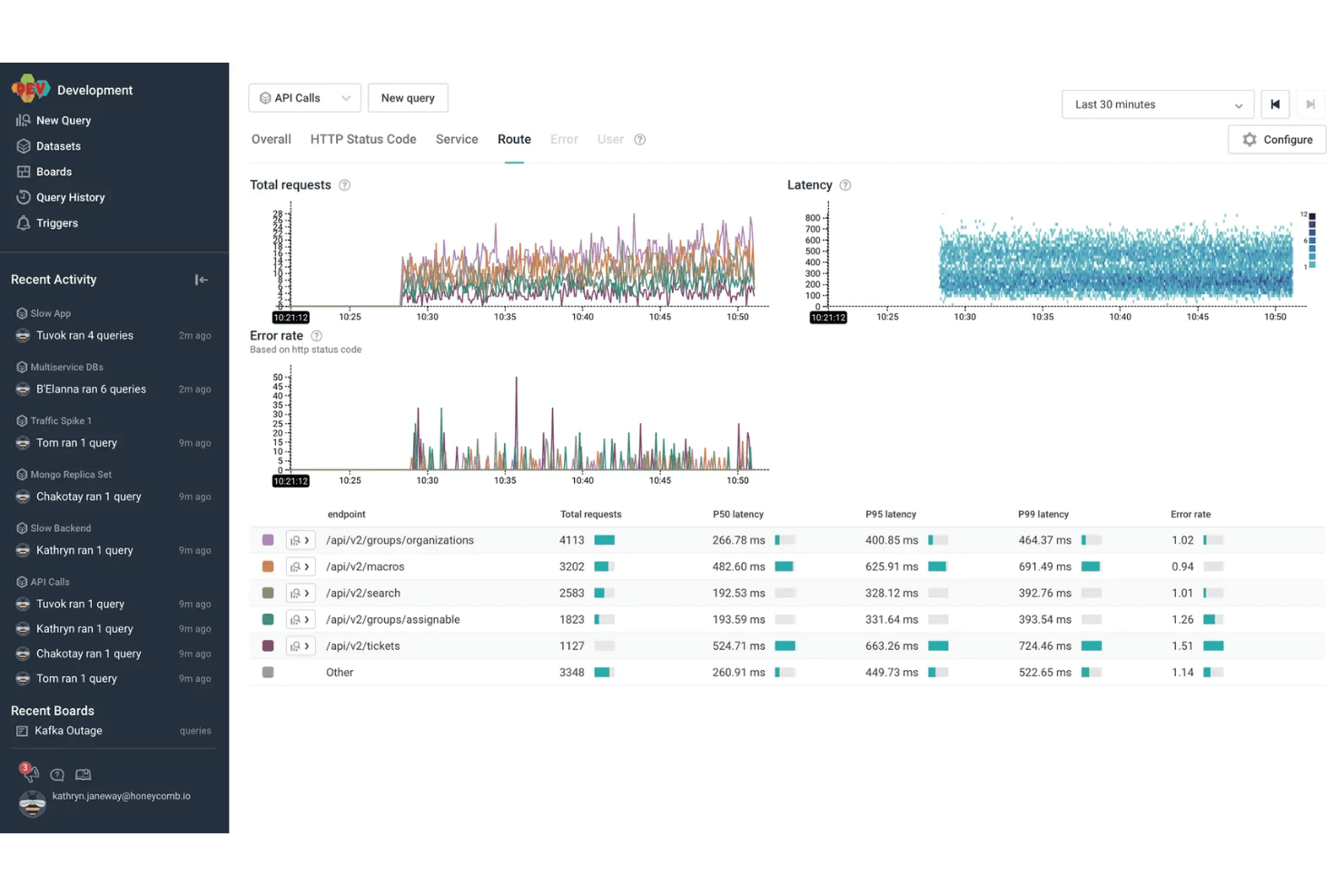
Honeycomb offers a modern, responsive interface with powerful querying and visualization tools, but its usability depends on your team’s technical expertise. Many users praise the speed and flexibility of its query builder, yet some find the learning curve steep, especially for those new to observability concepts.
The documentation and in-app guidance help, but teams without experience in distributed tracing or event-based monitoring may need extra ramp-up time to unlock Honeycomb’s full value.
Integrations
Honeycomb integrates with AWS Lambda, Slack, PagerDuty, Terraform, MySQL, Prometheus, ServiceNow, AWS CloudWatch, GitHub Actions, and Amazon Kinesis, among others.
Honeycomb also offers a robust API and supports connections with third-party integration tools for custom workflows and data ingestion.

Honeycomb Specs
- AI Integration: Yes
- API: Yes
- Automated Testing: No
- Browser Compatibility Testing: No
- Bug Tracking: Yes
- Code Review: No
- Custom Reports: Yes
- Data Export: Yes
- Data Import: Yes
- Developer Tools: Yes
- External Integrations: Yes
- Malware Protection: No
- Multi-User: Yes
- Notifications: Yes
- Performance Testing: Yes
- Process Reporting: Yes
- Static Analysis: No
- Status Notifications: Yes
- Workflow Management: No


