

Recensione HeadSpin 2026: Pro, Contro, Caratteristiche e Prezzi Spiegati
HeadSpin si distingue come strumento di gestione dei test con test su dispositivi reali, analisi tramite IA e approfondimenti sulle prestazioni. Scopri come aiuta i team a migliorare la qualità delle app.

Recensiamo gli strumenti in modo indipendente e le commissioni ci aiutano a finanziare i nostri test. Consulta la nostra politica sulla trasparenza, la nostra metodologia, oppure suggerisci uno strumento.
HeadSpin is a test management software built for teams who need to test mobile and web apps on real devices under real-world network conditions. It uses AI to surface performance issues tied to actual user experience data across a globally distributed device network. I'd consider it over BrowserStack if you need more than device and browser compatibility coverage—HeadSpin goes deeper into performance diagnostics, giving you actionable data on what's degrading the user experience and exactly where it's happening.
HeadSpin Evaluation Summary

4.6/5
- From $39/month (billed annually)
- Free demo available
Perché fidarsi dei nostri consigli sui software
6,700+
Reviews
20
Industry experts
16+
Evaluation factors
14
Years
Il nostro team testa e recensisce software dal 2012. In quanto leader tecnologici noi stessi, sappiamo quanto sia difficile — e importante — scegliere il software giusto.
Per questa guida, abbiamo valutato gli strumenti attraverso test praticie ricerche indipendenti, assegnando un punteggio agli strumenti in base ai nostri criteri di selezione.
Le nostre recensioni riflettono il nostro giudizio editoriale umano, non un discorso di vendita.
Revisori esperti:
- Paulo Gardini MiguelDirettore tecnico
 Tim FisherVP dell'IA
 Gabriel RosasTech Lead e architetto software
 Christhian GruhnTech Lead e architetto della piattaforma

HeadSpin Overview
When judging test management options, I think HeadSpin stands out if you want device diversity, integrated performance analytics, and AI-driven insights in one place. Its deep integrations, detailed reporting, and real-world network testing set it apart, especially for mobile and IoT QA. Pricing is on the higher side, and onboarding can challenge new users, but teams prioritizing advanced analytics and global coverage will appreciate what HeadSpin offers.
For fast-paced environments and businesses with a distributed qa footprint, I’d select HeadSpin over more basic testing platforms.
Pros
- Offers real device cloud for global testing coverage.
- Detailed performance and user experience analytics are included.
- Supports automation for mobile, web, and IoT testing.
Cons
- Pricing can be higher than many alternatives.
- UI can feel cluttered when running complex tests.
- API documentation lacks depth for custom workflows.
Is HeadSpin Right For Your Needs?
Who Would be a Good Fit for HeadSpin?
HeadSpin is best suited for organizations that need real-world device testing, advanced analytics, or global test coverage with strict reliability requirements. It serves industries where mobile performance and cross-device quality directly affect user satisfaction.
Teams with significant QA workloads and those handling high-frequency, production-grade releases typically get the most value from its deep diagnostics and AI-driven insights.
- Mobile App DevelopersMobile teams needing global device access and real-world user scenario simulation will benefit from HeadSpin’s robust device lab and session recording capabilities.
- Telecom ProvidersTelecom companies can use HeadSpin’s network simulation and cross-region device testing to optimize apps for varying connectivity environments.
- Financial ServicesBanks and fintech companies value HeadSpin’s security-focused diagnostics and analytics when testing secure, transaction-heavy mobile apps.
- Enterprise QA TeamsLarge-scale QA operations that require automated regression, device health tracking, and cross-platform transparency thrive with HeadSpin’s workflow automation.
- IoT Solution ProvidersCompanies testing IoT devices benefit from HeadSpin’s ability to simulate user journeys and troubleshoot device-to-app interactions.
- Media & Streaming FirmsVideo and content streaming platforms use HeadSpin’s performance analytics to ensure high-quality playback across many devices and networks.
Who Would be a Bad Fit for HeadSpin?
Smaller businesses or teams with limited automation needs, basic QA requirements, or a narrow device focus may find HeadSpin’s pricing and complexity excessive. It may also overwhelm organizations that don’t need cross-geography, multi-device functionality or prefer simpler test management software. Light use cases rarely justify the investment required to take full advantage of HeadSpin’s platform depth.
- Small StartupsTeams with light QA needs or limited budgets won’t maximize HeadSpin’s advanced analytics or device cloud features.
- Manual Test TeamsBusinesses relying mostly on manual testing won’t benefit from the automation and AI workflow tools HeadSpin provides.
- Single-Platform TeamsCompanies building for just one platform or device type don’t need HeadSpin’s cross-platform device infrastructure.
- Local Service ProvidersOrganizations operating in a single geographic region rarely make use of HeadSpin’s global device labs or network condition simulation.
- Education & NonprofitsSectors where simple compliance or low-complexity flows are priority may find the cost and features misaligned.
- Freelance TestersIndependent QA consultants or small agencies may be overwhelmed or priced out by the enterprise-focused capabilities.
La Nostra Metodologia di Recensione
Come Testiamo e Valutiamo gli Strumenti
Abbiamo trascorso anni a costruire, perfezionare e migliorare il nostro sistema di testing e valutazione del software. Il nostro schema è progettato per cogliere le sfumature della selezione software e cosa rende efficace uno strumento, focalizzandosi sugli aspetti critici del processo decisionale.
Di seguito, puoi vedere esattamente come funziona il nostro testing e punteggio su sette criteri. Ci permette di offrire una valutazione imparziale del software basata su funzionalità principali, caratteristiche distintive, facilità d’uso, onboarding, assistenza clienti, integrazioni, recensioni dei clienti e rapporto qualità-prezzo.
Funzionalità Principali (25% del punteggio finale)
Il punto di partenza della nostra valutazione è sempre la funzionalità principale dello strumento. Ha le funzioni e caratteristiche base che ci si aspetta? Alcune di queste caratteristiche sono limitate ai piani tariffari superiori? Fondamentalmente, ci aspettiamo che uno strumento regga il confronto rispetto alle capacità di base dei concorrenti.
Caratteristiche Distintive (25% del punteggio finale)
Successivamente, valutiamo le caratteristiche distintive e non comuni che vanno oltre la funzionalità base tipicamente trovata negli strumenti di questa categoria. Un punteggio alto riflette funzionalità specializzate o uniche che rendono il prodotto più veloce, efficiente o offrono ulteriore valore all’utente.
Valutiamo inoltre quanto sia semplice integrare altri strumenti tipicamente utilizzati nell’infrastruttura tecnologica per espandere la funzionalità e l’utilità del software. Gli strumenti che offrono numerose integrazioni native, connessioni di terze parti e accesso API per creare integrazioni personalizzate ottengono i punteggi migliori.
Facilità d’Uso (10% del punteggio finale)
Consideriamo quanto sia rapido e semplice svolgere i compiti definiti nella funzionalità principale utilizzando lo strumento. Il software con punteggio alto è ben progettato, intuitivo da usare, offre app mobili, fornisce modelli e rende semplici attività relativamente complesse.
Onboarding (10% del punteggio finale)
Sappiamo quanto sia importante l’adozione rapida da parte del team per una nuova piattaforma, quindi valutiamo quanto sia facile imparare e utilizzare uno strumento con formazione minima. Valutiamo quanto velocemente un membro del team possa iniziare a usare lo strumento anche senza esperienza. Soluzioni con punteggio alto indicano che sono richiesti pochi o nessun supporto.
Assistenza Clienti (10% del punteggio finale)
Esaminiamo quanto sia veloce e facile ricevere assistenza e risolvere problemi tramite telefono, live chat o knowledge base. Gli strumenti e le aziende che garantiscono supporto in tempo reale ottengono il miglior punteggio, mentre i chatbot ottengono il peggiore.
Recensioni dei Clienti (10% del punteggio finale)
Oltre ai nostri test e valutazioni, prendiamo in considerazione il net promoter score dei clienti attuali e passati. Valutiamo la probabilità che, data la scelta, selezionerebbero nuovamente lo strumento per la funzionalità principale. Un software con punteggio alto riflette un alto net promoter score da parte dei clienti attuali o passati.
Rapporto Qualità-Prezzo (10% del punteggio finale)
Infine, considerando tutti gli altri criteri, analizziamo il prezzo medio dei piani base rispetto alle funzionalità principali e consideriamo il valore degli altri criteri di valutazione. Il software che offre di più a meno otterrà un punteggio più alto.
Core Features
Real Device Cloud
Test across a vast network of real mobile devices and browsers. This ensures true-to-life results in various geographies.
Automated Test Execution
Schedule and run tests automatically across devices and platforms. Save time and eliminate manual intervention for release cycles.
Performance Analytics
Receive in-depth analytics on app performance, responsiveness, and stability. Visualize network, device, and user metrics in one dashboard.
Session Recording and Replay
Capture, replay, and debug test sessions with granular logs. Pinpoint issues by retracing steps on actual devices.
AI-Driven Issue Detection
Get automatic insights into failures and performance bottlenecks with AI. The platform prioritizes issues so you know what to tackle first.
Network Condition Simulation
Test how apps behave under different network scenarios, like 3G or LTE. Identify and solve connectivity problems before users experience them.

Ease of Use
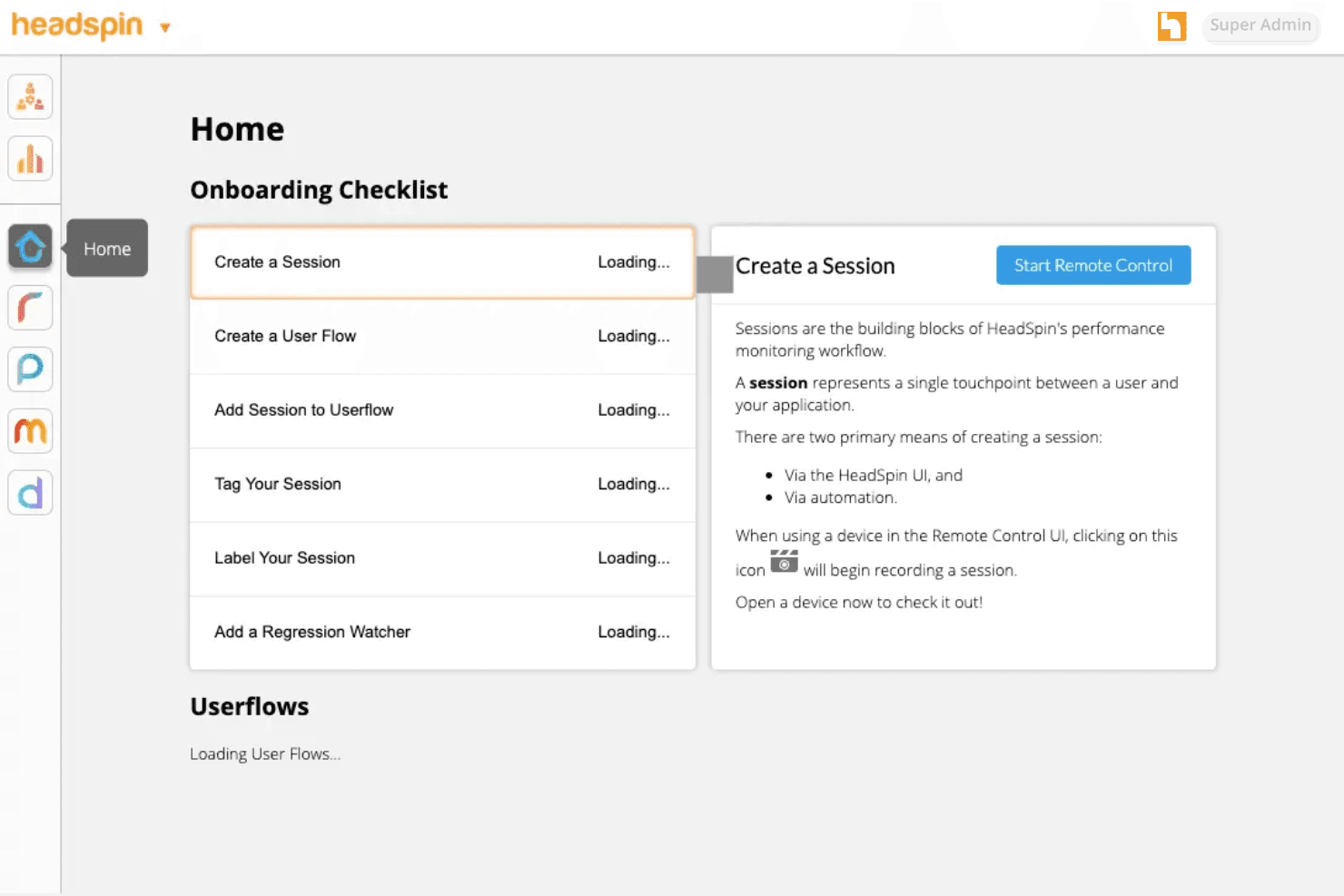
HeadSpin’s dashboard provides unmatched device and test visibility, but its complex feature set can overwhelm new users. In my experience, navigating advanced performance analytics and filtering logs takes extra effort.
Power users appreciate the depth for debugging, while teams without dedicated QA engineers may need more ramp-up time before it feels intuitive.
Integrations
HeadSpin integrates with Appium, Selenium, Jenkins, Jira, GitHub, GitLab, Azure, Slack, CircleCI, and Tricentis Tosca, among others.
HeadSpin also offers a comprehensive API and supports custom integrations for advanced workflows.

HeadSpin Specs
- A/B Testing: Yes
- API: Yes
- Automated Testing: Yes
- Browser Compatibility Testing: Yes
- Bug Tracking: No
- Calendar Management: No
- CI/CD Integration: Yes
- Dashboard: Yes
- Data Export: Yes
- Data Import: Yes
- Data Visualization: Yes
- Developer Tools: Yes
- External Integrations: Yes
- History/Version Control: No
- Manual Testing: Yes
- Multi-User: Yes
- Notifications: Yes
- Performance Testing: Yes
- Regression Testing: Yes
- Scheduling: No
- Status Notifications: No
- Third-Party Plugins/Add-Ons: Yes


