

Recensione di Fivetran: Vantaggi, Svantaggi, Funzionalità e Prezzi
Fivetran si distingue tra le soluzioni ETL per la sua facilità d'uso e la capacità di integrarsi senza problemi nell'infrastruttura dati esistente.

Recensiamo gli strumenti in modo indipendente e le commissioni ci aiutano a finanziare i nostri test. Consulta la nostra politica sulla trasparenza, la nostra metodologia, oppure suggerisci uno strumento.
Fivetran is an ETL tool built around fully managed, automated data pipelines that connect hundreds of SaaS apps, databases, and cloud sources to your data warehouse. It's a strong fit if your team needs to move data reliably without owning or maintaining pipeline infrastructure. If you've outgrown Stitch and need broader connector coverage with more dependable schema change handling, Fivetran is the more capable option.
Fivetran Evaluation Summary

0/5
- Pricing upon request
- 14-day free trial + free demo + free plan available
Perché fidarsi dei nostri consigli sui software
6,700+
Reviews
20
Industry experts
16+
Evaluation factors
14
Years
Il nostro team testa e recensisce software dal 2012. In quanto leader tecnologici noi stessi, sappiamo quanto sia difficile — e importante — scegliere il software giusto.
Per questa guida, abbiamo valutato gli strumenti attraverso test praticie ricerche indipendenti, assegnando un punteggio agli strumenti in base ai nostri criteri di selezione.
Le nostre recensioni riflettono il nostro giudizio editoriale umano, non un discorso di vendita.
Revisori esperti:
- Paulo Gardini MiguelDirettore tecnico
 Tim FisherVP dell'IA
 Gabriel RosasTech Lead e architetto software
 Christhian GruhnTech Lead e architetto della piattaforma

Fivetran Overview
In my opinion, Fivetran stands out for its automated data integration and wide range of connectors, making it a strong choice for data-centric teams. It's particularly effective for organizations that need quick, reliable data syncing without heavy manual intervention, though its pricing can be high. Compared to other ETL tools, Fivetran excels in ease of use and setup speed, but it may offer limited customization options. Your team will find it beneficial if you prioritize automated data workflows and have the budget for its premium features.
Pros
- Automated data syncing saves your team time and effort.
- Extensive connectors support various data sources for your work.
- Simple setup and management make it easy for your team to use.
Cons
- Its limited customization options might not suit your needs.
- Some users find the support response time slower than expected.
- It requires stable internet connectivity for optimal performance.
Is Fivetran Right For Your Needs?
Who Would be a Good Fit for Fivetran?
Fivetran is ideal for data-driven teams in tech and finance needing quick, automated data integration. It suits businesses with diverse data sources, as its extensive connectors simplify syncing. Analytics departments benefit from its ease of use, cutting manual effort and letting you focus on insights. Data engineers will appreciate its minimal setup and maintenance, allowing them to manage data pipelines efficiently.
- Tech StartupsFivetran's automated processes help your team manage data without needing a large IT department.
- Finance CompaniesThe tool's reliable data syncing supports your need for accurate, real-time financial data analysis.
- Data AnalystsFivetran simplifies data integration, letting you focus on deriving insights.
- Marketing TeamsIts wide range of connectors allows you to easily gather data from various marketing platforms.
- Large EnterprisesFivetran handles complex data environments, making it great for large-scale data operations.
- E-CommerceWith Fivetran, your team can efficiently sync sales and customer data for better business insights.
Who Would be a Bad Fit for Fivetran?
Fivetran may not suit small businesses or startups with tight budgets due to its pricing. If your team needs highly customized data transformations, Fivetran's limited customization options could be restrictive. Companies with unstable internet or those requiring on-premise solutions will face challenges since Fivetran relies on cloud connectivity. Additionally, if fast customer support is critical for your operations, the slower response times might not meet your needs.
- Small StartupsFivetran's pricing can be steep if you have a tight budget.
- Custom SolutionsIf your work demands extensive customization, Fivetran's options may seem limited.
- On-Premise NeedsFivetran relies on cloud infrastructure, making it unsuitable if your company needs on-premise solutions.
- Unstable InternetYour team will struggle if internet connectivity isn't reliable, as Fivetran requires stable access.
- Niche IndustriesHighly specialized industries needing unique data integrations might find Fivetran's offerings too generic.
- Fast Support NeedsIf quick customer support is crucial, Fivetran's slower response times could hinder your operations.
La Nostra Metodologia di Recensione
Come Testiamo e Valutiamo gli Strumenti
Abbiamo trascorso anni a costruire, perfezionare e migliorare il nostro sistema di testing e valutazione del software. Il nostro schema è progettato per cogliere le sfumature della selezione software e cosa rende efficace uno strumento, focalizzandosi sugli aspetti critici del processo decisionale.
Di seguito, puoi vedere esattamente come funziona il nostro testing e punteggio su sette criteri. Ci permette di offrire una valutazione imparziale del software basata su funzionalità principali, caratteristiche distintive, facilità d’uso, onboarding, assistenza clienti, integrazioni, recensioni dei clienti e rapporto qualità-prezzo.
Funzionalità Principali (25% del punteggio finale)
Il punto di partenza della nostra valutazione è sempre la funzionalità principale dello strumento. Ha le funzioni e caratteristiche base che ci si aspetta? Alcune di queste caratteristiche sono limitate ai piani tariffari superiori? Fondamentalmente, ci aspettiamo che uno strumento regga il confronto rispetto alle capacità di base dei concorrenti.
Caratteristiche Distintive (25% del punteggio finale)
Successivamente, valutiamo le caratteristiche distintive e non comuni che vanno oltre la funzionalità base tipicamente trovata negli strumenti di questa categoria. Un punteggio alto riflette funzionalità specializzate o uniche che rendono il prodotto più veloce, efficiente o offrono ulteriore valore all’utente.
Valutiamo inoltre quanto sia semplice integrare altri strumenti tipicamente utilizzati nell’infrastruttura tecnologica per espandere la funzionalità e l’utilità del software. Gli strumenti che offrono numerose integrazioni native, connessioni di terze parti e accesso API per creare integrazioni personalizzate ottengono i punteggi migliori.
Facilità d’Uso (10% del punteggio finale)
Consideriamo quanto sia rapido e semplice svolgere i compiti definiti nella funzionalità principale utilizzando lo strumento. Il software con punteggio alto è ben progettato, intuitivo da usare, offre app mobili, fornisce modelli e rende semplici attività relativamente complesse.
Onboarding (10% del punteggio finale)
Sappiamo quanto sia importante l’adozione rapida da parte del team per una nuova piattaforma, quindi valutiamo quanto sia facile imparare e utilizzare uno strumento con formazione minima. Valutiamo quanto velocemente un membro del team possa iniziare a usare lo strumento anche senza esperienza. Soluzioni con punteggio alto indicano che sono richiesti pochi o nessun supporto.
Assistenza Clienti (10% del punteggio finale)
Esaminiamo quanto sia veloce e facile ricevere assistenza e risolvere problemi tramite telefono, live chat o knowledge base. Gli strumenti e le aziende che garantiscono supporto in tempo reale ottengono il miglior punteggio, mentre i chatbot ottengono il peggiore.
Recensioni dei Clienti (10% del punteggio finale)
Oltre ai nostri test e valutazioni, prendiamo in considerazione il net promoter score dei clienti attuali e passati. Valutiamo la probabilità che, data la scelta, selezionerebbero nuovamente lo strumento per la funzionalità principale. Un software con punteggio alto riflette un alto net promoter score da parte dei clienti attuali o passati.
Rapporto Qualità-Prezzo (10% del punteggio finale)
Infine, considerando tutti gli altri criteri, analizziamo il prezzo medio dei piani base rispetto alle funzionalità principali e consideriamo il valore degli altri criteri di valutazione. Il software che offre di più a meno otterrà un punteggio più alto.
Core Features
Automated Data Syncing
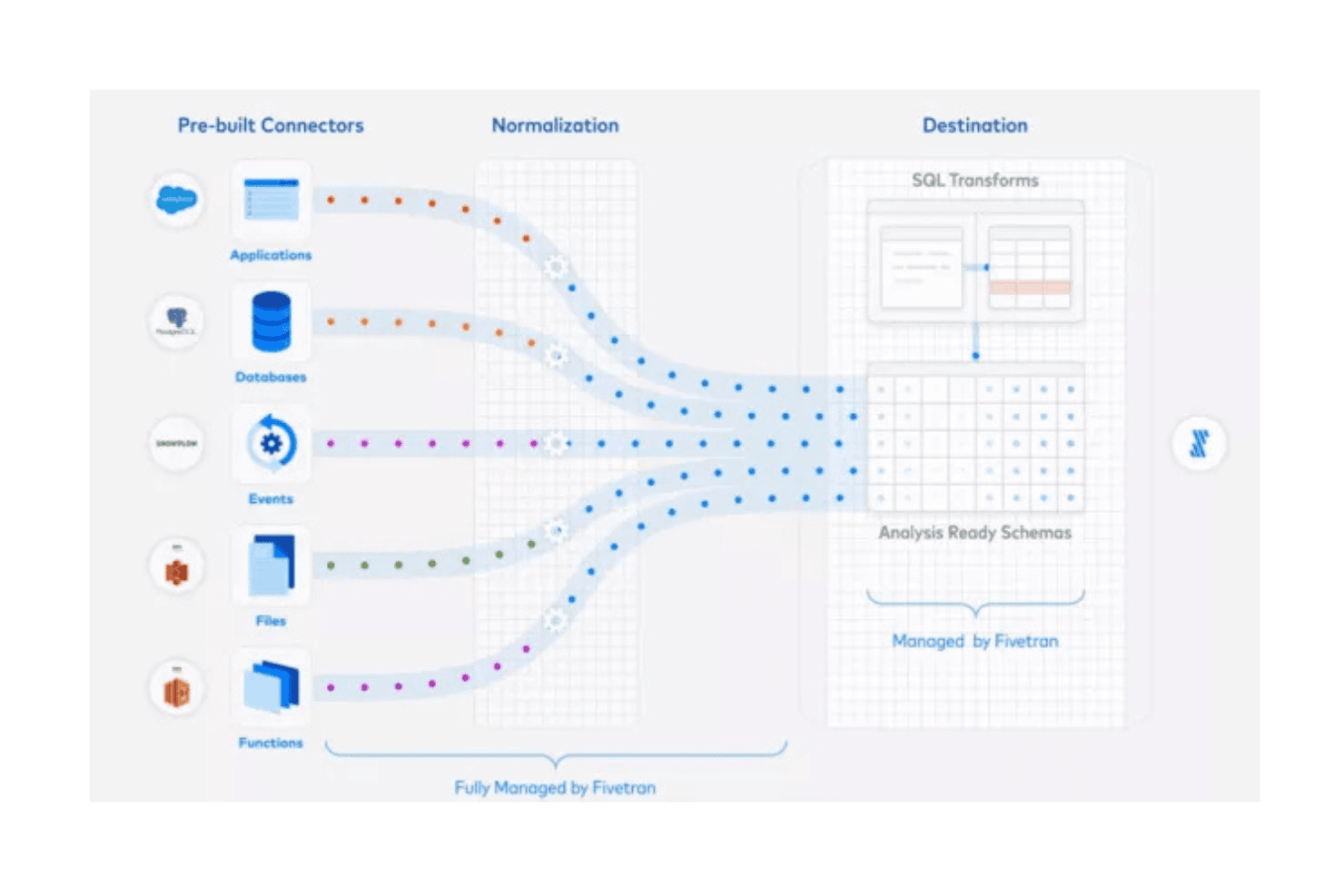
Fivetran automatically replicates data from various sources to your warehouse, reducing manual work for your team. This ensures your data is always up to date without constant monitoring.
Schema Management
You can use Fivetran for schema change automation, so your team doesn't have to worry about breaking data pipelines. This keeps your data movement smooth and consistent.
Data Transformation
Fivetran supports basic SQL transformations, allowing your team to refine data before analysis and simplifying your data preparation process.
Error Notifications
You'll get alerts if something goes wrong so you can address issues quickly. This minimizes downtime and ensures data accuracy.
Security Compliance
Fivetran adheres to industry security standards, keeping your data stacks safe and compliant. This gives your team peace of mind when handling sensitive information.
Ease of Use
Fivetran stands out for its user-friendly interface, making it easy for your team to manage your data models without extensive training. The intuitive dashboard simplifies monitoring and managing data sources, and automated processes reduce manual tasks. As a no-code ETL tool, users appreciate how quickly it can be set up. The ease of handling schema changes and receiving error notifications further enhances usability.
Integrations
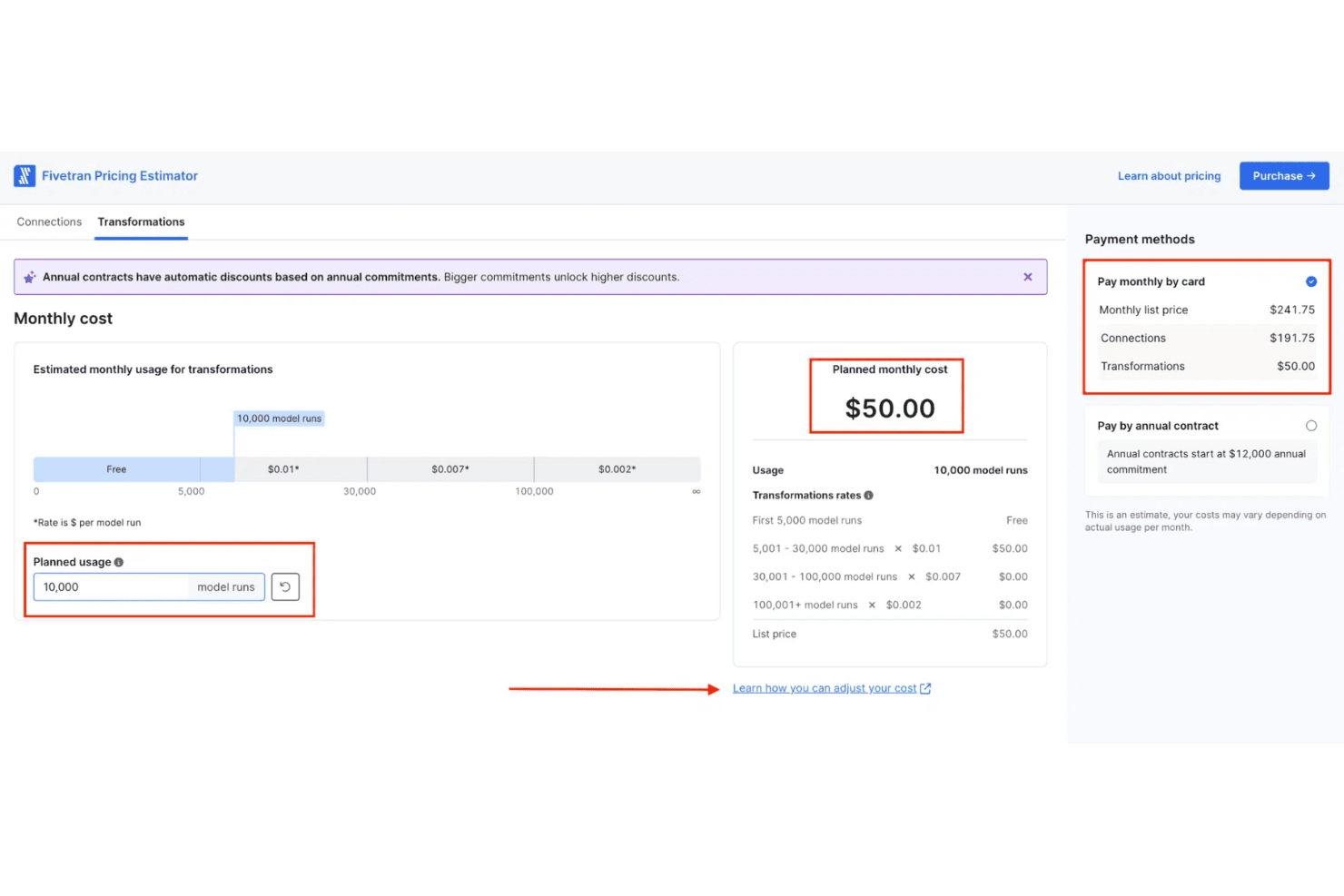
Fivetran integrates with dbt Core, RedShift, AWS, Salesforce, NetSuite, Google Ads, Snowflake, Shopify, HubSpot, Microsoft Dynamics 365 Finance, SAP ERP, Oracle Fusion, and Stripe. Fivetran also offers an API and supports building custom connectors through its Connector SDK, allowing for third-party integration.

Fivetran Specs
- 2-Factor Authentication: Yes
- Accounts Payable: Yes
- Accounts Receivable: Yes
- API: Yes
- Approval Workflows: Yes
- Balance Sheet: Yes
- Billing/Invoicing: Yes
- Budgeting: Yes
- Calendar Management: Yes
- Comparative Reporting: Yes
- CRM Integration: Yes
- Custom Reports: Yes
- Customer Management: Yes
- Dashboard: Yes
- Data Export: Yes
- Data Import: Yes
- Data Visualization: Yes
- Expense Tracking: Yes
- External Integrations: Yes
- Forecasting: Yes
- General Account Ledger: No
- Historical Data Analysis: Yes
- Inventory Tracking: No
- Multi-Currency: No
- Multi-User: Yes
- Notifications: Yes
- P&L: No
- Payroll: No
- Scenario Planning: No
- Scheduling: Yes
- Supplier Management: No
- Tax Management: Yes
- Time Management: Yes


