

Recensione di EZO AssetSonar 2026: Pro, Contro, Funzionalità e Prezzi

Recensiamo gli strumenti in modo indipendente e le commissioni ci aiutano a finanziare i nostri test. Consulta la nostra politica sulla trasparenza, la nostra metodologia, oppure suggerisci uno strumento.
If you’re managing hundreds or thousands of IT assets across multiple locations, you know the pain of spreadsheet chaos, ghost licenses, and that sinking feeling during audit season. EZO AssetSonar is an intuitive IT asset management software that offers visibility without the complexity that typically comes with enterprise ITAM platforms.
I’ve analyzed AssetSonar’s feature set, pricing structure, and real user feedback to give you an unbiased assessment of whether this tool deserves a spot in your IT stack. You’ll get the specifics on what works well, like automated discovery and software license optimization, and where it might leave you wanting more.
Ezo AssetSonar Evaluation Summary
4.6/5
- From $29.99/user/month
- 7-day free trial
Perché fidarsi dei nostri consigli sui software
6,700+
Reviews
20
Industry experts
16+
Evaluation factors
14
Years
Il nostro team testa e recensisce software dal 2012. In quanto leader tecnologici noi stessi, sappiamo quanto sia difficile — e importante — scegliere il software giusto.
Per questa guida, abbiamo valutato gli strumenti attraverso test praticie ricerche indipendenti, assegnando un punteggio agli strumenti in base ai nostri criteri di selezione.
Le nostre recensioni riflettono il nostro giudizio editoriale umano, non un discorso di vendita.
Revisori esperti:
- Paulo Gardini MiguelDirettore tecnico
 Tim FisherVP dell'IA
 Gabriel RosasTech Lead e architetto software
 Christhian GruhnTech Lead e architetto della piattaforma

Ezo AssetSonar Overview
Pros
- Mobile app enables IT administrators to track, provision, and maintain assets remotely with full ecosystem visibility from any location.
- Software license optimization tools help identify unused licenses and prevent overspending through detailed usage tracking and renewal management.
- Automated network discovery and ITAM agent deployment provide comprehensive visibility across all hardware assets without manual data entry.
Cons
- While it is easy to use, there is an initial learning curve for configuration and setup.
- Smaller integration ecosystem than competitors, potentially requiring workarounds for specific workflow automations.
- Limited advanced reporting customization compared to enterprise ITAM platforms, which may restrict complex analytics needs for larger organizations.
Is Ezo AssetSonar Right For Your Needs?
Who Would be a Good Fit for Ezo AssetSonar?
AssetSonar is appropriate for medium-sized firms with 100 to 1,000 people who want to view all of their IT assets without having to deal with the expense or complexity of an enterprise-level solution. Its automated discovery and SaaS management tools are highly helpful for businesses that have too many software licenses, can’t keep up with regulations, or have shadow IT.
- Remote-First WorkplacesCloud-based asset monitoring with MDM connectors that maintain track of assets no matter where they are on a device is useful for trams that are spread out globally.
- SaaS-Heavy CompaniesCompanies using a lot of software can save money by detecting licenses that aren’t being utilized and making renewals easier with consolidated license data.
- Educational InstitutionsMobile provisioning and checkout management can help schools and colleges with a number of devices in different areas save time and money.
- Healthcare OrganizationsReal-time vulnerability monitoring and detailed asset custody records can help medical institutions that need to maintain a close track of compliance and be ready for audits.
- Growing IT TeamsAutomated asset monitoring that keeps up with expansion without adding a lot of extra work for administrators can help companies that are swiftly expanding their IT infrastructure.
Who Would be a Bad Fit for Ezo AssetSonar?
If you work for a big company that needs a lot of customization, advanced analytics, or third-party integrations that AssetSonar doesn’t already have, it might not be the best choice. Businesses that already use full-featured ITSM platforms or that need very specific compliance features for their industry might not find AssetSonar to have enough features. Companies with small IT departments, fewer than 50 employees, who only need to keep track of a few things, may also find the platform too hard to use.
- Minimal IT InfrastructureIf your small business only has a few devices and simple software stacks, you probably don’t need all of AssetSonar’s features and would be better off with tools that are less expensive and easier to use.
- Highly Regulated IndustriesBusinesses that need more than just basic vulnerability tracking to stay compliant may need ITAM solutions that are specific to their field and come with certified modules.
- Advanced Analytics TeamsFor IT departments that need detailed custom analytics and complex data modeling, the pre-built reporting structure may not be as flexible as other enterprise options.
- Legacy System EnvironmentsAssetSonar is mostly a cloud-based service, so you can’t use it on-site as much, making it hard for businesses that depend on a lot of on-premise infrastructure and don’t use the cloud.
- Large, Complex CompaniesBusinesses that have more than 5,000 assets in use around the world may not find AssetSonar’s reporting tool sufficient if they need more powerful platforms.
La Nostra Metodologia di Recensione
Come Testiamo e Valutiamo gli Strumenti
Abbiamo trascorso anni a costruire, perfezionare e migliorare il nostro sistema di testing e valutazione del software. Il nostro schema è progettato per cogliere le sfumature della selezione software e cosa rende efficace uno strumento, focalizzandosi sugli aspetti critici del processo decisionale.
Di seguito, puoi vedere esattamente come funziona il nostro testing e punteggio su sette criteri. Ci permette di offrire una valutazione imparziale del software basata su funzionalità principali, caratteristiche distintive, facilità d’uso, onboarding, assistenza clienti, integrazioni, recensioni dei clienti e rapporto qualità-prezzo.
Funzionalità Principali (25% del punteggio finale)
Il punto di partenza della nostra valutazione è sempre la funzionalità principale dello strumento. Ha le funzioni e caratteristiche base che ci si aspetta? Alcune di queste caratteristiche sono limitate ai piani tariffari superiori? Fondamentalmente, ci aspettiamo che uno strumento regga il confronto rispetto alle capacità di base dei concorrenti.
Caratteristiche Distintive (25% del punteggio finale)
Successivamente, valutiamo le caratteristiche distintive e non comuni che vanno oltre la funzionalità base tipicamente trovata negli strumenti di questa categoria. Un punteggio alto riflette funzionalità specializzate o uniche che rendono il prodotto più veloce, efficiente o offrono ulteriore valore all’utente.
Valutiamo inoltre quanto sia semplice integrare altri strumenti tipicamente utilizzati nell’infrastruttura tecnologica per espandere la funzionalità e l’utilità del software. Gli strumenti che offrono numerose integrazioni native, connessioni di terze parti e accesso API per creare integrazioni personalizzate ottengono i punteggi migliori.
Facilità d’Uso (10% del punteggio finale)
Consideriamo quanto sia rapido e semplice svolgere i compiti definiti nella funzionalità principale utilizzando lo strumento. Il software con punteggio alto è ben progettato, intuitivo da usare, offre app mobili, fornisce modelli e rende semplici attività relativamente complesse.
Onboarding (10% del punteggio finale)
Sappiamo quanto sia importante l’adozione rapida da parte del team per una nuova piattaforma, quindi valutiamo quanto sia facile imparare e utilizzare uno strumento con formazione minima. Valutiamo quanto velocemente un membro del team possa iniziare a usare lo strumento anche senza esperienza. Soluzioni con punteggio alto indicano che sono richiesti pochi o nessun supporto.
Assistenza Clienti (10% del punteggio finale)
Esaminiamo quanto sia veloce e facile ricevere assistenza e risolvere problemi tramite telefono, live chat o knowledge base. Gli strumenti e le aziende che garantiscono supporto in tempo reale ottengono il miglior punteggio, mentre i chatbot ottengono il peggiore.
Recensioni dei Clienti (10% del punteggio finale)
Oltre ai nostri test e valutazioni, prendiamo in considerazione il net promoter score dei clienti attuali e passati. Valutiamo la probabilità che, data la scelta, selezionerebbero nuovamente lo strumento per la funzionalità principale. Un software con punteggio alto riflette un alto net promoter score da parte dei clienti attuali o passati.
Rapporto Qualità-Prezzo (10% del punteggio finale)
Infine, considerando tutti gli altri criteri, analizziamo il prezzo medio dei piani base rispetto alle funzionalità principali e consideriamo il valore degli altri criteri di valutazione. Il software che offre di più a meno otterrà un punteggio più alto.
Core Features
Automated Network Discovery
AssetSonar’s network discovery engine automatically finds and lists all the hardware assets that are connected to your network. Your configuration management database stays up to date without IT’s help because the system is always looking for new devices and updating asset records in real time.
Software License Management
The platform keeps track of all the software licenses in your company, including installations, versions, and how they are used. You can find licenses that aren’t being used enough, plan renewals in advance, and save money by canceling or moving software subscriptions that you don’t use.
IT Asset Lifecycle Management
AssetSonar keeps track of assets from the time you buy them until you throw them away, so you can see every step of the hardware lifecycle. The system keeps track of warranty information, maintenance schedules, and how much things lose value over time, making it easier to plan purchases based on how well the assets work and how they are used.
ITAM Agent and MDM Integrations
A lightweight discovery agent runs on both Windows and Mac computers and automatically collects a lot of information about the hardware and software on those computers. With native MDM integrations, you can keep an eye on all of your mobile devices, which gives you full visibility across all of your endpoints.
Configuration Management Database (CMDB)
The built-in CMDB shows how configuration items are connected, which speeds up the process of fixing problems. IT teams can see how changes or outages will affect services by knowing which hardware or software components they depend on.
Vulnerability and Patch Management
Real-time monitoring looks for security holes in both hardware and software and sends automated alerts for serious risks. The platform keeps track of the status of patches and lets you block bad software while keeping browser security data to stop costly security breaches.
Standout Features
Mobile Asset Management App
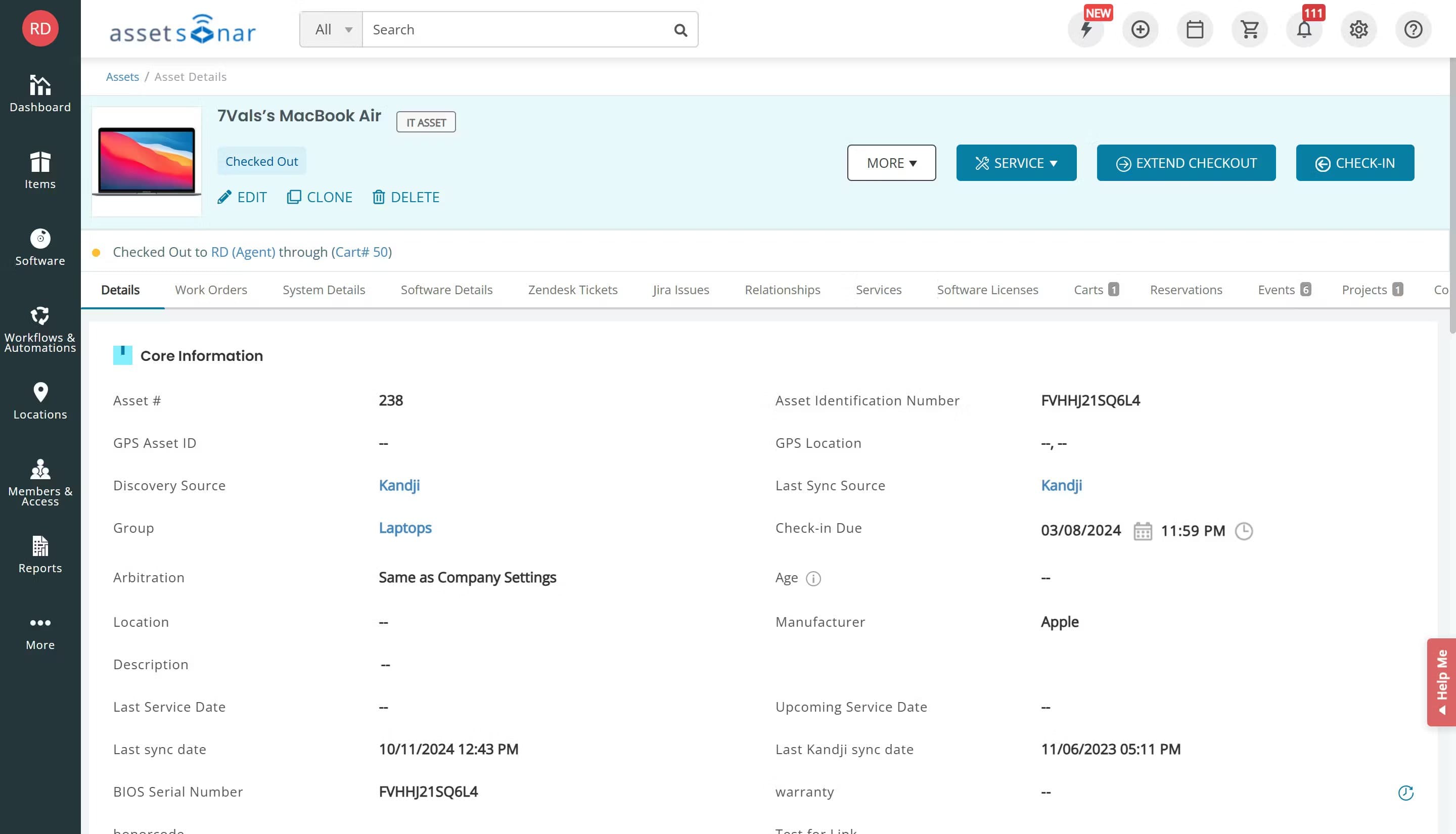
IT admins can manage the whole asset ecosystem from anywhere, whether they’re at work or on the road, thanks to AssetSonar’s specialized mobile app. System administrators may use their phones to find out where assets are, update maintenance records, set up new equipment, and run audits. This is a feature that isn’t often found in ITAM platforms that cost as much as AssetSonar.
Automated Onboarding and Offboarding Workflows
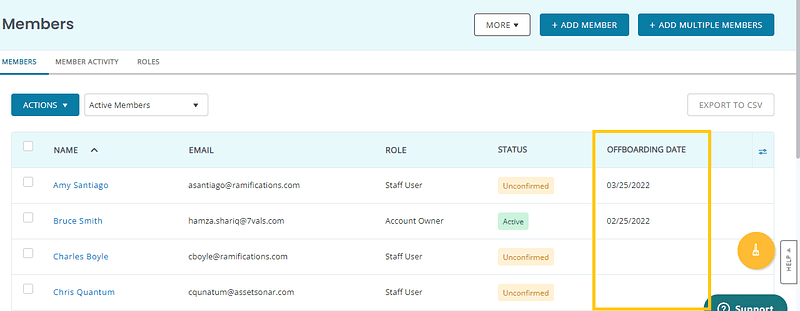
The platform lets you customize process automation to handle the whole employee lifecycle, making it easy to give and receive IT assets. You can build automatic onboarding procedures that offer new employees laptops, software licenses, and login information. When an employee leaves, offboarding routines immediately take back their assets and cancel their access.
Ease of Use
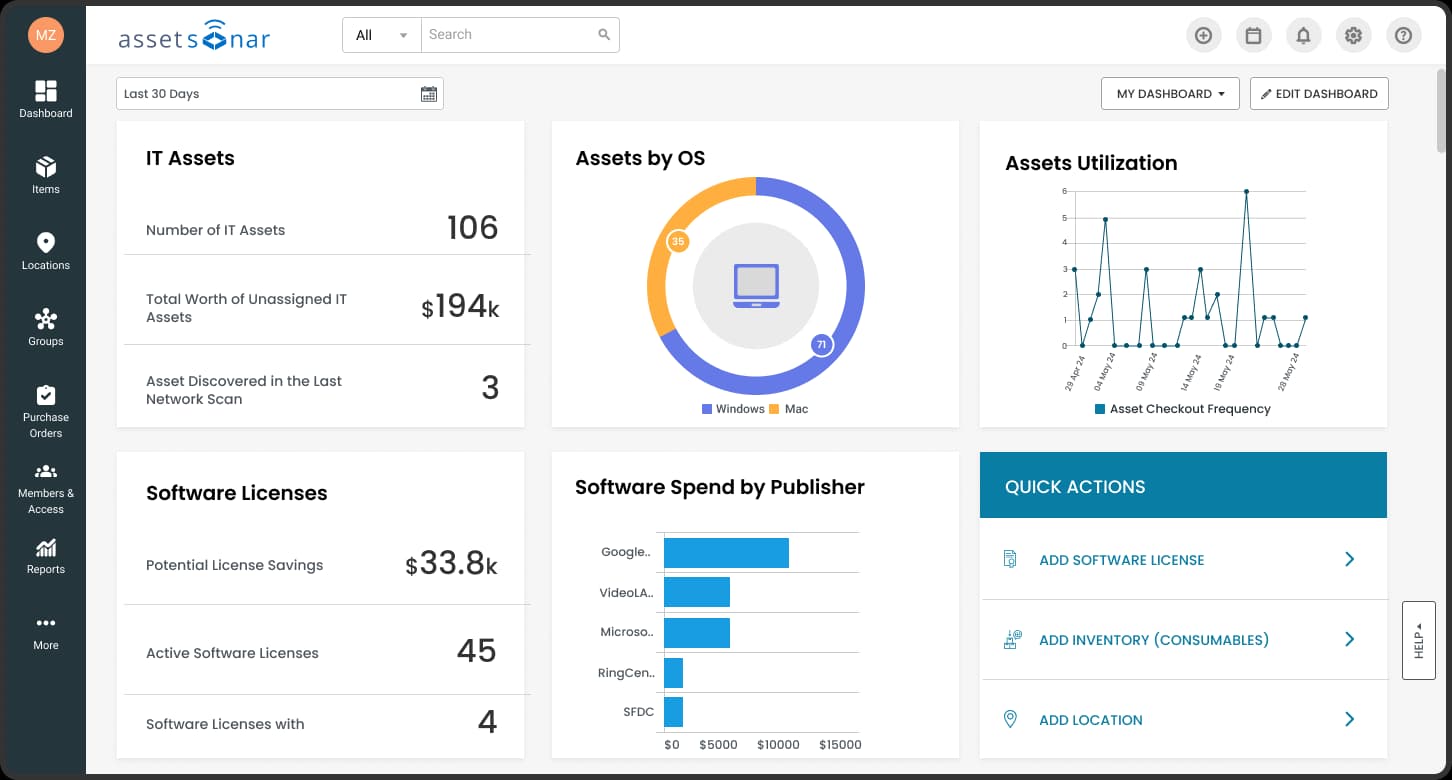
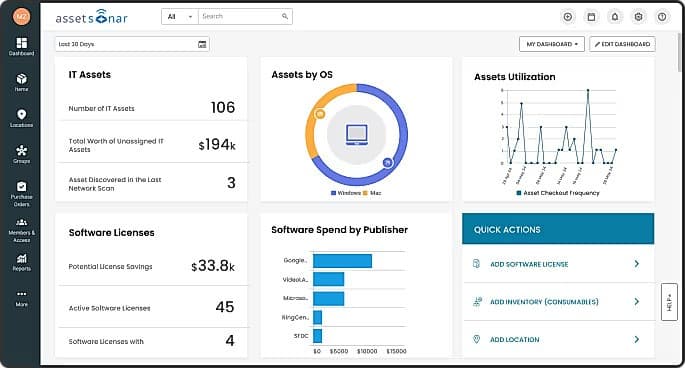
AssetSonar is generally an easy-to-use platform, but the reality of that depends on how complicated the organization is. With visual widgets and pre-made reports, the dashboard gives you a centralized view of your IT ecosystem that makes it easy for most IT teams to keep track of their assets. But the first time you set things up and configure them, it can be hard to learn how to do things, especially when you have to customize workflows, set up integrations, or configure the ITAM agent for different types of devices. Once set up, everyday tasks like checking out assets, running reports, and managing licenses become fairly easy.
Onboarding
AssetSonar helps teams build up their asset collection by providing a structured onboarding process with setup guidance and guided configuration. New users may install the ITAM agent, set up network discovery, and connect ITSM tools with the aid of documentation, video tutorials, and step-by-step instructions. Customer service during onboarding may help with technical setup issues, but the level of hands-on coaching depends on the pricing tier. Automated walkthroughs help with basic navigation, but businesses with complex infrastructure or specific process needs may require extra effort to make the platform work better.
Customer Support
AssetSonar can help customers in many ways, such as email support, a help center with documents, and a knowledge base of the right way to do things and how to solve problems. The platform has videos, setup tips, and an FAQ that answer common questions about how to use its features and set them up. Higher price levels may include paid help choices that respond more quickly and handle accounts directly.
Integrations
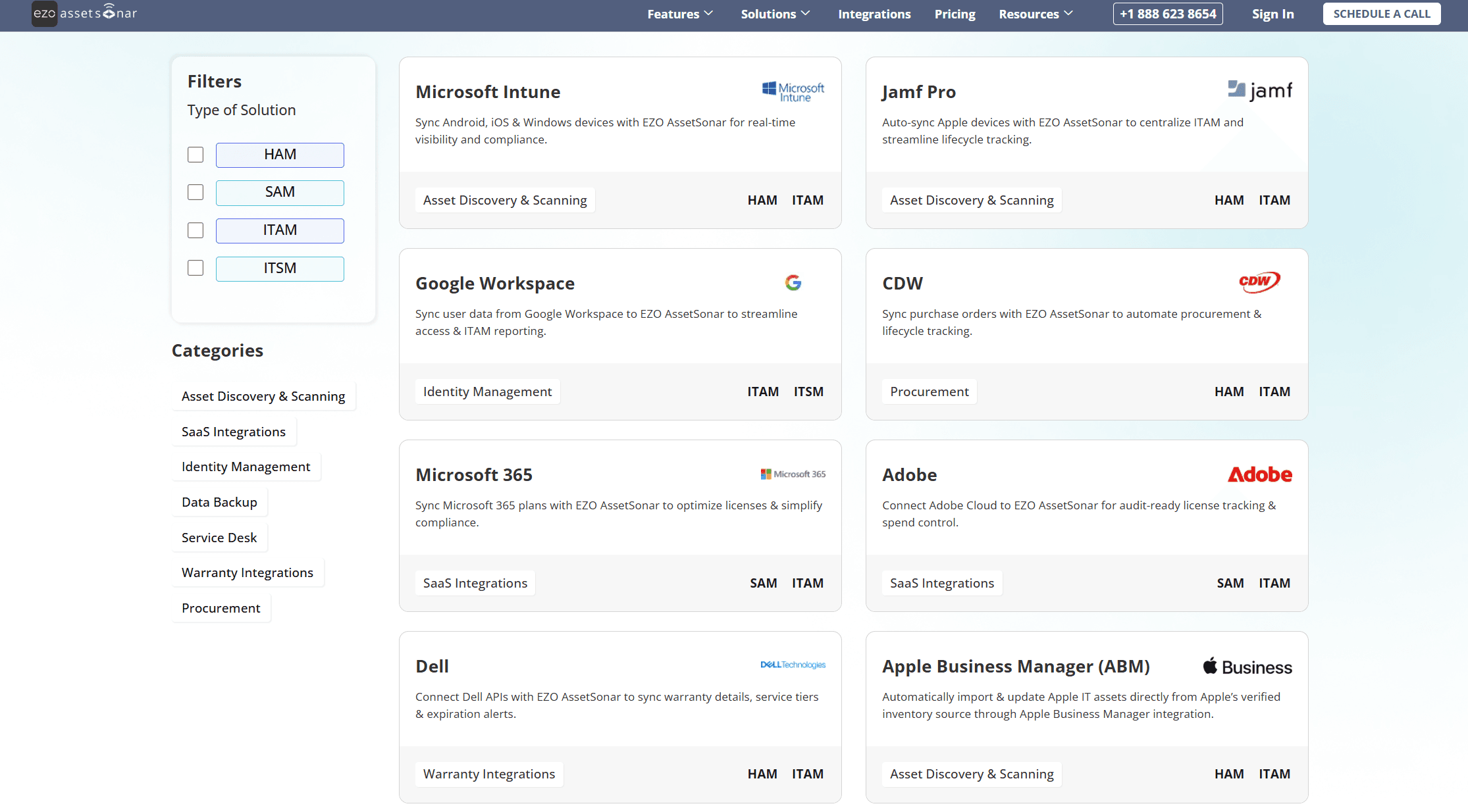
AssetSonar integrates with identity management tools like Okta, Azure AD, G Suite, OneLogin, Centrify, and Ping Identity, as well as native connections to popular ITSM platforms like Zendesk and Jira. It also works with Jamf Pro, Microsoft Intune, Cisco Meraki, Workplace One, JumpCloud, Kandji, and Mosyle Manager to find devices. The platform also works with Microsoft SCCM and Google Endpoint Management to keep track of Windows and Chrome OS devices, respectively, as well as with backup services like Dropbox and OneDrive. AssetSonar’s API lets users add new features and connect the software to private systems or other third-party tools that aren’t covered by native connections.
Value for Money
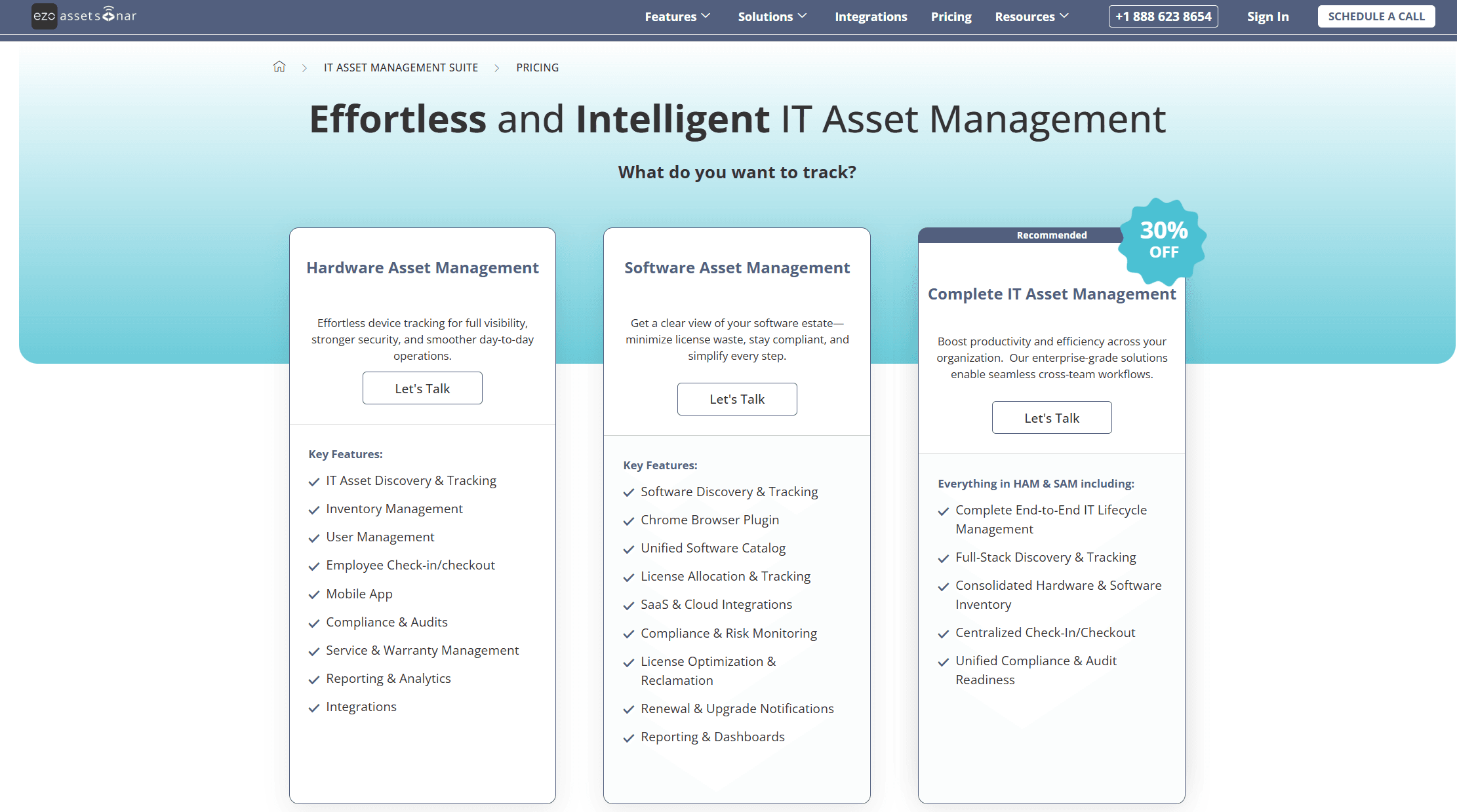
AssetSonar offers competitive pricing positioned between basic asset tracking tools and enterprise-level ITAM platforms, making it accessible for mid-sized organizations that need comprehensive features without enterprise budgets. Its plans are structured around whether you need only Hardware Asset Management (HAM), only Software Asset Management (SAM), or a combined ITAM plan that includes both, so you’re not forced to pay for capabilities you don’t use. The platform provides a free trial to test functionality before committing, but exact pricing isn’t listed publicly—you’ll need to speak with sales to get a quote tailored to your asset volume and feature needs. If you require automated discovery, software license optimization, and mobile management, the value is compelling compared with manual tracking or juggling multiple point solutions.
Ezo AssetSonar Specs
- 2-Factor Authentication: No
- API: Yes
- Asset Tagging: No
- Dashboard: Yes
- Data Export: Yes
- Data Import: Yes
- Data Visualization: Yes
- Database: Yes
- Document Management: No
- External Integrations: Yes
- Hardware Integration: No
- Hardware Modernization: No
- Inventory Tracking: Yes
- Multi-User: Yes
- Network Device Performance Monitoring: No
- Network Traffic Monitoring: No
- Network Visualization: No
- Notifications: Yes
- Scheduling: Yes
- Status Notifications: Yes
- Third-Party Plugins/Add-Ons: Yes
- Workflow Management: Yes
Ezo AssetSonar FAQs
Ezo AssetSonar Company Overview & History
EZO, which used to be called EZOfficeInventory, was first released in 2013 as a cloud-based system for keeping track of assets. Now it is a full-fledged asset intelligence platform that helps businesses all over the world. The company changed its name to EZO in 2025 to reflect its new vision of asset intelligence reimagined. This stop moved the company from traditional inventory management to predictive analytics and AI-driven insights. EZO is based in the US, but it sells to people all over the world and now has a number of product lines, such as AssetSonar for keeping track of IT assets, as well as tools for keeping track of general equipment and running facilities.
Major Milestones
- 2013: EZOfficeInventory was founded as a cloud-based asset tracking solution.
- 2017: Launched AssetSonar as a dedicated IT asset management platform separate from general equipment tracking.
- 2023: Became available on AWS Marketplace, expanding cloud deployment options for enterprise customers.
- 2025: Rebranded from EZOfficeInventory to EZO, reflecting evolution toward asset intelligence and AI-driven capabilities.
- 2025: Introduced enhanced product updates, including advanced network discovery features and expanded MDM integrations.
- 2025: Demonstrated measurable client success with case studies showing 100% IT productivity improvements.