

Recensione di SureMDM 2026: vantaggi, svantaggi, funzionalità e prezzi
I judge SureMDM by how well it can bring order to a mixed-device fleet—not just by its feature list. This review weighs its strengths, trade-offs, and pricing to help you decide if it fits.

Recensiamo gli strumenti in modo indipendente e le commissioni ci aiutano a finanziare i nostri test. Consulta la nostra politica sulla trasparenza, la nostra metodologia, oppure suggerisci uno strumento.
SureMDM is MDM software from 42Gears for managing and securing devices across platforms. I’d consider it when your team needs one console for a mixed fleet, including mobile devices, computers, kiosks, wearables, or IoT endpoints. SureMDM is a stronger fit than Microsoft Intune when your fleet also includes ChromeOS, Wear OS, VR, or IoT devices, which SureMDM lists among its supported platforms.
SureMDM Evaluation Summary
4.8/5
- From $3.99/device/month (billed annually)
- 30-day free trial
Perché fidarsi dei nostri consigli sui software
6,700+
Reviews
20
Industry experts
16+
Evaluation factors
14
Years
Il nostro team testa e recensisce software dal 2012. In quanto leader tecnologici noi stessi, sappiamo quanto sia difficile — e importante — scegliere il software giusto.
Per questa guida, abbiamo valutato gli strumenti attraverso test praticie ricerche indipendenti, assegnando un punteggio agli strumenti in base ai nostri criteri di selezione.
Le nostre recensioni riflettono il nostro giudizio editoriale umano, non un discorso di vendita.
Revisori esperti:
- Paulo Gardini MiguelDirettore tecnico
 Tim FisherVP dell'IA
 Gabriel RosasTech Lead e architetto software
 Christhian GruhnTech Lead e architetto della piattaforma

SureMDM Overview
I’d choose SureMDM for a mixed fleet spanning phones, computers, kiosks, wearables, VR, and IoT devices. Zero-touch, Apple Business Manager, and QR enrollment support staged rollouts, while remote control, kiosk policies, app deployment, and remote wipe cover daily administration. Advanced reporting, identity management, certificate management, and SIEM integrations are available in higher tiers. The central console brings inventory and device controls together, though its broad feature set requires planning. 42Gears also offers 24/7 support. I’d select it for managing varied endpoints, with the right plan depending on the features and integrations required.
Pros
- Wide support spans mobile, desktop, ChromeOS, wearables, VR, and IoT.
- Users praise remote control, app deployment, and kiosk mode.
- Reviewers frequently commend responsive technical support.
Cons
- Reporting offers limited customization for operational views.
- Profile and policy changes become difficult to manage at scale.
- One administrator reported an outage leaving iOS devices unmanaged.
Is SureMDM Right For Your Needs?
Who Would be a Good Fit for SureMDM?
SureMDM suits teams managing varied devices or distributed endpoints that need enrollment, app deployment, and remote actions from one console. Its enrollment options, integrations, and REST API also fit IT teams connecting device management with existing systems.
- Mixed FleetsOrganizations managing varied device types can use SureMDM’s broad platform coverage and centralized enrollment, app deployment, lock, and wipe features.
- Zebra OperationsTeams managing Zebra devices can pair SureMDM with its Zebra LifeGuard integration for device-related workflows.
- Distributed TeamsIT departments supporting remote or dispersed workers can manage devices remotely and handle routine tasks from one console.
- New Device RolloutsDeployment teams can use zero-touch, QR-code, and Apple Business Manager enrollment to prepare devices for users.
- IT Support TeamsSupport staff can remotely lock or wipe devices and deploy apps without handling each endpoint in person.
- Connected IT OperationsIT teams using Microsoft 365, ServiceNow, Active Directory, or other listed integrations can connect SureMDM with existing systems, and use its REST API for external workflows.
Who Would be a Bad Fit for SureMDM?
SureMDM may be less suitable when device management needs are narrow or your team can’t spend time on configuration. Its advanced settings have a learning curve, and profile or policy changes can become harder to manage as deployments grow. Check connector availability before choosing it for a workflow that depends on a specific external application.
- Small Single-Platform FleetsTeams managing a small, uniform fleet may not need SureMDM’s broad platform coverage, which can add complexity beyond their routine requirements.
- No Admin CapacityOrganizations without an owner for setup and ongoing configuration may struggle with SureMDM’s learning curve around advanced settings.
- Frequent Policy ChangesTeams that regularly revise profiles and policies may find those changes harder to manage as their deployment grows.
- Complex RolloutsOrganizations planning large, mixed-fleet deployments should expect more configuration work than a small rollout, given SureMDM’s broad coverage and advanced settings.
- Unlisted IntegrationsTeams requiring a turnkey connector to an unlisted system should verify its availability first, since connecting external applications through the REST API may require additional work.
- Basic Device NeedsBusinesses that only need a narrow set of device-management tasks may find SureMDM’s broad platform coverage and configuration options more than they need.
La Nostra Metodologia di Recensione
Come Testiamo e Valutiamo gli Strumenti
Abbiamo trascorso anni a costruire, perfezionare e migliorare il nostro sistema di testing e valutazione del software. Il nostro schema è progettato per cogliere le sfumature della selezione software e cosa rende efficace uno strumento, focalizzandosi sugli aspetti critici del processo decisionale.
Di seguito, puoi vedere esattamente come funziona il nostro testing e punteggio su sette criteri. Ci permette di offrire una valutazione imparziale del software basata su funzionalità principali, caratteristiche distintive, facilità d’uso, onboarding, assistenza clienti, integrazioni, recensioni dei clienti e rapporto qualità-prezzo.
Funzionalità Principali (25% del punteggio finale)
Il punto di partenza della nostra valutazione è sempre la funzionalità principale dello strumento. Ha le funzioni e caratteristiche base che ci si aspetta? Alcune di queste caratteristiche sono limitate ai piani tariffari superiori? Fondamentalmente, ci aspettiamo che uno strumento regga il confronto rispetto alle capacità di base dei concorrenti.
Caratteristiche Distintive (25% del punteggio finale)
Successivamente, valutiamo le caratteristiche distintive e non comuni che vanno oltre la funzionalità base tipicamente trovata negli strumenti di questa categoria. Un punteggio alto riflette funzionalità specializzate o uniche che rendono il prodotto più veloce, efficiente o offrono ulteriore valore all’utente.
Valutiamo inoltre quanto sia semplice integrare altri strumenti tipicamente utilizzati nell’infrastruttura tecnologica per espandere la funzionalità e l’utilità del software. Gli strumenti che offrono numerose integrazioni native, connessioni di terze parti e accesso API per creare integrazioni personalizzate ottengono i punteggi migliori.
Facilità d’Uso (10% del punteggio finale)
Consideriamo quanto sia rapido e semplice svolgere i compiti definiti nella funzionalità principale utilizzando lo strumento. Il software con punteggio alto è ben progettato, intuitivo da usare, offre app mobili, fornisce modelli e rende semplici attività relativamente complesse.
Onboarding (10% del punteggio finale)
Sappiamo quanto sia importante l’adozione rapida da parte del team per una nuova piattaforma, quindi valutiamo quanto sia facile imparare e utilizzare uno strumento con formazione minima. Valutiamo quanto velocemente un membro del team possa iniziare a usare lo strumento anche senza esperienza. Soluzioni con punteggio alto indicano che sono richiesti pochi o nessun supporto.
Assistenza Clienti (10% del punteggio finale)
Esaminiamo quanto sia veloce e facile ricevere assistenza e risolvere problemi tramite telefono, live chat o knowledge base. Gli strumenti e le aziende che garantiscono supporto in tempo reale ottengono il miglior punteggio, mentre i chatbot ottengono il peggiore.
Recensioni dei Clienti (10% del punteggio finale)
Oltre ai nostri test e valutazioni, prendiamo in considerazione il net promoter score dei clienti attuali e passati. Valutiamo la probabilità che, data la scelta, selezionerebbero nuovamente lo strumento per la funzionalità principale. Un software con punteggio alto riflette un alto net promoter score da parte dei clienti attuali o passati.
Rapporto Qualità-Prezzo (10% del punteggio finale)
Infine, considerando tutti gli altri criteri, analizziamo il prezzo medio dei piani base rispetto alle funzionalità principali e consideriamo il valore degli altri criteri di valutazione. Il software che offre di più a meno otterrà un punteggio più alto.
Core Features
Device Enrollment
SureMDM enrolls devices through zero-touch, QR-code, Apple Business Manager, and manual methods. These options let your team prepare a batch of devices before rollout or enroll a BYOD device with Apple User Enrollment.
Configuration And Security Policies
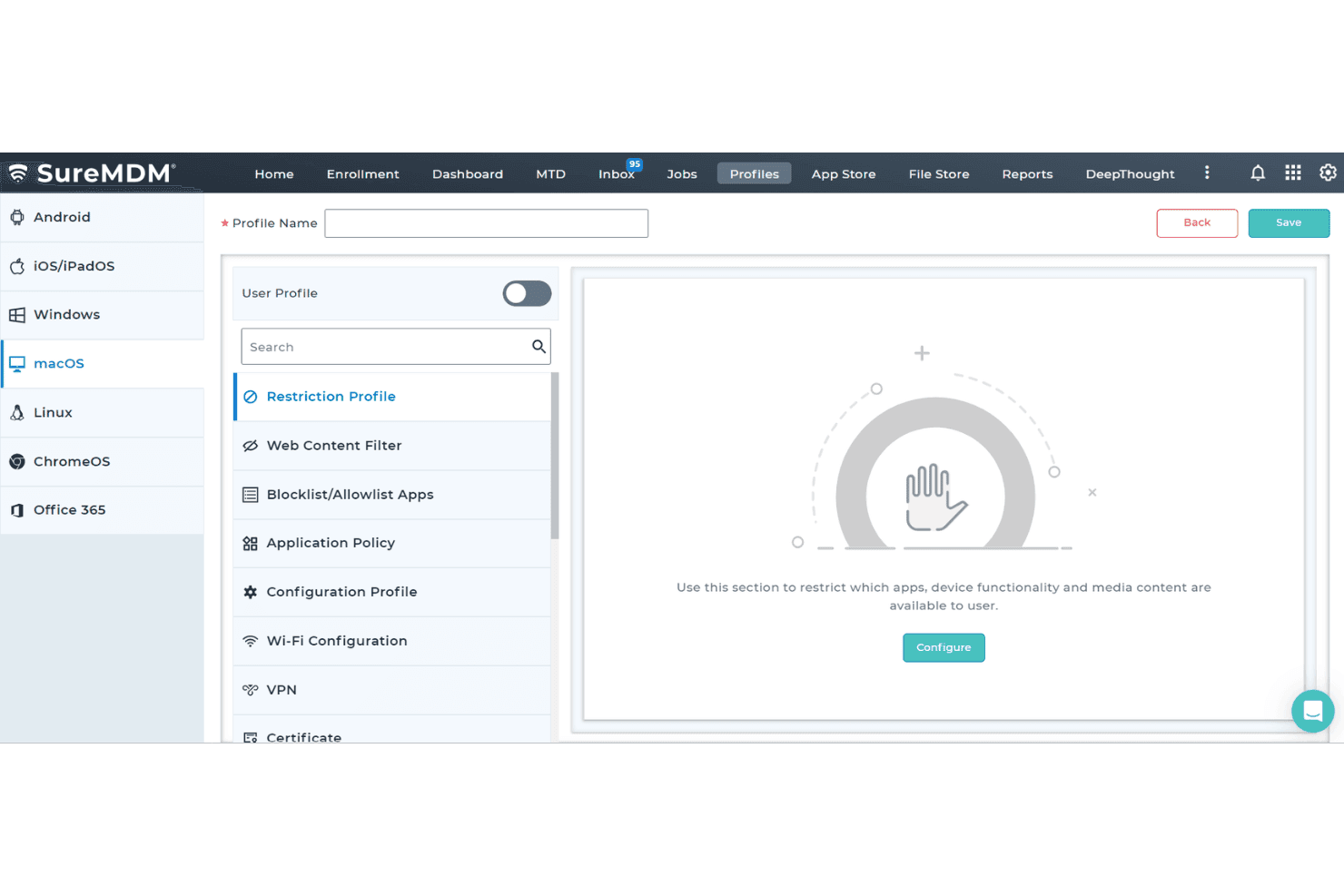
Admins apply settings and security rules from the SureMDM console, including password requirements, network settings, and restrictions. Remote lock and wipe let your team respond to a lost device without retrieving it first.
App And Content Deployment
SureMDM pushes apps from sources such as Managed Google Play or an enterprise app store, and can install Android apps silently. Your team can also distribute files remotely, such as PDFs for field staff.
Kiosk Lockdown
Kiosk mode restricts a device to approved apps or websites, with options to block system settings and other apps. A retail tablet, for example, can stay locked to a checkout app; SureLock is included with all plans.
Remote Support
Admins can view and control supported device screens, transfer files, and troubleshoot from the console. That lets your support team diagnose a field device remotely instead of first arranging an on-site visit.
Device Inventory And Tracking
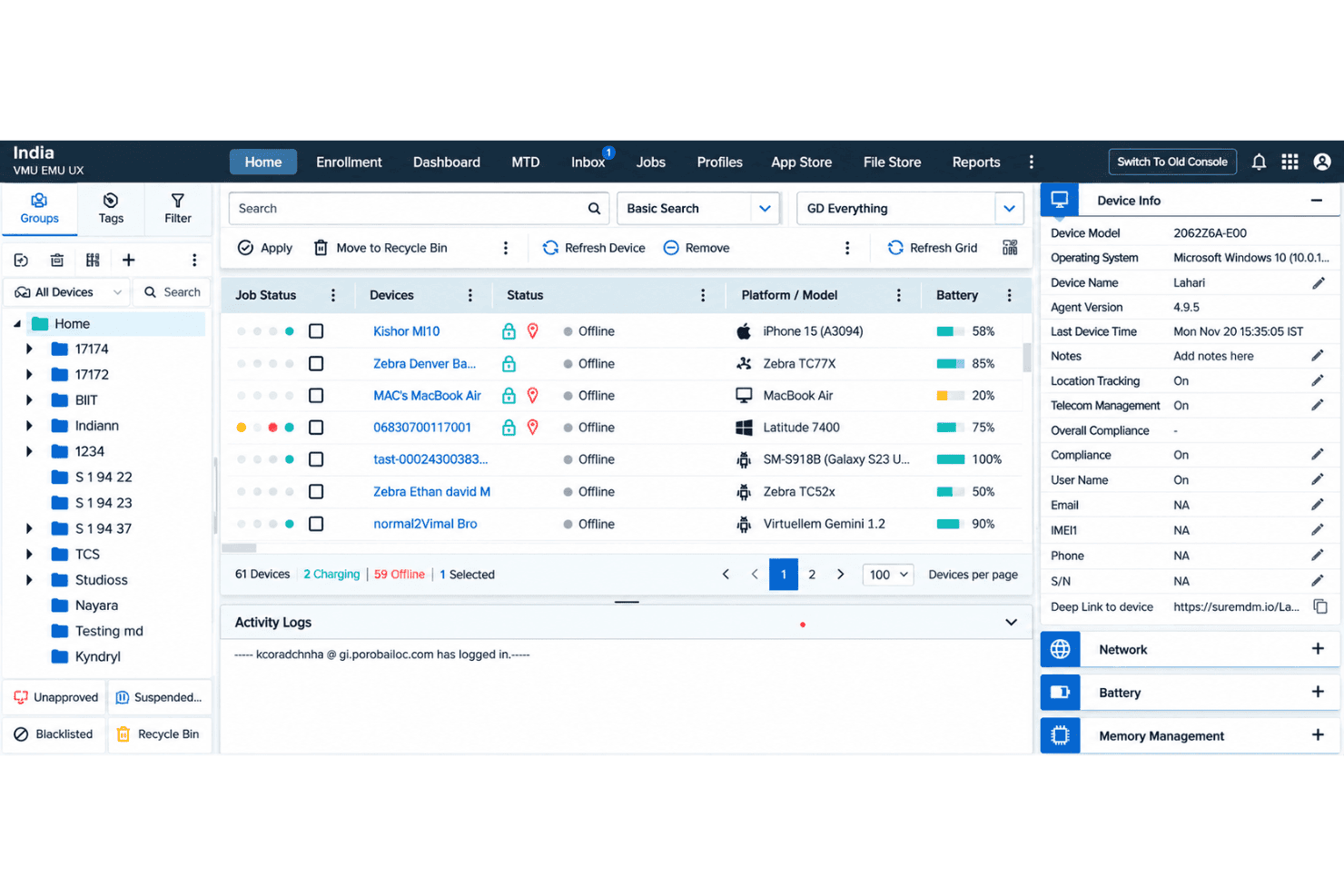
SureMDM records device and app inventory, and offers location tracking on supported devices, including real-time and historical GPS views for Android. Your team can check device status or locate a misplaced device before deciding whether to lock or wipe it.
Ease of Use
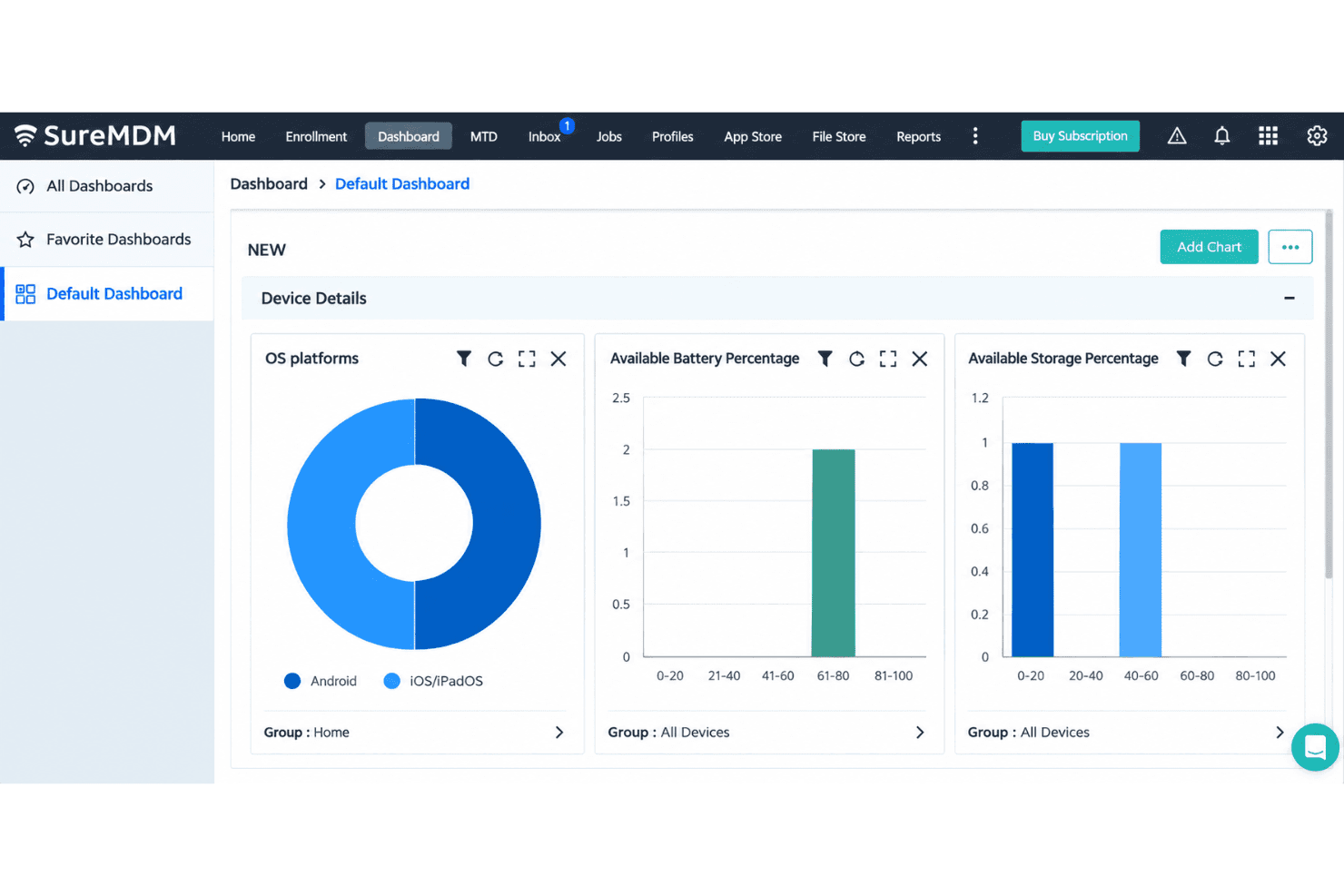
SureMDM is fairly easy to use for routine device work, but its broad platform coverage adds complexity as deployments grow. Reviewers praise the organized dashboard, straightforward setup, and remote management; enrollment options, app deployment, and remote lock or wipe keep common tasks in one console. The trade-off is a learning curve around advanced settings, and profile or policy changes can become harder to manage at scale. I’d favor it over narrower mobile-first tools for mixed fleets, provided you can invest time in configuration.
Integrations
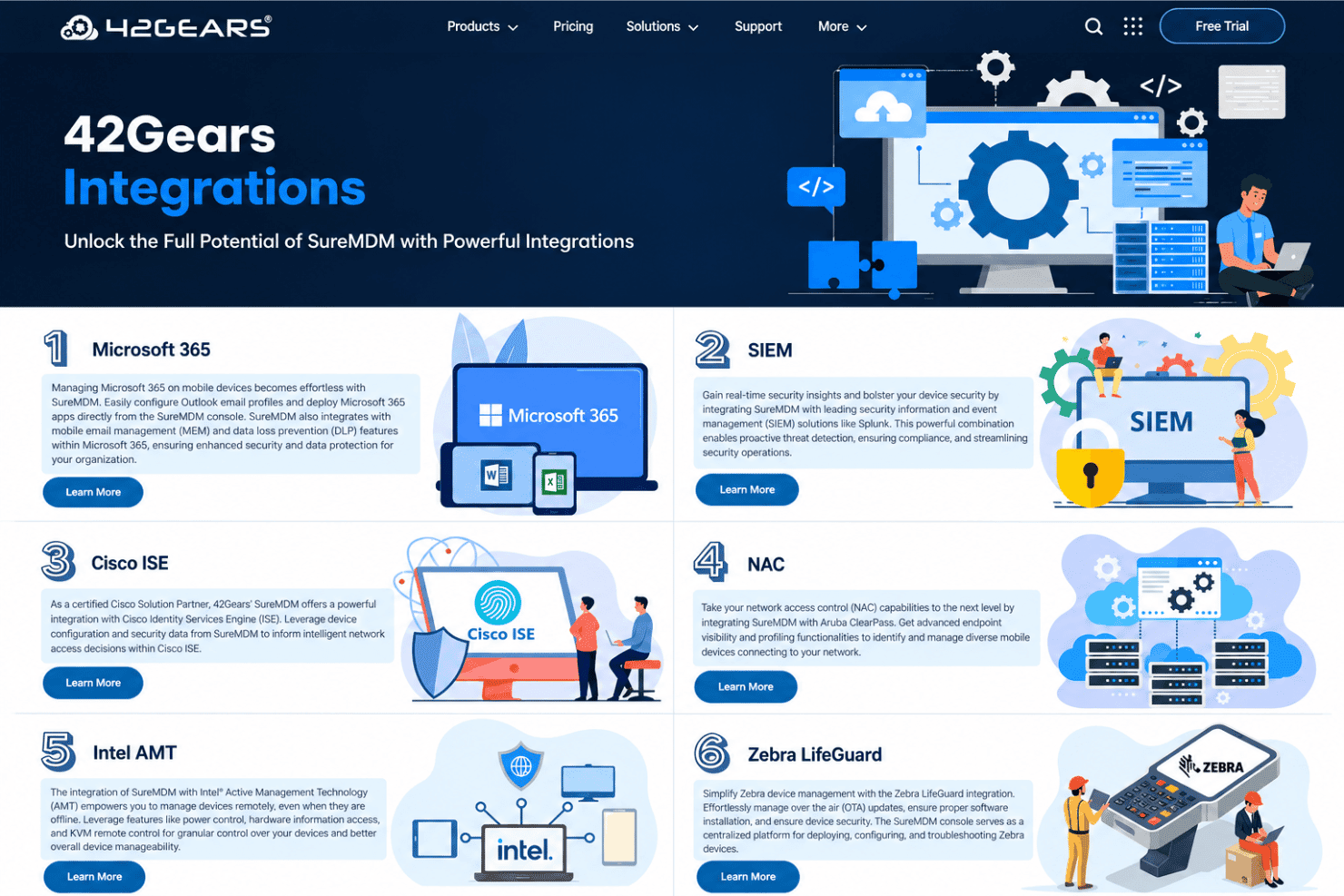
SureMDM integrates with Microsoft 365, Splunk, Cisco ISE, Aruba ClearPass, Intel AMT, Zebra LifeGuard, ServiceNow, Active Directory, and Google Workspace.
SureMDM also offers a REST API for custom integrations with external applications, dashboards, and workflows.
SureMDM Specs
- 2-Factor Authentication: Yes
- Cloud Deployment: Yes
- Dashboard: Yes
- Data Export: Yes
- Data Import: Yes
- External Integrations: Yes
- Inventory Tracking: Yes
- Multi-User: Yes
- Network Device Performance Monitoring: No
- Notifications: Yes
- Password & Access Management: Yes
- Remote Access: Yes


